Best GPU for Running AI Locally (2026 Complete Guide)
Compare the best GPUs for running AI locally in 2026. Discover VRAM tiers, memory bandwidth benchmarks, Ollama models, and NVIDIA vs AMD trade-offs.
GPU price comparisons for local AI frequently send developers down the wrong path by chasing raw frame rates, clock speeds, and graphics core counts. Video RAM (VRAM) capacity and memory bandwidth are the decisive hardware metrics for local inference.
Selecting the best GPU for running AI locally comes down to whether model weights and attention context fit within onboard memory. When model parameters overflow physical VRAM, inference throughput collapses to unusable single digits across PCIe bus channels.
Key Takeaways
- Video RAM (VRAM) capacity establishes the absolute ceiling for model parameters, requiring 8GB to 12GB for 7B to 14B models, 16GB for 14B models with large context, 24GB for 32B reasoning models, and 32GB or dual GPUs for 70B models.
- Memory bandwidth dictates token generation speed during the autoregressive decode phase, with GDDR7 reaching up to 1,792 GB/s on the RTX 5090 for 140 to 220 tokens per second on 8B models.
- A used NVIDIA RTX 3090 with 24GB GDDR6X (priced around 650 to 800 dollars) remains the highest-value local AI investment, outperforming newer 12GB and 16GB cards on model capacity.
- NVIDIA CUDA provides the most integrated software ecosystem for PyTorch and custom attention kernels, while AMD RDNA 4 cards like the RX 9070 XT (16GB at 699 dollars) offer strong Linux value through mature ROCm 6.4 support.
- Extended context windows (32K to 128K tokens) demand 2GB to 8GB of additional dedicated VRAM for the KV cache independently of static model weight storage.
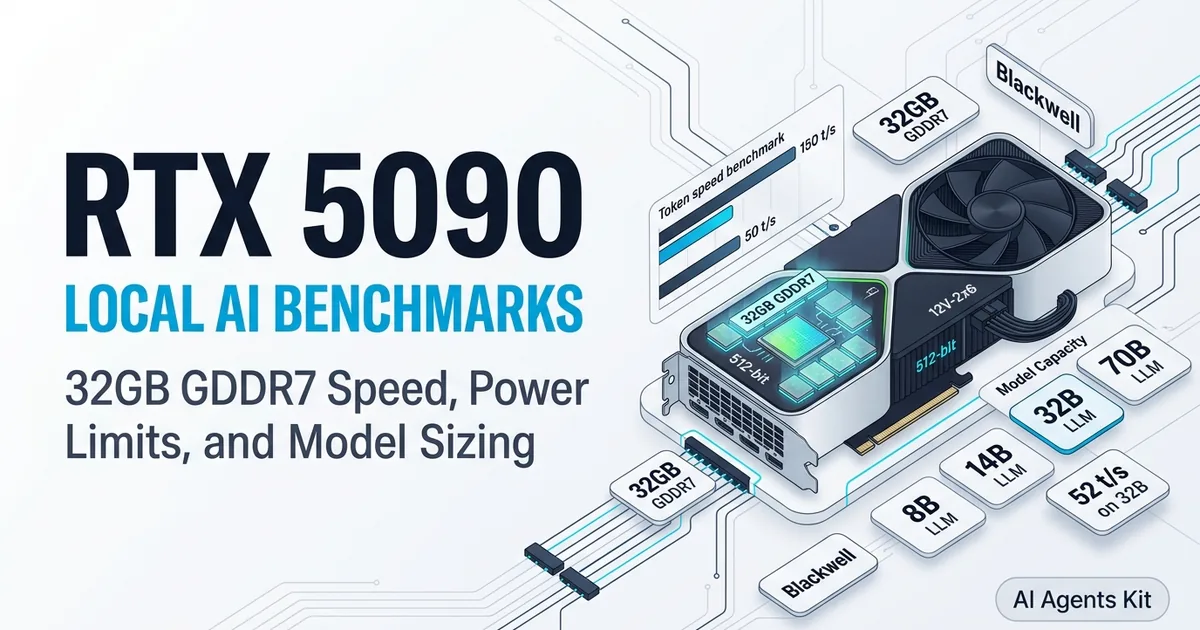
This guide analyzes essential VRAM calculations, benchmarks top graphics cards across every price tier in 2026, and presents practical trade-offs between NVIDIA Blackwell and AMD RDNA 4 architectures. For dedicated hardware throughput evaluations on NVIDIA’s flagship, our RTX 5090 local AI benchmarks and limits guide analyzes decode speeds across 8B, 14B, 32B, and 70B models.
Why VRAM Is the Decisive Specification for Local AI
A common misconception among engineers new to local inference is that a high-end gaming GPU will automatically generate tokens quickly. In reality, a card can feature exceptional rasterization throughput yet prove completely ineffective for a 32B parameter model if restricted to 8GB of VRAM. Understanding hardware compatibility starts with our guide to running Ollama locally.
The VRAM Math: Calculating Model Memory Footprint
When executing a Large Language Model locally, model weights must reside entirely inside GPU VRAM for fluid performance. As demonstrated in the llama.cpp Official GitHub Repository, loading transformer layers into native GPU buffers allows matrix multiplications to leverage dedicated high-speed memory channels.
The base mathematical formula is straightforward. Running a model at standard 16-bit precision (FP16 or BF16) demands roughly 2GB of VRAM per billion parameters. A 8B parameter model requires approximately 16GB of VRAM at full precision, whereas a 70B model demands roughly 140GB, exceeding the physical limits of any single desktop card.
Weight quantization compresses these parameters into lower bit-depth representations. Compressing weights to 4-bit precision (Q4_K_M format) reduces an 8B model footprint to 4.5GB to 5GB. Meanwhile, a 70B model compresses to 38GB to 42GB.
| Precision Format | VRAM per Billion Parameters | Quality Retention | Primary Use Case |
|---|---|---|---|
| FP32 | ~4.0 GB | 100% baseline | Model training and master weights |
| FP16 / BF16 | ~2.0 GB | Full reference | Precision evaluation and fine-tuning |
| Q8_0 (8-bit) | ~1.0 GB | ~99.9% accuracy | Maximum quality local serving |
| NVFP4 (Blackwell) | ~0.55 GB | ~99.1% accuracy | Hardware-accelerated Tensor Core decode |
| Q4_K_M (4-bit) | ~0.6 GB | ~98.9% accuracy | Recommended consumer sweet spot |
| Q3 / Q2 | ~0.3-0.4 GB | Noticeable degradation | Extreme memory constraint testing |
The emergence of NVIDIA Blackwell silicon introduces hardware-native NVFP4 (4-bit floating point, E2M1) acceleration supported directly in frameworks like the vLLM Project Official GitHub Repository. NVFP4 employs a two-level micro-block scaling strategy where blocks of 16 weights share an FP8 factor.
This architecture achieves a 3.5x memory reduction over FP16 with under 1% accuracy degradation on reasoning models like DeepSeek-R1. As Blackwell runtime optimizations mature, NVFP4 provides higher token throughput than traditional integer quantization.
Memory bandwidth acts as the second critical factor. Once model parameters fit inside VRAM, memory bandwidth dictates token generation throughput during the decode stage. Modern GDDR7 memory interfaces deliver up to 1,792 GB/s on the RTX 5090, generating tokens roughly twice as fast as GDDR6X architectures at identical parameter sizes.
What Happens When Your Model Doesn’t Fit in VRAM
When an AI model exceeds available GPU VRAM, inference throughput experiences an immediate cliff drop as transformer layers spill over the PCIe bus into system RAM. Token generation plummets from dozens of tokens per second to unusable single digits, causing interactive chat and coding sessions to freeze.
Local runtimes like Ollama and llama.cpp support partial layer offloading across system memory. However, PCIe 4.0 x16 bandwidth tops out at 31.5 GB/s in each direction, which is roughly thirty to fifty times slower than onboard VRAM interfaces. A setup generating 45 tokens per second entirely in VRAM frequently collapses to 2 to 3 tokens per second when only three layers spill into system RAM.
Experienced systems engineers prioritize VRAM buffer size before assessing core clock speeds. A used 24GB RTX 3090 routinely outperforms a brand-new 12GB RTX 5070 on large models because the 3090 fits complete model weights without triggering PCIe bus transfers. For developers evaluating secondary market hardware, our comprehensive analysis details whether a used RTX 3090 is still worth it for AI in modern deep learning workflows.
The standard consumer VRAM tiers in 2026:
- 8GB to 12GB VRAM: Hosts 7B to 8B models at Q4_K_M for lightweight chat and basic code completion. Mobile users can consult our guide on how to run local LLMs on a gaming laptop for portable deployment strategies.
- 16GB VRAM: Hosts 14B models comfortably with generous context, serving as the developer baseline.
- 24GB VRAM: Hosts 32B reasoning models and MoE architectures at interactive generation rates.
- 32GB to 48GB+ VRAM: Unlocks dense 70B models locally for enterprise-grade autonomous reasoning.
For developers configuring local programming environments, our comprehensive guide to the best local LLM for coding by VRAM analyzes exact model selections, Fill-in-the-Middle autocomplete, and KV cache sizing across each hardware tier.
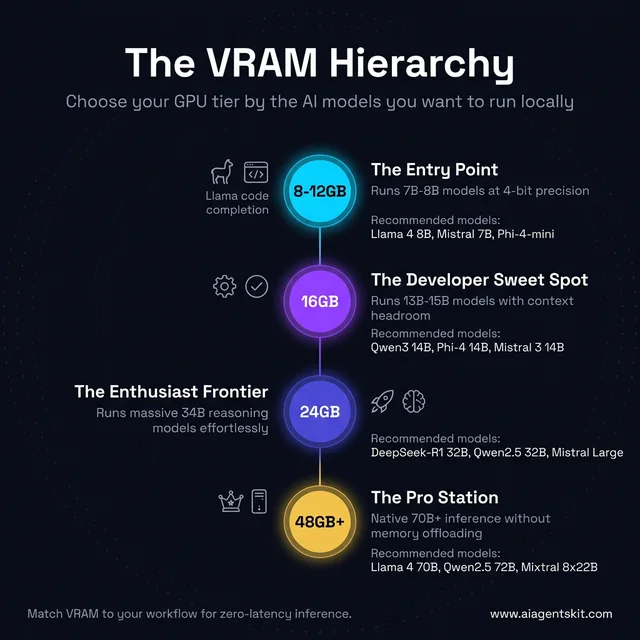
The VRAM Hierarchy: which GPU tier unlocks which AI models, from entry 7B inference up to 70B+ pro workflows.
How Much VRAM Do You Actually Need for AI Models?
Selecting sufficient VRAM requires calculating base model weights at chosen quantization levels and adding 4GB to 8GB of memory headroom for dynamic KV cache buffers. Most developers find 16GB VRAM to be the ideal sweet spot for running 14B models comfortably with long context. Reviewing our benchmark analysis of open source LLMs provides deep context on parameter scaling.
VRAM Requirements by Model Size and Quantization
Quantization mathematical formulas documented in the Dettmers et al. QLoRA Research Paper on arXiv confirm that 4-bit NormalFloat (NF4) quantization retains 98.9% benchmark accuracy while reducing model memory footprint by 70%.
The table below calculates practical memory allocations for leading open architectures, factoring in model parameters and standard working context buffers:
| Model Scale | Q4_K_M (4-bit) | Q8_0 (8-bit) | FP16 (Full Precision) | Recommended Hardware Tier |
|---|---|---|---|---|
| 7B to 8B | 4.5 - 5.5 GB | 8.5 - 9.5 GB | 15 - 17 GB | RTX 4060 Ti 16GB, RTX 5060 Ti |
| 13B to 14B | 8.5 - 10.5 GB | 14.5 - 16.5 GB | 27 - 30 GB | RTX 4070 12GB, RTX 5080 16GB |
| 32B to 34B | 18.5 - 22.5 GB | 34.0 - 37.0 GB | 65 - 72 GB | RTX 3090 24GB, RTX 4090 24GB |
| 70B | 38.0 - 43.0 GB | 72.0 - 82.0 GB | 142 - 155 GB | Dual RTX 3090 (48GB), RTX 5090 (partial) |
| 400B+ MoE | 220+ GB | N/A | N/A | Dedicated multi-GPU workstation |
For engineers building multi-card systems, our complete tutorial on configuring a dual-GPU setup for local LLMs covers PCIe bifurcation, slot spacing, and power supply sizing.
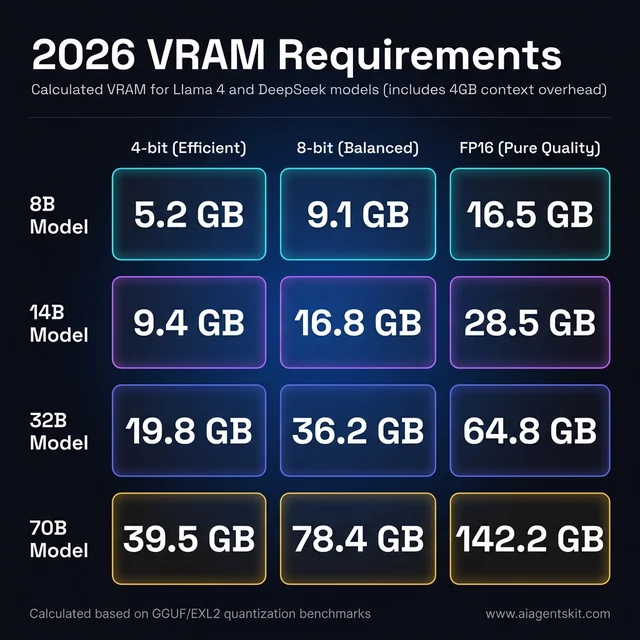
2026 VRAM cheat sheet: calculated memory requirements for common model sizes at every quantization level, including 4GB context overhead.
Memory sizing formulas in the Hugging Face Quantization Documentation emphasize that weight size is only part of total memory consumption. Active generation also requires allocating memory for dynamic context tokens.
Context Window Length and KV Cache Overhead
An essential consideration during hardware selection is the Key-Value (KV) cache, which stores attention states across multi-turn prompts. When operating with a compact 4,096 token context window, KV cache consumption remains modest at under 1GB of memory.
However, modern developer workflows frequently demand 32K, 64K, or 128K context tokens for analyzing entire code repositories or documentation sets. At 32K context on a 14B model, the KV cache demands 4GB to 6GB of additional VRAM beyond static weights.
Total VRAM Needed = (Model Parameters × Bytes per Weight) + KV Cache Buffer + Runtime Scratchpad
Example (14B Q4_K_M @ 32K Context):
  Weights:    14B × 0.6 GB/B = 8.4 GB
  KV Cache:   32K tokens × 16 layers × head dimensions ≈ 4.8 GB
  Overhead:   CUDA runtime + desktop display buffer ≈ 1.2 GB
  Total:      14.4 GB VRAM (Fits cleanly within 16GB cards)
Engineers regularly processing deep documentation repositories must reserve 4GB to 6GB of headroom above base parameter sizes. A 16GB graphics card comfortably hosts a 14B model with extensive context, whereas an 8GB card quickly exhausts physical buffers.
Best Local AI Models for Each GPU and VRAM Tier in 2026
Matching specific graphics hardware to optimal model weights prevents memory thrashing while maximizing response generation rates. The official runtime tools in the Ollama Official GitHub Repository simplify deployment through standardized command-line flags. Detailed benchmarking for entry hardware is detailed in our guide covering the best local LLMs for RTX 4060, RTX 3070, and RTX 5060.
Best AI Models for 4GB VRAM (RTX 3050, GTX 1660 Super)
Running local AI on 4GB VRAM is tightly constrained, requiring ultra-compact quantized architectures to avoid host memory offloading.
When searching for the best ollama models for 4gb vram 2026, developers find that sub-3B parameter models provide responsive generation:
| Model Name | VRAM Footprint (Q4) | Target Use Case | Ollama Pull Command |
|---|---|---|---|
| Phi-4-mini | ~2.5 GB | Reasoning and basic code | ollama run phi4-mini |
| Gemma 3 2B | ~1.8 GB | Rapid text summarization | ollama run gemma3:2b |
| Qwen2.5 1.5B | ~1.0 GB | Multilingual drafting | ollama run qwen2.5:1.5b |
| TinyLlama 1.1B | ~0.7 GB | Educational testing | ollama run tinyllama |
While 4GB hardware allows testing basic CLI tools, upgrading to 8GB or 12GB unlocks significantly improved logical reasoning and instruction-following capability.
Best AI Models for 8GB VRAM (RTX 4060, RTX 3070 8GB)
Finding the best local llm for rtx 4060 8gb vram 2026 involves balancing parameter count against context length. Cards with 8GB VRAM run 7B to 8B parameter models quantized to Q4_K_M comfortably:
| Model Name | VRAM Footprint (Q4_K_M) | Throughput (RTX 4060) | Primary Strength |
|---|---|---|---|
| Llama 4 8B | ~4.8 GB | 35-50 tokens/sec | Comprehensive reasoning |
| Mistral 7B | ~4.1 GB | 45-60 tokens/sec | Low-latency drafting |
| Qwen2.5-Coder-7B | ~4.6 GB | 40-55 tokens/sec | Specialized code generation |
| DeepSeek-R1 7B | ~4.7 GB | 35-48 tokens/sec | Step-by-step mathematical reasoning |
The best ollama models for rtx 4060 8gb vram 2026 center on Llama 4 8B and Qwen2.5-Coder-7B. Developers configuring an rtx 3070 local llm setup achieve comparable throughput, provided prompt lengths stay under 8,192 tokens.
# High-utility terminal setup for 8GB graphics cards
ollama pull llama4:8b
ollama pull qwen2.5-coder:7b
ollama pull deepseek-r1:7b
Best AI Models for 12GB VRAM (RTX 3060 12GB, RTX 4070 12GB)
Identifying the best local llm for 12gb vram comes down to memory bandwidth and context size. The 12GB tier represents a substantial capability leap over 8GB, unlocking 13B to 14B models that deliver noticeably sharper reasoning.
The best models for 12gb vram include Qwen3 14B and DeepSeek-R1 14B:
| Model Name | VRAM Footprint (Q4_K_M) | Speed (RTX 3060 12GB) | Speed (RTX 4070 12GB) | Primary Strength |
|---|---|---|---|---|
| Qwen3 14B | ~9.2 GB | 18-28 tokens/sec | 25-40 tokens/sec | Instruction-following and coding |
| DeepSeek-R1 14B | ~9.0 GB | 15-22 tokens/sec | 20-32 tokens/sec | Mathematical chain-of-thought |
| Phi-4 14B | ~8.8 GB | 20-30 tokens/sec | 28-42 tokens/sec | Synthetic math reasoning |
| Gemma 3 12B QAT | ~9.4 GB | 18-26 tokens/sec | 24-38 tokens/sec | Balanced conversation |
| Mistral Nemo 12B | ~7.5 GB | 22-32 tokens/sec | 30-45 tokens/sec | Efficient general assistance |
For developers researching the best local llms for rtx 3060 12gb vram 2026, Qwen3 14B at Q4_K_M is the standout choice. The best ollama model for 12gb vram for general programming remains Qwen3 14B, which runs comfortably within 10GB of memory.
# Recommended model stack for 12GB VRAM hardware
ollama pull qwen3:14b
ollama pull phi4:14b
ollama pull deepseek-r1:14b
Best AI Models for 16GB VRAM (RTX 5060 Ti 16GB, RTX 5080 16GB)
The 16GB memory tier serves as the ideal workstation baseline for engineers in 2026. With roughly 14.5GB usable for weights and context, these cards run 14B models at high-fidelity 8-bit precision or compact 20B to 32B models at 4-bit precision.
| Model Name | Precision Format | VRAM Footprint | Speed (RTX 5060 Ti 16GB) | Primary Strength |
|---|---|---|---|---|
| Qwen3 14B | Q8_0 (8-bit) | ~14.2 GB | 25-38 tokens/sec | High-precision code generation |
| Phi-4 14B | Q8_0 (8-bit) | ~14.4 GB | 24-36 tokens/sec | Strict algorithmic accuracy |
| Mistral Small 4 | Q4_K_M (4-bit) | ~13.8 GB | 22-32 tokens/sec | Agentic workflow planning |
| DeepSeek-R1 14B | Q8_0 (8-bit) | ~14.1 GB | 20-30 tokens/sec | Deep math and formal logic |
Comparing the rtx 5060 vs rtx 3060 12gb llm inference speed 14b model demonstrates how memory bandwidth influences responsiveness. Analyzing rtx 5060 14b model inference speed tokens per second reveals that the RTX 5060 Ti produces 25 to 38 tokens per second on 14B models, outperforming the older 3060 by over 35%.
# Developer configuration for 16GB VRAM systems
ollama pull qwen3:14b-q8_0
ollama pull phi4:14b-q8_0
ollama pull deepseek-r1:14b-q8_0
Best AI Models for 24GB VRAM (RTX 3090, RTX 4090)
Selecting the best local llm for rtx 3090 24gb vram 2026 unlocks 32B models like DeepSeek-R1 32B and Qwen2.5 32B. For practitioners curating the best local llms for rtx 3090 24gb vram 2026, 4-bit precision ensures smooth generation without overflowing memory:
| Model Name | VRAM Footprint (Q4_K_M) | Speed (RTX 3090 24GB) | Primary Strength |
|---|---|---|---|
| DeepSeek-R1 32B | ~19.8 GB | 12-18 tokens/sec | State-of-the-art open reasoning |
| Qwen2.5 32B | ~19.2 GB | 14-22 tokens/sec | Broad STEM and programming ability |
| Llama 4 Scout 17B | ~11.4 GB | 28-42 tokens/sec | Fast Mixture-of-Experts routing |
| Mistral Large 24B | ~14.6 GB | 26-38 tokens/sec | Nuanced instruction adherence |
The best local llm for rtx 4090 24gb vram 2026 reaches 25 to 35 tokens per second on DeepSeek-R1 32B, thanks to 1,008 GB/s memory bandwidth. A used 24GB card delivers near-frontier reasoning performance at under 800 dollars in total hardware expense. For full installation instructions and Ollama configuration flags, configure runtime parameters to run DeepSeek-R1 locally.
# Advanced reasoning profile for 24GB VRAM cards
ollama pull deepseek-r1:32b
ollama pull qwen2.5:32b
ollama pull llama4:scout
Top 5 GPUs for Running AI Locally in 2026
The desktop hardware landscape in 2026 is defined by NVIDIA Blackwell architecture and AMD RDNA 4 offerings. Runtime selection between in-depth comparison of llama.cpp vs Ollama affects memory efficiency across all tiers.
| GPU Model | Architecture | VRAM | Bandwidth | TDP | Price Range | Best Workload |
|---|---|---|---|---|---|---|
| NVIDIA RTX 5090 | Blackwell | 32GB GDDR7 | 1,792 GB/s | 575W | ~$1,999+ | Heavy 32B/70B models, local AI video |
| NVIDIA RTX 3090 (Used) | Ampere | 24GB GDDR6X | 936 GB/s | 350W | ~$650-$800 | Highest VRAM value for 32B reasoning |
| NVIDIA RTX 5080 | Blackwell | 16GB GDDR7 | 960 GB/s | 360W | ~$1,199 | Premium 14B models with low latency |
| NVIDIA RTX 5060 Ti | Blackwell | 16GB GDDR7 | 432 GB/s | 180W | ~$449-$549 | Best budget card for 14B agent loops |
| AMD Radeon RX 9070 XT | RDNA 4 | 16GB GDDR6 | 640 GB/s | 304W | ~$699 | Linux-first value build for Ollama/ROCm |
| Intel Arc B580 | Battlemage | 12GB GDDR6 | 456 GB/s | 190W | ~$249 | Sub-$300 budget 12GB VRAM entry |
1. Best Overall: NVIDIA RTX 5090 (32GB GDDR7, Blackwell)
The RTX 5090 is universally recognized as the best consumer gpu for local llm inference 2026 and the best consumer gpu for local ai 2026. Built on NVIDIA Blackwell silicon with 32GB of high-speed GDDR7 memory, it handles 32B models effortlessly and runs quantized 70B models with generous context headroom.
As detailed in the NVIDIA RTX 5090 Official Architecture Specifications, 5th Generation Tensor Cores feature native FP4 precision acceleration. Empirical test data from the Puget Systems GPU Content Creation Roundup highlights that the RTX 5090 delivers up to 140 to 220 tokens per second on 8B parameter models, matching cloud cluster speeds on desktop workstations.
Performance Profile:
- 8B Models (Q4_K_M):   140 - 220 tokens/second
- 14B Models (Q4_K_M):  80 - 120 tokens/second
- 32B Models (Q4_K_M):  45 - 75 tokens/second
- 70B Models (Q2_K):    14 - 22 tokens/second
Key trade-offs center on its 1,999 dollar baseline pricing and substantial 575W peak power draw, which necessitates a high-efficiency 1,000W power supply. For full-time machine learning practitioners, it provides industry-leading single-card throughput.
2. Best Value: Used NVIDIA RTX 3090 (24GB GDDR6X, Ampere)
A pre-owned RTX 3090 remains the most compelling budget proposition for local AI inference. While two generations removed from modern architectures, 24GB of physical VRAM remains identical in utility for hosting deep neural networks.
Inference latency scales with memory capacity first and architectural speed second. An RTX 3090 generates 14 to 20 tokens per second on DeepSeek-R1 32B. A developer waiting four seconds for a multi-step code generation query works far faster than when encountering cloud API throttling.
Newer 16GB graphics cards like the RTX 5080 cost nearly double on retail shelves while offering 8GB less memory. For pure model capacity and 32B model execution, 24GB of VRAM wins decisively.
3. Best Modern Mid-Range: NVIDIA RTX 5080 (16GB GDDR7, Blackwell)
For engineers seeking new hardware reliability, manufacturer warranty coverage, and high power efficiency, the RTX 5080 delivers modern Blackwell silicon without top-tier pricing. Its 16GB GDDR7 memory bus provides 960 GB/s bandwidth, maintaining 45 to 65 tokens per second on 14B models.
In the broader Blackwell lineup, the RTX 5070 Ti (16GB GDDR7) and standard RTX 5070 (12GB GDDR7) provide additional mid-range options. While the 5070 handles 7B to 14B models at lower price points, the 5080 maintains the highest memory bandwidth for low-latency interactive serving.
4. Best Budget: NVIDIA RTX 5060 Ti (16GB GDDR7, Blackwell)
The RTX 5060 Ti stands out as the best budget gpu for local llm inference 2026. At under 550 dollars retail, it provides 16GB of VRAM, delivering identical model headroom to cards costing twice as much.
The trade-off involves memory bandwidth, which sits around 432 GB/s compared to 960 GB/s on the 5080. On 7B models, the 5060 Ti achieves 40 to 60 tokens per second, which provides a responsive development environment. Drawing under 200W of power, it installs into compact builds without requiring power supply upgrades.
5. Best AMD Value: AMD Radeon RX 9070 XT (16GB GDDR6, RDNA 4)
The AMD Radeon RX 9070 XT represents AMD’s most capable consumer AI hardware to date. Equipped with 16GB of GDDR6 memory, 640 GB/s bandwidth, and dedicated RDNA 4 AI accelerators, it provides strong competition for mid-range NVIDIA cards.
As confirmed in the AMD ROCm 6.4.1 Unified Linux Release Notes, ROCm 6.4 brings native Linux support for Ollama and llama.cpp on RDNA 4 silicon. Token throughput matches NVIDIA 16GB cards closely on Linux, running at 35 to 50 tokens per second on 8B models while drawing 304W peak.
The primary limitation remains Windows runtime optimization, where ROCm driver tooling still trails Linux parity. For Linux-first developers, the card provides exceptional memory value per dollar.
6. Best Sub-$300 Budget Pick: Intel Arc Battlemage B580 (12GB GDDR6)
For builders constrained to an absolute sub-300 dollar budget, the Intel Arc Battlemage B580 provides 12GB of GDDR6 memory at 456 GB/s bandwidth. This memory bus allows it to host 14B models that cannot physically fit on competing 8GB budget cards.
The local AI software ecosystem for Intel hardware experienced an essential shift in early 2026. Intel officially archived the legacy intel/ipex-llm repository in January 2026, transitioning recommended execution to official Vulkan backends. Ollama now natively supports Vulkan acceleration on Intel Arc, delivering 15 to 35 tokens per second on 8B models without requiring complex SYCL driver configurations. For benchmark comparisons and runtime configuration steps across Ollama and OpenVINO, explore our comprehensive Intel Arc for local AI guide.
NVIDIA CUDA vs AMD ROCm: Architectural Trade-Offs
The debate between NVIDIA and AMD for local AI centers on software ecosystem maturity rather than pure silicon capabilities. Reviewing our performance comparison of NVIDIA vs AMD for AI breaks down additional architectural details.
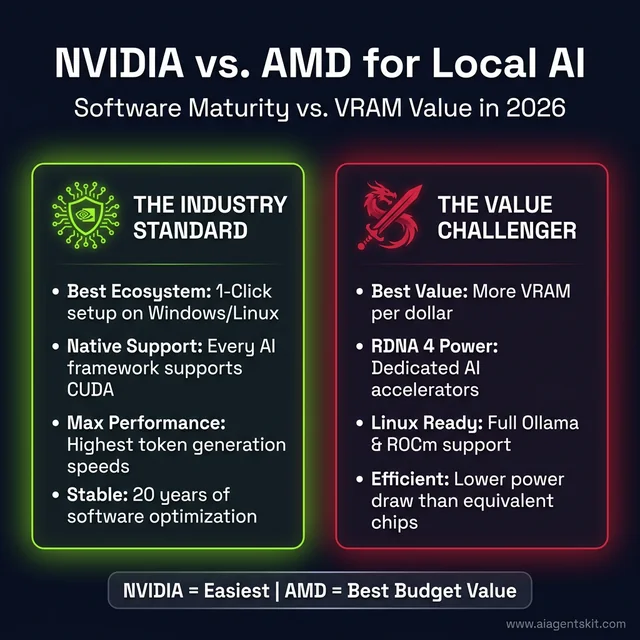
NVIDIA vs AMD for local AI: CUDA wins on ecosystem depth and ease-of-use; AMD RDNA 4 wins on VRAM-per-dollar and power efficiency.
Software Stack Maturity: CUDA Dominance and ROCm Progress
NVIDIA CUDA represents two decades of specialized compiler optimizations. Major machine learning libraries, attention kernels like FlashAttention, and quantization frameworks are compiled CUDA-first. When developers encounter runtime edge cases, extensive community troubleshooting archives exist.
AMD ROCm has matured significantly on Linux distributions. Standard tools like Ollama, llama.cpp HIP backends, and vLLM execute smoothly on modern RDNA 4 hardware.
Key software trade-offs in 2026:
- PyTorch Native Operations: CUDA executes without manual library path exports or custom Docker container configurations.
- Custom Attention Kernels: Specialized quantization algorithms ship on CUDA weeks before receiving community ROCm ports.
- Fine-Tuning Workflows: Parameter-efficient training with QLoRA remains significantly simpler to configure on NVIDIA hardware.
- Hardware Pricing: AMD cards frequently offer 15% to 25% higher memory bandwidth per dollar than retail NVIDIA counterparts.
Linux developers running off-the-shelf GGUF models through Ollama will find AMD RDNA 4 hardware cost-effective. Developers prioritizing Windows native execution or experimental model training should stick with NVIDIA CUDA.
What System Requirements Does Local AI Actually Need?
A high-end GPU requires balanced supporting hardware to prevent input/output bottlenecks. Market projections in the Jon Peddie Research AI Processors Market Report emphasize that edge AI workloads place sustained utilization on storage buses, system RAM, and power delivery. Further platform architecture advice is available in our selection framework for AI PC hardware.
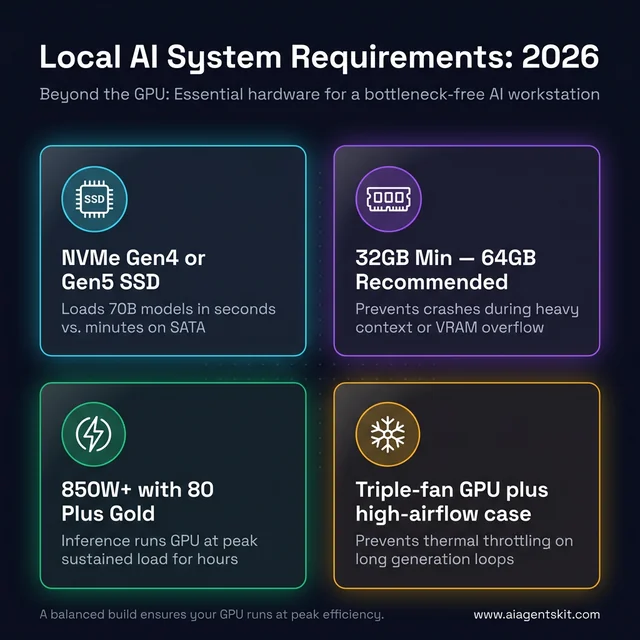
Beyond the GPU: the four hardware pillars that prevent system bottlenecks in a local AI workstation build.
Storage and System RAM Specifications
Neural network weights range from 4GB to over 40GB per model. Loading these weights from secondary storage into GPU VRAM occurs whenever an inference service initializes:
- PCIe 4.0 NVMe Storage: Sequential read speeds of 5,000 to 7,000 MB/s load a 40GB model file into VRAM in under eight seconds. Traditional mechanical drives or legacy SATA SSDs introduce painful multi-minute loading delays.
- System Memory (RAM): Running a 14B model requires 32GB of DDR5 host RAM for stable OS operation. Workstations running multi-agent workflows or 32B models should install 64GB of RAM to prevent system paging.
Power Delivery and Thermal Dissipation
Local inference workloads maintain high graphics core and memory utilization for sustained minutes during agent loops and batch generations:
| GPU Configuration | Peak Board Power | Recommended Power Supply | Minimum 12V Rail Rating |
|---|---|---|---|
| NVIDIA RTX 5090 | 575W | 1000W - 1200W (ATX 3.1) | 80+ Platinum certified |
| NVIDIA RTX 5080 | 360W | 750W - 850W | 80+ Gold certified |
| AMD RX 9070 XT | 304W | 750W | 80+ Gold certified |
| NVIDIA RTX 3090 (Used) | 350W | 750W - 850W | 80+ Gold certified |
| NVIDIA RTX 5060 Ti | 180W | 600W - 650W | 80+ Bronze certified |
Workstation chassis must provide robust intake airflow to dissipate heat generated during sustained matrix multiplication routines. Triple-fan card designs and unrestricted mesh front panels prevent thermal throttling during long generation sessions.
GPU Requirements for AI Video Generation and Autonomous Agents
Beyond standard text inference, two resource-intensive workflows require specific hardware sizing: generative video synthesis and multi-turn autonomous coding agents.
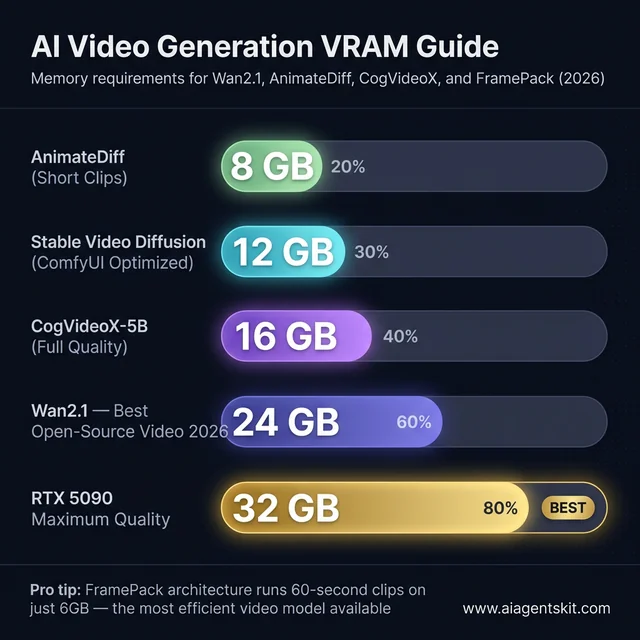
AI video generation VRAM requirements in 2026: from AnimateDiff short clips at 8GB up to Wan2.1 full-quality at 24GB.
Hardware for Local AI Video Generation
Selecting the best gpu for local ai video generation 2026 requires prioritizing high memory buffer capacity for temporal frames. Open video models like Wan2.1, CogVideoX, and Stable Video Diffusion process spatial and temporal attention matrices simultaneously, demanding far more memory than language models:
- Wan2.1 (14B Video Model): Requires 24GB VRAM for uncompressed generation, making the RTX 3090, RTX 4090, or RTX 5090 mandatory.
- Stable Video Diffusion: Operates on 12GB to 16GB cards using low-VRAM tiling optimizations within the ComfyUI Official GitHub Repository.
- AnimateDiff Pipelines: Functions within 8GB to 12GB buffers when restricted to standard-definition resolutions.
NVIDIA remains the standard platform for video generation due to specialized xFormers and FlashAttention kernel support within ComfyUI node ecosystems.
Hardware for Local Autonomous Agent Workflows
Autonomous agent loops generated by frameworks like CrewAI or AutoGen produce thousands of tokens per task across multi-turn reasoning steps. Tool outputs and environment states rapidly accumulate context, filling 32K token windows within minutes.
Workstations supporting agent systems should prioritize 16GB to 24GB VRAM cards paired with 64GB of host system RAM. Engineers evaluating alternative form factors should consult our comprehensive Apple Silicon AI guide to explore unified memory benefits.
Frequently Asked Questions About Local AI GPUs
Can I run AI locally with an 8GB GPU?
An 8GB GPU runs 7B to 8B parameter models quantized to 4-bit precision, consuming approximately 4.5GB to 5.5GB of memory. While adequate for concise code completion and casual chat, 8GB lacks sufficient headroom for extended 32K context windows or models larger than 9B parameters.
How many tokens per second should I expect from my GPU?
Inference speeds scale directly with memory bandwidth, yielding 140 to 220 tokens per second for 8B models on an RTX 5090, 40 to 55 tokens per second on an RTX 5080, and 25 to 45 tokens per second on an RTX 3060 12GB. Any sustained generation rate above 20 tokens per second delivers a fluid, interactive workflow.
Is an RTX 5090 worth it for local AI inference?
The RTX 5090 delivers compelling return on investment for engineering teams and power users who actively displace hundreds of dollars in monthly cloud API expenses by hosting 32B and 70B models locally. For individual hobbyists and students, a used RTX 3090 provides 24GB of memory at approximately one-third the financial investment.
What is the best budget GPU for running AI locally on a tight budget?
The NVIDIA RTX 5060 Ti 16GB represents the leading new budget card under 550 dollars by offering 16GB of modern VRAM with full CUDA support. For builders willing to shop secondary markets, a used RTX 3090 delivers 24GB of VRAM for 650 to 800 dollars, unlocking 32B reasoning models.
Can I use two GPUs for local AI instead of one?
Multi-GPU setups allow runtimes like llama.cpp to split large 70B models across two 24GB graphics cards through tensor parallelism. However, dual-card workstations double total electrical power draw, generate substantial case heat, and demand an enterprise-grade power supply with generous PCIe physical spacing.
What’s the difference between running AI on a GPU vs Apple Silicon Mac?
Discrete desktop GPUs achieve significantly higher memory bandwidth (up to 1,792 GB/s) for faster token generation on models that fit in VRAM, whereas Apple Silicon shares unified memory across CPU and GPU to run 70B+ models without multi-GPU hardware. High-end discrete GPUs win on raw decoding speed for 8B to 32B models, while high-spec Mac systems offer superior maximum memory capacity.
What is the recommended VRAM for running a 70B LLM locally?
Running a 70B model at 4-bit quantization demands 38GB to 42GB of memory once operational context buffers are allocated. A single consumer GPU cannot run 70B models at 4-bit precision without dual-card configurations (two 24GB cards) or 64GB+ unified memory on Apple Silicon.
What is the best local LLM for RTX 3060 12GB VRAM?
The RTX 3060 12GB delivers exceptional performance with 14B parameter models like Qwen3 14B and DeepSeek-R1 14B quantized to Q4_K_M precision. These models require approximately 8.5GB to 9.2GB of memory, leaving sufficient headroom for 8K context windows while generating 18 to 28 tokens per second.
Choosing the Right GPU for Local AI: Final Recommendations
Selecting graphics hardware for local AI requires aligning VRAM capacity with your target model class and reserving 4GB to 6GB of headroom for dynamic context expansion. Never prioritize generational clock speed improvements over raw physical memory buffers, as model parameters must fit onboard to prevent catastrophic PCIe transfer penalties.
Recommended hardware configurations by developer tier:
- Budget Builder Under $550: NVIDIA RTX 5060 Ti 16GB for 8B and 14B coding models with low power draw.
- Maximum Value Under $800: Used NVIDIA RTX 3090 24GB for 32B reasoning models and local video generation.
- Modern Mid-Range Workstation: NVIDIA RTX 5080 16GB for high-speed 14B inference with full warranty coverage.
- Uncompromised Desktop Inference: NVIDIA RTX 5090 32GB for 32B models, quantized 70B execution, and high-throughput agent swarms.
- Linux Value Specialist: AMD Radeon RX 9070 XT 16GB for affordable ROCm inference pipelines.
Once hardware is installed, configuring an efficient local inference runtime like Ollama or llama.cpp ensures maximum token throughput across development workflows.