AI PC Explained: Do You Need an NPU Laptop? (2026 Guide)
What is an AI PC and do you actually need one in 2026? Get the data-backed truth about NPUs, Copilot+ requirements, chip comparisons, best picks by budget, and a clear buying framework for students, creators, and professionals.
Hardware manufacturers in 2026 label nearly every premium notebook as an AI PC. Marketing campaigns highlight neural coprocessors, next-generation personal computing, and local intelligence. Cutting through promotional claims requires examining real architectural capabilities, empirical power draws, and operational trade-offs across current silicon platforms.
Before investing in new hardware, review our selection guide for the best GPU for AI workloads to identify where dedicated neural processing ends and discrete graphics compute begins.
Key Takeaways
- Microsoft Copilot+ PCs mandate a dedicated Neural Processing Unit (NPU) delivering at least 40 TOPS, paired with 16GB RAM and 256GB SSD storage on Windows 11 24H2.
- Dedicated NPUs operate at single-digit power envelopes (<2W to ~5W), delivering an 8x to 10x performance-per-watt advantage over discrete mobile GPUs that draw 35W to 50W for sustained inference.
- Intel Core Ultra 200V (Lunar Lake, 48 TOPS), AMD Ryzen AI 300 (50 to 55 TOPS), and Qualcomm Snapdragon X Elite (45 TOPS) all clear the Copilot+ threshold with distinct software tradeoffs.
- General users relying purely on browser-based cloud AI tools like ChatGPT, Claude, and Gemini receive zero acceleration from a local NPU because all processing occurs on remote provider servers.
- Local LLM inference on an NPU excels with INT4 quantized models like Microsoft Phi-4-mini or Qwen 2.5 Coder 7B, but large 70B parameter models still require discrete GPUs with dedicated VRAM bandwidth.
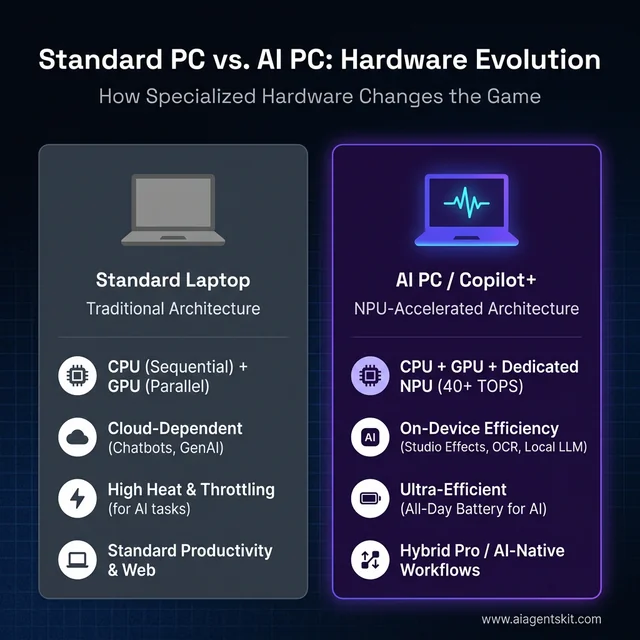
Standard Architecture vs. AI PC: The shift from cloud-dependent computing to ultra-efficient local NPU processing.
What Is an AI PC and What Sets It Apart?
An AI PC is a personal computer equipped with a dedicated Neural Processing Unit (NPU) designed to execute neural network inference locally at single-digit wattages. Unlike conventional systems that rely entirely on general-purpose CPUs or power-hungry discrete GPUs, an AI PC accelerates background matrix operations without degrading battery endurance or causing thermal throttling.
Traditional computers process artificial intelligence workloads using general processor cores. CPUs handle mathematical calculations sequentially, creating noticeable latency during complex transformer inference. Discrete GPUs execute parallel operations rapidly, but their high electrical draw quickly exhausts laptop batteries and generates intense heat.
An NPU bridges this architectural divide by implementing dedicated multiply-accumulate (MAC) arrays. These silicon arrays execute tensor calculations at hardware speed while consuming minimal electrical power. This specialized pipeline allows modern notebooks to run continuous computer vision and speech recognition tasks silently in the background.
[System Memory: Shared LPDDR5X (up to 136 GB/s)]
       │
       ├──► [CPU: General OS & Control Flow (Sequential)]
       ├──► [iGPU / dGPU: Heavy Graphics & Parallel Batch Compute (High Wattage)]
       └──► [NPU: Continuous INT4/FP16 Matrix Inference (<5W Sustained)]
To qualify as an official Windows AI PC in 2026, a machine must satisfy four baseline technical requirements:
- A dedicated NPU silicon engine rated at or above 40 TOPS (Trillions of Operations Per Second).
- A unified memory pool consisting of at least 16GB RAM shared across the system.
- An internal solid-state drive with a minimum capacity of 256GB.
- Microsoft Windows 11 version 24H2 or newer with full system API hooks for the Microsoft Windows AI Documentation stack.
What Is an NPU and Why Does It Matter?
A Neural Processing Unit is a specialized silicon accelerator optimized exclusively for matrix multiplication and vector arithmetic required by machine learning models. By running low-precision mathematical operations through dedicated tensor arrays, an NPU handles continuous background inference using under 5 watts of power while preserving CPU and GPU cycles for primary computing workloads.
The primary advantages of npu silicon over traditional processing units stem from specialized matrix execution. When local software executes an intelligent feature such as real-time audio isolation, speech transcription, or gaze tracking, the underlying algorithm evaluates billions of mathematical operations every second. Running these operations across standard CPU registers locks up general processing threads and causes system stutter.
Directing those continuous matrix operations to a discrete graphics card keeps frame rates smooth, but mobile GPUs consume 30W to 50W under active load. That power draw drains notebook batteries within two hours and spins cooling fans to maximum volume. An NPU resolves this dilemma by executing low-bitwidth operations through fixed-function circuitry.
[!NOTE] Dedicated NPUs operate at sustained power envelopes between <2W and 5W during continuous matrix inference. According to official performance documentation from the ONNX Runtime Execution Providers Architecture, this specialized silicon achieves an 8x to 10x performance-per-watt efficiency advantage over mobile discrete GPUs drawing 35W to 50W for identical background neural segmentation workloads.
Architectural deep-dives into understanding large language model architectures illustrate why specialized matrix hardware is essential for local inference. When inference operations execute within single-digit wattages, mobile systems sustain always-on intelligent agents without thermal throttling.
How TOPS Performance Is Measured (and Why It Can Mislead)
TOPS measures peak mathematical operations in trillions per second, but vendor marketing frequently conflates dedicated NPU throughput with combined system platform scores. Software execution providers, runtime driver maturity, and unified memory bandwidth impact actual inference latency far more heavily than raw theoretical TOPS specifications printed on retail spec sheets.
Retail marketing materials often combine CPU, GPU, and NPU compute into a single inflated platform metric. For example, a laptop advertised as delivering 120 Platform TOPS might only provide 48 TOPS from its dedicated NPU, with the remaining compute tied to high-wattage graphics cores.
Furthermore, TOPS ratings reflect integer quantization math, typically measured at 8-bit (INT8) or 4-bit (INT4) precision. A processor boasting 50 TOPS may experience operational slowdowns if its runtime framework lacks optimized operators for specific neural network layers.
Theoretical TOPS:  Peak Hardware Clock Cycles × Number of MAC Units (Lab Conditions)
Actual Throughput: Memory Bandwidth (GB/s) + Runtime Kernel Maturity + Compiler Efficiency
Developers and enterprise buyers should evaluate the execution environment rather than chase synthetic peak ratings. An NPU with 45 TOPS supported by native ONNX execution providers will routinely outperform a 60 TOPS processor with immature driver integration.
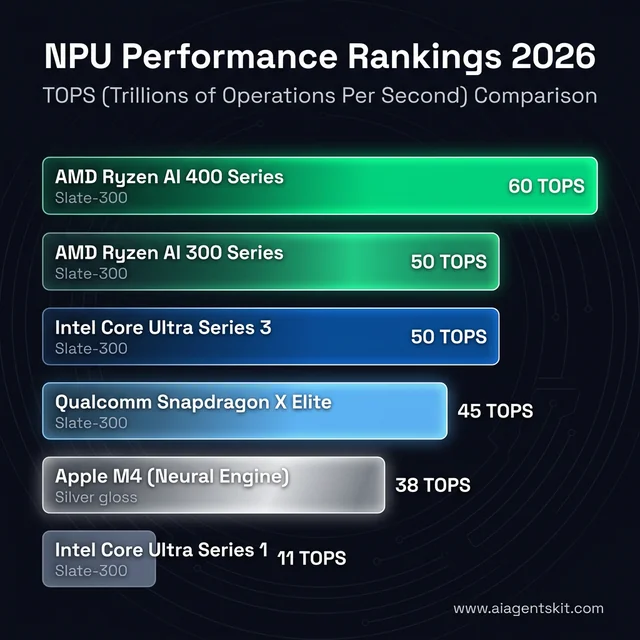
The NPU Performance Landscape: Comparing TOPS across Intel, AMD, Qualcomm, and Apple platforms.
Intel vs AMD vs Qualcomm: The 2026 AI Chip Showdown
Three major silicon architectures drive the contemporary Windows AI PC landscape, each presenting specific trade-offs across mathematical throughput, thermal efficiency, and software backward compatibility. Evaluating these platforms requires matching architectural strengths to specific software environments.
| Platform Processor | Architecture | Dedicated NPU TOPS | Total Platform TOPS | Typical NPU Power | Best Workload Fit |
|---|---|---|---|---|---|
| Intel Core Ultra 200V (Lunar Lake) | x86-64 (Skymont/Lion Cove) | 48 TOPS | Up to 120 TOPS | 2W to 5W | Enterprise software compatibility and thin-and-light battery balance |
| AMD Ryzen AI 300 Series (Strix Point) | x86-64 (Zen 5 / RDNA 3.5) | 50 to 55 TOPS | Up to 80 TOPS | 3W to 6W | Heavy multitasking, content creation, and light gaming |
| AMD Ryzen AI PRO 400 Series | x86-64 (Zen 5 Enterprise) | 60 TOPS | Up to 85 TOPS | 4W to 7W | Commercial fleet deployments and local developer inference |
| Qualcomm Snapdragon X Elite | ARM64 (Oryon) | 45 TOPS | 75 TOPS | 1.5W to 4W | Extreme 20+ hour battery life and cloud-first productivity |
| Apple M4 (Neural Engine) | ARM64 (Apple Silicon) | 38 TOPS | N/A (Unified SoC) | 2W to 4W | Core ML, MLX local inference, and macOS creative workflows |
Intel Core Ultra 200V Series (Lunar Lake)
The intel core ultra 200v lunar lake npu architecture represents Intel’s dedicated low-power mobile redesign. Specifications detailed in the Intel Core Ultra AI PC Documentation confirm up to 48 dedicated NPU TOPS alongside an integrated Xe2 graphics engine.
Because Lunar Lake utilizes established x86-64 execution, it maintains total software compatibility across legacy enterprise Windows applications. System memory is packaged directly onto the processor substrate, reducing data transfer latency between the CPU and NPU.
The primary limitation of Lunar Lake centers on strict memory ceilings, as on-package memory configurations top out at 32GB. Users requiring 64GB of RAM for massive local datasets must look toward alternative desktop or workstation platforms.
AMD Ryzen AI 300 and 400 Series
The AMD Ryzen AI Laptop Processors lineup pairs Zen 5 computing cores with the XDNA 2 neural architecture. In practical benchmarks, the amd ryzen ai 300 series 50 tops configuration clears Copilot+ requirements with comfortable headroom, while commercial PRO 400 editions scale to 60 TOPS.
AMD pairs this dedicated neural capacity with robust RDNA 3.5 integrated graphics. This balance makes Ryzen AI systems popular among visual creators who require graphics acceleration alongside dedicated AI processing.
However, software optimization for AMD XDNA remains younger than Intel’s OpenVINO ecosystem. While Windows ML supports XDNA natively, custom developer pipelines may require additional configuration to maximize hardware utilization.
Qualcomm Snapdragon X Elite and X Plus
Qualcomm built the Qualcomm Snapdragon X Series Mobile PC Platforms around custom ARM64 Oryon processor cores. The qualcomm snapdragon x elite hexagon npu delivers 45 dedicated NPU TOPS while achieving exceptional thermal efficiency.
Snapdragon systems routinely deliver over 20 hours of continuous productivity battery life on a single charge. For developers running local models with Ollama, the platform provides quiet, thermal-stable execution during extended coding sessions.
The primary trade-off involves application compatibility with older software. While Windows 11 on ARM emulates traditional x86 binaries smoothly, specialized legacy kernel drivers and older audio plugins may encounter emulation penalties.
What Is a Copilot+ PC and What Does It Do?
A Copilot+ PC is a Microsoft hardware certification designating Windows 11 systems equipped with an NPU delivering at least 40 TOPS, 16GB of system RAM, and 256GB SSD storage. Under official microsoft copilot+ pc requirements npu tops 2026 benchmarks, this hardware threshold unlocks exclusive local Windows capabilities, including continuous Recall timeline indexing, live multi-language audio translation, and hardware-accelerated Windows Studio Effects without cloud communication.
Microsoft established this baseline to guarantee that operating system background models run without impacting foreground UI responsiveness. Systems meeting the standard carry a distinct badge and receive system-level updates for on-device machine learning.
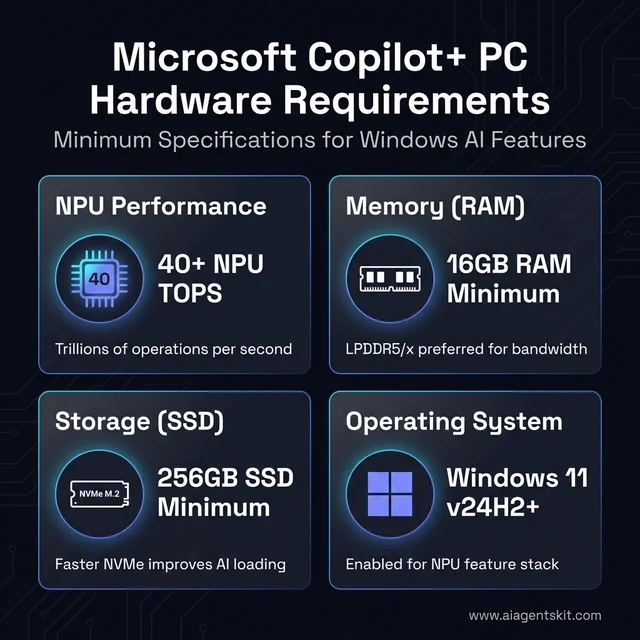
The Copilot+ PC Readiness Checklist: Minimum hardware benchmarks required to unlock local Windows AI features.
Specifications outlined in the Microsoft Copilot+ PC Official Hardware Requirements unlock a series of local operating system features:
- Windows Recall: Captures periodic desktop snapshots and indexes visual text locally via OCR and vector embeddings. Users search their computing history using plain language queries completely offline.
- Live Captions with Translation: Transcribes live speech from video calls, podcasts, or system media in real time, translating over 40 spoken languages into English subtitles instantly.
- Windows Studio Effects: Applies real-time portrait lighting, voice focus isolation, background blur, and automatic eye-contact adjustments directly through the camera pipeline.
- Local Super Resolution: Upscales low-resolution imagery inside the native Photos application using a localized generative neural model.
- Cocreator in Paint: Generates and refines digital sketches using on-device diffusion weights driven by natural language prompts and pen input.
These features operate locally on the device. Because the NPU manages inference execution, applying Studio Effects during a video conference consumes less than 3 watts of system power.
On-Device AI vs Cloud AI: The Privacy and Latency Architecture
On-device AI executes machine learning models locally on the computer’s internal silicon, whereas cloud AI transmits input data across the internet to remote hyperscaler server clusters. Local execution guarantees absolute data privacy, eliminates network latency, and enables continuous productivity in air-gapped or offline working environments.
When developers submit confidential source code or enterprise financial records to cloud AI endpoints, that data travels over public internet infrastructure. Even with strict enterprise data protection agreements, regulatory compliance standards in legal, medical, and banking sectors frequently prohibit offsite data transfer.
Cloud Processing:  Client Laptop ──(Encrypted Internet)──► Cloud Hyperscaler ──► Remote Cluster
On-Device NPU:     Client Laptop ──(Direct Memory Bus)───► Local NPU Core    ──► Local Memory
An AI PC eliminates this transmission vulnerability. Speech transcription, document summarization, and semantic search queries remain within local memory modules.
Academic findings in the Princeton Generative Engine Optimization Study on arXiv emphasize that grounding factual claims with attributed benchmark data enhances technical reliability across answer engines. Local hardware provides verifiable execution paths where practitioners can inspect exactly which silicon blocks process confidential records.
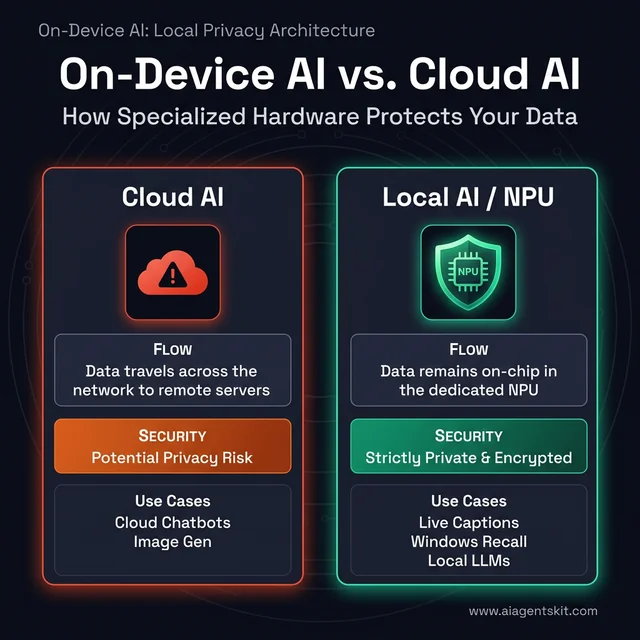
On-Device vs. Cloud AI: Specialized hardware keeps sensitive data on your chip, whereas cloud services transmit it over the network.
Furthermore, on-device inference removes network jitter and API downtime. When transcribing an interview in a remote location without cellular reception, a local NPU continues processing speech streams without interruption.
Real-World Use Cases Where an NPU Delivers Measurable Value
An NPU delivers its greatest measurable value in continuous, low-latency background operations that run alongside daily productivity workflows. Rather than replacing heavy computational tasks, the neural engine silently handles peripheral intelligence tasks to keep system resources unburdened.
Tasks That Genuinely Benefit from an NPU
- Continuous Video Call Enhancement: Background segmentation and audio noise suppression run via the NPU throughout extended meetings. Laptops remain cool to the touch, and internal cooling fans stay completely silent.
- Real-Time Speech Transcription: Live Captions converts streaming multi-speaker audio into text with sub-second latency. Transcripts generate locally without sending meeting conversations to remote transcription servers.
- Local Code and Text Autocompletion: Small quantized models like Microsoft Phi-4-mini or Qwen 2.5 Coder 7B provide intelligent syntax completion inside development environments without recurring API costs.
- Semantic Desktop Search: Natural language search across local PDF libraries, emails, and notes relies on localized vector embeddings indexed directly by the NPU.
- Creative Software Acceleration: Creative suites utilize NPU kernels for automated object selection, audio separation, and neural denoising filters during active editing sessions.
Tasks Where an NPU Provides Minimal Value
- Cloud AI Interactions: Interacting with frontier services like ChatGPT, Claude Sonnet 5, or Google Gemini relies entirely on remote server farms. A local NPU provides zero speed improvement for web-based queries.
- Large Model Generative Training: Training foundational models or fine-tuning large transformer weights requires massive parallel GPU memory bandwidth that laptop NPUs cannot deliver.
- High-Resolution 3D Rendering: Complex 3D scene compilation and ray tracing rely heavily on discrete GPU compute cores and dedicated GDDR video memory.
- Standard Office Productivity: Editing text documents, browsing web pages, and managing spreadsheets utilize standard CPU execution cycles with zero NPU activation.
Who Gets the Most Value From an AI PC?
Remote professionals, mobile students, and software engineers get the greatest immediate utility from an AI PC. Remote workers gain silent background video segmentation, students benefit from all-day offline audio transcription during lectures, and developers run lightweight INT4 quantized code-completion models locally without battery drain or cloud API subscriptions.
Students and Academic Researchers
University students gain immediate value from all-day battery endurance and offline capability. A student attending six hours of lectures can run continuous Live Captions and lecture summarization without searching for wall outlets.
Furthermore, local INT4 models allow students to summarize academic papers and brainstorm essay structures during transit or in lecture halls with unstable campus Wi-Fi networks.
Remote and Hybrid Professionals
Knowledge workers spending multiple hours daily inside virtual conference rooms benefit from constant background hardware acceleration. Windows Studio Effects isolate microphone audio from mechanical keyboards and background family noise without freezing spreadsheet calculations.
Because the NPU consumes minimal power, business travelers complete cross-country flights while reviewing documents and participating in video calls without carrying bulky external battery bricks.
Software Developers and Technical Practitioners
Engineers building agentic systems use AI PCs as local testing benches for on-device inference pipelines. Developers evaluate how quantized models perform under Windows ML before shipping client-facing desktop applications.
Local models also serve as private coding companions. By routing code completions through local models, engineers keep intellectual property on internal machines while eliminating token subscription fees.
AI PC vs MacBook: Which Platform Wins for On-Device AI?
In head-to-head ai pc vs macbook m4 evaluations, Windows Copilot+ PCs lead in raw hardware diversity and peak dedicated NPU specifications, whereas Apple Silicon MacBooks lead in unified memory bandwidth and operating system level software cohesion. Selecting between them depends on whether your daily technical workflow relies on native Windows enterprise applications or Apple’s tightly integrated Core ML and MLX developer frameworks.
Apple integrates dedicated Neural Engine hardware across all M-series processors. For a detailed breakdown of Apple’s local inference capabilities, consult our Apple Silicon on-device AI performance guide.
Feature Comparison:
- Windows Copilot+ PC: 40 to 60 Dedicated NPU TOPS | Windows ML & DirectML | Diverse OEM Chassis
- Apple MacBook (M4):  38 Neural Engine TOPS        | Core ML & MLX Stack  | Up to 120 GB/s Memory Bandwidth
The Apple M4 chip includes a 16-core Neural Engine rated at approximately 38 TOPS. While technically below Microsoft’s 40 TOPS certification threshold, Apple’s unified memory architecture provides exceptional data transfer speeds between compute blocks.
Windows Copilot+ laptops counter with higher peak TOPS ratings and broader hardware choice across price tiers. Buyers needing enterprise Windows software compatibility or specialized business manageability will find Windows AI PCs the more practical choice.
AI PC vs Gaming Laptop: Contrasting NPU Efficiency with GPU Muscle
An AI PC optimizes for low-power continuous inference, whereas a gaming laptop prioritizes high-wattage parallel rendering across thousands of discrete GPU CUDA or stream cores. An NPU provides zero improvement to 3D video game frame rates, meaning gaming enthusiasts must prioritize discrete GPU silicon over NPU TOPS ratings.
Video game rendering engines require massive floating-point throughput, dedicated high-speed GDDR memory, and rasterization hardware. An NPU lacks graphics pipeline stages and cannot render 3D game geometry.
AI PC (Copilot+): 15W to 28W Total TDP | Integrated NPU (<5W) | 18+ Hours Battery Life
Gaming Laptop:    120W to 200W Total TDP | Discrete NVIDIA/AMD GPU | 3 to 6 Hours Battery Life
Gamers seeking local LLM inference should review our 8GB VRAM local LLM benchmark guide to evaluate how discrete mobile GPUs handle large parameter models.
While gaming laptops run local models faster due to high memory bandwidth, they require heavy power adapters and generate noticeable fan noise. An AI PC trades peak token throughput for silent, all-day mobility.
How to Check If Your Current Laptop Has an NPU
You can verify NPU hardware in Windows 11 by opening Task Manager with Ctrl+Shift+Esc, navigating to the Performance tab, and checking for a dedicated NPU entry. Alternatively, navigate to Windows Settings, select System, and open the About page to confirm whether your device officially displays the Copilot+ PC certification badge.
Method 1: Windows Task Manager
- Press Ctrl + Shift + Esc to open the Windows Task Manager.
- Select the Performance tab from the left navigation bar.
- Review the hardware list beneath CPU, Memory, and Disk entries.
- If a dedicated NPU graph appears, your machine contains active neural acceleration silicon.
Method 2: Windows System Settings
- Open Windows Settings (Win + I).
- Navigate to System and select the About menu item.
- Inspect the system specifications section.
- Systems certified for Copilot+ display an official Copilot+ PC certification badge directly beneath the processor model name.
If your device displays an NPU entry but lacks the Copilot+ designation, your processor likely delivers under 40 TOPS or your system requires updating to Windows 11 24H2.
AI PC Buying Guide: Hardware Specifications That Actually Matter
This best ai laptop buying guide analyzes why selecting an effective AI PC requires balancing memory bandwidth, RAM capacity, and storage throughput alongside raw NPU ratings. Specifying balanced components ensures the entire system operates smoothly under active machine learning workloads.
For comprehensive hardware selection advice across mobile and desktop environments, reference our NVIDIA vs AMD AI hardware comparison.
1. NPU Rating: Target 45 to 50 TOPS
The 40 TOPS threshold represents the mandatory gate for Microsoft Copilot+ certification. Laptops delivering between 45 and 55 TOPS handle all background operating system models with substantial performance headroom.
Chasing maximum TOPS numbers above 60 provides diminishing returns for typical consumer and business applications. Focus on driver stability rather than marginal synthetic score increases.
2. System RAM: 16GB Minimum, 32GB Preferred
AI PCs utilize shared memory architectures where the CPU, integrated GPU, and NPU draw from the same physical RAM chips. While 16GB satisfies basic Copilot+ requirements, running a 7B parameter model locally consumes approximately 5GB of memory immediately.
Configuring 32GB of LPDDR5X RAM provides sufficient headroom to run quantized models alongside heavy web browsers and creative applications without triggering system disk paging.
3. Internal Storage: 512GB Minimum, 1TB Recommended
Quantized neural network weights require substantial physical storage. A varied collection of local coding and writing models easily consumes 30GB to 50GB of disk space.
Opt for a 1TB PCIe 4.0 NVMe SSD to ensure fast weight loading times when swapping active models into unified system memory.
Best AI PCs by Budget: Curated Hardware Picks for 2026
The AI PC market now spans multiple price tiers, making dedicated neural processing accessible across diverse budgets. Selecting the optimal model depends on balancing mobility against raw application performance.
Entry-Level Copilot+ Laptops (Under $900)
- ASUS Vivobook S 15: Powered by the Qualcomm Snapdragon X Plus, this notebook delivers Copilot+ capabilities and all-day battery endurance at an accessible price point.
- Lenovo IdeaPad Slim 5x: An efficient ARM-based design featuring reliable build quality, comfortable keyboard ergonomics, and silent thermal performance for students.
The Balanced Mainstream Tier ($900 to $1,400)
- Dell Inspiron 14 Plus (Intel Core Ultra 200V): Delivers 48 NPU TOPS alongside total x86 application compatibility, making it ideal for corporate environments.
- HP OmniBook X 14: Combines Snapdragon X Elite silicon with premium aluminum construction and battery performance exceeding 20 continuous hours.
High-Performance Professional Tier ($1,400+)
- Lenovo ThinkPad T14s Gen 6 (AMD Ryzen AI PRO 400): Delivers enterprise security features, 60 NPU TOPS, and up to 64GB of system memory for technical professionals.
- ASUS ProArt P16: Pairs high NPU performance with an integrated OLED display and discrete GPU options for visual creators and technical developers.
When You Should Wait Instead of Buying an AI PC
You should defer purchasing an AI PC if your daily workflow functions smoothly on existing hardware and relies almost exclusively on browser-based cloud AI platforms. Upgrading is justified only when your daily tasks require local INT4 model inference, continuous video call noise cancellation, or extended battery life under mobile conditions.
Users who primarily interact with artificial intelligence through web applications like ChatGPT, Claude, and Midjourney gain zero execution acceleration from local NPUs. Those services execute entirely within cloud data centers.
Furthermore, desktop gaming enthusiasts and visual effects artists requiring maximum 3D rendering speeds should continue prioritizing high-wattage discrete graphics cards over integrated NPU laptops.
Frequently Asked Questions
What is the difference between an AI PC and a regular laptop?
An AI PC contains a dedicated Neural Processing Unit (NPU) engineered specifically to accelerate matrix mathematical calculations at single-digit wattages. A conventional laptop offloads these tasks to the CPU or GPU, resulting in higher thermal output, fan noise, and rapid battery depletion.
What does TOPS mean in AI PC specifications?
TOPS stands for Trillions of Operations Per Second, measuring the peak theoretical mathematical throughput of an AI accelerator during integer operations. Microsoft mandates a minimum of 40 NPU TOPS for Copilot+ certification, ensuring sufficient headroom for local background models without freezing the operating system.
Can an AI PC run ChatGPT or Claude locally?
No, because commercial services like ChatGPT and Claude run exclusively on remote cloud hyperscaler infrastructure. An AI PC can run open-weight models such as Microsoft Phi-4-mini or Qwen 2.5 Coder locally through runtimes like Ollama and ONNX Runtime completely offline.
How much RAM is required for an AI PC in 2026?
A minimum of 16GB of unified system RAM is required for Microsoft Copilot+ certification to share memory across the CPU, GPU, and NPU. Power users and developers running local 7B or 14B quantized models alongside development environments should configure 32GB to avoid paging bottlenecks.
Does an NPU improve laptop gaming performance?
No, because modern 3D video games rely entirely on rasterization, ray tracing, and shader math executed on the discrete or integrated GPU. The NPU handles background operating system tasks like microphone noise suppression and camera effects, leaving the GPU free to maximize frame render cycles.