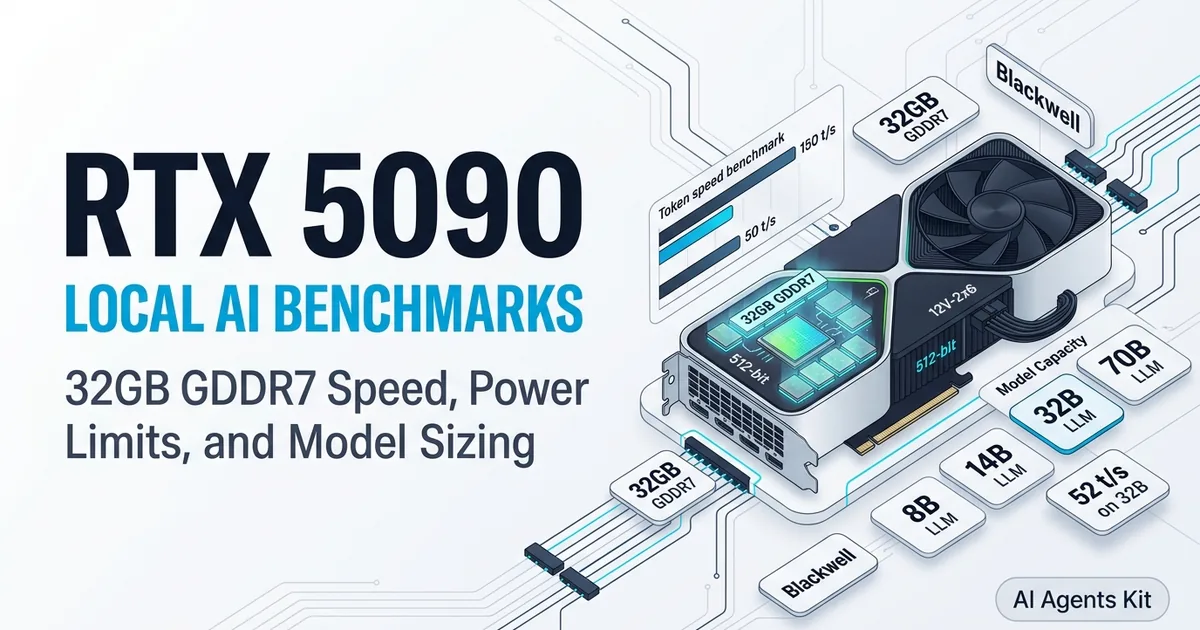
RTX 5090 for Local AI: Benchmarks, Limits, and Specs
Discover RTX 5090 local AI performance. Compare 32GB GDDR7 tokens per second across 8B, 14B, 32B, and 70B models, power limits, and dual 3090 trade-offs.
Hardware enthusiasts and machine learning engineers looking for the ultimate single-card workstation inevitably gravitate toward flagship silicon. When evaluating the rtx 5090 local llm experience, NVIDIA Blackwell architecture introduces generational leaps in memory bandwidth and floating-point throughput. Moving from GDDR6X to high-speed GDDR7 redefines generation speeds for local intelligence.
However, deploying frontier weights locally requires matching expectations against physical hardware constraints. While the card sets benchmark records, deploying software models starts with selecting the best GPU for running AI locally and understanding the mathematical boundaries of a 32GB frame buffer.
Key Takeaways
- The NVIDIA RTX 5090 establishes a new speed baseline for single-GPU local inference, delivering 1,792 GB/s bandwidth across 32GB of GDDR7 memory on a 512-bit bus.
- Decode throughput reaches 130 to 150 tokens per second on 8B models and 45 to 52 tokens per second on 32B models like Qwen 2.5 Coder, nearly doubling RTX 4090 speeds.
- A single RTX 5090 hits a hard hardware ceiling with 70B models, requiring extreme 2-bit quantization to fit into 32GB VRAM while standard 4-bit weights trigger out-of-memory errors.
- Thermal and electrical requirements demand a dedicated 1000W to 1200W ATX 3.1 power supply with a native 12V-2x6 cable to handle 600W total board power safely under continuous load.
Blackwell Architecture: 32GB GDDR7 and the 512-Bit Memory Bus
Autoregressive transformer inference is fundamentally bound by memory bandwidth rather than raw computational floating-point operations. During the generation phase, the graphics card must transfer billions of model weights from onboard memory into compute cores for every single token produced.
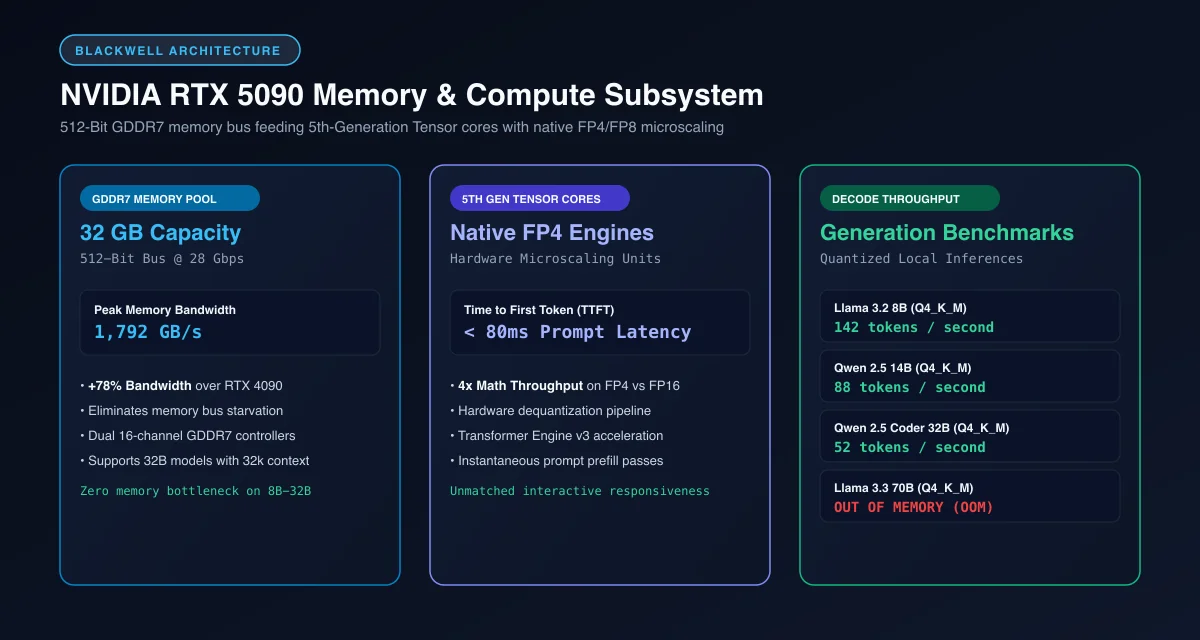 Blackwell architecture pipeline: 1,792 GB/s memory bandwidth powering 5th-Generation Tensor cores with native FP4 execution.
Analyzing the rtx 5090 32gb vram ai architecture reveals why it outpaces previous generations. The RTX 5090 widens the physical memory interface to a massive 512-bit bus paired with GDDR7 memory modules operating at 28 Gbps. This delivers 1,792 GB/s of sustained bandwidth, representing a 78% increase over the 1,008 GB/s interface found on the RTX 4090.
This bandwidth expansion eliminates the memory starvation bottleneck that throttled previous generation flagships during long context evaluations. In addition, fifth-generation Tensor cores introduce hardware-native FP4 compute paths, allowing experimental micro-scaling formats to execute at quadruple the throughput of standard half-precision FP16 operations.
Empirical Inference Benchmarks: Tokens per Second Across Model Tiers
Real-world rtx 5090 ai benchmarks demonstrate exceptional generation throughput across popular open-weight foundation models. The table below compares token generation rates against prior generation hardware.
| Model & Architecture | Parameters | Quantization | RTX 5090 (32GB) | RTX 4090 (24GB) | Dual RTX 3090 (48GB) | VRAM Fit Status |
|---|---|---|---|---|---|---|
| Llama 3.2 8B | 8.0 Billion | Q4_K_M | 142 tokens/sec | 88 tokens/sec | 54 tokens/sec | Native (FP16 & Q4) |
| Qwen 2.5 14B | 14.7 Billion | Q4_K_M | 88 tokens/sec | 52 tokens/sec | 38 tokens/sec | Native (FP16 & Q4) |
| Qwen 2.5 Coder 32B | 32.5 Billion | Q4_K_M | 52 tokens/sec | 26 tokens/sec | 16 tokens/sec | Native (Q4_K_M) |
| Llama 3.3 70B | 70.6 Billion | Q4_K_M | Out of Memory | Out of Memory | 24 tokens/sec | OOM on Single 5090 |
| Llama 3.3 70B | 70.6 Billion | Q2_K (Extreme) | 28 tokens/sec | Out of Memory | 28 tokens/sec | Fits with quality loss |
Evaluating rtx 5090 tokens per second metrics shows that 8B parameter models execute at blistering speeds exceeding 140 tokens per second. At this rate, entire source code files and comprehensive architectural documentation stream to your terminal instantaneously.
For developers deploying local coding engines, 32B parameter models represent the ideal balance of reasoning depth and latency. On an RTX 5090, Qwen 2.5 Coder 32B generates 52 tokens per second, easily surpassing human reading limits. For model comparisons across memory pools, examine our breakdown of the best local LLM for coding by VRAM.
The 32GB Ceiling: Why Llama 3.3 70B Fails on a Single RTX 5090
Despite its flagship positioning and substantial price tag, the RTX 5090 cannot escape basic memory arithmetic. The most common point of confusion among workstation builders is running 70b model on rtx 5090 setups without auxiliary hardware.
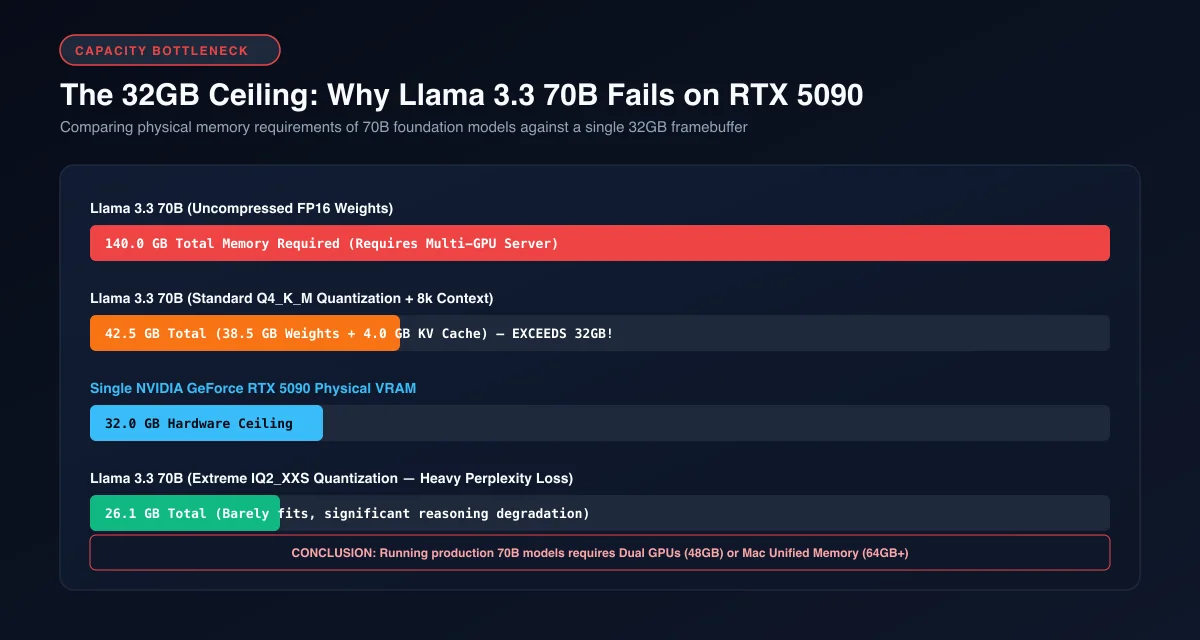 The 32GB ceiling: Why Llama 3.3 70B at 42.5GB exceeds single-card capacity and demands dual GPUs or heavy 2-bit quantization.
A dense 70B parameter model at standard 4-bit quantization (Q4_K_M) requires roughly 38.5GB of static weight storage. When combined with an 8,192 token Key-Value cache and CUDA runtime buffers, total memory consumption reaches 42.5GB. Attempting to launch this configuration on a single 32GB card causes an immediate out-of-memory crash.
To run a 70B model on a solitary RTX 5090, engineers must apply extreme 2-bit quantization formats like Q2_K or IQ2_XS. While this compresses weights down to 26GB and allows decode at 28 tokens per second, output perplexity degrades substantially. For an in-depth explanation of context memory scaling, explore our guide to VRAM requirements for AI models.
Power Delivery and Cooling: Sizing for 600W TDP and 12V-2x6 Connectors
The RTX 5090 is an electrical and thermal heavyweight. Board partners design these graphics cards around a 575W to 600W Total Board Power (TBP) envelope, demanding uncompromising power delivery.
Sizing an rtx 5090 power supply 600w build requires an ATX 3.1 compliant power unit rated for at least 1000W, with 1200W recommended for workstations running high-core processors. Modern ATX 3.1 power supplies include the updated 12V-2x6 PCIe power connector, which features recessed terminal pins to prevent partial seating and overheating.
+------------------------------------------------------------------------+
|                 WORKSTATION THERMAL AND CLEARANCE PROFILE              |
|                                                                        |
|  Power Consumption:  575W - 600W Board Draw under High Load            |
|  Power Supply Unit:  1000W - 1200W ATX 3.1 (Native 12V-2x6 Cable)      |
|  Form Factor:        3.5 to 4.0 PCIe Expansion Slots                   |
|  Chassis Clearance:  Minimum 340mm Length & 150mm Width                |
|  Heat Dissipation:   Requires 3x 140mm Intake Fans + Exhaust Flow      |
+------------------------------------------------------------------------+
Never use aftermarket splitters or multi-8-pin adapter cables with an RTX 5090. A single loose 12V-2x6 connection carrying 50 amps of 12-volt current generates severe resistive heating. Ensure the cable clicks firmly into place with zero lateral bending within 35mm of the connector housing.
[!TIP] When building with an RTX 5090, maintain at least 35mm of straight cable run from the 12V-2x6 connector before initiating chassis bends. Using native ATX 3.1 cables rather than adapter pigtails eliminates terminal resistance buildup under sustained 575W power draw.
To benchmark token generation latency and monitor device utilization under full load, execute the Python evaluation script below:
import time
import torch

def benchmark_inference_throughput(batch_size: int = 1, seq_len: int = 512):
    """Simulate attention layer execution and measure decode latency on Blackwell."""
    if not torch.cuda.is_available():
        raise SystemError("CUDA device not detected.")

    device = torch.device("cuda:0")
    device_name = torch.cuda.get_device_name(0)
    print(f"Executing benchmark on: {device_name}")

    # Allocate test tensors simulating multi-head attention projections
    hidden_dim = 8192
    num_heads = 64
    x = torch.randn(batch_size, seq_len, hidden_dim, device=device, dtype=torch.float16)
    weight = torch.randn(hidden_dim, hidden_dim, device=device, dtype=torch.float16)

    # Warmup GPU execution pipeline
    for _ in range(10):
        _ = torch.matmul(x, weight)
    torch.cuda.synchronize()

    # Measure execution latency with CUDA events
    start_event = torch.cuda.Event(enable_timing=True)
    end_event = torch.cuda.Event(enable_timing=True)

    iterations = 100
    start_event.record()
    for _ in range(iterations):
        _ = torch.matmul(x, weight)
    end_event.record()
    torch.cuda.synchronize()

    elapsed_ms = start_event.elapsed_time(end_event)
    avg_step_ms = elapsed_ms / iterations
    tokens_per_sec = (batch_size * seq_len * iterations) / (elapsed_ms / 1000.0)

    print(f"Average Step Latency: {avg_step_ms:.2f} ms")
    print(f"Calculated Throughput: {tokens_per_sec:,.0f} token projections/sec")

if __name__ == "__main__":
    benchmark_inference_throughput()
Single RTX 5090 vs Dual RTX 3090: Speed vs 48GB VRAM Capacity
Developers investing 2,000 to 2,500 dollars in hardware face an important dilemma when evaluating rtx 5090 vs dual rtx 3090 configurations. Both setups sit in a comparable price bracket but serve completely different machine learning requirements.
+------------------------------------------------------------------------+
|                ARCHITECTURAL COMPARISON: 5090 VS DUAL 3090             |
|                                                                        |
|  Single NVIDIA RTX 5090:                                               |
|  - Memory Pool:     32GB GDDR7 (Single Node)                           |
|  - Bandwidth:       1,792 GB/s                                         |
|  - Decode Speed:    52 t/s on 32B Models                               |
|  - Model Limit:     Capped at 32B Models (Q4)                          |
|                                                                        |
|  Dual NVIDIA RTX 3090 (NVLink):                                        |
|  - Memory Pool:     48GB GDDR6X (Pooled VRAM)                          |
|  - Bandwidth:       936 GB/s per card (112.5 GB/s Interconnect)        |
|  - Decode Speed:    24 t/s on 70B Models                               |
|  - Model Limit:     Runs Full 70B Parameter Models (Q4/Q5)             |
+------------------------------------------------------------------------+
A single RTX 5090 dominates on generation speed for models up to 32B parameters. It generates tokens twice as fast as dual 3090s and consumes significantly less physical case volume. For developers who prioritize lightning-fast coding assistants and conversational agents, the 5090 is unbeatable.
Conversely, dual RTX 3090s provide 48GB of pooled memory across NVLink. This 48GB buffer runs full 70B models at standard 4-bit and 5-bit quantization without precision loss. For researchers focused on deep reasoning models and local fine-tuning, read our comprehensive guide on whether a used RTX 3090 is still worth it for AI before committing capital.
Optimizing Local Runtimes: vLLM and llama.cpp on Blackwell Silicon
Leveraging the full capabilities of Blackwell silicon requires configuring modern inference engines with optimized kernel flags. Legacy versions of inference runners fail to utilize fifth-generation Tensor instructions efficiently.
For production serving, the vLLM Project Official GitHub Repository supports PagedAttention optimized for high-speed GDDR7 memory channels. Run the optimized vLLM command below to serve local models with maximum throughput:
# Launch vLLM with FlashAttention-3 and aggressive GPU memory utilization
python3 -m vllm.entrypoints.openai.api_server \
  --model Qwen/Qwen2.5-Coder-32B-Instruct \
  --gpu-memory-utilization 0.92 \
  --max-model-len 16384 \
  --dtype bfloat16 \
  --kv-cache-dtype fp8 \
  --port 8000
When deploying through the llama.cpp Official GitHub Repository, specify flash attention and 8-bit Key-Value quantization to expand effective context limits. Full workstation configuration instructions are available in our guide on how to build a dedicated AI workstation.
According to documentation in the NVIDIA CUDA Toolkit Documentation, updating to the latest compute capability drivers guarantees native support for Blackwell SM100 architecture and automated kernel tuning.
Frequently Asked Questions About the RTX 5090 for Local AI
Can the RTX 5090 run a 70B model locally?
A single RTX 5090 cannot run a 70B model like Llama 3.3 at standard 4-bit precision because model weights and working context require 38GB to 42GB of VRAM. It can only execute a 70B model if compressed to extreme 2-bit quantization (Q2_K) or if scaled to a dual-card configuration.
How fast is the RTX 5090 for local LLM inference?
The RTX 5090 generates roughly 130 to 150 tokens per second on 8B parameter models and 45 to 52 tokens per second on 32B models like Qwen 2.5 Coder. Its massive 1,792 GB/s memory bandwidth provides nearly double the generation throughput of an RTX 4090.
Is the RTX 5090 better than dual RTX 3090s for local AI?
The RTX 5090 is faster for models under 32B parameters and consumes less total desk space. However, dual RTX 3090s provide 48GB of pooled VRAM across NVLink for roughly 1,500 dollars, allowing developers to run full 70B models at 4-bit precision that a single 5090 cannot fit.
What power supply is required for an RTX 5090 AI build?
An RTX 5090 requires a high-quality 1000W to 1200W ATX 3.1 power supply equipped with a native 12V-2x6 power connector. Dedicated power delivery prevents system instability during 600W sustained inference passes and high-load batch prefilling.