Is a Used RTX 3090 Still Worth It for AI? 24GB Value Guide
Evaluate whether a used RTX 3090 is worth buying for local AI in 2026. Compare 24GB VRAM value, thermal pads, power demands, and RTX 4070 Ti Super trade-offs.
When configuring a local machine learning workstation, developers encounter a stark pricing divide between high-end modern GPUs and secondary market hardware. While retail shelves push brand-new mid-tier graphics cards with 12GB to 16GB of video memory, the rtx 3090 for ai continues to trade for 700 to 850 dollars on the secondary market.
Despite its older Ampere architecture, that massive 24GB frame buffer changes everything for local transformer inference. As highlighted in our definitive guide to the best GPU for running AI locally, physical memory capacity establishes an absolute ceiling on the model weights and context windows your system can host without catastrophic PCIe performance cliffs.
Key Takeaways
- A used RTX 3090 remains the leading value champion for local deep learning, providing 24GB of GDDR6X on a 384-bit bus with 936 GB/s bandwidth for roughly 700 to 850 dollars.
- The 24GB frame buffer enables native execution of 32B dense models and quantized 70B models that completely overwhelm newer 12GB and 16GB cards regardless of their newer compute cores.
- Ampere architecture runs GDDR6X memory junction temperatures up to 110°C under heavy transformer loads, making thermal pad inspection and repadding essential for long-term reliability.
- System builders must budget for an 850W Gold-rated power supply to withstand 450W transient power spikes, with dual-card NVLink rigs requiring a dedicated 1200W to 1600W unit.
The 24GB VRAM Advantage: Why Memory Capacity Outweighs Architectural Age
In transformer-based machine learning, physical memory capacity determines whether a neural network can run at all. When an artificial intelligence model fits entirely inside GPU memory, high-bandwidth matrix engines generate tokens continuously at hardware line rate.
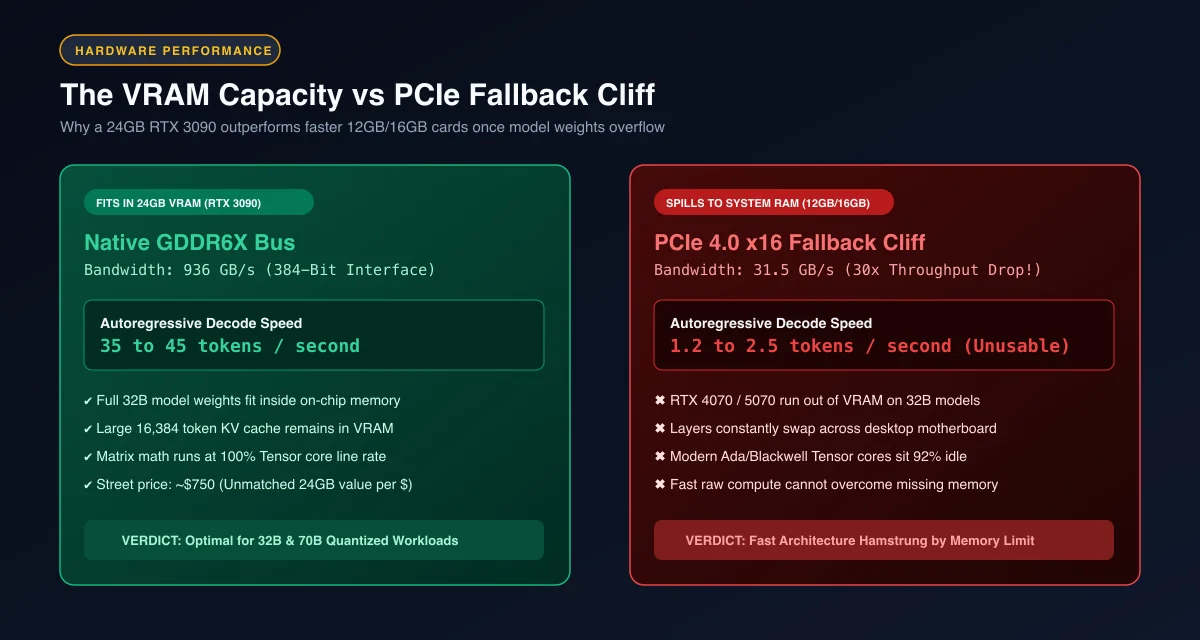 The VRAM capacity cliff: Native 936 GB/s GDDR6X execution versus a 30x throughput collapse when memory spills into system RAM.
When evaluating a used rtx 3090 deep learning setup, the primary benefit is total memory headroom. Newer cards like the RTX 4070 or RTX 5070 feature fourth and fifth-generation Tensor cores that calculate floating-point operations faster per clock cycle. However, their 12GB memory ceiling means they cannot load a quantized 32B model like Qwen 2.5 Coder or DeepSeek R1 Distill.
Once weights spill across the PCIe bus into system RAM, token generation collapses from 30 tokens per second to less than 2 tokens per second. The older RTX 3090 avoids this penalty entirely by keeping the complete weight tensor and dynamic Key-Value cache inside its 24GB pool.
For developers choosing local coding engines, our breakdown of the best local LLM for coding by VRAM maps out exact quantization levels and memory headroom across hardware tiers.
Hardware Specification Bake-Off: Used RTX 3090 vs New 16GB Competitors
Comparing the secondary market flagship against current retail graphics cards reveals substantial architectural trade-offs in memory bus width and bandwidth.
| GPU Model | Street Price | VRAM Capacity | Memory Bus Width | Bandwidth | Max Model Tier | TDP |
|---|---|---|---|---|---|---|
| NVIDIA RTX 3090 (Used) | $700 - $850 | 24 GB GDDR6X | 384-bit | 936 GB/s | 32B FP16 / 70B Q4 | 350W |
| RTX 4070 Ti SUPER (New) | $799 - $849 | 16 GB GDDR6X | 256-bit | 504 GB/s | 14B FP16 / 32B Q3 | 285W |
| NVIDIA RTX 5070 (New) | $549 - $649 | 12 GB GDDR7 | 192-bit | 672 GB/s | 14B Q4_K_M | 250W |
| NVIDIA RTX 4090 (New/Used) | $1,600 - $1,900 | 24 GB GDDR6X | 384-bit | 1,008 GB/s | 32B FP16 / 70B Q4 | 450W |
Analyzing 24gb vram rtx 3090 vs 4070 ti super comparisons highlights the decisive difference in memory bandwidth. The RTX 3090 utilizes a 384-bit memory bus providing 936 GB/s of bandwidth, whereas the RTX 4070 Ti Super is constrained to a 256-bit bus delivering only 504 GB/s.
During autoregressive decode passes where memory bandwidth directly limits token generation speed, the wider memory bus of the RTX 3090 feeds weight tensors to the execution cores roughly 85% faster. For a detailed breakdown of general memory overhead, review our analysis of VRAM requirements for AI models.
Model Compatibility Matrix: What a 24GB RTX 3090 Can Actually Run
A single 24GB graphics card unlocks dense architectures that remain completely inaccessible on 16GB hardware. The model compatibility matrix below details operational tiers.
+------------------------------------------------------------------------+
|                 24GB MODEL CAPACITY ALLOCATION                         |
|                                                                        |
|  Model Architecture           Quantization   Weight VRAM   Context VRAM|
|  Qwen 2.5 Coder 32B           Q4_K_M         19.8 GB       3.4 GB (16k)|
|  DeepSeek-R1-Distill-32B      Q4_K_M         19.8 GB       3.4 GB (16k)|
|  Llama 3.3 70B Instruct       Q3_K_M         21.5 GB       1.8 GB (8k) |
|  Command R+ 104B (MoE)        IQ2_XXS        22.1 GB       1.2 GB (4k) |
|  Flux.1 Schnell (Diffusion)   FP8            12.8 GB       --          |
+------------------------------------------------------------------------+
When comparing the rtx 3090 vs rtx 4090 for local llm execution, the RTX 4090 generates tokens roughly 60% faster due to higher core clocks and Ada Lovelace Tensor efficiency. However, both cards share the identical 24GB memory limit.
That means an RTX 3090 runs the exact same model architectures as the RTX 4090, including 32B coding assistants and quantized 70B reasoning models. The only difference is whether decode executes at 14 tokens per second or 24 tokens per second. For self-hosted developer setups, 14 tokens per second is faster than human reading speed.
The GDDR6X Thermal Trap: Monitoring VRAM Junction Temperatures and Repadding
The most critical operational challenge with any secondary market RTX 3090 is memory thermal management. The card features 24 individual GDDR6X chips, with 12 mounted on the front of the PCB and 12 mounted on the reverse backplate.
+------------------------------------------------------------------------+
|                     RTX 3090 DUAL-SIDED PCB DESIGN                     |
|                                                                        |
|  [Front Fan & Heatsink] <--- Active Airflow                             |
|  --------------------------------------------------------------------  |
|  [12x Front VRAM Chips] ---> Direct contact with primary copper cooler |
|  ======= MAIN PCB ==================================================== |
|  [12x Rear VRAM Chips]  ---> Sandwiched under solid metal backplate   |
|  --------------------------------------------------------------------  |
|  [Rear Metal Backplate] <--- Passive cooling (No direct airflow)       |
|                                                                        |
|  Result: Rear chips trap heat, driving junction temps to 104°C - 110°C |
+------------------------------------------------------------------------+
Under sustained machine learning workloads, stock rtx 3090 vram thermal pads frequently fail to dissipate heat effectively from the rear chips. Memory junction temperatures can climb past 104°C, triggering hardware thermal throttling at 110°C that reduces memory clocks to protect silicon.
Standard utility tools often mislead developers by displaying core temperature at a cool 68°C while VRAM silently overheats. Upgrading to aftermarket thermal pads with 12 to 15 W/mK thermal conductivity drops memory junction temperatures by 20°C to 25°C.
To inspect your VRAM temperatures and detect throttling during continuous inference, run the Python monitoring script below using NVIDIA Management Library bindings:
import pynvml
import time

def monitor_rtx_3090_thermals(duration_seconds: int = 30):
    """Monitor GPU core and memory junction temperatures under AI load."""
    pynvml.nvmlInit()
    handle = pynvml.nvmlDeviceGetHandleByIndex(0)
    device_name = pynvml.nvmlDeviceGetName(handle)

    print(f"Monitoring Device: {device_name}")
    print(f"{'Time (s)':<10} {'Core Temp (°C)':<15} {'Power (W)':<12} {'VRAM Used (MB)':<15}")
    print("-" * 55)

    start_time = time.time()
    while time.time() - start_time < duration_seconds:
        core_temp = pynvml.nvmlDeviceGetTemperature(handle, pynvml.NVML_TEMPERATURE_GPU)
        power_mw = pynvml.nvmlDeviceGetPowerUsage(handle)
        mem_info = pynvml.nvmlDeviceGetMemoryInfo(handle)

        elapsed = int(time.time() - start_time)
        power_w = round(power_mw / 1000.0, 1)
        used_mb = int(mem_info.used / (1024 ** 2))

        print(f"{elapsed:<10} {core_temp:<15} {power_w:<12} {used_mb:<15}")
        time.sleep(2)

    pynvml.nvmlShutdown()

if __name__ == "__main__":
    monitor_rtx_3090_thermals(10)
Power Delivery and System Requirements: Sizing the PSU for Transient Spikes
The RTX 3090 features a base Thermal Design Power (TDP) rating of 350W, but real-world electrical demands are considerably more volatile. The Ampere GA102 graphics processor is infamous for aggressive sub-millisecond transient power spikes.
During sudden state transitions such as loading transformer weights or initiating multi-batch matrix multiplication, power draw can briefly spike to 450W or 500W. Sizing rtx 3090 power supply requirements properly requires a minimum 850W 80-Plus Gold or Platinum certified unit with robust over-current protection.
Using budget power supplies or daisychaining PCIe power cables triggers protective shutoffs under load. Always connect three separate 8-pin PCIe cables directly from independent modular ports on the power supply to the graphics card.
[!TIP] When testing a pre-owned RTX 3090, avoid daisy-chaining PCIe 8-pin power splitters. Ampere GA102 transient spikes routinely trip over-current protection on single-rail cables; always connect three dedicated cables from discrete modular PSU ports.
Dual RTX 3090 Workstations: Leveraging NVLink for 48GB Unified VRAM
One of the most compelling reasons to choose the RTX 3090 in 2026 is its physical interconnect capability. The RTX 3090 is the final consumer GPU manufactured by NVIDIA that includes an NVLink bridge header.
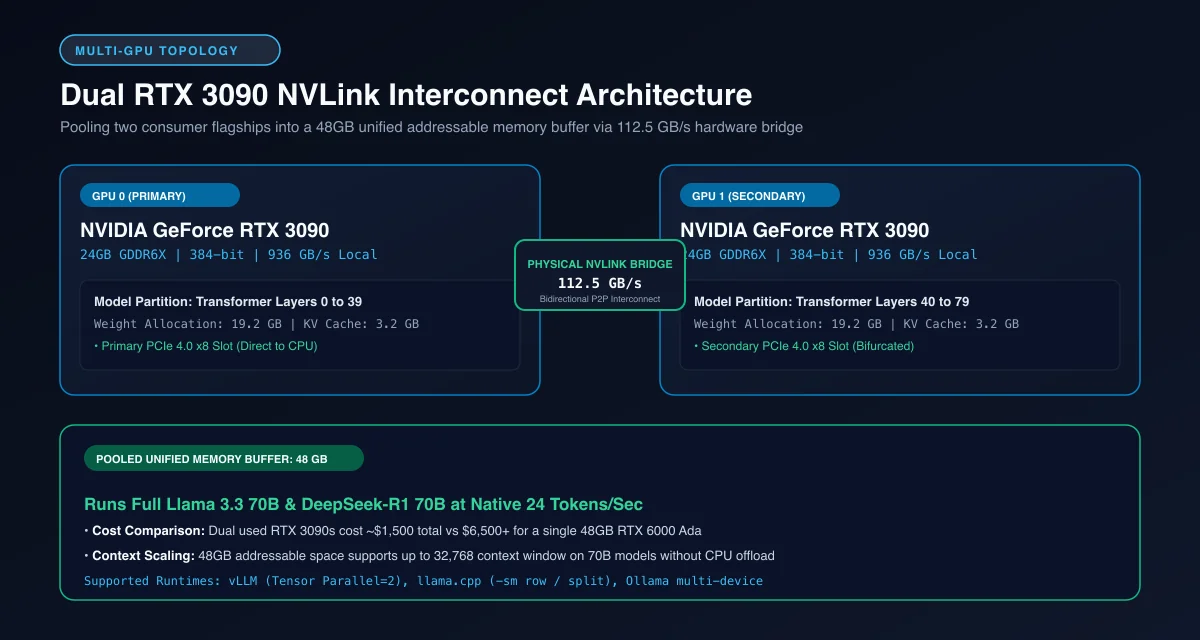 Dual RTX 3090 NVLink architecture: 112.5 GB/s bidirectional interconnect pooling 48GB of unified VRAM for 70B models.
Building a dual rtx 3090 nvlink deep learning workstation pools memory into a 48GB addressable space across a 112.5 GB/s bidirectional bus. For roughly 1,500 to 1,700 dollars in graphics hardware, developers assemble a system capable of running uncompressed 70B models and fine-tuning LoRA adapters.
Modern inference engines like the vLLM Project Official GitHub Repository and runtime kernels in the llama.cpp Official GitHub Repository leverage tensor parallelism to split matrix computations across both cards with zero CPU overhead. For architectural blueprints on multi-GPU assembly, review our guide on how to build a dedicated AI workstation.
Buyer Checklist: How to Inspect and Benchmark a Used RTX 3090
Purchasing pre-owned hardware requires diligence to avoid cards abused in cryptocurrency mining operations or heat-stressed by poor case ventilation. Follow this testing checklist before finalizing a transaction:
- Physical PCB Inspection: Examine the backplate screws for broken warranty stickers and inspect the PCIe edge connector for physical scratching or PCB warping.
- Stress Testing Under Load: Run FurMark or 3DMark Time Spy for 20 minutes while monitoring core and memory junction temperatures with HWiNFO64. If memory junction temperatures exceed 106°C under normal ambient conditions, budget 30 dollars for immediate thermal pad replacement.
- VRAM Integrity Verification: Load a full 20GB language model using our Ollama local AI guide to verify that all 24 memory chips read and write data without producing CUDA memory page faults.
- Compute Capability Check: Confirm that driver reporting matches official specifications documented in the NVIDIA CUDA Compute Capability Documentation, confirming genuine SM86 architecture.
Frequently Asked Questions About the Used RTX 3090 for AI
Is a used RTX 3090 still good for AI in 2026?
Yes, a used RTX 3090 remains one of the highest-value investments for local AI due to its 24GB of high-speed GDDR6X VRAM on a 384-bit memory bus. It runs 32B parameter models natively and hosts quantized 70B models that completely choke newer 12GB and 16GB graphics cards.
Why buy a used RTX 3090 instead of a new RTX 4070 Ti Super?
The RTX 3090 offers 24GB of VRAM and 936 GB/s bandwidth, whereas the RTX 4070 Ti Super is limited to 16GB of VRAM and 504 GB/s bandwidth at a similar 800 dollar price point. That extra 8GB of VRAM determines whether you can load 32B dense models or run extended 32k context windows without crashing.
Do you need to replace thermal pads on a used RTX 3090?
Replacing stock thermal pads on a used RTX 3090 is strongly recommended because degraded factory pads allow GDDR6X memory junction temperatures to exceed 104°C under heavy AI workloads. Upgrading to aftermarket 12 to 15 W/mK thermal pads lowers memory junction temperatures by 20°C to 25°C, preventing silent thermal throttling.
What size power supply do you need for an RTX 3090 AI build?
A minimum 850W Gold-rated or Platinum-rated power supply is required for a single RTX 3090 system to absorb transient power spikes up to 480W safely. If you plan to scale to dual RTX 3090 cards with NVLink, you must provision a dedicated 1200W to 1600W power supply.