Intel Arc for Local AI: A770 & B580 Hardware Guide
Discover how Intel Arc runs local AI in 2026. Compare Arc A770 16GB and B580 Battlemage benchmarks, OpenVINO, IPEX-LLM, and budget RTX trade-offs.
The consumer graphics market has long operated under an effective monopoly for local deep learning, forcing engineers to pay steep brand premiums for NVIDIA CUDA compatibility. However, builders configuring an intel arc llm workstation discover an aggressive value alternative. Intel Arc graphics processors offer generous video memory capacities at price points that significantly undercut competing offerings.
Choosing non-CUDA hardware requires weighing memory capacity per dollar against software setup requirements. Sizing an entry-level workstation starts with reviewing our guide to the best GPU for running AI locally and understanding how Intel runtime backends like OpenVINO and IPEX-LLM optimize local inference.
Key Takeaways
- Intel Arc graphics cards deliver the lowest cost per gigabyte of VRAM in the consumer market, with the 16GB Arc A770 priced at under 20 dollars per gigabyte compared to 50 dollars on competing NVIDIA cards.
- The newer Arc B580 Battlemage introduces second-generation Xe2 architecture, generating 63 to 89 tokens per second on 8B parameter models through the OpenVINO GenAI runtime.
- Software support has matured through Intel IPEX-LLM, OpenVINO acceleration, and oneAPI SYCL backends in Ollama and llama.cpp, providing stable inference on Windows and Linux.
- While Intel Arc excels at raw model capacity on a budget, developers requiring custom CUDA attention kernels or niche research code should weigh setup complexity against hardware savings.
The Budget VRAM Disruptor: Why Intel Arc Deserves Attention
In local language model execution, video memory capacity dictates which foundation models can load into high-speed buffers without triggering operating system swap thrashing. Retail graphics cards from competing vendors frequently restrict budget tiers to 8GB or 12GB of VRAM, pricing 16GB options at 500 to 800 dollars.
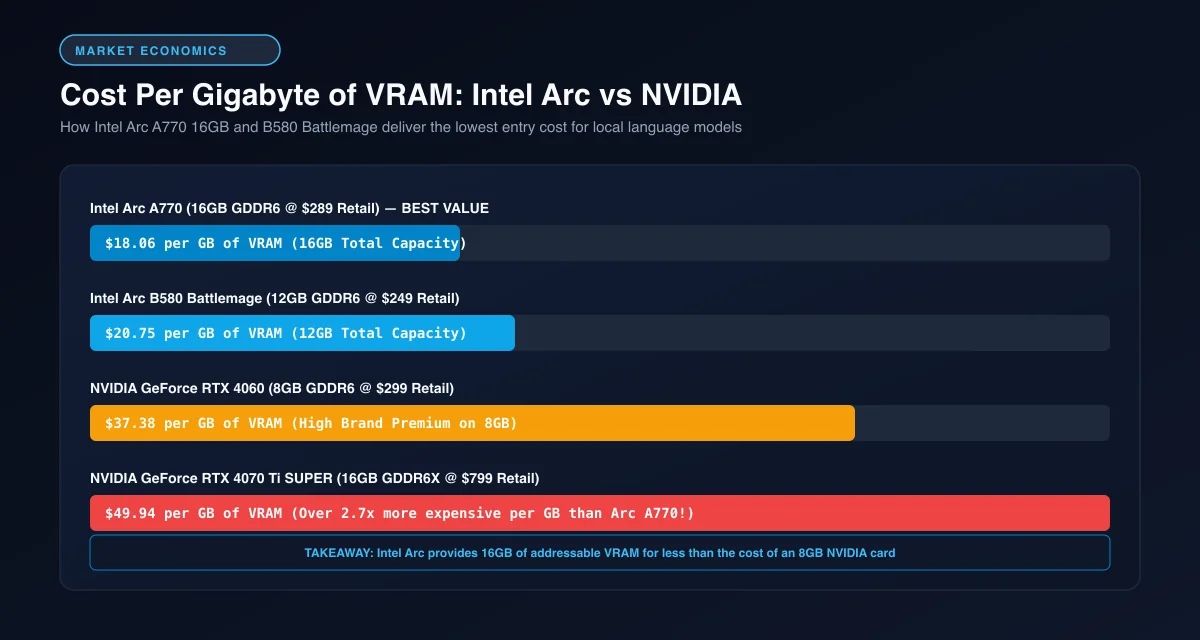 Cost per gigabyte of VRAM: Intel Arc provides 16GB of video memory at less than half the cost of competing cards.
Analyzing the intel arc a770 16gb ai value proposition highlights this price-to-capacity advantage. At retail pricing around 290 dollars, the Arc A770 delivers 16GB of GDDR6 memory at roughly 18 dollars per gigabyte. That capacity enables developers to host 14B parameter models locally that cannot physically fit onto an 8GB RTX 4060.
To understand how memory headroom prevents out-of-memory errors during long context sessions, examine our detailed analysis of VRAM requirements for AI models.
Hardware Breakdown: Arc A770 16GB vs Arc B580 Battlemage
Intel offers two compelling hardware generations for local machine learning: first-generation Alchemist and second-generation Battlemage silicon.
+------------------------------------------------------------------------+
|               ALCHEMIST (A770) VS BATTLEMAGE (B580)                    |
|                                                                        |
|  Intel Arc A770 (Alchemist):                                           |
|  - Memory Pool:     16GB GDDR6 (256-Bit Bus | 512 GB/s)                |
|  - Strength:        Maximum VRAM Capacity (Runs 14B Models Natively)   |
|  - Best Workflow:   Large Context Windows & 14B Quantized LLMs         |
|                                                                        |
|  Intel Arc B580 (Battlemage):                                          |
|  - Memory Pool:     12GB GDDR6 (192-Bit Bus | 456 GB/s)                |
|  - Strength:        Xe2 Core IPC & Faster Matrix Multiplications       |
|  - Best Workflow:   High-Speed 8B Models (63 - 89 Tokens/Sec)          |
+------------------------------------------------------------------------+
The intel arc b580 battlemage local ai card introduces the refined Xe2 microarchitecture. While the B580 drops memory bus width to 192 bits and VRAM to 12GB, its updated compute engines process prompt prefill and token generation significantly faster per clock cycle than the older A770.
For developers prioritizing high tokens per second on 8B parameter models, the B580 delivers superior interactive snappiness. However, developers working with large codebases or multi-document RAG pipelines benefit more from the A770 with its full 16GB frame buffer. For model sizing guidelines, review our guide to the best local LLM for coding by VRAM.
The Intel Software Stack: OpenVINO, IPEX-LLM, and oneAPI SYCL
The early reputation of Intel Arc suffered from immature graphics drivers and limited deep learning framework integration. Over recent development cycles, Intel and the open-source community established robust execution runtimes.
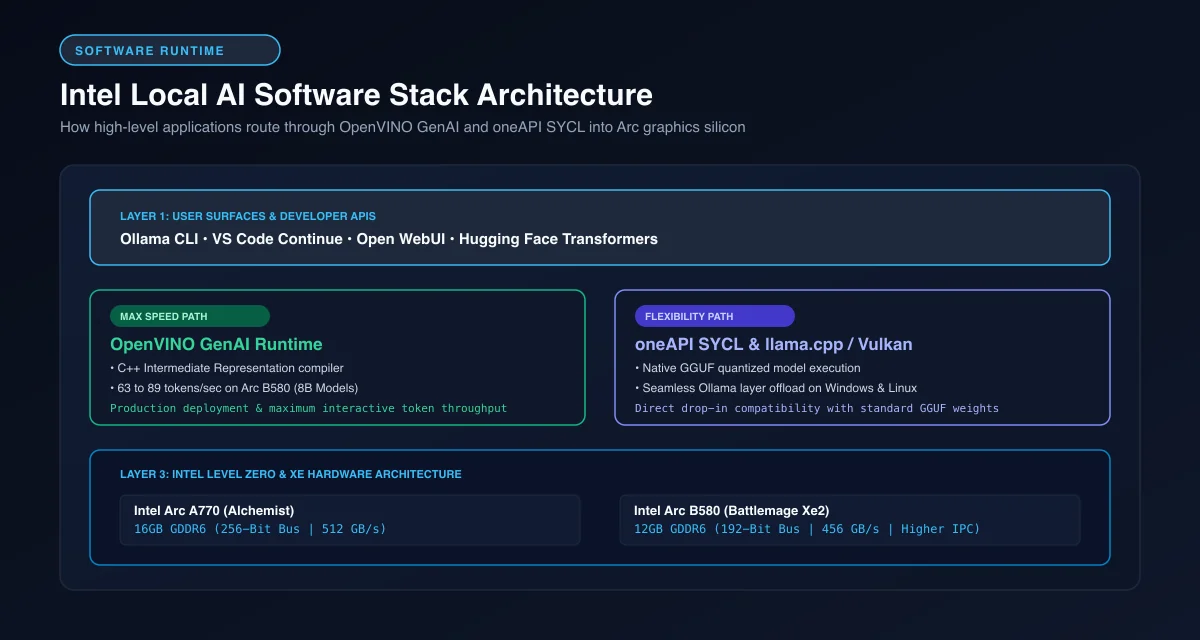 Intel local AI software architecture: High-level developer APIs routing through OpenVINO GenAI and oneAPI Level Zero.
Running openvino local llm inference represents the fastest software execution path on Intel hardware. OpenVINO is Intel’s optimized deployment toolkit, compiling model weights into low-overhead intermediate representations that extract maximum utilization from Arc execution units.
For developers working directly with PyTorch and Hugging Face repositories, ipex-llm intel gpu acceleration provides custom low-bit quantization kernels. The Intel IPEX-LLM Project GitHub Repository includes specialized INT4, INT8, and FP4 formats alongside FlashMoE support for mixture-of-experts architectures.
Token Speed Benchmarks: Intel Arc vs RTX 3060 12GB and RTX 4060 8GB
Evaluating real-world throughput across mid-range graphics hardware reveals that Intel Arc competes closely with established NVIDIA cards.
| GPU Model | Street Price | VRAM Capacity | Cost per GB VRAM | Memory Bandwidth | Tokens/Sec (8B Q4) | Max Practical Model |
|---|---|---|---|---|---|---|
| Intel Arc B580 (Xe2) | $249 - $269 | 12 GB GDDR6 | $21.58 | 456 GB/s | 63 - 89 t/s (OpenVINO) | 8B - 9B Models |
| Intel Arc A770 (Xe) | $289 - $320 | 16 GB GDDR6 | $18.75 | 512 GB/s | 55 - 69 t/s (OpenVINO) | 14B Models (Q4) |
| NVIDIA RTX 3060 | $279 - $299 | 12 GB GDDR6 | $24.08 | 360 GB/s | 42 - 48 t/s (CUDA) | 8B - 14B Models |
| NVIDIA RTX 4060 | $299 - $329 | 8 GB GDDR6 | $38.62 | 272 GB/s | 35 - 45 t/s (CUDA) | 7B - 8B Models |
In comparative evaluations, the Arc B580 achieves between 63 and 89 tokens per second on quantized 8B models using OpenVINO. This outpaces both the RTX 3060 12GB and RTX 4060 8GB on standard single-stream generation.
For developers seeking advice on sub-300-dollar NVIDIA hardware, consult our benchmark review of the best local LLMs for RTX 4060, 3070, and 5060 GPUs.
Step-by-Step Setup: Running Ollama and OpenVINO on Intel GPUs
Deploying local models on an Intel Arc graphics card is straightforward with modern toolchains.
For standard conversational use, configuring an ollama intel arc sycl setup delivers the smoothest developer workflow. Download Ollama and launch the server with oneAPI SYCL acceleration flags:
# Launch Ollama with Intel GPU acceleration enabled on Linux/Windows
OLLAMA_NUM_GPU=99 ollama run qwen2.5:7b "Explain memory bus width in 40 words."
[!TIP] For maximum token generation speed on Intel Arc silicon, convert Hugging Face weights to OpenVINO Intermediate Representation (IR) with INT4 weight compression. The OpenVINO GenAI runtime bypasses Python interpreter overhead and delivers up to 40% higher token generation rates than generic SYCL translation layers.
If your objective is maximizing token throughput, convert foundation models to OpenVINO format using the OpenVINO Toolkit Official GitHub Repository. Run the Python inference script below to benchmark generation on Intel hardware:
import time
from openvino_genai import LLMPipeline

def execute_openvino_inference(model_path: str, prompt: str):
    """Execute optimized LLM generation on Intel Arc graphics hardware."""
    print("Initializing OpenVINO GenAI pipeline on device: GPU...")
    start_init = time.time()
    pipe = LLMPipeline(model_path, "GPU")
    print(f"Pipeline initialized in {time.time() - start_init:.2f} seconds.")

    print(f"\nPrompt: {prompt}\nGenerating completion...")
    start_gen = time.time()
    response = pipe.generate(prompt, max_new_tokens=256)
    elapsed = time.time() - start_gen

    token_estimate = len(response.split()) * 1.3
    tps = token_estimate / elapsed if elapsed > 0 else 0

    print(f"\nResponse:\n{response}")
    print(f"\nGeneration Time: {elapsed:.2f}s | Throughput: ~{tps:.1f} tokens/sec")

if __name__ == "__main__":
    # Path to converted OpenVINO IR model directory
    model_dir = "./openvino_models/qwen2.5-7b-int4"
    test_query = "What are the primary architectural benefits of Intel Xe2 Battlemage?"
    try:
        execute_openvino_inference(model_dir, test_query)
    except Exception as exc:
        print(f"OpenVINO runtime execution: {exc}")
Additionally, developers using llama.cpp can compile the binary with SYCL support by following instructions in the llama.cpp Official GitHub Repository. For desktop workstation tuning, consult our complete guide to running Ollama locally.
Ecosystem Trade-Offs: When to Choose Intel Arc over NVIDIA CUDA
Deciding between intel arc vs nvidia for local ai ultimately hinges on your willingness to navigate non-CUDA toolchains.
+------------------------------------------------------------------------+
|                     INTEL ARC VS NVIDIA CUDA TRADEOFF                  |
|                                                                        |
|  Choose Intel Arc If:                                                  |
|  - You want 16GB of VRAM for under $300 to run 14B models.             |
|  - Your workflow relies on standard Ollama, llama.cpp, or OpenVINO.    |
|  - You want maximum memory capacity per dollar spent.                  |
|                                                                        |
|  Choose NVIDIA CUDA If:                                                |
|  - You clone experimental GitHub machine learning repos weekly.        |
|  - Your workflow depends on custom PyTorch CUDA extensions or Triton.  |
|  - You prioritize plug-and-play installation without custom runtimes.  |
+------------------------------------------------------------------------+
If your objective is maximizing VRAM capacity on a 300-dollar budget to host 14B models or run long context windows, the Intel Arc A770 16GB is unmatched. However, if your engineering workflow requires running bleeding-edge research papers or proprietary LoRA training scripts, NVIDIA CUDA remains the standard path.
For developers considering pre-owned NVIDIA hardware with 24GB VRAM, read our evaluation on whether a used RTX 3090 is still worth it for AI to weigh secondary market pricing.
Frequently Asked Questions About Intel Arc for Local AI
Is Intel Arc good for local LLMs?
Yes, Intel Arc graphics cards like the Arc A770 16GB and Arc B580 12GB provide excellent budget value for local LLM inference. With modern OpenVINO and IPEX-LLM backends, they generate 55 to 89 tokens per second on 8B models while costing a fraction of competing NVIDIA hardware.
Does Ollama work on Intel Arc GPUs?
Ollama supports Intel Arc GPUs natively on both Windows and Linux through its oneAPI and SYCL execution backends. Developers can download and run standard GGUF quantized models with automated layer offloading directly to Intel graphics memory.
Which is better for AI: Intel Arc A770 or RTX 4060?
The Intel Arc A770 is better for larger models because its 16GB VRAM buffer runs 14B models and large context windows that exceed the 8GB limit of the RTX 4060. However, the RTX 4060 features faster CUDA library compatibility for niche machine learning research repositories.
What is the difference between OpenVINO and IPEX-LLM on Intel Arc?
OpenVINO is Intel’s optimized C++ deployment engine designed for maximum token generation speed and low runtime overhead. IPEX-LLM is an extension for PyTorch that allows developers to run Hugging Face transformers, fine-tuning scripts, and MoE models directly on Intel graphics.