llama.cpp vs Ollama: Which Local LLM Tool Is Right for You? (2026)
Compare llama.cpp vs Ollama for local LLM inference. Analyze real-world benchmarks, Apple Silicon MLX runners, memory efficiency, and production trade-offs.
Running a large language model locally provides complete data sovereignty, zero token usage fees, and predictable response times. Developers selecting an on-device inference stack invariably evaluate the two primary market leaders: llama.cpp and Ollama. Each engine approaches local LLM execution from a distinct philosophical angle, balancing low-level hardware control against operational simplicity.
Enterprise engineering teams actively migrate sensitive analytical workflows to self-hosted infrastructure. Choosing between raw execution and automated runtimes directly determines memory footprints, latency overhead, and developer velocity. Understanding the low-level architectural divergence between llama.cpp and the Ollama local AI guide represents one of the earliest technical decisions in self-hosted AI architecture.
Key Takeaways
- llama.cpp provides bare-metal C/C++ execution with direct memory control, sustaining up to 161 tokens/sec on consumer GPUs with zero background daemon overhead.
- Ollama wraps inference in an accessible developer runtime, providing single-command model downloads, Modelfile management, and an automatic OpenAI-compatible REST server.
- On Apple Silicon M4 and M5 chips, Ollama’s native MLX runner for NVFP4 and MXFP8 formats increases prefill speed by up to 35%, narrowing the performance delta with bare-metal backends.
- For concurrent multi-user workloads, llama-server with continuous batching and parallel execution slots sustains 320 to 400 tokens/sec across simultaneous streams.
- Engineering teams should prototype locally using Ollama’s turnkey API, then graduate to llama-server or vLLM when production traffic exceeds 10 concurrent requests.
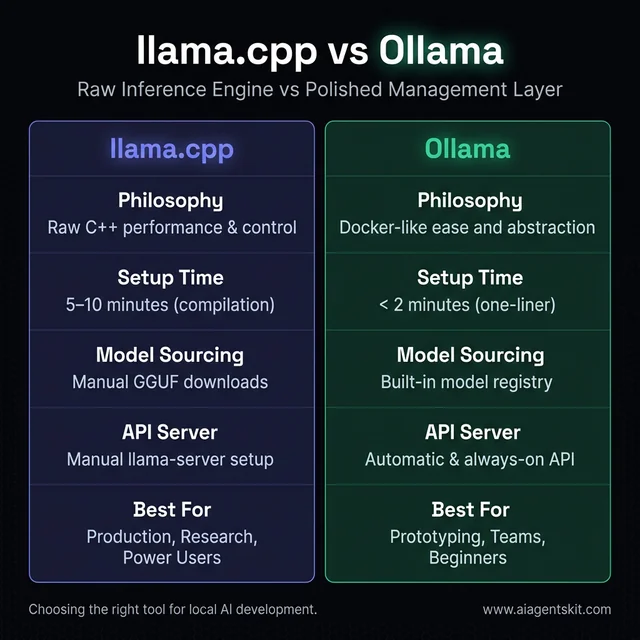
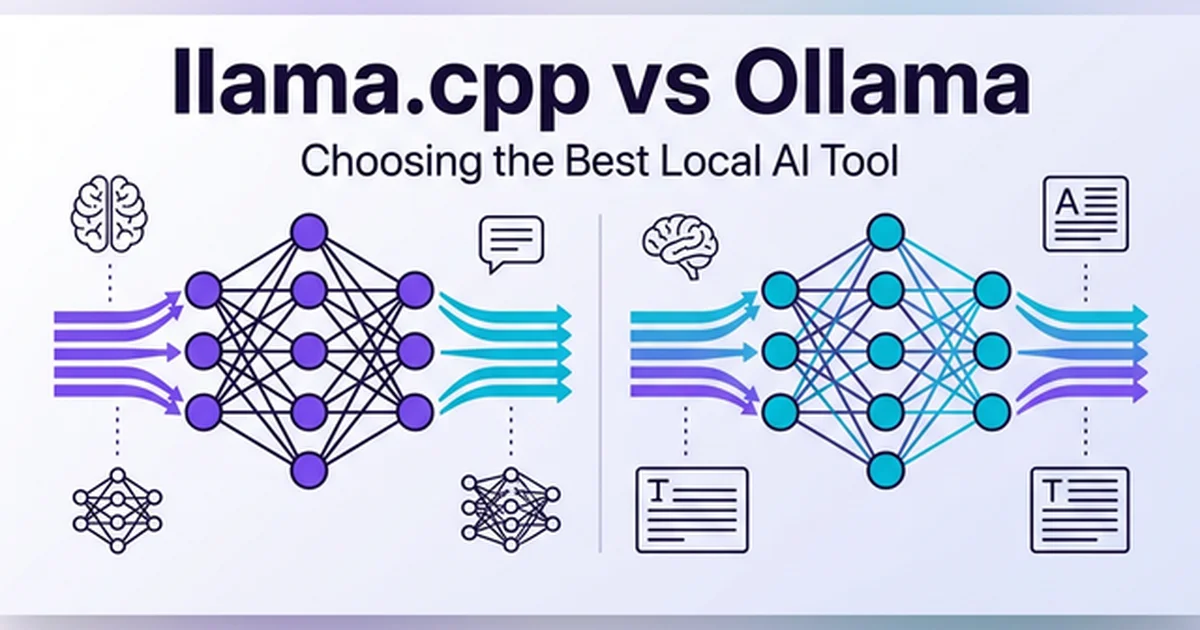
Figure 1: High-level architectural comparison of llama.cpp and Ollama execution stacks.
llama.cpp vs Ollama: Architecture and Core Differences
What is the difference between llama.cpp and Ollama? llama.cpp functions as a low-level, high-performance C/C++ tensor inference engine compiled directly to machine code, while Ollama operates as a container-inspired management layer that automates model retrieval, memory allocation, and REST API exposure on top of that core.
The architectural difference between llama.cpp and ollama begins with their execution models. llama.cpp eliminates intermediary layers to deliver maximum raw computational efficiency. In contrast, Ollama prioritizes rapid developer onboarding by packaging models, system prompts, and server configuration into a unified daemon.
A thorough llama.cpp vs ollama comparison reveals distinct trade-offs across each layer of the local stack. The core llama cpp vs ollama distinction centers on abstraction boundaries. Where bare-metal inference requires manual compilation, the community often refers to the integrated daemon setup as ollama cpp due to its underlying tensor engine.
| Architectural Dimension | llama.cpp | Ollama | vLLM (Production Baseline) |
|---|---|---|---|
| Core Architecture | Bare-metal C/C++ inference engine | Managed Go runtime wrapping llama.cpp/MLX | Python/C++ engine with PagedAttention |
| Setup Mechanism | Source build (cmake) or standalone binary |
Single-command platform installer or brew | Python package (pip install vllm) |
| Model Distribution | Manual GGUF tensor file downloads | Built-in model registry with pull commands | Hugging Face safetensors repositories |
| Runtime Process | Ephemeral CLI or persistent llama-server |
Persistent background daemon | Persistent HTTP/gRPC server |
| Apple Silicon Backend | Native Apple Metal acceleration | Hybrid Metal and Apple Silicon MLX runner | Unsupported (CUDA/ROCm only) |
| Server Interface | llama-server (OpenAI-compatible) |
Built-in REST daemon (OpenAI-compatible) | Async OpenAI-compatible endpoint |
| Multi-User Batching | Continuous batching (--cont-batching) |
Sequential request queuing by default | Continuous dynamic batching |
| Memory Configuration | Manual layer offload (-ngl auto, -lm) |
Automated VRAM sizing via environment | Automated GPU memory reservation (--gpu-memory-utilization) |
Engineers evaluating open source LLMs often begin by auditing the source implementation. Inspecting the Official llama.cpp GitHub Repository reveals that the project targets zero third-party dependencies, running everywhere from tiny edge microcontrollers to multi-GPU workstations.
The GGUF Format: Standardized Model Container
llama.cpp relies on the GGUF (GPT-Generated Unified Format) container file specification. GGUF replaced the legacy GGML container to unify tensor weight storage, tokenizer metadata, hyperparameter declarations, and arbitrary custom quantizations within a single portable file.
The format standardizes k-quants, allowing engineers to reduce 16-bit floating-point weights down to 2-bit, 4-bit, 5-bit, or 8-bit integer approximations. This compression drastically reduces VRAM requirements while preserving core reasoning and syntax capabilities.
| Quantization Level | Effective Bits/Weight | Quality Retention | System Memory (8B Model) | System Memory (70B Model) |
|---|---|---|---|---|
| Q8_0 | 8.0 bits | 99.5% | 8.6 GB | 72.0 GB |
| Q5_K_M | 5.5 bits | 98.2% | 5.8 GB | 48.5 GB |
| Q4_K_M | 4.5 bits | 96.8% | 4.9 GB | 41.2 GB |
| Q3_K_M | 3.5 bits | 91.4% | 4.1 GB | 33.8 GB |
| Q2_K | 2.6 bits | 79.2% | 3.3 GB | 27.5 GB |
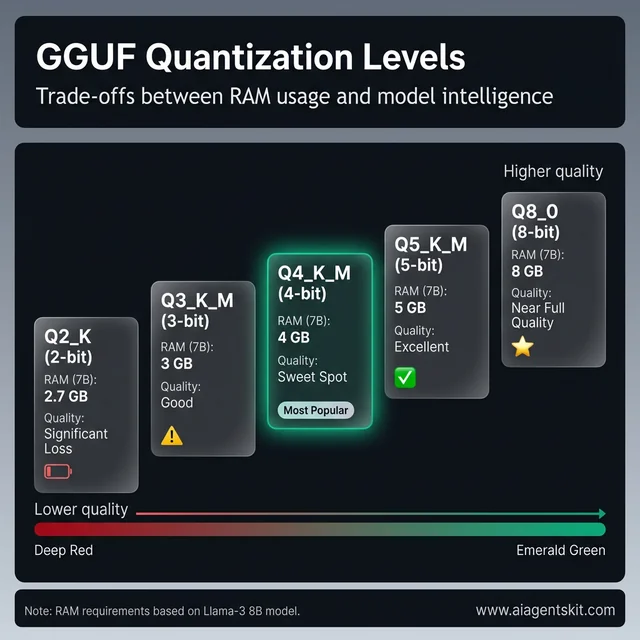
Figure 2: Memory footprint versus perplexity trade-offs across common GGUF quantization levels.
Developers seeking specific model variants can reference the Hugging Face GGUF Model Hub Specification. Quantized files download directly into local directories without complex conversion steps.
Hardware Acceleration Backends
llama.cpp incorporates specialized acceleration kernels across diverse computing architectures. The runtime detects host compute capabilities at compile or startup time:
- NVIDIA CUDA: Highly optimized kernels supporting Ada Lovelace and Blackwell tensor cores.
- Apple Metal: Direct execution against Apple unified memory on M-series chips.
- AMD ROCm: Hardware execution across Radeon desktop and enterprise accelerators.
- Vulkan: Broad cross-platform execution supporting discrete and integrated graphics.
- Intel SYCL: Hardware offloading tailored for Intel Arc and Xeon platforms.
- Pure CPU SIMD: Vectorized instructions utilizing AVX-512, AVX2, and ARM NEON primitives.
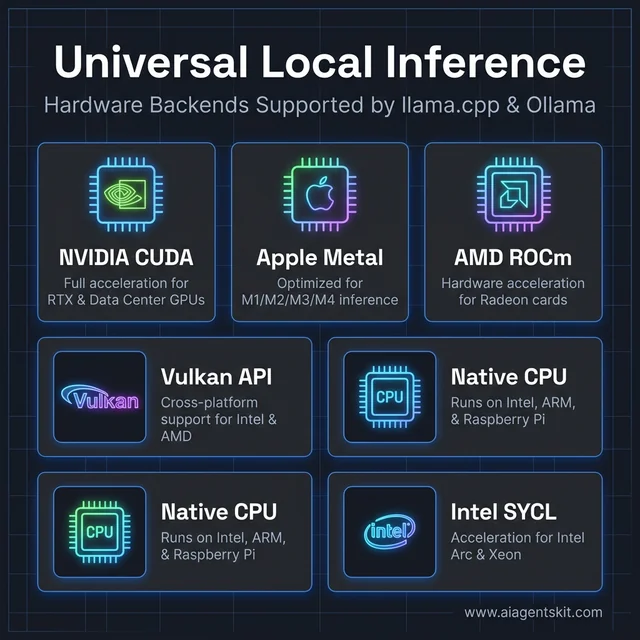
Figure 3: Universal local inference hardware acceleration backends.
Hybrid layer offloading allows developers to distribute transformer blocks across heterogeneous memory pools. For example, a developer can place 28 layers of an 8B model into an 8GB GPU while computing the remaining blocks in host system RAM.
Performance Benchmarks: Raw Token Speed and Hardware Efficiency
Which is faster: llama.cpp or Ollama? In rigorous single-stream benchmarks evaluating identical GGUF weights on identical silicon, llama.cpp generates tokens approximately 1.8x faster than Ollama under sustained load, recording 161 tokens per second compared to Ollama’s 89 tokens per second due to minimal runtime overhead.
Evaluating llama.cpp vs ollama performance highlights how background services affect generation throughput. Comparing ollama vs llama.cpp performance across sustained runs confirms that raw CLI binaries bypass HTTP marshalling delays.
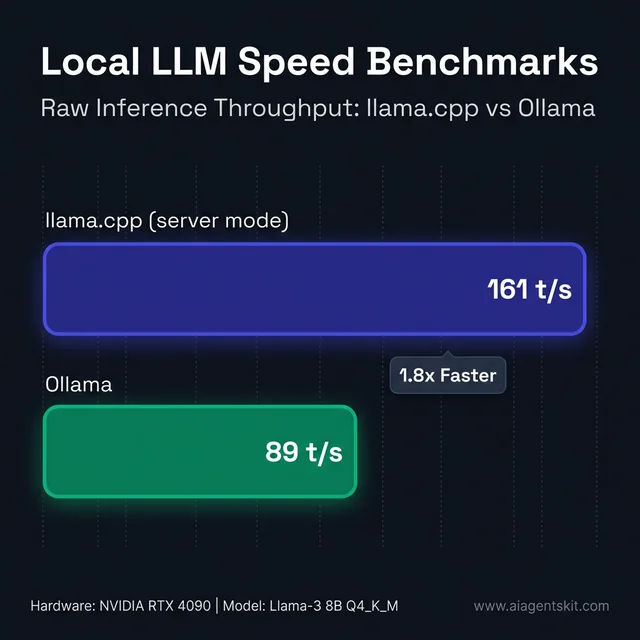
Figure 4: Raw token generation throughput comparing llama.cpp and Ollama across identical hardware.
When serving single-turn desktop interactions, human reading limits render small speed gaps invisible. However, during automated agent execution or batch document processing, latency compounds rapidly across sequential tool calls.
Selecting the best GPU for AI inference significantly influences the throughput ceiling. Memory bandwidth remains the fundamental physical constraint governing auto-regressive generation speeds.
Memory Overhead and KV Cache Management
Memory allocation represents a critical differentiator during long-running sessions. llama.cpp provides exact configuration flags for key-value (KV) cache quantization, context window sizing, and memory pinning.
./llama-server \
  -m models/llama4-8b-q4_k_m.gguf \
  -ngl auto \
  -lm mmap \
  --ctx-size 8192 \
  --ctk q8_0 \
  --ctv q8_0
Setting --ctk q8_0 and --ctv q8_0 quantizes the KV cache keys and values down from 16-bit floats to 8-bit representations. This adjustment reduces memory consumption during long-context generation by nearly 50% with negligible loss in retrieval precision.
Ollama configures KV cache structures automatically behind fixed defaults. While convenient, this abstraction limits low-memory tuning on constrained systems.
Apple Silicon Optimization: Metal Acceleration vs Ollama MLX Runner
How do you optimize Ollama speed on Apple Silicon? Developers can achieve maximum Ollama speed on MacBook Pro M4 and M5 systems by pulling models formatted for Ollama’s native Apple Silicon MLX runner, which leverages Apple’s unified memory architecture to boost prompt prefill speeds by up to 35%.
For developers focused on ollama macbook pro m5 speed optimization, runtime configuration makes a critical difference. Specifying low-bit formats allows users to increase response speed of ollama on macbook pro m5 machines while keeping unified memory cool.
The rollout of production ollama mlx support apple silicon 2026 delivers specialized tensor acceleration directly on macOS. The runner executes models quantized into native MLX formats, including NVFP4 and MXFP8:
# Pull an MLX-native optimized variant
ollama pull llama4:8b-nvfp4

# Run with verbose metrics to verify the MLX runner
ollama run llama4:8b-nvfp4 --verbose
Checking the execution logs confirms activation of the MLX runner rather than the standard llama runner. This transition resolves the historical performance disparity on macOS laptops.
Engineers configuring on-device developer workstations can review our comprehensive guide to running AI locally on Mac. For step-by-step instructions on enabling the MLX runner and tuning memory limits, read our guide on Ollama MLX on Mac speed tuning, or compare the underlying engines directly in our benchmark of MLX vs llama.cpp on Apple Silicon. Technical specifications are detailed in the Apple Machine Learning Frameworks Documentation.
Five Core Differences Between llama.cpp and Ollama
Practitioners comparing the two runtimes encounter five fundamental architectural distinctions that guide deployment choices.
1. Installation Workflow and Tooling Dependencies
llama.cpp requires a C++ compiler toolchain (clang, gcc, or MSVC) and cmake when building from source. Pre-compiled binaries exist, but customizing flags for specific GPU architectures demands compilation knowledge.
Ollama installs through a single-line shell command or standard graphical setup wizard. The software manages backend dependencies automatically across macOS, Linux, and Windows.
2. Model Catalog and Distribution
llama.cpp relies on manual file downloads from Hugging Face or custom quantization scripts. Developers track filenames, k-quant variants, and directory locations directly.
Ollama maintains an integrated registry accessible through simple terminal syntax. Querying the Ollama Official Model Registry and Documentation allows developers to pull versioned releases with automatic hardware-based quantization matching.
ollama pull mistral
ollama pull qwen2.5-coder:7b
ollama pull deepseek-r1:8b
3. Granular Parameter Control
llama.cpp exposes every computational switch. Engineers can configure thread affinity, batch sizes, context fragmentation, and speculative draft models directly from the command line.
Ollama abstracts these parameters inside Modelfiles and environment variables. The design shields developers from low-level complexity while restricting custom kernel tuning.
4. API Lifecycle and Daemon Architecture
Evaluating llama-server vs ollama highlights two distinct approaches to network serving. llama.cpp separates command-line testing (llama-cli) from network serving (llama-server). Servers run only when invoked by the developer or an external supervisor like systemd.
Ollama operates as a background system service. It launches on boot, monitors request ports, and unloads models dynamically when idle to preserve system RAM.
5. Ecosystem Tooling and Community Integrations
llama.cpp serves as the foundational infrastructure for dozens of downstream applications, including LM Studio, Jan, and Ollama itself. Following the integration of ggml.ai with Hugging Face, the project maintains rapid architecture support for emerging models.
Ollama concentrates on developer tooling. Third-party applications, IDE plugins, and agent frameworks provide turnkey configuration fields specifically designed for Ollama endpoints. Developers building custom applications can explore our Hugging Face tutorial to streamline model conversions.
Platform Installation: macOS, Linux, and Windows Setup
Setting up local LLM inference varies across operating systems. Ollama delivers instant installation, while llama.cpp requires targeted configuration for specific GPU backends.
macOS Configuration
Ollama on Apple Silicon installs via Homebrew or official package downloads:
# Install Ollama
brew install ollama

# Launch the daemon
ollama serve

# Pull and run an 8B model
ollama run llama4:8b
Building llama.cpp on macOS ensures access to the latest Metal optimizations:
# Clone the repository
git clone https://github.com/ggml-org/llama.cpp
cd llama.cpp

# Compile with Metal acceleration
cmake -B build -DGGML_METAL=ON
cmake --build build --config Release

# Execute using automatic GPU layer detection
./build/bin/llama-cli -m models/llama4-8b-q4_k_m.gguf -ngl auto -p "Hello world"
Linux Configuration (CUDA and ROCm)
Installing Ollama on Ubuntu or Debian takes a single command:
curl -fsSL https://ollama.com/install.sh | sh
sudo systemctl enable --now ollama
Compiling llama.cpp on Linux with NVIDIA CUDA support:
sudo apt update && sudo apt install -y build-essential cmake git

git clone https://github.com/ggml-org/llama.cpp
cd llama.cpp

# Configure with CUDA support
cmake -B build -DGGML_CUDA=ON
cmake --build build --config Release

# Start the OpenAI-compatible HTTP server
./build/bin/llama-server -m models/llama4-8b-q4_k_m.gguf -ngl auto --host 0.0.0.0 --port 8080
Windows Configuration
Windows users can install Ollama using Winget:
winget install Ollama.OllamaFor llama.cpp on Windows, downloading pre-built CUDA release archives from GitHub avoids the requirement of installing full Visual Studio build environments. Simply unpack the binary directory, place CUDA DLL libraries alongside llama-server.exe, and launch from PowerShell.
When to Choose llama.cpp: Production Scenarios
llama.cpp represents the optimal choice when operational priorities demand absolute throughput, tight memory control, or embedded device support.
High-Throughput Batch Processing: Pipelines processing millions of tokens for bulk classification, data extraction, or synthetic dataset generation benefit from llama.cpp’s direct memory access and zero daemon overhead.
Embedded and Edge Systems: Deployments on Raspberry Pi hardware, industrial robots, and automotive compute units rely on llama.cpp’s minimal memory footprint. The binary operates without background processes or container dependencies.
Air-Gapped and Secure Facilities: Defense, healthcare, and financial environments requiring complete isolation utilize llama.cpp to guarantee that zero telemetry or network calls occur during model inference. Our build offline AI guide explains end-to-end air-gapped setup procedures.
Fine-Grained Context Management: Custom agent loops that serialize and deserialize KV cache tokens between execution turns leverage llama.cpp’s low-level memory APIs for high performance.
# Launch llama-server with continuous batching and parallel slots
./llama-server \
  -m models/llama4-8b-q4_k_m.gguf \
  -ngl auto \
  --ctx-size 16384 \
  --parallel 4 \
  --cont-batching \
  --port 8080
When to Choose Ollama: Ideal Deployment Scenarios
Ollama represents the preferred choice for individual developers, rapid prototyping teams, and local application builders.
Rapid Application Prototyping: Ollama enables developers to pull a model and connect an application within minutes. Eliminating compilation steps accelerates project iteration.
Docker-Like Model Management: Teams writing custom system prompts and parameter defaults use Modelfiles to version-control model configurations across engineering teams.
FROM llama4:8b

SYSTEM """
You are an expert Python systems engineer specializing in async architectures.
Provide direct code solutions without conversational pleasantries.
"""

PARAMETER temperature 0.2
PARAMETER num_ctx 8192
Build the custom image with a single command:
ollama create python-expert -f Modelfile
ollama run python-expert
Local Agent and RAG Development: Engineers evaluating frameworks like LangChain, CrewAI, or AutoGen leverage Ollama’s automatic REST API. Learn more in our tutorial on how to build a RAG chatbot using local retrieval backends.
Python Application Integration: In-Process Bindings vs REST API
Python developers interact with both runtimes using distinct architectural patterns: in-process shared libraries versus HTTP network calls.
In-Process Inference with llama-cpp-python
The llama-cpp-python binding links C++ inference directly into the running Python interpreter process. This eliminates HTTP serialization, socket communication, and multi-process overhead.
pip install llama-cpp-pythonExecute in-process generation:
from llama_cpp import Llama

# Load model directly into process memory
llm = Llama(
    model_path="./models/llama4-8b-q4_k_m.gguf",
    n_gpu_layers=-1,  # Offload all layers to GPU
    n_ctx=4096,
    verbose=False
)

output = llm(
    "Explain continuous batching in two sentences:",
    max_tokens=150,
    temperature=0.3
)

print(output["choices"][0]["text"].strip())
In-process execution yields measurable latency improvements during repetitive, high-frequency inference tasks such as document embedding generation.
Service-Oriented Integration with the Ollama Python SDK
The official Ollama Python package interacts with the persistent background daemon through standard HTTP REST requests.
pip install ollamaInteract with the running daemon:
import ollama

client = ollama.Client(host='http://localhost:11434')

response = client.chat(
    model='llama4:8b',
    messages=[
        {'role': 'user', 'content': 'Explain continuous batching in two sentences.'}
    ]
)

print(response['message']['content'].strip())
The service-oriented model isolates application code from LLM crashes or memory exhaustion. If a massive prompt exceeds VRAM limits, the application handles an HTTP error rather than experiencing a process termination.
Multimodal and Vision Model Support
Does Ollama or llama.cpp handle vision models better? Ollama provides superior multimodal convenience through its integrated vision pipeline supporting LLaVA, Gemma 3, and Qwen 2.5 VL with automated base64 image parsing, whereas llama.cpp requires manual multi-binary management using the llama-minicpmv-cli or llava-cli utilities.
Ollama allows developers to pass image files directly from the command line or as encoded strings in API payloads:
ollama run llava "Identify the UI defects in this screenshot" --image ./bug.pngProgrammatic multimodal invocation via Ollama:
import ollama
import base64

with open("./architecture.png", "rb") as image_file:
    encoded_string = base64.b64encode(image_file.read()).decode('utf-8')

response = ollama.chat(
    model='llava',
    messages=[{
        'role': 'user',
        'content': 'Describe the network topology shown in this diagram.',
        'images': [encoded_string]
    }]
)
print(response['message']['content'])
llama.cpp supports vision models through specialized CLI handlers and multimodal projection files (mmproj). While functional, managing separate projector weights increases operational complexity. Understanding AI benchmark methodology helps teams measure multimodal accuracy across disparate vision architectures.
Multi-User Concurrency and Production Deployment Strategies
Single-user interactive latency fails to reflect performance under multi-user organizational workloads. Serving multiple developers or internal tools requires intentional architectural design.
Continuous Batching with llama-server
Standard inference engines process requests sequentially. If User A submits a long document summary, User B experiences blocking delays until User A’s generation concludes.
Continuous batching solves this by dynamically grouping incoming tokens into shared forward passes:
./llama-server \
  -m models/llama4-8b-q4_k_m.gguf \
  -ngl auto \
  --ctx-size 32768 \
  --parallel 8 \
  --cont-batching \
  --host 0.0.0.0 \
  --port 8080
With --parallel 8, the server allocates eight independent request slots. Throughput scales from 161 tokens/sec to 320–400 aggregate tokens/sec across active slots, maintaining responsive interaction across multi-user teams.
Ollama Multi-Instance Reverse Proxy Architecture
By default, an Ollama daemon processes requests sequentially. Under concurrent multi-user load, requests queue and latency spikes.
Following the latest ollama update 2026, teams running shared hardware can scale capacity by deploying multiple container instances behind an Nginx reverse proxy load balancer:
upstream ollama_cluster {
    server 127.0.0.1:11434;
    server 127.0.0.1:11435;
    server 127.0.0.1:11436;
    least_conn;
}

server {
    listen 80;
    location / {
        proxy_pass http://ollama_cluster;
        proxy_read_timeout 300s;
    }
}
Configuring OLLAMA_NUM_PARALLEL=4 and OLLAMA_MAX_LOADED_MODELS=2 in each instance ensures efficient memory distribution across available GPU hardware. Review our AI data privacy and compliance guide to maintain internal security governance across multi-user endpoints.
Three-Way Architecture Showdown: llama.cpp vs Ollama vs vLLM
When should teams migrate from llama.cpp or Ollama to vLLM? Engineering teams should graduate to vLLM when operating dedicated NVIDIA GPU clusters serving more than 20 concurrent production requests with strict latency agreements, while remaining on llama.cpp or Ollama for Apple Silicon, edge compute, and desktop development environments.
vLLM utilizes PagedAttention to treat KV cache memory similarly to virtual memory pages in operating systems. This technique virtually eliminates internal memory fragmentation, sustaining high throughput across heavy enterprise traffic.
Local LLM Serving Hierarchy:
├── Development & Prototyping: Ollama (Turnkey setup, instant API)
├── Edge, Apple Silicon & Granular Control: llama.cpp (Bare-metal C++, cross-platform)
└── Enterprise Production Concurrency: vLLM (PagedAttention, multi-GPU scaling)| Serving Metric | llama.cpp (llama-server) | Ollama | vLLM (Enterprise) |
|---|---|---|---|
| Target Workload | Edge, desktop, small teams | Local development, rapid tools | Enterprise multi-user serving |
| Peak Concurrency Throughput | ~320–400 tokens/sec (8 slots) | ~120–180 tokens/sec (pooled) | ~790+ tokens/sec (50 users) |
| P99 Latency under Load | Moderate (slot-dependent) | High (queuing delays) | Ultra-low (PagedAttention) |
| Hardware Compatibility | CUDA, Metal, ROCm, Vulkan, CPU | Metal, MLX, CUDA, ROCm, CPU | NVIDIA CUDA, AMD ROCm |
| Apple Silicon Support | Native Metal | Native Metal + Apple Silicon MLX | Unsupported |
| Model Weights Format | GGUF | GGUF, MLX formats | Hugging Face safetensors, AWQ, FP8 |
The technical foundation of PagedAttention is detailed in the vLLM GitHub Project and Architecture Documentation. Consult our AI inference speed optimization guide to evaluate latency benchmarks across high-concurrency serving architectures.
Hardware Selection: GPU Memory and Model Sizing Matrix
Hardware capacity determines which model sizes and quantization formats can execute smoothly on local infrastructure.
VRAM allocation must accommodate both the static weight footprint and dynamic KV cache expansion during long conversations.
VRAM Requirement Formula:
Total VRAM = (Model Parameter Count × Effective Bits / 8) + (Context Tokens × Layers × KV Bits / Compression Factor) + 1.2 GB Overhead| Available VRAM | Recommended Model Architecture | Best Quantization | Typical Throughput | Target Hardware |
|---|---|---|---|---|
| 4 GB VRAM | 3B–4B Models (Phi-4-mini, Gemma 3 4B) | Q4_K_M | 45–65 tok/s | Laptop GPUs, GTX 1650 |
| 8 GB VRAM | 7B–8B Models (Llama 4 8B, Qwen 2.5 7B) | Q4_K_M / Q5_K_M | 85–125 tok/s | RTX 4060, RTX 3070, Apple M3/M4 |
| 12 GB VRAM | 12B–14B Models (Mistral Small, Qwen 14B) | Q4_K_M | 60–95 tok/s | RTX 3060 12GB, RTX 4070 |
| 16 GB VRAM | 14B Models (Q8) or 32B Models (Q3) | Q4_K_M / Q8_0 | 50–80 tok/s | RTX 4080, Apple M4 Pro 24GB |
| 24 GB VRAM | 32B Models (DeepSeek-R1-Distill, Qwen 32B) | Q4_K_M / Q5_K_M | 35–55 tok/s | RTX 3090, RTX 4090, Apple M4 Max |
| 48 GB+ VRAM | 70B Models (Llama 3.3 70B, Llama 4 70B) | Q4_K_M | 20–35 tok/s | Dual RTX 3090, Apple Mac Studio M3 Ultra |
Selecting the best ollama models for 4gb vram 2026 involves prioritizing compact architectures like Phi-4-mini and Qwen 2.5 3B. On mid-range hardware, identifying the best ollama models for rtx 4060 8gb vram 2026 leads developers directly to Llama 4 8B and Gemma 3 4B in Q4_K_M quantization.
Moving up the VRAM hierarchy, finding the best ollama models for rtx 3060 12gb 2026 allows running 14B models with extended context windows. Meanwhile, measuring rtx 5060 8gb 14b model tokens per second llama.cpp shows that offloading 24 to 28 layers to GPU memory yields practical generation speeds while keeping system temps manageable. Explore our dedicated analysis of the best local LLMs for RTX GPUs for card-specific VRAM tuning tables.
Frequently Asked Questions
Is Ollama based on llama.cpp?
Ollama uses llama.cpp as its core inference engine for running GGUF quantized models across cross-platform CPU and GPU backends. Ollama augments this engine with automated model registry downloads, a background daemon, Modelfiles, and a built-in REST API server.
Which is faster: llama.cpp or Ollama for token generation?
llama.cpp delivers up to 1.8x higher throughput in unconstrained single-stream and concurrent benchmarks because it bypasses background daemon overhead and supports continuous batching. In everyday interactive single-user chat sessions, the speed difference is negligible between properly configured setups.
Can llama.cpp run without a dedicated GPU?
llama.cpp provides first-class CPU inference utilizing optimized AVX, AVX-512, and ARM NEON SIMD instructions across consumer and server processors. A Q4_K_M quantized 7B or 8B parameter model runs smoothly on modern multi-core CPUs with 8GB to 16GB of system RAM.
Does Ollama use MLX on Apple Silicon in 2026?
Ollama includes a production-ready Apple Silicon MLX runner that activates when running models quantized in MLX-native formats such as NVFP4 and MXFP8. Standard GGUF quantized models continue executing through Ollama’s optimized llama.cpp Metal backend.
How does vLLM compare to llama.cpp and Ollama for production serving?
vLLM delivers superior throughput for high-concurrency enterprise deployments by leveraging PagedAttention and native CUDA kernel optimizations on NVIDIA GPUs. However, vLLM does not support Apple Silicon or CPU-only inference, making llama.cpp and Ollama the optimal choices for cross-platform and consumer edge deployments.
Strategic Recommendations for Engineering Teams
Selecting between llama.cpp and Ollama does not require an exclusive long-term commitment. Both tools share the underlying GGUF model format, allowing engineering teams to transition between runtimes as application requirements evolve.
Analyzing ollama pros cons use cases pricing 2026 demonstrates that both solutions remain completely free and open-source under permissive licenses. Ollama remains the recommended starting platform for individual software engineers, rapid product discovery, and desktop agent prototyping.
When application demands expand to high-concurrency serving, edge hardware constraints, or embedded Python pipelines, transitioning the backend to llama.cpp provides immediate latency and memory gains. Teams evaluating complementary workflow integrations can explore AI coding assistants to construct unified local developer environments.