Best Local LLM for Coding by VRAM: 8GB to 48GB Hardware Guide
Discover the best local LLM for coding matched to your GPU VRAM tier. Compare Qwen 2.5 Coder, DeepSeek Coder, KV cache math, and VS Code Continue setups.
Deploying an autonomous coding assistant on local hardware eliminates telemetry leaks, stops per-token API billing, and guarantees offline repository privacy. Software engineers evaluating local hardware quickly learn that rasterization speed means very little when selecting the best local LLM for coding. Physical video RAM dictates which model architectures fit into memory and whether inference executes at interactive speeds.
Pairing the wrong model architecture with your graphics card causes severe operating system paging or immediate out-of-memory crashes. Sizing your system correctly starts with selecting the best GPU for running AI locally and understanding the physical memory requirements of modern attention layers.
Key Takeaways
- Qwen 2.5 Coder 32B Instruct is the leading local coding model for 24GB VRAM cards like the RTX 3090 and RTX 4090, achieving an 88.4% HumanEval pass@1 score at 10 to 14 tokens per second.
- Available GPU VRAM dictates the parameter ceiling, with 8GB accommodating 7B models at Q4_K_M, 16GB hosting 14B models with generous context, and 24GB unlocking 32B dense architectures.
- Real-time IDE integration demands decoupling tab autocomplete from conversational chat, pairing a sub-500ms Fill-in-the-Middle (FIM) model like Qwen 2.5 Coder 1.5B with a larger reasoning engine in the sidebar.
- KV cache allocation consumes 1GB to 4GB of additional VRAM beyond static weights, requiring developers to size context limits deliberately to prevent out-of-memory crashes during multi-file repository indexing.
Why GPU VRAM Dictates Local Coding Model Performance
GPU VRAM determines the absolute upper boundary for model parameters and working context length during local code generation. When model weights exceed physical VRAM, the runtime spills memory chunks across the system PCIe bus into system RAM, dropping token throughput from 40 tokens per second to less than 2 tokens per second.
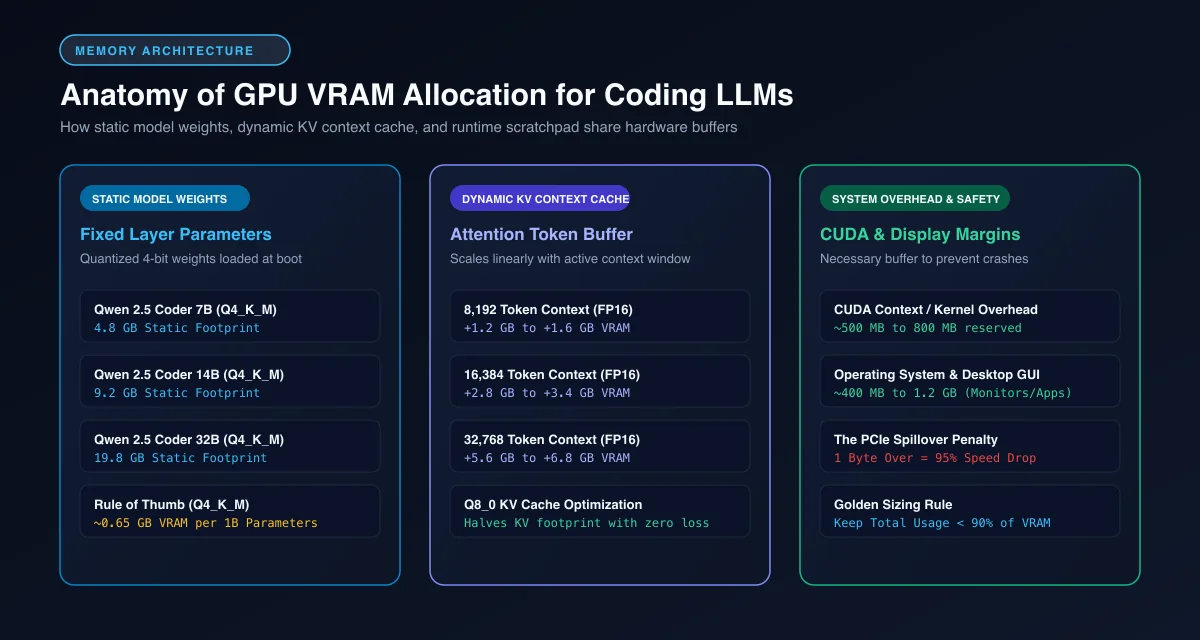 GPU VRAM buffer allocation: Static model weights, dynamic KV context cache, and CUDA runtime margins.
Calculating vram requirements for coding models requires accounting for three distinct memory pools. First, static model weights occupy fixed memory based on parameter count and quantization bit-depth. Second, the runtime framework reserves roughly 500MB to 800MB of scratchpad memory for CUDA contexts and compute buffers.
Third, the Key-Value (KV) cache grows dynamically with every token ingested from your active codebase. A 32B parameter model running a 16,384 token context window consumes approximately 3.2GB of VRAM solely for its attention cache. For deeper analysis of general memory math, examine our guide to VRAM requirements for AI models.
The Dual-Engine Pattern: Decoupling Autocomplete from Sidebar Chat
Inline tab autocomplete and conversational sidebar code refactoring require fundamentally different model architectures. Forcing a single large model to handle both workloads ruins developer flow by introducing noticeable keystroke latency.
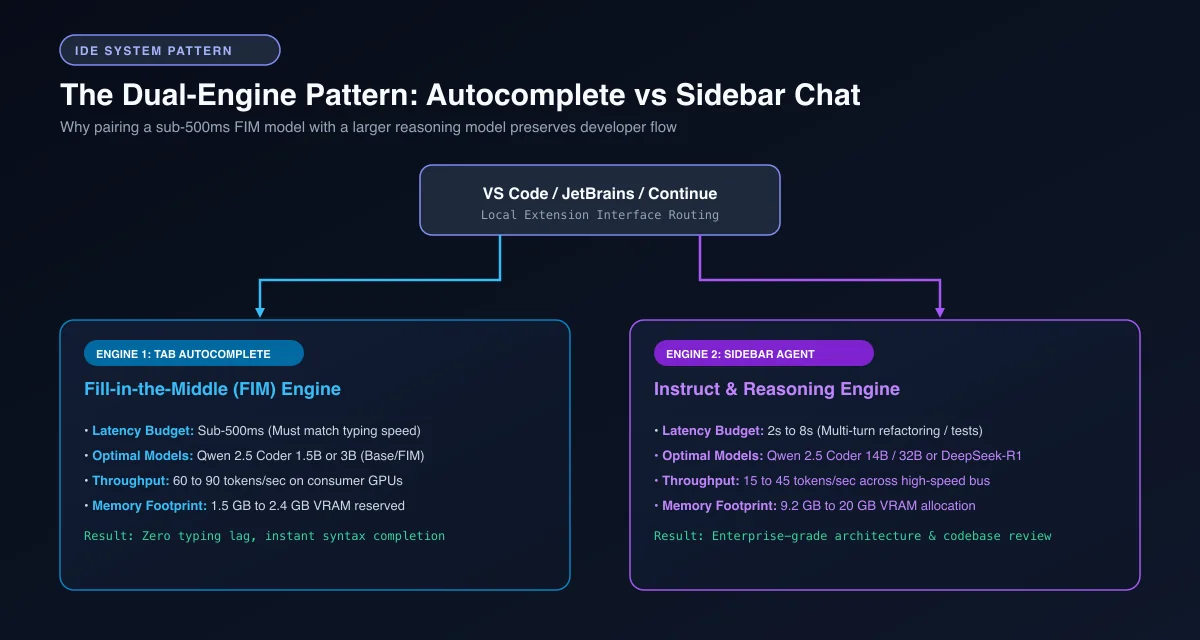 The dual-engine pattern: Pairing a sub-500ms FIM model with a larger conversational reasoning model in VS Code.
Effective local llm tab autocomplete relies on specialized fill in the middle coding models. A Fill-in-the-Middle (FIM) model accepts preceding code as a prefix and succeeding code as a suffix, predicting only the missing middle tokens. Traditional instruct models fail at this task because they output conversational preambles instead of raw syntax.
Autocomplete suggestions must land within a 500ms latency budget to feel responsive while typing. Running a compact 1.5B parameter FIM model delivers 60 to 90 tokens per second, easily hitting this timing window. Meanwhile, your sidebar chat leverages a heavier 14B or 32B instruct model capable of multi-file reasoning, test generation, and architectural design.
Best Local Coding LLMs by VRAM Tier: Hardware Sizing Matrix
Selecting the optimal model requires balancing parameter density, quantization format, and memory headroom. The hardware sizing matrix below outlines verified models across consumer GPU tiers.
| VRAM Tier | Recommended Model | Quantization | Static Weight RAM | KV Cache Headroom (8k) | Tokens/Sec (Decode) | Target Workflow |
|---|---|---|---|---|---|---|
| 8GB VRAM | Qwen 2.5 Coder 7B | Q4_K_M | 4.8 GB | 2.1 GB | 32 - 45 t/s | Inline FIM, single-file scripts |
| 12GB VRAM | Qwen 2.5 Coder 7B | Q8_0 / FP8 | 7.6 GB | 3.4 GB | 40 - 55 t/s | Precision refactoring, testing |
| 16GB VRAM | Qwen 2.5 Coder 14B | Q4_K_M | 9.2 GB | 5.5 GB | 22 - 32 t/s | Multi-function edits, small repos |
| 24GB VRAM | Qwen 2.5 Coder 32B | Q4_K_M | 19.8 GB | 3.2 GB | 11 - 15 t/s | Production coding, complex logic |
| 48GB+ VRAM | DeepSeek Coder V2 | Q4_K_M | 38.5 GB | 8.0 GB | 18 - 26 t/s | Enterprise monorepos, whole-system review |
8GB VRAM Tier: Lightweight Scripting with Qwen 2.5 Coder 7B
Running local models on 8GB cards like the RTX 4060 or RTX 3070 requires disciplined quantization choices. On these GPUs, Qwen 2.5 Coder 7B compressed to Q4_K_M represents the highest-performing option available.
The static weights consume approximately 4.8GB of memory. This leaves 2.4GB of free VRAM on an 8GB card, which comfortably accommodates an 8,192 token context window using 16-bit KV caching. Attempting to run a 14B model on an 8GB card forces heavy layer offloading to system RAM, which ruins generation speed.
For developers seeking dedicated recommendations on sub-10GB GPUs, explore our benchmark breakdown of the best local LLMs for RTX 4060, 3070, and 5060 GPUs.
12GB to 16GB VRAM Tier: Mid-Range Balance with 14B Models
Mid-range GPUs equipped with 12GB or 16GB of VRAM hit a practical sweet spot for individual engineers. Cards such as the RTX 3060 12GB, RTX 4070 12GB, and RTX 4060 Ti 16GB unlock 14B parameter models. Budget cards like the Intel Arc A770 16GB and B580 12GB also unlock these models via Vulkan; review our Intel Arc for local AI guide for verified tokens-per-second benchmarks.
At Q4_K_M quantization, Qwen 2.5 Coder 14B requires 9.2GB of static memory. On a 16GB card, this footprint leaves roughly 5.8GB of VRAM headroom, enabling context expansions up to 32,768 tokens without memory exhaustion. For complex algorithmic debugging, DeepSeek-R1-Distill-Qwen-14B provides superior reasoning traces, though its internal chain-of-thought generation increases latency.
Developers comparing deepseek coder vs qwen coder will find that Qwen produces cleaner code syntax out of the box with zero conversational fluff. DeepSeek excels at identifying subtle mathematical bugs and edge-case concurrency race conditions.
24GB VRAM Tier: Production Development with Qwen 2.5 Coder 32B
Single-card 24GB setups using an RTX 3090 or RTX 4090 deliver enterprise-grade local coding capability. At this memory tier, Qwen 2.5 Coder 32B Instruct operates as the definitive local coding standard.
+------------------------------------------------------------------------+
|              24GB VRAM ALLOCATION: QWEN 2.5 CODER 32B (Q4_K_M)         |
+-------------------------------------------------------+----------------+
|  Static Model Weights: ~19.8 GB                       | KV Cache: 3.2GB|
|  (32.5 Billion Parameters Quantized via llama.cpp)    | (16k Context)  |
+-------------------------------------------------------+----------------+
|  CUDA Context Buffers: ~0.8 GB                                         |
+------------------------------------------------------------------------+
Reviewing the qwen 2.5 coder vram requirements highlights why 24GB cards are prized. The 32B model at Q4_K_M takes 19.8GB of physical VRAM. This leaves approximately 3.4GB of memory for the KV cache, supporting 16,384 tokens of continuous repository context.
On an RTX 3090, this configuration generates 11 to 14 tokens per second, while an RTX 4090 delivers 20 to 25 tokens per second. In benchmark evaluations published in the Qwen 2.5 Coder Official GitHub Repository, Qwen 2.5 Coder 32B achieved an 88.4% pass@1 score on HumanEval. This performance matches proprietary cloud endpoints while keeping your proprietary codebase on local silicon.
48GB+ VRAM Tier: Multi-GPU and Enterprise Coding Workstations
Workstations equipped with dual 24GB GPUs or unified memory hardware unlock massive mixture-of-experts architectures. With 48GB of addressable VRAM, developers can host uncompressed 32B models or run DeepSeek-Coder-V2 236B.
The DeepSeek Coder GitHub Repository documents how its 236B Mixture-of-Experts architecture activates only 21B parameters per token. Quantized to Q4_K_M, the static model footprint requires 38.5GB of VRAM. Dual RTX 3090 cards linked across PCIe slots host this model cleanly while preserving 8GB of headroom for large multi-file diffs.
Dual-GPU rigs distribute transformer layers across both devices using tensor or pipeline parallelism. Inspect our technical walkthrough comparing llama.cpp vs Ollama execution runtimes to optimize tensor parallel performance across split memory channels.
Step-by-Step Setup: Configuring Ollama and Continue in VS Code
Establishing a resilient local coding environment in VS Code involves running Ollama as the local inference daemon and Continue as the IDE orchestration bridge. For comprehensive runtime setup commands, review our complete guide to running Ollama locally.
First, pull the designated FIM autocomplete model and the primary conversational instruct model through the terminal:
# Pull lightweight 1.5B model for sub-500ms tab autocomplete
ollama pull qwen2.5-coder:1.5b-base

# Pull primary 14B or 32B instruct model for sidebar chat and refactoring
ollama pull qwen2.5-coder:14b
Establishing a reliable continue vscode local llm workflow begins by configuring the Continue extension configuration file located at ~/.continue/config.yaml. Define your local models according to the Continue Official GitHub Repository specification to enforce strict role-based routing:
name: Local AI Assistant
models:
  - name: Qwen 2.5 Coder 14B (Chat)
    provider: ollama
    model: qwen2.5-coder:14b
    roles:
      - chat
      - edit
    requestOptions:
      num_ctx: 16384

tabAutocompleteModel:
  title: Qwen 2.5 Coder 1.5B (Autocomplete)
  provider: ollama
  model: qwen2.5-coder:1.5b-base
  roles:
    - autocomplete

customCommands:
  - name: test
    prompt: "Write comprehensive unit tests with edge cases for the selected code block."
    description: "Generate unit tests"
Save the file and reload VS Code. When typing in any editor tab, Continue intercepts keystrokes and queries the lightweight 1.5B base model via Fill-in-the-Middle tokens. When highlighting complex functions and pressing Ctrl+L, Continue routes the query to your primary 14B or 32B model.
[!TIP] For production coding workflows in VS Code, set
tabAutocompleteModel.requestOptions.num_ctx: 2048in Continue. Sizing the FIM context buffer to 2,048 tokens prevents the autocomplete daemon from consuming VRAM needed by your larger sidebar chat engine.
To verify memory allocation and check whether layers are spilling out of GPU memory, execute the Python monitoring snippet below:
import torch
import subprocess
import json

def audit_local_vram_allocation() -> dict:
    """Inspect current CUDA memory utilization and identify potential OOM risks."""
    if not torch.cuda.is_available():
        return {"error": "CUDA is not active on this workstation."}

    device_count = torch.cuda.device_count()
    device_metrics = []

    for idx in range(device_count):
        total_mem = torch.cuda.get_device_properties(idx).total_memory / (1024 ** 3)
        allocated_mem = torch.cuda.memory_allocated(idx) / (1024 ** 3)
        reserved_mem = torch.cuda.memory_reserved(idx) / (1024 ** 3)
        free_mem = total_mem - reserved_mem

        device_metrics.append({
            "gpu_index": idx,
            "device_name": torch.cuda.get_device_name(idx),
            "total_vram_gb": round(total_mem, 2),
            "allocated_vram_gb": round(allocated_mem, 2),
            "reserved_vram_gb": round(reserved_mem, 2),
            "free_vram_gb": round(free_mem, 2),
            "headroom_status": "CRITICAL" if free_mem < 1.5 else "OPTIMAL"
        })

    return {"devices": device_metrics}

if __name__ == "__main__":
    report = audit_local_vram_allocation()
    print(json.dumps(report, indent=2))
Production Gotchas: KV Cache Exhaustion and Context Degradation
Running local coding models introduces distinct operational challenges that differ from standard web APIs. The most frequent failure point is Key-Value cache exhaustion caused by unconstrained context windows.
+------------------------------------------------------------------------+
|                     KV CACHE CONTEXT WINDOW GROWTH                     |
|                                                                        |
|  Tokens:   2,048 tokens   ->   VRAM: 0.4 GB (Safe)                     |
|  Tokens:   8,192 tokens   ->   VRAM: 1.6 GB (Standard)                 |
|  Tokens:  16,384 tokens   ->   VRAM: 3.2 GB (High Load)                |
|  Tokens:  32,768 tokens   ->   VRAM: 6.4 GB (OOM Risk on 24GB Cards)   |
+------------------------------------------------------------------------+
When indexing large repositories with tools like Continue or Cline, the context window fills rapidly with syntax definitions, file trees, and AST chunks. If your model weights occupy 20GB on a 24GB card and context expands to 32,000 tokens, the KV cache demands 6.4GB of memory. This total of 26.4GB exceeds physical hardware limits, causing CUDA out-of-memory errors.
Engineers can resolve this issue by configuring 8-bit or 4-bit KV cache quantization inside their runner. In runtime engines using the llama.cpp Official GitHub Repository, setting --cache-type-k q8_0 --cache-type-v q8_0 cuts attention memory consumption by 50% with negligible loss in retrieval precision.
Another common pitfall is context degradation during multi-turn refactoring. While models advertise 32k or 128k context support, effective code recall drops significantly beyond 16,000 tokens. Clearing chat sessions between distinct feature implementations maintains strict code adherence and prevents hallucinated import statements.
Frequently Asked Questions About Local Coding LLMs
What is the best local LLM for coding in 2026?
Qwen 2.5 Coder 32B Instruct is the top local coding model for 24GB GPUs, achieving an 88.4% HumanEval score that rivals proprietary cloud APIs. For 8GB to 16GB cards, Qwen 2.5 Coder 7B and 14B offer the best balance of syntax accuracy, execution speed, and low memory footprint.
How much VRAM do you need for a local coding model?
You need a minimum of 8GB VRAM to run a quantized 7B coding model like Qwen 2.5 Coder 7B with an 8k context window. Developers seeking production-grade architectural analysis and refactoring should target 24GB VRAM to host 32B parameter models with sufficient KV cache headroom.
Can you use the same local model for both chat and tab autocomplete?
Using the same model for both chat and tab autocomplete is counterproductive because autocomplete demands sub-500ms response times and Fill-in-the-Middle (FIM) training. The recommended architecture pairs a lightweight 1.5B or 3B FIM model for tab completions with a 14B or 32B instruct model for conversational chat.
Is DeepSeek Coder better than Qwen 2.5 Coder for local coding?
Qwen 2.5 Coder is generally superior for day-to-day software development due to cleaner syntax formatting, minimal preamble, and broader language coverage across 90+ programming languages. DeepSeek models and their R1-distilled variants excel specifically at algorithmic debugging, mathematical proofs, and complex logic isolation.
How do you prevent out-of-memory errors when processing large codebases locally?
To prevent VRAM exhaustion, restrict the model context window to realistic bounds like 8,192 or 16,384 tokens and enable 8-bit KV cache quantization in your inference runner. Offloading overflow context layers to system RAM creates a severe throughput bottleneck, making aggressive context management essential.