Run AI on Mac: Apple Silicon Guide for 2026
Complete guide to running AI locally on Mac with Apple Silicon. Ollama setup, MLX framework, M5 hardware advice, Llama 4 support, and model recommendations for M1-M5 chips.
The assumption that running AI models requires dedicated NVIDIA graphics cards is no longer true for everyday engineering workflows. Apple Silicon’s unified memory architecture provides Mac users with a fundamentally different, and often superior, approach to local model execution. With the M5 generation delivering substantial matrix math throughput gains over earlier chips, the performance gap between consumer laptops and dedicated GPU workstations has closed for inference tasks.
Engineers evaluating how to run AI on Mac often struggle to determine memory requirements, backend framework differences, and hardware tiering. Understanding these architectural mechanisms helps you select the right machine and software runtime for your workloads. This guide examines the open source LLMs available for local use on macOS, compares runtime execution layers, and explains how to configure high-speed local inference on Apple Silicon hardware.
Key Takeaways
- Apple Silicon unified memory eliminates discrete GPU VRAM ceilings by allowing the CPU, GPU, and Neural Engine to access up to 128GB on M5 Max and 512GB on M5 Ultra.
- Model weights must never exceed 60% of total unified memory to reserve the remaining 40% for dynamic KV cache allocation and prevent memory swapping.
- Apple MLX delivers 15% to 30% higher steady-state generation throughput over llama.cpp Metal backends by leveraging zero-copy memory arrays. For an in-depth framework benchmark and quantization analysis, read our comparative guide on MLX vs llama.cpp on Apple Silicon.
- An M5 Max running a quantized 70B parameter model at 12 to 18 tokens per second draws approximately 50W of system power, compared to 300W to 600W for PC GPU rigs.
- Apple Intelligence manages OS-level utilities, whereas local runtimes like Ollama and MLX enable private, air-gapped execution of open-source frontier models.
What Makes Apple Silicon Unified Memory Unique for Local AI?
Apple Silicon combines the CPU, GPU, and Neural Engine into a single system on a chip that shares a unified physical memory pool. Unlike traditional PC architectures that separate system RAM from dedicated graphics card VRAM, Apple Silicon allows all compute cores to access the entire memory pool without PCI Express bus transfer penalties.
Traditional PC workstations split memory into distinct CPU RAM and GPU VRAM pools. A discrete NVIDIA GeForce RTX 4090 includes 24GB of high-speed VRAM. Any large language model requiring more than 24GB cannot run fully on that GPU without offloading layers to system RAM, which severely penalizes token generation throughput.
Apple Silicon sidesteps this physical bottleneck entirely. An M5 Max configured with 128GB of unified memory allows the GPU to allocate weights directly from the shared pool. Developers can load models that would otherwise require multiple enterprise GPUs costing thousands of dollars.
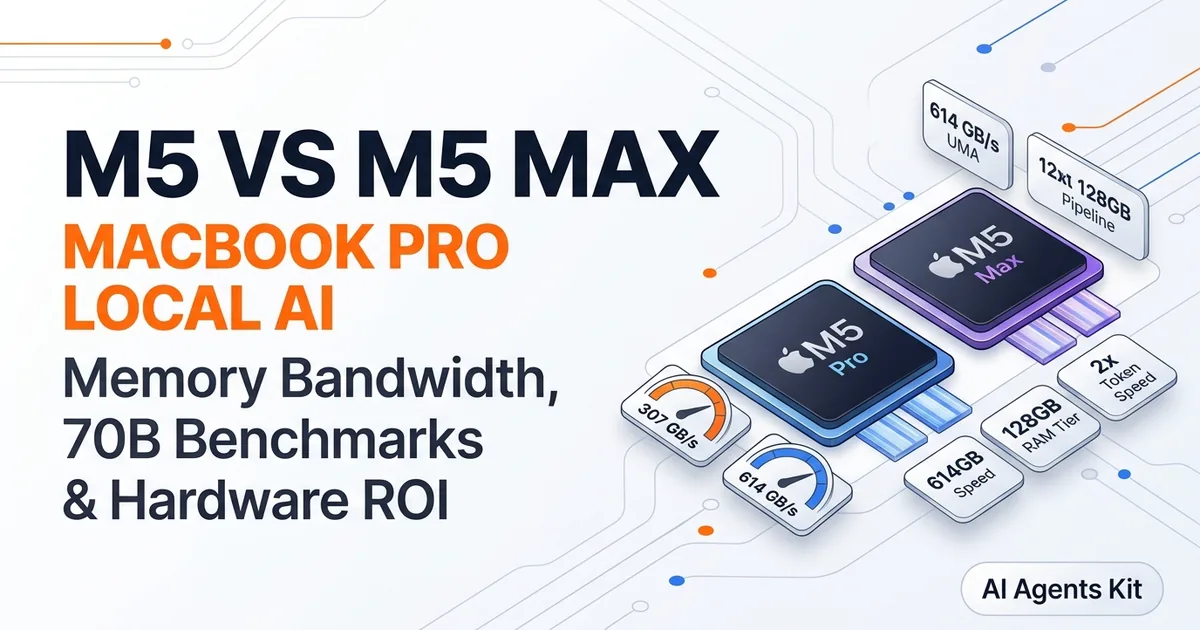
Memory bandwidth dictates generative inference speed because language models read billions of parameter weights for every generated token. According to the Apple MacBook Pro Technical Specifications, the M5 Max delivers up to 614 GB/s of unified memory bandwidth.
The Apple Machine Learning Research MLX GitHub Repository demonstrates that zero-copy array sharing between CPU and GPU maximizes this bandwidth by eliminating redundant memory transfers. Reviewing VRAM requirements for different AI tasks confirms why unified memory architecture eliminates the most restrictive hardware ceiling in consumer AI computing.
The Neural Engine provides specialized matrix acceleration alongside the GPU cores. The M4 Neural Engine delivers 38 trillion operations per second, while the M5 generation introduces Neural Accelerators directly into each GPU core. This hybrid execution pipeline ensures high parallel compute density across both prompt prefill and token generation phases.
| Architecture | Traditional PC Workstation | Apple Silicon (M5 Max) |
|---|---|---|
| CPU Memory Pool | System DDR5 RAM (separate bus) | Unified shared LPDDR5X pool |
| GPU Memory Pool | Dedicated VRAM (24GB on RTX 4090) | Same unified system memory pool |
| Maximum AI Memory Ceiling | 24GB on consumer GPUs | Up to 128GB on Max, 512GB on Ultra |
| Memory Bandwidth | ~1,008 GB/s (RTX 4090 GDDR6X) | 614 GB/s (M5 Max Unified) |
| System Power Under Load | 350W to 650W | ~50W total system power draw |
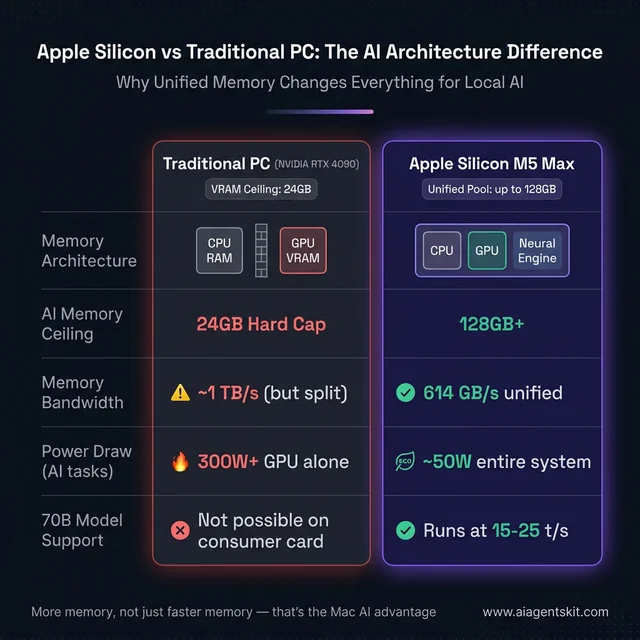
Apple Silicon unified memory eliminates the 24GB VRAM ceiling of consumer GPUs, enabling laptops to execute large language models efficiently.
Energy efficiency remains a major operational advantage of Apple Silicon. A MacBook Pro running a 70B parameter model draws roughly 50W of power from the wall. An equivalent discrete multi-GPU PC setup draws between 350W and 600W, generating substantial heat and acoustic fan noise.
How Much RAM Does Running Local LLMs on Mac Require?
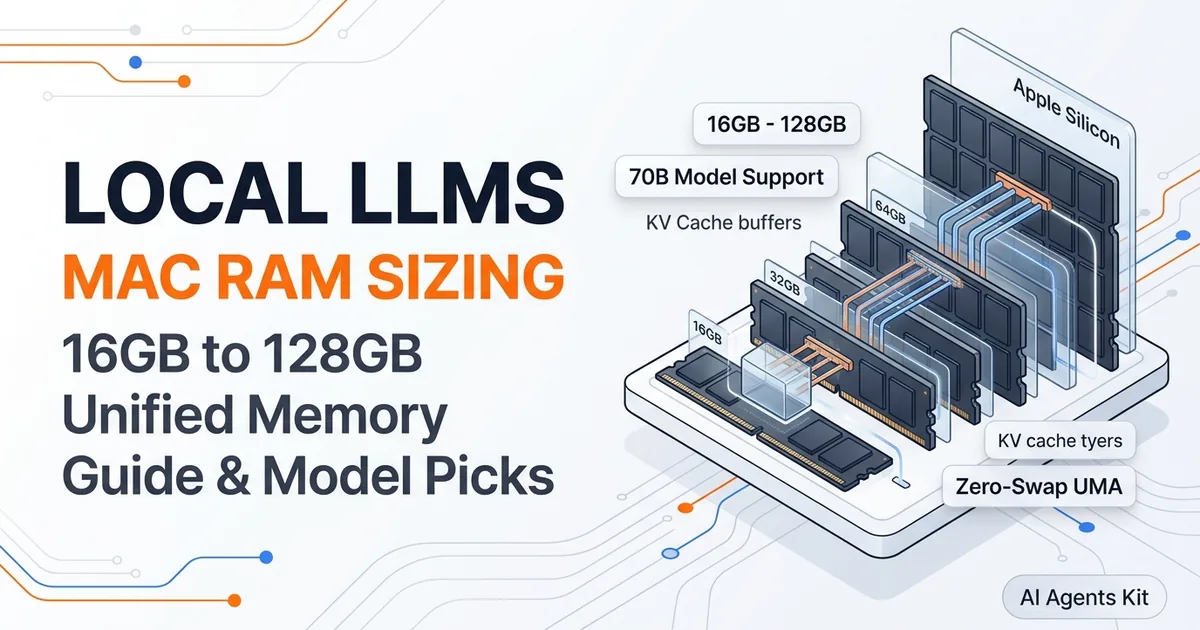
Running local LLMs on Mac requires matching model parameter size and quantization level to available unified memory, allocating at least 16GB for 8B models, 36GB for 14B to 32B models, and 64GB or more for 70B architectures. Model weights should occupy no more than 60% of total memory to preserve the remaining 40% for the dynamic key-value cache.
The key-value cache stores the attention states for previous tokens in a conversation. As context lengths expand toward 16K or 32K tokens, the cache grows substantially in size. Exceeding 60% memory allocation causes macOS to initiate disk swapping, which degrades generation speed from 40 tokens per second down to single digits.
Quantization reduces memory consumption by storing weights in lower-bit precision formats like 4-bit or 8-bit GGUF. A 7B parameter model in 16-bit float requires 14GB of RAM, but drops to approximately 4.5GB using Q4_K_M quantization. Evaluating cloud and local AI tradeoffs illustrates how quantization makes local execution viable on everyday hardware.
Unified memory cannot be upgraded after purchase, making upfront hardware selection critical. Here is how modern model architectures map across Apple Silicon memory tiers:
| Unified Memory | Recommended Models | Quantization | Target Workload |
|---|---|---|---|
| 8GB | SmolLM2-1.7B, Phi-4-mini, Gemma 2 2B | Q4_K_M | Learning CLI tools, short single-turn queries |
| 16GB | Llama 4 8B, Mistral 7B, Qwen2.5-Coder-7B | Q4_K_M | Daily coding assistance, document drafting |
| 24GB to 32GB | Qwen2.5 14B, DeepSeek-R1 14B | Q4_K_M / Q8_0 | Advanced reasoning, structured data extraction |
| 36GB to 64GB | Llama 4 70B (Q4), Mistral Small 4 | Q4_K_M | High-precision research, complex agent workflows |
| 128GB+ | Llama 4 70B (Q8), Llama 4 Scout 109B | Q8_0 / Q4_K_M | Production local inference, full codebase analysis |
| 192GB to 512GB | Llama 4 Maverick, DeepSeek-V3 | Q4_K_M / Q5_K_M | Frontier open-source exploration, multi-agent servers |
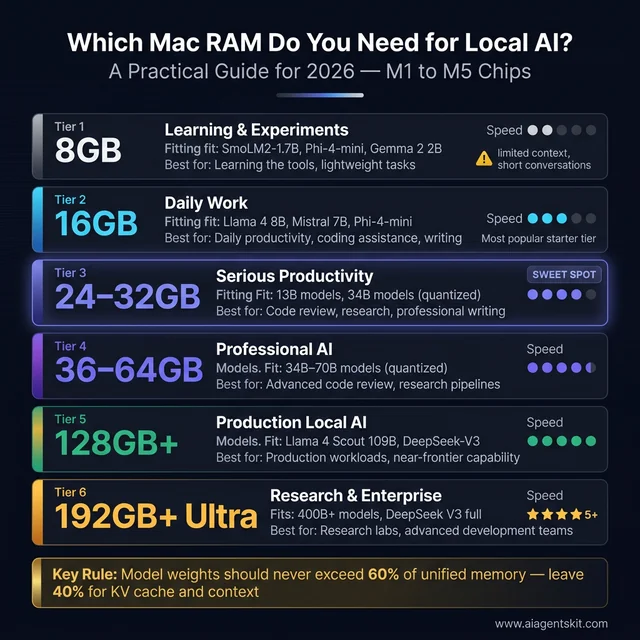
Reserving 40% of unified memory for key-value cache allocation ensures fluid multi-turn context generation without triggering system swap.
The 16GB tier represents the minimum baseline for professional work. Machines with 16GB run 8B parameter models at responsive speeds. The 8GB configuration remains strictly limited to compact edge models.
Best LLMs for Mac M1 8GB RAM
When selecting the best llms for mac m1 8gb ram 2026, compact architectures under 3B parameters deliver the most consistent interactive experience. These small models include SmolLM2-1.7B, Phi-4-mini, Gemma 2 2B, and Llama 3.2 3B, fitting within the 5GB of free memory available after macOS system overhead.
On an original M1 chip, these compact models generate between 60 and 100 tokens per second. Generation speed is responsive for summarizing individual paragraphs, writing isolated functions, or rephrasing text. The primary operational constraint is context length rather than compute latency.
| Model | Size on Disk | Target Task | Ollama CLI Command |
|---|---|---|---|
| SmolLM2-1.7B | ~1.0GB | Rapid text summarization | ollama run smollm2 |
| Phi-4-mini (Q4) | ~2.5GB | Logical reasoning, lightweight code | ollama run phi4-mini |
| Gemma 2 2B (Q4) | ~1.8GB | General conversational queries | ollama run gemma2:2b |
| Llama 3.2 3B (Q4) | ~2.2GB | High-quality 3B general baseline | ollama run llama3.2:3b |
| Qwen2.5 3B (Q4) | ~2.2GB | Multilingual coding tasks | ollama run qwen2.5:3b |
Attempting to run a 7B parameter model on an 8GB M1 Mac causes immediate memory pressure. Because macOS requires memory for window management and background processes, a 4.5GB model file leaves almost no headroom for the key-value cache. For developers needing 7B quality, upgrading hardware to 16GB is the proper architectural fix. For comprehensive sizing tables and recommendations across all memory configurations, consult our detailed breakdown of the best local LLMs for Mac by RAM tier.
Best Mac for Running Large Language Models Locally in 2026
The best Mac for running large language models locally in 2026 depends on your target model parameter class, with the MacBook Pro M5 Pro 36GB representing the optimal value sweet spot for developers and the M5 Max 128GB serving as the flagship workstation for 70B parameter inference. Hardware tiers determine both memory bandwidth and maximum context capacity.
Engineers seeking the best mac for running local ai models 2026 should prioritize memory capacity over clock frequency. When choosing between a higher-tier chip with less memory or a lower-tier chip with more memory, choosing higher unified memory capacity consistently enables larger model architectures.
MacBook Air M4 or M5 (16GB to 32GB Unified Memory)
The MacBook Air serves as a capable portable platform for lightweight inference. According to the Apple MacBook Air Technical Specifications, the M5 model accelerates AI tasks up to 4x faster than M4 through updated Neural Accelerators. For developers asking is the macbook air good for running llms and ai agents, a 16GB or 24GB Air comfortably executes Llama 4 8B or Mistral 7B while running standard development editors.
Users often ask can i run ai apps on the macbook air m5 for sustained workflows. While the fanless thermal design handles short batch requests and code completions cleanly, extended multi-hour agent loops will trigger minor thermal throttling. The 24GB configuration represents the best macbook air for llm processing 2026, giving a macbook air m5 local llm setup adequate context room without memory exhaustion.
MacBook Pro M5 Pro (24GB to 64GB Unified Memory)
The MacBook Pro M5 Pro is the standard professional machine for software engineers. The M5 Pro features active cooling fans and provides 307 GB/s of unified memory bandwidth, processing input prompts nearly four times faster than previous generations.
At 36GB of unified memory, an M5 Pro executes 14B reasoning models like DeepSeek-R1 14B and Qwen2.5 14B at high token speeds. At 64GB, the machine enters genuine 70B territory using Q4_K_M quantization. For teams weighing a Mac against building a dedicated AI workstation, the M5 Pro provides equivalent inference capability with complete battery-powered portability.
MacBook Pro M5 Max (36GB to 128GB Unified Memory)
The MacBook Pro M5 Max removes consumer VRAM restrictions entirely. Configured with 128GB of unified memory and 614 GB/s of memory bandwidth, this machine runs 70B parameter models at 8-bit precision or 109B mixture-of-experts architectures like Llama 4 Scout at interactive speeds of 15 to 25 tokens per second. For an in-depth hardware comparison with real-world token benchmarks and price-per-token economics, read our guide on the MacBook Pro M5 vs M5 Max for local AI.
Practitioners running llm on macbook pro m5 configurations at this tier report zero compromise when working with large multi-file codebases. It is the definitive mobile workstation for machine learning researchers and autonomous agent developers.
Mac Studio M5 Ultra (Up to 512GB Unified Memory)
The Mac Studio M5 Ultra bridges the gap between consumer workstations and enterprise data center racks. Connecting two M5 Max dies through UltraFusion, it delivers up to 512GB of unified memory with over 1.2 TB/s of aggregate memory bandwidth.
This configuration runs massive architectures like Llama 4 Maverick and DeepSeek-V3 in quantized formats completely locally. It is designed for enterprise laboratories and research teams requiring maximum private context without cloud egress exposure.
How to Set Up and Optimize Ollama on Apple Silicon
Setting up Ollama on Apple Silicon requires installing the command-line utility via Homebrew, which automatically configures Metal GPU acceleration without requiring manual CUDA or driver installations. Ollama serves local models through an OpenAI-compatible HTTP REST endpoint listening on port 11434.
Execute the following commands in the macOS Terminal to install Ollama and pull your first model:
  # Install Ollama via Homebrew
brew install ollama

  # Start the background service
ollama serve

  # Download and run Llama 4 8B in an interactive session
ollama run llama4:8b
Subsequent executions load weights from the local cache and operate fully offline. For developers deploying specialized reasoning engines, configuring DeepSeek-R1 models details Apple Silicon memory sizing and prompt calibration. The complete Ollama tutorial outlines advanced model creation files and routing patterns. To enable native MLX acceleration and optimize context window memory variables, see our focused walkthrough on Ollama MLX on Mac setup and speed tuning.
Ollama relies on the Ollama REST API Documentation for network integration, while using the llama.cpp Metal Build Documentation for its hardware backend. On Apple Silicon, inference runs via Metal Performance Shaders (MPS), providing high-throughput matrix multiplication directly on the Mac GPU.
Key Ollama CLI Commands Reference
Manage your local model library with standard CLI commands:
  # Display all installed models and their disk footprint
ollama list

  # Pull an exact quantization profile
ollama pull llama4:8b-instruct-q4_K_M

  # View currently active models loaded in unified memory
ollama ps

  # Run a model with expanded context window size
ollama run llama4:8b --ctx-size 16384

  # Delete a model to reclaim storage
ollama rm llama4:8b
Ollama Speed Optimization on Apple Silicon
Users frequently search for ollama macbook pro m5 speed optimization techniques to maximize generation throughput. Applying three configuration adjustments helps increase response speed of ollama on macbook pro m5 systems under sustained load.
First, adjust the system wired memory ceiling. By default, macOS reserves a safety margin of RAM for system processes. You can adjust the maximum memory allocated to the GPU driver by executing:
  # Check current wired memory allocation limit
sysctl iogpu.wired_mem_limit

  # Temporarily increase GPU wired allocation limit to 85% of RAM (requires admin privileges)
sudo sysctl iogpu.wired_mem_limit=85
Second, optimize thread scheduling and context size in your Modelfile. When creating custom model configurations, set num_gpu 999 to ensure all transformer layers reside on the Metal GPU rather than the CPU cores. Specifying realistic context limits with num_ctx 8192 prevents unnecessary key-value cache pre-allocation.
Third, maintain consistent prompt caching. Ollama automatically caches prompt prefixes across consecutive calls. When developing multi-turn agent scripts, keep system prompts identical across turns to leverage cached evaluation states and reduce time-to-first-token latency.
5 Best Local AI Tools for Mac in 2026
The local software ecosystem on macOS includes several mature applications catering to command-line developers, visual users, and performance engineers. These five tools leverage Apple Silicon hardware acceleration for distinct operational use cases.
1. Ollama (Best for Developers and API Integrations)
Ollama acts as the central inference service for macOS developers. Running as a lightweight background daemon, it exposes an OpenAI-compatible REST API that redirects toolchains from paid cloud providers to local hardware with a single endpoint change. Its standardized CLI makes automation, scripting, and model management straightforward.
2. LM Studio (Best Graphical Interface for Experimentation)
The LM Studio Developer Tools GitHub Repository highlights its native desktop interface for exploring Hugging Face repositories. LM Studio allows users to search, download, and converse with GGUF and MLX models without terminal interaction. It features a built-in local server mode and visual controls for temperature, context limits, and system instructions. Our LM Studio setup and performance guide explains how to configure local endpoints and model quantization.
3. Apple MLX Framework (Best for Raw Throughput and Research)
The Apple MLX Examples GitHub Repository details Apple’s native framework for machine learning on Apple Silicon. Unlike generalized runtimes, MLX utilizes lazy evaluation and unified memory arrays to achieve 15% to 30% higher steady-state generation throughput on identical hardware.
Install and run models directly via Python:
  # Install the MLX language model package
pip install mlx-lm

  # Generate text directly using pre-converted Hugging Face weights
python -m mlx_lm.generate \
  --model mlx-community/Llama-3.2-3B-Instruct-4bit \
  --prompt "Explain unified memory architecture in two concise sentences."
4. Jan Desktop (Best for Isolated Privacy and Compliance)
The Jan Desktop Open Source Documentation outlines its architecture as an open-source, air-gapped desktop client. Jan stores all conversations and parameters in accessible local JSON files with zero telemetry. For legal, financial, or confidential research data, Jan provides total network isolation.
5. Continue Extension (Best for In-Editor Coding Assistance)
The Continue VS Code Extension Documentation explains how to integrate local inference directly into VS Code and JetBrains IDEs. By connecting to a local Ollama or LM Studio backend, Continue provides inline code tab-autocompletion, contextual codebase indexing, and conversational refactoring without monthly cloud subscriptions. For step-by-step instructions on configuring dual models for sub-25ms autocomplete and multi-file Cline loops, see our hands-on tutorial to run local coding models on Mac with VS Code.
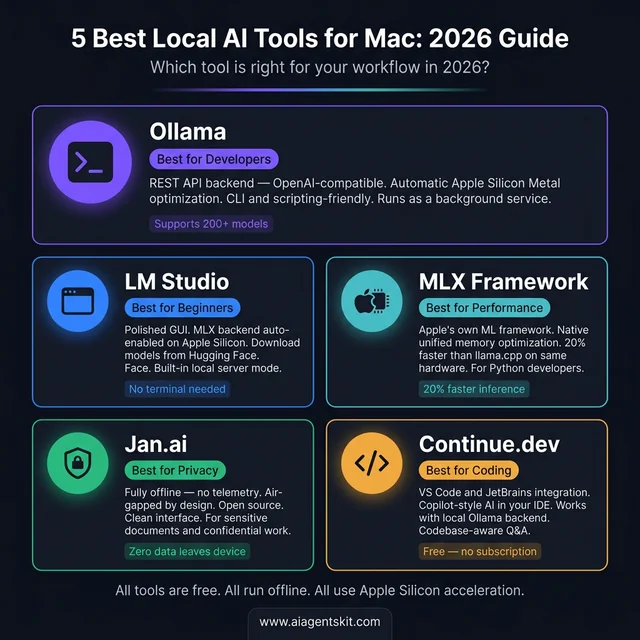
Selecting the proper local runtime depends on whether your workflow prioritizes command-line automation, graphical chat, raw speed, or IDE completion.
How to Choose the Right Open-Source Model for Your Mac
Choosing the right open-source model requires balancing parameter depth, quantization format, and available unified memory bandwidth to maintain interactive generation rates above 15 tokens per second. Selecting best local llms for mac apple silicon 2026 workflows involves matching specific task requirements to validated model architectures.
| Model Architecture | Parameters | Minimum RAM | Tokens/s (M4 24GB) | Tokens/s (M5 Pro 36GB) | Recommended Workload |
|---|---|---|---|---|---|
| Phi-4-mini | 3.8B | 8GB | 90–110 t/s | 110–130 t/s | Low-latency summaries, fast unit test generation |
| Mistral 7B | 7.2B | 16GB | 45–55 t/s | 55–70 t/s | General conversational reasoning, prose editing |
| Llama 4 8B | 8.0B | 16GB | 40–52 t/s | 50–65 t/s | General developer assistant, script automation |
| Qwen2.5 14B | 14.7B | 24GB | 28–38 t/s | 35–50 t/s | Technical documentation, multilingual translation |
| DeepSeek-R1 14B | 14.7B | 24GB | 22–32 t/s | 30–45 t/s | Complex mathematical logic, deep code analysis |
| Llama 4 70B (Q4) | 70.6B | 64GB | Memory Limited | 12–18 t/s | Production analysis, complex architectural review |
| DeepSeek-R1 70B | 70.6B | 64GB | Memory Limited | 8–14 t/s | Enterprise reasoning, autonomous research |
| Llama 4 Scout | 109B (MoE) | 96GB+ | Memory Limited | Memory Limited | Multi-document synthesis, long-context retrieval |
Quantization selection directly impacts output fidelity. For standard development tasks, Q4_K_M delivers the best balance of model size and perplexity. When performing sensitive tasks such as contract verification or complex syntax parsing, use Q8_0 on machines with 36GB or more RAM.
DeepSeek-R1 models utilize explicit reasoning tokens to decompose problems before returning answers. This chain-of-thought process increases time-to-first-token latency, but produces substantially higher accuracy on complex debugging problems.
Real-World Use Cases: Who Benefits Most from Local Mac AI?
Local execution delivers concrete operational advantages across four distinct technical audiences by removing network latency, recurring per-token cloud costs, and corporate data leakage risks.
Software Engineers and Developers
Software engineers use local inference to power continuous coding assistants and test agent handoff loops without accumulating cloud API fees. Connecting Continue to an Ollama instance running Qwen2.5-Coder gives engineers private code completions that analyze proprietary internal repositories securely.
Developers building autonomous systems can prototype tool-calling loops locally before deploying to production endpoints. Running hundreds of iterative agent tests against local models eliminates development costs that mount rapidly on hosted APIs.
Writers and Academic Researchers
Researchers handling unpublished findings or sensitive interviews require tools that never transmit data to third-party servers. LM Studio allows researchers to load dozens of PDF documents into a local vector index, querying across primary sources without internet connectivity.
Writers benefit from private editing and summarization environments that respect source confidentiality. Using Jan Desktop or LM Studio ensures notes and draft manuscripts remain stored on local encrypted APFS volumes.
University Students and Educators
Local models eliminate recurring subscription costs for students while operating independently of campus network restrictions. A student with a 16GB MacBook Air can run Llama 4 8B for coursework explanations, paper outlining, and foreign language practice with zero monthly expenses.
Because models operate offline, students can study and code during commutes or in areas with intermittent internet access without service degradation.
Enterprise and Legal Teams
Enterprise legal departments deploy Apple Silicon hardware to maintain strict regulatory compliance under HIPAA, GDPR, and corporate confidentiality policies. Reviewing the AI privacy and data protection landscape for enterprises demonstrates how on-device execution eliminates vendor data transmission liabilities.
A dedicated Mac mini M4 configured with 64GB of unified memory operates as a shared departmental inference server. It processes contract reviews, internal wiki queries, and compliance summaries without external network dependencies.
How to Deploy a Mac mini as a 24/7 Local AI Server
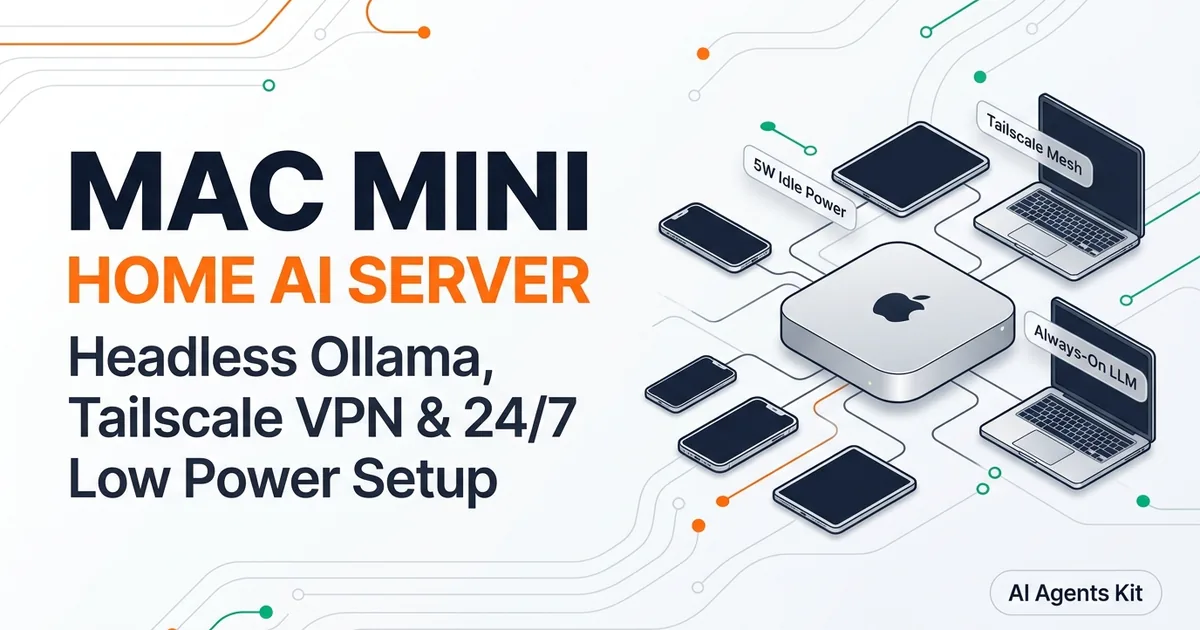
Deploying a Mac mini M4 as a local AI server provides development teams with a centralized, silent, and power-efficient inference node that serves OpenAI-compatible API requests across a local area network.
At a starting price of $599 for base models and approximately $1,399 for 64GB configurations, the Mac mini draws roughly 30W under sustained compute load. It operates without fan noise while providing hardware-accelerated inference to every workstation on the network.
Configure the Mac mini as a network server with these steps:
  # Step 1: Install Ollama
brew install ollama

  # Step 2: Configure Ollama to listen on all local network interfaces
export OLLAMA_HOST=0.0.0.0

  # Step 3: Launch Ollama server daemon
ollama serve
Deploy Open WebUI using Docker to provide team members with a collaborative browser interface:
  # Launch Open WebUI bound to port 3000
docker run -d -p 3000:8080 \
  --add-host=host.docker.internal:host-gateway \
  -e OLLAMA_API_BASE_URL=http://host.docker.internal:11434/api \
  -v open-webui:/app/backend/data \
  --name open-webui \
  --restart always \
  ghcr.io/open-webui/open-webui:main
Network users can then access chat, document upload, and model management tools by opening http://mac-mini-ip:3000 in any web browser.
| Operational Factor | Mac mini M4 (64GB) | MacBook Pro M5 Pro (64GB) |
|---|---|---|
| Approximate Base Price | ~$1,399 | ~$2,999 |
| Sustained Power Draw | ~30W wall power | ~50W (battery management overhead) |
| Continuous 24/7 Server Suitability | Native headless server design | Laptop form factor (battery wear) |
| Maximum Unified Memory | 64GB | 64GB |
| Remote Access Support | SSH, Tailscale, Screen Sharing | SSH, Tailscale, Screen Sharing |
For dedicated departmental server deployments, the Mac mini provides the most cost-effective hardware solution. The MacBook Pro remains the proper choice for engineers requiring mobile workstation performance. For a complete step-by-step tutorial on configuring headless power management, launchd daemons, and encrypted Tailscale remote access, consult our dedicated guide on setting up a Mac mini as a home AI server.
Apple Intelligence vs. Local Open-Source AI: Key Differences
Apple Intelligence and open-source local runtimes address fundamentally different operational requirements, with Apple Intelligence handling direct operating system utilities while tools like Ollama provide unrestricted model choice and programmatic developer control.
Apple Intelligence integrates compact on-device models directly into macOS 26. It powers system-wide Writing Tools, notification summarization, photo editing utilities, and contextual Siri interactions automatically. Requests exceeding local compute capabilities route through Private Cloud Compute, ensuring cryptographic verification and zero data retention.
However, Apple Intelligence does not expose developer APIs for running arbitrary open weights, configuring custom system prompts, or tuning quantization formats. Developers cannot swap foundation models or execute multi-step tool-calling agent graphs through the native macOS interface.
| Feature Comparison | Apple Intelligence | Local Open-Source AI (Ollama / MLX) |
|---|---|---|
| User Setup Required | None (integrated into macOS 26) | ~5 minutes via Homebrew |
| Model Customization | Fixed Apple foundation models | Unrestricted open-source library |
| Developer API Access | None for general LLM inference | Full OpenAI-compatible REST API |
| Air-Gapped Offline Operation | Partial (simple tasks only) | 100% offline, guaranteed |
| Prompt & Context Control | Controlled by operating system | Full control over context and temperature |
| Primary Operational Role | System-wide productivity utilities | Custom development, RAG, and coding |
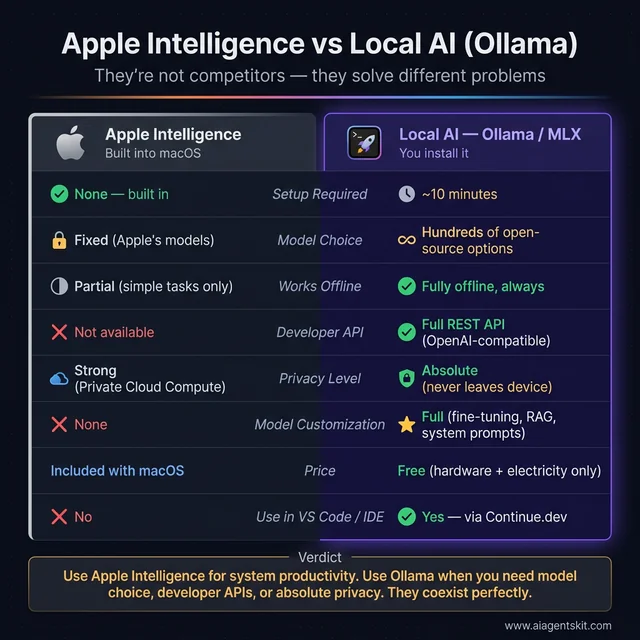
Apple Intelligence manages native operating system tasks, while Ollama provides programmable infrastructure for open-source model execution.
Both systems operate concurrently without resource contention. Developers frequently utilize Apple Intelligence for desktop productivity while running Ollama or MLX for engineering workflows.
How to Fine-Tune Local Models on Mac with MLX and LoRA
Low-Rank Adaptation (LoRA) enables engineers to fine-tune open-source language models directly on Apple Silicon by freezing original model weights and training lightweight adapter matrices. This technique makes domain specialization computationally practical on consumer hardware.
Using Apple’s MLX framework, developers can fine-tune a 7B parameter model on a 16GB or 32GB Mac in under 15 minutes. The resulting adapter weights require only megabytes of storage and fuse directly into the base model. Reviewing our comprehensive guide to fine-tuning LLMs provides additional dataset curation strategies.
| Model Parameter Tier | Minimum Unified RAM | Recommended RAM | Training Duration (600 Iterations) |
|---|---|---|---|
| 3B Models (Phi-4-mini) | 8GB | 16GB | ~6 minutes (M4 Pro) |
| 7B to 8B Models (Llama 4 8B) | 16GB | 32GB | ~12 minutes (M5 Pro) |
| 14B Models (Qwen2.5 14B) | 32GB | 48GB | ~25 minutes (M5 Max) |
| 32B+ Architectures | 64GB | 96GB+ | ~60 minutes (M5 Max) |
Execute fine-tuning with the following Python workflow:
  # Step 1: Install MLX model libraries
pip install mlx mlx-lm

  # Step 2: Execute LoRA adaptation on a quantized base model
python -m mlx_lm.lora \
  --model mlx-community/Llama-3.2-3B-Instruct-4bit \
  --train \
  --data ./training_data \
  --iters 600 \
  --batch-size 4 \
  --lora-layers 16

  # Step 3: Fuse adapter weights into the base architecture
python -m mlx_lm.fuse \
  --model mlx-community/Llama-3.2-3B-Instruct-4bit \
  --adapter-file adapters.npz \
  --save-path ./custom_specialized_model
Fine-tuning proves particularly valuable for training models on internal documentation, enforcing strict JSON output structures, or teaching proprietary coding conventions. Standard conversational tasks rarely require fine-tuning, as baseline instruction models handle them effectively.
How to Build Local RAG and Autonomous AI Agent Pipelines on macOS
Retrieval-Augmented Generation (RAG) and autonomous agent frameworks run completely locally on macOS by chaining local vector databases with Ollama inference endpoints.
RAG systems ingest external documents, split text into semantic chunks, generate vector embeddings, and retrieve relevant context at query time. This pipeline enables models to answer questions using private data without expensive retraining or cloud API transmission.
Our guide on building AI agents with Python demonstrates how to construct local execution loops. The following Python script implements a functional local RAG pipeline using ChromaDB, LangChain, and Ollama:
from langchain_community.vectorstores import Chroma
from langchain_ollama import OllamaEmbeddings, OllamaLLM
from langchain.text_splitter import RecursiveCharacterTextSplitter
from langchain_community.document_loaders import TextLoader

  # Load and segment private documentation
loader = TextLoader("internal_architecture_spec.txt")
documents = loader.load()
splitter = RecursiveCharacterTextSplitter(chunk_size=1000, chunk_overlap=150)
chunks = splitter.split_documents(documents)

  # Generate embeddings and store in local Chroma vector store
embeddings = OllamaEmbeddings(model="llama4:8b")
vector_store = Chroma.from_documents(chunks, embeddings, persist_directory="./local_chroma")

  # Query the index and synthesize an answer
retriever = vector_store.as_retriever(search_kwargs={"k": 3})
llm = OllamaLLM(model="llama4:8b")

query = "What are the primary caching mechanisms defined in the spec?"
context_matches = retriever.invoke(query)
combined_context = "\n\n".join([doc.page_content for doc in context_matches])

prompt = f"Answer the query using only the provided context:\n\nContext:\n{combined_context}\n\nQuery: {query}"
print(llm.invoke(prompt))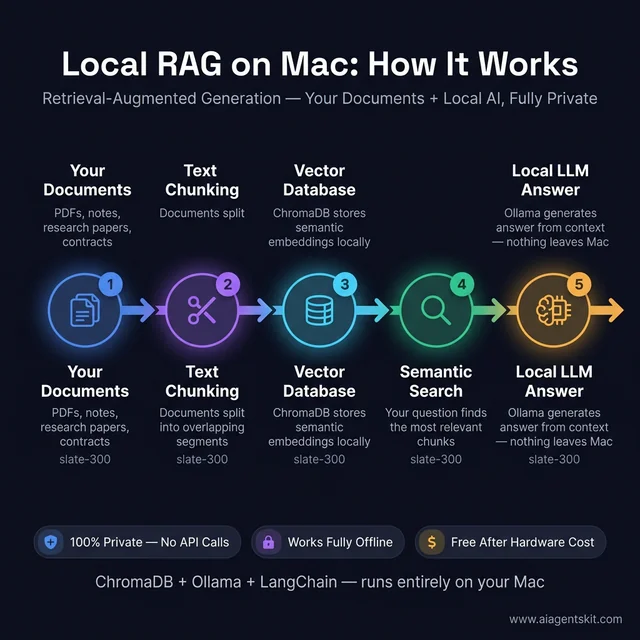
Local RAG pipelines store vectors and compute embeddings on Apple Silicon with zero external network transmission.
Autonomous agent frameworks like CrewAI and AutoGen connect directly to local Ollama endpoints. Multi-agent workflows generate higher token volumes than single-turn chat, making 36GB or 64GB Mac configurations preferable for complex reasoning loops.
For low-code workflow automation, the n8n Self-Hosted Automation Documentation explains how to configure self-hosted n8n instances to trigger local Ollama models in response to webhooks, database changes, and file updates.
Why Running AI Locally on Mac Protects Data Privacy and Compliance
Executing language models locally on Mac hardware eliminates data transmission across external networks, ensuring that proprietary source code, legal records, and medical data remain stored on private encrypted disks.
Cloud AI API providers routinely log prompts and retain data according to variable terms of service. For organizations operating under strict data governance standards, sending sensitive inputs to third-party endpoints introduces regulatory liabilities. Running models through Ollama or MLX guarantees that tokens never leave local memory.
Offline reliability provides another major operational benefit. Local systems operate without internet connectivity, avoiding unexpected cloud service outages, API rate limits, or breaking model deprecations. Once downloaded, your local runtime remains stable indefinitely.
Local inference also delivers clear economic advantages. High-volume engineering pipelines processing millions of tokens each month incur substantial API expenses. A 64GB Mac workstation amortizes its hardware investment within months by replacing recurring cloud token fees. The historical model quality gap that previously made cloud AI APIs mandatory has closed in 2026 for code generation, text analysis, and reasoning tasks.
Apple Silicon vs NVIDIA for Local LLMs: Hardware Benchmarks and Trade-offs
Evaluating Apple Silicon against discrete NVIDIA GPUs requires separating raw training performance from memory-bound inference practicality.
Where NVIDIA excels: For models under 14B parameters that fit within the 24GB VRAM ceiling of an RTX 4090, NVIDIA hardware generates tokens substantially faster. Community benchmarks show an RTX 4090 generating 100 to 140 tokens per second on an 8B model, compared to 50 to 65 tokens per second on an M5 Max. Discrete GPUs also remain mandatory for large-scale distributed model pre-training due to CUDA optimization depth.
Where Apple Silicon excels: The moment an AI architecture exceeds 24GB of memory, Apple Silicon becomes the more practical hardware platform. A quantized 70B parameter model requires approximately 35GB of RAM. Consumer NVIDIA GPUs cannot load this model without dropping layers to system RAM or purchasing multiple enterprise GPUs costing thousands of dollars.
An M5 Pro with 64GB or M5 Max with 128GB loads 70B models directly with extensive context headroom. Consult our guide to the best GPUs for running AI locally for a detailed comparison of discrete desktop cards.
Apple Silicon also delivers dramatic acoustic and thermal advantages. Executing inference on a MacBook Pro generates minimal noise while drawing 50W of power, whereas a multi-GPU PC workstation consumes 500W and requires dedicated cooling. For interactive code assistance, document analysis, and agent experimentation, Apple Silicon offers an exceptionally balanced workstation environment.
Frequently Asked Questions
How much RAM is required to run AI models on a Mac?
Running local LLMs smoothly requires a minimum of 16GB for 7B to 8B models, 36GB for 14B to 32B models, and 64GB or more for 70B models. Engineering teams should ensure model weights occupy no more than 60% of total unified memory to preserve sufficient space for dynamic KV cache allocation.
Can an M1 Mac with 8GB RAM run local LLMs in 2026?
Yes, an 8GB M1 Mac can run lightweight 1B to 3B models such as SmolLM2-1.7B, Phi-4-mini, and Llama 3.2 3B at 60 to 100 tokens per second for focused, single-turn tasks. Models at the 7B tier or higher induce persistent memory swap thrashing on 8GB machines, making 16GB the practical entry baseline for daily development.
Does Ollama use MLX or Metal on Apple Silicon Macs?
Ollama uses llama.cpp as its core inference backend, which accelerates model operations on Apple Silicon through Metal Performance Shaders (MPS) rather than MLX. Both frameworks utilize Apple Silicon GPU cores efficiently, but Apple’s native MLX framework delivers slightly higher sustained throughput for custom Python workflows.
How fast is AI inference on M5 compared to M4 Mac?
Official Apple hardware benchmarks indicate that the M5 Pro and M5 Max process prompt tokens up to 3.9x and 4x faster than M4 counterparts due to dedicated Neural Accelerators embedded directly in each GPU core. In interactive token generation, an M5 Max produces 28 to 32 tokens per second on quantized 70B architectures where an M4 Max achieved approximately 8 to 10 tokens per second.
Can I use a Mac mini M4 as a dedicated 24/7 AI server?
The Mac mini M4 functions as an exceptional headless local AI server, drawing only 30W under sustained inference while operating in total acoustic silence. By binding Ollama to network interfaces and pairing it with an Open WebUI container, an entire local development team can share model access without paying external API fees.
Apple Silicon Is the Most Practical Local AI Platform in 2026
Apple Silicon has transformed local machine learning execution from an experimental curiosity into an essential developer productivity stack. Hardware configurations with 16GB of unified memory run capable open-source models today, while modern M5 systems make 70B parameter models fluid and interactive.
The practical local ecosystem extends far beyond conversational chat. Engineers deploy local RAG pipelines to query private technical documentation, run autonomous agent graphs with tool execution, and fine-tune specialized models in minutes using MLX. Compact machines like the Mac mini provide silent, always-on inference servers for distributed teams.
Getting started requires only a few minutes. Installing Ollama or launching LM Studio gives you immediate access to frontier open-source weights running directly on your hardware. For engineers curious about the lower hardware boundaries of local inference, our walkthrough on running AI on a Raspberry Pi 5 illustrates what minimal edge setups can accomplish.
By uniting high memory capacity, strong memory bandwidth, and high energy efficiency into a cohesive hardware platform, Apple Silicon provides developers with an ideal workstation for private local artificial intelligence.