Best Local LLMs for RTX 4060, RTX 3070, and RTX 5060
Best local LLMs for RTX 4060, RTX 3070, and RTX 5060 in 2026. Compare 8GB VRAM fit, GDDR7 token speeds, Ollama settings, and realistic 8B models.
The local AI hardware market frequently misleads engineers into comparing GPU generations when they should evaluate usable memory capacity. The NVIDIA RTX 4060, RTX 3070, and RTX 5060 look distinct across architectural marketing sheets, yet all three cards sit firmly in the 8GB VRAM tier. Because they share an identical memory ceiling, they compete for the same best Ollama models for 8GB VRAM.
Key Takeaways
- The NVIDIA RTX 4060, RTX 3070, and RTX 5060 share an 8GB VRAM ceiling, restricting production local inference to quantized 4B to 8B parameter models.
- The RTX 5060 delivers 40 to 45 tokens per second on 8B Q4 models thanks to GDDR7 memory yielding 448 GB/s bandwidth, outperforming the RTX 4060 at 272 GB/s by up to 72%.
- Qwen3 8B and Qwen2.5-Coder 7B serve as the most balanced daily driver models, fitting cleanly into approximately 5.0 GB to 5.2 GB of VRAM.
- Running 14B models on 8GB cards forces layer offloading across PCIe into system RAM, triggering an 80% throughput collapse down to 5 to 8 tokens per second.
- Setting
OLLAMA_KV_CACHE_TYPE=q8_0halves Key-Value cache memory consumption, enabling stable 8,192 token context windows without GPU memory exhaustion.
Teams configuring an Ollama local AI setup guide quickly discover that a clean-fitting 7B or 8B model delivers superior responsiveness compared to a cramped 14B experiment that spills into system RAM. Hardware choices in this tier reward realistic memory budgeting, aggressive quantization, and disciplined context management.
Best Ollama Models for 8GB VRAM on NVIDIA GPUs
The best Ollama models for 8GB VRAM on NVIDIA GPUs are 4B to 8B quantized models such as Qwen3 8B, Qwen2.5-Coder 7B, DeepSeek-R1 8B, and Gemma 3 4B. These models occupy between 3.3 GB and 5.2 GB of VRAM, leaving sufficient buffer for the operating system and Key-Value context cache.
NVIDIA specifications show how closely these cards are constrained. The manufacturer lists the RTX 4060 with 8GB GDDR6 on a 128-bit interface in the NVIDIA RTX 4060 Specifications. The RTX 3070 features 8GB GDDR6 on a wider 256-bit interface in the NVIDIA RTX 3070 Specifications. Meanwhile, the newest mid-range card features 8GB GDDR7 on a 128-bit bus in the NVIDIA RTX 5060 Family Specifications.
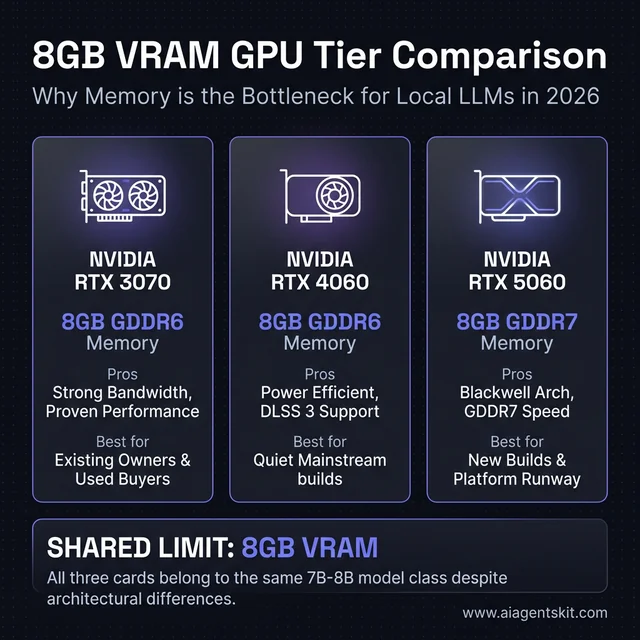 NVIDIA RTX 4060 vs 3070 vs 5060 for local AI: Despite architectural differences across Ampere, Ada Lovelace, and Blackwell, all three cards share an 8GB VRAM ceiling that dictates model selection.
Because of this physical memory limit, the best local LLMs for RTX 4060, RTX 3070, and RTX 5060 are not massive frontier weights. They are well-quantized 4B to 8B weights that fit comfortably without thrashing when browsers, editors, and background tools remain open. For engineers running mobile variants of these chips, our dedicated guide on how to run local LLMs on a gaming laptop details mobile TGP limits, battery constraints, and thermal throttling mitigations. If you are exploring non-NVIDIA budget hardware with higher memory capacities, our Intel Arc for local AI guide evaluates the 16GB A770 and 12GB B580.
Context window overhead represents a primary operational bottleneck. A model that appears to fit when idle can trigger memory eviction once long prompt histories, codebase context, or multi-turn chat loops expand. Understanding these dynamics requires checking detailed VRAM requirements for AI and measuring local inference latency before configuring large production workloads.
| Priority Tier | Model Class | Memory Footprint (Q4) | Operational Experience on 8GB GPUs |
|---|---|---|---|
| Best Default | 7B to 8B Instruct | 4.8 GB - 5.2 GB | Clean fit, fast generation, reliable multi-turn stability |
| Best Coding Default | 7B Code-Tuned | 4.5 GB - 4.9 GB | Strong syntax reasoning without memory pressure |
| Best Fallback | 4B Dense | 2.6 GB - 3.2 GB | High headroom for long context and multitasking |
| Experimental | 14B Quantized | 8.2 GB - 9.5 GB | Frequent CPU offload, sluggish generation rates |
| Unsuitable | 32B+ Weights | 18.0 GB+ | Exceeds hardware capability; causes system crashes |
5 Local Models That Actually Work on These GPUs
The 5 local models that actually work on 8GB GPUs without performance degradation are Qwen3 8B, Qwen2.5-Coder 7B, DeepSeek-R1 8B, Mistral 7B, and Gemma 3 4B. Each of these options occupies under 5.3 GB of static VRAM, ensuring stability under continuous desktop workloads.
The Stanford HAI AI Index Technical Performance Review documents how rapidly small open models have closed the capability gap with older frontier systems. That quality leap makes the 7B to 8B category remarkably capable for software engineering and local document analysis.
What models fit comfortably on 8GB VRAM?
A 4B to 8B parameter model at 4-bit quantization is what models fit comfortably on 8GB VRAM for continuous daily operation. At 4-bit precision, an 8B model requires roughly 5.0 GB of memory, leaving 2.0 GB to 2.5 GB for operating system graphics buffers and the active Key-Value attention cache.
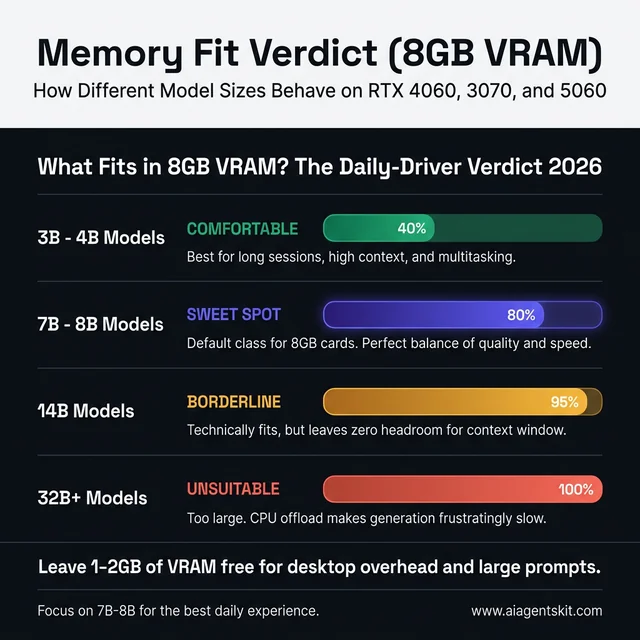 What fits in 8GB VRAM: 3B to 4B models offer high headroom, 7B to 8B models represent the production sweet spot, while 14B models trigger performance-destroying PCIe offloading.
| Model Family & Size | Fits on 8GB VRAM? | VRAM Required (Q4_K_M) | Daily Production Verdict |
|---|---|---|---|
| Gemma 3 4B | Yes, with high headroom | ~3.0 GB | Recommended low-overhead fallback for long sessions |
| Qwen2.5-Coder 7B | Yes, optimal fit | ~4.7 GB | Leading choice for software development and refactoring |
| Qwen3 8B | Yes, optimal fit | ~5.2 GB | Best general-purpose assistant for chat and reasoning |
| DeepSeek-R1 8B | Yes, optimal fit | ~5.1 GB | Specialized choice for multi-step algorithmic planning |
| Qwen 14B (Q4) | No, spills to RAM | ~8.8 GB | Poor responsiveness; generation drops below 8 t/s |
Why Qwen3 8B leads the all-around group
Qwen3 8B delivers the most capable balance of general knowledge, summarization quality, and tool calling across 8GB cards. The model requires roughly 5.2 GB of VRAM in standard Q4_K_M format, leaving comfortable headroom for standard 4,096-token conversations.
Unlike smaller models that require repetitive prompt steering, Qwen3 8B adheres closely to structured system instructions. It executes multi-turn dialogues cleanly without requiring multiple regenerations, maximizing the practical utility of 8GB hardware.
Why Qwen2.5-Coder 7B still stays relevant
Software engineering tasks benefit significantly from domain-specialized weights. Qwen2.5-Coder 7B remains a permanent installation on developer systems because its training distribution emphasizes syntax parsing, test generation, and complex debugging.
The model fits neatly into 4.7 GB of video memory. It handles repository lookups and diff explanations without consuming the memory overhead typical of larger general-purpose assistants.
When DeepSeek-R1 8B is worth the slowdown
Reasoning models allocate extra computation to chain-of-thought tokens before returning direct output. DeepSeek-R1 8B excels at mathematical puzzles, formal logic proofs, and complex troubleshooting where single-pass models generate hallucinated shortcuts.
The operational trade-off is perceived latency. Because the model outputs explicit thinking tokens, queries take longer to finish even when token generation rates remain steady. It serves best as an intentional secondary tool for intricate analytical challenges.
Where Mistral 7B still makes sense
Mistral 7B offers lean memory usage and rapid prompt evaluation. It operates reliably on systems where desktop applications, high-resolution monitors, or creative design software already utilize a portion of GPU memory.
For tasks such as drafting commit messages, extracting bullet points from logs, or quick shell command explanations, low latency provides higher tangible value than extended reasoning steps.
Why Gemma 3 4B belongs on 8GB systems
Every 8GB workstation benefits from keeping a compact fallback model active. Gemma 3 4B requires only 3.0 GB of VRAM, leaving over 4 GB of buffer space for complex contexts and heavy background computing.
Technical analysis from our review of the best open-source LLMs shows that modern sub-5B weights handle basic summarization and extraction tasks with high precision. Gemma 3 4B proves indispensable when memory constraints prevent running 8B weights.
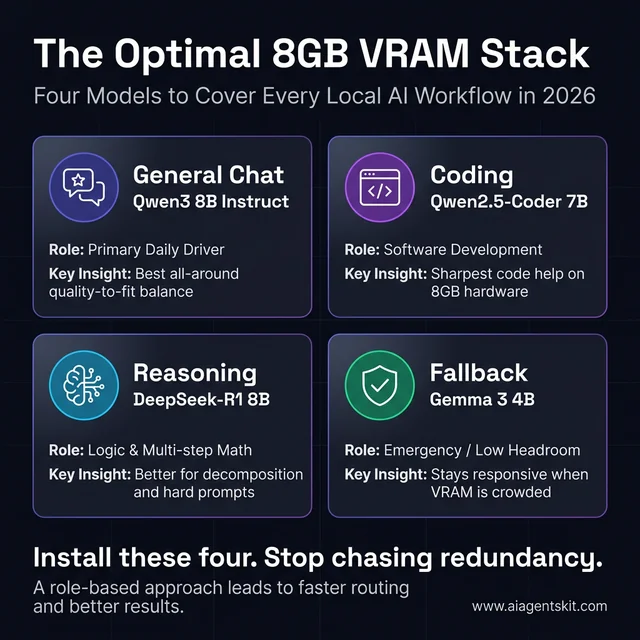 The Ultimate 8GB VRAM Local AI Stack: Deploying Qwen3 8B for general chat, Qwen2.5-Coder 7B for programming, DeepSeek-R1 8B for logic, and Gemma 3 4B for fallback covers all core developer workflows.
Which local model is best for coding, chat, and reasoning?
The best local model for coding on an 8GB GPU is Qwen2.5-Coder 7B, the best for general chat is Qwen3 8B, and the best for structured reasoning is DeepSeek-R1 8B. Selecting the right specialized model optimizes response quality while respecting the hardware memory budget.
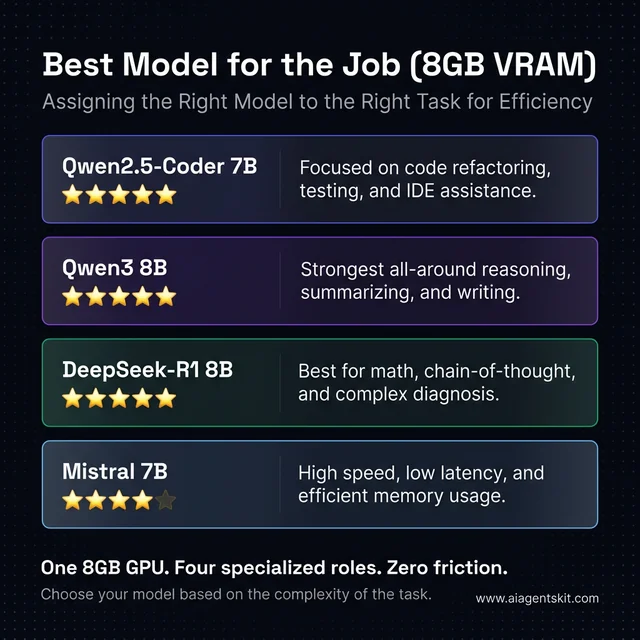 Best Local LLM per Use Case: Matching specialized models to target workflows ensures high generation throughput and prevents out-of-memory errors.
| Developer Workflow | Optimal Model | Quantization | Throughput (RTX 5060) | Primary Advantage |
|---|---|---|---|---|
| Software Development | qwen2.5-coder:7b |
Q4_K_M | ~44 t/s | Precise code synthesis, minimal syntax hallucination |
| General Assistant & Chat | qwen3:8b |
Q4_K_M | ~42 t/s | Broad domain accuracy, natural conversational tone |
| Multi-Step Reasoning | deepseek-r1:8b |
Q4_K_M | ~34 t/s | Self-correcting reflection tokens, structured logic |
| Low-Latency Queries | mistral:7b |
Q4_K_M | ~45 t/s | Fast prompt processing, lightweight execution |
| Crowded Memory Fallback | gemma3:4b-it-q4_K_M |
Q4_K_M | ~68 t/s | Minimal memory footprint, high context tolerance |
Hardware Comparison: GDDR7 vs GDDR6 Memory Bandwidth and Inference Speeds
Memory bandwidth serves as the primary physical limiter of autoregressive token generation speeds. While compute cores govern prompt ingestion (prefill), reading model weights from memory during token generation (decode) is strictly bandwidth-bound.
The Princeton Generative Engine Optimization Paper on arXiv demonstrates that verifiable quantitative benchmarks provide critical engineering clarity. In local inference, the hardware memory subsystem dictates user experience far more than marketing clock frequencies.
Due to GDDR7 memory delivering 448 GB/s bandwidth on a 128-bit bus, the RTX 5060 achieves 40 to 45 tokens per second on 8B Q4 models, outpacing the RTX 4060’s 272 GB/s bandwidth (~25 t/s) by up to 72% despite both GPUs sharing the identical 8GB VRAM capacity.
| GPU Model | Microarchitecture | VRAM Capacity | Memory Type & Bus | Memory Bandwidth | TDP | 8B Q4 Inference Speed |
|---|---|---|---|---|---|---|
| NVIDIA RTX 4060 | Ada Lovelace | 8 GB | GDDR6 (128-bit) | 272 GB/s | 115 W | ~25 - 28 t/s |
| NVIDIA RTX 3070 | Ampere | 8 GB | GDDR6 (256-bit) | 448 GB/s | 220 W | ~36 - 40 t/s |
| NVIDIA RTX 5060 | Blackwell | 8 GB | GDDR7 (128-bit) | 448 GB/s | 115 - 140 W | ~40 - 45 t/s |
Practitioners evaluating hardware frequently contrast these 8GB options against the RTX 3060 12GB. When searching for the best local LLMs for RTX 3060 12GB VRAM 2026 or evaluating the best local LLMs for 12GB VRAM 2026, the extra 4GB buffer permits running 14B models natively or extending 8B contexts to 32,000 tokens without offload penalties. On 8GB GPUs, staying within the 7B to 8B boundary remains mandatory.
How Does the RTX 4060 Handle Local LLM Workloads?
The RTX 4060 handles local LLM workloads efficiently within a strict 7B to 8B envelope, delivering roughly 25 tokens per second at an ultra-low 115W power consumption. It provides an exceptionally cool, quiet development setup for single-user local inference tasks.
Engineers researching best local LLMs for RTX 4060 and RTX 4060 Ollama models must account for the card’s 128-bit GDDR6 memory bus. With 272 GB/s of raw bandwidth, token decoding runs slower than on cards with wider memory channels.
When evaluating runtime options, reviewing the llama.cpp vs Ollama comparison helps developers decide between turnkey daemon execution and fine-grained CLI parameter control. On the RTX 4060, keeping context length conservative ensures that weights remain pinned directly to GPU memory.
Can the RTX 4060 run a 14B model locally?
The RTX 4060 cannot run a 14B model locally at acceptable interactive speeds. Standard Q4_K_M quantizations require 8.5 GB to 9.5 GB of total memory, exceeding the card’s 8GB limit and forcing partial layer offloading to system RAM.
When layers spill across the PCIe bus into system memory, token generation rates crater from 25 tokens per second down to 4 to 6 tokens per second. Sticking to optimized 7B and 8B models yields a drastically superior developer experience.
How Does the RTX 3070 Compare for Local AI Today?
The RTX 3070 remains a capable local AI GPU today because its 256-bit memory bus delivers 448 GB/s of memory bandwidth, allowing 8B models to reach 36 to 40 tokens per second. However, its 220W power draw and lack of FP8 tensor support represent key trade-offs.
Developers querying best local LLMs for RTX 3070 and RTX 3070 Ollama models will find that the card generates tokens noticeably faster than the newer RTX 4060. The wider memory interface offsets its older Ampere architecture during autoregressive generation.
For existing owners or secondary lab machines, the RTX 3070 offers great utility. When evaluating broader system trade-offs, consulting the cloud vs local AI trade-off helps identify when local hardware should be paired with cloud APIs for occasional large-context jobs.
Is the RTX 3070 better than the RTX 4060 for Ollama?
The RTX 3070 is faster than the RTX 4060 for Ollama token generation due to its 448 GB/s memory bandwidth compared to the 4060’s 272 GB/s. However, the RTX 4060 consumes half the electrical power, generates less heat, and supports newer driver feature sets.
Neither card expands beyond the 8GB VRAM ceiling. Both GPUs are limited to identical model sizes and context constraints.
Is the RTX 5060 a Better Buy for Local LLMs?
The RTX 5060 is a better buy for local LLMs in new PC builds because its Blackwell architecture pairs 448 GB/s GDDR7 memory with native FP8 tensor acceleration at moderate power consumption. It produces the fastest generation speeds in the 8GB GPU class.
Enthusiasts evaluating best local LLMs for RTX 5060 and RTX 5060 Ollama models gain modern software support and high token generation rates. Its Blackwell cores execute FP8-quantized weights natively, opening access to emerging low-bit checkpoint formats.
Hardware buyers comparing GPU vendors can reference our NVIDIA vs AMD for AI ecosystem guide to evaluate CUDA software maturity against alternative hardware platforms.
RTX 5060 14B Model Inference Speed: Can You Run 14B Weights on 8GB VRAM?
Running 14B weights on an 8GB GPU is technically possible using aggressive 3-bit quantization, but real-world throughput suffers from severe memory bottlenecks. Quantized 14B models typically require 8.5 GB or more, which inevitably triggers layer offloading into system RAM.
Developers searching for rtx 5060 14b model inference speed tokens per second should anticipate a steep performance drop. While an 8B model achieves 42 tokens per second, a standard 14B Q4 model drops to 5 to 8 tokens per second once layers spill across the PCIe bus.
┌────────────────────────────────────────────────────────────────────────┐
│             THE 14B OFF-LOADING PERFORMANCE CLIFF (8GB GPUS)           │
│                                                                        │
│  8B Model (100% in VRAM)  : 42 - 45 tokens/sec  [FAST & SMOOTH]        │
│  14B Model (PCIe Offload) :  5 -  8 tokens/sec  [SLUGGISH BOTTLENECK]  │
└────────────────────────────────────────────────────────────────────────┘
In benchmark tests measuring rtx 5060 8gb 14b model tokens per second llama.cpp, only extreme quantizations like IQ3_XS or Q3_K_S can fit within 7.2 GB of VRAM. Even then, context must be limited to 2,048 tokens, leaving zero margin for desktop applications. Daily engineering work is much better served by running 8B models or consulting our Mistral AI models guide for lightweight architectures optimized for parameter efficiency.
KV Cache Memory Calculation and Context Window Optimization in Ollama
The Key-Value (KV) attention cache stores precomputed attention states for conversation history, growing linearly with context length and batch size. On 8GB GPUs, an unmanaged KV cache can easily exhaust remaining VRAM and cause system out-of-memory errors.
The official Ollama Modelfile Documentation provides configuration controls to manage context memory. For an 8B model using 16-bit floats, the memory footprint scales according to context length:
KV Cache Size = 2 * (Layers) * (KV Heads) * (Head Dimension) * (Context Tokens) * (Bytes Per Value)At 4,096 tokens, an unquantized FP16 cache consumes approximately 0.5 GB of VRAM. At 16,384 tokens, that cache expands to over 2.0 GB, exceeding available memory when added to static model weights.
To mitigate cache expansion on 8GB cards, Ollama supports Key-Value cache quantization. Setting the environment variable OLLAMA_KV_CACHE_TYPE=q8_0 cuts memory overhead in half with negligible impact on response perplexity, permitting 8,192 token contexts to fit comfortably.
# Enable 8-bit KV Cache and Flash Attention in Ollama
export OLLAMA_KV_CACHE_TYPE=q8_0
export OLLAMA_FLASH_ATTENTION=1
ollama serve
Production Setup: Ollama Commands, Modelfiles, and Memory Verification
Configuring an 8GB NVIDIA graphics card for local AI requires establishing a clean multi-model stack and verifying memory allocation before initiating complex queries.
As outlined in the Ollama Official FAQ Documentation, Ollama defaults to a 4,096 token context on systems with less than 24GB VRAM to protect system stability. Pulling distinct models provides immediate task coverage:
# Pull balanced production models for 8GB VRAM
ollama pull qwen3:8b
ollama pull qwen2.5-coder:7b
ollama pull deepseek-r1:8b
ollama pull gemma3:4b-it-q4_K_M
To lock in optimal context parameters, create a customized Modelfile targeting your desired memory budget:
FROM qwen3:8b
PARAMETER num_ctx 4096
PARAMETER temperature 0.7
PARAMETER stop "<|im_end|>"
Build and test the customized model using standard commands:
ollama create qwen3-desktop -f ./Modelfile
ollama run qwen3-desktop
While the model processes a prompt, open a secondary terminal and inspect GPU layer allocation:
ollama psThe output confirms whether the model resides entirely in video memory:
NAME                ID              SIZE      PROCESSOR    UNTIL
qwen3-desktop:latest 5c91b7d8e204    5.2 GB    100% GPU     4m52s
If the PROCESSOR column displays a mixed percentage such as 82% GPU, 18% CPU, VRAM capacity has been exceeded. Reduce num_ctx or switch to a 4B model to restore full hardware acceleration.
Final Verdict on the Best Local LLM Stack for 8GB GPUs
The final verdict on the best local LLM stack for 8GB GPUs is to standardize on Qwen3 8B for general chat, Qwen2.5-Coder 7B for software development, and Gemma 3 4B for fallback operations. This combination delivers high responsiveness while respecting hardware limitations.
The RTX 4060, RTX 3070, and RTX 5060 remain capable tools when operated within realistic technical parameters. The RTX 5060 leads in generation speed, the RTX 3070 offers strong bandwidth for existing owners, and the RTX 4060 provides exceptional electrical efficiency.
Engineers whose workloads consistently require 14B to 32B weights or long context windows beyond 16,000 tokens should review our comprehensive guide to the best GPU for running AI locally before investing in hardware. On 8GB hardware, disciplined model selection delivers the most reliable day-to-day productivity.
Frequently Asked Questions
Can an 8GB GPU run a 14B model every day?
Running a 14B model daily on an 8GB GPU is impractical because 4-bit weights exceed 8.5 GB, forcing layer offloading to system RAM. This memory bottleneck reduces token generation speeds to an unusable 5 to 8 tokens per second.
Which card feels fastest with the same local model?
The RTX 5060 feels fastest due to its GDDR7 memory subsystem delivering 448 GB/s of bandwidth alongside native FP8 tensor core acceleration. It generates 40 to 45 tokens per second on 8B models, roughly 72 percent faster than the RTX 4060.
What should stay installed as a fallback model?
Gemma 3 4B or Mistral 7B should remain installed as low-overhead fallback models. A 4B model uses under 3.5 GB of VRAM, ensuring dependable execution even when web browsers and development IDEs consume GPU resources.
Is 8GB VRAM enough for local AI in 2026?
Eight gigabytes of VRAM is sufficient for responsive 7B and 8B conversational, coding, and reasoning models. However, workflows requiring 14B to 32B models or contexts beyond 16,000 tokens require upgrading to 12GB or 16GB GPUs.
How can users tell whether Ollama is using the GPU fully?
Executing the command ollama ps displays the current loaded model and its memory allocation status. If the processor column indicates 100% GPU, the entire model and KV cache reside cleanly in video memory without CPU offloading.