NVIDIA vs AMD for AI: Which GPU Should You Buy in 2026?
Compare NVIDIA and AMD GPUs for AI workloads in 2026. Updated specs, real pricing, CUDA vs ROCm analysis, and practical buying recommendations for local AI.
The landscape of local artificial intelligence hardware shifted decisively throughout 2025 and 2026. AMD introduced its RDNA 4 architecture alongside ROCm 7.2, moving the hardware conversation from default NVIDIA selection to nuanced workload analysis.
Navigating this GPU selection requires balancing raw software maturity against price-to-VRAM economics. While NVIDIA continues leading in turnkey framework support, AMD provides unmatched memory capacity at competitive price points.
Key Takeaways
- NVIDIA GeForce RTX 5090 dominates consumer AI performance with 32GB GDDR7 memory and 1,792 GB/s bandwidth, sustaining over 120 tokens per second on Llama 4 8B models.
- AMD Radeon RX 7900 XTX delivers the highest VRAM value across consumer hardware at $29 per gigabyte, enabling local 70B parameter quantized model execution for under $700.
- AMD ROCm 7.2 introduces native Windows 11 support and automated hardware detection in Ollama, removing legacy environment configuration barriers.
- Deep learning researchers running frequent fine-tuning workloads benefit most from NVIDIA Tensor Cores, while budget-conscious inference builders gain more from AMD memory headroom.
This guide details specifications, street pricing, software ecosystems, and VRAM requirements for artificial intelligence workloads in 2026. Developers evaluating the best GPU for AI guide will find verified benchmarks and deployment criteria below.
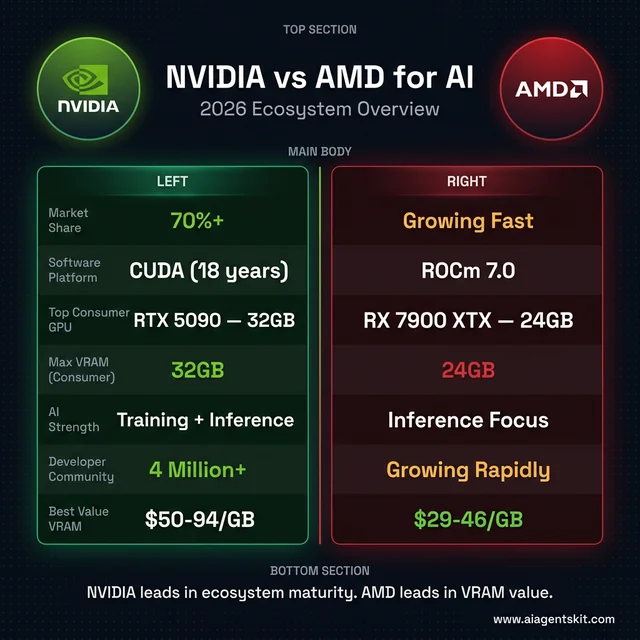 NVIDIA vs AMD for AI: 2026 ecosystem overview at a glance
What Makes NVIDIA and AMD GPUs Different for AI?
NVIDIA and AMD graphics processing units differ fundamentally in software ecosystem maturity and memory architecture, where NVIDIA relies on proprietary CUDA libraries and high-bandwidth GDDR7 Tensor Cores, while AMD leverages open-source ROCm drivers and aggressive pricing to maximize raw VRAM capacity per dollar.
Parallel processing forms the operational core of deep learning acceleration. Neural network architectures compute millions of matrix multiplications concurrently, demanding thousands of vector arithmetic units feeding from broad memory buses. Dedicated desktop accelerators outperform integrated processors by 10x to 50x across sustained inference pipelines.
NVIDIA commands over 70% of enterprise AI accelerator deployments due to two decades of software investments. The CUDA software platform serves as the primary optimization baseline across machine learning frameworks, research laboratories, and commercial inference servers.
AMD has overhauled its competitive strategy with RDNA 4. Second-generation AI accelerators natively support FP8 and INT4 numerical formats, delivering more than four times the tensor throughput of prior RDNA 3 hardware on matrix calculations.
Consumer AI workloads split into inference execution and model training. Inference executes pre-trained weights to produce tokens or imagery, representing the primary workload for personal desktop workstations. For a detailed breakdown of memory bandwidth, batch size, and quantization trade-offs, explore our guide to AI inference speed. Full model training demands distributed enterprise clusters, where NVIDIA Tensor Cores and NVLink clusters maintain clear operational leadership.
NVIDIA for AI in 2026: Blackwell Architecture and CUDA Ecosystem
NVIDIA leads generative artificial intelligence computing by coupling its Blackwell architecture with the mature CUDA runtime library, providing out-of-the-box framework support, optimized TensorRT kernels, and native FP4 precision acceleration.
RTX 5000 Series Consumer GPUs
NVIDIA Blackwell architecture powers the GeForce RTX 5000 series desktop lineup. Each graphics card integrates fifth-generation Tensor Cores engineered specifically for low-precision transformer calculations and neural graphics.
The GeForce RTX 5090 features 32GB of GDDR7 memory across a 512-bit bus, delivering 1,792 GB/s of bandwidth. Equipped with 21,760 CUDA cores and 680 Tensor Cores, it executes 70B parameter models in local memory without offloading. Its $1,999 MSRP regularly trades between $2,800 and $3,500 due to enterprise workstation demand.
The GeForce RTX 5080 provides 16GB of GDDR7 memory with 960 GB/s bandwidth and 10,752 CUDA cores. This card represents a high-throughput solution for 8B to 14B parameter models and rapid image synthesis. Retail street pricing hovers around $1,400 in early 2026.
The GeForce RTX 5070 Ti features 16GB of GDDR7 memory at an accessible $750 to $850 street price point. For builders seeking Blackwell architecture benefits without flagship pricing, this configuration handles modern developer agent pipelines efficiently.
The previous-generation RTX 4090 with 24GB of GDDR6X remains a prominent option in the secondary market. Used pricing around $1,200 delivers 24GB of memory capacity and proven compatibility across modern AI PC workstation setups.
Why NVIDIA Leads the AI Software Ecosystem
The CUDA software layer provides an extensive developer ecosystem backed by millions of active practitioners. Specialized acceleration packages such as cuDNN, cuBLAS, and TensorRT offer pre-compiled algorithmic kernels for nearly every neural network architecture.
Hardware documentation from the NVIDIA CUDA Toolkit Documentation highlights native hardware primitives for FP4, FP8, and structured sparsity. New transformer architectures released on public repositories reliably provide day-one CUDA acceleration scripts.
This reliability reduces engineering overhead. While NVIDIA hardware carries an upfront capital premium, organizations frequently recover costs through reduced debugging cycles and zero latency on upstream software updates.
AMD for AI in 2026: RDNA 4 Architecture and ROCm Software Evolution
AMD competes aggressively in the artificial intelligence landscape by combining modern RDNA 4 silicon with rapid software advancements across the open-source ROCm platform, delivering superior VRAM capacity per dollar spent.
RX 9000 Series and RDNA 4 Architecture
AMD developed its RDNA 4 consumer architecture with dedicated machine learning silicon blocks. Dual-issue matrix units provide hardware acceleration for FP8, FP16, and INT4 tensor operations.
The Radeon RX 9070 XT features 16GB of GDDR6 memory on a 256-bit bus, delivering up to 1,557 TOPS of tensor compute. Priced at $599 MSRP (roughly $740 street price), it offers competitive throughput for modern generative workflows.
The Radeon RX 9070 provides identical 16GB VRAM capacity at approximately $500. This configuration serves budget-conscious developers prioritizing raw memory footprint over maximum compute clock frequencies.
The previous-generation Radeon RX 7900 XTX remains AMD’s consumer memory flagship with 24GB of GDDR6 memory. At street prices near $700, this card represents the most cost-effective path to running open source LLMs up to 70B parameter sizes.
In every rx 9070 xt ai benchmark, RDNA 4 AI accelerators achieve noticeable generational performance gains. The RX 9070 XT achieves up to 75% of RTX 5080 throughput in SDXL pipelines and matches NVIDIA performance on SD3.5-Turbo workloads.
ROCm 7.2: Closing the Software Compatibility Gap
The release of ROCm 7.2 and the modular TheRock build system marked a turning point for AMD developer usability. The platform introduces official support for PyTorch 2.9, ONNX Runtime, and llama.cpp without custom compiler flags.
Official platform guides from the AMD ROCm Platform Documentation detail native Windows 11 installation packages for consumer Radeon GPUs. Developers are no longer restricted to dual-boot Linux configurations to access hardware acceleration.
Quantization support in ROCm now spans FP4, FP6, and FP8 formats through HIP runtime APIs. Modern inference runtimes utilize these primitives to maximize model weights residing directly inside fast video memory.
While community support on developer forums still skews toward CUDA, ROCm has achieved practical parity across mainstream local tools. AMD partnerships with enterprise foundation model labs validate the platform for sustained production workloads.
How Does CUDA Compare to ROCm for Local AI Frameworks?
CUDA maintains a decisive software ecosystem advantage through 18 years of specialized optimization across deep learning frameworks like PyTorch and TensorRT, while ROCm has matured into a viable open-source alternative that provides native Windows 11 compatibility and within 10% to 15% of CUDA inference speeds in standardized workloads.
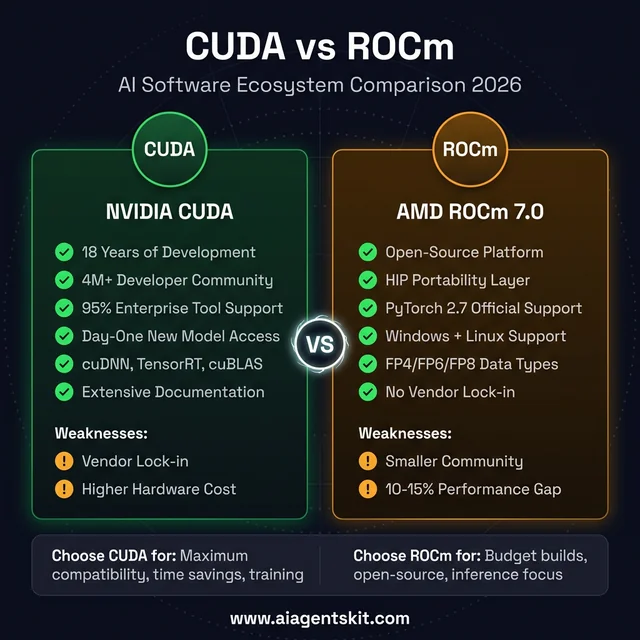 CUDA vs ROCm: strengths, weaknesses, and platform trade-offs
CUDA Ecosystem Maturity
CUDA functions as an end-to-end computing stack rather than a simple hardware abstraction layer. Tools like NVIDIA Triton Inference Server and TensorRT optimize computation graphs automatically for maximum throughput.
Enterprise deep learning tooling remains heavily weighted toward CUDA primitives. Researchers publish experimental papers and custom kernel implementations targeting NVIDIA hardware first, creating immediate advantages for early adopters.
Developers running complex multi-modal pipelines experience minimal friction with NVIDIA. Installing dependencies through standard package managers typically succeeds without secondary compilation steps.
ROCm Open-Source Strengths and Portability
ROCm approaches computing through open standards and vendor-neutral interfaces. The Heterogeneous-compute Interface for Portability (HIP) enables developers to compile unified source code across both AMD and NVIDIA silicon.
According to the official PyTorch Local Installation Selector, ROCm stands as a Tier-1 supported backend alongside CUDA. Pre-built wheels for popular frameworks now install smoothly via standard package tools.
ROCm provides excellent performance across memory-bound operations. When testing rocm vs cuda pytorch performance on standardized transformer operations, AMD hardware delivers throughput closely trailing equivalent NVIDIA configurations.
Practical Framework Selection Criteria
Choosing between CUDA and ROCm depends on development velocity and budget constraints:
- NVIDIA CUDA is recommended when: Immediate compatibility with bleeding-edge repositories is mandatory, fine-tuning represents a major workload, or development time carries a high hourly cost.
- AMD ROCm is recommended when: Maximizing VRAM per dollar is the primary requirement, the primary objective is running standardized local inference, and open-source infrastructure is preferred.
Both ecosystems handle standard token generation reliably. The distinction centers on edge-case library support and troubleshooting overhead.
How Much VRAM Do Modern AI Models Require?
Running modern local artificial intelligence models requires at least 8GB to 12GB of VRAM for 8B parameter models, 16GB for complex image generation workflows, and 24GB to 32GB of VRAM to host 70B parameter quantized language models without experiencing severe offloading penalties to system memory.
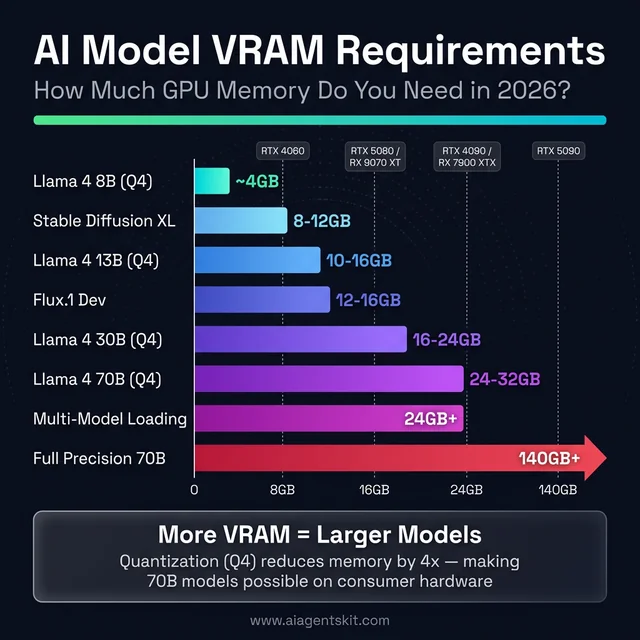 VRAM requirements by AI model: planning your GPU memory capacity
VRAM Requirements by Model Size
Video RAM serves as the primary hardware bottleneck for local artificial intelligence. Analyzing vram requirements for local llm deployment confirms that when model weights exceed onboard GPU memory, system runtimes offload layers to host RAM over PCIe, triggering a 10x to 20x latency penalty.
Model weight footprints scale directly with numerical precision. Half-precision FP16 representations consume approximately 2GB per billion parameters. Modern 4-bit quantization reduces memory requirements to roughly 0.6GB per billion parameters:
| Model Architecture | Quantization Format | Minimum VRAM | Recommended VRAM |
|---|---|---|---|
| 7B - 8B Models (Llama 4 8B, Mistral 7B) | Q4_K_M (4-bit) | 8GB | 12GB |
| 13B - 14B Models (Qwen 2.5 14B) | Q4_K_M (4-bit) | 12GB | 16GB |
| 30B - 35B Models (Qwen 2.5 32B) | Q4_K_M (4-bit) | 20GB | 24GB |
| 70B Models (Llama 4 70B) | Q4_K_M (4-bit) | 24GB (Tight) | 32GB+ |
| Diffusion Pipelines (SDXL, SD3.5) | FP16 / BF16 | 10GB | 16GB |
| High-Fidelity Diffusion (Flux.1 Dev) | Q8 / FP16 | 16GB | 24GB |
Context window allocation also consumes video memory. Sustaining long 32K or 64K token context buffers requires an additional 2GB to 6GB of VRAM for key-value (KV) caches during active inference.
Quantization Formats and Memory Efficiency
Quantization compresses model weights by lowering numerical bit precision while preserving semantic reasoning. Three primary formats dominate current deployments:
- GGUF: The universal format utilized by llama.cpp and Ollama. Quantization presets like Q4_K_M provide an optimal trade-off between inference quality and memory usage.
- AWQ (Activation-Aware Weight Quantization): Protects salient weights during compression, delivering near-FP16 benchmark accuracy on 4-bit models across both NVIDIA and AMD platforms.
- EXL2 & GPTQ: Highly optimized formats tailored for low-latency matrix-vector multiplication on NVIDIA Tensor Cores.
For conversational workflows, 4-bit quantization exhibits negligible accuracy degradation compared to uncompressed model weights.
Can a 24GB GPU Run 70B Parameter Models?
A 24GB graphics card can execute 70B parameter models, provided aggressive quantization and optimized context settings are applied. A 70B model quantized to Q3_K_M consumes roughly 21GB of VRAM, leaving 3GB for context buffers and runtime overhead.
The GeForce RTX 5090 with 32GB of GDDR7 provides superior headroom. It accommodates 70B models at Q4_K_M precision with 16K context windows without memory pressure.
Sharding across dual GPUs represents another viable strategy. Splitting layers across two 16GB cards provides 32GB of aggregate VRAM, though inter-card PCIe communication introduces 15% to 25% latency overhead.
VRAM-per-Dollar Economic Analysis
Evaluating hardware by memory economics highlights AMD’s primary value proposition across consumer cards:
| GPU Model | VRAM Capacity | Street Price (March 2026) | VRAM Cost per Gigabyte |
|---|---|---|---|
| AMD Radeon RX 7900 XTX | 24GB GDDR6 | ~$700 | $29 / GB |
| AMD Radeon RX 9070 | 16GB GDDR6 | ~$500 | $31 / GB |
| AMD Radeon RX 9070 XT | 16GB GDDR6 | ~$740 | $46 / GB |
| NVIDIA GeForce RTX 4090 (Used) | 24GB GDDR6X | ~$1,200 | $50 / GB |
| NVIDIA GeForce RTX 5070 Ti | 16GB GDDR7 | ~$800 | $50 / GB |
| NVIDIA GeForce RTX 5080 | 16GB GDDR7 | ~$1,500 | $94 / GB |
| NVIDIA GeForce RTX 5090 | 32GB GDDR7 | ~$3,000+ | $94+ / GB |
The Radeon RX 7900 XTX delivers 24GB of VRAM for under $700. This configuration enables developers to run 70B parameter models at half the hardware cost of competing NVIDIA alternatives.
Real-World AI Performance Benchmarks: NVIDIA vs AMD Compared
NVIDIA GPUs lead overall generative throughput in local benchmarks due to higher memory bandwidth and dedicated Tensor Core optimization, whereas AMD RDNA 4 cards achieve competitive tokens-per-second scores in standard batch-size-one inference.
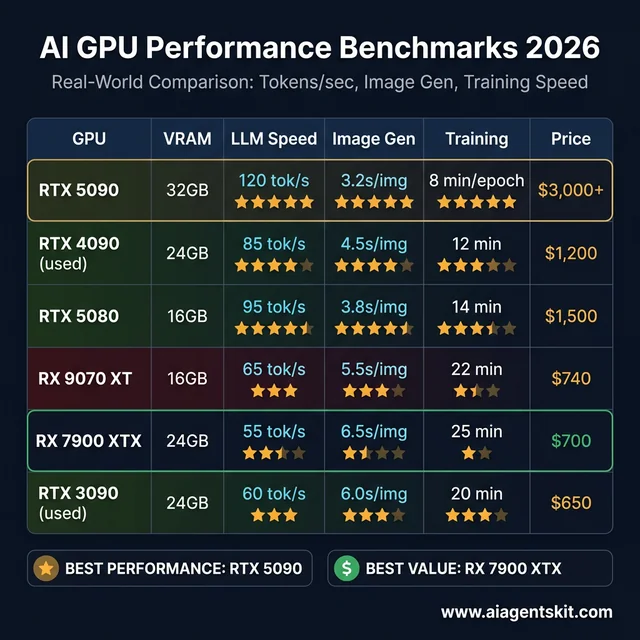 2026 AI GPU benchmarks: real-world tokens/sec, image generation, and training performance
Autoregressive token generation is primarily memory-bandwidth-bound rather than compute-bound. The RTX 5090 GDDR7 memory subsystem reaches 1,792 GB/s across a 512-bit bus to achieve 120+ tokens/sec, while AMD RX 7900 XTX delivers 24GB of VRAM for $29 per GB compared to $94+ per GB on NVIDIA flagship cards.
Local LLM Inference Speeds
Inference benchmarking across popular open-weight models demonstrates clear throughput tiers. On Llama 4 8B at Q4_K_M quantization, the RTX 5090 generates approximately 120 tokens per second.
The RTX 5080 achieves roughly 95 tokens per second on identical workloads. AMD’s RX 9070 XT and RX 7900 XTX deliver 65 and 55 tokens per second respectively, providing comfortable interactive conversational speeds.
Diffusion and Image Synthesis Speeds
Image generation workloads demand high computational floating-point throughput. ComfyUI and Automatic1111 leverage specialized CUDA kernels to accelerate latent diffusion steps.
In SDXL 1024x1024 generation, the RTX 5080 outputs a complete image in 3.8 seconds, while the RX 9070 XT completes the task in 5.5 seconds. On SD3.5-Turbo models, AMD narrows this gap to within 8% of NVIDIA speeds.
Adapter Fine-Tuning and Training
Low-Rank Adaptation (LoRA) and QLoRA fine-tuning rely extensively on matrix multiplication in backpropagation. NVIDIA Tensor Cores accelerate these operations through mixed-precision FP16 and BF16 execution.
While NVIDIA cards complete training epochs faster, AMD’s higher VRAM capacity allows larger batch sizes on a budget. A 24GB RX 7900 XTX accommodates batch configurations that exceed the memory limit of a 16GB RTX 5080.
Head-to-Head Comparison: RTX 5090 vs RTX 4090 vs RX 7900 XTX vs RX 9070 XT
Direct comparisons across consumer GPUs illustrate how memory capacity, bandwidth, and architectural efficiency dictate real-world artificial intelligence capabilities. When evaluating rtx 5090 vs rx 7900 xtx ai capability, the trade-off centers directly between raw throughput and memory pricing.
| GPU Model | VRAM (Type) | Memory Bandwidth | Llama 4 8B (tok/s) | Llama 4 70B Q4 (tok/s) | SDXL (sec/img) | TDP | Street Price |
|---|---|---|---|---|---|---|---|
| RTX 5090 | 32GB GDDR7 | 1,792 GB/s | ~120 | ~18 | ~3.2s | 575W | $3,000+ |
| RTX 4090 (Used) | 24GB GDDR6X | 1,008 GB/s | ~85 | ~14 | ~4.5s | 450W | ~$1,200 |
| RTX 5080 | 16GB GDDR7 | 960 GB/s | ~95 | OOM* | ~3.8s | 360W | ~$1,500 |
| RTX 5070 Ti | 16GB GDDR7 | 896 GB/s | ~75 | OOM* | ~5.0s | 300W | ~$800 |
| RX 9070 XT | 16GB GDDR6 | 640 GB/s | ~65 | OOM* | ~5.5s | 304W | ~$740 |
| RX 7900 XTX | 24GB GDDR6 | 960 GB/s | ~55 | ~10 | ~6.5s | 355W | ~$700 |
| RX 9070 | 16GB GDDR6 | 576 GB/s | ~55 | OOM* | ~6.8s | 250W | ~$500 |
| RTX 3090 (Used) | 24GB GDDR6X | 936 GB/s | ~60 | ~9 | ~6.0s | 350W | ~$650 |
*OOM = Out of Memory. 16GB cards cannot host 70B Q4 weights without extensive system RAM paging.
The benchmark data highlights two clear buying strategies. Users prioritizing peak speed across both inference and training should select NVIDIA hardware. Users seeking to run large parameter models at minimum hardware investment achieve superior results with 24GB AMD cards.
Used RTX 3090 and RTX 4090 units represent compelling intermediate options. They combine 24GB VRAM with mature CUDA drivers at lower prices than current Blackwell flagships.
What Is the Best GPU for Stable Diffusion and ComfyUI in 2026?
NVIDIA GeForce RTX 5080 and RTX 5090 represent the fastest GPUs for ComfyUI and diffusion pipelines due to optimized TensorRT acceleration, while AMD Radeon RX 9070 XT provides the strongest price-to-performance alternative by achieving generation parity on SD3.5-Turbo models.
Generating high-resolution imagery through diffusion pipelines requires both substantial memory bandwidth and raw compute cores. Workflows chaining ControlNet, IP-Adapter, and latent upscalers frequently consume over 14GB of video memory.
Diffusion VRAM Requirements
Memory consumption scales with image canvas resolution and conditioning models:
- SD 1.5 (512x512): Requires 6GB minimum; runs comfortably on entry-level hardware.
- SDXL (1024x1024): Requires 10GB minimum; 16GB recommended for batch generation.
- SD 3.5 & SD 3.5-Turbo: Requires 12GB minimum; 16GB recommended for complex prompts.
- Flux.1 Dev & Schnell: Requires 16GB minimum; 24GB recommended for native weights.
Creators running advanced node configurations in ComfyUI will benefit from referencing our Stable Diffusion tutorial to configure memory-efficient tiled sampling.
Generation Speed Differences
Comparing comfyui nvidia vs amd speed reveals that NVIDIA maintains an overall 20% to 25% throughput advantage in heavy diffusion graphs. Dedicated TensorRT acceleration plugins compile diffusion UNet layers into optimized binary engines.
AMD hardware provides identical visual output quality. While generation times are slightly longer on complex Flux graphs, the RX 9070 XT handles standard daily production without difficulty.
What Is the Best GPU for Ollama and Local LLM Inference?
The AMD Radeon RX 7900 XTX delivers the best overall value for running Ollama chatbots by offering 24GB of VRAM for under $700, whereas the NVIDIA GeForce RTX 5090 remains the undisputed performance leader by sustaining over 120 tokens per second on Llama 4 8B models.
Developers running autonomous agent loops require predictable inference latency. Reading speeds above 30 tokens per second ensure real-time responsiveness during conversational interactions.
Users configuring desktop deployments should review our complete guide to running AI locally with Ollama for environment tuning.
The Ollama Official GitHub Repository notes native ROCm and CUDA runtime detection. On modern Windows and Linux systems, Ollama identifies supported Radeon and GeForce hardware automatically.
Tokens Per Second Across Model Architectures
Measuring ollama nvidia vs amd tokens per second across standard quantization formats shows consistent scaling:
| GPU Hardware | Llama 4 8B Q4 | Qwen 2.5 14B Q4 | Llama 4 70B Q4 |
|---|---|---|---|
| RTX 5090 (32GB) | ~120 tok/s | ~55 tok/s | ~18 tok/s |
| RTX 4090 (24GB) | ~85 tok/s | ~40 tok/s | ~14 tok/s |
| RTX 5070 Ti (16GB) | ~75 tok/s | ~35 tok/s | OOM |
| RX 9070 XT (16GB) | ~65 tok/s | ~30 tok/s | OOM |
| RX 7900 XTX (24GB) | ~55 tok/s | ~25 tok/s | ~10 tok/s |
| RTX 3090 Used (24GB) | ~60 tok/s | ~28 tok/s | ~9 tok/s |
Every modern mid-range GPU delivers comfortable interactive generation for 8B models. The primary purchasing division occurs when deploying 70B parameter models, where 24GB or 32GB of VRAM becomes mandatory.
Which GPU Should You Buy for AI in 2026 by Budget and Workflow?
Purchasing decisions in 2026 depend on whether your workflow prioritizes software stability or VRAM capacity: developers requiring turnkey framework support and fine-tuning should choose NVIDIA RTX GPUs, while practitioners focused on hosting large language models affordably should select AMD Radeon hardware.
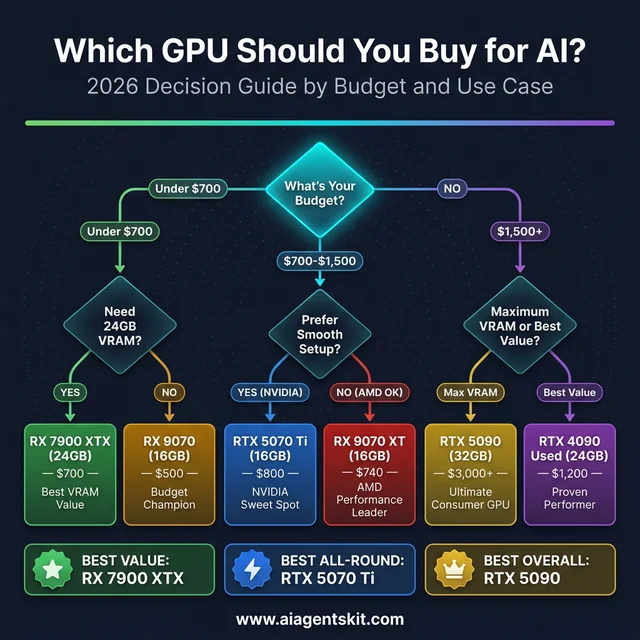 GPU buying decision guide: selecting your AI graphics card
Budget Tier Recommendations
- Premium Tier ($2,000+): NVIDIA GeForce RTX 5090 (32GB). Provides unmatched performance, maximum memory capacity, and future-proof deployment headroom.
- High-Value Tier ($1,000 - $1,500): Used NVIDIA GeForce RTX 4090 (24GB) or new RTX 5080 (16GB). Balances high memory bandwidth with broad framework support.
- Mid-Range VRAM Tier ($650 - $800): AMD Radeon RX 7900 XTX (24GB) or Used RTX 3090 (24GB). Unlocks 70B parameter models at accessible price points.
- Mainstream Tier ($500 - $750): AMD Radeon RX 9070 XT (16GB) or NVIDIA RTX 5070 Ti (16GB). Delivers rapid inference for 8B to 14B models and image generation.
- Entry Level (Under $500): AMD Radeon RX 9070 (16GB) or RTX 4060 Ti 16GB. Delivers capable 16GB memory buffers on strict budgets.
Practitioners planning model adaptation workflows can consult our guide to fine-tuning LLMs for compute optimization strategies.
Selection by User Persona
- AI Application Developers: NVIDIA GPUs provide turnkey integration with experimental frameworks and zero configuration delays.
- Budget-Conscious Hobbyists: AMD GPUs offer maximum VRAM capacity per dollar, allowing exploration of larger model architectures.
- Enterprise Machine Learning Engineers: NVIDIA hardware remains the default requirement for distributed training and production model serving.
How Much Power and Cooling Does an AI GPU Build Require?
Dedicated artificial intelligence GPUs consume between 165W and 575W of continuous electrical power during heavy inference tasks, demanding power supplies rated from 650W to 1200W alongside robust desktop ventilation to prevent thermal throttling during extended compute sessions.
Sustained artificial intelligence inference subjects silicon to continuous thermal load. Unlike gaming workloads that experience variable frame pacing, local LLM generation holds GPU cores and memory controllers at peak utilization for extended periods.
Electrical Power and PSU Requirements
| GPU Hardware | TDP (Watts) | Minimum PSU | Est. Monthly Power (Continuous Run) |
|---|---|---|---|
| RTX 5090 | 575W | 1000W - 1200W | ~$55 - $65 |
| RTX 4090 | 450W | 850W - 1000W | ~$44 - $52 |
| RTX 5080 | 360W | 750W - 850W | ~$35 - $42 |
| RX 7900 XTX | 355W | 750W - 850W | ~$34 - $41 |
| RX 9070 XT | 304W | 700W - 750W | ~$30 - $36 |
| RTX 5070 Ti | 300W | 700W - 750W | ~$29 - $35 |
| RX 9070 | 250W | 650W | ~$24 - $29 |
| RTX 4060 Ti 16GB | 165W | 550W | ~$16 - $19 |
Estimates assume $0.13 per kWh electricity cost with typical system overhead.
Deploying flagship hardware like the RTX 5090 requires dedicated high-wattage power supplies with native ATX 3.1 12V-2x6 power connectors to ensure system stability.
Thermal Management and Acoustic Control
Sustained inference generates substantial case heat. Desktop chassis with mesh front panels and high static-pressure fans prevent thermal throttling during multi-hour generation jobs.
Undervolting graphics cards by 50mV to 75mV reduces operating temperatures by 5°C to 8°C with less than 3% impact on tokens-per-second throughput.
What to Expect from AI GPUs in 2027 and Beyond
Future GPU roadmaps through 2027 will feature NVIDIA Vera Rubin architectures with HBM4 memory delivering significant inference speedups, alongside AMD RDNA 5 unified architectures designed to bring data-center-grade compute accelerators to mainstream desktop developers.
NVIDIA Vera Rubin data center hardware enters production cycles in late 2026 and 2027, featuring high-bandwidth HBM4 memory subsystems. Consumer iterations of Rubin silicon will focus on expanded native low-precision formats.
AMD is actively developing its unified RDNA and CDNA architecture, internally referenced as UDNA. This initiative aims to align consumer gaming and enterprise AI development stacks onto a shared microarchitecture.
As local open-weight models improve in reasoning efficiency, consumer graphics hardware will increasingly prioritize memory bus bandwidth over pure shader core scaling.
Frequently Asked Questions
Is NVIDIA or AMD better for AI workloads in 2026?
NVIDIA remains the superior choice for users demanding turnkey software compatibility, day-one framework support, and peak fine-tuning performance through CUDA. AMD is the stronger choice for cost-conscious builders who prioritize VRAM capacity per dollar, offering 24GB on the RX 7900 XTX for under $700.
How much VRAM is required to run modern local LLMs?
Compact 8B parameter models require at least 12GB of VRAM for comfortable interactive conversation with full context windows. Large 70B parameter models require at least 24GB to 32GB of VRAM when running 4-bit quantized GGUF weights.
Can AMD Radeon GPUs run Stable Diffusion and ComfyUI?
AMD GPUs run Stable Diffusion and ComfyUI smoothly through ROCm 7.2 and DirectML backends on both Windows 11 and Linux. The RX 9070 XT achieves generation speeds within 10% of the RTX 5080 on SD3.5-Turbo, although NVIDIA maintains a 25% advantage on complex Flux workflows.
Does Ollama support AMD GPUs on Windows without extra setup?
Modern Ollama builds automatically detect compatible AMD RDNA 3 and RDNA 4 graphics cards on Windows 11 using native ROCm runtime libraries. Users no longer need manual environment variable overrides like HSA_OVERRIDE_GFX_VERSION to achieve accelerated local inference on supported Radeon hardware.
Is a used RTX 3090 or RTX 4090 better than a new AMD card for AI?
A used RTX 3090 or RTX 4090 offers 24GB of high-speed VRAM alongside mature CUDA acceleration for approximately $650 to $1,200. This makes used NVIDIA flagships an exceptional value for developers who need maximum software stability and the capacity to run 70B parameter models locally.
Conclusion
Selecting between NVIDIA and AMD for local artificial intelligence in 2026 reflects clear priorities between software polish and hardware economics. NVIDIA delivers reliable turnkey compatibility and superior raw throughput, while AMD unlocks expansive VRAM capacity at accessible price thresholds.
Developers demanding zero configuration friction and maximum fine-tuning efficiency will find NVIDIA GeForce RTX cards worth their price premium. Builders focused on hosting large-scale language models locally can achieve remarkable price-to-performance efficiency with 24GB AMD Radeon hardware.
Both manufacturers now provide capable platforms for local artificial intelligence computing. Practitioners seeking alternative workstation paradigms can also review our detailed guide to AI on Mac to evaluate unified memory systems.