Dual-GPU Setup for Local LLMs: Hardware & Parallelism Guide
Learn how to build a dual-GPU setup for local LLMs. Configure PCIe bifurcation, power supply sizing, llama.cpp layer splitting, and vLLM tensor parallelism.
Deploying frontier open-weights language models on local hardware inevitably pushes individual graphics cards beyond their physical memory boundaries. While single-card desktop builds hit an expensive ceiling at 24GB or 32GB of VRAM, configuring a multi gpu llm workstation unlocks 48GB or more of high-speed memory. Combining two graphics cards allows developers to host dense 70B parameter models at standard 4-bit precision without paying enterprise server premiums.
However, scaling across two graphics cards introduces intricate hardware interdependencies that single-GPU builds never face. Selecting components requires consulting our guide to the best GPU for running AI locally and mastering PCIe bus lane allocations, physical slot spacing, power distribution, and parallel runtime configurations.
Key Takeaways
- A dual-GPU configuration provides 48GB of pooled addressable VRAM across two 24GB cards, unlocking full 70B parameter models at standard 4-bit precision for under 1,600 dollars.
- Motherboard selection must provide CPU-level PCIe bifurcation into an x8/x8 topology, avoiding chipset-linked x4 slots that throttle cross-device activation transfers.
- llama.cpp layer-based pipeline parallelism (-sm layer) distributes sequential transformer blocks across cards, delivering stable 24 tokens per second without requiring high-speed NVLink hardware.
- Workstation power delivery requires a 1200W to 1600W power supply with dedicated, unshared PCIe power cables to absorb dual 350W board draws and transient spikes safely.
Why Dual-GPU Systems Outperform Expensive Single Accelerators
In local deep learning, memory capacity determines model viability while memory bandwidth dictates interactive token generation speeds. Single consumer graphics cards top out at 24GB on the RTX 3090/4090 and 32GB on the RTX 5090.
+------------------------------------------------------------------------+
|                SINGLE FLAGSHIP VS DUAL-GPU HARDWARE SCALING            |
|                                                                        |
|  Single RTX 5090 (32GB GDDR7):                                         |
|  - Estimated Cost:  $2,000 - $2,500                                    |
|  - Total VRAM:      32 GB                                              |
|  - 70B Model Fit:   Fails (Requires heavy 2-bit quantization)          |
|                                                                        |
|  Dual RTX 3090 Workstation (2x 24GB GDDR6X):                           |
|  - Estimated Cost:  $1,400 - $1,700 (Used Cards)                       |
|  - Total VRAM:      48 GB Addressable Buffer                           |
|  - 70B Model Fit:   Runs Native Q4_K_M & Q5_K_M with 16k Context       |
+------------------------------------------------------------------------+
When building a dual gpu local llm setup, pooling two 24GB graphics cards provides 48GB of total video memory. This allows developers to run Llama 3.3 70B or Qwen 2.5 72B with generous context windows for roughly 1,500 dollars.
Achieving identical capacity on a single professional accelerator like an NVIDIA RTX 6000 Ada requires spending over 6,500 dollars. For builders evaluating secondary market hardware, examine our breakdown of whether a used RTX 3090 is still worth it for AI to understand the economics of 24GB cards.
PCIe Bifurcation and Motherboard Architecture: The x8/x8 Imperative
The most critical architectural requirement for multi-GPU workstations is motherboards that support CPU PCIe bifurcation. Mainstream desktop processors provide only 20 to 24 dedicated PCIe lanes directly wired to the CPU socket.
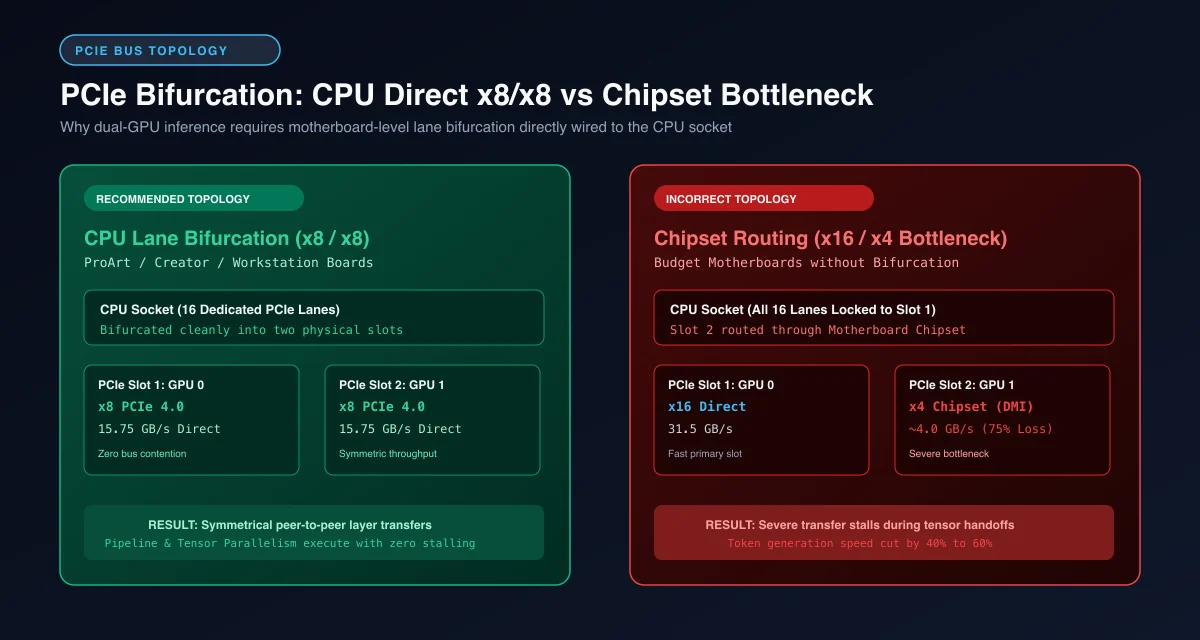 PCIe bifurcation architecture: Symmetric CPU-direct x8/x8 lane allocation versus platform controller hub bottlenecks.
Configuring pcie bifurcation x8 x8 for ai requires selecting creator-grade or workstation motherboards. Premium boards like the ASUS ProArt series or ASRock Creator split the primary CPU-linked lanes evenly into x8 and x8 modes when both physical slots detect graphics hardware.
Avoid budget motherboards where the secondary full-length slot routes through the platform controller hub at PCIe 4.0 x4. Routing tensor handoffs through the chipset bus introduces severe latency bottlenecks that cut generation speed in half.
Physical Slot Spacing, Thermal Choking, and Airflow Dynamics
Modern graphics cards feature triple-slot and quad-slot cooling assemblies. Installing two large air-cooled GPUs onto a standard ATX motherboard presents severe thermal complications.
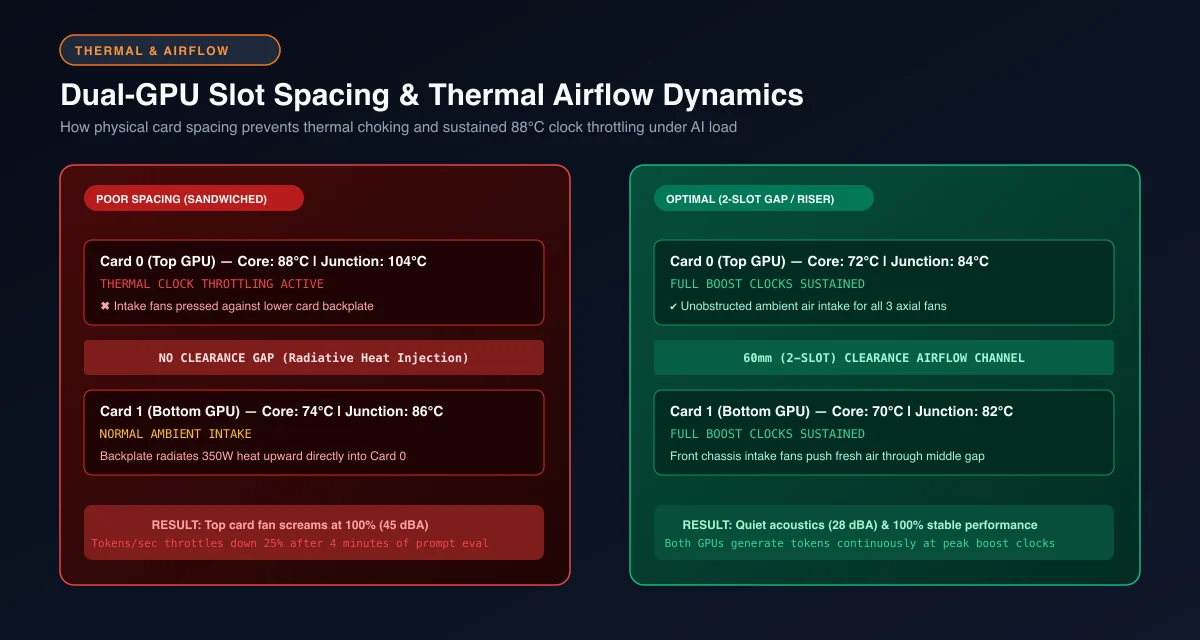 Dual-GPU thermal dynamics: Overheating risks from sandwiched cards versus sustained boost clocks with 60mm clearance.
When cards sit directly adjacent to one another, the backplate of the lower card radiates heat directly into the intake fans of the upper card. This thermal choking starves the top card of fresh air, forcing core temperatures past 85°C and triggering thermal clock throttling.
Maintain a physical clearance of at least two empty expansion slots between graphics cards. If your motherboard lacks adequate spacing, use high-speed PCIe 4.0 x16 shielded riser cables to mount the secondary GPU vertically or reposition it onto a dedicated lower bracket.
Parallelism Architectures: Pipeline Splitting vs Tensor Sharding
Distributing deep learning models across multiple GPUs relies on two primary parallelization strategies. Understanding pipeline parallelism vs tensor parallelism ensures you choose the proper runtime mode for your workload.
| Feature | Pipeline Parallelism (PP / Layer Splitting) | Tensor Parallelism (TP / Tensor Sharding) |
|---|---|---|
| Primary Execution Engine | llama.cpp (-sm layer) and Ollama |
vLLM and TensorRT-LLM |
| Interconnect Requirement | Standard PCIe 4.0 x8 (No NVLink needed) | High-Speed (NVLink or PCIe 5.0 preferred) |
| Single-User Latency | Stable and low latency per token | High throughput, slightly higher latency |
| Multi-User Scaling | Lower efficiency (Pipeline bubbles) | Superior (All devices compute concurrently) |
| Model Sharding Rule | Arbitrary layer division across VRAM | Attention heads must divide evenly by GPUs |
Pipeline parallelism assigns sequential blocks of transformer layers to each card. GPU 0 executes layers 1 through 40, then passes the resulting activation vectors over the PCIe bus to GPU 1, which calculates layers 41 through 80. Because devices communicate only once per token at layer boundaries, standard PCIe interfaces handle the workload without bottlenecking.
Tensor parallelism shards individual weight matrices across both GPUs simultaneously. Both cards compute mathematical sub-matrices in parallel and execute All-Reduce synchronization routines to combine partial sums. This pattern provides superior throughput for concurrent client requests but demands high interconnect bandwidth.
[!TIP] For single-developer interactive coding on PCIe connections, prioritize llama.cpp with pipeline parallelism (
-sm layer). Tensor parallelism (vLLM) requires heavy All-Reduce collective communication over PCIe, which degrades single-stream decode speed unless high-speed NVLink bridges are present.
Power Delivery and PSU Sizing: Handling Dual High-TDP Cards
Calculating dual gpu power supply sizing requires accounting for sustained thermal board power alongside transient electrical spikes.
A dual RTX 3090 or RTX 4090 setup combines two 350W to 450W graphics processors. When paired with a 150W desktop CPU, storage drives, and liquid cooling pumps, continuous power consumption under matrix multiplication easily reaches 900W to 1,000W.
+------------------------------------------------------------------------+
|                   POWER DISTRIBUTION SIZING BREAKDOWN                  |
|                                                                        |
|  Primary GPU (RTX 3090/4090):      350W - 450W                         |
|  Secondary GPU (RTX 3090/4090):    350W - 450W                         |
|  CPU, Motherboard, Fans, Storage:  200W - 250W                         |
|  Transient Spike Headroom (20%):   250W - 300W                         |
|  -------------------------------------------------------------         |
|  TOTAL RECOMMENDED POWER SUPPLY:   1200W to 1600W (ATX 3.1 Certified)  |
+------------------------------------------------------------------------+
Always select a 1200W to 1600W power supply certified for 80-Plus Platinum or Titanium efficiency. Never daisychain PCIe power cables using dual-headed splitter leads. Run independent, dedicated 8-pin power cables directly from modular power supply outputs to every connector port on each graphics card.
Step-by-Step Configuration in llama.cpp and Ollama
The simplest method for running multi-GPU models locally is using llama.cpp. The engine includes automated device discovery and layer balancing.
To execute a 70B parameter model across two graphics cards, run the llama.cpp server with explicit tensor-split parameters:
# Launch llama.cpp server splitting layers evenly across GPU 0 and GPU 1
./llama-server \
  -m models/Llama-3.3-70B-Instruct-Q4_K_M.gguf \
  -ngl 99 \
  -sm layer \
  -ts 24,24 \
  -c 16384 \
  --port 8080
In this command, -sm layer enforces pipeline parallelism across transformer blocks. The -ts 24,24 parameter represents the llama cpp tensor split ratio, instructing the engine to allocate equal memory shares to GPU 0 and GPU 1. If you are pairing cards with unequal VRAM such as a 24GB card and a 16GB card, adjust the ratio to -ts 24,16.
When running through Ollama, the daemon automatically detects multiple CUDA-compatible graphics cards and balances layers proportionally across free memory buffers without requiring manual flags. Review our detailed llama.cpp vs Ollama comparison to explore runtime performance nuances.
Production Serving with vLLM Multi-GPU Distributed Runtimes
For developers hosting multi-agent environments or serving high-volume developer APIs, vllm multi gpu serving delivers production-grade continuous batching.
To configure distributed tensor parallelism across two GPUs using vLLM, launch the server using the command below:
# Launch vLLM server with tensor parallelism across 2 GPUs
python3 -m vllm.entrypoints.openai.api_server \
  --model meta-llama/Llama-3.3-70B-Instruct \
  --tensor-parallel-size 2 \
  --gpu-memory-utilization 0.94 \
  --max-model-len 8192 \
  --port 8000
You can interact with your distributed multi-GPU endpoint programmatically using Python. Execute the client script below to verify that both devices generate completions synchronously:
import requests
import json
import time

def query_distributed_vllm_cluster(prompt: str) -> dict:
    """Send request to local multi-GPU vLLM cluster and measure latency."""
    url = "http://localhost:8000/v1/completions"
    headers = {"Content-Type": "application/json"}
    payload = {
        "model": "meta-llama/Llama-3.3-70B-Instruct",
        "prompt": prompt,
        "max_tokens": 256,
        "temperature": 0.2
    }

    start_time = time.time()
    response = requests.post(url, headers=headers, json=payload)
    elapsed = time.time() - start_time

    if response.status_code == 200:
        result = response.json()
        generated_text = result["choices"][0]["text"]
        token_count = len(generated_text.split())
        tps = token_count / elapsed if elapsed > 0 else 0

        return {
            "status": "success",
            "latency_seconds": round(elapsed, 2),
            "estimated_tps": round(tps, 1),
            "response": generated_text.strip()
        }
    else:
        return {"status": "error", "code": response.status_code, "msg": response.text}

if __name__ == "__main__":
    test_prompt = "Explain the difference between pipeline parallelism and tensor parallelism in two concise sentences."
    res = query_distributed_vllm_cluster(test_prompt)
    print(json.dumps(res, indent=2))
For advanced multi-node orchestration and distributed clusters, review official deployment guidelines in the vLLM Distributed Serving Documentation alongside the vLLM Project Official GitHub Repository. Complete assembly instructions for multi-accelerator builds are documented in our guide on how to build a dedicated AI workstation.
Additionally, review implementation standards in the llama.cpp Official GitHub Repository to track memory mapping optimizations across heterogeneous GPUs.
Frequently Asked Questions About Dual-GPU Local LLM Setups
Can you run a local LLM across two different GPUs?
Yes, you can run a local LLM across two mismatched GPUs using llama.cpp by specifying custom layer distributions with the tensor split argument. While runtime engines balance layers across unequal VRAM pools, matching identical GPUs is recommended for optimal synchronization.
What is the difference between tensor parallelism and pipeline parallelism?
Pipeline parallelism assigns sequential blocks of layers to each GPU, passing activations down the pipeline with minimal cross-device chatter over standard PCIe slots. Tensor parallelism splits individual weight matrices across both GPUs simultaneously, delivering higher multi-user throughput but requiring high-speed interconnects.
What motherboard do you need for a dual-GPU AI setup?
You need an ATX or E-ATX motherboard that supports CPU-level PCIe bifurcation into an x8/x8 configuration across two full-length PCIe slots. The board must also provide at least two to three slots of physical spacing between GPUs to ensure adequate cooling airflow for the top card.
How many watts do you need for a dual-GPU AI workstation?
A dual-GPU AI workstation requires a 1200W to 1600W 80-Plus Gold or Platinum power supply depending on your graphics card TDP. Two 350W GPUs combined with a modern multi-core processor and motherboard draw over 900W under full load, requiring headroom for transient spikes.