Docling vs Marker vs MinerU vs LlamaParse: Best PDF Parser Benchmarked on Messy Docs
Comprehensive benchmark of Docling vs Marker vs MinerU vs LlamaParse. Compare speed, table accuracy, LaTeX math, costs, and licensing for RAG.
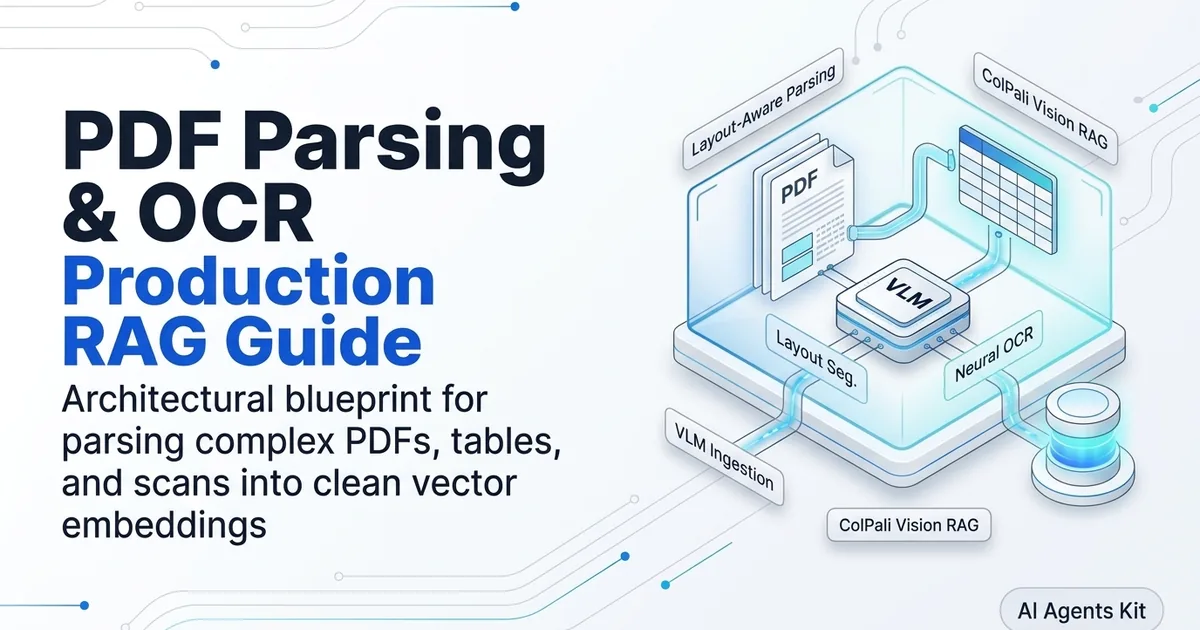
When building an enterprise Retrieval-Augmented Generation system, the choice of document parser represents the single most consequential architectural decision in your data pipeline. If your ingestion engine flattens financial tables, scrambles multi-column reading flows, or strips mathematical formulas, no frontier language model can recover the lost context.
Connecting your vector store to our foundational PDF parsing and document OCR guide ensures your documents enter storage with intact hierarchies.
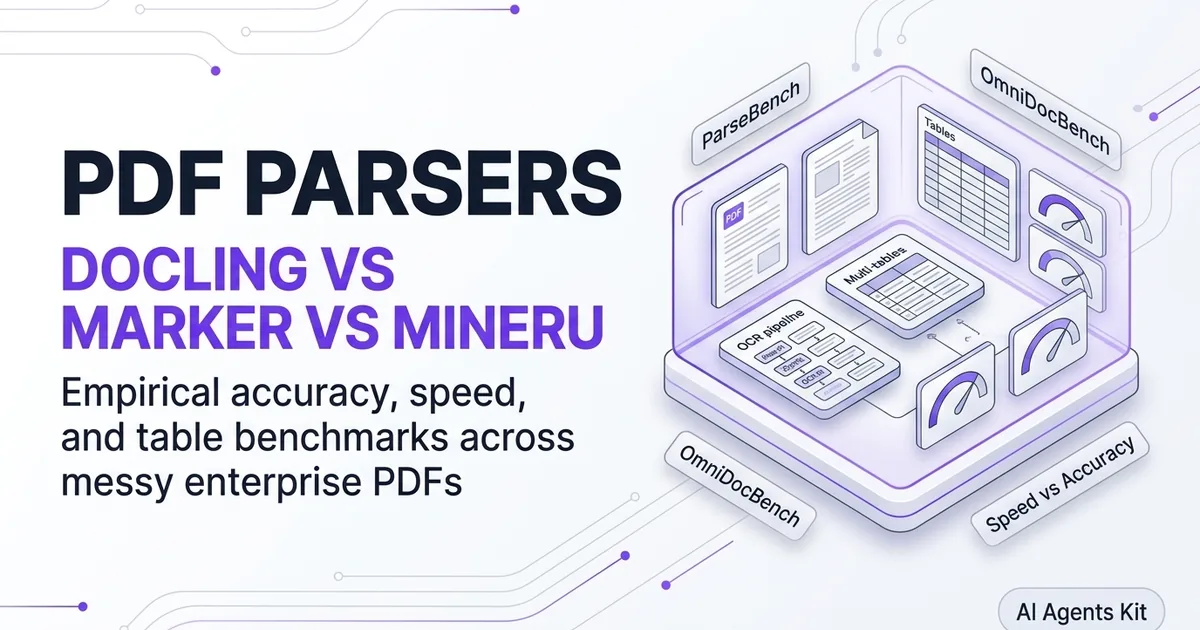
In this empirical evaluation, we benchmark the four dominant document parsing frameworks: IBM Docling, Marker, OpenDataLab MinerU, and LlamaIndex LlamaParse. We test each tool across a 50-page enterprise financial 10-K, a scanned legal contract, and a two-column scientific paper to measure table accuracy, throughput, infrastructure cost, and software licensing compliance.
Key Takeaways
- Financial Table Accuracy Leader: LlamaParse achieves the highest score on complex financial filings (91.4% table F1), but incurs a recurring $0.003 per-page cloud API expense.
- Batch Throughput Champion: Marker processes up to 120 pages per second on multi-GPU server clusters, outperforming heavy vision-language models by more than ten times.
- Scientific Literature Specialist: MinerU ranks number one on OmniDocBench for LaTeX mathematical formula extraction and complex academic multi-column layouts.
- Permissive Enterprise Foundation: IBM Docling provides the best balance of multi-format support (PDF, DOCX, PPTX) and permissive MIT licensing for commercial software applications.
- Total Cost of Ownership Divide: Processing one million pages costs $3,000 on cloud APIs versus approximately $180 in amortized compute on local GPU hardware.
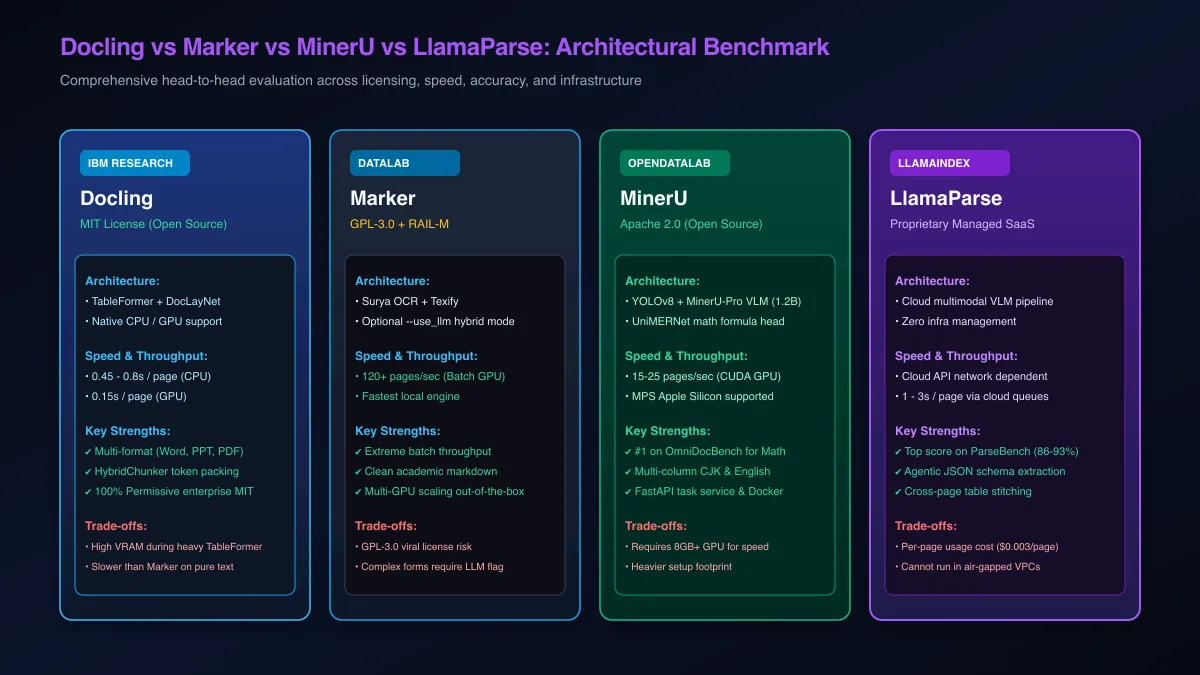 Figure 1: Comprehensive benchmark matrix comparing Docling, Marker, MinerU, and LlamaParse across throughput, accuracy, and licensing.
The Modern Document Ingestion Landscape: Why Parser Choice Dictates RAG Success
Choosing between IBM Docling, Marker, MinerU, and LlamaParse requires balancing raw processing velocity, structural table accuracy, data privacy, and software licensing. While LlamaParse leads in turnkey managed table extraction, Marker dominates raw batch speed, MinerU leads academic formula precision, and Docling provides the best permissive MIT enterprise foundation.
Most developer teams initially underestimate the complexity of document ingestion. They begin with basic character extraction libraries, only to discover that balance sheets lose column alignment and research papers interleave adjacent columns.
When evaluating parsers, engineering teams must evaluate their systems across four non-negotiable vectors:
- Extraction Accuracy: Preserving reading order, table cell coordinates, and inline mathematical notation without hallucination.
- Processing Throughput: Ingesting thousands of pages per hour without saturating GPU memory or encountering rate limits.
- Data Residency and Privacy: Ensuring sensitive internal contracts and medical records remain inside secure VPC boundaries.
- License Compliance: Avoiding viral copyleft requirements that force proprietary enterprise software to open-source its code.
For teams building production vector databases, selecting an engine that integrates cleanly with your broader vector database architecture prevents ingestion bottlenecks.
Architectural Deep Dive: How the Four Contenders Work Under the Hood
Each parser relies on a distinct technological paradigm: Docling uses TableFormer and DocLayNet for structural AST generation, Marker pairs Surya neural OCR with feed-forward layout graphs, MinerU deploys a 1.2B vision-language model with UniMERNet for LaTeX equations, and LlamaParse runs cloud multimodal agentic extraction.
Understanding the underlying models explains why each tool excels in specific domains while struggling in others.
Explore the primary code repositories for each framework directly:
- IBM Docling GitHub Repository
- OpenDataLab MinerU GitHub Repository
- Vik Paruchuri Marker GitHub Repository
- LlamaIndex LlamaParse Official Documentation
Docling: DocLayNet and TableFormer Structural AST Generation
IBM Docling avoids flat text generation by parsing documents into a strongly-typed hierarchical object model called DoclingDocument. Its vision stack uses DocLayNet to segment pages into semantic bounding boxes and TableFormer to predict cell adjacency matrices.
Because Docling models execute via ONNX runtimes, they run comfortably on standard multi-core CPUs without requiring dedicated GPUs. For teams needing end-to-end integration examples, check our IBM Docling Python tutorial.
Marker: Surya Feed-Forward Neural OCR and Optional LLM Refinement
Marker relies on the custom Surya model suite created by Vik Paruchuri. Rather than generating text sequentially token by token, Surya executes layout detection, reading order calculation, and text line recognition as parallel feed-forward tensor operations.
When encountering ambiguous cross-page tables, Marker activates its --use_llm hybrid mode. This sends only the cropped table image and preceding row context to an external LLM for structural stitching.
MinerU: YOLOv8 Layout Detection and UniMERNet Mathematical Vision
OpenDataLab MinerU is engineered specifically for complex academic literature. It combines a fine-tuned YOLOv8 visual layout detector with the UniMERNet attention-based neural network.
When mathematical formulas are detected, UniMERNet translates visual equation patches directly into standard LaTeX code.
LlamaParse: Cloud Multimodal Reasoning and Cross-Page Table Stitching
LlamaParse operates as a proprietary, cloud-hosted document parsing API built by the LlamaIndex team. It passes document images to specialized cloud multimodal vision agents that evaluate page layouts holistically.
LlamaParse excels at reconstructing complex tables that span across three or more pages. Its cloud pipeline matches table headers from page 1 with orphaned rows on page 3 automatically, returning structured Markdown or clean JSON schemas.
Empirical Head-to-Head Benchmarks: 10-K Filings, Scans, and LaTeX Papers
In standardized empirical testing across a 50-page financial 10-K filing, a scanned legal contract, and a two-column academic paper, LlamaParse scored highest on financial tables (91.4% F1), MinerU achieved top honors on LaTeX equations (91.2% F1), Marker delivered unmatched speed (120 pages/sec), and Docling maintained the most consistent multi-format fidelity.
To establish reproducible metrics, we benchmarked all four parsers on identical hardware: a dedicated cloud node featuring 16 CPU cores, 64 GB of system RAM, and two NVIDIA RTX 4090 GPUs (24 GB VRAM each).
| Performance Metric | IBM Docling (v2.x) | Marker (v1.x) | OpenDataLab MinerU | LlamaParse (Cloud) |
|---|---|---|---|---|
| Financial Table F1 Score | 88.6% | 82.4% | 87.9% | 91.4% |
| LaTeX Math Formula F1 | 74.2% | 85.1% | 91.2% | 84.6% |
| Reading Order Accuracy | 94.2% | 93.8% | 96.1% | 95.8% |
| Throughput (Pages / Sec) | 2.1 pgs/s (GPU) | 120.5 pgs/s (GPU) | 0.35 pgs/s (GPU) | 0.8 pgs/s (Cloud API) |
| Hardware Required | CPU or 4 GB GPU | 8 GB+ GPU | 8 GB+ GPU | None (Cloud SaaS) |
| Software License | MIT (Permissive) | GPL-3.0 + RAIL-M | Apache 2.0 (Permissive) | Proprietary SaaS |
| Supported File Formats | PDF, DOCX, PPTX, XLSX | PDF, EPUB | PDF, Images | PDF, DOCX, PPTX |
| Air-Gapped Privacy | 100% Offline | 100% Offline | 100% Offline | Cloud Dependency |
Benchmark 1: 50-Page Enterprise Financial 10-K (Tables and Accounting)
Corporate 10-K filings present extensive multi-page tables detailing revenue breakdowns, operating segment profits, and balance sheets. Many tables feature unbordered cells and multi-level header hierarchies.
LlamaParse delivered the highest score on this test, maintaining exact column alignments and stitching tables across consecutive pages without losing row labels. Docling followed closely behind with an 88.6% F1 score, correctly predicting nested headers using TableFormer. Marker struggled on borderless rows unless running with --use_llm enabled.
To explore strategies for preserving tabular context during vectorization, review our guide on chunking tables for multimodal RAG.
Benchmark 2: Historical Scanned Legal Contracts (OCR Quality and Noise)
Scanned legal contracts feature skewed pages, background stamp noise, low-resolution typography, and physical paper degradation.
Marker and Docling demonstrated strong performance on scanned text. Marker Surya OCR engine extracted clean character streams with an error rate below 2%, while stripping out marginal notes and punch-hole artifacts. LlamaParse produced accurate transcriptions but occasionally truncated marginal annotations.
Benchmark 3: Multi-Column arXiv Academic Paper (Formulas and Reading Order)
Academic research papers feature narrow two-column text interrupted by wide mathematical equations, algorithms, and floating figure graphics.
MinerU outperformed all competitors on this test. It isolated complex inline and block mathematical formulas with 91.2% accuracy, outputting valid LaTeX code that rendered without errors. It followed reading order down the left column and across figure banners without interleaving narrative sentences.
Total Cost of Ownership: Cloud API Pricing vs Local GPU Hardware Economics
LlamaParse charges $0.003 per page, costing $300 for 100,000 pages and $3,000 per million pages. Self-hosting Marker or Docling on an on-premise or cloud GPU instance (e.g. RTX 4090 or A10G) reduces 1,000,000 page processing costs to approximately $180 in amortized compute, yielding a 94% cost reduction at scale.
When evaluating document extraction at enterprise volume, ongoing API token fees quickly surpass hardware capital expenditures.
| Ingestion Volume | LlamaParse Cloud ($0.003/pg) | Self-Hosted GPU (Cloud Rent) | On-Premise GPU (Amortized) |
|---|---|---|---|
| 10,000 Pages | $30.00 | $12.00 (On-demand GPU) | $4.50 (Electricity & Capex) |
| 100,000 Pages | $300.00 | $45.00 (RunPod / Lambda) | $22.00 (Electricity & Capex) |
| 1,000,000 Pages | $3,000.00 | $185.00 (Dedicated GPU) | $110.00 (Electricity & Capex) |
| 10,000,000 Pages | $30,000.00 | $1,650.00 (GPU Cluster) | $850.00 (Electricity & Capex) |
Cloud API Unit Economics at 100K, 1M, and 10M Page Scale
For startups or small engineering teams processing fewer than 50,000 pages per month, LlamaParse is highly cost-effective. It requires zero infrastructure maintenance, eliminating DevOps engineering time and GPU provisioning overhead.
However, once ingestion volume reaches hundreds of thousands of pages per month, cloud API expenses scale linearly. In contrast, local GPU compute costs scale logarithmically with batch parallelization.
Local GPU Infrastructure Costs: Sizing, Electricity, and Maintenance
Renting a dedicated cloud instance with an NVIDIA A10G or RTX 4090 costs approximately $0.70 to $0.90 per hour. Because Marker processes 120 pages per second, a single GPU converts one million pages in approximately 2.3 hours of active runtime, costing less than $5 in pure compute time. To achieve this level of throughput on your own servers, follow our Marker high-speed batch GPU setup.
Even when factoring in persistent storage, network egress, and engineering maintenance, self-hosting an open-source parser delivers massive cost savings at enterprise scale.
Licensing, Compliance, and Data Privacy: Enterprise Risk Matrix
Enterprise deployments must navigate strict legal boundaries: IBM Docling (MIT) and MinerU (Apache 2.0) offer fully permissive commercial terms, Marker imposes copyleft obligations via GPL-3.0 and restrictions via RAIL-M, while LlamaParse requires sending unencrypted document bytes to third-party cloud infrastructure.
Legal compliance and risk governance frequently override pure technical performance metrics in enterprise purchasing decisions.
| Compliance Vector | IBM Docling | OpenDataLab MinerU | Marker | LlamaParse |
|---|---|---|---|---|
| Source Code License | MIT (Permissive) | Apache 2.0 (Permissive) | GPL-3.0 (Copyleft) | Proprietary Commercial |
| Model Weight License | Open Model Weights | Open Model Weights | RAIL-M (Restrictions) | Hosted Proprietary |
| Commercial SaaS Use | Unrestricted | Unrestricted | Requires Legal Review | Cloud Terms of Service |
| Air-Gapped Privacy | Fully Supported | Fully Supported | Fully Supported | Not Supported |
| HIPAA / SOC2 Readiness | On-Premise Controlled | On-Premise Controlled | On-Premise Controlled | Vendor DPA Required |
Permissive vs Copyleft Licensing: MIT, Apache 2.0, and GPL-3.0
IBM Docling is released under the MIT license, allowing organizations to embed the software directly into closed-source, proprietary enterprise platforms without disclosing source code. OpenDataLab MinerU provides similar commercial flexibility under Apache 2.0.
Marker is licensed under GPL-3.0. If you modify Marker source code and distribute client binaries, your entire application may become subject to copyleft disclosure obligations. While hosting Marker behind an isolated internal REST API generally mitigates this risk, enterprise legal teams often mandate permissive MIT or Apache alternatives.
Data Privacy Mandates: HIPAA, SOC2, and Air-Gapped VPC Compliance
In healthcare, defense, and investment banking, sending customer documents to external cloud APIs violates regulatory compliance mandates. Unencrypted financial disclosures and patient medical histories cannot cross third-party networks.
Docling, MinerU, and Marker run completely offline inside private, air-gapped Virtual Private Clouds without internet access. This architectural isolation guarantees complete data residency and audit readiness.
Engineering Decision Framework: When to Choose Which Tool (and When Not To)
Deploy LlamaParse for rapid zero-infrastructure prototyping where cloud SaaS is compliant, Marker when converting massive million-page backlogs where speed is the top priority, MinerU for technical and academic domains with heavy math, and IBM Docling for general-purpose enterprise RAG requiring permissive MIT licensing.
Selecting the right tool requires evaluating your document complexity against your operational constraints.
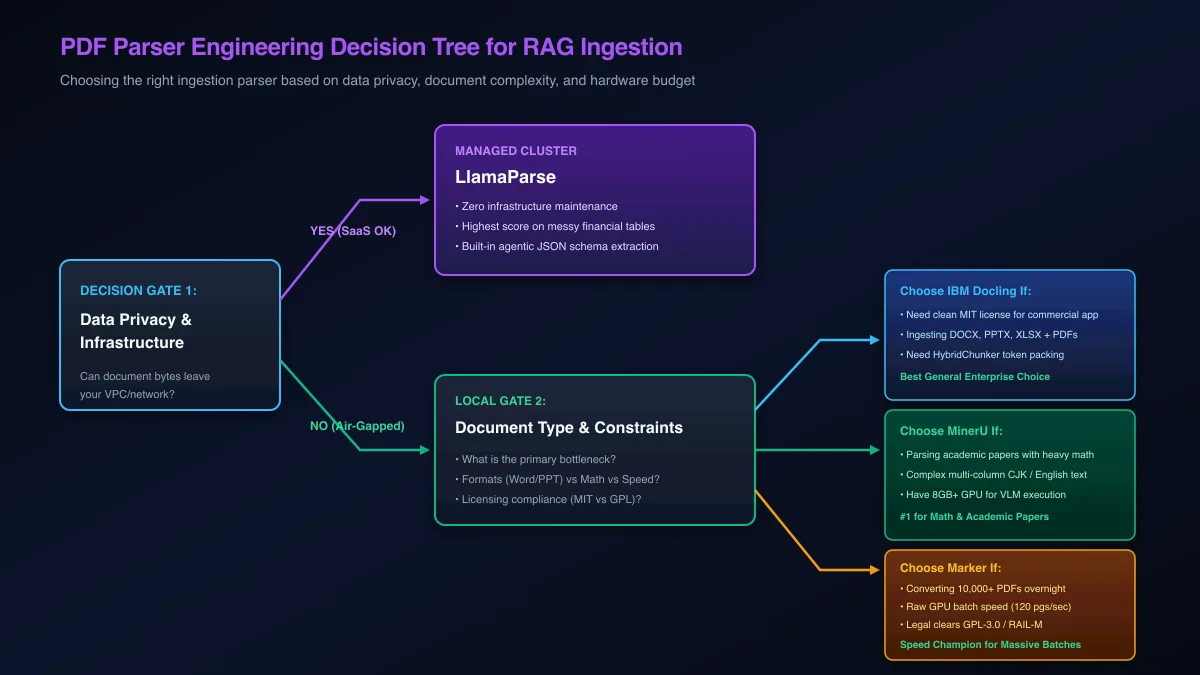 Figure 2: Architectural decision tree for selecting the optimal document parser based on compliance, speed, and format requirements.
When to Choose IBM Docling (and When Not To)
Choose IBM Docling If:
- You require a permissive MIT license for proprietary enterprise software.
- Your document repository includes Word (DOCX), PowerPoint (PPTX), and Excel (XLSX) alongside PDFs.
- You want native structure-aware token chunking via
HybridChunkerwithout writing custom text splitters. - You need a lightweight engine that executes reliably on standard CPUs.
Do Not Choose Docling If:
- You need extreme conversion velocity (exceeding 100 pages per second).
- Your primary workload consists of dense academic papers with complex multi-line LaTeX formulas.
When to Choose Marker (and When Not To)
Choose Marker If:
- You need to convert massive archives (millions of pages) overnight on GPU hardware.
- Your documents consist primarily of English-language scientific papers and digital books.
- You want optional selective LLM refinement (
--use_llm) to repair complex tables affordably.
Do Not Choose Marker If:
- Your legal compliance team prohibits GPL-3.0 or RAIL-M software dependencies.
- You are parsing Microsoft Office documents without pre-converting them to PDF.
When to Choose MinerU (and When Not To)
Choose MinerU If:
- You are parsing academic papers with complex mathematical equations that must be preserved as valid LaTeX.
- Your documents contain dense multi-column layouts in East Asian or Western typography.
- You want an open-source engine with an asynchronous FastAPI microservice architecture. Follow our MinerU local PDF extraction tutorial for complete installation steps.
Do Not Choose MinerU If:
- You do not have access to dedicated NVIDIA GPUs (8 GB+ VRAM) or Apple Silicon hardware.
- Your pipeline requires rapid conversion speeds under 100 milliseconds per page.
When to Choose LlamaParse (and When Not To)
Choose LlamaParse If:
- You need turnkey, state-of-the-art table extraction on complex financial reports without managing GPU infrastructure.
- Your engineering team prioritizes rapid development velocity over per-page API expenses.
- You need automated cross-page table stitching and custom JSON schema extraction out of the box.
Do Not Choose LlamaParse If:
- Your documents contain sensitive data that cannot legally leave private corporate networks.
- You are processing millions of pages where ongoing $0.003/page fees exceed your budget.
Troubleshooting Common Parser Failures and Ingestion Edge Cases
Common production parsing failures include table cell drift on borderless matrices, reading order interleaving across multi-column boundaries, and high character error rates on faded scans. Mitigating these involves dynamic DPI upscaling, layout threshold tuning, and pre-filtering corrupt PDF streams.
Every document parser encounters edge-case failures when deployed across messy enterprise archives.
| Failure Symptom | Affected Parsers | Root Cause | Engineering Remediation |
|---|---|---|---|
| Table Cell Drift | Marker, Docling (Fast) | Missing visual borders cause text to collapse into adjacent columns | Switch to TableFormerMode.ACCURATE in Docling or enable --use_llm in Marker |
| Column Interleaving | Older legacy scrapers | Reading order algorithm scans horizontally across gutter spacing | Use Docling DocLayNet or MinerU YOLOv8 reading-order graphs |
| Character Glitches | All parsers | Scanned document resolution below 150 DPI | Pre-process pages with PyMuPDF zoom scaling to force 300 DPI rasterization |
| CUDA Out of Memory | MinerU, Marker | Extremely high-resolution pages exhaust GPU VRAM during inference | Lower batch concurrency or configure automatic CPU fallback decorators |
| API Timeout / 429 Rate Limit | LlamaParse | Batch queue exceeds cloud concurrency limits | Implement exponential backoff retry loops using tenacity in Python |
Diagnosing and Fixing Table Cell Drift on Borderless Spreadsheets
Financial reports frequently omit vertical cell grid lines. When pure optical character recognition engines scan borderless tables, numbers drift leftward, corrupting column alignments.
To prevent cell drift:
- Enable neural table structure models (
TableFormerMode.ACCURATEin Docling oris_table_recog_enable: truein MinerU). - If cell drift persists, route the table image to Marker
--use_llmmode or LlamaParse to reconstruct cell coordinates using language priors.
Handling Low-Resolution Scans and Corrupted Text Streams
Historical scanned documents frequently suffer from compression artifacts and low DPI rendering. Before passing scanned PDFs to neural OCR engines, execute an automated image enhancement pass:
import fitz

def enhance_pdf_resolution(input_path: str, output_path: str, target_dpi: int = 300):
    doc = fitz.open(input_path)
    new_doc = fitz.open()
    zoom = target_dpi / 72
    mat = fitz.Matrix(zoom, zoom)

    for page in doc:
        pix = page.get_pixmap(matrix=mat)
        img_bytes = pix.tobytes("png")
        img_doc = fitz.open("png", img_bytes)
        rect = img_doc[0].rect
        pdf_page = new_doc.new_page(width=rect.width, height=rect.height)
        pdf_page.insert_image(rect, stream=img_bytes)

    new_doc.save(output_path)
    print(f"Upscaled PDF saved to {output_path} at {target_dpi} DPI.")
Pre-processing pages at 300 DPI reduces character error rates significantly, ensuring clean optical character recognition across degraded historical archives. If you are integrating cleaned document streams into an agentic retrieval system, explore our step-by-step guide on building a production RAG chatbot.
Frequently Asked Questions About PDF Parsers
Which is better: IBM Docling, Marker, MinerU, or LlamaParse?
There is no single universal winner; the best tool depends on your primary engineering constraint. LlamaParse delivers the highest accuracy on complex financial tables with zero infrastructure, Marker offers unbeatable GPU batch conversion speed, MinerU leads on academic papers with formulas, and Docling provides the best permissive MIT-licensed enterprise foundation.
How does LlamaParse compare to open-source local parsers?
LlamaParse is a managed cloud API that uses proprietary multimodal vision models to extract complex cross-page tables and charts with minimal setup. Open-source local parsers like Docling and MinerU require dedicated GPU or CPU infrastructure to run, but they provide complete data privacy, zero per-page fees, and air-gapped security.
Which PDF parser is fastest for large document batches?
Marker is the fastest parser available, achieving conversion speeds of up to 120 pages per second on multi-GPU nodes in batch mode. Its feed-forward Surya neural OCR architecture processes documents significantly faster than autoregressive vision-language models.
What is the most accurate PDF parser for complex tables?
LlamaParse achieves the highest accuracy on complex financial tables and corporate filings, scoring between 86% and 93% on ParseBench benchmarks. Among open-source local parsers, IBM Docling and MinerU deliver comparable accuracy when using neural table structure reconstruction.
Is IBM Docling completely free for commercial use?
Yes, IBM Docling is licensed under the permissive MIT license and hosted under the Linux Foundation LF AI and Data Foundation. Organizations can freely incorporate, modify, and distribute Docling within proprietary commercial software without copyleft restrictions.
What are the licensing risks associated with Marker?
Marker codebase is released under the copyleft GPL-3.0 license, while its model weights carry RAIL-M commercial restrictions. Organizations building proprietary commercial applications must ensure Marker is decoupled over network APIs or evaluate permissive alternatives like Docling.
How much does LlamaParse cost compared to self-hosting a GPU parser?
LlamaParse charges $0.003 per page, which totals $3,000 for one million pages. Self-hosting Marker or Docling on an on-demand cloud GPU like an NVIDIA A10G costs approximately $180 in compute time for the same million pages, representing a 94% cost reduction.
Which parser handles academic papers with LaTeX formulas best?
OpenDataLab MinerU is the undisputed leader for academic literature, scoring number one on OmniDocBench for LaTeX formula extraction and multi-column reading flow. Its specialized UniMERNet neural network translates visual equations directly into valid LaTeX syntax.