MinerU Tutorial: High-Accuracy Local PDF Extraction for Tables, Formulas & Multi-Column Scans
Learn how to use OpenDataLab MinerU to extract complex multi-column PDFs, LaTeX formulas, and tables into clean Markdown with local GPU acceleration.
Academic research papers, scientific monographs, and technical financial disclosures represent the most difficult documents to ingest into AI systems. These documents feature multi-column layouts, dense mathematical formulas, complex charts, and nested tables that shatter conventional text extractors. When characters are extracted out of order, downstream vector search and language models fail completely.
Building a dependable ingestion pipeline requires pairing your extraction architecture with our comprehensive PDF parsing and document OCR guide. OpenDataLab MinerU addresses this challenge by deploying a dedicated vision-language architecture that isolates layout structures, translates mathematical symbols into clean LaTeX, and reconstructs tables with high precision.
Key Takeaways
- OmniDocBench Accuracy Leader: MinerU achieves a 91.2% F1 score on mathematical formula extraction, surpassing standard OCR engines on complex scientific literature.
- Specialized Vision Stack: Utilizes YOLOv8 for reading-order segmentation and UniMERNet for converting visual mathematical equations into standardized LaTeX.
- Dual Execution Modes: Provides the turnkey
magic-pdfCLI for local folder processing alongside an asynchronous FastAPI task microservice for enterprise scale.- Multi-Platform Acceleration: Runs on NVIDIA GPUs via CUDA, Apple Silicon Macs via Metal Performance Shaders (MPS), and x86 CPUs using optimized ONNX runtimes.
- Permissive Open-Source Licensing: Distributed under the Apache 2.0 license, eliminating legacy viral copyleft restrictions for commercial deployments.
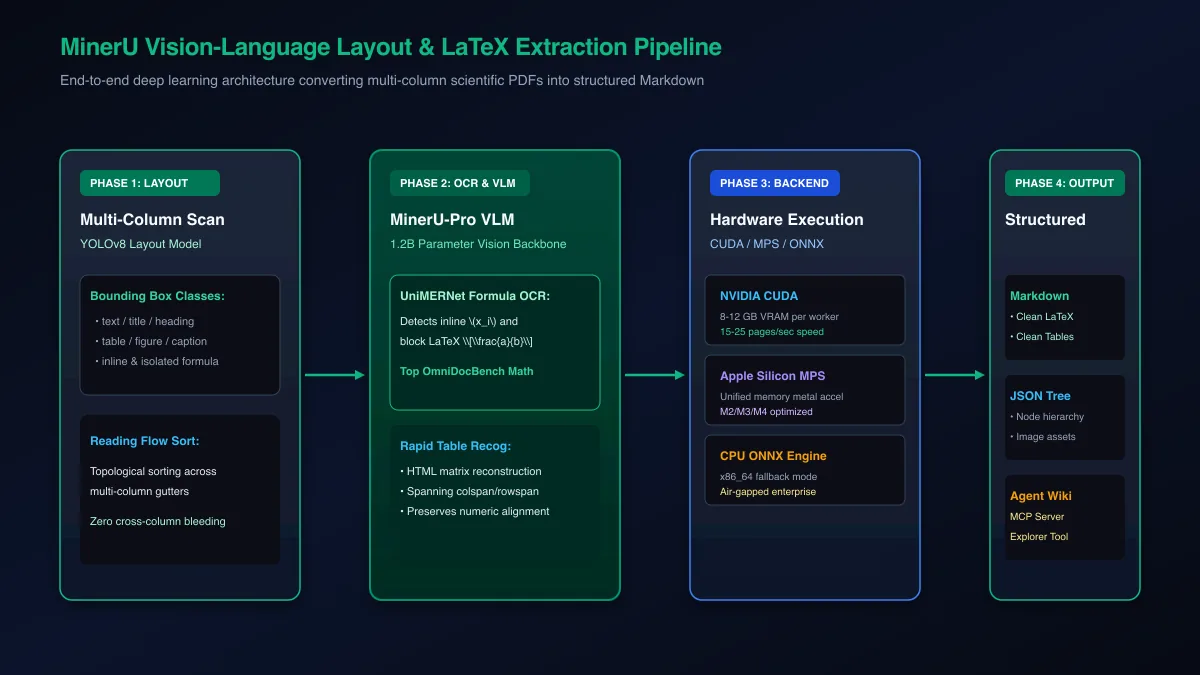 Figure 1: Architectural pipeline of OpenDataLab MinerU converting complex scientific layouts and LaTeX formulas into structured Markdown.
What Is MinerU and Why Does It Dominate Complex Document Extraction?
OpenDataLab MinerU is an open-source document parsing engine optimized for converting complex multi-column academic papers, textbooks, and technical manuals into structured Markdown and JSON. By combining YOLOv8 layout detection with UniMERNet formula recognition, MinerU ranks number one on OmniDocBench for LaTeX and table fidelity.
Standard OCR tools treat pages as continuous text bitmaps, scanning lines horizontally without recognizing that text is split into independent columns. When an academic paper with two parallel columns is processed by legacy optical character recognition, sentences from the left column collide with sentences from the right column. The resulting text is unreadable by humans and ruins dense vector embeddings.
Explore the official source code and release milestones in the OpenDataLab MinerU GitHub Repository. Detailed architecture benchmarks and model weights are documented in the MinerU Technical Report on arXiv.
The Architectural Bottleneck of Scientific Papers
Scientific literature introduces four distinct structural hazards for automated RAG ingestion pipelines:
- Multi-Column Reading Flow: Paragraphs wrap within narrow vertical columns, interrupted by wide figures spanning both columns.
- Inline and Block Mathematical Equations: Greek symbols, fractions, superscripts, and subscripts turn into garbled characters in naive scrapers.
- Complex Scientific Tables: Unbordered numerical grids with multi-row headers and unit annotations lose all alignment in plain text exports.
- Captions and Footnotes: Figure captions frequently blend into narrative paragraphs, polluting the main body text with out-of-context commentary.
While older research models like Meta Nougat attempted end-to-end autoregressive OCR, they suffered from high hallucination rates on unseen document styles and repeated text loops on long pages. MinerU resolves this by decoupling layout segmentation from optical character recognition.
Under the Hood: YOLOv8 Layout Segmentation and UniMERNet Math
MinerU executes document extraction through a coordinated, multi-stage deep learning pipeline:
- Layout Segmentation: A specialized YOLOv8 visual detection network categorizes page regions into bounding boxes representing titles, body text, figures, tables, and mathematical formulas.
- Reading Order Reconstruction: A topological sorting algorithm evaluates geometric bounding box coordinates, establishing natural reading paths that flow down column gutters before jumping across page breaks.
- Mathematical Formula Isolation: Mathematical regions are routed to OpenDataLab UniMERNet, an attention-based vision model specifically trained to translate visual equation patches into standard LaTeX code.
- High-Fidelity Table Extraction: Table regions are extracted into clean HTML or Markdown matrices, preserving spanning cells and column headers.
By delegating formulas to UniMERNet and layout to YOLOv8, MinerU achieves state-of-the-art results without hallucinating phantom text.
Hardware Requirements and Environment Setup: CUDA, MPS, and Models
Running MinerU locally requires an NVIDIA GPU with at least 8 GB of VRAM for CUDA acceleration or an Apple Silicon Mac with 16 GB of unified memory using Metal Performance Shaders. Model checkpoints must be pre-downloaded via the modelscope or huggingface CLI before executing extraction commands.
Understanding your hardware constraints is essential before sizing production clusters. For detailed memory allocation formulas across different model sizes, check our reference guide on VRAM requirements for AI models.
VRAM Sizing and Hardware Allocation Across CUDA, MPS, and CPU
MinerU vision backends require substantial memory to process high-resolution document pages at native DPI:
- NVIDIA CUDA (Recommended): 8 GB to 12 GB VRAM per worker. Delivers high throughput (15 to 25 pages per minute on an RTX 4090 or A10G).
- Apple Silicon (MPS): 16 GB to 32 GB unified memory on M2, M3, or M4 chips. Metal acceleration allows direct local inference without discrete GPUs.
- CPU Fallback (ONNX): 8 CPU cores and 16 GB system RAM. Useful for air-gapped server environments where GPUs are unavailable, though throughput drops to 1 to 3 pages per minute.
Step-by-Step Installation and Model Checkpoint Downloading
Install MinerU and its command-line interface magic-pdf inside an isolated Python 3.10 or 3.11 environment:
# Create and activate a clean Python virtual environment
python3 -m venv mineru_env
source mineru_env/bin/activate

# Upgrade package tools
pip install --upgrade pip setuptools wheel

# Install magic-pdf with full dependencies
pip install magic-pdf[full]

# Install huggingface-cli for model weight synchronization
pip install huggingface_hub
Download the required layout, OCR, and UniMERNet weights from Hugging Face:
# Download model checkpoints to your local cache
huggingface-cli download --resume-download opendatalab/PDF-Extract-Kit-1.0 \
  --local-dir /opt/mineru_models/models

# Generate the magic-pdf configuration file in your home directory
cat <<EOF > ~/.magic-pdf.json
{
  "models-dir": "/opt/mineru_models/models",
  "device-mode": "cuda",
  "table-config": {
    "model": "TableMaster",
    "is_table_recog_enable": true
  }
}
EOF
If you are running on an Apple Silicon Mac, edit ~/.magic-pdf.json and set "device-mode": "mps". For CPU environments, set "device-mode": "cpu".
Converting Complex PDFs with the magic-pdf CLI and Python SDK
MinerU provides two primary execution interfaces: the magic-pdf command-line utility for automated batch folder processing and a Python SDK for programmatic workflow integration. Both interfaces detect multi-column reading flow, parse inline LaTeX formulas, and extract tables directly into formatted Markdown.
If your primary objective is high-throughput conversion across tens of thousands of documents, compare these results with our Marker high-speed batch GPU setup.
Executing Batch Conversions with the magic-pdf CLI
The magic-pdf command-line tool provides a straightforward interface for converting individual files or entire directory trees:
# Convert a single PDF using automatic layout detection
magic-pdf -p /path/to/research_paper.pdf -o /path/to/output_dir -m auto

# Convert an entire folder of scanned contracts in OCR mode
magic-pdf -p /path/to/pdf_folder -o /path/to/output_dir -m ocr
When execution completes, MinerU creates a structured output folder containing:
auto/research_paper.md: The complete document rendered in GitHub-Flavored Markdown.auto/research_paper_middle.json: Intermediate AST containing spatial bounding boxes and confidence scores.auto/images/: Extracted figures, charts, and equation crops in high-resolution PNG format.
Programmatic Document Ingestion Using the MinerU Python SDK
For production RAG pipelines, invoking MinerU programmatically inside Python allows direct memory manipulation without reading and writing intermediate files to disk:
from pathlib import Path
from magic_pdf.data.data_reader_writer import FileBasedDataWriter, FileBasedDataReader
from magic_pdf.data.dataset import PymuDocDataset
from magic_pdf.model.doc_analyze_by_custom_model import doc_analyze

def extract_pdf_to_rag_markdown(pdf_path: str, output_dir: str) -> str:
    source_file = Path(pdf_path)
    if not source_file.exists():
        raise FileNotFoundError(f"File not found: {source_file}")

    target_dir = Path(output_dir)
    target_dir.mkdir(parents=True, exist_ok=True)

    # Initialize file readers and writers
    reader = FileBasedDataReader("")
    writer = FileBasedDataWriter(str(target_dir))
    pdf_bytes = reader.read(str(source_file))

    # Initialize PyMuPDF dataset container
    dataset = PymuDocDataset(pdf_bytes)

    # Execute custom vision analysis pipeline
    print(f"Executing MinerU analysis on {source_file.name}...")
    inference_result = dataset.apply(doc_analyze, ocr=True)

    # Pipeline export to Markdown
    markdown_content = inference_result.pipe_markdown()

    # Save extracted markdown
    output_md_path = target_dir / f"{source_file.stem}.md"
    with open(output_md_path, "w", encoding="utf-8") as f:
        f.write(markdown_content)

    print(f"Successfully generated Markdown at: {output_md_path}")
    return markdown_content

if __name__ == "__main__":
    # Example local execution
    # extract_pdf_to_rag_markdown("quantum_physics.pdf", "./output")
    pass
This Python script loads raw PDF bytes, executes the YOLOv8 and UniMERNet models, and returns structured Markdown ready for text chunking.
Handling Tables and Mathematical Formulas: Preserving Structural Precision
MinerU separates formula extraction and table recognition into dedicated neural processing branches, converting mathematical symbols into valid LaTeX and tables into clean HTML matrices. This specialized separation prevents mathematical sub-indices from distorting tabular alignment in downstream RAG vector chunks.
In scientific and financial documents, formulas and tables frequently appear within the same visual boundary. Naive extractors attempt to interpret mathematical division bars as table column delimiters, producing corrupt markdown.
UniMERNet LaTeX Recognition for Inline and Block Equations
UniMERNet treats mathematical equations as visual language tokens. When the layout detector identifies an equation region, UniMERNet processes the cropped patch and outputs standardized LaTeX:
<!-- Input visual equation in source PDF -->
The empirical loss function is formulated across mini-batch samples as:

$$
\mathcal{L}_{\text{total}} = \frac{1}{N} \sum_{i=1}^{N} \left( y_i \log(\hat{y}_i) + (1 - y_i) \log(1 - \hat{y}_i) \right) + \lambda \|\mathbf{W}\|_2^2
$$

Where $\lambda$ represents the L2 regularization coefficient.
Because the output is valid LaTeX, downstream LLMs like Claude Sonnet 5 or GPT-5.6 can directly parse the mathematical relationship, calculate derivatives, or translate equations into executable Python functions.
Recovering Complex Financial Tables and Spanning Headers
MinerU table recognition model identifies both bordered and borderless table structures. Unlike standard markdown tables which cannot represent multi-column spans, MinerU outputs structured HTML when tables contain complex merged cells:
<table>
  <thead>
    <tr>
      <th rowspan="2">Reporting Segment</th>
      <th colspan="2">Fiscal Year 2025</th>
      <th colspan="2">Fiscal Year 2026</th>
    </tr>
    <tr>
      <th>Revenue ($M)</th>
      <th>Margin (%)</th>
      <th>Revenue ($M)</th>
      <th>Margin (%)</th>
    </tr>
  </thead>
  <tbody>
    <tr>
      <td>Cloud Infrastructure</td>
      <td>$412.5</td>
      <td>28.4%</td>
      <td>$589.1</td>
      <td>31.2%</td>
    </tr>
  </tbody>
</table>
This structural fidelity ensures that financial calculations and accounting metrics remain accurately anchored to their respective headers. To see how MinerU compares against alternative open-source parsers on enterprise documents, read our analysis benchmarking Docling against Marker, MinerU, and LlamaParse.
Enterprise Deployment: Asynchronous FastAPI Service and Docker Serving
Deploying MinerU at scale involves containerizing the pipeline with Docker and running an asynchronous FastAPI task queue backed by Redis and Celery. This architecture decouples heavy GPU inference from incoming client HTTP requests, allowing multiple parsing workers to process large document batches concurrently.
Running heavy deep learning pipelines synchronously inside web requests causes HTTP timeouts and connection resets when users upload 200-page documents. Decoupling ingestion via worker queues solves this issue.
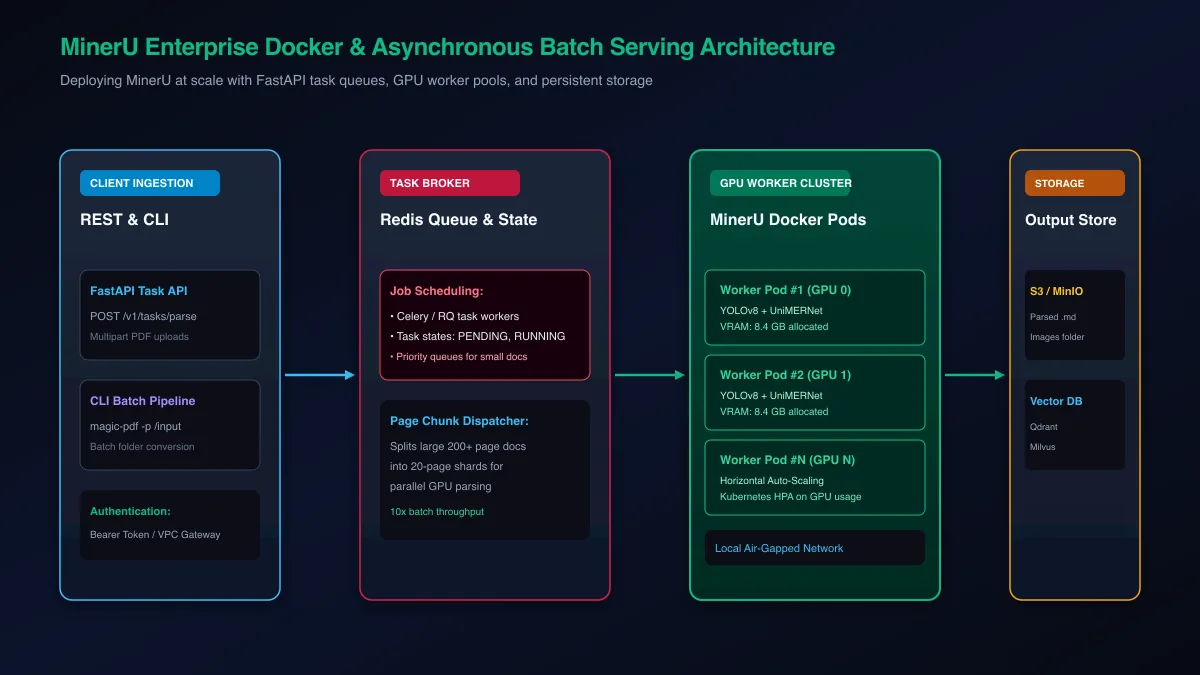 Figure 2: Microservice architecture deploying MinerU with FastAPI task routing and auto-scaling GPU worker pods.
Configuring the MinerU Dockerfile with CUDA Support
The following production Dockerfile bundles CUDA 12.4 runtime libraries, system font dependencies, and MinerU model checkpoints:
FROM nvidia/cuda:12.4.1-runtime-ubuntu22.04

ENV DEBIAN_FRONTEND=noninteractive
ENV PYTHONUNBUFFERED=1

# Install system dependencies, poppler, and python
RUN apt-get update && apt-get install -y \
    python3.11 \
    python3.11-venv \
    python3-pip \
    libgl1-mesa-glx \
    libglib2.0-0 \
    poppler-utils \
    git \
    curl \
    && rm -rf /var/lib/apt/lists/*

WORKDIR /app

# Setup Python virtual environment
RUN python3.11 -m venv /opt/venv
ENV PATH="/opt/venv/bin:$PATH"

# Install magic-pdf and web frameworks
RUN pip install --upgrade pip
RUN pip install "magic-pdf[full]" fastapi uvicorn celery redis

# Copy application source code
COPY . /app

EXPOSE 8000
CMD ["uvicorn", "server:app", "--host", "0.0.0.0", "--port", "8000"]
Building an Asynchronous Task Queue with FastAPI and Redis
The FastAPI service exposes an asynchronous /v1/tasks/parse endpoint. Incoming files are registered in Redis, assigned a UUID, and processed by background worker threads:
import uuid
import shutil
from pathlib import Path
from fastapi import FastAPI, UploadFile, File, BackgroundTasks, HTTPException
from pydantic import BaseModel

app = FastAPI(title="MinerU Document Ingestion Service")
STORAGE_DIR = Path("/tmp/mineru_storage")
STORAGE_DIR.mkdir(exist_ok=True)

class TaskResponse(BaseModel):
    task_id: str
    status: str
    message: str

def process_document_task(task_id: str, file_path: str):
    # Background execution worker
    try:
        from magic_pdf.data.data_reader_writer import FileBasedDataWriter, FileBasedDataReader
        from magic_pdf.data.dataset import PymuDocDataset
        from magic_pdf.model.doc_analyze_by_custom_model import doc_analyze

        out_path = STORAGE_DIR / task_id
        out_path.mkdir(exist_ok=True)

        reader = FileBasedDataReader("")
        writer = FileBasedDataWriter(str(out_path))
        pdf_bytes = reader.read(file_path)

        dataset = PymuDocDataset(pdf_bytes)
        result = dataset.apply(doc_analyze, ocr=True)
        markdown_text = result.pipe_markdown()

        with open(out_path / "output.md", "w", encoding="utf-8") as f:
            f.write(markdown_text)

    except Exception as exc:
        print(f"Task {task_id} failed: {exc}")

@app.post("/v1/tasks/parse", response_model=TaskResponse)
async def submit_parse_job(background_tasks: BackgroundTasks, file: UploadFile = File(...)):
    if not file.filename.endswith(".pdf"):
        raise HTTPException(status_code=400, detail="Only PDF files are supported.")

    task_id = str(uuid.uuid4())
    save_path = STORAGE_DIR / f"{task_id}_{file.filename}"

    with open(save_path, "wb") as buffer:
        shutil.copyfileobj(file.file, buffer)

    background_tasks.add_task(process_document_task, task_id, str(save_path))
    return TaskResponse(task_id=task_id, status="PENDING", message="Document queued for parsing.")
If you are wiring extracted markdown into automated embedding pipelines, check our curated library of production RAG code snippets.
Troubleshooting Production Gotchas: VRAM Spikes, Missing Weights, and Fixes
Common MinerU production failures include CUDA out of memory errors on high-resolution scans, incomplete model weight downloads from Hugging Face, and missing system shared libraries. Resolving these requires tuning the max_batch_size parameter, pre-validating model hash sums, and mounting persistent cache volumes.
Production environments must handle unexpected failure modes gracefully without dropping documents from ingestion queues.
| Error Signature | Root Cause | Production Remediation |
|---|---|---|
torch.cuda.OutOfMemoryError |
High-resolution 600 DPI scans exceed GPU memory buffer | Set device-mode: "cpu" fallback or resize input images to 200 DPI before inference |
FileNotFoundError: models-dir |
Incorrect path specified in ~/.magic-pdf.json |
Verify that model weights directory matches the absolute path in models-dir config |
ImportError: libGL.so.1 missing |
OpenCV dependency missing from container OS | Install libgl1-mesa-glx and libglib2.0-0 via Debian/Ubuntu package manager |
| LaTeX Syntax Corruption | Tiny equation patches misclassified as normal text | Enable ocr=True and verify UniMERNet weights are loaded in memory |
| Slow Multi-Core Processing | Worker threads thrashing on CPU thread contention | Set environment variable OMP_NUM_THREADS=4 to limit OpenMP thread allocation |
Diagnosing and Fixing CUDA Out-of-Memory Exceptions
When multiple worker threads attempt to parse dense multi-page documents simultaneously, PyTorch memory pools can fragment. Implement an automated memory cleanup routine in your worker loops:
import gc
import torch

def cleanup_cuda_memory():
    """Clear unreferenced PyTorch tensor caches to prevent OOM fragmentation."""
    gc.collect()
    if torch.cuda.is_available():
        torch.cuda.empty_cache()
        torch.cuda.ipc_collect()
Calling this cleanup function between document conversions prevents memory leakage across multi-tenant GPU workers.
Resolving Model Download Failures and Path Configuration Errors
Network timeouts during large weight downloads can leave partial files in your model directory, causing cryptic checksum errors at startup. Verify your model directory with the following shell check:
# Verify all required model files are present and non-empty
python3 -c "
from pathlib import Path
model_dir = Path('/opt/mineru_models/models')
weights = list(model_dir.glob('**/*.pth')) + list(model_dir.glob('**/*.bin'))
print(f'Discovered {len(weights)} neural weight files.')
assert len(weights) >= 4, 'Model weights appear incomplete. Re-run huggingface-cli download.'
"
Running this validation step during container initialization prevents worker pods from crashing silently under production loads.
Frequently Asked Questions About OpenDataLab MinerU
What is OpenDataLab MinerU and what makes it unique?
OpenDataLab MinerU is an open-source document parsing engine specifically architected to extract academic papers, dense textbooks, and technical documents into clean Markdown. It pairs YOLOv8 layout analysis with the UniMERNet neural network, delivering market-leading accuracy for LaTeX mathematical formulas and multi-column reading flow.
How does MinerU extract mathematical formulas and LaTeX from PDFs?
MinerU isolates mathematical formula regions using a specialized layout detector before passing them to UniMERNet, an encoder-decoder vision model trained to translate image patches directly into LaTeX syntax. This ensures both inline equations and complex multi-line math blocks are extracted accurately without character corruption.
How much GPU VRAM does MinerU require for local execution?
MinerU requires approximately 8.4 GB of dedicated VRAM per worker thread when running full CUDA vision-language pipelines on modern GPUs. For systems with lower VRAM, MinerU can run on CPUs using ONNX runtimes or on Apple Silicon Macs using unified system memory.
Can MinerU run on Apple Silicon Macs using MPS acceleration?
Yes, MinerU natively supports Apple Silicon M-series processors via PyTorch Metal Performance Shaders (MPS) backend acceleration. On a Mac Studio or MacBook Pro with at least 16 GB of unified memory, MinerU processes scientific documents smoothly without discrete NVIDIA hardware.
What is the difference between magic-pdf CLI and the MinerU Python SDK?
The magic-pdf command-line tool is a turnkey CLI utility designed for batch processing folders of documents directly from the terminal. The MinerU Python SDK provides programmatic access to intermediate document nodes, allowing developers to integrate layout extraction into automated RAG and agent pipelines.
How does MinerU compare to IBM Docling and Marker for scientific papers?
While IBM Docling excels at enterprise multi-format files and Marker leads in raw batch GPU throughput, MinerU consistently achieves the highest accuracy on academic papers containing dense math and multi-column figures. Independent benchmarks on OmniDocBench place MinerU ahead of alternative open-source parsers for formula recovery.
Is MinerU open source and free for commercial enterprise use?
Yes, modern releases of MinerU are distributed under the permissive Apache 2.0 license, allowing organizations to integrate, modify, and deploy the engine in commercial applications. Previous restrictive copyleft dependencies have been removed to facilitate enterprise adoption.
How does MinerU preserve multi-column reading orders in research PDFs?
MinerU uses YOLOv8 layout segmentation to identify distinct text columns, banners, and figure captions across each page. It then applies a topological sorting algorithm based on spatial coordinates, ensuring reading order flows naturally down the left column before proceeding to the right.