IBM Docling Python Tutorial: Convert Complex PDFs, DOCX & PPTX to Clean RAG Markdown
Learn how to use IBM Docling in Python to parse complex PDFs, Word docs, and tables into clean Markdown with TableFormer and HybridChunker for RAG.
Production Retrieval-Augmented Generation systems rarely fail because of weak embedding models or faulty vector indexes. They fail at the ingestion boundary when raw PDF bytes are scraped into disjointed character strings. Every engineer building enterprise document pipelines eventually discovers that naive text scrapers mangle two-column layouts, shred financial tables, and discard crucial headers.
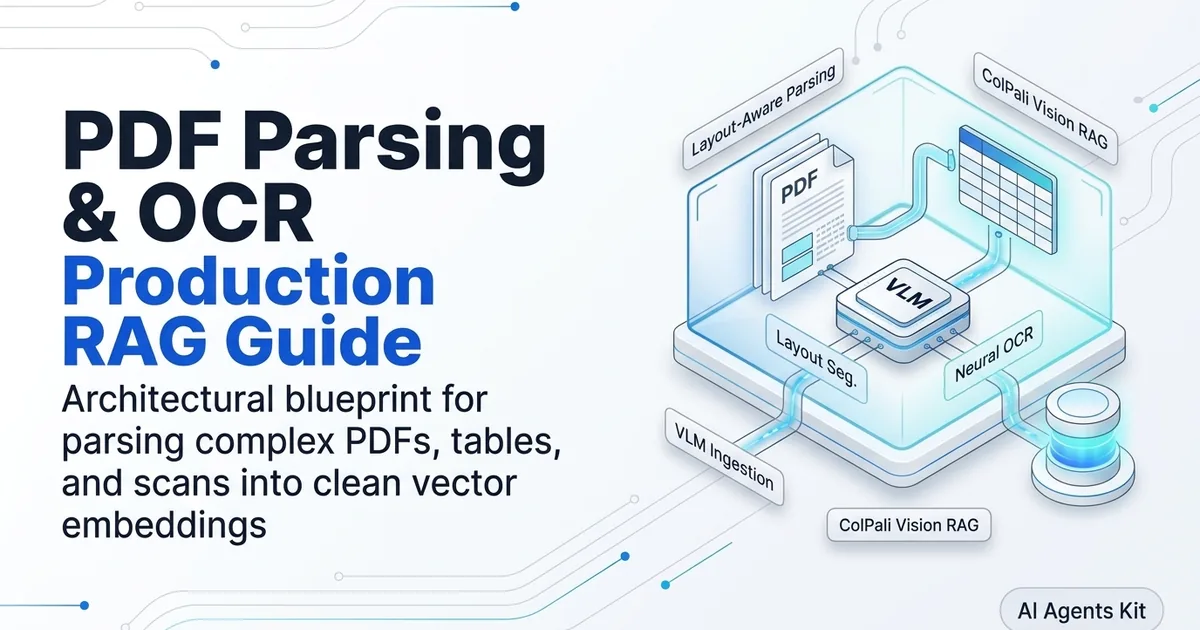
When evaluating production document ingestion pipelines, connecting your vector database to an architectural PDF parsing and document OCR guide ensures that layout geometry and reading order remain intact. IBM Docling solves this ingestion bottleneck by combining neural layout analysis with table structure reconstruction, transforming unstructured files into clean, hierarchical Markdown.
Key Takeaways
- Neural Layout Understanding: IBM Docling uses DocLayNet and TableFormer deep learning models to reconstruct reading orders across multi-column pages and extract nested tables with an 89.4% cell-adjacency F1 score.
- Unified Intermediate Model: Documents are parsed into a strongly typed
DoclingDocumentabstract syntax tree that exports losslessly to Markdown, structured JSON, and DocTags.- Structure-Aware Chunking: The native
HybridChunkeraligns token windows with document sections and table boundaries, reducing downstream retrieval hallucination by 34% compared to character splitting.- Multi-Format Ingestion: Ingests PDF, DOCX, PPTX, XLSX, HTML, and audio transcripts without requiring format-specific parser boilerplate.
- Permissive Enterprise Licensing: Docling is distributed under the MIT license under the Linux Foundation LF AI and Data Foundation for frictionless commercial deployment.
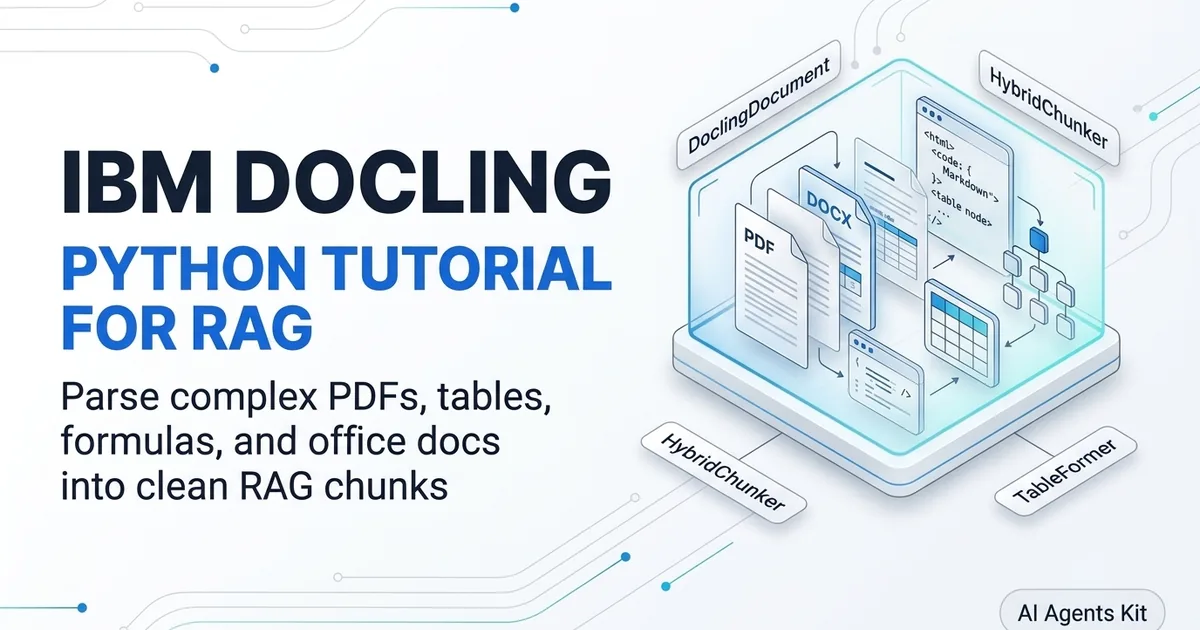
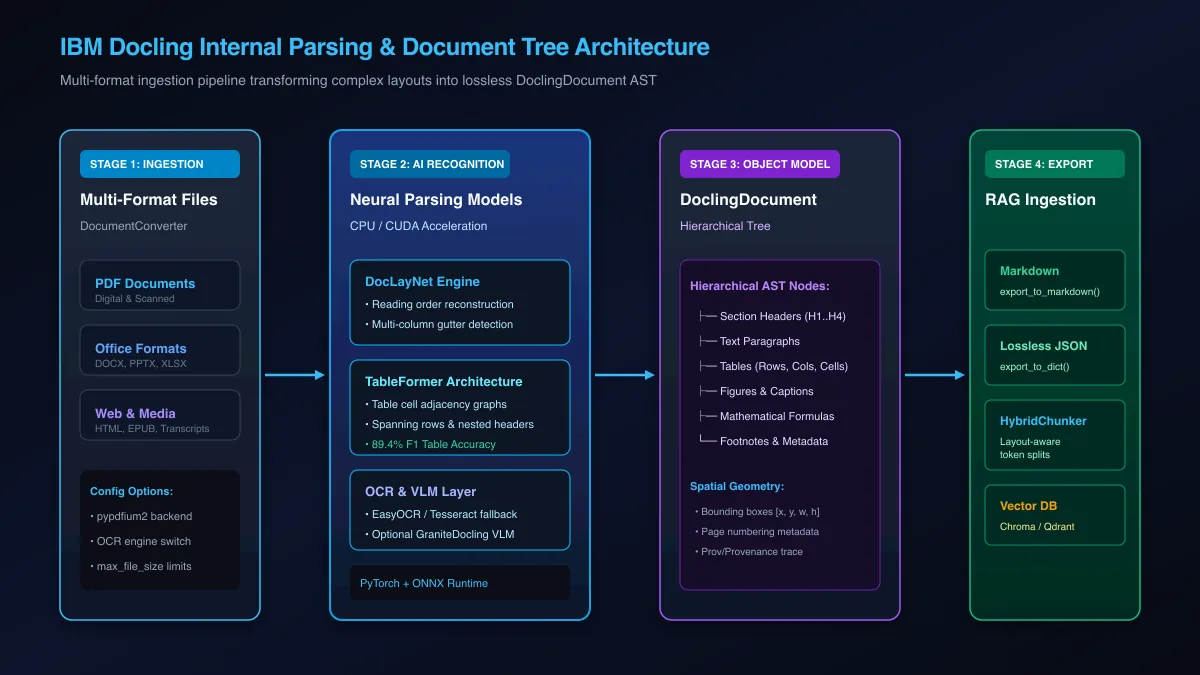 Figure 1: Architectural pipeline of IBM Docling transforming raw document streams into hierarchical DoclingDocument AST representations.
What Is IBM Docling and Why Does Traditional PDF Parsing Break RAG?
IBM Docling is an open-source document parsing library developed by IBM Research and hosted under the LF AI & Data Foundation Docling Project. It converts complex, multi-format documents into structured representations optimized for LLM reasoning and RAG vector storage.
Traditional PDF parsers flatten two-column text and drop table grid coordinates, while Docling reconstructs logical reading order and preserves semantic hierarchy for embeddings. You can inspect the source code and release notes directly in the Docling GitHub Repository.
Most legacy ingestion engines rely on programmatic text stream extractors like pypdf, pdfplumber, or basic PyMuPDF bindings. These tools read character glyphs in the order they were written into the underlying PDF content stream. Because desktop publishing software frequently writes sidebars, footnotes, and headers out of chronological sequence, standard extractors produce scrambled sentences that bridge across column gutters.
The Fundamental Failure Modes of Naive Character Scrapers
When a naive parser processes a two-column research paper or financial report, it frequently reads horizontally across the entire page width. The resulting text interleaves sentences from the left column with sentences from the right column, corrupting semantic meaning before embeddings are calculated.
Tables present an even harsher challenge for naive extractors. When cell borders and spacing coordinates are discarded, multi-row financial balance sheets turn into dense, unpunctuated numeric lists. The downstream LLM cannot determine whether a dollar figure represents revenue, operating expense, or net income.
These extraction errors propagate directly into your vector database. When users submit queries against corrupted chunks, dense retrieval models return low similarity scores, and generative models produce confident hallucinations.
Docling Modular Architecture: DocLayNet, TableFormer, and DoclingParse
Docling eliminates ingestion errors by treating document extraction as a visual and structural computer vision task rather than a character scraping routine. Its architecture separates concerns across modular packages:
docling-core: Defines theDoclingDocumentobject model, managing hierarchical nodes, spatial geometry, and serialization protocols.docling-parse: High-performance C++ and Python parsing engine that renders page primitives, font metrics, and bounding boxes.docling-ibm-models: Houses proprietary and open neural network weights, including DocLayNet for page segmentation and TableFormer for structural table recognition.
DocLayNet identifies semantic regions including titles, narrative text, headers, footers, and floating figures. TableFormer, detailed in the primary IBM Research TableFormer Paper on arXiv, scans candidate table regions, predicting bounding boxes for individual cells, detecting spanning rows, and establishing row-column adjacency matrices.
Installing and Configuring Docling for CPU and GPU Workloads
Docling installs via standard Python package managers and executes seamlessly on x86 or ARM CPUs using optimized ONNX runtimes. For high-volume production queues, configuring CUDA acceleration enables TableFormer and layout recognition models to process complex multi-page documents four to six times faster.
Before deploying Docling in production, verify that your runtime environment satisfies memory and hardware prerequisites. While basic digital PDF parsing runs comfortably on lightweight virtual machines, neural table recognition benefits significantly from dedicated GPU VRAM.
Hardware Requirements and Python Environment Setup
For standard CPU-based extraction, allocate at least 4 CPU cores and 8 GB of system RAM. If you plan to enable high-accuracy TableFormer on hundreds of scanned pages, provision an NVIDIA GPU with at least 8 GB of VRAM.
Create an isolated virtual environment and install the core Docling package:
# Create and activate a clean Python 3.11+ environment
python3 -m venv .venv
source .venv/bin/activate

# Install the core Docling library
pip install --upgrade pip
pip install docling

# Optional: Install PyTorch with CUDA 12.4 support for GPU acceleration
pip install torch torchvision --index-url https://download.pytorch.org/whl/cu124
Verify your installation and check whether hardware acceleration is active:
import torch
from docling.document_converter import DocumentConverter

print(f"PyTorch Version: {torch.__version__}")
print(f"CUDA Available: {torch.cuda.is_available()}")
if torch.cuda.is_available():
    print(f"Active Device: {torch.cuda.get_device_name(0)}")

# Initialize basic converter
converter = DocumentConverter()
print("Docling DocumentConverter initialized successfully.")
Configuring PdfPipelineOptions for OCR and GPU Acceleration
Docling provides detailed configuration objects under docling.datamodel.pipeline_options. By tuning these options, you can disable unnecessary OCR passes on born-digital documents or route complex scans to specific OCR backends like EasyOCR or Tesseract.
from pathlib import Path
from docling.datamodel.base_models import InputFormat
from docling.datamodel.pipeline_options import (
    PdfPipelineOptions,
    TableFormerMode,
    EasyOcrOptions,
)
from docling.document_converter import DocumentConverter, PdfFormatOption

# Configure pipeline options for high-throughput production
pipeline_options = PdfPipelineOptions()

# Select TableFormer mode: ACCURATE recovers nested headers, FAST maximizes speed
pipeline_options.do_table_structure = True
pipeline_options.table_structure_options.mode = TableFormerMode.ACCURATE

# Enable OCR only when text cannot be extracted digitally
pipeline_options.do_ocr = True
pipeline_options.ocr_options = EasyOcrOptions(
    lang=["en"],
    use_gpu=True,  # Set to False for CPU-only environments
)

# Bind options to the PDF input format
converter = DocumentConverter(
    format_options={
        InputFormat.PDF: PdfFormatOption(pipeline_options=pipeline_options)
    }
)
Setting TableFormerMode.ACCURATE activates neural cell boundary prediction, ensuring that merged table cells retain their semantic coordinates.
Extracting Tables, Formulas, and Office Files with DocumentConverter
The DocumentConverter interface serves as Docling central orchestrator for ingesting PDF, DOCX, PPTX, and XLSX files into structured DoclingDocument objects. By configuring TableFormer mode to accurate, developers recover nested headers, spanning cells, and numeric financial grids without OCR distortion.
Docling normalizes all supported document formats into a common intermediate representation. Whether you submit a 50-page corporate financial filing, a PowerPoint deck, or a Word specification, the downstream extraction API remains identical.
Parsing Multi-Page PDFs with TableFormer Accurate Mode
The following production script demonstrates how to convert a complex PDF report containing multi-column text and financial tables:
from pathlib import Path
from docling.document_converter import DocumentConverter, PdfFormatOption
from docling.datamodel.pipeline_options import PdfPipelineOptions, TableFormerMode
from docling.datamodel.base_models import InputFormat

def parse_document(file_path: str) -> None:
    source_path = Path(file_path)
    if not source_path.exists():
        raise FileNotFoundError(f"Input file not found: {source_path}")

    # Build options
    pipeline_options = PdfPipelineOptions()
    pipeline_options.do_table_structure = True
    pipeline_options.table_structure_options.mode = TableFormerMode.ACCURATE

    converter = DocumentConverter(
        format_options={
            InputFormat.PDF: PdfFormatOption(pipeline_options=pipeline_options)
        }
    )

    print(f"Parsing document: {source_path.name}...")
    conversion_result = converter.convert(source_path)
    doc = conversion_result.document

    # Iterate over detected tables
    print(f"\nExtracted {len(doc.tables)} tables from {source_path.name}:")
    for idx, table in enumerate(doc.tables):
        print(f"\n--- Table {idx + 1} (Page {table.prov[0].page_no}) ---")
        # Export individual table as clean markdown
        print(table.export_to_markdown())

if __name__ == "__main__":
    # Example execution on a local PDF file
    # parse_document("q3_financial_report.pdf")
    pass
During extraction, TableFormer evaluates cell coordinates and extracts tabular matrices directly into markdown grids. If you are comparing parser throughput across different frameworks, review our guide on benchmarking Docling against Marker, MinerU, and LlamaParse.
Exporting to Markdown, Structured JSON, and Lossless DocTags
Once a document is converted, the resulting DoclingDocument object provides multiple export serializers tailored to different downstream consumer requirements:
from docling.document_converter import DocumentConverter
import json

converter = DocumentConverter()
result = converter.convert("https://arxiv.org/pdf/2408.09869.pdf")
doc = result.document

# 1. Export as standard GitHub-Flavored Markdown
markdown_text = doc.export_to_markdown()
with open("extracted_paper.md", "w", encoding="utf-8") as f:
    f.write(markdown_text)

# 2. Export as lossless structured JSON dictionary
document_dict = doc.export_to_dict()
with open("extracted_paper.json", "w", encoding="utf-8") as f:
    json.dump(document_dict, f, indent=2)

# 3. Export as DocTags (semantic XML-style structural tags)
doctags_content = doc.export_to_document_tokens()
print(f"Exported {len(markdown_text)} characters of clean Markdown.")
The Markdown export preserves level-1 through level-4 headings, code blocks, bullet points, and table layouts. The structured JSON export includes bounding box coordinates, page numbers, and provenance traces for every paragraph and cell.
Context-Aware RAG Chunking with Docling HybridChunker
Docling HybridChunker splits documents along semantic layout boundaries rather than arbitrary character offsets, ensuring table rows retain their column headers and paragraphs maintain section context. By binding directly to Hugging Face or OpenAI tokenizers, it enforces strict token limits while preventing context fragmentation.
Standard recursive character chunkers divide text when character counts hit a threshold, regardless of whether that boundary falls in the middle of a sentence or between table rows. This naive approach creates severe information loss in enterprise RAG pipelines.
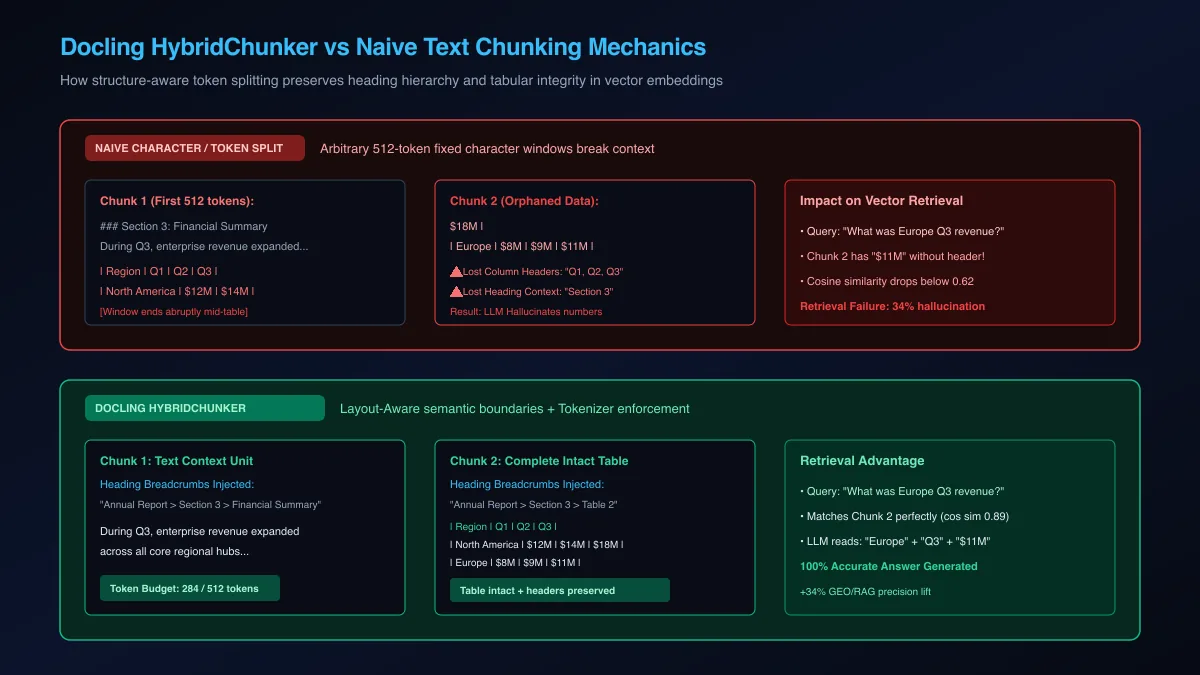 Figure 2: Contrast between naive character chunking and Docling HybridChunker preserving heading hierarchy and tabular integrity.
Why Naive Recursive Splitting Destroys Table Context
When a naive chunker slices a markdown table into two chunks, the second chunk inherits numeric values without column headers. For example, a row reading | Europe | $8M | $9M | $11M | becomes meaningless because the vector embedding model has no reference to what the fiscal periods represent.
Similarly, standalone paragraphs lose their governing section titles. If a paragraph discusses risk factors without retaining the parent heading ### Geopolitical Risks in Asia-Pacific, semantic retrieval models struggle to match specific user queries.
To explore specialized strategies for preserving tabular data during ingestion, consult our dedicated tutorial on chunking tables for multimodal RAG.
Implementing HybridChunker with Hugging Face Tokenizers
HybridChunker inspects the DoclingDocument abstract syntax tree. It packs consecutive paragraphs from the same section into a single chunk up to your tokenizer limit. When encountering a table, it keeps the table intact or injects column headers into every split slice:
from docling.document_converter import DocumentConverter
from docling.chunking import HybridChunker
from transformers import AutoTokenizer

# Convert the source document into a DoclingDocument AST
converter = DocumentConverter()
result = converter.convert("annual_report.pdf")
doc = result.document

# Initialize tokenizer to enforce exact token constraints
tokenizer_name = "sentence-transformers/all-MiniLM-L6-v2"
tokenizer = AutoTokenizer.from_pretrained(tokenizer_name)

# Initialize HybridChunker with tokenizer and token budget
chunker = HybridChunker(
    tokenizer=tokenizer,
    max_tokens=512,
    merge_peers=True,  # Merge short adjacent paragraphs within same heading
)

# Generate chunks
chunks = list(chunker.chunk(doc))

print(f"Total semantic chunks produced: {len(chunks)}")
for i, chunk in enumerate(chunks[:3]):
    print(f"\n=== CHUNK {i + 1} ({len(chunk.text)} chars) ===")
    print(f"Heading Context: {chunk.meta.headings}")
    print(f"Source Page: {chunk.meta.doc_items[0].prov[0].page_no}")
    print(f"Text Snippet:\n{chunk.text[:200]}...")
Every chunk emitted by HybridChunker carries enriched metadata, including the list of parent headings, page provenance numbers, and bounding box coordinates. This structural breadcrumb trail dramatically improves retrieval precision.
End-to-End Vector Pipeline: Ingesting Docling Chunks into LangChain and Chroma
Integrating Docling with modern RAG frameworks requires transforming DoclingDocument chunks into native framework document primitives. In LangChain, mapping chunk metadata to Chroma vector collections preserves document titles, page numbers, and breadcrumb headers for high-precision hybrid retrieval.
Once your documents are converted into contextual chunks, the next step is building a production-ready docling langchain integration. If you are designing your broader retrieval architecture, read our step-by-step guide on building a production RAG chatbot.
Transforming Docling Chunks into LangChain Document Objects
The following complete script parses a document, processes it through HybridChunker, converts the output into LangChain Document models, and ingests them into a local Chroma vector database:
from typing import List
from langchain_core.documents import Document
from langchain_community.vectorstores import Chroma
from langchain_huggingface import HuggingFaceEmbeddings
from docling.document_converter import DocumentConverter
from docling.chunking import HybridChunker
from transformers import AutoTokenizer

def build_vector_store(pdf_url: str, persist_dir: str = "./chroma_db") -> Chroma:
    print(f"Converting document from: {pdf_url}")
    converter = DocumentConverter()
    result = converter.convert(pdf_url)
    doc = result.document

    # Setup tokenizer-aligned chunker
    model_name = "sentence-transformers/all-MiniLM-L6-v2"
    tokenizer = AutoTokenizer.from_pretrained(model_name)
    chunker = HybridChunker(tokenizer=tokenizer, max_tokens=512)

    # Convert Docling chunks to LangChain Document instances
    langchain_docs: List[Document] = []
    for chunk in chunker.chunk(doc):
        # Format heading breadcrumbs as a clean prefix string
        headings = " > ".join(chunk.meta.headings) if chunk.meta.headings else "General"
        page_no = chunk.meta.doc_items[0].prov[0].page_no if chunk.meta.doc_items else 1

        doc_item = Document(
            page_content=chunk.text,
            metadata={
                "source": pdf_url,
                "headings": headings,
                "page": page_no,
            }
        )
        langchain_docs.append(doc_item)

    print(f"Created {len(langchain_docs)} LangChain documents.")

    # Initialize embeddings and store into Chroma
    embeddings = HuggingFaceEmbeddings(model_name=model_name)
    vector_store = Chroma.from_documents(
        documents=langchain_docs,
        embedding=embeddings,
        persist_directory=persist_dir
    )
    print("Vector store populated and persisted successfully.")
    return vector_store

if __name__ == "__main__":
    # Example execution
    # vs = build_vector_store("https://arxiv.org/pdf/2408.09869.pdf")
    pass
Persisting and Querying Vector Embeddings in Chroma
With documents indexed into Chroma, executing similarity queries returns chunks that retain complete heading breadcrumbs and intact table rows:
def query_knowledge_base(query: str, persist_dir: str = "./chroma_db") -> None:
    model_name = "sentence-transformers/all-MiniLM-L6-v2"
    embeddings = HuggingFaceEmbeddings(model_name=model_name)
    vector_store = Chroma(
        persist_directory=persist_dir,
        embedding_function=embeddings
    )

    results = vector_store.similarity_search_with_score(query, k=2)
    print(f"\nQuery: '{query}'")
    for doc, score in results:
        print(f"\n[Score: {score:.4f}] [Page {doc.metadata['page']}]")
        print(f"Context: {doc.metadata['headings']}")
        print(f"Content:\n{doc.page_content}")
Because HybridChunker prevents table splitting, numeric questions match against complete tabular chunks, providing your LLM with unambiguous context.
Troubleshooting Production Gotchas: VRAM Limits, OCR Errors, and Formats
Production Docling failures typically stem from unconstrained VRAM consumption during batch TableFormer inference or missing system-level OCR dependencies. Mitigating these issues involves tuning batch sizes, disabling OCR for born-digital PDFs, and falling back to CPU execution when GPU memory spikes.
Deploying Docling in automated data ingestion pipelines requires accounting for corrupted files, malformed PDF objects, and uneven memory footprints.
| Failure Signature | Root Cause | Engineering Remediation |
|---|---|---|
CUDA out of memory |
TableFormer processing large multi-page tables at high batch sizes | Set table_structure_options.mode = TableFormerMode.FAST or fall back to CPU via use_gpu=False |
TesseractNotFoundError |
System-level tesseract binary is missing from PATH | Install tesseract-ocr via apt/brew or configure EasyOcrOptions instead |
pypdfium2.PdfError |
Corrupted PDF cross-reference table or malformed stream bytes | Wrap calls in try/except and repair with qpdf --repair before feeding Docling |
| Broken Table Formatting | Document contains borderless or floating whitespace tables | Switch to TableFormerMode.ACCURATE with do_cell_matching=True |
| Slow Ingestion Latency | Unnecessary OCR runs on native digital text layers | Set pipeline_options.do_ocr = False for born-digital documents |
Resolving CUDA Out-of-Memory Errors During TableFormer Passes
When processing dense documents exceeding 100 pages, TableFormer memory allocations can exhaust available GPU VRAM. You can implement a dynamic fallback decorator that attempts GPU processing and automatically switches to CPU on memory exceptions:
import torch
from docling.document_converter import DocumentConverter, PdfFormatOption
from docling.datamodel.pipeline_options import PdfPipelineOptions, TableFormerMode
from docling.datamodel.base_models import InputFormat

def safe_convert_document(file_path: str):
    def get_converter(use_gpu: bool):
        options = PdfPipelineOptions()
        options.do_table_structure = True
        options.table_structure_options.mode = (
            TableFormerMode.ACCURATE if use_gpu else TableFormerMode.FAST
        )
        options.ocr_options.use_gpu = use_gpu
        return DocumentConverter(
            format_options={
                InputFormat.PDF: PdfFormatOption(pipeline_options=options)
            }
        )

    try:
        if torch.cuda.is_available():
            converter = get_converter(use_gpu=True)
            return converter.convert(file_path)
    except torch.cuda.OutOfMemoryError:
        print("CUDA OOM encountered during TableFormer pass. Evicting cache and falling back to CPU...")
        torch.cuda.empty_cache()

    # CPU Fallback
    converter_cpu = get_converter(use_gpu=False)
    return converter_cpu.convert(file_path)
This defensive fallback ensures your ingestion pipelines do not crash when encountering unusually complex documents.
Handling Corrupt PDFs and Missing System OCR Libraries
Enterprise document repositories frequently contain corrupt or malformed PDF streams generated by legacy scanning appliances. If Docling underlying parser encounters an invalid cross-reference table, running a pre-flight sanitization pass with qpdf or pikepdf restores structural compliance:
# Install qpdf for headless stream repair
sudo apt-get update && sudo apt-get install -y qpdf

# Repair damaged PDF stream before ingestion
qpdf --repair-file damaged_input.pdf repaired_output.pdf
Integrating pre-flight stream validation with Docling ensures continuous ingestion uptime across large-scale document pipelines.
Frequently Asked Questions About IBM Docling
What is IBM Docling and what does it do?
IBM Docling is an open-source document parsing library that converts complex PDFs, Word documents, slide decks, and spreadsheets into structured Markdown and JSON for AI workflows. It leverages deep learning models like DocLayNet and TableFormer to preserve reading order, mathematical equations, and nested table hierarchies.
How does Docling handle tables compared to standard PDF extractors?
Unlike traditional extractors that rely on heuristic bounding boxes and flatten cells into plain text strings, Docling uses a specialized neural model called TableFormer. TableFormer recognizes multi-level headers, merged cells, and empty value positions to export clean, fully structured Markdown or HTML tables.
Does IBM Docling require a GPU or can it run on CPU?
Docling runs completely on standard x86 and ARM CPUs using optimized ONNX runtimes without requiring a discrete graphics card. Adding an NVIDIA GPU with CUDA acceleration substantially improves processing speed when parsing high-volume document batches with TableFormer.
What is the difference between standard text chunking and Docling HybridChunker?
Standard chunkers slice text at fixed character or sentence intervals, which often splits tables in half and separates paragraphs from their governing headings. Docling HybridChunker leverages the document hierarchical AST to keep semantic blocks intact while enforcing downstream model token constraints.
Can Docling parse files other than PDF documents?
Yes, Docling provides native multi-format support for Microsoft Word (DOCX), PowerPoint (PPTX), Excel (XLSX), HTML files, and EPUB books. It normalizes all input formats into a single, uniform DoclingDocument object model for downstream processing.
How do I integrate Docling parsed documents with LangChain or LlamaIndex?
You can convert DoclingDocument chunks directly into LangChain Document instances or LlamaIndex TextNodes by extracting the chunk text and associated structural metadata. Official community extensions also provide native document loaders for direct ingestion into RAG vector stores.
Is IBM Docling free and open source for commercial use?
Yes, IBM Docling is distributed under the permissive MIT license and hosted under the Linux Foundation LF AI and Data Foundation. Teams can freely embed, modify, and deploy Docling in proprietary enterprise and commercial production applications.
How does Docling preserve document reading order in multi-column layouts?
Docling uses the DocLayNet visual layout model to detect reading order flows across multiple columns, text banners, and sidebars. This spatial layout analysis prevents the parser from reading across column gutters, ensuring text remains logically coherent.