Marker PDF-to-Markdown Guide: Batch GPU Conversion + Optional --use_llm Table Cleanup
Learn how to run Marker for high-speed batch PDF to Markdown conversion on GPUs with Surya OCR and optional LLM table cleanup for production RAG.
When enterprise data teams need to convert millions of PDF pages into Markdown for Retrieval-Augmented Generation, processing speed becomes the primary engineering constraint. Running heavy vision-language models across extensive document archives can take weeks of continuous compute and incur tens of thousands of dollars in cloud API bills.
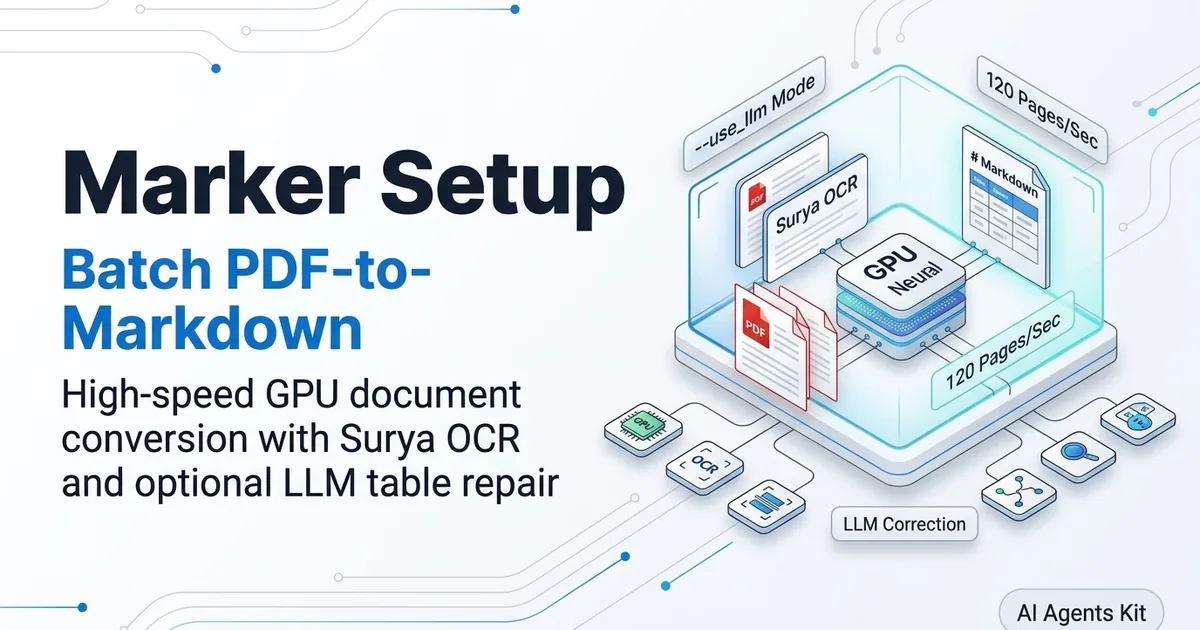
To structure high-throughput ingestion pipelines without sacrificing document fidelity, teams consult our architectural PDF parsing and document OCR guide. Marker delivers an effective balance between speed and accuracy by coupling high-performance neural layout models with an optional hybrid language model refinement loop that operates at 120 pages per second.
Key Takeaways
- Blazing Batch Throughput: Marker converts documents at up to 120 pages per second on multi-GPU nodes, outpacing heavy vision-language models by an order of magnitude.
- Specialized Surya Model Suite: Uses custom deep learning backends including Surya layout analysis, Surya text recognition, and Texify for inline mathematical equations.
- Hybrid
--use_llmRefinement: Selectively engages external models like Claude, Gemini, or local Ollama instances to repair broken multi-page tables while using 90% fewer tokens than end-to-end VLM OCR.- Multi-GPU Parallelization: Built-in
marker_batchCLI distributes file chunks across multiple graphics cards automatically with process isolation.- Enterprise Licensing Caveats: Distributed under the copyleft GPL-3.0 license with RAIL-M model weights, requiring architectural isolation for proprietary commercial integrations.
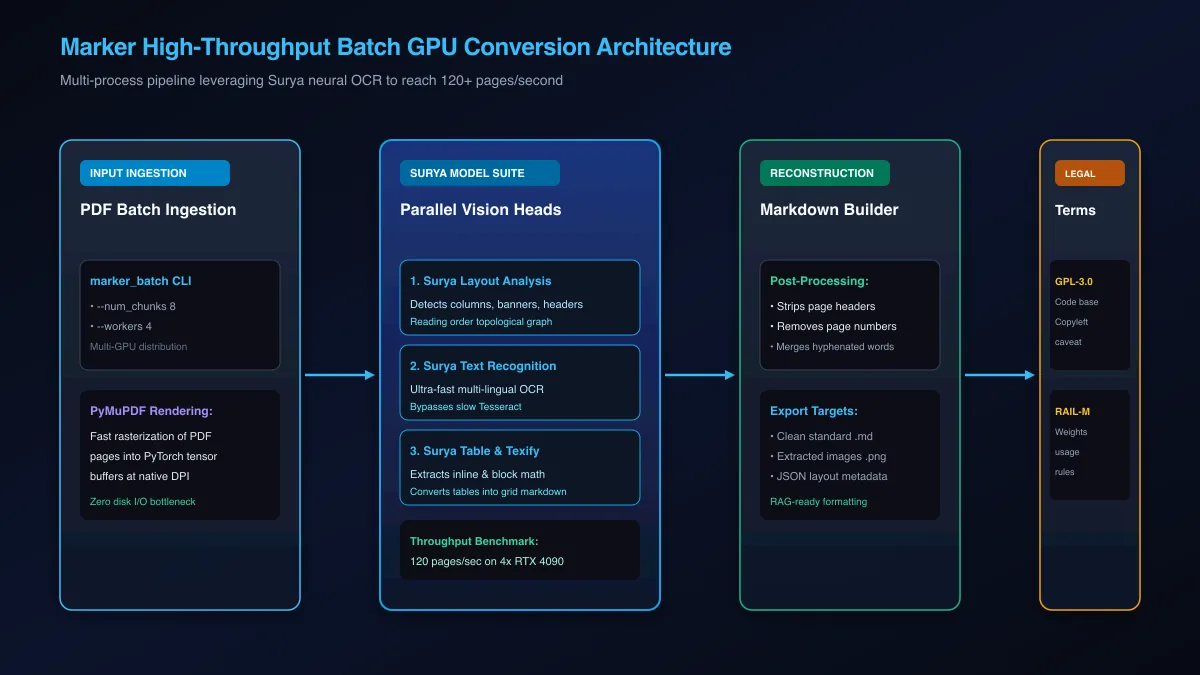 Figure 1: Architectural pipeline of Marker utilizing Surya neural models and multi-GPU parallelization for high-throughput batch extraction.
What Is Marker and Why Is It the Speed Leader for PDF Conversion?
Marker is an open-source document conversion pipeline created by Vik Paruchuri that transforms PDFs, EPUBs, and books into clean Markdown at speeds reaching 120 pages per second on GPU clusters. Built on the Surya neural OCR and layout analysis model suite, Marker extracts high-fidelity text without relying on slow cloud vision APIs.
Most modern document understanding frameworks rely on autoregressive vision-language models like PaliGemma or Qwen2-VL. While these models produce accurate outputs on single pages, their sequential token generation creates a severe compute bottleneck. Generating text token-by-token limits processing speeds to approximately 1 to 2 pages per second per GPU.
Inspect the complete source code and benchmark results in the Marker GitHub Repository. The underlying vision engine is maintained in the Surya OCR GitHub Repository, while equation parsing is powered by Texify.
The High-Throughput Architecture Behind Surya Models
Marker achieves its high conversion velocity by decomposing document extraction into parallel, feed-forward computer vision tasks:
- Layout Detection: Surya layout segmentation predicts bounding boxes for headers, footers, paragraphs, and tables in a single forward tensor pass.
- Reading Order Sorting: A spatial topological graph establishes logical narrative flow down column gutters before crossing page boundaries.
- Text Recognition: Surya OCR detects text lines across multi-lingual alphabets without relying on legacy Tesseract binaries.
- Formula Parsing: Texify translates mathematical expressions into inline LaTeX without invoking heavy autoregressive LLMs.
Because every stage runs as an optimized feed-forward convolutional or transformer pass, inference latency scales linearly with pixel dimensions rather than token length.
How Marker Outperforms Conventional PDF Scraping Frameworks
Legacy text extraction libraries like pypdf or pdfminer extract text quickly, but they fail completely on multi-column layouts and scanned images. They output text in arbitrary stream order, mixing left and right columns together.
Marker replaces naive character extraction with a neural layout understanding pipeline. It removes headers, footers, and page numbers automatically, producing clean Markdown that vectors directly into downstream RAG databases.
If you are evaluating parser accuracy across messy tables, compare Marker with our comprehensive analysis benchmarking Docling against Marker, MinerU, and LlamaParse.
Installing Marker and Tuning Multi-GPU Batch Pipelines
Installing Marker with full GPU acceleration requires PyTorch CUDA bindings and the marker-pdf package. Running batch conversions via marker_batch allows teams to distribute document queues across multiple GPUs by tuning worker thread counts and document chunk allocations.
Selecting the right hardware architecture is critical for maximizing batch throughput. For hardware recommendations and GPU cluster sizing, check our guide on the best GPU for AI workloads.
Environment Prerequisites and PyTorch CUDA Installation
Marker performs best on modern Linux servers equipped with NVIDIA Ada Lovelace or Ampere GPUs. Ensure you have Python 3.10 or 3.11 installed along with CUDA 12.1 or newer drivers:
# Create and activate an isolated virtual environment
python3 -m venv marker_env
source marker_env/bin/activate

# Upgrade package installers
pip install --upgrade pip setuptools wheel

# Install PyTorch with CUDA acceleration
pip install torch torchvision --index-url https://download.pytorch.org/whl/cu121

# Install Marker with GPU support
pip install marker-pdf[gpu]
Verify that PyTorch identifies your installed graphics cards:
import torch

print(f"CUDA Available: {torch.cuda.is_available()}")
print(f"Device Count: {torch.cuda.device_count()}")
for i in range(torch.cuda.device_count()):
    print(f"  Device {i}: {torch.cuda.get_device_name(i)}")
Configuring marker_batch with Workers and Chunk Sizing
The marker_batch command distributes document conversion across multiple processes and GPUs. By tuning worker concurrency and chunk counts, you eliminate GPU under-utilization:
# Execute batch conversion across 4 GPUs
marker_batch /data/incoming_pdfs /data/output_markdown \
  --workers 4 \
  --num_chunks 8 \
  --max_pages 500 \
  --metadata_file /data/output_markdown/metadata.json
Key configuration flags include:
--workers: Number of parallel worker processes. Set this to match your available GPU count or CPU core budget.--num_chunks: Subdivides the total file queue into balanced processing batches to prevent memory spikes.--strip_existing_ocr: Forces Marker to ignore unreliable embedded PDF text layers and re-run Surya neural OCR from raw page rasters.
Activating the –use_llm Hybrid Refinement Mode for Messy Tables
Passing the --use_llm flag enables Marker hybrid mode, which selectively routes ambiguous tables, complex forms, and distorted inline equations to an external language model for structural repair. By only invoking the LLM on flagged table regions, teams achieve near-perfect table fidelity while reducing token expenses by 90%.
While Surya extracts clean paragraphs and straightforward tables quickly, complex corporate balance sheets with unbordered cells or multi-page splits challenge pure vision models.
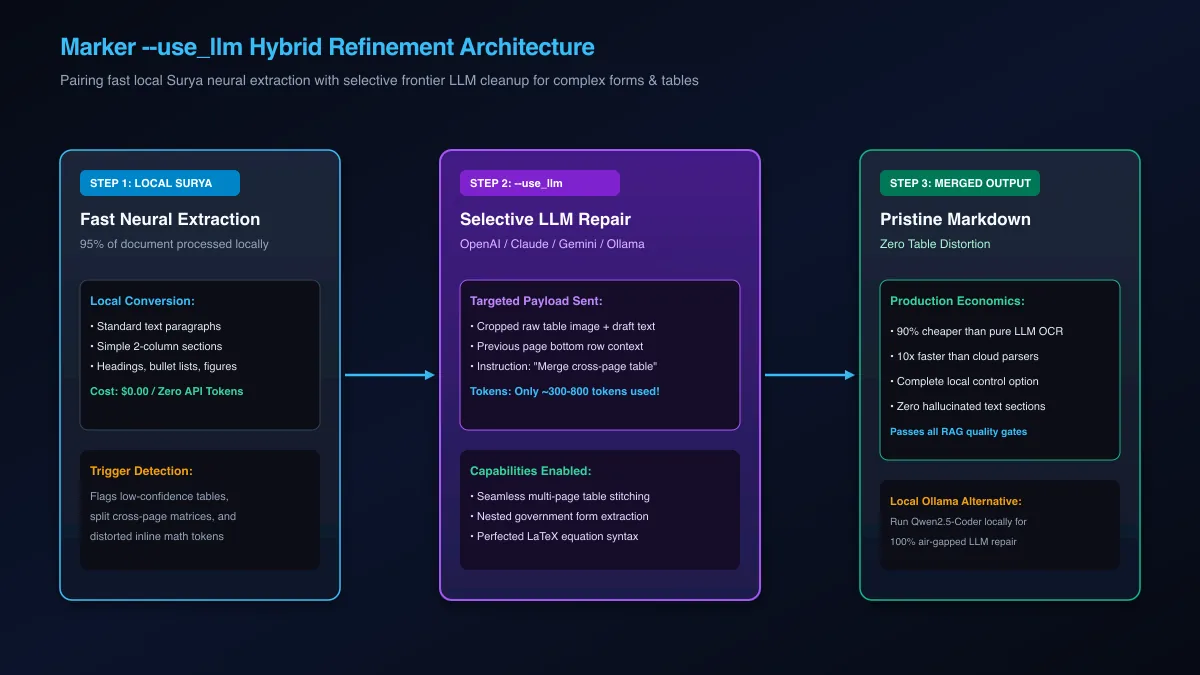 Figure 2: Hybrid workflow combining local Surya OCR with selective LLM refinement for complex tables and forms.
How Selective LLM Repair Eliminates Cross-Page Table Breaks
In pure LLM-based document parsing, every page is rendered into an image and passed to a multimodal API like GPT-4o or Claude. For a 100-page document, this approach consumes over 150,000 tokens and costs several dollars per file.
Marker hybrid mode fundamentally alters this economic equation by processing the vast majority of content locally.
First, Marker parses approximately 95% of the document locally using Surya neural models at zero token cost.
Second, when the layout engine detects a complex table spanning multiple pages, it crops the visual region and constructs a minimal repair prompt.
Third, the prompt sends only the cropped table image and preceding row context to the LLM. The model stitches headers across page breaks and returns clean Markdown.
This targeted approach consumes only 300 to 800 tokens per table, delivering high fidelity at a fraction of the cost.
Wiring Cloud APIs and Local Ollama Models into Marker
You can configure Marker to connect to major commercial LLM providers or local self-hosted inference servers using environment variables:
# Option 1: Configure Anthropic Claude 3.5 Sonnet
export LLM_SERVICE="anthropic"
export ANTHROPIC_API_KEY="your-anthropic-key"

# Option 2: Configure Google Gemini 1.5 Flash / Pro
export LLM_SERVICE="gemini"
export GEMINI_API_KEY="your-gemini-key"

# Option 3: Configure Local Ollama (Air-Gapped & Private)
export LLM_SERVICE="openai"
export OPENAI_BASE_URL="http://localhost:11434/v1"
export OPENAI_API_KEY="ollama"
export LLM_MODEL="qwen2.5-coder:14b"
Run conversion with hybrid refinement enabled:
# Convert a complex financial report using hybrid table cleanup
marker_single /data/annual_report.pdf /data/output --use_llm
Using local models like Qwen2.5-Coder via Ollama ensures that sensitive enterprise documents never leave your secure internal infrastructure.
Automating Ingestion with the Marker Python SDK
Marker provides a clean Python programming interface that allows developers to integrate high-speed document extraction directly into automated data ingestion workers. By invoking Marker models in-memory, pipelines eliminate intermediate disk write overhead and stream parsed Markdown directly into RAG chunkers.
Automating extraction inside Python scripts enables real-time document transformation within ingestion queues. If your pipeline also requires parsing Microsoft Office formats alongside PDFs, review our IBM Docling Python tutorial.
Building a Multi-Threaded Document Ingestion Service
The following production script demonstrates how to load Marker models once in memory and process incoming PDF streams programmatically:
from pathlib import Path
from marker.convert import convert_single_pdf
from marker.models import load_all_models
from marker.output import save_markdown

class MarkerDocumentService:
    def __init__(self, use_llm: bool = False):
        print("Loading Surya layout, OCR, and Texify models into memory...")
        # Load all models once into GPU VRAM
        self.models = load_all_models()
        self.use_llm = use_llm
        print("Marker models successfully cached in VRAM.")

    def convert_pdf(self, file_path: str, output_dir: str) -> str:
        pdf_path = Path(file_path)
        if not pdf_path.exists():
            raise FileNotFoundError(f"Source file not found: {pdf_path}")

        out_path = Path(output_dir)
        out_path.mkdir(parents=True, exist_ok=True)

        print(f"Processing: {pdf_path.name}")
        full_text, images, out_metadata = convert_single_pdf(
            fname=str(pdf_path),
            model_lst=self.models,
            max_pages=None,
            langs=None,
            use_llm=self.use_llm
        )

        # Save markdown and associated figure crops
        subfolder_path = save_markdown(
            out_folder=str(out_path),
            base_name=pdf_path.stem,
            full_text=full_text,
            images=images
        )
        print(f"Conversion complete. Artifacts written to: {subfolder_path}")
        return full_text

if __name__ == "__main__":
    # Example execution
    # service = MarkerDocumentService(use_llm=False)
    # text = service.convert_pdf("financial_10k.pdf", "./output")
    pass
Handling Post-Processing and Metadata Normalization
Marker returns extracted image assets and structural metadata alongside narrative Markdown. Ingestion pipelines can harvest bounding boxes and reading order markers to populate metadata fields in vector search databases.
Storing page provenance numbers and image file paths alongside chunk vectors allows downstream LLM applications to cite exact page references and display visual diagram crops to end users.
Legal and Licensing Boundaries: GPL-3.0 and RAIL-M Enterprise Realities
Deploying Marker in enterprise environments requires careful legal evaluation because the codebase is licensed under GPL-3.0 while underlying model weights carry RAIL-M commercial usage limitations. Organizations building commercial SaaS applications must maintain architectural isolation or evaluate permissive MIT alternatives.
Understanding software licenses is essential when embedding open-source components into commercial software architectures.
| Licensing Dimension | Marker Codebase | Surya Model Weights | Enterprise Implications |
|---|---|---|---|
| License Type | GNU General Public License v3.0 (GPL-3.0) | OpenRAIL-M (Responsible AI License) | Strong copyleft on source code; use restrictions on weights |
| Commercial SaaS Use | Permitted if hosted as an isolated network microservice | Permitted subject to acceptable use policy | Code cannot be linked into proprietary closed-source binaries |
| Derivative Works | Modifications must be released under GPL-3.0 | Derivatives inherit RAIL-M restrictions | Custom fine-tuning inherits license boundaries |
| Permissive Alternative | IBM Docling (MIT License) | DocLayNet / TableFormer (Open Weights) | Frictionless enterprise embedding without copyleft obligations |
Understanding Copyleft Obligations Under GPL-3.0
The GPL-3.0 license is a strong copyleft license. If you modify Marker source code and distribute that software to external customers, you are legally obligated to make the complete source code available under GPL-3.0.
However, running Marker as an independent HTTP microservice behind a private internal REST API generally does not trigger copyleft distribution clauses under standard copyright law, provided client applications communicate strictly over network boundaries.
Navigating RAIL-M Model Weight Restrictions and Commercial Alternatives
The Surya model weights carry an OpenRAIL-M license, which includes acceptable use restrictions prohibiting biometric surveillance, deceptive impersonation, and illegal activities.
If your enterprise compliance policies strictly forbid GPL-3.0 dependencies, consider deploying IBM Docling, which is released under the permissive MIT license under the Linux Foundation.
Troubleshooting Marker Production Gotchas: Worker Crashes and VRAM Spikes
Common Marker production errors include PyTorch multiprocessing CUDA initialization deadlocks, memory fragmentation during large batch runs, and missing API credentials during --use_llm passes. Resolving these requires setting the torch spawn context, tuning chunk sizes, and implementing strict environment variable validation.
Managing multi-GPU inference pools requires defensive engineering to prevent worker processes from failing silently. For precise memory allocation formulas during concurrent batch runs, consult our reference on VRAM requirements for AI models.
| Error Message | Root Cause | Engineering Fix |
|---|---|---|
RuntimeError: Cannot re-initialize CUDA in forked subprocess |
Linux default process fork conflicts with PyTorch CUDA runtime | Set multiprocessing.set_start_method('spawn', force=True) before importing torch |
CUDA out of memory in worker |
High-resolution raster scans exceeding worker VRAM buffer | Decrease batch size or configure --num_chunks to smaller page allocations |
KeyError: LLM_SERVICE |
Missing environment configuration when passing --use_llm |
Ensure LLM_SERVICE and associated provider API keys are exported in shell environment |
Surya checkpoint not found |
Network failure during automated Hugging Face model pull | Pre-download models via huggingface-cli download vikp/surya_layout to shared volume |
| Corrupt Character Glyphs | Unreliable embedded PDF font encoding | Run with --strip_existing_ocr to force full neural OCR from visual image pixels |
Resolving CUDA Multi-Processing Deadlocks and Worker Crashes
When spawning multiple worker processes in Python, standard Linux process forking causes PyTorch CUDA contexts to corrupt. Force the process spawning method to spawn in your entrypoint:
import multiprocessing as mp

if __name__ == "__main__":
    # Must be called before any PyTorch or CUDA imports
    try:
        mp.set_start_method("spawn", force=True)
    except RuntimeError:
        pass
This configuration ensures that every worker process initializes a clean CUDA memory space, preventing process deadlocks during high-volume batch runs.
Managing Batch Memory Fragmentation on Heavy Enterprise Scans
Large multi-page documents can leave lingering tensor allocations in PyTorch memory caches. If worker processes experience creeping memory usage, invoke garbage collection and tensor cache eviction between documents:
import gc
import torch

def flush_worker_memory():
    """Reclaim unallocated tensor buffers between batch documents."""
    gc.collect()
    if torch.cuda.is_available():
        torch.cuda.empty_cache()
Regular memory flushes prevent long-running worker processes from crashing due to memory fragmentation.
Frequently Asked Questions About Marker
What is Marker and how does it convert PDFs to Markdown?
Marker is an open-source document conversion pipeline built by Vik Paruchuri that converts PDFs, EPUBs, and books into clean Markdown. It uses the Surya neural model suite to detect page layout, extract text through optical character recognition, and format tables and equations.
How fast is Marker compared to other PDF parsing tools?
Marker is significantly faster than most visual PDF parsers, processing up to 120 pages per second on multi-GPU nodes in batch mode. Its streamlined PyTorch inference pipeline and C++ rendering backends deliver ten times the throughput of heavy vision-language models.
What does the –use_llm flag in Marker do?
The –use_llm flag activates Marker hybrid refinement mode, routing complex or split tables to a language model like Claude, GPT, Gemini, or local Ollama. This selective approach repairs broken multi-page tables and inline math while using 90% fewer tokens than full-document LLM OCR.
Can I use Marker with local LLMs like Ollama?
Yes, Marker supports custom OpenAI-compatible endpoints, allowing you to route –use_llm requests to local models running on Ollama, such as Qwen2.5-Coder. This configuration enables high-fidelity table cleanup in completely private, air-gapped environments.
What is Surya OCR and how does Marker use it?
Surya is a specialized suite of deep learning models designed for document layout analysis, reading order detection, and multi-lingual text extraction. Marker relies on Surya as its core vision engine to segment document pages and extract textual content before markdown generation.
Is Marker free and open source for commercial use?
Marker source code is licensed under GPL-3.0, which imposes copyleft distribution obligations on derivative software, while its model weights carry RAIL-M commercial restrictions. Enterprise teams building proprietary commercial products should review these terms with legal counsel or consider MIT-licensed alternatives like IBM Docling.
How do I run Marker in batch mode across multiple GPUs?
You can execute the marker_batch command and configure the –workers and –num_chunks flags to distribute files across available graphics cards. Marker automatically provisions worker processes that bind to specific CUDA device IDs for parallel processing.
What are the main differences between Marker and IBM Docling?
Marker is optimized for raw batch GPU throughput on scientific papers and books, offering blazing conversion speeds but carrying a GPL-3.0 copyleft license. IBM Docling provides broader native support for office formats like DOCX and PPTX, includes native structure-aware chunking, and is released under the permissive MIT license.