Build a RAG Chatbot: Complete Step-by-Step Guide (2026)
Build a production RAG chatbot in Python with LangChain and ChromaDB. Master hybrid search, cross-encoder reranking, and local Ollama deployment in 2026.
Engineering teams face a fundamental requirement when deploying conversational artificial intelligence: models must answer questions accurately from proprietary documentation without fabricating facts. Retrieval-Augmented Generation (RAG) provides the foundational architecture solving this challenge by grounding large language models directly in verified private knowledge bases.
This hands-on langchain rag tutorial demonstrates how to build a production-ready rag chatbot python application using LangChain and local vector storage. It forms a key pillar in the modern ecosystem of AI agents and intelligent document retrieval.
Key Takeaways
- A production RAG chatbot couples semantic vector retrieval with frontier language models like GPT-5.6 Sol or local Llama 4 to ground answers directly in organizational documents.
- Ingestion quality dictates system accuracy, where recursive chunking (500 to 800 tokens) and OpenAI text-embedding-3-large embeddings prevent context loss and retrieval noise.
- According to the EACL 2026 T2-RAGBench benchmark, combining BM25 keyword matching with cross-encoder reranking lifts Recall@5 by 39% (0.816 vs 0.587) over standalone vector search.
- LangChain v1.0 standardizes conversational RAG around create_history_aware_retriever and create_retrieval_chain, while LangGraph executes self-correcting agentic grading loops.
- Sensitive enterprise documents deploy locally without API costs by pairing Ollama, nomic-embed-text, and local ChromaDB storage.
What Is a RAG Chatbot and Why Does It Matter?
A RAG chatbot is an AI architecture that retrieves relevant passages from a private knowledge base before generating responses with a large language model. This open-book pattern eliminates hallucinations by grounding answers directly in verified proprietary documents rather than static model weights.
Standard language models operate on a closed-book basis, relying entirely on static weights frozen during pre-training. A chatbot with rag takes an open-book approach, dynamically querying external document indices to fetch relevant passages before generating an answer. For technical teams managing proprietary source code, operational runbooks, or policy documentation, this open-book retrieval pattern is indispensable.
The commercial impact reflects this architectural advantage. According to Precedence Research market data, enterprise adoption of retrieval pipelines grew from 31% to 51% over the past twelve months. Grounding answers in verified company data transforms generic language models into reliable enterprise assistants.
Architectural comparisons between RAG, fine-tuning, and direct prompting highlight why retrieval dominates enterprise roadmaps. While fine-tuning adapts tone or specialized syntax, it cannot reliably memorize rapidly changing internal documentation. Fitting entire knowledge bases directly into context windows introduces severe latency and quadratic token costs.
RAG vs Fine-Tuning vs Prompting: When Each Wins
| Approach | How It Works | Best For | Trade-offs |
|---|---|---|---|
| RAG | Retrieves documents at query time and injects them as prompt context | Large, dynamic knowledge bases | Adds retrieval latency; quality depends on chunking |
| Fine-Tuning | Retrains model weights on domain datasets | Modifying model tone, formatting, and reasoning style | Expensive, slow to update, risks catastrophic forgetting |
| Prompting | Fits all reference context into a single raw prompt window | Small documents and static reference sheets | High token costs; degrades as document length scales |
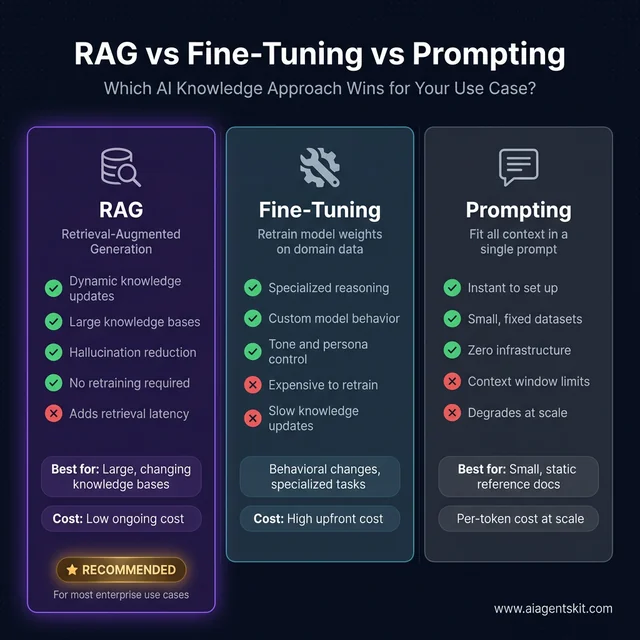
RAG architecture delivers dynamic knowledge integration at lower ongoing operational costs than continuous model fine-tuning.
McKinsey global research indicates that over 80% of enterprise organizations now deploy artificial intelligence across internal business functions. As teams build complex multi-agent workflows, establishing a robust python rag pipeline provides the foundational grounding layer required for production deployment.
5 Core Components of Every RAG Architecture
Every production RAG system relies on five sequential stages to transform unstructured documents into grounded conversational responses:
- Document Loader: Ingests source files, including PDFs, Markdown documentation, text files, and HTML web pages. If your pipeline extracts live site data, see our AI web scraping tutorial for automated ingestion patterns.
- Text Splitter: Breaks large documents into semantically coherent chunks suitable for vector embedding and retrieval.
- Embedding Model: Maps textual passages into dense mathematical vectors capturing contextual meaning.
- Vector Database: Indexes embeddings to execute high-speed approximate nearest neighbor or cosine similarity searches.
- Language Model Generator: Synthesizes the final response by conditioning on both the retrieved context chunks and the user’s prompt.
The runtime query cycle follows a clean operational flow. When a user submits an inquiry, the system embeds the query using the identical model applied during document ingestion. The resulting vector query scans the vector database, extracts the top-k most similar passages, and formats them into an augmented system prompt for model inference.
Empirical testing reveals that retrieval failures rarely stem from the generation model. Instead, poorly calibrated chunk boundaries and indexing choices degrade context quality before generation begins. For a comprehensive overview of indexing algorithms and vector storage engines, explore our vector database concepts guide.
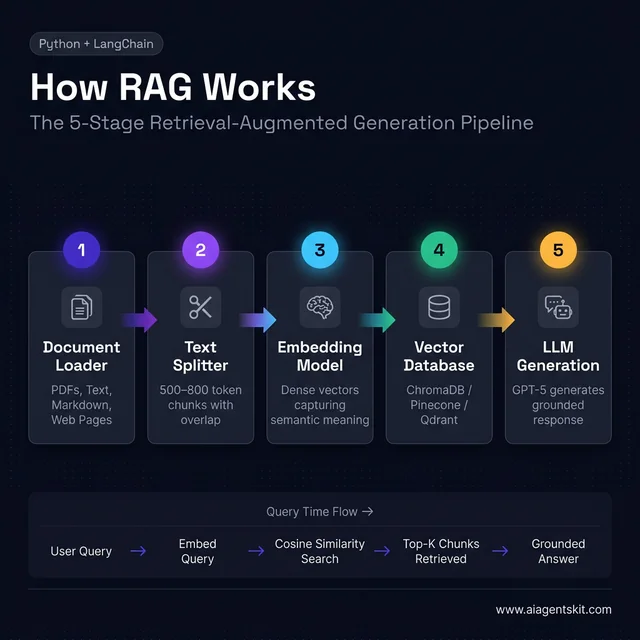
The complete RAG pipeline: document ingestion flows top to bottom, while query retrieval executes left to right at runtime.
How to Set Up Your RAG Development Environment in Python
Configuring a dedicated Python environment ensures clean dependency management and isolates project packages. Python 3.10 or higher is required to support modern asynchronous typing features in LangChain and ChromaDB.
mkdir rag-chatbot
cd rag-chatbot
python3 -m venv venv
source venv/bin/activate  # On Windows: venv\Scripts\activate
Installing Required Python Packages
Install the core libraries for document ingestion, local vector storage, and frontier model integration:
pip install langchain langchain-openai langchain-community chromadb pypdf python-dotenvEach package fulfills a specific architectural responsibility:
langchain: Provides core orchestration abstractions and chain composition utilities.langchain-openai: Delivers native bindings for OpenAI embedding endpoints and chat models.langchain-community: Supplies document loaders, including PyPDF and web scrapers.chromadb: Implements an embedded vector store requiring zero external database infrastructure.pypdf: Extracts raw text and page metadata from binary PDF files.python-dotenv: Loads API credentials securely from local environment files.
Configure your API credentials in a local environment file:
# .env
OPENAI_API_KEY=sk-your-actual-api-key-here
Always append .env to your .gitignore configuration before committing code. Credential leakage represents a major security vulnerability in software engineering. If you need a refresher on credential provisioning and quota configuration, consult our OpenAI API developer guide.
Verify your local configuration before proceeding to document indexing:
# test_setup.py
import os
from dotenv import load_dotenv

load_dotenv()

api_key = os.getenv("OPENAI_API_KEY")
if api_key and api_key.startswith("sk-"):
    print("Environment setup verified: OpenAI API key detected.")
else:
    print("Configuration error: Missing or invalid OPENAI_API_KEY in .env file.")
How to Load, Chunk, and Embed Documents for Vector Search
Ingestion quality directly dictates RAG chatbot accuracy. The data ingestion pipeline extracts raw text, divides content into structured chunks, and generates dense mathematical vectors for downstream retrieval.
Supported Document Formats and Loaders
LangChain provides specialized loaders for common document formats across technical environments:
| Format | LangChain Loader | Typical Use Case |
|---|---|---|
PyPDFLoader |
Enterprise policy manuals, technical specifications | |
| Text | TextLoader |
System log files, plain documentation |
| Markdown | UnstructuredMarkdownLoader |
Developer documentation, internal knowledge bases |
| Web Pages | WebBaseLoader |
Public web documentation, release announcements |
| CSV | CSVLoader |
Tabular datasets, structured product catalogs |
The following script loads an entire directory of technical PDF documents:
# load_documents.py
from langchain_community.document_loaders import PyPDFLoader, DirectoryLoader

loader = DirectoryLoader(
    "documents/",
    glob="**/*.pdf",
    loader_cls=PyPDFLoader
)
documents = loader.load()

print(f"Loaded {len(documents)} document pages.")
for doc in documents[:3]:
    source = doc.metadata.get("source", "unknown")
    page = doc.metadata.get("page", 0)
    print(f"Indexed: {source}, page {page}")
Each loaded document object contains raw text accessible through page_content and origin information stored in metadata. Retaining precise page and source metadata is critical for downstream citation attribution.
Choosing the Right Chunk Size for Your Documents
Chunk size selection requires balancing semantic scope against precision. Excessively large chunks introduce irrelevant conversational noise, while microscopic chunks sever context across related sentences.
Production experience recommends targeted chunk sizes based on document structure:
| Document Type | Chunk Size | Overlap | Engineering Rationale |
|---|---|---|---|
| Technical documentation | 500 tokens | 100 tokens | Preserves tight API parameters and method signatures |
| Narrative business prose | 800 tokens | 150 tokens | Maintains context across multi-sentence paragraphs |
| Structured FAQ catalogs | 300 tokens | 50 tokens | Keeps individual question-answer pairs isolated |
| Mixed architectural guides | 600 tokens | 120 tokens | Delivers a balanced general-purpose starting point |
The following script splits loaded documents using recursive character boundaries:
# chunk_documents.py
from langchain.text_splitter import RecursiveCharacterTextSplitter

text_splitter = RecursiveCharacterTextSplitter(
    chunk_size=800,
    chunk_overlap=100,
    length_function=len,
    separators=["\n\n", "\n", " ", ""]
)

chunks = text_splitter.split_documents(documents)
print(f"Generated {len(chunks)} chunks from {len(documents)} source pages.")
The RecursiveCharacterTextSplitter prioritizes paragraph breaks before falling back to sentence and word boundaries. Always inspect sample chunks before vector indexing to ensure tables and code snippets remain structurally intact.
Creating Embeddings with OpenAI
Text embeddings translate strings into high-dimensional vectors where semantic similarity corresponds to geometric proximity in vector space. As documented in the OpenAI Embeddings Documentation, text-embedding-3-large creates 3,072-dimensional embeddings that significantly improve retrieval accuracy over older embedding models.
# create_embeddings.py
from dotenv import load_dotenv
from langchain_openai import OpenAIEmbeddings

load_dotenv()

embeddings = OpenAIEmbeddings(model="text-embedding-3-large")
sample_vector = embeddings.embed_query("How to build a rag chatbot in Python?")
print(f"Generated vector dimensions: {len(sample_vector)}")
At approximately $0.00013 per thousand tokens, indexing 10,000 document chunks of 600 tokens each costs less than one dollar. Embedding occurs during ingestion, allowing developers to cache vectors and avoid recurring embedding costs on unchanged documents.
How to Build the Retriever and RAG Chain with LangChain v1
Building a retriever and RAG chain connects your vector database to a language model using LangChain Expression Language (LCEL). This modular pipeline indexes document embeddings in ChromaDB, retrieves top-ranked candidate passages, and prompts frontier models like GPT-5.6 Sol to generate factual answers.
Setting Up ChromaDB as Your Local Vector Store
As outlined in the ChromaDB Getting Started Guide, ChromaDB serves as an embedded vector database that runs entirely in-process without external database clusters. A local chromadb rag setup provides rapid indexing and persistent vector storage with zero external cloud dependencies. In ChromaDB version 0.4 and newer, data persists automatically to the specified directory.
| Database | Best For | Operational Cost | Scalability Boundary |
|---|---|---|---|
| ChromaDB | Prototyping, local development | Free open-source | Up to 100K chunks |
| Pinecone | Serverless production workloads | Paid managed SaaS | Millions of vectors |
| Qdrant | Latency-critical production | Free open-source or managed | Enterprise clustering |
| pgvector | Existing relational Postgres stacks | Open-source extension | High volume with indexes |
The following script indexes document chunks directly into local ChromaDB storage:
# create_vectorstore.py
from dotenv import load_dotenv
from langchain.text_splitter import RecursiveCharacterTextSplitter
from langchain_community.document_loaders import DirectoryLoader, PyPDFLoader
from langchain_community.vectorstores import Chroma
from langchain_openai import OpenAIEmbeddings

load_dotenv()

loader = DirectoryLoader("documents/", glob="**/*.pdf", loader_cls=PyPDFLoader)
documents = loader.load()

splitter = RecursiveCharacterTextSplitter(chunk_size=800, chunk_overlap=100)
chunks = splitter.split_documents(documents)

embeddings = OpenAIEmbeddings(model="text-embedding-3-large")
vectorstore = Chroma.from_documents(
    documents=chunks,
    embedding=embeddings,
    persist_directory="./chroma_db"
)

print(f"ChromaDB ready: {vectorstore._collection.count()} chunks indexed.")
ChromaDB automatically persists the vector index upon completion. Explicit .persist() method invocations from older tutorials are deprecated and should be omitted in modern projects.
Connecting GPT-5.6 Sol to Build the LCEL Chain
LangChain Expression Language (LCEL) composes streaming-compatible, deterministic chains. We configure ChatOpenAI with model gpt-5.6-sol and low temperature to ensure strict factual adherence:
# create_rag_chain.py
from dotenv import load_dotenv
from langchain.prompts import ChatPromptTemplate
from langchain_community.vectorstores import Chroma
from langchain_core.output_parsers import StrOutputParser
from langchain_core.runnables import RunnablePassthrough
from langchain_openai import ChatOpenAI, OpenAIEmbeddings

load_dotenv()

embeddings = OpenAIEmbeddings(model="text-embedding-3-large")
vectorstore = Chroma(
    persist_directory="./chroma_db",
    embedding_function=embeddings
)

retriever = vectorstore.as_retriever(
    search_type="similarity",
    search_kwargs={"k": 4}
)

llm = ChatOpenAI(model="gpt-5.6-sol", temperature=0.1)

prompt = ChatPromptTemplate.from_template("""You are an enterprise AI assistant answering questions strictly based on the provided context.

Context:
{context}

Question: {question}

Answer concisely and accurately. If the context does not contain the answer, state: "This information is not present in the knowledge base." """)

def format_docs(docs):
    return "\n\n".join(doc.page_content for doc in docs)

rag_chain = (
    {"context": retriever | format_docs, "question": RunnablePassthrough()}
    | prompt
    | llm
    | StrOutputParser()
)

response = rag_chain.invoke("What are the primary operational parameters?")
print(response)
The candidate retrieval parameter k balances recall against prompt token consumption. Setting k=4 provides balanced context for standard technical inquiries without introducing context pollution.
For engineers exploring multi-tool architectures where vector search functions as one tool among many, our tutorial on building AI agents in Python demonstrates how to incorporate retrieval into broader autonomous workflows.
Adding Conversational Memory with History-Aware Retrieval
Single-turn retrieval breaks down during realistic multi-turn dialogues where users ask follow-up questions like “Can you explain the third feature in detail?” Without contextual memory, the retriever queries the raw follow-up string and returns irrelevant passages.
In LangChain v1.0, the legacy ConversationalRetrievalChain was moved to langchain_classic. As shown in the LangChain Python Documentation, modern conversational pipelines use create_history_aware_retriever combined with create_stuff_documents_chain and create_retrieval_chain.
# rag_with_memory.py
from dotenv import load_dotenv
from langchain.chains import create_history_aware_retriever, create_retrieval_chain
from langchain.chains.combine_documents import create_stuff_documents_chain
from langchain_community.vectorstores import Chroma
from langchain_core.messages import HumanMessage, AIMessage
from langchain_core.prompts import ChatPromptTemplate, MessagesPlaceholder
from langchain_openai import ChatOpenAI, OpenAIEmbeddings

load_dotenv()

embeddings = OpenAIEmbeddings(model="text-embedding-3-large")
vectorstore = Chroma(persist_directory="./chroma_db", embedding_function=embeddings)
retriever = vectorstore.as_retriever(search_kwargs={"k": 4})
llm = ChatOpenAI(model="gpt-5.6-sol", temperature=0.1)

contextualize_q_prompt = ChatPromptTemplate.from_messages([
    ("system", "Given a conversation history and a follow-up query, rephrase it as a standalone question."),
    MessagesPlaceholder("chat_history"),
    ("human", "{input}"),
])
history_aware_retriever = create_history_aware_retriever(llm, retriever, contextualize_q_prompt)

qa_prompt = ChatPromptTemplate.from_messages([
    ("system", "Answer the user inquiry based strictly on the retrieved context below:\n\n{context}"),
    MessagesPlaceholder("chat_history"),
    ("human", "{input}"),
])
question_answer_chain = create_stuff_documents_chain(llm, qa_prompt)

conversational_rag_chain = create_retrieval_chain(history_aware_retriever, question_answer_chain)

chat_history = []
q1 = "What features does the enterprise tier include?"
res1 = conversational_rag_chain.invoke({"input": q1, "chat_history": chat_history})
print("Turn 1:", res1["answer"])

chat_history.extend([HumanMessage(content=q1), AIMessage(content=res1["answer"])])
q2 = "How much does that tier cost per seat?"
res2 = conversational_rag_chain.invoke({"input": q2, "chat_history": chat_history})
print("Turn 2 (Follow-up):", res2["answer"])
The history-aware retriever reformulates conversational follow-ups into self-contained search queries prior to vector lookup. This preserves context continuity across extended chat sessions without manual string concatenation.
RAG Chatbot Evaluation: Testing and Failure Mode Diagnostics
Evaluating a RAG chatbot requires decoupling retrieval precision from generation faithfulness. Automated evaluation frameworks like Ragas Evaluation Framework Documentation measure system quality across quantitative indicators before production deployment.
Smoke Tests: Four Query Types That Reveal System Health
| Test Scenario | Query Type | Target System Behavior |
|---|---|---|
| Single-passage lookup | Direct factual query | Returns grounded response with accurate source citation |
| Multi-chunk synthesis | Broad analytical query | Combines facts from multiple chunks into a unified response |
| Out-of-domain query | Unindexed subject | States information is missing without fabricating facts |
| Semantic variation | Rephrased question | Retrieves matching content despite alternate vocabulary |
Quantitative benchmarks evaluate retrieval and generation independently:
- Context Precision: Measures whether the retrieved chunks contain relevant information ranked at the top.
- Context Recall: Determines whether all relevant passages needed to answer the inquiry were retrieved.
- Faithfulness: Validates that all factual claims in the generated response match the retrieved context.
- Answer Relevancy: Assesses whether the response directly addresses the user’s specific prompt.
Common RAG Failure Modes and How to Fix Them
| Observed Symptom | Primary Root Cause | Engineering Solution |
|---|---|---|
| Model reports missing data when text exists | Retrieval failure due to large chunks | Reduce chunk size, increase overlap, or adjust k parameter |
| Hallucinations despite retrieved text | Weak system prompt constraints | Enforce strict citation rules and lower model temperature to 0.0 |
| High query latency exceeding 3 seconds | Ingestion-time embedding during query | Pre-compute document embeddings and tune retriever candidate counts |
| Truncated answers on complex topics | Retrieval candidate count set too low | Increase k from 4 to 8 and apply cross-encoder reranking |
7 Advanced RAG Techniques That Boost Retrieval Accuracy
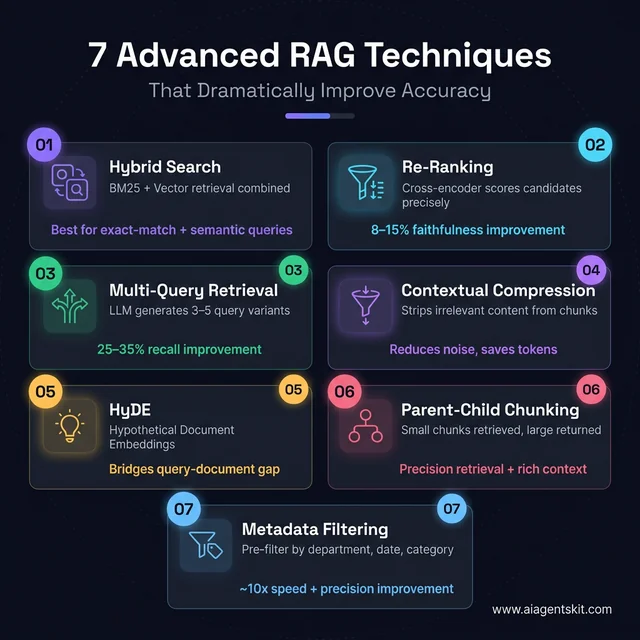
Seven production retrieval techniques targeting specific failure points in standard RAG pipelines.
Advanced RAG techniques improve retrieval precision and context relevance when simple semantic search reaches performance limits. Implementing hybrid search rag pipelines, cross-encoder reranking, parent-child chunking, and metadata filtering resolves edge cases across complex enterprise documentation.
1. Hybrid Search Combining BM25 and Vector Retrieval
Pure vector retrieval excels at semantic similarity but struggles with precise identifiers like error codes or product SKUs. BM25 sparse retrieval solves exact keyword matching. In the EACL 2026 T2-RAGBench benchmark, combining BM25 keyword matching with cross-encoder reranking lifted Recall@5 to 0.816, compared to 0.587 for dense-only retrieval, representing a 39% relative improvement with only 10 to 50 milliseconds of parallel latency overhead.
# hybrid_search.py
from dotenv import load_dotenv
from langchain.retrievers import EnsembleRetriever
from langchain_community.retrievers import BM25Retriever
from langchain_community.vectorstores import Chroma
from langchain_openai import OpenAIEmbeddings

load_dotenv()

embeddings = OpenAIEmbeddings(model="text-embedding-3-large")
vectorstore = Chroma(persist_directory="./chroma_db", embedding_function=embeddings)
vector_retriever = vectorstore.as_retriever(search_kwargs={"k": 4})

bm25_retriever = BM25Retriever.from_documents(chunks)
bm25_retriever.k = 4

hybrid_retriever = EnsembleRetriever(
    retrievers=[vector_retriever, bm25_retriever],
    weights=[0.6, 0.4]
)

results = hybrid_retriever.invoke("What are the error code 403 authorization rules?")
2. Cross-Encoder Neural Reranking
Initial vector search retrieves candidate chunks using bi-encoders that encode queries and documents separately. As documented in the Hugging Face MS-MARCO Cross-Encoder Model Repository, a cross-encoder evaluates the query and candidate chunk jointly, generating a highly accurate relevance score.
# reranking.py
from langchain.retrievers import ContextualCompressionRetriever
from langchain.retrievers.document_compressors import CrossEncoderReranker
from langchain_community.cross_encoders import HuggingFaceCrossEncoder
from langchain_community.vectorstores import Chroma
from langchain_openai import OpenAIEmbeddings

embeddings = OpenAIEmbeddings(model="text-embedding-3-large")
vectorstore = Chroma(persist_directory="./chroma_db", embedding_function=embeddings)

base_retriever = vectorstore.as_retriever(search_kwargs={"k": 12})
reranker = CrossEncoderReranker(
    model=HuggingFaceCrossEncoder(model_name="cross-encoder/ms-marco-MiniLM-L-6-v2"),
    top_n=4
)

reranking_retriever = ContextualCompressionRetriever(
    base_compressor=reranker,
    base_retriever=base_retriever
)

results = reranking_retriever.invoke("What are the contractual liability limits?")
3. Multi-Query Expansion
Users frequently pose questions using idiosyncratic vocabulary that fails to match index embeddings. Multi-query expansion utilizes an LLM to generate three to five alternative phrasings, retrieves candidates for each, and deduplicates the combined result set to boost recall.
# multi_query.py
from langchain.retrievers import MultiQueryRetriever
from langchain_community.vectorstores import Chroma
from langchain_openai import ChatOpenAI, OpenAIEmbeddings

embeddings = OpenAIEmbeddings(model="text-embedding-3-large")
vectorstore = Chroma(persist_directory="./chroma_db", embedding_function=embeddings)
base_retriever = vectorstore.as_retriever(search_kwargs={"k": 4})
llm = ChatOpenAI(model="gpt-5.6-luna", temperature=0)

multi_query_retriever = MultiQueryRetriever.from_llm(
    retriever=base_retriever,
    llm=llm
)

results = multi_query_retriever.invoke("What features are included in enterprise tiers?")
4. Contextual Compression
Retrieved document passages often embed a single vital sentence within paragraphs of irrelevant text. Contextual compression filters out extraneous sentences before packaging context into the prompt, reducing token consumption and mitigating context window dilution.
# contextual_compression.py
from langchain.retrievers import ContextualCompressionRetriever
from langchain.retrievers.document_compressors import LLMChainExtractor
from langchain_community.vectorstores import Chroma
from langchain_openai import ChatOpenAI, OpenAIEmbeddings

embeddings = OpenAIEmbeddings(model="text-embedding-3-large")
vectorstore = Chroma(persist_directory="./chroma_db", embedding_function=embeddings)
base_retriever = vectorstore.as_retriever(search_kwargs={"k": 4})
llm = ChatOpenAI(model="gpt-5.6-luna", temperature=0)

compressor = LLMChainExtractor.from_llm(llm)
compression_retriever = ContextualCompressionRetriever(
    base_compressor=compressor,
    base_retriever=base_retriever
)
5. Hypothetical Document Embeddings (HyDE)
Short user questions occupy a different geometric region in vector space than detailed technical answers. HyDE prompts an LLM to hallucinate a plausible answer, embeds that hypothetical passage, and retrieves real documents matching the synthetic answer’s embedding.
# hyde.py
from langchain.prompts import ChatPromptTemplate
from langchain_community.vectorstores import Chroma
from langchain_core.output_parsers import StrOutputParser
from langchain_openai import ChatOpenAI, OpenAIEmbeddings

embeddings = OpenAIEmbeddings(model="text-embedding-3-large")
vectorstore = Chroma(persist_directory="./chroma_db", embedding_function=embeddings)
llm = ChatOpenAI(model="gpt-5.6-luna", temperature=0.3)

hyde_prompt = ChatPromptTemplate.from_template(
    "Write a concise, authoritative paragraph that directly answers this question: {question}"
)
hyde_chain = hyde_prompt | llm | StrOutputParser()

def hyde_retrieve(question: str, k: int = 4):
    hypothetical = hyde_chain.invoke({"question": question})
    return vectorstore.similarity_search(hypothetical, k=k)

results = hyde_retrieve("What is the client onboarding SLA?")
6. Parent-Child Hierarchical Chunking
Parent-child indexing decouples the retrieval unit from the generation unit. The system indexes small 200-token child chunks for precise vector matching, but passes the enclosing 1,000-token parent chunk to the language model to maintain comprehensive context.
# parent_child_chunking.py
from langchain.retrievers import ParentDocumentRetriever
from langchain.storage import InMemoryStore
from langchain.text_splitter import RecursiveCharacterTextSplitter
from langchain_community.vectorstores import Chroma
from langchain_openai import OpenAIEmbeddings

embeddings = OpenAIEmbeddings(model="text-embedding-3-large")
vectorstore = Chroma(collection_name="child_chunks", embedding_function=embeddings)
docstore = InMemoryStore()

child_splitter = RecursiveCharacterTextSplitter(chunk_size=300, chunk_overlap=30)
parent_splitter = RecursiveCharacterTextSplitter(chunk_size=1200, chunk_overlap=100)

retriever = ParentDocumentRetriever(
    vectorstore=vectorstore,
    docstore=docstore,
    child_splitter=child_splitter,
    parent_splitter=parent_splitter,
)
7. Structured Metadata Filtering
For enterprise datasets spanning multiple business units, filtering by structured metadata pre-narrows the candidate search space. Adding department, year, or access tags before similarity calculation reduces latency and prevents unauthorized document retrieval.
# metadata_filtering.py
from langchain_community.vectorstores import Chroma
from langchain_openai import OpenAIEmbeddings

embeddings = OpenAIEmbeddings(model="text-embedding-3-large")
vectorstore = Chroma(persist_directory="./chroma_db", embedding_function=embeddings)

retriever = vectorstore.as_retriever(
    search_type="similarity",
    search_kwargs={
        "k": 4,
        "filter": {
            "department": "finance",
            "year": {"$gte": 2025}
        }
    }
)

results = retriever.invoke("What are the quarterly budget approval thresholds?")
5 Real-World RAG Chatbot Use Cases in Enterprise
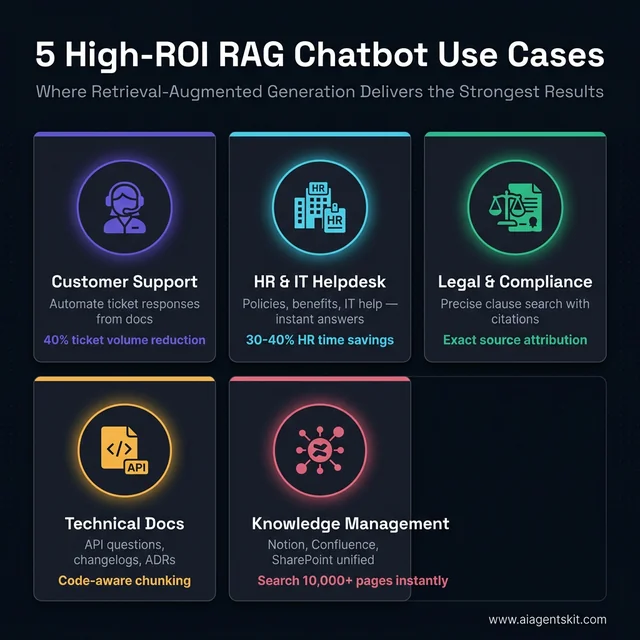
Five enterprise application domains where grounded RAG architectures deliver measurable return on investment.
Knowing how to build RAG is one thing, but identifying where it delivers the highest return on investment drives enterprise success. These five application patterns consistently yield the strongest operational results across production deployments.
1. Customer Support Ticket Deflection
Support engineering teams spend significant hours addressing repetitive inquiries regarding billing, compatibility, and account provisioning. Indexing knowledge bases, user manuals, and past resolved cases enables automated deflection of routine tickets.
Configuring a similarity score threshold routes borderline queries to human agents when confidence falls below acceptable limits:
# confidence_routing.py
results = vectorstore.similarity_search_with_score(query, k=1)
best_doc, best_score = results[0]

if best_score > 0.35:  # Cosine distance: lower indicates higher semantic similarity
    print("Confidence threshold unmet. Routing query to human support tier.")
else:
    print(rag_chain.invoke(query))
2. Internal HR and Technical Helpdesk
Internal HR departments handle hundreds of recurring inquiries regarding health coverage, leave policies, and expense allowances. Implementing role-based metadata filtering ensures employees retrieve only policies applicable to their specific job band and jurisdiction.
# role_retrieval.py
def get_user_retriever(user_role: str):
    allowed_roles = ["general", "benefits"]
    if user_role == "manager":
        allowed_roles.append("compensation")
    return vectorstore.as_retriever(
        search_kwargs={"k": 4, "filter": {"role_access": {"$in": allowed_roles}}}
    )
3. Legal Contract Analysis and Compliance
Compliance officers work with dense agreements where precise wording and clause numbers are essential. Implementing sentence-level chunking ensures the chatbot pinpoints exact indemnification limits and liability caps with attributable page metadata.
# legal_citations.py
qa_chain = conversational_rag_chain
response = qa_chain.invoke({"input": "What are the contractual liability limits?", "chat_history": []})
print("Answer:", response["answer"])
for doc in response.get("context", []):
    print(f"Verified Source: {doc.metadata.get('source')}, Page {doc.metadata.get('page')}")
4. Technical Documentation Assistant
Engineering teams maintaining evolving APIs require immediate answers to integration specifications and parameter types. Using code-aware text splitters ensures method signatures and function blocks remain intact within single context windows:
# code_splitter.py
from langchain.text_splitter import RecursiveCharacterTextSplitter

code_splitter = RecursiveCharacterTextSplitter(
    chunk_size=800,
    chunk_overlap=100,
    separators=[
        f"\n{'`'*3}\n",
        "\n## ",
        "\n### ",
        "\n\n",
        "\n",
        " "
    ]
)
5. Unified Enterprise Knowledge Bases
Organizations accumulate documentation across isolated tools like Confluence, Google Drive, and Notion. Indexing corporate wikis with incremental change detection provides staff with unified conversational search across enterprise repositories.
# confluence_ingest.py
from langchain_community.document_loaders import ConfluenceLoader

loader = ConfluenceLoader(
    url="https://company.atlassian.net/wiki",
    username="service-account@company.com",
    api_key="confluence-token",
    space_key="ENG",
    limit=50
)
docs = loader.load()
How to Build an Agentic RAG System with LangGraph
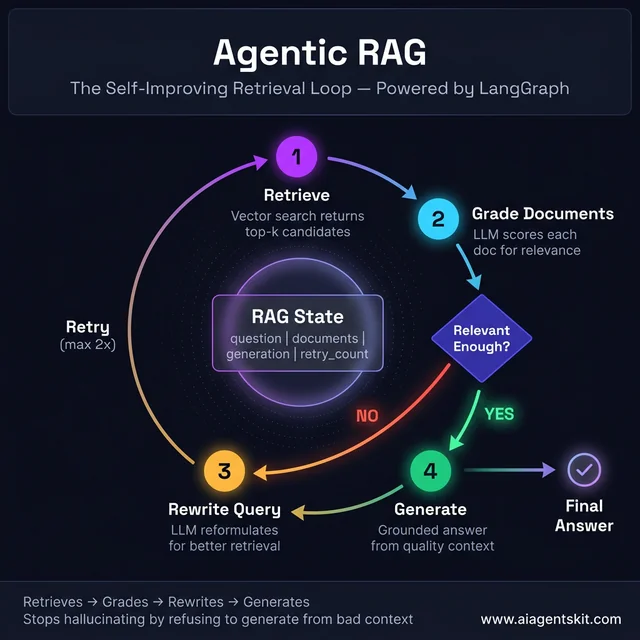
The agentic RAG loop evaluates retrieved passages and rewrites suboptimal queries before generating answers.
Agentic RAG upgrades linear retrieval pipelines into self-correcting cognitive loops using LangGraph. Constructing an agentic rag langgraph system equips the application with cyclical validation logic to verify context quality before generating responses.
# agentic_rag.py
from typing import TypedDict, List
from dotenv import load_dotenv
from langchain_core.documents import Document
from langchain_core.output_parsers import StrOutputParser
from langchain.prompts import ChatPromptTemplate
from langchain_community.vectorstores import Chroma
from langchain_openai import ChatOpenAI, OpenAIEmbeddings
from langgraph.graph import StateGraph, END

load_dotenv()

class RAGState(TypedDict):
    question: str
    documents: List[Document]
    generation: str
    retry_count: int

embeddings = OpenAIEmbeddings(model="text-embedding-3-large")
vectorstore = Chroma(persist_directory="./chroma_db", embedding_function=embeddings)
retriever = vectorstore.as_retriever(search_kwargs={"k": 4})
llm = ChatOpenAI(model="gpt-5.6-sol", temperature=0)

def retrieve(state: RAGState) -> dict:
    docs = retriever.invoke(state["question"])
    return {"documents": docs, "question": state["question"]}

grade_prompt = ChatPromptTemplate.from_template(
    "Assess if this document is relevant to answering the question. Output 'yes' or 'no'.\n\nQuestion: {question}\nDocument: {document}"
)
grader = grade_prompt | llm | StrOutputParser()

def grade_documents(state: RAGState) -> dict:
    valid_docs = [
        doc for doc in state["documents"]
        if grader.invoke({"question": state["question"], "document": doc.page_content}).strip().lower() == "yes"
    ]
    return {"documents": valid_docs}

rewrite_prompt = ChatPromptTemplate.from_template(
    "Rewrite this question to improve vector retrieval accuracy:\n\n{question}"
)
rewriter = rewrite_prompt | llm | StrOutputParser()

def rewrite_query(state: RAGState) -> dict:
    new_q = rewriter.invoke({"question": state["question"]})
    return {"question": new_q, "retry_count": state.get("retry_count", 0) + 1}

gen_prompt = ChatPromptTemplate.from_template(
    "Answer based strictly on context:\n\nContext: {context}\n\nQuestion: {question}"
)
generator = gen_prompt | llm | StrOutputParser()

def generate(state: RAGState) -> dict:
    ctx = "\n\n".join(doc.page_content for doc in state["documents"])
    ans = generator.invoke({"context": ctx, "question": state["question"]})
    return {"generation": ans}

def decide_next_step(state: RAGState) -> str:
    if len(state["documents"]) >= 2 or state.get("retry_count", 0) >= 2:
        return "generate"
    return "rewrite"

workflow = StateGraph(RAGState)
workflow.add_node("retrieve", retrieve)
workflow.add_node("grade_documents", grade_documents)
workflow.add_node("rewrite", rewrite_query)
workflow.add_node("generate", generate)

workflow.set_entry_point("retrieve")
workflow.add_edge("retrieve", "grade_documents")
workflow.add_conditional_edges("grade_documents", decide_next_step, {"generate": "generate", "rewrite": "rewrite"})
workflow.add_edge("rewrite", "retrieve")
workflow.add_edge("generate", END)

agentic_rag = workflow.compile()
The document grading node discards irrelevant chunks and reformulates the question up to two times before generating. This self-correcting loop significantly reduces hallucinations caused by poor retrieval matches.
For deeper architectural patterns including persistent session checkpointing and cyclic multi-agent topologies, explore our guide on LangChain agent patterns.
How to Build a Local RAG Chatbot Without APIs (Ollama Setup)
Building a local RAG chatbot with Ollama allows organizations to query sensitive internal documents with zero cloud API dependencies. Running a local rag ollama architecture ensures private corporate documents remain securely on internal machines without API exposure.
Setting Up Ollama and Local Embeddings
Install Ollama and download local inference and embedding models:
# Install Ollama
curl -fsSL https://ollama.com/install.sh | sh

# Pull local language model and embedding weights
ollama pull llama3.2
ollama pull nomic-embed-text
Install the required LangChain Ollama driver:
pip install langchain-ollama chromadb pypdf python-dotenvLocal RAG Pipeline Implementation
The pipeline architecture mirrors cloud deployments while redirecting embeddings and generation to local processes:
# local_rag.py
from langchain.prompts import ChatPromptTemplate
from langchain.text_splitter import RecursiveCharacterTextSplitter
from langchain_community.document_loaders import DirectoryLoader, PyPDFLoader
from langchain_community.vectorstores import Chroma
from langchain_core.output_parsers import StrOutputParser
from langchain_core.runnables import RunnablePassthrough
from langchain_ollama import ChatOllama, OllamaEmbeddings

# Local embedding model running on device
embeddings = OllamaEmbeddings(model="nomic-embed-text")

loader = DirectoryLoader("documents/", glob="**/*.pdf", loader_cls=PyPDFLoader)
documents = loader.load()

splitter = RecursiveCharacterTextSplitter(chunk_size=800, chunk_overlap=100)
chunks = splitter.split_documents(documents)

vectorstore = Chroma.from_documents(
    documents=chunks,
    embedding=embeddings,
    persist_directory="./chroma_local"
)
retriever = vectorstore.as_retriever(search_kwargs={"k": 4})

llm = ChatOllama(model="llama3.2", temperature=0.1)

prompt = ChatPromptTemplate.from_template("""Answer using only the provided context:

Context:
{context}

Question: {question}""")

def format_docs(docs):
    return "\n\n".join(doc.page_content for doc in docs)

local_rag_chain = (
    {"context": retriever | format_docs, "question": RunnablePassthrough()}
    | prompt
    | llm
    | StrOutputParser()
)

response = local_rag_chain.invoke("Summarize the architectural findings.")
print(response)
Running RAG locally offers complete data sovereign control. For additional architectural details on air-gapped deployments and open-weights models, review our guide on running AI models offline.
Frequently Asked Questions
What is the difference between RAG and fine-tuning an LLM?
RAG dynamically fetches external documentation at query time to inject into prompt context without altering underlying model weights. In contrast, fine-tuning modifies internal network parameters through supervised training, making RAG superior for frequently updated private knowledge bases.
What vector database is best for a production RAG chatbot?
ChromaDB provides the easiest local zero-dependency vector store for initial development and prototypes. For scaled production deployments, managed solutions like Pinecone or high-throughput engines like Qdrant and pgvector deliver distributed search and low-latency filtering.
How do I reduce hallucinations in a RAG chatbot?
Hallucinations drop dramatically when developers lower LLM temperature to 0.0 and enforce strict system prompts that require citing retrieved text. Pairing dense vector retrieval with BM25 hybrid search and cross-encoder reranking ensures the model receives strictly relevant context.
What chunk size is best for technical RAG systems?
Starting with 500 to 800 tokens and 10 to 20 percent overlap maintains paragraph coherence while fitting comfortably within embedding vector boundaries. Dense API references benefit from smaller 300-token chunks, whereas narrative reports require 800-token windows to preserve full context.
Can you build a production RAG chatbot without LangChain?
Yes, engineers can construct custom RAG pipelines directly using raw database drivers like chromadb or qdrant alongside native OpenAI or Anthropic SDKs. For developers who want compile-time guarantees across their data ingestion and model inference calls, explore our guide on how to use TypeSafe AI Jev. LangChain simply accelerates assembly by providing standardized document loaders, text splitters, and retrieval chain abstractions.
Conclusion
Building a production RAG chatbot in Python combines data ingestion precision, vector search calibration, and grounded language model generation. Moving beyond naive prototypes requires systematic investment in chunking strategies, hybrid BM25 retrieval, and neural cross-encoder reranking.
Teams transitioning to production should implement automated evaluation with Ragas early in the development lifecycle. Continuous monitoring of context precision and answer faithfulness ensures knowledge systems scale gracefully as enterprise document volumes expand.
To extend your conversational pipeline with an interactive user interface, explore our walkthrough on creating an interactive web interface with Streamlit.