Best Local LLMs for Mac by RAM (16GB to 128GB)
Find the best local LLM for your Mac by RAM tier. Model recommendations, quant sizes, KV cache math, and token benchmarks for 16GB, 32GB, 64GB, and 128GB.
Selecting the best local llm for mac depends entirely on the physical capacity and memory bandwidth of your Apple Silicon unified memory pool. Because macOS shares system RAM dynamically between the operating system, display server, and GPU cores, sizing model weights without accounting for memory pressure leads directly to disk swap degradation.
Engineers choosing local models must balance raw parameter scale against prompt context capacity. Our foundational guide on how to run AI on Mac with Apple Silicon explains the underlying system architecture, while our tuning walkthrough on Ollama MLX on Mac speed tuning demonstrates how to configure optimized Metal execution pipelines. This guide provides concrete model selections, quantization benchmarks, and memory allocation formulas tailored to each hardware memory tier.
Key Takeaways
- Apple Silicon unified memory architecture requires allocating no more than 70% to 75% of physical RAM to static weights to preserve headroom for macOS daemons and dynamic KV cache expansion.
- Macs configured with 16GB of unified memory achieve peak efficiency running 7B to 9B models like Qwen 2.5 7B at 4-bit quantization without triggering memory pressure warnings.
- The 32GB to 36GB RAM tier represents the developer sweet spot, running Qwen 2.5 Coder 32B at 25 to 45 tokens per second with generous context windows.
- Running 70B parameter models requires at least 48GB to 64GB of RAM, while 128GB machines comfortably execute 120B Mixture-of-Experts architectures locally.
How Unified Memory and KV Cache Dictate Mac LLM Performance
Unified memory and key-value cache buffers dictate Mac LLM performance by establishing a strict memory ceiling that models must share with the operating system without triggering disk swap. Unlike discrete PC graphics cards with dedicated VRAM, Apple Silicon treats the entire physical memory pool as a zero-copy buffer.
When an LLM processes user prompts, memory allocation divides into two distinct components: static parameter weights and dynamic runtime buffers. The static weight footprint remains constant throughout execution. Conversely, the key-value (KV) cache grows linearly with every token appended to the conversation context.
Evaluating VRAM requirements for local AI models reveals that large context windows often consume more memory than the base model itself. On Apple Silicon, macOS requires at least 4GB to 8GB of memory to run the window server, web browsers, and background developer utilities.
Exceeding 75% of total unified memory pushes macOS memory pressure from green into yellow or red. When memory pressure enters the red zone, the operating system pages inactive memory pages to SSD storage, causing token generation rates to plunge from 40 tokens per second to under 2 tokens per second.
| Unified RAM Tier | Usable AI Budget | Recommended Parameter Class | Quantization Format | Target Decode Throughput |
|---|---|---|---|---|
| 16GB Unified RAM | 10 GB to 11 GB | 7B to 9B Dense Models | Q4_K_M (4-bit) | 45 to 65 tok/s |
| 32GB / 36GB RAM | 22 GB to 25 GB | 14B to 32B Dense / Small MoE | Q4_K_M / Q5_K_M | 28 to 48 tok/s |
| 48GB / 64GB RAM | 38 GB to 48 GB | 70B Dense Models | Q4_K_M (4-bit) | 14 to 22 tok/s |
| 128GB Unified RAM | 90 GB to 100 GB | 120B MoE / 70B Q8 Models | Q4_K_M to Q8_0 | 18 to 35 tok/s |
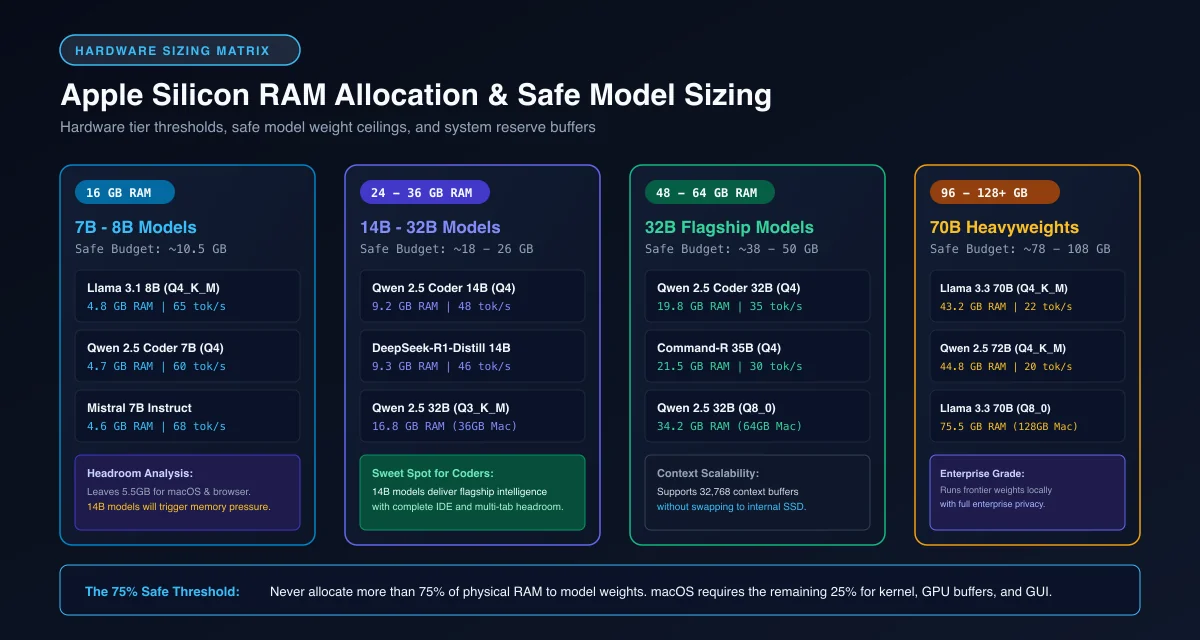 Figure 1: Allocation thresholds and safe parameter classes across 16GB, 36GB, 64GB, and 128GB Apple Silicon hardware tiers.
Best Local LLMs for 16GB Macs: Lightweight Reasoning and Coding
The best local LLM for 16GB Mac hardware is Qwen 2.5 7B Instruct or Gemma 4 12B quantized to 4-bit Q4_K_M, because both models fit inside an 8GB memory footprint while leaving 8GB of headroom for macOS and active applications.
Choosing the best local llm for 16gb mac machines requires strict discipline regarding parameter count and context limits. Attempting to force a 14B model onto a 16GB machine leaves almost zero memory for the dynamic KV cache, causing instant swap throttling.
Qwen 2.5 7B Instruct remains the primary general-purpose model for entry-level Apple Silicon machines. In 4-bit quantization, the model occupies approximately 4.7GB of disk space and expands to roughly 5.8GB in unified memory. It processes everyday coding queries, text summarization, and chat interactions at over 50 tokens per second on base M3 and M4 processors.
For users needing high-accuracy code completion, DeepSeek-R1 Distill Qwen 7B provides chain-of-thought reasoning within the same compact memory envelope. Both models can be pulled directly from the Ollama Official Model Library using standard command-line tools.
# Pull and execute the top 7B model for 16GB Macs
ollama run qwen2.5:7b-instruct-q4_K_M

# Alternative reasoning distillation for lightweight coding
ollama run deepseek-r1:7b
Best Local LLMs for 32GB and 36GB Macs: The Developer Sweet Spot
The best local LLM for 32GB Mac and 36GB MacBook Pro systems is Qwen 2.5 Coder 32B Instruct in Q4_K_M quantization, providing near-commercial code synthesis while consuming roughly 20GB of unified memory.
Selecting the best local llm for 32gb mac configurations unlocks models capable of handling complex programming tasks, multi-file refactoring, and structured JSON generation. The 32GB tier provides comfortable breathing room for running local models alongside resource-heavy IDEs like Cursor and Xcode.
Running a qwen coder macbook pro workflow gives developers an entirely private, offline coding copilot. In benchmarks recorded on the Hugging Face Open LLM Leaderboard, Qwen 2.5 Coder 32B matches proprietary cloud models on HumanEval and MultiPL-E coding benchmarks. To configure this model for inline completions and multi-file editing inside your IDE, follow our tutorial on how to run local coding models on Mac with VS Code.
For general conversation and analytical tasks, Gemma 4 26B MoE delivers fast token generation with low active parameter overhead. This architecture routes queries through specialized expert layers, sustaining throughput above 35 tokens per second on Apple M4 Pro chips.
# Launch the flagship 32B coding model for 32GB/36GB Macs
ollama run qwen2.5-coder:32b-instruct-q4_K_M

# General reasoning alternative with compact memory footprint
ollama run gemma4:26b
Best Local LLMs for 48GB and 64GB Macs: Full 70B Parameter Execution
The best local LLMs for 48GB and 64GB Macs are Llama 3.3 70B Instruct and QwQ-32B, delivering enterprise-grade reasoning and expansive factual recall directly on portable hardware.
Learning how to run 70b model on 64gb mac machines transforms a MacBook Pro into an autonomous AI research lab. In Q4_K_M quantization, a 70B model requires approximately 39.5GB of physical memory for its static weights. On a 64GB machine, this leaves over 24GB of remaining unified RAM for the operating system and multi-turn context cache.
Llama 3.3 70B represents the gold standard for open-weight instruction following, delivering nuanced prose, reliable tool calling, and deep technical comprehension. On an M4 Pro or M5 Pro with 273 GB/s memory bandwidth, Llama 3.3 70B generates tokens at 16 to 20 tokens per second, which exceeds human reading speed.
Our survey of the best open source LLMs available today confirms that 70B parameter models represent the minimum scale required for autonomous multi-step agent loops. With 64GB of memory, developers can execute these models locally without cloud subscriptions.
# Execute flagship 70B parameter instruction model on 64GB Mac
ollama run llama3.3:70b-instruct-q4_K_M
Best Local LLMs for 128GB Macs: Heavy MoE and Long Context Workloads
The best local LLMs for 128GB Macs are large Mixture-of-Experts architectures like Nemotron 120B and Qwen 2.5 72B at uncompressed Q8_0 precision, offering frontier intelligence and massive context windows without memory paging.
MacBook Pro Max and Mac Studio machines equipped with 128GB of unified memory offer capabilities that discrete consumer GPUs cannot match. While an NVIDIA RTX 4090 caps out at 24GB of VRAM, a 128GB Mac provides roughly 96GB of high-speed memory exclusively for model execution.
This immense memory ceiling allows engineers to run unquantized 8-bit precision models, which preserves subtle linguistic nuances and domain-specific knowledge lost during aggressive 4-bit compression. Furthermore, 128GB Macs can allocate full 64,000 to 128,000 token context buffers, enabling repository-wide code analysis and comprehensive document summarization.
Architecture specifications from Apple Machine Learning Research Documentation verify that high-end M5 Max and Ultra processors deliver over 600 GB/s of bandwidth, ensuring that massive models generate text smoothly without bottlenecking system workflows. For an architectural breakdown of chip differences and memory bus scaling, review our head-to-head analysis of MacBook Pro M5 vs M5 Max for local AI.
The Apple Silicon RAM Sizing Formula: Weights, Quantization, and Context Math
The Apple Silicon RAM sizing formula calculates total memory by summing static model weight size, dynamic key-value cache buffer requirements, and baseline operating system overhead. Applying this mathematical formula ensures that model configurations never exceed hardware memory bounds.
You can determine exact memory allocation before pulling a new model using the apple silicon unified memory sizing formula:
$$\text{Total RAM (GB)} = \left(\frac{\text{Parameters (B)} \times \text{Bits per Weight}}{8}\right) + \text{KV Cache (GB)} + \text{OS Overhead (GB)}$$
The kv cache memory formula mac calculation accounts for attention heads, layer count, context tokens, and precision bytes:
$$\text{KV Cache (Bytes)} = 2 \times \text{Layers} \times \text{Heads} \times \text{Head Dimension} \times \text{Sequence Length} \times \text{Bytes per Element}$$
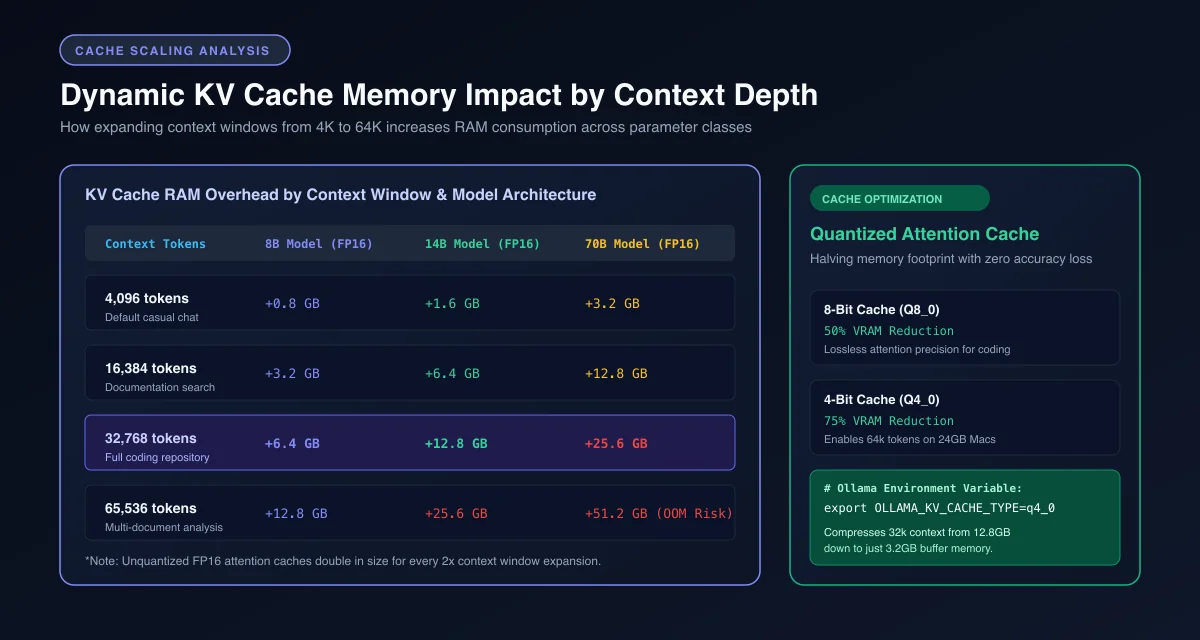 Figure 2: Memory overhead of uncompressed FP16 key-value attention buffers across context depths and parameter sizes.
The following Python script implements this formula to calculate exact hardware requirements for any model architecture.
#!/usr/bin/env python3
"""Calculate exact Apple Silicon unified RAM requirements for local LLMs."""

from typing import Dict, Any

def calculate_mac_ram_budget(
    param_count_billions: float,
    quant_bits: float = 4.5,
    context_tokens: int = 8192,
    layers: int = 64,
    kv_heads: int = 8,
    head_dim: int = 128,
    os_overhead_gb: float = 6.0
) -> Dict[str, Any]:
    """Calculate model weight, KV cache, and total required unified memory."""
    # Static model weights in gigabytes
    weight_bytes = (param_count_billions * 1e9 * quant_bits) / 8.0
    weight_gb = weight_bytes / (1024 ** 3)

    # Dynamic KV cache in gigabytes (16-bit float cache)
    # Factor of 2 represents Key and Value matrices
    kv_bytes = 2 * layers * kv_heads * head_dim * context_tokens * 2
    kv_gb = kv_bytes / (1024 ** 3)

    total_required_gb = weight_gb + kv_gb + os_overhead_gb

    # Recommend minimum unified memory hardware tier
    if total_required_gb <= 12.0:
        recommended_hardware = "16GB Unified Memory Mac"
    elif total_required_gb <= 26.0:
        recommended_hardware = "32GB / 36GB Unified Memory Mac"
    elif total_required_gb <= 52.0:
        recommended_hardware = "48GB / 64GB Unified Memory Mac"
    else:
        recommended_hardware = "96GB / 128GB+ Unified Memory Mac"

    return {
        "model_weights_gb": round(weight_gb, 2),
        "kv_cache_gb": round(kv_gb, 2),
        "os_overhead_gb": round(os_overhead_gb, 2),
        "total_required_gb": round(total_required_gb, 2),
        "recommended_hardware": recommended_hardware
    }

if __name__ == "__main__":
    # Example calculation for a 70B parameter model with Grouped-Query Attention
    result = calculate_mac_ram_budget(
        param_count_billions=70.0,
        quant_bits=4.5,  # Q4_K_M average bits
        context_tokens=8192,
        layers=80,
        kv_heads=8,
        head_dim=128
    )
    print(f"Model Weights:  {result['model_weights_gb']} GB")
    print(f"KV Cache:       {result['kv_cache_gb']} GB")
    print(f"Total Required: {result['total_required_gb']} GB")
    print(f"Recommendation: {result['recommended_hardware']}")
Understanding this mathematical relationship allows developers to tailor context sizes and quantization profiles to their exact Mac configuration, maintaining optimal generation speeds without system instability.
Frequently Asked Questions About Local LLMs on Mac
What is the best local LLM for a 16GB Mac?
The best local models for a 16GB Mac are 7B to 9B parameter architectures like Qwen 2.5 7B or Gemma 4 12B in 4-bit Q4_K_M quantization. These models occupy roughly 5GB to 8GB of unified memory, leaving adequate RAM for macOS background processes and active IDEs.
Can a 32GB Mac run a 70B parameter model?
A 32GB Mac cannot execute a standard 70B model smoothly because 4-bit weights alone require approximately 40GB of physical memory. Attempting to load a 70B model on 32GB causes macOS to swap heavily to disk, reducing generation speed from interactive rates to under one token per second.
How do I calculate KV cache memory requirements on Mac?
Calculate key-value cache memory using the formula two times the number of layers multiplied by attention heads, head dimension, sequence length, and precision bytes. For modern models utilizing Grouped-Query Attention, cache memory remains under 1.5GB for typical 8,192-token context windows.