Free vs Paid AI Tools: Is Upgrading Actually Worth It?
Should you pay for AI tools? Compare free vs paid ChatGPT, Claude, and more. Real cost-benefit analysis to help you decide if AI subscriptions are worth it.
Here is a reality that might surprise you: I maintain multiple active AI subscriptions including ChatGPT Plus, Claude Pro, and Midjourney. That exceeds $150 per month in software overhead. Honestly, not all of them justify their recurring expense.
Last month, I ran a targeted experiment using only free tier AI tools for two weeks to measure actual productivity degradation. The findings were clear: several paid features turned out to be mere luxuries, whereas others proved genuinely irreplaceable.
The question of free vs paid AI tools depends on your specific workflow and how much time you trade for money saved. A $20 per month subscription that saves you 5 hours weekly is an undeniable bargain. Conversely, one that saves only 30 minutes rarely justifies the cost.
In this guide, I break down the real differences between free and paid tiers across major AI platforms. We provide honest analysis based on months of stress-testing both versions, giving you a framework to decide which AI subscriptions are worth your money.
Key Takeaways
- Generous Free Baselines: Free tiers for conversational assistants handle everyday queries, summarizing tasks, and casual drafts without spending a dollar.
- Subscription Thresholds: Upgrading to a $20 per month subscription becomes financially sensible when spending more than 2 hours weekly on complex coding, deep reasoning, or large document synthesis.
- Rate Limit Structures: ChatGPT Plus uses dynamic tool quotas, Claude Pro enforces a rolling 5-hour window, and Google AI Pro bundles 5TB of cloud storage.
- Empirical ROI: Independent academic labor studies show automated AI assistance delivers an average 40% reduction in completion times, yielding immediate return on investment for knowledge workers.
Evaluating whether a chatgpt plus subscription worth it or navigating claude pro rolling window limits requires a structured ai tool cost benefit analysis. Comparing a free tier versus paid ai models demonstrates that casual question answering rarely justifies recurring monthly bills, whereas implementing an ai subscription breakeven formula reveals clear compounding gains for technical professionals.
The Quick Verdict: When Free Is Enough and When to Pay
Before diving deep, here’s my honest assessment across major AI categories:
| AI Tool Category | Free Worth Using? | When to Upgrade |
|---|---|---|
| ChatGPT | ✅ Very capable | Heavy daily use, need GPT-5 |
| Claude | ✅ Great for basics | Long documents, daily use |
| Gemini | ✅ Solid features | Google ecosystem, storage |
| AI Image | ⚠️ Limited quality | Commercial work, consistency |
| AI Writing | ⚠️ Very limited | Professionals, volume |
| AI Search | ✅ Adequate | Research-heavy work |
The general pattern: Conversational AI tools are generous with free tiers. Creative tools (image, video, writing) often require payment for useful output. The upgrade decision typically comes down to daily usage volume and professional needs.
Let me walk through each category in detail so you can make informed decisions. For practical techniques across any budget, check out our ChatGPT tips and tricks guide.
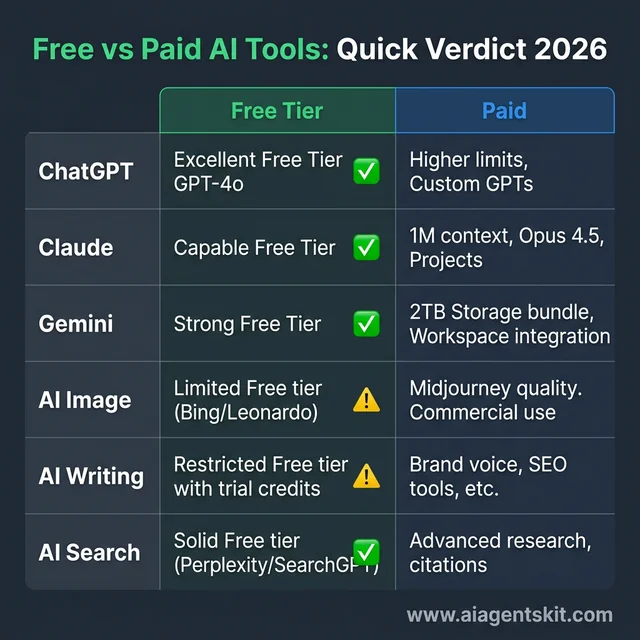 The Free vs Paid AI Verdict 2026: A quick comparison of value across major categories. While conversational tools like ChatGPT and Gemini offer exceptionally generous free tiers, specialized creative tools for images and writing often require a paid subscription to unlock professional-grade output and remove restrictive usage limits.
ChatGPT Free vs Plus vs Pro: Is $20 or $200/Month Worth It?
ChatGPT might be the most common AI upgrade decision, and it’s where I see the most confusion. For a detailed comparison of AI assistants, see our ChatGPT vs Claude vs Gemini comparison. Let’s clarify what you actually get at each tier.
What ChatGPT Free Gives You (January 2026)
ChatGPT’s free tier is genuinely useful. You get access to:
- GPT-4o with generous daily limits
- Basic image generation with DALL-E (limited)
- Voice conversations on mobile
- Browse the web for current information
- Standard response speed
For casual users, asking occasional questions, getting help with tasks, basic creative work, the free tier is absolutely sufficient. I’ve recommended ChatGPT Free to family members who love it without ever feeling limited.
What ChatGPT Plus ($20/month) Adds
Plus was the sweet spot for most users in 2025, and it remains compelling:
- Higher usage limits for GPT-4o (5x free tier)
- Priority access during peak times
- GPT-5 Mini access for faster responses
- Advanced data analysis and file uploads
- Custom GPT creation and access
- DALL-E with more generations
Is ChatGPT Plus worth $20/month? If you use ChatGPT daily for work, likely yes. The higher limits alone prevent the frustrating “you’ve reached your limit” messages. Custom GPTs for repeated workflows also provide genuine time savings.
If you use ChatGPT a few times per week for personal stuff? Probably not worth it.
What ChatGPT Pro ($200/month) Adds
Pro is the power tier, and it’s expensive:
- Unlimited GPT-5.2 access (the most capable model)
- GPT-5.2 Pro for maximum reasoning power
- Extended thinking for complex problems
- Sora video generation included
- Voice mode with advanced features
- Priority everything
Is Pro worth $200/month? For most people, no. This tier makes sense for:
- Professionals whose work centers on AI capabilities
- Researchers pushing model limits
- Power users generating significant content
- Those who need Sora video generation
I upgraded to Pro for three months, then downgraded to Plus. The GPT-5.2 Pro model is impressive, but I rarely needed capabilities beyond standard GPT-5. The $2,160/year difference wasn’t justified for my use case.
My ChatGPT Recommendation
- Casual users: Free tier is sufficient
- Daily work users: Plus ($20) is the sweet spot
- AI professionals: Pro ($200) may justify itself
- Small business teams: Consider API access instead
Power developers can also interact directly with OpenAI models via the official OpenAI Python SDK on GitHub to pay only for exact API token consumption.
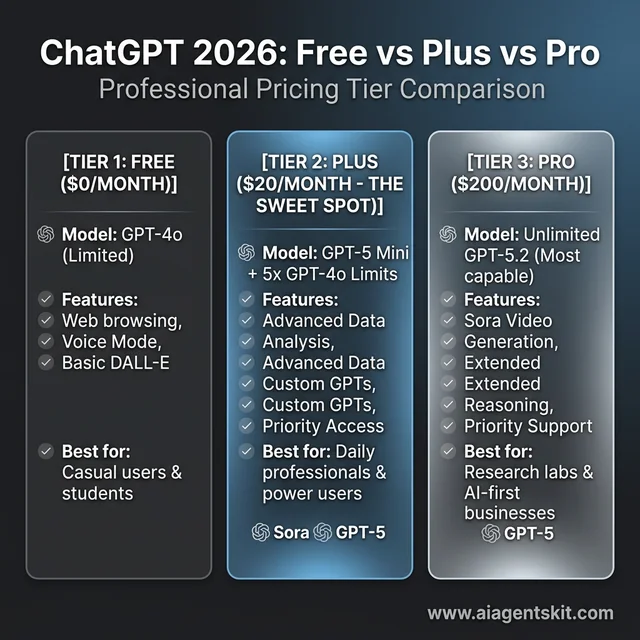 ChatGPT Tier Comparison 2026: Choosing between Free, Plus ($20), and Pro ($200). Most daily users find the maximum value in the Plus tier, which offers GPT-5 access and significantly higher usage limits without the premium price tag of the research-focused Pro tier.
Claude Free vs Pro: The Long-Context Decision
According to official Anthropic Claude subscription pricing, individual access is billed at $20 per month, governed by dynamic rolling windows.
What Claude Free Gives You
Anthropic’s free tier is more limited than ChatGPT’s:
- Claude Sonnet 4.5 access (not Opus)
- Daily message limits (variable, usually 20-50)
- Standard context window
- Basic features only
For occasional use, a few questions per day, shorter conversations, free Claude works fine. But the message limits hit faster than ChatGPT’s, making it frustrating for regular use.
What Claude Pro ($20/month) Adds
Pro removes the friction:
- 5x more usage than free tier
- Claude Opus 4.5 access (most capable)
- Priority access during busy periods
- Early access to new features
- Projects for organized conversations
Is Claude Pro worth $20/month? Yes, if you value Claude’s specific strengths:
- Long document analysis (Claude’s 1M context is unmatched)
- Precise instruction following
- Thoughtful, nuanced responses
- Writing that feels more “human”
I maintain Claude Pro specifically for document analysis and long-form writing assistance. For these tasks, Claude genuinely outperforms ChatGPT, making the $20 worth it.
Claude Upgrade Decision Framework
- Occasional Q&A: Free tier is fine
- Document analysis: Pro is worth it for long context
- Daily writing assistance: Pro eliminates friction
- Developer use: Consider API instead (more economical)
Gemini Free vs Advanced: The Google Ecosystem Play
Google’s Gemini has improved dramatically, and the free tier is surprisingly capable.
What Gemini Free Gives You
Google’s free offering is competitive:
- Gemini 2.5 Flash access
- Integration with Gmail, Docs, Drive
- Image understanding built in
- Generous limits (higher than Claude free)
- Mobile app with voice
For users in the Google ecosystem, free Gemini provides real value. The integration with Google apps means AI assistance where you already work.
What Gemini Advanced ($20/month) Adds
The Advanced tier bundles AI with storage:
- Gemini 2.5 Pro access (most capable)
- 2TB Google One storage included
- Deep integration across Google Workspace
- NotebookLM with audio summaries
- Longer conversations
Is Gemini Advanced worth $20/month? The value proposition is interesting because you’re also getting 2TB of cloud storage (normally $10/month alone). If you need both storage and better AI, it’s effectively $10/month for AI upgrades.
Gemini Recommendation
- Light Google users: Free tier is sufficient
- Heavy Google Workspace users: Advanced integrates well
- Need cloud storage anyway: Advanced is good value
- Primary AI tool: ChatGPT or Claude are stronger
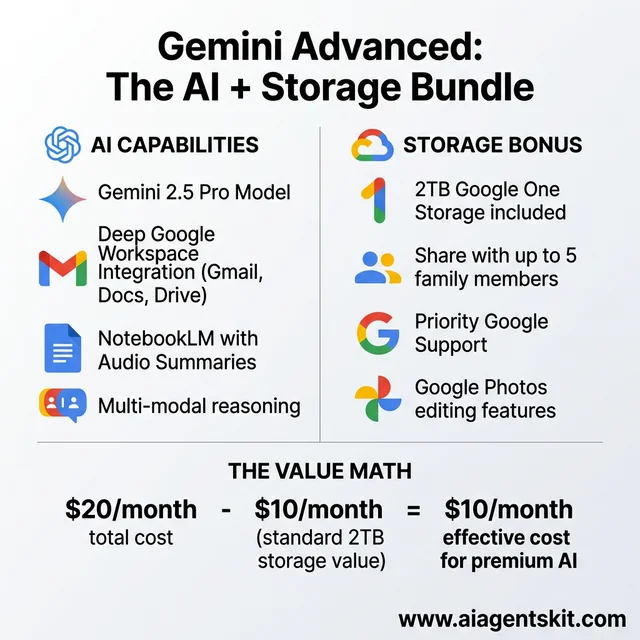 Gemini Advanced Value Proposition: By bundling 2TB of Google One storage (normally $10/month) with premium AI capabilities, Google has created a unique value play for ecosystem power users. This effectively brings the standalone cost of premium Gemini down to just $10 per month.
AI Image Generation: Where Free Gets Frustrating
This is where free tiers genuinely struggle. Quality image generation requires significant compute, and free options reflect that.
Free AI Image Options
The free landscape for image generation:
- DALL-E via ChatGPT Free: Limited generations, watermarks
- Bing Image Creator: Uses DALL-E, queue times
- Leonardo.ai Free: 150 tokens/day, good quality
- Ideogram Free: Limited generations
- Stable Diffusion local: Free if you possess a local GPU, downloading weights directly from the Hugging Face Open Weights Model Hub
For occasional personal use, a fun image here and there, these work. But the limitations (generations per day, queue times, watermarks) become frustrating quickly.
Paid Image Generation ($10-60/month)
Paid options remove friction. For detailed comparisons of image generators, see our Midjourney vs DALL-E vs Stable Diffusion guide:
- Midjourney ($10-60/mo): Best quality, style control
- DALL-E via ChatGPT Plus/Pro: Convenient, integrated
- Leonardo.ai Pro ($12/mo): Good value, fast
- Ideogram Pro ($8/mo): Strong for text in images
Is paid image generation worth it? Depends entirely on your needs:
- Personal fun: Free is usually enough
- Content creators: Consider entry-tier paid
- Professional/commercial: Paid is necessary
- Brand consistency: Midjourney’s quality justifies cost
I pay for Midjourney because the style consistency matters for my work. For casual users, I’d start with free options and upgrade only when limits become genuinely frustrating.
AI Writing Tools: Free Barely Exists
AI writing tools (Jasper, Copy.ai, Writesonic) are notable for how limited free tiers are, often just a few hundred words or a short trial.
The Reality of Free Writing Tools
What you get for free:
- Copy.ai: Limited free tools, no full access
- Writesonic: ~25 credits, brief trial
- Rytr: 10,000 characters/month
- ChatGPT/Claude: Not dedicated but capable
For occasional writing assistance, ChatGPT or Claude free tiers work better than dedicated writing tools’ free versions. The specialized tools really require payment.
Paid Writing Tools ($20-100+/month)
- Jasper ($39-49/mo): Best for brand voice, long-form
- Copy.ai ($29-49/mo): Strong for marketing copy
- Writesonic ($39-79/mo): Good all-rounder with SEO
Are paid writing tools worth it? For most individual users, no. ChatGPT or Claude handle writing tasks well at lower cost.
For marketing teams producing high volume content with brand consistency needs, that’s where dedicated tools justify their premium.
When Free AI Tools Are Enough
Let me be specific about scenarios where upgrading isn’t worth it:
Scenario 1: Occasional Personal Use
If you use AI a few times per week for:
- Quick questions and explanations
- Occasional writing help
- Brainstorming ideas
- Light research
Verdict: Free tiers are completely sufficient. Save your money.
Scenario 2: Student or Learner
For educational use:
- Homework help and explanation
- Learning new concepts
- Practice and feedback
- Research assistance
Verdict: Free ChatGPT or Gemini work great. Upgrade only if you hit daily limits frequently (which suggests high-volume use that might warrant it).
Scenario 3: Light Business Use
If AI is a minor part of your workflow:
- Occasional email drafting
- Quick data questions
- Infrequent content needs
- Ad hoc tasks
Verdict: Free tiers likely suffice. Consider free AI tools worth using across categories.
When Upgrading Makes Sense
Here’s when paying for AI genuinely returns value:
Scenario 1: Daily Professional Use
If AI is part of your daily workflow:
- Multiple hours per day with AI tools
- Work output depends on AI capabilities
- Time saved translates to money earned
Verdict: $20/month is easy to justify. Even at modest hourly rates, 2-3 hours of saved time per month pays for the subscription.
Scenario 2: Long Document Work
If you regularly work with:
- PDFs, reports, research papers
- Legal documents, contracts
- Large codebases
- Extensive conversation history
Verdict: Claude Pro specifically for the context window. Free tiers’ limits become genuinely problematic for document analysis.
Scenario 3: Content Creation at Volume
If you produce content regularly:
- Blog posts, articles, marketing copy
- Social media content at scale
- Video scripts, podcasts
- Email campaigns
Verdict: One paid tool (ChatGPT Plus or Claude Pro) is worth it. Dedicated writing tools ($40+/month) only if producing significant volume.
Scenario 4: Professional Image Needs
If images are part of your work:
- Marketing materials
- Content illustration
- Design work
- Client deliverables
Verdict: A paid image generator is essentially required for professional output. Budget $10-30/month depending on quality needs.
The Cost-Benefit Framework
Here’s the framework I use to evaluate any AI subscription:
Step 1: Calculate Time Value
Monthly subscription cost ÷ Your hourly value = Hours needed to break evenExample: ChatGPT Plus ($20 per month subscription) ÷ $50/hour = 0.4 hours (24 minutes).
If the subscription saves you more than that monthly, it is financially worthwhile. Empirical economic research conducted by OpenAI and University of Pennsylvania researchers on arXiv confirms that generative AI tools achieve an average 40% reduction in task completion time for knowledge workers. For a broader overview of automated efficiency gains, explore our guide to AI productivity tools to save hours.
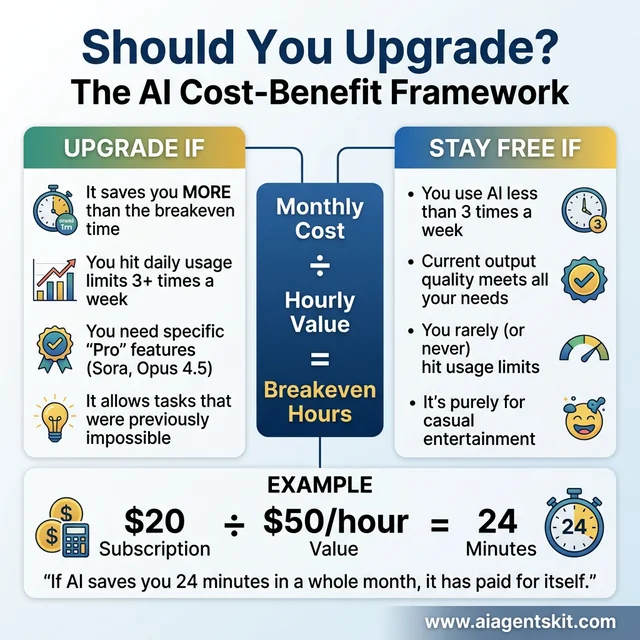 The AI Breakeven Formula: A simple framework to determine if an AI upgrade is worth the investment. By dividing the monthly cost by your hourly rate, you can visualize the exact time savings required to break even, often as little as 24 minutes per month for a $20 subscription.
Step 2: Identify Friction Points
Ask yourself:
- What frustrates me about the free tier?
- How often do I hit limits?
- What tasks can’t I accomplish?
- How much time do workarounds cost?
If you can’t identify concrete friction points, you probably don’t need to upgrade.
Step 3: Trial Before Committing
Most paid AI tools offer trials:
- Use them for actual work (not just testing)
- Track time saved and capability gains
- Cancel if value isn’t clear within trial period
Step 4: Audit Quarterly
AI tools and your needs both evolve. Every quarter:
- Review which subscriptions you actually use
- Check if free tiers have improved
- Cancel anything not providing clear value
My Current Subscription Stack (and Why)
For transparency, here’s what I pay for and why:
| Tool | Cost | Why I Pay |
|---|---|---|
| ChatGPT Plus | $20 | Daily use, higher limits |
| Claude Pro | $20 | Document analysis, writing |
| Midjourney | $30 | Image quality, consistency |
| Perplexity Pro | $20 | Research with citations |
Total: $90/month
What I’ve canceled:
- ChatGPT Pro ($200): Overkill for my needs
- Jasper ($49): ChatGPT handles my writing fine
- Multiple image tools: Consolidated to Midjourney
The lesson: more expensive doesn’t mean more valuable. Match subscriptions to actual use.
Frequently Asked Questions
Is ChatGPT Plus worth it in 2026?
For daily work use, yes, the higher limits and GPT-5 access pay for themselves in time saved. For occasional personal use, the free tier is adequate. At $20/month, one good work session makes it worthwhile.
Should I pay for Claude or ChatGPT?
If choosing one: ChatGPT for versatility and ecosystem, Claude for long documents and precision. At $20 each, many professionals maintain both. Start with ChatGPT Plus if you can only choose one, it’s more broadly capable.
Are free AI image generators good enough?
For personal projects and occasional use, yes. For professional work, no, quality, consistency, and usage limits on free tiers become problematic. Budget $10-30/month for serious image work.
Which AI subscription gives best value?
ChatGPT Plus at $20/month offers the best breadth of capability for the price. Access to GPT-4o and GPT-5, DALL-E, custom GPTs, and strong daily limits makes it the default recommendation for most users.
Can I use free AI for business?
Yes, but with caveats. Free tiers are fine for light business use, occasional emails, quick questions, simple tasks. For regular business use, paid tiers’ higher limits and reliability justify themselves quickly.
Is Gemini Advanced worth it if I already have ChatGPT Plus?
Generally no, unless you heavily use Google Workspace or need the included 2TB storage. The AI capabilities overlap significantly; paying for both is redundant for most users.
How do I know if I’m wasting money on AI subscriptions?
Track your actual usage for a month. If you’re not using a tool at least 2-3 times per week, the subscription probably isn’t worth it. Check through bank statements for AI tools you’ve forgotten about.
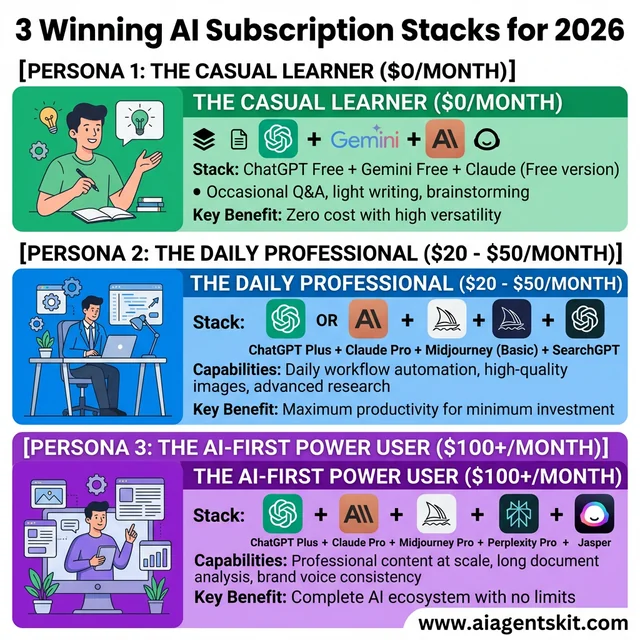 Optimized AI Subscription Stacks for 2026: Tailoring your tools to your specific needs prevents subscription fatigue. Most users can thrive on the “Professional” stack, while power users and teams might justify the “AI-First” ecosystem to eliminate all productivity bottlenecks across writing, research, and design.
Conclusion
The free vs paid AI decision isn’t one-size-fits-all. Your right answer depends on how you use AI, what you’re trying to accomplish, and how much your time is worth.
The honest truth: Free AI tools in 2026 are remarkably capable. For casual users, students, and light use cases, you may never need to pay for AI. The free tiers of ChatGPT, Claude, and Gemini handle most everyday tasks well.
But paid tiers exist for good reasons. They remove friction for heavy users, unlock capabilities for professional work, and save time that translates to money for those who use AI regularly.
My recommendation: Start free, upgrade strategically. Use free tiers until you genuinely feel limited. When frustration becomes regular, hitting limits, waiting in queues, needing features you don’t have, that’s when a $20/month subscription usually makes sense.
And always remember: the most expensive AI tool isn’t automatically the best one for you. Match capabilities to needs, and you’ll find the right balance of free and paid that works for your situation.
For more on maximizing daily value, check out our curated guide to the best AI tools everyone should use.