
How to Run AI Models on Raspberry Pi: Complete 2026 Guide
Learn how to run local LLMs, Stable Diffusion, and computer vision on Raspberry Pi. Complete setup guide with Ollama, Piper TTS, and ONNX Runtime.
Deploying machine learning models directly on edge hardware provides complete data confidentiality and eliminates recurring cloud API fees. Recent advancements in 4-bit quantization and dedicated neural co-processors make local inference practical on single-board computers.
Embedded systems engineers, IoT developers, edge AI architects, robotics builders, and vibe coders can now run language models, image generators, and vision pipelines on sub-$100 hardware.
This technical runbook details how to run ai models on raspberry pi with production-grade stability. The guide covers hardware sizing, operating system tuning, local language model serving with Ollama and llama.cpp, edge speech synthesis with Piper, computer vision on the official Hailo-8 AI HAT+, and compact diffusion generation.
Key Takeaways
- The Raspberry Pi 5 8GB single-board computer paired with an active cooler and a PCIe Gen 3.0 M.2 NVMe drive provides the reliable baseline hardware standard for local edge AI inference.
- Compact language models between 1B and 2B parameters, such as Qwen 2.5 1.5B, achieve 7 to 12 tokens per second under Q4_K_M GGUF quantization using Ollama or llama.cpp.
- The Raspberry Pi 5 Broadcom BCM2712 application processor does not have an on-die NPU, meaning dedicated neural acceleration requires the official Raspberry Pi AI HAT+ with a 13 TOPS or 26 TOPS Hailo-8 coprocessor.
- OnnxStream and sd.cpp enable 512x512 image synthesis via Stable Diffusion 1.5 and Latent Consistency Models in 90 to 180 seconds with peak system memory consumption under 300MB.
Why Deploy Local AI Models on Raspberry Pi Hardware?
Deploying raspberry pi edge ai architectures delivers complete data privacy, eliminates recurring API costs, and ensures operational continuity in air-gapped or remote environments. Processing inferences on local silicon guarantees sensitive audio, video, and text telemetry never leave local networks or risk third-party logging.
Data privacy represents the primary requirement for edge architectures. Medical telemetry, industrial sensor feeds, and private conversational assistants must frequently operate under strict zero-egress compliance mandates. On-device inference guarantees that zero user payloads leave the local physical machine.
Recurring operating expenses drop to zero when moving away from hosted endpoints. Serving automated agent loops or high-frequency sensor parsing through cloud APIs can cost hundreds of dollars each month. A dedicated single-board computer draws approximately 5W to 12W under load, requiring only pennies in monthly electricity.
Offline resilience allows edge appliances to function without dependable internet connectivity. Field research stations, autonomous rovers, marine monitoring buoys, and emergency equipment rely on continuous local intelligence. For architectural designs on isolated systems, review the guide to building offline AI systems.
Hardware Requirements and Edge Accelerator Comparison
Selecting the correct hardware tier determines whether edge inference succeeds or terminates in memory thrashing. The Raspberry Pi 5 8GB represents the minimum practical baseline for multi-modal edge workloads and language models. The 4GB model remains suitable for dedicated single-task vision classification, but lacks the memory headroom required for concurrent operating system processes and language model weights.
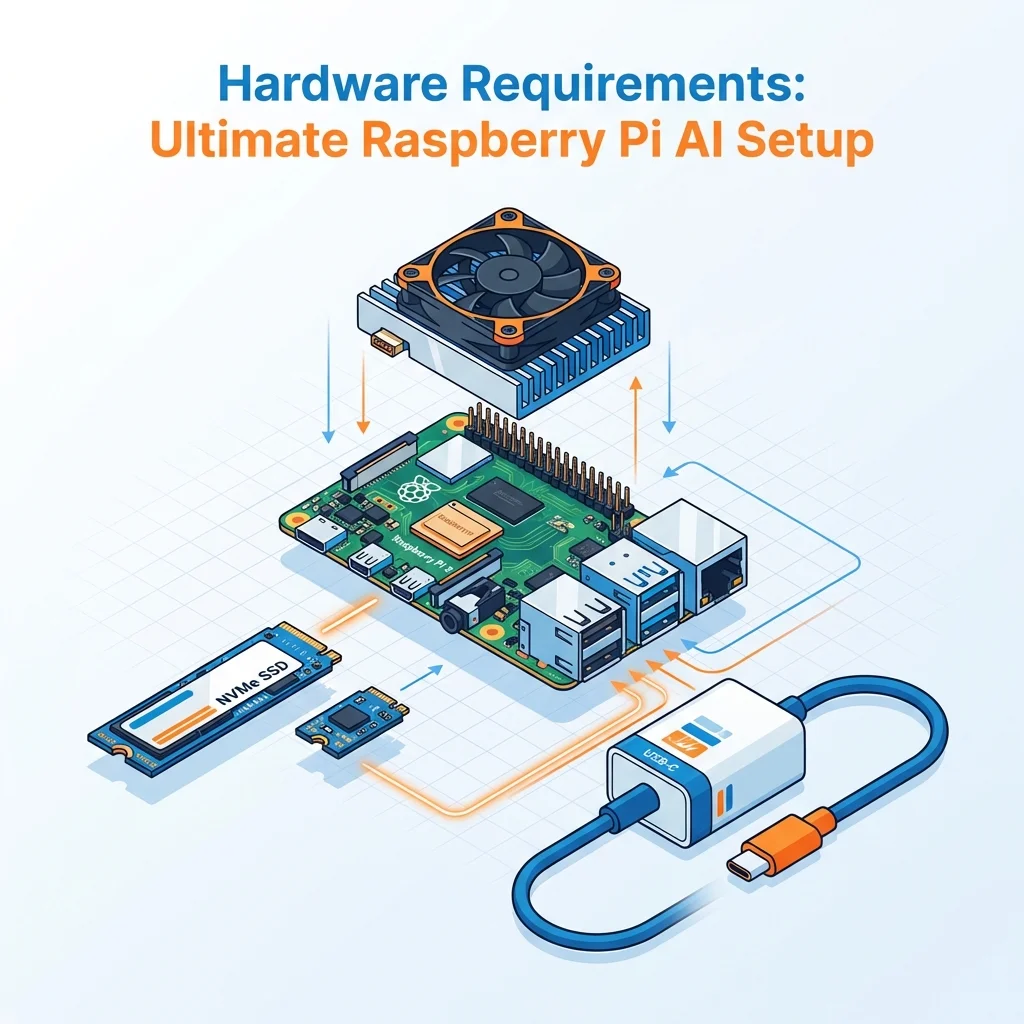
The table below outlines real-world inference throughput across hardware tiers when evaluating raspberry pi 5 ai models:
| Hardware Architecture | Memory Configuration | Target Model Class | Tokens/Sec (Pi 5) | Optimal Edge Use Case |
|---|---|---|---|---|
| Broadcom BCM2712 CPU | 8GB LPDDR4X | Qwen 2.5 0.5B (Q4_K_M) | 18 to 28 t/s | Low-latency terminal automation |
| Broadcom BCM2712 CPU | 8GB LPDDR4X | Qwen 2.5 1.5B (Q4_K_M) | 7 to 12 t/s | Interactive edge voice assistant |
| Broadcom BCM2712 CPU | 8GB LPDDR4X | Llama 3.2 3B (Q4_K_M) | 2 to 5 t/s | Complex reasoning and extraction |
| Broadcom BCM2712 CPU | 8GB LPDDR4X | Phi-3.5 Mini (3.8B Q4) | 2 to 4 t/s | Technical documentation synthesis |
| Raspberry Pi AI HAT+ | 26 TOPS Hailo-8 NPU | YOLOv8m (INT8 Vision) | 30+ FPS | Real-time multi-stream video detection |
| Raspberry Pi AI Camera | 1.5 TOPS Sony IMX500 | MobileNet SSD (INT8) | 30 FPS | Ultra-low-power edge presence trigger |
Empirical profiling confirms that because the Raspberry Pi 5 quad-core Cortex-A76 processor is bound by approximately 17 GB/s of LPDDR4X memory bandwidth, 4-bit quantized (Q4_K_M) 1.5B models achieve a practical throughput of 7 to 12 tokens per second, while 8B models saturate bus bandwidth at under 2 tokens per second. Detailed technical parameters are documented in the Raspberry Pi Documentation Repository.
Hardware acceleration on the Raspberry Pi ecosystem relies on dedicated co-processors rather than the main application processor. While earlier community documentation claimed the Pi 5 features an on-die NPU, the BCM2712 SoC is CPU-only.
The official hardware solution is the Raspberry Pi AI HAT+ and Hailo-8 Examples, which connects over PCIe Gen 3.0 to deliver 13 TOPS or 26 TOPS of neural processing. For a comprehensive overview of alternative platforms, refer to our edge AI hardware comparison guide.
Active cooling is mandatory for sustained computational workloads. Running matrix multiplications across all four Cortex-A76 cores rapidly raises package temperatures past 80°C, triggering aggressive thermal throttling down to 1.5 GHz. The official Raspberry Pi Active Cooler maintains operating temperatures below 62°C under heavy loads.
Storage media choice also dictates overall responsiveness. A raspberry pi 5 nvme ssd ai setup connected via M.2 HAT loads 2GB model weights in under 10 seconds, compared to 45 seconds on standard microSD cards.
System Setup: 64-Bit OS, Active Cooling, and NVMe Storage
Preparing Raspberry Pi OS for machine learning workloads requires configuring memory management and thermal controls before installing model weights. A clean 64-bit operating system installation is required to address system memory beyond 4GB and enable 64-bit ARM NEON vector instructions.

Begin by updating the base operating system packages and installing essential build tooling:
# Update repository packages
sudo apt update && sudo apt full-upgrade -y

# Install core build dependencies and mathematical libraries
sudo apt install -y build-essential cmake git python3-pip python3-venv libatlas-base-dev
Adjust the virtual memory subsystem to reduce kernel swapping aggressiveness. Lowering swappiness prevents the operating system from prematurely writing model weights to storage during transient memory allocations:
# Set swappiness to 10 for low disk paging pressure
echo 'vm.swappiness=10' | sudo tee -a /etc/sysctl.conf
sudo sysctl -p
Create an isolated Python virtual environment to manage framework dependencies without conflicting with system packages:
# Initialize isolated Python environment
python3 -m venv ~/ai-env
source ~/ai-env/bin/activate
pip install --upgrade pip

# Install foundational numerical and image packages
pip install numpy pillow
Thermal monitoring ensures system clocks remain stable during continuous inference. Read core temperatures with the built-in video core diagnostic tool:
vcgencmd measure_tempRunning Local LLMs with Ollama on Raspberry Pi 5
Setting up a headless raspberry pi ollama setup provides the simplest deployment mechanism for serving local llm raspberry pi 5 workloads. It automates model weight retrieval, manages memory mapping, and exposes an OpenAI-compatible HTTP REST API on port 11434. Developers exploring end-to-end containerized and desktop setups can consult our guide to running AI models locally with Ollama.
Install Ollama using the official Linux installation script:
# Download and install Ollama service
curl -fsSL https://ollama.com/install.sh | sh

# Enable and verify background systemd daemon
sudo systemctl enable ollama
sudo systemctl start ollama
Select models optimized for edge parameter constraints. While 8B models can load into 8GB of RAM, memory bus limitations restrict generation speed to roughly 1.8 tokens per second. Running Qwen 2.5 1.5B or Llama 3.2 1B delivers interactive conversational speeds:
# Pull lightweight 1.5B parameter instruction model
ollama pull qwen2.5:1.5b

# Execute interactive terminal session
ollama run qwen2.5:1.5b
Integrate Ollama programmatically using standard HTTP POST requests against the local REST server, as detailed in the Ollama API Documentation on GitHub:
import requests
import json

def query_edge_llm(prompt: str, model: str = "qwen2.5:1.5b") -> str:
    """Send prompt to localized Ollama service and parse output."""
    endpoint = "http://localhost:11434/api/generate"
    payload = {
        "model": model,
        "prompt": prompt,
        "stream": False,
        "options": {
            "temperature": 0.7,
            "top_p": 0.9,
            "num_ctx": 2048
        }
    }

    response = requests.post(endpoint, json=payload, timeout=60)
    response.raise_for_status()
    return response.json()["response"]

if __name__ == "__main__":
    result = query_edge_llm("Summarize three key benefits of edge AI computing.")
    print(result)
High-Performance Inference with llama.cpp and ARM NEON
For latency-critical robotics and embedded pipelines, compiled C++ inference outperforms abstracted service layers. Running llama cpp raspberry pi 5 builds with native ARM NEON SIMD vector extensions yields a 10% to 20% throughput gain over generic runtimes. For a complete runtime evaluation, inspect our llama.cpp vs Ollama architectural comparison.
Clone and compile the latest release directly from the llama.cpp GitHub Repository:
# Clone official repository
git clone https://github.com/ggerganov/llama.cpp
cd llama.cpp

# Compile native binary with ARM NEON acceleration flags
cmake -B build -DGGML_NATIVE=ON
cmake --build build --config Release -j4
Download a pre-quantized Q4_K_M GGUF model directly from Hugging Face:
mkdir -p ~/models
wget -O ~/models/qwen2.5-1.5b-instruct-q4_k_m.gguf \
  https://huggingface.co/Qwen/Qwen2.5-1.5B-Instruct-GGUF/resolve/main/qwen2.5-1.5b-instruct-q4_k_m.gguf
Execute inference using the compiled CLI executable:
./build/bin/llama-cli \
  -m ~/models/qwen2.5-1.5b-instruct-q4_k_m.gguf \
  -p "Explain the role of memory bandwidth in edge machine learning:" \
  -n 256 \
  -t 4 \
  --temp 0.6
Integrate llama.cpp directly into Python pipelines using official bindings:
from llama_cpp import Llama

llm = Llama(
    model_path="/home/pi/models/qwen2.5-1.5b-instruct-q4_k_m.gguf",
    n_ctx=2048,
    n_threads=4,
    n_batch=512
)

output = llm(
    "Q: What is the primary bottleneck for LLM inference on Raspberry Pi?\nA:",
    max_tokens=128,
    temperature=0.2,
    stop=["\n", "Q:"]
)

print(output["choices"][0]["text"].strip())
Edge Voice Pipeline: Whisper.cpp STT and Piper TTS
Building an interactive voice assistant on a single-board computer requires low-latency speech recognition paired with natural acoustic synthesis. Running Whisper.cpp alongside Piper creates an entirely offline conversational loop that executes without cloud dependencies.
Deploy Whisper.cpp for high-speed voice transcription:
# Clone Whisper.cpp repository
git clone https://github.com/ggerganov/whisper.cpp
cd whisper.cpp
make -j4

# Download optimized base English model
bash ./models/download-ggml-model.sh base.en
Transcribe captured audio files with high temporal precision:
./main -m models/ggml-base.en.bin -f input_sample.wav -otxtFor speech output, piper tts raspberry pi configurations provide lightweight neural voice synthesis with fast generation speeds. Download the standalone Piper binary and a high-quality ONNX voice model:
# Download Piper release
wget https://github.com/rhasspy/piper/releases/latest/download/piper_linux_aarch64.tar.gz
tar -xzf piper_linux_aarch64.tar.gz
sudo cp -r piper /usr/local/bin/

# Fetch voice checkpoint and JSON configuration
mkdir -p ~/piper-voices
wget -O ~/piper-voices/en_US-lessac-medium.onnx \
  https://huggingface.co/rhasspy/piper-voices/resolve/main/en/en_US/lessac/medium/en_US-lessac-medium.onnx
wget -O ~/piper-voices/en_US-lessac-medium.onnx.json \
  https://huggingface.co/rhasspy/piper-voices/resolve/main/en/en_US/lessac/medium/en_US-lessac-medium.onnx.json
Generate immediate audio playback using standard Linux audio utilities:
echo "Raspberry Pi edge intelligence initialized successfully." | \
  piper --model ~/piper-voices/en_US-lessac-medium.onnx --output_raw | \
  aplay -r 22050 -f S16_LE -t raw -
Computer Vision Acceleration with Raspberry Pi AI HAT+ and Hailo-8
Computer vision pipelines on the Raspberry Pi 5 benefit substantially from dedicated neural co-processors. While the Cortex-A76 CPU can process low-resolution MobileNet classifications at 10 to 15 frames per second, running dense object tracking or high-resolution segmentation on the CPU monopolizes system resources.
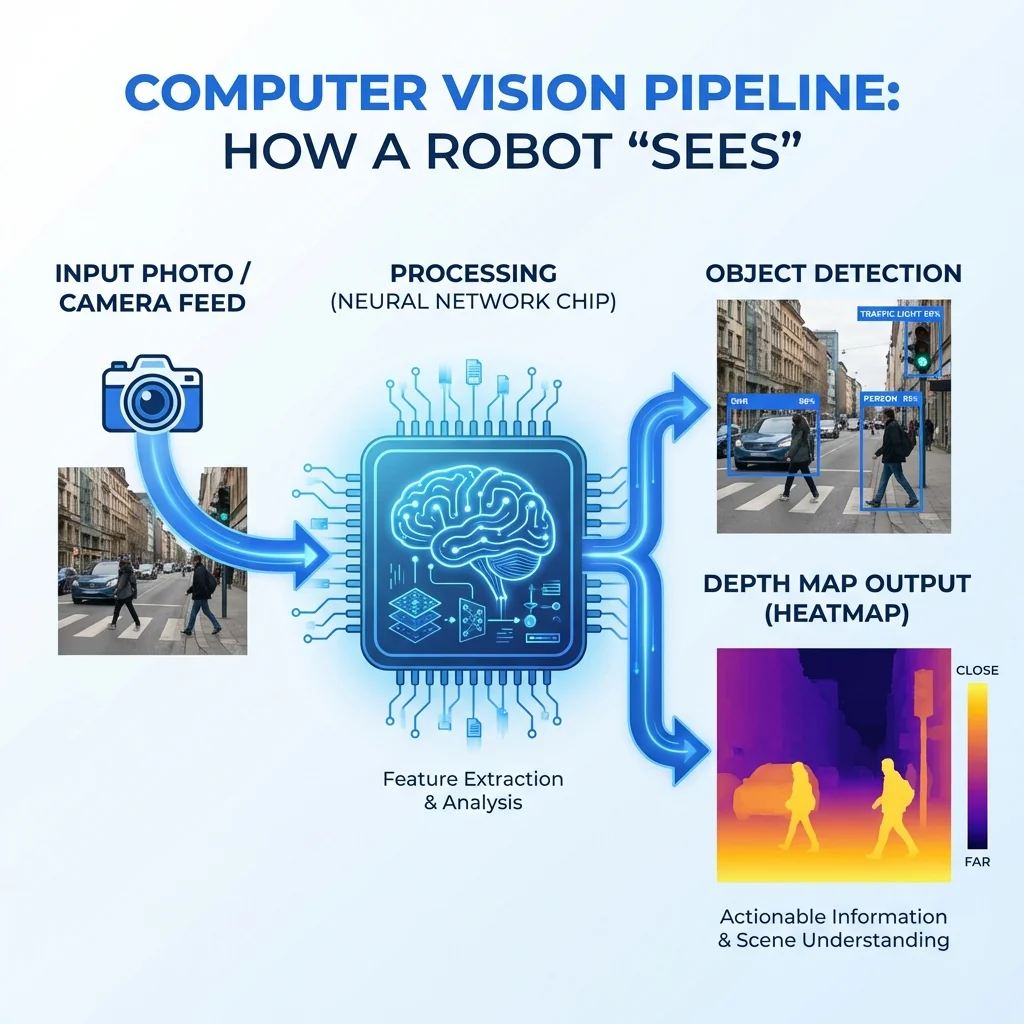
Deploying the official raspberry pi ai hat plus provides up to 26 TOPS of dedicated compute over PCIe Gen 3.0. The hailo 8 raspberry pi ai hat allows the host processor to offload neural evaluations entirely, maintaining sustained 30+ FPS video detection with minimal thermal impact.
Install the official software stack for the AI HAT+:
# Install Hailo runtime, firmware, and camera utilities
sudo apt install -y hailo-all rpicam-apps

# Verify PCIe hardware detection and Hailo firmware communication
hailortcli fw-control identify
Run real-time object detection directly from an attached camera sensor using hardware acceleration:
# Execute YOLOv8 detection pipeline with post-processing metadata
rpicam-hello -t 0 --post-process-file /usr/share/rpi-camera-assets/hailo_yolov8_inference.json --viewfinder-width 1920 --viewfinder-height 1080
For robotics applications requiring spatial geometry without stereo camera pairs, configuring an onnx runtime raspberry pi environment allows developers to execute MiDaS depth estimation directly on the host CPU:
import numpy as np

def calculate_depth_clearance(depth_tensor: np.ndarray, distance_threshold: float = 1.2) -> bool:
    """Analyze central bounding box to determine obstacle clearance in meters."""
    height, width = depth_tensor.shape
    center_roi = depth_tensor[height // 3: 2 * height // 3, width // 3: 2 * width // 3]
    closest_distance = np.min(center_roi)
    return closest_distance > distance_threshold
Edge Image Generation: Stable Diffusion with OnnxStream and sd.cpp
Generating complex synthetic images on low-power hardware was historically considered impractical due to extreme memory requirements. However, lightweight inference engines designed specifically for constrained RAM now make stable diffusion raspberry pi synthesis feasible.
Standard Python diffusers pipelines frequently crash on single-board computers by exceeding available memory pools during attention calculation. In contrast, the OnnxStream Edge Inference Engine on GitHub splits operations sequentially, executing Stable Diffusion 1.5 with peak RAM usage below 300MB.
Pairing Stable Diffusion with Latent Consistency Models (LCM-LoRA) reduces required denoising steps from 25 steps down to 4 steps. This lowers total generation time from 8 minutes down to 90 to 180 seconds on an actively cooled Raspberry Pi 5 CPU.
Compile sd.cpp with ARM NEON matrix acceleration for compact image generation:
# Clone stable-diffusion.cpp repository
git clone --recursive https://github.com/leejet/stable-diffusion.cpp
cd stable-diffusion.cpp
cmake -B build
cmake --build build --config Release -j4
Execute 4-step image synthesis at 512x512 resolution:
./build/bin/sd \
  -m ~/models/v1-5-pruned-emaonly.q4_0.gguf \
  --lora-model-dir ~/models/lcm-lora-sdv1-5.gguf \
  -p "A futuristic edge computing robot on a workbench, studio lighting" \
  --steps 4 \
  -W 512 -H 512 \
  -o edge_render.png
Production Optimization, Thermal Throttling, and Memory Caps
Operating machine learning systems in production requires understanding the physical boundaries of edge hardware. Because single-board devices lack expansive cooling infrastructure or dedicated high-bandwidth VRAM, architects must configure operating thresholds carefully. To understand how model architecture relates to memory footprints, read our analysis on VRAM and memory requirements for local AI.
The memory bandwidth bottleneck remains the hard ceiling for edge inference throughput. Because autoregressive token generation requires streaming all model parameters from memory to the compute cores for every single token produced, theoretical throughput equals memory bandwidth divided by model size in bytes. On a Raspberry Pi 5 with 17 GB/s bandwidth, a 2GB model weight has a hard mathematical ceiling near 8.5 tokens per second.
Mitigate memory constraints by configuring a 2048-token context ceiling. Retaining lengthy conversational histories consumes valuable system memory for KV cache buffers, which can trigger system panics. Restrict context buffers in your model serving configuration to preserve free RAM.
# Increase default swap allocation to 2048MB for burst stability
sudo dphys-swapfile swapoff
sudo sed -i 's/CONF_SWAPSIZE=.*/CONF_SWAPSIZE=2048/' /etc/dphys-swapfile
sudo dphys-swapfile setup
sudo dphys-swapfile swapon
Monitor thermal metrics continuously to ensure the host CPU does not encounter active cooler thermal throttling. Maintaining temperatures under 70°C ensures all four ARM cores run at their full 2.4 GHz frequency, delivering consistent token generation across prolonged edge computing runs.
Practical Edge AI Project Blueprints
Developers can combine these modular building blocks into complete raspberry pi ai projects. Because each framework operates independently, systems can chain sensory perception with speech and logical reasoning.
- Autonomous Privacy Smart Camera: Connect the Raspberry Pi Camera Module 3 to the Raspberry Pi AI HAT+. Execute YOLOv8m inference at 30 FPS over PCIe Gen 3.0 to detect humans and domestic animals. Transmit lightweight JSON metadata over MQTT to Home Assistant without streaming raw video outside your private network.
- Offline Conversational Companion: Combine a ReSpeaker USB microphone array, Whisper.cpp for speech recognition, Ollama running Qwen 2.5 1.5B for logic synthesis, and Piper TTS for voice responses. The entire pipeline executes locally in under two seconds per conversational turn.
- Robotic Obstacle Avoidance Rover: Mount a Raspberry Pi 5 to a differential-drive robotics chassis. Run MiDaS depth estimation to calculate dynamic obstacle distances in real time, routing control vectors to motor drivers while logging telemetry directly to an onboard NVMe drive.
Frequently Asked Questions
Can a Raspberry Pi 5 run large language models locally?
Yes, a Raspberry Pi 5 with 8GB RAM can run quantized models up to 3 billion parameters at usable speeds using Ollama or llama.cpp. Compact models like Qwen 2.5 1.5B achieve 7 to 12 tokens per second, which is suitable for interactive terminal chat and automation.
Does the Raspberry Pi 5 have a built-in NPU for AI acceleration?
No, the Broadcom BCM2712 processor on the Raspberry Pi 5 does not include an integrated neural processing unit. Hardware acceleration requires external add-ons like the official Raspberry Pi AI HAT+, which provides a Hailo-8 NPU delivering 13 to 26 TOPS over PCIe Gen 3.0.
How fast does Ollama run on a Raspberry Pi 5?
Ollama delivers approximately 15 to 30 tokens per second on sub-1B models and 7 to 12 tokens per second on 1.5B models on an actively cooled Pi 5. Larger 7B or 8B models run at under 2 tokens per second due to the 17 GB/s LPDDR4X memory bandwidth limitation.
Can you run Stable Diffusion image generation on a Raspberry Pi?
Yes, you can generate 512x512 images using Stable Diffusion 1.5 on a Raspberry Pi 5 using specialized inference runtimes like OnnxStream or sd.cpp with LCM-LoRA adapters. Generation typically requires between 90 and 180 seconds while maintaining a working memory footprint below 300MB.
Why is an NVMe SSD recommended over a microSD card for Raspberry Pi AI?
An NVMe SSD connected through an M.2 HAT dramatically reduces model loading times from 45 seconds down to approximately 10 seconds for multi-gigabyte GGUF weights. Faster sequential and random I/O also prevents system lockups when temporary memory swapping occurs during peak inference loads.