How to Trace LangChain & CrewAI Agents with Self-Hosted Langfuse (Docker Setup)
Deploy self-hosted Langfuse with Docker Compose, PostgreSQL, and ClickHouse. Trace LangChain and CrewAI agent tool execution loops with production Python code.
Production AI agents fail in silent, non-deterministic ways that traditional application performance monitors cannot detect. When a multi-turn reasoning agent gets trapped in a tool retry cycle, leaks memory across task handoffs, or runs up thousands of unauthorized API queries, standard HTTP status codes reveal nothing about the failure. Building reliable autonomous systems demands deep telemetry into parent-child execution graphs, token consumption budgets, and intermediate reasoning spans across your broader AI agent observability and distributed tracing architecture.
For teams running agent workflows inside private infrastructure or compliance-restricted VPCs, streaming telemetry data to third-party cloud vendors is often unacceptable. Establishing your own telemetry infrastructure provides complete control over sensitive customer payloads and eliminates SaaS egress costs.
Self-hosting Langfuse with Docker Compose gives engineering teams a battle-tested, on-premise observability platform designed specifically for generative AI workflows and multi-agent coordination. When engineering teams choose to self host ai observability open source tools, they retain full data governance while slashing per-trace cloud fees.
Key Takeaways
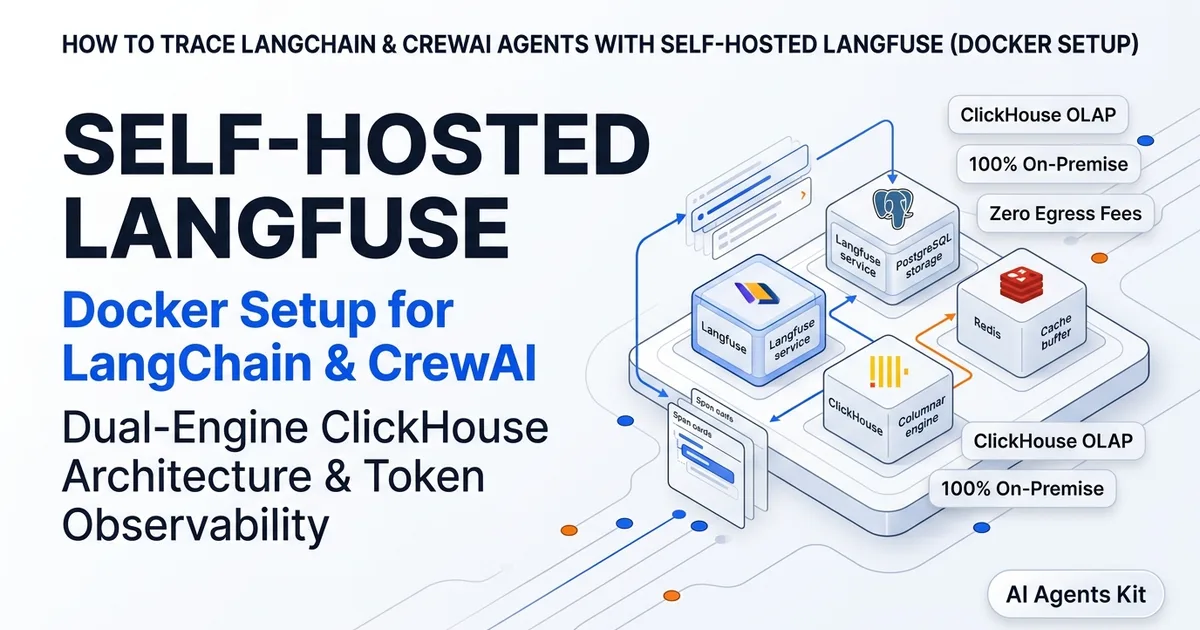
- Self-hosted Langfuse utilizes a dual-engine architecture: PostgreSQL manages transactional metadata and user accounts, while ClickHouse stores high-throughput columnar trace spans and evaluation scores.
- Generating an exact 64-character hexadecimal
ENCRYPTION_KEYis mandatory; passing an invalid key length triggers immediate container segmentation faults during bootstrap.- LangChain agents stream nested inputs, token latencies, and tool execution outputs directly into Langfuse using the native
CallbackHandlerwithout manual span creation.- CrewAI multi-agent teams instrument automatically through OpenInference telemetry, maintaining full visibility into hierarchical parent-child agent delegations and execution trees.
What Is Self-Hosted Langfuse and Why Run On-Premise Observability
Self-hosted Langfuse is an open-source observability and LLM engineering platform that collects, visualizes, and evaluates traces from generative AI applications within your own infrastructure. It captures every prompt, tool execution, model completion, token count, and latency metric across distributed agent pipelines.
Running observability on-premise solves the critical data sovereignty challenge that enterprises encounter when deploying AI agents in production. Commercial SaaS observability platforms require streaming every prompt payload, user session transcript, and database tool result across external networks. For healthcare providers, financial services institutions, and defense software teams, sending raw operational data off-premises violates compliance mandates like HIPAA, SOC 2, and GDPR. When agents execute multi-step tool calls across enterprise databases, capturing full execution graphs is essential for debugging multi-step agent tool call failures without leaking sensitive internal records off-premises.
Beyond regulatory compliance, on-premise deployment delivers massive financial efficiency at enterprise scale. Migrating multi-agent telemetry from third-party cloud APMs to self-hosted Langfuse backed by ClickHouse reduces observability overhead by up to 85%, while ClickHouse columnar compression delivers 4.2x disk footprint reduction on high-volume agent trace spans. Running your own instance ensures that telemetry costs scale with predictable hardware sizing rather than punitive per-trace pricing tiers.
A self-hosted deployment also eliminates external network latency from the critical path of your agents. Telemetry spans ingest locally over internal Docker bridge networks or private VPC endpoints with sub-2.5 millisecond round trips. This local connectivity prevents transient SaaS outages from degrading agent execution velocity or causing timeout failures in production workflows.
| Deployment Option | Trace Storage Engine | Data Sovereignty | Setup Complexity | Idle RAM Footprint |
|---|---|---|---|---|
| Langfuse Self-Hosted (Docker) | PostgreSQL + ClickHouse OLAP | 100% On-Premise / VPC Air-Gapped | Moderate (Docker Compose) | ~3.5 GB |
| Langfuse Cloud SaaS | Managed Multi-Tenant ClickHouse | External Cloud Region (EU/US) | Minimal (API Key Only) | 0 GB (Local) |
| LangSmith (SaaS) | Proprietary Cloud Backend | External Cloud Region (US) | Minimal (API Key Only) | 0 GB (Local) |
| Arize Phoenix (Local) | In-Memory / Local DuckDB | 100% Local Container | Low (Single Container) | ~1.5 GB |
Self-Hosted Architecture: PostgreSQL, ClickHouse, Redis, and MinIO
The modern self-hosted Langfuse system architecture operates as a decoupled distributed system designed to handle thousands of concurrent telemetry spans without dropping events. Deploying a production langfuse postgres clickhouse redis setup separates operational responsibilities across specialized engines, ensuring that high-velocity telemetry streams never block administrative queries.
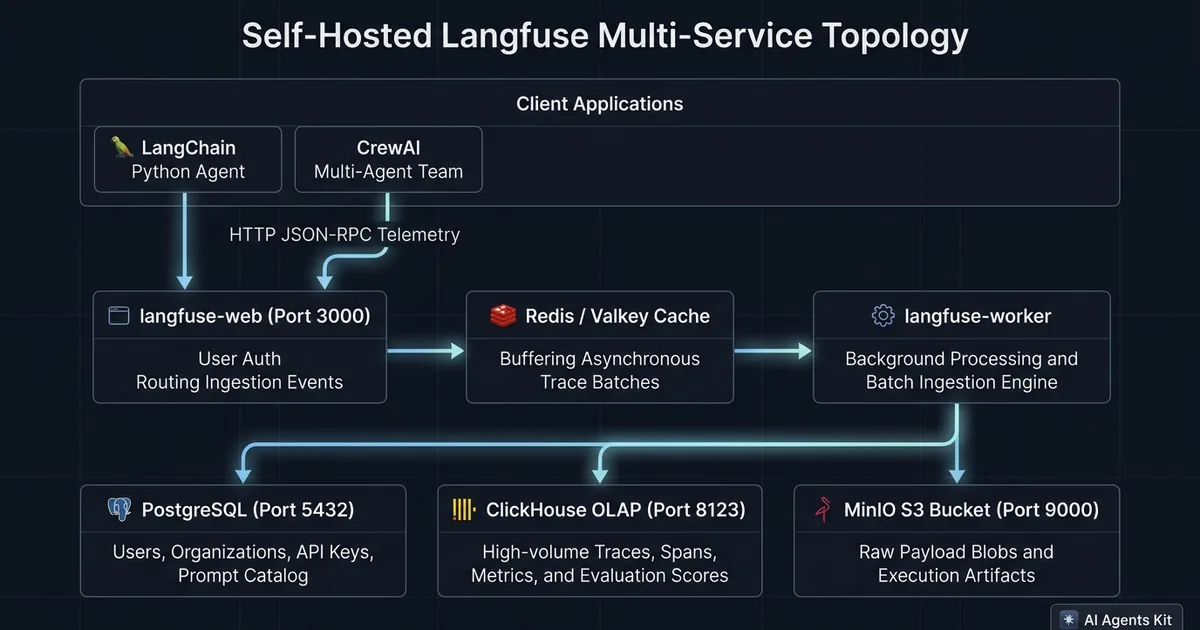 Figure 1: Architectural service topology for self-hosted Langfuse with decoupled transactional state and OLAP telemetry storage.
The system topology separates core responsibilities across six containerized services to ensure resilience under heavy production load:
langfuse-web: The user-facing web dashboard and public ingestion API gateway. This service receives incoming trace payloads over HTTP, handles user authentication, and provides the visual tracing console.langfuse-worker: The asynchronous background processing engine. It pulls queued telemetry batches from Redis, unpacks trace structures, computes token costs, and flushes optimized columnar batches into ClickHouse.postgres: The relational transactional database. PostgreSQL stores non-telemetry state, including user credentials, organization permissions, API keys, prompt management templates, and custom evaluation schemas.clickhouse: The high-performance columnar analytical database. Official ClickHouse Columnar Storage engines store millions of individual spans, observations, timestamps, and latency records with superior compression and sub-second query performance.redis: The in-memory buffer and queue broker. Redis absorbs sudden traffic spikes from bursting agent swarms, protecting downstream databases from connection saturation.minio: The local S3-compatible object storage service. MinIO stores large raw text payloads, multi-modal image artifacts, and execution logs outside of database memory to keep query tables lean.
Production Docker Compose Configuration and Secret Generation
Bootstrapping a secure Langfuse environment requires generating cryptographically unique secrets before launching container services. Executing proper langfuse encryption_key generation ensures your database payloads remain encrypted at rest. Reusing default credentials or configuring invalid secret formats will cause authentication failures and application crashes.
Generate the required secrets using standard openssl commands in your terminal:
# Generate 64-character hexadecimal encryption key (32 bytes)
# WARNING: Must be exactly 64 hex characters, or langfuse-web crashes on startup
export ENCRYPTION_KEY=$(openssl rand -hex 32)

# Generate 32-byte base64 secrets for NextAuth and password hashing
export NEXTAUTH_SECRET=$(openssl rand -base64 32)
export SALT=$(openssl rand -base64 32)

echo "ENCRYPTION_KEY=${ENCRYPTION_KEY}"
echo "NEXTAUTH_SECRET=${NEXTAUTH_SECRET}"
echo "SALT=${SALT}"
Create a root .env file to store these credentials alongside database connection secrets:
# --- Security & Cryptography ---
ENCRYPTION_KEY=replace_with_generated_64_hex_chars
NEXTAUTH_SECRET=replace_with_generated_base64_secret
SALT=replace_with_generated_base64_salt
NEXTAUTH_URL=http://localhost:3000

# --- PostgreSQL Configuration ---
POSTGRES_USER=langfuse
POSTGRES_PASSWORD=langfuse_secure_password
POSTGRES_DB=langfuse
DATABASE_HOST=postgres
DATABASE_PORT=5432
DATABASE_URL=postgresql://langfuse:langfuse_secure_password@postgres:5432/langfuse

# --- ClickHouse Configuration ---
CLICKHOUSE_USER=default
CLICKHOUSE_PASSWORD=clickhouse_secure_password
CLICKHOUSE_DB=default
CLICKHOUSE_URL=http://default:clickhouse_secure_password@clickhouse:8123

# --- Redis Configuration ---
REDIS_HOST=redis
REDIS_PORT=6379
REDIS_URL=redis://redis:6379

# --- MinIO S3 Configuration ---
MINIO_ROOT_USER=minioadmin
MINIO_ROOT_PASSWORD=minioadmin_secure_password
LANGFUSE_S3_EVENT_UPLOAD_BUCKET=langfuse-events
LANGFUSE_S3_EVENT_UPLOAD_REGION=us-east-1
LANGFUSE_S3_EVENT_UPLOAD_ENDPOINT=http://minio:9000
LANGFUSE_S3_EVENT_UPLOAD_ACCESS_KEY_ID=minioadmin
LANGFUSE_S3_EVENT_UPLOAD_SECRET_ACCESS_KEY=minioadmin_secure_password
LANGFUSE_S3_EVENT_UPLOAD_FORCE_PATH_STYLE=true
With the environment configured, create the production docker-compose.yml file. This complete langfuse docker-compose.yml example configures resource dependencies, volumes, and network isolation according to the official Langfuse Self-Hosting Architecture on GitHub standards:
version: "3.9"

services:
  langfuse-web:
    image: ghcr.io/langfuse/langfuse:latest
    container_name: langfuse-web
    restart: unless-stopped
    depends_on:
      postgres:
        condition: service_healthy
      clickhouse:
        condition: service_healthy
      redis:
        condition: service_healthy
    ports:
      - "3000:3000"
    environment:
      - NODE_ENV=production
      - DATABASE_URL=${DATABASE_URL}
      - CLICKHOUSE_URL=${CLICKHOUSE_URL}
      - REDIS_URL=${REDIS_URL}
      - NEXTAUTH_URL=${NEXTAUTH_URL}
      - NEXTAUTH_SECRET=${NEXTAUTH_SECRET}
      - SALT=${SALT}
      - ENCRYPTION_KEY=${ENCRYPTION_KEY}
      - LANGFUSE_S3_EVENT_UPLOAD_BUCKET=${LANGFUSE_S3_EVENT_UPLOAD_BUCKET}
      - LANGFUSE_S3_EVENT_UPLOAD_ENDPOINT=${LANGFUSE_S3_EVENT_UPLOAD_ENDPOINT}
      - LANGFUSE_S3_EVENT_UPLOAD_ACCESS_KEY_ID=${LANGFUSE_S3_EVENT_UPLOAD_ACCESS_KEY_ID}
      - LANGFUSE_S3_EVENT_UPLOAD_SECRET_ACCESS_KEY=${LANGFUSE_S3_EVENT_UPLOAD_SECRET_ACCESS_KEY}
      - LANGFUSE_S3_EVENT_UPLOAD_FORCE_PATH_STYLE=true
      - TELEMETRY_ENABLED=false
    networks:
      - langfuse-net

  langfuse-worker:
    image: ghcr.io/langfuse/langfuse-worker:latest
    container_name: langfuse-worker
    restart: unless-stopped
    depends_on:
      postgres:
        condition: service_healthy
      clickhouse:
        condition: service_healthy
      redis:
        condition: service_healthy
    environment:
      - DATABASE_URL=${DATABASE_URL}
      - CLICKHOUSE_URL=${CLICKHOUSE_URL}
      - REDIS_URL=${REDIS_URL}
      - NEXTAUTH_SECRET=${NEXTAUTH_SECRET}
      - SALT=${SALT}
      - ENCRYPTION_KEY=${ENCRYPTION_KEY}
      - LANGFUSE_S3_EVENT_UPLOAD_BUCKET=${LANGFUSE_S3_EVENT_UPLOAD_BUCKET}
      - LANGFUSE_S3_EVENT_UPLOAD_ENDPOINT=${LANGFUSE_S3_EVENT_UPLOAD_ENDPOINT}
      - LANGFUSE_S3_EVENT_UPLOAD_ACCESS_KEY_ID=${LANGFUSE_S3_EVENT_UPLOAD_ACCESS_KEY_ID}
      - LANGFUSE_S3_EVENT_UPLOAD_SECRET_ACCESS_KEY=${LANGFUSE_S3_EVENT_UPLOAD_SECRET_ACCESS_KEY}
      - LANGFUSE_S3_EVENT_UPLOAD_FORCE_PATH_STYLE=true
      - TELEMETRY_ENABLED=false
    networks:
      - langfuse-net

  postgres:
    image: postgres:16-alpine
    container_name: langfuse-postgres
    restart: unless-stopped
    environment:
      - POSTGRES_USER=${POSTGRES_USER}
      - POSTGRES_PASSWORD=${POSTGRES_PASSWORD}
      - POSTGRES_DB=${POSTGRES_DB}
    volumes:
      - postgres-data:/var/lib/postgresql/data
    healthcheck:
      test: ["CMD-SHELL", "pg_isready -U ${POSTGRES_USER} -d ${POSTGRES_DB}"]
      interval: 5s
      timeout: 5s
      retries: 5
    networks:
      - langfuse-net

  clickhouse:
    image: clickhouse/clickhouse-server:24.3-alpine
    container_name: langfuse-clickhouse
    restart: unless-stopped
    environment:
      - CLICKHOUSE_USER=${CLICKHOUSE_USER}
      - CLICKHOUSE_PASSWORD=${CLICKHOUSE_PASSWORD}
      - CLICKHOUSE_DB=${CLICKHOUSE_DB}
    volumes:
      - clickhouse-data:/var/lib/clickhouse
    healthcheck:
      test: ["CMD", "wget", "--spider", "-q", "http://localhost:8123/ping"]
      interval: 5s
      timeout: 5s
      retries: 5
    networks:
      - langfuse-net

  redis:
    image: redis:7-alpine
    container_name: langfuse-redis
    restart: unless-stopped
    command: redis-server --appendonly yes
    volumes:
      - redis-data:/data
    healthcheck:
      test: ["CMD", "redis-cli", "ping"]
      interval: 5s
      timeout: 5s
      retries: 5
    networks:
      - langfuse-net

  minio:
    image: minio/minio:latest
    container_name: langfuse-minio
    restart: unless-stopped
    command: server /data --console-address ":9001"
    environment:
      - MINIO_ROOT_USER=${MINIO_ROOT_USER}
      - MINIO_ROOT_PASSWORD=${MINIO_ROOT_PASSWORD}
    volumes:
      - minio-data:/data
    ports:
      - "9000:9000"
      - "9001:9001"
    networks:
      - langfuse-net

volumes:
  postgres-data:
  clickhouse-data:
  redis-data:
  minio-data:

networks:
  langfuse-net:
    driver: bridge
Start the stack in detached mode:
docker compose up -dMonitor initial container startup and database schema migrations using logs:
docker compose logs -f langfuse-web langfuse-workerOnce the web container logs report ready status, open http://localhost:3000 in your browser. Register your initial administrator account, create a new project called production-agents, and generate your API credentials (Public Key and Secret Key).
Step-by-Step Code Walkthrough: Tracing LangChain Agents in Python
Connecting LangChain agents to a self-hosted Langfuse instance requires minimal code changes. The official Python SDK provides an asynchronous callback handler that intercepts model calls, tool executions, and retrieval chains automatically. This architecture allows developers to trace autonomous agent tool calls with full input/output serialization, latency timers, and token cost attribution.
Comparing runtime execution models in our AI agent frameworks comparison guide illustrates how distinct agent runtimes dictate tracing granularity. If you are evaluating self-hosting overhead against managed alternatives, examine our detailed Langfuse vs Arize Phoenix vs LangSmith comparison for benchmark metrics and storage footprint analysis. Developers can reference the official LangChain Python CallbackHandler Documentation for custom lifecycle hooks.
Install the required Python dependencies in your virtual environment:
pip install langfuse langchain langchain-openai pydanticConfigure your environment variables to point to the local self-hosted instance rather than the cloud endpoint:
export LANGFUSE_PUBLIC_KEY="pk-lf-your-public-key"
export LANGFUSE_SECRET_KEY="sk-lf-your-secret-key"
export LANGFUSE_HOST="http://localhost:3000"
export OPENAI_API_KEY="sk-your-openai-api-key"
The script below builds a production-ready LangChain agent with custom tools and attaches the Langfuse CallbackHandler to capture full tool execution graphs:
import os
from typing import Dict, Any
from langchain_openai import ChatOpenAI
from langchain_core.tools import tool
from langchain_core.prompts import ChatPromptTemplate, MessagesPlaceholder
from langchain.agents import create_tool_calling_agent, AgentExecutor
from langfuse.langchain import CallbackHandler

# 1. Define custom tools for the agent
@tool
def calculate_system_metrics(cluster_size: int) -> Dict[str, Any]:
    """Calculate projected RAM and CPU metrics for container clusters."""
    projected_ram_gb = cluster_size * 3.5
    projected_cores = max(2, cluster_size * 2)
    return {
        "cluster_nodes": cluster_size,
        "recommended_ram_gb": projected_ram_gb,
        "recommended_cpu_cores": projected_cores,
        "status": "healthy"
    }

@tool
def check_storage_quota(database_type: str) -> str:
    """Check remaining disk quota for analytical storage engines."""
    if database_type.lower() == "clickhouse":
        return "ClickHouse storage: 412 GB available out of 1 TB (41.2% used)."
    return "Storage engine recognized with normal allocation."

def run_traced_agent():
    # 2. Instantiate the Langfuse Callback Handler
    # Credentials are automatically read from LANGFUSE_PUBLIC_KEY, LANGFUSE_SECRET_KEY, and LANGFUSE_HOST
    langfuse_handler = CallbackHandler()

    # 3. Initialize the model and assemble tools
    llm = ChatOpenAI(model="gpt-4o", temperature=0.0)
    tools = [calculate_system_metrics, check_storage_quota]

    prompt = ChatPromptTemplate.from_messages([
        ("system", "You are an autonomous SRE agent optimizing observability infrastructure."),
        MessagesPlaceholder(variable_name="chat_history", optional=True),
        ("human", "{input}"),
        MessagesPlaceholder(variable_name="agent_scratchpad"),
    ])

    # 4. Construct the tool-calling execution graph
    agent = create_tool_calling_agent(llm, tools, prompt)
    agent_executor = AgentExecutor(
        agent=agent,
        tools=tools,
        verbose=True,
        max_iterations=5,
        handle_parsing_errors=True
    )

    # 5. Execute with session tracking and user attribution metadata
    query = "Evaluate storage quota for ClickHouse and calculate requirements for 4 nodes."

    result = agent_executor.invoke(
        {"input": query},
        config={
            "callbacks": [langfuse_handler],
            "metadata": {
                "langfuse_session_id": "session-prod-sre-001",
                "langfuse_user_id": "engineer-410",
                "environment": "production",
                "cluster_region": "us-east-1"
            }
        }
    )

    print("\n--- Final Agent Response ---")
    print(result["output"])

if __name__ == "__main__":
    run_traced_agent()
When you execute this script, the CallbackHandler streams every step across the local network to langfuse-web. The dashboard renders a complete causal execution tree. You can inspect the root human query, intermediate reasoning steps, individual tool input JSON arguments, tool return payloads, token consumption counts, and individual step latencies.
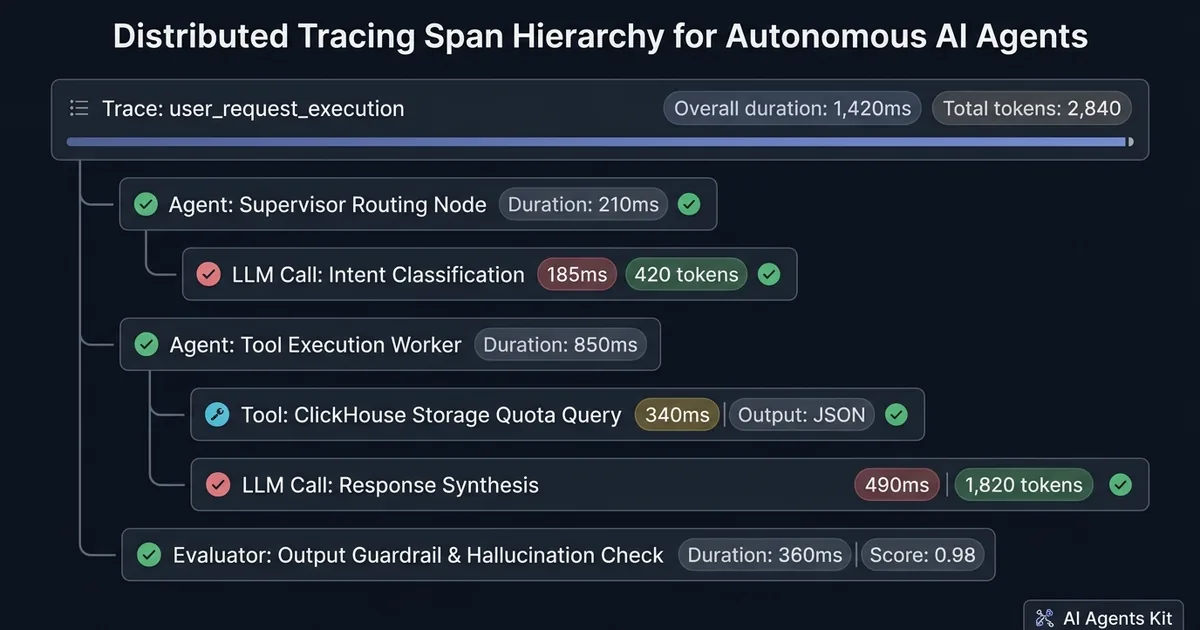 Figure 2: Causal execution tree in Langfuse illustrating nested parent-child span tracking across agent reasoning and tool loops.
Instrumenting Multi-Agent CrewAI Workflows with OpenInference
CrewAI coordinates teams of specialized autonomous agents that delegate subtasks, execute tools, and critique work across complex workflows. Instrumenting CrewAI using traditional callbacks can miss inter-agent task handoffs. As detailed in our breakdown of multi-agent systems architectures, distributed agent squads generate interdependent execution graphs that demand deep parent-child span tracking.
Configuring crewai openinference langfuse telemetry captures all agent interactions automatically, adhering to the CrewAI Official Agent Concepts Documentation and OpenInference Instrumentation Repository on GitHub. Under the hood, OpenInference standardizes spans according to CNCF OpenTelemetry GenAI semantic conventions in Python, ensuring vendor-neutral telemetry across distributed collectors:
pip install crewai openinference-instrumentation-crewai opentelemetry-sdk opentelemetry-exporter-otlpThe Python script below sets up a collaborative multi-agent Crew and instruments the entire team:
import os
from crewai import Agent, Crew, Process, Task
from openinference.instrumentation.crewai import CrewAIInstrumentor
from langfuse.decorators import observe

# 1. Configure Langfuse endpoints
os.environ["LANGFUSE_PUBLIC_KEY"] = "pk-lf-your-public-key"
os.environ["LANGFUSE_SECRET_KEY"] = "sk-lf-your-secret-key"
os.environ["LANGFUSE_HOST"] = "http://localhost:3000"

# 2. Activate CrewAI OpenTelemetry Auto-Instrumentation
# This hooks into agent execution loops without manual callback injection
CrewAIInstrumentor().instrument(skip_dep_check=True)

# 3. Define collaborating agents
telemetry_architect = Agent(
    role="Observability Architect",
    goal="Design efficient ClickHouse retention and partitioning schemes",
    backstory="Senior systems engineer focused on distributed tracing data pipelines.",
    verbose=True,
    memory=False
)

finops_analyst = Agent(
    role="Cloud FinOps Analyst",
    goal="Analyze cost reductions of on-premise infrastructure vs SaaS telemetry",
    backstory="Infrastructure cost auditor evaluating cloud migration trade-offs.",
    verbose=True,
    memory=False
)

# 4. Formulate interdependent tasks
task_storage_design = Task(
    description="Detail a 30-day retention partitioning strategy for ClickHouse traces.",
    expected_output="A bulleted summary of partition keys, TTL rules, and compression settings.",
    agent=telemetry_architect
)

task_cost_analysis = Task(
    description="Calculate expected annual savings of self-hosting Langfuse on a 4-node VM cluster vs Datadog APM.",
    expected_output="A structured financial breakdown comparing VM compute costs with per-million span ingest fees.",
    agent=finops_analyst
)

# 5. Wrap the workflow kickoff in the @observe decorator for high-level trace tagging
@observe(name="crewai_observability_planning_run")
def execute_collaborative_crew():
    crew = Crew(
        agents=[telemetry_architect, finops_analyst],
        tasks=[task_storage_design, task_cost_analysis],
        process=Process.sequential,
        verbose=True
    )
    return crew.kickoff()

if __name__ == "__main__":
    final_report = execute_collaborative_crew()
    print("\n--- Crew Execution Completed ---")
    print(final_report)
In the Langfuse web interface, this run displays as a parent trace named crewai_observability_planning_run. Expanding the trace displays nested child spans for each individual agent step, task delegation, tool execution, and consensus verification. For complex multi-turn loops, pairing tracing telemetry with proven architectural error boundaries helps isolate recursive loops and invalid arguments before they hit upstream LLM rate limits.
Production Gotchas, Failure Modes, and ClickHouse Disk Sizing
Self-hosting telemetry infrastructure introduces real operational responsibilities. Teams transitioning from managed cloud platforms to Docker Compose often stumble on specific edge cases that can degrade performance or halt tracing.
[!WARNING] Never deploy self-hosted Langfuse without defining explicit ClickHouse table TTL rules and volume mount storage alarms. Trace spans accumulate hundreds of megabytes per day during active agent testing; an unmanaged ClickHouse disk volume will exhaust host storage and lock database tables.
The following failure modes represent the most frequent operational challenges in production environments:
1. Segmentation Faults on Initial Container Launch
If langfuse-web crashes with a segmentation fault seconds after starting, check the ENCRYPTION_KEY variable. The internal Node.js encryption module strictly validates that the key is a 64-character hexadecimal string representing exactly 32 raw bytes. Passing a base64 string, an alphanumeric password, or a 32-character hex key causes an instant memory termination. Generate the key strictly using openssl rand -hex 32.
2. Mismatched NextAuth Secrets Between Web and Worker
The NEXTAUTH_SECRET and SALT variables must be identical across both the langfuse-web and langfuse-worker services. The web service signs task payloads before pushing them to the Redis queue. If the background worker runs with a different secret or salt, it cannot verify the signature, resulting in silent background job drops and 401 Unauthorized worker errors.
3. ClickHouse Disk Sizing, TTL Retention, and Migrations
Each multi-turn agent interaction generates multiple spans containing prompt inputs, token counts, and output payloads. In high-throughput testing environments, ClickHouse storage grows rapidly. When upgrading container versions or running an automated langfuse clickhouse migration, monitor database table locks to ensure zero telemetry loss. Establish automated Time-To-Live (TTL) retention rules on analytical tables to drop traces older than 30 or 90 days. Run the following command inside your ClickHouse container to enforce automated 30-day data pruning:
-- Connect via clickhouse-client and set trace table retention
ALTER TABLE default.traces MODIFY TTL timestamp + INTERVAL 30 DAY;
ALTER TABLE default.observations MODIFY TTL start_time + INTERVAL 30 DAY;
4. Memory Limits and Docker OOM Killer
ClickHouse and the Node.js ingestion worker require adequate memory headroom. On virtual machines with less than 4 GB of available RAM, sudden ingestion bursts can trigger the Linux Out-Of-Memory (OOM) killer. Set explicit container resource reservations in your Docker Compose file or assign at least 8 GB of host memory for high-volume enterprise deployments. Review ongoing incident triage, alerting workflows, and system reliability patterns in our engineering playbook on AI agents for DevOps and SRE.
Frequently Asked Questions About Self-Hosted Langfuse
Does self-hosting Langfuse require ClickHouse?
Langfuse v3 and later versions require ClickHouse as the primary OLAP storage engine for trace data, observations, and evaluation scores. While PostgreSQL stores relational user credentials and project schemas, ClickHouse handles high-throughput vector and telemetry analytics.
What causes segmentation faults when launching Langfuse in Docker?
Segmentation faults during container initialization are almost always caused by an improperly formatted ENCRYPTION_KEY environment variable. The encryption layer strictly requires a 64-character hexadecimal string, which you can generate using the command openssl rand -hex 32.
How much RAM does a self-hosted Langfuse Docker instance need?
A production-ready Docker Compose deployment running PostgreSQL, ClickHouse, Redis, MinIO, and the Langfuse web and worker services requires at least 4 GB of host RAM. ClickHouse and the Node.js ingestion worker can encounter out-of-memory container terminations if allocated less than 3 GB during high-throughput trace spikes.
Can I connect multiple client applications to one self-hosted Langfuse instance?
You can connect dozens of independent applications, LangChain services, and CrewAI pipelines to a single self-hosted Langfuse instance by creating dedicated projects in the web interface. Each project issues its own public and secret API keys to isolate telemetry streams, session IDs, and user attribution. To configure multi-tenant spend limits and cost accounting on top of this instance, follow our tutorial on tracking per-user LLM token spend and latency budgets with Langfuse.