Build an AI Agent with AutoGPT: Step by Step (2026 Guide)
Build an autonomous AI agent with AutoGPT in 2026. Master Docker Compose setup, agent graph workflows, LLM configuration, and production guardrails.
Autonomous software systems execute complex, multi-step objectives by iteratively planning actions, invoking external tools, and reflecting on intermediate execution traces. The AutoGPT framework provides an extensible visual workflow engine and execution server designed to coordinate these long-running tasks. Software engineers can now deploy robust autonomous systems that query live search APIs, process local data, and execute scripts without writing brittle prompt chains from scratch.
Key Takeaways
- AutoGPT Platform runs on a microservice architecture via Docker Compose with visual frontend access on port 3000 and backend execution on port 8006.
- The autonomous agent loop follows a four-stage execution cycle: Planning subtasks, Action execution with tools, Observation analysis, and Reflection self-correction.
- Token consumption per completed agent task has increased by approximately 4.3x as multi-turn reasoning traces and dynamic tool schemas expanded.
- Production deployments require strict iteration limits between 10 and 20 cycles and human-in-the-loop confirmation blocks before executing state-mutating actions.
- Developers can deploy AutoGPT locally using Ollama and Llama 4 Scout to eliminate third-party API costs and protect sensitive enterprise data.
What is AutoGPT?
AutoGPT is an open-source framework designed for building autonomous AI agents that pursue multi-step goals with minimal human intervention. Unlike standard conversational interfaces that pause after each generation, AutoGPT executes a continuous, directed execution graph.
The system deconstructs high-level objectives into sequential milestones, selects appropriate tools, executes external actions, and evaluates intermediate outcomes against the original target. For a foundational overview of these systems, review the architectural definition of AI agents and their core execution boundaries. Developers looking for role-based multi-agent collaboration rather than single-agent graphs can also explore our CrewAI tutorial.
The open-source repository maintained by Significant Gravitas has evolved into two distinct offerings:
| Feature | AutoGPT Classic | AutoGPT Platform |
|---|---|---|
| Primary Interface | Terminal and Command-Line Interface | Visual Web Flow Editor (Port 3000) |
| System Architecture | Single monolithic Python process | Microservices on Docker Compose |
| Execution Model | Sequential terminal prompt loop | Directed agent graph with visual blocks |
| Target Audience | Systems researchers and terminal developers | Software engineers and automation builders |
| Repository Path | classic/original_autogpt/ |
autogpt_platform/ |
| Licensing | MIT License | Polyform Shield License |
AutoGPT Classic represents the original command-line script that popularized autonomous agent loops across the engineering community. It operates inside a single terminal session and is maintained for developers who require bare-metal script execution.
AutoGPT Platform provides an enterprise-ready visual graph builder, integrated execution server, and a modular block ecosystem. Developers can review the latest updates directly in the AutoGPT Platform Releases on GitHub, where version 0.8.0 introduced graph checkpointing and expanded block templates.
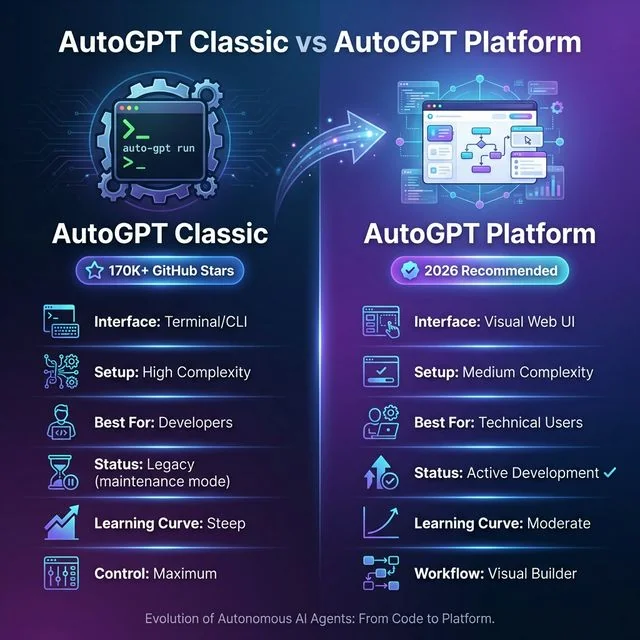 AutoGPT Classic vs Platform: The evolution from terminal-based CLI to the modern visual web interface. Platform offers medium complexity setup with visual workflow builder and active development, making autonomous AI agent creation more accessible in 2026.
System Architecture & The Four-Step Agent Loop
Under the hood, the fundamental autogpt agent loop architecture executes an autonomous decision cycle. Rather than making a single completion call to a large language model, the system treats the model as an active reasoning engine.
The reasoning engine coordinates memory stores, file operations, and external tool APIs across four deterministic phases. Exploring real-world AI agent use cases demonstrates how this cyclical reasoning model powers production market research and code generation.
┌─────────────┐     ┌──────────────┐     ┌──────────────┐     ┌──────────────┐
│   PLANNING  │────▶│    ACTION    │────▶│ OBSERVATION  │────▶│  REFLECTION  │
│             │     │              │     │              │     │              │
│ Break goal  │     │ Execute      │     │ Review       │     │ Update       │
│ into tasks  │     │ using tools  │     │ results      │     │ strategy     │
└─────────────┘     └──────────────┘     └──────────────┘     └──────┬───────┘
       ▲─────────────────────────────────────────────────────────────┘
The four stages operate in continuous sequence until the task objective is fulfilled:
- Planning: The agent evaluates the top-level prompt and constructs an internal task hierarchy. The system determines which subtasks have been completed, which dependencies remain unresolved, and what information must be acquired next.
- Action: The agent selects a specific tool block from its registered registry. This action may include executing a search query, fetching an HTTP endpoint, reading a local file, or running a code sandbox.
- Observation: The execution server captures the raw output generated by the invoked tool. The runtime parses status codes, JSON responses, or file buffers and formats them for context injection.
- Reflection: The model assesses whether the observed outcome advanced the overall goal. If a tool invocation failed or returned insufficient data, the reflection step updates the internal state and adjusts the next action.
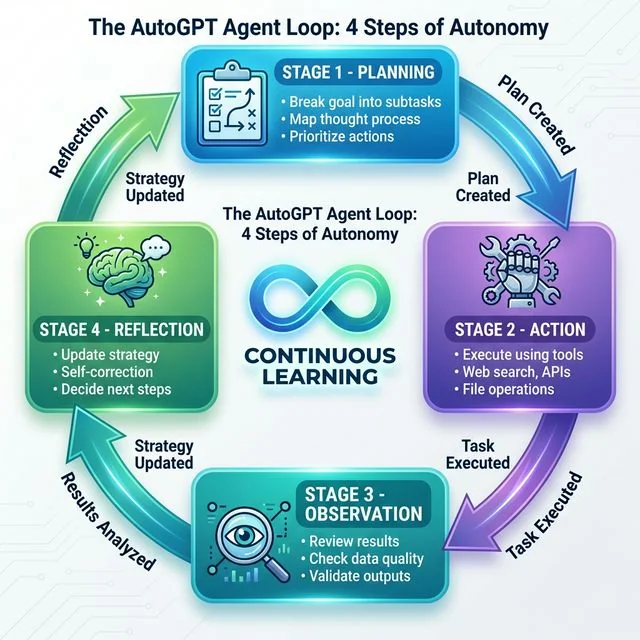 The AutoGPT Agent Loop: Four-step autonomous cycle of Planning, Action, Observation, and Reflection. This continuous learning loop with self-correction enables true autonomy in AI agents.
AutoGPT distinguishes between ephemeral working memory and durable persistent storage. Ephemeral memory retains immediate execution context within the model context window, while persistent memory indexes past tool outputs into local SQLite databases or vector embeddings. This hybrid structure implements the task to agent pattern, allowing autonomous ai agents to retrieve historical context across long-running executions without exceeding model token limits.
Prerequisites & System Requirements
Running the modern AutoGPT Platform requires container infrastructure capable of orchestrating several supporting services. The visual flow editor and backend runtime rely on containerized message queues and persistent datastores to maintain execution state.
Hardware Specifications
Hardware allocation directly affects the responsiveness of the agent execution graph:
- Processor: 64-bit multi-core CPU (Apple Silicon M-Series or Intel/AMD with 4+ physical cores).
- System Memory: 16GB RAM recommended to ensure stable operation of the container stack; 8GB is the bare functional minimum.
- Disk Storage: At least 10GB of free SSD storage for container images, package virtual environments, and workspace files.
- Operating System: macOS 14+, Ubuntu 22.04 LTS+, or Windows 11 with WSL2 enabled.
Software Dependencies
Install the core tooling prior to cloning the repository:
- Docker Desktop: Version 4.30 or higher with Docker Compose v2 enabled.
- Git: Version 2.40 or higher for repository synchronization.
- Python: Python 3.10 or 3.11 installed locally if you intend to run custom Python tool blocks.
- API Access: An active OpenAI API key with funded billing credits, or a local instance of Ollama.
Step 1: Install AutoGPT Platform via Docker Compose
Deploying the container stack during autogpt platform setup via a multi-container docker compose setup ensures that all required services initialize with the correct network bindings and dependencies. The platform stack includes the React frontend, FastAPI backend server, PostgreSQL database, Redis cache, and RabbitMQ message broker.
Quick Setup via One-Line Installer
For Unix-based operating systems, Significant Gravitas provides an automated installation script:
# Download and execute the automated setup script
curl -fsSL https://setup.agpt.co/install.sh -o install.sh && bash install.sh
This installer verifies system prerequisites, clones the required repositories, and launches the container stack. If you prefer manual oversight of your infrastructure, execute the step-by-step container build detailed below.
Manual Docker Compose Setup
Begin by cloning the primary AutoGPT repository to your local workstation:
# Clone the repository
git clone https://github.com/Significant-Gravitas/AutoGPT.git
cd AutoGPT/autogpt_platform

# Copy the default environment template
cp .env.example .env
Review the port allocation in your docker-compose.yml to confirm that required network ports are available on your host system:
- Port 3000: Web frontend and visual flow editor
- Port 8006: Backend REST API server
- Port 8001: WebSocket communication server
- Port 5432: PostgreSQL database
- Port 6379: Redis cache
- Port 5672: RabbitMQ task broker
Launch the microservice stack using Docker Compose:
# Build images and start services in the background
docker compose up -d --build
Monitor the startup logs to verify that the backend API establishes database connections and starts listening for incoming requests:
# Verify running containers
docker compose ps

# Follow logs from the backend execution engine
docker compose logs -f backend
Once the containers report healthy status, open your browser and navigate to http://localhost:3000 to access the visual agent builder.
Step 2: Configure API Keys & Local LLM Endpoints
AutoGPT requires access to large language models to drive the agent reasoning loop. You can configure commercial frontier providers or connect local inference engines for private workflows.
Configuring Commercial Cloud Providers
Open the autogpt_platform/.env file in your editor and configure your provider credentials:
# Primary OpenAI credentials
OPENAI_API_KEY=sk-proj-yourActualKeyHere

# Default model configuration for agent loops
DEFAULT_REASONING_MODEL=gpt-5.6-sol
DEFAULT_FAST_MODEL=gpt-5.6-luna

# Optional secondary provider keys
ANTHROPIC_API_KEY=sk-ant-yourAnthropicKeyHere
Consult the OpenAI API Reference Documentation for exact parameter definitions, context window specifications, and spending caps. Setting hard budget quotas inside your provider dashboard prevents unexpected billing surges during automated multi-step runs.
Privacy-First: Run AutoGPT with Local LLMs
Organizations processing proprietary code or confidential datasets can run AutoGPT with local LLM instances. Installing Ollama enables local model hosting on consumer GPUs without network transmission.
Download and start the server from the Ollama GitHub Repository, then pull a capable reasoning model:
# Pull Llama 4 Scout for high-throughput reasoning
ollama run llama4
Update your .env configuration to redirect model completions to your local Ollama port:
# Configure local endpoint routing
INTEGRATION_LOCAL_LLM=true
LOCAL_LLM_ENDPOINT=http://localhost:11434/v1
DEFAULT_MODEL=llama4
Local inference eliminates token billing entirely. However, running multi-turn agent loops locally requires dedicated GPU memory of at least 16GB to sustain multi-step reasoning traces without thermal throttling.
Step 3: Build an Autonomous Research Agent Workflow
Once the platform services are running, you can assemble an end-to-end research agent using the visual flow builder. For additional architectural inspiration, review our guide on production AI agent code patterns.
Creating the Visual Agent Graph
Navigate to http://localhost:3000 in your web browser and select New Agent from the dashboard:
- Input Node: Drag an
Inputblock onto the canvas. Set the field name toTopicwith the prompt label"Target Technology or Competitor". - Search Tool Node: Drag a
Web Searchblock onto the workspace. Connect the output of theInputnode to the query property of the search tool. Configure the result limit to 5 sources. - AI Reasoning Node: Add an
AI Agentblock. Connect the aggregated search results to the context input. Assigngpt-5.6-solorclaude-5-sonnetas the model, and set the system prompt to enforce structured output. - File Output Node: Drag a
File Writeblock onto the canvas. Connect the generated text from the reasoning node to the content property, specifyingreports/output.mdas the target path.
Save your graph and click Run. The platform executes each node sequentially, highlighting active blocks with a real-time status glow while streaming logs to the inspection drawer.
Recipe: Autonomous Competitor Analysis Agent
Autonomous market analysis represents a high-leverage production application for agentic graphs. A dedicated workflow can monitor competitors, extract feature changes, and generate executive summaries automatically.
The workflow integrates four specialized nodes:
- Crawler Block: Traverses competitor documentation and pricing tables.
- Diff Analyzer Block: Compares newly retrieved text against prior database snapshots.
- Synthesis Block: Summarizes major product positioning shifts and pricing adjustments.
- Webhook Dispatch Block: Transmits structured JSON alerts directly to your internal messaging server.
This graph-based design replaces unpredictable free-form scripts with observable, deterministic checkpoints.
AutoGPT vs CrewAI vs AgentGPT vs LangChain
When evaluating modern agentic ai frameworks, such as in an autogpt vs crewai comparison, selecting the correct tool depends on whether your project requires visual flow editing, code-first multi-agent teams, or lightweight browser testing. The ecosystem provides complementary frameworks suited for distinct production scales. For an in-depth breakdown of these tools, consult our comprehensive AI agent frameworks comparison guide.
| Framework | Primary Architecture | Setup Complexity | Multi-Agent Support | Cost Model | Best For |
|---|---|---|---|---|---|
| AutoGPT Platform | Visual Agent Graphs & Microservices | Medium (Docker Compose) | Modular node graphs | API or local compute | Visual workflows and single-agent research tasks |
| CrewAI | Role-Based Orchestrated Teams | Low to Medium (Python package) | Native hierarchical roles | API or local compute | Multi-agent collaborative enterprise pipelines |
| AgentGPT | Cloud Browser-Based Interface | None (Hosted web app) | Limited | Freemium subscription | Rapid prototyping without local infrastructure |
| LangChain | Composable Software Primitives | High (Developer SDK) | Extensive via LangGraph | Highly variable | Custom production applications with complex routing |
| BabyAGI | Minimalist 200-Line Task Queue | Low (Single script) | Task prioritization loops | API-based | Educational research and basic task prioritization |
Developers seeking role-based delegation across multiple collaborating agents often implement the CrewAI Agent Architecture Documentation alongside AutoGPT blocks. In this architecture, CrewAI directs the operational sequence while AutoGPT handles autonomous information retrieval.
Engineers evaluating open-source alternatives can inspect the AgentGPT GitHub Repository for lightweight browser deployments, or the BabyAGI GitHub Repository for minimalist task loops. For an in-depth architectural breakdown across these three systems, consult our BabyAGI vs AutoGPT vs AgentGPT comparison.
Token Consumption & API Cost Optimization
Operating autonomous agents introduces distinct financial considerations. Because the agent loop repeatedly submits conversation history, system instructions, and tool definitions to the language model, token consumption cost scales non-linearly with iteration count.
Empirical evaluations published in the GAIA Benchmark Evaluation on arXiv indicate that token consumption per completed task grew by approximately 4.3x as multi-turn reasoning paths and detailed tool schemas expanded. This increase stems from longer chain-of-thought iterations and complex schemas, such as the Model Context Protocol.
Current Model Inference Pricing
The table below outlines current API pricing across common frontier and utility models:
| Model Tier | Input Cost (per 1M tokens) | Output Cost (per 1M tokens) | Cached Read Cost (per 1M) | Optimal Loop Role |
|---|---|---|---|---|
| GPT-5.6 Sol | $2.50 | $10.00 | $1.25 | Complex multi-turn planning and code generation |
| GPT-5.6 Luna | $0.25 | $1.00 | $0.125 | Tool output parsing and intermediate data filtering |
| Claude Sonnet 5 | $3.00 | $15.00 | $0.30 | Deep technical synthesis and report writing |
| Llama 4 Scout (Local) | $0.00 | $0.00 | $0.00 | Local private processing on consumer hardware |
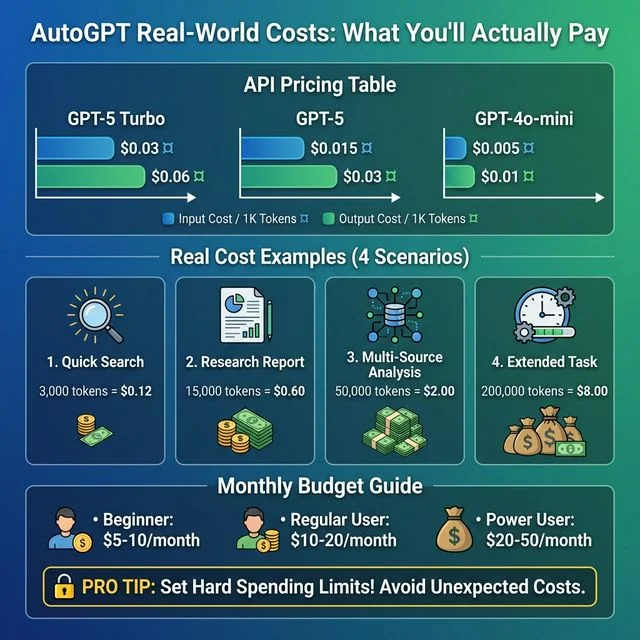 AutoGPT Real-World Costs: Complete breakdown of API pricing per 1M tokens, task scenarios from quick searches to extended tasks, and monthly budget guidelines.
Engineering Guidelines for Cost Reduction
Implement these three architectural practices to protect production budgets:
- Leverage Prompt Caching: Standardize system prompts and tool definition schemas at the start of the context window. Modern frontier models discount cached input tokens by up to 80% to 90%, significantly lowering overhead on repeated iterations.
- Implement Model Tiering: Do not route mundane text extraction to expensive reasoning models. Use fast utility models like GPT-5.6 Luna to clean raw HTML scrapes before passing distilled data to your primary reasoning model.
- Enforce Context Truncation: Store raw tool outputs in local files rather than retaining full responses in working memory. Pass only concise summaries into subsequent loop prompts.
Production Guardrails & Fixing Infinite Loops
A common failure mode in autonomous systems is the infinite execution loop. This occurs when an agent fails to recognize that an action has already been attempted or encounters unexpected tool error formats.
Root Causes of Agent Loop Stagnation
Loop stagnation generally arises from three predictable causes:
- Overly Broad Objectives: Specifying vague prompts like
"Analyze the global AI market"causes the planning module to continually spawn new exploratory subtasks without a definitive termination state. - Repetitive Tool Failures: If a website blocks an automated scraper with an HTTP 403 status code, an unconstrained agent may repeatedly query the exact same URL expecting a different result.
- Excessive Temperature Settings: Elevated sampling temperatures cause models to introduce inconsistent action parameters, triggering continuous validation errors.
Practical Remediation Steps
Apply these engineering adjustments to fix autogpt infinite loops across development and production environments:
- Configure Strict Iteration Caps: Set
max_iterationsbetween 10 and 20 within your workflow configuration. This forces the engine to halt and report current progress rather than looping indefinitely. - Drop Inference Temperature: Reduce model temperature to 0.2 or 0.3 for technical, structured tasks. Lower entropy ensures deterministic tool parameter formatting.
- Implement Human-in-the-Loop Security Guardrails: Introduce confirmation checkpoints into the graph before the agent executes state-mutating actions, such as file deletions or network posts. The agent pauses execution and requests explicit human approval via the web UI or messaging webhook.
# Conceptual guardrail verification inside a custom tool block
def execute_safe_action(action_payload: dict, iteration_count: int, max_limit: int = 15):
    """Enforces execution limits and checks for human approval"""
    if iteration_count >= max_limit:
        raise RuntimeError("Agent exceeded maximum allowed iterations. Halting execution.")

    if action_payload.get("is_destructive", False):
        requires_human_approval = True
        return {"status": "PAUSED", "prompt": "Human approval required for action."}

    return {"status": "EXECUTING", "payload": action_payload}
Bonus: Deploy AutoGPT via Telegram Bot
Learning how to deploy autogpt telegram bot integrations enables convenient remote monitoring and interaction without maintaining an open desktop browser session. Telegram provides an accessible platform for real-time task triggers and notifications. Review the Telegram AI bot deployment guide for complete interface customization patterns.
Architecture: Webhooks vs Polling
When connecting autonomous agents to Telegram, developers select between two connection models:
- Long Polling: The bot process continuously asks Telegram servers for updates. This method works behind corporate firewalls and local NAT setups without requiring public domain routing.
- Webhooks: Telegram delivers incoming events directly to your public HTTPS endpoint. Webhooks offer lower latency and superior resource efficiency for production cloud servers.
Developers can inspect the Telegram Bot Webhook Architecture Reference for protocol specifications and certificate configuration.
Asynchronous Python Telegram Bot Implementation
The following production script implements an asynchronous Telegram interface using the official Python client. It connects user queries to the agent execution pipeline:
import os
import logging
from dotenv import load_dotenv
from telegram import Update
from telegram.ext import (
    Application,
    CommandHandler,
    MessageHandler,
    filters,
    ContextTypes
)
import openai

load_dotenv()
logging.basicConfig(
    format="%(asctime)s - %(name)s - %(levelname)s - %(message)s",
    level=logging.INFO
)
logger = logging.getLogger(__name__)

openai_client = openai.AsyncOpenAI(api_key=os.getenv("OPENAI_API_KEY"))

async def start(update: Update, context: ContextTypes.DEFAULT_TYPE) -> None:
    """Send welcome message and operational commands."""
    welcome_text = (
        "Autonomous Agent Interface Online.\n\n"
        "Send your research topic directly, or use:\n"
        "/status - Check agent server health\n"
        "/reset  - Clear conversation context"
    )
    await update.message.reply_text(welcome_text)

async def handle_agent_task(update: Update, context: ContextTypes.DEFAULT_TYPE) -> None:
    """Dispatch incoming user message to the reasoning agent."""
    user_prompt = update.message.text
    chat_id = update.effective_chat.id

    await context.bot.send_chat_action(chat_id=chat_id, action="typing")

    try:
        response = await openai_client.chat.completions.create(
            model="gpt-5.6-sol",
            messages=[
                {
                    "role": "system",
                    "content": "You are a research agent assistant. Provide structured technical summaries."
                },
                {"role": "user", "content": user_prompt}
            ],
            max_tokens=1200,
            temperature=0.3
        )
        report = response.choices[0].message.content

        # Telegram limits individual message length to 4096 characters
        if len(report) > 4000:
            for chunk in [report[i:i + 4000] for i in range(0, len(report), 4000)]:
                await update.message.reply_text(chunk)
        else:
            await update.message.reply_text(report)

    except Exception as error:
        logger.error(f"Task dispatch failed: {error}")
        await update.message.reply_text("Execution error encountered during task processing.")

def main() -> None:
    """Initialize and run the Telegram client application."""
    bot_token = os.getenv("TELEGRAM_BOT_TOKEN")
    if not bot_token:
        raise ValueError("Missing TELEGRAM_BOT_TOKEN environment variable.")

    app = Application.builder().token(bot_token).build()
    app.add_handler(CommandHandler("start", start))
    app.add_handler(MessageHandler(filters.TEXT & ~filters.COMMAND, handle_agent_task))

    logger.info("Bot service starting via long polling.")
    app.run_polling(allowed_updates=Update.ALL_TYPES)

if __name__ == "__main__":
    main()
For advanced event handlers and message dispatch mechanics, refer to the Python Telegram Bot Documentation.
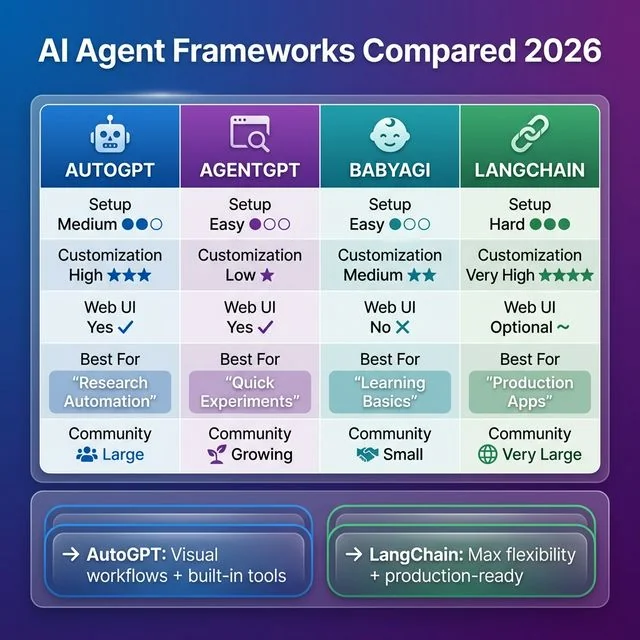 AI Agent Frameworks Compared: Comprehensive comparison of AutoGPT, AgentGPT, BabyAGI, and LangChain across setup difficulty, flexibility, and architectural targets.
Frequently Asked Questions
Do I need to know Python to use AutoGPT?
You do not need Python knowledge to build agents using the AutoGPT Platform visual workflow builder. Python expertise is only required if you write custom tool blocks or modify the backend server code.
Can AutoGPT browse the live web in 2026?
Yes, AutoGPT integrates with search APIs and headless browser tools to query search engines and scrape webpage content dynamically. However, pages protected by heavy anti-bot protections or complex dynamic JavaScript may require dedicated scraping proxies.
How is AutoGPT fundamentally different from ChatGPT?
ChatGPT operates as a conversational interface that only acts when prompted by a human user. In contrast, AutoGPT operates autonomously by breaking high-level goals into subtasks and executing tools iteratively until the objective is reached.
Can I run AutoGPT for free using local LLMs?
Yes, you can run AutoGPT completely free of API charges by pointing its LLM endpoint to a local Ollama instance running Llama 4 or Mistral. You only need a local machine with at least 16GB of system RAM and a modern GPU.
How do I prevent AutoGPT from getting stuck in infinite loops?
You prevent infinite loops by enforcing a hard iteration cap between 10 and 20 cycles and defining measurable success criteria in your system prompt. Inserting intermediate reflection blocks also forces the agent to assess whether it is making tangible progress toward its goal.
Conclusion & Next Steps
You now have a functional foundation for deploying autonomous agent graphs using AutoGPT. By transitioning from fragile prompt scripts to containerized visual workflows, you can build reliable data scrapers, research synthesizers, and operational assistants with deterministic boundaries.
To continue advancing your agent infrastructure:
- Deploy Specialized Blocks: Expand your workflow canvas with database connectors and automated browser testing tools.
- Benchmark Local Models: Configure Ollama with Llama 4 Scout to compare local inference throughput against commercial API tiers.
- Enforce Security Boundaries: Establish strict human-in-the-loop approval triggers before giving agents permission to write to production databases or call external webhooks.