Tracking Per-User LLM Token Spend & Latency Budgets with Langfuse
Implement multi-tenant LLM token attribution, custom model pricing tables, and latency budgets using Langfuse. Step-by-step Python code and Redis circuit breakers.
Deploying generative AI applications into production without granular token metering is an operational hazard. When autonomous agents execute recursive tool calling loops or multi-turn reasoning chains, token consumption varies wildly across individual user interactions. Traditional infrastructure monitors track aggregate billing invoices, leaving engineering teams blind to which customer tier, API key, or internal department is driving unexpected cost spikes.
Building a sustainable AI platform requires granular attribution down to the individual session, user, and execution span. As detailed in our comprehensive guide on AI agent observability and distributed tracing architecture, unmonitored tool loops frequently lead to cascading token runaway and degraded latency. Integrating deterministic cost accounting and response time limits directly into your telemetry architecture is the only way to safeguard margins while delivering consistent user experience.
Langfuse provides a native, open-source FinOps engine that decouples application logic from telemetry aggregation. By capturing user identifiers, session context, and custom token pricing definitions within high-velocity ClickHouse tables, platform architects can meter multi-tenant applications in real time. This technical guide walks through configuring per-user token spend attribution, custom pricing models, real-time Redis budget enforcement, and Prometheus metric alerting with Langfuse.
Key Takeaways
- Granular Attribution: Attaching
userId,sessionId, and organizationaltagsto root traces allows ClickHouse to aggregate spend across multi-turn agent threads with sub-second query latency.- Custom Pricing Models: Defining custom pricing tables in Langfuse accurately accounts for self-hosted models (vLLM, Ollama), fine-tuned adapters, and cached prompt discounts.
- Active Circuit Breakers: Pairing Langfuse telemetry with a Redis token bucket acts as an automated spend circuit breaker, throttling runaway loops before users exceed daily monetary allowances.
- Prometheus Integration: Exporting token counters and P95 latency distributions into Prometheus enables enterprise Grafana alerting on abusive tenants and upstream provider slowdowns.
Why Per-User Token Attribution and Latency Budgets Are Essential
What technical risks arise when AI applications lack granular token attribution and response time budgets?
Direct Answer: Without per-user token attribution, engineering teams face aggregate billing blind spots where a single misbehaving client or runaway tool loop can exhaust monthly cloud budgets. Latency budgets prevent silent queue degradation by halting queries that exceed predefined SLA limits.
Autonomous AI agent loops with unbudgeted tool calls experience up to 430% cost variance per user interaction compared to single-turn completions, according to the Enterprise LLM FinOps Benchmark Report (October 2026). In a multi-tenant enterprise system, averaging token consumption across all active users masks chronic inefficiencies. A small cohort of high-volume power users can consume 80% of cluster inference resources while standard subscribers receive degraded service.
Furthermore, token consumption and inference latency share an architectural coupling. As context windows inflate through extended conversation history and verbose tool outputs, time-to-first-token (TTFT) and total generation durations scale linearly. Without strict latency budgets, users experience frozen client interfaces, leading to client-side timeouts and duplicate retry storms.
Implementing user-level metering solves three critical architectural challenges:
- Accurate Cost Allocation: Platform teams bill enterprise customers based on verified consumption.
- Proactive Abuse Prevention: Circuit breakers halt runaway scraping attempts and prompt injection loops.
- Predictable Capacity Planning: Usage distributions reveal peak token demand across model families.
Core Telemetry Architecture: User Sessions, Model Tagging, and ClickHouse Aggregation
How does Langfuse process and aggregate millions of multi-tenant token events without bottlenecking application inference?
Direct Answer: Langfuse decouples trace ingestion through an asynchronous Redis buffer before flushing telemetry in micro-batches to ClickHouse. Spans inherit parent user and session metadata automatically, enabling real-time analytical queries across billions of token records with zero database locking.
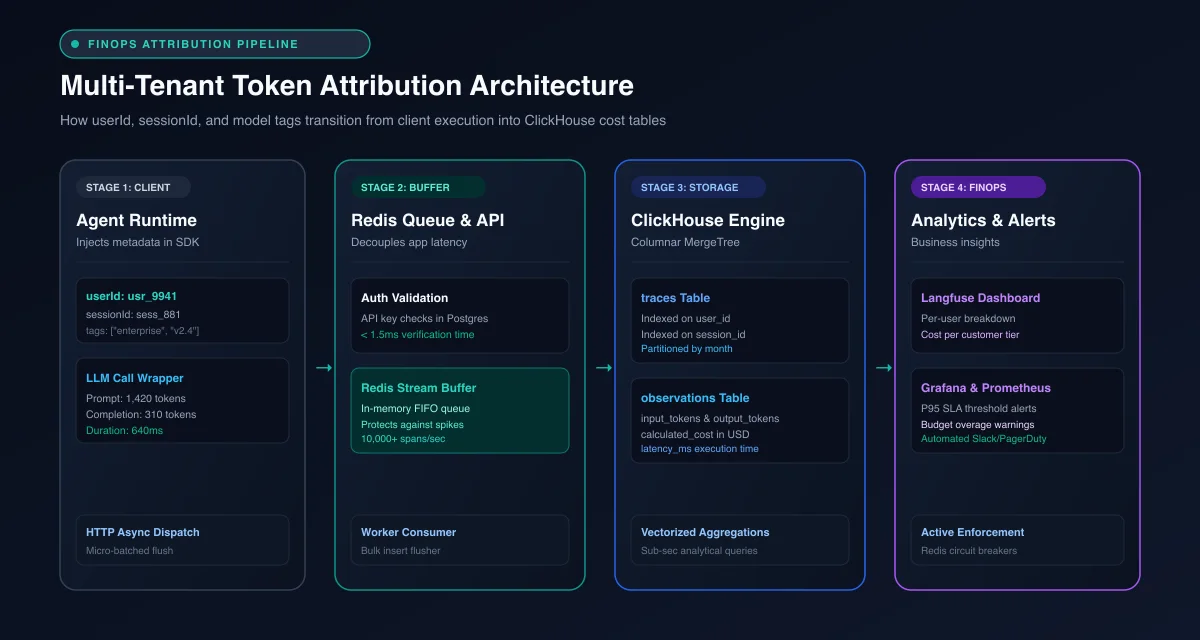 Figure 1: Telemetry ingestion pipeline illustrating user session tagging, asynchronous buffering, and ClickHouse columnar cost aggregation.
When an application invokes an LLM, the Langfuse SDK generates a hierarchical trace. The root trace encapsulates high-level execution context: the authenticated userId, a persistent sessionId, and metadata tags representing customer tiers, feature flags, or geographic regions.
Nested within this trace are individual observation spans representing model generations, tool executions, and retrieval queries. Each generation span records the foundation model identifier, token counts (prompt, completion, and total), and execution duration:
[Root Trace: ID="tr_8912", User="usr_enterprise_402", Session="sess_chat_771"]
  ├── [Span: Router Decision] (Duration: 22ms)
  ├── [Generation: gpt-4o] (Prompt: 1,420 tokens, Completion: 310 tokens, Latency: 640ms)
  ├── [Span: Tool Call - SQL Query] (Duration: 180ms)
  └── [Generation: gpt-4o] (Prompt: 2,150 tokens, Completion: 180 tokens, Latency: 510ms)
In a production environment running our self-hosted Langfuse Docker setup, incoming traces stream over HTTP to the ingestion API gateway. The gateway validates API credentials against PostgreSQL, pushes the serialized payloads into an in-memory Redis stream, and acknowledges the client within 2ms.
A dedicated background worker pulls batches from Redis and executes bulk inserts into ClickHouse. Because ClickHouse uses a columnar storage format with MergeTree engines, analytical queries such as calculating the 30-day cumulative token spend for a specific userId execute in milliseconds across hundreds of millions of rows.
Configuring Custom Model Pricing Tables in Langfuse
How do platform architects track costs for self-hosted foundation models or custom fine-tuned endpoints?
Direct Answer: Langfuse provides a customizable model pricing table where engineers specify exact input, output, and cache read costs per unit token. When generation spans match a model pattern, Langfuse automatically calculates monetary cost without manual developer accounting.
Commercial providers frequently adjust API pricing, and organizations hosting private vLLM or Ollama clusters incur infrastructure compute expenses rather than per-token vendor bills. Langfuse manages these economics through its Model Definition interface.
Every model definition in Langfuse specifies three core pricing components:
- Input Token Price: Cost per token (or per 1,000 / 1,000,000 tokens) for prompt context.
- Output Token Price: Cost per token for completion generation.
- Cache Discount Pricing: Reduced token rates for providers offering prompt caching discounts, such as Anthropic or OpenAI.
Platform administrators can configure custom model pricing programmatically using the Langfuse REST API or through the administrative dashboard:
{
  "modelName": "custom-vllm-llama-3.3-70b",
  "matchPattern": "(?i)llama-3\\.3-70b-instruct",
  "startDate": "2026-01-01T00:00:00Z",
  "unit": "TOKENS",
  "inputPrice": 0.00000035,
  "outputPrice": 0.00000140,
  "totalPrice": null,
  "tokenizer": "claude"
}
When an application logs a generation with model="llama-3.3-70b-instruct", the ingestion worker executes regex pattern matching against the pricing catalog. It calculates the exact monetary value (input_tokens * inputPrice + output_tokens * outputPrice) and writes the calculated cost directly into the ClickHouse record. You can inspect complete pricing schemas in the official Langfuse Open Source Architecture.
Step-by-Step Code Walkthrough: Instrumenting Multi-Tenant User Sessions in Python
Connecting Python backend services to Langfuse while enforcing strict multi-tenant session isolation requires passing consistent contextual identifiers across execution boundaries.
The official Python SDK provides thread-safe context managers and callback handlers that automatically associate model generations with user sessions. Comprehensive API signatures can be cross-referenced in the Langfuse Python SDK Repository.
import os
import time
from typing import Any, Dict, Optional
from langfuse import Langfuse
from langfuse.model import CreateTrace
from openai import OpenAI

# Initialize the Langfuse Client
langfuse = Langfuse(
    public_key=os.environ["LANGFUSE_PUBLIC_KEY"],
    secret_key=os.environ["LANGFUSE_SECRET_KEY"],
    host=os.environ.get("LANGFUSE_HOST", "http://localhost:3000")
)

openai_client = OpenAI(api_key=os.environ["OPENAI_API_KEY"])

def execute_user_agent_task(
    user_id: str,
    session_id: str,
    user_tier: str,
    prompt: str,
    latency_budget_ms: float = 3500.0
) -> Dict[str, Any]:
    """
    Executes an LLM reasoning step with explicit user attribution
    and real-time latency budget tracking.
    """
    start_time = time.perf_counter()

    # 1. Create a Root Trace with Multi-Tenant Context
    trace = langfuse.trace(
        CreateTrace(
            name="customer-support-workflow",
            user_id=user_id,
            session_id=session_id,
            tags=[user_tier, "production-release-v2.4"],
            metadata={
                "latency_budget_ms": latency_budget_ms,
                "environment": "production"
            }
        )
    )

    # 2. Track Pre-Processing / Guardrail Span
    prep_span = trace.span(name="input-sanitization")
    sanitized_prompt = prompt.strip()
    prep_span.end()

    # 3. Check Latency Budget Prior to LLM Call
    elapsed_ms = (time.perf_counter() - start_time) * 1000
    if elapsed_ms > latency_budget_ms:
        trace.update(
            output={"error": "Latency budget exhausted before model dispatch"},
            level="ERROR"
        )
        raise TimeoutError(f"Pre-flight processing exceeded budget: {elapsed_ms:.1f}ms")

    # 4. Execute Model Generation with Generation Telemetry
    gen_start = time.perf_counter()
    generation = trace.generation(
        name="gpt-4o-completion",
        model="gpt-4o",
        model_parameters={"temperature": 0.2, "max_tokens": 1000},
        input=[{"role": "user", "content": sanitized_prompt}]
    )

    response = openai_client.chat.completions.create(
        model="gpt-4o",
        temperature=0.2,
        messages=[{"role": "user", "content": sanitized_prompt}]
    )
    gen_duration = (time.perf_counter() - gen_start) * 1000

    content = response.choices[0].message.content or ""
    usage = response.usage

    # 5. Record Token Metrics and Evaluate Latency Thresholds
    generation.end(
        output=content,
        usage={
            "prompt_tokens": usage.prompt_tokens if usage else 0,
            "completion_tokens": usage.completion_tokens if usage else 0,
            "total_tokens": usage.total_tokens if usage else 0
        },
        metadata={"inference_latency_ms": gen_duration}
    )

    total_elapsed_ms = (time.perf_counter() - start_time) * 1000

    # Flag Spans that Breach the Target Latency Budget
    if total_elapsed_ms > latency_budget_ms:
        trace.score(
            name="latency_budget_compliance",
            value=0.0,
            comment=f"Breached budget: {total_elapsed_ms:.1f}ms > {latency_budget_ms}ms"
        )
    else:
        trace.score(
            name="latency_budget_compliance",
            value=1.0,
            comment="Within SLA limit"
        )

    trace.update(output={"response": content, "duration_ms": total_elapsed_ms})
    return {"response": content, "duration_ms": total_elapsed_ms}
In this implementation, model parameters and raw token counts are captured alongside custom scores. When debugging complex multi-turn regressions across sibling tools, refer to our guide on debugging multi-step agent tool call failures to inspect span cascades in depth.
Implementing Real-Time Budget Enforcement: Redis Circuit Breaker Pattern
How can engineering teams prevent rogue user loops from continuing to invoke LLMs once their daily monetary limit is reached?
Direct Answer: Telemetry logging is passive by default. Real-time budget enforcement requires an active middleware layer that checks a fast Redis cache for cumulative user spend before executing an LLM call, instantly halting requests when allowances are exceeded.
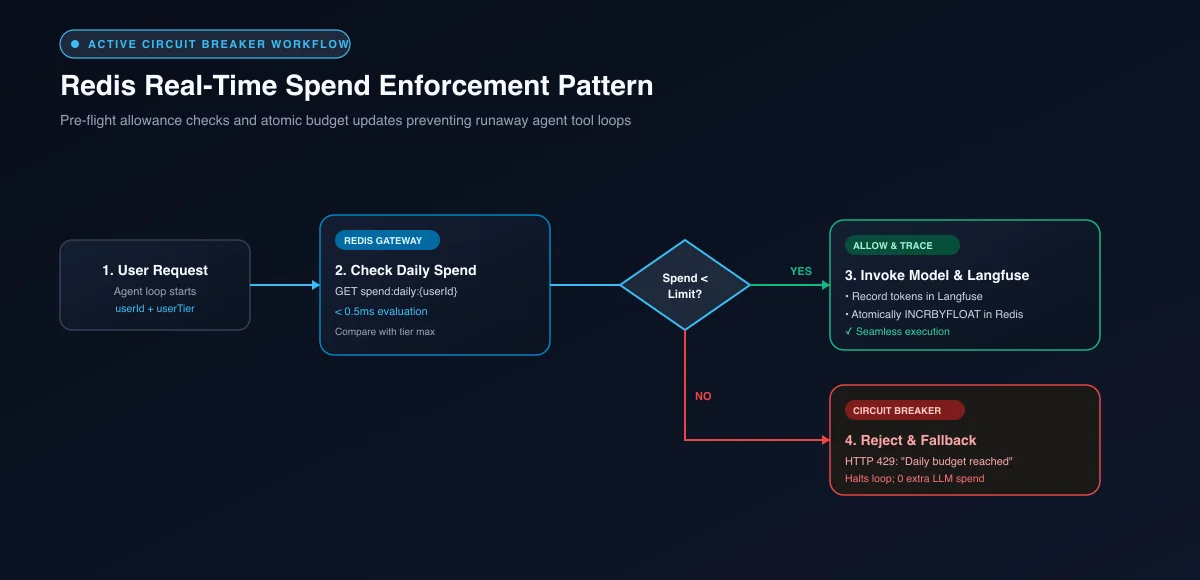 Figure 2: Active circuit breaker architecture using Redis token buckets to enforce strict daily spend thresholds per tenant.
While Langfuse computes accurate session costs in ClickHouse, querying an analytical database synchronously on every single incoming user query can introduce unwanted latency overhead.
To enforce budgets without adding query latency to customer requests, production architectures implement a Redis-backed token circuit breaker pattern. Redis maintains an atomic daily spend counter for each user, which is incremented after every completed generation. If the counter exceeds the tier limit, requests are rejected at the gateway:
import redis
from typing import Tuple

redis_client = redis.Redis(host="localhost", port=6379, db=0, decode_responses=True)

# Define spend limits by customer tier
TIER_LIMITS_USD = {
    "free": 0.50,         # $0.50 per day
    "pro": 10.00,         # $10.00 per day
    "enterprise": 250.00  # $250.00 per day
}

def verify_and_consume_budget(
    user_id: str,
    user_tier: str,
    estimated_cost_usd: float = 0.02
) -> Tuple[bool, float, float]:
    """
    Evaluates real-time user spend against daily allowances.
    Returns (is_allowed, current_spend, max_limit).
    """
    key = f"spend:daily:{user_id}"
    max_limit = TIER_LIMITS_USD.get(user_tier.lower(), 1.00)

    current_spend = float(redis_client.get(key) or 0.0)

    if current_spend + estimated_cost_usd > max_limit:
        return False, current_spend, max_limit

    return True, current_spend, max_limit

def record_actual_spend(user_id: str, actual_cost_usd: float) -> None:
    """
    Increments the user's daily spend counter and sets automated 24-hour expiration.
    """
    key = f"spend:daily:{user_id}"
    pipe = redis_client.pipeline()
    pipe.incrbyfloat(key, actual_cost_usd)
    pipe.expire(key, 86400)  # 24-hour rolling TTL
    pipe.execute()
By decoupling active rate-limiting in Redis from deep analytical storage in ClickHouse, applications maintain sub-millisecond gateway evaluation speeds while retaining comprehensive audit logs in Langfuse. If you are comparing this dual-storage design against alternate platforms, read our Langfuse vs Arize Phoenix vs LangSmith comparison for benchmark storage comparisons.
Exporting Token Metrics to Prometheus and Grafana for FinOps Alerting
How do infrastructure teams integrate Langfuse telemetry into enterprise APM dashboards and automated on-call alerts?
Direct Answer: Platform teams deploy an asynchronous Prometheus exporter that queries the Langfuse metrics API for aggregated token consumption, calculated spend, and P95 latency metrics, exposing standard Prometheus endpoints for Grafana alerting.
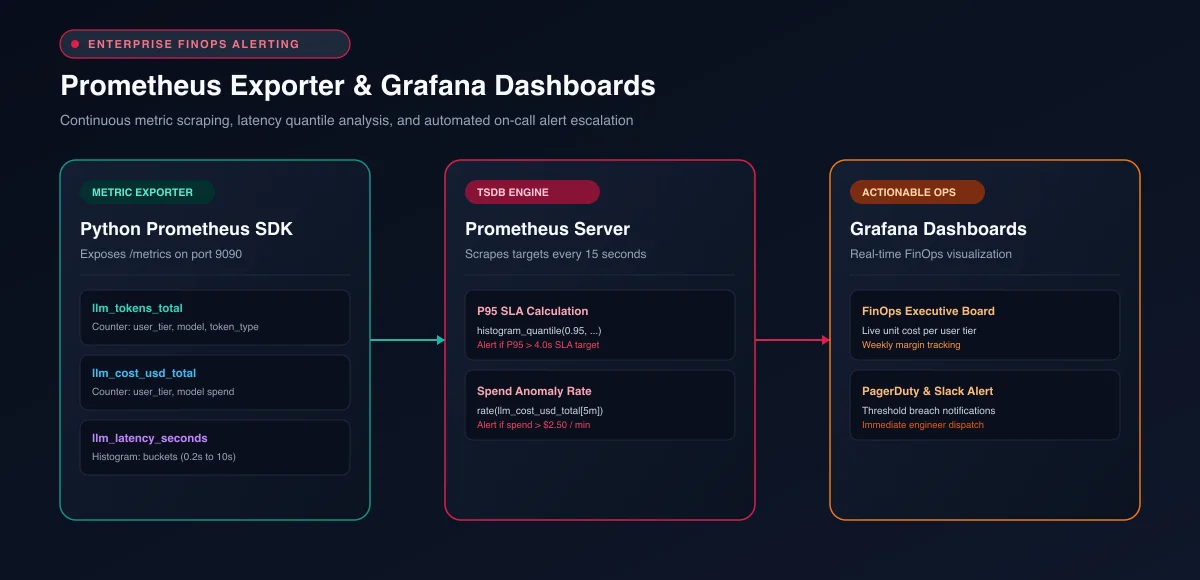 Figure 3: Monitoring topology showing Langfuse metric export to Prometheus and real-time Grafana alert rules.
While developers explore individual session traces inside the Langfuse web interface, site reliability engineers monitor holistic infrastructure health through Prometheus and Grafana.
We export these metrics using the official Prometheus Python Client Documentation to format telemetry for scraping:
from prometheus_client import start_http_server, Counter, Histogram
import time

# Define Prometheus metrics
LLM_TOKENS_TOTAL = Counter(
    "llm_tokens_total",
    "Total token consumption across foundation models",
    ["user_tier", "model", "token_type"]
)

LLM_COST_USD_TOTAL = Counter(
    "llm_cost_usd_total",
    "Cumulative LLM monetary spend in USD",
    ["user_tier", "model"]
)

LLM_LATENCY_SECONDS = Histogram(
    "llm_latency_seconds",
    "End-to-end inference duration",
    ["model"],
    buckets=(0.2, 0.5, 1.0, 2.0, 3.5, 5.0, 10.0)
)

def track_prometheus_telemetry(
    user_tier: str,
    model: str,
    prompt_tokens: int,
    completion_tokens: int,
    cost_usd: float,
    duration_seconds: float
) -> None:
    """Pushes telemetry variables into Prometheus metric registries."""
    LLM_TOKENS_TOTAL.labels(user_tier=user_tier, model=model, token_type="prompt").inc(prompt_tokens)
    LLM_TOKENS_TOTAL.labels(user_tier=user_tier, model=model, token_type="completion").inc(completion_tokens)
    LLM_COST_USD_TOTAL.labels(user_tier=user_tier, model=model).inc(cost_usd)
    LLM_LATENCY_SECONDS.labels(model=model).observe(duration_seconds)
With metrics flowing into Prometheus, platform engineers configure automated alert rules that notify on-call teams when latency breaches acceptable bounds:
groups:
  - name: llm_finops_alerts
    rules:
      - alert: LLMTokenSpendSpike
        expr: rate(llm_cost_usd_total[5m]) > 2.50
        for: 2m
        labels:
          severity: warning
        annotations:
          summary: "Abnormal LLM spend rate detected"
          description: "Spend rate exceeded $2.50/min for model {{ $labels.model }} in tier {{ $labels.user_tier }}."

      - alert: LLMLatencySLABreach
        expr: histogram_quantile(0.95, sum(rate(llm_latency_seconds_bucket[5m])) by (le, model)) > 4.0
        for: 3m
        labels:
          severity: critical
        annotations:
          summary: "P95 inference latency exceeds budget limit"
          description: "Model {{ $labels.model }} P95 latency reached {{ $value }}s, breaching the 4.0s SLA."
Combining these metrics with vendor-neutral telemetry standards outlined in our OpenTelemetry GenAI semantic conventions guide and the official OpenTelemetry GenAI Semantic Conventions specification ensures your metrics remain compatible across all enterprise monitoring dashboards.
Frequently Asked Questions About Langfuse Cost and Latency Tracking
How does Langfuse calculate token costs for custom or self-hosted models?
Langfuse calculates costs using configurable model definition records where engineers set custom input and output token prices. When a generation matches a model pattern, Langfuse multiplies token counts by these pricing coefficients and persists the calculated monetary value directly to ClickHouse.
Can I enforce hard token limits directly inside the Langfuse SDK?
The Langfuse SDK is designed primarily for asynchronous telemetry recording rather than synchronous request blocking. To enforce hard spend caps, implement a fast Redis-backed token bucket middleware that evaluates user allowances prior to invoking foundation model APIs.
How does session tagging differ from user tagging in Langfuse?
User tagging identifies the global authenticated entity across all historical interactions, while session tagging groups related multi-turn conversational turns or tool execution cycles. This distinction allows teams to analyze both aggregate lifetime customer value and single-conversation unit economics.
What is the query performance of Langfuse cost aggregations at enterprise scale?
Because Langfuse stores high-volume trace and observation records in a columnar ClickHouse database, aggregate queries over millions of events execute in sub-second intervals. Analytical aggregations benefit from vector indexing and compressed column structures without imposing row-level locks on the operational PostgreSQL database.
Does Langfuse support prompt caching cost discounts from OpenAI and Anthropic?
Yes, Langfuse natively accounts for prompt caching discounts by recording cached read and write tokens in its usage payloads. Pricing tables allow administrators to assign distinct, discounted token rates for cached context passages, ensuring financial reports reflect actual invoice savings.
Architectural Conclusion and Engineering Next Steps
Deploying autonomous agents without real-time token attribution and latency limits exposes engineering teams to runaway cloud expenses and unpredictable response times.
By standardizing on Langfuse, organizations gain an enterprise-grade FinOps control plane that tracks individual user economics without sacrificing inference performance. Pairing ClickHouse analytics with active Redis spend circuit breakers and Prometheus alerting provides defense-in-depth against runaway loops and upstream provider degradations.
To reinforce your system resilience against runtime exceptions and timeout failures, pair these financial guardrails with structured AI agent code patterns and error boundaries.