Pydantic AI vs CrewAI: Type-Safe vs Multi-Agent (2026)
Compare Pydantic AI vs CrewAI on Pydantic v2 type safety, dependency injection, CrewAI Flows, testing, token costs, and top Pydantic AI alternatives.
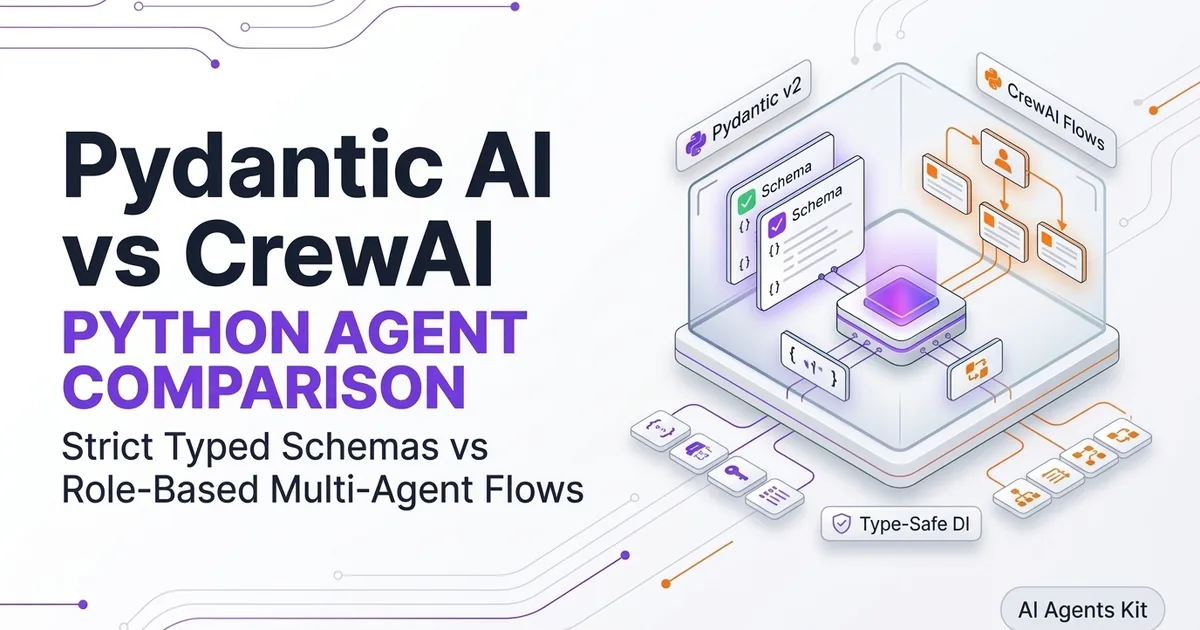
Evaluating Pydantic AI vs CrewAI comes down to a single architectural choice: strict Python type safety for backend services versus role-based multi-agent orchestration for collaborative business workflows. Pydantic AI models every agent like a typed FastAPI endpoint with Pydantic v2 validation and dependency injection, while CrewAI organizes agents around personas, task delegation, and event-driven Flows.
Choosing the wrong framework creates immediate production friction. Running a three-agent CrewAI pipeline for a straightforward JSON extraction microservice typically multiplies token spend by 3x to 5x, whereas manually wiring multi-role editorial debates in Pydantic AI requires building orchestration boilerplate that CrewAI ships out of the box.
Key Takeaways
- Pydantic AI (v2.67+) enforces Pydantic v2 structured outputs, FastAPI-style
RunContextdependency injection, and native OpenTelemetry tracing through Pydantic Logfire, making it the stronger fit for production Python APIs.- CrewAI (v1.15+) accelerates multi-agent business workflows using
role,goal, andbackstorypersonas alongside event-driven CrewAI Flows (@start,@listen,@router) with typed Pydantic state.- Token and Latency Overhead: Three-agent CrewAI handoffs typically consume 3x to 5x more tokens than a single Pydantic AI structured output call because each handoff replays persona context across multiple LLM round-trips.
- Testing and CI/CD: Pydantic AI includes built-in zero-cost pytest mocking via
TestModel,FunctionModel, andALLOW_MODEL_REQUESTS = False, whereas CrewAI relies on live CLI evaluations (crewai test) or manual client patching.- Top Pydantic AI Alternatives: Teams looking outside CrewAI usually evaluate Agno for batteries-included agent apps, LangGraph for durable cyclic state machines, or the OpenAI Agents SDK for OpenAI-native handoffs.
Pydantic AI vs CrewAI: Architecture and Quick Comparison
Pydantic AI and CrewAI target opposite layers of the Python AI stack. Pydantic AI is a lightweight, code-first library that brings static typing, structured validation, and async concurrency to LLM calls, while CrewAI is a high-level orchestration engine designed to coordinate autonomous multi-agent teams.
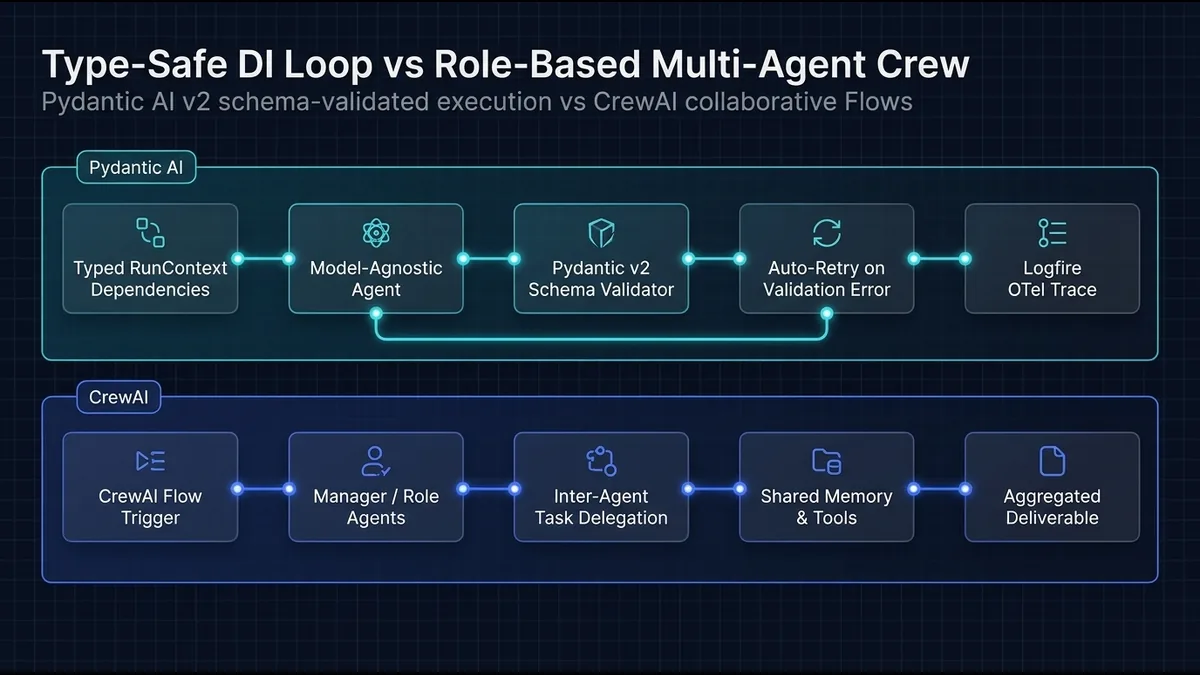 Figure 1: Execution architecture comparing Pydantic AI strict schema validation and dependency injection against CrewAI role-based multi-agent crews.
Both frameworks reached production maturity by late 2026. According to the Pydantic AI GitHub Repository, the library surpassed 21,300 stars following its June 2026 v2.0 capability release and November 2026 v2.67 durable dynamic agent updates. Meanwhile, the CrewAI GitHub Repository crossed 61,000 stars as v1.15 stabilized core executors, added versioned file artifacts, and expanded programmatic usage_metrics in Flows.
Feature-by-Feature Comparison Matrix
Inspecting type-safe AI agents vs multi-agent frameworks side by side clarifies how their core abstractions affect backend reliability, testing velocity, and operational cost.
| Dimension | Pydantic AI (v2.67+) | CrewAI (v1.15+) |
|---|---|---|
| Core Mental Model | Typed Python function with LLM tool loop | Role-playing team (role, goal, backstory) |
| Primary Language & Runtime | Async-first Python (asyncio), mypy/pyright strict |
Python with sync/async Crews and event-driven Flows |
| Type Safety & Validation | End-to-end Pydantic v2 (output_type, deps_type) |
Task-level (output_pydantic, output_json) and Flow[State] |
| Dependency Injection | Native FastAPI-style RunContext[Deps] |
Manual injection or global tool configuration |
| Stateful Orchestration | Pydantic Graph (typed finite state machines) | CrewAI Flows (@start, @listen, @router) |
| Multi-Agent Delegation | Explicit Python tool calls or graph edges | Native Process.sequential and Process.hierarchical |
| Unit Testing & Mocking | Native TestModel, FunctionModel, ALLOW_MODEL_REQUESTS |
CLI evaluation (crewai test) or unittest.mock |
| Observability | Native Pydantic Logfire (OpenTelemetry GenAI spans) | CrewAI Enterprise / AMP Control Plane & OTel hooks |
| Model Agnosticism | Native adapters (GPT-6.2, Claude 5.5, Gemini 4, Ollama) | Model-agnostic via LiteLLM and native provider adapters |
| GitHub Community (Late 2026) | 21,300+ stars (MIT License) | 61,000+ stars (MIT core + commercial Enterprise) |
Structured output reliability is the sharpest technical dividing line in this matrix. Pydantic AI validates every tool argument and final response against Pydantic v2 schemas before returning control to your application, automatically feeding validation errors back to the model for self-correction. Engineers who want deeper wire-level context on schema enforcement can review our guide on structured outputs and JSON mode mechanics.
CrewAI approaches the problem from the organizational layer instead. Rather than forcing engineers to hand-code every prompt transition, CrewAI wraps LLM calls in role-specialized agents that share short-term, long-term, and entity memory while delegating work across a defined process.
Pydantic Graph vs CrewAI Flows for Stateful Orchestration
Comparing CrewAI Flows vs Pydantic Graph highlights how each ecosystem handles complex, multi-step control flow when a single prompt loop is no longer enough.
Pydantic Graph models workflows as strictly typed finite state machines. Every node is a Python dataclass implementing an async run() method whose return type annotation declares the exact next node or End[ResultType] state. As detailed in the Pydantic Graph State Machine Documentation, static type checkers verify every edge transition at build time, eliminating dead-end routing bugs before code reaches staging.
CrewAI Flows use event-driven decorators (@start(), @listen(), and @router()) backed by a typed Pydantic state object (Flow[MyState]). Developers combine deterministic Python functions with entire autonomous Crews inside a single pipeline. According to the CrewAI Flows Official Documentation, Flows also aggregate usage_metrics programmatically across all nested crews and direct LLM calls, giving teams a clean way to track total token spend per workflow run.
In practice, Pydantic Graph fits teams that want compiler-checked state transitions inside high-concurrency services. CrewAI Flows fit teams orchestrating multi-stage business processes where deterministic routing triggers autonomous research or drafting crews.
Self-Contained Framework Breakdowns: Where Each Tool Wins
Evaluating Pydantic AI vs CrewAI without mixing their trade-offs requires inspecting each framework as an independent architectural unit. The structured cards below isolate each tool’s verdict, strengths, operational limitations, and pricing model.
Pydantic AI: Verdict, Strengths, Trade-Offs, and Pricing
- Verdict: Pydantic AI is the strongest code-first Python framework for production microservices that require strict Pydantic v2 structured outputs, clean dependency injection, and deterministic pytest coverage.
- Best for: FastAPI backend engineers, data extraction pipelines, structured classification APIs, and teams already standardized on mypy, pyright, and OpenTelemetry.
- Strengths:
- Pydantic AI dependency injection: Passes database pools,
httpx.AsyncClientinstances, and tenant auth tokens viaRunContext[Deps], keeping agent definitions stateless and trivial to mock. - Pydantic AI structured outputs: Validates streamed and final responses against
output_typeschemas, raising targetedModelRetryprompts whenever an LLM emits invalid fields. - Minimal v2 footprint: Explicit provider extras (
pip install 'pydantic-ai[openai]') and a composable capability model keep container images lean and cold starts fast. - Native Logfire observability: Instruments every model call, tool invocation, token count, and guardrail decision using OpenTelemetry standards.
- Pydantic AI dependency injection: Passes database pools,
- Trade-offs:
- No out-of-the-box persona manager or prebuilt multi-agent team abstractions; developers wire delegation explicitly in Python or Pydantic Graph.
- Smaller catalog of prebuilt third-party connectors (scrapers, SaaS wrappers) compared to CrewAI Tools.
- Requires familiarity with modern Python typing, generics, and
asynciopatterns.
- Pricing: Core Python framework is 100% open source under the MIT License ($0). Optional Pydantic Logfire cloud observability includes a free tier with 10 million spans per month, with paid team tiers billed by span volume. Underlying LLM API costs are paid directly to providers.
Where Pydantic AI Wins
- High-throughput FastAPI microservices: Pydantic AI shares the exact Pydantic v2 core used by FastAPI, enabling zero-copy validation from HTTP request payload to LLM tool call to JSON response.
- Strict CI/CD and zero-cost unit testing: Teams enforcing 80%+ test coverage can run full agent behavioral suites in GitHub Actions without spending a cent on live LLM tokens.
- Multi-provider failover and model routing: Switching a production agent from
openai:gpt-6.2-soltoanthropic:claude-5-5-sonnet-20260928orgoogle-gla:gemini-4-neonrequires changing one string argument while preserving identicaloutput_typeguarantees. - Fine-grained error isolation: Raising
ModelRetryinside a tool lets the LLM recover from recoverable input mistakes while allowing genuine infrastructure exceptions (such as database timeouts) to fail fast.
CrewAI: Verdict, Strengths, Trade-Offs, and Pricing
- Verdict: CrewAI is the fastest path to prototyping and deploying collaborative multi-agent business workflows where distinct roles, shared memory, and event-driven Flows outweigh minimal token overhead.
- Best for: Operations automation teams, competitive intelligence pipelines, content production squads, and enterprise workflows combining visual Studio oversight with Python Flows.
- Strengths:
- CrewAI role-based multi-agent design: Assigning explicit
role,goal, andbackstoryparameters structures complex multi-step reasoning without hand-crafting sprawling system prompts. - Event-driven CrewAI Flows: Combines deterministic Python branching (
@router) with autonomous Crew execution and shared Pydantic state (Flow[MyState]). - Rich built-in tool ecosystem: Ships with ready-to-use integrations (
crewai-tools) for web search, file parsing, database queries, and versioned file artifacts. - Enterprise governance (AMP / Studio): Provides visual workflow editing, RBAC, centralized audit logs, and one-click cloud deployments for enterprise operations teams.
- CrewAI role-based multi-agent design: Assigning explicit
- Trade-offs:
- Higher token consumption and end-to-end latency because inter-agent handoffs replay persona descriptions and natural-language summaries across multiple LLM round-trips.
- Weaker deterministic unit-testing primitives compared to Pydantic AI; testing often requires live model runs or custom
unittest.mockpatches. - Autonomous delegation in
Process.hierarchicalcan drift or loop ifmax_iterceilings and task acceptance criteria are left loose.
- Pricing: Core Python framework is open source under the MIT License ($0). Managed CrewAI Enterprise / AMP offers a Basic free tier ($0 for 50 workflow executions per month and 1 seat) and custom Enterprise contracts scaling by execution volume and compliance requirements. Underlying LLM API costs are always billed separately.
Where CrewAI Wins
- Rapid business-workflow prototyping: Non-infrastructure teams can spin up a three-agent research, drafting, and compliance-review pipeline in under an hour using YAML configs and prebuilt tools.
- Genuine multi-perspective collaboration: Workflows that benefit from adversarial critique, such as a security auditor reviewing a developer agent’s patch before a manager agent signs off, map naturally to CrewAI’s hierarchical process.
- Built-in memory layers: Short-term, long-term, and entity memory work out of the box without requiring engineers to architect custom vector store schemas on day one.
- Cross-functional enterprise visibility: Product managers and operations leads can inspect and trigger Crew runs inside CrewAI Studio without reading Python source code. For a hands-on walkthrough of agent roles, hierarchical managers, and Flows, see our step-by-step CrewAI tutorial.
Side-by-Side Python Implementation: Ticket Triage in Both Frameworks
Comparing Pydantic AI vs CrewAI in production Python is clearest when both frameworks solve the exact same engineering problem. Below, both implementations ingest a customer support ticket, verify account status, classify urgency, and return a strictly typed triage decision.
Pydantic AI v2: Typed RunContext, output_type, and ModelRetry
Pydantic AI v2 uses explicit provider extras (pip install 'pydantic-ai[openai]'), injects runtime dependencies through RunContext, and validates the final payload against output_type. Notice how the lookup_account_tier tool raises ModelRetry when the model passes a malformed ID while letting real HTTP errors propagate cleanly.
from dataclasses import dataclass
from typing import Literal
import httpx
from pydantic import BaseModel, Field
from pydantic_ai import Agent, ModelRetry, RunContext


class TriageDecision(BaseModel):
    ticket_id: str
    severity: Literal["p0_outage", "p1_billing", "p2_general"]
    assigned_queue: Literal["sre_oncall", "billing_ops", "support_l1"]
    customer_tier: Literal["enterprise", "pro", "free"]
    summary: str = Field(max_length=240)
    requires_human_escalation: bool


@dataclass
class SupportDeps:
    http_client: httpx.AsyncClient
    crm_base_url: str
    api_token: str


triage_agent = Agent(
    "openai:gpt-6.2-sol",
    deps_type=SupportDeps,
    output_type=TriageDecision,
    retries=2,
    instructions=(
        "Classify incoming customer support tickets. Always call "
        "lookup_account_tier before selecting severity or escalation."
    ),
)


@triage_agent.tool
async def lookup_account_tier(
    ctx: RunContext[SupportDeps], account_id: str
) -> str:
    """Fetch customer subscription tier from the internal CRM service."""
    if not account_id.startswith("acct_"):
        raise ModelRetry(
            "Invalid account_id format. Extract an ID starting with 'acct_'."
        )

    response = await ctx.deps.http_client.get(
        f"{ctx.deps.crm_base_url}/accounts/{account_id}",
        headers={"Authorization": f"Bearer {ctx.deps.api_token}"},
        timeout=5.0,
    )
    response.raise_for_status()
    return response.json()["tier"]


async def handle_ticket(ticket_text: str, deps: SupportDeps) -> TriageDecision:
    result = await triage_agent.run(ticket_text, deps=deps)
    return result.output
The triage_agent object carries zero mutable state. Every request passes its own SupportDeps instance, making the function safe for concurrent FastAPI workers and guaranteeing that result.output is a verified TriageDecision instance. For full API signatures across capabilities and dependency scopes, consult the Pydantic AI Dependency Injection Documentation.
CrewAI v1.15: Role-Based Crew Inside a Typed CrewAI Flow
In CrewAI v1.15, the same workflow is structured around specialized personas wrapped inside a typed Flow[TriageFlowState]. Separating classification from escalation review demonstrates how CrewAI combines autonomous multi-agent handoffs with deterministic Python state transitions and strict max_iter bounds.
from typing import Literal
from pydantic import BaseModel, Field
from crewai import Agent, Crew, Process, Task
from crewai.flow.flow import Flow, listen, router, start
from crewai.tools import tool


class TriageDecision(BaseModel):
    ticket_id: str
    severity: Literal["p0_outage", "p1_billing", "p2_general"]
    assigned_queue: Literal["sre_oncall", "billing_ops", "support_l1"]
    customer_tier: Literal["enterprise", "pro", "free"]
    summary: str = Field(max_length=240)
    requires_human_escalation: bool


class TriageFlowState(BaseModel):
    raw_ticket: str = ""
    decision: TriageDecision | None = None
    audit_status: str = "pending"


@tool("CRM Account Tier Lookup")
def lookup_account_tier(account_id: str) -> str:
    """Return the subscription tier for a given acct_ identifier."""
    if not account_id.startswith("acct_"):
        return "ERROR: account_id must start with 'acct_'."
    # Production implementation calls internal CRM API with timeout handling
    mock_tiers = {"acct_901": "enterprise", "acct_402": "pro"}
    return mock_tiers.get(account_id, "free")


class SupportTriageFlow(Flow[TriageFlowState]):
    @start()
    def run_triage_crew(self) -> None:
        classifier = Agent(
            role="Support Triage Analyst",
            goal="Verify customer tier and classify ticket urgency accurately",
            backstory=(
                "You are a senior support operations analyst who checks CRM "
                "records before assigning incident queues."
            ),
            tools=[lookup_account_tier],
            llm="anthropic/claude-5-5-sonnet-20260928",
            max_iter=4,
            allow_delegation=False,
        )

        qa_reviewer = Agent(
            role="Incident Escalation Reviewer",
            goal="Confirm enterprise outages always trigger human escalation",
            backstory=(
                "You enforce SLA compliance so enterprise p0 outages never "
                "route to automated queues without an on-call page."
            ),
            llm="openai/gpt-6.2-sol",
            max_iter=3,
            allow_delegation=False,
        )

        classify_task = Task(
            description=(
                f"Analyze this ticket and look up the account tier: "
                f"{self.state.raw_ticket}"
            ),
            expected_output="Structured ticket classification with verified tier.",
            agent=classifier,
        )

        review_task = Task(
            description=(
                "Review the classification and enforce enterprise SLA rules. "
                "Output the final TriageDecision schema."
            ),
            expected_output="Validated TriageDecision JSON payload.",
            agent=qa_reviewer,
            context=[classify_task],
            output_pydantic=TriageDecision,
        )

        crew = Crew(
            agents=[classifier, qa_reviewer],
            tasks=[classify_task, review_task],
            process=Process.sequential,
            verbose=False,
        )
        crew_result = crew.kickoff()
        self.state.decision = crew_result.pydantic

    @router(run_triage_crew)
    def route_escalation(self) -> str:
        if self.state.decision and self.state.decision.requires_human_escalation:
            return "page_oncall"
        return "auto_queue"

    @listen("page_oncall")
    def trigger_pager(self) -> str:
        self.state.audit_status = "escalated_to_human"
        return self.state.audit_status

    @listen("auto_queue")
    def enqueue_ticket(self) -> str:
        self.state.audit_status = "routed_automatically"
        return self.state.audit_status
Notice the parameter choices that keep CrewAI predictable in production: allow_delegation=False prevents agents from spawning unscheduled side conversations, max_iter caps tool-loop cycles, and output_pydantic=TriageDecision enforces schema compliance on the final task output before the @router inspects self.state.decision.
Structural Differences Revealed by the Code
Comparing both implementations reveals three concrete engineering differences that rarely appear in marketing feature charts.
- Dependency Injection vs Global Tools: Pydantic AI passes
httpx.AsyncClientand per-request credentials throughRunContext[SupportDeps], whereas CrewAI’s@tooldecorator defines standalone functions that must read clients from module globals, closures, or customBaseToolsubclasses. - Single-Pass Validation vs Multi-Agent Review: Pydantic AI resolves the ticket in one typed agent loop (1 tool call + 1 structured response), while CrewAI splits responsibility across a Classifier and a QA Reviewer, adding an explicit second reasoning pass for SLA verification.
- Error Propagation Semantics: Pydantic AI separates recoverable LLM errors (
ModelRetry) from infrastructure crashes (response.raise_for_status()). In CrewAI, tool functions return error strings ("ERROR: ...") so the agent reads the text and decides whether to retry.
Testing, Mocking, and Observability in Production CI/CD
Software teams shipping agentic systems to production spend more time debugging regressions and running CI pipelines than writing initial prompts. Testing mechanics and observability telemetry represent the widest operational gap between Pydantic AI and CrewAI.
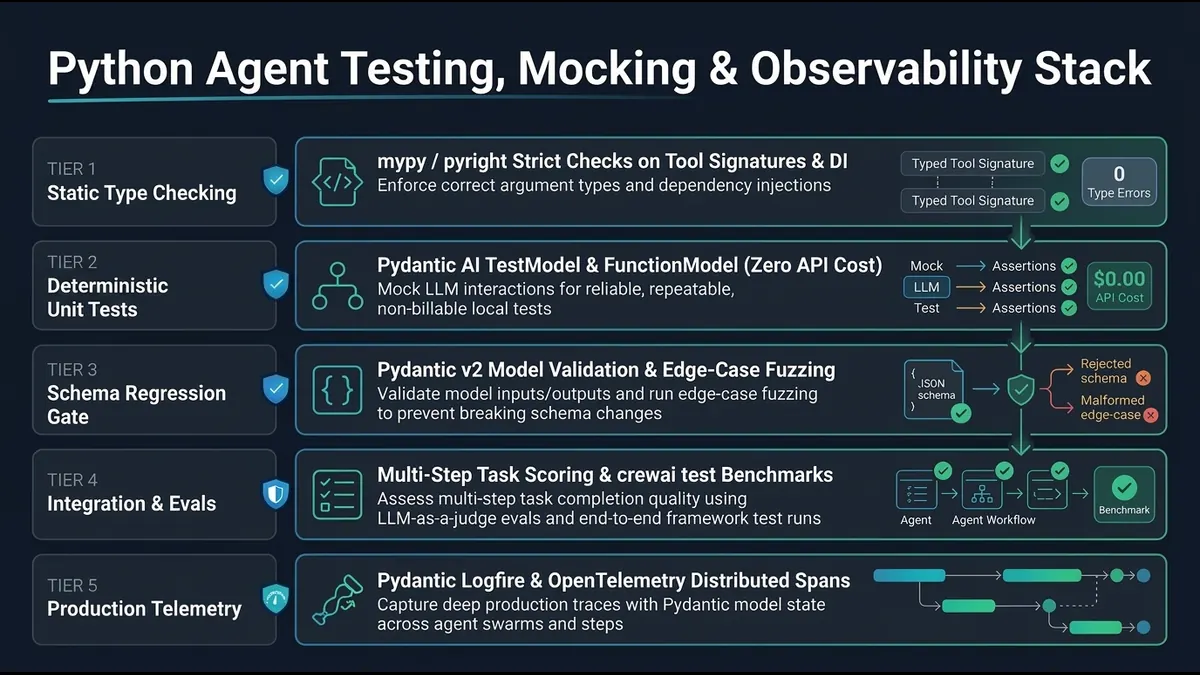 Figure 2: Production CI/CD testing, deterministic mocking, schema regression checks, and OpenTelemetry tracing layers.
Deterministic Unit Testing in Pydantic AI with TestModel and FunctionModel
Pydantic AI treats LLM calls like any other external I/O dependency that must be isolated during unit tests. Setting models.ALLOW_MODEL_REQUESTS = False globally in conftest.py guarantees that an unmocked agent immediately raises a runtime error instead of silently burning API credits in CI.
Developers choose between two native mock models via Agent.override(): TestModel automatically synthesizes valid schema-compliant data for output_type and invokes registered tools, while FunctionModel hands you full programmatic control over every ModelResponse turn.
import pytest
import httpx
from pydantic_ai import models, ModelResponse, TextPart, ToolCallPart
from pydantic_ai.models.test import TestModel
from pydantic_ai.models.function import AgentInfo, FunctionModel
from triage_service import SupportDeps, TriageDecision, triage_agent

# Hard safety guardrail: block all live LLM network requests in pytest
models.ALLOW_MODEL_REQUESTS = False


@pytest.mark.asyncio
async def test_schema_contract_with_test_model() -> None:
    transport = httpx.MockTransport(
        lambda req: httpx.Response(200, json={"tier": "enterprise"})
    )
    async with httpx.AsyncClient(transport=transport) as client:
        deps = SupportDeps(
            http_client=client,
            crm_base_url="https://crm.internal",
            api_token="test-token",
        )
        with triage_agent.override(model=TestModel()):
            result = await triage_agent.run(
                "Account acct_901 reports complete API downtime.", deps=deps
            )
            assert isinstance(result.output, TriageDecision)


@pytest.mark.asyncio
async def test_model_retry_recovery_with_function_model() -> None:
    turn = {"count": 0}

    def scripted_llm(messages: list, info: AgentInfo) -> ModelResponse:
        turn["count"] += 1
        if turn["count"] == 1:
            # Simulate LLM passing a malformed ID to trigger ModelRetry
            return ModelResponse(
                parts=[ToolCallPart("lookup_account_tier", {"account_id": "901"})]
            )
        if turn["count"] == 2:
            # Verify the agent recovers with the corrected prefix
            return ModelResponse(
                parts=[
                    ToolCallPart("lookup_account_tier", {"account_id": "acct_901"})
                ]
            )
        return ModelResponse(
            parts=[
                TextPart(
                    '{"ticket_id":"T-100","severity":"p0_outage",'
                    '"assigned_queue":"sre_oncall","customer_tier":"enterprise",'
                    '"summary":"Enterprise API outage","requires_human_escalation":true}'
                )
            ]
        )

    transport = httpx.MockTransport(
        lambda req: httpx.Response(200, json={"tier": "enterprise"})
    )
    async with httpx.AsyncClient(transport=transport) as client:
        deps = SupportDeps(
            http_client=client,
            crm_base_url="https://crm.internal",
            api_token="test-token",
        )
        with triage_agent.override(model=FunctionModel(scripted_llm)):
            result = await triage_agent.run("Outage on acct_901", deps=deps)
            assert result.output.severity == "p0_outage"
            assert turn["count"] == 3
That second test verifies the exact ModelRetry recovery path in under 20 milliseconds with zero network calls. Full testing patterns, including capture_run_messages and Pydantic Evals datasets, are documented in the Pydantic AI Testing and Evals Documentation.
Evaluation Runs and Mocking Workarounds in CrewAI
CrewAI takes an evaluation-first testing approach rather than a deterministic unit-mocking approach. Its CLI provides crewai test -n 5 -m gpt-6.2-sol, which executes the full crew five times against a live LLM and runs a scoring pass to grade task completion quality and execution time.
While crewai test is useful for prompt regression checks before a release, it incurs real token costs and exhibits non-deterministic variance in CI pipelines. Teams that want offline unit tests in CrewAI must patch the underlying LiteLLM or provider completion methods using unittest.mock.patch or point agent llm configs at a local Ollama stand-in model.
Observability: Pydantic Logfire OpenTelemetry vs CrewAI AMP
Production debugging requires tracing prompt tokens, tool arguments, and latency spans across every step. Pydantic AI integrates natively with Pydantic Logfire (logfire.configure() followed by logfire.instrument_pydantic_ai()), emitting standard OpenTelemetry GenAI spans that capture validation retries, token counts, and tool latency. Because Logfire builds on OpenTelemetry, teams can also export those exact spans to self-hosted Jaeger, Datadog, or Langfuse, as detailed in our OpenTelemetry GenAI semantic conventions Python guide.
CrewAI provides verbose console logging (verbose=True) in the open-source library, programmatic usage_metrics inside Flows, and centralized enterprise tracing inside the CrewAI AMP Control Plane. For open-source teams who want SQL-queryable span analytics without adopting a commercial control plane, Logfire’s native instrumentation and 10-million-span free tier (documented in the Pydantic Logfire Documentation) provide lower friction.
Token Economics, Latency Overhead, and Pricing Compared
Pydantic AI vs CrewAI performance differences stem primarily from orchestration topology rather than Python interpreter speed. Every additional agent handoff adds a full LLM network round-trip and re-injects system instructions, persona backstories, and prior task outputs into the prompt context.
Why Multi-Agent Handoffs Multiply Token Spend and Latency
In late-2026 production workloads running frontier models such as GPT-6.2 Sol or Claude Sonnet 5.5, a single Pydantic AI structured output call typically sends 600 to 1,200 input tokens (concise instructions, tool JSON schema, and user payload) and completes in one to two LLM round-trips.
By contrast, a three-agent CrewAI sequential pipeline (Researcher, Writer, Reviewer) executes at least three sequential LLM calls, and a hierarchical crew adds manager planning and verification turns on top. Because each downstream agent receives its own role/goal/backstory prompt plus the upstream task’s full prose output, total token consumption routinely scales to 3x to 5x the cost of an equivalent single-agent Pydantic AI run.
| Execution Pattern | Typical LLM Round-Trips | Relative Token Multiplier | Latency Profile | Best Economic Fit |
|---|---|---|---|---|
| Pydantic AI Single Agent + 1 Tool | 2 turns | 1.0x (baseline) | Low (near raw API latency) | Real-time APIs, structured extraction, triage |
| Pydantic AI + Pydantic Graph (3 Nodes) | 2 to 3 turns | 1.2x to 1.8x | Low to Moderate | Deterministic multi-step backend pipelines |
| CrewAI Sequential Crew (3 Agents) | 3 to 6 turns | 3.0x to 4.5x | Moderate to High | Async research reports, content drafting |
| CrewAI Hierarchical Crew (Manager + 3) | 5 to 10+ turns | 4.5x to 7.0x | High (serial delegation) | Complex open-ended synthesis with QA loops |
Teams running high-volume multi-agent systems can contain CrewAI token spend by assigning lightweight, cost-optimized models such as Gemini 4 Hydrogen, Claude Haiku 5.5, or GPT-6.1 Terra to routine worker agents while reserving flagship reasoning models (Claude Opus 5.5 or GPT-6.2 Astra) exclusively for the hierarchical manager. To evaluate when multi-agent topologies justify their token overhead, review our breakdown of supervisor vs swarm vs router multi-agent topologies.
Open-Source Licensing vs Cloud Platform Pricing
Both frameworks distribute their core Python libraries under the permissive MIT License, meaning self-hosted execution on Kubernetes, AWS ECS, or Cloudflare-backed Python workers carries zero framework licensing fees.
Commercial costs diverge only when adopting managed cloud platforms:
- Pydantic AI + Logfire: The agent library is always free. Optional Pydantic Logfire telemetry starts at $0/month (10M spans), scaling predictably on span ingestion volume rather than per-workflow execution caps.
- CrewAI + AMP / Studio: The Basic cloud plan is $0/month for 50 workflow executions and 1 seat. Production organizations deploying managed CrewAI Studio with RBAC, compliance controls, and higher execution limits negotiate custom Enterprise contracts while still paying OpenAI, Anthropic, or Google separately for all LLM tokens.
Top Pydantic AI Alternatives: Agno, LangGraph, and OpenAI Agents SDK
Developers searching for Pydantic AI alternatives often find that neither Pydantic AI’s minimal code-first loop nor CrewAI’s persona-driven crews matches their exact infrastructure constraints. Three Python frameworks stand out as the strongest alternatives in late 2026: Agno, LangGraph, and the OpenAI Agents SDK.
Agno: Batteries-Included Agent Apps with Built-In Storage
- Verdict: Agno is the best alternative to Pydantic AI for developers who want lightweight Python ergonomics paired with built-in session storage, persistent memory, and RAG knowledge bases out of the box.
- Best for: Full-stack AI product teams shipping user-facing assistants, multi-agent teams, and knowledge-base apps quickly without stitching together separate memory databases.
- Strengths:
- Fast, low-overhead Python runtime with clean agent and team abstractions documented in the Agno GitHub Repository.
- Native session persistence, vector knowledge retrieval, and model-agnostic string configuration across OpenAI, Anthropic, Gemini, and local providers.
- Pragmatic developer experience with a gentler learning curve than graph engines.
- Trade-offs:
- Less strict static type enforcement across dependency injection boundaries than Pydantic AI’s
RunContext[Deps]. - Less granular control over low-level cyclic state transitions and time-travel checkpointing than LangGraph.
- Less strict static type enforcement across dependency injection boundaries than Pydantic AI’s
- Pricing: Open-source core library ($0), with optional commercial enterprise and AgentOS hosting tiers.
LangGraph: Durable Cyclic State Machines and Human-in-the-Loop
- Verdict: LangGraph is the strongest Pydantic AI alternative for long-running, state-critical enterprise workflows that require ACID database checkpointing, cyclic retries, and human-in-the-loop pause/resume interrupts.
- Best for: Regulated financial, legal, and DevOps automation pipelines where workflows span hours or days and must survive worker restarts without losing state.
- Strengths:
- Mature LTS state-machine runtime supporting PostgreSQL and Redis checkpointers with deterministic time-travel replay.
- Native
interrupt()primitives for human approval gates and branching conditional edges. - Deep ecosystem integration with LangSmith tracing and LangChain document loaders.
- Trade-offs:
- Steepest learning curve of the five frameworks; modeling
TypedDictstate reducers and graph topologies adds boilerplate for simple single-agent APIs. - Structured output validation is optional per node rather than enforced globally at every agent boundary.
- Steepest learning curve of the five frameworks; modeling
- Pricing: Core Python library is open-source MIT ($0). Optional LangSmith observability and LangGraph Platform hosting use tiered commercial pricing. For a dedicated three-way architectural breakdown, read our Pydantic AI vs LangChain vs LangGraph comparison.
OpenAI Agents SDK: Native Handoffs for OpenAI-First Stacks
- Verdict: The OpenAI Agents SDK (the official successor to the experimental OpenAI Swarm repository) is the cleanest alternative for teams standardized exclusively on OpenAI models who want minimal-friction agent-to-agent handoffs.
- Best for: Engineering teams running GPT-6.2 Sol or Astra end to end who need dynamic triage handoffs, built-in input/output guardrails, and native OpenAI Responses API tracing.
- Strengths:
- First-party support for dynamic agent handoffs, sessions, and parallel guardrail checks documented in the OpenAI Agents SDK Documentation.
- Minimal conceptual surface area with zero third-party orchestration overhead on OpenAI endpoints.
- Built-in tracing dashboard directly inside the OpenAI platform console.
- Trade-offs:
- Optimized primarily for OpenAI APIs; routing workloads to Claude Sonnet 5.5, Gemini 4 Neon, or self-hosted vLLM requires third-party adapters and loses first-party ergonomics.
- Lacks Pydantic AI’s FastAPI-style
RunContextdependency injection and nativeTestModelpytest suite.
- Pricing: Open-source MIT SDK ($0); users pay standard OpenAI API token rates.
Quick Selection Table Across All Five Frameworks
| Framework | Core Strength | Primary Weakness | Choose It When |
|---|---|---|---|
| Pydantic AI | Strict Pydantic v2 typing, RunContext DI, pytest mocking |
Manual multi-agent wiring | Building reliable FastAPI microservices and extraction APIs |
| CrewAI | Role-based multi-agent crews and event-driven Flows | 3x to 5x token overhead on handoffs | Automating collaborative multi-role business workflows |
| Agno | Batteries-included memory, storage, and RAG apps | Less rigid state-graph control | Shipping full-stack assistant apps quickly |
| LangGraph | Durable PostgreSQL checkpointing and human interrupts | Steep graph-design boilerplate | Running long-lived, auditable cyclic workflows |
| OpenAI Agents SDK | Native OpenAI handoffs and guardrails | Tight OpenAI ecosystem coupling | Standardized 100% on OpenAI GPT-6.2 models |
Production Troubleshooting: Common Failure Modes and Fixes
Deploying either framework without explicit operational guardrails leads to predictable failure modes. Pydantic AI fails loudly at validation boundaries, whereas CrewAI tends to fail through runaway delegation loops or silent context drift across handoffs.
[!WARNING] Never deploy an autonomous agent loop to production without hard iteration limits (
retriesin Pydantic AI,max_iterin CrewAI) and per-request token budgets. An unconstrained retry or delegation loop can exhaust rate limits and spike API billing within minutes.
Fixing Pydantic AI Validation Loops and UnexpectedModelBehavior
When a model repeatedly returns JSON that violates your output_type schema or calls a tool with invalid arguments, Pydantic AI retries up to the configured retries threshold and then raises UnexpectedModelBehavior.
Three concrete fixes resolve 90% of these failures:
- Simplify nested union schemas: Deeply nested
Unionfields with ambiguous descriptions confuse smaller models. Add explicitField(description=...)metadata and prefer flatLiteralenums over unconstrained strings. - Distinguish
ModelRetryfrom infrastructure exceptions: Only raiseModelRetrywhen the LLM can fix the mistake (such as a malformed ID or date format). Let HTTP 503s and database timeouts raise standard exceptions so your service’s circuit breaker handles them instead of wasting LLM retries. - Verify v2 model prefixes: After the Pydantic AI v2.0 shift, the
openai:prefix defaults toOpenAIResponsesModel. If you proxy traffic through an older OpenAI-compatible gateway that only supports Chat Completions, switch the model string explicitly toopenai-chat:<model-name>.
Stopping CrewAI Infinite Delegation Loops and Silent Context Drift
CrewAI production incidents usually surface in two patterns: agents bouncing tasks back and forth until timeouts hit, or an upstream agent hallucinating a fact that downstream agents treat as ground truth.
- Disable unnecessary delegation: Set
allow_delegation=Falseon every specialist agent unless dynamic delegation is explicitly required by a hierarchical manager. - Enforce
max_iterandmax_rpm: Cap every agent atmax_iter=3to5for deterministic tasks and setmax_rpmto stay comfortably below provider rate limits. - Wrap custom tool logic in
try/except: Uncaught exceptions inside a custom tool’s_runmethod can crash an entire Crew run mid-flight. Catch expected API errors inside the tool and return a concise, actionable error message so the agent can degrade gracefully. - Lock handoff contracts with
output_pydantic: Attach a Pydantic schema to intermediate tasks so downstream agents consume structured JSON fields rather than parsing free-form markdown paragraphs.
Failure Mode Remediation Matrix
| Symptom / Error | Framework | Root Cause | Production Fix |
|---|---|---|---|
UnexpectedModelBehavior after retries |
Pydantic AI | Complex output_type schema or vague ModelRetry message |
Flatten schema with Literal types, add Field(description=...), and pass specific correction hints |
404 on custom OpenAI-compatible proxy |
Pydantic AI | v2.0 openai: prefix targets Responses API |
Switch prefix to openai-chat:<model> for Chat Completions gateways |
| Accidental live API bills in pytest | Pydantic AI | Unmocked agent invoked during CI run | Set models.ALLOW_MODEL_REQUESTS = False in conftest.py |
| Runaway token spend & timeouts | CrewAI | Unbounded delegation between peer agents | Set allow_delegation=False, cap max_iter=4, and inspect flow.usage_metrics |
| Silent hallucination in final output | CrewAI | Upstream agent passed unvalidated prose context | Enforce output_pydantic on intermediate tasks and lower model temperature to 0.1 |
Frequently Asked Questions
Is Pydantic AI better than CrewAI for production APIs?
Pydantic AI is better suited for production FastAPI microservices because it enforces Pydantic v2 output schemas, injects dependencies cleanly via RunContext, and adds minimal latency over raw LLM calls. CrewAI fits asynchronous background pipelines where multi-role collaboration matters more than sub-second request latency.
Can Pydantic AI build multi-agent systems like CrewAI?
Yes, Pydantic AI supports multi-agent workflows through agent delegation inside tools, programmatic handoffs, and Pydantic Graph for typed finite state machines. Unlike CrewAI, Pydantic AI requires you to wire delegation logic explicitly in Python rather than relying on persona backstories.
Does CrewAI support Pydantic structured outputs?
CrewAI supports structured outputs by attaching a Pydantic BaseModel to a task via the output_pydantic or output_json parameters and by typing CrewAI Flows with Flow[MyState]. However, schema validation in CrewAI is task-level rather than embedded across every tool dependency and streaming boundary.
How do you unit test Pydantic AI vs CrewAI agents without paying for LLM calls?
Pydantic AI provides native zero-cost unit testing through Agent.override() with TestModel or FunctionModel alongside ALLOW_MODEL_REQUESTS = False to block live network calls in pytest. CrewAI lacks a built-in structural mock model, so teams either run crewai test against live endpoints or patch underlying clients with unittest.mock.
Why does CrewAI use more tokens than Pydantic AI?
CrewAI consumes 3x to 5x more tokens on multi-step workflows because each agent handoff sends role definitions, backstories, task prompts, and accumulated natural-language context back to the model. Pydantic AI avoids inter-agent prose chatter by executing typed tool calls and returning compact validated JSON.
What are the best alternatives to Pydantic AI in 2026?
The top Pydantic AI alternatives in 2026 are Agno for batteries-included agent apps with built-in storage, LangGraph for durable cyclic state graphs with checkpointing, and the OpenAI Agents SDK for lightweight OpenAI-native handoffs. Teams needing rapid role-based business workflow prototypes typically choose CrewAI.
Can you use Pydantic AI and CrewAI together in the same Python project?
Yes, Python teams frequently run Pydantic AI for low-latency, type-safe API endpoints and structured data extraction while invoking CrewAI Flows asynchronously via Celery or background workers for multi-role research jobs. Both frameworks share Pydantic v2 models, allowing you to reuse the same schema definitions across both layers.
Architectural Recommendation
Start by auditing whether your workflow actually requires multiple autonomous personas. If your system takes structured input, invokes internal APIs, and returns validated JSON inside a backend service, install Pydantic AI with explicit provider extras, wire RunContext dependency injection, and lock down CI with ALLOW_MODEL_REQUESTS = False.
Choose CrewAI when the problem genuinely benefits from role specialization, shared memory, and rapid business-process prototyping, and wrap your Crews inside typed CrewAI Flows with output_pydantic and strict max_iter caps. If your architecture instead demands multi-day PostgreSQL state checkpointing or built-in assistant storage, step sideways to LangGraph or Agno rather than forcing either framework outside its design envelope.
Many production Python teams combine both patterns cleanly. Use Pydantic AI for synchronous FastAPI endpoints where p95 latency and strict schema validation dominate, and offload asynchronous, multi-role research or drafting jobs to CrewAI Flows running on background workers with shared Pydantic v2 data contracts.