How to Run DeepSeek-R1 Locally: Complete Setup Guide (2026)
Learn how to run DeepSeek-R1 locally with Ollama and LM Studio. Master VRAM hardware sizing, Apple Silicon setups, and official prompting guidelines.
The release of DeepSeek-R1 shattered the assumption that competitive frontier reasoning requires multi-million-dollar proprietary cloud clusters. By applying large-scale reinforcement learning without prior supervised fine-tuning, the model performs internal chain-of-thought verification that rivals closed commercial engines in mathematics, algorithmic programming, and scientific deduction.
However, relying on third-party cloud endpoints introduces latency spikes, rate limits, and compliance challenges for proprietary corporate codebases. Running DeepSeek-R1 locally solves these operational constraints, providing complete data privacy, deterministic reproducibility, and zero subscription overhead.
Selecting the right deployment architecture requires matching your physical compute hardware against the correct model scale. This comprehensive technical guide walks through hardware VRAM calculations, terminal setup with Ollama, graphical desktop deployment with LM Studio, and the essential prompting rules required to extract optimal reasoning performance.
Key Takeaways
- The distilled DeepSeek-R1 models (1.5B to 70B) bring frontier reasoning to consumer GPUs, running comfortably on 8GB to 48GB of VRAM.
- The 32B Qwen-distilled variant represents the optimal performance-per-watt balance, executing on single 24GB GPUs (RTX 3090/4090) or 36GB+ Apple Silicon Macs.
- Running the full 671B Mixture-of-Experts (MoE) foundation model requires enterprise clusters (multiple A100/H100s) or high-memory Mac Studios (128GB+ unified memory).
- Never use a system prompt with DeepSeek-R1; injecting instructions into the system field interferes with the reinforcement learning policy and degrades reasoning.
- Maintain temperature at 0.0 for deterministic code and mathematics, or 0.6 for open-ended analytical reasoning.
What Is DeepSeek-R1 and How Does Local Inference Work?
An open-weights reasoning model architecture developed by DeepSeek that uses reinforcement learning to incentivize internal chain-of-thought verification before answering, capable of executing locally via quantized GGUF weights on consumer GPUs, Apple Silicon unified memory, or CPU-RAM pipelines.
To understand local deployment, developers must distinguish between the foundational DeepSeek-R1 model and its distilled siblings. The full foundation model is a massive Mixture-of-Experts (MoE) architecture containing 671 billion total parameters, of which roughly 37 billion activate on any single forward pass.
Because housing 671 billion parameters in active memory demands hundreds of gigabytes of storage bandwidth, the DeepSeek team also trained smaller dense models. They distilled R1’s reasoning traces into established open backbones like Qwen 2.5 and Llama 3.3.
When you execute DeepSeek-R1 on your local workstation, the inference runtime loads the model’s neural weights from disk directly into your GPU VRAM or Apple Silicon unified memory.
During generation, the model dynamically creates intermediate reasoning tokens wrapped inside <think> and </think> XML delimiters. These tokens represent the model exploring problem trees, verifying intermediate logic, and double-checking calculations before formulating the final user-facing response.
In autonomous software development, local reasoning engines operate as the deliberative planning layer. Teams exploring how AI agents operate routinely integrate local R1 instances to decompose complex programming tasks into verifiable execution sub-steps without leaking internal business logic over public networks.
┌────────────────────────────────────────────────────────────────────────┐
│                   DEEPSEEK-R1 LOCAL EXECUTION PIPELINE                 │
├────────────────────────────────────────────────────────────────────────┤
│  User Query ──► [User Prompt Context] (No System Prompt Injected)      │
│                         │                                              │
│                         ▼                                              │
│  Inference Engine (Ollama / LM Studio / llama.cpp / vLLM)              │
│                         │                                              │
│                         ▼                                              │
│  Reasoning Engine ──► Generates <think> Tokens (Self-Correction Loop) │
│                         │                                              │
│                         ▼                                              │
│  Synthesis Layer ──► Closes </think> Tag & Emits Final Verified Answer │
└────────────────────────────────────────────────────────────────────────┘
The underlying technical mechanics are fully detailed in the official DeepSeek-R1 GitHub repository and documented on the Hugging Face DeepSeek-R1 model hub. By executing these reasoning steps entirely within local memory, developers gain predictable latency and total operational sovereignty.
Hardware Requirements and VRAM Sizing for Local DeepSeek-R1
The fundamental bottleneck in local Large Language Model inference is memory bandwidth, not raw compute throughput. Every token generated requires the inference engine to stream the entire parameter footprint across the memory bus. If a model fits completely into your GPU’s high-speed VRAM, inference runs at dozens of tokens per second. If it overflows into standard system RAM, performance immediately collapses to a slow crawl.
The Quantization Standard (Q4_K_M)
Most local deployments rely on 4-bit Medium K-quantization (Q4_K_M). Quantization compresses 16-bit floating-point weights into 4-bit integers with negligible loss in reasoning capability, reducing memory footprint by approximately 70%.
The table below breaks down the physical hardware and memory thresholds required to run each DeepSeek-R1 variant locally:
| Model Variant | Base Model | Weight Size (Q4) | Min VRAM Required | Recommended GPU Hardware | Apple Silicon Unified RAM | Average Speed |
|---|---|---|---|---|---|---|
| DeepSeek-R1-1.5B | Qwen 2.5 | 1.1 GB | 4 GB VRAM | GTX 1660 / RTX 3050 | 8 GB (M1/M2/M3) | 60–100 tok/sec |
| DeepSeek-R1-7B | Qwen 2.5 | 4.7 GB | 8 GB VRAM | RTX 3060 / 4060 (8GB) | 16 GB (Base M-Series) | 35–55 tok/sec |
| DeepSeek-R1-8B | Llama 3.1 | 4.9 GB | 8 GB VRAM | RTX 3060 / 4060 (8GB) | 16 GB (Base M-Series) | 35–55 tok/sec |
| DeepSeek-R1-14B | Qwen 2.5 | 9.0 GB | 12 GB VRAM | RTX 4070 (12GB) / 3080 | 18–24 GB (M-Pro) | 25–40 tok/sec |
| DeepSeek-R1-32B | Qwen 2.5 | 20.0 GB | 24 GB VRAM | RTX 3090 / 4090 (24GB) | 36–48 GB (M-Max) | 18–30 tok/sec |
| DeepSeek-R1-70B | Llama 3.3 | 43.0 GB | 48 GB VRAM | 2× RTX 3090/4090 (48GB) | 64–96 GB (M-Max/Studio) | 10–18 tok/sec |
| DeepSeek-R1-671B | Native MoE | 131–400 GB | 160–500 GB | 4–8× A100/H100 PCIe | 128–192 GB (Mac Studio) | 4–12 tok/sec |
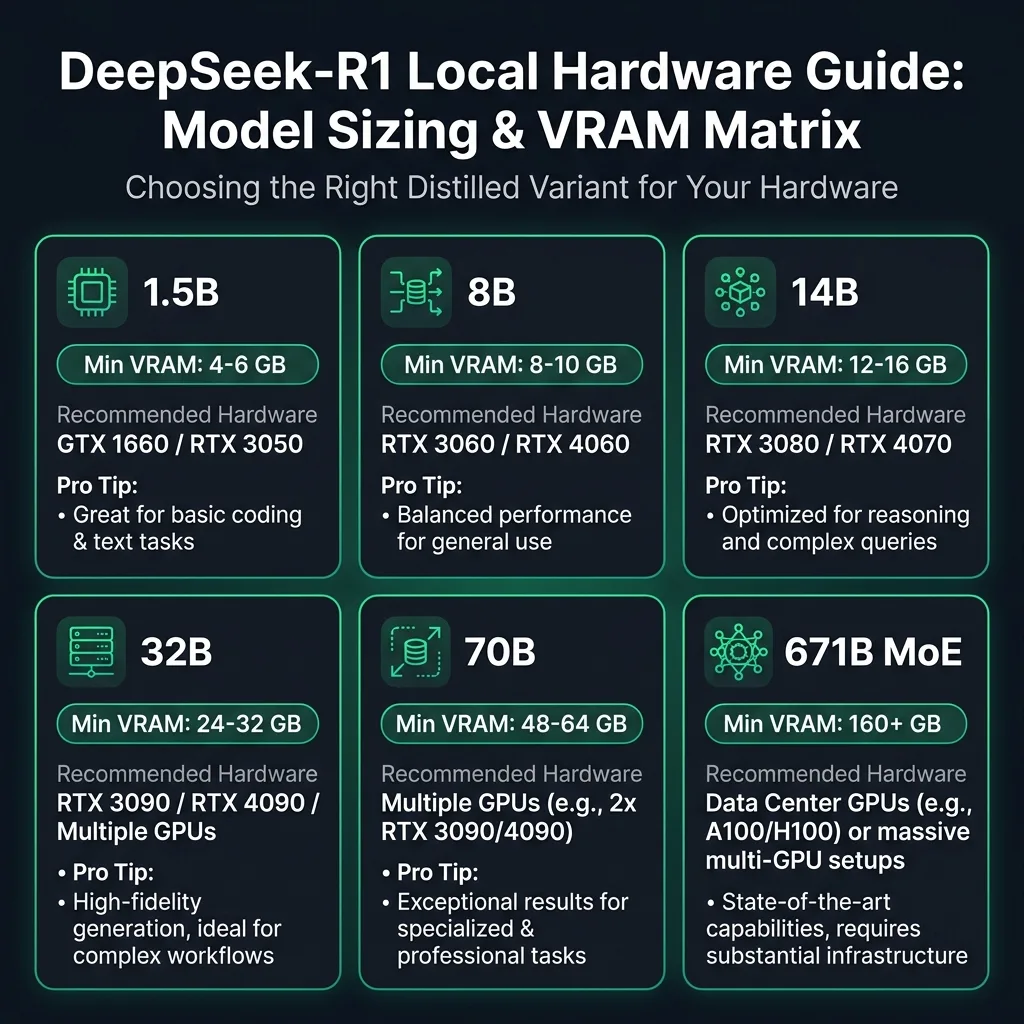 DeepSeek-R1 Local Hardware Matrix: Recommended VRAM, compatible graphics cards, and operational pro tips across all six model scales.
For an in-depth breakdown of consumer graphics cards and memory interfaces, review our comprehensive benchmark of the best GPUs for AI workloads to evaluate memory bus widths and cooling configurations.
Dedicated GPU vs. Apple Silicon Unified Memory
Local inference hardware generally falls into two distinct hardware paradigms:
- Discrete NVIDIA GPUs (CUDA): Consumer cards like the RTX 3060, 4070, and 4090 feature ultra-high memory bandwidth (ranging from 360 GB/s on midrange cards up to 1,008 GB/s on the RTX 4090).
However, they are strictly constrained by dedicated VRAM capacities. If your model parameters and KV cache exceed 24 GB, a single consumer card cannot load the model without offloading layers to system RAM.
- Apple Silicon Unified Memory (Metal): Mac systems powered by M-series Pro, Max, and Ultra chips share a single memory pool between the CPU and GPU.
A Mac Studio with 128 GB or 192 GB of unified memory can load models that would otherwise require multiple professional datacenter GPUs costing tens of thousands of dollars.
If you plan to run deepseek r1 on mac hardware, Apple Silicon unified memory offers a compelling architecture for loading 32B and 70B parameter checkpoints without needing multi-GPU enterprise server racks.
Calculating KV Cache and Context Window Memory Overhead
Model weights represent only one component of your total memory consumption. As conversations expand, the inference engine maintains an attention key-value (KV) cache for every prompt and response token.
Running DeepSeek-R1 with a 32,000-token context window can easily consume an additional 4 GB to 8 GB of VRAM beyond the static model file. When sizing your hardware, always reserve a 25% safety margin between the quantized weight size and your maximum available VRAM to prevent Out-Of-Memory (OOM) crashes during long reasoning runs.
How to Run DeepSeek-R1 Locally with Ollama in 5 Steps
Ollama is the most widely adopted command-line inference engine for local artificial intelligence. It bundles model downloading, quant management, CUDA/Metal GPU acceleration, and an OpenAI-compatible REST server into a single lightweight background daemon.
Step 1: Install Ollama on Your Operating System
Open your terminal and install Ollama using the appropriate package command for your platform:
# macOS (Homebrew or direct download)
brew install ollama

# Linux (One-line automated shell script)
curl -fsSL https://ollama.com/install.sh | sh
For Windows users, download the official installer executable directly from the Ollama DeepSeek-R1 model library. After installation completes, verify the daemon is active:
ollama --versionStep 2: Select and Pull Your Chosen Quantized Variant
Ollama maintains pre-packaged versions of all DeepSeek-R1 distilled variants. Review your available hardware VRAM and download your chosen model size:
# For laptops or 8GB VRAM cards (fast 8B model)
ollama pull deepseek-r1:8b

# For 12GB VRAM cards like the RTX 4070 (balanced 14B model)
ollama pull deepseek-r1:14b

# For 24GB GPUs or 36GB+ Macs (recommended reasoning flagship 32B model)
ollama pull deepseek-r1:32b

# For dual-GPU workstations or 64GB+ Macs (heavyweight 70B model)
ollama pull deepseek-r1:70b
Downloading the 32B variant requires transferring approximately 20 GB of data. Ollama automatically verifies the SHA-256 hash checksums during download to ensure model weight integrity.
Step 3: Launch an Interactive Terminal Reasoning Session
Once the download finishes, start an interactive chat session directly in your terminal:
ollama run deepseek-r1:14bInput a complex logic puzzle or algorithmic challenge to test the reasoning engine:
>>> Prove that the square root of 2 is irrational using proof by contradiction.The model will immediately output its <think> stream, evaluating each algebraic transformation before presenting the completed proof. For additional commands and server arguments, refer to our complete Ollama local AI guide.
Step 4: Configure Context Window and Parameters via a Custom Modelfile
By default, Ollama initializes models with a conservative 2,048-token context window to prevent memory exhaustion on entry-level computers. Because DeepSeek-R1 frequently emits extensive reasoning chains, you should expand the context window to at least 16,384 tokens.
Create a plain text file named Modelfile:
FROM deepseek-r1:14b

# Set 16K context window
PARAMETER num_ctx 16384

# Set official baseline reasoning temperature
PARAMETER temperature 0.6

# Set repeat penalty to prevent cyclical thought loops
PARAMETER repeat_penalty 1.15
Build and register your customized local model:
ollama create my-deepseek-r1 -f ./Modelfile
ollama run my-deepseek-r1
Step 5: Connect Local DeepSeek-R1 to Developer Tools via REST API
Ollama automatically exposes an OpenAI-compatible local web server at http://localhost:11434/v1. You can test this endpoint directly from your terminal using curl:
curl http://localhost:11434/v1/chat/completions \
  -H "Content-Type: application/json" \
  -d '{
    "model": "deepseek-r1:14b",
    "messages": [
      {"role": "user", "content": "Write an efficient Python function to solve the Two Sum problem in O(n) time."}
    ],
    "temperature": 0.0
  }'
You can point developer tools like Cursor, Continue.dev, or Open WebUI to http://localhost:11434/v1 by using deepseek-r1:14b as the model name and any placeholder string as the API key.
How to Run DeepSeek-R1 in LM Studio with a Graphical UI
Setting up deepseek r1 lm studio environments gives users an outstanding graphical interface for local model execution. For developers deploying on Apple Silicon, consult our guide on running AI models on Mac to configure Metal acceleration and unified memory thresholds. It features interactive model discovery, granular GPU layer offloading controls, visual thinking token collapsible accordions, and a built-in local inference server.
┌────────────────────────────────────────────────────────────────────────┐
│                        LM STUDIO INTERFACE OVERVIEW                    │
├────────────────────────────────────────────────────────────────────────┤
│  [ Search Hugging Face ] ──► "deepseek-r1-distill-qwen-32b-gguf"       │
│                                      │                                 │
│                                      ▼                                 │
│  [ GPU Offload Controls ] ──► Set GPU Layers to 'MAX' (Full VRAM)      │
│                                      │                                 │
│                                      ▼                                 │
│  [ Chat Playground ] ───────► Collapsible <think> Thinking Accordion   │
│                                      │                                 │
│                                      ▼                                 │
│  [ Local Developer Server ] ─► OpenAI-Compatible Endpoint on Port 1234  │
└────────────────────────────────────────────────────────────────────────┘
Detailed installation steps and advanced settings are maintained in the official LM Studio documentation.
Step 1: Install LM Studio and Search for Quantized Weights
Download the installer from the LM Studio website for macOS, Windows, or Linux. Launch the application and click the Search icon (magnifying glass) in the left sidebar navigation.
Type deepseek-r1-distill-qwen-32b into the search bar. LM Studio queries the Hugging Face repository directly, displaying quantized GGUF weights compiled by reputable community quantizers like bartowski and TheBloke. Select the Q4_K_M quantization variant and click Download.
Step 2: Configure Hardware Acceleration and GPU Offloading
Navigate to the Chat tab and select your downloaded DeepSeek-R1 model from the top dropdown menu. In the right-hand configuration panel under Inference Parameters:
-
Locate the GPU Acceleration section and toggle GPU Offload to ON.
-
Set the GPU offload slider to MAX. If your graphics card has 24 GB of VRAM, ensure all model layers are allocated to the GPU.
-
Set the Context Length to 16,384 tokens to give the model ample room for long reasoning chains.
If you have an 8GB or 12GB GPU and choose to run the 32B model, you can partially offload layers. Be advised that hybrid CPU-GPU splitting significantly reduces token generation speed.
Step 3: Interacting with Collapsible Reasoning Blocks
LM Studio includes native support for DeepSeek-R1’s reasoning architecture. When the model generates its response, LM Studio captures all tokens between <think> and </think>, placing them inside a sleek collapsible UI panel labeled Thought Process.
This interface allows you to expand the accordion to audit the model’s logic step by step, or collapse it to focus strictly on the final code or answer.
Step 4: Activating the Local Developer Server
To use your LM Studio model inside external code editors or third-party web clients:
-
Click the Developer tab (bracket icon
<->) in the left navigation bar. -
Ensure your DeepSeek-R1 model is selected in the server panel.
-
Click Start Server to initialize the endpoint on
http://localhost:1234/v1.
You can now use standard OpenAI Python or TypeScript SDK clients to query your local machine without sending a single byte outside your local area network.
Prompting DeepSeek-R1: Temperature, System Prompts, and Think Tags
DeepSeek-R1 does not behave like traditional instruction-tuned chat models (such as GPT-4 or standard Claude). Because its behavior was shaped primarily through reinforcement learning policies that reward extended chain-of-thought exploration, prompting it incorrectly can degrade its performance or trap it in infinite reasoning loops.
Rule 1: Avoid System Prompts Entirely
The single most critical rule when prompting DeepSeek-R1 is to avoid system prompts. Omitting the deepseek r1 system prompt is essential because rigid personas interfere with the model’s natural reasoning pattern. During training, the reasoning policy was conditioned almost entirely on direct user interactions without heavy persona framing or system-level constraints.
When developers inject verbose system prompts (such as “You are an expert full-stack developer who only outputs code”), the model frequently struggles to reconcile those constraints with its internal thinking chain. Instead, incorporate all context, instructions, and output constraints directly into the User message:
# INCORRECT (Avoid system prompt):
System: You are an expert Python engineer. Provide only code.
User: Implement a binary search tree.

# CORRECT (Include all directives in the user turn):
User: Write a clean Python implementation of a binary search tree with insert and search methods. Include type hints and docstrings. Do not include introductory text; output the code block directly after your reasoning.
Rule 2: Precision Temperature Calibration
Temperature controls the randomness of token selection. Selecting the correct deepseek r1 temperature setting prevents erratic output and maintains logical consistency across thousands of thinking steps:
-
Temperature 0.0 (Deterministic / Code & Math): Use temperature 0.0 when solving competitive programming challenges, mathematical proofs, or SQL generation where logical variance causes syntax errors.
-
Temperature 0.5 to 0.7 (Standard Baseline): The official recommended baseline is 0.6. This setting provides enough creative flexibility to explore alternative problem paths without devolving into repetitive reasoning loops.
-
Avoid Temperatures Above 1.0: Exceeding 1.0 causes the model’s self-reflection mechanism to destabilize, producing runaway repetitive
<think>loops that hit maximum token limits without producing an answer.
Rule 3: Managing the <think> Reasoning Tokens
In production pipelines, parsing deepseek r1 think tags allows client applications to isolate internal chain-of-thought tokens from user-facing answers. Here is how to query DeepSeek-R1 using Python and the official OpenAI SDK, separating the thinking block from the final result:
import re
from openai import OpenAI

# Connect to local Ollama server
client = OpenAI(
    base_url="http://localhost:11434/v1",
    api_key="ollama"  # Required by SDK, ignored by local server
)

prompt = "Explain how Raft consensus algorithm handles network partitions in distributed systems."

response = client.chat.completions.create(
    model="deepseek-r1:14b",
    messages=[
        {"role": "user", "content": prompt}
    ],
    temperature=0.6,
    max_tokens=4096
)

raw_output = response.choices[0].message.content

# Separate thinking chain from final answer using regex
think_match = re.search(r"<think>(.*?)</think>", raw_output, re.DOTALL)
final_answer = re.sub(r"<think>.*?</think>", "", raw_output, flags=re.DOTALL).strip()

if think_match:
    internal_reasoning = think_match.group(1).strip()
    print("=== INTERNAL THINKING LOG ===")
    print(internal_reasoning[:300] + "...\n")

print("=== FINAL VERIFIED ANSWER ===")
print(final_answer)
Which Distilled DeepSeek-R1 Model Should You Choose?
With six different model sizes available, choosing the right variant depends on balancing your hardware budget against your required reasoning depth.
┌────────────────────────────────────────────────────────────────────────┐
│               DEEPSEEK-R1 DISTILLED SELECTION HIERARCHY                │
├────────────────────────────────────────────────────────────────────────┤
│   1.5B – 8B   │  Edge & Laptop Testing (Fast, basic logic checks)     │
│   14B         │  Workstation Generalist (Strong math, fits 12GB VRAM)  │
│   32B         │  ⭐ THE SWEET SPOT (Rivals closed frontier reasoning)   │
│   70B         │  Enterprise Powerhouse (Deep synthesis, needs 48GB+)   │
│   671B        │  Foundational MoE (Datacenter or 128GB+ Mac Studio)    │
└────────────────────────────────────────────────────────────────────────┘
The 1.5B and 7B/8B Variants: Edge & Mobile Prototyping
The 1.5B model is remarkably nimble, running comfortably on smartphones, Raspberry Pi clusters, or entry-level laptops without dedicated GPUs. While it understands basic chain-of-thought mechanics, its limited parameter capacity makes it prone to logical shortcuts on complex mathematical problems.
The 7B (Qwen) and 8B (Llama) models are ideal for everyday code assistance on modern ultrabooks and 8GB graphics cards. For developers running budget rigs, review our benchmark of local LLMs for RTX 4060 and 3070 GPUs to compare throughput figures.
The 14B Variant: The Efficient Workstation Workhorse
The 14B Qwen-distilled variant offers an exceptional upgrade in formal reasoning. It fits comfortably inside the 12GB VRAM buffer of mainstream GPUs like the RTX 4070 or 3080 while delivering token speeds exceeding 30 tokens per second. For users who cannot step up to 24GB hardware, the 14B model represents the most capable single-GPU daily driver.
The 32B Variant: The Definitive Sweet Spot
The 32B model is widely recognized across the open-source community as the absolute sweet spot of the R1 family. When calculating deepseek r1 32b vram requirements, account for both the 20GB static weight footprint and the dynamic KV cache buffer. On standardized mathematics (MATH-500) and coding (HumanEval) benchmarks, the 32B distilled model scores within 2% to 4% of the massive 671B foundation model.
Because a 4-bit quantization occupies roughly 20 GB of memory, it fits entirely into a single 24GB consumer graphics card (NVIDIA RTX 3090 or RTX 4090) or an Apple Silicon Mac with 36 GB or 48 GB of unified memory. It produces deeply articulated, multi-page mathematical and architectural deductions without noticeable reasoning degradation.
The 70B and Full 671B Models: Datacenter & Research Clusters
Running deepseek r1 70b local instances provides supreme nuance in prose synthesis, multi-lingual translation, and enterprise legal analysis. However, needing 43 GB of memory at Q4 quantization requires either dual 24GB GPUs or a 64GB+ Apple Silicon workstation.
Understanding deepseek r1 671b requirements clarifies why the full foundation model is generally reserved for dedicated AI infrastructure or 192GB Mac Studios. Unless you are running comprehensive scientific evaluations, the 32B distilled model delivers 90% of the practical utility at a fraction of the computational and financial overhead.
Frequently Asked Questions About Running DeepSeek-R1 Locally
Can I run the full 671B DeepSeek-R1 model on a home computer?
Running the full 671B model on a standard consumer desktop is practically impossible because it requires at least 131 GB of RAM even under extreme 1.58-bit quantization.
However, creators using a high-end Mac Studio equipped with 128 GB or 192 GB of unified memory can run quantized versions locally. Standard home PC users should run the distilled 14B or 32B variants instead.
Which tool is better for local execution: Ollama or LM Studio?
Ollama is superior for developers who want a lightweight command-line background service that integrates with terminal workflows, scripts, and local API servers.
LM Studio is better for users who prefer an intuitive desktop application with visual model searching, slider-based GPU layer offloading, and collapsible thought process panels. Both tools use the same high-performance llama.cpp inference engine under the hood.
How much VRAM do I need to run DeepSeek-R1 32B?
You need a minimum of 20 GB to 24 GB of VRAM to run the 32B model at 4-bit quantization (Q4_K_M). An NVIDIA RTX 3090 or RTX 4090 can run the model entirely within GPU memory at 20 to 30 tokens per second.
On macOS, an Apple Silicon Mac with at least 36 GB or 48 GB of unified memory is required to accommodate both the weights and the active context cache.
Why does DeepSeek-R1 fail or loop when given a system prompt?
DeepSeek-R1 was trained with large-scale reinforcement learning focused on direct user interactions. Introducing rigid system prompts conflicts with the model’s natural reasoning pattern, often causing it to hallucinate, skip its internal verification steps, or cycle through repetitive thoughts. Always place your system instructions directly inside the user prompt turn.
What is the ideal temperature setting for DeepSeek-R1?
The official recommended baseline temperature is 0.6 for general problem-solving and conversational reasoning.
For deterministic tasks like competitive mathematics, algorithm design, or syntax parsing, set the temperature to 0.0 to eliminate randomness. Avoid temperatures above 1.0, which frequently destabilize the chain-of-thought mechanism.
Can I connect local DeepSeek-R1 to Cursor or VS Code?
Yes. Both Ollama and LM Studio expose OpenAI-compatible API servers on local ports (http://localhost:11434/v1 for Ollama and http://localhost:1234/v1 for LM Studio).
You can configure extensions like Continue.dev, Cline, or Cursor to query these local URLs, enabling complete local AI code completion and architectural review with zero API costs.
How do I hide the <think> reasoning block in API responses?
When querying DeepSeek-R1 programmatically through its local API endpoint, the output includes raw <think> and </think> tags. You can strip these tokens using a regular expression such as re.sub(r"<think>.*?</think>", "", text, flags=re.DOTALL) in Python.
Alternatively, desktop interfaces like LM Studio automatically hide these tokens inside interactive collapsible UI accordions.
Is running DeepSeek-R1 locally completely private and offline?
Yes. Once you download the model weights using Ollama or LM Studio, you can completely disconnect your machine from the internet.
All matrix multiplications, prompt processing, and token generations execute strictly on your local physical hardware without transmitting telemetry, logs, or prompt data to any external server.
The Future of Local Reasoning Models and Final Recommendations
The arrival of DeepSeek-R1 marks a permanent change in how artificial intelligence models are deployed and consumed. High-grade logical reasoning is no longer the exclusive domain of proprietary cloud monopolies. By running open-weights reasoning models on local hardware, developers regain full privacy, absolute predictability, and complete control over their technical computing environment.
To establish an optimal local reasoning stack today:
-
Start with Ollama: Deploy
deepseek-r1:14bif you have an 8GB to 12GB GPU, or step up todeepseek-r1:32bif you possess 24GB of VRAM or 36GB+ of Apple Silicon unified memory. -
Respect the Prompting Rules: Omit system prompts, set your temperature to 0.6, and ensure your context window is allocated to at least 16,384 tokens.
-
Secure Your Workflows: Point your local IDE tools to your localhost REST endpoint to build private, cost-free coding workflows.
For teams building air-gapped workstations and self-contained AI infrastructure, explore our comprehensive framework on how to build an offline AI setup to configure private local document retrieval, secure vector indexing, and fully autonomous edge workflows. Download your chosen variant today and experience frontier reasoning running directly on your own hardware.