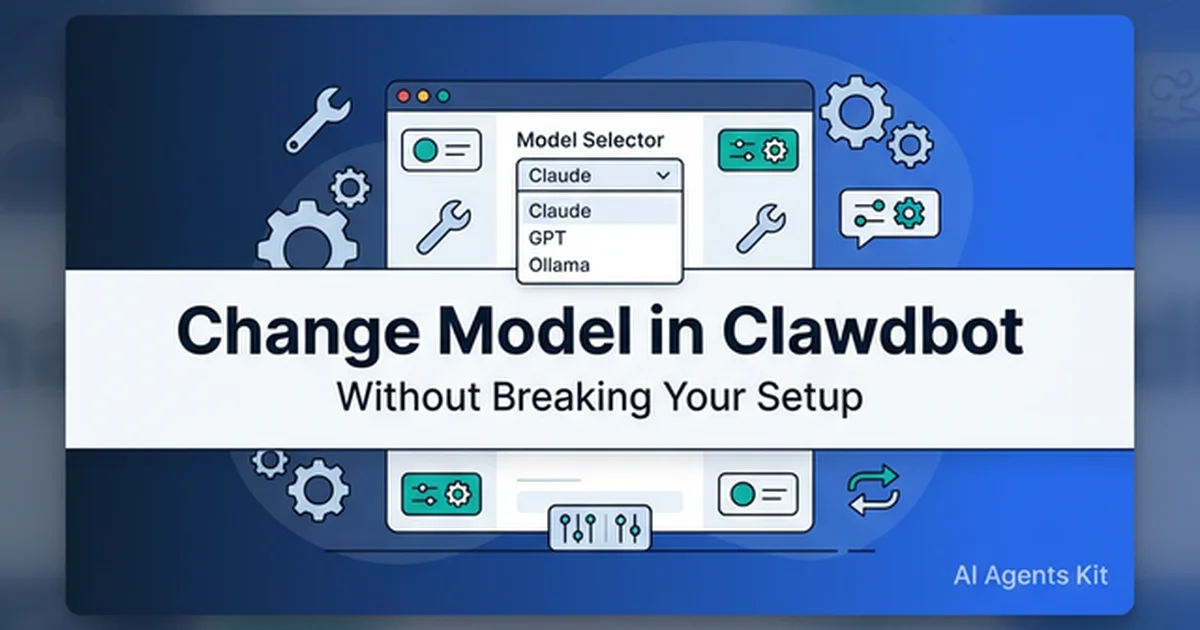
How to Change the Model in Clawdbot (OpenClaw) Without Breaking Your Setup
Step-by-step guide for switching models in Clawdbot, now OpenClaw, safely using /model, openclaw models set, and targeted config edits.
Changing the model in Clawdbot sounds straightforward, but an unverified configuration can halt an entire agent deployment. Operators frequently encounter silent crashes when editing raw settings or switching providers before credentials initialize. While the project permanently rebranded to OpenClaw in early 2026, many engineers still search for legacy Clawdbot workflows because command structures and daemon environments remain broadly backward-compatible.
The safest operational practice avoids ad hoc edits to global configuration files. Production stability requires testing candidate models in active sessions first, verifying provider authentication, and persisting changes only after validation. If you have not yet deployed the base agent runtime, follow our step-by-step OpenClaw installation guide across macOS, Linux, and Windows WSL2. For foundational context on the project’s evolution, this complete Moltbot and OpenClaw guide details how the transition from Clawdbot to Moltbot and OpenClaw unfolded.
Key Takeaways
- OpenClaw enforces model selection through a strict hierarchy starting with session tests via
/model <provider/model>and persisting defaults withopenclaw models set <provider/model>.- Direct edits to
~/.openclaw/openclaw.jsonmust be performed surgically usingopenclaw config set agents.defaults.model.primaryto avoid corrupting JSON5 syntax or surrounding tool bindings.- The common “Model is not allowed” error is triggered by the
agents.defaults.modelscatalog acting as an active security allowlist for session overrides.- Enabling Anthropic Prompt Caching on Claude Sonnet 5 drops repetitive input token costs by 90% and latency by up to 80%, while local 14B-32B Ollama offloading cuts cloud token burn entirely.
- Always validate a candidate model with a live tool-using workflow before declaring the switch successful in production daemon environments.
This runbook establishes a low-risk operational workflow for model reconfiguration. We examine what changes during a model switch, identify safe CLI commands, review surgical edits to openclaw.json, and outline recovery steps for failed deployments. The objective is maintaining continuous daemon stability while migrating to newer model architectures.
What Breaks When You Change the Model in Clawdbot or OpenClaw?
Changing the model in Clawdbot or OpenClaw breaks setups when unauthenticated provider namespaces, unlisted models in security allowlists, or malformed JSON5 configurations cause the background gateway daemon to reject requests or fail during startup.
In production environments, OpenClaw resolves models through a coordinated chain of provider routing, default agent configurations, allowlist policies, and provider credentials. According to the OpenClaw Models CLI Documentation, selection begins with agents.defaults.model.primary before evaluating fallback cascades. The agents.defaults.models configuration key simultaneously defines the security catalog governing which models /model session overrides can access.
Incoming Prompt / Session
          │
          ▼
┌─────────────────────────────────────────┐
│ 1. Active Session Override (/model)     │ ──► Checks agents.defaults.models allowlist
└─────────────────────────────────────────┘
          │ (If no session override)
          ▼
┌─────────────────────────────────────────┐
│ 2. Primary Default Model                │ ──► agents.defaults.model.primary
└─────────────────────────────────────────┘
          │ (If primary throttled/unreachable)
          ▼
┌─────────────────────────────────────────┐
│ 3. Fallback Model Cascade               │ ──► agents.defaults.model.fallbacks
└─────────────────────────────────────────┘
This multi-tiered architecture provides granular execution governance, but careless reconfiguration triggers unexpected service interruptions. A syntactically valid model identifier will fail if the provider credentials are absent, if the model is omitted from allowlists, or if a legacy alias fails to resolve. The OpenClaw Official GitHub Repository architecture specifications emphasize using explicit provider/model identifiers rather than relying on legacy provider fallback heuristics.
Three primary failure modes recur across self-hosted agent environments:
- Provider mismatch: The active configuration targets OpenAI, Anthropic, or Ollama before API credentials or local endpoints are initialized.
- Policy mismatch: The requested model exists on the upstream provider, but the local installation allowlist actively blocks execution.
- Config blast radius: Manual edits unintentionally corrupt adjacent keys governing channels, Model Context Protocol (MCP) servers, sandboxing, or filesystem boundaries.
Operators often misinterpret these errors as provider outages. In practice, the OpenClaw gateway daemon halts execution defensively because it cannot reconcile requested parameters with active configuration states.
OpenClaw loads configuration from an optional JSON5 file located at ~/.openclaw/openclaw.json. While JSON5 permits inline comments and trailing commas, it increases the risk of subtle syntax oversights during manual updates. This reality reinforces why our comprehensive Clawdbot setup guide treats model switching as a strict configuration management discipline.
Treat model migrations with standard production change management:
- Inspect the current default state and active allowlists.
- Apply a single, targeted modification to the target parameter.
- Validate runtime tool execution and response latency.
- Maintain an immediate, verified rollback path.
This structured procedure prevents tedious debugging cycles caused by configuration drift. It ensures the assistant remains responsive across all automated messaging channels.
Autonomous assistants rarely utilize language models in isolation. The configured primary model orchestrates browser automation, terminal execution, workspace file edits, and external API requests. Changing the default affects tool-calling precision, refusal thresholds, token consumption rates, and prompt injection resilience.
Testing must extend beyond conversational greetings. A basic greeting confirms only minimal network connectivity. It fails to validate structured tool invocations, fallback handling, or security boundaries. Reliable validation requires executing a representative automated task, such as a file modification or MCP database lookup.
Does the Clawdbot rename to OpenClaw change model switching?
No, the rename from Clawdbot to OpenClaw does not alter core model switching mechanics because CLI commands, routing hierarchies, and JSON5 configuration paths remain completely backward-compatible across both naming conventions while preserving existing session daemon bindings.
While the branding shifted, the underlying engineering requirements remain identical. Operators executing a clawdbot change model task must manage credentials, allowlists, and fallbacks without corrupting background daemon processes. Whether developers search for how to change model in openclaw, change model in openclaw, open claw change model, or an openclaw model change guide, the operational sequence is identical.
Similarly, configuring a clawdbot local model for local inference or integrating the agent into a clawdbot home assistant environment follows this exact command structure. The documentation standard reflects this transition, ensuring engineers searching for a clawdbot tutorial or clawdbot architecture discover verified OpenClaw commands.
Understanding this naming alignment clarifies three equivalent search queries:
change model in clawdbotopenclaw change default modelopenclaw model switching
Each variation targets the same operational objective across the unified codebase. Modern deployments use the openclaw binary while preserving legacy directory paths when present.
4 Safe Ways to Switch Models Without Wiping Config
Switching methods carry distinct operational risk profiles. Some commands modify only the ephemeral chat session, while others write persistent defaults to disk. The safest strategy proceeds from low-risk session experiments to permanent system configuration.
1. Use /model when the goal is testing, not commitment
The Anthropic Prompt Caching API Documentation notes that persistent agent instructions benefit from prompt caching, dropping prompt token processing latency by up to 80% and token costs by 90%. Testing candidate models in-session allows operators to evaluate these latency improvements directly without modifying system defaults.
Session testing isolates experimental changes from production workflows. If an evaluation model fails during tool execution, existing background automations continue running unhindered on the established default.
Session-level overrides are ideal when:
- Validating a newly configured API provider key.
- Benchmarking output quality between frontier models on complex coding tasks.
- Escalating temporary compute resources for a demanding analytical workflow.
- Isolating latency degradation or upstream API rate limits.
Execute an in-session model test using this command sequence:
/model list
/model status
/model anthropic/claude-sonnet-5
Session switching is instantly reversible directly in chat. If a model exhibits hallucinations or stumbles on tool schemas, the operator can switch back immediately. For teams contrasting Anthropic and OpenAI reasoning behaviors, our practical Claude API tutorial examines provider-specific architectural differences.
What is the difference between /model, models set, and configure?
The /model command switches models exclusively for the active chat session without altering persistent files, whereas openclaw models set updates system defaults in openclaw.json, and openclaw configure launches an interactive wizard that guides multi-parameter adjustments safely.
| Switching Method | Primary Command | Scope of Change | Failure Blast Radius | Recommended Scenario |
|---|---|---|---|---|
| Session Override | /model provider/model |
Active conversation only | Zero persistent risk | Evaluating model responses, debugging tool calls |
| CLI Persistent | openclaw models set <id> |
agents.defaults.model.primary |
Low (validated schema) | Routine updates to system default model |
| Interactive Wizard | openclaw configure |
Multi-section settings | Medium (guided changes) | Initial setup, adding providers, configuring fallbacks |
| Direct JSON5 Edit | openclaw config set <path> |
Raw configuration file | High if hand-edited | Advanced provider endpoints, complex array edits |
This comparison clarifies appropriate operational boundaries:
- Execute
/modelto verify candidate connectivity and reasoning. - Run
openclaw models setto commit a validated model as the system default. - Run
openclaw configurewhen reviewing providers and fallbacks together. - Use
openclaw config setwhen applying programmatic, scripted adjustments.
Categorizing model modifications by risk ensures teams avoid deploying unverified models to production systems.
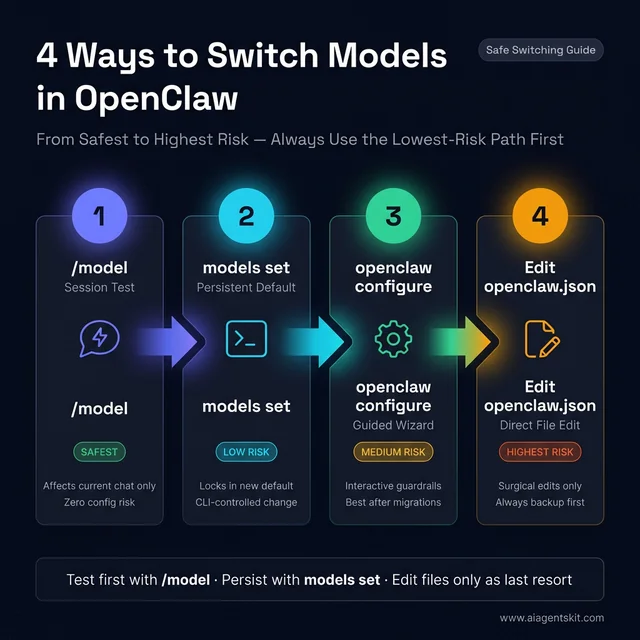
OpenClaw model switching includes four safe paths ordered by blast radius. Advance methodically from session overrides to CLI persistent commands.
2. Use openclaw models set when the goal is a persistent default
Once session testing confirms model performance, commit the persistent default via openclaw models set <provider/model>. This command updates the primary model property while enforcing valid provider syntax.
Execute this standard CLI workflow to establish a persistent default:
openclaw models list
openclaw models status
openclaw models set anthropic/claude-sonnet-5
openclaw models status
Utilizing openclaw models set offers significant advantages over manual file editing:
- It updates target model properties without altering adjacent configuration blocks.
- It validates the
provider/modelnamespace structure during input parsing. - It provides immediate terminal feedback on active configuration state.
- It eliminates syntax errors common when editing nested JSON5 structures by hand.
Most production issues trace back to manual file corruption. Adopting official CLI commands eliminates this entire class of failures.
How to change the default model in OpenClaw step by step
When executing an openclaw change default model workflow, follow this controlled verification sequence:
- Inspect the active default by running
openclaw models status. - Verify exact model naming conventions with
openclaw models list. - Test candidate reasoning in a live session via
/model provider/model. - Persist the change with
openclaw models set provider/model. - Verify updated system defaults with
openclaw models status. - Run a representative multi-step tool workflow before closing the maintenance window.
This disciplined progression prevents premature configuration changes. Inspecting models list prevents typographical errors, while session testing validates credentials. Running a complete tool-using workflow verifies that autonomous execution remains stable under the new model.
3. Use openclaw configure when the team needs guardrails
The interactive openclaw configure wizard provides structured prompts for complex reconfigurations. It is particularly valuable when auditing legacy environments or adjusting multiple provider keys simultaneously.
The interactive configuration wizard is recommended when:
- Managing an inherited installation with unknown configuration history.
- Adding new upstream model providers alongside existing credentials.
- Establishing fallback cascades and vision-specific image models.
- Reviewing system allowlists to grant access across developer teams.
The configuration wizard prompts for required parameters sequentially, minimizing the risk of omitting necessary authentication tokens or fallback definitions.
In multi-user deployments, model selection represents shared infrastructure rather than individual preference. Utilizing guided configuration flows ensures all required provider mappings are documented and validated before deployment.
4. Direct config edits should be the last resort, not the default
Directly modifying ~/.openclaw/openclaw.json should be reserved for complex state reconciliation that the CLI does not expose. When the runtime provides dedicated commands like openclaw models set, manual editing introduces unnecessary operational risk.
Manual edits are appropriate only when adjusting custom base URLs or intricate routing rules. Isolating configuration tasks prevents unintentional changes to messaging daemons, tool definitions, or file sandboxes.
Adhering to this structured approach separates two distinct engineering decisions:
- Can the local gateway reach and authenticate with the target model?
- Should this candidate model govern all autonomous background tasks?
Session overrides resolve connectivity and tool capability. Persistent CLI updates establish production policy. Merging these steps risks breaking working environments during routine evaluations.
Safe model switch checklist
Before updating a persistent production default, verify each prerequisite:
- The candidate model is registered in
openclaw models list. - Provider API keys are configured and authenticated.
- The target model is permitted by the active allowlist.
- The previous known-good default model is recorded for rollback.
- A fresh backup copy of
~/.openclaw/openclaw.jsonis stored safely. - A representative validation task has been selected for testing.
Following this checklist ensures consistent execution across teams and systems.
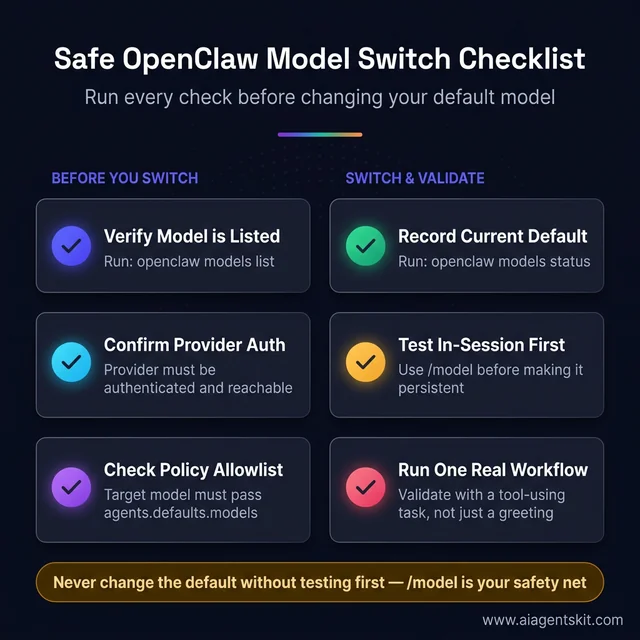
The six-step OpenClaw model switch checklist separates pre-switch checks from live validation. Running a real tool-using task ensures operational stability.
How Should You Edit openclaw.json Safely?
You should edit openclaw.json safely by creating a backup file first, inspecting active properties with openclaw config get, and executing targeted updates via openclaw config set rather than manually rewriting raw JSON5 configuration text.
The OpenClaw Gateway Configuration Specification notes that system settings reside at ~/.openclaw/openclaw.json. The OpenClaw Config CLI Reference further details how dot-path notation provides surgical programmatic access to nested properties without requiring manual text editing.
Replacing an entire configuration file with examples copied from online forums frequently overwrites critical local parameters. Targeted CLI modifications preserve unique channel tokens, port assignments, and workspace paths.
Always execute this pre-edit inspection sequence:
cp ~/.openclaw/openclaw.json ~/.openclaw/openclaw.json.bak
openclaw models status
openclaw config get agents.defaults.model.primary
openclaw config get agents.defaults.models
This verification sequence establishes essential operational baselines:
- Captures the active primary model identifier.
- Confirms the contents of the security allowlist.
- Verifies file readability and JSON5 structure.
- Creates an immediate rollback copy.
When applying modifications, restrict updates strictly to model-related keys:
agents.defaults.model.primaryagents.defaults.model.fallbacksagents.defaults.modelsmodels.providers.*(only when registering new API endpoints)
Avoid modifying surrounding keys governing channels, browser sandboxing, or memory indexes unless specifically required. A model change must remain strictly isolated.
Production setups accumulate custom configurations over time, including tailored system prompts and tool permissions. Overwriting a working file with a generic template causes widespread configuration drift. Surgical updates protect your established operational state.
Using openclaw config set offers safer programmatic control than opening a text editor:
openclaw config set agents.defaults.model.primary "openai/gpt-5.6-sol"
openclaw config get agents.defaults.model.primary
openclaw models status
Dot-path CLI updates prevent accidental syntax corruption, missing braces, or unclosed string literals. They ensure parameters conform to internal schema requirements.
Following any configuration modification, validate daemon health immediately:
openclaw models status
openclaw models list
openclaw logs --follow
The OpenClaw Gateway Logging Guide explains that gateway daemons output real-time startup errors and authentication events directly to logging streams. Monitoring logs ensures operators catch startup errors before they impact users. These structured diagnostics align directly with the recovery workflows detailed in our guide to AI error handling patterns.
Maintain a simple operational changelog detailing previous and newly deployed model identifiers. Documenting adjustments ensures rapid attribution if downstream tool workflows experience unexpected behavioral shifts.
Which config paths matter most for model changes?
The four critical configuration paths governing OpenClaw model selection are agents.defaults.model.primary for system defaults, agents.defaults.model.fallbacks for provider redundancy, agents.defaults.models for session allowlists, and models.providers.* for upstream API keys and custom endpoint URLs.
| Configuration Path | Operational Purpose |
|---|---|
agents.defaults.model.primary |
Defines the global default primary model for all new sessions |
agents.defaults.model.fallbacks |
Specifies ordered fallback models if the primary provider throttles |
agents.defaults.models |
Acts as the security catalog and allowlist for session overrides |
models.providers.* |
Configures upstream API credentials, base URLs, and custom parameters |
Explicitly targeting these specific configuration paths simplifies manual reviews and automated deployments.
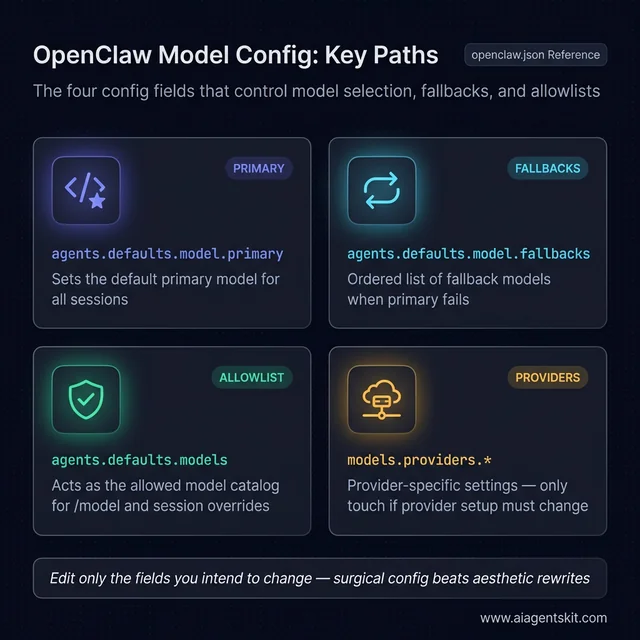
Four configuration paths govern OpenClaw model behavior. Keep provider credentials isolated and modify only primary or fallback keys.
What Causes “Model Not Allowed” and Other Failures?
The ‘Model is not allowed’ error occurs when the requested model is omitted from the agents.defaults.models catalog allowlist, whereas ‘unknown model’ failures stem from missing provider authentication, invalid model namespace formatting, or unreachable local endpoints.
The OpenClaw Gateway FAQ clarifies that when agents.defaults.models is populated, it functions as an enforced security perimeter. Any attempt to invoke an unlisted model via /model generates an explicit policy rejection, safeguarding installations against unauthorized API consumption.
Session Request: /model anthropic/claude-opus-5
                       │
                       ▼
┌──────────────────────────────────────────────┐
│ Check: Is model in agents.defaults.models?    │
└──────────────────────────────────────────────┘
         │                           │
        YES                          NO
         ▼                           ▼
┌─────────────────┐       ┌─────────────────────────────────────┐
│ Authenticate &  │       │ Gateway Halts Defensively:          │
│ Execute Request │       │ "Model Not Allowed" (Policy Error)  │
└─────────────────┘       └─────────────────────────────────────┘
When confronted with policy rejections, execute this diagnostic sequence:
openclaw config get agents.defaults.models
openclaw models list
Resolve policy rejections by selecting an appropriate remediation path:
- Register the target model identifier inside the
agents.defaults.modelsallowlist. - Clear the allowlist if your operational environment permits unconstrained model selection.
- Select an alternate model already permitted by the active catalog.
The second widespread failure pattern involves provider resolution. An unknown model error indicates that the gateway cannot authenticate with the provider or locate the requested endpoint, even when the model identifier is syntactically accurate.
Indicators that point toward provider configuration issues include:
- The model identifier appears in examples but is missing from
openclaw models list. - The
/modelcommand executes without error, but queries hang indefinitely. - Cloud providers function normally, but local model requests fail immediately.
- Terminal logs display upstream HTTP 401 Unauthorized or HTTP 404 Not Found responses.
Local inference adds hardware dependencies to provider resolution. The Ollama Model Library documentation specifies that local models require dedicated VRAM allocation, recommending a minimum context window of 64k tokens to accommodate system instructions and tool definitions. For step-by-step local model deployment, consult our guide to running local AI with Ollama.
How to fix model not allowed in OpenClaw
To fix the ‘model not allowed’ error in OpenClaw, verify active permissions with openclaw config get agents.defaults.models, append the target model string to that catalog array, and test the override in-session before updating persistent defaults.
Follow this exact troubleshooting procedure:
- Query the active allowlist via
openclaw config get agents.defaults.models. - Check whether the target model identifier is missing from that list.
- Verify the exact provider namespace against
openclaw models list. - Append the missing model to the catalog or select an approved model.
- Validate the override using
/modelbefore modifying persistent defaults.
Differentiating error types accelerates recovery:
model not allowed: Indicates a security allowlist policy restriction.unknown model: Indicates an unauthenticated provider, invalid syntax, or network timeout.
Addressing policy restrictions with authentication changes wastes valuable engineering time. Diagnosing the exact failure mode ensures targeted, effective remediation.
How to switch between Claude, GPT, OpenRouter, and Ollama
Switching providers involves reconfiguring authentication, endpoint routing, and operational assumptions alongside model strings.
| Migration Path | Primary Configuration Changes | Key Operational Risk |
|---|---|---|
| Claude to GPT | Provider key and model identifier namespace | Stale environment variables or invalid provider prefix |
| GPT to OpenRouter | Custom base URL and specialized routing ID | Malformed model routing string or missing header |
| Cloud to Ollama | Local daemon endpoint and model download | Local Ollama daemon unreachable or insufficient VRAM |
| Ollama to Cloud | Provider API credentials and rate limits | Unexpected token costs on automated high-frequency loops |
A provider migration introduces multiple architectural variables. Always validate the new provider using /model in a live session before updating the global configuration file.
Local deployments present unique operational trade-offs:
- Pointing default routing to a local model before the daemon initializes halts all automated background tasks.
- Deploying smaller open-weight models without sufficient reasoning capabilities can lead to frequent tool-calling errors in complex automation workflows.
Smaller quantized models exhibit higher vulnerability to prompt injection and struggle with multi-step planning. In production environments with wide tool permissions, defaulting to frontier cloud models remains the more secure and reliable design choice.
Team prompting habits naturally adapt to the active model’s reasoning style. When migrating defaults, establish consistent baseline tasks to objectively evaluate performance differences.
Legacy tutorials frequently demonstrate outdated model names lacking provider namespaces. Modern OpenClaw releases require explicit provider/model identifiers. Copy exact strings directly from openclaw models list to prevent resolution failures.
When a model migration fails, execute this recovery sequence:
- Restore the previous verified model default immediately.
- Review gateway daemon logs to diagnose the specific error.
- Confirm provider API credentials and network connectivity.
- Verify allowlist membership in
agents.defaults.models. - Retest candidate models in-session before re-attempting persistent updates.
Following this structured sequence ensures rapid recovery and continuous system availability.
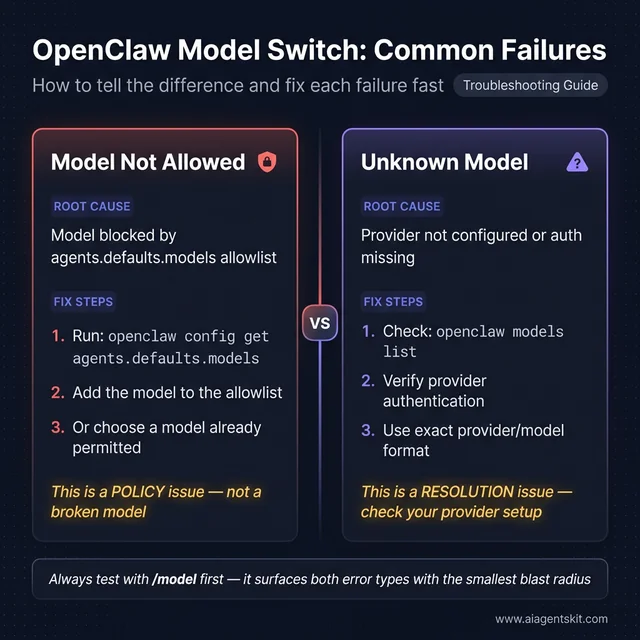
Identify whether your failure is a policy allowlist error or an unresolved provider namespace. Diagnose the root cause before modifying configuration files.
Which Model Should Become Your OpenClaw Default?
Your OpenClaw default model should match the reasoning complexity of your most frequent automated tasks, balancing frontier intelligence such as Claude Sonnet 5 for tool calling against local 14B Ollama models for high-volume, cost-sensitive background workflows.
Selecting an optimal default model requires evaluating specific workflow requirements rather than relying on vendor benchmarks. The OpenAI API Models Specification outlines capability tiers, context capacities, and token pricing structures across modern model families.
┌────────────────────────────────────────────────────────────────────────┐
│                        Workload Tier Breakdown                         │
├───────────────────────┬──────────────────────┬─────────────────────────┤
│ Tier                  │ Recommended Model    │ Best For                │
├───────────────────────┼──────────────────────┼─────────────────────────┤
│ Reasoning-Heavy       │ Claude Sonnet 5      │ Multi-step coding, MCP  │
│ Operational           │ GPT-5.6 Sol          │ Mixed routing, tasks    │
│ Cost-Optimized        │ GPT-5.6 Luna         │ High-volume messaging   │
│ Privacy-First (Local) │ Qwen 2.5 Coder 32B   │ Air-gapped offline work │
└───────────────────────┴──────────────────────┴─────────────────────────┘
Select your default model using these practical operational criteria:
- Reasoning-heavy default: Deploy frontier reasoning models for complex programming, multi-step tool execution, and extensive workspace modifications.
- Operational default: Deploy balanced, mid-tier models for daily task automation, message drafting, and status reporting.
- Budget default: Deploy cost-optimized cloud models as primary defaults, escalating demanding sessions via
/modelon demand. - Privacy-first default: Deploy local Ollama models when data privacy is mandatory, verifying that host hardware supplies adequate VRAM headroom.
The primary model acts as the central coordinator for your entire agent installation. It executes shell scripts, interacts with Model Context Protocol (MCP) servers defined by the Model Context Protocol Architecture Specification, and accesses local filesystems. Selecting an capable default ensures reliable adherence to security constraints. Evaluating these trade-offs is examined in our ChatGPT vs Claude vs Gemini comparison.
Configuring fallback cascades prevents outages during upstream provider disruptions. Establishing redundant model routing ensures continuous operation even when primary APIs experience rate limiting:
- Primary: High-capability frontier reasoning model.
- Fallback: High-throughput secondary cloud model or local endpoint.
- Catalog: Enforced allowlist defining permissible session overrides.
- Workflow: Documented session escalation procedures for demanding tasks.
This architecture delivers high reliability while preventing unnecessary configuration adjustments.
When should fallbacks be used instead of changing the default?
Configured fallbacks should be used when the current primary model remains optimal for daily automation but requires automated failover protection against upstream provider rate limits, regional service outages, or temporary API quota exhaustion.
Deploy fallback cascades when:
- The primary model performs well, but occasional provider throttling causes timeouts.
- Background tasks can gracefully degrade to secondary models during service disruptions.
- The installation integrates multiple authenticated provider credentials cleanly.
- Maintaining continuous gateway uptime is an operational priority.
Update the primary default when:
- Daily automation tasks consistently outgrow the current model’s reasoning capabilities.
- Routine API expenditures exceed acceptable operational budgets.
- Automated workflows shift from conversational chat to complex programming.
- The existing model exhibits recurring tool schema formatting errors.
Distinguishing between high-availability requirements and baseline capability needs helps teams build resilient architectures.
Follow these decision principles:
- If the assistant routinely reviews code or calls MCP tools, prioritize frontier reasoning models.
- If the assistant handles lightweight scheduling and notifications, select balanced, cost-effective models.
- If workloads require absolute data sovereignty, deploy local open-weight models with dedicated hardware.
- In shared team environments, prioritize operational predictability over experimental features.
Operational reliability outweighs benchmark performance. A model that ranks highly on academic leaderboards may struggle in production if it handles tool calls inconsistently or introduces excessive latency.
Validate candidate default models against real-world tasks:
- Execute a natural-language query requiring tool execution.
- Execute a complex file-modification task.
- Test context retrieval across multi-turn conversation history.
- Verify proper refusal behavior on out-of-scope instructions.
- Measure response latency and token consumption metrics.
This structured validation ensures the candidate model reliably handles production workloads.
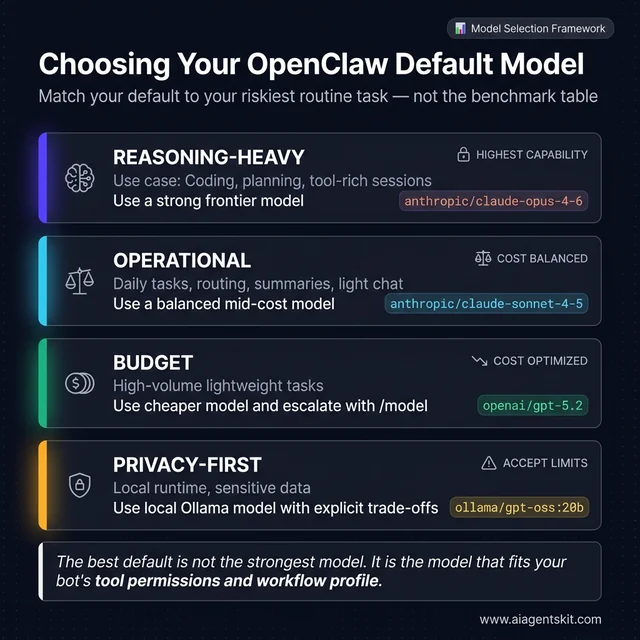
Select an OpenClaw default model based on workflow complexity and operational budget. Local Ollama deployments require explicit VRAM headroom.
Avoid combining default model updates with major provider migrations or credential updates. Modifying multiple components simultaneously obscures root causes if failures occur. Isolating configuration adjustments simplifies testing and guarantees straightforward rollbacks.
A disciplined deployment strategy ensures your assistant remains dependable. Isolating model updates protects system stability, transforming upgrades into predictable, low-risk operational routines.
Frequently Asked Questions About Clawdbot and OpenClaw Model Switching
Can OpenClaw switch models without a restart?
Yes, session-level adjustments executed via /model apply instantly to active chat conversations without restarting the background gateway daemon. Persistent changes made through openclaw models set automatically govern any newly initiated chat sessions or scheduled agent executions.
Why does OpenClaw return a ‘Model is not allowed’ error?
The agents.defaults.models configuration key functions as an active security allowlist that restricts which models session overrides can select. If a requested model identifier is omitted from that catalog array, the gateway halts execution before sending external provider requests.
Is /model safer than editing openclaw.json directly?
Yes, the /model command operates strictly in session memory and leaves your persistent configuration files completely untouched. Testing a candidate model in-session verifies API keys and tool-calling capabilities before committing permanent system-wide changes.
Can local Ollama models and cloud models coexist in OpenClaw?
Yes, OpenClaw natively supports hybrid deployments by routing between local Ollama instances and external cloud providers like Anthropic and OpenAI. Operators often allocate local 14B models for low-cost file indexing while preserving cloud frontier models for complex multi-turn reasoning.
What is the fastest rollback method if a model switch fails?
You can restore stability immediately by running openclaw models set <previous-provider/model> or copying back your saved openclaw.json.bak configuration. Confirm recovery by inspecting live gateway logs with openclaw logs --follow to ensure all daemons initialize cleanly.
The Safe Sequence for Future Model Changes
The established operational sequence remains simple: verify active status, evaluate candidate models using /model, commit validated defaults with openclaw models set, and modify openclaw.json directly only when complex customization requires it. This progression guarantees that updates remain observable, narrow in scope, and completely reversible.
If your team is evaluating whether to maintain cloud-hosted API dependencies or transition workloads to self-hosted local infrastructure, our detailed guide on cloud vs local AI trade-offs provides comprehensive architectural decision criteria.