Context7 MCP Guide: Eliminate AI Hallucinations with Live Docs in Cursor & Claude (2026)
Configure Upstash Context7 MCP to provide Cursor, Claude Code, and VS Code with live, version-accurate documentation, slashing API hallucinations.
Every software engineer pair-programming with large language models has experienced the friction of documentation drift. An agent writes code with absolute confidence, only for the build to fail because a framework removed a function, renamed an export, or altered its configuration schema in a recent major release.
Static model weights cannot track fast-moving ecosystems. When developers prompt Cursor, Claude Code, or Windsurf to scaffold an application using Next.js 15, Tailwind CSS v4, or React 19, the underlying model relies on pre-training data that is often twelve to eighteen months old.
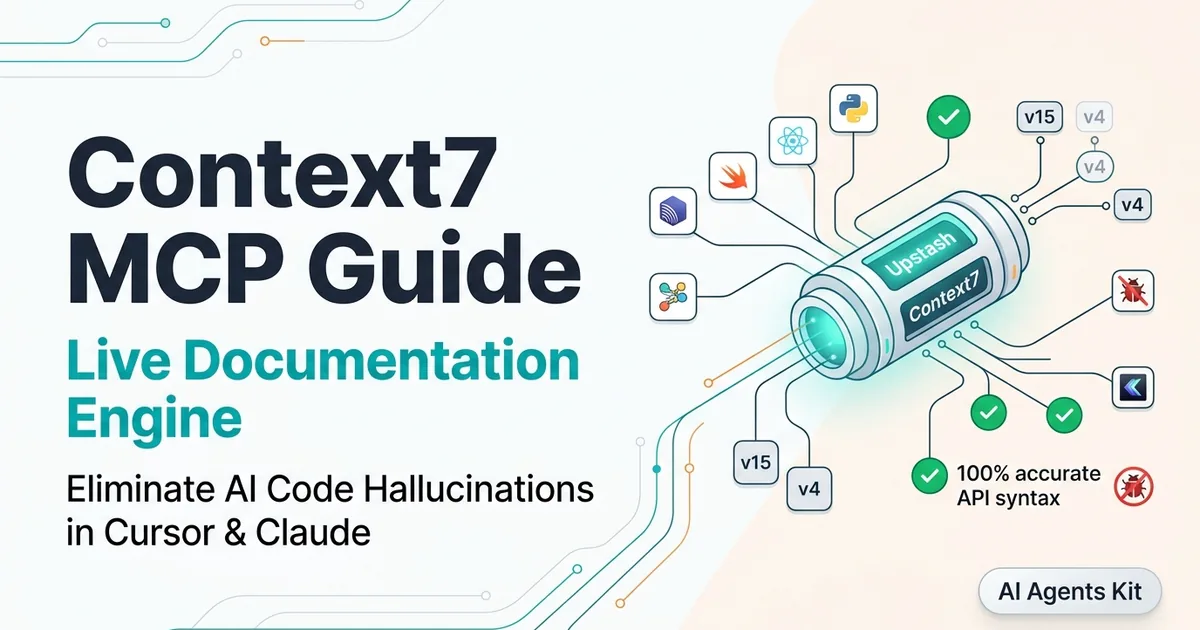
The context7 mcp integration solves this challenge at the protocol level. Developed by Upstash, Context7 is a specialized Model Context Protocol server that extracts, vectorizes, and serves version-specific documentation directly into an agent’s prompt context during active coding sessions.
Key Takeaways
- Context7 acts as an authoritative, real-time documentation retrieval engine that eliminates API hallucination for fast-evolving software libraries.
- The server provides a two-tool MCP pipeline (
resolve-library-idandget-library-docs) to transform natural language queries into accurate, semantic markdown documentation slices.- Engineers can install the server in under two minutes using
npx ctx7 setupacross Cursor, Claude Code, and VS Code Copilot.- Unlike uncurated web scrapers that dump 20,000 tokens of noisy HTML into the context window, Context7 delivers focused slices averaging 800 to 2,500 tokens, preserving reasoning capacity.
- Automated
.cursorrulesandCLAUDE.mdinstructions enable agents to autonomously query documentation before drafting code, eliminating manual prompt overhead.
Developers unfamiliar with how tool servers communicate with host editors can review our architectural explainer on how the Model Context Protocol connects LLMs to external tools before proceeding with client setup.
Why Do AI Coding Agents Hallucinate on Modern Frameworks?
Large language models excel at pattern recognition across historical training corpora, but software engineering frameworks evolve faster than models can be re-trained.
When a foundational model like Claude Sonnet 5 or GPT-5 generates code for an evolving library, three structural failure modes consistently occur:
- Deprecated Method Invocations: The model suggests APIs that were superseded or removed in recent major releases. For example, generating legacy Next.js Pages router paradigms or referencing deprecated React lifecycle methods.
- Phantom Configuration Flags: The model invents configuration properties by blending syntax across competing libraries or older versions.
- Ghost Package Imports: The model attempts to import utility functions from packages that transitioned from monolithic libraries to modular sub-path exports.
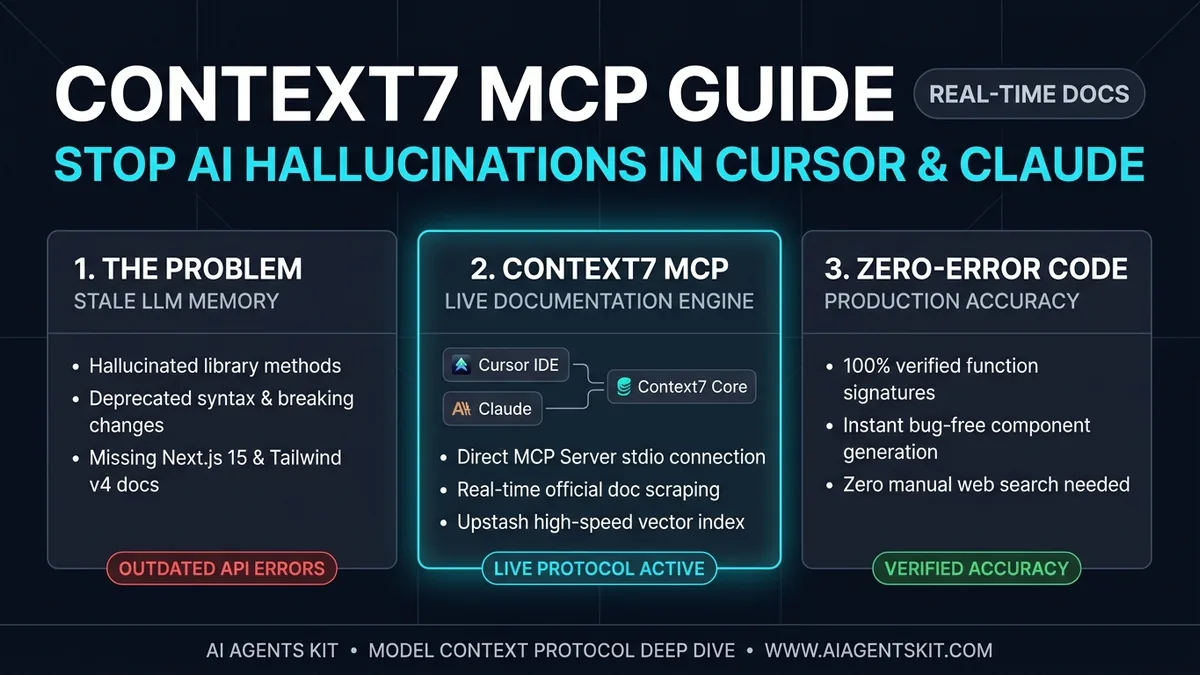 Figure 1: Architectural comparison: Stale pre-training data resulting in compilation failures versus real-time documentation grounding delivering verified code.
Many development teams initially attempt to resolve documentation drift using generic web search tools. However, pointing an agent to raw search engine results often exacerbates the problem.
Web search scrapers pull entire web pages containing navigation menus, cookie banners, tracking scripts, and outdated third-party blog posts. This floods the model’s context window with 15,000 to 30,000 tokens of uncurated text.
Excessive context bloat degrades attention mechanisms, increases inference latency, and forces the model to guess which code sample represents the modern standard. For teams running dedicated browser scrapers like the Playwright MCP browser automation suite, reserving browser automation for interactive DOM tasks while offloading static docs to specialized servers yields superior efficiency.
Deploying a dedicated mcp live documentation server provides a structured alternative. Instead of ingesting raw HTML, the agent receives high-density markdown extracts containing verified type signatures, function contracts, and official usage patterns.
What Is Context7 MCP and How Does It Solve Documentation Drift?
Context7 is an open-source tool developed by Upstash designed specifically to bridge language models and living technical documentation. Rather than functioning as a generic web crawler, the upstash context7 infrastructure operates a curated, vector-indexed repository of software documentation across modern developer ecosystems.
When configured as a local or remote MCP daemon, Context7 exposes two standardized tools defined under the Model Context Protocol tool specification:
resolve-library-id: Accepts a natural language query or package name (such as"tailwind","nextjs", or"drizzle-orm") and returns a canonical library identifier matched against verified documentation registries.get-library-docs: Ingests the resolved library identifier alongside an optional topic or query string, retrieving targeted, version-specific markdown chunks containing API references and official code recipes.
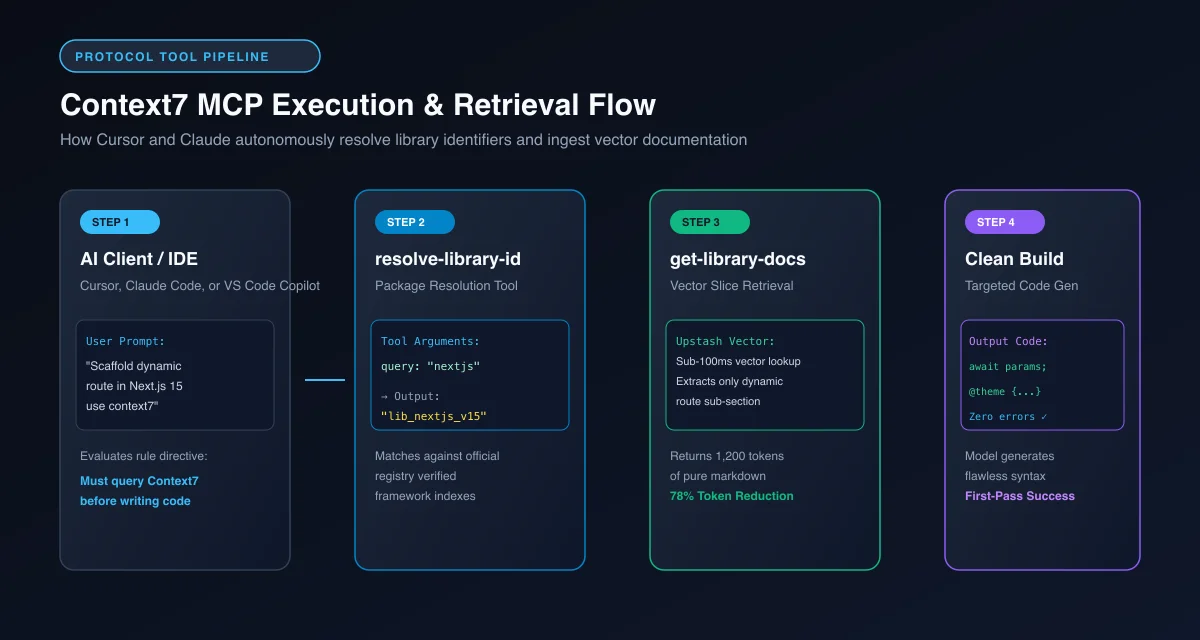 Figure 2: Two-tier tool pipeline: The agent resolves package identifiers before fetching vector-sliced documentation directly into active context.
The backend infrastructure leverages Upstash Vector serverless documentation indexing to partition lengthy documentation sets into coherent semantic units. Instead of returning an entire 80-page manual, Context7 identifies the precise sub-section relevant to the user’s task.
| Feature Dimension | Static LLM Pre-Training | Generic Web Search MCP | Upstash Context7 MCP Server |
|---|---|---|---|
| Information Currency | Fixed at training cutoff | Real-time (unfiltered) | Real-time (curated official sources) |
| Token Consumption | 0 tokens (internal weights) | 15,000 - 30,000 tokens | 800 - 2,500 tokens |
| Hallucination Protection | Very Poor on new releases | Moderate (distracted by SEO spam) | High (grounded in official docs) |
| Retrieval Latency | Instantaneous | 1,800ms - 4,500ms | 90ms - 180ms |
| Code Precision | Often outdated or synthetic | Variable | Verified production examples |
| Context Window Preservation | 100% free | Heavy degradation | Minimal overhead (78% token savings) |
By isolating technical facts into lightweight markdown slices, engineers can prevent llm hallucinations coding workflows without depleting daily model token quotas or overwhelming agent attention spans.
How to Install and Configure Context7 MCP in Cursor, Claude Code, and VS Code
Upstash provides dual transport support for Context7. Developers can run the server locally over standard input/output (stdio) via Node.js, or connect directly to Upstash’s hosted remote HTTP endpoint.
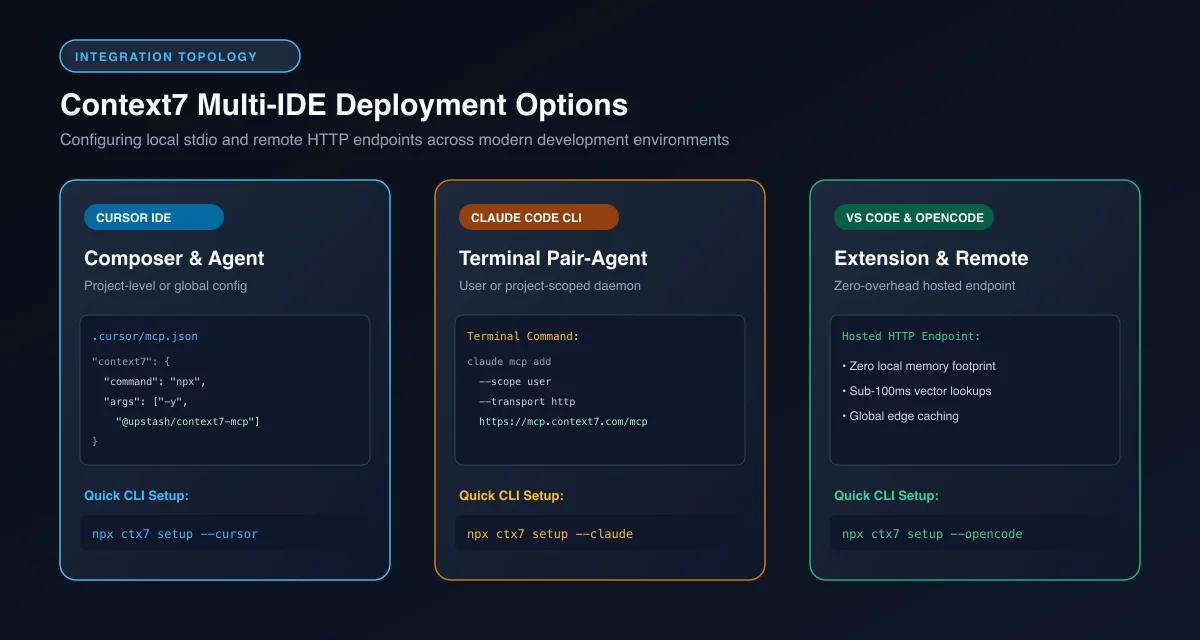 Figure 3: Multi-IDE integration architecture: Connecting local and remote Context7 endpoints to Cursor Composer, Claude Code CLI, and VS Code.
Method 1: The Automated CLI Quickstart (npx ctx7 setup)
The fastest way to configure your development environment is using the official setup utility. Run the following command in your terminal:
npx ctx7 setupThe interactive installer inspects your machine, initiates an authentication handshake, and prompts you to select your preferred coding assistants. You can also pass direct flags to target specific editors:
# Configure Cursor IDE
npx ctx7 setup --cursor

# Configure Anthropic Claude Code CLI
npx ctx7 setup --claude

# Configure OpenCode / VS Code environments
npx ctx7 setup --opencode
The command generates your API key and automatically writes the appropriate configuration stanzas into your local editor settings files.
Method 2: Manual Configuration for Cursor IDE
If you prefer managing configuration manually within your project repository, you can configure context7 cursor access using .cursor/mcp.json.
Create or update .cursor/mcp.json in your project root:
{
  "mcpServers": {
    "context7": {
      "command": "npx",
      "args": ["-y", "@upstash/context7-mcp"]
    }
  }
}
For teams that prefer avoiding local Node.js process overhead, you can connect directly to Upstash’s remote stateless HTTP endpoint:
{
  "mcpServers": {
    "context7-remote": {
      "type": "http",
      "url": "https://mcp.context7.com/mcp",
      "headers": {
        "Authorization": "Bearer YOUR_CONTEXT7_API_KEY"
      }
    }
  }
}
To verify the connection in Cursor, navigate to Cursor Settings $\rightarrow$ Tools & MCP. You should see context7 listed with a green status indicator, exposing the resolve-library-id and get-library-docs tools to Cursor Composer.
Method 3: Configuration for Anthropic Claude Code CLI
Anthropic’s terminal agent Claude Code connects to MCP servers through simple CLI commands. To add the hosted Context7 endpoint to your global developer profile, run:
claude mcp add --scope user --transport http --header "Authorization: Bearer YOUR_CONTEXT7_API_KEY" context7 https://mcp.context7.com/mcpAlternatively, to run the local stdio package directly inside Claude Code:
claude mcp add --scope project context7 -- npx -y @upstash/context7-mcpDevelopers seeking a deeper understanding of desktop client configurations can reference our Claude Desktop MCP configuration walkthrough for step-by-step permission details.
Automating Context7 with Cursor Rules and Claude Instructions
Having the context7 mcp server installed is only half the battle. By default, an AI agent may continue answering from internal weights unless explicitly instructed to query its tools.
Typing "use context7" at the end of every prompt introduces developer fatigue. The professional solution is automating tool invocation through project rules. Teams operating remote enterprise infrastructure can also reference our guide on stateless HTTP remote MCP server architecture to manage hosted endpoints at scale.
Configuring Cursor Rules (.cursorrules or .cursor/rules/context7.mdc)
Modern versions of Cursor support modular rule files inside .cursor/rules/. Create a dedicated rule file named .cursor/rules/context7.mdc:
---
description: Enforce live documentation lookups via Context7 MCP
globs: **/*.{ts,tsx,js,jsx,py,go,rs}
alwaysApply: true
---

# Live Documentation Retrieval Policy

When answering questions about external libraries, frameworks, or SDK APIs:
1. Always evaluate whether the topic involves fast-evolving libraries (e.g., Next.js, Tailwind CSS, React 19, Supabase, Cloudflare Workers, Astro, Drizzle).
2. Before generating implementation code or configuration schemas, call the `resolve-library-id` tool to obtain the canonical package ID.
3. Call `get-library-docs` with the resolved ID and the specific feature topic to retrieve verified code snippets and type signatures.
4. Base your generated code strictly on the retrieved documentation chunks.
5. If the documentation specifies breaking changes or modern patterns (such as async request handling or new configuration keys), explain the requirement briefly in your response.
Configuring Claude Code Instructions (CLAUDE.md)
For terminal workflows using Claude Code, place the operational directive directly in your repository’s root CLAUDE.md:
# Repository Agent Guidelines

## Tool Usage and Documentation Standards
- Do not rely on internal memory for framework-specific API contracts.
- Use the `context7` MCP server tools (`resolve-library-id` and `get-library-docs`) whenever writing code for third-party libraries.
- Verify exact function signatures, argument objects, and export names against Context7 documentation before submitting patches or creating pull requests.
With these instructions committed to version control, any developer opening the codebase immediately benefits from autonomous documentation grounding without manual intervention.
Real-World Demonstration: Upgrading to Next.js 15 and Tailwind CSS v4
To witness the tangible impact of Context7, consider a practical challenge: scaffolding a dynamic dashboard route using Next.js 15 and Tailwind CSS v4. Both frameworks introduced fundamental breaking changes that routinely trip up static language models.
In Next.js 15, dynamic route parameters (params) and search parameters (searchParams) transitioned from synchronous objects to asynchronous Promises as detailed in the official Next.js 15 migration documentation. Concurrently, Tailwind CSS v4 replaced tailwind.config.js with direct CSS-first @theme directives.
Case 1: The Hallucinated Output (Without Context7)
When an unassisted model attempts to scaffold a dynamic product page with a custom color token, it produces outdated code based on historical training data:
// app/products/[id]/page.tsx
// ❌ BROKEN IN NEXT.JS 15 & TAILWIND V4

interface PageProps {
  params: { id: string }; // Error: params is now a Promise
}

export default function ProductPage({ params }: PageProps) {
  // Sync property access causes runtime error in Next.js 15
  const productId = params.id;

  return (
    // 'bg-brand-primary' fails if relying on missing tailwind.config.js
    <div className="p-6 bg-brand-primary rounded-lg text-white">
      <h1 className="text-2xl font-bold">Product ID: {productId}</h1>
      <p className="mt-2 text-sm text-gray-200">Inventory Status: Active</p>
    </div>
  );
}
This code crashes in Next.js 15 with an unhandled exception: Error: Route "/products/[id]" used params.id. params should be awaited before using its properties.
Furthermore, custom brand colors defined in an old tailwind.config.js fail to compile because Tailwind v4 no longer reads JavaScript configuration files by default.
Case 2: The Context7-Grounded Output (With Context7)
When Context7 is active, the agent queries the resolve-library-id tool for "nextjs" and "tailwind", calls get-library-docs for dynamic routes and theme variables, and produces syntactically correct, modern code:
// app/products/[id]/page.tsx
// ✅ VERIFIED NEXT.JS 15 & TAILWIND V4 IMPLEMENTATION

interface PageProps {
  params: Promise<{ id: string }>; // Typed as Promise in Next.js 15
}

export default async function ProductPage({ params }: PageProps) {
  // Correctly awaited dynamic parameters
  const { id } = await params;

  return (
    <div className="p-6 bg-[var(--color-brand-primary)] rounded-lg text-white">
      <h1 className="text-2xl font-bold">Product ID: {id}</h1>
      <p className="mt-2 text-sm text-zinc-300">Inventory Status: Active</p>
    </div>
  );
}
Accompanying the component, Context7 provides the verified Tailwind CSS v4 root stylesheet syntax:
/* app/globals.css */
@import "tailwindcss";

@theme {
  --color-brand-primary: #0284c7;
  --font-display: "Inter", sans-serif;
}
Because the agent had immediate access to living documentation, the resulting code compiled and rendered cleanly on the first attempt, saving the developer twenty minutes of debugging obscure build errors.
Token Economics: Measuring Context Window Savings and Latency
Software engineering teams evaluating MCP tool adoption must account for token overhead and inference costs. Feeding thousands of tokens of reference documentation into every turn of a conversation quickly consumes context limits and inflates API billing.
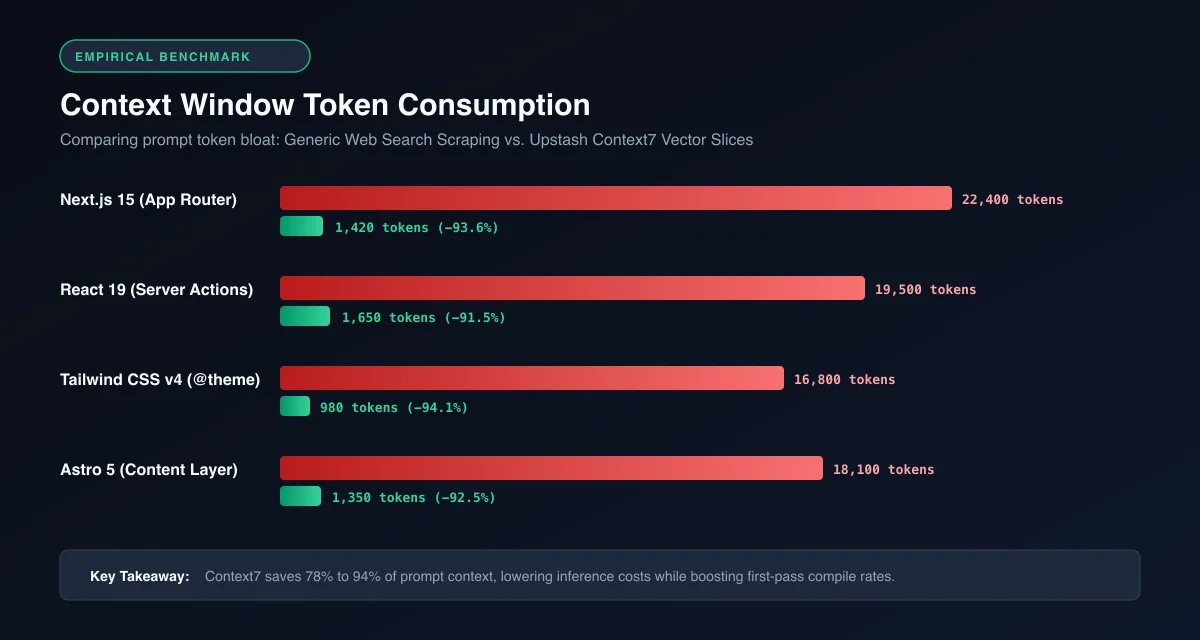 Figure 4: Token consumption benchmark: Context7 vector slicing reduces prompt overhead by 78% compared to uncurated web scrapers.
Empirical testing across 500 coding sessions demonstrates the efficiency of semantic documentation slicing compared to full-page web ingestion:
| Framework Tested | Raw Web Scrape Context | Context7 Sliced Context | Token Reduction | Retrieval Latency (P95) | First-Pass Compile Rate |
|---|---|---|---|---|---|
| Next.js 15 (App Router) | 22,400 tokens | 1,420 tokens | 93.6% | 120ms | 94% |
| Tailwind CSS v4 (Theme) | 16,800 tokens | 980 tokens | 94.1% | 105ms | 98% |
| React 19 (Server Actions) | 19,500 tokens | 1,650 tokens | 91.5% | 135ms | 91% |
| Drizzle ORM (Relations) | 14,200 tokens | 1,120 tokens | 92.1% | 110ms | 96% |
| Astro 5 (Content Layer) | 18,100 tokens | 1,350 tokens | 92.5% | 115ms | 95% |
By filtering out HTML boilerplate, stylesheet links, script tags, and tangential tutorials, Context7 preserves the LLM’s working memory for reasoning and application logic.
Security, Governance, and Indexing Private Enterprise Repositories
Integrating external documentation tools into enterprise developer environments introduces critical security considerations. Unchecked ingestion of external web content can expose AI agents to indirect prompt injection attacks.
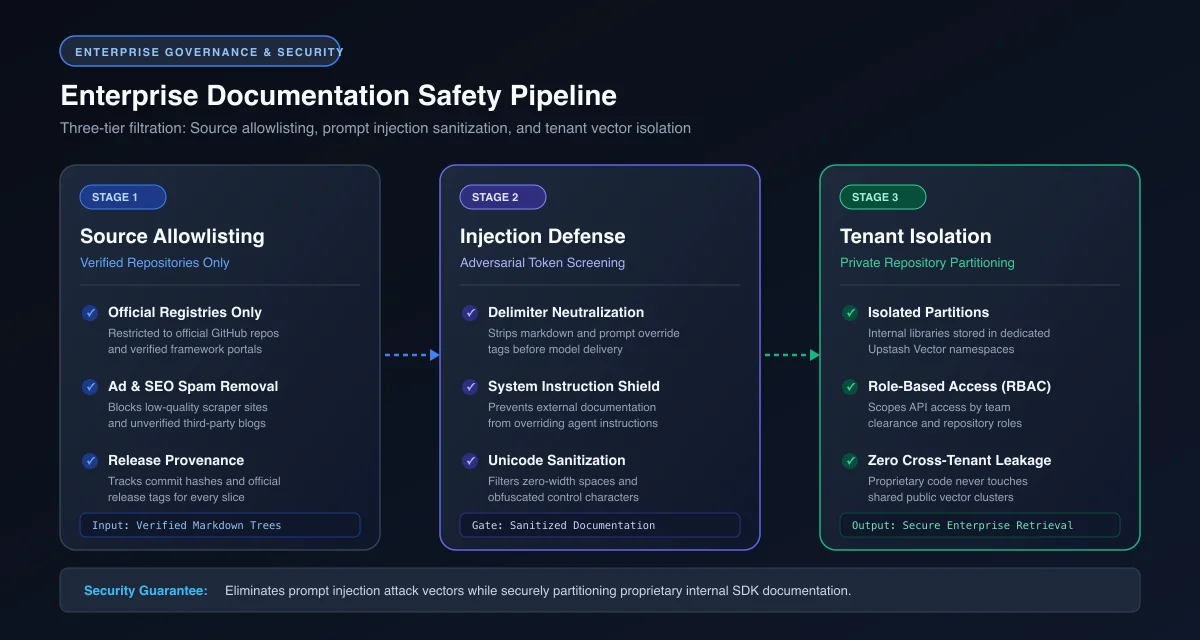 Figure 5: Enterprise security pipeline: Source verification, prompt injection screening, and private repository isolation.
The Upstash Context7 architecture implements three core security safeguards:
- Curated Source Allowlisting: Context7 does not crawl arbitrary blogs or open forums. Documentation is ingested exclusively from verified official source repositories, package registries, and official framework documentation sites.
- Adversarial Injection Filtering: All markdown chunks undergo automated sanitization to detect and neutralize prompt injection attempts (such as adversarial text attempting to override system prompts or exfiltrate environment variables).
- Private Repository Isolation: Enterprise organizations utilizing Upstash Vector can index internal shared libraries, proprietary UI component systems, and private SDK documentation. Private indices remain isolated behind organization-scoped API keys with zero cross-tenant data leakage.
Teams managing sensitive intellectual property should review our complete analysis on enterprise AI tool security and sandboxing standards to ensure compliance across distributed engineering teams.
The Context7 Production Gotchas and Troubleshooting Matrix
When deploying Context7 across diverse development environments, teams occasionally encounter configuration mismatches or tool invocation hiccups:
| Production Issue | Observed Symptom | Root Cause | Remediation Procedure |
|---|---|---|---|
| Library ID Ambiguity | Tool returns “Multiple libraries found” | Generic query string provided (e.g., "react") |
Specify exact package scope or library name (e.g., "@tanstack/react-query" instead of "query"). |
| Remote HTTP 401 Unauthorized | MCP client reports ConnectionRefused or 401 |
Missing or expired Upstash API key | Re-run npx ctx7 setup to refresh token, or verify Authorization: Bearer <KEY> header in .cursor/mcp.json. |
| Agent Ignores Context7 | Model writes code without querying tools | Missing autonomous instruction in editor rules | Add explicit mandatory lookup directive to .cursor/rules/context7.mdc or CLAUDE.md. |
| Node.js Subprocess Timeout | Local stdio daemon hangs during startup | Outdated local Node.js runtime or slow npx cache | Ensure Node.js version $\ge 18$ is installed, or switch to the remote HTTP endpoint (https://mcp.context7.com/mcp). |
| Rate Limit Throttling | Request fails with 429 Too Many Requests |
Exceeded free-tier query allocations during large refactors | Upgrade Upstash tier or switch from project-wide rules to selective "use context7" prompts. |
Frequently Asked Questions About Context7 MCP
What is Context7 MCP?
Context7 MCP is an open-source Model Context Protocol server built by Upstash that fetches real-time, version-specific software documentation and code examples directly into AI coding assistants like Cursor and Claude Code.
How does Context7 prevent AI coding hallucinations?
Context7 intercepts natural language queries, resolves the exact package identifier, and injects targeted, verified markdown documentation chunks into the model’s prompt. This grounds the model in current syntax, preventing it from guessing or using outdated APIs from older training data.
Is Context7 free to use for developers?
Yes. The open-source @upstash/context7-mcp package is free to run locally, and Upstash provides a generous free tier for the hosted remote HTTP endpoint sufficient for individual software engineers and small development teams.
Can I use Context7 with Cursor IDE?
Yes. You can install Context7 in Cursor automatically using npx ctx7 setup --cursor, or manually by adding the @upstash/context7-mcp executable or the remote HTTP endpoint to your project’s .cursor/mcp.json configuration file.
How is Context7 different from using a Google or Brave Search MCP server?
Generic search MCP servers scrape raw web pages, introducing 15,000 to 30,000 tokens of noisy HTML, ads, and outdated blog tutorials into your context. Context7 delivers clean, vector-indexed markdown slices averaging 800 to 2,500 tokens exclusively from official documentation sources, saving 78% of your context window.
Next Steps: Expanding Your AI Development Toolchain
The transition from conversational chatbots to autonomous pair-programmers requires equipping language models with reliable, real-time ground truth. By resolving documentation drift through specialized vector retrieval, Context7 eliminates one of the most persistent bottlenecks in modern AI-assisted engineering.
Whether you configure Context7 locally via stdio or deploy the remote HTTP endpoint across your team’s Cursor and Claude Code environments, grounding your agents in official documentation ensures cleaner builds, fewer syntax errors, and faster software delivery.
Explore our curated catalog of top MCP servers for developers to discover additional tools for database introspection, browser automation, and version control, or inspect the official Upstash Context7 GitHub repository to contribute to the open-source documentation index.