What Is MCP? Model Context Protocol Explained (2026)
Learn what the Model Context Protocol (MCP) is, how it works, and why the Linux Foundation and major AI labs adopted it as the universal standard for AI tools.
The most capable foundation models share a fundamental operational constraint: their reasoning is frozen at pre-training cutoffs. Inquiring about local file systems, querying production SQL databases, or triggering external SaaS workflows falls flat without live system connectivity.
Key Takeaways
- The Model Context Protocol (MCP) functions as an open, vendor-neutral standard connecting AI models directly to external tools, databases, and APIs.
- Formally donated by Anthropic to the Linux Foundation’s Agentic AI Foundation (AAIF), MCP is governed collaboratively alongside OpenAI, Google, and Microsoft.
- The 2026-07-28 specification introduced a stateless request-response core architecture with header-based routing, cacheable list results, and task extensions.
- Enterprise engineering teams report an average 40% reduction in custom integration development time after standardizing on MCP.
What Is MCP and How Does It Work?
The Model Context Protocol (MCP) is an open-source standard that defines how artificial intelligence applications securely connect to external tools, data sources, and runtime environments. Originally developed by Anthropic and governed by the Linux Foundation, MCP provides a universal communication standard between reasoning engines and data infrastructure.
Practitioners frequently describe MCP as the universal USB-C cable for artificial intelligence. Before this open standard emerged, connecting an AI model to an external database or code repository required bespoke point-to-point connectors. When an application implements the model context protocol, it gains immediate compatibility with thousands of community and enterprise mcp servers.
According to ERP Today’s 2026 Connectivity Benchmark, enterprise engineering teams adopting MCP achieve an average 40% reduction in integration development time. With over 100 million monthly SDK downloads and 10,000 public servers, understanding how mcp works has become a foundational competency for developers building autonomous AI agents guide architectures.
As defined in the Model Context Protocol Repository on GitHub, the protocol specification standardizes JSON-RPC 2.0 message contracts across both local process boundaries and remote HTTP endpoints. This decoupling guarantees that tool implementations remain completely portable across host applications.
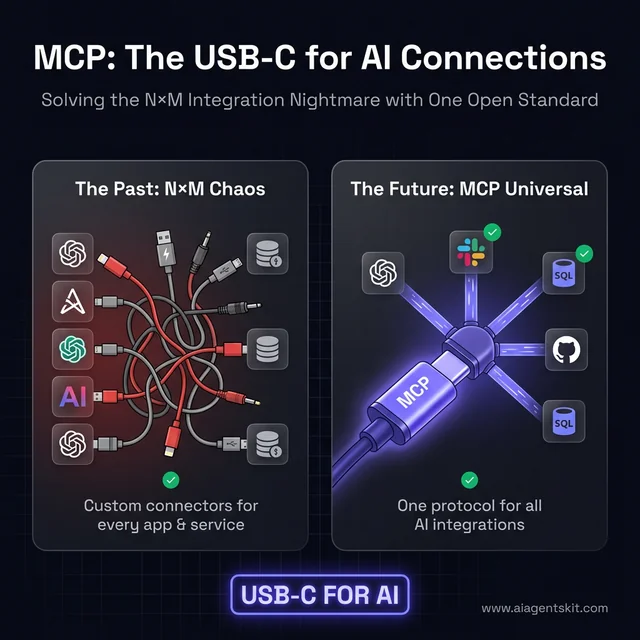
The universal integration standard: How MCP simplifies the classic N-by-M connection bottleneck into a standardized interface.
MCP vs Function Calling: Architectural Differences Explained
Software developers frequently confuse the Model Context Protocol with native large language model function calling. While both technologies enable models to interact with software systems, they operate at completely different layers of the infrastructure stack.
Function calling is a model-specific API capability where a single provider parses tool schemas and outputs structured JSON arguments. In contrast, MCP is a system-wide communication protocol that governs dynamic discovery, transport security, session negotiation, and resource streaming. The MCP vs function calling comparison illustrates how MCP abstracts function calling into a cross-vendor runtime.
| Dimension | Model Context Protocol (MCP) | Proprietary Function Calling | Custom REST/GraphQL APIs |
|---|---|---|---|
| Standardization | Open vendor-neutral standard (Linux Foundation AAIF) | Vendor-specific schemas (OpenAI, Anthropic, Google) | Bespoke organization-specific designs |
| Tool Discovery | Dynamic runtime discovery via tools/list handshake |
Hardcoded into prompt context window payloads | Documented via OpenAPI or GraphQL schemas |
| State Management | Native support for stateful sessions and resource streams | Stateless per-request payload exchange | Custom database sessions or cookies |
| Transport Layer | Standardized JSON-RPC 2.0 over Stdio or HTTP/SSE | Model provider REST API endpoints | Standard HTTP/HTTPS network calls |
| Ecosystem Reach | Single server works across Claude, Cursor, ChatGPT, Gemini | Locked to individual foundation model providers | Requires unique client SDK for each consumer |
The Three Core Primitives: Tools, Resources, and Prompts
The Model Context Protocol organizes all external system capabilities into three foundational primitives. Understanding the role of each primitive enables developers to design clean, secure interfaces for host applications.
As explored in our MCP primitives guide, these building blocks separate computational actions from read-only data ingestion and prompt guidance:
1. Tools (Executable Operations)
Tools represent active functions that perform computations or alter system state. When an agent needs to execute a terminal command, post a Slack message, or update a database row, it invokes an MCP tool. Tools require explicit input schemas defined with JSON Schema and return structured text, images, or error objects.
2. Resources (Read-Only Data Ingestion)
Resources represent passive, contextual data endpoints designed for reading. File contents, application logs, database table schemas, and git diffs are exposed as resources. Unlike tools, reading a resource has zero side effects, allowing client applications to pre-fetch context without asking for user confirmation.
3. Prompts (Standardized Interaction Workflows)
Prompts are pre-configured conversational templates hosted directly on the server. They provide users with standardized prompts for complex tasks, such as triggering an automated code review or generating a database migration plan. Prompts guide the user and model toward effective workflows without manual prompt authoring.
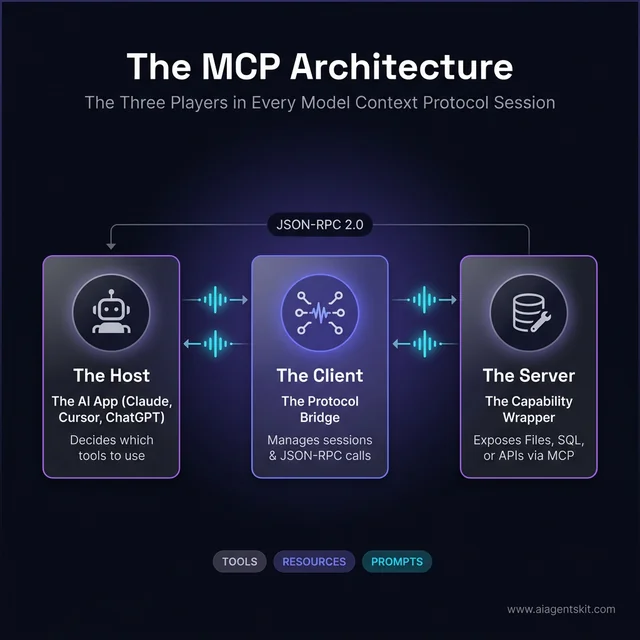
The core architectural triad: Host application, embedded MCP client, and modular MCP server.
Client-Server Transport: Local Stdio vs Remote HTTP/SSE
MCP supports two distinct transport protocols to balance execution performance against distributed enterprise architecture. Choosing the appropriate transport depends on deployment topology and network security policies.
Local Stdio Transport
For desktop applications and local development environments, MCP uses standard input and output (stdio). The host application spawns the MCP server as a local child process and exchanges JSON-RPC messages over standard streams. Stdio transport delivers sub-millisecond execution latency, operates completely offline, and avoids exposing network ports to local exploits.
Remote HTTP with Server-Sent Events (SSE)
For cloud-hosted services and enterprise microservices, MCP deploys over HTTP using Server-Sent Events for server-to-client streaming. The 2026-07-28 specification streamlined this architecture into a stateless core, allowing remote servers to sit behind standard enterprise API gateways and round-robin load balancers. Remote endpoints enforce token authentication via OAuth 2.1 and transport encryption via TLS.
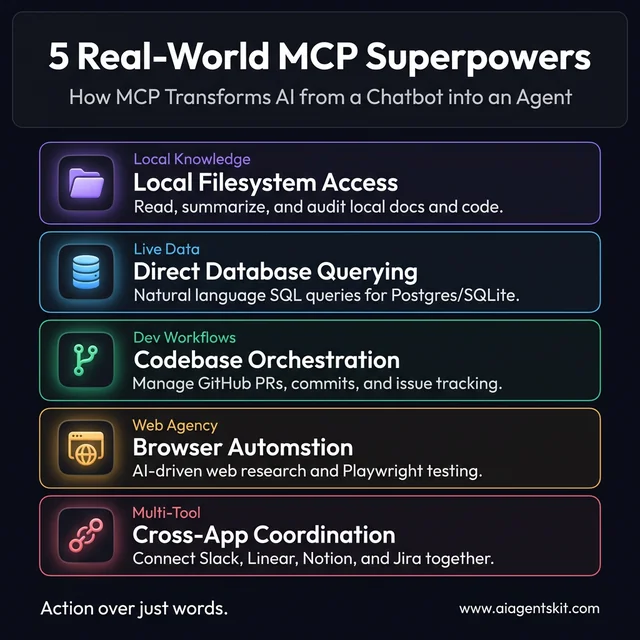
Five practical capabilities unlocked by MCP servers, from database administration to multi-tool automation.
Configuring Claude Desktop MCP Servers and Real-World Examples
Setting up MCP servers on desktop environments requires editing a simple JSON configuration manifest. Customizing the claude desktop mcp config alongside our Claude Desktop MCP setup guide enables local AI assistants to read documents and interact with local tools.
Users configure servers by modifying the claude_desktop_config.json manifest located within their local application support directory. Adding an executable command under the mcpServers block exposes those capabilities upon application restart:
{
  "mcpServers": {
    "filesystem": {
      "command": "npx",
      "args": ["-y", "@modelcontextprotocol/server-filesystem", "/Users/username/Desktop"]
    },
    "apple-notes": {
      "command": "npx",
      "args": ["-y", "apple-notes-mcp"]
    },
    "playwright": {
      "command": "npx",
      "args": ["-y", "@modelcontextprotocol/server-playwright"]
    }
  }
}
Configuring an Apple Notes MCP server gives macOS users immediate access to their personal notes database without writing integration code. Similarly, configuring a playwright mcp server connects reasoning models to real browser instances, enabling agents to parse live web pages and execute automated testing flows.
Developers building Python backends can inspect the Anthropic Python SDK on GitHub to see how decorators automatically register tool schemas and validation parameters. FastMCP libraries reduce protocol boilerplate to under five lines of code per tool.
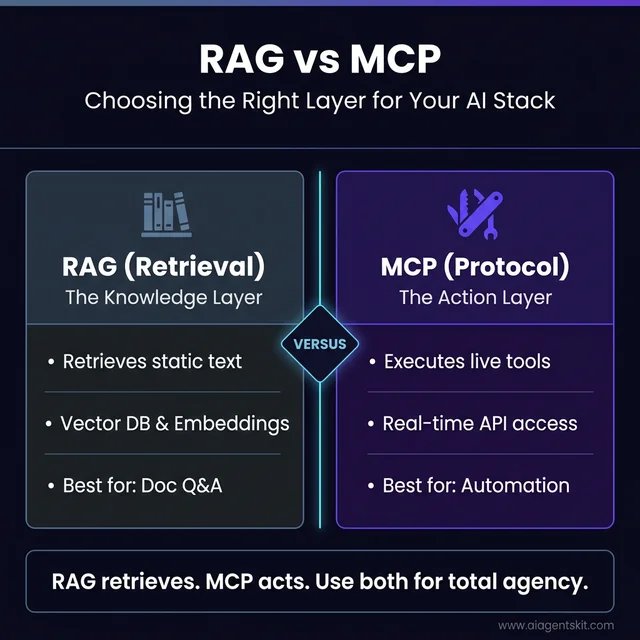
RAG versus MCP: Knowledge retrieval over static indexes compared to real-time tool execution.
Enterprise Adoption, Security Governance, and Future Outlook
As autonomous agents transition from consumer experiments into regulated business operations, enterprise security governance becomes essential. Reviewing enterprise MCP security best practices protects corporate networks against prompt injection and unauthorized data exfiltration.
In December 2025, Anthropic donated the Model Context Protocol to the Linux Foundation Agentic AI Foundation, establishing vendor-neutral governance alongside co-founders Block and OpenAI. This structural transfer ensures that MCP cannot be co-opted by a single corporate vendor, guaranteeing long-term backward compatibility for enterprise software investments.
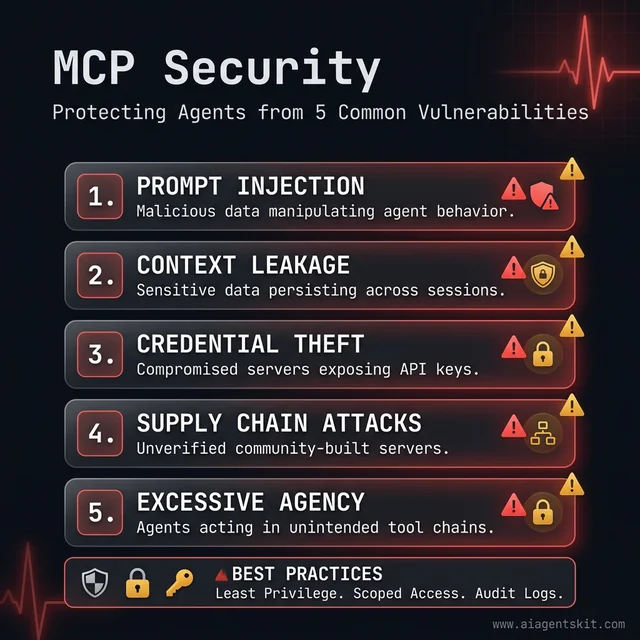
Five core security vectors to evaluate before deploying MCP servers in production environments.
Enterprise IT departments enforce least-privilege scoping across all server configurations. Restricting filesystem servers to explicit directory paths and running database connectors in read-only transaction modes eliminates the risk of unauthorized data modifications.
Frequently Asked Questions
What is MCP in artificial intelligence?
The Model Context Protocol (MCP) is an open-source standard that enables AI applications to securely connect with local files, databases, and remote web services. Donated by Anthropic to the Linux Foundation, it serves as a universal interface between reasoning models and external tools.
How does MCP differ from LLM function calling?
Function calling is a model-level feature where a single model outputs structured JSON arguments for a developer-defined schema. MCP is an architectural protocol that standardizes discovery, execution, security, and transport across multiple models, clients, and servers.
How do you configure MCP servers in Claude Desktop?
MCP servers are configured in Claude Desktop by editing the claude_desktop_config.json file located in your application support directory. Adding an executable command and argument array under the mcpServers key immediately exposes those capabilities upon application restart.
What are the three core primitives of MCP?
The three core primitives of MCP are Tools, Resources, and Prompts. Tools perform active operations with side effects, Resources expose read-only data streams, and Prompts supply reusable interaction templates.