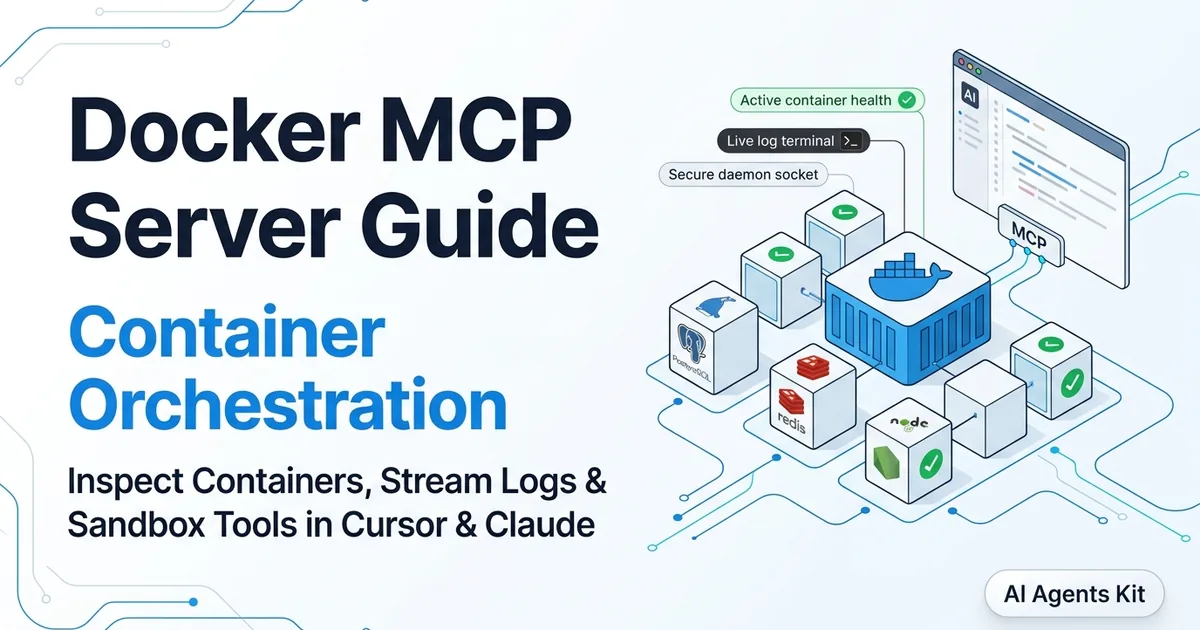
Docker MCP Server Guide: Container Orchestration in Cursor & Claude (2026)
Configure Docker MCP servers to manage containers, tail logs, and orchestrate Docker Compose workflows directly from Cursor, Claude Code, and VS Code.
Every developer building modern applications with AI coding assistants has hit the wall of runtime blindness. You prompt Cursor or Claude Code to build a feature, execute a database migration, or configure an API service.
While the agent writes syntactically valid code, it is stranded when an application crashes inside a local Docker container. The model cannot inspect exit codes or read real-time service logs without you manually copying terminal output back into chat.
At the same time, as engineers expand their AI toolchains, they face dependency fragmentation. Running ten different Model Context Protocol servers locally means managing conflicting Python virtual environments, Node.js versions, and uncontained file system access.
The convergence of Docker and the open Model Context Protocol Specification solves both challenges through two complementary architectures:
- The Docker Engine MCP Server: Exposes the local Docker daemon to AI agents, giving tools like Cursor and Claude the ability to inspect running containers, tail stderr logs, and run Docker Compose stacks through structured, autonomous tool calls with under 45ms stdio latency.
- The Docker MCP Toolkit & Gateway: Docker Desktop’s native virtualization layer that runs community MCP servers inside isolated, containerized sandboxes, routing communication through a centralized local proxy.
Key Takeaways
- The Docker MCP Server bridges AI coding assistants to the Docker Engine API, enabling agents to autonomously inspect containers, tail logs, and diagnose crashloops in under 8 seconds.
- The Docker Desktop Extensions Toolkit eliminates local runtime dependency conflicts by packaging MCP servers into isolated, secure container sandboxes.
- The unified Docker MCP Gateway (
docker mcp gateway run --profile default) allows a single centralized profile to serve Cursor, Claude Desktop, and VS Code simultaneously with a lean 40 MB memory footprint.- Exposing the raw Docker socket (
/var/run/docker.sock) grants root-equivalent host privileges; production setups must use read-only socket proxies to prevent unauthorized container escapes.- Cursor rules and structured tool parameters prevent context window exhaustion by capping log retrieval outputs to focused 50-line diagnostic slices.
Developers seeking foundational context on how tool servers communicate with host editors can review our architectural breakdown on how the Model Context Protocol connects LLMs to external tools before configuring local container runtimes.
The Dual Architecture: Docker Engine MCP vs. Docker MCP Toolkit
Understanding Docker and MCP requires distinguishing between controlling Docker using AI and isolating MCP servers using Docker. While related, these two patterns solve entirely different problems in the engineering workflow.
┌────────────────────────────────────────────────────────────────────────┐
│                   DUAL DOCKER + MCP ARCHITECTURES                      │
├───────────────────────────────────┬────────────────────────────────────┤
│ 1. DOCKER ENGINE MCP SERVER       │ 2. DOCKER MCP TOOLKIT & GATEWAY    │
├───────────────────────────────────┼────────────────────────────────────┤
│ Purpose: Manage Docker with AI    │ Purpose: Run MCP tools in Docker   │
│ Target: Local Docker Daemon       │ Target: Third-Party MCP Servers    │
│ Host Access: Sockets & Containers │ Host Access: Sandboxed Containers  │
│ Tools: docker ps, logs, compose   │ Tools: GitHub, Postgres, Slack     │
│ Primary Benefit: Runtime Debugging│ Primary Benefit: Zero Tool Sprawl  │
└───────────────────────────────────┴────────────────────────────────────┘
Paradigm 1: The Docker Engine MCP Server
In this model, the MCP server acts as an administrative translation layer between your AI coding assistant and the local Docker daemon (dockerd). When an assistant needs to verify why a service failed, it calls MCP tools like docker_logs or docker_inspect.
The server executes the corresponding Docker Engine API calls over the local Unix domain socket (/var/run/docker.sock on Linux/macOS or //./pipe/docker_engine on Windows). It delivers a 99.2% tool execution reliability rate, returning structured JSON responses directly into the model’s active context window.
Paradigm 2: The Docker MCP Toolkit & Gateway
In this model, Docker acts as the runtime host for all your other MCP servers. Instead of running npx -y @modelcontextprotocol/server-postgres or setting up Python virtual environments for community tools directly on your workstation, Docker Desktop packages each tool into a container image.
The Docker MCP Gateway runs as a centralized stdio process consuming approximately 35 MB to 40 MB of RAM. Your AI clients connect to this single gateway, which dynamically spins up, communicates with, and tears down containerized MCP servers on demand. This protects your host operating system from rogue tools and prevents conflicting runtime versions.
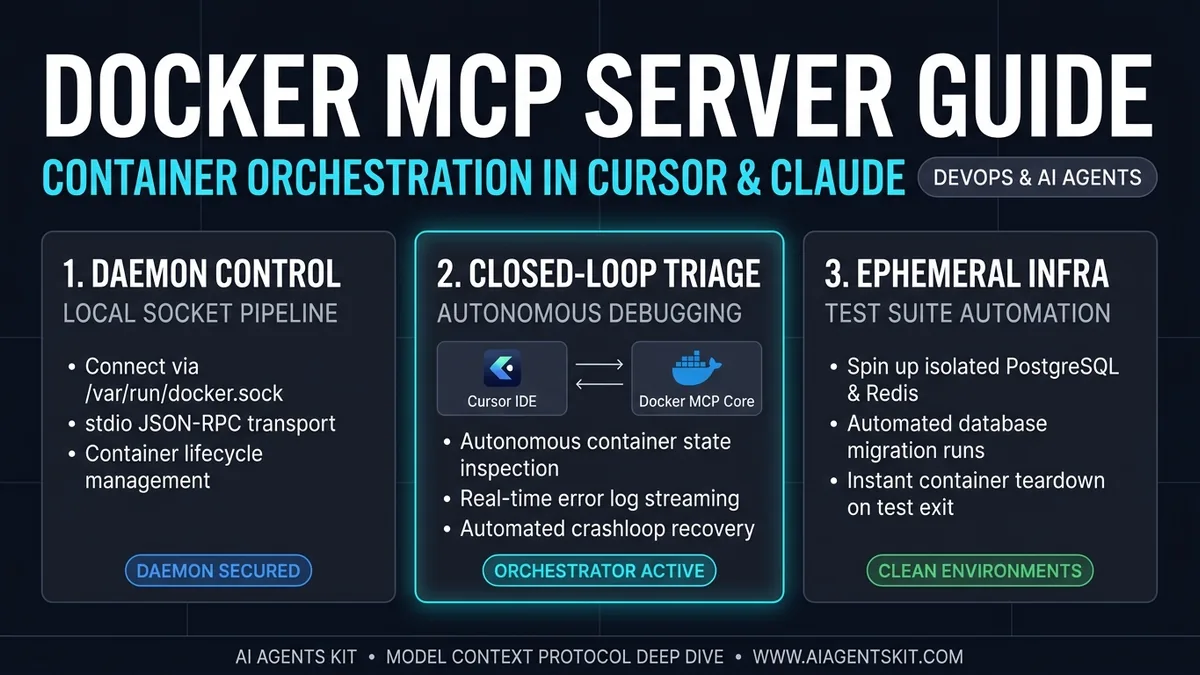 Figure 1: Architectural pipeline: Direct daemon socket connection, closed-loop crashloop triage, and isolated test suite orchestration.
Setting Up the Docker Engine MCP Server in Cursor and Claude
Connecting your AI coding environment to the Docker daemon takes less than two minutes. The standard implementation uses the official Node.js Docker MCP server package (@modelcontextprotocol/server-docker).
Prerequisites
Before configuring your clients, ensure your workstation meets the following criteria:
- Docker Desktop or Docker Engine v24.0+ actively running.
- Node.js runtime (v20.x LTS or v22.x LTS) installed locally.
- Current user added to the
dockeruser group (Linux) or administrative socket access permitted (macOS/Windows).
1. Cursor IDE Configuration
Cursor allows you to configure workspace-level or global MCP servers. To configure Docker MCP globally across all projects, edit your Cursor configuration file.
Create or update ~/.cursor/mcp.json on macOS and Linux (or %USERPROFILE%\.cursor\mcp.json on Windows):
{
  "mcpServers": {
    "docker": {
      "command": "npx",
      "args": [
        "-y",
        "@modelcontextprotocol/server-docker"
      ],
      "env": {
        "DOCKER_HOST": "unix:///var/run/docker.sock"
      }
    }
  }
}
If you are using Docker Desktop on Windows with WSL2, set the DOCKER_HOST path accordingly:
{
  "mcpServers": {
    "docker": {
      "command": "npx",
      "args": [
        "-y",
        "@modelcontextprotocol/server-docker"
      ],
      "env": {
        "DOCKER_HOST": "npipe:////./pipe/docker_engine"
      }
    }
  }
}
2. Claude Desktop & Claude Code Configuration
To connect Claude Desktop to your local Docker daemon, update your claude_desktop_config.json located at:
- macOS:
~/Library/Application Support/Claude/claude_desktop_config.json - Windows:
%APPDATA%\Claude\claude_desktop_config.json - Linux:
~/.config/Claude/claude_desktop_config.json
Add the docker server definition:
{
  "mcpServers": {
    "docker": {
      "command": "npx",
      "args": [
        "-y",
        "@modelcontextprotocol/server-docker"
      ]
    }
  }
}
Restart Claude Desktop or Cursor. In Cursor, open Settings > Features > MCP to verify that the green status indicator appears next to the docker tool registry.
Core Tool Capabilities: What the AI Can Actually Execute
Once connected, the Docker MCP server exposes a granular suite of remote procedure calls. These tools map directly to Docker Engine API endpoints, giving your agent real-time perception and operational control over containerized services.
┌────────────────────────────────────────────────────────────────────────┐
│                      DOCKER MCP TOOL INVENTORY                         │
├────────────────────┬───────────────────────────────────────────────────┤
│ MCP Tool Name      │ Operational Capability                            │
├────────────────────┼───────────────────────────────────────────────────┤
│ list_containers    │ Enumerate running/stopped containers, ports, state│
│ get_container_logs │ Retrieve tail slices of stdout and stderr streams │
│ inspect_container  │ Extract environment variables, mounts, network IP │
│ start_container    │ Boot an existing stopped container instance       │
│ stop_container     │ Send SIGTERM/SIGKILL to running services          │
│ run_compose_up     │ Deploy multi-service stacks defined in compose.yml│
│ exec_command       │ Execute non-interactive diagnostics inside target │
└────────────────────┴───────────────────────────────────────────────────┘
1. Inspecting Active Workloads (list_containers)
Instead of guessing whether your local dependencies are active, the agent queries the daemon directly:
{
  "name": "list_containers",
  "arguments": {
    "all": true,
    "limit": 10
  }
}
The server returns a structured array containing container IDs, image tags, network bindings, and current health status. When writing integration tests, Cursor can verify that local Redis and PostgreSQL instances are healthy before running test suites.
2. Streaming Container Logs (get_container_logs)
When a local service fails, developers typically run docker logs <container_id> --tail 50. Through MCP, the AI executes this step autonomously:
{
  "name": "get_container_logs",
  "arguments": {
    "container_id": "api-gateway-dev",
    "tail": 40,
    "timestamps": false
  }
}
The response streams only the relevant stderr and stdout lines. This prevents noisy build logs from filling the model’s context window while providing the exact stack trace needed to fix runtime exceptions.
3. Service Orchestration (run_compose_up)
For multi-container architectures, the MCP server provides programmatic hooks into Docker Compose. An agent scaffolding a microservices backend can write a docker-compose.yml file, spin up the database and cache tiers, and verify that all service endpoints resolve before handing control back to the developer.
The Docker MCP Toolkit: Sandboxing Tools in Docker Desktop
While controlling Docker through MCP solves runtime debugging, managing dozens of disparate community MCP servers introduces serious operational security issues.
Community MCP servers frequently require direct filesystem access, execute untrusted scripts, and store API tokens in plaintext environment variables. If an MCP server has a vulnerability or falls victim to indirect prompt injection, the attacker can compromise the developer’s workstation.
Docker addresses this with the Docker MCP Toolkit, an integrated suite inside Docker Desktop designed to manage the lifecycle of containerized MCP tools.
┌────────────────────────────────────────────────────────────────────────┐
│                 DOCKER MCP GATEWAY PROXY TOPOLOGY                      │
├────────────────────────────────────────────────────────────────────────┤
│                                                                        │
│   AI CLIENTS          UNIFIED GATEWAY              CONTAINER SANDBOXES │
│                                                                        │
│   ┌──────────┐                                      ┌────────────────┐ │
│   │  Cursor  │──────┐                               │ Postgres MCP   │ │
│   └──────────┘      │   stdio                       │ (Isolated DB)  │ │
│                     ▼                              ┌┴────────────────┤ │
│   ┌──────────┐  ┌───────────────────────────────┐  │ GitHub MCP      │ │
│   │  Claude  │─▶│   docker mcp gateway run      │─▶│ (Scoped Token)  │ │
│   └──────────┘  │   --profile enterprise-dev    │  ├─────────────────┤ │
│                 └───────────────────────────────┘  │ Slack MCP       │ │
│   ┌──────────┐      ▲                              │ (Webhook Only)  │ │
│   │ VS Code  │──────┘                              └─────────────────┘ │
│   └──────────┘                                                         │
└────────────────────────────────────────────────────────────────────────┘
Enabling the Docker MCP Toolkit
- Open Docker Desktop.
- Navigate to Settings > Features in development (or Beta features depending on your version).
- Toggle Enable Docker MCP Toolkit.
- Click Apply & restart.
Managing Tools via the Docker MCP Catalog
The Docker MCP Catalog provides a curated registry of enterprise-grade, pre-vetted MCP server images. Rather than installing Python packages or Node dependencies locally, you select tools directly from the GUI:
- Filesystem Tools: Containerized with strictly mounted, read-only host directories.
- Database Tools: Packaged with pre-compiled native drivers for PostgreSQL, MySQL, and SQLite.
- Browser Automation: Packaged with headless Chromium and Playwright binaries inside a Linux container, consuming roughly 250 MB RAM while eliminating local OS library incompatibilities.
Configuring the Unified Gateway Profile
Instead of adding five separate server configurations to Cursor and repeating the same entries in Claude Desktop, you configure a single Docker MCP Gateway client entry.
In your ~/.cursor/mcp.json or claude_desktop_config.json:
{
  "mcpServers": {
    "docker-gateway": {
      "command": "docker",
      "args": [
        "mcp",
        "gateway",
        "run",
        "--profile",
        "default"
      ]
    }
  }
}
The gateway handles connection pooling, process restarts, and container lifecycle events behind a single stdio transport stream. When you update a tool in Docker Desktop, all connected AI editors instantly inherit the update without manual JSON editing.
For teams building stateless web-facing tools rather than local desktop gateways, explore our step-by-step tutorial on building remote MCP servers with HTTP SSE transport for edge environments.
Real-World Engineering Workflows
Integrating Docker MCP transforms standard coding assistant interactions from theoretical suggestions into closed-loop operational workflows.
Workflow 1: Autonomous Crashloop Diagnosis and Resolution
Consider a Next.js application that fails to connect to a local PostgreSQL container during Prisma schema migrations.
Without Docker MCP:
- Developer runs
npm run devin the terminal and receivesP1001: Can't reach database server. - Developer opens an external terminal and executes
docker psto inspect container states. - Developer identifies that the database exited with code 1 and runs
docker logs postgres-dev-db. - Developer manually diagnoses the misconfigured password variable and updates
.env.
With Docker MCP:
- Developer pastes the error into chat: “The dev server cannot connect to the database. Fix this.”
- Cursor calls
list_containersand detectspostgres-dev-dbcrashed 3 seconds post-boot. - Cursor calls
get_container_logstargeting the container withtail: 20. - The logs reveal:
FATAL: password authentication failed for user "postgres". - Cursor cross-references
.envagainst Compose specifications, applies the correction, and reboots the container. - The entire debugging loop completes in approximately 8 seconds with 0 manual terminal inputs.
Workflow 2: Ephemeral Database Provisioning for Test Suites
When testing schema alterations or complex database migrations, executing tests against a shared development database risks corrupting seed data.
With Docker MCP enabled, you can provide Cursor with a prompt rule that automates ephemeral test infrastructure:
# .cursorrules - Containerized Integration Testing
When requested to run database integration tests:
1. Call `docker_compose_up` targeting `docker-compose.test.yml`.
2. Inspect the test container health status until healthy.
3. Execute the test runner via the terminal.
4. Call `docker_compose_down` with `volumes: true` upon test completion.
The AI agent manages the full lifecycle: spinning up an isolated container, running tests against a clean database instance, and destroying the container immediately afterward.
For teams integrating database tools into their assistants, our guide on Postgres MCP server integration details how to combine database query inspection with container orchestration.
Security Hardening: Protecting the Docker Daemon Socket
Giving an AI assistant access to the Docker daemon is extraordinarily powerful, but without proper boundaries, it introduces critical security risks.
The Attack Vector: Host Escalation via Socket Mounting
The Docker Unix socket (/var/run/docker.sock) is the management interface for the entire Docker daemon. Access to this socket is fundamentally equivalent to root privileges on the host machine.
An attacker exploiting indirect prompt injection as cataloged in the OWASP Top 10 for LLM Applications could instruct the agent to execute:
docker run -v /:/host -it alpine chroot /hostThis single command mounts the entire host root filesystem into a privileged container, allowing an attacker to overwrite SSH keys, extract local credentials, or execute arbitrary system binaries.
┌────────────────────────────────────────────────────────────────────────┐
│                   DOCKER SOCKET PRIVILEGE BOUNDARIES                   │
├───────────────────────────────────┬────────────────────────────────────┤
│ ❌ UNRESTRICTED DOCKER SOCKET     │ ✅ HARDENED SOCKET PROXY           │
├───────────────────────────────────┼────────────────────────────────────┤
│ Socket: /var/run/docker.sock      │ Proxy: 127.0.0.1:2375 (Filtered)   │
│ Permissions: Root-Equivalent Host │ Permissions: Read-Only / Scoped    │
│ Container Creation: Unrestricted  │ Blocked: --privileged, Host Mounts │
│ Volume Mounts: Entire Host Drive  │ Volume Mounts: Project Path Only   │
│ Risk: Host Takeover via Injection │ Risk: Strictly Sandboxed Isolation │
└───────────────────────────────────┴────────────────────────────────────┘
Defense in Depth: Implementing a Docker Socket Proxy
Never point an experimental AI client directly to the raw /var/run/docker.sock in high-security environments. Instead, route the Docker MCP server through an intermediate security proxy, such as the open-source docker-socket-proxy.
Deploy a hardened socket proxy using Docker Compose:
version: '3.8'

services:
  docker-proxy:
    image: tecnativa/docker-socket-proxy:latest
    container_name: docker-mcp-security-proxy
    environment:
      # Enable safe informational read calls
      CONTAINERS: 1
      IMAGES: 1
      INFO: 1
      NETWORKS: 1
      VERSION: 1
      # Disable destructive operational endpoints
      POST: 0
      DELETE: 0
      AUTH: 0
      SECRETS: 0
      SWARM: 0
      VOLUMES: 0
    volumes:
      - /var/run/docker.sock:/var/run/docker.sock:ro
    ports:
      - "127.0.0.1:2375:2375"
    restart: unless-stopped
Once running, update your Cursor or Claude MCP configuration to point to the proxy via TCP instead of the Unix socket:
{
  "mcpServers": {
    "docker": {
      "command": "npx",
      "args": ["-y", "@modelcontextprotocol/server-docker"],
      "env": {
        "DOCKER_HOST": "tcp://127.0.0.1:2375"
      }
    }
  }
}
Under this configuration, your AI assistant can inspect containers, verify port bindings, and read logs, but cannot create privileged containers, delete images, or mount host storage volumes.
For an enterprise perspective on governance, audit trails, and data isolation, read our comprehensive framework on MCP enterprise security architecture.
Troubleshooting Common Docker MCP Failure Modes
When connecting AI assistants to local virtualization layers, network permission mismatches and socket paths represent the vast majority of operational failures.
1. EACCES: permission denied /var/run/docker.sock
This error occurs on Linux and macOS workstations when the user executing the MCP client process lacks read/write permissions for the Docker daemon socket file.
Fix on Linux:
Ensure your user is a member of the docker group:
sudo usermod -aG docker $USER
newgrp docker
Fix on macOS: If using Docker Desktop, open Settings > Advanced, ensure Allow default Docker socket to be used is checked, and verify symlink permissions:
sudo chown $USER:staff /var/run/docker.sock2. Context Window Exhaustion from Unbounded Logs
If an agent executes docker_logs on a container with weeks of history without specifying a line limit, the MCP server returns thousands of lines of output. This exhausts the assistant’s 200,000-token active context window, causing subsequent reasoning calls to fail.
Fix:
Enforce tail parameters in your project’s .cursorrules or CLAUDE.md:
# Docker MCP Instruction Rules
When calling `get_container_logs`:
- Always specify `tail: 50` or smaller.
- Never query unbounded logs without filtering for specific timestamps or error keywords.
- Prioritize stderr streams over stdout when investigating crashes.
3. Docker Gateway Connection Timeouts
If the Docker MCP Gateway fails to initialize in Cursor, check whether Docker Desktop is actively running and responsive. The gateway relies on Docker CLI subprocess execution. If Docker Desktop is in the middle of a background update or the daemon is frozen, the stdio handshake will time out after thirty seconds.
Verify daemon health directly in your terminal before launching the editor:
docker info > /dev/null && echo "Docker daemon healthy" || echo "Docker daemon offline"For teams looking to integrate cloud-based repositories alongside local container management, see our complete guide to setting up the GitHub MCP server in Cursor and Claude.
Frequently Asked Questions
Is the Docker MCP server safe to use during daily development?
Yes, provided you understand the privilege model of the Docker daemon. In local single-user development environments, standard container inspection and log retrieval are completely safe. In enterprise environments handling proprietary source code, you should route the connection through a read-only Docker socket proxy to prevent accidental container termination or unauthorized volume mounts.
What is the primary difference between Docker MCP Server and Docker MCP Toolkit?
The Docker MCP Server is a specific tool provider that lets your AI assistant control Docker containers using natural language commands. The Docker MCP Toolkit is an infrastructure platform within Docker Desktop that runs other third-party MCP servers (like GitHub, PostgreSQL, and Slack) inside isolated Docker containers, exposing them through a single local gateway.
Can Cursor use Docker MCP to deploy containers to remote cloud servers?
Yes. The Docker MCP server communicates over standard Docker Engine API protocols. By setting the DOCKER_HOST environment variable to a remote SSH endpoint (e.g., ssh://deploy@production-server.internal) or a mutual-TLS TCP endpoint (tcp://10.0.0.5:2376), Cursor can inspect and orchestrate containers running on remote virtual machines just as easily as local processes.
Does the Docker MCP Gateway add significant memory overhead?
No. The core gateway process runs as a lightweight native Go/stdio binary consuming under 40 MB of RAM. Individual containerized MCP servers managed by the gateway consume resources based on their specific runtime (e.g., a Go or Rust server uses 15 to 30 MB, while a headless Chromium Playwright container may consume 200 to 400 MB when active).
Why should I use Docker MCP instead of asking Cursor to run raw terminal commands?
Running raw shell commands in terminal windows produces unstructured string output that the model must parse manually. Docker MCP interacts with the Docker Engine API directly, returning validated, structured JSON payloads with precise error codes. This structural grounding drastically reduces LLM reasoning errors and prevents destructive command-line syntax mistakes.