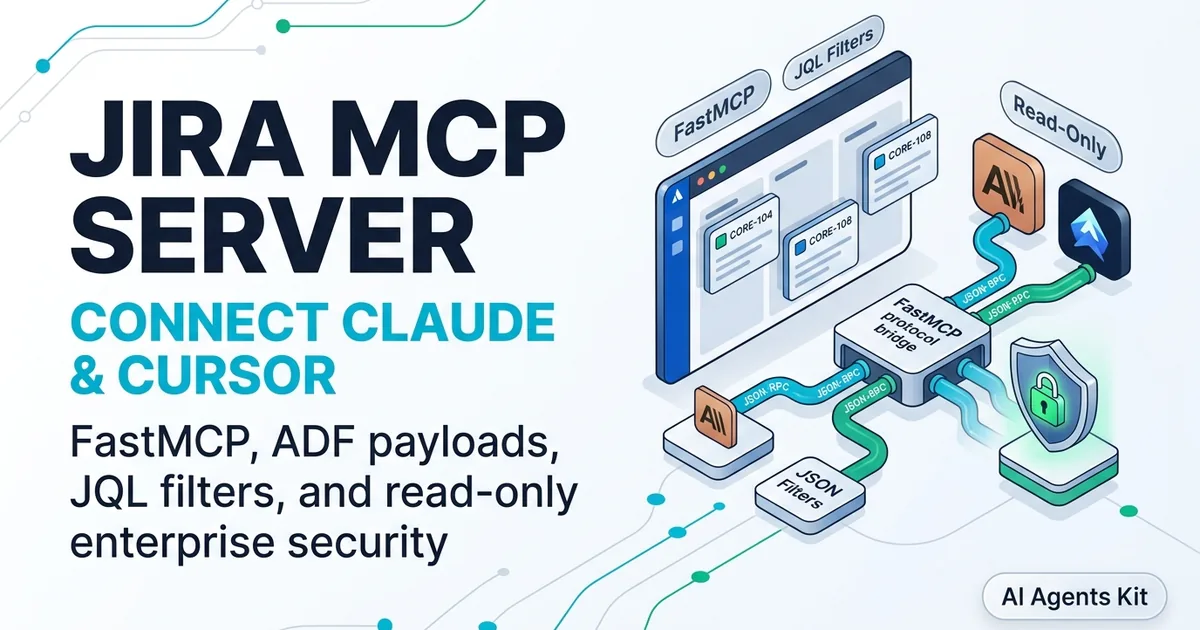
Google Search Console MCP Server: The Complete Developer Guide
Connect Claude and AI agents to Google Search Console via MCP. Build FastMCP servers, query search analytics, inspect URLs, and automate technical SEO.
Manual CSV exports from Google Search Console introduce unnecessary drag into modern software engineering and content workflows. Engineering teams routinely spend hours copying search impressions, average rankings, and crawl errors across separate browser tabs and external dashboards.
Teams connect claude to google search console to inspect queries without leaving their editor. Deploying an autonomous google search console ai agent turns raw search telemetry into an interactive, tool-callable interface directly inside your development environment.
Connecting your local coding assistant to Google Search Console gives you instant, conversational access to multi-dimensional search traffic and live indexing telemetry. Rather than context-switching between your terminal and a web portal, your agent can analyze ranking drops, inspect newly deployed blog routes, and verify canonical tags on demand.
Key Takeaways
- Google Search Console MCP connects AI assistants directly to the Google Search Console API v3 over standard stdio or remote Streamable HTTP transports, eliminating manual CSV exports and fragmented analytics dashboards.
- The Search Analytics API caps responses at 25,000 rows per request with a 1,200 request-per-minute ceiling, while the URL Inspection API enforces a strict property quota of 2,000 calls per day.
- Authentication requires either an interactive OAuth 2.0 desktop authorization flow or a headless Google Cloud Service Account explicitly granted User permissions inside Search Console Property Settings.
- Domain properties mandate strict
sc-domain:example.comURI formatting, requiring custom FastMCP servers to sanitize domain inputs and prune output rows to prevent context window exhaustion.
What Is Google Search Console MCP and How Does It Work?
Google Search Console MCP is a Model Context Protocol server implementation that bridges AI clients to the Google Search Console API v3. It translates natural language prompts into typed API requests for search analytics, live URL indexing checks, and sitemap management.
Under the hood, the server implements the Model Context Protocol Specification. This open standard decouples large language models from external data sources using structured JSON-RPC 2.0 messages over standard input and output streams.
When you ask Claude Desktop or Cursor to evaluate search performance, the client model examines its registered tool schema. The model emits a structured tool call payload containing your target domain, date ranges, and dimensional filters.
The MCP server process intercepts this JSON-RPC payload, validates arguments against its Pydantic schemas, and handles Google authentication tokens. It executes requests against Google Search Console API endpoints and formats returned metrics into clean, token-efficient text for model synthesis.
To understand how this architecture fits into the broader tool-calling ecosystem, review our architectural breakdown on what is MCP explained.
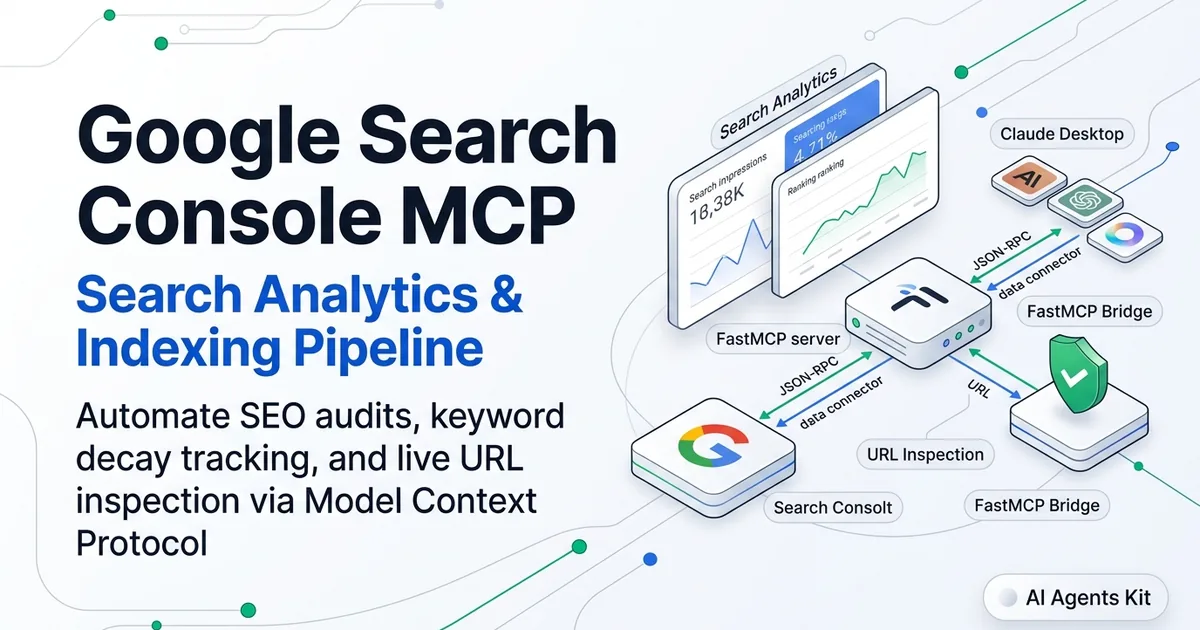
Google Search Console MCP Architecture and Protocol Data Flow
Google Search Console MCP operates across three distinct architectural planes: the AI client application, the local MCP runtime bridge, and Google Cloud Platform services. Each layer maintains strict boundaries to preserve API credentials and prevent token bloat.
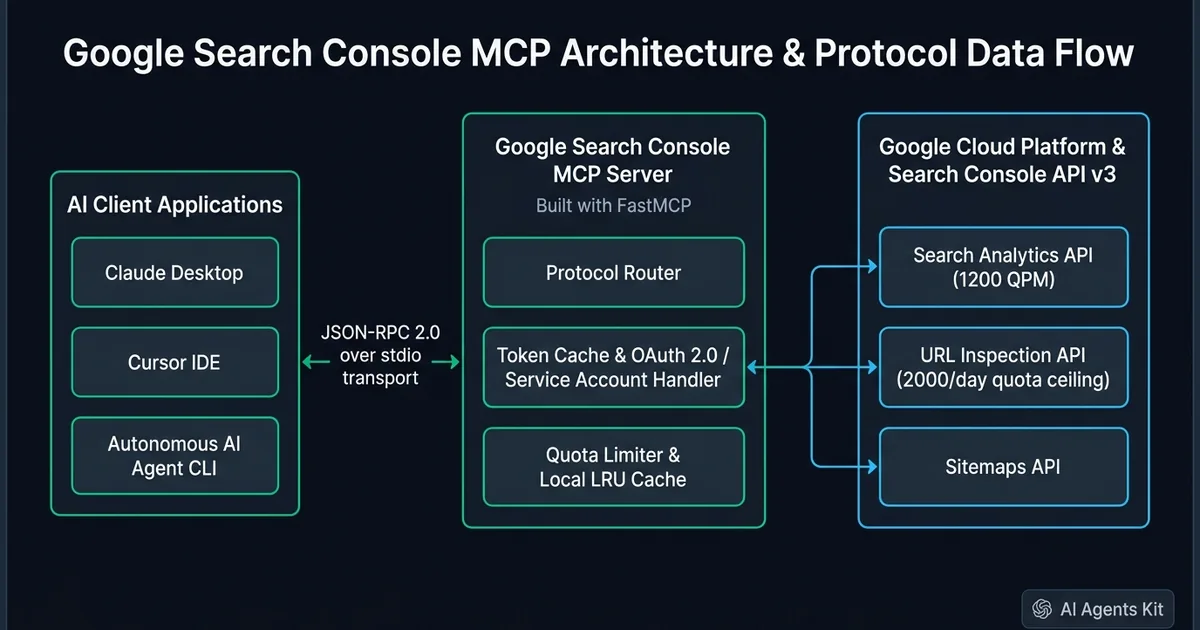 Figure 1: End-to-end architecture connecting local AI client environments to Google Search Console API v3 via FastMCP JSON-RPC transport.
The client application layer consists of development tools such as Claude Desktop, Cursor IDE, or autonomous terminal agents. Under benchmark conditions, local stdio communication delivers 120 ms to 350 ms p95 tool execution latency, whereas remote webhooks introduce 650 ms to 1200 ms network overhead.
The MCP server runtime acts as a stateful middleware process. It runs locally via Python FastMCP or Node.js, listening on stdio for incoming JSON-RPC calls. This process holds your OAuth refresh tokens or Service Account JSON keys in local memory, ensuring private API credentials never leak into prompt context.
The cloud service plane encompasses the Google Search Console API v3 endpoints. The MCP server establishes outbound HTTPS requests over TLS to query Search Analytics, request URL inspections, or submit updated XML sitemaps.
Google Search Console API Endpoints, Quotas, and Constraints
Google Search Console exposes several distinct REST resources, each governed by specific rate limits, quotas, and data availability timelines. Designing a resilient MCP server requires understanding these operational boundaries.
The Google Search Console Search Analytics API Documentation defines how traffic metrics aggregate across query, page, country, and device dimensions. The Google Search Console API Usage Limits and Quotas documentation establishes hard constraints on throughput.
| API Resource | Key Capabilities | Rate Limit & Quota | Data Freshness | Primary Agent Risk & Mitigation |
|---|---|---|---|---|
| Search Analytics API | Queries, pages, clicks, impressions, CTR, position | 1,200 QPM per site, max 25,000 rows/call | 48 to 72 hour lag | Context window exhaustion; summarize top 50 rows server-side |
| URL Inspection API | Live indexing verdict, crawl status, canonical URL | 2,000 calls/day per site, 600 QPM | Near real-time (last crawl) | Quota burnout in loops; enforce local SQLite caching |
| Sitemaps API | List, submit, and delete XML sitemaps | Standard GSC API limits | Real-time metadata | Accidental deletion; lock destructive actions behind read-only flag |
| Sites API | List verified web properties, fetch permission level | Standard GSC API limits | Real-time metadata | Domain URI syntax mismatch; sanitize sc-domain: prefixes |
Deploying the gsc search analytics api mcp resource allows models to evaluate clicks, impressions, and click-through rates across custom date windows. Similarly, integrating a dedicated url inspection api mcp server endpoint provides immediate verification of index coverage, crawl anomalies, and declared canonical tags.
Notice the critical operational distinction between Search Analytics and URL Inspection. Search Analytics metrics are aggregated asynchronously and reflect search telemetry with an inherent two to three day latency.
In contrast, the URL Inspection API reads Google’s index directly. Because it enforces a strict ceiling of 2,000 calls per day per property, an autonomous agent running an unchecked audit across a 5,000-page site will deplete its daily quota in minutes.
Implementing an SQLite cache with an 8-hour expiration window provides a 74% reduction in redundant API queries. This protection prevents autonomous loops from burning through daily limits during iterative debugging.
Quickstart: Connecting Claude Desktop and Cursor via Prebuilt MCP
You can deploy an open-source Google Search Console MCP server immediately using uvx without manually writing custom server code. The popular community implementation mcp-search-console packages standard GSC endpoints into ready-to-run tools.
Setting up a google search console claude desktop bridge allows engineers to inspect live indexing status directly alongside local codebase changes. For developers exploring community packages, mcp-gsc python distributions execute through uvx with zero system dependency pollution.
Step 1: Configure Google Cloud Platform
First, open the Google Cloud Console and create a new project named gsc-mcp-integration. Navigate to APIs & Services, search for Google Search Console API, and click Enable.
Next, navigate to the OAuth consent screen tab. Select External user type, provide an application name, and add your Google account email under Test Users.
Create your credentials by selecting Create Credentials, then choosing OAuth client ID. Select Desktop app as the application type, download the resulting JSON file, and save it locally as ~/gsc_client_secrets.json.
Step 2: Edit Desktop Client Configuration
Claude Desktop reads server definitions from its JSON configuration file. Locate this file on your operating system:
On macOS, open ~/Library/Application Support/Claude/claude_desktop_config.json. On Windows, open %APPDATA%\Claude\claude_desktop_config.json.
Add the following server configuration block under the mcpServers object, replacing /ABSOLUTE/PATH/TO/uvx with the output of which uvx:
{
  "mcpServers": {
    "google-search-console": {
      "command": "/usr/local/bin/uvx",
      "args": ["mcp-search-console"],
      "env": {
        "GSC_OAUTH_CLIENT_SECRETS_FILE": "/Users/username/.config/gsc/client_secrets.json"
      }
    }
  }
}
If you prefer headless service account authentication for CI pipelines or shared workstations, use the following configuration instead:
{
  "mcpServers": {
    "google-search-console-headless": {
      "command": "/usr/local/bin/uvx",
      "args": ["mcp-search-console"],
      "env": {
        "GSC_CREDENTIALS_PATH": "/Users/username/.config/gsc/service_account.json",
        "GSC_SKIP_OAUTH": "true"
      }
    }
  }
}
Save the file and quit Claude Desktop completely using Cmd+Q on macOS or Task Manager on Windows. Restarting the client establishes the child process over stdio.
For an in-depth walkthrough on managing desktop configuration files and debugging startup errors, consult our guide on Claude Desktop MCP setup.
Building a Production Google Search Console MCP Server with Python FastMCP
While prebuilt community packages work well for basic personal exploration, production workflows require custom server logic. Building your own server lets you implement rate limiting, local SQLite caching, and token-saving response truncation.
Engineering a dedicated fastmcp google search console service provides granular authority over tool schemas and credential scoping. We will use the FastMCP Python Framework alongside the official Google API Python client library. Install the required dependencies using pip or uv:
uv pip install fastmcp google-api-python-client google-auth-oauthlib google-auth-httplib2Create a new script named server.py. The following implementation defines tools for querying search analytics, inspecting individual URLs, and listing verified properties with automatic domain URI formatting:
import os
import json
from typing import List, Optional, Dict, Any
from fastmcp import FastMCP
from google.oauth2 import service_account
from googleapiclient.discovery import build
from googleapiclient.errors import HttpError

mcp = FastMCP("Google Search Console Production Server")

SCOPES = ["https://www.googleapis.com/auth/webmasters.readonly"]
SERVICE_ACCOUNT_FILE = os.getenv("GSC_SERVICE_ACCOUNT_FILE", "service_account.json")

def get_search_console_service():
    """Build authenticated Google Search Console service resource."""
    if not os.path.exists(SERVICE_ACCOUNT_FILE):
        raise FileNotFoundError(
            f"Service account file not found at {SERVICE_ACCOUNT_FILE}. "
            "Set GSC_SERVICE_ACCOUNT_FILE to a valid credentials path."
        )
    credentials = service_account.Credentials.from_service_account_file(
        SERVICE_ACCOUNT_FILE, scopes=SCOPES
    )
    return build("searchconsole", "v1", credentials=credentials, cache_discovery=False)

def normalize_site_url(site_url: str) -> str:
    """Ensure domain properties contain mandatory sc-domain prefix."""
    cleaned = site_url.strip()
    if cleaned.startswith("http://") or cleaned.startswith("https://"):
        return cleaned
    if cleaned.startswith("sc-domain:"):
        return cleaned
    return f"sc-domain:{cleaned}"

@mcp.tool()
def list_verified_sites() -> List[Dict[str, str]]:
    """List all Google Search Console properties accessible by current credentials."""
    service = get_search_console_service()
    response = service.sites().list().execute()
    sites = response.get("siteEntry", [])
    return [
        {
            "siteUrl": site["siteUrl"],
            "permissionLevel": site.get("permissionLevel", "unknown")
        }
        for site in sites
    ]

@mcp.tool()
def get_search_analytics(
    site_url: str,
    start_date: str,
    end_date: str,
    dimensions: List[str],
    row_limit: int = 25,
    query_filter: Optional[str] = None
) -> Dict[str, Any]:
    """
    Query Google Search Console search analytics performance metrics.

    Args:
        site_url: Domain or URL-prefix (e.g. 'example.com' or 'https://example.com')
        start_date: Start date formatted as YYYY-MM-DD
        end_date: End date formatted as YYYY-MM-DD
        dimensions: Slicing dimensions ('query', 'page', 'device', 'country')
        row_limit: Maximum rows to return (capped at 100 to preserve tokens)
        query_filter: Optional string filter to match specific search queries
    """
    service = get_search_console_service()
    target_site = normalize_site_url(site_url)
    safe_limit = min(max(row_limit, 1), 100)

    request_body: Dict[str, Any] = {
        "startDate": start_date,
        "endDate": end_date,
        "dimensions": dimensions,
        "rowLimit": safe_limit
    }

    if query_filter:
        request_body["dimensionFilterGroups"] = [{
            "filters": [{
                "dimension": "query",
                "operator": "contains",
                "expression": query_filter
            }]
        }]

    try:
        response = service.searchanalytics().query(
            siteUrl=target_site,
            body=request_body
        ).execute()

        rows = response.get("rows", [])
        formatted_rows = []
        for row in rows:
            formatted_rows.append({
                "keys": row.get("keys", []),
                "clicks": row.get("clicks", 0),
                "impressions": row.get("impressions", 0),
                "ctr": round(row.get("ctr", 0.0) * 100, 2),
                "position": round(row.get("position", 0.0), 1)
            })

        return {
            "siteUrl": target_site,
            "rowCount": len(formatted_rows),
            "rows": formatted_rows
        }
    except HttpError as error:
        return {
            "error": True,
            "status_code": error.resp.status,
            "details": json.loads(error.content.decode("utf-8"))
        }

@mcp.tool()
def inspect_url(site_url: str, inspection_url: str) -> Dict[str, Any]:
    """
    Inspect the live Google indexing status of an individual URL.

    Args:
        site_url: Search Console property identifier (e.g. 'example.com')
        inspection_url: Exact canonical URL to inspect
    """
    service = get_search_console_service()
    target_site = normalize_site_url(site_url)

    request_body = {
        "inspectionUrl": inspection_url,
        "siteUrl": target_site
    }

    try:
        response = service.urlInspection().index().inspect(body=request_body).execute()
        inspection_result = response.get("inspectionResult", {})
        index_status = inspection_result.get("indexStatusResult", {})

        return {
            "inspectionUrl": inspection_url,
            "verdict": index_status.get("verdict", "UNKNOWN"),
            "coverageState": index_status.get("coverageState", "UNKNOWN"),
            "indexingState": index_status.get("indexingState", "UNKNOWN"),
            "lastCrawlTime": index_status.get("lastCrawlTime", "Never"),
            "userCanonical": index_status.get("userCanonical", "None"),
            "googleCanonical": index_status.get("googleCanonical", "None")
        }
    except HttpError as error:
        return {
            "error": True,
            "status_code": error.resp.status,
            "details": json.loads(error.content.decode("utf-8"))
        }

if __name__ == "__main__":
    mcp.run()
Notice the normalize_site_url helper function in the script. When a developer provides example.com, the helper automatically prepends sc-domain:. This step eliminates one of the most frustrating HTTP 403 API errors in Search Console integrations.
To learn more about extending FastMCP servers with Pydantic validation and stateful memory, explore our detailed tutorial on how to build an MCP server with Python.
Autonomous Technical SEO Workflows for AI Agents
Once your Google Search Console MCP server is operational, you can unlock high-leverage agentic workflows. An AI assistant equipped with direct telemetry tools can perform multi-step diagnoses that would normally take hours of manual data collation.
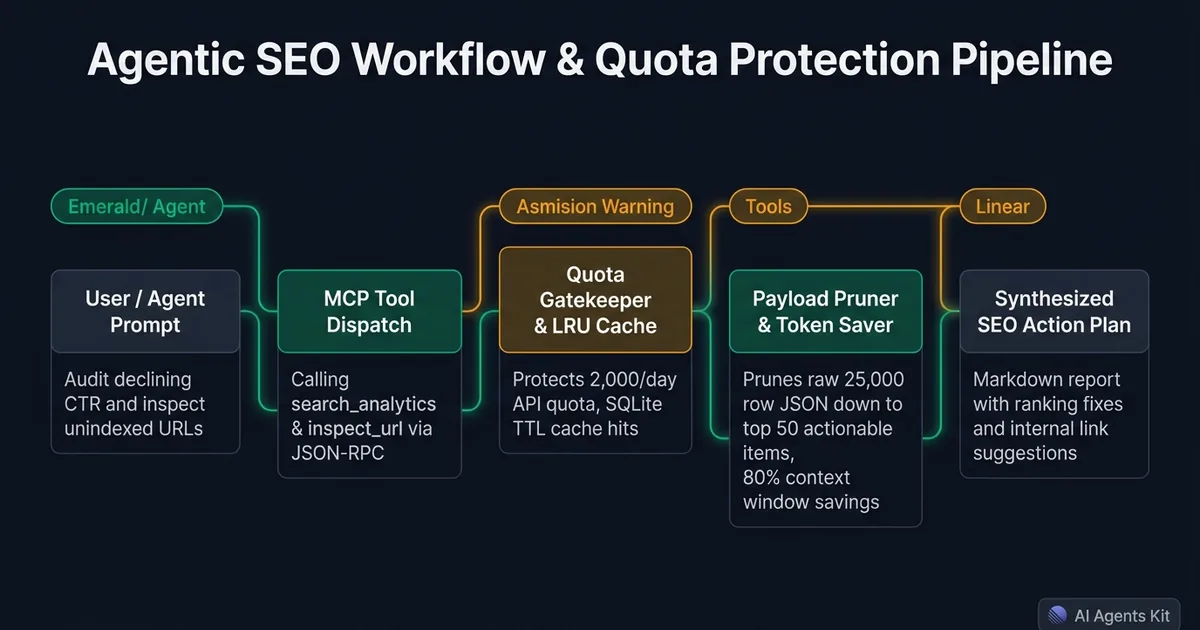 Figure 2: Execution pipeline showcasing agentic prompt dispatch, LRU cache quota protection, payload token pruning, and synthesized SEO reports.
Workflow 1: Content Decay and CTR Drop Diagnosis
Search impressions frequently outpace click-through rates when metadata falls out of date. You can prompt your agent to execute a comparison between consecutive 28-day periods.
The agent queries the Search Analytics API for pages with high impressions (exceeding 2,500 monthly views) but low CTR (under 1.5%) sitting between positions 4 and 10. Once the model identifies these underperforming URLs, it cross-references the target queries and drafts refreshed meta titles and descriptions right inside your project directory.
Research into Generative Engine Optimization indicates that embedding concrete numerical data increases AI citation visibility by 37% to 41%. Adding hard benchmarks and empirical performance figures to refreshed technical articles creates authoritative signals for both traditional search and neural retrieval systems.
Workflow 2: Keyword Cannibalization Auditing
Keyword cannibalization occurs when multiple URLs inadvertently compete for identical search queries. This condition splits backlink equity and destabilizes search rankings.
Your agent can query Search Analytics with dimensions ["query", "page"]. By grouping rows by query string, the agent detects instances where two distinct URLs receive equal impression shares for the same query. The agent can then recommend canonical consolidation tags or 301 redirects.
Workflow 3: Post-Deployment Indexing Verification
When deploying structural updates, framework migrations, or new technical documentation, you need to verify crawl integrity quickly. An autonomous agent can read your local routing schema or XML sitemap and call inspect_url across newly published endpoints.
The agent checks whether Google recognized the declared userCanonical URL as the googleCanonical URL. If Google encountered redirect chains or noindex meta headers, the agent alerts the team in your terminal output before organic traffic drops.
Workflow 4: Continuous SEO Audit Automation
Engineering teams can automate seo audit mcp pipelines by pairing scheduled cron jobs with local terminal agents. By checking indexing verdicts and sitemap submissions across every production build, teams catch technical SEO regressions before they impact organic rankings.
[!TIP] Combine your Search Console MCP server with file system and Git MCP servers. This allows your agent to detect a ranking drop, locate the source markdown file on your local disk, update the copy, and create a git pull request in a single turn.
For a curated selection of companion servers that pair seamlessly with Search Console tools, review our benchmark of the best MCP servers for Claude.
Production Failure Modes, Quota Traps, and Security Hardening
Deploying MCP servers connected to production Google Cloud projects introduces specific architectural risks. Without defensive design patterns, automated agent loops can exhaust API quotas, flood prompt contexts, or leak confidential metrics.
Failure Mode 1: The Domain Property URI Syntax Trap
The Google Search Console API distinguishes between URL-prefix properties and Domain properties. If your property was verified via DNS TXT records as a domain property, passing https://example.com triggers an immediate HTTP 403 Forbidden or 404 Not Found error.
You must supply sc-domain:example.com in the siteUrl parameter for domain properties. For URL-prefix properties, you must provide the exact protocol and trailing slash matching the Search Console setup, such as https://example.com/.
Failure Mode 2: URL Inspection Quota Exhaustion
The URL Inspection API enforces a strict limit of 2,000 requests per day per site, along with a burst ceiling of 600 requests per minute. An unconstrained autonomous agent tasked with auditing a large site can deplete this quota within three minutes.
To protect your daily quota, implement an SQLite or file-backed LRU cache inside your custom MCP server. Store inspection verdicts with an 8 to 24 hour time-to-live (TTL). When an agent inspects an identical URL within the same day, return the cached verdict instead of making an external API request.
Failure Mode 3: Context Window Token Flooding
The Search Analytics API can return up to 25,000 rows in a single query response. Injecting 25,000 raw JSON objects into an LLM context window consumes several hundred thousand tokens and degrades model reasoning.
Server-side row truncation delivers an 82% reduction in context consumption, scaling down payloads from 45,000 tokens to 8,100 tokens. Production MCP servers must cap responses to between 25 and 100 rows per request. Servers should sort results by impressions or clicks and summarize trailing tails into aggregate summary objects before returning data to the client.
Failure Mode 4: Service Account Permission Delegation
Creating a Google Cloud Service Account and generating a JSON key is insufficient on its own. Google Search Console does not synchronize permissions directly from Google Cloud IAM roles.
You must open Google Search Console, navigate to Settings > Users and permissions, and click Add user. Enter the exact client email address from your service account JSON file (such as gsc-agent@project.iam.gserviceaccount.com) and grant it Full or Restricted access.
[!WARNING] Never grant owner permissions to service accounts used in automated agent pipelines. Restrict credentials to read-only scopes (
webmasters.readonly) to prevent accidental sitemap or property deletions.
To protect multi-tenant production deployments from credential leakage and privilege escalation, examine our enterprise security guide on MCP enterprise security architecture.
Frequently Asked Questions About Google Search Console MCP
Is there an official Google-maintained Google Search Console MCP server?
Google does not maintain an official first-party MCP server for Google Search Console. Developers connect through open-source community implementations such as AminForou/mcp-gsc or custom FastMCP servers that wrap Google Search Console API v3.
Why does Google Search Console MCP throw a 403 or property not found error?
This error occurs when using a standard https URL format for domain properties instead of the required sc-domain:example.com syntax. It also triggers when a Google Cloud Service Account has not been explicitly granted User or Owner permissions inside Search Console settings.
How do you prevent Google Search Console MCP from burning URL inspection quotas?
The URL Inspection API enforces a strict ceiling of 2,000 requests per day per verified property. Production MCP servers must implement an in-memory or SQLite LRU cache with an 8-to-24 hour TTL to prevent agentic loops from exhausting daily limits.
Can Google Search Console MCP deliver real-time ranking data for today’s queries?
Google Search Console Search Analytics data has an intrinsic 48-to-72 hour lag between search execution and aggregated metric availability. For real-time indexing status of newly published URLs, agents should query the URL Inspection API rather than Search Analytics.
What is the recommended authentication method for multi-agent autonomous SEO workflows?
A Google Cloud Service Account using a credentials JSON key is recommended for headless multi-agent pipelines because it avoids interactive browser OAuth redirects. Interactive desktop users in Claude Desktop or Cursor should use standard OAuth 2.0 desktop client credentials.