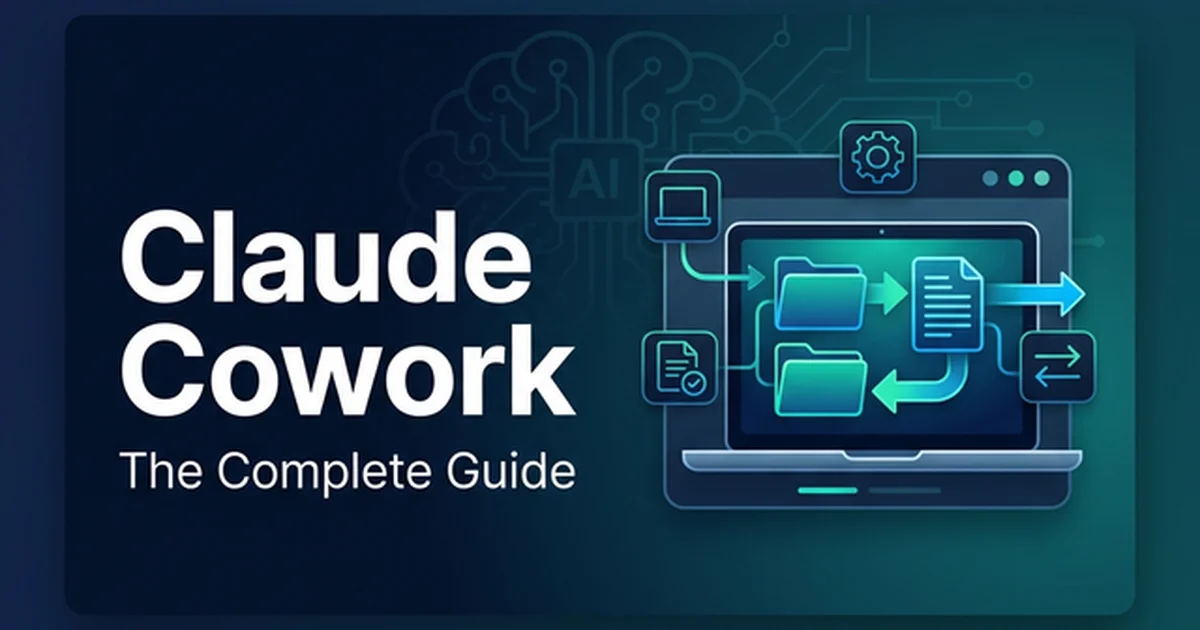
Claude Cowork: Complete Guide to Anthropic's AI Assistant (2026)
Master Claude Cowork in 2026. Explore Anthropic's desktop AI assistant architecture, local file isolation, TypeScript SDK hooks, and enterprise setup.
Deploying Claude against local file systems transforms routine knowledge work into deterministic, automated workflows without uploading proprietary business data to cloud training pipelines. Most teams interact with large language models through conversational browser tabs. In contrast, agentic desktop systems read, organize, transform, and verify local project files directly on the host machine.
Key Takeaways
- Claude Cowork integrates Anthropic’s agentic execution engine into the desktop application, enabling direct local file reads, batch transformations, and structured reporting across permitted folders.
- Anthropic isolates local file access through hypervisor-level sandboxing, using Apple Virtualization Framework on macOS and Host Compute System on Windows rather than unconstrained host shell access.
- The Anthropic Economic Index confirms that active Claude deployments deliver an 86% speed improvement and up to a 12x acceleration factor on complex analytical tasks.
- Developers govern enterprise file operations by configuring TypeScript middleware and PreToolUse hooks within the Anthropic Agent SDK to enforce deterministic Policy Decision Point rules.
Understanding the architectural foundations of AI agents clarifies why this desktop assistant operates differently from standard chat interfaces. Rather than generating stateless responses, an autonomous desktop agent perceives the environment, synthesizes multi-step execution plans, executes file operations, and inspects outputs for errors.
What Is Claude Cowork and How Does It Work Under the Hood?
Claude Cowork is Anthropic’s desktop agent capability that executes multi-step file operations and data synthesis within designated local directories. It plans sub-steps autonomously, reads and writes files inside an isolated workspace sandbox, and returns structured outputs without cloud data exfiltration.
Anthropic introduced Claude Cowork in early 2026 as a task automation interface inside the Claude Desktop client on macOS and Windows. Anthropic Cowork represents a fundamental shift in desktop computing: rather than requiring users to manually copy context into prompt windows, the system receives permission to inspect local directories. Operating within a 200,000 tokens context window, the agent reads spreadsheets, parses PDF documents, extracts unstructured notes, and writes production deliverables.
The operational lifecycle follows a five-stage agentic loop:
- Permission-Scoped Directory Mounting: The user designates a specific workspace folder. The host application mounts only that directory path into an isolated execution runtime.
- Deterministic Task Planning: The user provides an outcome-oriented instruction in plain language. Claude decomposes the objective into discrete filesystem reads, transformations, and writes.
- Autonomous Step Execution: Claude reads target documents, executes schema formatting, and generates draft artifacts inside the designated folder boundary.
- Verification and Error Recovery: If a file parser encounters malformed data or a missing column, the agent catches the exception and adjusts its parsing logic automatically.
- Output Delivery and Audit Trail: The agent delivers the finalized files and logs an audit trail detailing every file modified, created, or reviewed during the session.
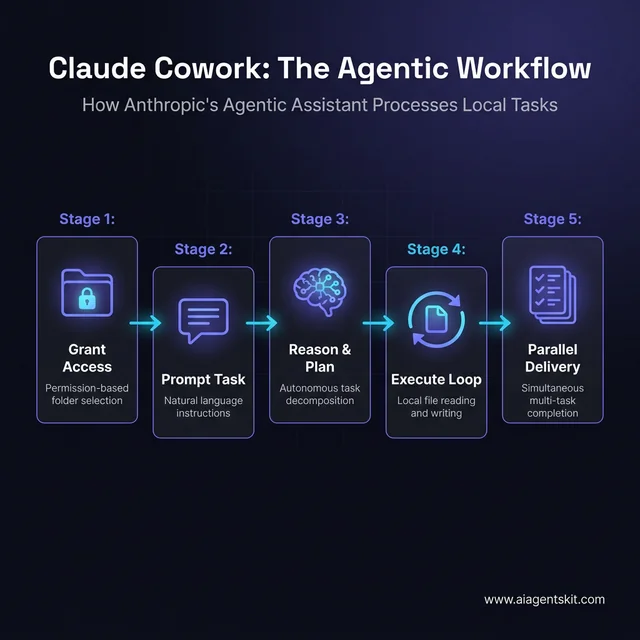 The five-stage agentic workflow that powers local file operations.
In everyday enterprise operations, anthropic claude cowork transforms manual data collection into continuous background tasks. Instead of spending hours converting unstructured invoices into account reconciliations, team members queue tasks that execute while they focus on high-judgment decisions. Teams contrasting native desktop sandboxes against cloud-orchestrated multi-model workers can reference our Perplexity Computer review to evaluate operational trade-offs.
Anthropic Cowork Architecture Design Details and Sandboxing
Anthropic cowork architecture design details center on environmental containment rather than fragile user prompt confirmations. Early desktop automation experiments relied on intrusive modal dialogs asking users to confirm every command. That approach caused severe alert fatigue, leading users to approve dangerous operations without inspection.
Modern desktop agent deployments replace manual confirmation prompts with hypervisor-based sandboxing. This architectural shift eliminates prompt injection blast radius and user alert fatigue.
On macOS, the desktop engine spins up an isolated guest environment with a compact 512 MB RAM footprint via the Apple Virtualization Framework. On Windows, the client provisions a lightweight utility container powered by the Host Compute System (HCS), mounting only the authorized host folder into the guest environment.
| Architectural Layer | Implementation Technology | Containment Mechanism | Security Guarantee |
|---|---|---|---|
| Host Application | Electron / Native Desktop Shell | OS Keychain and Credential Vault | Encrypted API keys and configuration profiles |
| Virtualization Boundary | Apple Virtualization / Windows HCS | Lightweight guest Linux micro-VM | Memory isolation and zero host kernel exposure |
| Filesystem Access | VirtioFS / Hyper-V Shared Folders | Scoped directory mount points | Traversal restricted strictly to authorized path |
| Network Egress | Custom Host Packet Filter | Domain allowlisting for MCP APIs | Blocks arbitrary reverse shells and data exfiltration |
| Model Runtime | Claude Sonnet 5 / Claude Opus 5 | Tokenized tool calling protocol | Structured JSON tool arguments with schema validation |
Quantitative findings published in the Anthropic Economic Index Research Report demonstrate the business impact of this architecture. In empirical workplace studies covering thousands of knowledge workers, active Claude deployments achieved an 86% speed improvement on recurring workflows. Furthermore, specialized analytical and programming tasks recorded up to a 12x acceleration factor when models interacted directly with structured project files.
For teams deploying claude for work, environmental containment ensures that security teams retain full visibility. The agent executes inside strict network egress boundaries, ensuring that company data never leaves the local machine during file sorting, text extraction, or local model synthesis.
Claude Cowork vs Claude Code vs Claude Chat: Tool Selection Guide
Choosing the right Anthropic interface depends entirely on the technical profile of the operator and the structure of the target workload. Claude Cowork, Claude Code, and Claude Chat share the same underlying intelligence engine, yet their interface modalities serve distinct disciplines.
Claude Chat operates as a web-based, conversational assistant. It excels at brainstorming, short-form drafting, and conceptual exploration. However, Claude Chat remains completely stateless regarding host infrastructure. Users must upload files manually, and generated code must be copied into local editors.
Claude Code targets software engineers who work continuously inside terminal emulators. It analyzes multi-repository codebases, executes test suites, manages git branches, and resolves merge conflicts. Because Claude Code requires command-line proficiency and shell familiarity, non-technical teammates often struggle to adopt it.
In an objective evaluation of modern AI agent frameworks, the desktop application bridges this divide by providing a clean graphical user interface for non-developer knowledge workers. It exposes the deep file-manipulation strengths of the Claude Agent SDK through intuitive desktop task cards.
| Feature | Claude Chat | Claude Cowork | Claude Code |
|---|---|---|---|
| Primary Interface | Web Browser / Mobile App | Desktop Graphical Task Window | Terminal Shell (CLI) |
| Filesystem Access | None (manual upload attachments) | Scoped local folders via hypervisor | Full developer repository and shell tools |
| Target User | General knowledge workers | Business analysts, operations, managers | Software engineers and DevOps specialists |
| Primary Workload | Ad-hoc queries, drafting, analysis | Document batching, data extraction, reports | Architecture refactoring, testing, git ops |
| Parallel Execution | Single conversation thread | Multi-task background queue | Multi-subagent terminal threads |
| Foundation Model | Claude Sonnet 5 / Haiku 4.5 | Claude Sonnet 5 / Claude Opus 5 | Claude Opus 5 / Claude Sonnet 5 |
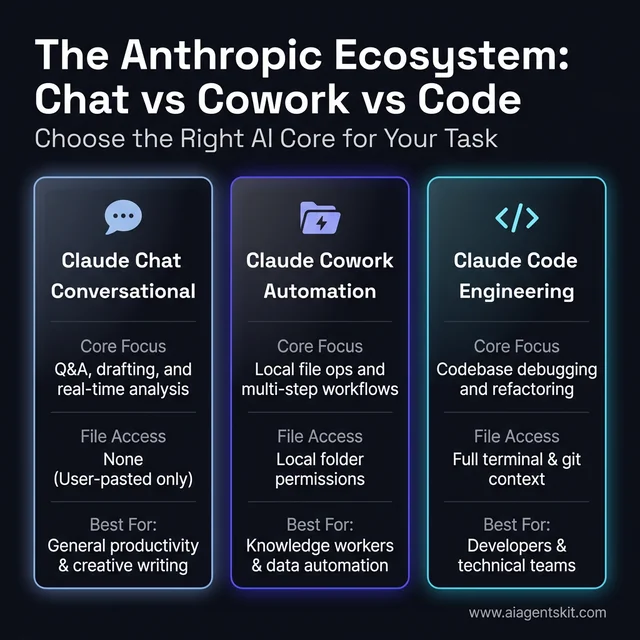 Understanding the different roles of Chat, Cowork, and Code within the Anthropic ecosystem.
When evaluating claude cowork anthropic against terminal agents, the primary differentiator remains accessibility. Marketing directors, financial controllers, and paralegals can command complex file workflows without learning shell commands or git conventions.
Enterprise Governance: TypeScript Middleware Anthropic Agent SDK PDP Integration Code Snippets
Enterprise IT teams must enforce centralized governance when deploying autonomous agents across corporate workstations. Organizations cannot grant desktop agents unrestricted filesystem permissions without verifying data sensitivity, path boundaries, and user authorizations.
Developers implement deterministic Policy Decision Points (PDP) using PreToolUse hooks provided by the Anthropic TypeScript SDK. Operating with sub-250 ms hook evaluation latency, the following typescript middleware anthropic agent sdk pdp integration code snippets demonstrate how to intercept filesystem actions, inspect tool arguments, scrub sensitive data, and reject operations outside permitted paths:
import { Anthropic } from "@anthropic-ai/sdk";
import path from "node:path";

interface PolicyDecision {
  action: "allow" | "deny" | "ask" | "defer";
  reason?: string;
  sanitizedInput?: Record<string, unknown>;
}

export class AgentPolicyDecisionPoint {
  private allowedBasePath: string;
  private piiPatterns: RegExp[];

  constructor(allowedBasePath: string) {
    this.allowedBasePath = path.resolve(allowedBasePath);
    this.piiPatterns = [
      /\b\d{3}-\d{2}-\d{4}\b/g, // SSN pattern
      /\b(?:\d{4}-){3}\d{4}\b/g // Credit card pattern
    ];
  }

  public evaluatePreToolUse(toolName: string, input: Record<string, unknown>): PolicyDecision {
    if (toolName === "write_file" || toolName === "read_file") {
      const targetPath = path.resolve(String(input.filePath || ""));
      if (!targetPath.startsWith(this.allowedBasePath)) {
        return {
          action: "deny",
          reason: `Security violation: Path ${targetPath} is outside workspace ${this.allowedBasePath}`
        };
      }
    }

    if (toolName === "write_file" && typeof input.content === "string") {
      let sanitizedContent = input.content;
      for (const pattern of this.piiPatterns) {
        sanitizedContent = sanitizedContent.replace(pattern, "[REDACTED_PII]");
      }
      return {
        action: "allow",
        sanitizedInput: { ...input, content: sanitizedContent }
      };
    }

    return { action: "allow" };
  }
}

export async function createGovernedAgentSession(workspaceDir: string) {
  const pdp = new AgentPolicyDecisionPoint(workspaceDir);
  const client = new Anthropic({ apiKey: process.env.ANTHROPIC_API_KEY });

  // Hook enforcement logic inside the agent loop
  const onPreToolUseHook = (toolName: string, input: Record<string, unknown>) => {
    const decision = pdp.evaluatePreToolUse(toolName, input);
    if (decision.action === "deny") {
      throw new Error(`Policy Decision Point blocked tool '${toolName}': ${decision.reason}`);
    }
    return decision.sanitizedInput || input;
  };

  return { client, onPreToolUseHook };
}
When comparing agent architectures, architects frequently evaluate a claude agent sdk vs langgraph comparison 2026 for production orchestration. LangGraph provides graph-based cycle definitions with state persistence across distributed worker nodes. In contrast, the Anthropic Agent SDK offers direct native integration with Claude’s tool calling protocol and minimal runtime overhead for local desktop runtimes.
Engineers building custom integrations can study production implementation patterns in our collection of Claude API code snippets and patterns. Implementing PreToolUse hooks ensures that client agents maintain compliance with internal data governance frameworks.
High-Impact Workflows: Document, Data, and Cross-Platform Automation
The operational value of the desktop assistant becomes apparent when applied to high-volume document workflows. Unstructured business records create significant operational bottlenecks for knowledge teams. Cowork resolves these bottlenecks by translating raw folder contents into clean, structured business assets.
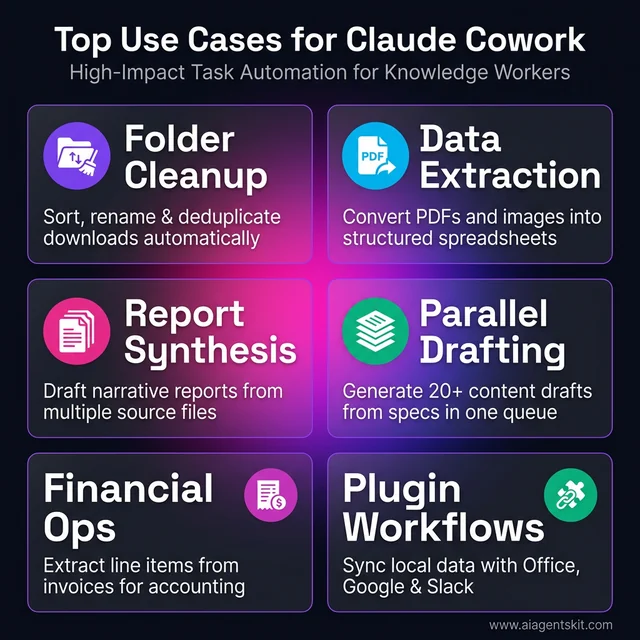 From folder cleanup to financial automation: identifying high-value tasks for Cowork.
Organizations deploy Cowork across three primary categories:
1. Document Synthesis and Folder Normalization
Messy download directories and shared project drives create hours of manual sorting. Cowork inspects file contents, extracts creation dates and metadata, and renames files using standardized corporate naming schemes. For example, pointing Cowork at a folder of unformatted customer intake PDFs produces an index spreadsheet alongside deduplicated, uniformly labeled records.
2. Multi-Format Data Extraction
Financial operations teams frequently receive scanned receipts, vendor invoices, and statement exports. Cowork extracts vendor names, line items, transaction dates, and tax sums, populating formatted Excel worksheets with dynamic summation formulas. Practitioners looking to deploy specialized workflows can review the Claude prebuilt agents library for purpose-built automation blueprints.
3. Cross-Application Asset Assembly
Marketing teams leverage Cowork to convert product specification sheets into complete promotional campaigns. By referencing brand guidelines in the workspace folder, the agent generates release notes, social summaries, and slide deck copy simultaneously. Parallel task execution allows the agent to process twenty individual product briefs in parallel, cutting preparation time from days to minutes.
Enterprise teams configuring the best claude agents consistently find that structured preparation determines task accuracy. Providing clean reference guidelines in the workspace folder ensures predictable, high-quality deliverables.
Claude Desktop MCP Discovery Prompts Installation Permissions and Setup
Configuring the desktop assistant for maximum utility requires pairing the desktop client with the Model Context Protocol (MCP). The open standard connects desktop assistants to local databases, enterprise APIs, and developer toolchains without custom client modifications.
Official technical specifications in the Model Context Protocol Specification and the Anthropic Model Context Protocol Architecture Announcement describe how desktop clients discover tools dynamically. When launching the desktop environment, Claude reads client configuration files to register available endpoints.
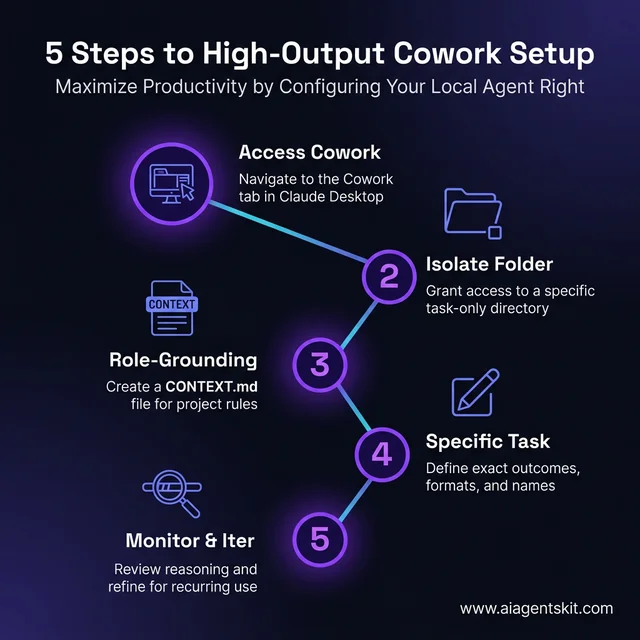 The definitive five-step path to configuring desktop task execution for maximum output.
Setting up a high-performance Cowork environment involves five methodical steps:
Step 1: Establish Workspace Scoping
Create a dedicated local folder such as ~/ClaudeWorkspace/ProjectAlpha. Copy only the documents required for the active objective into this folder. Never grant the agent access to root system directories or user home folders.
Step 2: Configure System Context via CONTEXT.md
Place a CONTEXT.md markdown file in the root of the workspace folder. Define team roles, target audience, style preferences, and strict file-naming conventions. Claude parses this document automatically prior to executing queued tasks.
Step 3: Configure MCP Endpoints and Permissions
Edit your claude_desktop_config.json to register filesystem and SQLite servers. Standard model endpoints like Claude Sonnet 5 are billed at $3.00 per million input tokens, making local MCP resource caching cost-effective. For full configuration steps, consult our comprehensive Claude Desktop MCP configuration guide. A representative configuration file appears below:
{
  "mcpServers": {
    "filesystem": {
      "command": "npx",
      "args": [
        "-y",
        "@modelcontextprotocol/server-filesystem",
        "/Users/username/ClaudeWorkspace/ProjectAlpha"
      ]
    },
    "sqlite": {
      "command": "uvx",
      "args": [
        "mcp-server-sqlite",
        "--db-path",
        "/Users/username/ClaudeWorkspace/analytics.db"
      ]
    }
  }
}
Step 4: Validate Discovery Prompts and Installation Permissions
During first-time server initialization, execute claude desktop mcp discovery prompts installation permissions checks in the desktop interface. Inspect the hammer tool icon to confirm that registered tools display their respective argument schemas.
Discovery Verification Prompt:
"List all active MCP tools and verify that read/write access is restricted exclusively to the ProjectAlpha directory."
Review the returned tool manifests in the Anthropic Agent SDK GitHub Repository to verify that local runtime schemas match expected server exports.
Step 5: Execute and Inspect the Task Run
Issue a structured outcome prompt: “Inspect all PDF files in the workspace, extract executive summary metrics, and write an executive briefing to briefing.md.” Monitor Claude’s step-by-step reasoning panel to verify file access decisions in real time.
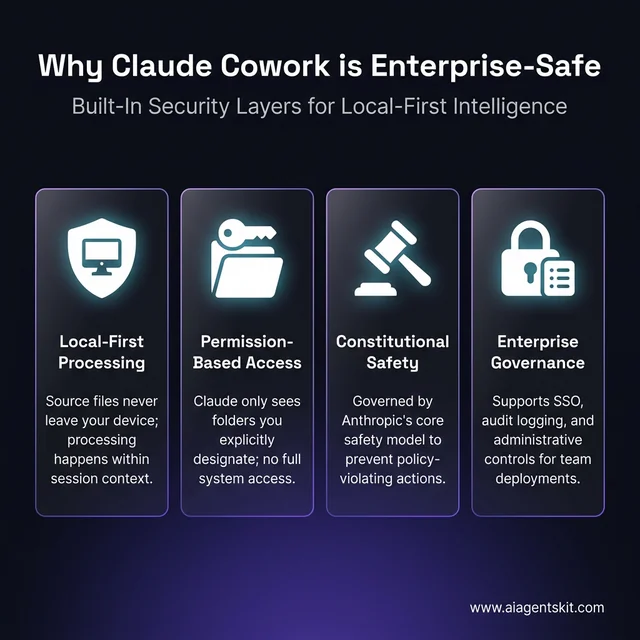 The core security architecture that keeps business data safe within the Cowork environment.
Frequently Asked Questions About Claude Cowork
What is Claude Cowork and how does it work?
Claude Cowork is Anthropic’s desktop agent capability that executes multi-step file operations and data synthesis within designated local directories. It plans sub-steps autonomously, reads and writes files inside an isolated workspace sandbox, and returns structured outputs without cloud data exfiltration.
How does Claude Cowork differ from Claude Code?
Claude Code is a developer CLI tool specialized for navigating terminal environments, multi-file codebases, and git version control loops. Claude Cowork provides a graphical task interface designed for document workflows, spreadsheet synthesis, and cross-application knowledge work.
Can the desktop assistant access files without explicit user permission?
Claude Cowork cannot inspect or alter files outside the explicit folder boundaries configured by the user. Operating systems enforce this boundary through hypervisor virtualization and folder permission scoping, preventing arbitrary filesystem traversal.
What subscription tier is required to run desktop task automation?
Claude Cowork capabilities are accessible to users on Claude Pro, Max, Team, and Enterprise subscription plans. Pro and Team subscribers utilize Claude Sonnet 5 by default, whereas Max and Enterprise tiers provide access to Claude Opus 5 for high-complexity reasoning.
How does the desktop agent compare to Microsoft Copilot in practice?
Microsoft Copilot operates predominantly within the Microsoft 365 cloud ecosystem, relying on OneDrive and Microsoft Graph permissions. Claude Cowork is filesystem-agnostic, executing directly against local directory trees using open Model Context Protocol integrations.