Best GPU for Running AI Locally (2026 Complete Guide)
Best GPU for running AI locally in 2026. VRAM tiers, best LLMs per GPU (RTX 3060, 4060 Ti, 4070, 3090), AMD picks, video generation, and budget recommendations.
GPU price comparisons for local AI keep sending developers down the wrong path — chasing frame rates and core counts when the only number that actually matters is VRAM. Most guides haven’t caught up with 2026 hardware, leaving readers choosing between stale 2024 recommendations and confusing specs that don’t translate to real inference performance.
The challenge is that selecting the right GPU for running AI locally with Ollama or any local inference stack comes down to one deceptively simple question: will the model fit in memory? Everything else — architecture, clock speed, shader count — plays a secondary role.
This guide covers the key VRAM math, the top GPU picks for every budget in 2026 (including the new Blackwell and RDNA 4 cards), and the honest trade-offs between NVIDIA and AMD that most product reviews gloss over.
Why VRAM Is the Only Spec That Matters for Local AI
There’s a common misconception among developers new to local AI: that a “fast” GPU will run AI models fast. The truth is more specific. A GPU can be the fastest graphics chip ever made and still be completely useless for running a 34B model if it only has 8GB of VRAM.
The VRAM Math: How to Calculate What You Need
When running a Large Language Model locally, the entire model needs to fit in GPU VRAM. Not most of it — all of it. The moment a model spills over into system RAM, inference speeds drop from dozens of tokens per second to single digits or complete failure.
The raw math is straightforward: running a model at FP16 (standard precision) requires approximately 2GB of VRAM per billion parameters. A Llama 4 8B model needs roughly 16GB of VRAM at full precision. A 70B model? Approximately 140GB — well beyond any single consumer GPU.
That’s where quantization enters the picture. By compressing model weights to 4-bit precision (Q4_K_M format), that 70B model shrinks to 35-40GB. At Q4_K_M quantization, the 8B model fits in just 4-5GB. According to NVIDIA TensorRT documentation, 4-bit quantization retains approximately 98.9% of model quality compared to full precision — an entirely acceptable trade-off for most use cases.
| Precision | VRAM per Billion Parameters | Quality |
|---|---|---|
| FP32 | ~4 GB | Full quality |
| FP16 (BF16) | ~2 GB | Full quality (standard) |
| Q8_0 (8-bit) | ~1 GB | ~99.9% quality retained |
| Q4_K_M (4-bit) | ~0.6 GB | ~98.9% quality retained |
| Q3 / Q2 | ~0.4-0.3 GB | Noticeable quality loss |
Memory bandwidth is the secondary consideration. Once a model fits in VRAM, bandwidth determines how quickly token generation happens. Modern GDDR7 cards (RTX 5090: 1,792 GB/s) generate tokens noticeably faster than GDDR6X cards (RTX 4090: 1,008 GB/s), even with the same model loaded. Target 600+ GB/s as a minimum for fluid generation; below that, generation starts to feel sluggish on larger models.
What Happens When Your Model Doesn’t Fit in VRAM
The degradation when a model overflows VRAM isn’t gradual — it’s a cliff. Tools like Ollama will partially load models into GPU VRAM and offload the rest to system RAM, but communication across the PCIe bus is orders of magnitude slower than native VRAM bandwidth. A model that generates 40 tokens/second fully in VRAM might drop to 2-3 tokens/second when offloaded. Practically speaking, it becomes unusable for interactive work.
This is why experienced practitioners reach for VRAM capacity before any other spec. A used RTX 3090 with 24GB often delivers more usable performance for local AI than a brand-new RTX 5070 with 12GB — despite the 3090 being two GPU generations older.
The practical VRAM tiers:
- 8-12GB VRAM: Run 7-8B models at Q4_K_M. Suitable for code completion and basic chat.
- 16GB VRAM: Run 13-14B models comfortably, or 7-8B at higher quality. Good developer sweet spot.
- 24GB VRAM: Run 34B models at 4-bit. Handles complex reasoning and advanced code tasks.
- 48GB+ VRAM: Run 70B models fully in VRAM. Near-frontier quality, serious investment.
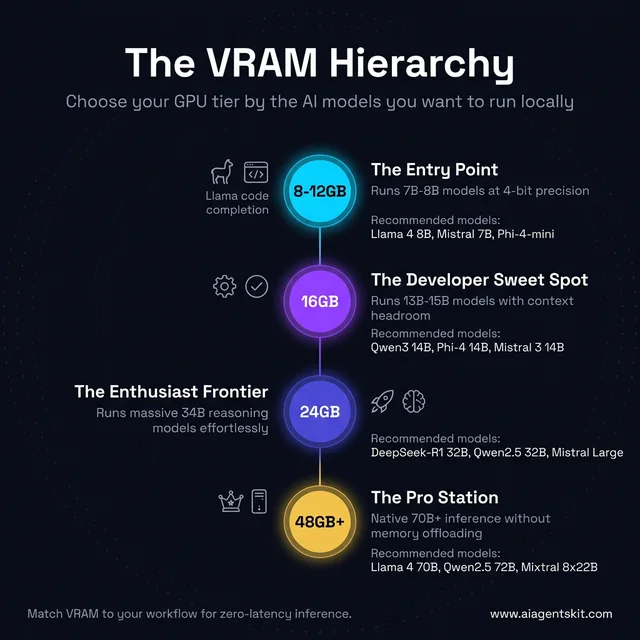
The VRAM Hierarchy: which GPU tier unlocks which AI models — from entry 7B inference up to 70B+ pro workflows.
How Much VRAM Do You Actually Need for AI Models?
Matching VRAM to use case is more nuanced than picking a “bigger is always better” tier. Actual requirements depend on model size, quantization level, and context window length.
VRAM Requirements by Model Size and Precision
This table targets the featured snippet because it’s the most-searched question about local AI hardware. The numbers assume running models with open source LLMs like Llama 4, Mistral, and DeepSeek variants at common quantization levels:
| Model Size | Q4_K_M (4-bit) | Q8_0 (8-bit) | FP16 (Full) | Practical GPU |
|---|---|---|---|---|
| 7B-8B | 4-5 GB | 8-9 GB | 14-16 GB | RTX 4060 Ti, RTX 5060 Ti |
| 13-14B | 8-10 GB | 14-16 GB | 26-28 GB | RTX 5080 (16GB), RTX 4070 |
| 32-34B | 18-22 GB | 34-36 GB | 64-68 GB | RTX 3090, RTX 4090 |
| 70B | 35-40 GB | 70-80 GB | 140 GB | Dual RTX 3090, RTX 4090 ×2 |
| 405B | 200+ GB | N/A | N/A | Professional workstation only |
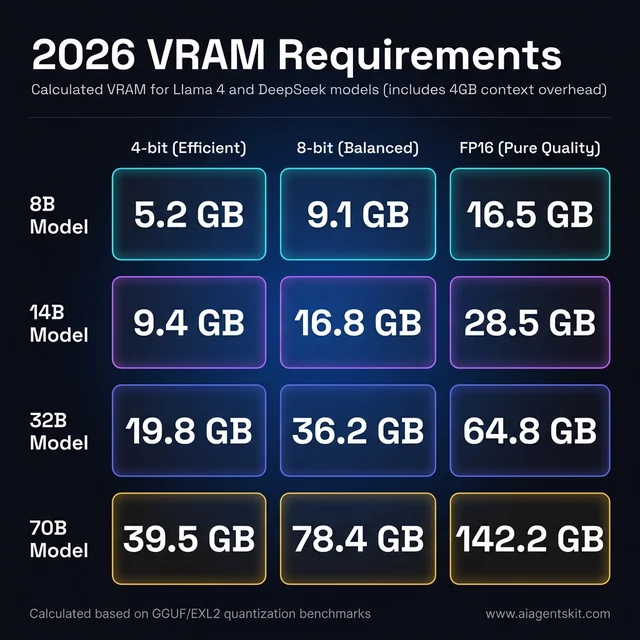
2026 VRAM cheat sheet: calculated memory requirements for common model sizes at every quantization level, including 4GB context overhead.
Most developers running Llama 4 8B or similar models for daily coding and reasoning tasks find 16GB VRAM to be the sweet spot — enough headroom for comfortable inference without professional-tier pricing.
Context Window Length and Its Hidden VRAM Cost
An often-overlooked VRAM consumer is the KV cache — the memory required to store the context window during inference. At 4,096 tokens of context, the overhead is minimal. At 32K or 128K tokens (increasingly common in 2026 models), the KV cache can consume 4-8GB of VRAM on its own.
Practical impact: if regularly working with long documents, codebases, or extended conversations, add 4-6GB to the baseline VRAM requirement. An RTX 5080 with 16GB starts feeling constrained with a 70B model loaded at 4-bit plus a large context — the model fits, but long-context inference suffers.
The NVIDIA NVIDIA vs AMD comparison page goes deeper on how context window memory differs between architectures, but the key takeaway is to budget for both model weights and KV cache when planning hardware.
Best Local AI Models for Each GPU and VRAM Tier in 2026
Knowing which GPU to buy is only half the answer. The more immediate question most developers have is: with the GPU I already own — or the one I’m about to buy — which models should I actually run? The answer changes significantly depending on VRAM capacity, and the guidance below maps specific GPUs to specific recommended models with Ollama commands.
The core rule: a model must fit entirely in GPU VRAM for interactive speeds. Partial offload to system RAM works but drops token generation from 30-80 tokens/second to 2-6 tokens/second — barely usable for interactive workflows.
Best AI Models for 4GB VRAM (RTX 3050, GTX 1660 Super, RTX 3060 Mobile)
Running local AI on 4GB VRAM is genuinely constrained — only the smallest quantized models fit without any offloading. That said, for learning the tooling and testing simple prompts, 4GB is workable.
| Model | VRAM at Q4 | Use Case | Ollama Command |
|---|---|---|---|
| Phi-4-mini | ~2.5 GB | General reasoning, code | ollama run phi4-mini |
| Gemma 3 2B | ~1.8 GB | Fast chat, summaries | ollama run gemma3:2b |
| TinyLlama 1.1B | ~0.7 GB | Extremely fast, basic tasks | ollama run tinyllama |
| Qwen2.5 1.5B | ~1.0 GB | Coding snippets, drafting | ollama run qwen2.5:1.5b |
4GB VRAM is a hard constraint for quality work. For anyone doing serious local AI development, upgrading to 8GB+ should be the first priority. The quality gap between a 1.5B and a 7B model is noticeable in reasoning, code generation, and instruction-following.
Best AI Models for 8GB VRAM (RTX 4060, RTX 3060 8GB, RTX 3070 8GB)
The RTX 4060 with 8GB VRAM is a common entry-level card. 7B-8B models at Q4_K_M fit comfortably, consuming 4-5GB and leaving enough room for context. Pushing to Q8 (8-9GB) is tight but possible with a small context window.
| Model | VRAM at Q4_K_M | Speed (RTX 4060) | Best For |
|---|---|---|---|
| Llama 4 8B | ~4.8 GB | 35-50 t/s | General reasoning, daily tasks |
| Mistral 7B | ~4.1 GB | 45-60 t/s | Fast, competent general chat |
| Qwen2.5 7B | ~4.5 GB | 40-55 t/s | Coding, multilingual tasks |
| DeepSeek-R1 7B | ~4.6 GB | 35-48 t/s | Math, logical reasoning |
| Gemma 3 9B | ~5.5 GB | 28-40 t/s | Strongest 9B for general use |
Best local LLMs for RTX 4060 8GB VRAM: Llama 4 8B and Mistral 7B are the standing recommendations. Mistral 7B loads faster; Llama 4 8B produces stronger output on complex prompts. For coding work specifically, Qwen2.5-Coder-7B is worth pulling — it significantly outperforms base 7B models on code completion and debugging tasks.
# Coding-focused setup for RTX 4060 8GB
ollama pull qwen2.5-coder:7b
ollama pull mistral
ollama pull deepseek-r1:7b
Best AI Models for 12GB VRAM (RTX 3060 12GB, RTX 4070 12GB, RTX 3080 10GB)
The 12GB VRAM tier is one of the most popular for local AI — the RTX 3060 12GB and RTX 4070 (base) both land here, and the jump from 8GB unlocks 13-14B models that produce noticeably stronger output than 7B.
Best local LLMs for RTX 3060 12GB and RTX 4070 12GB VRAM:
| Model | VRAM at Q4_K_M | Speed (RTX 3060 12GB) | Speed (RTX 4070 12GB) | Best For |
|---|---|---|---|---|
| Llama 4 8B (Q8) | ~8.4 GB | 30-45 t/s | 40-58 t/s | Higher quality 8B |
| Qwen3 14B | ~9.2 GB | 18-28 t/s | 25-40 t/s | Instruction-following, STEM |
| Phi-4 14B | ~8.8 GB | 20-30 t/s | 28-42 t/s | Math, reasoning, coding |
| Gemma 3 12B (QAT) | ~9.4 GB | 18-26 t/s | 24-38 t/s | Best general-purpose 12B |
| DeepSeek-R1 14B | ~9.0 GB | 15-22 t/s | 20-32 t/s | Complex reasoning, math |
| Mistral Nemo 12B | ~7.5 GB | 22-32 t/s | 30-45 t/s | Fast chat, balanced quality |
The RTX 4070 12GB generates tokens 30-50% faster than the RTX 3060 12GB for the same models, due to significantly higher memory bandwidth (504 GB/s vs 360 GB/s). Both run the same models — the choice is speed vs. price.
Best Ollama models for RTX 4070 12GB: Qwen3 14B at Q4_K_M is the standout pick — it delivers strong reasoning and coding at ~60 t/s on the RTX 4070, which makes it feel genuinely interactive. Gemma 3 12B QAT is worth trying for general chat quality.
# Recommended setup for 12GB VRAM cards
ollama pull qwen3:14b
ollama pull phi4:14b
ollama pull gemma3:12b
ollama pull deepseek-r1:14b
Best AI Models for 16GB VRAM (RTX 4060 Ti 16GB, RTX 5060 Ti, RTX 4080, RTX 5080)
The 16GB tier is the current developer sweet spot. With 14-15GB usable for model weights plus context, it handles 13-14B models at Q8 and pushes into 20-34B territory at Q4.
Best local LLMs for RTX 4060 Ti 16GB VRAM:
| Model | VRAM at Q4_K_M | Speed (RTX 4060 Ti 16GB) | Best For |
|---|---|---|---|
| Qwen3 14B (Q8) | ~14.2 GB | 25-40 t/s | Best quality 14B on 16GB |
| GPT-OSS 20B | ~14.0 GB | 18-30 t/s | Strong general reasoning |
| Phi-4 14B (Q8) | ~14.5 GB | 22-35 t/s | Math, code quality |
| Mistral 3 14B | ~8.8 GB | 45-70 t/s | Speed + quality balance |
| Llama 4 Scout (partial) | ~14.8 GB | 12-20 t/s | MoE model, partial fit |
| DeepSeek-R1 14B (Q8) | ~14.0 GB | 20-32 t/s | Hard reasoning tasks |
The RTX 4060 Ti 16GB has more VRAM than the standard RTX 4060 Ti — but lower bandwidth than the RTX 5060 Ti or RTX 5080. For coding and reasoning workflows on 16GB, Qwen3 14B at Q8 is the most common recommendation in developer communities: it fits entirely, produces high-quality code, and runs at interactive speeds.
# Best Ollama models for RTX 4060 Ti 16GB
ollama pull qwen3:14b          # Best all-around
ollama pull phi4:14b            # Engineering/math tasks
ollama pull mistral:3-14b      # Fastest option with good quality
ollama pull deepseek-r1:14b   # Reasoning-intensive work
Best AI Models for 24GB VRAM (RTX 3090, RTX 4090, RTX 3090 Ti)
24GB opens up the real frontier of consumer local AI. 34B models fit at Q4_K_M with headroom; quantized 70B models partially fit with system RAM offloading.
Best LLMs for 24GB VRAM:
| Model | VRAM at Q4_K_M | Speed (RTX 3090) | Best For |
|---|---|---|---|
| Llama 4 70B (Q2 — tight) | ~22 GB | 8-14 t/s | Largest model that fits |
| DeepSeek-R1 32B | ~20 GB | 12-18 t/s | Best reasoning at this tier |
| Qwen2.5 32B | ~19 GB | 14-22 t/s | Strong general + coding |
| Llama 4 Scout 17B | ~11 GB | 28-42 t/s | Fast MoE, excellent quality |
| Qwen3 14B (Q8) | ~14 GB | 35-50 t/s | Very high quality 14B |
| Mistral Large 24B | ~14 GB | 28-40 t/s | Mistral’s best consumer tier |
The used RTX 3090 at 24GB stands out because it enables a category of model — 30-34B — that changes the quality of output meaningfully compared to 14B. DeepSeek-R1 32B at Q4_K_M on a used RTX 3090 is arguably the best value local AI experience available in 2026: near-frontier reasoning at <$800 hardware cost.
# Deep reasoning setup for 24GB VRAM
ollama pull deepseek-r1:32b
ollama pull qwen2.5:32b
ollama pull llama4:scout       # Llama 4 Scout 17B active params
5 Best GPUs for Running AI Locally in 2026
The 2026 landscape shifted significantly with NVIDIA’s Blackwell consumer cards and AMD’s RDNA 4 lineup targeting AI workloads more directly. Here are the top picks across every budget tier.
Best Overall: NVIDIA RTX 5090 (32GB GDDR7, Blackwell)
Price: ~$1,999 | VRAM: 32GB | Memory Bandwidth: 1,792 GB/s
The RTX 5090 is, without contest, the best consumer GPU for local AI inference available in 2026. Launched on NVIDIA’s Blackwell architecture with 32GB of fast GDDR7 memory, it handles 34B models effortlessly and runs quantized 70B models with room to spare for generous context windows. According to NVIDIA’s official RTX 5090 specifications, the card delivers 3× higher AI performance than the previous Ada Lovelace generation.
The benchmark numbers are striking: the RTX 5090 reached approximately 5,841 tokens per second on Qwen2.5-Coder-7B in testing, making it roughly 2.6× faster than an NVIDIA A100 80GB data center GPU at this task — an extraordinary result for consumer hardware. Puget Systems’ 2025 Professional GPU Content Creation Roundup confirmed these results translate to real production AI workflows, with on-device inference speeds that rival cloud GPU clusters for many common model sizes. On practical workflows with 13B models at 4-bit, user testing consistently shows 80-120 tokens per second. That’s fast enough that response latency feels imperceptible.
The 5th Generation Tensor Cores with Blackwell’s FP4 support mean the architecture improves further with optimized inference frameworks. NVIDIA estimates 3× higher AI performance than the previous Ada Lovelace generation across the full chip.
Why it wins:
- 32GB GDDR7 handles nearly every consumer-relevant model without compromise
- Best-in-class inference speed (not just on paper — measured in production workflows)
- Full CUDA ecosystem: every AI tool supports it natively
- Future-proofed for 2027-2028 model releases that will demand more VRAM
The downsides: At $1,999 (and often selling well above MSRP at launch), it’s a substantial investment. The card draws 575W peak — requiring an 850W+ PSU with proper connectors. Supply constraints in early 2026 also mean availability can be limited at MSRP.
Best for: Developers who run local AI as a primary workflow and don’t want to think about VRAM limits for the next 3+ years.
Best Value: Used NVIDIA RTX 3090 (24GB GDDR6X)
Price: ~$650-900 used | VRAM: 24GB | Memory Bandwidth: 936 GB/s
The used RTX 3090 remains the most compelling value proposition in local AI GPUs in 2026 — and that surprises most people encountering the recommendation. Two generations old? Yes. Still dramatically more capable for local AI than most new mid-range cards? Absolutely.
The reason is simple: 24GB of VRAM in 2021 is the same 24GB in 2026. Architecture matters less than raw memory capacity for inference workloads. Token generation on a 3090 runs at 15-25 tokens/second for 34B models — slower than a 5090, but fully capable for development iteration. Most developers waiting 3-4 seconds for a complete code suggestion (which the 3090 delivers) are working faster than they would have with cloud API rate limits.
What the used market offers that new mid-range cards can’t match: a model like RTX 5080 at $1,199 has 16GB — 8GB less than the used 3090 for twice the price. For pure inference work, the VRAM gap wins.
Why it wins:
- 24GB VRAM at a fraction of new GPU prices
- Proven reliability — these are well-tested consumer workhorses
- Full CUDA support, works with every AI tool without configuration
- Often available from former crypto miners who treated them gently at stable loads
The downsides: Power-hungry (350W TDP), generates significant heat, and the two-slot cooler means excellent case airflow is non-negotiable. Buying used carries the standard risk of undisclosed wear — always test immediately after purchase.
Best for: Budget-conscious developers who need serious VRAM for inference and don’t mind a bit of extra heat and power draw.
Choosing llama.cpp vs Ollama as a runtime makes a difference on 3090 hardware — llama.cpp’s memory management often extracts slightly better performance per VRAM dollar than Ollama’s defaults.
Best Mid-Range: NVIDIA RTX 5080 (16GB GDDR7, Blackwell)
Price: ~$1,199 | VRAM: 16GB | Memory Bandwidth: 960 GB/s
For developers who want modern Blackwell architecture, full warranty, new hardware reliability, and strong performance without the 5090’s price tag, the RTX 5080 is the choice. At 16GB of GDDR7, it comfortably runs 13-14B models at high precision and handles 34B models at 4-bit quantization without significant constraint.
Performance benchmarks put it at 40-55 tokens/second for 7B models — fast enough for real-time interaction. The GDDR7 memory delivers 960 GB/s bandwidth (34% more than the RTX 4080), meaning even when models push against the 16GB limit, token generation stays brisk. Blackwell’s 5th Gen Tensor Cores with FP4 support also mean forward-compatibility as inference frameworks add lower-precision optimizations.
The 16GB limit does become real at the edges: 34B models at 4-bit fit, but large context windows (16K+) push into uncomfortable territory. For most development workflows running 7-13B models, 16GB is enough — but it requires more intentional model selection than 24GB+.
Why it wins:
- Blackwell architecture with all the ecosystem advantages of new NVIDIA hardware
- GDDR7 memory bandwidth is meaningfully faster than GDDR6X alternatives
- Modern power efficiency compared to 30-series
- Full warranty and new hardware peace of mind
The downside: At $1,199, the price-to-VRAM ratio is notably worse than a used RTX 3090. Picking between them depends entirely on whether bandwidth, power efficiency, and warranty outweigh raw VRAM capacity.
Best for: Developers who want a new, current-generation GPU with strong performance and can work within 16GB VRAM constraints.
Best Budget: NVIDIA RTX 5060 Ti (16GB GDDR7, Blackwell)
Price: ~$449-549 | VRAM: 16GB | Memory Bandwidth: ~432 GB/s
The RTX 5060 Ti emerged as the value standout of NVIDIA’s Blackwell consumer lineup. At 16GB of VRAM for under $550, it delivers the same VRAM headroom as the RTX 5080 at less than half the price. The trade-off is memory bandwidth — roughly 432 GB/s versus 960 GB/s on the 5080.
For inference tasks (running models, not training them), bandwidth affects token generation speed rather than whether a model can run at all. On 7B models, the RTX 5060 Ti produces 40-80 tokens/second with Q4_K_M quantization in optimized setups — fully adequate for development work. The gap to the 5080 becomes noticeable on larger models where bandwidth becomes more constraining.
Power efficiency is genuinely impressive at under 200W. The card fits in virtually any mid-tower case without clearance concerns. For developers primarily doing inference testing, prompt iteration, and development work rather than production serving, the 5060 Ti delivers remarkable capability per dollar.
Why it wins:
- 16GB VRAM at a budget price point — same model headroom as the 5080
- Blackwell architecture (CUDA 12+, FP4 support for future optimizations)
- Excellent power efficiency
- Fits in more system configurations than higher-end cards
The downside: Lower bandwidth means slower token generation, especially on larger models. Not suitable for production inference under heavy load. If budget allows, the jump to a used 3090 offers 8GB more VRAM for similar cost.
Best for: Students, hobbyists, and developers on strict budgets who need 16GB VRAM without spending RTX 5080 prices.
Best AMD Option: AMD Radeon RX 9070 XT (16GB GDDR6, RDNA 4)
Price: ~$699 | VRAM: 16GB | Memory Bandwidth: ~640 GB/s
AMD’s RDNA 4 architecture represented a genuine step forward for AI workloads, and the RX 9070 XT is the most accessible entry point. With 128 dedicated AI accelerators (new to RDNA 4), 16GB of GDDR6 memory, and improved FP8/FP4 support, it’s AMD’s most capable consumer AI card to date.
The ROCm ecosystem situation in 2026 is considerably better than it was two years ago. According to AMD’s official ROCm 6.4.1 release notes, the Radeon RX 9070 and RX 9070 XT received full ROCm support in May 2025, with support for RDNA 4’s compute units and AI accelerators across major Linux distributions. Major local AI tools have followed: Ollama supports the RX 9000 series out of the box on Linux, llama.cpp’s HIP backend runs well, and Windows support via ONNX EP was previewed in mid-2025 and continues maturing.
Where things still require attention: some Python-based ML frameworks assume CUDA by default. Fine-tuning workflows using PyTorch may need additional configuration. Projects built on CUDA-specific optimizations (flashattention, custom kernels) may require workarounds. For pure inference — which is what most local AI users actually need — the gap has narrowed significantly.
Token generation on the RX 9070 XT is competitive with NVIDIA cards at similar memory bandwidth: 30-50 tokens/second on 7-8B models, 15-25 tokens/second on 34B models — similar to the used RTX 3090, at lower power draw (175W TDP vs 350W).
Why it’s worth considering:
- 16GB VRAM at competitive pricing (often undercuts equivalent NVIDIA cards by $100-200)
- RDNA 4 AI accelerators make it AMD’s most AI-capable consumer GPU
- ROCm matured significantly — Ollama and llama.cpp work well on Linux
- Lower power consumption than comparable NVIDIA options
The downside: Windows AI software support still lags Linux. Community experience is smaller (fewer forum posts, tutorials, troubleshooting guides). Some workflows hitting RDNA 4 edge cases won’t have quick community answers.
Best for: Developers already comfortable on Linux who want to maximize VRAM per dollar and don’t mind occasionally troubleshooting compatibility.
NVIDIA vs AMD for Local AI: The Real Trade-offs
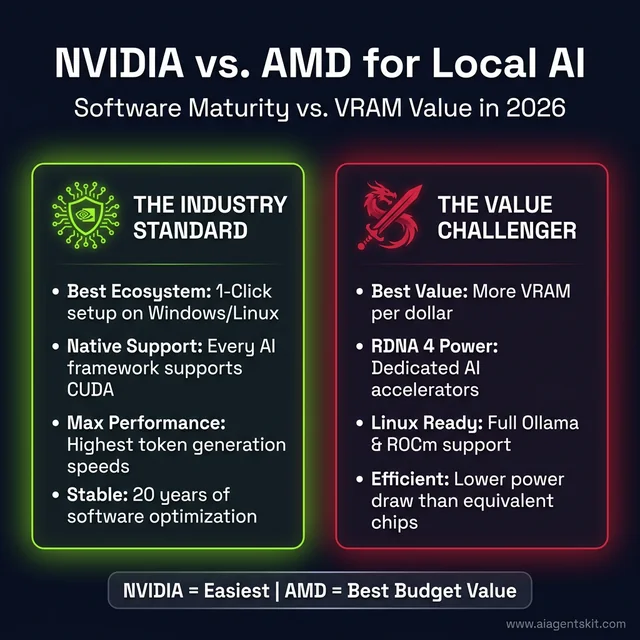
NVIDIA vs AMD for local AI: CUDA wins on ecosystem depth and ease-of-use; AMD RDNA 4 wins on VRAM-per-dollar and power efficiency.
The NVIDIA vs AMD debate in local AI circles is less about hardware performance than it is about software ecosystem readiness. In 2026, NVIDIA still leads on software maturity — but AMD has closed the gap meaningfully.
CUDA vs ROCm: What the Software Gap Actually Means
CUDA is two decades of accumulated software optimization. Every major LLM training framework was built CUDA-first. Every memory optimization technique (FlashAttention, PagedAttention, continuous batching) shipped on CUDA before being ported elsewhere. When developers hit issues with CUDA setups, thousands of Stack Overflow answers exist. When they hit ROCm issues, the community knowledge base is smaller.
In practice, the software gap matters most in three areas: custom PyTorch operations, cutting-edge inference optimizations, and fine-tuning workflows. For pure inference with mainstream tools — Ollama, LM Studio, llama.cpp — AMD’s support is now solid on Linux and improving on Windows.
Where NVIDIA wins decisively:
- PyTorch ecosystem: CUDA-native without configuration
- Custom kernels and optimized attention implementations
- Fine-tuning workflows (QLoRA, PEFT, etc.)
- Community knowledge base size
- Troubleshooting resources when things break
Where AMD is now competitive:
- Ollama: full support on Linux for RDNA 4
- llama.cpp: HIP backend works reliably
- Price-to-VRAM ratio: often 15-25% cheaper for equivalent VRAM capacity
- Power efficiency: RDNA 4 draws meaningfully less power than equivalent NVIDIA
When AMD RX 9070 XT Makes More Sense Than NVIDIA
There’s a specific user profile where AMD makes the better call in 2026. Linux-first developers running inference-only workloads through Ollama or llama.cpp, who primarily use off-the-shelf models rather than custom fine-tuned variants, and who are motivated by value rather than raw speed — that’s the AMD sweet spot.
For everyone else, the path of least resistance is still NVIDIA CUDA. The ecosystem, the tutorials, the community, and the fact that every AI tool lists CUDA support first make it the lower-friction choice. For users exploring AI on Mac as an alternative, Apple Silicon’s unified memory architecture offers a completely different trade-off — shared CPU/GPU memory enables running larger models on consumer hardware that no discrete GPU can match at similar cost.
What System Requirements Does Local AI Actually Need?
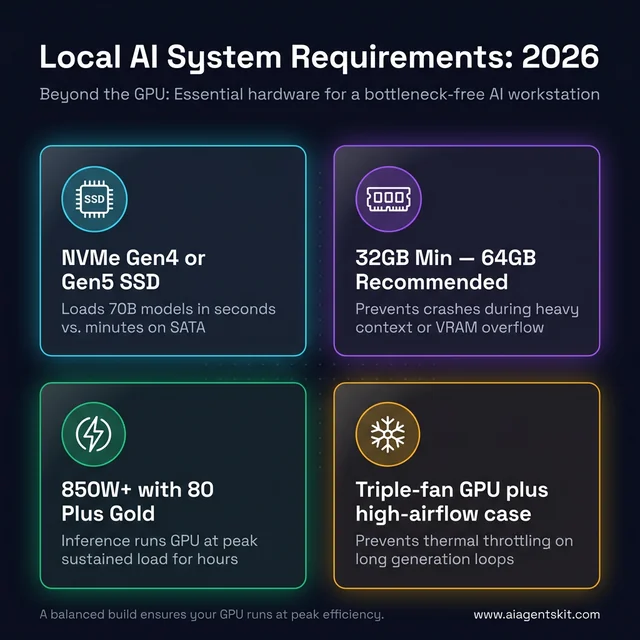
Beyond the GPU: the four hardware pillars that prevent system bottlenecks in a local AI workstation build.
The GPU gets all the attention, but the rest of the system matters more than most guides acknowledge. Bottlenecks outside the GPU can cancel out expensive VRAM investments. According to Jon Peddie Research’s Annual AI Processors Market Development report, the AI processor market reached $377 billion in 2025, projected to grow to $494 billion in 2026 — much of that growth driven by inference at the edge and on consumer hardware rather than cloud-only deployments.
Storage and NVMe Speed: Why It Matters for Model Loading
Model files are large and need to load into VRAM before inference begins. A Llama 4 8B Q4_K_M model is approximately 4.5GB; a 70B Q4_K_M model is roughly 39GB. Loading these from a slow drive is painful.
An NVMe SSD is not optional for a productive local AI setup — SATA SSDs are 2-4× slower for sequential reads (the primary workload here), and mechanical drives make large model loading a multi-minute ordeal. NVMe PCIe 4.0 drives provide sequential reads of 5-7 GB/s, meaning a 70B model loads in under 10 seconds. Budget at least 500GB dedicated for models; 1-2TB is practical for anyone running multiple models across different tasks.
System RAM is the second critical variable. If a model runs entirely in GPU VRAM, system RAM is rarely a bottleneck. But when models partially overflow into system RAM, bandwidth matters. 32GB DDR4/DDR5 handles 7-34B models with overflow headroom; 64GB+ recommended for 70B models or multi-agent workflows running several models simultaneously.
Power Supply Requirements by GPU Generation
Power supply sizing is where many local AI setups run into trouble. The requirements are more specific than typical gaming builds:
| GPU | TDP | Recommended PSU |
|---|---|---|
| NVIDIA RTX 5090 | 575W peak | 1000W+ |
| NVIDIA RTX 5080 | 360W peak | 750W+ |
| AMD RX 9070 XT | 304W peak | 700W+ |
| NVIDIA RTX 3090 | 350W peak | 750W+ |
| NVIDIA RTX 5060 Ti | ~180W peak | 600W+ |
AI inference runs GPUs at high sustained utilization — not burst loads like gaming, which typically spike briefly. PSU should be rated for sustained load at the required wattage, with a high-efficiency rating (80+ Gold or better). Running a high-end GPU on an undersized PSU during extended inference sessions is a hardware risk.
CPU selection is rarely the bottleneck for inference, but model loading and pre/post-processing benefit from a modern CPU (8+ cores). AMD Ryzen 9000 series and Intel Core Ultra 200 series both handle local AI support workflows without issue. PCIe 4.0 × 16 is the recommended slot (PCIe 5.0 provides minimal benefit for inference — the bandwidth isn’t the limit in typical workloads).
Cooling deserves mention given inference’s sustained load profile: plan for continuous GPU temperature management. Unlike gaming, which has variable load, AI inference often runs the GPU at near-maximum utilization for extended periods. Triple-slot GPU coolers and good case airflow are worth prioritizing. The AI PC hardware selection framework covers cooling fundamentals in more detail.
GPU Requirements for Local AI Video Generation and Agent Workflows
The keyword searches around local AI video generation and AI agent hardware reflect two growing use cases that have different requirements from pure LLM inference. Neither fits into the standard VRAM table above — they need their own guidance.
Best GPU for Local AI Video Generation in 2026
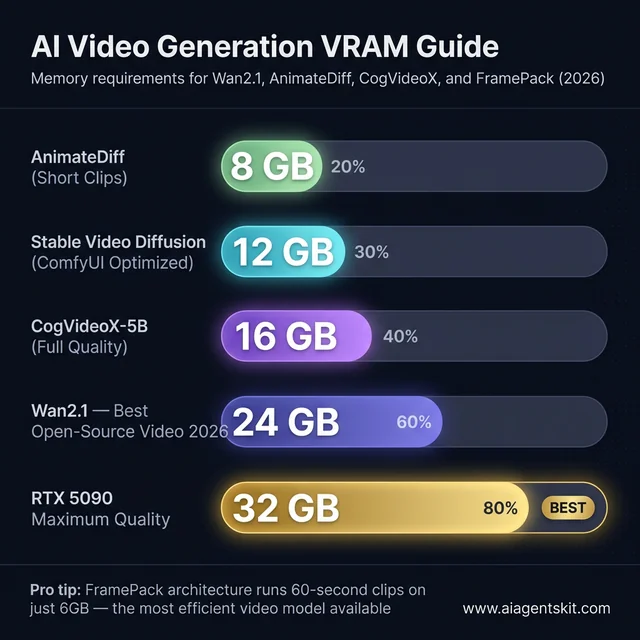
AI video generation VRAM requirements in 2026: from AnimateDiff short clips at 8GB up to Wan2.1 full-quality at 24GB.
AI video generation (Wan2.1, Stable Video Diffusion, CogVideoX, AnimateDiff) is significantly more VRAM-intensive than text inference. Video models encode spatial and temporal relationships across frames simultaneously, keeping much more data in VRAM at once than text LLMs.
VRAM requirements for local AI video generation:
| Tool / Model | Min VRAM | Recommended VRAM | Notes |
|---|---|---|---|
| Stable Video Diffusion (ComfyUI optimized) | 12 GB | 16 GB | Optimized pipelines bring requirements down substantially |
| Wan2.1 (14B video model) | 16 GB | 24 GB | Best open-source video model in 2026 |
| CogVideoX-5B | 16 GB | 24 GB | Good quality, memory-efficient |
| AnimateDiff (with ControlNet) | 8 GB | 16 GB | Short clips, older architecture |
| FramePack (6GB innovation) | 6 GB | 12 GB | 60-second clips at lower memory via novel architecture |
Best GPU for local AI video generation: The RTX 5090 (32GB) is the unchallenged consumer leader — video models run at full resolution and full quality without any memory compromise. For most creators, the practical choice is the used RTX 3090 (24GB) or RTX 5080 (16GB). The 24GB RTX 3090 handles Wan2.1 at full quality; the RTX 5080’s 16GB manages it with reduced resolution or shorter clips.
On a 12GB card (RTX 3060 12GB or RTX 4070 12GB), Stable Video Diffusion works with ComfyUI’s memory optimization enabled — the tool caches computations in system RAM and processes video in segments. Generation is slower but functional. FramePack’s breakthrough architecture enables 60-second clip generation on just 6GB — the most memory-efficient video model currently available.
AMD RDNA 4 cards work with ComfyUI on Linux via ROCm, but Windows support for video workflows is still maturing. NVIDIA remains the path of least resistance for AI video generation.
# Quick setup for AI video generation with ComfyUI
# Requires NVIDIA GPU; 16GB+ recommended
pip install torch torchvision --index-url https://download.pytorch.org/whl/cu121
git clone https://github.com/comfyanonymous/ComfyUI
cd ComfyUI && python main.py --lowvram   # --lowvram flag for 12-16GB cards
Best Hardware for Running Local AI Agents in 2026
Local AI agents — autonomous workflows using frameworks like AutoGen, CrewAI, or LangChain — generate significantly more tokens per task than simple chat. An agent researching a topic, writing code, and debugging it might generate 10,000-50,000 tokens to complete one task that a human would express in two sentences. That volume changes the hardware calculus.
What makes agent workloads different from chat inference:
- Volume: Agents run continuous inference loops, not single-request/response cycles. GPU utilization stays high for minutes, not seconds.
- Context accumulation: Agent memory grows across tool calls. A 32K context fills fast when tool outputs are verbose — choose GPUs with VRAM headroom for both the model and a growing context.
- Multi-model workflows: Some agent setups run a large reasoning model alongside a smaller, faster embedding model simultaneously. Two models loaded at once double the VRAM requirement.
Recommended hardware by agent use case:
| Agent Type | Min VRAM | Recommended GPU | Reasoning |
|---|---|---|---|
| Single-model research agent (7-14B) | 12 GB | RTX 4070 12GB, RTX 3060 12GB | Fits 14B with room for long context |
| Code generation + debugging agent (14B) | 16 GB | RTX 4060 Ti 16GB, RTX 5060 Ti | 14B at Q8 + context headroom |
| Multi-model agent (reasoning + embedding) | 24 GB | RTX 3090, RTX 4090 | Two models loaded simultaneously |
| Production multi-agent system (32B) | 24+ GB | RTX 5090, dual RTX 3090 | 32B reasoning model + tools + long context |
For agent workflows, the CPU and system RAM matter more than in pure inference setups. The CPU handles tool execution, file I/O, web requests, and Python logic between model calls. An AMD Ryzen 9 7900X or Intel Core Ultra 9 265K with 64GB DDR5 system RAM is the appropriate pairing for serious local agent work. NVMe storage is non-negotiable — agents frequently load and unload context documents.
The practical entry point for running useful local AI agents in 2026 is a 16GB VRAM card paired with 32GB system RAM. That configuration runs a 14B agent loop well, handles 32K context accumulation, and leaves room for ComfyUI or other tools to run alongside the agent for multi-modal workflows.
Frequently Asked Questions About GPUs for Local AI
Can I run AI locally with an 8GB GPU?
Yes, but with meaningful constraints. An 8GB GPU can run 7-8B models at Q4_K_M quantization, which fits in approximately 4-5GB of VRAM — leaving headroom for context. Cards like the RTX 4060 and RTX 5060 work for basic code completion and text generation. The limitation becomes apparent with context-heavy tasks: long documents, large codebases, or multi-turn conversations where the KV cache competes for the remaining VRAM. For experimentation and learning, 8GB works. For serious development workflows, the upgrade to 16GB makes a material difference.
How many tokens per second should I expect from my GPU?
Token generation speed depends on model size, quantization level, and GPU bandwidth. Rough benchmarks for common setups:
- RTX 5090 (32GB): 80-120+ tokens/second on 13B models, 60-90 on 7B models
- RTX 5080 (16GB): 40-55 tokens/second on 7B models
- RTX 3090 used (24GB): 15-25 tokens/second on 34B models; 40-60 on 7B
- RTX 5060 Ti (16GB): 40-80 tokens/second on 7B models with Q4
- AMD RX 9070 XT (16GB): 30-50 tokens/second on 7B models (ROCm/Linux)
Anything above 20 tokens/second feels interactive. Below 5 tokens/second starts feeling like waiting.
Is a $1,999 RTX 5090 worth it for local AI inference?
It depends on usage intensity. For developers spending $100+ per month on cloud AI APIs (Claude Pro, GPT-5, API usage), the math breaks even within 18-20 months. For occasional hobby use, the used RTX 3090 at $700 is a more rational choice. The RTX 5090 makes unambiguous sense for: teams running inference internally to avoid API costs, developers who need 32GB VRAM for 70B models, and anyone who wants the fastest local inference available without multi-GPU complexity.
What is the best budget GPU for running AI locally on a tight budget?
The RTX 5060 Ti at $449-549 and used RTX 3090 at $650-900 are the two value leaders in 2026. For pure budget (under $500), the RTX 5060 Ti’s 16GB VRAM provides more capability than any previous cheap option. If VRAM capacity matters more than speed or power efficiency, the used RTX 3090’s 24GB at $700-800 outpunches the newer card for 34B model work. Intel Arc B580 (12GB, ~$249) remains the cheapest entry into local AI experimentation, but limited bandwidth makes it a learning tool rather than a practical workflow card.
Can I use two GPUs for local AI instead of one?
Multi-GPU inference is possible but significantly more complex than single-GPU setups. llama.cpp supports tensor parallelism across multiple GPUs; Ollama has limited multi-GPU support. The practical use case for dual GPUs is running 70B models: two RTX 3090s (48GB combined) can fully load a 70B 4-bit model that no single consumer GPU can handle. The downsides: PCIe bandwidth between GPUs can throttle performance, power consumption doubles, setup complexity increases sharply, and the combined cost often approaches a used professional GPU. For most users, one high-VRAM card is simpler.
What’s the difference between running AI on a GPU vs Apple Silicon Mac?
Apple Silicon uses unified memory, meaning the same RAM pool serves both CPU and GPU. An M3 Max with 128GB can load a 70B model into memory — something no consumer GPU achieves alone. On the other hand, Apple Silicon’s memory bandwidth (~400 GB/s on M3 Max) is lower than RTX 5090 (1,792 GB/s), meaning token generation is slower for smaller models that fit readily in GPU VRAM. The Mac is compelling for large model work (70B+) without multi-GPU complexity; NVIDIA GPUs win on generation speed for 7-34B models. The choice depends on target model size and workflow.
Does training AI models require a different GPU than inference?
Training has different requirements from inference, and the answer shifts significantly based on training type. Full fine-tuning of a large model requires the highest VRAM possible plus fast interconnect — workstation or cloud hardware. Parameter-Efficient Fine-Tuning (PEFT/QLoRA), however, is achievable on consumer GPUs. A 24GB card can fine-tune 7-13B models with QLoRA techniques. For the inference-only use cases most practitioners actually have, the VRAM guide above applies directly. Training adds gradient memory, optimizer state, and activation checkpointing overhead — typically 3-4× the inference VRAM requirement for the same model.
Can I run Llama 4 locally on a consumer GPU?
Llama 4’s variable lineup makes this a question of which model. Llama 4 Scout (17B active parameters, 16-expert MoE) runs on 16-24GB VRAM at Q4_K_M — within reach of RTX 5080, RTX 5060 Ti, or used RTX 3090. Llama 4 Maverick (17B active parameters, 128-expert MoE, 400B total) is more demanding; the active parameter count keeps it feasible at Q4_K_M on 24GB cards, though the full model requires professional storage. Llama 4 405B — the largest variant — requires server-class infrastructure. For most developers, Scout at Q4_K_M on a 16-24GB card delivers an excellent local AI experience.
What quantization format is best for local AI inference?
Q4_K_M is the practical standard in 2026 — excellent balance of model quality (98.9% accuracy retention) and memory savings (roughly 70% reduction vs FP16). For higher quality where VRAM allows, Q8_0 delivers ~99.9% accuracy at about half the FP16 footprint. Q3 and Q2 formats exist for extreme memory constraint situations but produce noticeable quality degradation. NVIDIA’s NVFP4 format, native to Blackwell GPUs, offers additional efficiency gains with compatible inference frameworks — a forward-looking advantage for RTX 5090/5080 owners as tooling matures.
Does my GPU need PCIe 5.0 for local AI inference?
No. PCIe 4.0 × 16 provides 32 GB/s of bandwidth in each direction — far exceeding what inference workloads actually use. Model weights load from storage into VRAM at model-load time, and that bandwidth is storage-to-GPU (not PCIe-limited at 4.0). During active inference, the GPU works with data already in VRAM; PCIe bandwidth is not a factor. PCIe 5.0 becomes relevant for multi-GPU NVLink configurations or when CPU-side processing needs to rapidly transfer large data batches to GPU — neither of which applies to typical local AI inference. Don’t pay a premium for PCIe 5.0 support for this use case.
What is the best AMD GPU for local LLMs in 2026?
The RX 9070 XT (16GB GDDR6, RDNA 4) is AMD’s strongest consumer recommendation for local LLM inference in 2026. Its 128 dedicated RDNA 4 AI accelerators deliver 8× the AI compute of the previous RDNA 3 generation, and ROCm 6.4.1 brought full support for Ollama and llama.cpp on Linux. Token generation runs at 30-50 tokens/second for 7-14B models — competitive with NVIDIA cards at similar bandwidth. For users who need 24GB of VRAM with AMD hardware, the previous-generation RX 7900 XTX (24GB) remains available on the used market and provides more capacity than any current RDNA 4 consumer card. Both cards outperform NVIDIA on VRAM-per-dollar metrics; the trade-off is a smaller ROCm community and less complete Windows support.
What is the best GPU for Ollama in 2026?
Ollama runs on NVIDIA, AMD, and Apple Silicon GPUs. For dedicated PC hardware, the best GPU for Ollama depends on budget: the RTX 5060 Ti (16GB, ~$500) is the best-value new card — same model headroom as cards costing twice as much. The used RTX 3090 (24GB, ~$700) is the best-value overall, unlocking 34B model territory. The RTX 5090 (32GB, ~$2,000) is the best for performance ceiling. On AMD, the RX 9070 XT (16GB) works solidly with Ollama on Linux. Apple Silicon (M4/M5 with 24GB+ unified memory) is the best option for running larger models without a discrete GPU — Ollama automatically uses Metal acceleration on every M-series Mac.
What is the recommended VRAM for running a 70B LLM locally?
Running a 70B model fully in GPU VRAM requires 35-40GB at Q4_K_M quantization — beyond any single consumer GPU. The practical solutions: (1) Dual RTX 3090 setup (48GB combined) runs 70B models fully at 15-20 tokens/second using llama.cpp’s tensor parallelism, (2) single RTX 5090 (32GB) handles quantized 70B with conservative context settings by running Q2 quantization, or (3) Apple Silicon M4/M5 Max (64-128GB unified memory) handles 70B models without multi-GPU complexity at 8-15 tokens/second. No single consumer GPU handles 70B models at Q4_K_M without compromise — that’s the honest answer for 2026. Most developers working with 70B-equivalent quality use quantized 34B models (20-22GB at Q4_K_M) on a single 24GB card instead.
What is the best local LLM for RTX 3060 12GB VRAM?
The RTX 3060 12GB is a strong local AI card that punches above its gaming-class reputation. Best models by use case in 2026: General use: Gemma 3 12B QAT (~9.4GB, strong instruction-following), Coding: Qwen2.5-Coder-14B at Q4 (~8.5GB, best code quality that fits), Reasoning: DeepSeek-R1 14B at Q4 (~8.8GB, explicit chain-of-thought), Fast chat: Mistral Nemo 12B (~7.5GB, fastest at this tier). With Ollama: ollama pull gemma3:12b or ollama pull deepseek-r1:14b. Both fit comfortably with room for 4K-8K context windows. The RTX 3060 12GB hits a bandwidth constraint (360 GB/s) versus the RTX 4070 12GB (504 GB/s) — the same models run 20-30% faster on the 4070 at identical VRAM.
Choosing the Right GPU for Local AI: Final Recommendations
The three key takeaways for anyone selecting a GPU for local AI: match VRAM to the largest model intended to run, choose a budget tier that leaves 4-6GB headroom for context and future model growth, and don’t let architectural generation override VRAM capacity — the used RTX 3090 remains a legitimate recommendation specifically because VRAM trumps architecture for inference workloads.
For most developers in 2026, the practical options land here:
- Budget-first: RTX 5060 Ti (16GB, new) at ~$500 or used RTX 3090 (24GB) at ~$700
- Performance sweet spot: RTX 5080 (16GB Blackwell) at ~$1,199
- No compromises: RTX 5090 (32GB) at ~$2,000
- AMD path (Linux, value-focused): RX 9070 XT (16GB RDNA 4) at ~$699
Once the hardware decision is made, the software setup matters as much as the GPU choice. The local AI setup guide covers Ollama configuration, model management, and performance tuning for whichever GPU lands in the build — including the most common gotchas developers encounter when running their first model locally.
Get the VRAM right, and everything else falls into place.