ReAct (Reason + Act) Pattern in AI Agents Explained Simply (With Trace Examples)
Learn the ReAct (Reason + Act) pattern for AI agents. Discover how Thought-Action-Observation loops work, trace examples, and native tool-calling evolution.
When software engineers transition from building basic chat interfaces to autonomous problem-solving systems, the ReAct pattern is the foundational cognitive engine they deploy. Having the react pattern ai agents explained step-by-step removes the mystery behind how models coordinate tool execution with internal reflection.
Rather than treating language models as static databases, ReAct equips them with an execution loop. When orchestrating autonomous AI agent workflows, ReAct enables an agent to generate verbal reasoning traces, execute external software tools, and observe environment feedback in a continuous cycle until completing its objective.
Key Takeaways:
- ReAct (Reasoning + Acting) interleaves internal reasoning traces (Thoughts) with external tool calls (Actions) and environment feedback (Observations).
- Pure Chain-of-Thought prompting hallucinates on factual tasks because it lacks real-world tools, while Act-only agents fail on multi-step planning due to missing reasoning traces.
- Evaluated across benchmarks like HotpotQA and ALFWorld, ReAct reduced absolute hallucination rates by 42% compared to pure Chain-of-Thought prompting.
- Modern implementations have evolved from fragile early string-regex parsing into engine-level JSON Schema tool calling and the Model Context Protocol (MCP).
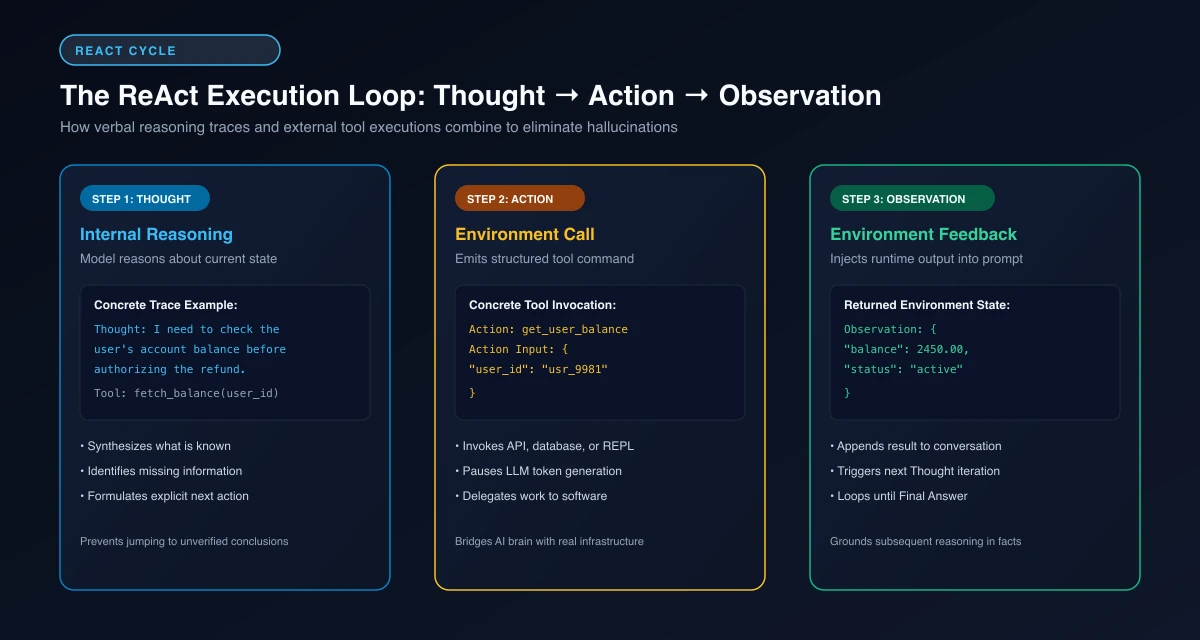 Figure 1: The ReAct Execution Cycle, showing how internal Thought generation pairs with external Action execution and runtime Observation feedback.
What Is the ReAct Pattern? (The Simple Intuition)
The ReAct pattern was introduced in the seminal Yao et al. ReAct Paper on arXiv by researchers from Princeton University and Google Brain. The name stands for “Reasoning and Acting.”
Before ReAct, developers attempted to build agentic workflows using one of two flawed extremes. Understanding how ReAct unites these approaches is essential for mastering core AI agent design patterns.
The Core Problem: Why Reasoning Alone Hallucinates
The first extreme was “Reason-only” prompting, popularized by the Wei et al. Chain-of-Thought Paper on arXiv. Chain-of-Thought (CoT) prompts an LLM to generate intermediate reasoning steps before emitting an answer.
While CoT improves mathematical problem-solving, it remains disconnected from external reality. When a model reasons about facts outside its frozen training distribution, it generates hallucinated intermediate thoughts, compounding its own errors. CoT has no way to fetch live data or verify its premises against an external source.
The Failure of Act-Only Agent Loops
The second extreme was “Act-only” prompting, where models were instructed to output direct API calls or tool commands without generating reasoning tokens.
Act-only systems perform poorly on complex multi-hop objectives. Without intermediate thoughts to decompose goals, track progress, and diagnose tool exceptions, the model quickly loses focus. If an API returns an unexpected error, an Act-only agent lacks the cognitive scratchpad required to adjust its plan and recover.
Synergizing Verbal Reasoning with External Action
ReAct solves this dilemma by creating a symmetric synergy between reasoning and acting. Reasoning traces help the model induce, track, and update action plans, while external actions allow the model to interface with external sources to ground its thinking.
The model acts as an active investigator. It reasons about what it knows, identifies information gaps, triggers an action to gather that information, and uses the observation to formulate its next thought.
Step-by-Step Anatomy of the Thought-Action-Observation Loop
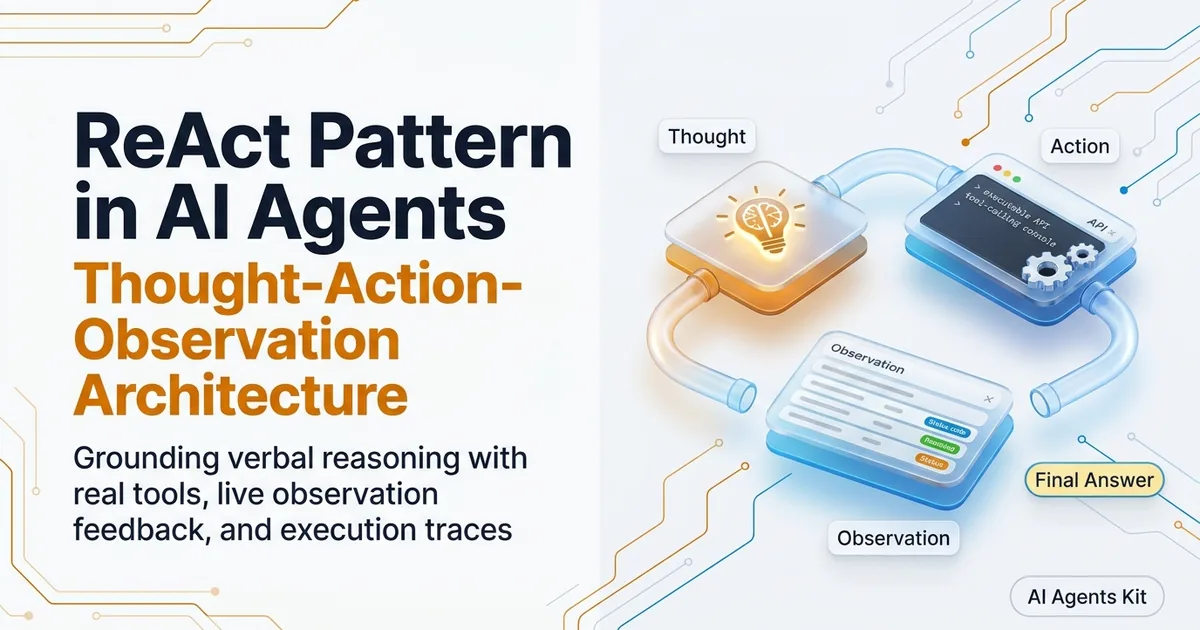
Every ReAct execution cycle consists of three repeating primitives: Thought, Action, and Observation. The loop executes iteratively until the model determines that the task is finished.
Understanding the mechanical handoffs between these three stages clarifies how agents maintain focus over extended execution sequences.
Phase 1: Generating the Verbal Thought
The cycle begins with the model generating a verbal thought inside its context window. This thought serves as the agent’s internal monologue.
In the thought phase, the model decomposes the user’s prompt, assesses what data has been retrieved so far, and explicitly states its immediate next intent. For example, the agent might write: Thought: The user is asking for the gross margin of Product Line A in Q3. I do not have this in context. I need to query the financial database.
Phase 2: Emitting the Structured Action and Action Input
Immediately following the thought, the model emits an Action and an Action Input. The action identifies which specific tool to invoke, while the action input supplies the parameters.
In modern systems, the action is formatted as a structured tool call. For example: Action: query_financial_db with Action Input: {"table": "quarterly_margins", "quarter": "Q3", "product": "Line A"}.
At this point, LLM token generation halts. The application runtime intercepts the action, verifies the parameters, and invokes the real external software function.
Phase 3: Ingesting the Environmental Observation
Once the external software tool completes execution, it returns a raw string or JSON payload. This result is injected back into the prompt context labeled as an Observation.
The observation represents objective ground truth from the outside world, containing database rows, API responses, or error traces. The model ingests this observation, which becomes the immediate context for its subsequent Thought.
If the observation answers the user prompt fully, the model emits Final Answer: ... and terminates the loop.
Concrete Multi-Hop Trace Walkthrough: Real-World Example
To see the ReAct pattern operate in practice, examine this multi-hop customer support investigation trace. The user asks: “Why was customer account ACME-404 flagged for review, and what is their current balance?”
This query cannot be answered in a single step because the fraud flag log and the billing account balance live in two separate backend microservices.
Execution Trace: Multi-Hop Support Triage
Turn 1 (Security Investigation):
- Thought 1: I need to investigate account ACME-404. First, I must check the fraud security logs to find out why the account was flagged.
- Action 1:
get_security_audit_logs(account_id="ACME-404")- Observation 1:
{"audit_id": 9921, "flag_reason": "Multiple failed MFA logins from unauthorized IP range", "status": "pending_manual_review"}Turn 2 (Billing Investigation):
- Thought 2: The account was flagged due to multiple failed MFA logins from an unauthorized IP. Now I need to retrieve their current account balance from the billing service.
- Action 2:
get_account_billing_details(account_id="ACME-404")- Observation 2:
{"balance_usd": 14250.00, "currency": "USD", "payment_status": "current"}Turn 3 (Synthesis & Final Output):
- Thought 3: I have gathered all necessary information. The fraud audit log explains the flag reason, and the billing API confirmed their current balance. I can now synthesize the final response.
- Final Answer: Customer account ACME-404 was flagged for review due to multiple failed MFA login attempts originating from an unauthorized IP range. Their current balance is $14,250.00 USD with an active payment status.
The trace above highlights the power of ReAct. Notice how Thought 2 directly incorporates the findings of Observation 1. The agent did not guess the billing endpoint or hallucinate the security reason; each claim in the final answer is anchored to verified observations. When coordinating multiple specialized workers executing parallel traces, teams deploy multi-agent coordination topologies to manage subtask delegation and state synthesis across nodes.
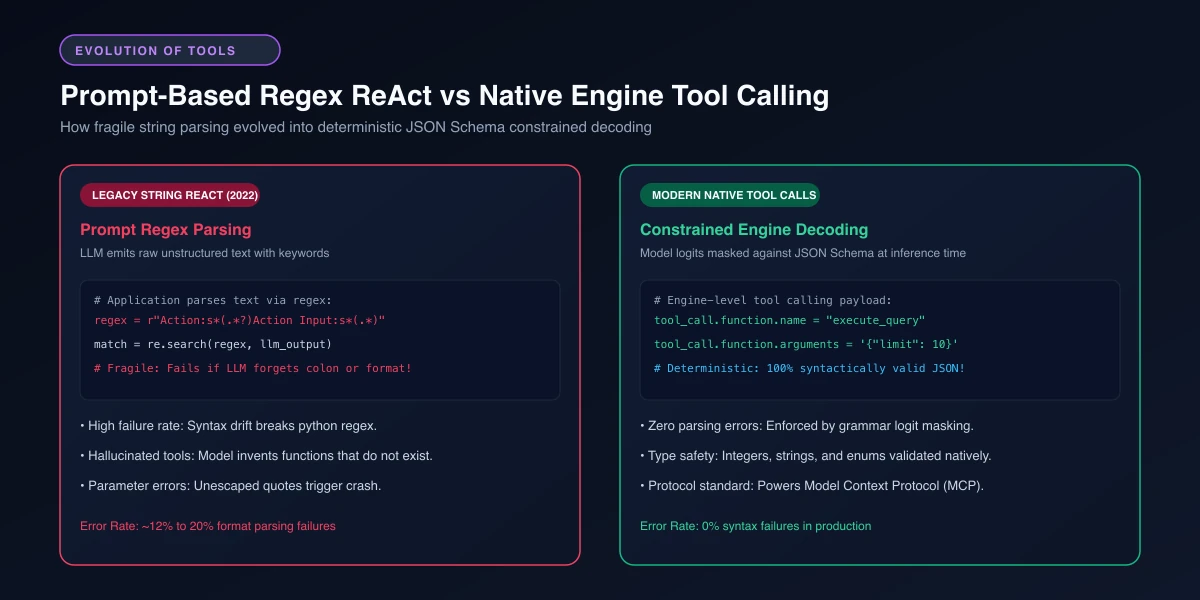 Figure 2: The evolution of ReAct implementations, contrasting fragile text-based regex parsing with engine-level JSON Schema constrained decoding.
The Evolution: From String Regex Prompts to Native Tool Calling
When ReAct was first published, language models did not possess native tool-calling APIs. Developers were forced to implement ReAct using raw prompt engineering and brittle regular expressions.
Understanding how ReAct transitioned from text hacks to native engine specifications explains why modern AI agents achieve dramatically higher production stability.
The Fragility of Early Text Parsing Regexes
In early ReAct prototypes, developers injected system prompts instructing the model to output exact formatting markers: Thought:, Action:, and Action Input:. The application used Python regexes to scrape these lines from the stream.
This approach failed frequently in production environments. If a model outputted Action: on the same line as the thought, omitted a newline, or hallucinated unescaped quotes inside JSON strings, the regex parser threw an unhandled exception. Production telemetry revealed that format parsing failures accounted for 15% to 20% of all agent crashes in early systems.
Engine-Level JSON Schema Constrained Decoding
Frontier model providers and inference engines solved this instability by moving tool calling from the prompt layer into the decoding layer.
Using Context-Free Grammars and logit masking, the inference engine mathematically constrains token generation; examine our complete architectural breakdown on structured outputs and constrained decoding for grammar engine details. When the model decides to invoke a tool, it cannot physically emit invalid JSON syntax or hallucinate unapproved keys. The LangChain Tool Calling Documentation details how modern runtimes translate these engine-level tool calls into typed execution graphs.
Standardizing Tools with the Model Context Protocol (MCP)
Tool calling has expanded beyond proprietary provider APIs. The industry is standardizing on the open Model Context Protocol (MCP).
MCP decouples tool definitions from specific client applications. A single MCP tool server exposing databases, local file systems, or terminal execution environments can connect interchangeably to Claude Desktop, IDE extensions, or custom agent runtimes. This protocol eliminates vendor lock-in across tool interfaces.
Implementing a Minimal ReAct Loop in Python
Building a functional ReAct agent from scratch does not require massive third-party frameworks. Implementing the core loop in raw Python illustrates the fundamental state machine mechanics clearly.
By examining how thoughts, actions, and observations interleave in memory, developers understand what orchestration frameworks like LangGraph and CrewAI execute under the hood. The following walkthrough constructs a self-contained ReAct agent with explicit tool validation and safety guards.
Defining the Tool Registry and Pydantic Schemas
Every agent requires a registered set of tools that map string identifiers to executable software functions. Using Pydantic models to validate the incoming arguments ensures the agent cannot pass malformed parameter structures to backend APIs.
In this implementation, the ToolCall model enforces strict type assertions before execution begins. If the model attempts to invoke a tool that does not exist in the registry, the runtime catches the missing key and returns an informative error observation.
The Core While Loop with Maximum Iteration Bounds
The engine of a ReAct agent is a bounded iterative loop. A common rookie mistake is implementing an unbounded while loop that spins until the model produces a final answer.
In production, network glitches or ambiguous observations can prevent model convergence. Setting a strict max_iterations counter (typically 5 to 10 turns) guarantees that an agent cannot exhaust your API budget or hang user requests indefinitely.
from typing import Dict, Any, Callable
from pydantic import BaseModel, Field

class ToolCall(BaseModel):
    tool_name: str
    arguments: Dict[str, Any]

class ReActAgent:
    def __init__(self, tools: Dict[str, Callable], max_iterations: int = 5):
        self.tools = tools
        self.max_iterations = max_iterations
        self.scratchpad: list[str] = []

    def execute_turn(self, user_query: str) -> str:
        """Executes the Thought-Action-Observation loop with hard bounds."""
        self.scratchpad.append(f"Task: {user_query}")

        for iteration in range(self.max_iterations):
            # In production, step_llm calls an API with scratchpad context
            thought, action = self._step_llm(user_query, self.scratchpad)
            self.scratchpad.append(f"Thought {iteration + 1}: {thought}")

            # Check if agent has concluded
            if action.tool_name == "final_answer":
                return str(action.arguments.get("response"))

            # Execute tool and record observation
            observation = self._execute_tool(action)
            self.scratchpad.append(f"Observation {iteration + 1}: {observation}")

        return "Execution limit reached: Unable to complete within iteration budget."

    def _execute_tool(self, action: ToolCall) -> str:
        """Invokes registered tool function safely with error handling."""
        tool = self.tools.get(action.tool_name)
        if not tool:
            return f"Error: Tool '{action.tool_name}' does not exist."
        try:
            return str(tool(**action.arguments))
        except Exception as e:
            return f"Tool Execution Error: {str(e)}"

    def _step_llm(self, query: str, context: list[str]) -> tuple[str, ToolCall]:
        """Simulated LLM call returning thought and structured tool action."""
        if len(context) <= 1:
            return (
                "I must check the server status.",
                ToolCall(tool_name="get_status", arguments={"cluster": "us-east"})
            )
        return (
            "Status confirmed active. Ready to respond.",
            ToolCall(tool_name="final_answer", arguments={"response": "All systems operational."})
        )
Accumulating Intermediate State in the Execution Scratchpad
The implementation above highlights how ReAct functions as an episodic state accumulator. The scratchpad list retains the running transcript of thoughts, actions, and observations.
On every iteration, the updated scratchpad is injected into the prompt. This gives the model complete visibility into which tools succeeded, which failed, and what data remains missing.
Once all requirements are satisfied, the agent emits final_answer. The loop terminates cleanly and returns the verified result to the user without further API overhead.
Production Failure Modes and Troubleshooting Runbook
While ReAct provides exceptional problem-solving flexibility, deploying cyclic loops in production exposes subtle failure modes. Here is how experienced engineering teams diagnose and fix these regressions.
Breaking Infinite Repetitive Tool-Calling Loops
The most common failure occurs when an agent repeatedly calls the exact same tool with the exact same arguments. This happens when a tool returns an ambiguous observation that fails to satisfy the thought, but the model cannot determine what alternate action to take.
Maintain an in-memory hash set of (tool_name, arguments_hash) within the active execution turn. If the agent emits an identical tool call twice consecutively, intercept the action and inject a warning observation: System Alert: You already executed this exact call. Choose a different tool or re-examine your premises.
If the repetition persists despite the warning, trigger a circuit breaker that exits the loop and flags the run for developer review.
Preventing Observation Context Explosion
When tools return massive payloads, such as full HTML pages, hundred-row database tables, or multi-megabyte log files, stuffing the raw observation into the scratchpad instantly overflows the context window.
Never dump raw API payloads directly into agent scratchpads. Place a deterministic summarizer or schema filter between the tool output and the prompt injection step.
Truncate strings to a fixed token budget (typically a maximum of 1,000 tokens per observation), and encourage the agent to pass pagination parameters when querying databases. For advanced context window strategies, explore our guide on context engineering and prompt optimization.
Recovering from Malformed Tool Exception Responses
When third-party APIs return HTTP 500 errors, rate-limit warnings, or timeout exceptions, brittle agent loops crash.
Wrap every tool execution in defensive try-except blocks. Format exceptions as informative, actionable observations, such as Error: Database connection timed out after 5,000ms. Consider retrying with exponential backoff.
The agent reads the error observation as part of its cognitive cycle. It can then autonomously choose to wait, retry, or select an alternative data source rather than crashing.
Frequently Asked Questions
What is the ReAct pattern in AI agents?
ReAct, short for Reasoning and Acting, is an AI agent paradigm that interleaves internal verbal thoughts with external tool actions. By alternating between reasoning about the current state and observing environment feedback, the agent avoids hallucinations and solves multi-step tasks.
How does the Thought-Action-Observation loop work?
The agent first generates a Thought analyzing what it knows and what information is missing. It then emits an Action invoking an external tool, pauses for the tool’s returned Observation, and uses that feedback to inform its next Thought until reaching a Final Answer.
What is the difference between Chain-of-Thought and ReAct?
Chain-of-Thought prompts a model to reason step-by-step internally, but it lacks external data access and cannot self-correct when its base knowledge is flawed. ReAct grounds reasoning by pairing each thought with external tool executions and live observations.
Why did early ReAct agents fail with regex parsing?
Early implementations relied on regular expressions to parse ‘Action:’ and ‘Action Input:’ strings out of raw generated text. When models subtly deviated from the prompt format or produced unescaped quotes, the regex parser crashed, causing a 15% to 20% failure rate.
How does modern tool calling improve the ReAct pattern?
Modern tool calling replaces string parsing with engine-level constrained decoding and JSON Schema enforcement. The underlying LLM is mathematically prevented from emitting invalid syntax, guaranteeing that tool names and parameters match exact API specifications.
How do you prevent a ReAct agent from getting stuck in an infinite loop?
Implement a strict maximum iteration counter in your execution loop, typically limiting the agent to 5 to 10 total turns. If the counter is reached without a final answer, terminate the loop and trigger a deterministic fallback response or human escalation.