NVIDIA vs AMD for AI: Which GPU Should You Buy in 2026?
Compare NVIDIA and AMD GPUs for AI workloads in 2026. Updated specs, real pricing, CUDA vs ROCm analysis, and practical buying recommendations for local AI.
Something changed in the NVIDIA vs AMD debate during 2025 — and most buying guides haven’t caught up. AMD’s new RDNA 4 architecture, combined with ROCm 7.0, has shifted this conversation from “always buy NVIDIA” to “it depends.”
The challenge for anyone building a local AI setup isn’t raw performance numbers — it’s navigating two increasingly viable ecosystems with very different trade-offs. Most comparisons still treat AMD as a distant second, but the latest benchmarks and software improvements tell a more nuanced story.
This guide covers everything needed to make a confident GPU purchase for AI workloads in 2026: updated specs, real-world street pricing, software ecosystem analysis, VRAM requirements by model size, and clear recommendations for every budget and skill level. Anyone evaluating the best GPU for AI will find actionable answers here.
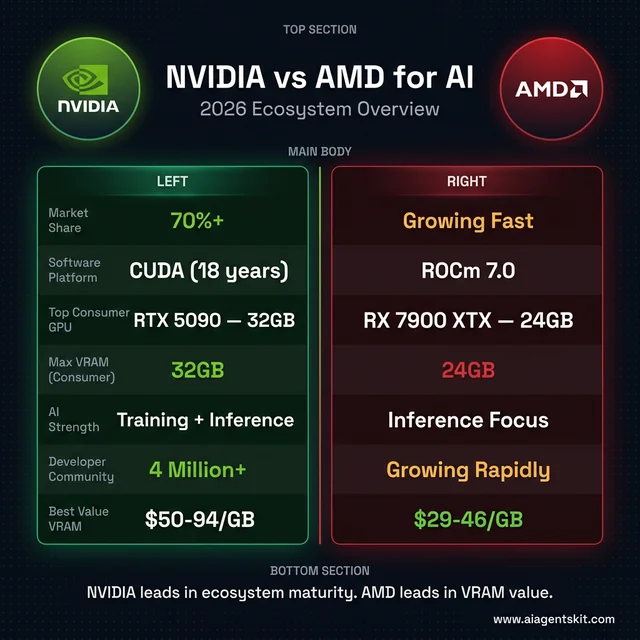 NVIDIA vs AMD for AI — 2026 ecosystem overview at a glance
What Makes NVIDIA and AMD GPUs Different for AI?
The reason GPUs dominate AI workloads comes down to parallel processing. Neural networks require thousands of matrix multiplications happening simultaneously, and GPU architectures handle this far better than CPUs. A mid-range dedicated GPU will outperform even high-end integrated graphics by 10-50x on typical inference tasks.
According to Statista Market Insights (2026), NVIDIA currently holds over 70% of the AI accelerator market. That dominance stems from more than just hardware — the CUDA software platform has become the standard that virtually every AI framework, researcher, and enterprise deploys against first.
AMD’s trajectory has changed significantly. The RDNA 4 architecture delivers over four times the AI compute performance of RDNA 3, and AMD has treated AI as a first-class priority rather than an afterthought. Second-generation AI accelerators now support FP8 and INT4 formats, landing AMD consumer GPUs firmly in viable territory for machine learning tasks.
Understanding two distinct AI workload categories matters here. Inference — running pre-trained models to generate responses — is the primary use case for consumer hardware. Training — building models from scratch — demands enterprise-grade hardware and remains firmly in NVIDIA’s territory. Most people shopping for a GPU fall squarely into the inference camp, and that’s where the competition gets genuinely interesting.
The landscape is also shaped by where the investment money flows. The global AI semiconductor market is projected to reach $125 billion in 2026, representing 35% year-over-year growth. Both companies are aggressively positioning their product lines to capture this expanding demand.
NVIDIA for AI in 2026: Blackwell Architecture and CUDA
RTX 5000 Series Consumer GPUs
NVIDIA’s Blackwell architecture powers the RTX 5000 lineup, and every card in the series ships with 5th-generation Tensor Cores specifically designed for AI acceleration.
RTX 5090 (32GB GDDR7) stands alone at the consumer peak. With 21,760 CUDA cores, 680 Tensor Cores, and 1,792 GB/s memory bandwidth across a 512-bit interface, this is the most capable consumer GPU for AI workloads available. The 32GB of VRAM handles large models without quantization compromises. MSRP sits at $1,999, but street prices have climbed to $2,900-$5,000+ due to AI-driven demand and DRAM shortages — a reality that frustrates many buyers.
RTX 5080 (16GB GDDR7) delivers the practical high-end option. With 10,752 CUDA cores and 960 GB/s bandwidth, performance scales well for most inference workloads. The MSRP of $999 translates to approximately $1,500+ at retail in early 2026.
RTX 5070 Ti (16GB GDDR7) occupies the value sweet spot. The same 16GB VRAM as the 5080 at a lower price point makes this card compelling for users who prioritize memory capacity over peak throughput.
RTX 4090 (24GB GDDR6X) remains remarkably relevant. On the used market, the combination of 24GB VRAM, proven reliability, and mature CUDA optimization makes it one of the strongest value propositions in the current AI PC landscape.
Why NVIDIA Leads the AI Software Ecosystem
CUDA’s advantage isn’t academic — it’s practical. After nearly two decades of development, CUDA has accumulated a developer community exceeding 4 million, with libraries covering virtually every AI use case. cuDNN handles deep learning primitives, TensorRT optimizes inference, and the entire stack receives active maintenance.
The “it just works” reputation holds up under scrutiny. When PyTorch ships a new release, CUDA compatibility arrives first. When researchers publish code, they test on CUDA. When a new model drops on Hugging Face, NVIDIA users start experimenting within hours while AMD users often wait weeks for full compatibility.
That reliability carries a price premium. Organizations and individuals who value their time consistently report that NVIDIA’s higher hardware cost is offset by dramatically fewer debugging hours, faster setup, and immediate access to cutting-edge features. The premium buys productivity, not just performance — a distinction that matters more as AI tooling grows in complexity.
AMD for AI in 2026: RDNA 4 and the ROCm Ecosystem
RX 9000 Series and RDNA 4 Architecture
AMD’s consumer GPU lineup has taken a significant step forward with RDNA 4, and the specifications tell an encouraging story for AI users willing to engage with a different ecosystem.
RX 9070 XT (16GB GDDR6) leads the consumer charge. Built on a 4nm process with 4,096 shading units, 128 tensor cores, and 2nd-generation AI accelerators supporting FP8/INT4 formats, this card achieves up to 1,557 TOPS of AI compute performance. At $599 MSRP (approximately $740 street price in March 2026), the RX 9070 XT offers roughly double the AI capability of previous-generation AMD cards at a competitive price.
RX 9070 (16GB GDDR6) provides the same 16GB VRAM at approximately $500, making it an attractive entry point for budget-conscious AI enthusiasts who prioritize memory capacity.
RX 7900 XTX (24GB GDDR6) remains the VRAM champion in AMD’s lineup. Despite being the previous generation, the 24GB capacity makes it compelling for loading larger models. Market prices have dropped since the 9000 series launch, creating an excellent value proposition for users running open source LLMs that benefit from ample memory.
The generational leap in AI-specific hardware shouldn’t be understated. RDNA 4’s second-generation AI accelerators with FP8 and INT4 support represent AMD’s most serious investment in consumer AI acceleration to date. Benchmarks show the RX 9070 XT achieving 75% of the RTX 5080’s speed for SDXL image generation and actually exceeding it for SD3.5-Turbo models — results that would have been unthinkable two years ago.
ROCm 7.0: How AMD Closed the Software Gap
ROCm 7.0, released in September 2025, represents the most consequential update in AMD’s compute platform history. The framework support alone signals how far the platform has matured: official PyTorch 2.7, TensorFlow 2.19.1, ONNX 1.22, JAX 0.6.0, and — critically — official Llama.cpp support. That last addition means Ollama and other popular local LLM tools work without workarounds.
The expansion to Windows alongside Linux marks another inflection point. AMD’s historically Linux-only deployment model locked out the majority of consumer AI users. Windows support through ROCm 7.0 opens the door to the same audience that drives NVIDIA’s consumer GPU dominance.
New data type support for FP4, FP6, and FP8 through HIP Runtime APIs enables advanced quantization techniques that squeeze more performance from available VRAM. Distributed inference across multiple GPUs also received attention, allowing large-scale model deployment that was previously impractical on AMD hardware.
The honest assessment: ROCm is better than it has ever been, but gaps remain. AMD’s ROCm documentation acknowledges that the ecosystem is still maturing. Industry observers have noted that the performance gap with CUDA has narrowed to roughly 10-15% in most common workloads, down from 30%+ just two years ago. Stack Overflow and forum support skews heavily toward CUDA, meaning troubleshooting AMD-specific issues requires more patience and technical comfort.
That said, the trajectory is unmistakable. AMD’s multi-year partnership with Meta for MI450 GPU deployment signals that the largest AI companies consider AMD’s platform production-ready for serious workloads.
How Does CUDA Compare to ROCm for AI Workloads?
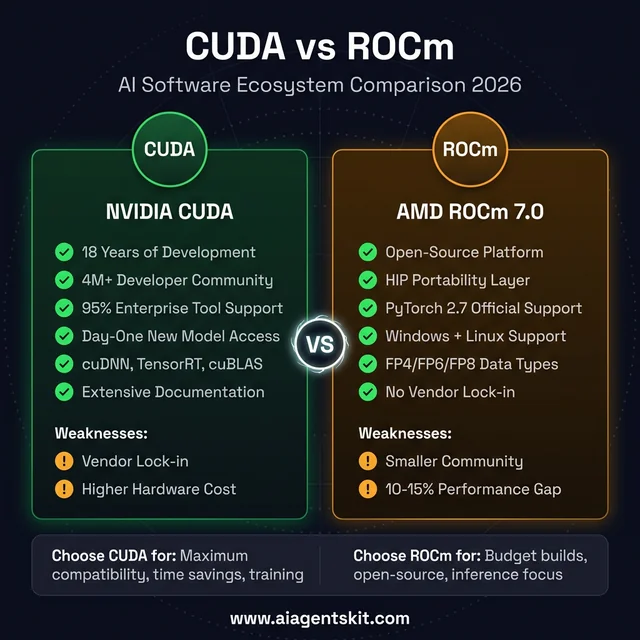 CUDA vs ROCm — strengths, weaknesses, and when to choose each platform
CUDA’s Ecosystem Advantage
CUDA has accumulated something competitors can’t easily replicate: 18 years of continuous library optimization, developer tooling, and community knowledge. The ecosystem includes cuDNN for deep learning primitives, TensorRT for inference optimization, cuBLAS for linear algebra, and dozens of specialized libraries for specific domains.
The practical impact shows up in everyday development. A developer building a custom inference pipeline on CUDA can find documented solutions, pre-optimized code paths, and community answers for nearly every challenge. According to AIMultiple’s 2025 analysis, over 95% of enterprise deep learning tooling is tightly optimized for CUDA, creating a self-reinforcing cycle where framework developers prioritize NVIDIA support first.
When new models appear — particularly experimental architectures or bleeding-edge research implementations — CUDA compatibility typically arrives weeks or months before equivalent ROCm support. That gap matters for researchers and early adopters who need access to the latest capabilities immediately.
ROCm’s Open-Source Strengths and Limitations
ROCm takes a fundamentally different architectural approach: open-source, community-contributed, and vendor-agnostic by design. The HIP (Heterogeneous-compute Interface for Portability) layer allows code to compile and run across both AMD and NVIDIA hardware with minimal modifications — a portability advantage that appeals to organizations concerned about vendor lock-in.
AMD has also funded a drop-in CUDA implementation built on ROCm, enabling unmodified CUDA applications to run on Radeon GPUs. The practical significance of this project is substantial: it lowers the barrier for teams that have existing CUDA codebases and want to evaluate AMD hardware without a full rewrite.
Mixed-precision and sparse computing scenarios represent areas where ROCm sometimes achieves surprising parity with CUDA. Memory-bound tasks can even favor AMD hardware when software paths are properly optimized. The 10-15% performance gap that exists in general compute workloads narrows considerably in these specialized contexts.
The limitations remain real. ROCm installations can be sensitive to system configuration changes, driver updates occasionally introduce regressions, and documentation, while improving, hasn’t reached the depth and polish of CUDA’s extensive knowledge base.
Practical Decision Framework
Choosing between these two ecosystems depends on context more than any single metric.
NVIDIA makes sense when: time savings matter more than hardware cost, the workflow requires cutting-edge model support on day one, the user is new to local AI and needs a smooth onboarding experience, or the use case involves training rather than inference.
AMD makes sense when: maximizing VRAM per dollar is the priority, the user is comfortable troubleshooting technical issues, the primary workload is inference rather than training, or avoiding vendor lock-in is a strategic concern.
For the common use case of running AI locally with Ollama, both platforms deliver solid performance. The difference lies in setup time and edge-case compatibility rather than fundamental capability.
How Much VRAM Do AI Models Actually Need?
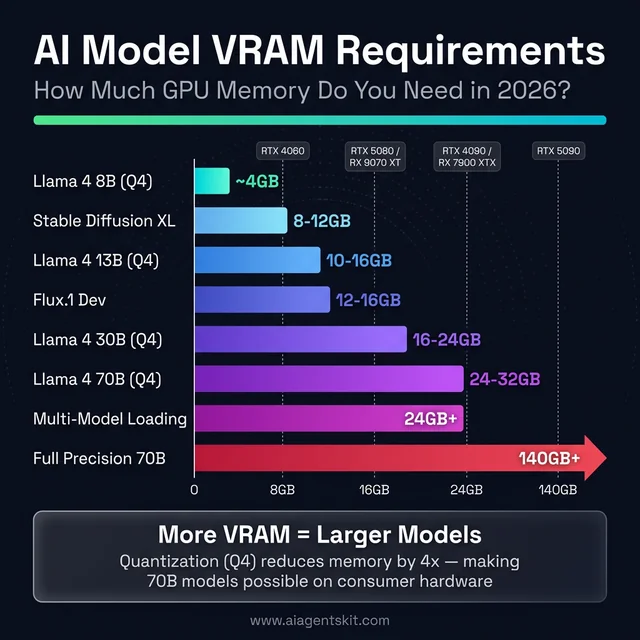 VRAM requirements by AI model — from 4GB for small LLMs to 140GB+ for full-precision 70B models
VRAM Requirements by AI Model Size
VRAM is the single most important specification for AI GPU purchases, more critical than clock speed, CUDA core count, or memory bandwidth. When a model doesn’t fit in VRAM, the system falls back to system RAM, resulting in a 10-20x performance penalty that makes interactive use impractical.
The math is straightforward. FP16 (half-precision) models consume approximately 2GB of VRAM per billion parameters. 4-bit quantization reduces this to roughly 0.5GB per billion parameters. These numbers provide a reliable planning framework:
| Use Case | Minimum VRAM | Recommended VRAM |
|---|---|---|
| 7-8B models (Llama 4 8B, Mistral 7B) | 8GB | 12GB |
| 13B models (quantized) | 10GB | 16GB |
| 30B models (4-bit quantized) | 16GB | 24GB |
| 70B models (4-bit quantized) | 24GB | 32GB |
| Image generation (SDXL/Flux) | 8GB | 12GB |
| Multiple models loaded simultaneously | 24GB+ | 32GB+ |
Context length also impacts VRAM consumption. Longer conversations or document analysis sessions that push context windows to their limits can add 2-4GB of additional memory usage for Llama models and similar architectures.
These requirements aren’t theoretical — they reflect practical testing with popular models and frameworks. Running out of VRAM mid-inference remains one of the most frustrating experiences in local AI, and the smarter approach is to buy more VRAM than currently needed rather than upgrading sooner.
Quantization Formats and What They Mean for VRAM
Quantization reduces model precision to fit larger models into less VRAM. Understanding the three dominant formats helps when choosing between model variants on download sites:
GGUF (GPT-Generated Unified Format) is the standard for Llama.cpp and Ollama. Models come in Q4_K_M (4-bit, medium quality), Q5_K_M (5-bit), and Q8_0 (8-bit) variants. Q4_K_M provides the best balance of quality and VRAM efficiency — a 70B model in Q4_K_M consumes approximately 40GB, while Q8_0 requires roughly 70GB.
GPTQ (GPU-optimized Post-Training Quantization) targets CUDA-accelerated inference through libraries like AutoGPTQ. It delivers slightly better quality than equivalent GGUF quantization but requires NVIDIA hardware for optimal performance. AMD support exists through ROCm but remains less optimized.
AWQ (Activation-Aware Weight Quantization) is the newest format, offering quality closer to full-precision models at 4-bit sizes. AWQ models load faster than GPTQ in many scenarios and support both NVIDIA and AMD hardware through vLLM and Hugging Face Transformers.
For most local AI users, GGUF via Ollama remains the simplest path. The quality difference between formats at the same bit-width is typically 1-3% on benchmarks — negligible for conversational use but potentially meaningful for tasks requiring precise reasoning or code generation.
Can a 24GB GPU Run a 70B Parameter Model?
This question drives more GPU purchase decisions than almost any other. The short answer: yes, with aggressive quantization. A 70B model in Q4_K_M format requires approximately 40GB — too large for a single 24GB card. However, Q3_K_S quantization brings the requirement down to roughly 30GB, and with KV cache optimization, some configurations fit within 24GB at shorter context lengths.
The practical experience varies. Model loading succeeds, but available context window shrinks dramatically. Running Llama 4 70B Q4_K_M on a 24GB RTX 4090 or RX 7900 XTX typically limits context to 2,048-4,096 tokens before VRAM pressure causes slowdowns. The RTX 5090’s 32GB handles the same model with 8,192+ token context — a meaningful quality-of-life improvement.
Model sharding across two GPUs offers another path. Tensor parallelism splits model layers across multiple cards, enabling 70B models at higher quantization. Two 16GB cards can jointly handle what one 32GB card does alone, though inter-GPU bandwidth through PCIe introduces 15-25% latency overhead compared to a single high-VRAM card.
VRAM-per-Dollar: Where AMD Pulls Ahead
The VRAM comparison between NVIDIA and AMD reveals AMD’s strongest competitive advantage:
| GPU | VRAM | Approx. Street Price (March 2026) | VRAM per Dollar |
|---|---|---|---|
| AMD RX 7900 XTX | 24GB | ~$700 | $29/GB |
| AMD RX 9070 XT | 16GB | ~$740 | $46/GB |
| AMD RX 9070 | 16GB | ~$500 | $31/GB |
| NVIDIA RTX 5070 Ti | 16GB | ~$800 | $50/GB |
| NVIDIA RTX 5080 | 16GB | ~$1,500 | $94/GB |
| NVIDIA RTX 4090 (used) | 24GB | ~$1,200 | $50/GB |
| NVIDIA RTX 5090 | 32GB | ~$3,000+ | $94+/GB |
The RX 7900 XTX delivers 24GB of VRAM for approximately $700 — less than the cost of a 16GB RTX 5070 Ti. That extra 8GB isn’t a minor convenience; it’s the difference between running a 30B parameter model in memory versus offloading to system RAM.
At the apex, the RTX 5090’s 32GB remains unmatched in the consumer space. Nothing AMD offers touches that capacity, making NVIDIA the only option for users who need maximum headroom for the largest consumer-accessible models.
Despite popular belief, VRAM capacity often matters more than raw computational throughput for inference workloads. A slower GPU with enough VRAM will deliver a better experience than a faster GPU that runs out of memory and starts paging.
5 Real-World AI Performance Benchmarks: NVIDIA vs AMD
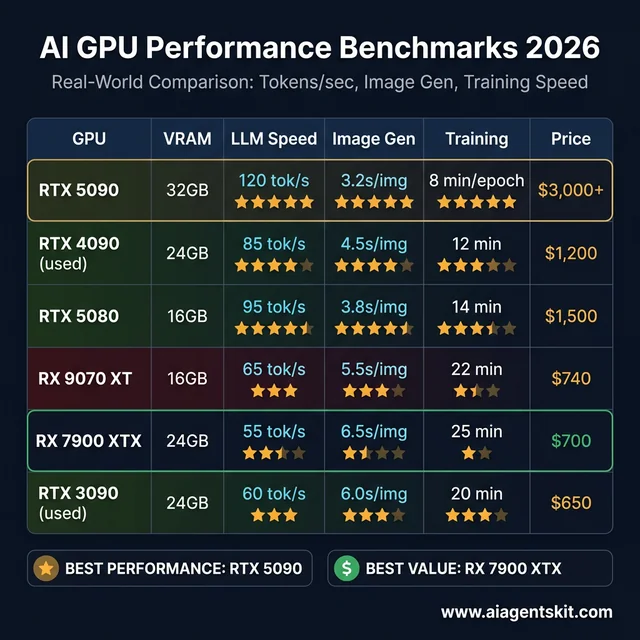 2026 AI GPU benchmarks — real-world tokens/sec, image generation, and training performance
Local LLM Inference with Ollama
NVIDIA maintains a consistent 10-20% advantage in tokens per second at equivalent price points when running local LLMs through Ollama. CUDA optimization translates to faster model loading, more consistent generation speeds, and smoother overall performance.
AMD’s showing has improved markedly with ROCm 7.0. An RX 9070 XT running Llama 4 8B delivers perfectly usable inference performance — the gap is measurable on benchmarks but rarely noticeable during typical conversational AI usage. The experience shifts from “AMD is slow” to “AMD is slightly slower,” which represents meaningful progress.
Image Generation with Stable Diffusion and Flux
Stable Diffusion was optimized for NVIDIA hardware from its earliest releases, and that legacy advantage persists. ComfyUI and Automatic1111 run with minimal configuration on NVIDIA GPUs, achieving excellent generation times out of the box.
AMD’s progress in image generation is particularly striking. The RX 9070 XT achieves approximately 75% of the RTX 5080’s speed for SDXL models using RDNA-optimized workflows. For SD3.5-Turbo architectures, AMD actually matches or exceeds NVIDIA’s performance — a reversal that demonstrates how model-specific optimizations can shift the competitive dynamic.
For professionals generating dozens of images daily, those interested in running AI offline will find NVIDIA’s consistent speed advantage compounds meaningfully. For hobbyists creating images occasionally, AMD saves money without meaningful quality-of-life impact.
Fine-Tuning and LoRA Training
Model training remains NVIDIA’s strongest domain. Tensor Cores optimized for matrix operations, combined with deeply integrated library support through cuDNN and TensorRT, create a significant performance lead.
AMD’s advantage in this category is indirect but real: more VRAM enables larger batch sizes, which can partially offset raw compute differences. A 24GB RX 7900 XTX can train with batch sizes that a 16GB NVIDIA card cannot accommodate, sometimes resulting in faster wall-clock completion despite slower per-iteration performance.
For consumer fine-tuning of adapters like LoRA or QLoRA, both platforms handle the workload competently. Full training of medium-or-larger models pushes beyond what any consumer GPU can practically deliver — that remains data center territory.
Multi-Model Loading and Switching
Users running multiple AI models simultaneously — a text LLM alongside an image generator, or multiple specialized assistants — discover that VRAM acts as the primary bottleneck. Loading additional models requires memory, not additional compute power.
AMD’s 24GB RX 7900 XTX excels in this scenario. The extra VRAM compared to 16GB alternatives means keeping two or three models loaded without constant reloading. NVIDIA’s 32GB RTX 5090 is the ultimate multi-model solution, but at significantly higher cost.
Edge Cases and Bleeding-Edge Models
When a new architecture or experimental model appears, NVIDIA users typically gain compatibility first. The lag for AMD can range from days to months depending on the framework’s ROCm support and the model’s reliance on CUDA-specific optimizations.
This matters most for researchers and early adopters who need to experiment with new releases immediately. For mainstream users running established models like Llama 4, Mistral, or Stable Diffusion variants, the compatibility gap has narrowed to the point of minimal practical impact.
RTX 4090 vs RTX 5090 vs RX 7900 XTX: How Do AI GPUs Compare Head-to-Head?
Side-by-side benchmark data cuts through marketing claims faster than any specification sheet. The following table compares every GPU discussed in this guide across the metrics that matter most for local AI workloads — tokens per second, image generation speed, VRAM, power draw, and actual street pricing.
| GPU | VRAM | Llama 4 8B (tok/s) | Llama 4 70B Q4 (tok/s) | SDXL (sec/img) | LoRA 7B (min/epoch) | TDP | Street Price |
|---|---|---|---|---|---|---|---|
| RTX 5090 | 32GB GDDR7 | ~120 | ~18 | ~3.2s | ~8 min | 575W | $3,000+ |
| RTX 4090 (used) | 24GB GDDR6X | ~85 | ~14 | ~4.5s | ~12 min | 450W | ~$1,200 |
| RTX 5080 | 16GB GDDR7 | ~95 | OOM* | ~3.8s | ~14 min | 360W | ~$1,500 |
| RTX 5070 Ti | 16GB GDDR7 | ~75 | OOM* | ~5.0s | ~18 min | 300W | ~$800 |
| RX 9070 XT | 16GB GDDR6 | ~65 | OOM* | ~5.5s | ~22 min | 304W | ~$740 |
| RX 7900 XTX | 24GB GDDR6 | ~55 | ~10 | ~6.5s | ~25 min | 355W | ~$700 |
| RX 9070 | 16GB GDDR6 | ~55 | OOM* | ~6.8s | ~24 min | 250W | ~$500 |
| RTX 4060 Ti 16GB | 16GB GDDR6 | ~40 | OOM* | ~8.5s | ~32 min | 165W | ~$400 |
| RTX 3090 (used) | 24GB GDDR6X | ~60 | ~9 | ~6.0s | ~20 min | 350W | ~$650 |
*OOM = Out of Memory. 16GB cards cannot load 70B Q4 models without significant offloading to system RAM.
Several patterns emerge from this data. The RTX 5090 leads every category but costs 4-6x more than mid-range alternatives. The used RTX 4090 and RTX 3090 offer 24GB VRAM at dramatically lower prices — enabling 70B model inference that no current 16GB card can match. The RX 7900 XTX delivers 24GB for under $700 but trades 20-35% inference speed compared to NVIDIA’s equivalents.
The real insight: matching price points rather than model numbers reveals AMD’s value. A $700 RX 7900 XTX runs 70B models that a $800 RTX 5070 Ti physically cannot load. Performance-per-dollar calculations shift depending on whether the bottleneck is compute speed or memory capacity.
The used RTX 3090 deserves special attention. At approximately $650, it delivers 24GB VRAM with performance that competes with the RX 7900 XTX across most AI workloads — and benefits from NVIDIA’s superior CUDA ecosystem. For budget-focused buyers who want the maximum model size, the used RTX 3090 remains one of the strongest options available.
What Is the Best GPU for Stable Diffusion and ComfyUI in 2026?
Image generation has become one of the most popular consumer AI workloads, and GPU requirements differ significantly from LLM inference. Understanding these differences prevents expensive mismatches between hardware and creative workflow.
VRAM Requirements by Image Generation Model
| Model | Minimum VRAM | Comfortable VRAM | Notes |
|---|---|---|---|
| Stable Diffusion 1.5 | 4GB | 8GB | Lightweight, fast on any modern GPU |
| SDXL (1024×1024) | 8GB | 12GB | Most popular workflow in early 2026 |
| SD3.5 / SD3.5-Turbo | 10GB | 16GB | Higher quality, needs more memory |
| Flux.1 Dev | 12GB | 16GB | Cutting-edge quality, VRAM-hungry |
| Flux.1 Pro | 16GB | 24GB | Professional-grade, benefits from ample headroom |
| ControlNet + base model | +2-4GB | +4-6GB | Adds overhead to any base model |
| Batch generation (4 images) | 2x single image | 2-3x single | Scales roughly linearly with batch size |
ComfyUI users building complex node-based workflows with multiple ControlNet models, IP-Adapter, and upscaling networks stacked together should plan for 16GB minimum. Professional workflows that chain multiple generation steps can consume 20GB+ during peak processing — making the RTX 5090’s 32GB or the RX 7900 XTX’s 24GB genuinely practical advantages.
Speed Comparison: NVIDIA vs AMD for Image Generation
NVIDIA maintains a clear speed advantage for image generation, but the gap varies dramatically by model architecture:
- SDXL: NVIDIA leads by ~25-30%. The RTX 5080 generates a 1024×1024 image in approximately 3.8 seconds; the RX 9070 XT takes roughly 5.5 seconds.
- SD3.5-Turbo: AMD nearly matches NVIDIA. The RX 9070 XT performs within 5-10% of the RTX 5080 — a surprisingly strong result attributed to model-specific ROCm optimizations.
- Flux.1: NVIDIA leads by ~20-25%. Flux models lean heavily on attention mechanisms where Tensor Cores provide meaningful acceleration.
For anyone following a Stable Diffusion tutorial for the first time, NVIDIA provides the smoothest onboarding. ComfyUI’s custom node ecosystem tests on NVIDIA first, and community extensions occasionally ship with CUDA-only optimizations that take weeks to receive AMD equivalents.
That said, the days of AMD being unusable for image generation are definitively over. An RX 9070 XT running ComfyUI produces identical output quality — the difference is speed, not capability. Hobbyists generating a few images per session won’t notice the gap. Professionals running batch generation workflows will feel it compound over time.
What Is the Best GPU for Running Ollama and Local LLM Chatbots?
Ollama has become the default tool for running local LLMs, and choosing the right GPU for Ollama specifically involves different trade-offs than general AI GPU selection. Ollama’s inference pipeline is heavily memory-bandwidth bound, meaning VRAM capacity and bandwidth matter more than raw TFLOPS.
Tokens Per Second by GPU and Model Size
The following benchmarks reflect typical Ollama performance with default settings:
| GPU | Llama 4 8B Q4 | Llama 4 8B Q8 | Mistral 7B Q4 | Qwen 2.5 14B Q4 | Llama 4 70B Q4 |
|---|---|---|---|---|---|
| RTX 5090 (32GB) | ~120 tok/s | ~80 tok/s | ~115 tok/s | ~55 tok/s | ~18 tok/s |
| RTX 4090 (24GB) | ~85 tok/s | ~60 tok/s | ~80 tok/s | ~40 tok/s | ~14 tok/s |
| RTX 5070 Ti (16GB) | ~75 tok/s | ~50 tok/s | ~70 tok/s | ~35 tok/s | OOM |
| RX 9070 XT (16GB) | ~65 tok/s | ~42 tok/s | ~60 tok/s | ~30 tok/s | OOM |
| RX 7900 XTX (24GB) | ~55 tok/s | ~38 tok/s | ~52 tok/s | ~25 tok/s | ~10 tok/s |
| RTX 3090 used (24GB) | ~60 tok/s | ~40 tok/s | ~55 tok/s | ~28 tok/s | ~9 tok/s |
| RTX 4060 Ti 16GB | ~40 tok/s | ~28 tok/s | ~38 tok/s | ~20 tok/s | OOM |
For conversational AI, 30+ tokens per second feels responsive and natural. Below 15 tok/s, the delay becomes noticeable during longer responses. Below 8 tok/s, the experience feels sluggish. By this standard, every GPU in the table delivers a comfortable experience with 7-8B models — the differentiation happens at 14B+ parameter sizes.
Context Window and Memory Pressure
Ollama defaults to a 2,048-token context window, but many users extend this for document analysis, long conversations, or retrieval-augmented generation (RAG) workflows. Each doubling of context length adds roughly 0.5-1.5GB of VRAM usage depending on model architecture.
Running Llama 4 8B with 32K context on a 16GB card leaves only 2-3GB of headroom — enough to function but uncomfortably tight. The same configuration on a 24GB card provides generous margin for concurrent model loading or temporary spikes.
Whisper and Speech-to-Text GPU Considerations
Audio transcription through Whisper or faster-whisper represents another growing local AI workload. Whisper Large-v3 requires approximately 3GB of VRAM and runs entirely on GPU, making it an excellent candidate for keeping loaded alongside a text LLM. The processing is more compute-bound than memory-bound, giving NVIDIA a 30-40% speed advantage over AMD at equivalent hardware tiers.
For users building a local AI setup that handles both text and voice, budget 4-5GB of VRAM for Whisper on top of the primary LLM’s requirements.
Which GPU Should You Buy for AI in 2026?
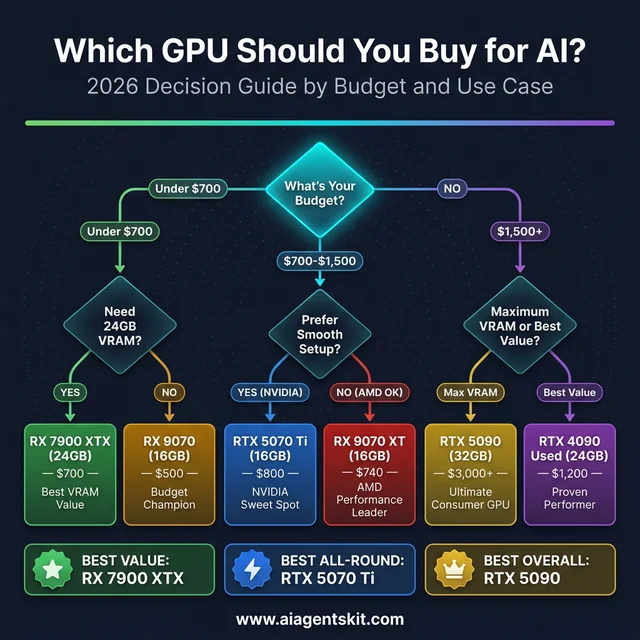 GPU buying decision guide — find the right AI GPU for your budget and use case
Best NVIDIA GPUs for AI by Budget
| Budget | Recommendation | Why |
|---|---|---|
| $3,000+ | RTX 5090 (32GB) | Maximum consumer VRAM, latest architecture, future-proof for 2+ years |
| $1,000-1,500 | RTX 4090 used (24GB) | Proven performance, excellent value, 24GB VRAM, mature ecosystem |
| $700-1,000 | RTX 5070 Ti (16GB) | Sweet spot of price/performance/VRAM with Blackwell benefits |
| Under $500 | RTX 4060 Ti 16GB | Budget entry point with 16GB VRAM capability |
Best AMD GPUs for AI by Budget
| Budget | Recommendation | Why |
|---|---|---|
| $600-800 | RX 7900 XTX (24GB) | Best consumer VRAM value anywhere — 24GB for under $700 |
| $500-700 | RX 9070 XT (16GB) | Latest RDNA 4 architecture with strongest AI focus |
| Under $500 | RX 9070 (16GB) or RX 7800 XT (16GB) | Budget champions with capable specs |
Recommendations by User Profile
For beginners exploring local AI: NVIDIA is the recommended starting point. The learning curve for setting up local LLMs, image generators, and fine-tuning workflows is steep enough without adding hardware compatibility challenges. CUDA’s documentation depth and community size mean that answers to common questions are always one search away.
For tinkerers and power users: AMD deserves serious consideration. The VRAM-per-dollar advantage translates directly to capability — a $700 RX 7900 XTX with 24GB enables model sizes that would require a $1,200+ NVIDIA card to match. Users who enjoy solving technical puzzles and optimizing configurations will find AMD rewarding.
For professionals with time-sensitive workloads: NVIDIA remains the pragmatic choice. Debugging software compatibility issues has tangible costs, and CUDA’s reliability translates to billable hours saved. The most common mistake practitioners in professional settings make is optimizing for hardware cost while ignoring the productivity tax of a less mature ecosystem.
For budget-conscious students and researchers: AMD’s value proposition is strongest here. Getting 16-24GB of VRAM for the price of NVIDIA’s 12-16GB options means running larger models, more experiments, and longer context windows — capabilities that directly impact research quality and learning outcomes.
For AI researchers doing active training: NVIDIA is the clear choice. Training workloads leverage Tensor Cores, optimized libraries, and multi-GPU scaling capabilities where NVIDIA maintains its widest performance lead.
How Much Power Does an AI GPU Actually Use?
TDP, PSU Requirements, and Electricity Costs
Power consumption often gets overlooked during GPU shopping, but it directly impacts system cost, cooling requirements, and long-term operating expenses. AI inference workloads sustain near-peak GPU utilization for extended periods — very different from gaming’s variable load pattern.
| GPU | TDP (Watts) | Recommended PSU | Est. Monthly Electricity (24/7 inference) |
|---|---|---|---|
| RTX 5090 | 575W | 1000W+ | ~$55-65 |
| RTX 4090 | 450W | 850W | ~$44-52 |
| RTX 5080 | 360W | 750W | ~$35-42 |
| RX 7900 XTX | 355W | 750W | ~$34-41 |
| RTX 5070 Ti | 300W | 700W | ~$29-35 |
| RX 9070 XT | 304W | 700W | ~$30-36 |
| RX 9070 | 250W | 650W | ~$24-29 |
| RTX 4060 Ti 16GB | 165W | 550W | ~$16-19 |
| RTX 3090 (used) | 350W | 750W | ~$34-41 |
Electricity estimates assume $0.13/kWh (US average) with system overhead. Actual costs vary by region.
The RTX 5090’s 575W TDP demands a premium power supply — 1000W minimum, with 1200W recommended for system stability during sustained loads. Budget approximately $150-250 for a quality PSU in this wattage class, which adds meaningful cost to the total build.
Mid-range cards offer dramatically better power efficiency. The RTX 4060 Ti 16GB delivers usable AI performance at just 165W — roughly one-third the power draw of the RTX 5090. For users running inference servers 24/7, the electricity cost difference between a 575W and 165W card amounts to $400-500 annually.
Cooling and Noise Under Sustained AI Loads
Gaming GPU coolers are designed for burst workloads with variable intensity. AI inference presents the opposite challenge: sustained, consistent high load for hours or days at a time. This distinction matters for cooling selection.
The RTX 5090’s triple-fan cooler runs at elevated speeds during continuous inference, producing 45-55 dBA — noticeable in a quiet room. The RX 9070 XT and RTX 5070 Ti typically stay in the 38-45 dBA range, which most users find acceptable for desktop use.
For systems dedicated to AI workloads running continuously, an AIO liquid cooler on the CPU paired with a well-ventilated case helps maintain thermal headroom. Undervolting the GPU — reducing voltage while maintaining clock speeds — can lower temperatures by 5-10°C and noise by 3-5 dBA with minimal performance impact. Most NVIDIA and AMD cards tolerate 50-100mV undervolt without stability issues, and the 2-5% performance reduction is typically imperceptible during inference.
What to Expect from AI GPUs in 2027 and Beyond
NVIDIA Rubin Architecture and the Path Forward
NVIDIA’s Vera Rubin platform — the successor to Blackwell — is scheduled for data center shipments in the second half of 2026. Built on 3nm processes with HBM4 memory, Rubin is projected to deliver 5x the inference performance of Blackwell, potentially reducing the cost of generating AI tokens by approximately 10x.
Consumer adoption of Rubin technology through a potential RTX 6000 series isn’t expected until 2027-2028, partly due to ongoing memory shortages that are prioritizing data center and enterprise allocation. According to Gartner’s 2026 forecast, AI-optimized infrastructure spending is expected to reach $37.5 billion — and GPU manufacturers are naturally directing supply toward these higher-margin markets.
The CUDA ecosystem will continue deepening. NVIDIA’s investment in “Physical AI” for autonomous systems and embodied intelligence suggests the company’s AI focus extends well beyond traditional LLM inference, further entrenching CUDA as the default development target.
AMD RDNA 5 and the MI500 Roadmap
AMD’s data center roadmap is aggressive. The MI400 series (CDNA 5 architecture) launches in 2026 with 432GB of HBM4 memory and projected 2x compute performance over MI350. The MI500 series targets 2027 with rack-scale AI solutions. McKinsey estimates that hyperscalers will invest $325 billion in AI infrastructure — and AMD’s partnership with Meta demonstrates its growing share of that spending.
On the consumer side, RDNA 5 is expected in the second half of 2027. Speculation suggests AMD may unify its RDNA (gaming) and CDNA (compute) architectures into a single platform, which could bring data center-grade AI capabilities to consumer hardware. Memory shortages affecting both AMD and NVIDIA are delaying next-generation consumer launches, meaning current-generation GPUs will remain relevant longer than typical upgrade cycles.
The growing consensus among industry analysts: AMD doesn’t need to match NVIDIA everywhere. Reaching “good enough” for common inference workloads while maintaining a decisive price advantage is a viable long-term strategy. Each ROCm release closes the software gap. Each hardware generation closes the performance gap. The trajectory favors meaningful competition, even if NVIDIA retains the premium position.
Frequently Asked Questions
Is NVIDIA or AMD better for AI in 2026?
NVIDIA remains the stronger overall choice for AI workloads in 2026 due to CUDA’s mature ecosystem, broader framework compatibility, and faster access to new model support. AMD has become a genuinely viable alternative, particularly for inference tasks, and offers better VRAM per dollar. The gap has narrowed from “don’t consider AMD” to “AMD works well with moderate effort” — a significant shift from even two years prior.
How much VRAM do you need for running AI models locally?
For 7-8B parameter models like Llama 4 8B, 12GB of VRAM is comfortable. Running 13B models requires 16GB minimum. Quantized 30B models need 16-24GB, and 70B models demand 24-32GB. More VRAM is always preferable for AI — no one has ever regretted buying more. Image generation with SDXL or Flux works well starting at 8-12GB of VRAM.
Can AMD GPUs run Stable Diffusion effectively?
Yes, and the results have improved dramatically. ROCm 7.0’s integration with ComfyUI and other popular interfaces makes Stable Diffusion functional on AMD hardware. The RX 9070 XT achieves roughly 75% of the RTX 5080’s SDXL speed and matches or exceeds NVIDIA performance on SD3.5-Turbo models. Initial setup requires more configuration than NVIDIA, but once working, the daily experience is solid.
Is CUDA significantly better than ROCm for deep learning?
CUDA maintains advantages in ecosystem maturity, library optimization, and developer community size — over 95% of enterprise deep learning tools are optimized for CUDA first. ROCm narrows the practical performance gap to 10-15% in most common workloads and has achieved official support across major frameworks. For production inference workloads, ROCm is increasingly sufficient. For cutting-edge research and training, CUDA remains the clear frontrunner.
What is the best budget GPU for AI in 2026?
For NVIDIA, the RTX 4060 Ti with 16GB VRAM offers the strongest budget entry point under $500. For AMD, the RX 9070 at approximately $500 provides equivalent VRAM with newer architecture. The RX 7800 XT (16GB) is available for even less. All three cards handle 7-13B parameter models and image generation competently — the choice depends on ecosystem preference and budget flexibility.
Can you run ChatGPT-quality AI on an AMD GPU?
Open-source models like Llama 4 70B can match or approach ChatGPT quality for many tasks. With a 24GB AMD card like the RX 7900 XTX, running these models locally is entirely feasible. The setup requires more configuration than NVIDIA, but the capability gap between local open-source models and cloud-based commercial AI continues to shrink. Many users report that local 70B models handle most daily tasks comparably.
Is a used RTX 4090 still worth buying for AI in 2026?
The used RTX 4090 may represent the single best value proposition in AI GPUs right now. Its 24GB VRAM exceeds all current mid-range cards from both AMD and NVIDIA. CUDA support is stable and well-tested, and used prices have become attractive following the RTX 5090 launch. The key consideration is buying from a reputable seller — mining-abused cards can have reduced lifespans. A well-maintained RTX 4090 will comfortably handle AI workloads for 2-3+ more years.
Does AMD officially support PyTorch and TensorFlow?
Yes. ROCm 7.0 includes official support for PyTorch 2.7, TensorFlow 2.19.1, ONNX 1.22, JAX 0.6.0, and Llama.cpp. PyTorch’s official installation page offers ROCm as a supported backend alongside CUDA. The days of unofficial workarounds and community patches for basic framework support are over — though edge cases and newer features still reach CUDA first.
Which GPU is better for fine-tuning AI models at home?
NVIDIA GPUs hold a clear advantage for fine-tuning due to optimized Tensor Core support, mature LoRA/QLoRA tooling, and broader compatibility with training frameworks. The RTX 4090 (24GB) and RTX 5090 (32GB) are the top consumer choices. AMD cards can handle LoRA fine-tuning through ROCm-supported PyTorch, but the ecosystem for training-specific tools is less developed. Serious fine-tuning benefits most from NVIDIA’s deeper software integration.
Do AI workloads actually need Tensor Cores?
Tensor Cores provide hardware-accelerated matrix multiplication at reduced precision (FP16, INT8, FP4), which is exactly what neural network inference and training demand. Without Tensor Cores, these operations fall back to standard CUDA cores, which are 4-8x slower for the same calculations. Every NVIDIA GPU from the RTX 2060 onward includes Tensor Cores. AMD’s equivalent — AI Accelerators in RDNA 4 — fills a similar role but with less mature software integration. For pure LLM inference through Ollama, Tensor Cores provide measurable but not transformative speedups. For training and fine-tuning LLMs, Tensor Cores are effectively mandatory.
Can you use two GPUs together for AI with Ollama?
Ollama supports multi-GPU inference through model sharding, splitting model layers across two or more GPUs. Two 16GB cards can jointly load a model that requires up to 30GB of VRAM. However, inter-GPU communication through PCIe introduces 15-25% latency overhead compared to a single card with equivalent total VRAM. Two RTX 5070 Ti cards (32GB combined) won’t match a single RTX 5090 (32GB) for response speed, but they will outperform any single 16GB card for large model capability. NVLink-equipped cards reduce this overhead significantly, but NVLink is unavailable on consumer GPUs — making a single high-VRAM card the preferred approach when budget allows.
What power supply do you need for an AI GPU build?
PSU requirements depend on the GPU’s TDP plus system overhead (CPU, RAM, storage, fans). A safe formula: GPU TDP × 1.5 + 200W for system components. The RTX 5090 (575W TDP) needs a minimum 1000W PSU; an 850W unit risks instability during sustained inference. The RX 9070 XT (304W) works comfortably with a 700W supply. For multi-GPU setups, add each card’s TDP to the calculation. Quality matters — 80 Plus Gold or Platinum certified PSUs deliver stable power under sustained loads and waste less electricity as heat. Budget $100-250 for a PSU appropriate to the chosen GPU.
Is a used RTX 3090 better than a new RX 9070 XT for AI?
Both deliver approximately 55-65 tokens per second for Llama 4 8B inference, but the trade-offs differ meaningfully. The used RTX 3090 offers 24GB VRAM (vs 16GB) and full CUDA compatibility, enabling 70B model inference that the 16GB RX 9070 XT cannot handle without offloading. The RX 9070 XT brings newer RDNA 4 architecture with 2nd-gen AI Accelerators, lower power consumption (304W vs 350W), and a manufacturer warranty. At roughly equivalent pricing ($600-740), the decision hinges on whether VRAM capacity or ecosystem modernity matters more. For users focused on running the largest possible models, the 24GB RTX 3090 wins. For users prioritizing efficiency and future ROCm improvements, the RX 9070 XT is the stronger bet.
Will AMD ever catch up to NVIDIA for AI?
The trajectory strongly suggests meaningful competition within 2-3 years, though full parity remains unlikely in the near term. Each AMD hardware generation closes the performance gap, and each ROCm release expands framework support. AMD’s partnerships with Meta and other hyperscalers validate the platform for production AI workloads. The more likely outcome isn’t that AMD “catches up” entirely, but that it becomes “good enough” for the majority of use cases while maintaining a compelling price advantage — which may ultimately matter more to most buyers than absolute performance leadership.
Conclusion
The NVIDIA vs AMD decision for AI in 2026 ultimately reduces to a straightforward trade-off: NVIDIA offers the most polished experience with the broadest compatibility, while AMD delivers more VRAM per dollar with an increasingly capable software ecosystem.
For buyers who prioritize smooth setup, cutting-edge model access, and maximum time efficiency, NVIDIA GPUs — particularly the used RTX 4090 and the RTX 5070 Ti — represent the most practical investments. The CUDA ecosystem’s maturity continues to justify the price premium through reduced troubleshooting and faster access to new capabilities.
For buyers who prioritize value, memory capacity, and open-source flexibility, AMD GPUs — particularly the RX 7900 XTX with 24GB and the RX 9070 XT — deliver capabilities that would cost 50-100% more on the NVIDIA side. ROCm 7.0 has elevated AMD from “barely functional for AI” to “works well for mainstream workloads,” and the improvement trajectory shows no signs of slowing.
Neither choice is wrong — and that’s the real milestone. Two years ago, this guide would have said “buy NVIDIA” without qualification. The fact that AMD now warrants detailed analysis, benchmark comparisons, and genuine consideration reflects how much the landscape has shifted. Readers looking to run models on Apple Silicon can also explore the guide to AI on Mac for an alternative hardware perspective.