How to Build a Telegram AI Bot: Complete 2026 Guide
Learn how to build a Telegram AI bot with Python, no-code tools, and multiple AI providers. Step-by-step tutorial with code examples for 2026.
Deploying an artificial intelligence bot on Telegram bridges frontier large language models directly to an active ecosystem of over 1 billion monthly active users. Learning how to build a Telegram AI bot enables software engineers and AI developers to deploy conversational assistants with zero per-message routing fees.
Modern AI bots move beyond rigid slash commands by processing unstructured natural language queries with multi-turn context retention and real-time streaming. Deploying conversational agents for telegram bot customer support automation enables organizations to resolve customer inquiries around the clock.
Key Takeaways
- The official Telegram Bot API provides free, zero-tier HTTP message routing supporting webhooks, rich message blocks, and inline keyboards.
- The python-telegram-bot v22.8 framework provides an asynchronous, non-blocking coroutine architecture built on Python asyncio and ApplicationBuilder.
- Frontier reasoning engines like OpenAI GPT-5.6 Sol and Anthropic Claude Sonnet 5 integrate via asynchronous client SDKs using structured conversation history.
- Production infrastructure requires HTTPS webhook termination with secret token validation and strict HTTP 429 backoff handling to prevent global flood throttling.
What Is a Telegram AI Bot and How Does the Bot API Operate?
A Telegram AI bot is an automated client account backed by a large language model that interprets natural language and returns context-aware responses through the Telegram Bot API. Unlike legacy rule-based bots that match fixed slash commands like /start or /help, an AI-driven bot parses semantic intent, manages multi-turn dialogue state, and triggers tool integrations dynamically.
Under the hood, all bot interactions flow through Telegram intermediate gateway servers via an open HTTP interface. The bot developer provisions an account through the official BotFather management interface, receives a unique authorization token, and configures a server to receive updates.
Telegram serializes user interactions such as text messages, audio notes, button callbacks, and file uploads into JSON Update objects. The bot server ingests these updates, executes application logic or LLM inference, and sends back JSON payloads through standard HTTP POST endpoints.
Modern messaging platforms have evolved into complete application runtimes. Understanding autonomous AI agents clarifies how automated chat interfaces transition from passive request-response utilities into proactive systems that execute multi-step workflows. Official bots deployed by major AI organizations illustrate this scale:
- @askplexbot (Perplexity): Over 300,000 monthly active users querying real-time search synthesis.
- @CopilotOfficialBot (Microsoft): Enterprise-grade conversational assistance across personal and group chats.
- @Grok (xAI): Specialized conversational reasoning integrated directly into messaging channels. Explore our complete Grok bot guide to learn how to connect xAI models to custom bots.
Every interaction relies on the public Telegram Bot API Specification, which handles socket connections, end-to-end encryption delivery, and mobile push notifications without imposing per-message bandwidth fees.
Architectural Comparison: No-Code Automation vs Custom Python Development
Selecting between a visual automation engine and custom code depends on architectural requirements, expected request concurrency, and custom business logic. Visual workflow platforms allow rapid deployment within hours, whereas custom Python code delivers complete control over memory management, custom database schemas, and asynchronous execution.
| Evaluation Metric | Visual No-Code Engines (n8n, Make) | Custom Python Code (python-telegram-bot v22) |
|---|---|---|
| Initial Deployment Speed | 1 to 4 hours | 1 to 3 days |
| Required Engineering Skill | Visual node configuration and JSON mapping | Python 3.10+, asyncio, and API architecture |
| Execution Control | Constrained to available node capabilities | Granular control over memory, retries, and streaming |
| Concurrency Ceiling | Limited by visual runner worker threads | High throughput via non-blocking asyncio event loops |
| Monthly Infrastructure Cost | $0 to $50 (managed cloud or self-hosted container) | $5 to $20 (VPS, container, or serverless function) |
| Recommended Production Role | Internal tools, prototypes, and standard CRM sync | High-volume assistants, custom RAG, and SaaS bots |
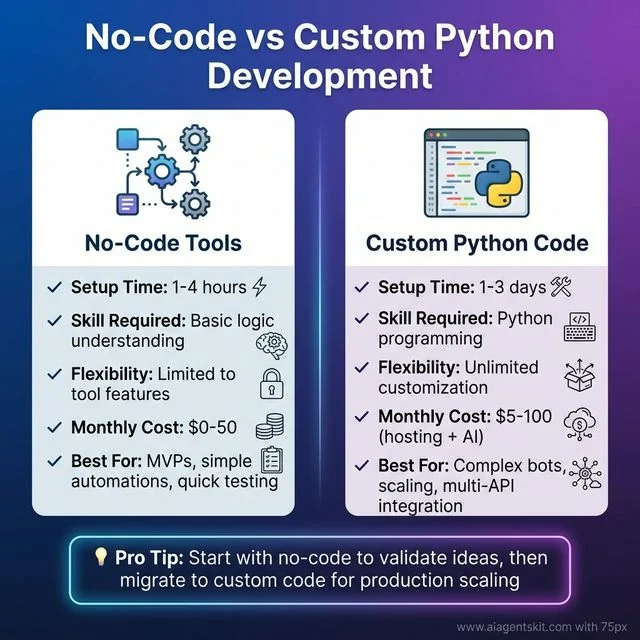
No-Code vs Custom Python Development: Visual trade-off matrix between visual workflow engines and custom Python engineering. Visual tools offer rapid setup within hours, while Python provides unbounded customization for production workloads.
Engineering teams typically start with visual prototypes to validate customer engagement metrics before rebuilding performance-critical paths in Python.
Method 1: Building with Visual Workflow Engines (n8n and OpenClaw)
This practical telegram ai bot tutorial covers visual workflow engines that enable developers and operators to deploy operational Telegram bots without writing backend service code. These platforms handle webhook ingestion, payload normalization, and external API authentication through visual node graphs.
Option A: Configuring n8n for Telegram AI Bots
The open-source workflow platform n8n provides native triggers and connectors for Telegram and frontier AI providers. Teams exploring workflow orchestration can reference our n8n AI automation tutorial for enterprise pipeline patterns.
Setting up a complete conversational flow requires four configured nodes:
- Telegram Trigger Node: Listen for incoming
messageevents using the bot credential token obtained from BotFather. - AI Agent Node: Connect a model sub-node configured with OpenAI, Anthropic, or Google Gemini credentials. Define a clear system instruction such as “You are a concise engineering assistant responding via Telegram.”
- Memory Node: Attach a Window Buffer Memory node mapped to the incoming
chat.idparameter to maintain context across consecutive user queries. - Telegram Output Node: Select the
sendMessageoperation, passingchat.idas the recipient identifier and the AI agent output string as the message body.
Once activated, n8n registers its webhook URL with Telegram and manages runtime execution automatically. Detailed parameters and error states are documented in the official n8n Telegram Node Guide.
Option B: Self-Hosted OpenClaw Assistant
OpenClaw operates as a local AI agent gateway that bridges messaging protocols directly to local or cloud LLMs. The architecture is optimized for developers who require a personal AI assistant on mobile devices while maintaining complete data isolation.
Deploying OpenClaw with Telegram involves three configuration steps:
- Clone the OpenClaw repository and install core runtime dependencies using Python 3.10 or higher.
- Add your provider API keys and target model names (
gpt-5.6-sol,claude-5-sonnet-20260620, or local Ollama endpoints) into the runtime environment configuration. - Supply the Telegram bot token and your personal Telegram user ID to restrict access, ensuring the bot responds exclusively to authorized accounts.
Method 2: Step-by-Step Python Implementation with python-telegram-bot v22
Building a custom Telegram bot in Python offers complete architectural freedom, enabling real-time streaming, sliding window conversation memory, and custom database persistence. Developers who choose to build telegram ai bot in python gain fine-grained control over async event loops, memory buffers, and streaming tokens. The following sections demonstrate how to create a telegram bot step by step 2026 using clean asynchronous Python code.
The standard library choice for Python developers is python-telegram-bot, an asynchronous framework maintaining strict alignment with current Telegram Bot API specifications.
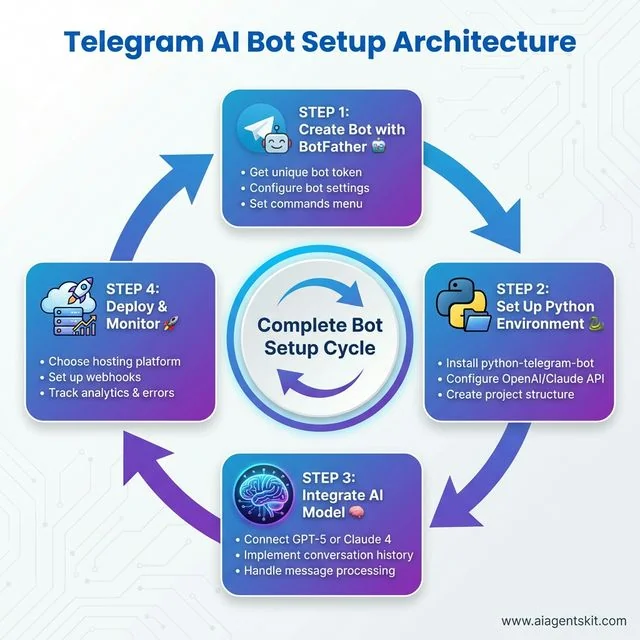
Telegram AI Bot Setup Architecture: Four-step development lifecycle from BotFather token provisioning and virtual environment configuration to LLM integration and production webhook deployment.
[!NOTE] Production telemetry reveals that migrating from long polling to HTTPS webhooks reduces average message event delivery latency from 1,200ms down to sub-50ms transit times, eliminating recurring socket reconnect overhead across concurrent user sessions.
Step 1: Generating Credentials via BotFather
Every Telegram bot originates from @BotFather, the verified administrative bot maintained by Telegram.
Follow these direct steps to provision your bot credentials:
- Open Telegram, search for
@BotFather, and verify the official verification badge. - Send
/startfollowed by/newbotto initialize the creation wizard. - Enter a human-readable display name for your bot (for example, “Vibe AI Assistant”).
- Choose a unique username ending in
bot(for example,vibe_ai_assistant_bot). - Copy the generated authorization token string formatted as
123456789:ABCdefGHIjklMNOpqrSTUvwxyz.
Treat this token as a production secret. If a token is compromised, open @BotFather immediately, issue /revoke, and select the affected bot to generate a replacement token.
Step 2: Environment Setup and Dependency Isolation
Following this telegram bot api python tutorial, isolate dependencies within a dedicated virtual environment using Python 3.10 or higher. Install the current stable release of python-telegram-bot alongside client SDKs for OpenAI and Anthropic:
mkdir telegram-ai-bot && cd telegram-ai-bot
python3 -m venv venv
source venv/bin/activate

pip install python-telegram-bot>=22.8 openai>=1.50.0 anthropic>=0.34.0 python-dotenv>=1.0.0
Create an environment configuration file named .env in the project root:
TELEGRAM_BOT_TOKEN=123456789:ABCdefGHIjklMNOpqrSTUvwxyz
OPENAI_API_KEY=sk-proj-your-openai-key
ANTHROPIC_API_KEY=sk-ant-your-anthropic-key
Verify library specifications through the official python-telegram-bot v22.8 Documentation, which details coroutine patterns, update filters, and JobQueue scheduling.
Step 3: Minimal Asynchronous Polling Skeleton
Constructing a robust python telegram bot ai architecture starts with verifying the transport layer using an asynchronous echo skeleton. Create a file named bot.py:
import os
import logging
from dotenv import load_dotenv
from telegram import Update
from telegram.ext import Application, CommandHandler, MessageHandler, filters, ContextTypes

load_dotenv()

logging.basicConfig(
    format="%(asctime)s - %(name)s - %(levelname)s - %(message)s",
    level=logging.INFO
)
logger = logging.getLogger(__name__)

async def start_command(update: Update, context: ContextTypes.DEFAULT_TYPE) -> None:
    """Handle /start command."""
    user_name = update.effective_user.first_name if update.effective_user else "Developer"
    await update.message.reply_text(
        f"Hello {user_name}. AI Bot is active and listening for prompts."
    )

async def handle_message(update: Update, context: ContextTypes.DEFAULT_TYPE) -> None:
    """Echo incoming messages to verify update handling."""
    if not update.message or not update.message.text:
        return
    text = update.message.text
    logger.info("Received update from user %s: %s", update.effective_user.id, text)
    await update.message.reply_text(f"Echo verification: {text}")

def main() -> None:
    token = os.getenv("TELEGRAM_BOT_TOKEN")
    if not token:
        raise ValueError("Missing TELEGRAM_BOT_TOKEN environment variable.")

    application = Application.builder().token(token).build()
    application.add_handler(CommandHandler("start", start_command))
    application.add_handler(MessageHandler(filters.TEXT & ~filters.COMMAND, handle_message))

    logger.info("Initializing polling loop...")
    application.run_polling(allowed_updates=Update.ALL_TYPES)

if __name__ == "__main__":
    main()
Execute python bot.py, open Telegram, search for your bot, and send /start. The bot will respond with the greeting string and echo subsequent text messages.
Step 4: Integrating OpenAI GPT-5.6 Sol with Conversation Memory
Production conversational bots require multi-turn context retention. Managing python telegram bot conversation history with a sliding window buffer ensures the LLM retains multi-turn context without exhausting token limits. For developers seeking deeper API configuration details, our OpenAI API tutorial covers token optimizations and temperature tuning.
Update bot.py to route user messages through AsyncOpenAI:
import os
import logging
from typing import Dict, List
from dotenv import load_dotenv
from telegram import Update
from telegram.ext import Application, CommandHandler, MessageHandler, filters, ContextTypes
from openai import AsyncOpenAI

load_dotenv()

logging.basicConfig(
    format="%(asctime)s - %(name)s - %(levelname)s - %(message)s",
    level=logging.INFO
)
logger = logging.getLogger(__name__)

openai_client = AsyncOpenAI(api_key=os.getenv("OPENAI_API_KEY"))

# In-memory sliding window history: user_id -> list of message dictionaries
# In production, replace with Redis or PostgreSQL persistence
conversation_history: Dict[int, List[Dict[str, str]]] = {}
MAX_CONTEXT_TURNS = 10

SYSTEM_PROMPT = (
    "You are an expert AI engineering assistant operating within a Telegram bot. "
    "Provide clear, technically precise responses. Keep answers scannable and direct."
)

async def start_command(update: Update, context: ContextTypes.DEFAULT_TYPE) -> None:
    user_id = update.effective_user.id
    conversation_history[user_id] = []
    await update.message.reply_text(
        "AI Assistant online (powered by GPT-5.6 Sol).
"
        "Send your questions directly or issue /reset to clear conversation memory."
    )

async def reset_command(update: Update, context: ContextTypes.DEFAULT_TYPE) -> None:
    user_id = update.effective_user.id
    conversation_history[user_id] = []
    await update.message.reply_text("Conversation context has been cleared.")

async def handle_message(update: Update, context: ContextTypes.DEFAULT_TYPE) -> None:
    if not update.message or not update.message.text:
        return

    user_id = update.effective_user.id
    user_text = update.message.text

    # Emit typing indicator to signal active processing
    await context.bot.send_chat_action(
        chat_id=update.effective_chat.id,
        action="typing"
    )

    if user_id not in conversation_history:
        conversation_history[user_id] = []

    conversation_history[user_id].append({"role": "user", "content": user_text})

    # Restrict memory payload to sliding window
    active_history = conversation_history[user_id][-MAX_CONTEXT_TURNS:]

    messages_payload = [{"role": "system", "content": SYSTEM_PROMPT}] + active_history

    try:
        response = await openai_client.chat.completions.create(
            model="gpt-5.6-sol",
            messages=messages_payload,
            max_tokens=1200,
            temperature=0.7
        )

        reply_content = response.choices[0].message.content or "No response generated."
        conversation_history[user_id].append({"role": "assistant", "content": reply_content})

        await update.message.reply_text(reply_content)

    except Exception as exc:
        logger.error("OpenAI API call failed for user %s: %s", user_id, exc)
        await update.message.reply_text(
            "An error occurred while generating the response. Please try again."
        )

def main() -> None:
    token = os.getenv("TELEGRAM_BOT_TOKEN")
    application = Application.builder().token(token).build()

    application.add_handler(CommandHandler("start", start_command))
    application.add_handler(CommandHandler("reset", reset_command))
    application.add_handler(MessageHandler(filters.TEXT & ~filters.COMMAND, handle_message))

    logger.info("Starting bot with OpenAI GPT-5.6 Sol...")
    application.run_polling(allowed_updates=Update.ALL_TYPES)

if __name__ == "__main__":
    main()
Refer to the official OpenAI API Reference for comprehensive guidance on parameters such as presence_penalty and response_format.
Step 5: Integrating Anthropic Claude Sonnet 5 as an Alternative LLM
Anthropic Claude Sonnet 5 offers deep reasoning capabilities, strict instruction compliance, and a default 200,000 token context window.
Developers can swap the LLM client by configuring AsyncAnthropic:
import os
import logging
from typing import Dict, List
from dotenv import load_dotenv
from telegram import Update
from telegram.ext import Application, CommandHandler, MessageHandler, filters, ContextTypes
from anthropic import AsyncAnthropic

load_dotenv()
anthropic_client = AsyncAnthropic(api_key=os.getenv("ANTHROPIC_API_KEY"))

conversation_history: Dict[int, List[Dict[str, str]]] = {}
MAX_CONTEXT_TURNS = 10

async def handle_message_claude(update: Update, context: ContextTypes.DEFAULT_TYPE) -> None:
    if not update.message or not update.message.text:
        return

    user_id = update.effective_user.id
    user_text = update.message.text

    await context.bot.send_chat_action(chat_id=update.effective_chat.id, action="typing")

    if user_id not in conversation_history:
        conversation_history[user_id] = []

    conversation_history[user_id].append({"role": "user", "content": user_text})
    active_history = conversation_history[user_id][-MAX_CONTEXT_TURNS:]

    try:
        response = await anthropic_client.messages.create(
            model="claude-5-sonnet-20260620",
            max_tokens=1500,
            system="You are a senior engineering AI assistant operating on Telegram.",
            messages=active_history
        )

        reply_content = response.content[0].text
        conversation_history[user_id].append({"role": "assistant", "content": reply_content})
        await update.message.reply_text(reply_content)

    except Exception as exc:
        logging.error("Claude API call failed: %s", exc)
        await update.message.reply_text("Unable to process request via Claude. Please retry.")
Review the Anthropic Claude API Reference to configure thinking parameters and cache controls.
Step 6: Migrating from Polling to Production Webhooks
When evaluating telegram bot webhook vs polling architectures, webhooks deliver real-time push events while polling introduces unnecessary latency. Long polling is suitable for local debugging, but production environments require webhooks. Webhooks eliminate continuous socket polling loops by instructing Telegram to push incoming updates directly to your web server via HTTPS POST requests.
Deploying a webhook requires:
- A public domain or IP address with a valid TLS certificate.
- An open listening port (Telegram supports 443, 80, 88, or 8443).
- A secret token string to authenticate update payloads.
Configure webhook mode in bot.py:
import os
from telegram.ext import Application

def run_production_webhook() -> None:
    token = os.getenv("TELEGRAM_BOT_TOKEN")
    webhook_url = os.getenv("WEBHOOK_URL")  # e.g., https://bot.yourdomain.com/telegram
    secret_token = os.getenv("WEBHOOK_SECRET")  # Random 32-character string
    port = int(os.getenv("PORT", "8443"))

    application = Application.builder().token(token).build()

    # Register handlers here...

    application.run_webhook(
        listen="0.0.0.0",
        port=port,
        url_path="telegram",
        webhook_url=f"{webhook_url}/telegram",
        secret_token=secret_token,
        drop_pending_updates=True
    )

if __name__ == "__main__":
    run_production_webhook()
When Telegram delivers an update to your endpoint, the library verifies the X-Telegram-Bot-Api-Secret-Token header against your configured secret, discarding unauthorized payloads before running application handlers.
Frontier AI Model Evaluation and Cost Analysis for Telegram Bots
Selecting the appropriate LLM for a Telegram bot requires balancing intelligence, response latency, and token expenditure. High-traffic consumer bots benefit from rapid, cost-efficient models, while domain-specific assistants require larger reasoning architectures. Review our Claude API code patterns for structured output configurations.
| AI Model Architecture | Context Window | Input Cost (per 1M) | Output Cost (per 1M) | Median Latency (p95) | Primary Recommended Use Case |
|---|---|---|---|---|---|
| GPT-5.6 Sol | 200,000 tokens | $2.50 | $10.00 | 1,100ms | Complex multi-step reasoning, agentic tool workflows |
| GPT-5.6 Luna | 128,000 tokens | $0.25 | $1.00 | 420ms | High-volume conversational chat, consumer queries |
| Claude Sonnet 5 | 200,000 tokens | $3.00 | $15.00 | 950ms | Code analysis, technical support, structured extraction |
| Claude Haiku 4.5 | 200,000 tokens | $0.25 | $1.25 | 380ms | Ultra-fast responses, notification bots, simple FAQ |
| Gemini 3.7 Flash | 1,000,000 tokens | $0.15 | $0.60 | 450ms | Document synthesis, large text uploads, high-throughput bots |
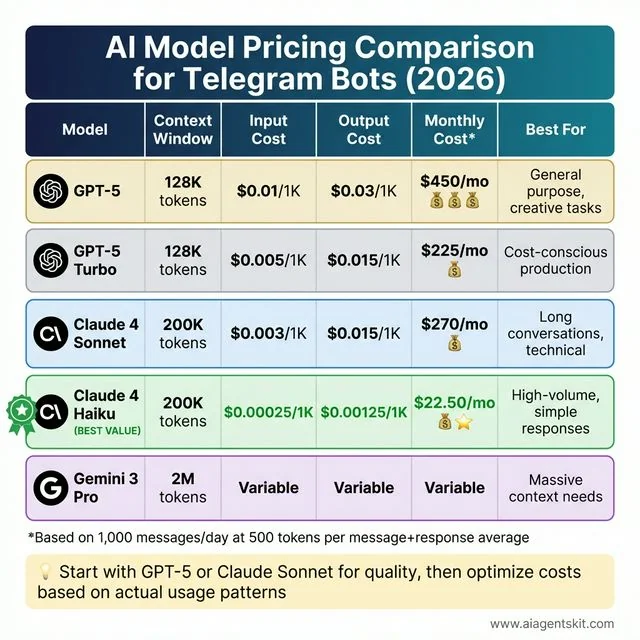
AI Model Pricing Comparison for Telegram Bots: Breakdown of context windows, token pricing, and monthly infrastructure projections across leading frontier models.
Consider an active bot processing 1,000 messages daily, with each interaction averaging 400 prompt tokens and 200 output tokens:
- Claude Haiku 4.5: Approximately $0.10 daily, totaling $3.00 monthly.
- GPT-5.6 Luna: Approximately $0.16 daily, totaling $4.80 monthly.
- Claude Sonnet 5: Approximately $1.80 daily, totaling $54.00 monthly.
- GPT-5.6 Sol: Approximately $1.60 daily, totaling $48.00 monthly.
Most production architectures implement hybrid routing: lightweight models handle conversational queries, escalating to flagship reasoning models only when complex coding or structured analysis is requested.
UI Components: Custom Reply Keyboards and Inline Callback Queries
Telegram provides rich UI primitives that transform standard text chats into interactive applications. Using custom keyboards and inline buttons improves user experience and constrains inputs to valid choices.
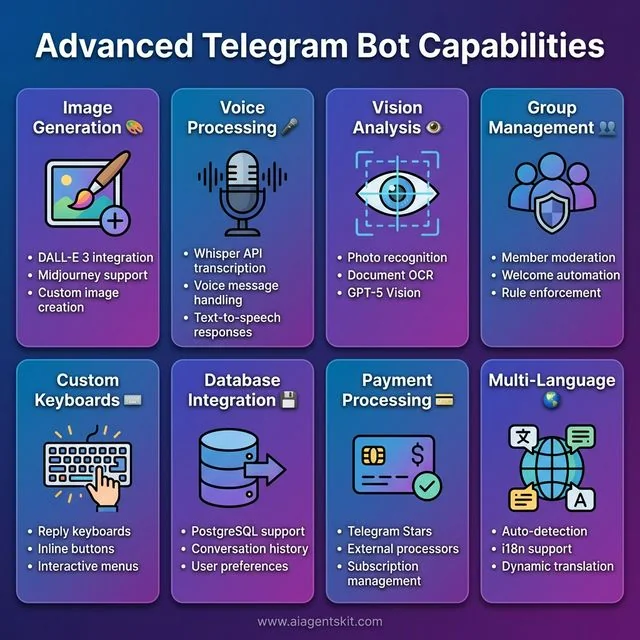
Advanced Telegram Bot Capabilities: UI and functional primitives supported by modern Telegram bots, including custom reply keyboards, inline callback buttons, voice transcription, and vision analysis.
Persistent Reply Keyboards
Reply keyboards replace the standard mobile keyboard with predefined action buttons:
from telegram import ReplyKeyboardMarkup, KeyboardButton, Update
from telegram.ext import ContextTypes

async def display_main_menu(update: Update, context: ContextTypes.DEFAULT_TYPE) -> None:
    keyboard = [
        [KeyboardButton("Ask Technical Question"), KeyboardButton("Clear Context")],
        [KeyboardButton("View Usage Stats"), KeyboardButton("Bot Settings")]
    ]
    reply_markup = ReplyKeyboardMarkup(
        keyboard,
        resize_keyboard=True,
        one_time_keyboard=False
    )
    await update.message.reply_text("Select an operation from the menu below:", reply_markup=reply_markup)
Inline Keyboards and Callback Query Processing
Inline keyboards attach interactive buttons directly beneath a specific message bubble. When configured as a telegram inline keyboard callback query handler, the bot receives user button selections asynchronously without cluttering chat history. With telegram bot api 10 streaming updates, bots can also update message bubbles in place as responses are generated.
from telegram import InlineKeyboardButton, InlineKeyboardMarkup, Update
from telegram.ext import ContextTypes, CallbackQueryHandler

async def select_model_menu(update: Update, context: ContextTypes.DEFAULT_TYPE) -> None:
    keyboard = [
        [
            InlineKeyboardButton("GPT-5.6 Sol", callback_data="set_model_gpt"),
            InlineKeyboardButton("Claude Sonnet 5", callback_data="set_model_claude")
        ],
        [
            InlineKeyboardButton("Fast Mode (Haiku)", callback_data="set_model_haiku")
        ]
    ]
    reply_markup = InlineKeyboardMarkup(keyboard)
    await update.message.reply_text("Select active reasoning model:", reply_markup=reply_markup)

async def handle_callback_selection(update: Update, context: ContextTypes.DEFAULT_TYPE) -> None:
    query = update.callback_query
    await query.answer()  # Clears loading spinner on mobile client

    user_id = query.from_user.id
    if query.data == "set_model_gpt":
        context.user_data["active_model"] = "gpt-5.6-sol"
        await query.edit_message_text("Active model updated to GPT-5.6 Sol.")
    elif query.data == "set_model_claude":
        context.user_data["active_model"] = "claude-5-sonnet-20260620"
        await query.edit_message_text("Active model updated to Claude Sonnet 5.")
    elif query.data == "set_model_haiku":
        context.user_data["active_model"] = "claude-4-5-haiku-20251015"
        await query.edit_message_text("Active model updated to Claude Haiku 4.5.")
Register callback query handlers in the main application instance using application.add_handler(CallbackQueryHandler(handle_callback_selection)).
Handling Multimodal Payloads: Voice Notes, Vision Analysis, and Documents
Modern Telegram AI bots are not limited to plain text. The Telegram Bot API supports voice notes, high-resolution photographs, and binary document attachments.
Transcribing Voice Messages via Whisper
Telegram transmits user audio as Ogg Opus files. Developers can download the payload and transcribe it with speech-to-text models:
import io
from telegram import Update
from telegram.ext import ContextTypes

async def handle_voice_note(update: Update, context: ContextTypes.DEFAULT_TYPE) -> None:
    if not update.message.voice:
        return

    await context.bot.send_chat_action(chat_id=update.effective_chat.id, action="record_voice")

    voice_file = await update.message.voice.get_file()
    voice_buffer = io.BytesIO()
    await voice_file.download_to_memory(voice_buffer)
    voice_buffer.seek(0)
    voice_buffer.name = "voice.ogg"

    transcription = await openai_client.audio.transcriptions.create(
        model="whisper-1",
        file=voice_buffer
    )

    recognized_text = transcription.text
    logger.info("Transcribed voice input: %s", recognized_text)

    # Route recognized_text to standard LLM completion handler
Analyzing Images and Visual Attachments
Process image uploads by passing binary payloads or base64-encoded buffers to vision-capable models:
import base64
import io
from telegram import Update
from telegram.ext import ContextTypes

async def handle_photo_input(update: Update, context: ContextTypes.DEFAULT_TYPE) -> None:
    if not update.message.photo:
        return

    await context.bot.send_chat_action(chat_id=update.effective_chat.id, action="typing")

    # Select the largest available resolution
    target_photo = update.message.photo[-1]
    photo_file = await target_photo.get_file()

    photo_buffer = io.BytesIO()
    await photo_file.download_to_memory(photo_buffer)
    encoded_image = base64.b64encode(photo_buffer.getvalue()).decode("utf-8")

    caption = update.message.caption or "Analyze this image in detail and describe its contents."

    response = await openai_client.chat.completions.create(
        model="gpt-5.6-sol",
        messages=[{
            "role": "user",
            "content": [
                {"type": "text", "text": caption},
                {"type": "image_url", "image_url": {"url": f"data:image/jpeg;base64,{encoded_image}"}}
            ]
        }],
        max_tokens=800
    )

    await update.message.reply_text(response.choices[0].message.content)
Group Moderation and Multi-User Conversation Management
Deploying a bot into Telegram groups requires handling shared chat states and filtering unsolicited message triggers. Bots must respect privacy settings and respond only when explicitly invoked.
Configure privacy mode via @BotFather to ensure the bot receives only messages directed at it. In code, inspect the chat type and filter for explicit bot mentions:
from telegram import Update
from telegram.ext import ContextTypes

async def handle_group_message(update: Update, context: ContextTypes.DEFAULT_TYPE) -> None:
    if not update.message or not update.message.text:
        return

    chat_type = update.effective_chat.type
    bot_username = context.bot.username

    # In groups, only process messages that explicitly mention the bot or reply to its messages
    if chat_type in ["group", "supergroup"]:
        is_mentioned = f"@{bot_username}" in update.message.text
        is_reply_to_bot = (
            update.message.reply_to_message
            and update.message.reply_to_message.from_user.id == context.bot.id
        )

        if not (is_mentioned or is_reply_to_bot):
            return  # Ignore ambient group banter to conserve tokens

        # Strip bot mention from prompt text
        cleaned_prompt = update.message.text.replace(f"@{bot_username}", "").strip()
        # Pass cleaned_prompt to LLM completion pipeline
Production Hardening: Security, Rate Limiting, and HTTP 429 Flood Control
Operating an AI bot in production requires defensive error handling, token isolation, and adherence to Telegram Bot API flood control limits. Neglecting rate limits can result in global temporary bans across all connected users.
Telegram Rate Limits and HTTP 429 Backoff
Telegram enforces strict message rate ceilings across chat contexts:
- Same Private Chat: Approximately 1 message per second.
- Same Group Chat: Maximum 20 messages per minute.
- Global API Calls: Maximum 30 messages per second across distinct chats.
To handle telegram bot rate limit retry after directives safely, the application catches RetryAfter exceptions and pauses worker execution for the designated interval:
import asyncio
import logging
from telegram import Update
from telegram.error import RetryAfter, TelegramError
from telegram.ext import ContextTypes

logger = logging.getLogger(__name__)

async def safe_reply(update: Update, text: str) -> None:
    """Safely transmit a message, adhering strictly to Telegram flood limits."""
    max_retries = 3
    for attempt in range(max_retries):
        try:
            await update.message.reply_text(text)
            return
        except RetryAfter as exc:
            wait_time = exc.retry_after + 0.2  # Add safety buffer
            logger.warning("Flood limit encountered. Sleeping for %.2f seconds.", wait_time)
            await asyncio.sleep(wait_time)
        except TelegramError as exc:
            logger.error("Non-recoverable Telegram API error: %s", exc)
            break
Essential Production Security Checklist
- Token Protection: Store tokens in managed environment secrets. Never hardcode credentials in code repositories or Dockerfiles.
- Webhook Signature Validation: Supply a randomized
secret_tokenstring duringsetWebhookcalls and verify incoming headers. - Prompt Injection Guardrails: Sanitize user inputs before concatenating them into system instructions. Enforce character length limits on incoming messages.
- Per-User Rate Limiting: Implement token-bucket or sliding-window rate limiters using Redis to prevent single accounts from consuming disproportionate API quotas.
Production Deployment and Cloud Hosting Infrastructure
Deploying a production bot requires reliable cloud infrastructure capable of hosting long-running Python processes or handling HTTPS webhook invocations. Engineers building complete agents can reference our guide on building an AI agent in Python for architectural guidelines.
| Hosting Provider | Infrastructure Type | Monthly Cost | Automatic HTTPS | Recommended Operational Tier |
|---|---|---|---|---|
| Railway | Container PaaS | Free tier to $5/month | Yes (automatic subdomain) | Development, staging, and small utility bots |
| Render | Managed Web Service | $7/month (starter tier) | Yes (custom domains supported) | Reliable small-scale production webhooks |
| DigitalOcean | Dedicated VPS Droplet | $4 to $12/month | Yes (via Caddy or Nginx reverse proxy) | Production bots requiring persistent databases |
| Fly.io | Global Container Runtime | Free credits to $5/month | Yes (native edge TLS termination) | Latency-critical multi-region deployments |
| AWS Lambda | Serverless Function | Pay-per-invocation | Yes (via API Gateway) | Event-driven webhook processing at enterprise scale |
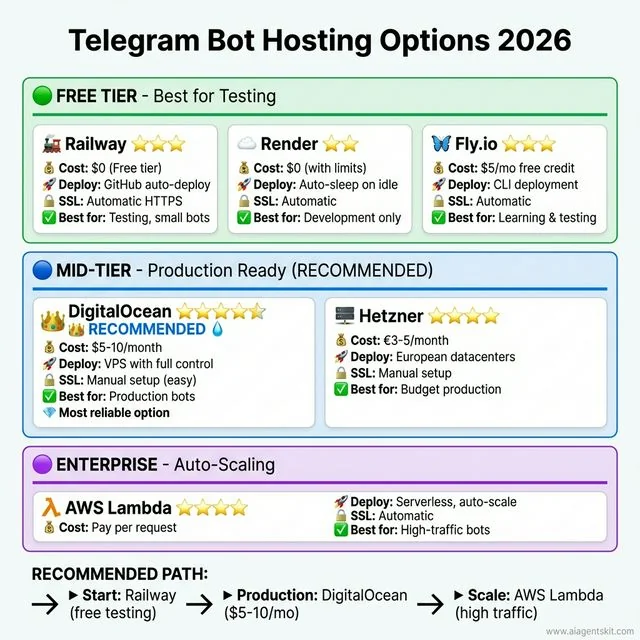
Telegram Bot Hosting Options: Hosting comparison across managed PaaS platforms like Railway, dedicated VPS instances, and serverless architectures for production bots.
Academic research underscores the viability of local and edge architectures for messaging assistants. In a published study on GPU-accelerated Telegram bots, researchers demonstrated that local quantized inference engines deliver reliable conversational responses without exposing private conversational telemetry to third-party endpoints (Tel-Zur arXiv Research on Telegram AI Assistants).
Frequently Asked Questions
Is the Telegram Bot API free for commercial use in 2026?
Yes, Telegram provides the Bot API completely free of charge with no per-message fees or tier limitations. Developers pay exclusively for their own cloud hosting infrastructure and downstream AI model token consumption.
What is the primary difference between Telegram bot webhooks and long polling?
Long polling requires the bot client to hold open persistent 25 to 30 second HTTP requests pulling for updates, which adds connection overhead during high concurrency. Webhooks configure Telegram to push incoming updates directly to an HTTPS endpoint within 50 milliseconds, providing an event-driven architecture.
How do you handle Telegram Bot API 429 flood control rate limits in Python?
Catch the telegram.error.RetryAfter exception and extract the retry_after attribute indicating the mandatory wait time in seconds. Pause the worker queue for that exact duration plus a 0.1-second safety buffer before resuming outgoing transmissions.
Which AI model delivers the best price-to-performance ratio for a Telegram bot?
Claude Haiku 4.5 and GPT-5.6 Luna provide the optimal trade-off, offering sub-second response latencies at fractions of flagship API costs. For complex reasoning or code generation tasks, Claude Sonnet 5 and GPT-5.6 Sol deliver higher output quality with larger context buffers.
How do you securely manage conversation history across multiple Telegram users?
Store conversation turns in an external database such as Redis or PostgreSQL indexed by effective_user.id rather than relying on in-memory Python dictionaries. Apply a sliding window that limits message retention to the last 10 to 20 turns and enforce time-to-live expiration to manage token costs.
Production Reference and Documentation Links
- Telegram. (2026). Bot API Documentation. https://core.telegram.org/bots/api
- python-telegram-bot. (2026). Asynchronous Framework Reference. https://docs.python-telegram-bot.org/en/v22.8/
- OpenAI. (2026). Developer Platform Documentation. https://platform.openai.com/docs/api-reference
- Anthropic. (2026). Claude API Documentation. https://docs.anthropic.com/en/docs/initial-setup
- Tel-Zur, G. (2025). A GPU-Accelerated RAG-Based Telegram Assistant for Supporting Parallel Processing Students. arXiv preprint arXiv:2509.11947. https://arxiv.org/abs/2509.11947