Best Local LLMs for RTX 4060, RTX 3070, and RTX 5060
Best local LLMs for RTX 4060, RTX 3070, and RTX 5060 in 2026. See which 8GB models fit cleanly, stay fast, and make sense for real local AI use.
The local-AI market still tricks buyers into comparing generations when they should compare memory. The RTX 4060, RTX 3070, and RTX 5060 look far apart on paper, but for local LLM work they sit in the same 8GB class and therefore compete for the same best Ollama models for 8GB VRAM.
That shared ceiling changes almost everything. Teams following an Ollama local AI setup guide usually discover that a clean-fitting 7B or 8B model feels better than a cramped 14B experiment that spills into system RAM.
The right answer is not one universal model, but it is a narrow shortlist. Current NVIDIA specs and current Ollama listings point to the same conclusion: these cards reward fit-first model choices, fast quantized weights, and realistic expectations.
Best Ollama Models for 8GB VRAM on NVIDIA GPUs
The fastest way to answer the query is to stop treating these three cards as different model classes. NVIDIA’s official pages list the RTX 4060 with 8GB GDDR6 on a 128-bit interface, the RTX 3070 with 8GB GDDR6, and the RTX 5060 with 8GB GDDR7 on a 128-bit interface, with NVIDIA listing the RTX 5060 as available on May 19, 2025 on its current family page: RTX 4060 specs, RTX 3070 specs, and RTX 5060 family specs.
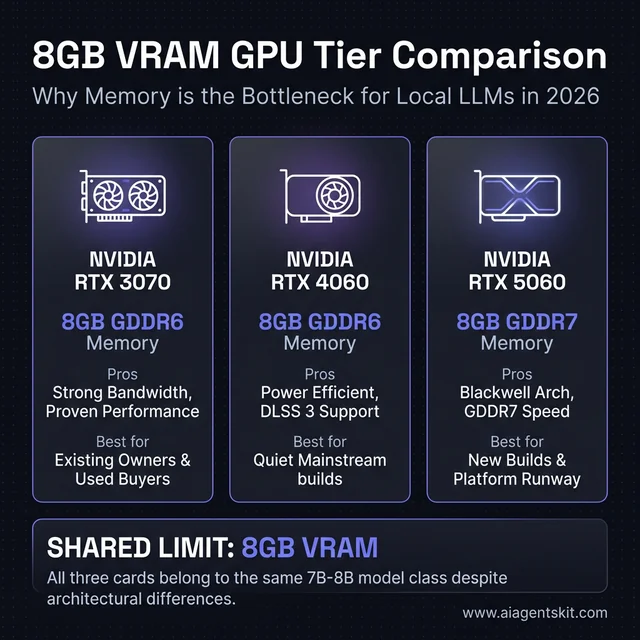 NVIDIA RTX 4060 vs 3070 vs 5060 for local AI: While these three cards feature different architectures (Ada, Ampere, Blackwell) and memory types (GDDR6, GDDR7), they all share the same 8GB VRAM ceiling. This shared limit means they all compete for the same class of 7B to 8B models, regardless of marketing claims.
That means the best local LLMs for RTX 4060, RTX 3070, and RTX 5060 are not giant frontier-class models. They are the well-quantized 4B to 8B models that fit comfortably, leave room for context, and do not punish the machine the moment a browser, IDE, or Discord window stays open in the background.
The broader market data points in the same direction. BCG’s 2025 AI value report shows a widening gap between firms that scale AI well and those that stay stuck in experimentation, while PwC’s midyear 2025 AI predictions update describes a market where AI strategy, cost discipline, and execution quality matter more than broad hype. That same production discipline shows up in consumer local AI: most practitioners don’t need the biggest model that can be forced to load, they need the smallest model that does the job well, stays responsive, and keeps enough headroom for a real workflow.
Stanford HAI’s AI Index 2025 technical performance review also highlights how quickly open and smaller models have improved. That matters here because it lowers the penalty for staying in the 7B to 8B lane. Two years ago, an 8GB GPU felt like a compromise card for local inference; in 2026, it is still limited, but it is no longer locked out of genuinely useful model quality.
There is another reason this matters: context window overhead is real. A model that looks perfect on a static size listing can become uncomfortable once a longer prompt history, codebase context, or tool chain starts consuming memory around it. That is why the safest recommendations on 8GB hardware almost always leave a few gigabytes of breathing room instead of treating every last megabyte as available.
Most teams discover the same fit ladder after a weekend of testing. A 4B model feels easy, a 7B or 8B model feels like the sweet spot, a 14B model often feels technically possible but operationally annoying, and anything larger belongs in a different hardware conversation entirely.
For readers who want the short version, the practical ranking looks like this:
| Priority | Model Class | Why It Works on These GPUs |
|---|---|---|
| Best default | 7B to 8B instruct model | Clean fit, good quality, still responsive |
| Best coding default | 7B code-tuned model | Strong code help without memory pain |
| Best fallback | 4B model | High reliability and long-context breathing room |
| Borderline experiment | 14B Q4 | Possible in some setups, rarely the best daily choice |
| Wrong tier | 32B+ | Too much compromise for 8GB cards |
Practitioners who want the fuller memory math should read the existing VRAM requirements for AI breakdown, but the real buying lesson is simpler than the spreadsheets make it look. Once three cards share the same 8GB ceiling, model choice becomes a memory management problem first and a GPU-generation problem second.
5 Local Models That Actually Work on These GPUs
The shortlist below is shaped by one rule: every recommendation has to make sense as a daily driver on an 8GB card, not as a one-time benchmark stunt. Ollama’s current library listing for Qwen3 8B shows a 5.2GB footprint, which is exactly the sort of model size that tends to work well on these GPUs because it leaves room for context and for the rest of the desktop to keep functioning.
RTX 4060 vs RTX 3070 vs RTX 5060 for local LLMs
Before picking a model, the clearer search question is often whether the GPUs themselves belong in different local-AI tiers. For these three cards, the answer is mostly no.
| GPU | VRAM | Practical local LLM tier | Best default model class | Best fit buyer |
|---|---|---|---|---|
| RTX 4060 | 8GB | 4B to 8B | 7B to 8B instruct or coder | Quiet, efficient mainstream desktop |
| RTX 3070 | 8GB | 4B to 8B | 7B to 8B with more tuning freedom | Existing owner or strong used buy |
| RTX 5060 | 8GB | 4B to 8B | 7B to 8B on a newer stack | Fresh build with current-gen runway |
The important phrase there is “practical local LLM tier.” A card can occasionally stretch above its practical tier, but that does not make the stretch the right recommendation. Searchers asking whether the RTX 3070 is “better” than the RTX 4060 for Ollama are usually really asking whether one card unlocks a larger model class. In most cases it does not. The winner changes the feel of the same class of models, not the class itself.
Recommended starting stack for mixed workloads
The strongest four-model stack for these cards is:
qwen3:8bqwen2.5-coder:7bdeepseek-r1:8bgemma3:4b-it-q4_K_M
That stack is not magical, but it is realistic. It covers general chat, coding, reasoning-heavy prompts, and low-headroom fallback use without pretending that an 8GB GPU is secretly a workstation.
It also avoids a problem that shows up in a lot of local-model collections: redundancy. Many users install five or six models that all occupy almost the same role, then bounce between them without learning which one is actually better for a given task. A tighter stack works better. One general model, one coding model, one reasoning model, and one lightweight safety model gives the machine clearer roles and usually leads to faster prompt routing by the user.
What models fit comfortably on 8GB VRAM?
This is the parent keyword opportunity the article should own because it matches how real users search after the first hardware question.
| Model size | Can it fit on 8GB? | Daily-driver verdict |
|---|---|---|
| 3B to 4B | Yes, comfortably | Best low-headroom or long-session choice |
| 7B to 8B | Yes, usually the sweet spot | Best overall range for these GPUs |
| 14B | Sometimes, with trade-offs | Usually a test case, not the default |
| 32B+ | No, not in a satisfying way | Wrong tier for these cards |
The word “comfortably” matters. A model that technically loads but leaves no room for a larger context, a browser, or an IDE is not a comfortable fit. For search traffic, that distinction helps because users asking “what fits in 8GB VRAM” usually mean “what works well enough to use every day,” not “what can be coaxed into running for one screenshot.”
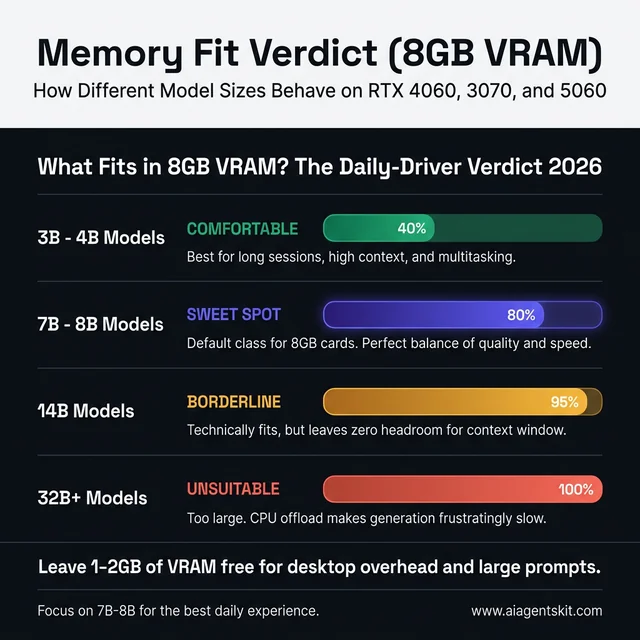 What fits in 8GB VRAM: A 3B to 4B model is comfortable, while 7B to 8B models represent the sweet spot for these cards. Moving to 14B weights becomes borderline and often frustratingly slow, while 32B models are unsuitable for daily use on 8GB hardware without significant quality loss.
Why Qwen3 8B leads the all-around group
Qwen3 8B is the safest single recommendation because it stays balanced. The model is good enough at writing, summarizing, debugging, planning, and tool-oriented prompting that it rarely feels like a compromise until a task becomes truly complex.
That matters more than headline benchmark wins. Many teams find that a strong all-around 8B model ends up doing more actual work than a larger model that loads slower, runs hotter, and becomes annoying the moment context grows. For anyone who wants one install and one answer, Qwen3 8B is the default.
Another advantage is predictability. The model does not need elaborate prompt steering to become useful. That is important on these cards because the best local experience often comes from reducing friction everywhere else. If a model needs an elaborate system prompt, multiple retries, or constant regeneration to produce solid answers, the hardware starts feeling slower than it really is.
Why Qwen2.5-Coder 7B still stays relevant
The best local LLMs for RTX 4060, RTX 3070, and RTX 5060 are not all-purpose by default; some should be specialized. Qwen2.5-Coder 7B still earns a permanent slot because the code-tuned behavior is more useful than many bigger general models when the actual job is refactoring, error explanation, quick tests, regex help, or reading a small repo.
This is the model that saves time in an IDE. It is not perfect at architecture or long-horizon planning, but it is focused, affordable in VRAM, and generally easier to trust for everyday software tasks than a generic 4B or 5B assistant.
That focus also reduces prompt tax. A code-tuned model usually needs less setup to stay in the lane. Users can ask for a failing test diagnosis, a quick migration snippet, or an explanation of a stack trace and get something practical without spending half the conversation reminding the model to be technical. On 8GB systems, that efficiency matters because smoother prompting often matters more than squeezing in a slightly larger but less specialized weight.
When DeepSeek-R1 8B is worth the slowdown
Reasoning-focused models can feel slower and more verbose, but they also pull their weight on tasks that benefit from careful decomposition. DeepSeek-R1 8B is the model to try when prompts involve math, multi-step logic, tricky debugging chains, or planning sequences where the assistant needs to stay organized instead of just sounding fluent.
The trade-off is user experience. Practitioners often find that reasoning models feel heavier even when their quantized size is manageable, so this is not always the right default for chat. It is the right second or third install for users who regularly ask more structured questions.
The strongest way to use a model like this is intentionally. It is better for “walk through this failure tree” or “compare these three implementation plans” than for casual brainstorming. When used for the right category of task, the extra latency feels justified. When used for everything, it can make a perfectly good 8GB setup feel sluggish.
Where Mistral 7B still makes sense
Mistral 7B stays useful because it is lean and fast. It makes sense on desktops that already have too much going on, on systems where the GPU is also driving high-resolution displays, or in workflows where the user values quick response over maximum reasoning depth.
That kind of model often looks boring in comparison tables. In daily use, boring is underrated. A model that loads fast, answers fast, and never flirts with memory overflow can beat a theoretically smarter option that turns each prompt into a wait.
This is especially true for assistant-like usage. If the model is helping draft commit messages, summarize notes, explain command output, or answer short technical questions, lower latency often creates more real value than an incremental quality bump. For many local-first users, Mistral earns its place not by being the most impressive model, but by being the model they keep coming back to when they want quick help without friction.
Why Gemma 3 4B belongs on 8GB systems
Every 8GB local-AI machine should keep a low-headroom safety option installed. Gemma 3 4B earns that slot because it loads easily, handles assistant-style tasks well enough, and gives the machine room for longer contexts, background applications, and the inevitable memory friction that shows up outside clean benchmark conditions.
Most experts now agree on the broader point even if they disagree on the exact model brand: small models have become good enough that they are no longer “emergency only.” That shift is why the current best open-source LLMs conversation increasingly includes smaller, sharper weights instead of treating every sub-10B model as a toy.
That shift changes how local stacks should be organized. Older advice pushed users to treat smaller models as throwaway installs they would never touch once a larger model was available. In 2026, that is outdated thinking. A strong 4B model can be the right answer for travel setups, low-noise systems, multi-app desktops, and long sessions where reliability matters more than raw reasoning range.
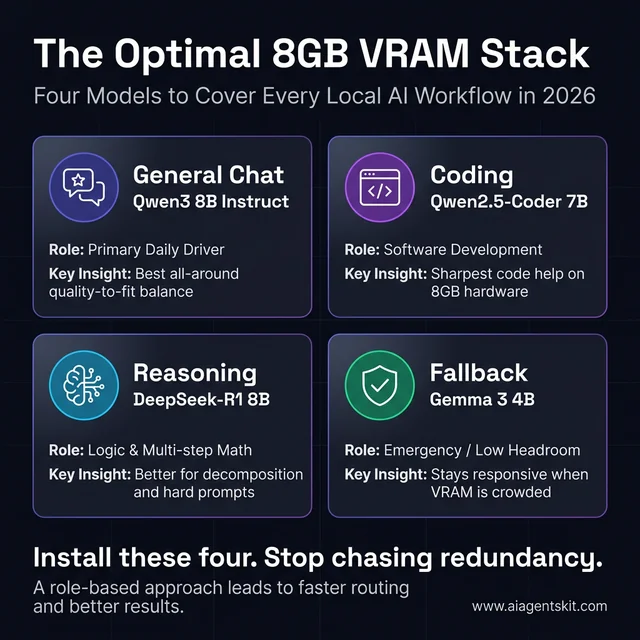 The Ultimate 8GB VRAM Local AI Stack: Rather than installing dozens of redundant models, these four—Qwen3 8B for chat, Qwen2.5-Coder 7B for code, DeepSeek-R1 8B for reasoning, and Gemma 3 4B for fallback—cover almost every professional local AI workflow while staying within the memory budget of a mainstream GPU.
Which local model is best for coding, chat, and reasoning?
This is another query family worth capturing directly because the user intent is highly actionable.
| Use case | Best model | Why it wins on 8GB |
|---|---|---|
| Coding | qwen2.5-coder:7b | Focused code behavior without blowing the memory budget |
| General chat | qwen3:8b | Strongest all-around quality-to-fit balance |
| Reasoning | deepseek-r1:8b | Better for step-by-step logic and hard prompts |
| Fast fallback | mistral:7b | Low friction, quick responses, lighter footprint |
| Tight-memory fallback | gemma3:4b-it-q4_K_M | Easiest reliable load when VRAM is crowded |
For search coverage, this table matters because it aligns with how users search after the initial hardware query. Many do not ask for “the best local LLM” in abstract terms. They ask for the best coding model, the best reasoning model, or the best fast model for a machine that only has 8GB available.
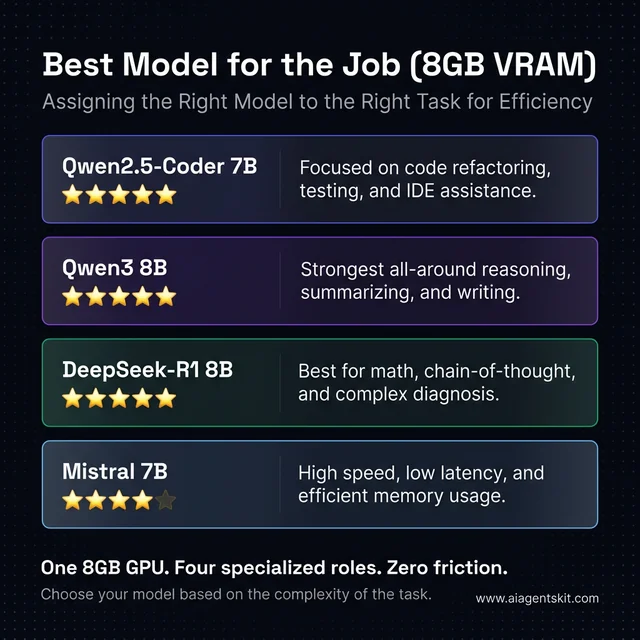 Best Local LLM per Use Case: Matching the model to the task is key to maintaining high responsiveness on an 8GB GPU. Specialized models like Qwen2.5-Coder for development or DeepSeek-R1 for complex logic out-perform larger general-purpose models that might struggle to fit cleanly alongside other desktop applications.
Which vision models are realistic on 8GB GPUs?
Vision and multimodal search intent is growing around local AI, so the article should answer it directly even if text models remain the main focus.
Ollama’s multimodal support and current library listings make smaller vision-capable models more realistic than they were a year ago. The current Qwen2.5-VL family is available through Ollama, and its smaller variants are the kind of models to test first on these cards rather than jumping to oversized multimodal weights. Ollama’s own 2025 multimodal engine rollout also widened the pool of vision-capable local models that can run in the same toolchain users already use for text models.
The catch is simple: vision workloads eat headroom faster than plain text prompting. Image understanding, document parsing, and screenshot analysis add pressure that makes an 8GB card feel smaller than it does in a text-only workflow. That is why the realistic answer for “best vision model for 8GB GPU” is not “the biggest VL model available.” It is “the smallest vision model that still handles the target task well.”
How Does the RTX 4060 Handle Local LLM Workloads?
The RTX 4060 is usually the card that gets oversold. Retail marketing makes it sound newer and therefore more suitable for local AI than anything from the RTX 30 series, but the 8GB limit keeps it in the same practical tier as the other cards in this article.
That does not mean the card is bad for local AI. It means the card is best at disciplined local AI. The RTX 4060 is efficient, widely available, and easy to build around in compact systems. It also fits nicely into the kind of desk setup where local AI is only one part of the workflow rather than the whole point of the machine.
For searchers specifically looking for RTX 4060 Ollama models, the answer is still centered on Qwen3 8B, Qwen2.5-Coder 7B, DeepSeek-R1 8B, Mistral 7B, and a smaller fallback such as Gemma 3 4B.
RTX 4060: best fit for quiet local setups
For general local usage, the RTX 4060 works best with:
qwen3:8bas the default modelqwen2.5-coder:7bfor software workgemma3:4b-it-q4_K_Mas the fallback model
This card rewards conservative choices. When teams push it into 14B territory, the output quality can improve on paper, but the experience often gets worse in practice. Longer prompt times, tighter context headroom, and higher sensitivity to whatever else is running on the desktop all start to pile up.
The evidence suggests that the RTX 4060 is strongest when the machine’s job is “developer workstation with local AI” rather than “budget inference box.” That is a different framing, and it leads to better decisions. Instead of asking how to squeeze the largest possible model into the card, the better question is how to keep the system responsive enough that the model actually gets used.
That framing helps with purchase regret too. The RTX 4060 disappoints most when buyers expect it to act like a deeply discounted prosumer inference card. It performs much better when evaluated as a low-power, mainstream GPU that can run serious local AI within a disciplined envelope. Under those conditions, it is genuinely useful.
Can the RTX 4060 run a 14B model locally?
Yes, sometimes, but the daily-driver answer is still no. The RTX 4060 can be pushed into 14B territory with aggressive quantization and careful context management, but that does not mean it becomes a good 14B machine. In search terms, “can it run” and “should it run” are different questions.
The practical problems show up quickly:
- less room for context
- more sensitivity to background VRAM use
- slower, less predictable responses
- more risk of CPU offload dragging down the experience
That is why the better search answer is that the RTX 4060 is a strong 7B to 8B card, a usable 4B card, and only a situational 14B experiment.
Where the RTX 4060 runs into trouble
The pain points are predictable:
- long context plus a heavier 8B model
- 14B experiments with aggressive quantization
- simultaneous IDE, browser, and GPU-accelerated background apps
- expectations shaped by 24GB-card YouTube demos
Many teams discover this the slow way. They install a bigger model because it technically loads, then spend the next hour waiting on the kind of half-speed, half-offloaded output that looks fine in a screenshot and feels bad in a real workday.
The more subtle problem is confidence. Once a setup becomes inconsistent, users stop trusting it. A model that sometimes answers in five seconds and sometimes stalls for twenty does not just waste time; it changes behavior. People stop reaching for the local stack at all, which defeats the point of building one.
Best use cases for the RTX 4060
The RTX 4060 is still a solid fit for:
- coding assistance
- document summarization
- local Q&A over moderate files
- lightweight agents that are not doing deep long-context reasoning
- privacy-sensitive personal workflows
It is less convincing for large-context research assistants, heavy multi-user serving, or the type of local inference stack that keeps several models hot at once. Readers deciding between tool layers on this card should compare the overhead trade-offs in the existing llama.cpp vs Ollama comparison before assuming the friendliest interface is always the best fit.
That is the recurring lesson with this GPU. The RTX 4060 can be a very good local-AI card for one person with a defined workflow. It becomes a much weaker proposition when the goal shifts toward experimentation across many larger models or serving as a household inference box with no patience for limits.
Best Ollama settings for an RTX 4060 with 8GB VRAM
For 8GB cards, setup details affect user experience more than many searchers expect. Ollama’s official FAQ says the default context window is 4096 tokens, and its context-length guidance notes that systems under 24GiB VRAM default to a 4K context. That default is useful because it keeps smaller desktops from overcommitting memory too early.
The safest starting setup for the RTX 4060 is:
- keep
num_ctxat 4096 first - verify the model is fully on GPU with
ollama ps - only increase context after confirming the card still holds the model cleanly
- prefer a smaller model before forcing a larger context
That advice may sound unexciting, but it maps directly to search intent around “best Ollama settings for 8GB GPU” and “what context size should be used on 8GB VRAM.” Conservative defaults usually win on these cards.
How Does the RTX 3070 Compare for Local AI Today?
The RTX 3070 is the odd card in this group because it is older but still respected by local-AI tinkerers. That reputation is not imaginary. The card remains attractive because even though it is still boxed into 8GB VRAM, its overall behavior can feel more confident than the RTX 4060 in some inference scenarios.
Even among experienced local-AI users, there is still debate about how much that practical edge matters. The right answer depends on the workload, the backend, and the tolerance for noise, heat, and power draw. What is not really in debate is the memory story: the RTX 3070 does not get promoted into a higher model class just because it sometimes feels stronger on the same class of model.
For readers searching for RTX 3070 Ollama models, the shortlist barely changes from the RTX 4060: the real difference is how comfortably the same 7B to 8B models run, not which completely new family should be installed.
RTX 3070: still strong when bandwidth matters
For local inference, the RTX 3070 is often the card people hang onto longer than expected. Practitioners usually find that the card handles 7B and 8B models with less of the “budget compromise” feeling than its age would suggest, especially when the machine’s whole purpose is interactive prompting rather than gaming-first efficiency.
That makes the RTX 3070 especially good for:
- responsive 7B and 8B chat models
- code assistants that stay hot during a session
- longer conversations on a fitted model
- home-lab setups where the GPU is dedicated mostly to local inference
The reason matters less than the outcome. If the same quantized model feels smoother on a 3070 than on a 4060 in a user’s exact setup, that is the result that counts.
That said, this is not a blanket rule. Fresh thermal paste, case airflow, driver state, backend choice, and even how aggressively the desktop uses VRAM can all shift the result. The right conclusion is not that the RTX 3070 always wins. The right conclusion is that older cards can still be rational local-AI tools when their memory behavior lines up with the workload.
Is the RTX 3070 better than the RTX 4060 for Ollama?
This is one of the clearest long-tail questions around the topic, and the answer is nuanced enough to deserve a direct block.
The RTX 3070 can feel better than the RTX 4060 for some local inference workloads, especially when the model already fits and the user cares about responsiveness more than efficiency. The RTX 4060 can still be the better real-world choice for quieter, cooler, lower-power systems that are not spending hours a day running local models.
So the better answer is:
- RTX 3070 for users who already own one or find a strong used deal
- RTX 4060 for efficient mainstream builds
- neither card changes the right model tier, because both stay in the 8GB lane
Where the RTX 3070 still disappoints
The disappointment comes when buyers confuse “better than expected” with “unlocked.” The RTX 3070 is still an 8GB card, which means the same traps remain:
- 14B models can cross from usable to irritating fast
- offload can wipe out the perceived advantage
- larger context windows still eat breathing room
- simultaneous GPU workloads still create friction
This is where the card’s position in 2026 becomes clearer. It is a strong used-market or already-owned option for local AI, but it is not automatically the smarter buy than a newer GPU once power efficiency, warranty runway, and total system goals come into play.
Used-market context matters here. A discounted RTX 3070 can be a smart answer when the rest of the build is already settled and the goal is simply to add capable local inference. It is a weaker answer when the user is starting from scratch and treating local AI as the main buying reason, because that money can sometimes be better redirected toward more VRAM rather than older horsepower.
Best use cases for the RTX 3070
The RTX 3070 makes the most sense for users who already own one or can get one at a compelling used price. In that scenario, the smartest move is often to lean into what the card does well, keep the model class disciplined, and let heavier tasks move elsewhere when needed.
That “elsewhere” point matters because local AI is rarely an all-or-nothing choice anymore. The current cloud vs local AI trade-off is not about ideology; it is about using local hardware for privacy, immediacy, and recurring workflows while letting cloud inference handle the rare jobs that obviously exceed an 8GB desktop card.
For that hybrid strategy, the RTX 3070 still makes a lot of sense. It can handle the repetitive daily prompts locally and leave only the occasional oversized reasoning or long-context request for a cloud model. That division of labor is one of the most cost-effective ways to keep an older GPU useful in 2026.
Can the RTX 3070 run 14B models more comfortably?
Compared with the RTX 4060, sometimes yes. Compared with a true higher-VRAM card, not really.
That is the key nuance the article should rank for. The RTX 3070 is one of the more forgiving 8GB GPUs for local AI experimentation, but the word “forgiving” should not be confused with “ideal.” A 14B model can still tip from interesting to irritating as soon as context grows or another app claims memory.
Is the RTX 5060 a Better Buy for Local LLMs?
The RTX 5060 is the newest card here, so it is also the one most likely to be misunderstood. New generation, Blackwell branding, GDDR7, and fresh launch language can make it sound like a clear jump into a new local-LLM tier. The memory limit says otherwise.
That does not mean the RTX 5060 is irrelevant or overhyped. It means its value has to be framed correctly. The card offers newer architecture, newer AI-oriented positioning, and the kind of software runway that often matters more over a two- or three-year ownership period than one benchmark chart does on launch month.
For RTX 5060 Ollama models, the same rule applies: start with the strongest 7B to 8B options first, then add a smaller fallback before experimenting with anything bigger.
RTX 5060: newer stack, same VRAM ceiling
For local inference, the RTX 5060 should be viewed as “the cleanest modern 8GB option” rather than “the first step into a different class.” That framing is much more useful because it explains both the appeal and the limit.
The appeal:
- newer Blackwell platform
- GDDR7 instead of GDDR6
- better long-term platform freshness
- strong fit for new builds that are not trying to become inference servers
The limit:
- still 8GB
- still best with 4B to 8B models
- still not a natural 14B daily-driver card
- still easy to overspend on if local AI is the main reason for buying
Most teams comparing the RTX 5060 with the RTX 4060 will land on one of two honest conclusions. Either the newer stack and GDDR7 make the 5060 the cleaner pick for a fresh build, or the practical model compatibility is similar enough that budget and availability matter more than branding.
That is exactly why the RTX 5060 is easy to oversell in local-AI discussions. Marketing language makes it tempting to frame the card as a model-unlocker, when it is really a user-experience improver inside the same model class. That distinction is not glamorous, but it is useful, and useful is what should drive a hardware recommendation.
Is the RTX 5060 worth buying for local LLMs?
For a new build, often yes. For someone upgrading only to run much larger models, not necessarily.
The RTX 5060 makes sense when the buyer wants:
- a current-generation NVIDIA card
- a cleaner long-term software runway
- a single GPU for gaming, desktop work, and local AI
- solid 7B to 8B model performance without moving into a more expensive tier
It makes less sense when the buyer’s real goal is 14B-plus daily use. In that situation, the better answer is often not a newer 8GB GPU, but a card with more VRAM.
Best use cases for the RTX 5060
The RTX 5060 makes the most sense in three cases:
- a new compact desktop that needs one modern GPU for gaming, creative work, and local AI
- a buyer who wants current-generation drivers and longer platform runway
- a user who values smooth 8B-class inference more than stretching for bigger-but-frustrating models
That last point is the real one. The best local LLMs for RTX 4060, RTX 3070, and RTX 5060 are mostly the same models because these cards remain in the same fit band. Anyone comparing vendors at the hardware-planning stage should still weigh the bigger ecosystem picture in the NVIDIA vs AMD for AI comparison, but within NVIDIA’s own 8GB lane the smartest setup remains stubbornly simple.
The card is also a better emotional fit for buyers who dislike used-hardware uncertainty. For some users, that matters as much as raw value. New warranty coverage, current-generation drivers, and a cleaner long-term support story can easily outweigh the last bit of performance debate, especially when the actual models being run do not change much anyway.
What should get installed first on an RTX 5060
A practical first-install order looks like this:
ollama pull qwen3:8b
ollama pull qwen2.5-coder:7b
ollama pull deepseek-r1:8b
ollama pull gemma3:4b-it-q4_K_M
That stack works because each model has a clear job. One handles general chat, one handles code, one handles reasoning-heavy prompts, and one stays ready for tight-memory moments. That kind of role-based lineup is usually better than installing six near-duplicate 7B models and hoping one feels special.
It also gives the machine a clear progression path. Start with the general model, keep the code model close to the editor, use the reasoning model only when the question really needs it, and drop to the smaller fallback when the system is crowded. That pattern works just as well on the RTX 4060 and RTX 3070, which is another reminder that these cards belong in the same planning conversation.
Best Ollama commands and checks for 8GB NVIDIA cards
The setup side deserves search coverage too because people often land on the page after the model choice, not before it.
ollama pull qwen3:8b
ollama pull qwen2.5-coder:7b
ollama pull deepseek-r1:8b
ollama pull gemma3:4b-it-q4_K_M
ollama ps
The practical workflow is:
- pull only the models with distinct roles
- run one model at a time first
- use
ollama psto verify whether the model is fully on GPU - lower context or drop model size if the GPU split turns mixed CPU/GPU too often
That advice aligns with Ollama’s official docs, which recommend checking ollama ps to confirm whether a model is loaded fully on GPU and document how num_ctx and global context length settings affect memory use.
Final Verdict on the Best Local LLM Stack for 8GB GPUs
The cleanest conclusion is also the least flashy one: the RTX 4060, RTX 3070, and RTX 5060 all belong to the same local-LLM class because 8GB of VRAM is still the rule that matters most. Their differences change responsiveness, thermals, efficiency, and buying value, but they do not change the best-fit model tier.
For most users, the recommended order is straightforward. Start with qwen3:8b, add qwen2.5-coder:7b if coding matters, add deepseek-r1:8b if structured reasoning matters, and keep gemma3:4b-it-q4_K_M installed so the machine always has one model that loads without drama.
The evidence points to a fit-first strategy, not a hype-first strategy. Readers who are still deciding whether to stay in the 8GB class at all should use the broader best GPU for running AI locally guide before buying hardware, because once workloads start leaning toward longer context, multi-user serving, or 14B-plus daily use, the better answer is usually more VRAM rather than a cleverer workaround.
That recommendation may sound conservative, but it is conservative in the productive way. A local-AI stack that gets used every day is better than a more ambitious stack that is always one overloaded prompt away from feeling broken. On these three GPUs, the winning move is not to chase bragging rights. It is to build a setup that stays responsive enough to become part of the real workflow.
Qwen3 8B vs Mistral 7B vs DeepSeek-R1 8B
These comparison queries are worth owning because they sit right at the center of purchase and install intent.
| Model | Best at | Main trade-off | Best role on 8GB |
|---|---|---|---|
| Qwen3 8B | All-around quality | Slightly heavier than smaller fallbacks | Default daily model |
| Mistral 7B | Speed and low friction | Less depth on harder tasks | Fast assistant |
| DeepSeek-R1 8B | Structured reasoning | Can feel slower and more verbose | Second install for hard prompts |
For most users, Qwen3 8B is the best default. Mistral 7B is the model to keep around when speed matters most. DeepSeek-R1 8B is the model to reach for when the prompt is hard enough that careful reasoning matters more than fast response.
Can an 8GB GPU run a 14B model every day?
It can, sometimes, but that is not the same as saying it should. A carefully quantized 14B model can load on some 8GB setups with the right backend and limited context, yet the day-to-day experience often becomes slower, tighter, and more fragile than the quality gain justifies.
That is why the strongest guidance in this article stays conservative. An 8GB card is far better at running a good 7B or 8B model cleanly than at pretending to be a 14B workstation.
Which card feels fastest with the same local model?
That depends on the exact stack, but the honest answer is usually “not by enough to change the best model choice.” The RTX 3070 can still feel surprisingly strong, the RTX 5060 should age more cleanly as a platform, and the RTX 4060 remains perfectly workable in sensible local-AI setups.
The practical model shortlist remains the same across all three. Users choosing between these cards should decide based on system goals, price, efficiency, and ownership horizon rather than assuming one of them unlocks a radically different class of model.
What should stay installed as a fallback model?
A 4B-class model should always stay installed. That is the model that keeps working when the IDE is open, the browser has too many tabs, a video call is running, or a longer context starts crowding the machine.
That fallback slot does not look glamorous, but it is one of the highest-leverage habits in local AI. The machine becomes more usable because there is always one model that fits cleanly when everything else is competing for memory.
Is 8GB VRAM enough for local AI in 2026?
Yes, for the right class of workloads. Eight gigabytes is enough for 4B to 8B local models, coding assistants, note summarization, local chat, and many privacy-first single-user workflows.
It is not enough for comfortable 32B-class inference, large-context daily use with bigger models, or the kind of local setup that needs to serve multiple heavy users at once. That is why 8GB remains a useful but clearly bounded local-AI tier rather than a one-size-fits-all answer.
What is the best coding model for an 8GB GPU?
For most users, qwen2.5-coder:7b is the best coding model for an 8GB GPU because it balances code quality, VRAM fit, and practical responsiveness better than larger general-purpose models.
The best answer can still vary by workflow. Users focused on quick edits and low latency may prefer a lighter model, while users who care more about reasoning through tricky bugs may still want DeepSeek-R1 8B available as a second option.
What is the best chat model for an 8GB GPU?
qwen3:8b is the best general chat model for most 8GB NVIDIA cards in this class because it stays broad, useful, and relatively efficient without becoming too cramped for daily desktop use.
Mistral 7B is still the better option for users who prioritize speed and simplicity over deeper reasoning. The broader pattern is that 8GB GPUs reward balanced models more than ambitious ones.
How can users tell whether Ollama is using the GPU fully?
The simplest check is ollama ps. Ollama’s own documentation recommends using it to verify whether a model is fully loaded on the GPU or split across GPU and CPU.
That matters because mixed offload is often the hidden reason a model feels slow. If a supposedly good model performs badly on an 8GB card, the first troubleshooting step should be checking whether it actually fits cleanly on the GPU in the current setup.
Are vision or multimodal models realistic on 8GB GPUs?
Yes, but only in the same disciplined way text models are realistic on 8GB GPUs. Smaller multimodal weights can be useful for screenshot analysis, light document understanding, and basic image-aware prompting.
The trade-off is tighter headroom. Vision work adds memory pressure faster than plain text work, so the right multimodal answer on these cards is usually a smaller VL model rather than the biggest one available in the library.
What context window should be used on an 8GB GPU?
The safest answer is to start at 4096 and only scale up after confirming the model still stays fully on GPU. Ollama’s official FAQ and context-length documentation both reinforce that context length costs memory, and its guidance for systems under 24GiB VRAM starts with a 4K default.
That matters for search because many users assume the biggest context setting is always the best setting. On these GPUs, it usually is not. The best context window is the one that preserves responsiveness while keeping the chosen model fully on the card.
Sources used in reporting: NVIDIA official RTX 4060, RTX 3070, and RTX 5060 specification pages; Ollama library pages and documentation for Qwen3, Qwen2.5-Coder, GPU support, FAQ, and context length; BCG 2025 AI value report; PwC midyear 2025 AI predictions update; Stanford HAI AI Index 2025.