AI PC Explained: Do You Need an NPU Laptop? (2026 Guide)
What is an AI PC and do you actually need one in 2026? Get the data-backed truth about NPUs, Copilot+ requirements, chip comparisons, best picks by budget, and a clear buying framework for students, creators, and professionals.
Every laptop manufacturer in 2026 is stamping “AI” on their products. AI PC. AI laptop. Copilot+ PC. Next-gen AI-powered whatever. The marketing is relentless — and mostly confusing, even for people who follow technology closely. According to Gartner’s AI PC forecast, these devices are projected to reach 55% of total global PC shipments by the end of 2026 — representing 143 million units and signaling a fundamental shift in how the PC market defines its products.
The real challenge isn’t finding information about AI PCs — it’s finding honest information. Incredible Odisha’s AI PC guide cuts through the vendor marketing with technical accuracy, verified market data, and a practical buying framework for those investing in hardware that actually matches their workflow. Before diving into specifications, understanding what best GPU for AI workloads actually covers helps clarify where NPU capability starts and GPU capability begins.
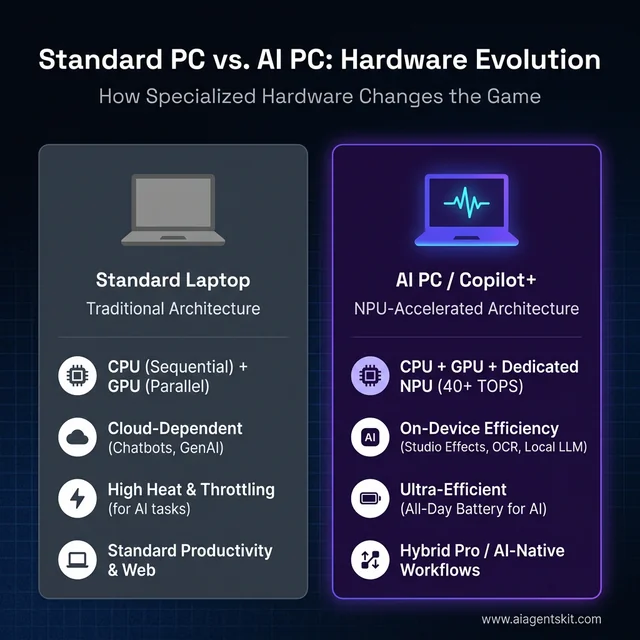
Standard Architecture vs. AI PC: The shift from cloud-dependent computing to ultra-efficient local NPU processing.
What Is an AI PC and What Sets It Apart?
An AI PC is a computer with a dedicated Neural Processing Unit (NPU) — specialized hardware built specifically for running AI tasks directly on the device rather than relying on cloud processing. That single hardware addition is what distinguishes an AI PC from a conventional laptop.
Regular computers handle AI tasks on either the CPU (versatile but slow for AI math) or the GPU (powerful but power-hungry). An NPU is optimized for the specific mathematical operations that AI models require: matrix multiplications, neural network inference, and pattern recognition. It performs these tasks more efficiently than either alternative.
Here is what qualifies as an AI PC in 2026:
- Contains a dedicated NPU chip rated at or above 40 TOPS (Trillions of Operations Per Second)
- Pairs the NPU with a modern CPU architecture from Intel, AMD, or Qualcomm
- Runs Windows 11 24H2 or later for full feature access
- Often certified by Microsoft as a “Copilot+ PC” when meeting specific hardware thresholds
The key chipmaker platforms in 2026:
- Intel Core Ultra Series 3 (up to 50 NPU TOPS, debuted CES 2026)
- AMD Ryzen AI 300 and 400 Series (50-60 TOPS, XDNA 2 architecture)
- Qualcomm Snapdragon X Elite/Plus (45 TOPS, ARM-based Hexagon NPU)
- Apple M-series (Neural Engine — Apple’s equivalent, different branding)
Gartner projects that 100% of new enterprise PCs will feature AI chips by the close of 2026, which signals that NPUs are shifting from differentiating feature to baseline expectation in business hardware purchasing. That trajectory matters for anyone evaluating whether to buy now or wait.
One important nuance: Apple has been shipping Neural Engine hardware in its M-series chips for years without using “AI PC” branding. The capability exists in MacBooks — Apple simply markets it differently. Buyers comparing Windows AI PCs with Apple Silicon machines are comparing functionally similar on-device AI approaches with different marketing language.
What Is an NPU and Why Does It Matter?
A Neural Processing Unit is a specialized processor optimized for one category of computing: AI inference. Understanding how it differs from a CPU and GPU explains both why it matters and where it falls short.
When AI software runs a task — recognizing a face, transcribing speech, blurring a background — the computations involved are primarily matrix multiplications running through layered neural network calculations. These calculations are simple in structure but enormous in volume. A typical speech recognition inference involves billions of these operations per second.
A CPU handles them sequentially, one operation at a time with occasional parallel threads. It works, but slowly. Imagine using a kitchen knife to process an entire restaurant order — technically possible, not efficient. A GPU processes these operations in parallel across thousands of cores, which is fast but consumes significant power — especially on a battery-powered laptop. Running sustained AI tasks through a GPU in a thin-and-light laptop creates heat, drains battery, and throttles performance within minutes.
An NPU occupies the efficient middle ground. Purpose-built for the math AI requires, it runs those calculations with dramatically less power than a GPU and can operate continuously without the thermal or battery impact of GPU-based alternatives. Teams evaluating on-device AI for everyday use consistently discover that NPU-accelerated tasks run more smoothly through full workdays than GPU-dependent equivalents. Understanding how large language models work helps clarify why different hardware architectures suit different ends of the AI task spectrum.
How TOPS Performance Is Measured (and Why It Can Mislead)
TOPS — Trillions of Operations Per Second — is the standard benchmark number printed on AI PC spec sheets. A higher TOPS rating indicates greater theoretical peak throughput. The complication: vendors measure TOPS differently.
Some report NPU-only TOPS. Others combine NPU, CPU iGPU, and the processor’s total AI compute into a single number. A chip advertised as “75 TOPS total” may deliver 45 TOPS from the NPU and 30 from the GPU — while a competitor’s “45 TOPS NPU” may outperform it for the workloads that actually use the NPU directly.
Current chip performance ranges from approximately 13 TOPS on desktop Intel Arrow Lake-S (which does not meet Copilot+ requirements) to 60 TOPS on the AMD Ryzen AI PRO 400 Series mobile processors. Microsoft’s Copilot+ PC designation requires a minimum of 40 TOPS from the NPU — the practical threshold that matters for software compatibility, not the highest achievable spec.
The practical implication: when comparing AI PCs, a chip meeting Copilot+ requirements with excellent driver support and application optimization consistently outperforms a higher-TOPS chip with immature software integration. The TOPS number is a starting filter, not a primary decision-maker.
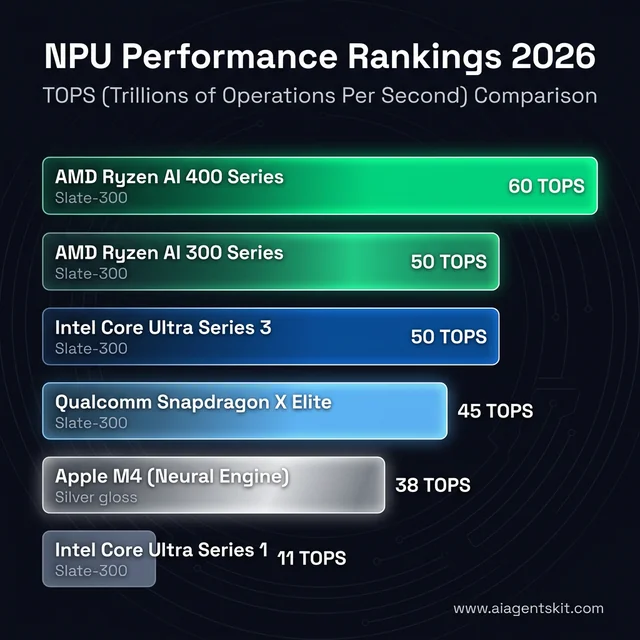
The NPU Performance Landscape: Comparing TOPS (Trillions of Operations Per Second) across Intel, AMD, Qualcomm, and Apple platforms.
Intel vs AMD vs Qualcomm: The AI Chip Showdown
Three platform ecosystems now compete for the Windows AI PC market, each with distinct tradeoffs in NPU performance, battery efficiency, software compatibility, and ecosystem maturity. Choosing between them is less about which spec sheet wins and more about which tradeoffs match specific use patterns.
Intel Core Ultra Series 3
Intel’s Core Ultra Series 3, which debuted at CES 2026, brings up to 50 NPU TOPS to the latest generation of Intel mobile processors. Built on Intel’s established x86 architecture, these chips carry the widest baseline software compatibility of any AI PC platform. Intel’s AI PC documentation outlines support for the full range of Windows AI features through DirectML, OpenVINO, and Windows ML APIs.
Strengths:
- Widest x86 software compatibility — virtually every Windows application runs natively
- Good balance across CPU, iGPU, and NPU performance
- Strong on performance-intensive applications alongside AI tasks
- Mature developer ecosystem for NPU optimization
Weaknesses:
- Battery efficiency trails Snapdragon in genuinely mobile scenarios
- Earlier chips (pre-Series 3) delivered lower TOPS and missed Copilot+ thresholds
Intel’s position suits users who run a mix of traditional Windows workloads alongside AI tasks and prioritize compatibility above all else.
AMD Ryzen AI 300 and 400 Series
AMD’s Ryzen AI processor lineup — particularly the 300 Series built on Zen 5 with the XDNA 2 NPU architecture — delivers 50 TOPS from the NPU, exceeding Copilot+ requirements with headroom. The Ryzen AI PRO 400 Series mobile platform pushes that to 60 TOPS for business-oriented configurations, representing the highest dedicated NPU throughput in the current Windows ecosystem.
Strengths:
- Highest NPU TOPS numbers in Windows AI PCs
- Strong integrated GPU handling AI tasks the NPU can’t address (and gaming performance)
- Competitive pricing relative to comparable Intel configurations
- Active expansion of software partners through AMD’s ISV program
Weaknesses:
- XDNA software ecosystem is newer than Intel’s DirectML framework
- Application-level NPU optimization from ISVs lags Intel’s established partner program slightly
AMD suits buyers who want maximum AI headroom within the Windows x86 ecosystem and value GPU capability alongside NPU performance.
Qualcomm Snapdragon X Elite and X Plus
Qualcomm’s ARM-based Snapdragon X Elite delivers 45 TOPS from its Hexagon NPU — meeting Copilot+ requirements solidly — with the standout characteristic being exceptional battery life. The ARM architecture brings smartphone-level efficiency to laptop form factors, and teams with genuinely mobile workstyles consistently find Snapdragon machines redefine their expectations for workday battery performance. For those evaluating running AI models locally, the platform’s thermal efficiency enables sustained inference without throttling.
Strengths:
- Industry-leading battery life — often 20+ hours in light workloads
- Best NPU performance per watt in the Windows ecosystem
- Generates less heat during sustained AI workloads
- Always-connected capabilities on compatible models
Weaknesses:
- ARM architecture means some older x86 Windows applications run via emulation
- Emulation introduces performance overhead for legacy or professional software
- Developer tools with x86 dependencies may have compatibility gaps
The honest assessment: Snapdragon X Elite is compelling for users who primarily use modern software — browser-based tools, Microsoft 365, streaming apps, and current-generation productivity software — and prioritize battery life. Those with dependencies on legacy business software, specialized engineering tools, or complex developer environments should validate compatibility before purchasing.
What Is a Copilot+ PC and What Does It Do?
Microsoft’s Copilot+ PC designation is a hardware certification that gates access to a specific set of Windows AI features. It is not a quality mark or performance guarantee — it is a minimum hardware requirement list.
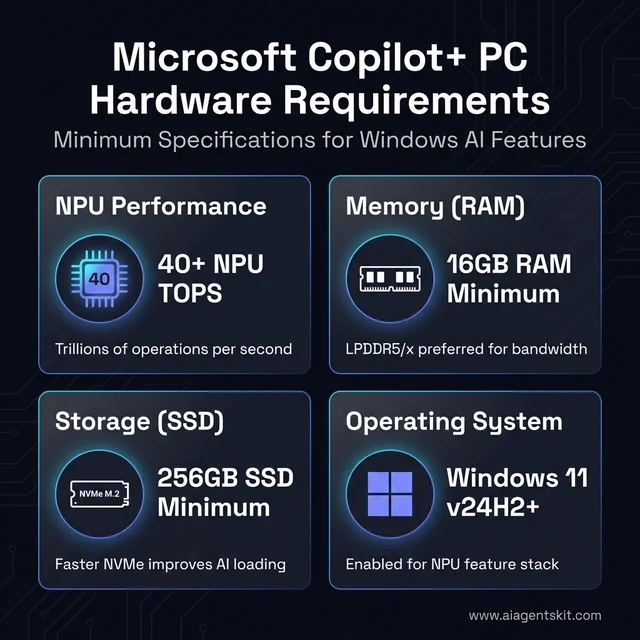
The Copilot+ PC Readiness Checklist: Minimum hardware benchmarks required to unlock local Windows AI features.
Official Copilot+ PC requirements:
- NPU with 40+ TOPS performance
- 16GB RAM minimum
- 256GB SSD minimum
- Windows 11 version 24H2 or later
Features unlocked by Copilot+ certification:
- Recall: An opt-in feature that captures periodic screen snapshots and creates a searchable timeline. After significant privacy controversy, Microsoft made it strictly opt-in and added encryption through Windows Hello Enhanced Sign-in Security. All data stays on-device.
- Live Captions with Translation: Real-time transcription of any system audio — video calls, streaming content, recorded meetings — with translation across supported languages. Processes on-device, never via cloud.
- Windows Studio Effects: Background blur, noise suppression, eye contact correction, and voice focus running continuously via NPU without meaningful battery drain.
- Cocreator in Paint: AI image generation within the built-in Paint app.
- Click to Do: Context-aware actions on highlighted text or images.
- Super Resolution in Photos: AI-upscaling of images.
The honest assessment: most features are incremental improvements rather than transformative capabilities. Live Captions with translation is genuinely useful for anyone consuming foreign-language content regularly. Windows Studio Effects provide real value for remote workers on continuous video calls. Recall appeals to some users and concerns others — it is fully controllable and opt-in.
The more defensible case for Copilot+ certification is future-proofing. Microsoft and ISVs are building toward Copilot+ requirements as the baseline for upcoming Windows AI features. Buying a certified laptop now positions users for capabilities arriving over the next 12-24 months of Windows development. The parallel with AI on Apple Silicon is instructive — Apple shipped Neural Engine hardware well before software fully utilized it, then gradually expanded AI capabilities that required the dedicated hardware.
On-Device AI vs Cloud AI: The Privacy Case for AI PCs
One of the most underappreciated advantages of a Copilot+ PC is what it means for data privacy — and understanding this distinction clarifies why on-device AI matters beyond raw performance numbers.
Cloud AI services — ChatGPT, Google Gemini, Midjourney, Azure AI — work by transmitting data to provider servers, where the actual processing occurs. Every prompt, document, image, or audio file sent to a cloud AI service leaves the device. It travels across the internet, sits on a third-party server for processing, and returns a result. For most personal use cases this is acceptable. For professionals handling confidential documents, healthcare data, legal records, or competitive business information, it is a meaningful risk.
AI PCs with NPUs flip this model. The following features process entirely on the device — nothing leaves:
- Live Captions with Translation: Audio processed locally by the NPU in real time. Meeting audio, video call transcriptions, and streaming content are never transmitted to Microsoft or any third party.
- Windows Studio Effects: Camera enhancements run on the NPU. Video feeds are processed on-chip and never leave the machine.
- Recall: When enabled, all screenshot captures and indexing happen locally with BitLocker encryption. Microsoft’s 2026 model explicitly states these snapshots are not used to train any global AI models.
- Windows Search semantic indexing: Local files are semantically indexed by the NPU for natural language search — entirely offline.
- Local language models: Running Llama 4 8B or Phi-3 locally through Ollama or LM Studio means conversations and documents stay on-device permanently.
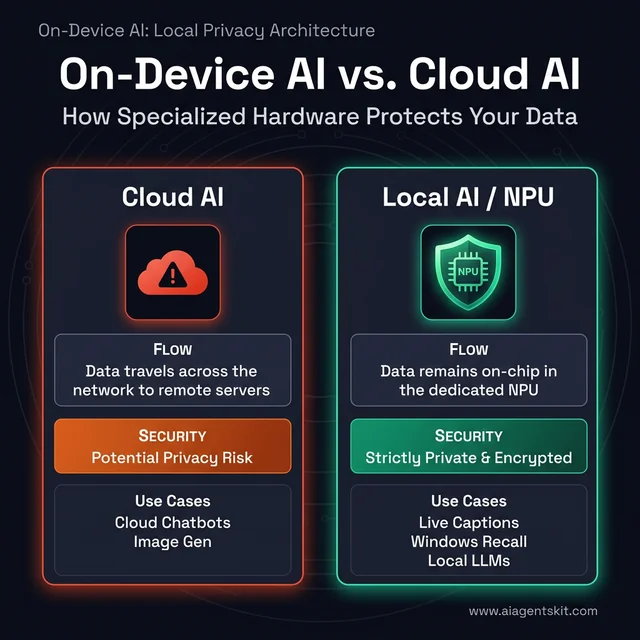
On-Device vs. Cloud AI: Specialized hardware keeps sensitive data on your chip, whereas cloud services transmit it over the network.
The Hybrid AI Reality
Not every feature on an AI PC is local. The Copilot assistant in Windows still routes queries to Microsoft’s cloud for most capabilities. Third-party apps that display “AI-powered” features may use a mix of local NPU processing and cloud calls behind the scenes. Users genuinely concerned about data privacy should verify which processing path each application uses — local NPU vs. cloud API — before trusting it with sensitive data.
The practical takeaway: for professionals in regulated industries (healthcare, legal, finance), journalists working with sensitive sources, or anyone in a high-security environment, the on-device AI capability of a Copilot+ PC represents a meaningful, auditable privacy improvement over cloud-dependent alternatives. For general users, it is a comfortable convenience — data stays on the device, the NPU handles it, and nothing is uploaded unless explicitly triggered.
6 Real Use Cases Where NPU Actually Helps
The gap between AI PC marketing and practical reality is significant. Vendor content implies an AI PC will transform daily computing. Actual NPU usage patterns are more targeted — specific tasks benefit meaningfully, while the majority of everyday computing happens without the NPU activating at all.
Tasks That Genuinely Benefit from NPU
Video call enhancement: The use case with the clearest, most consistent value. Background blur, noise cancellation, voice focus, and eye contact correction run via NPU efficiency rather than GPU power draw. For remote workers on six or more hours of calls daily, the difference is measurable: laptops stay cooler, batteries drain more slowly, and consistent quality holds without fan noise spiking. Teams evaluating AI meeting transcription tools for daily workflows find that on-device transcription on Copilot+ hardware outperforms cloud-only alternatives in latency and privacy.
Real-time transcription: Live Captions, meeting transcription apps, and voice-to-text all benefit from dedicated AI hardware. The operations run faster with less latency between speech and displayed text. For accessibility-dependent users and professionals relying on accurate real-time transcription, the improvement is meaningful.
Photo and video editing with AI features: Adobe Creative Cloud has added NPU acceleration paths for Photoshop neural filters, Premiere Pro AI effects, and Lightroom denoise operations. The improvements are real but incremental — a task taking 30 seconds may take 15. Cumulative time savings matter for professionals spending hours in editing software daily.
On-device language model inference: Running small quantized models locally — 7B and 13B parameter models for coding assistance, text analysis, or chat without internet — is meaningfully more practical with NPU assistance. Processing is fast enough to be useful, battery impact is acceptable, and privacy-sensitive applications benefit from keeping data entirely on-device.
Windows Studio Effects throughout the workday: Unlike GPU-based effects that create thermal and power drag during sustained use, NPU-based Studio Effects run continuously with minimal overhead. Organizations deploying these for remote teams see sustained video quality without the performance complaints typical of software-only alternatives.
Tasks Where NPU Barely Matters
Large language models at full scale: Running Llama 4 70B or similarly sized models at useful speeds requires a discrete GPU. Current NPUs handle small quantized models adequately but cannot approach GPU performance for full-scale LLM inference. The NPU is useful for task-specific small models; serious local AI inference still requires dedicated GPU capability.
Cloud AI services: ChatGPT, Claude, Google Gemini, Midjourney — all run on provider infrastructure. The local NPU has no involvement. The experience is identical on a 2019 laptop and a 2026 AI PC when accessing these cloud services. Marketing that implies otherwise is misleading.
Image and video generation: Stable Diffusion and similar generative models lean heavily on GPU parallelism. NPUs can assist with preprocessing steps but aren’t the primary compute for creative generation tasks.
Standard productivity: Email, web browsing, documents, spreadsheets, code editing — these workflows run on the CPU. The NPU is idle during most of a typical professional workday.
Who Gets the Most Value From an AI PC?
Marketing positions AI PCs as universally beneficial. Reality is more specific — some users get genuine daily value, others get future-proofing they won’t use for months. Here is where the NPU investment pays off most clearly by user type.
Students
Students represent one of the strongest AI PC use cases in 2026 — and one of the most budget-friendly to enter. Copilot+ certified laptops now start below $800 (Lenovo IdeaPad Slim 3X, ASUS Vivobook S15 with Snapdragon), making AI PC capability accessible without the premium price.
The key student benefits: Live Captions transcribes lectures in real time without sending audio to the cloud, which solves both the battery problem and the note-taking lag simultaneously. Local AI models handle essay structuring, research summarization, and code debugging without requiring an internet connection — particularly valuable during exams or in environments with unreliable WiFi. For students concerned about academic integrity policies around cloud AI tools, on-device processing through a local model represents a meaningfully different risk profile.
Recommended specs for students: 40+ TOPS NPU, 16GB RAM minimum, 512GB SSD. Snapdragon-based models offer the best battery life for all-day campus use if the student’s software is primarily web-based or Microsoft 365.
Content Creators
Content creators — video editors, photographers, podcasters, YouTubers — get some of the clearest measurable benefits from NPU hardware. Adobe Creative Cloud’s NPU acceleration paths in Photoshop (neural filters), Premiere Pro (AI noise reduction, scene detection), and Lightroom (denoise, masking) translate directly into faster editing cycles.
For creators who record themselves, Windows Studio Effects deliver continuous professional-grade video quality during recording sessions without the thermal cost of GPU-based effects: accurate background replacement, consistent eye contact correction, and noise suppression that works across the full recording session without throttling. Teams and YouTube creators who rely on consistent on-camera quality throughout long production days find NPU-based effects meaningfully more reliable than software-only alternatives.
Recommended specs for creators: AMD Ryzen AI 300 (highest NPU + strong iGPU for preview rendering) or Intel Core Ultra Series 3, 32GB RAM, 1TB SSD. A discrete GPU adds value for those doing heavy 3D, motion graphics, or large-scale image generation.
Remote and Hybrid Workers
For professionals spending four or more hours daily on video calls, the AI PC value proposition is immediate and consistent. Background blur, noise cancellation, voice focus, and eye contact correction running through the NPU rather than the CPU/GPU means less thermal throttling, quieter fans, and significantly better battery life during call-heavy days.
Live Captions provides an always-on transcript for any meeting on any platform — Zoom, Teams, Google Meet, third-party services — without uploading audio. For workers in open offices or home environments with ambient noise, the always-on Studio Effects noise suppression delivers consistent output without configuring each application separately.
Recommended specs for remote workers: Any Copilot+ certified platform (Intel/AMD/Snapdragon), 16GB RAM, 512GB SSD. Snapdragon is the battery-first choice for workers who travel frequently.
Developers and Technical Users
Developers running local AI models — for code assistance, API cost reduction, privacy-first prototyping, or AI application development — benefit most from high NPU TOPS and large RAM configurations. Running Llama 4 8B or a coding-specialized Qwen 2.5 Coder 7B locally through tools like Ollama or LM Studio provides always-available code autocomplete and explanation without network latency or per-token costs.
For AI application developers specifically, NPU-equipped machines allow testing on-device inference paths before deploying to production. Understanding how an application performs on 40-50 TOPS hardware helps architects design experience tiers for end-users who will run the same software on varied devices.
Recommended specs for developers: AMD Ryzen AI 300 or Snapdragon X Elite, 32GB RAM (64GB for serious model work), 1TB+ NVMe SSD. DirectML and ONNX Runtime support matters — verify the development tools support the target NPU.
Casual and General Users
Honest assessment: general users who primarily run browsers, streaming services, social media, Microsoft 365, and cloud AI tools (ChatGPT, Claude, Gemini) gain minimal immediate benefit from NPU hardware. The cloud AI tools they use run on provider servers regardless of what chip is in their laptop. The Copilot+ features they are most likely to notice — background blur on calls, noise cancellation — are useful but not transformative for users who only video call occasionally.
The case for general users buying an AI PC in 2026 is purely future-proofing: NPU-dependent features in the Windows ecosystem will compound over the next 24-36 months, and having the hardware in place now avoids upgrading again soon. At current price points where Copilot+ certification adds minimal premium, the decision is sensible. Paying a large premium specifically for NPU capability as a casual user is not.
AI PC vs MacBook: Which Platform Wins for On-Device AI?
The most common comparison search — “Copilot+ PC vs MacBook” — reflects a genuine decision millions of buyers face. Both platforms now ship with dedicated AI hardware. The comparison is more nuanced than either platform’s marketing acknowledges.
Neural Engine vs NPU: The Technical Reality
Apple’s M4 chip includes a Neural Engine rated at approximately 38 TOPS — technically below the 40 TOPS threshold Microsoft requires for Copilot+ certification, but performing comparably in many real-world AI inference tasks due to Apple’s tightly integrated hardware-software stack. The M4 Pro and M4 Max variants include enhanced Neural Engine configurations with higher throughput.
On the Windows side:
- AMD Ryzen AI 300 Series: 50 TOPS (highest in class)
- Intel Core Ultra Series 3: up to 50 TOPS
- Qualcomm Snapdragon X Elite: 45 TOPS
Raw TOPS favors Windows AI PCs on paper. Real-world performance depends heavily on software optimization — and Apple’s vertically integrated ecosystem means Core ML and Apple Intelligence features are often more fluid than equivalent Windows features at similar TOPS ratings, because Apple controls both the hardware and software layers completely.
Feature Comparison
| Capability | Copilot+ PC | MacBook (M4) |
|---|---|---|
| On-device transcription | Live Captions (all audio) | Transcription limited to select apps |
| Background AI effects | Windows Studio Effects (NPU) | Center Stage, Portrait Mode (Neural Engine) |
| AI image generation | Cocreator in Paint | Image Playground (Apple Intelligence) |
| Searchable screen history | Recall (opt-in) | Not available |
| Local LLM inference | Strong (ONNX, DirectML, Ollama) | Strong (MLX framework, Ollama) |
| On-device writing tools | Click to Do, Copilot in apps | Writing Tools system-wide (Apple Intelligence) |
| Battery life (light workloads) | 15-22hrs (Snapdragon); 12-18hrs (Intel/AMD) | 18-22hrs (M4 Air) |
Who Should Choose a Copilot+ PC
- Windows-dependent software environments (enterprise, specialized tools, older professional applications)
- Microsoft 365 power users who want Copilot deeply integrated across all Office apps
- Users who specifically want Recall or the full Windows AI feature roadmap
- Developers building Windows-targeted AI applications
- Those who want the most NPU TOPS for local model experimentation within a laptop budget
Who Should Choose a MacBook
- Creative professionals deep in Final Cut Pro, Logic Pro, or the Apple creative ecosystem
- Users already committed to iPhone/iPad continuity features (Handoff, Sidecar, Universal Clipboard)
- Those who find Apple Intelligence’s writing, summarization, and notification tools more integrated than Windows equivalents
- Developers building iOS/macOS applications
- Users who value Apple’s historically longer software support lifecycles
The honest verdict: neither platform dominates for on-device AI in 2026. Windows AI PCs win on raw NPU specifications and the breadth of the Copilot+ feature roadmap. MacBooks win on software ecosystem cohesion and the smoothness of AI feature integration across the operating system. Platform choice should follow workflow and software dependencies — not AI marketing.
AI PC vs Gaming Laptop: Two Different Products
A significant portion of “AI PC” search traffic comes from gamers wondering whether an AI PC upgrades their gaming experience. The direct answer: NPUs have zero impact on gaming performance. The longer answer clarifies what “AI PC” hardware can and can’t do for gamers.
What NPU Does Not Do for Gaming
Game rendering relies on the GPU — period. Frame rates, texture quality, ray tracing, anti-aliasing, and shader performance are all determined by the discrete GPU or integrated graphics. No NPU TOPS rating affects any of these workloads. A laptop with 60 TOPS NPU and Intel Iris Xe integrated graphics will lose badly to a laptop with 0 NPU TOPS and an NVIDIA RTX 4060 in every game.
Marketing that connects AI PC hardware to gaming refers to GPU-based features like DLSS 4 (NVIDIA’s AI upscaling via Tensor Cores on the GPU) or AMD’s FSR — not the NPU. These are discrete GPU capabilities, not NPU capabilities.
When an AI PC and Gaming Laptop Can Overlap
Some 2026 laptop designs combine Copilot+ certified NPU chips with discrete GPUs, creating machines that qualify as AI PCs while delivering genuine gaming performance:
- ASUS ROG Zephyrus G16 (AMD Ryzen AI + RX 7700S/RTX 5060): Copilot+ certified via AMD NPU, strong gaming GPU
- Razer Blade 14 (AMD Ryzen AI 9 + RTX 5070): Copilot+ certified, gaming-grade discrete GPU
- MSI Stealth A16 AI+ (Ryzen AI 300 + RTX 4060): Copilot+ certified with discrete GPU option
These hybrid machines exist, but they cost $1,800–$2,800+. At that price point, buyers get both AI PC features and gaming performance — but are paying a meaningful premium for the combination.
The Practical Decision Framework
- If gaming is the primary use case: Prioritize discrete GPU first. NPU is secondary and should not influence the decision unless at the same price point.
- If gaming is secondary to AI/productivity work: An AI PC with AMD’s strong integrated RDNA graphics handles casual gaming while delivering NPU capability.
- If budget is under $1,500: Choose between a solid AI PC without discrete GPU (good AI features, modest gaming) or a gaming laptop without NPU (strong gaming, no Copilot+ features).
How to Check If Your Current Laptop Has an NPU
Before buying an AI PC or paying for features, it is worth verifying whether an existing laptop already has NPU capability. Many laptops sold in 2024-2025 include early NPU hardware that may or may not meet Copilot+ thresholds.
Method 1: Task Manager (Fastest Check)
- Open Task Manager (Ctrl+Shift+Esc)
- Click the Performance tab
- Look at the left column — if an NPU entry appears alongside CPU, Memory, and GPU, the machine has dedicated AI hardware
- Click the NPU entry to see real-time utilization and confirm it is active when running AI tasks
If no NPU entry appears, the laptop either lacks dedicated NPU hardware or has an older chip where the NPU is not exposed through the Windows Performance API.
Method 2: Device Manager
- Open Device Manager (search from Start)
- Expand Processors or look for a section labeled Neural Processors or Compute Accelerators
- Intel NPUs appear as “Intel NPU” with a model number; AMD NPUs appear under the AMD processor listing; Qualcomm Hexagon NPU appears in the Qualcomm device category
Method 3: Windows Settings — Copilot+ PC Check
The simplest definitive check:
- Open Settings → System → About
- If the machine meets all Copilot+ PC requirements (40+ TOPS NPU, 16GB RAM, 256GB SSD, Windows 11 24H2), the designation “Copilot+ PC” appears on this page
- If it says “Copilot+ PC,” the NPU is certified at 40+ TOPS and all Copilot+ features are available
Method 4: Look Up the CPU Model
Search the laptop’s processor model + “NPU TOPS” to find the specification:
- Intel Core Ultra 200V Series: 47-48 TOPS ✅ Copilot+
- Intel Core Ultra 200H Series: 13 TOPS — does NOT meet Copilot+ threshold
- AMD Ryzen AI 9 HX 370: 50 TOPS ✅ Copilot+
- AMD Ryzen 7 8845HS: 16 TOPS — does NOT meet Copilot+ threshold
- Qualcomm Snapdragon X Elite X1E-80-100: 45 TOPS ✅ Copilot+
The generation gap matters significantly. Many 2024 laptops ship with NPUs that fall below the 40 TOPS threshold and cannot run Copilot+ exclusive features regardless of other hardware.
AI PC Buying Guide: 5 Things That Actually Matter
Buying an AI PC based on TOPS numbers alone is the equivalent of choosing a car by horsepower without considering the transmission. These five factors determine whether an AI PC delivers value.
1. NPU TOPS: 40 Is the Threshold, 50+ Is Plenty
The 40 TOPS Copilot+ requirement is the meaningful threshold. Below it, key AI features are unavailable. Above it, returns diminish rapidly for consumer workloads. Chips delivering 45-50 TOPS handle all current Copilot+ features without limitation. The difference between 50 TOPS and 60 TOPS matters for developers building applications — it rarely matters for end users running existing software.
Practical guidance: prioritize reaching Copilot+ certification. Don’t pay premium pricing specifically to chase the highest TOPS number.
2. RAM: 16GB Minimum, 32GB for Serious AI Work
Modern AI PCs use shared memory architecture — the CPU, NPU, and integrated GPU all draw from the same RAM pool. This means memory capacity affects all three simultaneously. 16GB is the practical minimum for AI feature usage with simultaneous standard applications. 32GB enables multiple AI-heavy applications running concurrently, larger on-device model inference, and smoother multitasking across professional workloads.
The 64GB configurations available on high-end AMD and Snapdragon machines serve developers and power users running multiple large applications or experimenting with larger quantized models. For most users, 32GB represents the performance ceiling worth paying for.
3. Storage: 512GB Minimum, 1TB for Experimentation
AI models occupy significant storage. A single 7B parameter model in typical quantized format requires 4-8GB. Multiple models, their quantized variants, updated versions, and the software to run them add up quickly. NVMe SSD speed matters alongside capacity — model loading times correlate with storage throughput, not just raw gigabytes.
512GB works for users who run one or two specific local models alongside standard applications. 1TB provides comfortable room for experimentation, model switching, and data files. Storage consumption during active AI experimentation surprises most new users.
4. Platform Choice: Compatibility vs. Efficiency
This decision splits buyer needs more than any specification:
- For software compatibility as the primary priority: Intel Core Ultra or AMD Ryzen AI — full x86 compatibility, every Windows application runs without emulation overhead
- For battery life and efficiency as the primary priority, with mostly modern software: Qualcomm Snapdragon X Elite or X Plus — the machine feels genuinely different in mobile use, but validating critical software runs natively is essential before purchasing
A practical test: list the five applications used most. Check whether they have native ARM versions or run well under emulation. If three or more are x86-dependent, Snapdragon introduces friction. If all five are modern web-based or Microsoft 365 tools, Snapdragon’s efficiency advantage is compelling. According to Gartner’s enterprise PC forecast, 100% of new enterprise PCs will feature AI chips by the end of 2026 — meaning platform choice will increasingly be made at the organizational level through standardized procurement decisions.
5. Budget Tiers in 2026
$900–$1,400 (Entry Copilot+ PC):
- 40-50 TOPS NPU, Copilot+ certified
- 16GB RAM, 512GB SSD
- Handles all Copilot+ features and most AI use cases
- Right tier for most buyers evaluating AI PCs for the first time
$1,400–$1,900 (Mid-range Sweet Spot):
- 45-60 TOPS NPU
- 16-32GB RAM, 512GB to 1TB
- Premium build quality, thinner profiles, better displays
- Best value for the combination of AI capability, overall performance, and build quality
$1,900+ (Premium):
- Top NPU configurations, 32GB+ RAM
- Professional builds, extended battery configurations
- Reserved for developers, content creators, and users with specific performance requirements that justify the premium
For context on where GPU performance for AI tasks fits relative to NPU capability — discrete GPUs remain the go-to for heavy AI compute tasks that the NPU cannot handle at scale.
Best AI PCs by Budget: Curated Picks for Every Tier
Spec comparisons only go so far. Here are concrete recommendations organized by budget tier, focusing on what each tier delivers rather than chasing specs for their own sake. Prices are approximate and vary by retailer and configuration.
Buying rule: Within any tier, prioritize RAM over NPU TOPS. A 16GB machine at 50 TOPS will feel more capable than an 8GB machine at 60 TOPS for real AI workloads.
Under $800: Entry-Level Copilot+ PCs
Who this is for: Students, light users, first-time AI PC buyers who want Copilot+ certification without premium pricing.
What to look for: Qualcomm Snapdragon X Plus or Intel Core Ultra 100V/200V, 16GB RAM, 512GB SSD. Avoid configurations under 16GB — 8GB models are not adequate for AI workloads.
Representative machines:
- Lenovo IdeaPad Slim 3x (Snapdragon X Plus) — Copilot+ certified, excellent battery life, strong port selection for the price, solid display
- ASUS Vivobook S 15 (Snapdragon X) — 15.6” display, Copilot+ certified, strong everyday performance, competitive thermals
- Acer Swift 14 AI (Intel Core Ultra 200V) — x86 compatibility advantage, good build quality, Intel NPU for DirectML ecosystem
Honest tradeoff: Entry-tier machines often ship with 512GB SSD, which fills quickly if experimenting with local models. Budget for an external SSD or cloud storage if storage will be a constraint.
$800–$1,200: The Mid-Range Sweet Spot
Who this is for: Remote workers, students with demanding workloads, content creators on a budget, professionals wanting reliable daily AI features.
What to look for: 16-32GB RAM, 512GB–1TB SSD, Copilot+ certified, premium display (1080p+ OLED or high-refresh IPS preferred).
Representative machines:
- HP OmniBook X 14 (Snapdragon X Elite) — Exceptional 25+ hour battery life, lightweight, premium build, full Copilot+ feature set
- ASUS Zenbook S 14 (Intel Core Ultra 200V) — Outstanding display, compact design, 32GB RAM options available, strong for creative work
- Dell XPS 13 Plus (Intel Core Ultra 200V) — Premium build quality, excellent display, solid NPU performance for the form factor
- Samsung Galaxy Book4 Edge (Snapdragon X Elite) — AMOLED display, excellent battery, thin profile, strong remote work configuration
Honest tradeoff: At this tier, Snapdragon-based machines lead on battery life and thermals; Intel-based machines lead on raw CPU performance for non-AI workloads. Choose based on whether battery mobility or application compatibility matters more.
$1,200–$1,800: Performance AI Laptops
Who this is for: Content creators, developers, power users who want NPU capability alongside strong overall performance without gaming-laptop compromises.
What to look for: AMD Ryzen AI 300 or Intel Core Ultra Series 3, 32GB RAM, 1TB SSD, premium thermals, quality display.
Representative machines:
- Microsoft Surface Laptop (15”) — AMD Ryzen AI 7 350 — Outstanding build quality, excellent display, 32GB RAM option, full Copilot+ integration
- ASUS ProArt P16 (AMD Ryzen AI 9) — OLED display, strong AMD NPU + iGPU combination for creators, content-focused software optimizations
- Lenovo ThinkPad X1 Carbon (Intel Core Ultra Series 3) — Enterprise-grade build, 50 TOPS NPU, best-in-class keyboard, exceptional software compatibility
- Dell XPS 15 (Intel Core Ultra H Series + discrete GPU) — Best for creators who need discrete graphics alongside Copilot+ capability
Honest tradeoff: At this tier, diminishing returns on AI-specific features begin. The extra spend buys build quality, display quality, and overall performance — not meaningfully more NPU throughput for day-to-day tasks.
$1,800+: Professional and Developer Tier
Who this is for: AI developers, data scientists, heavy creative professionals, users who need maximum on-device AI throughput.
What to look for: 32-64GB RAM, AMD Ryzen AI PRO 400 or Snapdragon X Elite top configurations, 2TB SSD, enterprise-grade build quality.
Representative machines:
- Lenovo ThinkPad T14s Gen 6 (AMD Ryzen AI PRO 400) — 60 TOPS NPU (highest available), 64GB RAM options, enterprise security features, vPro certification
- Dell Latitude 7455 (Snapdragon X Elite) — Enterprise-grade security, always-connected LTE option, full Copilot+ certification for business deployment
- ASUS ProArt PX13 (AMD Ryzen AI + discrete RTX GPU) — Best for AI creators who need the full stack: high NPU + powerful GPU + large display
Honest tradeoff: Spending above $1,800 specifically for AI PC features is only justified if: (a) running local models at scale daily, (b) developing AI applications that require maximum NPU throughput for testing, or (c) the enterprise-grade security and build quality serve a specific professional requirement.
When You Should Wait Instead of Buying Now
Not every situation calls for an AI PC purchase in 2026. The honest framework for deferring the decision:
Wait if current hardware handles the workflow. The most common upgrade driver should be that existing hardware creates friction. If daily tasks run smoothly on current equipment and the primary draw is “AI features,” the upgrade is a want, not a need. Features will be richer and better-optimized in 12-18 months as the software ecosystem catches up to the hardware.
Wait if cloud AI tools cover all AI usage. Teams running ChatGPT, Claude, Midjourney, and Google AI tools from a browser experience no improvement from a local NPU. Those services run on provider infrastructure. Local AI hardware only creates value when running AI software locally.
Wait if gaming is the primary use case. AI PCs optimize for different capabilities than gaming machines. NPUs provide no gaming performance advantage. A gaming laptop’s discrete GPU delivers more tangible value for gaming performance than any NPU configuration at the same price point.
Wait if budget is a constraint. A machine without an NPU still runs every cloud AI service, streams content, supports all productivity software, and handles normal computing. The NPU adds value for specific use cases — it does not make a computer fundamentally more capable for users who won’t access those use cases. Among the essential AI tools to maximize new hardware, many deliver equal value on standard machines through cloud processing.
The signal that means buy now: Hitting specific, recurring limitations that NPU resolves — sustained video calls draining battery, transcription lag creating workflow friction, slow local model inference interrupting development workflows. Users hitting those specific limitations know it. Users asking whether they “need” an AI PC generally don’t yet.
What Comes Next for AI PCs? The 18-Month Roadmap
The AI PC market is evolving faster than the typical PC hardware cycle. Understanding what is coming in the next 18 months helps calibrate both buying decisions and expectations for hardware purchased today.
Hardware: The Next Generation of NPU Chips
Intel Nova Lake (expected late 2026 / Q1 2027): Intel’s successor to the Core Ultra Series 3 is expected to push NPU throughput significantly beyond current 50 TOPS ceilings. Nova Lake will likely introduce new NPU architecture optimized for larger model inference and multi-model workloads simultaneously — think running a coding assistant and a document summarizer on the NPU at the same time without either degrading.
AMD Ryzen AI 500 Series (projected 2027): AMD’s continuation of the XDNA roadmap is expected to maintain the competitive NPU leadership that the 300/400 Series established. Architectural improvements to the XDNA engine will likely focus on reducing memory bandwidth bottlenecks that currently limit sustained inference performance.
Qualcomm Snapdragon X2 (anticipated 2026/2027): Qualcomm’s successor to the Snapdragon X Elite/Plus is expected to push the ARM platform to 50+ TOPS NPU performance while maintaining or improving the battery efficiency that defined the current generation’s appeal.
Software: The Expanding Copilot+ Feature Pipeline
Microsoft’s Copilot+ feature roadmap for the 18 months following early 2026 includes capabilities that make current hardware more valuable over time:
- Windows AI agents: Task-specific agents that operate locally — booking travel, filling forms, managing files — without cloud calls. Requires NPU for acceptable latency.
- Expanded Recall capabilities: More intelligent semantic linking across time, application context, and document types as the feature matures beyond its initial release.
- AI-enhanced Windows Search: Moving from keyword matching to full semantic intent search across all local content — documents, emails, media, system settings — processed locally by the NPU.
- Broader ISV integration: Over 100 independent software vendors have announced or begun NPU optimization tracks for their Windows applications. The NPU-accelerated feature set across the software ecosystem is estimated to double by end of 2026.
- AI accessibility features: Real-time scene description, AI-powered captioning improvements, and intelligent focus assistance — all NPU-dependent features following the accessibility roadmap Microsoft outlined.
The Windows 12 Horizon
Microsoft has not officially confirmed Windows 12, but industry analysis consistently points to a major Windows release targeting 2027 that positions AI PC hardware as the baseline tier for the full feature set — similar to how Windows 11 positioned TPM 2.0 and 64-bit architecture. Buyers purchasing Copilot+ certified hardware today are positioned for that transition.
The trajectory across all three dimensions — hardware NPU capacity, software feature richness, and ISV adoption — curves steeply upward. The practical implication: hardware bought today gains capability through software updates continuously. An AI PC purchased now will be more useful in 18 months than it is today, as the ecosystem catches up to the hardware.
AI PC: Frequently Asked Questions
What is the difference between an AI PC and a regular laptop?
An AI PC contains a dedicated Neural Processing Unit (NPU) — specialized hardware for running AI tasks locally on the device. A regular laptop lacks this chip and handles AI tasks on the CPU or GPU, which is slower and less power-efficient for sustained AI workloads. In practical terms, AI PCs can run background AI features like noise cancellation and live captions without significant battery drain. Regular laptops either can’t perform these tasks locally or do so with noticeable performance and thermal impact.
What does TOPS mean in AI PC specifications?
TOPS stands for Trillions of Operations Per Second — a measure of an NPU’s peak computational throughput. Higher numbers indicate greater theoretical capacity. The practical minimum for full Windows AI feature support is 40 TOPS (Microsoft’s Copilot+ requirement). Current chips range from 13 TOPS on some desktop configurations to 60 TOPS on AMD’s highest-end mobile processors. Critically, vendors measure TOPS differently — some report combined CPU+GPU+NPU totals, others report NPU-only figures. Software support and driver optimization matter as much as raw TOPS when evaluating real-world performance.
Can an AI PC run ChatGPT or Claude locally?
No — and understanding why matters for buying decisions. ChatGPT and Claude are cloud services operated by OpenAI and Anthropic respectively. They run on those companies’ servers regardless of the device used to access them. An AI PC can run similar open-source models locally — Llama 4 8B, Mistral 7B, Phi-3 Mini, and others — which offer privacy and offline capability. These local models differ meaningfully from cloud models in capability and experience. For small, task-specific models (code assistance, text analysis, summarization), local inference on an NPU is practical. For general conversational AI at cloud-service capability levels, cloud services remain superior.
How much RAM do I need for an AI PC?
16GB is the practical minimum for running Copilot+ features and basic local AI models alongside standard applications. 32GB enables smoother multitasking with AI workloads and supports slightly larger quantized models without memory pressure. 64GB benefits developers running multiple large models, data scientists, and users with memory-intensive creative or engineering workflows. Modern AI PCs use shared memory architecture — the CPU, NPU, and integrated GPU all draw from the same pool — so memory capacity affects overall system headroom rather than AI performance in isolation.
Is the Apple MacBook an AI PC?
Apple does not use “AI PC” marketing terminology, but MacBooks with M-series chips contain Apple’s Neural Engine — which functions as an NPU equivalent. The M4 Neural Engine delivers approximately 38 TOPS, slightly below the 40 TOPS Windows Copilot+ threshold. Apple’s platform utilizes this hardware for on-device AI features across macOS and iOS integration. Buyers comparing Windows AI PCs with MacBooks are comparing functionally analogous technologies marketed with different branding. The MacBook is not a Copilot+ PC (a Windows-specific certification), but it is an AI-capable machine by any reasonable technical definition.
Is Intel Core Ultra an AI PC?
It depends on the specific chip generation. Intel Core Ultra Series processors from the Meteor Lake generation and later include an integrated NPU. Core Ultra Series 3 (2026) delivers up to 50 TOPS and fully meets Copilot+ PC requirements. Standard Intel Core processors (non-Ultra designation) do not include an NPU and do not qualify as AI PCs. When evaluating a laptop, confirm whether it uses a Core Ultra chip versus a standard Core chip — this is the practical dividing line for AI PC capability.
What software actually uses the NPU on a Windows laptop?
As of 2026, NPU-utilizing applications include: Windows Studio Effects (background blur, noise cancellation, eye contact correction), Live Captions with translation, Recall, Microsoft Teams AI background effects, Zoom AI features, Adobe Creative Cloud AI tools (Photoshop neural filters, Premiere Pro noise reduction, Lightroom denoise), Otter.ai local transcription mode, and developer applications built on ONNX Runtime, DirectML, or Windows ML. The list is expanding as ISVs add NPU optimization to existing applications, but it remains narrower than marketing suggests. For most professional workloads, the NPU is idle the majority of the day.
Are AI PCs worth the premium over regular laptops?
In 2026, the premium question is increasingly moot. NPUs are becoming standard equipment in mid-range and premium laptops — buyers often receive the capability without paying a specific AI surcharge. The relevant question is whether to pay extra for a higher NPU specification. The answer: prioritize reaching Copilot+ certification (40 TOPS) if purchasing a laptop for three or more years. Consider 50+ TOPS for regular local AI development workloads. There is no established general consumer use case that justifies maximum-TOPS premium pricing.
How much storage do I need for local AI on a laptop?
A 7B parameter quantized model requires approximately 4-8GB of storage. Running three or four different models for varied use cases can consume 20-30GB before accounting for the runtime software and data files. For casual local AI experimentation, 512GB is workable but tight alongside a full application suite. For developers and active AI experimenters, 1TB is the practical minimum — 2TB for those running larger models or storing datasets. NVMe SSD speed accelerates model loading times, making drive performance relevant alongside raw capacity.
What is the best AI PC chip for battery life?
Qualcomm Snapdragon X Elite and X Plus consistently lead the Windows AI PC market in battery performance. The ARM architecture and efficiency-first design enables real-world battery life of 20+ hours in typical productivity workloads. Intel Core Ultra Series 3 and AMD Ryzen AI 300 Series machines offer strong battery life relative to prior generations but typically fall 30-40% short of Snapdragon equivalents in comparable thin-and-light designs. If battery life is the primary purchasing criterion, Snapdragon is the platform to evaluate — with the important caveat of validating software compatibility for critical applications before committing.
Is an AI PC good for students?
AI PCs are genuinely well-suited for students in 2026, and entry-level Copilot+ certified machines now start below $800 — making them budget-accessible for the first time. The most practical student benefits: Live Captions transcribes lectures in real time without uploading audio anywhere, local AI models handle study summarization and coding assignments without internet dependency, and NPU-based battery efficiency extends workday use in classrooms without outlets. Students in computer science, data science, or AI-adjacent fields gain additional value from being able to run local language models for coursework without per-API-call costs.
What AI features work offline on a Copilot+ PC?
Several core Copilot+ features operate entirely offline, requiring no internet connection: Live Captions with translation processes audio locally through the NPU, Windows Studio Effects (background blur, noise cancellation, eye contact correction) run on-device continuously, Recall captures and indexes screenshots locally with encryption, Windows Search semantic indexing processes local files through the NPU, and local language models run through tools like Ollama or LM Studio operate completely offline. The Copilot assistant itself requires an internet connection for most capabilities — that is the main Copilot+ feature that is not local. Third-party apps vary: check whether they use on-device models or cloud APIs before assuming offline functionality.
Can an AI PC run Stable Diffusion or image generation locally?
Technically yes, but with important limitations. Stable Diffusion and similar image generation models rely heavily on GPU parallelism — thousands of shader cores processing simultaneously. NPUs are optimized for sequential neural network inference, not the highly parallel workload image generation requires. Running SDXL or Stable Diffusion 3 on an NPU-only machine produces images, but at speeds that make it impractical for serious use (minutes per image versus seconds). The practical recommendation: if image generation is a primary use case, prioritize a laptop with a discrete GPU (NVIDIA RTX or AMD Radeon RX) alongside or instead of NPU specification. An AI PC with both Copilot+ certification and a discrete GPU exists — ASUS ProArt PX13, Dell XPS 15 with discrete GPU — but at $1,800+.
Is an AI PC good for video editing?
For video editing, AI PCs deliver meaningful but targeted benefits. Adobe Premiere Pro’s NPU-accelerated AI features — automatic scene detection, AI-powered noise reduction, smart reframing, and speech-to-text captioning — run faster on Copilot+ hardware than on equivalent machines without NPU capability. Export times and render performance still depend primarily on CPU and GPU. The practical value: routine AI-assisted editing tasks that previously required cloud processing or long waits run faster locally. For editors handling 4K+ footage with complex effects, a discrete GPU matters more than NPU TOPS — but NPU capability adds genuine value for the AI-assisted editing workflow that modern tools increasingly depend on. Recommended configuration for video editors: AMD Ryzen AI 300 + discrete GPU, 32GB RAM, 1TB NVMe SSD.
How do I know if my laptop is a Copilot+ PC?
The definitive way: open Settings → System → About in Windows 11. If the machine meets all requirements, the certification shows directly on that page as “Copilot+ PC.” If it is not displayed, the machine either doesn’t meet the hardware threshold (most likely insufficient NPU TOPS or RAM), or it hasn’t been updated to Windows 11 24H2. A second method: open Task Manager → Performance tab and check whether an NPU entry appears. If the NPU shows in Performance and the Copilot+ PC designation appears in Settings, all features are unlocked. If the NPU appears but the designation doesn’t, a software update is likely needed.
The Honest Take on AI PCs in 2026
The AI PC market occupies a distinctive position heading into the second half of 2026: the hardware is real and capable, market adoption is happening at scale across both consumer and enterprise segments, and the software ecosystem is actively expanding — but it has not yet caught up to what the marketing narrative implies about transformative daily computing experiences.
NPUs deliver genuine, measurable improvements in specific use cases: video call quality, transcription, on-device model inference, and background AI efficiency throughout the workday. Those improvements are real and matter to users who depend on those capabilities. The gap is in what the hardware promises versus what users encounter when they open a new machine and check which applications actually route work through the NPU.
The practical framework for buyers:
- Buying new anyway? Get a Copilot+ certified device (40+ TOPS). NPUs are standard equipment at mainstream price points now, and the feature trajectory over the next two to three years favors having the hardware in place.
- Specific NPU use case? Prioritize based on the use case — battery efficiency points to Snapdragon; maximum NPU throughput points to AMD; broad compatibility points to Intel.
- Current laptop working fine? There is no compelling reason to upgrade specifically for AI features. Wait for the software ecosystem to mature further.
The trajectory is clear: local AI matters more as the ecosystem develops. Hardware bought today will unlock capabilities rolling out over the next 12-24 months. The AI PC story is genuine, even when the immediate feature set is more modest than marketing suggests.
For teams and individuals serious about running AI at the hardware level, the broader picture includes more than NPUs. Explore essential AI tools to maximize new hardware for a complete view of the software that makes AI hardware worth the investment.