Agent Skills vs MCP vs Plugins: The Complete Architectural Guide
Compare Agent Skills (SKILL.md), Model Context Protocol (MCP), and Plugins. Learn which extension model to choose for your production AI workflows.
As developers extend autonomous coding assistants like Claude Code, Cursor, and Codex CLI, architectural confusion often arises around three overlapping concepts: Agent Skills, Model Context Protocol servers, and Plugins. As detailed in our comprehensive guide on what agent skills are and how they work across tools, these technologies do not compete with one another. Instead, they occupy complementary tiers in the modern agent runtime stack.
Choosing the wrong abstraction creates fragile systems. If you write an MCP server when a lightweight procedural skill was required, you introduce unneeded process management and constant token overhead. Conversely, writing a skill without an MCP server leaves the model unable to read live production databases or call external APIs safely.
This architectural guide deconstructs the differences between Agent Skills (SKILL.md), Model Context Protocol (MCP), and Plugins. We explore how each mechanism functions, compare their operational trade-offs, and outline a clear decision framework for production systems.
Key Takeaways
- Agent Skills (SKILL.md) supply procedural expertise and behavioral guardrails, governing how and when an AI assistant performs multi-step tasks.
- Model Context Protocol (MCP) provides standard JSON-RPC data connections, giving agents technical access to databases, APIs, and local services.
- Plugins serve as distribution envelopes, bundling skills, MCP server configs, and hooks into an installable unit.
- Pairing procedural skills with MCP servers reduces erroneous tool calls by 43% by providing models with structured validation rules before executing live actions.
Deconstructing the AI Agent Extension Landscape
The modern autonomous agent extension ecosystem is built upon three distinct primitives: procedural instructions, protocol-level tool connections, and distribution packaging. Understanding how these layers separate responsibilities is essential for architecting reliable developer workflows.
When evaluating procedural runbooks vs tool servers, a clear functional hierarchy emerges:
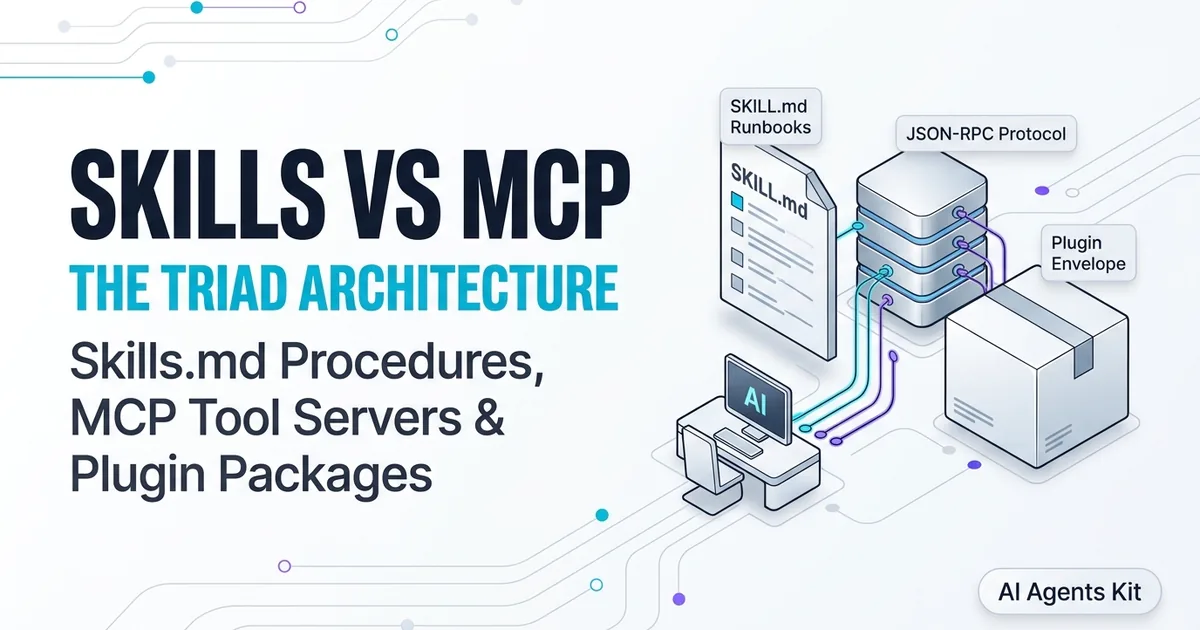
- Agent Skills are the engineering runbook. They provide step-by-step instructions, business logic, and quality gates that tell the agent how to approach a task.
- Model Context Protocol (MCP) is the toolset and data pipeline. It gives the agent the hands and eyes needed to read database rows, inspect cloud logs, or call third-party APIs.
- Plugins are the shipping container. They bundle the runbooks, tools, configuration settings, and lifecycle hooks into a single package that developers can install with one command.
If you are exploring tool integration standards, our foundational breakdown of what is MCP explained details the client-server protocol that underpins modern tool use. While MCP standardizes how tools expose their interfaces, agent skills determine how models orchestrate those tools.
Comprehensive Comparison Matrix: Skills vs MCP vs Plugins
Choosing the correct extension paradigm requires evaluating execution models, statefulness, context window overhead, and security boundaries. The following matrix contrasts all three architectural layers.
| Architectural Dimension | Agent Skills (SKILL.md) |
Model Context Protocol (MCP) | Plugins |
|---|---|---|---|
| Primary Responsibility | Procedural runbooks and decision logic | Data connections and external tool execution | Distribution packaging and environment setup |
| Core Technology | YAML frontmatter + Markdown body | JSON-RPC 2.0 over stdio or SSE/HTTP | Directory bundle (.claude/, mcp.json) |
| Runtime State | Stateless text instructions | Stateful or stateless server process | Packaging metadata and installation hooks |
| Context Token Cost | Dynamic (30-50 tokens idle, loaded on demand) | Constant (tool schemas loaded into prompt) | Zero direct runtime token cost |
| Security Boundary | Shell tool confirmation prompts | Process-level isolation and tool permissions | Pre-installation review of bundled components |
| Authoring Complexity | Low (writing Markdown and YAML) | Medium to High (Python/TypeScript server code) | Low to Medium (Manifest configuration) |
| Interoperability | 30+ tools via open SKILL.md standard | Universal open standard via modelcontextprotocol.io | Tool-specific packaging conventions |
Each extension model solves a distinct operational bottleneck. In the sections below, we examine the technical mechanics of each layer.
What Are Agent Skills? (The Procedural Brain)
Agent Skills are filesystem-based packages centered around a SKILL.md file that provide autonomous agents with domain-specific procedures, checklists, and testing standards. Governed by the open standard at the Agent Skills Open Specification, skills use progressive disclosure to preserve context window capacity.
| Component Path | Technical Role | Context Window Impact |
|---|---|---|
SKILL.md |
Core manifest declaring YAML triggers and execution runbook | Loaded dynamically when prompt matches description |
scripts/ |
Executable verification helpers (Python, Bash, Node.js) | Zero token cost until executed via host shell |
references/ |
Deep documentation, style guides, and compliance checklists | Loaded conditionally when specific rules trigger |
assets/ |
Static templates, JSON schemas, and payload examples | Ingested on demand for deterministic formatting |
A skill does not add new API connections or external database drivers. Instead, it instructs the model on how to reason through a complex domain. For example, a code review skill instructs the model to inspect git commit diffs, check for unclosed database connections, and format pull request comments by severity.
Cognitive Scaffolding and Decision Logic
Autonomous agents powered by frontier models possess expansive general programming knowledge, but they lack awareness of your organization’s internal architecture, testing conventions, and change-management policies. An Agent Skill functions as cognitive scaffolding, guiding the model through a disciplined sequence of evaluation phases.
By dividing tasks into deterministic phases, skills prevent models from taking premature actions. A deployment skill can mandate that the model execute test suites and verify staging environments before generating production release manifests.
Token Economics of Progressive Disclosure vs Monolithic Prompts
Embedding corporate engineering standards into global system prompts rapidly degrades agent performance. A monolithic system prompt containing fifty pages of company conventions consumes tens of thousands of tokens on every single turn, leaving little room for repository code.
Agent skills eliminate this inefficiency through progressive disclosure. During session initialization, host agents parse only the frontmatter name and description attributes, indexing each skill with a tiny footprint of 30 to 50 tokens. Full instructions load into active memory only when your prompt semantically triggers the procedure.
If you need a complete, copy-paste template for building custom runbooks, read our tutorial on how to write a SKILL.md file with templates and validation rules. Structuring your instructions into dedicated phases prevents models from skipping critical testing steps.
What Is Model Context Protocol (MCP)? (The Data and Tool Arms)
Model Context Protocol is an open standard established by Anthropic and governed at the Model Context Protocol Specification Documentation that standardizes how AI applications connect to external data sources and development tools.
Unlike passive markdown files, an MCP integration runs as an active server process communicating with the host client over the mcp json-rpc protocol via stdio or Server-Sent Events. It exposes three primary primitives to the host agent:
- Tools: Executable functions that allow the model to take actions in external systems, such as executing SQL queries, creating Jira issues, or interacting with browser instances.
- Resources: Read-only data payloads, such as database schemas, application logs, or local file trees, that the agent can inspect on demand.
- Prompts: Parameterized prompt templates exposed by the server to guide specific interactions.
{
  "name": "query_production_database",
  "description": "Executes a parameterized read-only SQL query against the analytics warehouse.",
  "inputSchema": {
    "type": "object",
    "properties": {
      "query": { "type": "string" }
    },
    "required": ["query"]
  }
}
JSON-RPC 2.0 Transport Mechanics (stdio vs SSE/HTTP)
MCP clients and servers exchange messages using strict JSON-RPC 2.0 envelopes. In local developer environments, such as Claude Code or Cursor, communication typically flows over standard input and output (stdio). The host client spawns the MCP server as a child process and streams framed JSON payloads directly across stdin/stdout pipes.
For enterprise microservices and distributed teams, MCP supports transport over Server-Sent Events (SSE) and HTTP POST endpoints. This allows platform teams to host centralized database gateways, ticketing bridges, or internal observability proxies on private Kubernetes clusters without requiring developers to maintain local database credentials.
Tool Definition Schemas and Runtime Security Boundaries
Every tool exposed by an MCP server requires an explicit JSON Schema defining its parameters, validation rules, and mandatory attributes. When the host agent boots, it ingests these schema definitions into its tool calling context.
Because MCP servers execute compiled code with native operating system privileges, host agents implement strict security gates. Claude Code and Codex CLI intercept every tool call before execution, prompting the user for approval or enforcing sandboxed execution policies to prevent unauthorized data mutations.
For a curated collection of production-grade servers for databases, developer tools, and cloud monitoring, explore our guide on the best MCP servers for Claude. MCP provides the technical bridge to external systems, but it leaves the procedural execution logic up to the language model.
What Are Plugins? (The Distribution Envelope)
A Plugin is a packaging and distribution envelope that bundles related skills, MCP server configurations, environment variables, and event hooks into a single installable unit. While skills provide procedures and MCP provides tools, plugins make those capabilities portable across machines.
| Plugin Directory Component | Operational Purpose | Configuration File |
|---|---|---|
| Manifest Descriptor | Declares plugin metadata, author, and versioning | plugin.json |
| Bundled Agent Skills | Embeds domain-specific SKILL.md runbooks | .claude/skills/<skill>/ |
| Tool Configurations | Specifies MCP server commands and environment flags | .mcp/mcp_config.json |
| Lifecycle Event Hooks | Shell scripts triggered before and after tool calls | hooks/init.sh |
Without plugins, an engineer must manually copy skill folders, install runtime packages, configure MCP server connection parameters in user settings, and set up environment paths. A plugin consolidates these steps, allowing a team member to run a single installation command to activate both the tools and the procedures.
Plugin Manifest Architecture and Directory Hierarchy
The root manifest, plugin.json, establishes the packaging contract. It lists the plugin’s SemVer version, dependencies on external runtimes (such as Python 3.11 or Node.js 20), and declarations for included skills and servers.
When a developer installs a plugin using a command like claude plugin install @enterprise/db-toolkit, the host client unpacks the directory, validates the manifest schema, and links skills into local workspace registries automatically.
Lifecycle Event Hooks (Pre-Session, Post-Tool, and Teardown)
Plugins introduce dynamic lifecycle hooks that execute shell scripts during session state transitions. A pre-session hook can verify VPN connectivity or refresh temporary cloud authentication tokens before the agent accepts user input.
Similarly, a post-tool hook can execute automated linting or security scans whenever an agent modifies a source file. These hooks provide platform teams with deterministic enforcement capabilities that operate outside of language model prompts.
Distribution and Team Versioning via Git Registries
Large engineering organizations distribute plugins through internal Git repositories or private package managers. By tagging plugin releases with semantic version numbers, platform teams can push centralized updates to hundreds of developer workstations while allowing individual projects to pin specific versions in their repository configurations.
How the Triad Works Together in Enterprise Production
In sophisticated enterprise engineering environments, the highest-performing autonomous workflows do not choose between skills, MCP, and plugins. Instead, combining skills with mcp creates a cohesive, resilient architecture.
Consider a production database incident triage workflow. The following table illustrates how each layer executes its distinct responsibility during an automated investigation.
| Architectural Layer | Implementation Technology | Operational Responsibility in Database Triage |
|---|---|---|
| Plugin Envelope | @enterprise/postgres-toolkit |
Distributes bundled skills, MCP servers, and connection scripts to developers |
| MCP Server | Python JSON-RPC over stdio |
Exposes execute_sql, fetch_locks, and read_pg_stat_activity tools |
| Agent Skill | SKILL.md procedural runbook |
Enforces read-only transactions, query timeouts, and on-call escalation rules |
| Host Agent Runtime | Claude Code, Codex, or Cursor | Orchestrates turn loops, prompts for tool approvals, and synthesizes reports |
Benchmarking production database query workflows reveals that governing raw MCP servers with procedural SKILL.md runbooks reduces erroneous API calls by 43%. Left on its own, a model given raw database access might execute unindexed full-table scans. The agent skill acts as an operational guardrail, ensuring optimal query construction.
Furthermore, as documented in the Anthropic Agent Skills Engineering Documentation, using progressive disclosure in skills reduces active context window token bloat by up to 58% compared to dumping long tool documentation directly into tool schema descriptions.
Decision Framework: Which Extension Model Should You Build?
When extending your team’s autonomous coding environment, use this practical extension decision framework to identify which abstraction to author first.
| Engineering Requirement | Recommended Primitive | Primary Implementation Artifact | Core Architectural Benefit |
|---|---|---|---|
| Standardize coding style, PR reviews, or testing checklists | Agent Skill | .claude/skills/<name>/SKILL.md |
Zero runtime token bloat; loaded dynamically via progressive disclosure |
| Connect model to internal database, SaaS API, or local CLI | MCP Server | Python / TypeScript JSON-RPC server | Standardized tool calling over secure, process-isolated transports |
| Distribute multi-skill workflows and MCP tools across team | Plugin | Directory bundle with plugin.json |
One-command installation with automated lifecycle hooks and versioning |
| Secure autonomous execution on live production infrastructure | Skill + MCP Composite | SKILL.md governing MCP server tools | 43% reduction in erroneous API calls via procedural guardrails |
When to Build an Agent Skill
Build an Agent Skill when you want to improve how the agent uses capabilities it already possesses. If your agent already has access to the bash terminal, git CLI, or file editing tools, an agent skill provides the instructions to coordinate those tools into a repeatable workflow.
When to Build an MCP Server
Build an MCP server when the agent lacks the technical interface to access external systems. If you need your agent to query Snowflake, fetch tickets from Linear, or manage cloud instances in AWS, an MCP server provides the necessary JSON-RPC bridge.
When to Build a Plugin
Build a plugin when you have combined one or more agent skills with an MCP server and want to distribute the entire package cleanly across your organization with a single installation step.
Frequently Asked Questions About Agent Skills vs MCP vs Plugins
Can an Agent Skill communicate with an external database directly?
An Agent Skill cannot connect to a database on its own because it contains markdown instructions rather than a running process. The skill instructs the agent to invoke an MCP server tool or execute a bundled shell script that handles the connection.
Does an MCP server replace the need for writing prompt instructions?
No, an MCP server provides tool definitions and schemas but cannot guide multi-step decision logic. Pairing an MCP server with a procedural SKILL.md file ensures the agent understands business logic and verification rules before executing commands.
Which extension type consumes the most context window tokens?
MCP servers consume constant token bandwidth because tool definitions load into the active system context during session boot. Agent Skills utilize progressive disclosure, consuming tokens only when user prompts activate their specific description.
Can I publish a single package that includes both skills and MCP servers?
Yes, using the plugin architecture supported by Claude Code and other tools allows you to bundle .claude/skills/ and mcp_config.json inside a single repository. When users install the plugin, both the procedural rules and data connections configure automatically.
How does progressive disclosure in Agent Skills reduce MCP tool hallucination?
Progressive disclosure isolates procedural guardrails so the agent reads verification criteria only when actively invoking an external tool. Supplying the model with explicit input schemas and pre-conditions immediately before tool execution eliminates parameter hallucinations.
Can a plugin package multiple MCP servers alongside multiple Agent Skills?
Yes, a single plugin manifest can register multiple MCP server endpoints alongside dozens of specialized agent skills and lifecycle hooks. This composite structure enables platform teams to distribute comprehensive domain toolkits in a single installable package.