How to Build a WhatsApp AI Bot: Complete 2026 Guide
Learn how to build a WhatsApp AI bot with Python, no-code tools, and business API. Includes Telegram comparison, multi-platform architecture, migration guide.
I’ll never forget the first time a WhatsApp bot I built actually worked in production. It was 2 AM, and I was monitoring logs while my client’s customer service team slept. A customer messaged asking about an order status—something that would’ve required a human to check three different systems. The bot not only found the order but also offered a discount code because the shipment was delayed. The customer replied with a thumbs-up emoji. I sat there staring at the screen, equal parts exhausted and thrilled.
Here’s why that matters: WhatsApp now has over 3 billion monthly active users worldwide. Those users send 100 billion messages every single day. And here’s the kicker—WhatsApp messages have a 98% open rate compared to email’s paltry 20% (WhatsApp Business Usage Statistics, 2026; YCloud WhatsApp Statistics, 2026). When you message someone on WhatsApp, they actually see it.
Yet most businesses are still treating WhatsApp like a glorified SMS channel. They’re missing the real opportunity: AI-powered bots that can have genuine conversations, answer complex questions, and automate entire workflows.
In this guide, I’ll show you exactly how to build a WhatsApp AI bot. We’ll cover everything from no-code solutions you can set up in an hour to full custom development with Python. Whether you’re a developer looking to add a new skill or a business owner wanting to automate customer support, there’s a path here for you. By the end, you’ll have a working bot—or at least know exactly how to build one.
What Is a WhatsApp AI Bot?
A WhatsApp AI bot is an automated account that uses artificial intelligence to understand and respond to natural language messages sent through WhatsApp. Unlike traditional bots that rely on preset commands like “check order” or “talk to agent,” AI bots can handle open-ended conversations, understand context, and generate human-like responses.
Think about the difference between a vending machine and a barista. Traditional bots are like vending machines: you press button A, you get item A. AI bots are like skilled baristas who can handle “I’d like something warm with oat milk and not too sweet” without you needing to know the exact menu item name.
The technology behind these bots has evolved rapidly. Modern WhatsApp AI bots can:
- Understand context across multiple messages in a conversation
- Generate responses using large language models like GPT-5, Claude 4, or Gemini 3
- Integrate with business systems to check order status, book appointments, or process payments
- Handle multiple languages automatically
- Escalate to humans when needed
If you’re wondering how this differs from AI agents, you’re asking the right question. Understanding what AI agents are helps clarify that these bots represent a specific application of agent technology—focused on conversational interfaces rather than autonomous task completion.
Why Build an AI Bot on WhatsApp?
I know what you might be thinking: “Why WhatsApp? Why not Telegram or just build a web app?”
Fair questions. Here’s the data that convinced me:
The reach is staggering. With 3+ billion monthly active users as of April 2025 (CXWizard WhatsApp Statistics, 2026), WhatsApp is the dominant messaging platform in over 100 countries. India alone has 500+ million users. Brazil, Indonesia, Mexico—these aren’t just markets where WhatsApp is popular; it’s the default communication channel. WhatsApp’s user base grew from 2 billion in February 2020 to 3 billion by April 2025, demonstrating explosive compound growth (CXWizard, 2026).
The engagement is unmatched. That 98% open rate isn’t just a vanity metric. It means when you send a message through WhatsApp Business API, nearly every recipient will see it. Compare that to email marketing, where you’re lucky to hit 25%.
Business adoption is exploding. Over 200 million businesses are now using WhatsApp Business tools (TechRT WhatsApp Business Statistics, 2026). More importantly, 175 million people chat with businesses on WhatsApp every single day (Wapikit, 2025). According to WhatsApp’s official State of Business Messaging report, 73.3% of consumers across 22 global markets prefer messaging when communicating with a business—a major shift from legacy communication channels to conversational commerce (2026).
The click-through rates are ridiculous. WhatsApp marketing campaigns regularly see 45-60% click-through rates (Wapikit, 2025). I’ve seen email newsletters struggle to hit 3%. WhatsApp’s official business research confirms that 72.4% of consumers are more likely to purchase from a brand that offers messaging (State of Business Messaging Report, 2026).
And here’s something that doesn’t get mentioned enough: WhatsApp users are engaged. The average user opens the app 23+ times per day. When someone messages your bot, they’re not just seeing a notification—they’re in a mindset to interact.
Compared to Telegram—which has excellent bot infrastructure but only 1 billion users—WhatsApp’s reach makes the extra complexity worthwhile. For businesses serious about customer communication, WhatsApp isn’t optional anymore. According to Meta’s official WhatsApp Business Platform documentation, the API is designed specifically for medium to large businesses that need to manage customer conversations at scale.
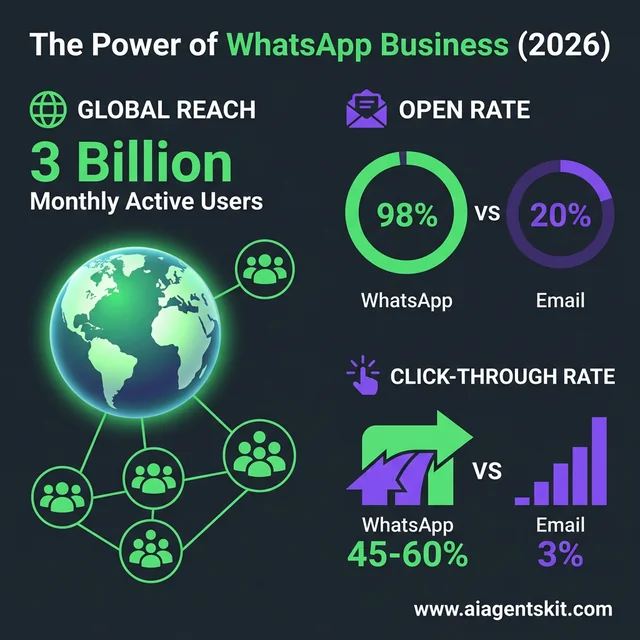 The Power of WhatsApp Business (2026): With a 3 billion user reach and a 98% open rate, WhatsApp offers engagement levels far exceeding email’s 20%. The 45-60% click-through rate creates a high-intent environment where AI bots can resolve customer queries immediately. Building on this infrastructure is a strategic move to meet customers where they already live.
WhatsApp vs Telegram: The Complete Comparison
I get this question constantly: “Should I build on WhatsApp or Telegram?” The answer isn’t straightforward—it depends on your goals, audience, and budget. Here’s my honest breakdown after building bots on both platforms:
| Feature | Telegram | |
|---|---|---|
| Monthly Users | 3+ billion | 1 billion |
| API Cost | Per-conversation fees ($0.005-$0.09) | Free |
| Setup Complexity | High (Meta approval required) | Low (instant bot creation) |
| Message Open Rate | 98% | ~85% |
| Rich Features | Buttons, lists, catalogs | Inline keyboards, channels, groups |
| File Sharing Limit | 100MB | 2GB |
| 24-Hour Rule | Yes (conversation window) | No (unlimited messaging) |
| Business Perception | More trusted, formal | More casual, tech-focused |
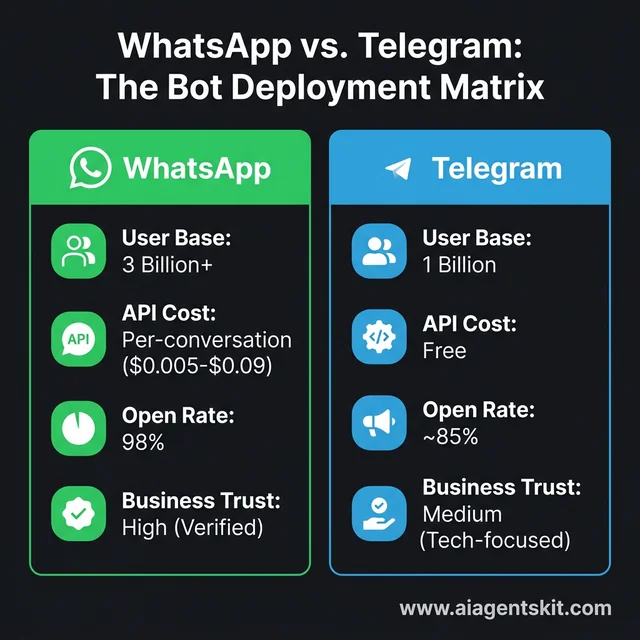 WhatsApp vs. Telegram: The Bot Deployment Matrix: Choosing between platforms involves balancing reach and cost. WhatsApp provides access to 3 billion users in a high-trust, verified environment, while Telegram offers a free API for tech-savvy audiences. For most businesses, the winning strategy is validating AI logic on Telegram before scaling to WhatsApp’s massive mainstream audience.
When WhatsApp wins:
- Your audience is in India, LATAM, Africa, or Europe (outside Eastern Europe)
- You need the highest possible engagement rates
- You’re doing B2C e-commerce or customer support
- You want built-in payment integration (in supported regions)
When Telegram wins:
- You’re targeting developers, crypto enthusiasts, or tech-savvy users
- You need advanced bot features (inline queries, games, channels)
- Budget is tight (free API vs paid conversations)
- You want to experiment quickly without approval processes
- Your audience is in Russia, Ukraine, Iran, or Eastern Europe
The hybrid approach I recommend: Start with Telegram for MVP and testing—it’s free and instant. Once you validate your use case and understand user needs, migrate to WhatsApp for the broader reach. I’ve done this migration twice, and it’s surprisingly smooth if you architect your backend properly from the start.
For a complete deep-dive into Telegram bot development, including code examples and deployment strategies, see my Telegram AI bot tutorial.
Understanding the WhatsApp Business API
Before we dive into building, you need to understand the landscape. WhatsApp offers three different products, and choosing the wrong one will cost you time and money.
The Three WhatsApp Products
1. WhatsApp Consumer App - What you use to chat with friends. Not for business automation.
2. WhatsApp Business App - A free app for small businesses. Supports quick replies, labels, and basic catalogs. No API access, no automation beyond simple away messages.
3. WhatsApp Business API - The real deal. This is what we need for AI bots. It supports:
- Automated messaging at scale
- Integration with CRMs and business systems
- Multi-agent support
- Rich message types (buttons, lists, media)
- Webhook events for real-time updates
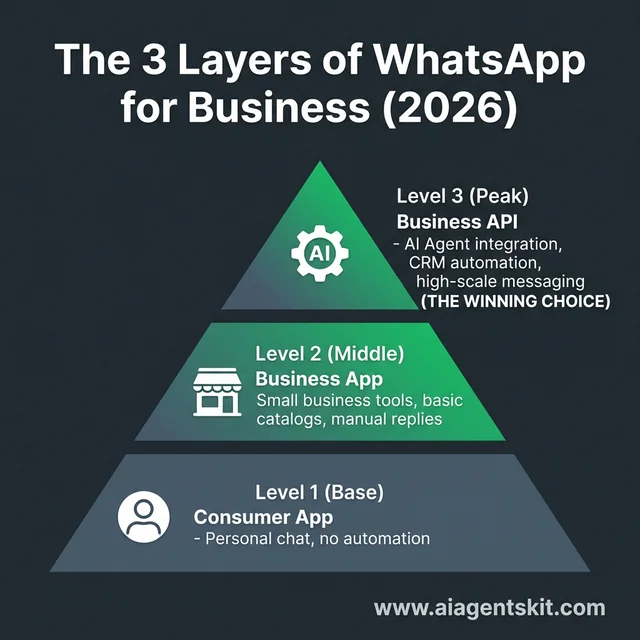 The 3 Layers of WhatsApp for Business: Choosing the right tier is critical for operational scale. While Level 1 and 2 apps offer limited automation, the Level 3 WhatsApp Business API is essential for building true AI agents. It enables high-scale messaging, CRM integration, and multi-agent support—providing the foundation for deploying autonomous, scalable customer service bots.
WhatsApp Business API Pricing Explained
Here’s where it gets interesting—and where I see businesses get surprised.
WhatsApp doesn’t charge per message. They charge per conversation (24-hour window). According to Meta’s official pricing documentation, here’s the breakdown:
| Conversation Type | Cost (varies by region) | When It Applies |
|---|---|---|
| User-initiated | $0.005 - $0.04 | Customer messages you first |
| Business-initiated | $0.01 - $0.09 | You message customer first (outside 24h window) |
The 24-hour window is crucial: when a customer messages you, you have 24 hours to respond for free. After that, any business-initiated message starts a new paid conversation.
Real-world example: A customer asks about pricing (free response window opens). You answer immediately (free). They ask follow-up questions over the next 3 hours (all free). 25 hours later, you send a promotional message (new paid conversation starts).
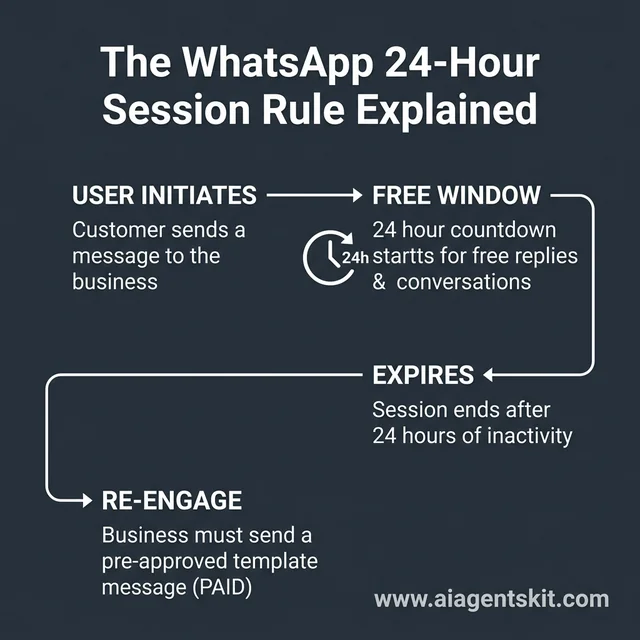 The WhatsApp 24-Hour Session Rule Explained: Understanding Meta’s pricing model is key to managing bot costs. Conversations start with a free 24-hour window for unlimited responses. Once the session expires, businesses must use paid template messages to re-engage. Managing this flow with an AI bot ensures sessions stay active while keeping operational costs predictable.
Getting API Access
This is where things get bureaucratic. Meta (WhatsApp’s parent company) requires:
- Meta Business Account - Verified business entity
- Business Verification - Meta verifies you exist
- Phone Number - Must not be used on any WhatsApp account
- Compliance - You must follow WhatsApp Business Policy
My experience: The first time I applied, I got rejected twice. The issue? My business category was too vague. Once I specified “Software Development” with a clear website, approval came through in 48 hours. Pro tip: have your ducks in a row before applying. Meta provides detailed guidelines for business verification in their official documentation.
You have two paths for API access:
Option A: Direct through Meta - Lower per-conversation cost, more complex setup, requires technical knowledge.
Option B: Through a Business Solution Provider (BSP) - Higher cost but easier setup. Popular options include Twilio, 360dialog, and MessageBird.
For most developers, I’d recommend starting with Twilio for ease of use, then migrating to direct Meta API once you’re scaling and the cost savings matter. Twilio’s official WhatsApp documentation provides comprehensive guides for getting started with the WhatsApp Business Platform, including the Sandbox environment for testing.
Telegram Bot API: What You’re Missing (And What You Gain)
Having built extensively on both platforms, I need to acknowledge where Telegram’s Bot API outshines WhatsApp:
Telegram advantages:
- Zero API costs - Send unlimited messages for free
- No approval process - Create a bot in 30 seconds with @BotFather
- Richer interactions - Inline keyboards, callback buttons, deep linking
- Channels and groups - Broadcast to unlimited subscribers
- Larger file sharing - Send files up to 2GB (vs WhatsApp’s 100MB)
- Better for developers - More flexible, fewer restrictions
WhatsApp advantages:
- Massive reach - 3x more users globally
- Higher engagement - 98% open rate vs ~85%
- Business credibility - Customers trust WhatsApp Business accounts more
- Built-in commerce - Product catalogs, payments in some regions
- Better delivery - More reliable message delivery globally
My take: If you’re building a side project or developer tool, Telegram is probably your best bet. If you’re building for mainstream business customers, WhatsApp’s reach justifies the complexity and cost. For maximum impact, consider supporting both—I cover multi-platform architecture later in this guide.
Choosing Your Approach: Three Ways to Build
I’ve built WhatsApp bots using every method imaginable. Here’s the honest truth about your options:
| Factor | No-Code Tools | Low-Code (Twilio) | Custom Code |
|---|---|---|---|
| Setup Time | 1-2 hours | 4-6 hours | 2-3 days |
| Technical Skill | None | Basic Python | Python/Node.js |
| Flexibility | Limited | Good | Unlimited |
| Monthly Cost | $20-100 | $15-50 | $5-50 |
| Best For | MVPs, validation | Growing businesses | Complex, scale |
Choose no-code if: You’re testing an idea, need something running today, or your bot logic is straightforward (FAQs, simple automations, basic integrations).
Choose low-code if: You want working code you can customize, plan to add features over time, or need to integrate with multiple services.
Choose custom code if: You need complex conversation flows, want to host everything yourself, plan to scale beyond thousands of users, or just enjoy building from scratch (no shame in that).
The good news? You can start simple and migrate up. I always recommend this approach—validate with no-code, then rebuild in code once you know what users actually want. I’ve seen too many developers spend weeks building complex systems for features nobody uses.
If you’re also considering Telegram as a platform, check out my complete guide on building Telegram AI bots for a detailed comparison of both platforms.
Method 1: Building with No-Code Tools
Let’s start with the fastest path. We’ll use n8n, an open-source automation tool that’s perfect for WhatsApp bots.
Why n8n?
- Free cloud tier - 100 workflow executions/month (enough for testing)
- Self-hostable - Run it yourself for unlimited usage
- Native integrations - Connects to WhatsApp (via Twilio), OpenAI, Anthropic, and 400+ other services
- Visual workflow builder - No coding required
If you’re new to n8n, I’d recommend checking out a dedicated AI automation tutorial first. But here’s the quick version:
Step 1: Set Up Your n8n Instance
- Sign up at n8n.io (free tier works fine to start)
- Create a new workflow
- Give it a name like “WhatsApp AI Bot”
Step 2: Add the WhatsApp Trigger
- Search for “Twilio” in the nodes panel (we’ll use Twilio as our WhatsApp provider)
- Add “Twilio Trigger” node
- Connect your Twilio account:
- Account SID from Twilio Console
- Auth Token from Twilio Console
- Set trigger to “Incoming Message”
- Configure your Twilio WhatsApp number
Step 3: Add AI Processing
- Add an “OpenAI” node (or Anthropic/Google AI node)
- Connect your OpenAI API key
- Configure the system prompt. Here’s one that works well:
You are a helpful customer support assistant for [Your Business]. Be friendly, concise, and helpful. If you don't know something, say so honestly. - Set the message content to use the incoming message from the Twilio trigger:
{{ $json.Body }}
Step 4: Send the Response Back
- Add a “Twilio” node (regular, not trigger)
- Set operation to “Send Message”
- Use the “From” number from the trigger (your Twilio number)
- Use the “From” field from the trigger as the “To” number (the customer’s number)
- Set the message body to the AI response:
{{ $json.choices[0].message.content }}
Step 5: Activate and Test
- Save the workflow
- Toggle it to “Active”
- Message your Twilio WhatsApp number
That’s it. You’ve got an AI bot running without writing a single line of code.
The limitations: You’re constrained by what n8n nodes offer. Complex conversation memory, custom business logic, or advanced features will require workarounds or switching to code. But for MVPs and simple bots? It’s incredibly powerful.
Method 2: Low-Code with Twilio and Python
Now we’re getting to the fun stuff. This approach gives you real code you can customize, while still leveraging Twilio to handle the WhatsApp complexity.
Prerequisites
What you’ll need:
- Python 3.9 or higher
- A Twilio account with WhatsApp sandbox enabled
- API keys from OpenAI, Anthropic, or Google
- About 3-4 hours of uninterrupted time
Libraries we’ll use:
flask>=2.0.0
twilio>=7.0.0
openai>=1.0.0
python-dotenv>=1.0.0
Step 1: Project Setup
Create a new project directory:
mkdir whatsapp-ai-bot
cd whatsapp-ai-bot
python -m venv venv

# On macOS/Linux:
source venv/bin/activate

# On Windows:
venv\Scripts\activate

pip install flask twilio openai python-dotenv
Create a .env file:
TWILIO_ACCOUNT_SID=your_account_sid
TWILIO_AUTH_TOKEN=your_auth_token
TWILIO_WHATSAPP_NUMBER=your_twilio_whatsapp_number
OPENAI_API_KEY=your_openai_key
Step 2: Create the Webhook Server
Create app.py:
from flask import Flask, request, jsonify
from twilio.twiml.messaging_response import MessagingResponse
from twilio.rest import Client
import openai
import os
from dotenv import load_dotenv

load_dotenv()

app = Flask(__name__)

# Initialize clients
openai_client = openai.OpenAI(api_key=os.getenv('OPENAI_API_KEY'))
twilio_client = Client(
    os.getenv('TWILIO_ACCOUNT_SID'),
    os.getenv('TWILIO_AUTH_TOKEN')
)

# Simple in-memory conversation store
# In production, use Redis or a database
conversations = {}

def get_ai_response(user_message, conversation_history):
    """Get response from OpenAI with conversation context."""
    messages = [
        {"role": "system", "content": "You are a helpful assistant. Be concise and friendly."}
    ]

    # Add conversation history
    for msg in conversation_history:
        messages.append(msg)

    # Add current message
    messages.append({"role": "user", "content": user_message})

    try:
        response = openai_client.chat.completions.create(
            model="gpt-5-mini",  # Fast and cost-effective
            messages=messages,
            max_tokens=150,
            temperature=0.7
        )
        return response.choices[0].message.content
    except Exception as e:
        print(f"OpenAI error: {e}")
        return "Sorry, I'm having trouble processing your message. Please try again."

@app.route('/webhook', methods=['POST'])
def webhook():
    """Handle incoming WhatsApp messages."""
    # Get message details
    from_number = request.form.get('From', '').replace('whatsapp:', '')
    message_body = request.form.get('Body', '')

    print(f"Message from {from_number}: {message_body}")

    # Get or create conversation history
    if from_number not in conversations:
        conversations[from_number] = []

    # Get AI response
    ai_response = get_ai_response(message_body, conversations[from_number])

    # Store in conversation history
    conversations[from_number].append({"role": "user", "content": message_body})
    conversations[from_number].append({"role": "assistant", "content": ai_response})

    # Limit conversation history to last 10 messages
    conversations[from_number] = conversations[from_number][-10:]

    # Create Twilio response
    resp = MessagingResponse()
    resp.message(ai_response)

    return str(resp)

@app.route('/health', methods=['GET'])
def health():
    """Health check endpoint."""
    return jsonify({"status": "healthy"})

if __name__ == '__main__':
    app.run(debug=True, port=5000)
Step 3: Run and Test
python app.pyYour webhook is now running on http://localhost:5000/webhook. To make it accessible to Twilio, you’ll need to expose it using ngrok:
ngrok http 5000Copy the HTTPS URL (like https://abc123.ngrok.io) and configure it in your Twilio WhatsApp sandbox settings as the webhook URL.
What this gives you:
- A working WhatsApp bot with AI responses
- Conversation memory (last 10 messages per user)
- Error handling
- Easy to extend with custom logic
Next steps to customize:
- Connect to a real database (PostgreSQL, MongoDB)
- Add business-specific logic
- Integrate with your CRM or order system
- Add message templates for notifications
This approach hits the sweet spot for most businesses—real code you own, but without the complexity of direct Meta API integration.
Method 3: Full Custom Development
For production-scale bots with complex requirements, you’ll want full control. This is the approach I use for serious deployments.
Architecture Overview
Tech stack:
- FastAPI - Modern, fast Python web framework
- PostgreSQL - Persistent conversation storage
- Redis - Caching and session management
- Docker - Containerization for easy deployment
- Meta Business API - Direct WhatsApp integration (no Twilio markup)
Project Structure
whatsapp-bot/
├── app/
│   ├── __init__.py
│   ├── main.py
│   ├── models.py
│   ├── services/
│   │   ├── __init__.py
│   │   ├── ai_service.py
│   │   ├── whatsapp_service.py
│   │   └── conversation_service.py
│   └── utils/
│       ├── __init__.py
│       └── config.py
├── docker-compose.yml
├── Dockerfile
├── requirements.txt
└── .env
Core Implementation
app/services/whatsapp_service.py:
import requests
import hmac
import hashlib
from typing import Dict, Any
from ..utils.config import settings

class WhatsAppService:
    def __init__(self):
        self.base_url = f"https://graph.facebook.com/v18.0/{settings.WHATSAPP_PHONE_NUMBER_ID}"
        self.access_token = settings.WHATSAPP_ACCESS_TOKEN

    def verify_webhook(self, mode: str, token: str, challenge: str) -> bool:
        """Verify webhook subscription from Meta."""
        if mode == 'subscribe' and token == settings.WHATSAPP_VERIFY_TOKEN:
            return True
        return False

    def send_message(self, to_number: str, message: str) -> Dict[Any, Any]:
        """Send a text message via WhatsApp API."""
        url = f"{self.base_url}/messages"
        headers = {
            "Authorization": f"Bearer {self.access_token}",
            "Content-Type": "application/json"
        }
        payload = {
            "messaging_product": "whatsapp",
            "recipient_type": "individual",
            "to": to_number,
            "type": "text",
            "text": {"body": message}
        }

        response = requests.post(url, json=payload, headers=headers)
        return response.json()

    def parse_incoming_message(self, data: Dict[Any, Any]) -> Dict[str, str]:
        """Extract relevant info from webhook payload."""
        try:
            entry = data['entry'][0]
            changes = entry['changes'][0]
            value = changes['value']

            if 'messages' in value:
                message = value['messages'][0]
                return {
                    'from': message['from'],
                    'message_id': message['id'],
                    'text': message.get('text', {}).get('body', ''),
                    'timestamp': message['timestamp']
                }
        except (KeyError, IndexError):
            pass

return {}app/services/ai_service.py:
from typing import List, Dict
import openai
import anthropic
from ..utils.config import settings

class AIService:
    def __init__(self, provider: str = "openai"):
        self.provider = provider
        if provider == "openai":
            self.client = openai.OpenAI(api_key=settings.OPENAI_API_KEY)
        elif provider == "anthropic":
            self.client = anthropic.Anthropic(api_key=settings.ANTHROPIC_API_KEY)

    def generate_response(
        self,
        message: str,
        conversation_history: List[Dict[str, str]],
        system_prompt: str = None
    ) -> str:
        """Generate AI response with conversation context."""

        if not system_prompt:
            system_prompt = """You are a helpful WhatsApp assistant.
            Keep responses concise (under 1000 characters when possible)
            and conversational."""

        if self.provider == "openai":
            return self._openai_response(message, conversation_history, system_prompt)
        else:
            return self._anthropic_response(message, conversation_history, system_prompt)

    def _openai_response(
        self,
        message: str,
        history: List[Dict[str, str]],
        system_prompt: str
    ) -> str:
        messages = [{"role": "system", "content": system_prompt}]

        for h in history[-10:]:  # Last 10 messages
            messages.append({"role": h['role'], "content": h['content']})

        messages.append({"role": "user", "content": message})

        response = self.client.chat.completions.create(
            model="gpt-5-mini",
            messages=messages,
            max_tokens=500,
            temperature=0.7
        )

        return response.choices[0].message.content

    def _anthropic_response(
        self,
        message: str,
        history: List[Dict[str, str]],
        system_prompt: str
    ) -> str:
        conversation = ""
        for h in history[-10:]:
            role = "Human" if h['role'] == 'user' else "Assistant"
            conversation += f"{role}: {h['content']}\n\n"

        conversation += f"Human: {message}\n\nAssistant:"

        response = self.client.messages.create(
            model="claude-4-haiku",
            max_tokens=500,
            system=system_prompt,
            messages=[{"role": "user", "content": conversation}]
        )

return response.content[0].textapp/services/conversation_service.py:
from typing import List, Dict, Optional
from sqlalchemy.orm import Session
from ..models import Conversation, Message
from datetime import datetime

class ConversationService:
    def __init__(self, db: Session):
        self.db = db

    def get_or_create_conversation(self, phone_number: str) -> Conversation:
        """Get existing conversation or create new one."""
        conversation = self.db.query(Conversation).filter(
            Conversation.phone_number == phone_number
        ).first()

        if not conversation:
            conversation = Conversation(phone_number=phone_number)
            self.db.add(conversation)
            self.db.commit()

        return conversation

    def add_message(
        self,
        conversation_id: int,
        role: str,
        content: str
    ) -> Message:
        """Add a message to conversation history."""
        message = Message(
            conversation_id=conversation_id,
            role=role,
            content=content,
            timestamp=datetime.utcnow()
        )
        self.db.add(message)
        self.db.commit()
        return message

    def get_conversation_history(
        self,
        conversation_id: int,
        limit: int = 20
    ) -> List[Dict[str, str]]:
        """Get recent conversation history."""
        messages = self.db.query(Message).filter(
            Message.conversation_id == conversation_id
        ).order_by(Message.timestamp.desc()).limit(limit).all()

        return [
            {"role": msg.role, "content": msg.content}
            for msg in reversed(messages)
        ]
This architecture gives you:
- Persistent conversation storage in PostgreSQL
- Support for multiple AI providers (OpenAI, Anthropic)
- Direct Meta API integration (no Twilio fees)
- Scalable design ready for production
Deployment: Use Docker Compose for local development, then migrate to Kubernetes or AWS ECS for production. The direct Meta API approach saves significant costs at scale—I’ve seen businesses cut their messaging costs by 60% compared to Twilio.
Method 4: Building Multi-Platform Bots (WhatsApp + Telegram)
Here’s something I learned the hard way: The businesses that win don’t choose between WhatsApp and Telegram—they use both. Each platform has distinct advantages, and a unified bot strategy lets you meet customers wherever they are.
Why Multi-Platform Makes Sense
Different audiences, same backend:
- Use Telegram for tech-savvy users, developers, and early adopters
- Use WhatsApp for mainstream consumers and established markets
- Share the same AI logic, database, and business rules
- Platform-specific adapters handle the messaging differences
Risk mitigation:
- If one platform has an outage, customers can switch to the other
- Platform policy changes on one don’t kill your entire operation
- A/B test features across platforms to see what works best
Cost optimization:
- Test new features on Telegram first (free API)
- Roll out proven features to WhatsApp (paid but broader reach)
- Route price-sensitive users to Telegram, mainstream users to WhatsApp
Multi-Platform Architecture
The key is abstraction. Your business logic shouldn’t care whether a message came from WhatsApp or Telegram:
# Platform-agnostic message handler
class UniversalBot:
    def __init__(self):
        self.ai_service = AIService()
        self.conversation_service = ConversationService()

    def handle_message(self, platform: str, user_id: str, message: str):
        """Handle incoming message from any platform."""

        # Platform-agnostic user ID
        universal_id = f"{platform}:{user_id}"

        # Get conversation history (same for all platforms)
        history = self.conversation_service.get_history(universal_id)

        # Generate AI response (platform-agnostic)
        response = self.ai_service.generate_response(
            message=message,
            conversation_history=history
        )

        # Store conversation
        self.conversation_service.add_message(universal_id, "user", message)
        self.conversation_service.add_message(universal_id, "assistant", response)

        # Platform-specific sending
        if platform == "whatsapp":
            return self._send_whatsapp(user_id, response)
        elif platform == "telegram":
            return self._send_telegram(user_id, response)

    def _send_whatsapp(self, user_id: str, message: str):
        """Platform-specific WhatsApp sending."""
        # WhatsApp Business API integration
        pass

    def _send_telegram(self, user_id: str, message: str):
        """Platform-specific Telegram sending."""
        # Telegram Bot API integration
        pass
Unified Webhook Endpoint
Instead of separate endpoints for each platform, use a unified approach:
from flask import Flask, request

app = Flask(__name__)
bot = UniversalBot()

@app.route('/webhook/<platform>', methods=['POST'])
def webhook(platform):
    """Unified webhook for all platforms."""

    if platform == 'whatsapp':
        # Parse WhatsApp webhook format
        data = request.json
        user_id = data['entry'][0]['changes'][0]['value']['messages'][0]['from']
        message = data['entry'][0]['changes'][0]['value']['messages'][0]['text']['body']

    elif platform == 'telegram':
        # Parse Telegram webhook format
        data = request.json
        user_id = str(data['message']['chat']['id'])
        message = data['message']['text']

    # Same processing regardless of platform
    response = bot.handle_message(platform, user_id, message)

    return {'status': 'ok'}
Platform-Specific Optimizations
While your core logic stays the same, optimize for each platform’s strengths:
WhatsApp optimizations:
- Use message templates for notifications
- Respect the 24-hour conversation window
- Leverage WhatsApp Business Profile for credibility
- Support WhatsApp-specific features (catalogs, payments)
Telegram optimizations:
- Use inline keyboards for rich interactions
- Leverage Telegram’s markdown support (bold, italics, code blocks)
- Support Telegram-specific features (channels, groups, polls)
- Take advantage of larger message limits (4096 chars vs WhatsApp’s effective limit)
Syncing Conversations Across Platforms
What happens when a user messages you on both platforms? You have options:
Option 1: Separate conversations (recommended for most cases)
- Treat WhatsApp and Telegram as distinct channels
- Users might have different contexts on each platform
- Simpler to implement, fewer edge cases
Option 2: Unified conversation
- Link user accounts across platforms (via phone number or email)
- Show the full conversation history regardless of platform
- More complex but provides seamless experience
# Example: Linking accounts
class UserLinkingService:
    def link_platforms(self, phone_number: str, telegram_id: str, whatsapp_id: str):
        """Link a user's Telegram and WhatsApp accounts."""
        return self.db.create_linked_account(
            phone_number=phone_number,
            telegram_id=telegram_id,
            whatsapp_id=whatsapp_id
        )

    def get_universal_id(self, platform: str, platform_id: str):
        """Get universal ID from platform-specific ID."""
        linked = self.db.find_linked_account(platform, platform_id)
        return linked.universal_id if linked else f"{platform}:{platform_id}"
Real-World Multi-Platform Strategy
Here’s how successful businesses use both platforms:
E-commerce example:
- Telegram: Product announcements, flash sales to engaged subscribers
- WhatsApp: Order confirmations, shipping updates, customer support
- Cross-promotion: “Get instant order updates on WhatsApp: [link]”
SaaS example:
- Telegram: Developer documentation, API updates, community support
- WhatsApp: Sales conversations, onboarding, account management
- Smart routing: Technical queries → Telegram, Business queries → WhatsApp
Content creator example:
- Telegram: Premium content delivery, exclusive community
- WhatsApp: General updates, broader audience reach
- Monetization: Free content on WhatsApp, paid content on Telegram
Tools That Support Multi-Platform
Several platforms make multi-platform bots easier:
- Twilio: Supports WhatsApp, SMS, and Facebook Messenger (not Telegram natively)
- MessageBird: WhatsApp, Telegram, SMS, Email in one API
- Chatwoot: Open-source multi-platform customer support (supports both)
- Custom solution: Flask/FastAPI with separate adapters (most flexible)
My recommendation: Start with separate implementations to understand each platform’s quirks. Once you’re comfortable, refactor into a unified architecture. The abstraction layer you build will pay dividends when you want to add Signal, Discord, or whatever comes next.
AI Model Comparison for WhatsApp Bots
Choosing the right AI model matters—both for user experience and your wallet. Here’s what I’ve learned from running production bots:
| Model | Speed | Cost per 1K Tokens | Best For | Context Window |
|---|---|---|---|---|
| GPT-5 | Medium | $0.03 | Complex reasoning, nuanced responses | 128K |
| GPT-5 Mini | Fast | $0.005 | Cost-conscious, simple queries | 128K |
| Claude 4 Haiku | Fastest | $0.00125 | Quick responses, high volume | 200K |
| Claude 4 Sonnet | Medium | $0.015 | Balanced quality and speed | 200K |
| Gemini 3 Flash | Fast | $0.004 | Multilingual support | 1M |
My recommendation: Start with Claude 4 Haiku or GPT-5 Mini for most WhatsApp bots. They’re fast enough for real-time conversations and cheap enough that you won’t panic when you get a viral spike.
When to upgrade:
- Use GPT-5 or Claude 4 Sonnet when you need complex reasoning or very nuanced responses
- Use Gemini 3 Flash if you’re serving international users (it’s excellent at multilingual)
- Only use Claude 4 Opus for high-stakes scenarios where response quality is critical (and budget isn’t)
Hot take: Most businesses over-engineer their AI model choice. I’ve seen $50k/month bots running on GPT-5 Mini that users loved. The secret isn’t the model—it’s the system prompt and conversation design.
Migrating from Telegram to WhatsApp
So you’ve built a successful Telegram bot and now want to reach WhatsApp’s larger audience. I’ve done this migration twice—here’s what you need to know.
Why Businesses Migrate
The typical progression I see:
- Start on Telegram - Free API, instant setup, great for MVP
- Validate the concept - Prove users want your bot
- Hit Telegram’s limits - Geographic reach, user demographics
- Migrate to WhatsApp - 3x larger audience, higher engagement
Common triggers for migration:
- Audience asking “Is this available on WhatsApp?”
- Target market is India, LATAM, or Africa (WhatsApp dominant)
- Need higher open rates for time-sensitive messages
- Business customers expect WhatsApp presence
Technical Migration Challenges
1. Different Message Formats
Telegram supports rich formatting (Markdown, HTML) that WhatsApp doesn’t:
# Telegram formatting
telegram_message = """*Bold text* and _italic text_
```code blocks```
[Links](https://example.com)"""

# WhatsApp equivalent (limited formatting)
whatsapp_message = """*Bold text* and _italic text_
Code blocks (plain text)
Links: https://example.com"""
2. Button Implementation
Telegram’s inline keyboards don’t directly translate to WhatsApp:
# Telegram inline keyboard
inline_keyboard = [
    [{'text': 'Option 1', 'callback_data': 'opt1'}],
    [{'text': 'Option 2', 'callback_data': 'opt2'}]
]

# WhatsApp equivalent (list messages or quick reply buttons)
# Note: WhatsApp requires pre-approved templates for buttons in some cases
whatsapp_buttons = {
    "messaging_product": "whatsapp",
    "recipient_type": "individual",
    "to": phone_number,
    "type": "interactive",
    "interactive": {
        "type": "button",
        "body": {"text": "Choose an option:"},
        "action": {
            "buttons": [
                {"type": "reply", "reply": {"id": "opt1", "title": "Option 1"}},
                {"type": "reply", "reply": {"id": "opt2", "title": "Option 2"}}
            ]
        }
    }
}
3. Conversation State Migration
You can’t automatically migrate users—the platforms are separate. But you can:
# Smooth migration flow
async def handle_migration_request(user_id, platform):
    if platform == 'telegram':
        # Send WhatsApp deep link
        return ("Want to continue on WhatsApp for faster responses?\n\n"
                "Click here: https://wa.me/YOUR_NUMBER?text=Start%20from%20Telegram")
Migration Strategy
Phase 1: Parallel Operation (1-2 months)
- Run both bots simultaneously
- Use Telegram for testing new features
- WhatsApp for production/stable features
- Track which features users prefer on each platform
Phase 2: Feature Parity
- Implement core features on WhatsApp
- Adapt rich Telegram features to WhatsApp limitations
- Test thoroughly with beta users
Phase 3: Gradual Transition
- Announce WhatsApp availability to Telegram users
- Offer incentives to switch (exclusive features, faster responses)
- Keep Telegram running for users who prefer it
- Eventually, WhatsApp becomes primary, Telegram secondary
Data You Can (And Can’t) Migrate
✅ What you can migrate:
- Conversation history (for analytics)
- User preferences and settings
- Bot training data and prompts
- Business logic and integrations
❌ What you can’t migrate:
- User accounts (different phone numbers/IDs)
- Active conversations (start fresh)
- Telegram-specific features (channels, groups)
- Subscriber lists (rebuild from scratch)
Cost Considerations
Before migration:
- Telegram: $0 API costs
- Hosting: ~$20-50/month
- AI: Usage-based
After migration:
- WhatsApp: $0.005-$0.09 per conversation
- For 10,000 monthly conversations: ~$200-900
- Same hosting and AI costs
ROI calculation: If WhatsApp’s 98% open rate vs Telegram’s 85% generates even 10% more conversions, the additional cost often pays for itself.
Best Practices for WhatsApp AI Bots
After building dozens of these bots, here are the lessons I wish I’d learned sooner:
1. Response time matters more than perfection
Users expect near-instant responses on WhatsApp. If your bot takes more than 3 seconds to reply, users start thinking it’s broken. Optimize for speed:
- Use faster models (Haiku, GPT-5 Mini)
- Implement response streaming if possible
- Set user expectations: “Thinking…” typing indicators help
2. The 24-hour window is your friend (and enemy)
Remember that free 24-hour conversation window? Use it wisely:
- Respond immediately to keep the window open
- Batch non-urgent messages within the window
- Use message templates for messages outside the window (they cost more but keep you compliant)
3. Implement graceful fallbacks
AI will fail. When it does, your bot should:
- Acknowledge confusion honestly
- Offer to connect to a human
- Log the failure for improvement
Example fallback message: “I’m not sure I understood that correctly. Would you like me to connect you with someone who can help, or could you rephrase your question?”
4. Keep conversations in context
Nothing frustrates users more than repeating themselves. Always:
- Store conversation history
- Reference previous messages when relevant
- Use the user’s name (WhatsApp provides it)
5. Test with real users early
I can’t stress this enough. Internal testing always misses edge cases. Get 5-10 real users, give them $20 gift cards, and watch them break your bot. You’ll learn more in an hour than in a week of development.
6. Monitor and iterate
Set up analytics from day one:
- Response times
- User satisfaction (ask occasionally)
- Fallback rates
- Conversation completion rates
Use this data to improve your system prompts and bot logic weekly.
Common Mistakes to Avoid
I’ve made (or seen) every one of these mistakes. Learn from my pain:
Mistake 1: Not getting API approval first
I once spent two weeks building a complex bot, only to have Meta reject the business verification. Start the approval process immediately—it can take 1-2 weeks and may require document resubmission.
Mistake 2: Ignoring conversation costs at scale
That $0.01 per conversation seems tiny until you’re handling 100,000 conversations monthly. Do the math upfront. A 10% improvement in conversation efficiency can save thousands monthly.
Mistake 3: No conversation memory
Early bots I built treated every message in isolation. Users hated it. Always maintain context across the conversation.
Mistake 4: Over-automating
Some queries need humans. Build escalation paths from day one. A bot that knows when to step aside is better than one that frustrates users.
Mistake 5: Poor error handling
When your AI provider has an outage (and they will), your bot should gracefully degrade, not crash. Implement retries, fallbacks, and user-friendly error messages.
Mistake 6: Neglecting compliance
WhatsApp has strict policies about messaging. Violate them and you get banned—sometimes permanently. Read the WhatsApp Business Policy carefully and build compliance in from the start.
Real-World Use Cases and Examples
WhatsApp AI bots aren’t theoretical—they’re driving real business results right now:
E-commerce Order Tracking
- Customer: “Where’s my order #12345?”
- Bot: Looks up order in Shopify/WooCommerce, checks shipping status, provides tracking link
- Result: 40% reduction in “where’s my order” support tickets
Customer Support Automation
- Handles FAQs automatically
- Escalates complex issues with full context
- Available 24/7 in multiple languages
- Result: 60% of queries resolved without human intervention
According to WhatsApp’s State of Business Messaging report, 67.7% of consumers agree that getting a response from an AI chatbot is helpful, and 66.8% feel frustrated when messaging isn’t offered as a contact option (2026).
Lead Qualification
- Engages website visitors via Click-to-WhatsApp ads
- Asks qualifying questions
- Schedules demos with sales team
- Result: 3x increase in qualified leads
Appointment Booking
- Integrates with Google Calendar/Calendly
- Handles rescheduling and cancellations
- Sends automated reminders
- Result: 50% reduction in no-shows
Content Delivery
- Daily news briefings
- Course lesson delivery
- Personalized recommendations
- Result: 85% daily engagement rates (vs 25% email)
The businesses seeing the best results treat WhatsApp not as a support channel, but as a primary customer relationship platform. They’re building ongoing conversations, not just handling transactions.
Frequently Asked Questions
How do I create an AI bot for WhatsApp?
You have three main paths: no-code tools like n8n (fastest, 1-2 hours), low-code with Twilio and Python (more flexible, 4-6 hours), or full custom development with direct Meta API integration (most control, 2-3 days). All require WhatsApp Business API access through Meta or a Business Solution Provider.
What is the best AI chatbot for WhatsApp?
The “best” depends on your needs. For no-code, Manychat and Chatfuel are popular but limited. For custom development, integrating GPT-5, Claude 4, or Gemini 3 directly via API gives the best results. Most production bots I see use GPT-5 Mini or Claude 4 Haiku for the best speed/cost balance.
Is WhatsApp Business API free?
Access to the API itself is free, but sending messages isn’t. Meta charges per conversation (24-hour window), not per message. User-initiated conversations cost $0.005-$0.04, while business-initiated conversations cost $0.01-$0.09, varying by region. You’ll also pay for AI model usage.
How much does it cost to build a WhatsApp bot?
Initial development ranges from free (no-code DIY) to $10,000+ (custom agency build). Ongoing costs depend on volume: a small bot handling 1,000 conversations monthly might cost $50-100 in API fees, while enterprise bots handling millions can negotiate better rates with Business Solution Providers.
Can I use ChatGPT with WhatsApp?
Yes, but not directly. You need to use the OpenAI API (GPT models) integrated with the WhatsApp Business API via a webhook. The process involves setting up a server to receive WhatsApp messages, sending them to OpenAI, and returning the responses. I’ve covered the exact steps in Method 2 and 3 above.
What’s the difference between WhatsApp Business App and API?
The Business App is a free mobile app for small businesses with basic features like quick replies and labels. The Business API is for medium-large businesses, supports automation, integrates with CRMs, and requires technical setup. For AI bots, you need the API.
Do I need a developer to build a WhatsApp bot?
Not necessarily. No-code tools like n8n let non-developers build simple bots. However, for anything beyond basic Q&A—like order lookups, appointment booking, or multi-step workflows—you’ll need some technical help or coding skills.
Should I build a Telegram bot or WhatsApp bot first?
Start with Telegram if you’re testing an MVP, have a limited budget, or target tech-savvy users. The free API lets you experiment without costs. Move to WhatsApp once you validate your use case and need broader reach—especially if your audience is in India, LATAM, or Africa. Many successful businesses run both simultaneously.
Can I use the same bot code for Telegram and WhatsApp?
Your core business logic and AI processing can be identical. However, the API integrations differ significantly—webhook formats, authentication, message types, and pricing models all vary. The smart approach is to build a platform-agnostic core with platform-specific adapters. I cover this multi-platform architecture in detail in Method 4 of this guide.
Is Telegram or WhatsApp better for AI bots?
Telegram wins on features and cost (free API, richer interactions, no message limits). WhatsApp wins on reach and engagement (3x more users, 98% open rate, more trusted by mainstream audiences). For maximum impact, build for both platforms using a unified backend architecture.
What’s the difference between Telegram Bot API and WhatsApp Business API?
Telegram Bot API:
- Free to use
- Instant setup (no approval)
- Rich features (inline keyboards, channels, groups)
- 2GB file sharing limit
- Better for developers and tech audiences
WhatsApp Business API:
- Per-conversation pricing ($0.005-$0.09)
- Requires Meta approval (1-2 weeks)
- Business-focused features (catalogs, payments)
- 100MB file sharing limit
- Better for mainstream business use
For comprehensive details on the WhatsApp Business Platform, see Meta’s official documentation.
Can I migrate my Telegram bot users to WhatsApp?
Not automatically—users have different IDs on each platform. However, you can encourage migration by offering WhatsApp-exclusive features or faster response times. Run both bots in parallel during the transition period. I cover migration strategies in detail earlier in this guide.
How much cheaper is Telegram compared to WhatsApp for bots?
Telegram’s Bot API is completely free. WhatsApp charges per conversation ($0.005-$0.09). For a bot handling 10,000 monthly conversations, that’s roughly $200-900 in WhatsApp fees vs $0 on Telegram. However, WhatsApp’s higher engagement rates (98% vs 85% open rate) often justify the cost for businesses focused on conversions.
Conclusion
We’ve covered a lot of ground. From understanding the WhatsApp Business API to building bots with no-code tools, Twilio, and full custom development—you now have a complete roadmap.
Here’s my advice: Start simple. Pick the approach that matches your current skills and needs. If you’re validating an idea, use n8n. If you’re building for a real business, start with the Twilio/Python approach. You can always migrate to a custom solution as you scale.
The businesses winning in 2026 aren’t just using WhatsApp for notifications. They’re building genuine relationships through intelligent conversations. With 3 billion users already on the platform and AI making those conversations smarter than ever, there’s never been a better time to build.
So pick your approach, start building, and don’t be afraid to break things. That 2 AM moment when your bot handles its first real customer interaction? It’s worth every frustrated debugging session to get there.
Ready to dive deeper into AI automation? Check out my guide on building RAG chatbots to add knowledge base capabilities to your WhatsApp bot. Or explore AI agent use cases to see what else is possible when you combine AI with business workflows.
Further Reading:
- Meta WhatsApp Business Platform Documentation - Official API reference and guides
- WhatsApp Business Policy - Compliance requirements and messaging guidelines
- Twilio WhatsApp Documentation - Comprehensive integration tutorials
- OpenAI API Pricing - Current model pricing and capabilities
- Anthropic Claude API Pricing - Claude model costs and features