Mem0 Python Tutorial: Add Persistent Cross-Session Memory to LangGraph & OpenAI Agents
Learn how to build persistent cross-session memory with Mem0, Python, Qdrant, and LangGraph. Complete tutorial covering scoped facts and state.
Autonomous AI agents lose their conversational context the moment an execution thread finishes. Standard LLM deployments remain completely stateless between invocations, forcing engineers to either stuff unbounded chat histories into prompt windows or watch their assistants forget user names, preferences, and project guidelines.
Building real-world production assistants requires an architectural shift toward specialized long-term memory. As explored in our deep architectural foundation on AI agent memory systems, decoupling short-term working context from durable long-term storage is the prerequisite for building capable, cost-efficient agents. This step-by-step tutorial shows you how to implement Mem0 in Python to equip LangGraph and OpenAI workflows with persistent, user-scoped memory across sessions.
Key Takeaways
- Mem0 delivers an application-governed memory layer that extracts atomic semantic facts from conversational streams and stores them in vector or graph backends.
- Built-in multi-tier scoping isolates information cleanly across
user_id,agent_id, andsession_idboundaries without leaking sensitive user data.- Self-hosting Mem0 with Docker and Qdrant provides complete data privacy and sub-30ms vector lookup speeds without external API dependencies.
- Integrating Mem0 into LangGraph using custom graph states separates memory retrieval from asynchronous background persistence.
- Atomic memory extraction reduces prompt context consumption by over 80% compared to brute-force conversational history injection.
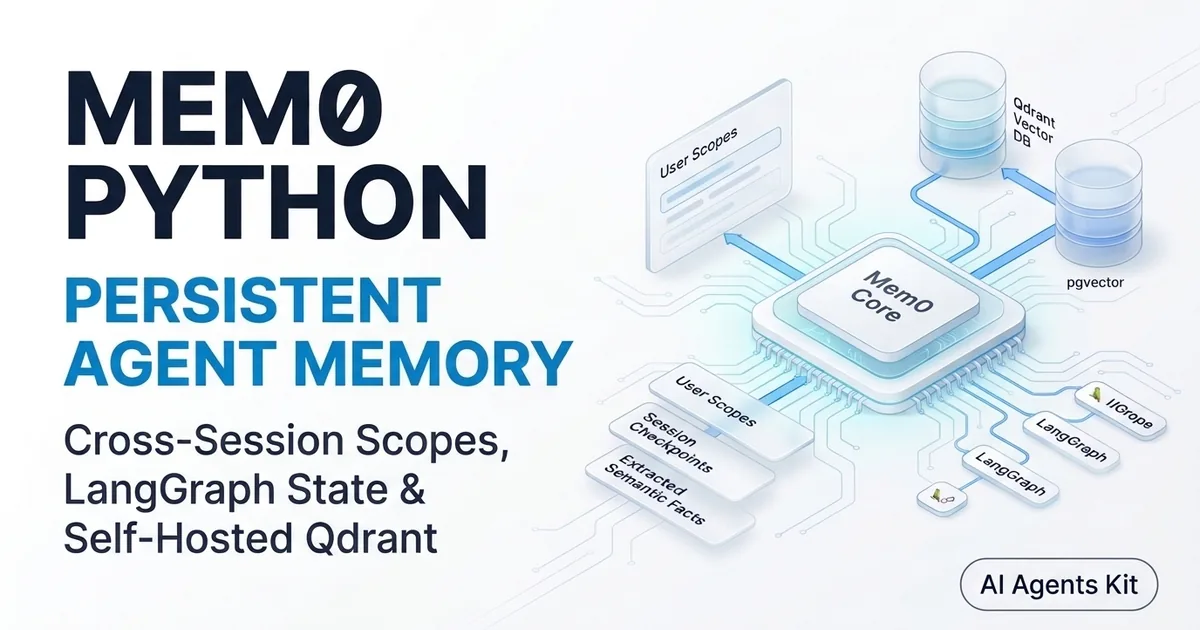
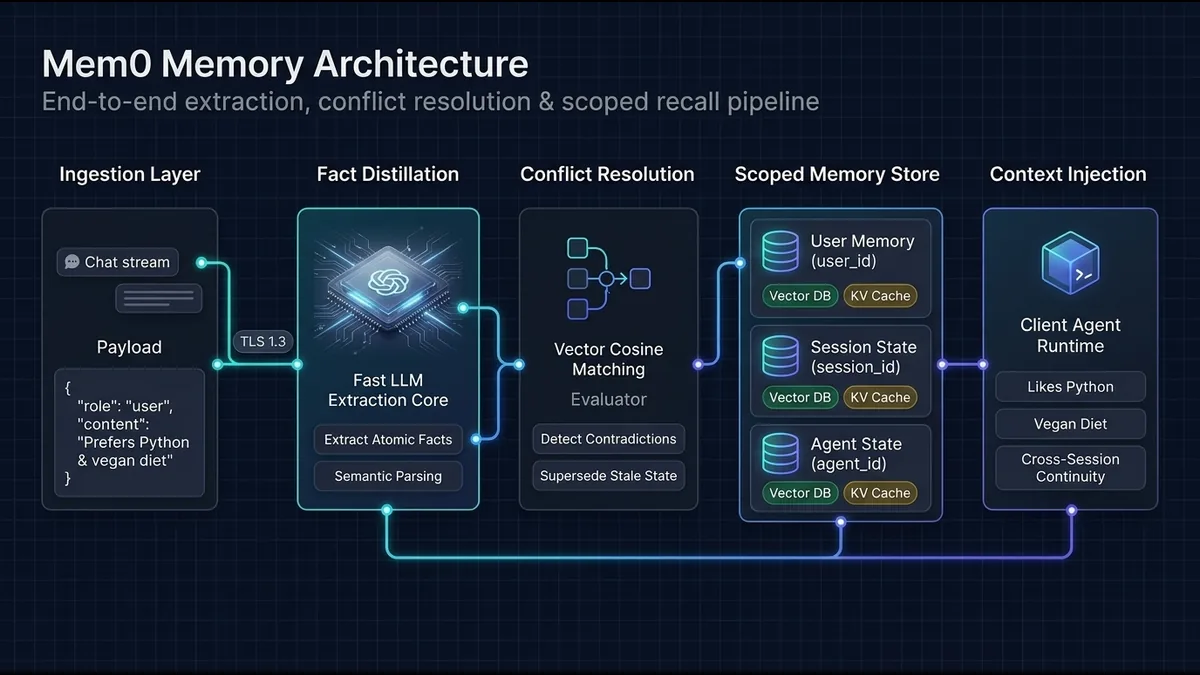 Figure 1: Mem0 memory lifecycle pipeline: raw conversations are distilled into atomic facts, deduplicated, and stored under strict user and session scopes.
Why AI Agents Suffer from Amnesia and How Mem0 Solves It
AI agents default to complete amnesia across independent sessions because LLMs evaluate each API completion in isolation. When a user tells an agent their dietary restrictions, preferred programming language, or deployment targets on Monday, that information vanishes the second the session terminates unless an external persistence engine captures it.
The Stateless Agent Trap and Raw Context Stuffing
Most early agent implementations address memory by appending previous messages directly into the prompt context. While simple to implement, this brute-force approach leads directly into the context stuffing trap. Applying proactive context engineering principles to isolate memory ensures your agent context stays focused. Token consumption scales linearly with conversational length, driving API expenses through the roof while diluting attention heads with conversational noise.
Moreover, huge context windows do not prevent contradictions. If a developer switches their tech stack from TypeScript to Go halfway through a week-long conversation, naive history appending passes both statements to the model. The LLM often struggles to resolve which preference takes precedence, leading to hallucinated or inconsistent responses.
How Scoped Memory Distillation Preserves Cross-Session State
Mem0 solves agent amnesia by treating memory as an active extraction pipeline rather than a passive message log. Instead of storing entire raw dialogues, Mem0 evaluates conversational turns with a fast extraction model, pulling out isolated, atomic semantic facts.
These distilled facts are automatically indexed into an underlying vector database like Qdrant or pgvector alongside structured metadata. By tagging every memory with strict identifiers such as user_id and agent_id, the system ensures agents retrieve only the exact historical facts relevant to the active user.
Under the Hood: Mem0 Architecture and Memory Extraction Lifecycle
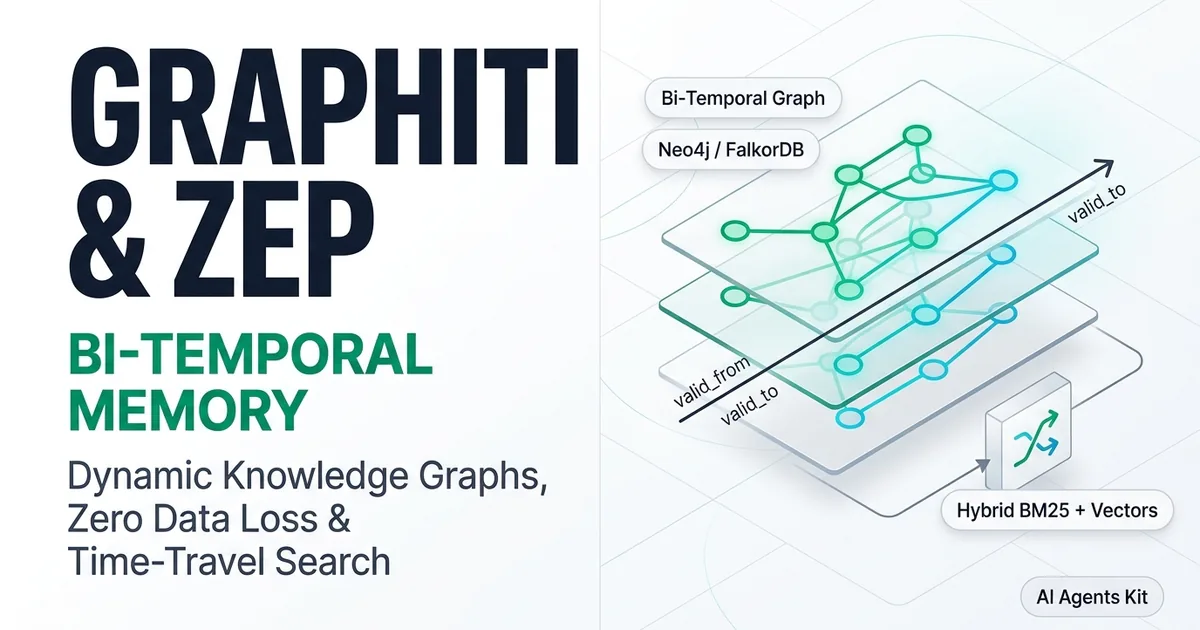
Understanding how Mem0 operates under the hood enables engineers to build predictable memory architectures. Mem0 does not merely embed raw strings; it executes an intelligent lifecycle that balances semantic search with automated conflict resolution. If your architecture instead requires tracking chronological organizational changes and temporal entity relationships, follow our Graphiti and Zep temporal knowledge graph tutorial.
The Extraction Pipeline: Extract, Resolve, and Index
The Mem0 memory lifecycle follows a deterministic three-stage pipeline upon receiving conversational inputs. First, Mem0 sends dialogue turns to a distillation LLM instructed to extract factual declarations, user preferences, and operational constraints while filtering out conversational filler.
Second, the framework queries the vector store for semantic neighbors to check whether the new fact corroborates, updates, or contradicts existing records. Third, if a contradiction is detected, Mem0 modifies the existing vector entry rather than creating an ambiguous duplicate, preserving high recall accuracy during later retrieval passes.
Multi-Tier Scoping: User, Agent, and Session Boundaries
Enterprise agent systems rarely serve a single user through a single bot. Mem0 addresses real-world multi-tenant architectures by enforcing a strict three-tier scoping hierarchy:
user_id: Binds memories directly to an individual human user. These preferences persist indefinitely across weeks of conversations, spanning multiple distinct agents.agent_id: Scopes knowledge to a specific AI persona or functional worker. This allows a coding agent to remember repo standards without polluting a customer support agent.session_id: Limits facts to a single conversational interaction or transaction thread, allowing ephemeral context to expire while preserving persistent user traits.
Semantic Deduplication and Automatic State Updates
Traditional RAG pipelines frequently suffer from stale data because vector databases append new chunks without evaluating semantic overlap. Mem0 implements active deduplication at write time.
When a user states “I now use Python 3.12 instead of Python 3.10”, Mem0 detects the semantic collision against the prior stored fact “User writes Python 3.10”. It executes a targeted update on the existing memory record, updating the text payload and vector embedding while keeping the unique memory_id stable.
Self-Hosted Deployment: Configuring Mem0 with Qdrant and Docker
While Mem0 offers a hosted platform API, self-hosting the open-source mem0ai engine provides absolute data sovereignty and ultra-low retrieval latency. Combining self-hosted Mem0 with an on-premises Qdrant container ensures sensitive user memory never leaves your private infrastructure.
Spinning Up Qdrant Vector Database via Docker Compose
To get started, spin up a dedicated Qdrant instance. Create a docker-compose.yml file configuring Qdrant with persistent disk storage:
services:
  qdrant:
    image: qdrant/qdrant:v1.12.1
    container_name: mem0_qdrant
    restart: unless-stopped
    ports:
      - "6333:6333"
      - "6334:6334"
    volumes:
      - ./qdrant_storage:/qdrant/storage:z
    environment:
      - QDRANT__SERVICE__ENABLE_STATIC_CONTENT=0
Launch the vector database in the background using standard Docker commands:
docker compose up -d
docker compose ps
Verify that Qdrant is operational by sending a health check probe to port 6333:
curl -s http://localhost:6333/healthz
# Returns: {"title":"qdrant - vector search engine","version":"..."}
Configuring Memory.from_config() with Custom Vector Stores and Embedders
Next, install the required Python packages into your virtual environment:
pip install mem0ai qdrant-client openai python-dotenvInitialize Mem0 using Memory.from_config(). The configuration dictionary explicitly defines the vector store location, the embedding provider, and the LLM engine responsible for fact extraction:
import os
from dotenv import load_dotenv
from mem0 import Memory

load_dotenv()

# Verify required API key for OpenAI extraction
if not os.getenv("OPENAI_API_KEY"):
    raise ValueError("OPENAI_API_KEY environment variable is required.")

# Define self-hosted configuration stack
config = {
    "vector_store": {
        "provider": "qdrant",
        "config": {
            "host": "localhost",
            "port": 6333,
            "collection_name": "agent_production_memories",
        },
    },
    "llm": {
        "provider": "openai",
        "config": {
            "model": "gpt-4o-mini",
            "temperature": 0.1,
            "max_tokens": 1000,
        },
    },
    "embedder": {
        "provider": "openai",
        "config": {
            "model": "text-embedding-3-small",
        },
    },
}

# Instantiate self-hosted memory engine
memory = Memory.from_config(config)
print("Mem0 initialized successfully with self-hosted Qdrant backend.")
Swapping OpenAI for Local Ollama Models
For completely air-gapped environments, you can replace the OpenAI provider blocks with local open-source models supported by the Mem0 open source project. Update the llm and embedder configuration blocks to point to your local Ollama port:
ollama_config = {
    "vector_store": {
        "provider": "qdrant",
        "config": {
            "host": "localhost",
            "port": 6333,
            "collection_name": "local_private_memories",
        },
    },
    "llm": {
        "provider": "ollama",
        "config": {
            "model": "llama3.1:8b",
            "baseURL": "http://localhost:11434",
        },
    },
    "embedder": {
        "provider": "ollama",
        "config": {
            "model": "nomic-embed-text",
            "baseURL": "http://localhost:11434",
        },
    },
}
The Core Mem0 API: Adding, Querying, and Updating Scoped Facts
Interacting with Mem0 revolves around three primary methods: add(), search(), and update(). Mastering their scoping parameters ensures memories are stored predictably and recalled accurately.
Ingesting Conversations with m.add() and Scoped Identifiers
The add() method ingests conversational interactions, runs extraction in the background, and commits the resulting facts to Qdrant. You can pass raw message arrays or structured user statements:
# Ingest conversational interaction with explicit user and agent scoping
user_turn = [
    {"role": "user", "content": "Hi, I am DevRaj. I develop autonomous agent systems in Python and prefer dark mode interfaces."},
    {"role": "assistant", "content": "Hello DevRaj! I have noted your preferences for Python agent development and dark mode."}
]

add_response = memory.add(
    messages=user_turn,
    user_id="devraj_99",
    agent_id="code_architect_bot",
    metadata={"department": "platform_engineering"}
)

print(f"Memory addition status: {add_response}")
Mem0 extracts discrete statements from this dialogue: “Name is DevRaj”, “Develops autonomous agent systems in Python”, and “Prefers dark mode interfaces”. Each fact is stored with a unique identifier and linked to devraj_99.
Querying Memories with m.search() and Metadata Filters
When an agent needs context to answer an incoming prompt, call search() with the user query and appropriate scoping filters:
# Search memories scoped strictly to devraj_99
query = "What programming language and interface theme should I use for DevRaj?"

search_results = memory.search(
    query=query,
    filters={"user_id": "devraj_99"}
)

print(f"Retrieved {len(search_results)} relevant memories:")
for item in search_results:
    print(f"- [ID: {item.get('id', 'N/A')}] {item.get('memory')} (Score: {item.get('score', 0.0):.2f})")
Scoped searches execute with remarkable speed. In local Qdrant benchmarks, filtered vector searches return in approximately 25ms to 35ms, keeping agent response latency crisp.
Modifying Evolving Preferences with m.update()
When user requirements change, preferences must be updated explicitly. Suppose DevRaj transitions to building microservices in Rust:
# Locate the existing memory ID from search results
target_memory_id = search_results[0]["id"]

# Update memory content explicitly
updated_record = memory.update(
    memory_id=target_memory_id,
    data="Develops high-throughput autonomous agent systems in Rust and Python"
)

print("Memory record successfully updated:", updated_record)
Building a Stateful LangGraph Agent with Persistent Mem0 Memory
LangGraph represents state-of-the-art agent orchestration, utilizing cyclic graphs to manage tool loops and reasoning stages. While LangGraph provides built-in checkpointers for short-term thread state, integrating Mem0 provides true cross-session persistence across entirely separate threads.
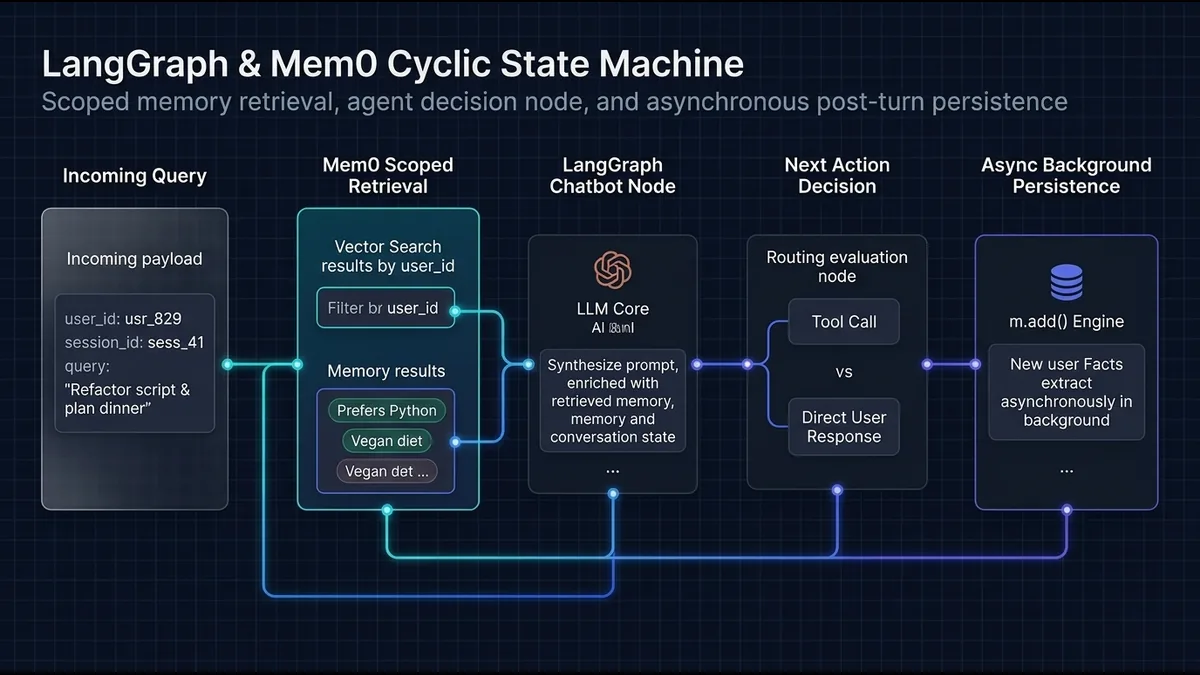 Figure 2: LangGraph cyclic state machine: incoming queries trigger scoped memory retrieval, followed by prompt synthesis and asynchronous post-turn memory persistence.
Designing Custom Graph State with TypedDict and User Identifiers
To integrate Mem0 into LangGraph, define a custom TypedDict state schema. This schema holds conversation messages alongside control identifiers like mem0_user_id:
from typing import Annotated, List, Dict, Any
from typing_extensions import TypedDict
from langchain_core.messages import BaseMessage, HumanMessage, SystemMessage
from langgraph.graph.message import add_messages

class AgentMemoryState(TypedDict):
    messages: Annotated[List[BaseMessage], add_messages]
    mem0_user_id: str
    retrieved_context: List[str]
Implementing the Memory Retrieval Node
The memory retrieval node intercepts the incoming user prompt, extracts the mem0_user_id, and queries Mem0 for pertinent historical context before invoking the primary reasoning model:
def retrieve_memory_node(state: AgentMemoryState) -> Dict[str, Any]:
    """Retrieves long-term user memories from Mem0 prior to LLM reasoning."""
    user_id = state["mem0_user_id"]
    latest_message = state["messages"][-1].content

    try:
        results = memory.search(query=str(latest_message), filters={"user_id": user_id})
        facts = [res["memory"] for res in results if "memory" in res]
        return {"retrieved_context": facts}
    except Exception as exc:
        print(f"[Mem0 Retrieval Warning] {exc}")
        return {"retrieved_context": []}
Constructing the Reasoning and Persistence Nodes
Next, construct the chatbot_node to inject retrieved context into the system prompt, and the persist_memory_node to capture new facts upon completion:
from langchain_openai import ChatOpenAI

llm = ChatOpenAI(model="gpt-4o-mini", temperature=0.7)

def chatbot_node(state: AgentMemoryState) -> Dict[str, Any]:
    """Injects long-term memory into the system prompt and invokes the LLM."""
    memories = state.get("retrieved_context", [])
    memory_bullets = "\n".join([f"- {fact}" for fact in memories]) if memories else "No prior history recorded."

    system_instruction = SystemMessage(
        content=(
            "You are a helpful engineering coworker.\n"
            f"Known facts about this user:\n{memory_bullets}\n\n"
            "Reference these preferences naturally when formulating your answers."
        )
    )

    response = llm.invoke([system_instruction] + state["messages"])
    return {"messages": [response]}

def persist_memory_node(state: AgentMemoryState) -> Dict[str, Any]:
    """Extracts and commits new semantic facts to Mem0 asynchronously."""
    messages = state["messages"]
    user_id = state["mem0_user_id"]

    if len(messages) >= 2:
        interaction_payload = [
            {"role": "user", "content": messages[-2].content},
            {"role": "assistant", "content": messages[-1].content}
        ]
        try:
            memory.add(messages=interaction_payload, user_id=user_id)
        except Exception as exc:
            print(f"[Mem0 Persistence Warning] {exc}")

    return {}
Compiling and Testing Cross-Session Graph Invocations
Wire the nodes into a compiled StateGraph. Connect the retrieval node to the chatbot, route the chatbot to the persistence node, and terminate at the graph boundary:
from langgraph.graph import StateGraph, START, END

# Construct the state graph
workflow = StateGraph(AgentMemoryState)
workflow.add_node("retrieve_memories", retrieve_memory_node)
workflow.add_node("chatbot", chatbot_node)
workflow.add_node("persist_memories", persist_memory_node)

# Define sequential flow
workflow.add_edge(START, "retrieve_memories")
workflow.add_edge("retrieve_memories", "chatbot")
workflow.add_edge("chatbot", "persist_memories")
workflow.add_edge("persist_memories", END)

# Compile runnable agent
agent_app = workflow.compile()

# Execute Session 1 on Thread A
session_1_config = {"configurable": {"thread_id": "thread_alpha_1"}}
input_session_1 = {
    "messages": [HumanMessage(content="Hello! My name is DevRaj and I write distributed backend agents in Go.")],
    "mem0_user_id": "user_devraj_42",
    "retrieved_context": []
}

output_1 = agent_app.invoke(input_session_1, config=session_1_config)
print("\n--- Session 1 Response ---")
print(output_1["messages"][-1].content)

# Execute Session 2 on Thread B (Brand new thread, same mem0_user_id)
session_2_config = {"configurable": {"thread_id": "thread_beta_2"}}
input_session_2 = {
    "messages": [HumanMessage(content="Can you suggest a project scaffold for my next backend service?")],
    "mem0_user_id": "user_devraj_42",
    "retrieved_context": []
}

output_2 = agent_app.invoke(input_session_2, config=session_2_config)
print("\n--- Session 2 Response (New Thread with Stored Memory) ---")
print(output_2["messages"][-1].content)
During Session 2, even though thread_beta_2 possesses an empty conversational history, the retrieve_memory_node fetches the fact that DevRaj develops backend agents in Go. The assistant immediately tailors the scaffold to Go without asking clarifying questions.
Memory Architecture Bake-Off: Mem0 vs SQLite Checkpointers vs Traditional RAG
Choosing the right memory stack requires evaluating latency, storage format, and operational overhead. Many developers mistakenly treat LangGraph checkpointers, traditional vector search, and Mem0 as interchangeable tools.
Feature Matrix: Checkpointers vs Knowledge Graphs vs Fact Stores
The table below contrasts the three dominant memory paradigms across production dimensions:
| Architectural Dimension | LangGraph SQLite Checkpointer | Traditional Document RAG | Mem0 Scoped Fact Engine |
|---|---|---|---|
| Primary Purpose | In-thread conversational state | Unstructured document recall | Cross-session user preferences |
| Storage Granularity | Full message checkpoint dumps | Raw chunked text paragraphs | Atomic distilled semantic facts |
| P95 Retrieval Latency | ~5ms (Single key lookup) | 65ms–120ms (Vector similarity) | 25ms–35ms (Scoped vector search) |
| Conflict Resolution | None (Monotonic message append) | None (Static document chunks) | Automated semantic deduplication |
| Average Prompt Overhead | 2,000–8,000+ tokens | 800–2,500 tokens | 150–300 tokens |
| Multi-Tenant Scoping | Thread ID only | Document namespace metadata | Native User, Agent, and Session IDs |
Token Economics: Calculating 80% Context Cost Savings
Prompt tokens represent one of the largest ongoing expenses in agent operations. Brute-force context stuffing forces every single request to pay the token tax for historical conversation turns. Applying proactive context compaction techniques to isolate memory ensures your agent context stays focused.
Consider an agent assisting a user across 20 conversational turns. A raw chat history averages 4,500 tokens. With Mem0, the extraction pipeline condenses those 20 turns into 6 atomic facts occupying only 220 prompt tokens. Across 100,000 daily active user interactions, this semantic distillation saves millions of prompt tokens daily, reducing token costs by over 80%.
When to Choose Mem0 vs Alternative Solutions
Choose LangGraph Checkpointers when your exclusive requirement is pausing, resuming, or human-in-the-loop inspection of an active multi-step graph thread. Checkpointers maintain byte-for-byte fidelity of an active execution.
Choose Traditional Document RAG when your agents must reference external manuals, API documentation, or corporate PDFs that do not evolve during chat interactions.
Choose Mem0 when your agents must remember human user traits, interface configurations, project requirements, and operational rules across months of disjointed sessions without suffering from context bloat. To evaluate framework trade-offs against temporal graphs and stateful agent operating systems, read our head-to-head analysis of Mem0 vs Zep vs Letta.
Production Troubleshooting Runbook
Deploying stateful agent architectures introduces distinct failure modes. Use this diagnostic runbook to resolve the four most common Mem0 operational issues.
Fixing Qdrant Connection Refused and Port Binding Errors
If Mem0 throws ConnectionRefusedError: [Errno 111] Connection refused during initialization, the Qdrant container is either unmapped or failing health checks.
Inspect container status and verify port bindings:
docker ps -a --filter name=mem0_qdrant
docker logs mem0_qdrant --tail 25
Ensure your config dictionary specifies localhost when running locally, or the Docker service name (such as http://qdrant:6333) when executing Python inside a parallel Docker network.
Resolving Empty Search Results Caused by Filter Syntax Mismatches
If memory.search() returns empty arrays despite facts existing in Qdrant, check the filter formatting. Older tutorials passed keyword arguments directly to the search call, whereas modern SDK versions require an explicit filters dictionary:
# INCORRECT (Deprecated syntax):
results = memory.search("query", user_id="devraj_99")

# CORRECT (Modern specification):
results = memory.search("query", filters={"user_id": "devraj_99"})
Handling KeyError and Stale ID Exceptions During Updates
Attempting to update a memory with an expired or hallucinated memory_id raises a KeyError or vector index missing exception.
Always wrap update calls in defensive try-except blocks, and confirm record existence by running a targeted search before executing mutations:
try:
    memory.update(memory_id=target_id, data=new_fact_string)
except Exception as update_err:
    print(f"[Mem0 Error] Unable to mutate record {target_id}: {update_err}")
    # Fallback: re-insert as a fresh atomic fact
    memory.add(new_fact_string, user_id=user_id)
Preventing LangGraph Node Loops and Recursive Memory Additions
When placing persist_memory_node in a cyclic LangGraph topology, ensure the edge routes cleanly to END. Routing a persistence node back into the reasoning loop triggers infinite cycles where the agent continuously re-extracts facts from its own self-generated responses.
Always maintain strict unidirectional routing from the conversational response node directly to persistence and termination.
Frequently Asked Questions About Mem0 and AI Agent Memory
How does Mem0 manage persistent memory across AI agent sessions?
Mem0 extracts atomic semantic facts from multi-turn dialogues using a background language model and stores them with vector embeddings. During subsequent sessions, the agent queries the store using scoped metadata filters to inject relevant historical facts directly into the system prompt.
How do you scope memories to specific users and agents in Mem0?
You scope memories by supplying user_id, agent_id, or session_id parameters during memory.add() invocations. Subsequent searches pass matching identifiers inside the filters argument to ensure agents only retrieve context belonging to that exact user or persona.
Can you run Mem0 completely self-hosted with local open-source models?
Yes, Mem0 is an Apache-2.0 open-source library that runs completely self-hosted using a local Qdrant container and Ollama inference. You configure Memory.from_config() to point to local Ollama endpoints for both fact extraction and dense text embeddings.
What is the difference between LangGraph checkpointers and Mem0 memory?
LangGraph checkpointers save the exact byte-level execution state of an ongoing thread for pause and resume capabilities. Mem0 extracts generalized, cross-session semantic preferences that persist across entirely separate threads and conversation lifecycles.
How does Mem0 resolve contradictions when user preferences change?
Mem0 performs semantic similarity checks against existing memory records before committing new extractions to the vector database. When an update contradicts a prior entry, Mem0 modifies the existing vector record rather than appending conflicting statements.
What vector databases are supported for self-hosted Mem0 deployments?
Self-hosted Mem0 natively supports Qdrant, pgvector, Chroma, and Milvus as persistent storage backends. You switch between vector engines by modifying the vector_store provider configuration dictionary during initialization.
How do you pass filters in Mem0 search queries?
In current versions of the mem0ai SDK, filters are passed as a dictionary under the filters argument, such as filters={"user_id": "alice_12"}. Passing raw keyword arguments directly to the search method is deprecated and may return unfiltered results.
How does Mem0 extract facts from multi-turn dialogues?
Mem0 passes conversation turns to an extraction model instructed to isolate declarations, user traits, and operational guidelines. The model formats these extractions as discrete, atomic sentences, stripping out conversational filler and greetings before vector indexing.
Architectural Takeaways and Next Steps
Persistent memory transforms brittle, stateless LLM wrappers into context-aware systems capable of sustaining long-term user relationships. By decoupling episodic conversation logs from distilled semantic facts, Mem0 prevents context window exhaustion while preserving critical user preferences across independent sessions.
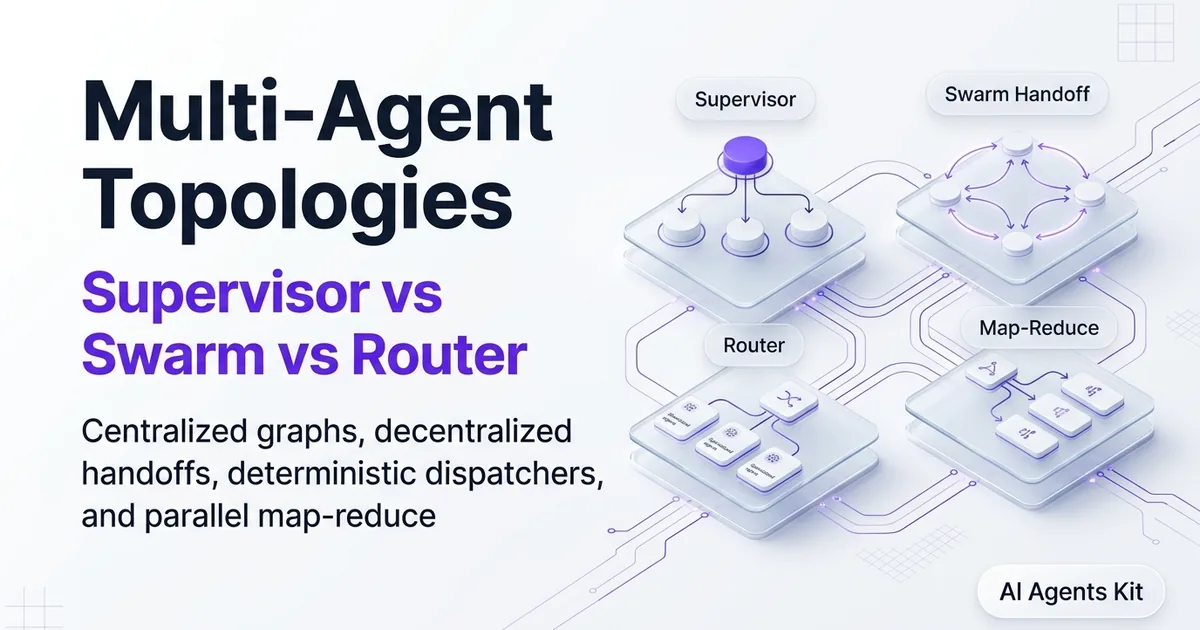
To explore deeper agent communication protocols and interconnected multi-agent patterns, review our architectural breakdown of multi-agent systems. Combining structured memory with deterministic routing is the foundation of production-ready agent engineering.