AI for Small Restaurants: Complete Guide (2026)
Discover how AI tools can transform your small restaurant. From voice ordering to menu optimization, learn which solutions fit your budget.
Independent restaurateurs operate under relentless margin pressures, fluctuating labor markets, and rising wholesale food costs. During peak dining rushes, unanswered phone calls and manual kitchen ticket errors directly erode profitability. Integrating targeted ai for small restaurants eliminates these friction points by automating phone orders, forecasting inventory demand, and optimizing shift schedules while preserving hospitality.
Key Takeaways
- Automated voice ordering for restaurants recovers up to $3,200 in monthly lost takeout revenue from missed phone calls.
- Predictive pos ai integration tools forecast daily ingredient requirements, reducing raw inventory food waste by 40% to 60%.
- Machine learning scheduling algorithms evaluate historical covers and weather patterns to eliminate labor overstaffing by 10% to 15%.
- Modern restaurant ai tools connect directly to existing Toast, Square, and Clover point-of-sale systems without custom coding.
Adopting restaurant automation technology no longer requires massive enterprise capital budgets or dedicated engineering departments. Plug-and-play cloud platforms now allow independent 20-seat cafes to deploy the same predictive intelligence as national franchise operators. For a broader overview of commercial workflows, review our guide to AI tools for small business.
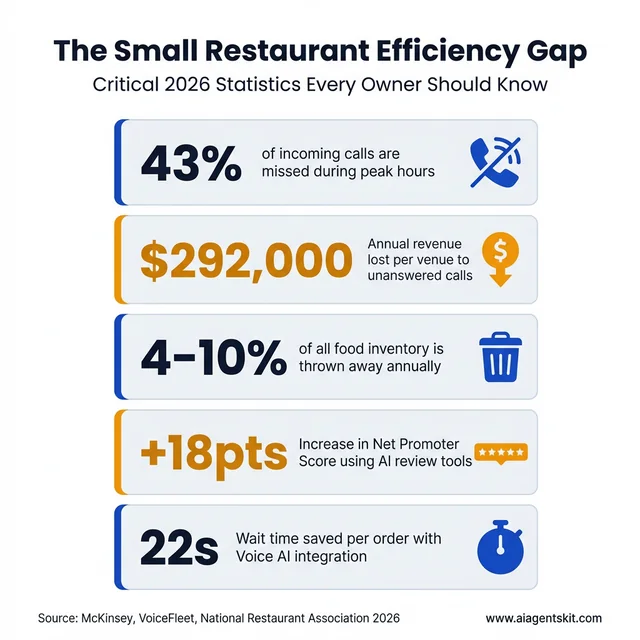
The Small Restaurant Efficiency Gap: 2026 Key Metrics demonstrating the impact of missed calls and waste.
What Is AI for Restaurants? (And Why It’s Not Just for Big Chains)
Artificial intelligence for restaurants is software that learns from your data, sales history, customer patterns, staffing levels, inventory usage, and uses that learning to automate decisions or surface insights you’d otherwise miss. Think of it as restaurant automation technology that gets smarter over time. As outlined in the Anthropic Prompt Engineering Documentation, structured data extraction allows language models to interpret messy, customized phone orders with reliable precision.
Think of it like this: instead of guessing how many servers you need next Thursday based on “how it felt” last year, AI analyzes every Thursday you’ve been open, factors in local events, weather patterns, and seasonal trends, then tells you: “Schedule 4 servers, not 6. You’ll be slower than usual.”
The reason this matters for small restaurants specifically? You have thinner margins and less room for error than the big chains. A Chipotle can absorb a 10% overstaffing mistake. You probably can’t.
Here’s what surprises most owners I talk to: you’re probably already using AI without realizing it. If you use Square, Toast, or most modern POS systems, their “smart” features, like sales forecasting or automatic reorder suggestions, those are AI. The difference in 2026 is that specialized restaurant AI tools have become powerful enough and cheap enough that even a 20-seat family restaurant can compete with chains on operational efficiency.
And unlike the massive enterprise systems that chains use, these new tools are built for owners who don’t have an IT department. Most take under an hour to set up and start showing results within days, not months. For a broader view on building your AI approach, read our guide on developing an AI strategy for small business.
The Real Problems AI Solves for Small Restaurants
Let me get specific about what actually changes when you bring AI into your operation. These aren’t theoretical benefits, they’re the exact pain points I hear about from owners every week.
The 30% of Calls You’re Missing
Here’s a statistic that should keep you up at night: restaurants miss approximately 43% of incoming calls during peak hours according to research from VoiceFleet and Hostie AI. The average venue loses up to $292,000 annually in lost business from unanswered calls. Not because you’re lazy, because you’re human, and there’s only one of you, and you can’t answer the phone while you’re running food or handling a customer complaint.
I watched a Thai restaurant in Portland discover they were losing $3,200 per month in missed takeout orders alone. The owner thought her voicemail was catching most calls. It wasn’t. People hang up after 3 rings and order from the competitor who answers.
Voice AI, essentially an automated phone system for restaurants, solves this. It picks up every call instantly, takes orders, answers common questions (“What time do you close?”), and can even handle reservations. Industry benchmarks from GitNux demonstrate that AI voice ordering achieves a 91% accuracy rate while reducing order turnaround by 22 seconds.
Modern conversational agents sound natural and human, eliminating the frustrating friction of legacy touch-tone phone trees.
The best part? These systems integrate directly with your POS, so orders flow straight to the kitchen without someone having to manually enter them. That means fewer errors (no more “I thought they said 4 orders of spring rolls” mistakes) and faster service.
Staffing Chaos and No-Shows
If you’ve ever had your best server call in sick on a Saturday night, you know the panic. You’re suddenly trying to cover 40 tables with half your normal staff, and the customers can feel the stress.
AI scheduling tools analyze historical sales data alongside local weather patterns and community events to forecast customer volume accurately. Instead of overstaffing and eating labor margins, operators receive actionable shift recommendations.
According to Modern Restaurant Management, 40% of operators cite predictive scheduling as their highest-ROI automation investment.
Some systems even monitor clock-ins in real-time and automatically suggest shift swaps or call-ins when someone’s running late. It’s not about replacing your scheduling judgment, it’s about giving you data to back up your instincts.
Food Waste Eating Your Margins
The average restaurant discards 4% to 10% of purchased food, creating $20,000 to $50,000 in annual margin losses for a typical $500,000 venue. Industry research from ReFED estimates aggregate foodservice food surplus at over $157 billion annually.
AI-powered inventory forecasting cuts this waste by calculating precise ingredient prep requirements before purchase orders are submitted.
AI inventory management tracks your actual usage patterns (not just what you ordered) and predicts exactly what you’ll need for the next few days. Instead of over-ordering produce “just in case,” you get precise par levels based on historical sales, weather, local events, and even what’s trending on your menu this month.
One owner I know cut his produce waste by 60% in the first month. The system noticed he was consistently over-ordering tomatoes on Mondays, turns out, Monday lunch was slower than he realized, and those tomatoes were spoiling before Wednesday.
7 Best AI Tools for Small Restaurants in 2026
I’ve tested or reviewed dozens of restaurant AI platforms over the past year. Here are the best restaurant software solutions that actually deliver value for small, independent operations, not just enterprise chains with dedicated IT teams.
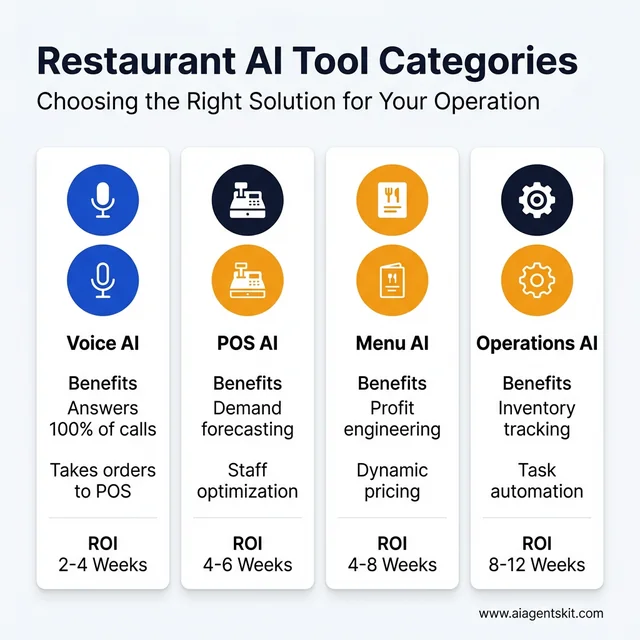
Comprehensive breakdown of Restaurant AI tool categories and their typical ROI timelines.
1. Voice AI / Phone Answering
Loman AI (~$199/month)
- What it does: AI phone agent that answers calls, takes orders, handles reservations
- Best for: Restaurants with high call volume for takeout/delivery
- Why it works: Integrates with Square, Toast, Clover. Orders go straight to your POS without manual entry.
- The catch: Works best with straightforward menus. If you have 200 items with complex customizations, it might struggle.
Certus AI (custom pricing)
- What it does: Voice AI focused specifically on phone ordering
- Best for: Quick service and fast casual
- Why it works: 91% order accuracy rate according to operational research. Handles multiple callers simultaneously.
- Pricing varies based on call volume, but typically $150-300/month for small operations.
Yelp Host & Receptionist (Yelp integrated)
- What it does: AI receptionist through Yelp’s platform
- Best for: Restaurants already using Yelp for reservations/reviews
- Why it works: Manages bookings, provides wait times, sends follow-up texts
- Pricing: Bundled with Yelp for Business (varies by market)
2. POS Integration
Aireus POS (AI features included)
- What it does: Full POS system with built-in AI forecasting
- Best for: Restaurants wanting an all-in-one solution
- Key AI features: Demand prediction, automatic reorder suggestions, labor optimization
- Cost: $69-149/month depending on features
Toast AI Add-ons (existing Toast users)
- What it does: Adds AI capabilities to your existing Toast system
- Features: Sales forecasting, menu performance analytics, guest insights
- Best for: Restaurants already on Toast who want to add intelligence. According to Toast’s 2025 financial reports, they now serve over 164,000 restaurant locations.
- Cost: $50-100/month add-on
Square for Restaurants AI
- What it does: AI features built into Square’s restaurant platform
- Features: Inventory forecasting, sales predictions, staff optimization
- Best for: Small restaurants already using Square
- Cost: Included in higher-tier plans ($165/month+)
3. Menu Optimization
Restaurant365 ($299-499/month)
- What it does: Full restaurant management with AI-powered menu engineering
- Best for: Growing restaurants ready for comprehensive tools
- Key feature: Analyzes your sales mix and food costs to identify your “stars” (high profit, high popularity) and “dogs” (low profit, low popularity)
- The insight: Most restaurants have 2-3 items driving 40% of their profit and 10 items losing money they don’t realize
Checkmate ($150-300/month)
- What it does: Dynamic menu optimization and pricing
- Best for: Restaurants wanting to test menu changes without printing new menus
- Feature: Digital menu boards that adjust pricing based on demand, time of day, or inventory levels
Popmenu ($199-399/month)
- What it does: AI-driven online menu display and customer engagement
- Best for: Restaurants focused on online presence and SEO
- Feature: Menus that update automatically based on availability, plus AI writing for descriptions
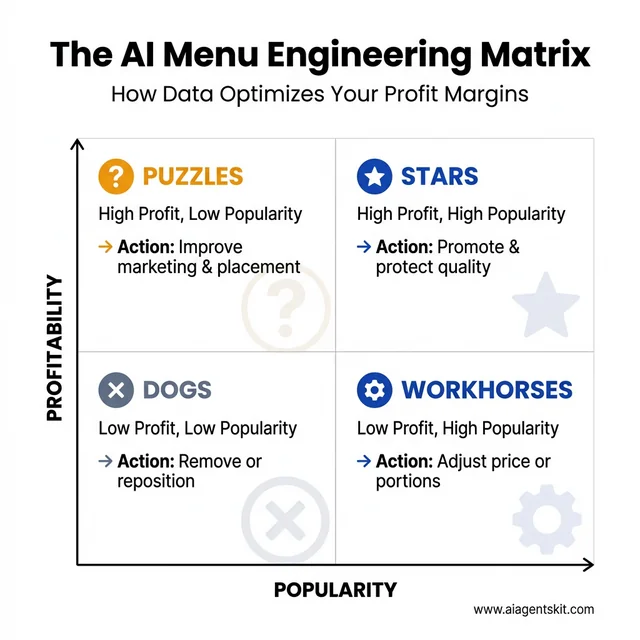
The AI Menu Engineering Matrix: A data-driven framework for optimizing menu profitability and popularity.
4. Operations & Forecasting
Fourth iQ (custom pricing, typically $200-500/month)
- What it does: AI forecasting for labor and inventory
- Best for: Multi-location or high-volume single locations
- Features: Predictive scheduling, automated purchasing, waste reduction analytics
- ROI claim: Users report 15-20% reduction in labor costs through better scheduling
Xenia ($99-249/month)
- What it does: Operations automation and task management with AI insights
- Best for: Restaurants wanting to standardize operations across shifts
- Feature: AI identifies patterns in your operations, like which prep tasks consistently run behind, and suggests workflow improvements
If you’re interested in how AI can automate online ordering and customer service, see our guide on AI agents for e-commerce automation.
How Much Does AI Cost for Small Restaurants?
Let me be straight with you: AI isn’t free. But it’s also not the $10,000+ enterprise software it used to be. Here’s the real cost breakdown for small restaurants in 2026.
Budget Tier: $0-100/month
Start here if you’re curious but cautious.
- Square/T Toast AI features: Often included in your existing plan or $50-100/month add-on
- ChatGPT for restaurants: Use it to write menu descriptions, respond to reviews, draft social media ($20/month for Plus)
- Free inventory apps with AI: Basic forecasting in apps like BlueCart (free tier) or MarketMan
Growth Tier: $100-300/month
This is where most successful small restaurants land.
- Voice AI (Loman, Certus): $150-250/month
- Menu optimization (Checkmate): $150-200/month
- Comprehensive operations (Xenia): $99-249/month
For $200-300/month, you can solve your biggest pain point, usually phone answering or scheduling, and see measurable ROI within 4-8 weeks.
Comprehensive Tier: $300-500+/month
For restaurants ready to fully commit to AI-driven operations.
- Full management suite (Restaurant365, Fourth iQ): $299-499/month
- Multiple specialized tools: Voice AI + menu optimization + forecasting = $400-600/month
| Tool Type | Monthly Cost | Typical ROI Timeline | Best For |
|---|---|---|---|
| Voice AI | $150-250 | 2-4 weeks | High call volume, takeout focus |
| Menu AI | $100-200 | 4-8 weeks | Menu optimization, pricing |
| Labor AI | $100-200 | 4-6 weeks | Scheduling challenges |
| Full Suite | $300-500 | 8-12 weeks | Comprehensive transformation |
Operators should start with a single tool in the $100 to $200 monthly range targeting their primary bottleneck, such as missed phone orders. Before deploying new systems, evaluate baseline operational savings with our AI ROI calculator.
According to Deloitte research, venues adopting predictive AI achieve 15% to 20% labor cost reductions through optimized scheduling.
A note on hidden costs: Budget an extra 2-3 hours per week for the first month to learn the system and train staff. Also factor in potential POS upgrade costs if your current system doesn’t integrate well. Some restaurants find they need to upgrade from a basic POS to a restaurant-specific one (like Toast or Square for Restaurants) before adding AI, which could be an additional $100-200/month.
POS AI Integration: Making Your Systems Smarter
Here’s something most restaurant tech salespeople won’t tell you: your POS system is already collecting the data AI needs. The problem is, most POS systems don’t do anything intelligent with that data.
POS AI integration means connecting AI tools to your point-of-sale system so they can:
- Read your sales data in real-time
- Analyze patterns (what sells when, at what price points, with what modifications)
- Make predictions (how much chicken you’ll need next Tuesday)
- Trigger actions (automatically suggest reordering when inventory hits a threshold)
Which POS Systems Have Built-in AI?
Toast (one of the most popular restaurant POS systems) now offers:
- Sales forecasting based on historical data
- Menu performance analytics (which items make you money vs. just revenue)
- Guest insights and visit frequency tracking
Square for Restaurants includes:
- Inventory forecasting
- Automatic reorder suggestions
- Staff optimization recommendations
Aireus POS is built specifically with AI in mind:
- Predictive scheduling
- Dynamic menu pricing
- Waste reduction analytics
What If Your POS Doesn’t Have AI?
Most modern AI tools integrate with popular POS systems through APIs (technical connections). If you’re using Clover, Square, Toast, or most major systems, tools like Loman AI, Fourth iQ, or Restaurant365 can connect directly.
The integration usually takes 15-30 minutes and involves:
- Authorizing the AI tool to access your POS data
- Mapping your menu items between systems
- Setting up basic rules (when to reorder, how to categorize items)
Important caveat: If you’re using an older “dumb” POS system that doesn’t have API access, you’re limited. You might need to upgrade your POS before adding AI, or choose AI tools that work independently (like voice AI that doesn’t need POS integration).
According to TD Bank industry research, 80% of restaurant executives plan to expand AI technology budgets. Industry surveys indicate that 57% of diners feel comfortable with automated restaurant workflows.
POS providers continue adding native predictive tools, ensuring future hardware upgrades include automated forecasting out of the box.
AI Menu Optimization: Data-Driven Decisions
Deploying dedicated menu optimization ai allows operators to audit menu profitability accurately. In one documented case study, a 40-item pizzeria discovered that 12 core items generated 85% of total operating profit while remaining dishes broke even.
He cut his menu to 20 items, focused on making those stars exceptional, and saw his profit margin jump from 8% to 14% in three months. Same kitchen, same staff, better bottom line.
What AI Menu Optimization Actually Does
AI menu optimization tools analyze:
- Sales volume: What sells and when
- Food costs: Ingredient costs and portion calculations
- Preparation time: Labor cost per item
- Price elasticity: How demand changes when you adjust prices
- Cross-selling patterns: Which items people order together
The Menu Engineering Matrix
Most AI tools use a variation of the classic “menu engineering” matrix:
- Stars: High profit, high popularity (your money makers, promote these)
- Puzzles: High profit, low popularity (make them more visible or improve descriptions)
- Workhorses: Low profit, high popularity (slight price increases or portion adjustments)
- Dogs: Low profit, low popularity (consider removing or repositioning)
Dynamic Pricing in Action
Some advanced tools, like Checkmate, offer dynamic menu pricing. This means your digital menu boards or online ordering automatically adjust prices based on:
- Time of day: Happy hour pricing, lunch specials
- Demand levels: Surge pricing during peak times (controversial but increasingly common)
- Inventory status: Discount items you need to move before they spoil
I’ll be honest: I’m still conflicted about surge pricing for restaurants. It works for delivery apps, but customers might resent paying more just because it’s Saturday night. The data says it increases revenue, but the customer experience question is real. That’s the kind of nuance AI can’t solve, you have to decide your own approach.
Step-by-Step: Implementing AI in Your Restaurant
I’ve watched too many owners get excited about AI, buy three different tools at once, and end up frustrated when nothing works smoothly. Here’s the approach that actually succeeds.
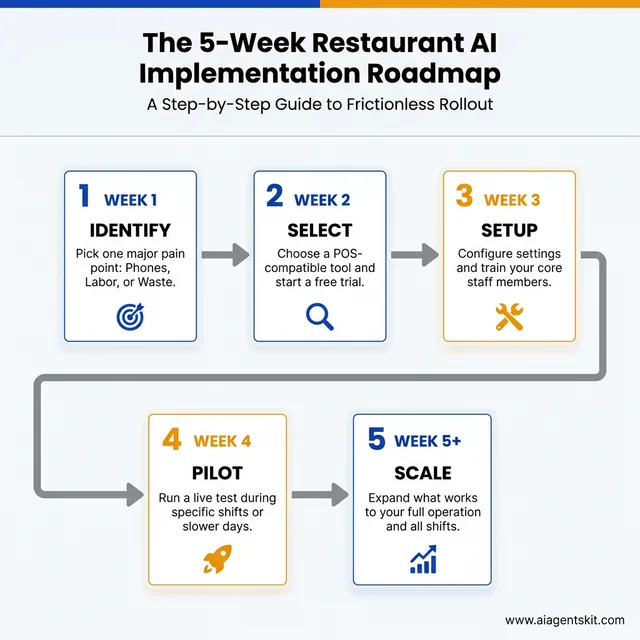
The 5-Week Restaurant AI Implementation Roadmap: A step-by-step strategy for successful rollout.
Week 1: Identify Your Biggest Pain Point
Don’t start with the coolest tool. Start with your biggest problem.
- Missing 30% of phone calls? → Start with voice AI
- Constantly overstaffed or understaffed? → Start with labor forecasting
- Throwing away food every week? → Start with inventory AI
- Not sure if your menu makes money? → Start with menu optimization
The rule: Pick ONE problem. Not two, not three. One.
Week 2: Choose the Right Tool
Match your problem to the tool category from earlier in this guide. Then:
- Check compatibility: Does it integrate with your POS? (Most list compatible systems on their website)
- Try before you buy: Most tools offer 14-day free trials. Use them.
- Start simple: Pick the basic plan. You can always upgrade later.
- Read small restaurant reviews: Look for reviews from operations your size, not just the enterprise case studies on their website
Week 3-4: Pilot and Measure
Don’t roll out AI to your entire operation on day one. That’s asking for chaos.
Pilot approach:
- Run the tool during specific shifts or days
- Train one or two key staff members thoroughly
- Track metrics before and after (missed calls, food waste dollars, labor hours)
- Get staff feedback daily
What to measure:
- Voice AI: Missed calls, order accuracy, average order value
- Labor AI: Labor cost percentage, customer wait times, staff overtime
- Inventory AI: Food cost percentage, waste dollars, stockouts
- Menu AI: Profit per item, items removed, customer feedback
Week 5+: Scale What Works
If the pilot shows positive results (usually 10%+ improvement in your key metric), expand it:
- Roll out to all shifts/days
- Train additional staff
- Add complementary tools if needed (voice AI + menu optimization work well together)
If it doesn’t work, cancel before the trial ends and try a different tool or approach. The beauty of modern SaaS tools is you’re not locked into year-long contracts.
Pro tip: Give it at least 4 weeks before judging success. AI needs time to learn your patterns. The first week might actually feel worse as the system adapts to your operation.
Common Mistakes to Avoid
After talking to dozens of restaurant owners about their AI implementations, here are the mistakes I see most often:
Trying to Implement Everything at Once
The owner who buys voice AI, menu optimization, inventory management, and a new POS system simultaneously is setting themselves up for failure. Each tool needs attention, training, and tweaking. Do one well before adding another.
Ignoring Staff Buy-In
Your staff will determine whether AI succeeds or fails. If they see it as “the robot taking our jobs,” they’ll sabotage it (intentionally or not). If they see it as “the tool that helps me do my job better,” they’ll make it work.
Involve key staff in the selection process. Show them how it helps them, not just you. For example: “This voice AI means you won’t have to answer the phone while you’re running food.”
Choosing Tools That Don’t Integrate
Nothing’s worse than having voice AI take an order, then someone has to manually type it into the POS. Before buying any tool, verify it integrates with your existing systems. Most vendors list integrations on their website, if they don’t list your POS, email and ask before committing.
Expecting Instant ROI
AI needs data to work well. In week one, voice AI might misunderstand orders. In week two, it gets better. By week four, it’s often more accurate than human staff.
Give it 4-8 weeks before making a final judgment. Most tools get significantly better as they learn your specific menu, customer accents, and order patterns.
Forgetting the Human Element
Here’s my hot take: AI won’t replace restaurant workers. But restaurants that use AI effectively will replace restaurants that don’t.
The goal isn’t to automate hospitality, that’s an oxymoron. The goal is to automate the administrative chaos (answering phones, scheduling, inventory tracking) so your humans can focus on what humans do best: creating memorable experiences, solving unique problems, and making guests feel welcome.
AI by Restaurant Type: What Works Best for You
Not all restaurants have the same needs. Here’s how AI applies to specific restaurant types:
AI for Pizzerias
Pizzerias deal with high call volumes, complex customization requests, and delivery coordination. The best AI tools for pizza shops include:
- Voice AI for phone orders: Handles “half pepperoni, half mushrooms, well-done crust” without confusion
- Delivery route optimization: AI that groups orders by neighborhood to minimize delivery times
- Predictive prep: Forecasts how much dough to prep based on day of week, weather, and local events
AI for Cafes and Coffee Shops
Cafes need speed during morning rushes and accurate inventory for perishables:
- Mobile ordering AI: Predicts prep times so customers arrive when their order is ready
- Milk and pastry forecasting: Tracks which pastries sell out by 10 AM vs 2 PM
- Staff scheduling: Accounts for the dramatic difference between weekday and weekend patterns
AI for Food Trucks
Food trucks face unique challenges, limited space, variable locations, and weather dependency:
- Location-based demand forecasting: Predicts sales at different spots based on day, weather, and local events
- Inventory optimization for small spaces: Ensures you don’t waste precious storage on slow-moving items
- Social media AI: Auto-posts your location and daily specials to Instagram and Twitter
AI for Bakeries
Bakeries work with highly perishable inventory and early morning prep:
- Production planning AI: Predicts exactly how many croissants, muffins, and loaves to bake
- Pre-order management: Handles custom cake orders and pickup scheduling
- Waste reduction: Tracks which items get tossed at end of day and adjusts production
AI for Bars and Nightlife
Bars need help with inventory tracking and staff management during unpredictable rushes:
- Pour cost analytics: Tracks exactly how much liquor you’re using vs selling
- Dynamic staffing: Predicts busy nights based on local events, weather, and holidays
- Reservation management: AI handles table bookings and VIP guest preferences
To see how different industries apply AI automation, check out our comprehensive guide on AI use cases by industry.
AI for Restaurant Marketing and Online Presence
Most restaurant owners focus AI on operations, but marketing AI can drive new customers:
Review Management AI
Tools like BirdEye and Podium use AI to:
- Monitor reviews across Google, Yelp, TripAdvisor, and Facebook in one dashboard
- Generate suggested responses to reviews (positive and negative)
- Identify common complaints before they become trends
- Alert you to reviews that need immediate attention
The key benefit: Responding to reviews within 24 hours increases customer retention. According to NBER operational productivity research, restaurants using AI for sentiment analysis on reviews have improved response times and raised Net Promoter Scores by 18 points. AI helps you do this consistently without spending hours monitoring multiple platforms.
Social Media AI
Buffer AI and Hootsuite AI can:
- Write Instagram captions featuring your daily specials
- Suggest optimal posting times based on when your followers are active
- Generate hashtag recommendations for food posts
- Create simple video content from photos
Email Marketing AI
Tools like Mailchimp AI and Klaviyo offer:
- Automated welcome sequences for new newsletter subscribers
- Personalized recommendations based on past orders
- A/B testing for subject lines and content
- Predictive sending (emails arrive when each customer is most likely to open them)
AI Reservation and Table Management Systems
Modern reservation AI goes beyond simple booking:
Smart Reservation Features
- Table optimization: AI arranges reservations to maximize seating capacity without overbooking
- No-show prediction: Identifies reservation patterns that predict no-shows (first-time bookers, large parties, holiday weekends)
- Waitlist management: Automatically texts waitlisted guests when tables open
- Guest preference tracking: Remembers that table 12 is Mrs. Johnson’s favorite and Mr. Chen is allergic to shellfish
Popular Options
OpenTable AI: The industry standard with AI-powered seating optimization and guest insights Resy: Focuses on high-end dining with intelligent waitlist and guest recognition Tock: Prepaid reservations reduce no-shows; AI optimizes tasting menu timing
Kitchen Display Systems and Back-of-House AI
The kitchen is where AI can reduce chaos and improve ticket times:
Kitchen Display System (KDS) AI
Modern KDS platforms like Aireus and Toast KDS use AI to:
- Prioritize tickets intelligently: Bumping up apps and salads while proteins cook
- Prep time prediction: Tells the front of house exactly when table 12’s food will be ready
- Bumping logic: Suggests when to fire specific items so everything hits the pass simultaneously
- Error detection: Flags tickets with unusual modifications that might be mistakes
Recipe Management AI
Meez and Galley Solutions offer:
- Recipe costing that updates automatically when ingredient prices change
- Scaling calculations for catering orders
- Prep list generation based on predicted sales
- Allergen tracking and cross-contamination alerts
Restaurant Business Intelligence and Predictive Analytics
For data-driven restaurant owners, business intelligence tools provide insights:
What Restaurant BI Tools Analyze
- Sales trends by hour, day, and season: Spot patterns invisible to daily operations
- Labor efficiency ratios: Revenue per labor hour across shifts
- Menu item profitability: True costs including labor, not just food costs
- Customer lifetime value: Which guests return most often and spend the most
- Benchmarking: How your metrics compare to similar restaurants in your area
Popular Restaurant Analytics Platforms
Restaurant365: Full BI suite with forecasting and accounting integration Tenzo: Real-time analytics that pull data from your POS, labor, and inventory systems 4R: Demand forecasting focused specifically on reducing food waste
Building Your Restaurant AI Technology Stack
Most successful small restaurants use 2-4 AI tools working together. Here’s how to think about your tech stack:
The Essential Stack (Budget: $200-400/month)
- POS with AI features (Toast, Square, or Aireus) - $69-165/month
- Voice AI for phone orders (Loman or Certus) - $150-200/month
- Review management (Podium or BirdEye) - $50-150/month
The Growth Stack (Budget: $400-700/month)
Add to the essential stack: 4. Labor forecasting (Fourth iQ or Xenia) - $100-200/month 5. Menu optimization (Restaurant365 or Checkmate) - $150-300/month
The Premium Stack (Budget: $700-1,000+/month)
For restaurants ready to fully commit: 6. Reservation AI (OpenTable with AI features) - $200-400/month 7. Advanced analytics (Tenzo or custom BI) - $150-300/month
Quick-Start AI Implementation Checklist
Use this checklist to get started without overwhelm:
Week 1: Assessment
- Identify your biggest time waster (phones, scheduling, inventory)
- List your current POS and software
- Check which AI features you already have (many are included in modern POS)
- Set a budget ($100-300 for first tool)
Week 2: Selection
- Research 2-3 tools that solve your #1 problem
- Verify integration with your POS
- Sign up for free trials
- Test with real scenarios (place test orders, try the interface)
Week 3: Setup
- Choose your tool and purchase
- Complete initial configuration
- Train 1-2 key staff members
- Create simple documentation for your team
Week 4: Launch
- Go live during slower shifts first
- Monitor closely and collect feedback
- Track your key metric (missed calls, labor hours, waste)
- Adjust settings based on what you learn
Month 2: Optimize
- Review performance data
- Expand usage to all shifts
- Train remaining staff
- Consider adding complementary tools
Step-by-Step Implementation Roadmap
Deploying artificial intelligence in a restaurant environment requires a disciplined, phased rollout to prevent staff confusion. Operators should begin with a single high-impact automation target, such as an AI phone agent, before attempting kitchen-wide forecasting.
Following a structured AI implementation roadmap ensures that staff receive proper POS ticket training and workflow handoffs.
Frequently Asked Questions
How much does AI voice phone ordering cost for small restaurants?
Dedicated restaurant voice AI systems typically range from $99 to $199 per month with zero long-term contracts. Operators usually recover the entire subscription cost within the first weekend by capturing previously unanswered takeout calls.
Can restaurant AI tools integrate with existing Square or Toast POS setups?
Yes, modern platforms integrate directly with major cloud POS providers like Toast, Square, and Clover via official app marketplaces. Incoming voice and online orders print directly to kitchen display systems without manual intervention.
How does AI demand forecasting reduce restaurant food waste?
Predictive inventory algorithms analyze past sales volume, upcoming weather forecasts, and local community events to generate accurate daily prep lists. This automated precision prevents kitchen teams from over-prepping perishable items.
Will implementing AI voice agents frustrate loyal restaurant customers?
Modern conversational AI models speak naturally and handle menu modifications with high accuracy, eliminating hold times completely. If a customer presents an unusually complex inquiry, the system seamlessly transfers the caller to on-duty staff.