AI Agents vs Chatbots: Key Differences, Use Cases & Which One You Need (2026)
AI agents vs chatbots explained clearly: key technical differences, industry use cases (customer service, healthcare, HR, marketing), real cost and ROI data, top platforms in 2026, and a practical decision framework.
Last month, a vendor demo’d their new “AI agent” to me. It answered questions about their product, suggested next steps, and felt pretty slick. Impressive, right?
Then I asked it to actually do something—book a demo slot, pull up my account info, anything beyond answering questions. Crickets. It couldn’t. Turns out their “AI agent” was just a really polished chatbot with a new name.
Here’s the thing: I see this confusion everywhere. Marketing teams slap “agent” on everything with an AI label. Legitimate agent platforms get lumped in with basic chatbots. And the people trying to make buying decisions? They’re stuck sorting through hype.
AI agents vs chatbots—what’s the actual difference? That’s what we’re going to untangle.
By the time you finish reading, you’ll understand exactly what distinguishes these technologies, when each makes sense, and how to decide what you actually need. No buzzwords, no vendor spin—just clarity.
And honestly? For most businesses, the answer might surprise you.
The Quick Answer (For Busy Readers)
Let me give you the one-liner first: Chatbots talk to you. AI agents do work for you.
That’s the core distinction. Chatbots are conversational interfaces—they respond to what you ask. AI agents are autonomous systems—they take actions to achieve goals.
Here’s how they compare:
| Feature | Chatbot | AI Agent |
|---|---|---|
| Primary function | Respond to queries | Complete tasks autonomously |
| Behavior | Reactive | Goal-oriented |
| Actions taken | Provides information | Executes real-world actions |
| Memory | Limited (often session-based) | Persistent across interactions |
| Complexity | Single-turn or guided flows | Multi-step workflows |
| Tools/integrations | Minimal | Extensive (APIs, databases, etc.) |
| Human oversight | Per-interaction | Periodic/exception-based |
Now, that’s the clean version. Reality is messier—and we’ll get into the gray areas. But if you walked away with just this table, you’d be ahead of most people.
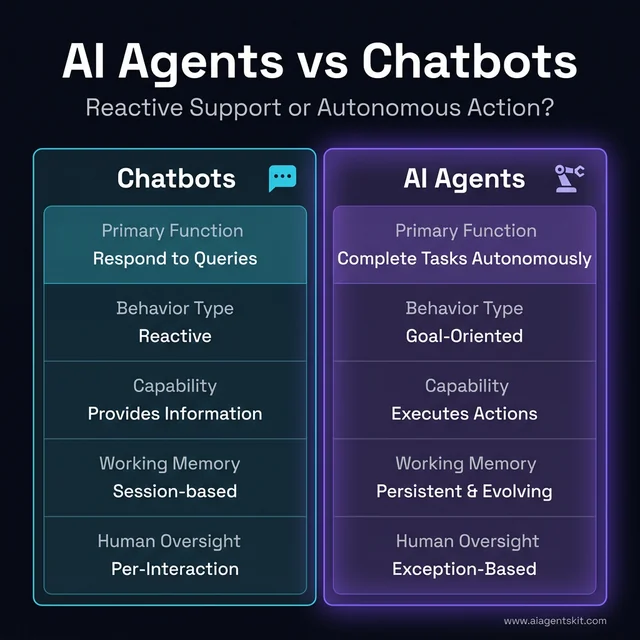
Figure 1: AI Agents vs Chatbots: A comparison of reactive support vs. autonomous action.
What Is a Chatbot? (The Foundation)
Before we compare, let’s make sure we’re on the same page about what chatbots actually are.
The Evolution of Chatbots
Chatbots have been around longer than most people realize. The first ones—back in the ELIZA days of the 1960s—were pure pattern matching. No AI, just scripts.
By the 2010s, chatbots got smarter. Natural language processing (NLP) allowed them to understand intent, not just match keywords. You could ask “what time do you close?” or “when are you open?” and get the same answer. That was progress.
Then came the LLM era. Modern chatbots powered by GPT, Claude, or similar models can hold genuinely natural conversations. They understand context within a conversation, handle typos and weird phrasing, and don’t feel like talking to a machine (most of the time). ChatGPT and similar tools demonstrated what’s possible with this technology.
But here’s what didn’t change: they’re still fundamentally reactive. They wait for you to say something, then respond. That’s the chatbot paradigm.
Types of Chatbots You’ll Encounter
Not all chatbots are created equal. Understanding the spectrum helps when evaluating solutions:
Rule-based chatbots operate on decision trees. They follow predefined paths: if user says X, respond with Y. They’re predictable, easy to build, and perfect for simple FAQ scenarios. But ask something outside their scripts, and they fall apart.
Intent-based chatbots use NLP to understand what you’re trying to accomplish. “I want to cancel my subscription” and “how do I stop my account” trigger the same intent. They’re more flexible, but still limited to recognized intents.
AI-powered chatbots leverage LLMs for genuine understanding. They handle nuance, context, and unexpected phrasing. They feel conversational because they are—powered by the same technology behind ChatGPT and Claude.
Hybrid chatbots combine approaches. They might use AI for understanding but fall back to structured flows for critical transactions. This gives flexibility where it helps and predictability where it matters.
Most businesses today use some combination—AI for understanding, structured flows for actions. The “pure AI” chatbot that handles everything through free-form conversation sounds appealing but often creates more problems than it solves. Sometimes a button is just better than a prompt.
What Chatbots Actually Do
Good chatbots excel at specific things:
- Handling FAQs — “What are your hours?” “Where’s my order?” “How do I reset my password?”
- Routing inquiries — Understanding what you need and connecting you to the right department or resource
- Collecting information — Qualification forms disguised as conversations. “What’s your budget?” “How many users do you need?”
- Guiding through predictable flows — Onboarding, troubleshooting steps, appointment booking
According to industry data, chatbots can automate roughly 95% of simple customer inquiries. That’s massive. For high-volume, predictable interactions, chatbots are cost-effective and proven.
The key word there is predictable. When the conversation follows patterns you can anticipate, chatbots shine. When it doesn’t… well, you’ve probably experienced the frustration. We’ve all been stuck in chatbot loops, repeating ourselves, trying to find the magic phrase that gets us to a human.
What Is an AI Agent? (The New Paradigm)
Now let’s talk about what makes AI agents different—and why the distinction matters.
Beyond Responding: Agents That Act
An AI agent is an autonomous software system that uses artificial intelligence to perceive its environment, make decisions, and take actions to achieve specific goals—without constant human oversight.
If you want to understand what AI agents are in more depth, we’ve got a complete guide. But here’s the essential difference from chatbots:
Agents don’t just answer your question. They solve your problem.
Say you want to reschedule a meeting. A chatbot might tell you how to access your calendar, suggest times that work, maybe even provide a link. An AI agent would check both calendars, find overlapping availability, draft a rescheduling email, send it, and update the calendar event—all from a single request.
That’s the paradigm shift. From “here’s information” to “here, it’s done.”
The Core Capabilities
What actually makes something an AI agent? Four key things:
1. Autonomy — Works toward goals without step-by-step instructions. You provide the objective; the agent figures out the path.
Example: You tell an agent “prepare for my quarterly review meeting.” It doesn’t ask you what to do next. It checks the meeting agenda, pulls relevant data from your analytics tools, drafts talking points based on past performance, and prepares a summary document—all without additional prompts.
2. Tool use — Interacts with external systems. APIs, databases, email, calendars, code execution—agents have hands, not just a mouth.
This is the technical heart of what makes agents different. A chatbot might tell you “here’s how to export your data.” An agent connects to your data source, runs the export, processes the results, and delivers the finished file. The difference is execution, not explanation.
3. Memory — Maintains context across sessions. An agent remembers what you discussed last week and builds on it.
Memory transforms one-off interactions into ongoing relationships. The agent knows your communication preferences, what worked last time, your preferred formats, even your writing style if it’s drafting on your behalf. This isn’t just convenience—it’s what enables compound productivity gains over time.
4. Multi-step execution — Handles complex workflows. Not just “send an email” but “research competitors, draft a comparison table, email it to the team, and schedule a review meeting.”
Each step might involve different tools, different data sources, different outputs. The agent orchestrates the entire workflow, handles errors along the way, and delivers the final result. That’s a fundamentally different capability than answering questions. Understanding how generative AI differs from agentic AI helps clarify why this distinction matters for your automation strategy.
According to Gartner, 40% of enterprise applications will embed task-specific AI agents by the end of 2026. That’s a staggering shift from “interesting experiment” to “standard feature.”
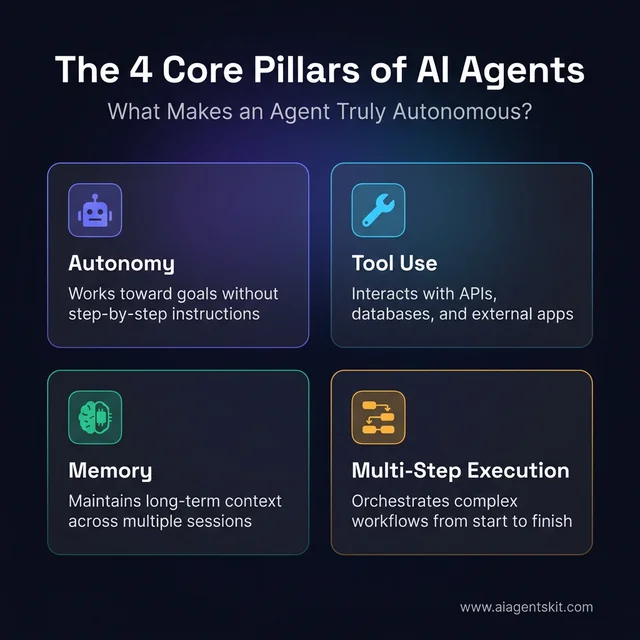
Figure 2: The four core pillars that define a true AI agent: Autonomy, Tool Use, Memory, and Multi-Step Execution.
AI Agents vs Chatbots: The Core Differences
Alright, let’s dig into the differences that actually matter.
Reactive vs Autonomous
This is the fundamental divide.
Chatbots are reactive. They wait for input, process it, respond. Every turn of conversation requires the human to initiate.
Agents are autonomous. Given a goal, they plan and execute without constant human direction. They can initiate actions, loop through multi-step processes, and handle contingencies.
Think about a customer service scenario. A chatbot handles the conversation—asks questions, provides information, maybe creates a ticket. An agent could go further: actually process the refund, update the customer record, and send a follow-up email—all without a human in the loop.
Single-Step vs Multi-Step
Chatbots are generally designed for conversational turns. Each message is a discrete interaction.
Agents orchestrate workflows. They break down complex goals into steps, execute them sequentially (or in parallel), and handle errors along the way.
A chatbot might help you draft an email. An agent could research the topic, draft multiple versions, A/B test subject lines against your historical open rates, schedule optimal send times, and follow up if there’s no reply.
That’s not hypothetical. These agents exist today.
Responding vs Executing
Here’s a phrase I’ve started using: chatbots are “read-only” AI; agents are “read-write” AI.
Chatbots read your input and write a response. That’s it. They’re information providers.
Agents read your input and write to external systems. They call APIs. Update databases. Send messages. Book meetings. Make changes in the real world.
The moment AI can do things—not just say things—you’ve crossed into agent territory.
Limited Context vs Persistent Memory
Most chatbots reset with each session. Some retain conversation history, but few maintain true long-term memory about you, your preferences, your past interactions.
AI agents, built correctly, remember. They know you prefer morning meetings. They recall that last quarter’s sales report had issues. They adapt based on what’s worked before.
Memory is what makes agents feel like they know you rather than starting fresh every time.
Now, here’s my honest take: about 80% of what gets called an “AI agent” today is really just a fancier chatbot—and that’s not necessarily bad. Marketing departments have latched onto “agent” as the hot term. But capabilities matter more than labels.
If your “agent” can’t actually take actions, doesn’t maintain memory, and requires human approval for every step… it’s a chatbot. A good one, maybe. But still a chatbot.
Cutting Through the Jargon: Chatbots, Virtual Agents, Conversational AI, and Agentic AI
Here’s where I’ll be honest: even experts draw the line differently. And the marketing industry has made things significantly worse. “Chatbot,” “virtual agent,” “conversational AI,” “AI assistant,” “agentic AI”—vendors use these interchangeably to make their product sound more advanced than it is.
Let’s clear it up:
| Term | What It Actually Means | Example |
|---|---|---|
| Rule-based chatbot | Scripted responses, decision trees, no real AI | Old bank phone menus |
| AI chatbot | LLM-powered, understands natural language, but reactive | ChatGPT (standard mode) |
| Virtual agent | Broad term for any AI-powered conversational interface | Siri, Alexa, support bots |
| Conversational AI | The technology stack enabling natural dialogue (NLP + ML + LLMs) | The engine inside modern chatbots |
| AI agent | Autonomous, goal-directed, multi-step executor with tool access | Claude with computer use, AutoGPT |
| Agentic AI | Describes any AI system that operates with agency—perceiving, reasoning, and acting | Any system running a plan → act → observe loop |
The practical test: if the system plans and acts without you prompting each step, you’re in agent territory. If it responds to each message you send, it’s a chatbot—regardless of what the marketing page says.
Is ChatGPT a Chatbot or an AI Agent?
This is one of the most-asked questions in this space, and the honest answer is: both, depending on how you configure it.
Standard ChatGPT = AI chatbot. You type a message; it responds. It doesn’t go do work in the world on your behalf without each prompt from you. It’s conversational AI at its most capable—but still fundamentally reactive.
ChatGPT with tools enabled = lightweight agent. When you use ChatGPT with code interpreter, web browsing, or file analysis, it starts exhibiting agentic behaviors: it plans which tool to use, takes action, observes the output, and adjusts. That perception–action–reflection loop is what defines agency.
ChatGPT Operator mode or Projects with persistent instructions = more genuinely agentic. These configurations allow multi-step autonomous workflows and real-world system access.
The same applies to Claude: a standard conversation is chatbot-mode. Claude operating with computer use tools and autonomous task completion crosses into real agent behavior.
What this means practically: the platform matters less than the configuration. The same underlying LLM can behave like a chatbot or an agent depending on what tools it can access and whether it has permission to act autonomously.
When evaluating any AI solution, these are the questions that actually matter:
- Can it take real actions in external systems, or only provide information?
- Does it maintain context across sessions, or reset every conversation?
- Can it handle multi-step workflows without step-by-step guidance from you?
- What happens when it hits something unexpected?
Those capabilities define what you’re actually getting, regardless of the label.
Real-World Use Cases: Chatbots in Action
Let’s get concrete. Where do chatbots make the most sense?
Customer Service FAQs
This is the classic use case—and it works. Chatbots excel at handling common inquiries around the clock. “What are your hours?” “Where’s my order?” “How do I return something?”
When 80% of questions have standard answers, chatbots can handle them faster and cheaper than human agents. The humans focus on the genuinely complex issues.
A practical example: a Shopify chatbot implementation handles routine customer questions about orders and products. It operates within scripted bounds—perfect for chatbot territory rather than agent territory.
Lead Qualification
Marketing teams love chatbots for this. A visitor lands on your pricing page. The chatbot engages: “Looking for anything specific today?” It asks qualifying questions—company size, budget, timeline—and captures contact info.
By the time a sales rep gets involved, they already know who’s worth pursuing.
Appointment Scheduling
“I’d like to book a consultation.” “Sure! What day works for you?”
Chatbots can handle the back-and-forth of scheduling, check availability (with calendar integrations), and book the slot. For high-volume scheduling—medical offices, salons, consultancies—this saves significant time.
Order Status and Simple Transactions
“Where’s my order?” The chatbot pulls tracking information. “I need to change my shipping address.” It walks through the update flow.
For e-commerce and service businesses, these high-volume, predictable interactions are perfect chatbot territory. Industry data suggests that 92% of North American banks now use AI chatbots for customer inquiries.
If you’re running an online store and want to understand how AI agents can automate your customer service, inventory management, and sales processes, check out our comprehensive guide on AI agents for ecommerce automation.
Real-World Use Cases: AI Agents in Action
Now let’s look at where agents differentiate themselves.
End-to-End Customer Resolution
Here’s where agents go beyond chatbots. A customer contacts support about a billing issue. The agent doesn’t just provide information—it investigates the account, identifies the problem, processes a correction, updates the customer record, and sends a confirmation email.
Full resolution without human intervention. That’s what agentic customer service looks like. For ready-to-use customer service frameworks, our exceptional customer service AI prompts guide provides specialized templates for support teams.
Complex Workflow Automation
Imagine you need to prepare a weekly report. The agent pulls data from your CRM, cross-references with marketing analytics, formats the results into a presentation, and distributes it to stakeholders—every Monday at 9am, without you lifting a finger.
Agents can orchestrate across multiple systems in ways chatbots simply can’t.
Research and Analysis
“Summarize what our competitors announced this quarter.”
An agent can search multiple sources, synthesize the findings, pull relevant data points, and present a structured analysis. It’s not just answering a question—it’s doing the research work.
Code and Development Tasks
Modern coding assistants like GitHub Copilot, Cursor, and Cody are increasingly agentic. They don’t just suggest code—they navigate codebases, write tests, refactor functions, and debug issues.
If you want to explore the tools developers are using, check out our comparison of AI agent frameworks. For autonomous agent frameworks specifically, see our detailed BabyAGI vs AutoGPT vs AgentGPT comparison.
The AI agent market is growing fast—projections suggest it’ll reach $52.62 billion by 2030, with a 46.3% compound annual growth rate. That’s a technology moving from “interesting” to “essential.”
AI Agents vs Chatbots by Industry: Where Each Wins
The “which should I use” question changes depending on the industry. A healthcare use case looks nothing like a sales use case. Here’s how the technology maps to real-world vertical needs.
Customer Service and Support
This is the proving ground for both technologies, and both belong here—just in different roles.
Chatbots handle the volume. Roughly 80% of support interactions follow predictable patterns—order status, return policies, password resets, account inquiries. Chatbots manage these 24/7 at a fraction of human labor cost. Studies put chatbot-driven cost reduction at 30–50% for customer service operations, and 92% of North American banks already use AI-powered chat for routine inquiries.
AI agents handle the resolution. When a billing dispute spans three invoices, two departments, and a partial refund—that’s not a chatbot problem. An agent investigates the account, processes the correction, sends the confirmation, and updates the CRM record without human escalation.
The winning architecture: chatbot at the front, agent in the back. The chatbot handles the predictable; the agent takes over when real actions are required.
Healthcare
Healthcare chatbots have quietly proven their value for years. Appointment scheduling, medication reminders, symptom triage, insurance verification—these are predictable interactions that chatbots handle reliably. The global healthcare chatbot market is projected to reach $1.49 billion in 2025 and grow to over $10 billion by 2034.
AI agents are where healthcare automation gets genuinely transformative. An agent can integrate with electronic health records (EHR), identify patients at risk of missing follow-up appointments, initiate personalized outreach, update care plans based on lab results, and flag anomalies for clinical review—all autonomously. That’s not just efficiency; it’s outcomes improvement.
The ceiling in healthcare: regulatory complexity and clinical oversight requirements mean agent autonomy has real limits. Most deployments keep humans in the loop for any clinical decision. The agents handle the logistics; clinicians handle the clinical judgment.
Marketing and Sales
Marketing teams discovered chatbot value early—lead qualification on websites, site engagement, capturing contact information. But chatbots can’t run campaigns. They field inbound interest; they don’t pursue it.
AI agents can execute multi-channel outreach sequences, analyze which prospects are most likely to convert based on behavioral data, personalize messaging at scale, schedule follow-ups, and even provide real-time coaching during sales calls. The fundamental distinction is campaign execution vs. conversation handling.
For B2B sales cycles specifically, agents handle account research, meeting prep briefs, post-demo follow-ups, and relationship context across months of interaction—work that currently consumes hours from human reps. An agent doesn’t forget a conversation from six weeks ago.
Human Resources
HR chatbots answer policy questions, schedule interviews, and direct employees to the right resource. That’s genuinely valuable for large organizations fielding hundreds of employee queries per day.
AI agents transform onboarding. Instead of a new employee filling out seven separate forms and waiting days for IT to provision accounts, an agent handles the entire workflow: system access requests, equipment orders, payroll document collection, benefits selection prompts, and training assignments—all through a single conversational interface. Organizations implementing agent-based onboarding report significant reductions in time-to-productivity for new hires.
Finance and Banking
Banks use chatbots for account balance checks, fraud alerts, and basic transaction inquiries—and they’ve adopted them aggressively (92% adoption rate for routine banking queries, as noted above).
AI agents operate deeper in the stack: loan processing workflows, portfolio rebalancing alerts, compliance documentation gathering, and anomaly investigation. The critical factor in finance is auditability—agents taking autonomous financial actions need to log every decision, because regulatory environments demand it. The best financial AI agent implementations build audit trails as a first-class feature, not an afterthought.
For a deeper look at how agents are transforming specific workflows, see our guide to AI agent use cases across industries.
When to Use a Chatbot vs an AI Agent
Here’s what I wish someone had told me earlier: most businesses should start with chatbots and scale to agents only when they need them.
Choose a Chatbot When…
High-volume, predictable inquiries dominate. If most of your interactions follow patterns—FAQs, standard processes, common questions—chatbots handle these efficiently.
Budget is constrained. Chatbot solutions start at $50-500/month for SaaS options. Some enterprise platforms cost more, but entry points are accessible.
Quick deployment is priority. Modern chatbot platforms can have something running in days or weeks. Agents typically take longer to build and configure properly.
Human escalation path is clear. Chatbots work best when there’s a fallback plan. Handle the simple stuff automated; route the complex stuff to humans.
Choose an AI Agent When…
Tasks require multi-step workflows. If you need AI to complete processes, not just answer questions, agents are built for this.
Real actions need to be executed. Updating databases, calling APIs, sending messages, booking resources—agents do; chatbots tell.
Personalization over time matters. Agents with persistent memory can build relationships and adapt to individual users.
Integration across multiple systems is needed. If the workflow spans CRM, email, calendar, and analytics, you need agent-level orchestration.
The Decision Framework
Here’s a practical way to think about it:
| Question | → Chatbot | → AI Agent |
|---|---|---|
| Are most interactions predictable? | Yes | Varied/complex |
| Does resolution require actions in other systems? | Rarely | Often |
| Do users need personalization across sessions? | Nice to have | Critical |
| What’s the acceptable response time investment? | Quick deployment | Worth longer setup |
| What’s your budget? | Limited | Flexible for ROI |
My honest take, after seeing dozens of implementations: if you’re asking “do I need an agent?”—you probably don’t, yet. Most businesses have chatbot-level problems that don’t require agent-level solutions. That’s not a knock on agents; it’s just about matching technology to actual needs.
The Hybrid Approach: Best of Both Worlds
Here’s what I think the future looks like—and what smart companies are doing now.
Use chatbots for frontline, high-volume interactions. They’re cost-effective, fast, and handle predictable queries beautifully.
Escalate to AI agents for complex cases. When the conversation moves beyond what the chatbot can handle—or when real actions need to be taken—hand off to an agent.
Design for seamless transitions. The user shouldn’t feel the handoff. Context should flow naturally from chatbot to agent to human (if needed).
What Hybrid Architecture Looks Like in Practice
Let me paint a concrete picture of how this works:
Tier 1 - Chatbot (80% of interactions):
- Customer lands on your site, asks “What are your pricing plans?”
- Chatbot provides pricing information, answers follow-up questions
- Customer asks to sign up → Chatbot guides through the self-service flow
- Simple, fast, no agent involvement needed
Tier 2 - AI Agent (15% of interactions):
- Customer has a complex billing issue spanning multiple invoices
- Chatbot recognizes complexity, hands off to agent with full context
- Agent investigates account history, identifies the problem, processes corrections
- Customer gets resolution without waiting for a human
Tier 3 - Human (5% of interactions):
- Edge cases, high-stakes decisions, or customer explicitly requests human
- Agent prepares handoff summary for human agent
- Human has full context from both chatbot and AI agent interactions
The key is context preservation. Each tier passes information to the next. The customer never has to repeat themselves. The human never starts from zero.
Implementation Patterns I’ve Seen Work
Pattern 1: Capability-based routing. Chatbot handles all conversational queries. Any request requiring system access (refunds, account changes, bookings) routes to an agent. Clear boundaries, easy to implement.
Pattern 2: Confidence-based escalation. Chatbot attempts everything but monitors its own confidence. Low-confidence responses trigger agent involvement. More fluid, but requires good uncertainty detection.
Pattern 3: Outcome-based handoff. Chatbot handles initial interaction. If resolution isn’t achieved after N turns, agent takes over. Simple logic, focused on results rather than capability detection.
Most successful implementations I’ve seen start with Pattern 1 (clear boundaries) and evolve toward Pattern 2 as they better understand their traffic.
This hybrid model is gaining traction. Current data shows only about 8.6% of companies have AI agents deployed in production, while many more use chatbots. But hybrid architectures—where both technologies work together—are emerging as the practical path forward.
The future isn’t agents OR chatbots. It’s both, working in concert.
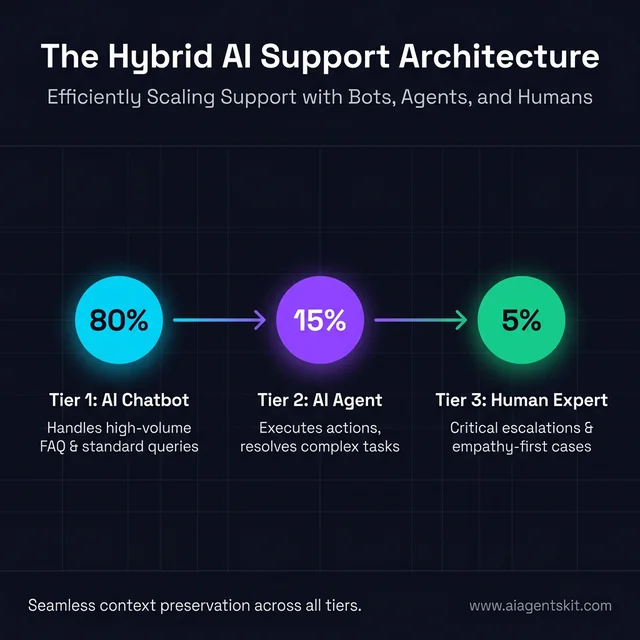
Figure 3: Hybrid AI Support Architecture: Scaling customer experience through a combination of chatbots, agents, and human experts.
From Chatbot to Agent: A Practical Migration Path
Most businesses don’t start with agents. They start with a chatbot, hit its limits, and then wonder what comes next. Here’s a migration path that actually works.
Step 1: Audit your chatbot usage. Pull the logs. What percentage of conversations get escalated to humans? What are the top reasons? Conversations that fail or escalate consistently are your agent candidates—they represent the 20% that needs something more than a scripted response.
Step 2: Identify automation candidates. From that escalation list, look for patterns that involve taking actions across systems. “Customer wants a refund processed” is an agent task. “Customer wants to know the refund policy” is a chatbot task. The distinction is always: information vs. action.
Step 3: Pilot with a scoped, isolated use case. Don’t try to automate everything at once. Pick one workflow—order resolution, onboarding, report generation—and build an agent for that specifically. Scope limits risk. Agent projects that fail almost always over-scope in week one.
Step 4: Build the integration layer deliberately. This is where most projects underestimate effort. Connecting an agent to your CRM, ticketing system, or ERP requires API work, authentication setup, and data mapping. MIT research suggests infrastructure and integration consume over 80% of the real effort in agent deployments—far more than the model work.
Step 5: Add oversight first, expand autonomy gradually. Launch with human-in-the-loop approval for any consequential action. As you build confidence in the agent’s behavior, extend its autonomy. An agent that earns trust incrementally is far more valuable than one given full autonomy on day one and then pulled back after a costly mistake.
The most successful agent deployments follow this pattern: a chatbot handles 85% of interactions, an agent handles 12%, and a human handles 3%. Getting to that ratio takes iteration—not a perfect architecture from the start. If you want to see what agent code actually looks like before committing to a platform, building a simple AI agent in Python is a good place to start.
Leading Platforms: Chatbots and AI Agents in 2026
If you’re ready to move from theory to implementation, here’s where the market stands. This isn’t comprehensive—the space shifts fast—but it covers the most established options across budgets and use cases.
Top Chatbot Platforms
For customer service:
- Intercom — The gold standard for SaaS customer service chat. Strong AI layer, excellent routing, conversation history. Pricing starts around $74/month; enterprise tiers get significantly more expensive.
- Zendesk AI — Strong integration with Zendesk tickets. The Answer Bot handles deflection well if you’re already in the Zendesk ecosystem.
- Tidio — Solid choice for small and mid-sized businesses. Clean interface, affordable pricing (free tier available, paid from ~$19/month), good e-commerce integrations.
For marketing and sales:
- Drift — Built specifically for revenue teams. Real-time lead qualification, Salesforce and HubSpot integrations. Enterprise pricing (requires a sales call).
- ManyChat — Dominant for social media chatbots (Instagram, Facebook, WhatsApp). Excellent for DTC e-commerce brands.
For developers:
- Botpress — Open-source, highly customizable, good middle ground between DIY and enterprise. Free with paid cloud hosting options.
Top AI Agent Platforms
No-code and low-code:
- n8n — Workflow automation with AI agent capabilities. Self-hostable, starting around $20/month cloud. One of the most flexible no-code options for building agent-like automations.
- Make.com — Visual workflow builder with AI modules. Good for connecting AI to an existing tech stack without deep coding.
- Lindy AI — Purpose-built AI agent platform for non-technical users. Handles email, scheduling, CRM tasks. Starting around $49/month.
Developer-focused:
- LangChain / LangGraph — The most widely used agent framework for developers. Highly flexible, massive ecosystem. Open source. Our guide to how multi-agent systems work together explains how LangGraph fits into the broader orchestration picture.
- CrewAI — Multi-agent orchestration framework. Excellent for building teams of specialist agents that collaborate.
Enterprise:
- Salesforce Agentforce — Native to Salesforce. If your business already runs on Salesforce CRM, this is worth serious evaluation. Deep integration is its main advantage.
- ServiceNow AI Agents — Dominant in IT service management. Ideal for incident resolution, knowledge management, and change management workflows.
- Microsoft Copilot Studio — For Microsoft 365-heavy organizations. Built on Azure OpenAI with enterprise security and compliance built in.
For teams working with small business budgets, prioritize platforms with free trials and transparent pricing over enterprise options that require a sales call just to see costs.
Platform Selection Checklist
Before committing, run through these six questions:
- Does it integrate with your existing stack (CRM, helpdesk, databases)?
- Who will build and maintain it—do you need technical resources?
- What’s the pricing model at scale—per-conversation, per-user, or flat rate?
- Does it offer human escalation routing for edge cases?
- What audit logging does it provide for compliance?
- Can you pilot on one workflow before full commitment?
The Real Numbers: AI Agent vs Chatbot ROI and Costs
Vendors love to present the upside without the full picture. Here’s a more complete view.
What Chatbots Actually Cost (and Return)
Operational costs:
- SaaS chatbot platforms: $19–$500/month for SMBs; enterprise custom builds can run $10,000–$30,000 upfront
- Annual maintenance for a well-run chatbot: $1,000–$5,000
What they return:
- Reduce customer service operating costs by 30–50%
- Average savings of ~$300,000/year for mid-sized businesses handling significant support volume
- Save approximately $0.70 per customer interaction deflected from human agents
- 62% of consumers prefer quick chatbot answers over waiting for a human—which means less abandonment
- According to Gartner, AI deployments in contact centers will cut agent labor costs by $80 billion by 2026
Chatbots are accessible, ROI-positive for most businesses with predictable interaction volumes, and relatively fast to deploy. For organizations doing volume, the math usually works.
What AI Agents Actually Cost (and Return)
Operational costs:
- SaaS agent platforms: $49–$1,000/month for core capabilities
- Custom agent development: $10,000–$50,000 for simpler scoped agents; $50,000–$150,000+ for complex multi-system integrations
- Annual maintenance for self-learning agent systems: $20,000–$50,000
- LLM API costs: variable, and they scale with usage—a high-volume agent can generate meaningful API bills
What they return:
- Teams adopting AI agents report productivity gains of 13–40% across relevant workflows
- Programmers using AI-agent tools complete comparable tasks 126% faster on average
- ROI in automation-heavy implementations typically reaches 200–500% within 3–6 months when workflows genuinely suit agent capabilities
- The global AI customer support agent market is projected to reach $15.82 billion in 2025, growing to $126.82 billion by 2035—reflecting where enterprise investment is heading
Agents generate real returns—but they require real investment to set up correctly.
The Hidden Costs Vendors Don’t Mention
Integration complexity. Every system connection requires engineering time: API setup, authentication, data mapping, error handling. It’s not a checkbox—it’s a project.
LLM API costs at scale. A popular agent making thousands of API calls daily can generate unexpected compute bills. Budget for this up front.
Governance and monitoring. Agents taking autonomous actions need oversight infrastructure: prompt monitoring, output auditing, exception handling workflows.
Change management. Teams need to learn how to work with agents, not just near them. Workflow redesign, training, and adoption support are real time investments.
None of these should be deal-breakers, but any vendor who doesn’t mention them is underselling what implementation actually involves.
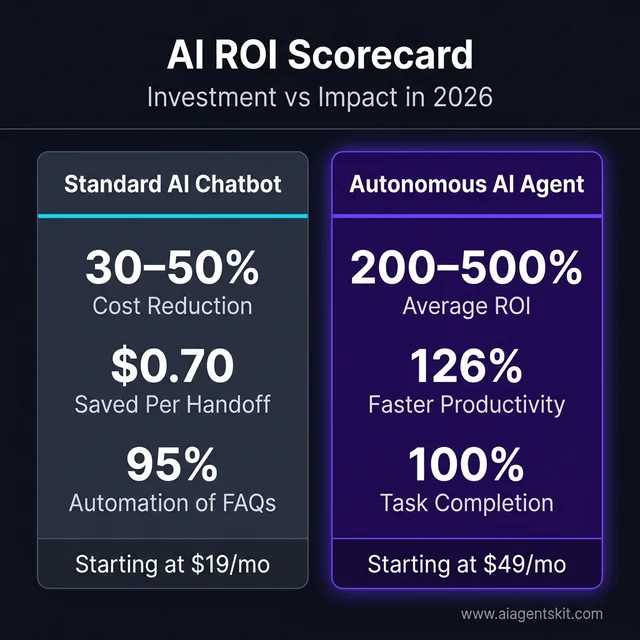
Figure 4: AI ROI Scorecard: Comparing the investment and impact of standard chatbots vs. autonomous agents in 2026.
Governance, Security, and Risk: What to Watch Before You Deploy
This is the conversation most vendor demos skip. Deploying AI—whether chatbot or agent—introduces real risks that need real mitigation.
Chatbot Risks
Hallucinations. LLM-powered chatbots can confidently state incorrect information. For customer-facing deployments, this creates brand risk and potential liability. Mitigation: ground chatbot responses in verified knowledge bases (RAG architecture), and route anything outside that knowledge to a human.
Data privacy. Customers sharing sensitive information with chatbots creates GDPR, HIPAA, and CCPA exposure. Every piece of PII flowing through a chatbot needs a clear data governance policy—where it’s stored, how long it’s retained, who can access it.
Bias in training data. Chatbots can perpetuate and amplify biases present in their training data. This affects customer experience quality and creates equity risks in regulated industries.
Security of the chatbot interface itself. Attackers have discovered chatbot prompt injection—crafting inputs that override system instructions. Any chatbot handling sensitive workflows needs adversarial testing before deployment.
AI Agent Risks
Autonomous actions with unintended consequences. An agent with write access to your CRM, email system, and calendar can do a lot of damage if something goes wrong. The principle of least privilege applies: give agents only the access they actually need, scoped to the task.
Prompt injection at scale. If an agent reads external content (emails, web pages, documents) as part of its workflow, malicious actors can embed instructions in that content designed to hijack the agent’s behavior. This is a real attack vector in production agent deployments.
Reliability at mission-critical thresholds. Industry estimates put real-world AI agent reliability around 80% for complex tasks—acceptable for many use cases, genuinely problematic for others. Never deploy an agent for workflows where failure creates irreversible consequences without human-in-the-loop checkpoints.
Audit trail requirements. Any agent taking actions in regulated industries (finance, healthcare, legal) needs to log what it did, why it did it, and what data it accessed. Build auditability in from day one—retrofitting it later is painful.
The practical takeaway: agents are powerful because they act. That same power is what makes governance non-optional. For a broader look at where AI agents are heading in 2026 and how governance frameworks are evolving, that post covers the landscape in depth.
The Future: Where Both Are Heading
Where do I think this goes?
Chatbots will get more capable. The line between advanced chatbots and simple agents will keep blurring. Expect chatbot platforms to add more tool integrations, better memory, more autonomy—effectively becoming more agent-like.
Agents will become easier to deploy. Today, building a robust agent requires significant technical expertise. That barrier will drop as platforms mature and best practices solidify.
The terminology will stay messy. Sorry. Marketing departments will keep calling things “agents” regardless of what they actually are.
Capabilities will matter more than labels. What can the system actually do? That’s the question that matters. Whether someone calls it a chatbot, agent, assistant, or copilot is secondary.
Multi-agent orchestration will grow. Instead of one super-agent, we’ll see specialized agents working together—one for research, one for drafting, one for compliance checking—with orchestration frameworks managing collaboration.
My prediction? By 2028, the distinction between “chatbot” and “agent” will feel as artificial as the distinction between “website” and “web app” feels today. They’ll blend. But for now, understanding the differences helps you make smarter decisions.
Frequently Asked Questions
What is the difference between an AI agent and a chatbot?
A chatbot responds to queries conversationally—you ask, it answers. An AI agent takes autonomous actions to achieve goals—you provide an objective, and it plans, executes, and completes multiple steps without constant guidance. Agents have tools to interact with external systems; chatbots primarily provide information within conversations.
Is an AI chatbot the same as an AI agent?
Not quite. An AI chatbot uses artificial intelligence (like an LLM) to understand and respond naturally, but it’s still fundamentally a conversational interface. An AI agent adds autonomy, tool access, persistent memory, and multi-step execution capabilities. Think of an AI chatbot as smarter conversation; an AI agent as automated work.
Are AI agents replacing chatbots?
No—they’re complementary technologies. Chatbots remain excellent for high-volume, predictable interactions like FAQs and lead qualification. AI agents excel at complex, action-oriented tasks. Most businesses need both, with chatbots handling frontline interactions and agents managing workflows that require real-world actions.
When should I use a chatbot vs an AI agent?
Use a chatbot when interactions are predictable, you need quick deployment, and providing information is sufficient. Use an AI agent when tasks require executing actions across systems, completing multi-step workflows, or building personalized experiences over time. Most businesses should start with chatbots and add agents as needs become clearer.
Can AI agents and chatbots work together?
Yes—this hybrid approach is becoming best practice. Chatbots handle frontline, high-volume interactions efficiently. When queries become complex or require actions, they escalate to AI agents. When agents need human oversight, they escalate to people. Designing for seamless handoffs creates the best user experience.
Do I need an AI agent for my small business?
Probably not yet. Most small businesses have chatbot-level problems—FAQs, lead qualification, appointment booking—that don’t require agent-level complexity. Start with a chatbot. As your needs grow more complex—multi-system workflows, autonomous task completion—then evaluate agents. Don’t over-engineer before you need to.
Is ChatGPT a chatbot or an AI agent?
Standard ChatGPT is an AI chatbot—highly capable, but reactive. You send a message; it responds. It doesn’t autonomously plan and execute multi-step work on your behalf. However, ChatGPT with tools enabled (code interpreter, web browsing, file analysis) exhibits lightweight agentic behaviors: it plans which tool to use, takes action, observes the result, and adjusts. In Operator mode or with persistent Projects instructions, it becomes more genuinely agentic. The same underlying model behaves differently depending on what tools it has access to and whether it has permission to act without per-step prompting from you.
How do AI agents complete multi-step tasks without constant human input?
Agents run a perception–planning–action–observation loop. When given a goal, the agent breaks it down into steps (planning), executes each step using available tools (action), reads the output (observation), and adjusts its next action based on what it learned. This loop continues until the goal is completed or the agent encounters something it can’t resolve. Memory systems—storing context across steps—keep the agent on track across long workflows. The short version: agents don’t wait to be told what to do next; they figure it out from the goal you gave them at the start.
What are the best AI agent platforms for small businesses?
For small businesses without development resources, the best starting points are n8n (flexible no-code workflow automation, free self-hosted tier), Make.com (visual automation with AI modules), and Lindy AI (purpose-built for non-technical users, handles email and CRM tasks). If you’re already using HubSpot, its native AI features are worth exploring before adding a separate agent platform. For teams with developer resources, LangChain offers the most flexibility. The practical advice: start with a platform that integrates with tools you already use, rather than the most powerful option available. Power you can’t configure is just cost.
How much can AI save my business—chatbot vs. agent?
Chatbots typically cost $19–$500/month for SaaS platforms and deliver 30–50% reduction in customer service operating costs. Businesses handling significant support volume often save $150,000–$300,000 annually. AI agents have higher setup costs ($10,000–$150,000+ for custom builds) but can deliver 200–500% ROI within 3–6 months when deployed on genuinely high-value workflows. The clearest signal for agent investment: if a workflow currently consumes 10+ hours of skilled human time per week and follows a repeatable pattern, an agent typically pays for itself within one quarter. Start with chatbots for high-volume, low-complexity interactions; move to agents when the ROI math on specific complex workflows becomes clear.
Conclusion
So, what’s the real difference between AI agents and chatbots?
Chatbots talk. Agents do.
Both have their place. Chatbots remain powerful for high-volume, conversational interactions where providing information is the goal. AI agents shine when you need autonomous systems that take actions, complete workflows, and make things happen in the real world.
The terminology is genuinely messy—and it’ll stay that way for a while. But capabilities matter more than labels. When evaluating any AI solution, ask: Can it actually do what I need? Does it take actions or just provide answers? Does it remember and learn over time?
My honest advice: start where you are. If you have chatbot-level problems, a good chatbot delivers real value. If you’re outgrowing that—if you need AI that executes, not just responds—then it’s time to explore agents.
And if you’re curious about building agents yourself, you might want to try building a simple agent with Python to see what’s possible. For those interested in running a self-hosted AI agent with full system access, see our Moltbook & OpenClaw complete guide—it covers everything from installation to security best practices.
The question isn’t “chatbots or agents?” It’s “what do you actually need today—and what might you need tomorrow?”
Start with that, and the rest gets a lot clearer.