Build AI Chatbot for Shopify Stores: Complete Guide (2026)
Learn how to build an AI chatbot for your Shopify store with no-code tools, Shopify Inbox, and custom OpenAI integration. Includes abandoned cart recovery, multilingual support, FAQs, and ROI calculations.
Customer support is the biggest bottleneck for growing Shopify stores. Most merchants struggle to respond to inquiries fast enough, leading to lost sales and frustrated customers. Research from Gartner shows that 67% of consumers expect immediate responses when shopping online, yet the average Shopify merchant takes 4–6 hours to reply to customer messages.
AI chatbots solve this by providing instant, 24/7 responses that understand products, policies, and order history. This guide covers three approaches to adding a conversational AI chatbot for online store: no-code tools for beginners, native Shopify solutions for simplicity, and custom builds for developers who need full control — plus critical topics like abandoned cart recovery, multilingual support, and data privacy that most guides skip entirely.
Store owners at every technical level — from beginners to experienced developers — will find a method that fits their situation. The AI customer service strategy guide explains how chatbots fit into a broader support system beyond these individual implementations.
Why Your Shopify Store Needs an AI Chatbot in 2026
The expectations of online shoppers have shifted dramatically. A 2025 Zendesk study found that 64% of consumers expect 24/7 availability from ecommerce support channels. When customers don’t get quick answers, they abandon carts — and carts get abandoned constantly. Baymard Institute’s research puts the global average cart abandonment rate at 70–75%, representing trillions in recoverable ecommerce revenue annually.
Implementing a Shopify chatbot for customer service addresses these modern expectations. An AI chatbot ecommerce solution provides immediate responses customers demand while reducing operational costs for merchants.
AI chatbots address these challenges in several concrete ways:
Immediate Response Times: AI chatbots answer common questions in under 2 seconds. This includes queries about shipping times, return policies, product availability, and order status. Customers get information when they’re actively considering a purchase — not hours later when they’ve moved on.
Cost Efficiency: Hiring human support staff costs $15–25 per hour on average. An AI chatbot handling routine inquiries costs $50–200 monthly depending on volume. For a store receiving 500 support messages monthly, this represents savings of $1,000–2,000 per month while improving response quality for common questions.
Conversion Rate Improvements: According to Gartner’s 2025 retail AI report, ecommerce sites using AI chatbots see 10–30% increases in conversion rates. Customers get answers that remove purchase objections immediately — questions about sizing, compatibility, and shipping are resolved instantly rather than requiring email exchanges.
Upselling and Cross-Selling at Scale: Beyond answering questions, well-configured AI chatbots can proactively suggest complementary products. A customer asking about a jacket can be shown matching accessories. Stores implementing chatbot-driven product recommendations report average order value (AOV) increases of 10–15%.
Handling Repetitive Queries: Roughly 80% of inquiries fall into predictable categories — “Where is my order?”, “What are your shipping options?”, “What’s your return policy?” AI chatbots handle these flawlessly, freeing human agents to focus on complex issues requiring judgment and empathy.
Understanding the difference between chatbots and AI agents helps clarify what technology matches specific needs. Chatbots handle scripted conversations, while AI agents can take actions like processing refunds or updating orders.
Shopify AI Chatbot Comparison: 5 Top Tools at a Glance
Choosing the right chatbot platform determines success more than any technical detail. Here’s how the leading options compare for Shopify stores in 2026:
| Tool | Best For | Free Tier | Starting Price | AI Capability | Shopify Integration |
|---|---|---|---|---|---|
| Tidio (Lyro AI) | Growing stores (100–1K chats/mo) | Yes (50 chats/mo) | $29/mo | Custom NLP (Lyro AI) | Deep native |
| Shopify Inbox | Small stores, zero budget | Always free | Free | Shopify Magic AI | Native built-in |
| Gorgias | High-volume / enterprise | No | $10/mo + usage | GPT-based | Deep (tickets + orders) |
| Zipchat AI | Sales-focused / cart recovery | No | ~$49/mo | Custom LLM | Native |
| Custom OpenAI | Developers, 1,000+ chats/mo | API credits only | ~$10–20/mo API | GPT-4o / GPT-4o-mini | API-based |
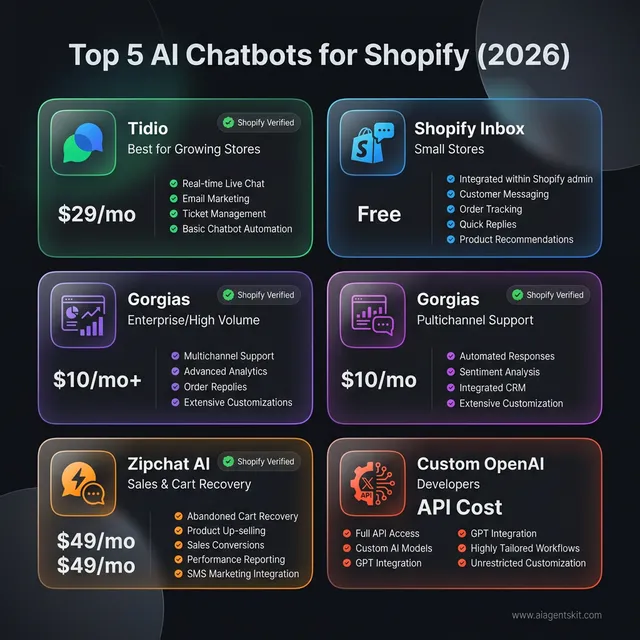
Top 5 AI Chatbots for Shopify (2026) Comparison: A comprehensive breakdown of the leading conversational AI solutions tailored for the Shopify ecosystem. This visualization highlights the strategic positioning of each tool, from the entry-level accessibility of Shopify Inbox (Ideal for early-stage stores) to the enterprise-grade depth of Gorgias. Tidio remains the dominant midrange choice with its native Lyro AI, while Zipchat targets the high-ROI abandoned cart recovery niche. For larger merchants processing 1,000+ monthly conversations, the ‘Custom OpenAI’ path offers the lowest operational cost per conversation through direct API integration. Each platform is evaluated on its unique capability to integrate with Shopify’s core data—products, orders, and customer history—ensuring that merchants can select a technology stack that scales with their specific traffic volume and technical capabilities.
The right choice depends on budget, technical resources, and conversation volume. Stores under 100 monthly conversations should start with Shopify Inbox. Growing stores in the 100–1,000 range see consistent ROI from Tidio’s paid plans. High-volume merchants processing thousands of monthly conversations often find custom OpenAI integrations more cost-effective long-term.
Option 1: Build a No-Code AI Chatbot with Tidio
Tidio has emerged as the leading Shopify chatbot app for merchants. Available directly from the Shopify App Store, this no-code solution includes a free tier with basic functionality, while paid plans add Lyro AI — which uses NLP (Natural Language Processing) to understand customer intent rather than relying on keyword matching.
Why Tidio Works for Most Shopify Stores
Tidio integrates directly with Shopify’s API, meaning it accesses real-time inventory data, order information, and customer history. The Lyro AI feature launched in late 2024 and has improved through 2025–2026, now handling complex multi-turn conversations about products and orders.
Key advantages:
- Free tier supports up to 50 conversations monthly
- Lyro AI understands context and remembers conversation history
- Visual chatbot builder requires zero coding
- Pre-built templates for common ecommerce scenarios
- Mobile app for managing conversations on the go
- Abandoned cart recovery triggers built into paid plans
Step-by-Step Setup Process
Step 1: Install from Shopify App Store Search for “Tidio” in your Shopify admin under Apps > Shop for apps. Click “Add app” and grant the requested permissions. Tidio needs access to products, orders, and customer data to provide accurate responses.
Step 2: Connect Your Shopify Store After installation, Tidio automatically syncs with store data. This takes 2–5 minutes depending on catalog size. The sync includes products, collections, inventory levels, and order history.
Step 3: Enable Lyro AI In the Tidio dashboard, navigate to the Lyro section. Enable AI responses for common questions. Initial training uses the FAQ page and product descriptions. Review and edit AI-generated responses before going live.
Step 4: Configure Response Scenarios Set up specific responses for:
- Order tracking (“Where is my order?”)
- Shipping questions (“How long does shipping take?”)
- Return policy inquiries
- Product recommendations based on browsing history
- Out-of-stock notifications with restock alerts
- Abandoned cart follow-up messages
Step 5: Test Before Going Live Use Tidio’s preview mode to test conversations. Try edge cases like misspelled product names, vague questions (“Do you have shoes?”), and multi-part queries. Adjust responses based on test results.
Pricing and When to Upgrade
The free tier works for stores with light support volume (under 50 conversations monthly). The Starter plan ($29/month) adds unlimited conversations and basic AI features. The Lyro AI plan ($89/month) unlocks the full AI capabilities described above.
Most growing stores see positive ROI on the Lyro plan once they hit 200+ monthly conversations, as it reduces human support hours by approximately 40%.
Exploring other AI tools for small business complements a chatbot with additional automation capabilities across marketing, inventory, and operations.
Option 2: Use Shopify Inbox with AI Features
Shopify Inbox is the platform’s native Shopify live chat app and messaging solution. This built-in Shopify AI assistant has evolved in 2025–2026, adding AI-powered features that make it viable for smaller stores or those wanting to minimize app overhead.
What Shopify Inbox Offers
Shopify Inbox consolidates customer messages from multiple channels: online store chat, Facebook Messenger, and Instagram DMs. The 2026 update introduced AI-powered suggested replies and automated conversation routing.
Key features:
- Completely free for all Shopify plans
- Native integration (no third-party dependencies)
- AI-suggested responses based on store data
- Automatic order lookup when customers ask about purchases
- Shared inbox for team collaboration
- Shopify Magic AI for reply suggestions
Setup Process
Step 1: Enable Shopify Inbox From the Shopify admin, go to Settings > Apps and sales channels. Find Shopify Inbox and click “Open.” If it’s not installed, add it from the Shopify App Store.
Step 2: Configure Quick Replies Create templates for the most common responses. Navigate to Settings > Quick replies. Good starting templates include:
- “Thanks for reaching out! Let me help you find products or check your order status.”
- “Standard shipping takes 3–5 business days. Express shipping (1–2 days) is available at checkout.”
- “Track your order here: [automatic order lookup link]”
Step 3: Set Up Automated Responses Configure away messages for after-hours inquiries. The AI detects when a query requires human attention versus when an automated response suffices.
Step 4: Enable Order Tracking Queries Shopify Inbox automatically recognizes order-related questions and pulls tracking information. Enable this in Settings > Order tracking.
Step 5: Configure Channels Decide which channels to enable: online store chat, Facebook, Instagram, or all three. Each channel can have customized welcome messages.
Limitations to Consider
Shopify Inbox lacks the sophisticated AI conversation capabilities of dedicated chatbot platforms. It excels at routing and simple responses but struggles with complex product questions or recommendations. The AI suggestions are helpful but require more human oversight than tools like Tidio’s Lyro.
Best for: Stores processing fewer than 100 support inquiries monthly, or those prioritizing simplicity over advanced features.
Option 3: Build a Custom AI Chatbot with OpenAI
Developers and technically-minded merchants may prefer to integrate a chatbot with their Shopify store through custom solutions. This approach offers unlimited customization, direct control over the AI model, and potentially lower costs at scale.
When Custom Build Makes Sense
Consider the custom approach if:
- Deep integration with custom Shopify apps or external systems is needed
- Specific AI models are required (Claude, GPT-4o, or open-source alternatives)
- The conversation flow requires complex conditional logic
- The store processes 1,000+ monthly conversations (API costs may beat SaaS pricing)
- Development resources are available
Technical Architecture
A custom Shopify chatbot typically consists of:
- Frontend widget: JavaScript chat interface embedded in the theme
- Backend API: Server handling OpenAI API calls and Shopify data retrieval
- Shopify integration: Storefront API or Admin API access for real-time data
- Vector database: For RAG (Retrieval-Augmented Generation) with the product catalog
Implementation Example
Below is a simplified implementation using OpenAI’s API and Shopify’s Storefront API:
// Backend: OpenAI API integration
const OpenAI = require('openai');
const openai = new OpenAI({ apiKey: process.env.OPENAI_API_KEY });

async function getChatbotResponse(userMessage, conversationHistory) {
  const systemPrompt = `You are a helpful customer service assistant for a Shopify store.
  Use the provided product information to answer questions accurately.
  If you don't know something, offer to connect the customer with a human agent.`;

  const response = await openai.chat.completions.create({
    model: "gpt-4o-mini",
    messages: [
      { role: "system", content: systemPrompt },
      ...conversationHistory,
      { role: "user", content: userMessage }
    ],
    temperature: 0.7,
    max_tokens: 300
  });

  return response.choices[0].message.content;
}
// Shopify theme: Add to theme.liquid before closing </body> tag
<div id="custom-chatbot" data-shop-domain="{{ shop.permanent_domain }}"></div>
<script src="{{ 'chatbot.js' | asset_url }}" async></script>// Frontend: chatbot.js
class ShopifyChatbot {
constructor() {
this.container = document.getElementById('custom-chatbot');
this.conversationId = this.generateConversationId();
this.render();
}
render() {
this.container.innerHTML = `
<div class="chat-widget">
<div class="chat-header">Customer Support</div>
<div class="chat-messages" id="chat-messages"></div>
<input type="text" id="chat-input" placeholder="Ask about products or orders...">
</div>
`;
this.container.querySelector('#chat-input').addEventListener('keypress', (e) => {
if (e.key === 'Enter') this.sendMessage(e.target.value);
});
}
async sendMessage(message) {
this.addMessage('user', message);
const response = await fetch('/apps/chatbot/api', {
method: 'POST',
headers: { 'Content-Type': 'application/json' },
body: JSON.stringify({ message, conversationId: this.conversationId })
});
const data = await response.json();
this.addMessage('assistant', data.reply);
}
}
new ShopifyChatbot();Security Considerations
Never expose the OpenAI API key in frontend code. Use a backend server or Shopify’s app proxy feature to keep credentials secure. Implement rate limiting to prevent API abuse — unexpected traffic spikes could generate significant costs quickly.
Cost Estimation
OpenAI’s GPT-4o-mini costs approximately $0.15 per million input tokens and $0.60 per million output tokens. A typical customer service conversation (10 messages) costs roughly $0.01–0.02. For 1,000 monthly conversations, expect $10–20 in API costs — significantly less than most SaaS chatbot platforms at scale.
For detailed API implementation patterns, refer to this OpenAI API tutorial.
How AI Chatbots Recover Abandoned Carts on Shopify (With Real Numbers)
Cart abandonment is one of the most painful revenue leaks in ecommerce — and one of the highest-ROI problems AI chatbots solve. The global average cart abandonment rate sits between 70–75%, with mobile shoppers abandoning at even higher rates (84%+). For a Shopify store generating $100,000 in monthly revenue, that represents $230,000+ in revenue that left without converting.
The reasons shoppers abandon are predictable: unexpected costs at checkout (48–55% of cases), forced account creation (24–26%), and complicated checkout flows (17–22%). Research on AI-powered cart recovery shows proactive chatbots can recover up to 35% of abandoned carts — compared to roughly 10% recovery through traditional abandoned cart emails alone.
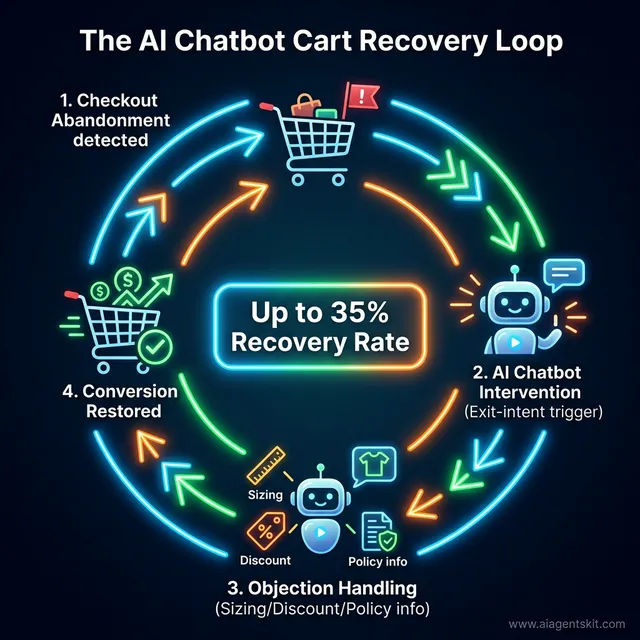
The 35% Recovery Advantage: The AI-Powered Cart Recovery Loop in action. Unlike traditional email sequences that trigger hours after a customer leaves, the AI chatbot operates in the ‘Golden Window’—the seconds immediately following an abandonment signal. By detecting exit-intent or checkout friction, the bot can intervene with precise objection handling. Whether the issue is shipping costs (addressed via a dynamic discount) or a sizing question (addressed via RAG-driven product knowledge), the AI prevents the bounce from becoming a permanent loss. Implementing this loop allows Shopify merchants to reclaim up to 35% of potentially lost revenue, effectively future-proofing their conversion rates against the growing 70-75% industry-wide cart abandonment rate.
How Chatbot Cart Recovery Works
The mechanism is real-time intervention. Unlike email (which arrives when the customer has physically left the site), chatbots engage while the shopper is still present or return within minutes of exit.
Trigger strategies that work:
- Exit-intent detection: Chatbot appears when cursor moves toward browser close button
- Time-on-page: Bot activates after 60–90 seconds on the checkout page without action
- Cart value thresholds: Higher-value carts trigger priority outreach
- Browse abandonment: Customer views a product 2+ times without adding to cart
What high-performing recovery messages say: Not generic “You left something!” messages — instead, the chatbot addresses specific friction. If the cart contained a $150 item, the bot might ask: “Need help with sizing before you go?” or offer: “Would a 10% first-order discount help with your decision?” Converting this response into a multi-turn conversation — where the AI actually addresses objections — is where AI chatbots dramatically outperform email sequences.
Tools built for Shopify cart recovery:
- Zipchat AI: Real-time intervention with personalized discount triggers
- Gorgias: Deep Shopify order data integration with recovery workflows
- Maisie AI: Abandoned cart messages via chat, SMS, and Messenger
- Ochatbot: Add-to-cart prompts and generative AI-powered recovery conversations
The conversational commerce market — Shopify chatbots included — is projected to exceed $290 billion globally by 2025, driven in large part by cart recovery and proactive sales automation.
Multilingual AI Chatbots for Shopify’s Global Merchant Base
Shopify serves merchants in 175+ countries, yet most chatbot implementations default to English only. For stores with significant international traffic, this is a missed opportunity — and a competitive disadvantage.
Which Platforms Handle Multilingual Well
The range in multilingual capability across chatbot tools is substantial:
| Tool | Languages Supported | Approach |
|---|---|---|
| Verifast AI | Up to 125 languages | Automatic detection + response |
| Ask Timmy | Up to 95 languages | Detection-based |
| Nurix AI | Multi-language | 24/7 multichannel |
| Tidio | Multiple (manual config) | Requires setup per language |
| Custom OpenAI | All GPT-supported languages | System prompt configuration |
| Shopify Inbox | Limited AI multilingual | Basic, manual |
Custom Build Multilingual Configuration
For custom OpenAI integrations, multilingual support is built in — GPT-4o handles most world languages natively. The system prompt can be adjusted to detect and match the customer’s language automatically:
const systemPrompt = `You are a customer service assistant for [Store Name].
Always respond in the same language the customer uses.
If the customer writes in French, respond in French.
If the customer writes in Spanish, respond in Spanish.
Store information: ${storeContext}`;
Omnichannel: Beyond the Website Chat Widget
Effective multilingual support goes beyond the website chat bubble. Leading Shopify merchants integrate AI chatbots across:
- WhatsApp Business API — dominant in Brazil, India, and Europe
- Instagram DMs — strong for fashion and lifestyle brands
- Facebook Messenger — still relevant for certain demographics
- SMS via Klaviyo or Attentive — for mobile-first audiences
Shopify Inbox handles Facebook Messenger and Instagram natively. For WhatsApp, custom integrations or tools like Tidio’s paid plans open that channel.
GDPR and Data Privacy: What Shopify Chatbot Users Need to Know
Every chatbot interaction collects customer data — names, email addresses, order history, conversation content. For Shopify merchants selling to EU customers (GDPR) or California residents (CCPA), this data handling creates legal obligations that many store owners overlook until they get a complaint.
What Data AI Chatbots Collect
| Data Type | Why Collected | Privacy Risk Level |
|---|---|---|
| Customer name | Personalization | Low |
| Email address | Follow-up, account lookup | Medium |
| Order data | Status queries | Medium |
| Conversation transcripts | Quality improvement, AI training | High |
| Browsing behavior | Product recommendations | High |
Key Compliance Steps for Shopify Merchants
For no-code tools (Tidio, Gorgias, Zipchat):
- Sign the vendor’s Data Processing Agreement (DPA) — most offer one in account settings
- Update the store’s privacy policy to disclose chatbot data collection
- Add a consent notice in the chat widget before data is collected (especially for EU traffic)
- Verify the vendor’s data storage location (EU-based servers for GDPR-strict stores)
For custom OpenAI builds:
- OpenAI’s API terms prohibit using customer conversation data to train OpenAI’s models (as of 2026) — verify this remains current in OpenAI’s latest policy
- Implement data retention policies — don’t store conversation transcripts longer than necessary
- Use Shopify’s built-in customer data deletion tools when a customer requests erasure
The reality practitioners find: Most small Shopify merchants don’t address chatbot data privacy proactively. The GDPR fines for e-commerce violations, while well-publicized, have mostly targeted large retailers — but the exposure is real and grows as stores scale internationally.
How to Train Your Chatbot on Product Data
Generic chatbot responses hurt sales. When a customer asks, “Will this jacket fit me?” a well-trained chatbot references size charts, materials, and fit notes. An untrained one gives vague responses that don’t help.
Learning how to train a chatbot on Shopify products effectively separates high-performing ecommerce chatbot implementations from basic ones that frustrate customers.
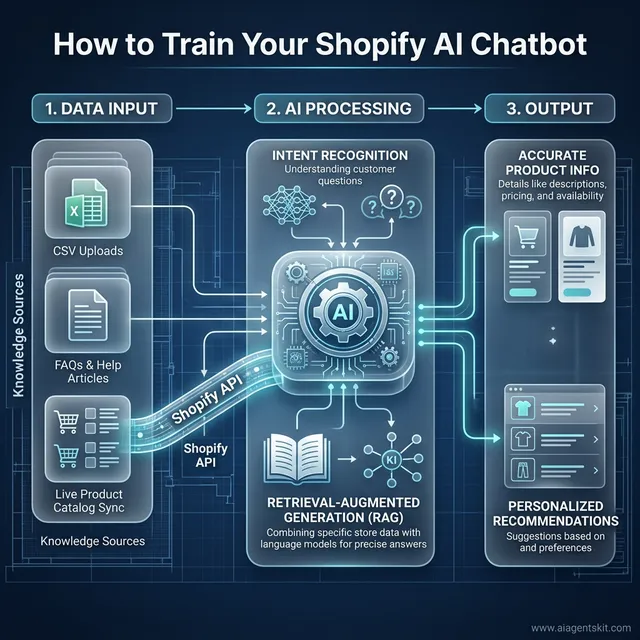
How AI Training Works: The technical pipeline between your Shopify store and the conversational agent. This blueprint illustrates the three-step data flow required for expert-level AI responses. First, Data Input consolidates structured knowledge from CSV uploads, FAQ pages, and a live sync with the Shopify Product API. Second, AI Processing utilizes Intent Recognition and Retrieval-Augmented Generation (RAG) to ensure the bot isn’t just generating text, but ‘retrieving’ specific facts (like current stock levels or exact dimensions). Finally, the Output provides the customer with high-accuracy product info and personalized recommendations. This multi-layered training approach ensures the chatbot moves beyond generic chatter, acting as a specialized sales associate with deep technical knowledge of your entire inventory.
Training Methods by Platform
No-Code Platforms (Tidio, Intercom): Most platforms accept CSV uploads containing FAQs, product descriptions, and support articles. Structure data with question/answer pairs. Update monthly as products are added or policies change.
Example CSV format:
question,answer,category
"What sizes do you offer?","We offer sizes XS through 3XL. Check our size chart for measurements.",sizing
"How do I care for this item?","Machine wash cold, tumble dry low. See product page for specific instructions.",care
"When will my order arrive?","Standard shipping takes 3-5 business days. You'll receive tracking via email.",shipping
Custom Builds: For custom implementations, use RAG (Retrieval-Augmented Generation). Store product data in a vector database like Pinecone or Weaviate. When a customer asks a question, search for relevant product information and include it in the AI prompt. This RAG chatbot tutorial provides detailed implementation guidance for custom solutions.
Creating Effective Training Data
Do:
- Use actual customer questions from the support inbox
- Include variations of the same question (“shipping time” vs “how long does delivery take”)
- Add negative examples (what the chatbot should NOT say)
- Update regularly as products and policies change
Don’t:
- Include pricing that changes frequently
- Use overly technical jargon customers don’t use
- Forget to include edge cases and exceptions
- Set and forget — monitor conversations weekly
Best Practices for Product Catalog Syncing
Set up automatic syncing between the Shopify catalog and chatbot knowledge base. For custom builds, use Shopify webhooks to update the vector database when products change. For no-code tools, most offer automatic daily or weekly syncs — enable these and verify they’re working. The most common training failure practitioners encounter is a chatbot showing outdated stock availability because the sync lapsed unnoticed.
Measuring Chatbot Success: KPIs and ROI
Implementing a chatbot is an investment. Measuring results proves value and identifies optimization opportunities.
Key Metrics to Track
Response Time: Measure average time from customer message to chatbot reply. Target under 2 seconds. If slower, investigate API latency or server performance.
Resolution Rate: Track what percentage of conversations are resolved without human intervention. A well-trained ecommerce chatbot should achieve 60–80% resolution rates for common questions.
Customer Satisfaction (CSAT): Add post-conversation surveys. Ask “Did this answer your question?” with yes/no options. Target 85%+ satisfaction. Low scores indicate training gaps.
Conversion Lift: Compare conversion rates for visitors who interact with the chatbot versus those who don’t. Properly implemented chatbots typically show 10–20% higher conversion.
Abandoned Cart Recovery Rate: Track the percentage of cart abandonment sessions where the chatbot intervenes and the cart converts. This metric alone often justifies the entire chatbot investment for volume stores.
Cost Per Conversation: Calculate total chatbot costs (subscription + implementation time) divided by conversation volume. Compare to human support costs ($4–8 per conversation).
Tools for Measurement
Most chatbot platforms include analytics dashboards. Supplement these with:
- Google Analytics for conversion tracking
- Shopify’s conversion reports
- Hotjar for session recordings showing chatbot interactions
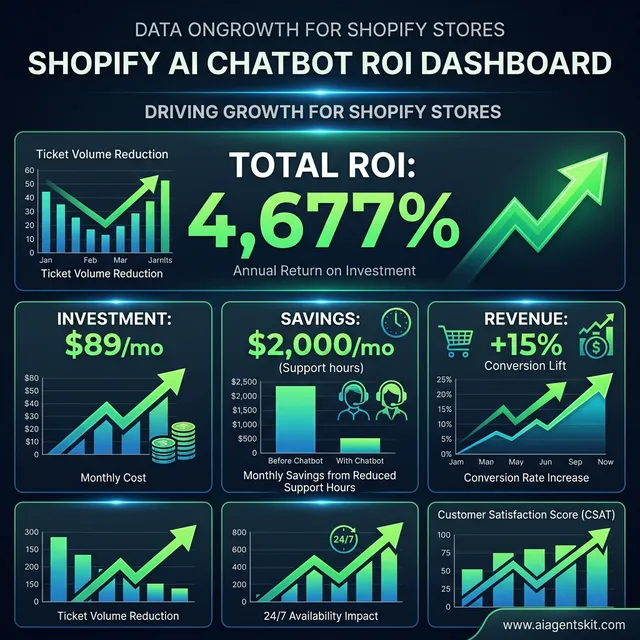
The Staggering ROI of Conversational AI: A comprehensive financial framework for evaluating Shopify chatbot impact. This dashboard visualizes the compounding value of a $89/mo investment across three critical domains. First, operational savings derived from a 60-80% reduction in support ticket volume, saving an estimated $2,000 monthly in human labor costs. Second, the revenue lift generated by a 15% increase in conversion rates for chatbot-assisted visitors. Third, the direct impact on bottom-line profitability through abandoned cart recovery. When aggregated, these factors result in a projected 4,677% return on investment. Beyond pure financials, the framework also tracks ‘soft’ ROI metrics like improved Customer Satisfaction (CSAT) scores and 24/7 availability impact, which drive long-term brand loyalty in the competitive 2026 ecommerce landscape.
ROI Calculation
Basic ROI formula:
ROI = (Cost Savings + Revenue Lift - Chatbot Costs) / Chatbot Costs × 100Example calculation for a store with 500 monthly support inquiries:
- Human support cost: $2,000/month (25 hours @ $20/hour)
- Chatbot cost: $89/month (Tidio Lyro plan)
- Conversion lift: +15% on 100 chatbot-assisted purchases = $1,500/month additional revenue
- Cart recovery: 10 recovered carts × $75 average order = $750/month
- ROI: ($2,000 + $1,500 + $750 - $89) / $89 × 100 = 4,677%
Use the AI ROI calculator for detailed projections based on specific metrics.
Troubleshooting Common Shopify Chatbot Issues
Issue 1: Chatbot Not Appearing on Site
Causes:
- Theme conflicts with existing JavaScript
- Incorrect installation (missing theme.liquid edits for custom solutions)
- App permissions not granted
- Mobile-specific CSS hiding the widget
Solutions: Check browser console for JavaScript errors. Verify the chatbot script loads in the theme’s source code. For mobile issues, test responsive breakpoints — some themes hide fixed-position elements on small screens.
Issue 2: Slow Response Times
Causes:
- Overloaded AI API
- Complex product catalog searches
- Server latency (custom builds)
- Rate limiting
Solutions: Cache frequently requested product data. Use faster AI models (GPT-4o-mini instead of GPT-4o for routine queries). Implement loading indicators so users know the chatbot is processing.
Issue 3: Incorrect Product Information
Causes:
- Outdated training data
- Sync failures between Shopify and chatbot
- Hallucinations (AI making up information)
Solutions: Enable automatic catalog syncing. Add a feedback mechanism for incorrect answers. For custom builds, implement confidence scoring — if confidence is low, escalate to human support rather than guessing.
Issue 4: Mobile Display Problems
Common issues: Chat widget covers navigation, text too small, input field obscured by keyboards.
Solutions: Test thoroughly on actual devices, not just browser emulators. Use Shopify’s theme editor to preview on mobile. Adjust widget positioning — bottom-right corners often conflict with Shopify’s own widgets.
Issue 5: Integration Errors
Symptoms: Orders not found, inventory showing incorrectly, customer data missing.
Solutions: Check Shopify API scopes — the chatbot needs read_orders, read_products, and read_customers permissions. Verify API version compatibility. Review Shopify Partner Dashboard for API error logs.
Frequently Asked Questions
Can you add an AI chatbot to Shopify for free?
Yes, several free options exist. Shopify Inbox is completely free for all Shopify plans and includes basic AI features through Shopify Magic. Tidio offers a free tier supporting up to 50 conversations monthly with basic chatbot functionality. Chatling.ai provides a free plan with 100 AI responses monthly. For custom builds, OpenAI’s API credits for new users cover initial testing. The trade-off with free plans is limited conversation volume and fewer advanced features like AI-powered product recommendations or abandoned cart recovery.
What is the best AI chatbot for Shopify stores?
The best chatbot depends on store size and priorities. For most growing stores (100–1,000 monthly conversations), Tidio with Lyro AI leads due to its Shopify integration depth and natural language understanding. Shopify Inbox suits smaller stores prioritizing simplicity. For sales-focused stores wanting aggressive cart recovery, Zipchat AI or Gorgias outperform on that specific metric. High-volume merchants (1,000+ conversations monthly) often find custom OpenAI implementations provide better ROI. The comparison table earlier in this guide maps each tool to its best use case.
What is the difference between a rule-based chatbot and an AI chatbot for Shopify?
Rule-based chatbots follow pre-written scripts and can only respond to exact phrases they were programmed to handle. When a customer uses different wording, these bots fail and return generic fallback messages. AI chatbots powered by NLP (Natural Language Processing) understand the intent behind a question, even with typos, colloquialisms, or phrasing variations. For a Shopify store, this distinction matters when a customer asks about “the blue jacket” instead of the exact product name — an AI chatbot finds the right item while a rule-based bot returns nothing. Most modern solutions marketed as “AI chatbots” (Tidio’s Lyro, Gorgias, Zipchat) are conversational AI, not rule-based systems.
Does Shopify have a built-in AI chatbot?
Shopify doesn’t offer a customer-facing AI chatbot as a native product as of 2026. What Shopify provides is Shopify Inbox — a free messaging and live chat tool with AI-assisted reply suggestions via Shopify Magic. Separately, Shopify Sidekick is an AI assistant for merchant-side store management tasks (not customer-facing). For a fully AI-powered customer chat experience — one that handles product questions, order tracking, and cart recovery automatically — merchants rely on third-party apps from the Shopify App Store like Tidio, Gorgias, or Zipchat AI.
Can AI chatbots handle order tracking on Shopify?
Yes, most Shopify chatbots handle order tracking when properly configured. They integrate with Shopify’s API to pull real-time order status, shipping information, and tracking numbers. Customers can ask “Where is my order?” and receive immediate updates without human intervention. For accurate tracking, the chatbot needs access to orders (read_orders API scope). Set up automated responses that include tracking links when orders have shipped. Some advanced setups handle delivery exception notifications automatically, offering solutions when packages are delayed.
Can a Shopify chatbot recover abandoned carts?
Yes — and this is one of the highest-ROI use cases for ecommerce chatbots. The average cart abandonment rate is 70–75% globally. AI chatbots intervene proactively: setting triggers when a customer lingers on the checkout page, offering a discount, or addressing the specific concern causing hesitation. Research shows proactive AI chatbots recover up to 35% of abandoned carts, compared to roughly 10% recovery from abandoned cart emails alone. Tools like Zipchat AI, Gorgias, and Maisie AI specialize in this use case for Shopify stores, offering real-time chat intervention before the customer leaves the site.
How much does a Shopify AI chatbot cost?
Costs range from free to several hundred dollars monthly depending on features and volume. Free options include Shopify Inbox (all plans) and limited tiers of Tidio or Chatling. Paid plans typically start at $29–50 monthly for basic AI features, scaling to $89–200 monthly for advanced capabilities like natural language understanding and unlimited conversations. Custom OpenAI implementations cost $0.01–0.02 per conversation in API fees, often cheaper than SaaS options at scale (1,000+ conversations). Factor in implementation time — no-code solutions take 1–2 hours, while custom builds require 20–40 hours of development.
Can a Shopify AI chatbot support multiple languages?
Multilingual support varies significantly by platform. Verifast AI supports up to 125 languages with automatic detection. Ask Timmy handles up to 95 languages. Tidio supports multiple languages but requires manual configuration per language. Custom OpenAI builds handle multilingual automatically — GPT-4o responds in the customer’s language when the system prompt includes language-matching instructions. Multilingual chatbots are essential for Shopify merchants selling across Europe, Southeast Asia, and Latin America, where customer expectations increasingly include support in their native language.
How do I know if my Shopify chatbot is actually working?
Three metrics indicate a well-functioning Shopify chatbot. First, resolution rate — a properly trained chatbot should resolve 60–80% of conversations without human escalation; anything below 50% signals training gaps. Second, CSAT (Customer Satisfaction Score) — post-conversation surveys targeting 85%+ satisfaction identify specific failure points quickly. Third, conversion lift — compare order rates for visitors who interact with the chatbot versus those who don’t; well-implemented chatbots typically show 10–20% higher conversion. Most platforms (Tidio, Gorgias) include analytics dashboards that surface these metrics automatically.
What are the most common mistakes Shopify merchants make with AI chatbots?
The most frequent mistakes practitioners observe: deploying without training (using default responses that don’t reference specific products or policies), no escalation path (customers hit dead ends with no way to reach a human), ignoring mobile UX (widgets that cover navigation elements on phones), and set-and-forget mentality (not reviewing conversation logs weekly to catch wrong answers). A subtler but costly mistake is not matching chatbot persona to brand voice — a high-end fashion store running a generic, corporate-sounding bot damages brand perception. The best-performing chatbots are reviewed monthly and updated whenever products, pricing, or policies change.
Conclusion
Adding an AI chatbot to a Shopify store isn’t just about keeping up with technology — it’s about meeting customer expectations for immediate, helpful support while capturing revenue that would otherwise walk out the door through cart abandonment.
The three approaches outlined here serve different needs: Tidio and similar no-code tools offer powerful AI capabilities without technical complexity, Shopify Inbox provides a free native solution for smaller stores, and custom OpenAI integrations give developers unlimited flexibility. Layer in abandoned cart recovery, multilingual support, and clear KPI tracking, and a chatbot becomes one of the highest-return investments a Shopify merchant can make.
The choice depends on store size, technical resources, and budget. Stores with under 100 monthly conversations should start with Shopify Inbox or Tidio’s free tier. Growing stores will see strong ROI from paid plans as they reduce support costs and improve conversion rates. High-volume merchants processing thousands of monthly conversations should evaluate custom builds for long-term cost efficiency.
The most important step is starting. Pick one method from this guide, implement it this week, and iterate based on customer feedback. A basic chatbot handling the top 10 most common questions delivers immediate value — and the data from those early conversations reveals exactly what to build next.
For stores ready to extend beyond chatbots into full workflow automation, explore how advanced automation workflows connect Shopify stores with other business systems for end-to-end operational efficiency.