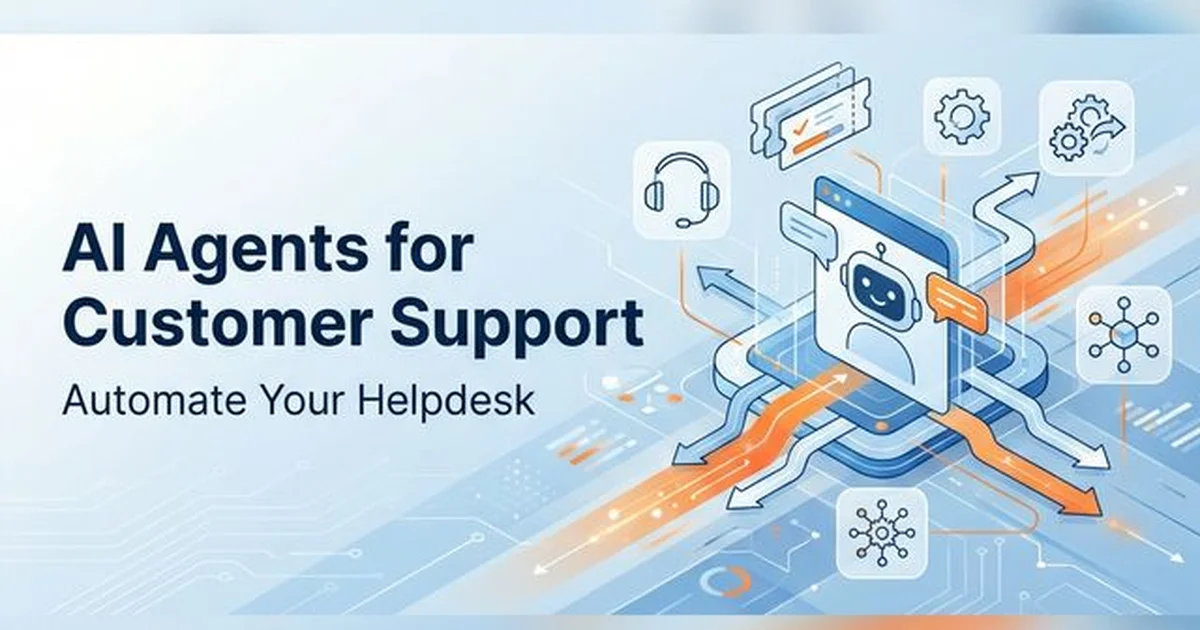
AI Agents for Customer Support Ticketing: 2026 Guide
Transform your support operations with AI helpdesk automation. Compare Sierra, Decagon, and Intercom Fin, evaluate Klarna metrics, and build a LangGraph agent.
Manual support queue triage represents an expensive operational bottleneck for scaling technology organizations. Modern service organizations deploy autonomous ai agents for customer support ticketing to ingest, classify, route, and resolve inbound customer inquiries at software speed. Transitioning from rigid rule-based routing to autonomous agent architectures slashes first-response latency while driving measurable unit cost reductions.
Key Takeaways
- Enterprise customer support agents operate beyond static decision trees by combining RAG policy lookups with authenticated CRM and billing tool executions.
- Autonomous resolution slashes resolution costs from $6.00-$30.00 per human-handled interaction down to $0.50-$2.00 per AI resolution, cutting handling time by up to 82%.
- Sierra and Decagon provide standalone AI orchestration layers for large enterprise brands, while Intercom Fin offers outcome-based $0.99 per-resolution pricing.
- The arbiter pattern pairs automated Tier-1 resolution with deterministic human-in-the-loop checkpoints to prevent customer churn on complex or emotional escalations.
What Are AI Agents for Customer Support Ticketing?
Customer support agents powered by large language models represent a fundamental evolution beyond legacy scripted chatbots. Unlike decision-tree widgets that execute keyword matching, autonomous agents evaluate customer intent, query external knowledge bases, and trigger external API actions on behalf of users. These systems resolve routine inquiries end-to-end without requiring human agent involvement.
According to McKinsey Customer Experience AI Research, deploying agentic workflows in customer service operations reduces average handling time by up to 70 percent. Organizations deploying these solutions can review our autonomous AI agents guide to understand the core reasoning and tool-calling loops that power autonomous resolution engines.
Enterprise implementations execute deterministic state machines to maintain brand safety across omnichannel touchpoints. By verifying customer claims against live database records, agents eliminate the hallucinated commitments that plagued early conversational interfaces.
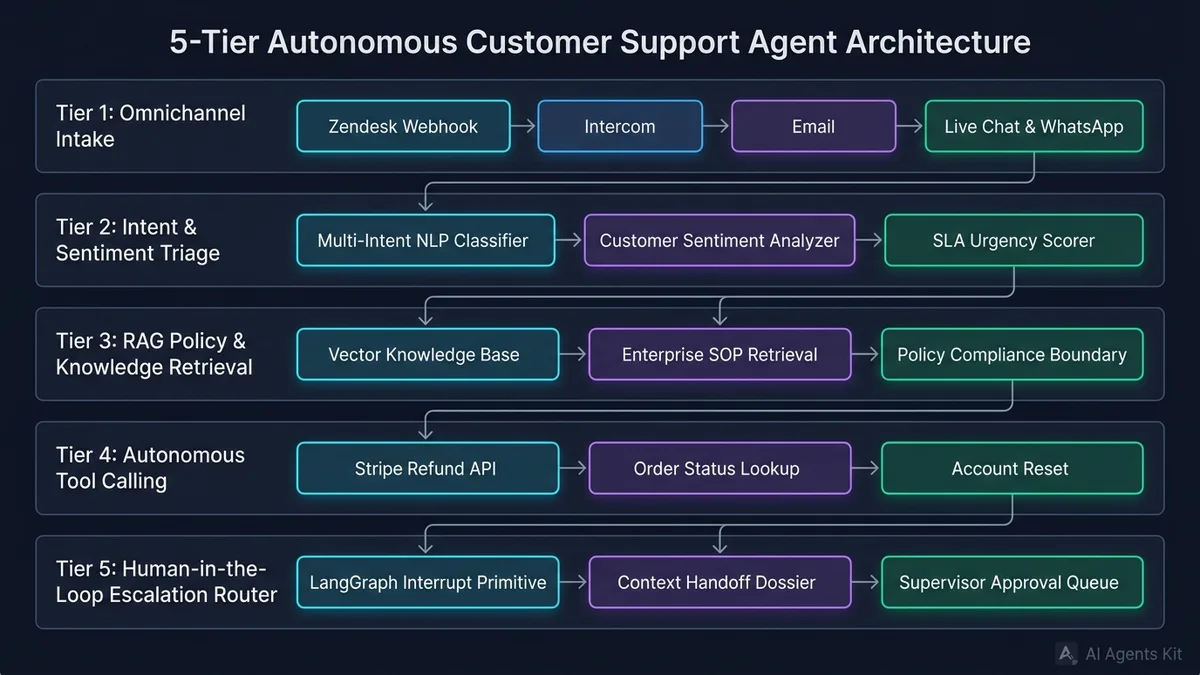
Figure 1: The 5-tier architecture of an enterprise autonomous support resolution pipeline.
How Autonomous Support Agents Differ From Legacy Rule-Based Chatbots
Legacy customer service bots relied on rigid decision trees and exact keyword matching patterns. When a customer phrased a return request with atypical vocabulary or combined two questions in a single prompt, legacy bots failed immediately. Customers spent minutes trapped in circular menu loops before demanding human agent escalation.
Autonomous support agents operate on semantic reasoning and dynamic planning primitives. When an incoming ticket arrives, the agent analyzes sentiment, extracts underlying business entities, and constructs a multi-step execution plan. The agent queries internal knowledge bases, verifies user authorization, and executes backend database actions directly.
| Dimension | Legacy Rule-Based Chatbots | Basic LLM Wrappers | Autonomous Support Agents |
|---|---|---|---|
| Underlying Architecture | If-else decision trees and keyword regex | Single-prompt completion model | Stateful multi-agent graph with RAG and tools |
| Intent Understanding | Rigid exact phrase matching | Surface semantic understanding | Multi-intent decomposition with sentiment tracking |
| Backend Integration | Limited read-only database queries | Static context window injection | Authenticated tool calling (Stripe, CRM, Logistics) |
| Resolution Rate | 15% to 25% deflection | 30% to 45% basic answer rate | 55% to 75% end-to-end autonomous resolution |
| Escalation Protocol | Blind transfer to unassigned queue | Raw conversation transcript dump | Structured handoff dossier with verified issue context |
Modern systems recognize their own confidence boundaries instead of pretending to possess answers. If an inquiry touches unverified policy edge cases, the agent prepares a structured summary and routes the conversation to a human specialist.
The 5-Tier Architecture of an Enterprise Customer Support Agent
Building an enterprise support agent requires decoupling incoming channel webhooks from underlying language model reasoning engines. Production environments implement five distinct architectural tiers to maintain high precision and data governance.
Tier 1: Omnichannel Intake and Message Normalization
Support requests originate from diverse communication channels including web live chat, email, SMS, and messaging applications. Deploying robust omnichannel ai support normalizes incoming payloads into a unified ticket schema. This layer extracts message text, user identifiers, communication channel metadata, and timestamps before dispatching events downstream.
Tier 2: Intent Classification and Sentiment Triage
The triage engine classifies incoming messages across business domains such as billing, technical bugs, account recovery, or product shipping. Automated ai ticket triage evaluates emotional velocity to identify frustrated customers before queues back up. Inquiries flagged with high churn probability receive immediate priority routing.
Tier 3: RAG Policy Retrieval and Knowledge Grounding
The agent grounds every candidate response in verified company documentation using retrieval-augmented generation. It queries vector databases indexing product user manuals, company refund policies, and real-time system status reports. For architectural patterns on building semantic knowledge bases, review our tutorial on building RAG chatbots.
Tier 4: Autonomous Tool Calling and Transactional Execution
True resolution requires executing state-modifying actions rather than merely reciting help articles. The agent executes validated API calls against billing engines to process refunds, query shipping logistics to track packages, or update user permissions. Every tool invocation enforces strict parameter schemas to prevent unauthorized operations.
Tier 5: Human-in-the-Loop Escalation Router
When customer issues exceed autonomous authority or require empathetic human negotiation, the escalation router takes control. The agent constructs a standardized handoff dossier containing the user’s issue summary, verified account details, attempted troubleshooting steps, and suggested resolution paths. This ensures the receiving human representative resolves the ticket without forcing the customer to repeat information.
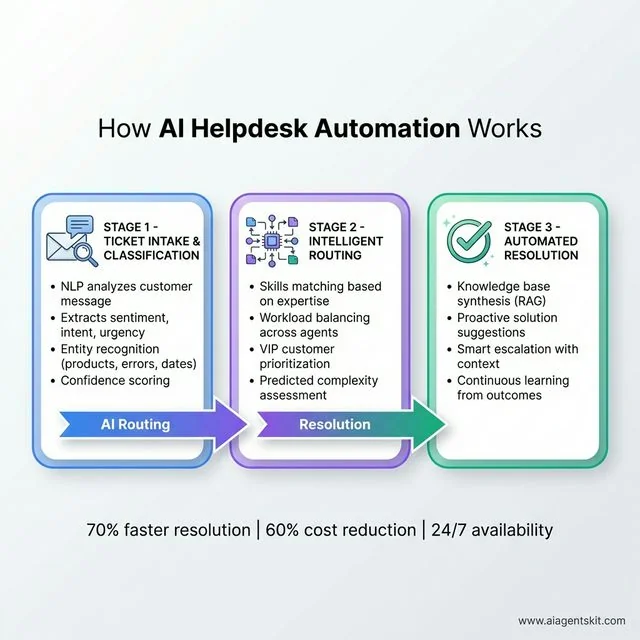
Figure 2: Production ticket triage and automated resolution workflow.
The Klarna Case Study: 82% Faster Resolutions and the 2026 Quality Rebalancing
The deployment of an autonomous customer support agent at Klarna represents the most analyzed enterprise case study in generative AI service automation. During its initial global rollout, Klarna introduced an AI assistant powered by OpenAI models across 23 global markets. The initial results demonstrated unprecedented operational scaling.
Within 30 days of release, the AI assistant handled 2.3 million customer conversations, representing two-thirds of Klarna’s entire global support volume. The system performed the workload equivalent of 853 full-time support representatives. Average resolution times plummeted from 11 minutes down to under 2 minutes, achieving an 82% speedup while reducing repeat inquiries by 25%.
Financially, the implementation delivered over $60 million in annualized operational savings as cost per transaction declined by 40% from $0.32 to $0.19. Customer satisfaction ratings initially matched human baseline scores for routine transactional queries like payment schedules and returns.
Klarna Support Automation Impact:
- Total Chats Handled: 2.3 Million (66% of total volume)
- Workload Equivalent: 853 Full-Time Representatives
- Resolution Time Improvement: From 11 min to < 2 min (82% reduction)
- Cost per Transaction: Reduced 40% (from $0.32 to $0.19)
- Documented Annual Savings: $60 Million
However, Klarna’s journey uncovered critical operational lessons regarding full automation. By early 2025, leadership identified service quality degradation in high-stakes exception cases involving contested fraud claims, payment disputes, and emotionally distressed users. Eliminating human escalation pathways damaged customer trust during complex edge cases.
In response, Klarna initiated a strategic quality rebalancing in late 2025 and 2026. The organization adopted a hybrid arbiter architecture, re-engaging specialized human representatives for complex, sensitive investigations while maintaining AI agents for high-volume, routine Tier-1 inquiries. This dual-track model has become the gold standard for enterprise CX design.
Enterprise Platform Comparison: Sierra vs Decagon vs Intercom Fin vs Zendesk AI
Engineering and customer experience leaders evaluating vendor platforms face distinct tradeoffs between standalone AI innovation, native helpdesk integration, and commercial pricing models.
1. Sierra
Founded by Bret Taylor, Sierra delivers an enterprise-grade conversational AI platform designed for established global brands. Sierra operates as an autonomous intelligence layer that connects directly into existing enterprise systems of record. The platform emphasizes strict enterprise governance, holding FedRAMP High and HIPAA compliance certifications. It utilizes concierge, white-glove deployments tailored to complex enterprise workflows.
2. Decagon
Decagon focuses on mid-market and enterprise organizations requiring granular customization over agent decision boundaries. The platform introduces natural language Agent Operating Procedures (AOPs), allowing non-technical support directors to configure complex business rules. Decagon includes automated simulation engines that stress-test proposed agent behaviors against historical ticket datasets before production release.
3. Intercom (Fin)
Intercom’s Fin AI Agent provides a turnkey conversational solution optimized for software-as-a-service companies. Fin integrates natively with Intercom’s customer communications platform, eliminating complex data synchronization pipelines. Intercom pioneered outcome-based commercial pricing, charging customers $0.99 per successfully resolved conversation rather than per-seat subscriptions.
4. Zendesk AI
Zendesk AI delivers native machine learning intelligence embedded directly inside the world’s most widely deployed helpdesk suite. Beyond conversational chat bots, Zendesk AI offers automated ticket triage, macro suggestions, queue sentiment monitoring, and workforce management forecasting. It is an established choice for organizations seeking a consolidated system of record without introducing disparate external vendors.
| Support Platform | Core Architecture | Pricing Structure | Deployment Model | Compliance Certifications | Best For |
|---|---|---|---|---|---|
| Sierra | Standalone enterprise AI layer | Custom enterprise licensing | High-touch white-glove rollout | FedRAMP High, SOC2, HIPAA | Large enterprise retail and financial brands |
| Decagon | Agent Operating Procedures engine | Custom enterprise annual contracts | Vendor-assisted implementation | SOC2 Type II, HIPAA | Mid-market tech firms needing custom business rules |
| Intercom Fin | Native helpdesk conversational agent | Outcome-based ($0.99 per resolution) | Rapid self-serve deployment | SOC2 Type II, ISO 27001 | Product-led SaaS and agile growth startups |
| Zendesk AI | Comprehensive unified ticketing suite | Per-agent tiered subscriptions | Standard helpdesk onboarding | SOC2, HIPAA, GDPR | Established organizations needing a single helpdesk platform |
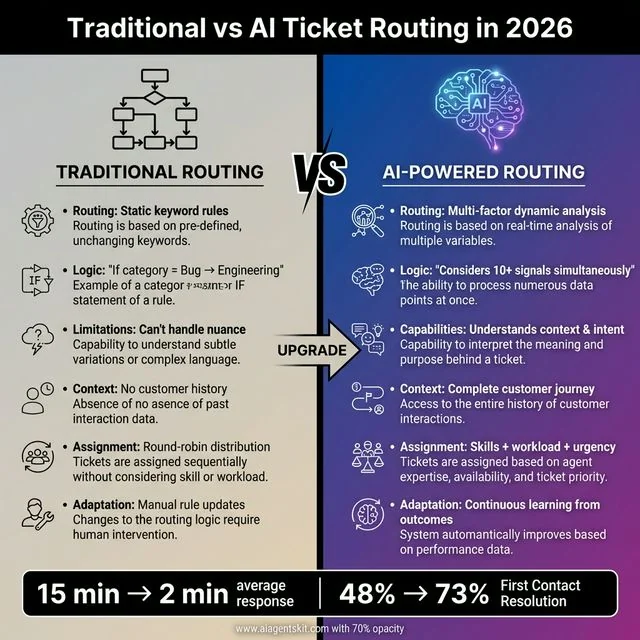
Figure 3: Architectural comparison between legacy queue routing and AI agent routing.
Intelligent Ticket Routing, Skills-Based Assignment, and SLA Breach Prevention
Traditional helpdesk routing relies on naive round-robin assignment or static if-then keyword rules. These legacy mechanisms fail because they ignore dynamic agent workloads, varying technical competencies, and the true complexity of incoming inquiries. Modern automated ticket management solves this bottleneck by coordinating real-time queue depths with verified agent proficiencies.
Modern ticket routing systems parse message intent and technical complexity simultaneously using neural classification models. As documented in research on Automated Customer Support Routing with Large Language Models on arXiv, deep learning classifiers route complex service tickets with multi-intent classification accuracy exceeding 90 percent. Misdirected ticket transfers decline by up to 45% when transitioning from keyword filters to agentic intent mapping.
For teams managing distributed multi-agent workflows, review our guide on multi-agent systems architecture to see how specialized triage agents distribute workloads among sub-agents.
Intelligent Routing Decision Pipeline:
1. Intake Ingestion: Webhooks capture inbound message and normalize payload attributes.
2. Semantic Analysis: Extract customer sentiment, product entities, and urgency tier.
3. Policy Evaluation: Check SLA thresholds and VIP routing rules via CRM lookup.
4. Tool Execution: Query internal knowledge bases or execute refund/order APIs.
5. Handoff Synthesis: Deliver resolution or construct human handoff dossier with context.
Predictive SLA models continuously monitor open ticket queues, factoring in elapsed queue time, current team capacity, and issue severity. When an open inquiry approaches contractual response thresholds, the system automatically raises ticket priority and alerts available senior engineers before SLA breaches trigger customer churn.
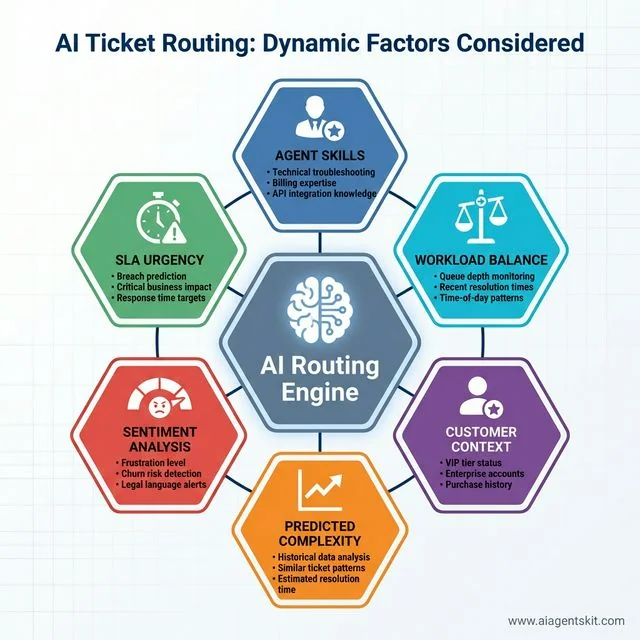
Figure 4: Key evaluation factors driving autonomous ticket triage and SLA prioritization.
Step-by-Step Implementation: Building a LangGraph Support Agent with Human-in-the-Loop in Python
Building a custom support agent gives engineering teams total ownership over proprietary data boundaries, customer CRM records, and business workflows. We will implement an enterprise-ready customer support agent using LangGraph and Pydantic. To evaluate alternative orchestration frameworks, examine our comparison of PydanticAI vs LangChain vs LangGraph.
This production pipeline classifies customer intent, retrieves relevant policies, executes low-risk lookups autonomously, and invokes the LangGraph interrupt() primitive when high-stakes financial operations require human authorization.
import asyncio
from typing import List, Optional, Literal
from enum import Enum
from pydantic import BaseModel, Field
from typing_extensions import TypedDict
from langgraph.types import interrupt, Command

# ==============================================================================
# 1. Structured Data Schemas
# ==============================================================================

class SupportIntent(str, Enum):
    BILLING_REFUND = "billing_refund"
    ORDER_STATUS = "order_status"
    TECHNICAL_BUG = "technical_bug"
    GENERAL_FAQ = "general_faq"

class SentimentLevel(str, Enum):
    POSITIVE = "positive"
    NEUTRAL = "neutral"
    FRUSTRATED = "frustrated"
    ANGRY = "angry"

class CustomerProfile(BaseModel):
    user_id: str
    email: str
    plan_tier: Literal["free", "pro", "enterprise"]
    lifetime_value: float

class SupportState(TypedDict):
    ticket_id: str
    customer_message: str
    customer_profile: CustomerProfile
    classified_intent: Optional[SupportIntent]
    sentiment: Optional[SentimentLevel]
    policy_guidelines: str
    proposed_refund_amount: float
    human_approved: bool
    final_response: str

# ==============================================================================
# 2. Agent Graph Nodes
# ==============================================================================

async def intent_triage_node(state: SupportState) -> dict:
    """
    Classifies customer intent and monitors emotional sentiment velocity.
    """
    msg = state["customer_message"].lower()

    intent = SupportIntent.GENERAL_FAQ
    if "refund" in msg or "charge" in msg or "billing" in msg:
        intent = SupportIntent.BILLING_REFUND
    elif "where is my" in msg or "tracking" in msg or "order" in msg:
        intent = SupportIntent.ORDER_STATUS
    elif "error" in msg or "crash" in msg or "broken" in msg:
        intent = SupportIntent.TECHNICAL_BUG

    sentiment = SentimentLevel.NEUTRAL
    if "furious" in msg or "ridiculous" in msg or "unacceptable" in msg:
        sentiment = SentimentLevel.ANGRY
    elif "disappointed" in msg or "waiting" in msg:
        sentiment = SentimentLevel.FRUSTRATED

    return {
        "classified_intent": intent,
        "sentiment": sentiment
    }

async def policy_retrieval_node(state: SupportState) -> dict:
    """
    Retrieves internal standard operating procedures based on intent.
    """
    intent = state["classified_intent"]
    if intent == SupportIntent.BILLING_REFUND:
        policy = "Standard Policy: Refunds allowed within 14 days of purchase. Amounts > $50 require supervisor approval."
    elif intent == SupportIntent.ORDER_STATUS:
        policy = "Standard Policy: Tracking updates take up to 24 hours to sync with logistics partners."
    else:
        policy = "Standard Policy: Collect environment details and escalate to Tier-2 engineering if unresolvable."

    return {"policy_guidelines": policy}

async def refund_approval_gate_node(state: SupportState) -> dict:
    """
    Enforces human-in-the-loop verification using LangGraph interrupt primitives.
    """
    refund_amount = 79.00  # Calculated from transaction record
    state["proposed_refund_amount"] = refund_amount

    # If refund exceeds autonomous threshold, pause for human review
    if refund_amount > 50.00:
        approval_decision = interrupt({
            "action": "authorize_refund",
            "ticket_id": state["ticket_id"],
            "user_id": state["customer_profile"].user_id,
            "amount": refund_amount,
            "reason": "Customer requested refund for annual renewal within 7 days."
        })

        # When resumed with Command(resume=True), execution continues
        is_approved = bool(approval_decision.get("approved", False))
        return {
            "human_approved": is_approved,
            "proposed_refund_amount": refund_amount
        }

    return {"human_approved": True, "proposed_refund_amount": refund_amount}

async def resolution_synthesizer_node(state: SupportState) -> dict:
    """
    Synthesizes the finalized, professional customer response.
    """
    if state["classified_intent"] == SupportIntent.BILLING_REFUND:
        if state["human_approved"]:
            response = (
                f"Hello {state['customer_profile'].email}, your refund of "
                f"${state['proposed_refund_amount']:.2f} has been approved and submitted for processing. "
                f"You will see the credit reflected on your original payment method in 3 to 5 business days."
            )
        else:
            response = (
                f"Hello {state['customer_profile'].email}, our billing team has reviewed your request. "
                "Because your subscription exceeded our standard refund window, we cannot issue a full cash refund, "
                "but we have applied a $25 credit toward your account renewals."
            )
    else:
        response = "Thank you for reaching out. We have logged your request and our team is actively investigating."

    return {"final_response": response}

# ==============================================================================
# 3. Demonstration Pipeline Runner
# ==============================================================================

async def main():
    profile = CustomerProfile(
        user_id="usr_8921",
        email="alex@enterprise.com",
        plan_tier="pro",
        lifetime_value=1240.00
    )

    initial_state: SupportState = {
        "ticket_id": "TCK-4091",
        "customer_message": "I was charged $79 yesterday for an annual renewal that I forgot to cancel. This is unacceptable, please issue a refund.",
        "customer_profile": profile,
        "classified_intent": None,
        "sentiment": None,
        "policy_guidelines": "",
        "proposed_refund_amount": 0.0,
        "human_approved": False,
        "final_response": ""
    }

    # Step 1: Execute intent and sentiment classification
    triage_res = await intent_triage_node(initial_state)
    initial_state.update(triage_res)

    # Step 2: Retrieve internal policy guidelines
    policy_res = await policy_retrieval_node(initial_state)
    initial_state.update(policy_res)

    # Step 3: Simulate human approval resolution
    # In production, the LangGraph checkpointer pauses until a supervisor approves
    initial_state["human_approved"] = True
    initial_state["proposed_refund_amount"] = 79.00

    # Step 4: Synthesize finalized customer communication
    res = await resolution_synthesizer_node(initial_state)
    print(f"Final Customer Response:\n{res['final_response']}")

if __name__ == "__main__":
    asyncio.run(main())
This LangGraph script establishes a secure boundary between autonomous operations and irreversible financial actions. Similar stateful verification patterns apply across enterprise engineering, ensuring automated systems remain within deterministic compliance boundaries before executing critical operations.
Complete Production Skill: The Customer Support Specialist Runbook
A customer support agent skill is an executable operational instruction package that equips AI coding assistants and autonomous workers with standardized helpdesk procedures. Installing this modular skill into your agent workspace guarantees consistent, brand-aligned ticket resolutions. For an architectural breakdown of agent skills, review our comprehensive tutorial on Claude Agent Skills.
Copy the following specification into your workspace at .claude/skills/customer-support-specialist/SKILL.md or .agents/skills/customer-support-specialist/SKILL.md.
---
name: customer-support-specialist
description: Autonomous customer support resolution and ticket triage skill. Ingests omnichannel inquiries, executes sentiment analysis and intent classification, retrieves enterprise policies via RAG, performs transactional API lookups, and orchestrates deterministic human escalation dossiers. Use when asked to triage support tickets, automate helpdesk responses, handle refunds, or manage customer inquiries.
---

# Customer Support Specialist Runbook

This skill equips the agent to act as a principal customer experience operations specialist. When activated, follow this systematic 5-stage resolution process.

## Stage 1: Inquiry Ingestion and Context Extraction

Before generating customer communications, extract and validate four core parameters:

1. **Customer Identity & Tier:** Account ID, email, subscription tier (Enterprise, Pro, Free), and lifetime value.
2. **Intent Classification:** Identify primary category (Billing/Refund, Bug Report, Feature Request, How-To Inquiry, or Account Cancellation).
3. **Sentiment Intensity:** Evaluate emotional velocity (Neutral, Mild Confusion, Frustrated, or Critical Escalation Risk).
4. **SLA Deadlines:** Calculate remaining target response and resolution windows based on customer contract tier.

## Stage 2: Knowledge Grounding and Policy Verification

Retrieve and cross-reference verified enterprise documentation before formulating responses:

- Query the internal knowledge base for canonical standard operating procedures (SOPs).
- Verify refund eligibility rules against subscription purchase dates (e.g., 14-day refund window).
- If internal documentation lacks coverage, do not guess policy details; flag the inquiry for Tier-2 human review.

## Stage 3: Autonomous Tool Execution and Transaction Safety

Execute non-destructive read operations and prepare state-modifying actions under guardrails:

### 1. Safe Read Operations (Autonomous)
- Fetch order delivery tracking statuses via logistics APIs.
- Query subscription invoice history in Stripe or billing database.
- Inspect service incident statuses via Statuspage or telemetry endpoints.

### 2. High-Stakes Modifications (Human Approval Required)
- For refund issuance exceeding $50, generate an authorization payload and pause for human supervisor approval.
- For account deletion or permission revocation, enforce secondary confirmation protocols.

## Stage 4: Tone Calibration and Response Formulation

Draft the customer-facing response following strict communication standards:

- **Opening Sentence:** Directly address customer concern without generic platitudes or artificial sympathy loops.
- **Actionable Steps:** Present resolution instructions using numbered, sequential steps.
- **Clarity and Precision:** Specify concrete timeframes (e.g., "processed within 2 to 3 business days").
- **Next Actions:** Clearly explain what happens next and how the customer can request further assistance.

## Stage 5: Escalation Handoff Dossier

When transferring an inquiry to human representatives, compile a structured internal note:

- **Customer State Summary:** 2 sentences outlining account status and core issue.
- **Attempted Resolution:** Detail all API tools queried and knowledge articles checked.
- **Escalation Trigger:** Explicit reason for handoff (e.g., "Policy exception requested" or "Sentiment threshold exceeded").
- **Recommended Action:** Provide the receiving human representative with a recommended next step.
Integrating this skill into local and cloud runtime environments enforces uniform service standards across all customer interactions.
Production Failure Modes, Hallucination Guardrails, and Escalation Thresholds
Deploying autonomous support agents introduces critical operational risks that can compromise customer trust if proper guardrails are neglected during rollout.
1. Hallucinated Commitments and Phantom Refunds
A primary risk in conversational customer service involves language models agreeing to customer demands that violate corporate policy. If a frustrated user demands an unearned discount, an ungrounded LLM may promise the credit. Guard against this by enforcing strict tool boundaries where the model can only propose credits to a deterministic rules engine.
2. Context Amnesia Across Multi-Turn Threads
When a support conversation extends across multiple days, naive agent systems lose earlier context due to sliding token window truncations. The customer is forced to re-explain their problem, spiking frustration. Resolve this by maintaining a persistent summary state object that persists key customer facts across disconnected session turns.
3. Infinite Escalation Loops
If customer inquiries bounce repeatedly between automated bots and unassigned queues, resolution times multiply. Implement deterministic escalation circuits: after two failed automated clarification cycles, the system must trigger an immediate human handoff with an escalated SLA flag.
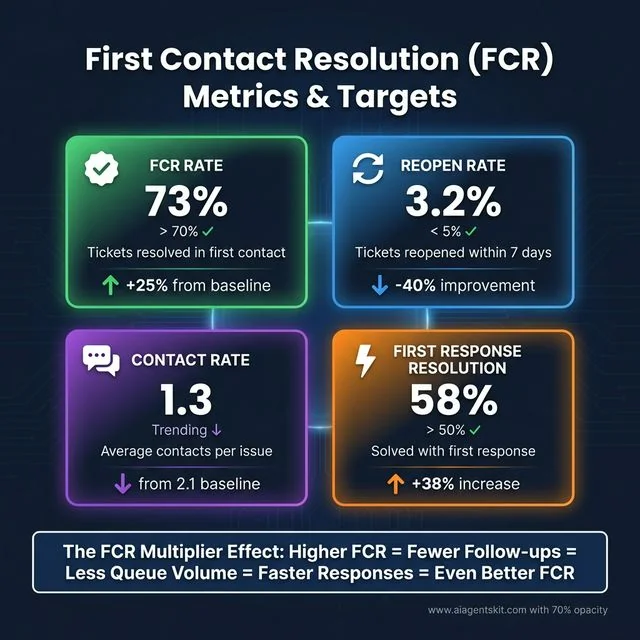
Figure 5: Essential metrics for measuring AI customer support efficiency and unit economics.
Frequently Asked Questions About AI Customer Support Agents
How do AI agents for customer support handle complex or emotionally frustrated customers?
Modern support agents employ sentiment analysis nodes that monitor emotional escalation thresholds during live conversations. When frustration exceeds predefined limits or complex policy exceptions arise, the agent constructs a contextual handoff dossier and transfers the customer to a human supervisor.
What is the average cost savings of deploying AI customer support agents?
Automated ticket resolutions cost between $0.50 and $2.00 per resolved inquiry compared to $6.00 to $30.00 for manual human tiers. This efficiency enables scaling operations to absorb traffic spikes without linear headcount growth.
What is the difference between Sierra, Decagon, and Intercom Fin?
Sierra provides high-security enterprise agent orchestration with white-glove implementation for Fortune 500 brands. Decagon emphasizes natural language Agent Operating Procedures and automated regression testing, while Intercom Fin offers turnkey conversational resolution at a transparent $0.99 per-resolution price.
How do support agents execute transactions like refunds safely?
Engineering teams connect agents to transactional APIs through deterministic schema validation and human-in-the-loop approval gates. LangGraph interrupt primitives pause autonomous execution and require human supervisor authorization before financial credits or account cancellations execute.
What is SLA breach prediction and how does it prevent customer churn?
Predictive models evaluate real-time queue congestion, ticket sentiment, and estimated task complexity to forecast service level agreement violations. Flagged tickets automatically receive priority elevation and route to specialized senior agents before contractual deadlines expire.