19 Top AI Coding Agents and Autonomous Systems (2026)
Discover the 19 top AI coding agents and autonomous systems in 2026. Compare GitHub Copilot, Cursor, Claude Code, Devin, Google Antigravity, Cline, Kilo Code, Bolt.new, v0 by Vercel, and more.
The fastest-growing segment of developer tools in 2026 isn’t a new language or a clever IDE plugin — it’s AI coding agents. According to Research and Markets (2025), the AI coding tools market is projected to hit $9.46 billion in 2026, growing at a 23.7% CAGR. That’s not hype — that’s a developer workflow transformation playing out in real time.
The problem most teams face isn’t lack of options. Every week another AI coding tool launches with bold claims about autonomy, codebase understanding, and productivity gains. Knowing which of the top AI coding agents actually deliver — and which level of autonomy a team genuinely needs — remains stubbornly difficult without a clear framework.
This guide breaks down the top AI coding agents and autonomous systems into a three-tier autonomy framework, reviews 19 leading tools with honest assessments — including newer entrants like Google Antigravity, Amazon Kiro, Lovable, Replit Agent, OpenAI Codex CLI, Cline, Kilo Code, Bolt.new, and v0 by Vercel — and covers the orchestration frameworks powering next-generation autonomous software development. For a foundation on understanding what AI agents are at the architecture level, the linked guide covers the core concepts in depth.
What Are AI Coding Agents and How Do They Work?
AI coding agents are software systems powered by large language models (LLMs) that interact with codebases through tool use — not just text generation. The critical distinction separating agents from early AI coding tools is their ability to reason over full repositories, plan multi-step tasks, execute shell commands, write and modify multiple files, and iterate based on output until a goal is achieved.
Traditional coding assistants — the ones that suggest the next line of code as developers type — are purely reactive. They respond to what’s currently on screen. AI coding agents, by contrast, are goal-oriented: a developer describes an objective (“add user authentication with JWT, write tests, and follow the existing patterns in this codebase”), and the agent reads the relevant files, creates a plan, implements changes, runs tests, evaluates failures, and makes corrections — all without being hand-held through each step.
The technical backbone of a modern coding agent includes three layers: an LLM core (Claude 4, GPT-5, or Gemini 3 in 2026’s leading tools), a tool-use layer that enables file system access, shell execution, and web lookups, and a memory or context system that indexes the codebase for retrieval. The difference between AI agents and chatbots comes down precisely to this tool-use and memory layer — chatbots answer questions, agents take actions. By early 2026, this architecture has matured to the point where nearly 50% of all code written globally is AI-generated or AI-assisted.
3 Levels of Autonomy: Assistants, Agents, and Autonomous Systems
Not all “AI coding tools” are equal in autonomy, and treating them as interchangeable leads to mismatched expectations. The most useful framework for evaluating the space categorizes tools across three distinct levels.
| Level | Category | Description | Interaction Model | Example Tools |
|---|---|---|---|---|
| Level 1 | Code Assistants | Reactive, single-file, suggestion-based | Developer types, AI suggests | Tabnine, early GitHub Copilot |
| Level 2 | Coding Agents | Multi-file, goal-based, iterative with tool use | Developer describes goal, agent executes | Cursor, Claude Code, Windsurf, Codex CLI, Cline, Kilo Code |
| Level 2.5 | App Builders | Natural language to full-stack app, visual iteration | Describe the product, agent builds and deploys | Lovable, Replit Agent, Bolt.new, v0 by Vercel |
| Level 3 | Autonomous Systems | Full-lifecycle, multi-task, minimal human input | Developer sets high-level objective | Devin, Google Antigravity, Manus |
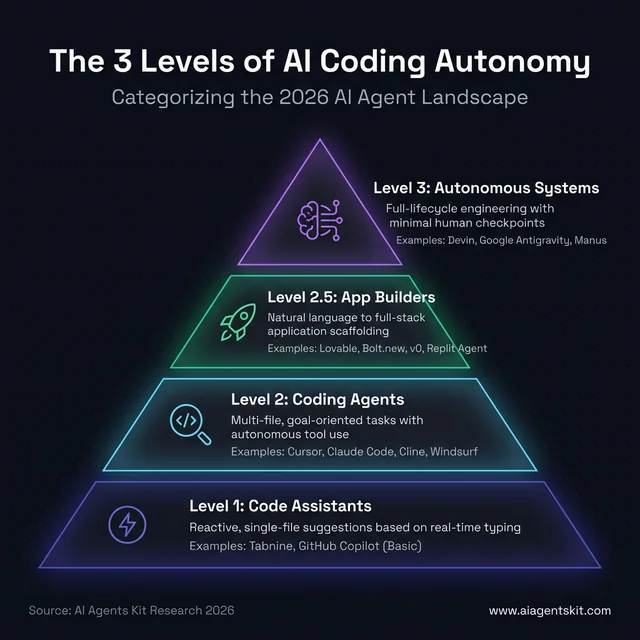 The 3 levels of AI coding autonomy: From reactive assistants like Tabnine to fully autonomous systems like Devin and Google Antigravity. Understanding where your tools sit on this spectrum is critical for matching the right agent to your engineering tasks, whether you need line-level speed or end-to-end task automation.
Level 1 tools remain relevant for raw speed and low-overhead code completion. They’re best for situations where a developer knows exactly what they want and just needs line-level acceleration. Level 2 tools — today’s dominant category — handle feature development, debugging, and refactoring across whole codebases with dramatically less human steering. Level 3 autonomous systems handle end-to-end software engineering tasks: from reading a requirements document to deploying a running application in a sandboxed cloud environment.
According to Gartner’s 2025–26 AI productivity research, AI tools are expected to contribute to a 55% productivity increase for development teams — but that figure depends heavily on which autonomy tier teams are actually deploying. A team using Level 1 tools sees modest gains in typing speed; a team deploying Level 3 agents for the right class of tasks sees order-of-magnitude acceleration on structured engineering work. Most high-performing engineering organizations in 2026 operate across all three levels simultaneously: Level 1 for real-time coding flow, Level 2 for feature work, and Level 3 for structured, well-scoped projects.
Gartner also predicts that by end of 2026, 40% of enterprise applications will embed AI agents — up from less than 5% in 2025. Teams that haven’t built an autonomy-tiered adoption strategy are already playing catch-up.
19 Top AI Coding Agents Ranked by Capability
The tools below represent the most production-tested, developer-validated AI coding agents available in March 2026, including the newest entrants from Google, Amazon, and the full-stack app-builder category that is reshaping how non-engineers ship software. The ranking isn’t by a single benchmark score — it’s organized to show breadth across autonomy levels and use cases, giving practitioners a comparative view that pure performance charts miss.
GitHub Copilot: The Enterprise Standard
GitHub Copilot has evolved from a line-completion tool into a full-featured Level 2 coding agent. The current version includes Agent Mode for autonomous task execution within VS Code, Copilot Workspace for PR-centric agentic development, inline chat, and multi-model support (GPT-5, Claude 4 Sonnet, and others via a model picker).
Best for: Enterprise teams already on GitHub that want AI integrated directly into their existing PR and CI workflows.
Key features:
- Agent Mode: Reads issues, writes implementation plans, creates pull requests
- Copilot Workspace: Full feature lifecycle from issue to PR
- Multi-model: Switch between GPT-5, Claude 4, and Gemini 3 per task
- Copilot Extensions for third-party tool integrations
Limitations: Copilot’s agent mode is more PR-centric than truly autonomous. For deep multi-file refactoring or legacy codebase work, a detailed Copilot vs Cursor vs Cody comparison shows where each tool’s ceiling sits.
Pricing: $10/month (individual), $19/user/month (business), enterprise plans available
Cursor: The AI-Native IDE Leader
Cursor is a fork of VS Code rebuilt from the ground up with AI-first architecture. Its Composer feature handles multi-file generation and modification from a single natural language prompt — one of the most mature multi-file agent implementations available. Cursor’s agent mode can run shell commands, install dependencies, and iterate on failing tests without developer intervention.
Best for: Individual developers and small teams who want the most capable IDE-native agent experience, with multi-model flexibility.
Key features:
- Composer: Multi-file generation and editing from natural language
- Agent mode: Shell access, command execution, autonomous iteration
- Multi-model: GPT-5, Claude 4, Gemini 3, and xAI Grok available
- Tab autocomplete with full-file context awareness
- Codebase indexing with semantic search
Limitations: Cursor’s credit-based pricing model has generated complaints from users who ran unexpectedly high bills during heavy agent sessions. Teams using Cursor at scale should model usage carefully before committing to a plan tier.
Pricing: Free (limited), $20/month (Pro), team plans available
Claude Code: Terminal-First Autonomy
Claude Code, developed by Anthropic and powered by Claude 4 Opus/Sonnet, is a terminal-first coding agent designed for developers who prefer the command line or need deep codebase understanding. It excels at tasks requiring complex reasoning across many files — legacy code comprehension, multi-layer debugging, and large refactoring that requires understanding implicit architectural patterns. Claude 4’s 200K context window (expandable to 1M) means it can hold an entire large codebase in view simultaneously.
Best for: CLI-focused engineers, senior developers working with complex or underdocumented codebases, AI researchers who need the most capable reasoning model on coding tasks.
Key features:
- Terminal interaction powered by Claude 4 (200K context, expandable to 1M)
- Native file reading, writing, and shell execution
- Superior performance on reasoning-heavy, ambiguous tasks
- Git integration for branch and commit management
Limitations: Claude Code has no GUI or IDE panel. For developers who think visually or prefer an integrated editor experience, the terminal-only workflow creates real friction that doesn’t suit every team.
Pricing: Based on Anthropic API usage (Claude 4 Sonnet: $0.003/1K input, $0.015/1K output)
Devin: The Most Autonomous AI Engineer
Devin, from Cognition Labs, sits firmly in the Level 3 autonomous systems category. It operates entirely in a sandboxed cloud environment and handles software engineering tasks end-to-end: reading a product brief, researching documentation, writing code, running tests, debugging failures, and deploying working applications — with minimal human checkpoints during the process. Development teams that have piloted Devin report that it’s most effective on well-scoped, research-heavy tasks where the solution path requires information gathering before implementation.
Best for: Enterprise teams with complex, well-scoped, high-value engineering tasks that don’t require rapid human iteration or real-time creative input.
Key features:
- Full software development lifecycle automation in a sandboxed environment
- Research → plan → build → test → deploy workflows without hand-holding
- Handles complex, multi-step engineering tasks beyond greenfield demos
- Persistent state across long sessions (multiple hours of autonomous work)
Limitations: Devin is expensive and slower on simple tasks than Level 2 agents. It also requires clear, well-defined task scopes — ambiguous instructions can lead to coherent but misaligned implementations. The multi-agent orchestration frameworks section below explains how this level of autonomous coordination works in practice.
Pricing: Enterprise pricing (contact sales); not available for individual developers
Windsurf: The Cascade Agent System
Windsurf, from Codeium, enters 2026 as one of the most polished full-IDE agentic experiences. Its Cascade agent system autonomously edits files, runs shell commands, and iterates based on feedback — handling multi-turn development loops that previously required constant developer steering. Codeium also offers self-hosted deployment, making Windsurf a serious choice for enterprise teams with strict data governance requirements.
Best for: Teams wanting a strong alternative to Copilot or Cursor, especially enterprise teams requiring on-premises or VPC deployment for code privacy.
Key features:
- Cascade agent: Multi-turn autonomous coding with shell access
- Available across VS Code, JetBrains, and other major IDEs
- Self-hosted deployment option for privacy-first enterprises
- Context-aware completion with deep repository indexing
Limitations: Windsurf is newer to the field than Copilot or Cursor. It has a growing but less mature ecosystem of extensions and third-party integrations. Teams switching from established tools should plan for an adjustment period.
Pricing: Free tier available; paid plans for Pro features and team use
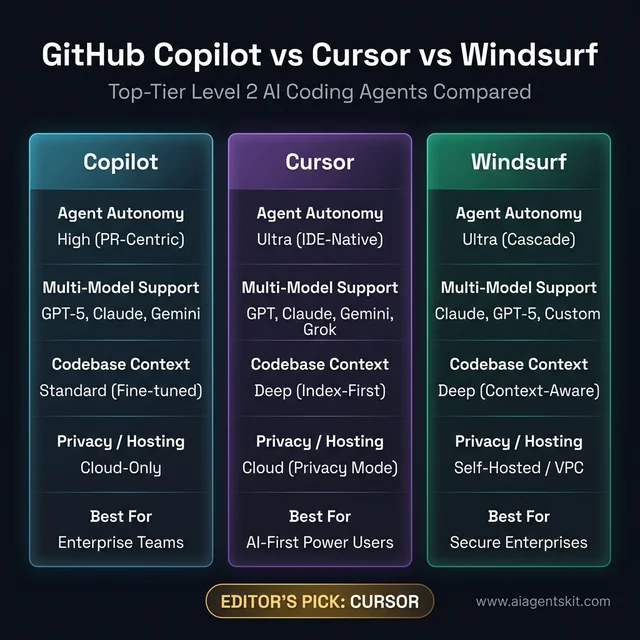 GitHub Copilot vs Cursor vs Windsurf comparison: While Cursor and Windsurf lead on raw agentic autonomy and IDE-native multi-file editing, Copilot remains the enterprise standard for GitHub-centric integration. Teams requiring strict data governance should prioritize Windsurf or Aider for their self-hosted and local execution capabilities in complex environments.
Amazon Q Developer: Deep AWS Integration
Amazon Q Developer extends far beyond code completion into a comprehensive developer agent with a unique advantage: native, first-party AWS integration. For teams building on AWS infrastructure, Q Developer understands IAM policies, resource constraints, and cloud-native patterns in ways that general-purpose agents can’t match. It also includes CLI agents that can execute AWS commands and manage infrastructure alongside application code.
Best for: AWS-native development teams, especially those managing complex cloud infrastructure alongside application code.
Key features:
- CLI agents: Execute AWS commands, manage cloud resources
- Tight integration with JetBrains and VS Code
- Code review, documentation generation, and security scanning built-in
- Understands AWS service patterns, SDK idioms, and cloud-native best practices
Limitations: Q Developer’s strength is its boundary. Outside the AWS ecosystem, it provides less differentiated value compared to Cursor or Claude Code. According to GitHub’s Octoverse 2023 Developer Survey, 81% of developers said AI tools improve team collaboration — but the tools need to integrate cleanly with existing workflows for that benefit to materialize.
Pricing: Free tier (individual), $19/user/month (Pro for teams), enterprise pricing available
Gemini Code Assist: Google’s AI Coding Tool
Gemini Code Assist, powered by Gemini 3 Pro and available through Google AI Studio and Vertex AI, brings Google’s frontier model to code generation, completion, and chat. A distinguishing feature is its ability to provide citations for code suggestions — particularly valuable for teams in regulated industries that need auditability of AI-generated code.
Best for: Google Cloud Platform teams, organizations leveraging Vertex AI for model customization, teams requiring citation-backed code generation.
Key features:
- Gemini 3 Pro model (2M token context window for massive codebases)
- Code citations feature — shows source references for generated snippets
- Full IDE integration (VS Code, JetBrains, Cloud Shell Editor)
- Enterprise controls via Google Cloud IAM and VPC Service Controls
Limitations: Gemini Code Assist delivers the most value inside the Google Cloud ecosystem. Teams primarily on AWS or Azure will find its cloud-native integration advantages largely irrelevant to their workflows.
Pricing: Free (personal use), $19/user/month (enterprise), Google Workspace bundles
Aider: CLI-First Refactoring Agent
Aider is an open-source, CLI-first AI coding agent with a passionate following among experienced developers and cost-conscious teams. It’s git-aware by default, meaning it understands commit history, creates commits for its changes, and can reason about how proposed changes interact with recent diffs. Aider supports a wide range of LLM backends — from Claude 4 and GPT-5 to local Ollama models — giving technically sophisticated teams complete control over their cost structure and data residency.
Best for: Senior developers and open-source contributors who want maximum control, cost efficiency, and model flexibility without IDE lock-in.
Key features:
- Git awareness: Understands commit history, creates commits for every change
- Multi-model: Works with Claude 4, GPT-5, Gemini 3, and local Ollama models
- Best-in-class for large-scale refactoring across complex repositories
- Fully open source — no vendor lock-in, fully customizable
Limitations: Aider’s CLI-only interface creates a learning curve and isn’t accessible for less technical team members. Teams wanting to build a Python AI agent for custom tooling will find Aider’s architecture instructive, but it’s explicitly a power-user tool.
Cline: The Open-Source VS Code Power Agent
Cline (formerly Claude Dev) is an open-source AI coding agent living entirely inside VS Code and its forks, and it operates like a genuine peer reviewer rather than an autocomplete engine. Unlike extensions that just suggest code, Cline proposes a full plan, requests explicit user permission before each significant action (file reads, edits, or terminal commands), and iterates step-by-step until the goal is achieved. This permission-gate model makes it one of the most transparent autonomous agents available — the developer always knows exactly what Cline is about to do before it does it.
Cline’s model-agnostic architecture is a core strength. It supports Anthropic API keys (Claude 4 Opus, Sonnet), OpenAI, Google Gemini, AWS Bedrock, and local models via Ollama or LM Studio. The open-source Apache-2.0 license means no platform fee — developers pay only for the API tokens they consume. A Memory Bank system persists project context across sessions, and Checkpoint management lets developers roll back any agent-made change cleanly.
Best for: Developers who want Claude-like agentic capability inside VS Code without committing to Cursor’s proprietary platform or paying per-seat subscription fees; open-source teams who prefer full cost transparency.
Key features:
- Full multi-file agent: edits, creates, deletes files and runs terminal commands
- Permission-gate model: explicit approval required before each meaningful action
- Model-agnostic: Claude 4, GPT-5, Gemini, Ollama, LM Studio, AWS Bedrock
- Memory Bank: persistent cross-session project context
- Checkpoint system: clean rollback of any agent action
- Apache-2.0 open source: no seat fee, model API costs only
Limitations: Cline’s step-by-step permission model, while safe and transparent, is slower per task than tools like Cursor that operate with broader autonomy by default. For developers who want the agent to run through a multi-step task without approvals at each stage, Cline’s default mode requires additional configuration. Its interface lives purely in the VS Code extension panel — no standalone app or manager view.
Pricing: Free and open source; model API costs apply (e.g., Claude 4 Sonnet at Anthropic standard rates)
Kilo Code: The Multi-Mode Open-Source Agent
Kilo Code is an open-source VS Code extension rebuilt from the ground up around specialized task modes — a different architectural philosophy from single-mode agents that attempt to do everything in one context. Rather than a single agent prompt handling all tasks, Kilo routes work to the appropriate mode automatically: Architect Mode plans system design and creates detailed roadmaps; Code Mode implements and bug-fixes; Debug Mode systematically isolates and fixes problems; Orchestrator Mode breaks complex projects into parallel subtasks distributed to other modes; and Ask Mode explains codebases without touching a single file.
Kilo Code’s March 2026 rebuild introduced parallel subagent delegation — multiple subagents executing concurrent tool calls (file reads, terminal commands, searches) simultaneously — and an Agent Manager view integrated with Git worktrees, where each parallel agent operates in its own isolated branch. A Smart Auto Model feature routes each mode to the optimal LLM automatically, balancing cost and capability. The Unified API Gateway provides access to over 500 models from a single connection.
Best for: Developers who want specialized-role agent behavior within VS Code, teams running parallel workstreams across multiple Git branches, and cost-conscious users who want automatic model routing to minimize API spend.
Key features:
- Five specialized modes: Architect, Code, Debug, Orchestrator, Ask (plus custom modes)
- Parallel subagents with Git worktree isolation: multiple agents, no branch conflicts
- Agent Manager: unified session interface with built-in diff reviewer
- Smart Auto Model: automatically selects the best LLM per mode based on task type
- Memory Bank: persistent project knowledge reduces re-explanation overhead
- Unified API Gateway: 500+ models from one connection
- Codebase indexing with semantic understanding across large repositories
- Free credits to get started; option to bring own API keys
Limitations: Kilo Code’s multi-mode architecture adds initial configuration overhead compared to single-mode agents. The rebuilt extension (March 2026) addresses earlier responsiveness issues, but community ecosystem maturity is still building relative to Cursor or Copilot. Teams expecting a fully managed, no-setup experience should plan for initial configuration time.
Pricing: Free credits included; bring-your-own API keys supported; built-in provider credits available for pay-as-you-go usage.
Tabnine: Privacy-First Code Completion
Tabnine occupies an important niche in 2026’s AI coding landscape: it’s the most mature enterprise-grade Level 1 tool with a genuine privacy-first architecture. Unlike most cloud-dependent coding agents, Tabnine offers on-premises deployment where no code ever leaves the organization’s infrastructure. It supports 80+ programming languages and integrates with virtually every major IDE.
Best for: Security-sensitive industries (finance, healthcare, defense) where code cannot be transmitted to external cloud services under any circumstances.
Key features:
- On-premises and VPC deployment — code never leaves the enterprise network
- Code completion, test generation, documentation, and debugging across 80+ languages
- SOC 2 Type II compliant and GDPR-compatible
- Chat features for code explanation and question answering
Limitations: Tabnine remains primarily a Level 1 code assistant — excellent at completion, but without the autonomous multi-file task execution of Cursor or Claude Code. Teams requiring Level 2 agentic capability alongside strict privacy need to architect a more complex solution using self-hosted models.
Pricing: $15/user/month (Pro), enterprise pricing for on-premises deployment
Cody by Sourcegraph: Large Codebase Expert
Cody, developed by Sourcegraph, solves one of the hardest problems in AI-assisted development: maintaining useful context across extremely large, complex codebases. Where most tools work well on greenfield projects or small-to-medium repos, Cody’s deep code intelligence layer — inherited from Sourcegraph’s code search platform — enables it to answer questions and execute changes with full awareness of a million-line monorepo’s structure and cross-service dependencies.
Best for: Enterprise engineering teams with large, complex monorepos or multi-repository architectures where codebase understanding is the primary bottleneck.
Key features:
- Deep code intelligence: Repository-wide context, cross-file dependency tracking
- Autocomplete and inline chat with enterprise-level codebase indexing
- Open-source core with enterprise add-ons
- Multiple model support (Claude 4, GPT-5, and open-source models)
Limitations: Setup complexity is higher than consumer-grade coding agents. Extracting Cody’s full value requires integrating with Sourcegraph’s code intelligence backend, which adds deployment overhead for smaller teams.
Pricing: Free (limited), $9/user/month (Pro), enterprise pricing for full code intelligence
OpenAI Codex CLI: The Terminal Agent for Everything
The original Codex model (2021) powered GitHub Copilot’s early code suggestions. The new Codex, released as an open-source CLI in April 2025 and updated with GPT-5.3-Codex in February 2026, is a fundamentally different product: a terminal-native autonomous coding agent that reads, modifies, and executes code locally on the developer’s machine. Built in Rust for speed, Codex CLI runs an interactive TUI (terminal UI) session where developers can assign tasks, attach screenshot inputs, run local code reviews, and experiment with multi-agent parallelization — all without leaving the terminal.
Best for: Developers who work primarily in the terminal, want OpenAI’s most powerful coding model (GPT-5.3-Codex) through a direct CLI interface, and want zero IDE overhead.
Key features:
- Runs locally — reads, writes, and executes files on the developer’s machine
- Supports GPT-5.3-Codex, o4-mini, GPT-4.1, and other OpenAI models via model picker
- Experimental multi-agent support for parallel task execution
- Attach screenshots or design specs as visual input
- macOS app version (released February 2026) adds a “command center” for managing multiple agent workflows
- Apache 2.0 open-source license; API usage paid per token
Limitations: Like Claude Code, Codex CLI lacks a GUI editor experience. It’s an explicitly terminal-first tool — powerful for engineers comfortable in the CLI, but not designed for developers who prefer visual interaction. API costs accumulate quickly during heavy agent sessions.
Pricing: Open-source CLI (free); requires OpenAI API access. Included with ChatGPT Plus, Pro, Business, and Enterprise plans.
Amazon Kiro: Spec-Driven Agentic IDE
Kiro, launched in preview by AWS in July 2025 and built on Amazon Bedrock, is Amazon’s answer to IDE-native agentic development — but with a distinctive architectural philosophy: spec-driven development. Before writing a single line of code, Kiro generates detailed requirements documents, design specs, and implementation plans, presenting them to the developer for review and approval. Code is written only after the developer validates the spec. This makes Kiro’s autonomous actions more auditable and predictable than tools that jump directly into implementation.
Kiro also introduces “agent hooks” — automated triggers that fire predefined agent actions based on events like file saves (e.g., automatically running lint, tests, or documentation generation whenever a file is modified). Amazon internally mandated Kiro adoption among its engineering teams in late 2025, though reports in early 2026 highlighted the importance of careful human review for AI-generated changes in production systems.
Best for: AWS-native teams that want structure, auditability, and spec-first development discipline baked into the agentic workflow — not just raw autonomous speed.
Key features:
- Spec-driven development: generates requirements, design docs, and implementation plans before coding
- Agent hooks: automated triggers for predefined actions on file events
- Built on Amazon Bedrock, supporting multiple foundation models
- Developer review and approval gate before agent executes code changes
- Supports Python and JavaScript (additional languages in roadmap)
Limitations: Kiro is still in preview (as of early 2026) and language support is narrower than mature tools. The spec-first workflow — while useful for auditability — adds overhead for fast-moving prototyping contexts where speed is more important than documentation. Internal Amazon reports in 2026 underscore that, like all autonomous coding tools, Kiro requires senior engineer oversight on production changes.
Pricing: Free preview access with usage limits; commercial pricing to be announced at general availability.
Google Antigravity: Agent-Orchestrated Development
Google Antigravity, announced in November 2025 alongside Gemini 3, is the most ambitious entry in the 2026 AI coding tools landscape. It’s a heavily modified Visual Studio Code fork rebuilt around an “agent-first” paradigm: rather than assisting developers, Antigravity delegates entire engineering tasks to autonomous agents that plan, execute, validate, and iterate with minimal human intervention.
Antigravity runs two views simultaneously. The Editor view provides the familiar IDE experience with an agent sidebar. The Manager view acts as a multi-agent command center — allowing developers to orchestrate multiple AI agents across different tasks simultaneously, each operating in parallel on separate problems. Agents generate “Artifacts” — verifiable deliverables including task lists, implementation plans, browser screenshots, and screen recordings — that developers review and comment on before the agent’s changes are finalized. This artifact-based trust mechanism addresses one of the key challenges in autonomous agent adoption: explainability.
Powered primarily by Gemini 3.1 Pro and Gemini 3 Flash, Antigravity also supports Claude Sonnet 4.6, Claude Opus 4.6, and an open-source GPT variant — making it the most model-agnostic major coding IDE launched to date.
Best for: Engineering teams that need parallel agent orchestration across multiple concurrent tasks, developers who want Google’s frontier models in an IDE environment, and organizations requiring transparent, verifiable agent actions before code is committed.
Key features:
- Dual-view architecture: Editor (IDE + agent sidebar) and Manager (multi-agent orchestration center)
- Artifact system: agents produce verifiable deliverables (task lists, plans, screenshots, recordings) for review
- Powered by Gemini 3.1 Pro and Flash; also supports Claude 4.6 and open-source models
- Heavy VS Code fork: familiar environment, zero migration cost for existing VS Code users
- Public preview available free on Windows, macOS, and Linux
Limitations: Antigravity launched in public preview in November 2025 and ecosystem maturity is still building. Its full power is realized in multi-agent orchestration scenarios — smaller teams running single-agent tasks may find it over-engineered relative to Cursor or Claude Code for their current needs. Integration with non-Google cloud providers is less mature than with GCP.
Pricing: Free public preview (as of March 2026); commercial pricing not yet announced.
Lovable: Natural Language to Full-Stack App
Lovable (lovable.dev) represents a distinct class of AI coding tool — the “prompt-to-product” app builder — that is reshaping how non-engineers ship software in 2026. Rather than assisting developers with code, Lovable generates complete, production-ready web applications from natural language descriptions. Describe the product in plain English; Lovable scaffolds the full-stack codebase (React, Tailwind, Vite frontend; Supabase backend and database), provisions the database, tracks project versions, and provides an instant live preview — editable code included, no visual block-builder lock-in.
Lovable 2.0 (released mid-2025) introduced full-stack capability with backend API services, real-time database provisioning, and integration with Supabase for authentication and storage. The generated codebase is proper, exportable code — not a proprietary format — meaning developers can take the output and continue building in any environment.
Best for: Founders, product managers, and non-technical builders who need a functional web app prototype or MVP without a development team; also useful for developers who want to skip boilerplate setup for greenfield web projects.
Key features:
- Natural language to full-stack web app (React + Tailwind + Vite + Supabase)
- Real-time app preview as the agent builds
- Generates exportable, production-quality source code — no proprietary lock-in
- Database provisioning and authentication setup via Supabase integration
- Project versioning and conversation-based iteration
Limitations: Lovable excels at web app scaffolding but is not designed for complex, existing codebases or multi-year enterprise systems. Customization beyond the generated scaffold requires standard developer skills. Teams building mobile apps, data pipelines, or infrastructure-heavy systems will find other tools more appropriate. The platform is optimized for greenfield web products.
Pricing: Free tier with limited projects; paid plans starting at approximately $20/month for broader usage.
Replit Agent: From Idea to Deployed App
Replit has evolved from an online IDE into one of the most capable full-stack autonomous coding platforms in 2026. Replit Agent 3 (released September 2025) can plan complex multi-file projects, write code, install dependencies, self-test in a real browser, autonomously debug failures, and deploy the finished application — all within Replit’s cloud environment. The latest iteration supports up to 200 minutes of autonomous work per session and can even construct other agents with scheduled automations, making it one of the few tools that genuinely reaches Level 3 autonomy for the right class of tasks.
A cautionary datapoint from 2025: a widely reported incident where a misinterpreted Replit prompt led to accidental database deletion underscores a recurring theme — autonomous coding agents require careful scope definition and, for production systems, human approval gates before destructive operations. Replit responded with “Autonomy Level Control” (later renamed Code Optimizations), allowing users to configure how independently the agent operates, from task-list-only execution to fully autonomous planning.
Best for: Rapid prototypers, indie developers, startup founders, and teams who want to go from idea to deployed, running application entirely within a browser-based cloud environment — no local setup required.
Key features:
- Agent 3: Up to 200 minutes of autonomous work per session
- Self-testing in a real browser — catches runtime errors autonomously
- Plans, builds, debugs, and deploys full-stack apps without hand-holding
- Autonomy Level Control: configure agent independence from task-list-only to fully autonomous
- Access to production deployment logs (as of February 2026) for runtime debugging
- Turbo Mode (Pro plan): 2.5× faster agent performance
Limitations: Replit’s cloud-only environment means code runs in Replit’s infrastructure rather than a local or organization-controlled environment. For teams with data residency requirements or who need to integrate with internal systems, this is a meaningful constraint. Like all highly autonomous agents, it requires clear, well-scoped instructions — ambiguous prompts lead to coherent-but-wrong implementations.
Pricing: Free (limited daily agent credits); Core ($20/month), Pro ($40/month with Turbo Mode), Enterprise pricing available.
Bolt.new: Browser-Native Full-Stack Development
Bolt.new, by StackBlitz, is the browser-native answer to the “prompt-to-app” challenge — and its key technical differentiator is WebContainers: a complete Node.js runtime that runs in the browser itself, with no cloud VM, no local setup, and no wait time. Developers describe the app they want; Bolt’s AI agents take control of the full development environment (filesystem, Node.js server, package manager, terminal, browser console) and build it live — with a real-time preview updating as code is written.
Bolt v2, released October 2025, marked a shift toward enterprise-grade production capability: autonomous debugging that reportedly reduced error-loop cycles by 98%, support for 1,000× larger project sizes, automated database setup, SEO optimization baked in, and Stripe payment integration out-of-the-box. The 2026 release added Figma import for real-time visual reference, AI image editing, team templates, and an Opus 4.6 model upgrade. Framework support spans React, Next.js, Astro, Svelte, Vue, Remix, and Angular — specified in the initial prompt. One-click deployment to Netlify and Cloudflare makes shipping frictionless.
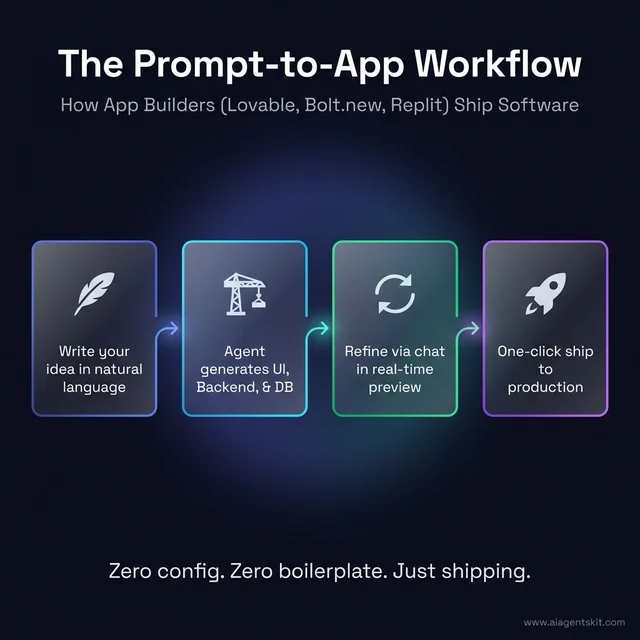 The prompt-to-app workflow: AI app builders like Lovable and Bolt.new follow a streamlined four-step cycle from initial description to live production deployment. This shift toward autonomous scaffolding and real-time conversational refinement allows founders and developers to bypass traditional boilerplate, reducing the time from idea to prototype by over 90%.
Best for: Developers and non-developers who want to build and deploy full-stack web apps entirely within a browser tab, using their preferred JavaScript framework, without any local environment setup.
Key features:
- WebContainers: complete Node.js dev environment runs in-browser, no backend required
- AI controls full environment: filesystem, server, package manager, terminal, browser console
- Framework support: React, Next.js, Astro, Svelte, Vue, Remix, Angular
- One-click deploy to Netlify or Cloudflare
- Real-time live preview as the agent builds
- Automated database setup, Stripe payments, SEO optimization (v2)
- Figma import for design-to-code workflows (2026)
- Team templates and collaboration features (enterprise tier)
Limitations: Bolt.new’s token-based pricing model generates more community complaints than most tools — complex projects burn tokens quickly and costs can escalate unexpectedly on ambitious builds. The WebContainers architecture, while powerful, has performance constraints on very large projects compared to native environments. For projects requiring proprietary backend systems, database migrations, or complex infrastructure, Bolt.new’s browser sandbox is a meaningful constraint.
Pricing: Free tier (limited tokens); paid plans with higher token allowances; enterprise pricing for team features and private repositories.
v0 by Vercel: AI-Powered UI Code Generator
v0, from Vercel, occupies a distinct and specifically scoped position in the 2026 AI coding tools landscape: it’s not a general-purpose coding agent, it’s the most polished AI UI code generator available, purpose-built for creating production-ready React components with Next.js, Tailwind CSS, and shadcn/ui. The workflow is tight: describe the UI in plain English (or upload an image or Figma mockup), refine it conversationally, and export clean JSX that drops into any Next.js project without additional formatting.
After a February 2026 major upgrade — driven by an announced base of over 4 million users — v0 expanded from pure component generation toward broader app-building capabilities, including basic backend logic generation and AI-generated content composition. Vercel is positioning v0 as central to its “AI Cloud” strategy, increasingly integrating it with Next.js deployments on Vercel infrastructure.
Best for: Frontend developers and designers who want to scaffold polished React/Next.js UI components from natural language or design files without wrestling with layout CSS; teams who want a rapid “UI first” development approach before adding backend logic.
Key features:
- Natural language and image/Figma mockup to React + Tailwind + shadcn/ui components
- Conversational refinement: iterate on generated UI via chat
- Generates clean, exportable JSX — no proprietary format lock-in
- Deep Next.js and Vercel ecosystem integration
- Over 4 million users as of February 2026
- Expanding toward backend logic and full app generation (v0.app roadmap)
Limitations: v0 is the most specialized tool in this roundup — it focuses on frontend UI and React/Next.js specifically. It does not handle backend API logic, databases, authentication, or deployment orchestration. Teams building Angular, Vue, or Svelte apps will find its output requires significant adaptation. For full-stack builds, pair v0 with a tool like Lovable or Bolt.new for backend coverage. Credit-based pricing has been a source of community friction when complex UIs consume more tokens than expected.
Pricing: Free tier with limited credits; paid plans with higher credit allowances; Vercel Pro subscribers receive enhanced v0 access.
How Do AI Coding Frameworks Enable Autonomous Development?
The tools reviewed above represent what’s available to individual developers and teams today. But the next tier of autonomous software development — where AI doesn’t just assist coding but coordinates entire development workflows across multiple specialized agents — runs on orchestration frameworks. These frameworks are the infrastructure layer that makes multi-agent systems capable of handling complex, multi-role engineering tasks without constant human coordination.
CrewAI: Role-Based Agent Orchestration
CrewAI structures multi-agent workflows around human-inspired role assignments. A CrewAI-powered coding workflow might deploy a “Product Manager” agent to interpret requirements, an “Architect” agent to design system structure, a “Developer” agent to implement code, and a “Reviewer” agent to evaluate output — all coordinating sequentially or in parallel.
Development teams that have deployed CrewAI for software engineering tasks find it particularly effective for structured development workflows where each stage has clear inputs and outputs. The role-based framing makes it easier to audit which agent made which decision — crucial for enterprise governance. Even among practitioners, there’s ongoing debate about how to best structure agent roles for complex, ambiguous tasks where the boundaries between “architect thinking” and “developer execution” aren’t clean.
AutoGen: Microsoft’s Multi-Agent Platform
AutoGen, from Microsoft Research, provides a conversational multi-agent framework optimized for code generation, debugging, and optimization tasks. Its “group chat” architecture allows multiple specialized agents to converse, critique each other’s output, and collectively iterate toward a solution — mimicking the peer review dynamics of a human development team.
AutoGen is widely deployed in research and increasingly in enterprise automation pipelines. Its strengths are flexibility and robustness in handling edge cases and failure modes more gracefully than simpler, sequential multi-agent setups.
MetaGPT: Simulating Software Engineering Teams
MetaGPT applies a “software engineering SOP” (Standard Operating Procedure) to multi-agent AI development. Agents in MetaGPT follow structured pipelines — from requirements analysis through PRD creation, system design, and code implementation — producing not just code but the full constellation of software engineering artifacts: design documents, API specs, and test plans.
What distinguishes MetaGPT from other frameworks is its emphasis on structured, auditable outputs. Rather than producing ad-hoc code and explanations, MetaGPT agents generate artifacts that mirror what a real engineering team would produce — making their outputs more integrable into existing development governance processes and easier to review with non-technical stakeholders.
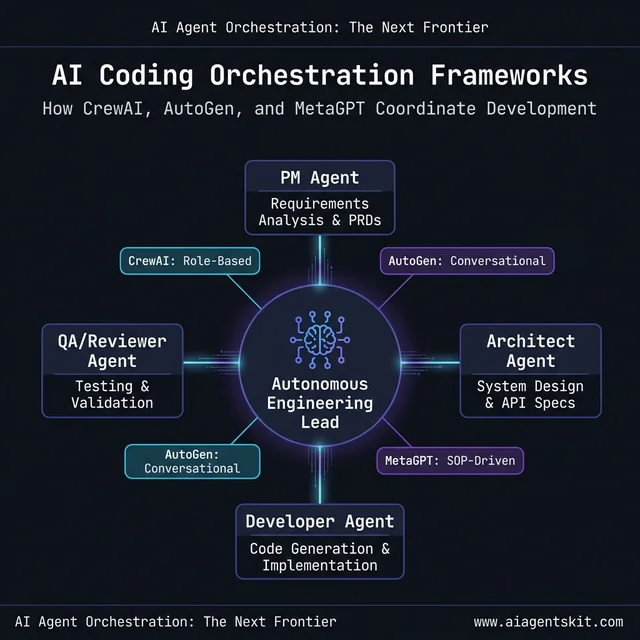 AI coding orchestration architecture: Next-generation frameworks like CrewAI and AutoGen coordinate specialized agent roles—from PMs and Architects to QA Reviewers—to handle complex engineering tasks. This multi-agent coordination ensures that autonomous systems mirror the structured workflows of human development teams, providing auditable decision points and higher implementation reliability.
AI Coding Agent Security: What Enterprise Teams Must Know
The productivity case for AI coding agents is clear — according to McKinsey’s 2025 State of AI Report, developers using generative AI tools write new code in nearly half the time, and companies with 80–100% developer AI adoption have experienced productivity gains exceeding 110%. The security and governance case is more nuanced, and getting it wrong exposes organizations to real risk.
The core security question with cloud-based AI coding agents is data residency: where does code go when it’s sent to the LLM? For public cloud agents (Copilot, default Cursor, default Gemini Code Assist), code is transmitted to external API endpoints. This is unacceptable for many regulated industries and for code involving proprietary algorithms, financial logic, or personal data. McKinsey’s 2025 survey also found that 62% of global organizations are experimenting with or piloting AI agents — but trust and security concerns remain the primary documented barrier to full production deployment.
The trust gap is real and well-documented: 46% of developers report distrust in AI-generated code outputs, and 48% admit to uploading sensitive data to public AI tools without explicit company approval. Both statistics represent organizational risk that security teams increasingly surface in AI adoption reviews. Understanding AI agent security best practices before deploying any coding agent in a production environment is essential, not optional.
Private deployment options (for code that cannot leave the organization):
- Tabnine: On-premises or VPC deployment, no external API calls required
- Windsurf (Codeium): Enterprise self-hosted deployment available
- Cody (Sourcegraph): Enterprise deployment fully within organizational infrastructure
- Aider: Works with local Ollama models — complete local inference, no cloud transmission
Security audit checklist for cloud-based agents:
- Does the vendor sign a Data Processing Agreement (DPA)?
- Is code used for model training? (Enterprise plans typically exclude this — verify contractually)
- What is the data retention policy for transmitted code?
- Is the agent’s network access scoped to only necessary endpoints?
- Does the tool support SSO/SAML for enterprise identity management?
For teams in healthcare, financial services, or defense, private deployment isn’t optional — it’s the only viable path. For SaaS companies or startups where IP sensitivity is lower, cloud-based agents with contractual data protections are typically acceptable with appropriate due diligence.
How to Choose the Right AI Coding Agent for Your Team
The “best” AI coding agent in 2026 isn’t the one with the highest benchmark score — it’s the one matched to a team’s specific autonomy requirements, toolchain, privacy constraints, and budget. The decision matrix below maps the most common team profiles to the most appropriate tool tier.
| Team Profile | Primary Need | Recommended Tool(s) |
|---|---|---|
| Large enterprise, GitHub-native | Enterprise standardization + GitHub workflow | GitHub Copilot |
| Startup at high development velocity | Best overall Level 2 agent capability | Cursor |
| Security-sensitive team (finance, health) | Code never leaves internal infrastructure | Tabnine (on-prem) or Aider (local Ollama) |
| AWS-centric infrastructure team | Cloud-native coding + infrastructure management | Amazon Q Developer or Amazon Kiro |
| Large monorepo / complex enterprise codebase | Codebase understanding at scale | Cody by Sourcegraph |
| CLI power users / open-source developers | Control, cost efficiency, model flexibility | Aider, Codex CLI, or Cline |
| VS Code users wanting transparent autonomous control | Permission-gated agentic control within VS Code | Cline |
| VS Code users wanting parallel multi-mode agents | Specialized modes + parallel Git worktree agents | Kilo Code |
| Enterprise autonomous task execution | End-to-end task pipeline automation | Devin (Level 3) |
| Google Cloud customers | GCP-native IDE + multi-agent orchestration | Google Antigravity or Gemini Code Assist |
| Non-technical founders / MVP builders | Ship a working web app from natural language | Lovable, Replit Agent, or Bolt.new |
| Browser-based full-stack development | No local setup, framework-agnostic app building | Bolt.new |
| Frontend UI scaffolding (React/Next.js focus) | Polished component generation from prompts or mockups | v0 by Vercel |
| Rapid full-stack prototypers | From idea to deployed app, no local setup | Replit Agent |
| Spec-driven, auditable agentic workflows | Structure + transparency before code execution | Amazon Kiro |
Decision axis 1 — Autonomy level needed: Start by honestly assessing what percentage of development tasks are well-scoped enough to run autonomously vs. requiring real-time human judgment. Teams where 80%+ of daily work involves repetitive patterns (CRUD features, test generation, documentation updates) get the most value from Level 2 and Level 3 agents. Teams doing novel architectural work benefit most from Level 1 and Level 2 tools that augment rather than replace judgment.
Decision axis 2 — Toolchain integration: The best tool is often the one a team will actually adopt and use daily. Teams deeply embedded in GitHub workflows often get better adoption with Copilot than with a technically superior alternative, simply because it lives where they already work. Friction in adoption is the silent killer of AI tool ROI, and it’s consistently underestimated in evaluation processes.
Decision axis 3 — Privacy and compliance: Evaluate whether code transmitted to the tool falls under data governance requirements. Regulated industries have specific obligations, and violating them through careless AI tool adoption creates audit and liability exposure. For teams operating under strict requirements, evaluate Tabnine, Windsurf Enterprise, or Aider with local Ollama models.
Decision axis 4 — Budget: Costs range from free (Aider, GitHub Copilot free tier, Gemini Code Assist personal) to $40+/user/month for enterprise plans. Devin operates at enterprise contract pricing well above the standard tool tier. For most teams, $20–25/user/month (Cursor or Copilot Business) represents the productivity/cost sweet spot for Level 2 capability.
AI Coding Agents: Frequently Asked Questions
What is the difference between an AI coding agent and a traditional coding assistant?
A traditional coding assistant is reactive and single-file: it suggests the next line of code based on what’s currently on screen. An AI coding agent is goal-oriented and multi-file: given a high-level objective, it reads relevant files across the codebase, creates a plan, executes changes across multiple files, runs commands, evaluates the results, and iterates — often without further developer input. The distinction is autonomy and scope. Traditional assistants react to developer keystrokes; agents act on developer intent across an entire project. This difference isn’t incremental — it’s a fundamental shift in how software development work gets allocated between human and machine.
Can AI coding agents replace software developers?
No — but developers who don’t adopt AI coding agents will increasingly lose competitive ground to those who do. The standard view among senior practitioners is that AI agents excel at automating the repetitive, structured portions of development — boilerplate, tests, documentation, standard patterns — while human developers remain essential for architectural judgment, novel problem-solving, stakeholder communication, and ensuring long-term code maintainability. The developer role is evolving from “person who writes code” to “person who directs, reviews, and refines AI-generated code” — a different but deeply skilled profession that requires strong judgment about when to trust and when to question AI output.
Which AI coding agent works best for large codebases?
For large monorepos or complex multi-repository architectures, Cody by Sourcegraph and Cursor lead on codebase understanding. Cody’s code intelligence layer — inherited from Sourcegraph’s enterprise search platform — provides the deepest repository-wide context, making it superior for organizations where understanding dependencies and cross-service impacts is the primary bottleneck. Cursor’s codebase indexing is excellent for mid-to-large codebases and more accessible for teams without dedicated code intelligence infrastructure. Claude Code also performs well on large codebase tasks due to Claude 4’s massive context window.
How do autonomous AI coding systems handle complex multi-file tasks?
Autonomous coding systems like Devin follow a structured agentic loop: they receive a goal, break it into subtasks, read relevant files, create an execution plan, run tool calls (write file, run command, read output), evaluate whether the output matches expectations, and iterate if it doesn’t. This loop runs autonomously — often for dozens to hundreds of steps — until the defined goal is achieved or the agent determines it needs human input. The quality of autonomous output is primarily determined by the quality of the initial goal specification. Vague prompts produce coherent-seeming but misaligned implementations, which is why Level 3 systems require more careful task scoping than Level 2 agents.
What are the best free AI coding agents available in 2026?
The strongest free options in 2026 are: Aider (open-source and free, uses model API at standard rates), GitHub Copilot free tier (VS Code only, limited completions per month), Gemini Code Assist (free for personal use with generous limits from Google), Cursor’s free tier (limited agent sessions), and OpenAI Codex CLI (open-source, free to download; requires OpenAI API credits). Google Antigravity is also currently free in public preview. Of these, Aider and Codex CLI provide the most raw capability for cost-conscious developers willing to work via CLI and pay only for API usage. For teams that want a GUI experience without spending, GitHub Copilot’s free tier is the most accessible starting point.
How much do AI coding agents cost for a team of 10 developers?
Costs for a 10-developer team range significantly by tool: GitHub Copilot Business ($19/user/month) totals $190/month; Cursor Pro ($20/user/month) totals $200/month; Tabnine Pro ($15/user/month) totals $150/month. Devin operates on enterprise contracts typically running thousands per month. Most small teams find $200–$250/month (Copilot or Cursor) to be the practical entry point for serious Level 2 agent capability. The ROI math works clearly in most cases: if each developer saves 2 hours per week at a $100/hr fully-loaded cost, that’s $200/week per developer in productivity value — against a $20/month tool cost.
Are AI coding agents secure enough for proprietary code?
It depends entirely on the deployment architecture. Cloud-based agents (Copilot, default Cursor, default Gemini Code Assist) transmit code to external API endpoints — unacceptable for many regulated industries or highly sensitive IP. Self-hosted or on-premises deployments (Tabnine Enterprise, Windsurf Enterprise, Aider with local Ollama models) keep code entirely within organizational control. For cloud-based tools, security due diligence should include reviewing the vendor’s DPA, confirming code is not used for model training, and validating data retention periods contractually. The answer is situational, and teams should treat “is this tool secure enough?” as a deployment architecture question, not a vendor trust question.
What AI models power the best coding agents in 2026?
The leading tools use these models: Claude Code runs on Claude 4 Opus and Sonnet (Anthropic); GitHub Copilot defaults to GPT-5 with Claude 4 and Gemini 3 available via model picker; Cursor supports GPT-5, Claude 4, Gemini 3, and Grok; Gemini Code Assist uses Gemini 3 Pro with a 2M token context window; Amazon Q Developer uses AWS-trained models. The best model for coding tasks in 2026 depends on task type — Claude 4 Opus generally leads on complex reasoning and codebase comprehension, while GPT-5 and Gemini 3 are competitive for instruction-following and generation speed. Most developers find Claude 4 Sonnet the best balance of capability and cost for everyday agent work.
How do teams measure the ROI of an AI coding agent?
The most reliable ROI metric is time-saved × developer cost. Teams should baseline developer hours spent on tasks the agent will handle — test writing, documentation, boilerplate, standard feature patterns — then measure the delta after adoption. According to McKinsey’s State of AI research (2025), developers using generative AI write new code in nearly half the time, with companies at 80–100% developer adoption seeing 110%+ productivity gains. The harder-to-quantify benefits — improved developer satisfaction, faster onboarding for new team members, and more consistent code quality — consistently show up in qualitative assessments and compound over time.
What is the future of autonomous AI coding agents?
The trajectory is toward agents that handle increasingly larger and more complex tasks over longer time horizons — measured in days rather than minutes. Gartner predicts that by end of 2026, 40% of enterprise applications will embed AI agents. The medium-term future (2027–2028) involves autonomous agents taking full responsibility for feature delivery cycles, with human developers focusing on product vision, architecture review, and quality governance rather than line-by-line implementation. Multi-agent frameworks will become the coordination infrastructure for software engineering pipelines that blend multiple specialized agents with human oversight at strategic decision points.
Conclusion
AI coding agents in 2026 aren’t a single category — they’re a spectrum, and the right position on that spectrum depends on workflow requirements, codebase complexity, security constraints, and tolerance for autonomous execution. The three-tier autonomy framework — code assistants, coding agents, autonomous systems — gives practitioners a cleaner vocabulary for evaluating 19 tools than the undifferentiated “AI coding tool” label that most marketing uses.
For most development teams, the practical priority is adopting Level 2 agents (Cursor, Claude Code, Codex CLI, Cline, Kilo Code, GitHub Copilot Agent Mode, or Amazon Kiro) for the majority of feature work, while beginning to experiment with Level 3 autonomous systems for well-scoped, high-value engineering tasks — whether that means Devin for complex enterprise pipelines, Replit Agent for rapid deployment, or Google Antigravity for multi-agent orchestration at scale.
Non-technical founders now have a genuine third path with Lovable, Replit Agent, and Bolt.new, where the agent ships the first working version and human developers refine it. Frontend-first teams can shortcut UI scaffolding entirely with v0 by Vercel. Teams that delay adoption across any of these tiers aren’t just missing productivity gains — they’re building a capability debt that compounds as autonomous systems become the standard expectation in engineering leadership roles.
The best way to understand where this technology is heading is to study the broader arc of autonomous AI systems and their trajectory across industries. For a deeper look at what’s coming, the analysis of the future of AI agents covers the developments that will reshape software engineering over the next three years.