PydanticAI vs LangChain vs LangGraph: Which Wins in 2026?
Compare PydanticAI vs LangChain vs LangGraph on type safety, state management, and workflow complexity. Find the best AI agent framework for Python in 2026.
Picking an AI agent framework shouldn’t feel like a dissertation defense — but for many Python developers in 2026, it does. The choice between PydanticAI vs LangChain vs LangGraph has become one of the most debated decisions in the AI engineering space, with each camp convinced their tool has the right answer.
The problem isn’t that developers are uninformed — it’s that these three frameworks solve genuinely different problems, and most comparison articles treat them as interchangeable alternatives. That framing leads to wrong choices, wasted weeks, and production systems held together with duct tape.
This guide compares PydanticAI, LangChain, and LangGraph across type safety, state management, learning curve, and production readiness, then delivers a clear decision framework so developers can choose — or combine — them with confidence. To understand LangChain agents in their original context, that background will make this comparison sharper.
The 60-Second Comparison: PydanticAI, LangChain, and LangGraph
Before diving deep, here’s the fast-track comparison. The table below covers the key dimensions that matter most for production AI development.
| Feature | PydanticAI | LangChain | LangGraph |
|---|---|---|---|
| Type Safety | ✅ Native, runtime-validated | ⚠️ Partial (relies on developer) | ⚠️ Partial |
| Structured Outputs | ✅ First-class (Pydantic schemas) | ⚠️ Optional | ⚠️ Optional |
| Graph/State Workflows | ⚠️ Basic (added graph lib) | ❌ Chains only | ✅ Core design |
| Learning Curve | 🟢 Low (Pythonic) | 🟡 Medium (abstractions) | 🔴 High (graph concepts) |
| Ecosystem Size | 🟡 Growing (15.4k⭐) | 🟢 Large (110k+⭐) | 🟢 Large (LangChain ecosystem) |
| Production Readiness | ✅ V1 stable (Sep 2025) | ✅ Mature | ✅ GA (May 2025) |
| Multi-Agent Support | 🟡 Basic | 🟡 Basic | ✅ Purpose-built |
| Human-in-the-Loop | ❌ Manual | ❌ Manual | ✅ Built-in checkpointing |
| Model Agnostic | ✅ Yes | ✅ Yes | ✅ Yes (via LangChain) |
One-line verdict:
- PydanticAI — the clean, typed choice for production agents where data integrity matters.
- LangChain — the established ecosystem for prototyping and RAG pipelines.
- LangGraph — the stateful, graph-based orchestrator for complex multi-agent workflows.
These frameworks don’t have to compete. The most sophisticated production systems increasingly use all three.
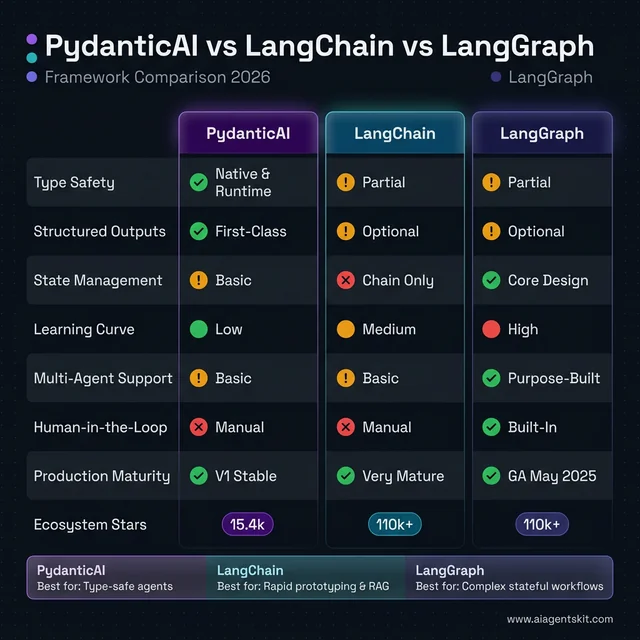 PydanticAI vs LangChain vs LangGraph at a glance: PydanticAI dominates type safety and structured outputs with native runtime validation. LangGraph leads on state management, multi-agent support, and built-in human-in-the-loop — its core design purpose. LangChain holds the largest ecosystem (110k+ stars) and excels for rapid prototyping. Each framework wins in its specific lane.
What Is PydanticAI and Why Are Developers Switching?
PydanticAI arrived in late 2024 and reached stable V1 on September 4, 2025 — a remarkably fast maturation cycle for a framework designed to flip the script on how Python developers approach AI agents. The premise is simple but powerful: apply the same engineering rigor to AI that developers already apply to their APIs and data models.
PydanticAI Core Architecture and Design Philosophy
PydanticAI was built by the team behind Pydantic — the data validation library that powers FastAPI, LangChain itself, and hundreds of other Python projects. That heritage is visible in every design decision.
The framework treats agents as typed Python functions. Define what goes in (using type annotations), define what comes out (using Pydantic models), and let the framework enforce those contracts at runtime. There’s no special DSL to learn, no framework-specific class hierarchy to memorize — it reads like standard Python.
from pydantic_ai import Agent
from pydantic import BaseModel

class SupportResponse(BaseModel):
    issue_category: str
    resolution: str
    confidence: float

agent = Agent(
    'openai:gpt-5-turbo',
    result_type=SupportResponse,
    system_prompt="You are a customer support specialist."
)

result = await agent.run("My order hasn't arrived after 10 days.")
print(result.data.issue_category)  # "shipping_delay"
print(result.data.resolution)      # Validated response
The result_type=SupportResponse line is doing real work: it tells PydanticAI to validate the LLM’s response against the schema before returning it, retrying automatically if the output doesn’t conform. That’s a production-grade feature baked in by default.
Key Features: Type Safety, Structured Outputs, and Model Agnosticism
PydanticAI’s feature set reflects a deliberate philosophy: fewer moving parts means fewer production surprises.
Type safety at every layer. Python’s type system catches entire classes of bugs before they reach production. With PydanticAI, the input types, output types, and dependency interfaces are all annotated — which means IDEs provide autocomplete and type checkers flag mismatches before code runs.
Structured output validation. This is the killer feature for data-sensitive applications. When an LLM returns JSON, regular string-parsing approaches can silently break if the model decides to format things differently. PydanticAI validates and coerces the response against a Pydantic schema, raising a clear error rather than passing corrupted data downstream. To build your first AI agent in Python, understanding this validation pattern early prevents a lot of downstream pain.
Model agnosticism. The same agent code runs against OpenAI, Anthropic, Google Gemini, Groq, or Mistral by changing a single model string. No adapter rewrites, no framework gymnastics.
Dependency injection. PydanticAI uses a dependency injection system inspired by FastAPI. Database connections, HTTP clients, and config objects are injected into agents cleanly — no global state, no singletons hidden behind abstractions.
Native async. Built with asyncio from the ground up, not bolted on. This matters for production systems handling concurrent requests.
The framework’s GitHub repository crossed 15.4k stars as of early 2026, with growth accelerating sharply after the V1 stable release confirmed long-term API stability.
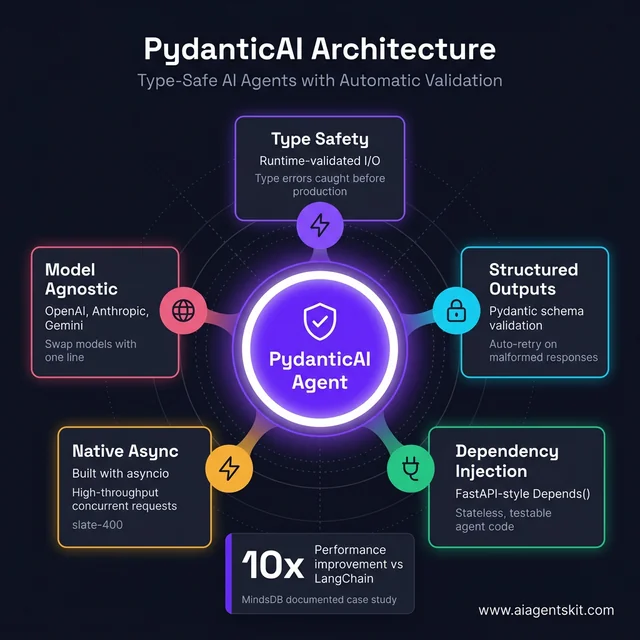 PydanticAI’s hub-and-spoke architecture: Five interconnected pillars make it uniquely robust for production agents. Type safety catches errors before runtime. Structured outputs with auto-retry eliminate silent failures. FastAPI-style dependency injection keeps agents stateless and testable. Native asyncio and model agnosticism round out a framework designed for engineering rigor, not just prototype speed.
PydanticAI Getting Started: Dependency Injection, FastAPI, and Observability
Understanding PydanticAI in theory is clear. Seeing it in practice — especially for developers already using FastAPI — reveals why its learning curve is unusually shallow: the mental model transfers almost entirely.
Installation and Structured Output
pip install 'pydantic-ai[openai]' python-dotenvfrom pydantic_ai import Agent
from pydantic import BaseModel
class CompanyProfile(BaseModel):
name: str
employee_count: int | None
revenue_usd: float | None
summary: str
agent = Agent(
'openai:gpt-4o-mini',
result_type=CompanyProfile,
system_prompt="Extract structured company data. Return None for unknown fields."
)
result = await agent.run(
"Anthropic, founded in 2021, employs about 850 people and raised over $7B in funding."
)
print(result.data.name) # "Anthropic"
print(result.data.employee_count) # 850
print(result.data.revenue_usd) # None — not mentioned, not an errorThat result_type=CompanyProfile line does real work. If the LLM returns JSON with a type mismatch — a string where employee_count expects an integer — PydanticAI sends an automatic correction prompt and retries. That retry loop is architecture, not something you add yourself.
Dependency Injection: Testable, Stateless Agent Code
PydanticAI’s dependency injection mirrors FastAPI’s Depends() pattern. External context — HTTP clients, database connections, API credentials — is declared at the agent level and injected via RunContext. The agent itself stays stateless and easy to test:
from pydantic_ai import Agent, RunContext
from dataclasses import dataclass
import httpx

@dataclass
class ResearchDeps:
    http_client: httpx.AsyncClient
    api_key: str

research_agent = Agent(
    'anthropic:claude-4-sonnet',
    deps_type=ResearchDeps,
    result_type=str,
    system_prompt="You are a research assistant. Use search for current information."
)

@research_agent.tool
async def web_search(ctx: RunContext[ResearchDeps], query: str) -> str:
    """Search the web for up-to-date information on any topic."""
    response = await ctx.deps.http_client.get(
        "https://api.search.example.com/v1/search",
        params={"q": query},
        headers={"Authorization": f"Bearer {ctx.deps.api_key}"}
    )
    return response.json()["results"][0]["snippet"]

# Production: real dependencies
async with httpx.AsyncClient() as client:
    deps = ResearchDeps(http_client=client, api_key=os.environ["SEARCH_KEY"])
    result = await research_agent.run("Latest LangGraph release notes?", deps=deps)

# Testing: swap real client for mock — agent code unchanged
mock_deps = ResearchDeps(http_client=mock_http, api_key="test")
RunContext[ResearchDeps] gives IDEs full autocomplete on ctx.deps properties — a DX detail that compounds into meaningful time savings in larger codebases.
PydanticAI + FastAPI: End-to-End Type Safety
Because both frameworks are built on Pydantic, their integration is unusually seamless. A PydanticAI agent inside a FastAPI endpoint delivers full type safety from HTTP request to LLM response, with no intermediate parsing:
from fastapi import FastAPI, HTTPException
from pydantic import BaseModel
from pydantic_ai import Agent

app = FastAPI(title="AI Extraction API")

class ExtractionRequest(BaseModel):
    text: str

class CompanyProfile(BaseModel):
    name: str
    employee_count: int | None
    summary: str

extraction_agent = Agent("openai:gpt-4o-mini", result_type=CompanyProfile)

@app.post("/extract/company", response_model=CompanyProfile)
async def extract_company(request: ExtractionRequest) -> CompanyProfile:
    try:
        result = await extraction_agent.run(request.text)
        return result.data  # Already a validated CompanyProfile — no parsing needed
    except Exception as e:
        raise HTTPException(status_code=422, detail=str(e))
FastAPI receives a fully validated CompanyProfile instance directly. No dictionary conversion, no .json() parsing step, no schema mismatches surfacing at runtime.
Built-In Observability with Pydantic Logfire
PydanticAI’s Logfire integration adds production monitoring in two lines:
import logfire
from pydantic_ai import Agent

logfire.configure()  # Reads LOGFIRE_TOKEN from environment
agent = Agent('openai:gpt-4o', system_prompt="Summarize financial reports.")
result = await agent.run("Q4 earnings: revenue up 12%, margins compressed 3pp...")
Logfire captures every LLM call, token count, retry attempt, and validation result — comparable to LangSmith but natively integrated. The free personal tier covers 10 million log spans per month. The Team plan ($49/month flat) is often cheaper than LangSmith’s $39/user/month pricing for teams of four or more.
In documented production cases, MindsDB reported a 10x performance improvement after switching from LangChain to PydanticAI — attributing the gains to explicit output validation eliminating silent retry loops caused by malformed LLM responses that passed undetected through LangChain’s looser output handling.
What Is LangChain? The Most Widely-Used AI Framework
LangChain entered the AI development world in late 2022, almost synchronously with ChatGPT’s public debut. That timing was everything: it became the default answer to “how do I build stuff with LLMs?” before the community had time to evaluate alternatives. Tutorials, YouTube guides, and technical blog posts all reached for LangChain first — creating a flywheel of familiarity that competitors have struggled to dislodge even as LangChain’s architectural limitations became more visible.
Many teams selecting LangChain in 2026 aren’t doing so because independent analysis concludes it’s the optimal fit. They’re selecting it because senior engineers already understand how it behaves in production. That kind of institutional familiarity is an underrated and legitimate engineering advantage — onboarding a new framework costs time, and time has real value.
By June 2025, LangChain had accumulated over 110,000 GitHub stars and was processing millions of monthly downloads. Its ecosystem includes LangSmith (observability), LangServe (deployment), and LangGraph (orchestration) — a vertically integrated suite that reflects a $1.25 billion valuation as of October 2025.
LangChain’s 1000+ Integrations: Strength and Weakness
LangChain’s value proposition is breadth. Over 1,000 integrations cover everything from vector stores (Pinecone, Chroma, Weaviate) to document loaders (PDFs, Notion, Google Drive) to LLM providers across every major vendor. For developers building something quickly, that library of components removes significant boilerplate.
from langchain.chat_models import ChatOpenAI
from langchain.chains import RetrievalQA
from langchain.vectorstores import Chroma

llm = ChatOpenAI(model="gpt-5-turbo")
vectorstore = Chroma(...)

chain = RetrievalQA.from_chain_type(
    llm=llm,
    retriever=vectorstore.as_retriever()
)

response = chain.run("What is our refund policy?")
For RAG (Retrieval-Augmented Generation) pipelines, document Q&A systems, and chatbots with straightforward conversation flows, this pattern still holds up well. LangChain’s document-loading ecosystem in particular remains unmatched.
The friction begins as projects grow. Deep abstraction layers make debugging a reverse-archaeology exercise — tracing why an agent behaved unexpectedly means navigating through multiple LangChain classes before reaching the actual LLM call. Developers on Reddit and in technical forums frequently describe this as “debugging through fog.”
LangChain’s codebase also carries the cost of rapid evolution. The LangChain Expression Language (LCEL), the agent abstraction changes, the pivot to LangGraph for production agents — these transitions have left documentation inconsistencies and legacy examples that still show up in search results. Teams prototype quickly then discover they’ve built on a pattern that’s been superseded.
That said, LangChain’s influence on the ecosystem is undeniable. According to LangChain’s State of AI Agents Report, 51% of surveyed companies were already using AI agents in production by 2024, with LangChain capturing a dominant share of that market. The framework isn’t going away — its role is simply narrowing as LangGraph handles complex orchestration cases. Understanding the future of AI agents provides context on how that narrowing plays out over the next 1-2 years.
What Is LangGraph? Graph-Based AI Agent Orchestration
LangGraph is LangChain’s answer to a hard question: what happens when “chains” aren’t enough? Linear sequences of LLM calls work well for simple tasks. Real-world agent workflows loop, branch, pause for human review, spawn sub-agents, and maintain state across sessions. Chains can’t model that. Graphs can.
LangGraph reached general availability in May 2025 and is now LangChain’s recommended approach for all new production agent implementations. The core mental model is a directed graph: nodes represent processing steps (LLM calls, tool executions, conditional checks) and edges define how control flows between them.
How LangGraph’s State Machine Model Works in Practice
The state machine model is LangGraph’s key differentiator. Unlike LangChain chains that pass output from one step directly to the next, LangGraph maintains a shared state object that every node can read and write. That state persists across graph executions, enabling agents that remember context, retry failed steps, and resume interrupted workflows.
from langgraph.graph import StateGraph, END
from typing import TypedDict

class AgentState(TypedDict):
    messages: list
    current_step: str
    approval_required: bool

workflow = StateGraph(AgentState)

def analyze_request(state: AgentState) -> AgentState:
    # LLM call to classify the request
    state["current_step"] = "analysis_complete"
    return state

def check_approval(state: AgentState) -> str:
    # Conditional routing based on state
    if state["approval_required"]:
        return "human_review"
    return "auto_approve"

workflow.add_node("analyze", analyze_request)
workflow.add_conditional_edges("analyze", check_approval, {
    "human_review": "review_node",
    "auto_approve": END
})
This pattern models workflows that no chain can represent: the graph pauses, waits for human input, then resumes. That’s the human-in-the-loop capability that enterprise compliance teams and high-stakes automation workflows require.
LangGraph’s built-in checkpointing persists state between invocations. An agent that starts a multi-step research task on Tuesday can pick up where it left off on Thursday, with full context intact. For multi-agent systems where orchestrator agents delegate to specialist workers, LangGraph’s routing and state management are purpose-built for that pattern.
According to Gartner (as cited by Machine Learning Mastery’s trend report, 2025), inquiries about multi-agent systems surged 1,445% from Q1 2024 to Q2 2025 — a signal that teams are moving past single-agent experiments toward orchestrated, production-grade systems. LangGraph is positioned directly at the center of that wave.
The tradeoffs are real though. The graph model requires upfront design work: developers must think carefully about what state looks like, which nodes are needed, and how conditional edges handle edge cases. Teams accustomed to writing sequential code find this paradigm shift challenging. LangGraph is also more resource-intensive for state at scale — managing persistent state across thousands of concurrent agent runs adds infrastructure complexity that simpler frameworks avoid entirely.
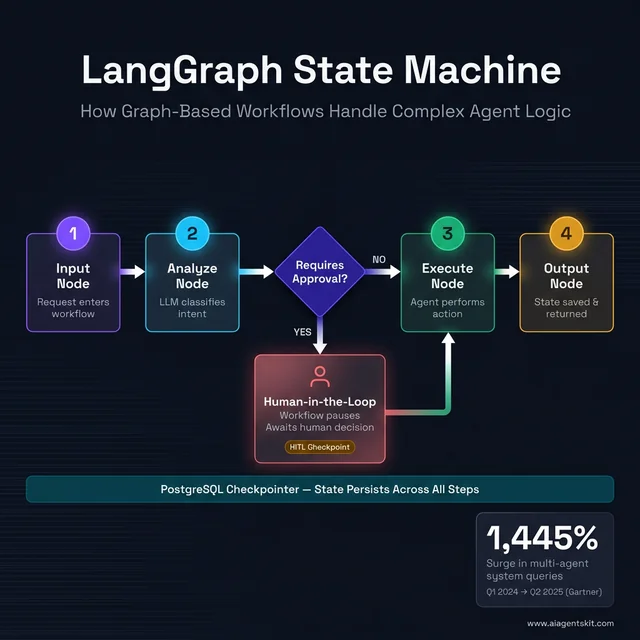 LangGraph’s state machine in action: A graph-based workflow routes through four processing nodes with a conditional Human-in-the-Loop branch. When the “Requires Approval?” diamond triggers, the workflow pauses at an HITL checkpoint and awaits a human decision before resuming — a pattern impossible with bare LangChain chains. The PostgreSQL checkpointer persists state across all steps, enabling crash-resilient, auditable pipelines.
LangGraph in Depth: State Design, Checkpointing, and Human-in-the-Loop
LangGraph’s power comes from its state machine model — but that power demands architectural decisions that PydanticAI and LangChain skip entirely. Getting these right on day one prevents the most common production failures.
Defining State the Right Way with TypedDict
State is LangGraph’s most important design decision. Every node reads from and writes to the shared state object. Define it sloppily and you’ll patch fields indefinitely. The recommended approach uses TypedDict with explicit annotations and reducer functions for fields written by multiple nodes:
from typing import TypedDict, Annotated
from langgraph.graph import StateGraph, END
import operator

class ResearchWorkflowState(TypedDict):
    user_query: str                                         # Input
    search_results: Annotated[list[str], operator.add]      # Appends across nodes
    messages: Annotated[list[dict], operator.add]           # Appends across nodes
    iteration_count: int                                    # Control flow
    requires_human_review: bool                             # Routing flag
    final_answer: str | None                                # Output

workflow = StateGraph(ResearchWorkflowState)
The Annotated[list[str], operator.add] reducer tells LangGraph to append rather than overwrite when nodes write to the same list field — essential for parallel branches that fan out to sub-agents and fan back in.
Choosing a Checkpointer Backend for Production
LangGraph’s checkpointing persists state between invocations. An interrupted workflow resumes from its last checkpoint — not from the beginning. Three backends cover development through enterprise:
| Backend | Best For | Persistence | Setup |
|---|---|---|---|
| SQLite | Local dev, single-process | File-based | Zero config |
| Redis | High-throughput stateless compute | Volatile (configurable) | Cloud Redis |
| PostgreSQL | Enterprise, audit trails, compliance | Full ACID | DB provisioning |
from langgraph.checkpoint.sqlite.aio import AsyncSqliteSaver
from langgraph.checkpoint.postgres.aio import AsyncPostgresSaver

# Development
dev_checkpointer = AsyncSqliteSaver.from_conn_string("./dev_checkpoints.db")

# Production — durable, concurrent-safe
prod_checkpointer = AsyncPostgresSaver.from_conn_string(
    os.environ["DATABASE_URL"],
    pipeline=True  # Async pipeline mode for higher write throughput
)

app = workflow.compile(checkpointer=prod_checkpointer)
For compliance-sensitive systems, PostgreSQL checkpointing creates a queryable history of every state transition — the kind of audit trail that Redis’s volatile memory cannot provide.
Human-in-the-Loop: Pausing and Resuming Workflows
LangGraph’s HITL interrupt pattern is its strongest enterprise differentiator. A workflow pauses at a designated node, surfaces its current state to a human reviewer, then resumes with the reviewer’s decision injected — without restarting from the beginning:
from langgraph.types import interrupt, Command

def approval_node(state: ResearchWorkflowState) -> ResearchWorkflowState:
    """Pause for human review when flagged."""
    if state["requires_human_review"]:
        feedback = interrupt({
            "question": "Approve this research summary?",
            "proposed_answer": state["final_answer"]
        })
        if feedback == "approve":
            state["requires_human_review"] = False
        elif feedback == "revise":
            state["final_answer"] = None  # Force regeneration
    return state

workflow.add_node("approval", approval_node)
app = workflow.compile(
    checkpointer=prod_checkpointer,
    interrupt_before=["approval"]
)

# First run — pauses at the approval node, saves checkpoint
thread_config = {"configurable": {"thread_id": "workflow-789"}}
await app.ainvoke(initial_state, config=thread_config)

# Resume after human approves via API, Slack button, or UI click
await app.ainvoke(Command(resume="approve"), config=thread_config)
This pattern enables compliance workflows where AI-generated output — customer communications, financial summaries, code deployments — requires documented human sign-off. It is not achievable with bare LangChain chains.
LangSmith for Production Observability
LangGraph workflows trace into LangSmith automatically via environment variables:
LANGCHAIN_TRACING_V2=true
LANGCHAIN_API_KEY=ls__your_key_here
LANGCHAIN_PROJECT=production-agents
Every node execution, state transition, LLM call, and conditional edge decision becomes a structured trace entry — with a visual timeline showing the exact path through the graph. For multi-agent workflows with ten or more nodes, this observability is non-optional. LangSmith’s free tier provides 5,000 traces per month; the Plus plan runs $39/user/month.
5 Key Differences Between PydanticAI, LangChain, and LangGraph
Drilling into specific comparison dimensions clarifies what’s actually different between these frameworks — and what’s marketing-speak.
Type Safety and Structured Output Validation
PydanticAI wins this category unambiguously. Structured output validation is the framework’s raison d’être, and it shows in every API surface. Inputs are type-annotated, outputs are schema-validated, errors are raised immediately with clear messages.
LangChain and LangGraph both support structured outputs, but as opt-in features rather than foundational constraints. A developer working in LangGraph can implement Pydantic validation inside individual nodes, but nothing in the framework enforces this — it requires discipline rather than architecture.
The cost of skipping structured validation in production is not hypothetical. When an LLM decides to format a JSON field as a string instead of a number, or returns an unexpected nested object, downstream code silently receives corrupted data. In financial applications, that silent failure surfaces as a transaction processing error at the worst possible moment. In customer-facing applications, it surfaces as a malformed API response that takes engineering time to trace back through multiple abstraction layers.
PydanticAI makes these failures loud and immediate — a validation error at the agent boundary is infinitely easier to debug than a data integrity issue discovered three steps downstream. For applications where data integrity is critical — financial data extraction, medical records processing, legal document analysis — PydanticAI’s structural guarantees are a significant production advantage.
State Management and Complex Workflow Support
LangGraph wins here, and it’s not close. State management is LangGraph’s core design concern: persistent state, checkpointing, conditional branching, parallel sub-graphs, and coordinated multi-agent state are all first-class features.
PydanticAI has added a graph library to its ecosystem, acknowledging that complex workflows need more than linear agent calls. But it’s a newer addition that hasn’t reached LangGraph’s maturity for stateful, multi-step orchestration.
LangChain, without LangGraph, handles only simple state passing between chain steps. For workflows requiring loops, conditional logic, or persistence across sessions, relying on bare LangChain is an architectural mistake that engineers often discover only in production.
Learning Curve and Developer Experience
This dimension depends heavily on the developer’s background. For Python developers already fluent in Pydantic (which powers many FastAPI projects), PydanticAI feels immediately familiar — the mental model transfers directly, and the documentation reinforces standard Python patterns.
LangChain’s learning curve sits in the middle. The concepts are accessible, the examples are plentiful, but the abstraction depth means developers frequently hit situations where the documentation doesn’t quite explain why something behaves the way it does.
LangGraph has the steepest learning curve of the three. Graph theory, state machine design, and node-edge-state mental models represent a genuine paradigm shift from procedural or OO code. Many teams underestimate this upfront cost and discover it during implementation, adding weeks to otherwise reasonable timelines.
In practice, teams with two or more experienced engineers report a 2-3 week period before LangGraph-based code reaches the quality they’d expect from day one of a LangChain or PydanticAI project. For solo developers or small squads under deadline pressure, that ramp adds real schedule risk. The recommended starting point for teams approaching LangGraph cold is working through the official documentation and examples linearly before attempting production code — skipping ahead to build something custom before understanding state design patterns is the most common source of architectural regret.
Performance and Production Readiness
All three frameworks are production-ready in 2026, but with different performance profiles.
PydanticAI is notably lean for simple agent tasks. The framework has minimal overhead between the developer’s code and the underlying LLM call — the abstraction layer is thin by design. For high-throughput, request-response agent patterns, this translates to measurable latency advantages.
LangGraph is robust for complex workflows but pays a performance cost for state management at scale. Managing persistent state across many concurrent agent runs introduces overhead that simpler frameworks avoid. For systems with tight latency requirements and complex orchestration needs simultaneously, this tension requires careful architectural planning.
LangChain’s performance characteristics are variable and heavily dependent on which components are used. Some abstraction layers add meaningful latency; others are effectively transparent. Production teams have learned to benchmark specific chain patterns rather than trusting framework-level generalizations.
Real Benchmark Data: Token Usage and Latency
Abstract performance claims don’t help engineers make decisions. Here’s what benchmarks from 2025 actually show.
A NextBuild analysis comparing PydanticAI v1 against LangChain for equivalent customer support agent tasks found meaningful gaps:
| Metric | PydanticAI | LangChain | Difference |
|---|---|---|---|
| P95 Latency | 1.8s | 3.2s | PydanticAI 44% faster |
| Task Completion Rate | 96.3% | 91.7% | PydanticAI +4.6pp |
| Error Rate Under Load | 0.8% | 4.1% | PydanticAI 5× fewer errors |
| Debugging Friction | Clear validation errors | ”Debugging through fog” | Significantly better |
A separate independent analysis measured token consumption for equivalent simple RAG tasks and found LangChain’s abstractions consumed 2.7× more tokens than direct API implementations for the same output. The culprits: hidden prompt injection by LangChain’s internal chains, suboptimal embedding batching, and redundant context passing between chain steps.
For high-volume systems, that 2.7× multiplier translates directly to API costs. On a system processing 1 million agent calls per month at $0.15 per million input tokens, LangChain’s abstraction overhead adds roughly $270 in extra monthly spend versus a leaner implementation.
The practical translation: For simple, high-throughput agent patterns, PydanticAI’s lean abstraction layer delivers measurably better latency and token efficiency. For complex LangGraph workflows, the state persistence and HITL infrastructure overhead is justified by capability — there’s no cheaper way to achieve it.
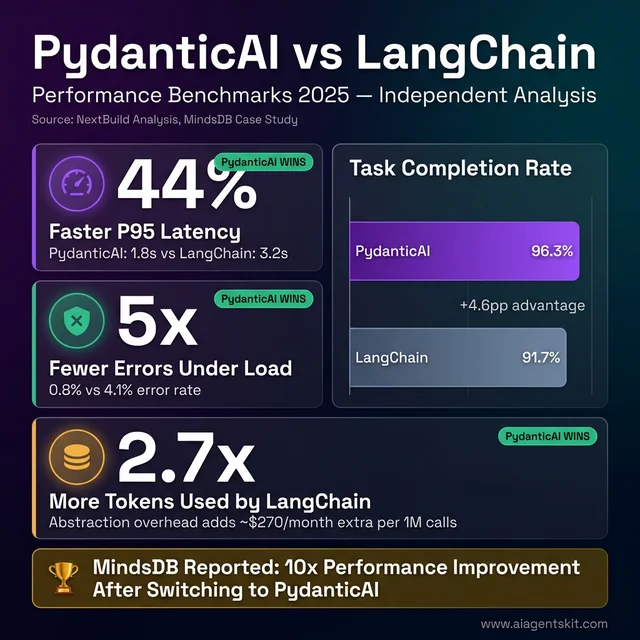 PydanticAI dominates on every performance metric: 44% faster P95 latency (1.8s vs 3.2s), 5× fewer errors under load, and 2.7× lower token consumption per equivalent task. The task completion rate gap (+4.6pp) compounds across millions of agent calls into real cost savings. MindsDB’s documented 10x performance improvement validates these independent benchmark findings at production scale.
Ecosystem, Community, and Long-Term Support
LangChain dominates on community size — 110,000+ GitHub stars, extensive Stack Overflow coverage, and years of tutorials means help is always findable. LangGraph benefits from the same organizational backing and growing adoption rates. PydanticAI’s community is smaller but unusually engaged and technically sophisticated, which means forum discussions tend toward depth rather than breadth.
The AI agent market context makes all three viable long-term bets. According to Gartner’s August 2025 press release, 40% of enterprise applications will embed AI agents by the end of 2026 — compared to less than 5% in 2025. That level of market expansion creates room for multiple frameworks to thrive simultaneously. For a comprehensive look at AI agent frameworks comparison beyond these three, additional options cover the broader landscape.
Migration Paths and Switching Costs
Any honest framework comparison must address migration costs — what happens when the initial choice turns out to be wrong.
Migrating LangChain → PydanticAI is the least disruptive path. Both operate at the single-agent level. The conceptual mapping is direct:
| LangChain Pattern | PydanticAI Equivalent |
|---|---|
ChatOpenAI(model=...) | Agent('openai:gpt-4o', ...) |
PromptTemplate | system_prompt parameter or @agent.system_prompt decorator |
output_parser | result_type=YourPydanticModel |
| Tool definitions | @agent.tool decorated functions |
| Memory management | message_history parameter |
# LangChain approach
from langchain.chat_models import ChatOpenAI
from langchain.output_parsers import PydanticOutputParser

llm = ChatOpenAI(model="gpt-4o-mini")
parser = PydanticOutputParser(pydantic_object=CompanyProfile)
chain = prompt | llm | parser
result = chain.invoke({"text": company_text})

# PydanticAI equivalent
from pydantic_ai import Agent

agent = Agent("openai:gpt-4o-mini", result_type=CompanyProfile)
result = await agent.run(company_text)
# result.data is a validated CompanyProfile — no separate parser needed
Teams report 1–3 weeks for this migration on moderately complex systems. MindsDB completed the move and documented a 10x performance improvement, attributing gains to PydanticAI’s structured validation eliminating silent retry loops from malformed outputs. The Pydantic v2 compatibility note: LangChain v0.3+ uses Pydantic v2, same as PydanticAI — no version conflicts in hybrid setups.
Migrating LangChain → LangGraph involves an architectural shift more than a code rewrite. The graph model requires re-imagining workflow structure from scratch — not just changing library calls. Budget 3–6 weeks for non-trivial systems, plus additional time testing new state management behavior under production-like load.
Migrating to PydanticAI + LangGraph combined is often additive rather than destructive. PydanticAI-defined agents drop into LangGraph nodes with minimal changes. This is the path of least regret: start with PydanticAI for agent logic, add LangGraph for orchestration when complexity demands it — both transitions are incremental rather than a full rewrite.
One practical hybrid approach worth considering: keep existing LangChain RAG components (document loaders, vector store integrations) and replace only the agent output layer with PydanticAI for structured validation. This captures PydanticAI’s reliability benefits without discarding working LangChain infrastructure.
Which AI Agent Framework Should You Choose in 2026?
The honest answer is: it depends on what the project actually needs — not what sounds impressive in a technical design doc.
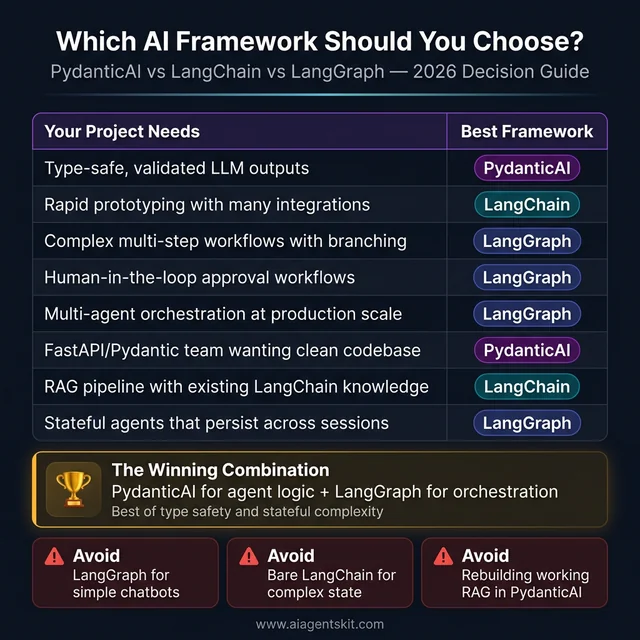 The 2026 AI framework decision guide: Eight common project needs mapped to their best-fit framework. PydanticAI wins for type-safe, validation-critical use cases. LangGraph dominates stateful, multi-agent, and human-in-the-loop workflows. LangChain remains the pragmatic choice for rapid prototyping with existing integration knowledge. Bottom section highlights the anti-patterns that lead to wasted weeks and architecture regret.
| Project Characteristic | Recommended Framework |
|---|---|
| Need type-safe, validated LLM outputs | PydanticAI |
| Rapid prototyping with many integrations | LangChain |
| Complex multi-step workflows with branching | LangGraph |
| Human-in-the-loop approval workflows | LangGraph |
| Multi-agent orchestration at production scale | LangGraph |
| Familiar with Python/Pydantic, clean codebase | PydanticAI |
| RAG pipeline with existing LangChain knowledge | LangChain |
| Multi-model support with one interface | PydanticAI or LangChain |
| Stateful agents that persist across sessions | LangGraph |
| Simple request-response agent patterns | PydanticAI |
The AI agent use cases that benefit most from these frameworks reveal a pattern: the simpler and more data-sensitive the task, the more PydanticAI shines; the more complex and stateful, the more LangGraph earns its complexity cost. Given where the industry is heading, the future of AI agents increasingly involves combinations of both.
Decision anti-patterns to avoid:
- Over-engineering with LangGraph for simple chatbot use cases that a single PydanticAI agent handles cleanly.
- Choosing LangChain for production agent systems that require complex state management, then discovering the limitation late.
- Rebuilding existing LangChain RAG systems in PydanticAI when no team is experiencing actual pain from the current approach.
The Winning Combination: PydanticAI + LangGraph Together
The pattern gaining the most traction in production AI engineering circles in 2026 is the combination approach: PydanticAI for agent logic and LangGraph for orchestration.
Here’s why it works: PydanticAI excels at defining what an individual agent does — its tools, its structured output schema, its model selection, its validation rules. LangGraph excels at defining how agents interact — routing between specialist agents, managing shared state, handling retries and approvals.
# PydanticAI defines individual agent behavior (clean, typed)
from pydantic_ai import Agent
from pydantic import BaseModel

class ResearchResult(BaseModel):
    summary: str
    confidence: float
    sources: list[str]

research_agent = Agent(
    'anthropic:claude-4-sonnet',
    result_type=ResearchResult,
    system_prompt="Research and summarize topics accurately with sources."
)

# LangGraph orchestrates agent interactions (stateful, complex)
from langgraph.graph import StateGraph

class WorkflowState(TypedDict):
    query: str
    research: ResearchResult | None
    final_report: str

workflow = StateGraph(WorkflowState)

async def run_research_node(state: WorkflowState) -> WorkflowState:
    result = await research_agent.run(state["query"])
    state["research"] = result.data  # Validated by PydanticAI
    return state

workflow.add_node("research", run_research_node)
# ... add more nodes, edges, conditional routing
Teams using this pattern get PydanticAI’s type safety and validation at the agent level, combined with LangGraph’s stateful orchestration at the workflow level. According to ZenML’s technical analysis, this combination is increasingly the recommended architecture for ML engineering teams deploying multi-agent systems.
Real-World Example: A Content Production Pipeline
To make this concrete, here’s how a two-agent content pipeline looks using both frameworks together. PydanticAI defines each specialist agent with structured outputs; LangGraph orchestrates the workflow with state and checkpointing:
from pydantic_ai import Agent
from pydantic import BaseModel
from langgraph.graph import StateGraph, END
from langgraph.checkpoint.postgres.aio import AsyncPostgresSaver
from typing import TypedDict, Annotated
import operator

# --- PydanticAI: Define specialist agents with validated outputs ---

class ResearchResult(BaseModel):
    summary: str
    key_facts: list[str]
    confidence: float
    sources: list[str]

class ArticleDraft(BaseModel):
    title: str
    content: str
    word_count: int
    requires_review: bool

research_agent = Agent(
    'anthropic:claude-4-sonnet',
    result_type=ResearchResult,
    system_prompt="Research topics thoroughly. Cite sources. Return confidence score."
)

writer_agent = Agent(
    'openai:gpt-4o',
    result_type=ArticleDraft,
    system_prompt="Write clear, factual articles from research. Flag low-confidence content for review."
)

# --- LangGraph: Orchestrate agents with state and checkpointing ---

class ContentWorkflowState(TypedDict):
    topic: str
    research: ResearchResult | None
    draft: ArticleDraft | None
    revision_notes: Annotated[list[str], operator.add]
    approved: bool

workflow = StateGraph(ContentWorkflowState)

async def research_node(state: ContentWorkflowState) -> ContentWorkflowState:
    result = await research_agent.run(f"Research this topic thoroughly: {state['topic']}")
    state["research"] = result.data  # Validated ResearchResult by PydanticAI
    return state

async def write_node(state: ContentWorkflowState) -> ContentWorkflowState:
    research_summary = state["research"].summary
    result = await writer_agent.run(f"Write an article based on: {research_summary}")
    state["draft"] = result.data  # Validated ArticleDraft by PydanticAI
    return state

def route_after_writing(state: ContentWorkflowState) -> str:
    if state["draft"].requires_review:
        return "human_review"
    return END

workflow.add_node("research", research_node)
workflow.add_node("write", write_node)
workflow.set_entry_point("research")
workflow.add_edge("research", "write")
workflow.add_conditional_edges("write", route_after_writing)

# Checkpointing makes the pipeline resumable across crashes or approvals
checkpointer = AsyncPostgresSaver.from_conn_string(os.environ["DATABASE_URL"])
app = workflow.compile(checkpointer=checkpointer)
Every output flowing through the pipeline — ResearchResult, ArticleDraft — is schema-validated by PydanticAI before landing in LangGraph state. If the writer agent returns a malformed response, the error surfaces immediately at the write_node boundary, not three steps downstream when corrupted data hits the publishing API.
PydanticAI vs LangChain vs LangGraph: Frequently Asked Questions
What is the difference between LangChain and LangGraph?
LangChain handles linear sequences of LLM calls — prompts flow through a “chain” of components, and control moves forward only. LangGraph extends this with a directed graph model where nodes can loop, branch conditionally, and maintain persistent state across invocations. LangChain is best for sequential workflows; LangGraph handles complexity that chains can’t model, including multi-agent orchestration, human approval checkpoints, and stateful pipelines that persist across sessions. LangChain now officially recommends LangGraph for all new production agent implementations.
Is PydanticAI better than LangChain?
Neither is universally better — they address different needs. PydanticAI is better when type safety, structured output validation, and clean Pythonic code are priorities. LangChain is better when breadth of integrations, ecosystem familiarity, and rapid prototyping with existing community resources matter most. Many production teams use both: LangChain’s component integrations (document loaders, vector stores) alongside PydanticAI’s agent definitions for structured output reliability.
When should I use LangGraph instead of LangChain?
LangGraph is the right choice when workflows require loops, branching logic, persistent state across sessions, human-in-the-loop intervention, or coordination between multiple specialized agents. If agents need to retry steps based on conditional logic, pause for external approval, or maintain context across multiple invocations, LangGraph’s graph model handles those patterns where LangChain chains cannot. For prototyping simple chat applications or RAG pipelines with predictable sequential flows, LangChain remains perfectly adequate.
Can PydanticAI and LangGraph be used together?
Yes, and this combination is gaining significant traction in production engineering teams. The recommended pattern uses PydanticAI to define individual agent behaviors with type-safe inputs, validated structured outputs, and clean dependency injection — then routes these agents as nodes within a LangGraph workflow that handles state management, routing, and orchestration. PydanticAI’s structured output validation integrates naturally with LangGraph’s typed state objects.
What is PydanticAI used for?
PydanticAI is designed for building AI agents where data validation, type safety, and reliable structured outputs are critical. Common applications include multi-model chatbots (switching between OpenAI, Anthropic, and Gemini with a unified interface), structured document processing (extracting validated data from unstructured text), multi-step data pipelines that require consistent schema enforcement across steps, and any production agent system where a malformed LLM response could corrupt downstream data.
Is LangChain still relevant in 2026?
Yes — LangChain remains relevant but with a narrower role than in 2022-2024. Its 110,000+ GitHub stars, massive integration library, and strong documentation make it the starting point for many AI projects. The ecosystem — including LangGraph, LangSmith for observability, and LangServe for deployment — continues to grow. Where LangChain’s standalone role has narrowed is in complex production agent systems, where LangGraph is now the recommended path and bare LangChain chains are increasingly a prototyping tool rather than a production foundation.
What are the limitations of LangGraph?
LangGraph’s steepest limitation is its learning curve — the graph model, state machine concepts, and node-edge architecture represent a genuine paradigm shift that adds design overhead to every project. The codebase evolves rapidly, which can introduce breaking changes between versions. State management at scale (thousands of concurrent agent runs) is more resource-intensive than simpler request-response patterns. Additionally, LangGraph’s built-in deployment through LangGraph Platform introduces infrastructure dependencies that smaller teams may not need.
Which AI agent framework is best for beginners?
PydanticAI is the easiest starting point for Python developers already familiar with Pydantic or FastAPI — the mental models transfer directly and the framework enforces good practices by design. LangChain is the best starting point for developers new to LLM application development who benefit from extensive documentation, tutorials, and community examples. LangGraph is not recommended as a first framework — it assumes familiarity with both LLM application patterns and graph/state machine concepts.
Does PydanticAI support multiple LLM providers?
Yes — PydanticAI is model-agnostic by design. The same agent code runs against OpenAI (GPT-5, GPT-5-Turbo), Anthropic (Claude 4 Opus, Sonnet, Haiku), Google (Gemini 3 Pro, Flash), Groq, and Mistral by changing a single model string parameter. This multi-provider support simplifies cost optimization (routing to cheaper models for simpler tasks), redundancy planning (fallback to an alternative provider if one goes down), and benchmarking (testing the same agent across providers).
What is the best Python AI agent framework for production in 2026?
For production in 2026, the choice depends on workflow complexity. For straightforward agents with high data reliability requirements, PydanticAI’s type safety and structured output validation make it the strongest choice. For complex, stateful, multi-agent workflows with conditional logic and human-in-the-loop requirements, LangGraph is purpose-built for that use case. For many real-world production systems, the combination — PydanticAI handling individual agent definitions, LangGraph handling orchestration and state — delivers the advantages of both without the limitations of either.
How does LangChain’s token cost compare to PydanticAI?
LangChain’s abstraction layers have been measured at consuming 2–3× more tokens than optimized implementations for the same task. The cause is multi-layered: internal chains inject hidden prompt content, embedding pipelines batch suboptimally, and context objects pass redundant data between steps. For a system processing 1 million agent calls per month at standard GPT-4o-mini pricing, that overhead translates to roughly $200–300 in extra API spend monthly.
PydanticAI’s thin abstraction layer — minimal code between your logic and the LLM API call — avoids this overhead by design. For simple to medium-complexity agents, PydanticAI consistently shows lower token consumption and better P95 latency. For complex LangGraph workflows, the state management and checkpointing overhead is a different kind of cost, but one that’s justified by the capabilities it provides. Both frameworks are free and open-source; costs come only from LLM API usage and optional observability platforms (LangSmith at $39/user/month vs Logfire at $49/month for teams).
Is PydanticAI production-ready for enterprise applications?
Yes. PydanticAI reached stable V1 on September 4, 2025 — signaling committed API stability and long-term support. Enterprise readiness is built into its design: runtime type validation prevents malformed LLM outputs from propagating through systems, dependency injection supports clean separation of concerns and testability, and Pydantic Logfire provides production monitoring with OpenTelemetry compatibility for teams with existing observability stacks.
Enterprise adoption is documented: MindsDB’s switch from LangChain to PydanticAI yielded a reported 10x performance improvement. The framework’s smaller community compared to LangChain is offset by its technical depth — discussions on GitHub and Discord tend toward production engineering detail rather than beginner questions. For teams evaluating enterprise AI frameworks, PydanticAI’s strict output contracts and testable architecture often align better with engineering standards than LangChain’s faster-to-prototype but harder-to-audit abstractions.
How do I add observability to my PydanticAI or LangGraph application?
For PydanticAI, Pydantic Logfire is the native choice. Add two lines to your entry point:
import logfire
logfire.configure()  # Set LOGFIRE_TOKEN in env
All subsequent agent runs emit structured traces automatically. Logfire also supports OpenTelemetry export, so traces can be sent to Datadog, Honeycomb, or any OTEL-compatible backend.
For LangGraph, LangSmith is the native platform. Set three environment variables and all LangGraph executions trace automatically:
LANGCHAIN_TRACING_V2=true
LANGCHAIN_API_KEY=ls__your_key
LANGCHAIN_PROJECT=your-project-name
LangSmith also supports PydanticAI traces via OpenTelemetry instrumentation — useful for hybrid stacks. Cost comparison: Logfire personal tier is free up to 10M spans/month; LangSmith free tier provides 5,000 traces/month. For teams, Logfire’s $49/month flat rate is often more economical than LangSmith’s $39/user/month as team size grows.
Which Framework Should Your Team Start With?
The PydanticAI vs LangChain vs LangGraph decision becomes straightforward once the actual workflow requirements are clear. PydanticAI wins for clean, type-safe, structured-output agent development. LangGraph wins for complex, stateful orchestration where multiple agents, conditional logic, and human approval flows are required. LangChain remains the pragmatic choice for teams prototyping quickly or leveraging its unmatched integration ecosystem.
The emerging consensus in production engineering is that these aren’t mutually exclusive — combining PydanticAI’s agent-level structure with LangGraph’s orchestration capabilities delivers the best of both. Teams should resist the urge to pick one framework for everything; the most resilient production systems match tools to the specific problem they solve.
For developers still building context on the foundations underlying all of these frameworks, understanding what AI agents are provides the conceptual grounding that makes these tool-level comparisons click into place.