Claude Cowork: The Complete Guide to Anthropic's AI Assistant
Claude Cowork transforms how teams work—local file access, parallel tasks, and enterprise plugins. Here's what it does and how to get the most from it.
The teams getting the most out of Claude in 2026 aren’t just chatting with it — they’re running it against their actual file systems. That distinction matters more than most early adopters expect.
Knowledge workers still lose hours to tasks that require no judgment whatsoever — sorting downloads, converting receipt photos into spreadsheets, drafting boilerplate from scattered notes. Those are exactly the problems Claude Cowork was built to eliminate.
Claude Cowork is Anthropic’s agentic desktop assistant that lets Claude 4 access local files, queue parallel tasks, and connect to enterprise tools — all without requiring a single line of code, and all without uploading files to the cloud. This guide covers how it works, when to use it, and the setup patterns that separate high-output deployments from frustrated early exits. Readers who want to build more advanced custom integrations can also explore the Claude API tutorial as a next step.
What Is Claude Cowork and How Does It Work?
Claude Cowork is an agentic AI assistant built into the Claude desktop application, launched January 12, 2026 as a research preview for Claude Max subscribers on macOS, with Windows support following on February 10, 2026. Unlike the standard Claude chat interface — which operates in a conversational, stateless way — Cowork grants Claude direct access to a user’s local folder structure and the ability to read, edit, and create files within designated directories.
The architecture is technically significant. Cowork is built on the same Claude Agent SDK that powers Claude Code, Anthropic’s developer-oriented CLI tool. The key difference is the interface: while Claude Code requires terminal familiarity and targets engineers, Cowork offers a graphical task interface designed for non-technical knowledge workers. Users with no programming background can use it just as effectively as developers.
Understanding what AI agents are at a foundational level helps frame what makes Cowork unique — it isn’t a chatbot with a file-access bolt-on. It’s a computer agent that plans, reasons about a task, executes file operations, and reports back. That planning loop is what separates it from a simple script or automation tool.
Here’s what the core workflow looks like:
- Permission-based folder access — Users designate specific local directories; Claude operates exclusively within those boundaries
- Natural language task input — Users describe the desired outcome in plain language (no scripting required)
- Autonomous planning and execution — Claude breaks the task into sub-steps, executes them, and handles errors without constant human supervision
- Parallel task queuing — Multiple tasks can run simultaneously, a feature that distinguishes Cowork from sequential workflow automation tools
- Chrome plugin for web navigation — Cowork can access web-based data via a Chrome integration, extending its task scope beyond the local file system
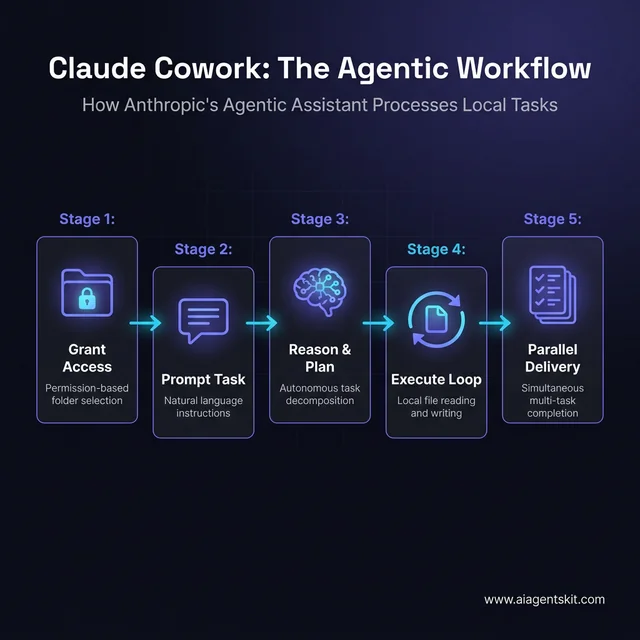 The five-stage agentic workflow that powers Claude Cowork’s local file operations.
According to Anthropic’s 2026 usage data, average task completion time on Claude.ai drops from 3.1 hours without AI assistance to approximately 15 minutes with Claude — a 92% reduction in time-to-completion. That’s the productivity gap Cowork is designed to close for general knowledge work, not just coding.
| Feature | Claude Chat | Claude Cowork | Claude Code |
|---|---|---|---|
| Interface | Web/App (conversational) | Desktop GUI | Terminal (CLI) |
| File access | None | Local folders (permission-based) | Local files (developer context) |
| Target user | Everyone | Knowledge workers | Developers |
| Task type | Q&A, drafting, analysis | File ops, automation, multi-step work | Code generation, debugging, refactoring |
| Parallelism | Single thread | Multiple parallel tasks | Single or multi-agent |
| Subscription | Pro, Max, Free | Pro, Max, Team, Enterprise | Pro, Max, Team, Enterprise |
How Claude Cowork Differs from Claude Code and Regular Chat
Claude Cowork occupies a specific and intentional position in Anthropic’s product ecosystem — and understanding where it sits helps avoid reaching for the wrong tool.
Claude Code, Anthropic’s developer-focused agent launched in 2025, is a terminal-based tool. It runs inside a developer’s existing workflow, understands codebases deeply, and excels at tasks like refactoring large files, debugging failures, and writing code across a multi-file project. The interface is intentionally minimal: a CLI that engineers already know how to use.
Cowork takes the same agentic engine and wraps it in a graphical interface non-developers can operate. The underlying capabilities are comparable — both use the Claude Agent SDK, both can execute multi-step plans — but the interaction model is radically different. There’s no terminal, no syntax to remember, and no coding prerequisites.
Regular Claude chat has different constraints entirely. The chat interface excels at reasoning, drafting, answering questions, and analyzing content that users paste into the conversation. The critical limitation is that nothing persists — there are no files being written, no folders being organized, and no external system being updated. Every chat session starts fresh.
Among the broader landscape of AI agent frameworks, Cowork is notable for being the first major consumer-grade agentic product that runs natively on a desktop without requiring cloud infrastructure or developer setup. The implications for non-technical teams are significant.
Anthropic’s internal research from August 2025 found that their own engineers were using Claude in 60% of their work and reporting a 50% productivity boost — a 2-3x increase from the previous year. Cowork extends that productivity profile beyond engineering teams for the first time, targeting the broader knowledge workforce.
The dividing lines between the three tools are clear in practice:
- Claude Chat: “Summarize this document I’ve pasted in and suggest next steps.”
- Claude Cowork: “Go through all the PDFs in my Downloads folder, extract the key figures, and build a summary spreadsheet.”
- Claude Code: “Refactor this Python module so all database calls go through a service layer.”
The overlapping zone — Cowork and Code — exists for developers who want a GUI rather than a terminal for certain tasks, and for teams where technical and non-technical members need to use the same tool. That said, practitioners consistently find that each tool performs best in its intended context.
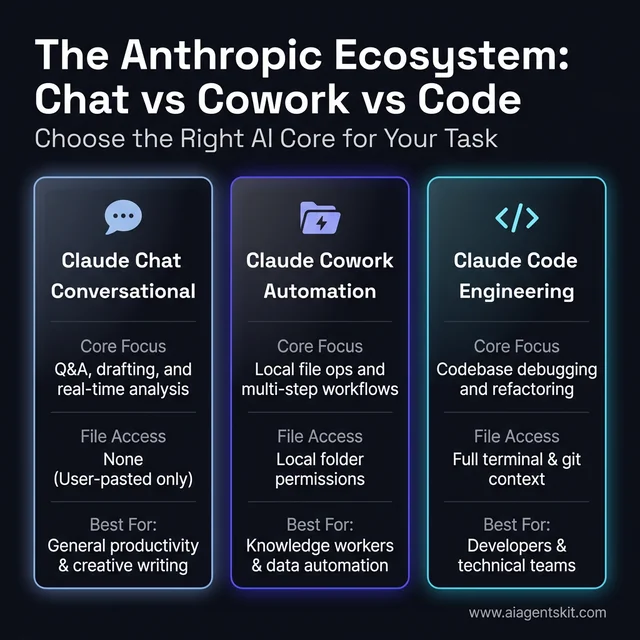 Understanding the different roles of Chat, Cowork, and Code within the Anthropic ecosystem.
7 High-Impact Use Cases for Claude Cowork in 2026
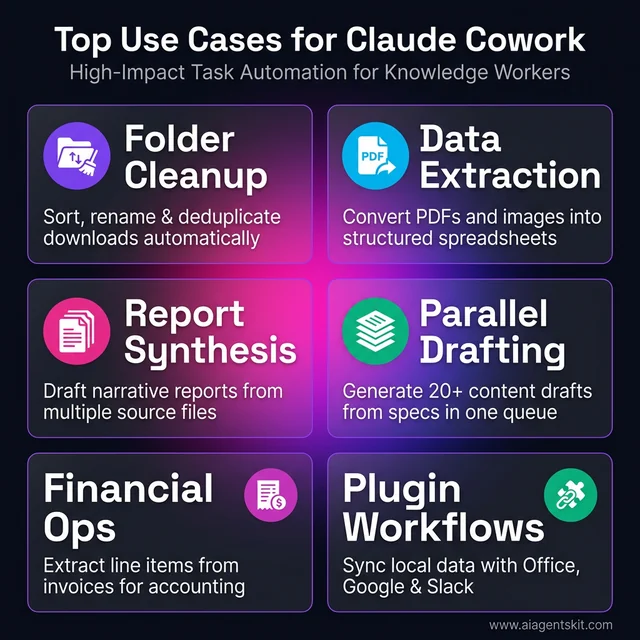 From folder cleanup to financial automation: identifying high-value tasks for Cowork.
The range of tasks Cowork handles well is broader than most new users expect. The common thread is this: any task that involves accessing, transforming, or generating file-based content — and that previously required either manual effort or custom scripting — is a strong Cowork candidate.
An enterprise-wide implementation of Claude at HUB International Limited, an insurance brokerage that deployed Claude across their workforce in late 2025, found an 85% productivity increase and an average weekly time saving of 2.5 hours per employee, with user satisfaction exceeding 90%. The majority of those gains came from exactly the use cases below.
Document and File Automation
The most immediate win for most teams is folder-level chaos elimination. Cowork can sort download folders by file type and date, rename files using consistent naming conventions drawn from the content itself, deduplicate documents, and archive old files into structured sub-directories — all in a single queued task.
The more sophisticated version involves document creation: users can point Cowork at a folder of scattered meeting notes or research fragments and ask it to produce a formatted report. It reads the source files, synthesizes the key points, and writes a structured Word or PDF document. For teams that produce regular reports from recurring raw inputs, this alone justifies the Max subscription cost.
Receipts and invoices represent a particularly high-value automation: Cowork reads photos or PDFs of financial documents and generates structured spreadsheet data with category labels, dates, and amounts — eliminating manual data entry entirely.
These kinds of AI productivity tools represent a shift in how organizations think about the value of their AI investment. The focus moves from “AI that can answer questions” to “AI that can complete workflows.”
Data Extraction and Reporting
Cowork handles unstructured-to-structured data conversion tasks that previously required either custom scripting or significant manual effort. A common workflow: a team maintains a folder of client emails exported as text files. Cowork reads all files, extracts the structured information (company name, contact, deal stage, next action), and builds a summary spreadsheet with working formulas.
The reporting extension of this is equally powerful. Teams that produce weekly dashboards from multiple source files — sales data from one system, support metrics from another, financial data from a third — can queue a Cowork task that reads all sources and compiles a unified dashboard view automatically.
The key insight practitioners consistently report: Cowork isn’t just faster at these tasks, it’s better at maintaining consistency. Human-assembled reports accumulate formatting variations and labeling inconsistencies over time. Cowork applies the same structure every time.
Content Creation at Scale
Content teams and marketing functions find strong use cases in Cowork’s ability to transform raw input files into polished output. A product brief stored as a text file becomes a full marketing article. Bullet-point slides become a narrative report. A client intake form becomes a personalized proposal draft.
The parallel task execution feature matters most here. A content manager with a folder of 20 product spec sheets can queue a single Cowork task to generate 20 first-draft marketing descriptions simultaneously — work that previously took a full day.
For presentations specifically, Cowork can read a data file, pull the key metrics, and generate slide-ready content that a designer can quickly format. The elimination of the “translate data into language” step in the presentation workflow is one of the highest-leverage time saves teams report.
Claude Cowork Enterprise: Plugins, Projects, and Team Features
The individual productivity gains from Cowork are significant. The organizational-level impact, once enterprises begin deploying the team and enterprise features, is where the real compounding happens.
The World Economic Forum projects that 78% of global enterprises will have integrated AI into their operations by 2025. Cowork’s enterprise suite is built specifically for that transition — providing the infrastructure to deploy Claude as a consistent, controlled, and customizable team resource rather than a personal productivity experiment.
That said, the evidence suggests deployment success depends heavily on how the tool is configured. Anthropic’s own Economic Index from May 2025 found that 57% of AI usage involves augmentation — AI acting as a partner rather than a full replacement — and teams that design around that model consistently outperform those chasing full automation. Cowork’s AI for small business applications follow the same pattern: the wins come from targeted augmentation, not wholesale task elimination.
Claude Projects for Shared Team Knowledge
Claude Projects is the feature that turns Cowork from a personal tool into a team platform. Each Project functions as a shared knowledge base — a 200,000-token context window that teams can populate with internal documentation, style guides, codebases, SOPs, and reference materials.
The practical effect: when a team member runs a Cowork task within a Project, Claude generates outputs that are grounded in the team’s specific policies, voice, and standards — not generic defaults. A Project configured for a legal team includes the firm’s contract templates, style guidelines, and jurisdiction-specific clauses. A Project for a product team includes the product specs, user research, and competitive analysis the team has accumulated.
Custom instructions per Project extend this further. Teams can define Claude’s persona, tone, and task constraints at the Project level. A “Claude for Customer Success” Project might instruct Claude to always maintain a consultative tone, reference the team’s playbook, and flag any client communication that mentions pricing.
Artifacts — standalone outputs like code snippets, documents, and graphics that Claude generates — can be shared and edited across Project members in real time. This turns Cowork into a collaborative creation environment rather than a single-user tool.
Enterprise Plugins and Department Customization
In 2026, Anthropic launched “Cowork & Plugins for the Enterprise” — a suite that embeds Claude directly into the applications enterprise workers already use daily, eliminating the context-switching that typically limits AI adoption.
The integration list covers the core productivity stack:
- Microsoft Office: Excel and PowerPoint with cross-application context (a financial model in Excel becomes a slide deck in PowerPoint without manual copy-paste)
- Google Workspace: Drive, Gmail, and Calendar access with inline citations from internal documents
- Slack: Channel summarization, thread digests, and direct task delegation via the Claude Slack app
- DocuSign and LegalZoom: Document processing automation for legal workflows
- Zapier: Connections to more than 8,000 third-party applications via the Zapier plugin
The enterprise customization model is particularly significant for large organizations. Companies can build private “plugin marketplaces” — internal repositories of specialized Claude agents configured for specific departments. “Claude for HR” handles job description drafting and candidate screening summaries. “Claude for Finance” builds models and generates regulatory-compliant reports. Each agent operates within rules the enterprise defines, ensuring consistency and compliance.
PwC is collaborating with Anthropic on enterprise plugin deployments specifically in the finance and healthcare/life sciences sectors — areas where the combination of high document volume, strict compliance requirements, and specialized vocabulary makes custom-configured Claude agents particularly valuable.
What Does Getting Started with Claude Cowork Actually Look Like?
The setup process for Cowork is simpler than most enterprise AI tools, but a few configuration decisions made early have outsized impact on the quality of results. Teams that invest 20 minutes in proper setup consistently outperform teams that skip ahead to task execution.
Subscription and Device Requirements
Cowork is available to users on Pro, Max, Team, or Enterprise subscription plans. The free tier does not include Cowork access. The device requirements are minimal: the Claude Desktop application installed on macOS (from the January 2026 launch) or Windows (from the February 2026 release).
The choice of plan affects which Claude 4 model Cowork uses by default. Pro and Team plans use Claude 4 Sonnet — capable and fast for the majority of Cowork tasks. Max plan subscribers get Claude 4 Opus access, which performs meaningfully better on complex reasoning tasks, multi-file synthesis, and ambiguous instructions. For individual power users and enterprise teams running high-complexity workflows, the Opus tier is worth the premium.
Setting Up Folder Access and Running Your First Task
Getting started involves five concrete setup steps, and the order matters:
Step 1: Access the Cowork tab. Open the Claude Desktop application, navigate to the “Cowork” tab, and enter “Tasks” mode. This is distinct from the standard chat interface.
Step 2: Designate a folder. Grant Cowork access to a specific local directory — and only that directory. The recommended approach is to create a dedicated “Cowork workspace” folder and copy only the files relevant to the immediate task into it. This limits both security exposure and the likelihood of Claude acting on files it shouldn’t.
Step 3: Create a CONTEXT.md file. This is the highest-leverage setup step most documentation skips. Create a plain text file named CONTEXT.md in the workspace folder that describes: the user’s role, the project context, any constraints or preferences, and the naming conventions the team uses. Claude reads this file before every task, and the quality improvement in outputs is immediately noticeable.
Step 4: Write the task with outcome specificity. “Organize my files” produces mediocre results. “Sort all PDF files by the date in their filename into sub-folders named YYYY-MM, rename any files without dates using the format DOCUMENT-NAME-UNDATED, and create a summary text file listing what was moved” produces excellent results. The additional time to write a specific task description pays back immediately in output quality.
Step 5: Monitor and iterate. Cowork shows its reasoning steps in real time — users can intervene mid-task if the approach doesn’t match expectations. After the first iteration, teams typically refine the task description and run again. For recurring tasks, the refined prompt becomes a “Skill” — a saved automation that activates via a slash command.
Teams that pair Cowork with the Claude Desktop MCP setup for Model Context Protocol integrations find they can extend Cowork’s reach into data systems and external APIs without custom coding, expanding the range of automatable workflows significantly.
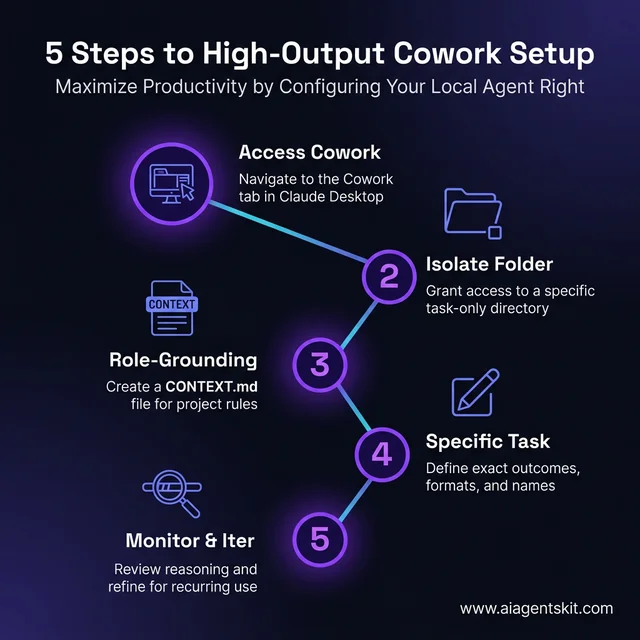 The definitive five-step path to configuring Claude Cowork for maximum output.
According to workforce research cited in Anthropic’s Economic Index, teams using AI complete 126% more projects per week than comparable non-AI teams. The configuration patterns above are what separate teams achieving those numbers from those still running pilot experiments.
Is Claude Cowork Safe to Use for Business Data?
Security is the most common concern slowing enterprise Cowork adoption — and it deserves a direct, honest assessment rather than a brochure answer.
The foundational security characteristic: files stay local. Cowork does not upload file contents to Anthropic’s cloud for processing in the conventional sense. Claude processes the files within the session context, but the originals remain on the user’s device. For organizations with strict data residency requirements, this is the most important architectural distinction to verify with their compliance team against their specific regulatory environment.
The permission model provides a second layer of control. Claude operates exclusively within the folders users designate — it cannot access the broader file system, email, or any application outside the permitted scope unless explicitly connected via a plugin. The model can’t “find” files the user hasn’t pointed it at.
Anthropic’s Constitutional AI framework governs Claude’s behavior at the model level, providing guardrails against harmful or policy-violating actions even within permitted task scope. Enterprise plans extend this with single sign-on (SSO), audit logging, compliance APIs, and administrative controls that let IT teams monitor and govern how Claude is being used across the organization.
According to Gartner’s 2026 survey of enterprise CIOs, nearly three-quarters reported that they were either losing money or only breaking even on AI investments, with poor data governance cited as a primary contributing factor. The Cowork data model addresses this directly — because files stay local and access is permission-scoped, the data governance burden is substantially lower than with cloud-based AI tools that ingest business data into external training pipelines.
The practical security best practices that enterprise teams consistently apply:
- Create a dedicated Cowork workspace folder — never point Cowork at full drives or system directories
- Copy only the files relevant to the current task into the workspace, then remove them when done
- For sensitive data, use enterprise SSO to ensure only authorized users can run Cowork tasks
- Enable audit logging on Enterprise plans to maintain a record of what tasks were run and what files were accessed
- Review Cowork’s reasoning steps during execution for any new task type before running it unattended
The Federal Reserve Bank of St. Louis’ 2025 research on generative AI adoption found that employees utilizing generative AI tools saved approximately 2.2 hours per week — but organizations capturing those gains were the ones that had clear data policies in place before deployment. Security isn’t a reason to avoid Cowork; it’s a checklist to complete before scale-up.
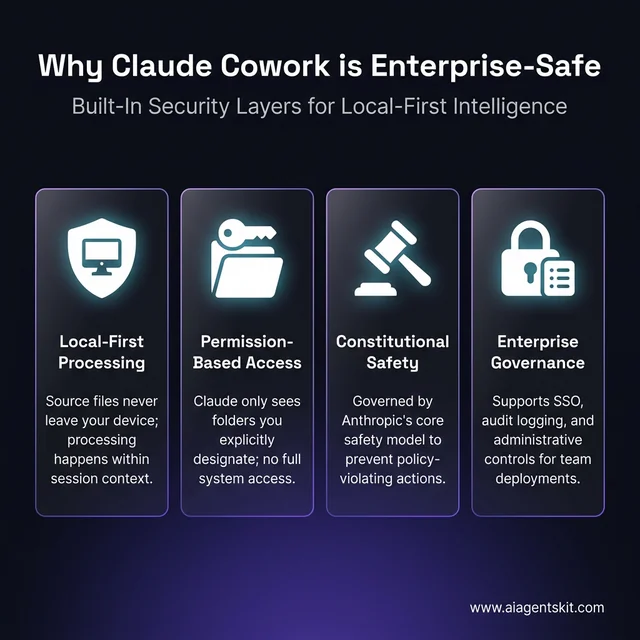 *The core security architecture that keeps business data safe within the Cowork environment. *
For teams interested in how Cowork fits into a broader AI strategy, understanding the architectural difference between agentic tools and conventional chatbots helps clarify why Cowork requires different governance thinking than simple chat deployments.
Claude Cowork: Frequently Asked Questions
What is Claude Cowork and how does it work?
Claude Cowork is Anthropic’s agentic desktop assistant, launched in January 2026, that allows Claude 4 to access local files and execute multi-step tasks autonomously. Users grant Cowork permission to access specific folders, then describe tasks in plain language. Claude plans the execution, reads and modifies the relevant files, runs tasks in parallel when possible, and reports results — all without uploading files to the cloud. It’s available as part of the Claude Desktop application on macOS and Windows.
How does Claude Cowork differ from Claude Code?
Claude Code is a terminal-based developer tool designed for engineers working inside codebases — it requires command-line familiarity and technical context. Claude Cowork is a graphical desktop interface designed for non-technical knowledge workers, targeting general file operations, document automation, and business workflows. Both tools use the Claude Agent SDK and Claude 4 models, but Code targets software development tasks while Cowork targets knowledge work across any discipline.
What subscription plan do I need for Claude Cowork?
Claude Cowork requires a Pro, Max, Team, or Enterprise subscription. The free tier does not include Cowork access. Pro and Team plans use Claude 4 Sonnet by default, while Max plan subscribers get Claude 4 Opus — which performs better on complex, multi-step tasks and ambiguous instructions. Enterprise plans add SSO, audit logging, and administrative controls. Pricing varies by plan tier, with enterprise plans on custom pricing.
Can Claude Cowork access my files without my permission?
No. Cowork operates exclusively within the specific local folders that users explicitly designate. It cannot access the broader file system, email, or any application outside the permitted scope. The permission model is explicit and session-based — nothing is accessed until the user grants folder access through the Cowork interface. Files remain local and are not uploaded to Anthropic’s servers.
What types of tasks can Claude Cowork automate?
Claude Cowork handles file organization (sorting, renaming, deduplication), data extraction (converting PDFs, emails, or images into structured spreadsheets), document generation (reports, proposals, presentations from raw source files), content creation (marketing copy, summaries, first drafts from brief files), and workflow automation (recurring multi-step processes that can be saved as “Skills”). The common thread: any task that involves reading source files and producing output files or transformed file states.
Can Claude Cowork work with Slack and Google Workspace?
Yes. Through enterprise plugins, Cowork integrates with Slack (channel summarization, thread digests, task delegation), Google Workspace (Drive, Gmail, Calendar access with inline citations), and Microsoft Office (Excel and PowerPoint with cross-application context). The Zapier plugin extends connectivity to more than 8,000 additional applications. Integration depth varies by subscription plan — Enterprise plans unlock the full suite of tool connections.
Does Claude Cowork upload my files to the cloud?
Files remain on the user’s local device — Cowork does not upload source files to Anthropic’s cloud servers. Claude processes file contents within the active session, but originals stay in the designated local folder. For highly sensitive data, organizations should still review Anthropic’s enterprise data processing terms and their own regulatory requirements, as the compliance picture can vary by industry and jurisdiction.
How do I use Claude Cowork Skills and Plugins?
Skills are saved automations — repeatable task prompts that trigger via slash commands. Once a task has been run and refined to produce good results, saving it as a Skill means it can re-run with a single command, no re-prompting required. Plugins extend Cowork’s capabilities to external applications: the Zapier plugin connects to third-party apps, the Chrome plugin enables web navigation, and enterprise plugins embed Claude directly into Office, Google Workspace, and Slack. Skills are created through the Cowork interface; Plugins are installed through the Claude Desktop settings.
Is Claude Cowork available on Windows?
Yes. Cowork launched on macOS on January 12, 2026, and Windows support became available on February 10, 2026. Both platforms require the Claude Desktop application and a qualifying subscription (Pro, Max, Team, or Enterprise). Cross-device synchronization, which would allow users to switch between macOS and Windows while maintaining task state, is part of Anthropic’s published roadmap but was not available at the February 2026 launch.
How does Claude Cowork compare to Microsoft Copilot?
Both tools embed AI into desktop workflows, but with different architectures. Microsoft Copilot is deeply integrated into the Microsoft 365 ecosystem — it works natively within Word, Excel, Teams, and Outlook but requires a Microsoft 365 subscription and operates best within that closed ecosystem. Claude Cowork is file-system-agnostic and works across any local folders regardless of file source, making it more flexible for teams using a mixed-tool environment. Cowork’s parallel task execution and local-first data model are architectural advantages in specific use cases; Copilot’s deeper integration into Teams and Outlook is its primary strength. Even among enterprise AI teams, there’s genuine debate about which tool delivers more value — the answer tends to be organization-specific.
Conclusion
Claude Cowork represents a meaningful shift in how AI fits into day-to-day knowledge work. The distinction between “AI that you talk to” and “AI that does work with your files” isn’t a marketing claim — it’s a functional difference that changes how much time workers actually recover.
The productivity numbers from early enterprise deployments — 85% efficiency gains, 2.5 hours per week recovered per employee, 126% more projects completed — are compelling. They’re also consistent with what happens when AI is used not just for conversation, but for completing the deterministic, repeatable portions of complex workflows.
The realistic starting point for most teams isn’t a full enterprise rollout. It’s identifying one specific recurring task — organizing a messy downloads folder, converting a batch of PDFs into summary reports — and using Cowork to eliminate the manual effort involved. That first successful task defines the pattern: clear task scope, designated folder, specific outcome language, CONTEXT.md for role grounding.
For teams exploring how agents vs chatbots should inform their broader AI strategy, Cowork is a concrete demonstration of what agentic AI looks like in practice — not autonomous systems replacing human judgment, but Claude-powered workflows that take the tedium out of knowledge work and give professionals back the time they need for the work that actually requires them.