How to Change the Model in Clawdbot (OpenClaw) Without Breaking Your Setup
Step-by-step guide for switching models in Clawdbot, now OpenClaw, safely using `/model`, `openclaw models set`, and targeted config edits.
Changing the model in Clawdbot sounds minor, but it can break a working setup when the wrong field gets edited or a provider is switched before authentication is ready. The current project name is OpenClaw, yet many operators still search for the older Clawdbot name because the rename happened recently and the workflows stayed broadly familiar.
The safest approach is not to rewrite the whole config. It is to test the new model in-session first, confirm provider auth, and only then persist the change. For the broader naming and platform background, this complete Moltbot and OpenClaw guide explains how the Clawdbot to Moltbot to OpenClaw transition happened.
This guide focuses on the low-risk path: what actually changes during a model switch, which commands are safest, how to edit openclaw.json without collateral damage, and how to recover quickly when the switch fails. The goal is not just to complete the switch, but to keep the rest of the assistant stable while it happens.
What Breaks When You Change the Model in Clawdbot or OpenClaw?
Most teams expect model switching to be a one-line change. In practice, OpenClaw treats model selection as a combination of provider routing, default agent settings, allowlists, fallbacks, and provider-specific auth. According to the official OpenClaw models reference, model selection starts with agents.defaults.model.primary, then moves through configured fallbacks, while agents.defaults.models can also act as the allowlist for what /model and session overrides are allowed to use OpenClaw Models CLI (2026).
That design is good for control, but it explains why a careless switch can knock over a setup that previously felt stable. A model string can be technically correct and still fail because the provider was never authenticated, the model is not in the allowlist, or an older shorthand alias no longer resolves the same way. The OpenClaw FAQ now explicitly recommends using provider/model rather than relying on implicit provider fallback, which is still present only as a temporary compatibility behavior OpenClaw FAQ (2026).
Three failure modes show up again and again in self-hosted assistant setups:
- Provider mismatch: the config points to OpenAI, Anthropic, Ollama, or another provider that is not fully configured.
- Policy mismatch: the requested model exists, but the active allowlist blocks it.
- Config blast radius: the operator edits more than the intended model fields and unintentionally changes channels, tools, workspace paths, or automation settings.
In practice, many operators assume the failure happened because the model is “bad.” The evidence from the docs suggests the opposite. OpenClaw is usually failing safely because it cannot reconcile the requested model with the surrounding configuration state.
Another detail matters here: OpenClaw reads an optional JSON5 config from ~/.openclaw/openclaw.json, which means comments and trailing commas are accepted, but that flexibility also makes manual copy-paste mistakes harder to spot on a quick glance OpenClaw Configuration (2026). That is why the older Clawdbot guide is directionally right when it warns that model switching is really a configuration-management task.
The safest mindset is to treat a model change like a production config change:
- confirm the current state
- make one narrow change
- validate the result
- keep a rollback path ready
That sequence is slower than editing a JSON file from memory, but it prevents the expensive failure mode: spending an hour “debugging the model” when the real problem is config drift.
There is also a practical reason experienced operators stay conservative here. A self-hosted assistant rarely uses the model in isolation. The same model may be attached to browser control, shell execution, memory, or messaging workflows. When the default changes, the change can alter latency, tool reliability, refusal behavior, cost, and even how well the agent follows safety instructions. A model switch is therefore both a capability change and an operational change.
Most teams also underestimate the difference between “the model answered a greeting” and “the model is a safe default.” A greeting only proves that a basic text round-trip succeeded. It does not prove tool calling works, fallbacks behave correctly, auth has the right scope, or the assistant remains usable for the tasks that matter. The safer practice is to test one real workflow after each switch: a short coding task, a controlled browser step, or a read-only lookup that mirrors normal usage.
Does the Clawdbot rename to OpenClaw change model switching?
Not in any meaningful architectural sense. The rename matters for documentation and search behavior, but the switching problem operators are trying to solve is still the same: how to change the active or default model without breaking auth, allowlists, fallbacks, or surrounding config. That is why the page should continue targeting Clawdbot while using OpenClaw throughout the body. Searchers often arrive with the legacy term, then need the current command language once they land.
From an SEO standpoint, that creates three useful intent buckets on one page:
change model in clawdbotchange default model in openclawopenclaw model switching
The article should satisfy all three because they describe the same real task from slightly different naming angles.
4 Safe Ways to Switch Models Without Wiping Config
Not every switching method carries the same risk. Some change only the active session. Others persist new defaults. Others let a typo touch far more than intended. The safest order is the one below.
1. Use /model when the goal is testing, not commitment
The OpenClaw FAQ explicitly lists /model in chat as the quick per-session option when the goal is to switch models without wiping configuration OpenClaw FAQ (2026). That matters because per-session switching keeps the blast radius tiny. The current chat changes, but the persistent defaults do not.
This is the right path when:
- the provider is newly added
- the team is comparing output quality
- a workflow needs a stronger or cheaper model temporarily
- a suspected provider issue needs fast isolation
A sensible test flow looks like this:
/model list
/model status
/model provider/model
The key advantage is that the switch is reversible without opening a file editor. If the model responds badly, stalls on tool use, or triggers a policy issue, the session can be moved back immediately. For teams comparing Anthropic and OpenAI model behavior in coding or reasoning tasks, the practical provider trade-offs in this Claude API tutorial help explain why one workflow may want a different default than another.
What is the difference between /model, models set, and configure?
This is where a lot of search intent sits, and it deserves a direct answer because many operators type variations of openclaw /model, openclaw models set, or openclaw configure models into Google.
| Method | Best Use Case | Scope of Change | Risk Level |
|---|---|---|---|
/model | Test a model in the current chat | Session only | Low |
openclaw models set | Make a new default model | Persistent model config | Low to medium |
openclaw configure | Review model settings with guardrails | Guided persistent update | Medium |
| Direct file edit | Fix advanced state mismatch | Potentially broad | Highest |
That table is useful because it turns abstract documentation into an action rule:
- use
/modelto ask “does this model work here?” - use
models setto ask “should this become the new default?” - use
configureto ask “what model-related settings need review before saving?” - use file edits only to ask “what exact state is the system holding right now?”
Search engines tend to reward pages that answer these adjacent task questions clearly, and operators benefit because they stop treating every model change as the same kind of action.
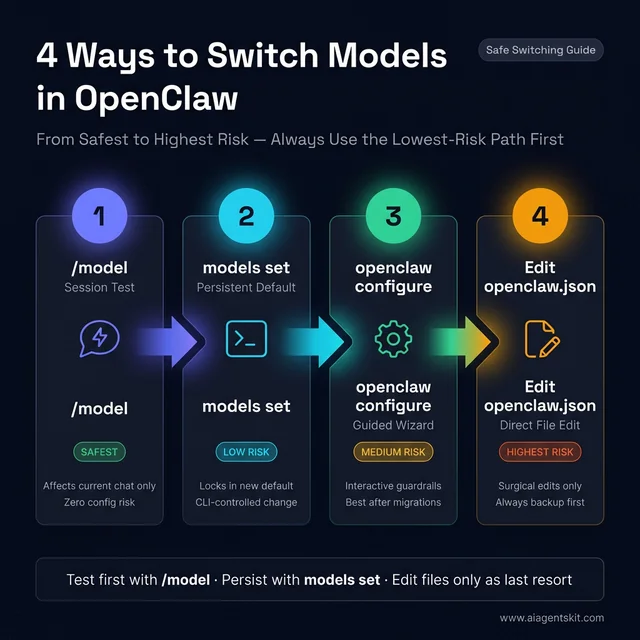 OpenClaw model switching: 4 paths ordered by blast radius. The /model command is a zero-risk session test. The models set CLI locks in a persistent default. The configure wizard adds guardrails for complex setups. Direct JSON edits are a last resort requiring a backup first. Always advance from left to right — never skip a step.
2. Use openclaw models set when the goal is a persistent default
Once the session-level test passes, the next safest option is openclaw models set <provider/model>. OpenClaw documents that command as the CLI path for changing the primary model, alongside openclaw models list and openclaw models status for inspecting the current model state OpenClaw Models CLI (2026).
That makes this the preferred persistent-switch workflow:
openclaw models list
openclaw models status
openclaw models set anthropic/claude-sonnet-4-5
openclaw models status
Why is this safer than a raw config edit?
- it changes the model configuration directly instead of inviting a broad config rewrite
- it keeps the operator in the official command surface
- it reinforces the exact
provider/modelformat the platform expects - it gives an easy status check before and after the switch
Most teams find that a lot of model-switch pain disappears once the switch is treated as an explicit CLI state change instead of an ad hoc JSON edit.
How to change the default model in OpenClaw step by step
For people searching how to change default model in OpenClaw, the lowest-risk sequence looks like this:
- check the current default with
openclaw models status - confirm the exact target identifier with
openclaw models list - test the candidate in-session with
/model provider/model - persist the change with
openclaw models set provider/model - verify the new default with
openclaw models status - run one real workflow before declaring the change complete
That process is intentionally repetitive. Repetition is what keeps the switch safe. The models list step prevents typos. The in-session test prevents premature persistence. The post-change status check prevents silent drift. The final workflow test confirms the assistant still behaves as expected when tools, latency, and provider behavior matter.
3. Use openclaw configure when the team needs guardrails
OpenClaw exposes both openclaw onboard and openclaw configure as guided configuration paths, and the configuration docs recommend those interactive flows for people who do not want to hand-edit the file OpenClaw Configuration (2026). This route is slower, but it is often the best option after a migration from older Clawdbot or Moltbot examples where a team is no longer sure which settings are still current.
This is the best choice when:
- the installation was inherited from another operator
- the current provider config is unclear
- the team wants to review all model-related options before saving
- auth profiles or fallback models are being added at the same time
The strongest reason to use the wizard is not convenience. It is context. The wizard makes it harder to forget that the model switch may also depend on auth profiles, image models, fallbacks, or allowlists.
That matters most in shared environments. When several people use one OpenClaw deployment, the switch is no longer a personal preference. It becomes a change in shared infrastructure. In those cases, the wizard or the explicit CLI commands create a clearer audit trail than “someone edited the JSON last night.” Even when the team never writes formal change records, using explicit control surfaces makes it easier to reconstruct what changed and why.
4. Direct config edits should be the last resort, not the default
Direct edits are sometimes necessary, especially when a team wants precision or needs to inspect a state mismatch the CLI is not making obvious. But the docs do not present manual editing as the first-choice path for ordinary switching. That is a useful design signal. When the product itself offers /model, models set, configure, and onboarding flows, the safest default is to use them.
The right conclusion is not “never edit the file.” It is “edit the file only after the safer control surfaces have either failed or proven insufficient.” The same principle appears in other provider-management work. Teams that understand exact provider expectations from the OpenAI API tutorial usually break fewer OpenClaw switches because they already think in terms of explicit model identifiers, auth boundaries, and rollback-safe changes.
Another advantage of keeping the safer order is that it separates two different questions that people often merge by mistake:
- “Can this installation reach the new model?”
- “Should this model become the default?”
Those are not the same decision. The first is a connectivity and config question. The second is a workflow, cost, and safety question. /model answers the first. models set answers the second. Mixing them is one of the easiest ways to turn a harmless experiment into an avoidable outage.
Safe model switch checklist
Before changing the default model, run this quick checklist:
- the target model appears in
openclaw models list - the provider is authenticated and reachable
- the target model is allowed by policy
- the current default has been recorded
- a rollback path exists
- one real task has been chosen for validation
That checklist adds a long-tail layer the article should rank for naturally: safe OpenClaw model switch, OpenClaw model switch checklist, and change model without breaking setup.
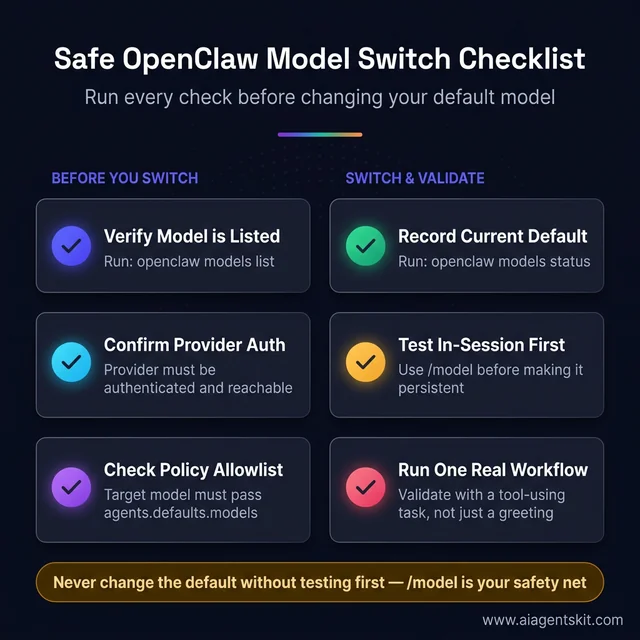 Six-step OpenClaw model switch checklist split into pre-switch checks and switch-and-validate phases. The first three steps prevent wasted attempts — most failed switches trace back to a missing allowlist entry or unauthenticated provider. The final step, running one real tool-using task, separates a working switch from a merely functional one.
How Should You Edit openclaw.json Safely?
Sometimes the config file is the only place that shows the real state clearly enough. When that happens, the rule is simple: back it up first, inspect before editing, and change only the model fields you intended to touch.
OpenClaw’s configuration docs state that the config file lives at ~/.openclaw/openclaw.json and that direct edit is only one of several supported editing modes OpenClaw Configuration (2026). The CLI config docs also clarify that values are parsed as JSON5 when possible and that dot or bracket paths can be targeted individually with openclaw config get, set, or unset OpenClaw Config CLI (2026).
That is the strongest argument against replacing the full file with an old snippet from a chat message or forum post. The platform already supports targeted changes. Full-file replacement is usually a self-inflicted risk.
Use this sequence before any manual edit:
cp ~/.openclaw/openclaw.json ~/.openclaw/openclaw.json.bak
openclaw models status
openclaw config get agents.defaults.model.primary
openclaw config get agents.defaults.models
That short sequence answers four important questions before anything changes:
- what the current default is
- whether an allowlist exists
- whether the file is present and readable
- whether a rollback copy exists
When editing manually, focus on the smallest relevant fields:
agents.defaults.model.primaryagents.defaults.model.fallbacksagents.defaults.modelsmodels.providers.*only if provider setup truly needs to change
Avoid editing unrelated sections such as channels, browser config, sandboxing, tools, memory, or automation unless that is the actual task. A model switch should stay a model switch.
That separation matters because OpenClaw setups tend to accumulate local customizations over time. A mature installation may have multiple providers, named auth profiles, protected defaults, experimental fallbacks, and workspace-specific behavior. Replacing the whole file with a “clean” example is often worse than leaving a messy but working setup alone. The safer standard is to prefer surgical edits over aesthetic rewrites.
Many operators also benefit from using openclaw config set for targeted updates instead of opening the file at all. Examples from the config docs show that dot-path updates are a first-class workflow, not a hidden escape hatch OpenClaw Config CLI (2026). That means a “manual” change can still be narrow and scriptable:
openclaw config set agents.defaults.model.primary "openai/gpt-5.2"
openclaw config get agents.defaults.model.primary
openclaw models status
In practice, many operators are safer with config set than with a text editor because the path being changed is explicit. There is less temptation to tidy unrelated config while “already being in there.”
After any direct edit, validate immediately:
openclaw models status
openclaw models list
openclaw logs --follow
The last command matters because configuration failures often surface more clearly in logs than in the first chat response. OpenClaw’s logging docs note that gateway logs can be tailed with openclaw logs --follow, and file logs default under /tmp/openclaw/ unless configured otherwise OpenClaw Logging (2026). That is a useful companion to the rollback discipline outlined in the AI error handling patterns article: confirm the failure mode before making a second change.
One more practice is worth adopting: save the old and new defaults in a team note or operations log when the installation matters to more than one person. That may sound excessive for a personal assistant, but it pays off the first time someone asks why browser tasks suddenly got slower or why a workflow started refusing commands it previously handled. Model switching changes behavior, not just branding.
Which config paths matter most for model changes?
For searchers looking for OpenClaw config get agents.defaults.models or OpenClaw primary model config, these are the high-value paths:
| Config Path | Purpose |
|---|---|
agents.defaults.model.primary | sets the default primary model |
agents.defaults.model.fallbacks | defines fallback model order |
agents.defaults.models | controls the model catalog and allowlist |
models.providers.* | stores provider-specific settings |
The value of calling these out explicitly is twofold. First, it helps users land on the right config path from search. Second, it narrows manual edits to the fields most likely to matter, which lowers risk immediately.
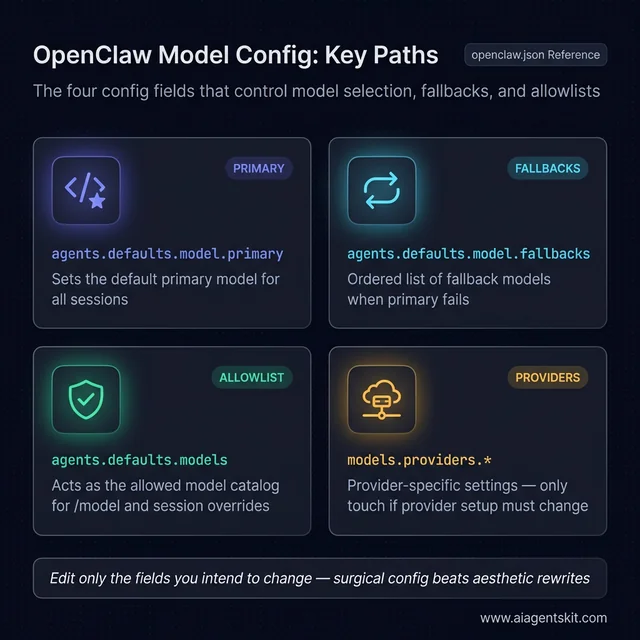 The four config paths that control OpenClaw model behavior. The primary field sets the default. The fallbacks field adds resilience against provider outages. The models allowlist gates what /model can choose. The providers namespace is the only field that should change during a genuine provider migration — leave it alone for routine switches.
What Causes “Model Not Allowed” and Other Failures?
The single most common OpenClaw switching failure is not a broken provider. It is an allowed-model mismatch. The OpenClaw FAQ is explicit: if agents.defaults.models is set, it becomes the allowlist for /model and other session overrides, and choosing a model outside that set returns a “Model is not allowed” error instead of a normal reply OpenClaw FAQ (2026).
That behavior surprises people because the target model may be perfectly valid globally. It is just not valid for the current installation policy.
Here is the practical recovery sequence:
openclaw config get agents.defaults.models
openclaw models list
Then choose one of three fixes:
- add the desired model to the allowlist
- remove or relax the allowlist
- pick a model already allowed by policy
The second common failure is provider resolution. OpenClaw’s FAQ gives a concrete example with MiniMax and explains that “unknown model” errors can come from provider configuration or auth not being present, even when the model name itself looks correct OpenClaw FAQ (2026). That general pattern applies well beyond MiniMax.
Symptoms that usually point to provider configuration rather than a bad model:
- the model appears in examples but not in
models list /modelaccepts the syntax but no reply follows- the switch works for one provider and fails for another
- the logs show provider or auth resolution errors
The third failure mode is mixed local and cloud expectations. OpenClaw supports local providers too, but local models need their own provider configuration and operational assumptions. The Ollama provider docs show that local models are configured through the Ollama integration and use model references like ollama/gpt-oss:20b, with OpenClaw able to target Ollama directly through its native API OpenClaw Ollama Provider (2026).
How to fix model not allowed in OpenClaw
This deserves its own direct answer because the query is so task-specific.
If OpenClaw says model not allowed, check these in order:
- run
openclaw config get agents.defaults.models - confirm the target model appears in that list
- compare the exact provider/model string against
openclaw models list - update the allowlist or choose a model already permitted
- retry with
/modelbefore changing the default
This is also a good place to separate two different problems that look similar in search results:
model not allowed: the model is blocked by policyunknown model: the model or provider is not resolving correctly
Those failures should not be debugged the same way. One is about permission or policy. The other is about resolution, naming, or provider setup.
How to switch between Claude, GPT, OpenRouter, and Ollama
This article should also capture provider-switching intent because many users are not merely changing one model name. They are moving between model families and backends.
| Switch Type | What Usually Changes | Common Risk |
|---|---|---|
| Claude to GPT | provider and model ID | stale auth or wrong provider prefix |
| GPT to OpenRouter | provider routing and pricing model | wrong model identifier shape |
| Cloud to Ollama | provider, runtime, local availability | local runtime not reachable |
| Ollama to cloud | provider auth and usage policy | assuming local names work remotely |
A safe provider switch is not fundamentally different from a safe model switch. It simply adds one more variable: backend expectations. That is why provider switches should always be tested in-session first. Operators searching for OpenClaw Claude to GPT or OpenClaw Ollama model switch are usually dealing with this exact boundary.
That means a team can break a previously healthy setup in two different ways:
- by switching the default to a local model before the local runtime is actually reachable
- by leaving a cloud-first workflow pointed at a local model with weaker tool-calling behavior than the rest of the automation expects
Even experts debate how aggressively self-hosted assistants should downshift to smaller local models once tools and browser control are enabled. The OpenClaw docs themselves warn that smaller or heavily quantized models are more vulnerable to prompt injection and unsafe behavior in tool-using contexts OpenClaw FAQ (2026). The evidence suggests that “cheapest available model” is usually the wrong default for a bot with broad tool access.
There is also the human factor. When a new model becomes the default, people rapidly adapt their prompt style to it. If the model is more literal, more verbose, or less capable at tool planning, users compensate without realizing it. Later, when another switch happens, the team blames the new model for behavior that actually came from months of changed prompting habits. The safest way to avoid that confusion is to define one or two benchmark tasks and run them after every default-model change.
A fourth failure mode is stale shorthand from older tutorials. Some early Clawdbot-era examples used looser model naming or provider assumptions that are not the safest habit anymore. The current docs are clear that provider/model is the correct mental model, and the safest recommendation is to copy the exact identifier from openclaw models list instead of free-typing from memory.
When a switch fails, the best recovery pattern is this:
- restore the previous model if it was working
- confirm logs and status, not just chat behavior
- verify provider auth
- verify allowlist state
- retry the switch in-session before making it persistent
That order is boring, but boring is exactly what stable operations need.
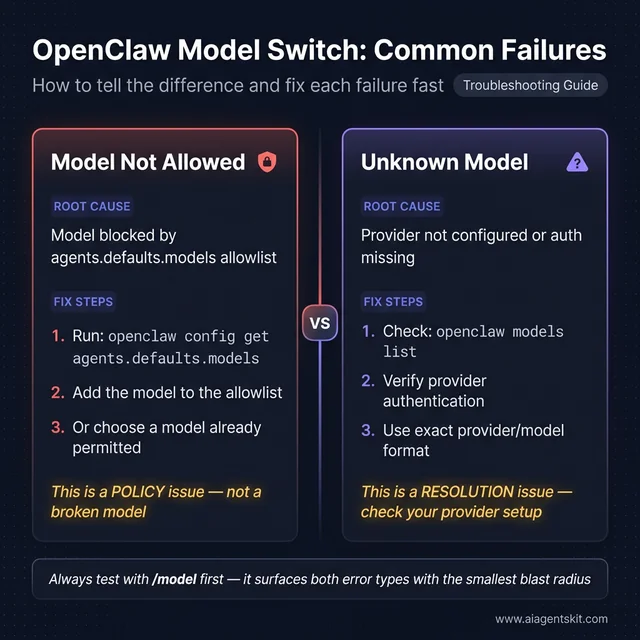 Two failure types that look similar but need different fixes. “Model Not Allowed” is a policy issue — the allowlist is blocking a valid model. “Unknown Model” is a resolution issue — the provider or auth setup is missing. Debugging them the same way wastes time. Always confirm which error type you have before making a second config change.
Which Model Should Become Your OpenClaw Default?
There is no universally correct default model. The best default is the one that matches the riskiest routine task your assistant performs. OpenClaw’s own FAQ currently recommends anthropic/claude-opus-4-6 as the best default, with anthropic/claude-sonnet-4-5 as a strong alternative, openai/gpt-5.2 as a reliable option, and cheaper providers such as Z.ai or MiniMax for more budget-sensitive workloads OpenClaw FAQ (2026).
That recommendation is useful, but it should not be copied blindly. Most teams find that default choice should be based on workflow shape, not marketing labels.
Use this rule of thumb:
- Reasoning-heavy default: choose a stronger frontier model for coding, planning, and tool-rich sessions.
- Operational default: choose a balanced model that can handle daily tasks without runaway cost.
- Budget default: choose a cheaper model, then escalate specific sessions with
/model. - Privacy-first default: choose a local model only if the team accepts the capability trade-offs and secures tool access carefully.
There is also a governance question hiding inside model choice. A default model is not just the “main model.” It becomes the model most likely to touch tools, browse external systems, and shape user expectations. For that reason, the safest operational policy is often a strong default plus explicit downshifts for lower-risk tasks. The provider trade-offs in this ChatGPT vs Claude vs Gemini comparison are useful for framing those decisions, but OpenClaw adds an extra layer: the model has to fit the bot’s tool permissions and automation profile, not just the benchmark table.
Another practical decision is whether to define fallbacks. OpenClaw’s model-selection order supports fallbacks under the default model configuration, which is helpful when the preferred provider is throttled or temporarily unstable OpenClaw Models CLI (2026). For many production-like setups, that is the strongest pattern:
- strong primary model
- cheaper or alternate-provider fallback
- explicit allowlist
- clear session-level override workflow
That setup is more resilient than constantly changing the global default. It also reduces the temptation to use the config file as a casual toggle board.
When should fallbacks be used instead of changing the default?
This is an important medium-tail and long-tail opportunity because many users do not actually need a new default. They need a more resilient default stack.
Use fallbacks when:
- the current default is generally correct, but provider outages happen
- some workloads can tolerate a cheaper backup model
- the team wants continuity more than perfection
- the installation supports multiple providers cleanly already
Change the default when:
- the current model is now the wrong fit for everyday work
- cost is structurally too high
- the assistant’s most common workflows have changed
- the old default has become less reliable over time
That distinction matters for traffic and usefulness. Queries about best default model and queries about fallback model are related but not identical. Covering both on one page makes the article more complete without forcing a separate thin post.
A useful decision rule looks like this:
- If the assistant regularly writes or reviews code, favor a strong reasoning default.
- If the assistant mostly handles routing, summaries, or lightweight chat, favor a balanced mid-cost default.
- If the assistant must remain private-first, treat local-model quality and safety as explicit trade-offs, not silent assumptions.
- If the environment is shared, prioritize predictability over novelty.
Research-backed operational judgment matters more than benchmark chasing here. A model that wins a headline comparison is not automatically the right OpenClaw default if it misbehaves with tools, has poor regional reliability for the team, or creates unpredictable costs under heavy messaging usage.
The safest rollout pattern is to separate default selection from full deployment confidence. After choosing the candidate default, run a short acceptance checklist against the tasks the assistant performs most often:
- one plain-language request
- one tool-using request
- one request that relies on memory or prior context
- one request that should be refused or constrained
- one cost-sensitive routine task
That checklist quickly reveals whether the new default is merely functional or actually appropriate. A model can be excellent at general chat and still be a poor OpenClaw default because it plans tool calls badly, ignores guardrails, or turns lightweight interactions into expensive ones. Many teams find that a default model earns trust only after it proves itself across several ordinary tasks, not after one impressive demo.
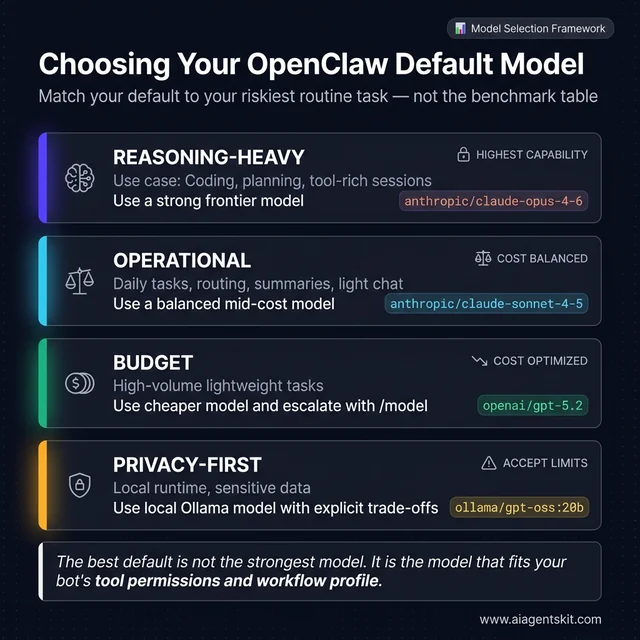 OpenClaw default model selection by workload tier. Reasoning-heavy setups using tools, code, or planning need a frontier model. Operational setups doing daily routing and chat favor a balanced provider. Budget setups escalate via /model on demand. Privacy-first setups choose local Ollama models with explicit capability trade-offs documented before rollout.
A final practical recommendation is to avoid changing the default at the same time as a provider migration, an auth-profile cleanup, and a workflow-policy change. Each of those can be valid on its own. Combining them makes debugging slow and attribution messy. The evidence from real operations is consistent: when the switch is isolated, rollback is simple; when several moving parts change together, people lose track of which layer actually failed.
That is the real point of a safe switch. The objective is not just to land on a newer or cheaper model. The objective is to preserve confidence in the assistant while the change happens, so future model upgrades remain routine instead of stressful, reversible, and well understood.
Frequently Asked Questions About Clawdbot and OpenClaw Model Switching
Can OpenClaw switch models without a restart?
Usually yes. Session-level changes through /model apply to the active conversation, while persistent default changes typically affect new sessions or future runs. If the old behavior seems to persist, confirm whether the current session is still pinned and then check openclaw models status.
Is /model safer than editing the config directly?
Yes, for testing. It is the smallest possible change surface and is therefore the lowest-risk way to compare models or confirm provider auth before changing defaults.
When should openclaw models set be preferred?
Use it after a test succeeds and the goal is to make the model the new persistent default. It keeps the change inside OpenClaw’s supported CLI flow instead of encouraging a broad file edit.
What does agents.defaults.models actually do?
It acts as the model catalog and allowlist for the installation. If it is set, only models inside it can be chosen through /model or other session overrides. That is why valid models can still trigger a “model not allowed” failure.
Should fallback models be configured?
For serious setups, usually yes. Fallbacks reduce downtime during provider instability and let the assistant continue operating when the primary model is unavailable or rate-limited.
Can local Ollama models and cloud models live in one setup?
Yes. OpenClaw supports both, but the safer design is to be explicit about which workflows may call cloud APIs and which must remain local. Mixed setups fail most often when those boundaries are assumed instead of documented.
What is the safest rollback plan if a switch fails?
Restore the known-good model first, then inspect logs, auth, and allowlists before trying again. The mistake to avoid is stacking a second or third config change on top of a failure that has not been diagnosed.
How should a team validate a new default model after rollout?
A strong post-switch validation routine looks like this:
- run one normal chat task
- run one tool-using task
- run one policy-sensitive request
- watch logs for provider or tool errors
- confirm cost and latency are within expectations
This is the difference between “the model changed” and “the rollout succeeded.” Searchers looking for validate OpenClaw model switch or test OpenClaw default model are usually asking for this exact sequence, even if they do not use that phrasing.
Should the default always be the strongest model available?
Not always. The strongest model is often the best choice for tools, reasoning, and high-stakes work, but some teams benefit from a balanced default plus explicit escalation to stronger models for complex sessions.
The Safe Sequence for Future Model Changes
The reliable sequence is simple: check status, test with /model, persist with openclaw models set, and edit ~/.openclaw/openclaw.json only when the CLI path is not enough. That order keeps the switch narrow, observable, and reversible.
If the broader decision is whether a workflow should stay cloud-backed or move to a local runtime, this guide to cloud vs local AI trade-offs is the right next read before locking in a new default.