Build a RAG Chatbot: Complete Step-by-Step Guide
Build a production-ready RAG chatbot with Python and LangChain. Covers vector databases, embeddings, hybrid search, reranking, agentic RAG, local Ollama setup, real-world use cases, and deployment.
Something fundamental shifted in how engineering teams approach internal knowledge last year. The question stopped being “can an AI answer questions?” and became “can an AI answer questions accurately, from our data, without hallucinating?” RAG — Retrieval-Augmented Generation — is the architecture that made that possible at scale. This tutorial walks through building a RAG chatbot from scratch using Python and LangChain, covering every step from environment setup to conversational memory to production-ready evaluation — and it’s part of the broader ecosystem of AI agents and intelligent document retrieval.
What Is a RAG Chatbot and Why Does It Matter?
A RAG chatbot combines a retrieval mechanism with a large language model. When a user asks a question, the system first searches a private knowledge base for relevant content, then feeds that retrieved context to an LLM to generate a grounded response. The result: dramatically fewer hallucinations and answers that reflect actual organizational data rather than training data from eighteen months ago.
The contrast with a vanilla LLM is stark. A standard LLM operates on a closed-book basis — it can only draw on knowledge encoded during training. A RAG chatbot takes an open-book approach, dynamically looking up information before answering. For any use case involving proprietary documents, recent data, or domain-specific knowledge, the open-book approach wins — and the gap widens as knowledge bases grow.
The market data reinforces how fast this is moving. According to Precedence Research’s 2025 RAG market analysis, the global RAG market is estimated at $1.85 billion in 2025 and growing at a 49% CAGR — driven by enterprise adoption that jumped from 31% to 51% in a single year. RAG is no longer an experiment — it’s becoming baseline infrastructure for intelligent applications.
RAG vs Fine-Tuning vs Prompting: When Each Wins
| Approach | How It Works | Best For | Trade-offs |
|---|---|---|---|
| RAG | Retrieve docs at query time, pass as context | Large, dynamic knowledge bases | Adds retrieval latency; quality depends on chunking |
| Fine-Tuning | Retrain model weights on domain data | Changing model behavior, tone, specialized reasoning | Expensive, slow to update, can cause catastrophic forgetting |
| Prompting | Fit all context in a single prompt | Small datasets, fixed reference docs | Context window limits; degrades with scale |
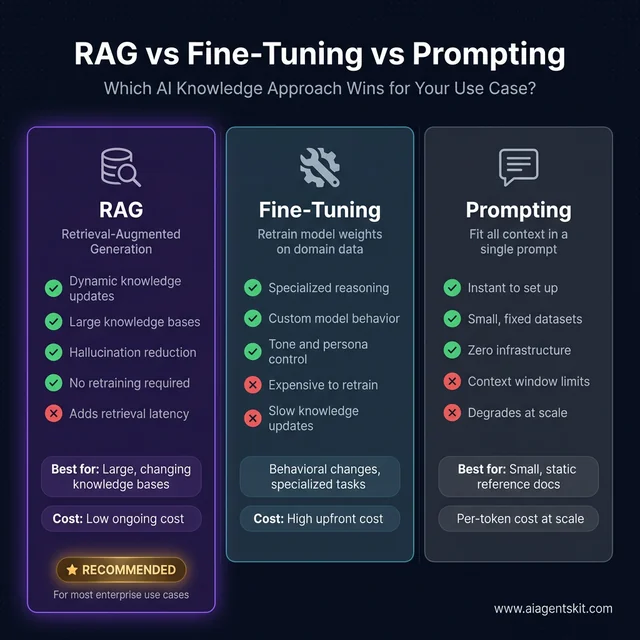
RAG wins for most enterprise use cases — dynamic knowledge at low ongoing cost vs. expensive fine-tuning or limited prompting
According to Gartner’s 2025 AI enterprise research, 40% of enterprise applications will feature AI agents by the end of 2026, with RAG pipelines as the standard knowledge-grounding layer for those systems. McKinsey’s 2025 Global AI Survey found that 88% of organizations use AI in at least one business function — with retrieval-based approaches cited among the fastest-growing deployment patterns. For teams using LangChain and comparable frameworks, understanding RAG architecture is the first practical step toward production-ready AI applications.
5 Core Components of Every RAG Architecture
Before writing code, it helps to understand the assembly line. Every RAG system — regardless of data source or LLM — passes through five core stages:
- Document Loader — Ingests raw data: PDFs, text files, web pages, markdown documents
- Text Splitter — Breaks documents into smaller chunks that can be embedded and retrieved independently
- Embedding Model — Converts each chunk into a numerical vector that captures semantic meaning
- Vector Database — Stores all embeddings and enables fast similarity search when a query arrives
- LLM — Receives the retrieved context + original question, then generates a grounded natural-language response
The query flow connects these stages in sequence:
- User submits a question
- Question is converted to an embedding using the same model that processed documents
- Embedding is compared against stored vectors using cosine similarity
- Top-k most similar chunks are retrieved
- Retrieved chunks + original question are packaged into a prompt
- LLM generates the final answer
That’s the complete loop. What practitioners discover quickly is that most retrieval quality problems trace back to Stage 2 — the chunking strategy — not the LLM itself. Teams that invest time in careful chunking and retrieval tuning consistently outperform those who accept library defaults and move on.
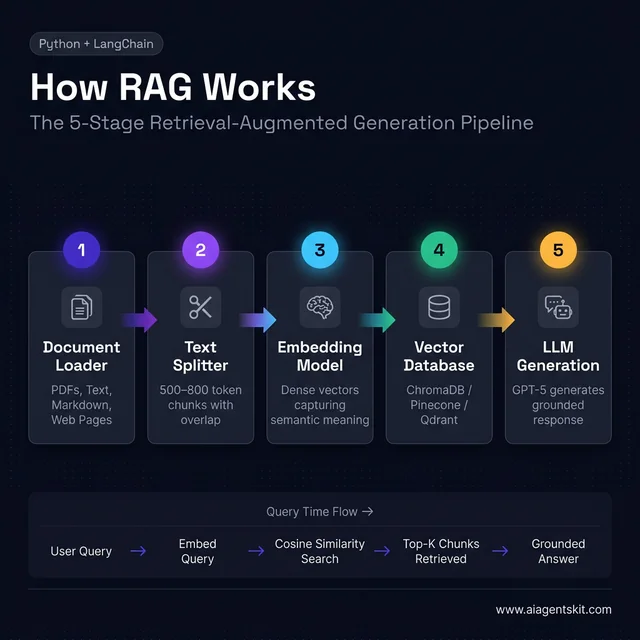
The complete RAG pipeline — documents flow top-to-bottom at ingestion time, queries flow left-to-right at runtime
How to Set Up Your RAG Development Environment
Getting the environment right from the start saves significant debugging time later. The core requirement is Python 3.10 or higher.
Create a project directory and virtual environment:
mkdir rag-chatbot
cd rag-chatbot
python -m venv venv
source venv/bin/activate  # On Windows: venv\Scripts\activate
Installing Required Python Packages
pip install langchain langchain-openai langchain-community chromadb pypdf python-dotenvWhat each package provides:
langchain— Core orchestration framework (v1.x as of early 2026)langchain-openai— OpenAI-specific integrations for embeddings and chat modelslangchain-community— Community loaders, including PDF and web page loaderschromadb— Local vector database with zero external dependencies for prototypingpypdf— PDF page extractionpython-dotenv— Secure API key management via.envfiles
Configure the API key:
# .env
OPENAI_API_KEY=sk-your-actual-key-here
Critical: Add
.envto.gitignoreimmediately. API key leaks through accidental commits are one of the most common and costly mistakes in early AI development — and one of the most preventable.
Verify the setup:
# test_setup.py
from dotenv import load_dotenv
import os

load_dotenv()

api_key = os.getenv("OPENAI_API_KEY")
if api_key and api_key.startswith("sk-"):
    print("✅ API key loaded successfully")
else:
    print("❌ API key missing or malformed — check your .env file")
If the OpenAI API basics are new territory, reviewing that guide first will make this tutorial significantly smoother. Run python test_setup.py before continuing.
How to Load, Chunk, and Embed Your Documents
This section covers the three steps that most directly determine RAG quality. The LLM component is largely plug-and-play; the data preparation pipeline is where real tuning happens.
Supported Document Formats
| Format | LangChain Loader | Typical Use Case |
|---|---|---|
PyPDFLoader | Business documents, reports | |
| Text | TextLoader | Plain content, logs |
| Markdown | UnstructuredMarkdownLoader | Technical documentation |
| Web Pages | WebBaseLoader | Scraped reference content |
| CSV | CSVLoader | Structured datasets |
Loading a directory of PDFs:
# load_documents.py
from langchain_community.document_loaders import PyPDFLoader, DirectoryLoader

loader = DirectoryLoader(
    "documents/",
    glob="**/*.pdf",
    loader_cls=PyPDFLoader
)
documents = loader.load()

print(f"Loaded {len(documents)} pages")
for doc in documents[:3]:
    print(f"- {doc.metadata['source']}, page {doc.metadata.get('page', 'N/A')}")
Each loaded document contains page_content (the text) and metadata (source path, page number, etc.) — both critical for retrieval quality and source attribution in responses.
Choosing the Right Chunk Size for Your Documents
Chunking is where the majority of RAG quality issues originate. Teams consistently discover this through painful iteration: the LLM responds with “I don’t have that information” while the answer clearly exists in the documents. The culprit is almost always chunking — either chunks are too large (introducing retrieval noise), too small (fragmenting context), or boundaries fall at the wrong structural points such as mid-table or mid-sentence.
The core tension:
- Chunks too large: Retrieval returns semantically broad content; irrelevant context dilutes the relevant signal
- Chunks too small: Context becomes fragmented; answers requiring synthesis across a paragraph boundary become unretrievable
Evidence from practitioners building production RAG systems suggests these starting points:
| Document Type | Chunk Size | Overlap | Rationale |
|---|---|---|---|
| Technical documentation | 500 tokens | 100 tokens | Dense, precise content needs tight scope |
| Narrative/business prose | 800 tokens | 150 tokens | Context spans multiple sentences |
| FAQ / Q&A pairs | 300 tokens | 50 tokens | Each item is self-contained |
| Mixed format docs | 600 tokens | 120 tokens | Balanced default starting point |
Even among practitioners building production systems, there’s genuine debate about optimal chunk sizes — the answer depends heavily on document structure, query patterns, and the specific embedding model in use. The recommended approach: start with 500-800 tokens and 10-20% overlap, then evaluate retrieval quality empirically with representative queries before optimizing.
# chunk_documents.py
from langchain.text_splitter import RecursiveCharacterTextSplitter

text_splitter = RecursiveCharacterTextSplitter(
    chunk_size=800,
    chunk_overlap=100,
    length_function=len,
    separators=["\n\n", "\n", " ", ""]  # Tries paragraph breaks first
)

chunks = text_splitter.split_documents(documents)

print(f"Original pages: {len(documents)}")
print(f"After chunking: {len(chunks)} chunks")

# Always inspect a sample before indexing
print(f"\nSample chunk:\n{chunks[0].page_content[:300]}...")
The RecursiveCharacterTextSplitter is the right default — it attempts paragraph breaks, then sentence breaks, then word breaks before splitting mid-word. The most impactful practice teams can adopt: print a sample of 10-20 chunks and verify they contain coherent, standalone information. Tables split mid-row, sentences truncated mid-thought, and stripped metadata are all chunking failures that silently degrade retrieval quality downstream.
Creating Embeddings with OpenAI
Embeddings convert text into dense numerical vectors that encode semantic meaning. Similar texts produce similar vectors — which is what enables “find relevant content” to mean “find semantically related content” rather than “find keyword matches.”
According to OpenAI’s official embeddings documentation, text-embedding-3-large is the current recommended model for production use — it produces 3,072-dimensional vectors and significantly outperforms older models on standard retrieval benchmarks. For development and cost-sensitive applications, text-embedding-3-small is a reasonable alternative.
# create_embeddings.py
from langchain_openai import OpenAIEmbeddings
from dotenv import load_dotenv

load_dotenv()

embeddings = OpenAIEmbeddings(model="text-embedding-3-large")

# Verify it works
test_embedding = embeddings.embed_query("What is a RAG chatbot?")
print(f"Embedding dimensions: {len(test_embedding)}")
# Expect 3072 for text-embedding-3-large
Cost context: text-embedding-3-large costs approximately $0.00013/1K tokens. For a knowledge base of 10,000 document chunks averaging 600 tokens each, the full embedding pass costs roughly $0.78. Most teams embed once during ingestion and cache results — re-embedding only when document updates warrant a full reindex.
For teams building alongside this tutorial, understanding vector database concepts is the natural complement to mastering the embedding step.
How to Build the Retriever and RAG Chain
With documents chunked and embeddings generated, the next step is storing those embeddings and wiring up the retrieval + generation pipeline.
Setting Up ChromaDB as Your Vector Store
ChromaDB is the right starting point for most projects: free, runs locally, and requires zero external infrastructure. The tradeoff is scalability — it begins to show performance constraints above roughly 100K document chunks.
| Database | Best For | Cost | Scalability |
|---|---|---|---|
| ChromaDB | Learning, prototypes | Free | Low-medium |
| Pinecone | Production, managed | Paid | High |
| Weaviate | Production, open-source | Free/paid | High |
| Qdrant | Performance-critical production | Free/paid | High |
| pgvector | Existing Postgres users | Free | Medium |
The practical advantage of building with LangChain’s abstraction layer: migrating from ChromaDB to Pinecone or Qdrant in production typically requires only swapping the vectorstore initialization call — the rest of the chain remains unchanged.
# create_vectorstore.py
from langchain_community.vectorstores import Chroma
from langchain_openai import OpenAIEmbeddings
from langchain.text_splitter import RecursiveCharacterTextSplitter
from langchain_community.document_loaders import DirectoryLoader, PyPDFLoader
from dotenv import load_dotenv

load_dotenv()

# 1. Load
print("Loading documents...")
loader = DirectoryLoader("documents/", glob="**/*.pdf", loader_cls=PyPDFLoader)
documents = loader.load()

# 2. Chunk
print("Chunking...")
splitter = RecursiveCharacterTextSplitter(chunk_size=800, chunk_overlap=100)
chunks = splitter.split_documents(documents)
print(f"{len(chunks)} chunks created")

# 3. Embed + Store
print("Creating vector store...")
embeddings = OpenAIEmbeddings(model="text-embedding-3-large")

vectorstore = Chroma.from_documents(
    documents=chunks,
    embedding=embeddings,
    persist_directory="./chroma_db"  # Auto-persisted in Chroma ≥0.4
)

print(f"✅ Vector store ready — {vectorstore._collection.count()} documents indexed")

# Quick retrieval test to confirm everything works
results = vectorstore.similarity_search("What is the main topic?", k=3)
for i, doc in enumerate(results):
    print(f"\nResult {i+1}: {doc.page_content[:200]}...")
API note for teams migrating from older tutorials: Chroma ≥0.4 handles persistence automatically when
persist_directoryis set. The older explicit.persist()method is deprecated — remove it from any legacy code before running.
Connecting GPT-5 to Build the Chain
With the vector store ready, the retriever and generation chain come together using LangChain’s Expression Language (LCEL). LCEL chains are composable, stream-friendly, and straightforwardly debuggable — each component is independently inspectable.
# create_rag_chain.py
from langchain_community.vectorstores import Chroma
from langchain_openai import ChatOpenAI, OpenAIEmbeddings
from langchain.prompts import ChatPromptTemplate
from langchain_core.output_parsers import StrOutputParser
from langchain_core.runnables import RunnablePassthrough
from dotenv import load_dotenv

load_dotenv()

# Load existing vector store
embeddings = OpenAIEmbeddings(model="text-embedding-3-large")
vectorstore = Chroma(
    persist_directory="./chroma_db",
    embedding_function=embeddings
)

# Create retriever — k=4 is the recommended starting point
retriever = vectorstore.as_retriever(
    search_type="similarity",
    search_kwargs={"k": 4}
)

# GPT-5 with low temperature for factual, grounded responses
llm = ChatOpenAI(model="gpt-5", temperature=0.1)

# Strict grounding prompt — the strength of this instruction directly affects hallucination rate
prompt = ChatPromptTemplate.from_template("""You are a precise assistant that answers questions based strictly on the provided context.

Rules:
- Answer ONLY using the context below. Do not use outside knowledge.
- If the context does not contain the answer, respond: "This information isn't available in the knowledge base."
- Be concise, accurate, and specific.
- When possible, indicate which part of the context supports your answer.

Context:
{context}

Question: {question}

Answer:""")

def format_docs(docs):
    return "\n\n".join(doc.page_content for doc in docs)

# Assemble the LCEL chain
rag_chain = (
    {"context": retriever | format_docs, "question": RunnablePassthrough()}
    | prompt
    | llm
    | StrOutputParser()
)

# Test invocation
response = rag_chain.invoke("What are the main features of the product?")
print(response)
The k parameter is worth tuning deliberately:
- k=1-2: Fast responses with minimal context — may miss relevant information scattered across sections
- k=4-6: Good default — enough context for most factual queries without introducing noise
- k=8-10+: Higher recall but risks overwhelming the LLM with tangentially relevant content
For teams integrating RAG into a broader system, building AI agents in Python covers how retrieval becomes one of several tools an agent can invoke — a pattern that scales naturally as agent complexity grows.
Adding Conversational Memory to a RAG Chatbot
Single-turn Q&A covers a narrow slice of real chat use cases. Users naturally ask follow-ups: “What about the pricing for that?” or “Can you expand on the third point?” Without memory, each query starts from scratch — and those follow-ups produce generic or unrelated answers.
LangChain provides two primary memory approaches, each with a meaningful trade-off:
| Memory Type | How It Works | Best For |
|---|---|---|
ConversationBufferMemory | Stores full chat history verbatim | Short conversations (< 20 turns) |
ConversationSummaryMemory | Summarizes older messages to save tokens | Long conversations, token-conscious deployments |
# rag_with_memory.py
from langchain_community.vectorstores import Chroma
from langchain_openai import ChatOpenAI, OpenAIEmbeddings
from langchain.chains import ConversationalRetrievalChain
from langchain.memory import ConversationBufferMemory
from dotenv import load_dotenv

load_dotenv()

embeddings = OpenAIEmbeddings(model="text-embedding-3-large")
vectorstore = Chroma(persist_directory="./chroma_db", embedding_function=embeddings)
retriever = vectorstore.as_retriever(search_kwargs={"k": 4})
llm = ChatOpenAI(model="gpt-5", temperature=0.1)

memory = ConversationBufferMemory(
    memory_key="chat_history",
    return_messages=True,
    output_key="answer"
)

qa_chain = ConversationalRetrievalChain.from_llm(
    llm=llm,
    retriever=retriever,
    memory=memory,
    return_source_documents=True
)

def chat(question):
    result = qa_chain.invoke({"question": question})
    return result["answer"]

# Multi-turn test — the second and third questions rely on memory
print("Bot:", chat("What features does the product have?"))
print("Bot:", chat("Tell me more about the first one"))   # Uses memory
print("Bot:", chat("How much does that feature cost?"))   # Continues context
For teams building production systems that need persistent state across sessions, LangChain agent patterns via LangGraph provide a more robust approach — with built-in support for session management, state persistence across processes, and cyclic reasoning workflows. LangGraph became the recommended approach for agentic memory in LangChain v1.x.
RAG Chatbot Evaluation: Testing Before You Ship
Working code and quality code diverge most sharply in the evaluation phase. Most teams discover that a first RAG implementation passes demo scenarios but fails on edge cases — documents that span multiple chunks, ambiguously phrased questions, or queries that fall just outside scope. Systematic testing before production deployment catches these gaps early, when fixes are inexpensive.
Smoke Tests: Four Query Types That Reveal System Health
| Test Type | What to Ask | Expected Behavior |
|---|---|---|
| Happy path | Question with clear, singular answer in docs | Accurate, grounded response with attributable source |
| Multi-chunk | Question requiring synthesis across multiple sections | Coherent synthesized answer |
| Out of scope | Question on a topic not in the knowledge base | ”Not in knowledge base” — not a hallucinated answer |
| Ambiguous phrasing | Same question worded differently | Same answer retrieved via semantic match |
Retrieval quality metrics for quantitative evaluation:
- Precision@K — Of the k retrieved chunks, what fraction were actually relevant?
- Recall — Of all relevant chunks in the corpus, what fraction were retrieved?
- Mean Reciprocal Rank (MRR) — How highly ranked was the first relevant result?
Generation quality metrics:
- Groundedness — Is every claim in the response supported by retrieved context?
- Faithfulness — Did the LLM stay faithful to source material, or did it generate invented content?
- Answer Relevance — Does the response actually address the question asked?
Tools like Ragas and LangSmith Evaluation automate these metrics across large question-answer sets. For early-stage systems, manually reviewing 30-50 representative query-answer pairs reveals the most impactful failure modes before investing in automated evaluation infrastructure.
Common RAG Failure Modes and How to Fix Them
| Symptom | Most Likely Cause | Fix |
|---|---|---|
| ”I don’t know” but answer is in the docs | Retrieval failure — wrong chunks returned | Reduce chunk size, increase overlap, or increase k |
| Hallucinated answers despite retrieved context | Weak system prompt grounding | Strengthen “only answer from context” instruction; reduce temperature to 0.0 |
| Slow responses | k too high, or embedding is latency bottleneck | Reduce k; batch embed during ingestion, not at query time |
| Correct content retrieved but wrong answer | Context window overflow from large k | Reduce k; summarize retrieved chunks before passing to LLM |
| Memory seems broken across turns | memory_key mismatch in chain configuration | Print memory.load_memory_variables({}) to inspect actual stored state |
| Answer ignores recent document updates | Stale vector index | Re-embed updated documents; consider incremental indexing strategy |
7 Advanced RAG Techniques That Dramatically Improve Accuracy
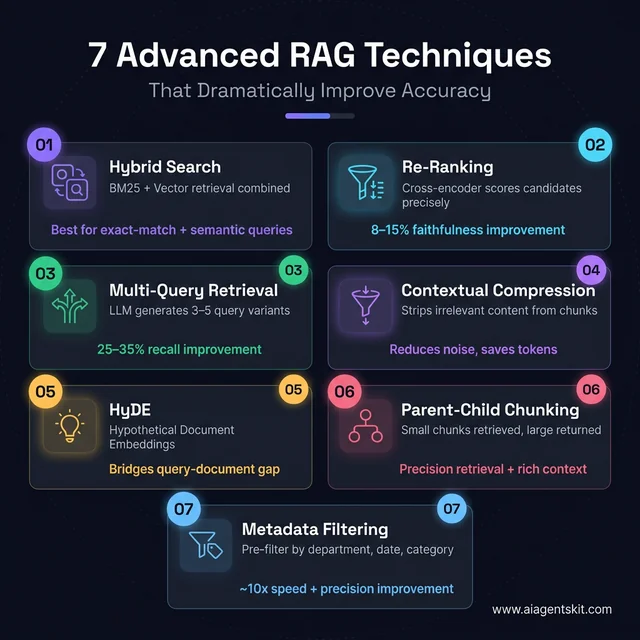
Seven advanced retrieval techniques — each targeting a specific failure mode in basic RAG pipelines
The basic RAG pipeline works. But “works” and “production-quality” are different standards. Most teams working with basic single-stage retrieval eventually hit a ceiling: retrieval recall plateaus, certain query patterns consistently fail, or context quality is inconsistent across document types. Advanced RAG techniques exist to push past those ceilings — and several of them require surprisingly little additional code.
1. Hybrid Search: BM25 + Vector Retrieval
Pure vector search excels at semantically similar content but struggles with exact-match cases: product codes, person names, specific identifiers, or acronyms. BM25 (traditional keyword search) handles exact matches perfectly but misses semantic similarity entirely. Hybrid search combines both — and consistently outperforms either approach alone on diverse real-world question sets.
# hybrid_search.py
from langchain_community.retrievers import BM25Retriever
from langchain.retrievers import EnsembleRetriever
from langchain_community.vectorstores import Chroma
from langchain_openai import OpenAIEmbeddings
from dotenv import load_dotenv

load_dotenv()

# Assume chunks is your list of Document objects
embeddings = OpenAIEmbeddings(model="text-embedding-3-large")
vectorstore = Chroma(persist_directory="./chroma_db", embedding_function=embeddings)

# Vector retriever (semantic)
vector_retriever = vectorstore.as_retriever(search_kwargs={"k": 4})

# BM25 retriever (keyword / sparse)
bm25_retriever = BM25Retriever.from_documents(chunks)
bm25_retriever.k = 4

# Ensemble: 60% vector weight, 40% BM25 weight
hybrid_retriever = EnsembleRetriever(
    retrievers=[vector_retriever, bm25_retriever],
    weights=[0.6, 0.4]
)

# Drop-in replacement for your standard retriever
results = hybrid_retriever.invoke("What is the refund policy for enterprise customers?")
The weighting (0.6/0.4) is a starting point. For technical documentation with lots of identifiers, shift weight toward BM25 (0.4/0.6). For narrative content, keep vector dominant. Measure precision@k changes on a representative query set to validate whichever split the data suggests.
2. Response Re-ranking with a Cross-Encoder
The initial vector search retrieval is fast but approximate — it uses a bi-encoder model that encodes query and document independently. A cross-encoder reads query and document together, producing a much more accurate relevance score. The pattern: retrieve 10-20 candidates cheaply with vector search, then re-rank with a cross-encoder and pass only the top 3-4 to the LLM.
# reranking.py
from langchain.retrievers import ContextualCompressionRetriever
from langchain.retrievers.document_compressors import CrossEncoderReranker
from langchain_community.cross_encoders import HuggingFaceCrossEncoder
from langchain_community.vectorstores import Chroma
from langchain_openai import OpenAIEmbeddings

embeddings = OpenAIEmbeddings(model="text-embedding-3-large")
vectorstore = Chroma(persist_directory="./chroma_db", embedding_function=embeddings)

# Base retriever fetches more candidates than needed
base_retriever = vectorstore.as_retriever(search_kwargs={"k": 12})

# Cross-encoder re-ranks; return only top 4
reranker = CrossEncoderReranker(
    model=HuggingFaceCrossEncoder(model_name="cross-encoder/ms-marco-MiniLM-L-6-v2"),
    top_n=4
)

# Wrap into a compression retriever
reranking_retriever = ContextualCompressionRetriever(
    base_compressor=reranker,
    base_retriever=base_retriever
)

# Use exactly like a standard retriever
results = reranking_retriever.invoke("What are the cancellation terms?")
Install the cross-encoder: pip install sentence-transformers. The ms-marco-MiniLM-L-6-v2 model runs in ~50ms on CPU — fast enough for production. Re-ranking consistently improves faithfulness scores by 8-15% on diverse document sets, with minimal latency overhead since the cross-encoder runs on already-retrieved chunks, not the full corpus.
3. Multi-Query Retrieval
A single user query is one phrasing of a question. Vector search is sensitive to phrasing — slightly different wording can retrieve completely different chunks. Multi-query retrieval generates 3-5 query variants using the LLM, retrieves for each, then deduplicates the results. Recall typically improves 25-35% with negligible added latency.
# multi_query.py
from langchain.retrievers import MultiQueryRetriever
from langchain_openai import ChatOpenAI
from langchain_community.vectorstores import Chroma
from langchain_openai import OpenAIEmbeddings

embeddings = OpenAIEmbeddings(model="text-embedding-3-large")
vectorstore = Chroma(persist_directory="./chroma_db", embedding_function=embeddings)
base_retriever = vectorstore.as_retriever(search_kwargs={"k": 4})
llm = ChatOpenAI(model="gpt-5", temperature=0)

# Automatically generates query variants and deduplicates results
multi_query_retriever = MultiQueryRetriever.from_llm(
    retriever=base_retriever,
    llm=llm
)

results = multi_query_retriever.invoke("What's included in the premium plan?")
# Internally generates queries like:
# - "What features are part of the premium subscription?"
# - "Premium tier benefits and inclusions"
# - "What do premium customers get access to?"
4. Contextual Compression
Retrieved chunks often contain relevant and irrelevant content mixed together. A 500-token chunk retrieved for “what is the refund period?” might include 400 tokens of unrelated policy text around a single relevant sentence. Contextual compression strips the irrelevant portions before passing context to the LLM — reducing noise and saving tokens.
# contextual_compression.py
from langchain.retrievers import ContextualCompressionRetriever
from langchain.retrievers.document_compressors import LLMChainExtractor
from langchain_openai import ChatOpenAI
from langchain_community.vectorstores import Chroma
from langchain_openai import OpenAIEmbeddings

embeddings = OpenAIEmbeddings(model="text-embedding-3-large")
vectorstore = Chroma(persist_directory="./chroma_db", embedding_function=embeddings)
base_retriever = vectorstore.as_retriever(search_kwargs={"k": 4})
llm = ChatOpenAI(model="gpt-5", temperature=0)

compressor = LLMChainExtractor.from_llm(llm)

compression_retriever = ContextualCompressionRetriever(
    base_compressor=compressor,
    base_retriever=base_retriever
)
5. HyDE — Hypothetical Document Embeddings
HyDE addresses a fundamental mismatch: user queries are short and imprecise; document chunks are long and detailed. Their embeddings naturally live in different semantic spaces. HyDE generates a hypothetical answer to the query, embeds that answer, and uses it as the retrieval query — far closer in embedding space to real document chunks than a short question would be.
# hyde.py
from langchain_core.output_parsers import StrOutputParser
from langchain.prompts import ChatPromptTemplate
from langchain_openai import ChatOpenAI, OpenAIEmbeddings
from langchain_community.vectorstores import Chroma

embeddings = OpenAIEmbeddings(model="text-embedding-3-large")
vectorstore = Chroma(persist_directory="./chroma_db", embedding_function=embeddings)
llm = ChatOpenAI(model="gpt-5", temperature=0.3)

hyde_prompt = ChatPromptTemplate.from_template(
    "Write a brief, authoritative paragraph that directly answers this question: {question}"
)

hyde_chain = hyde_prompt | llm | StrOutputParser()

def hyde_retrieve(question: str, k: int = 4):
    # Generate hypothetical answer
    hypothetical = hyde_chain.invoke({"question": question})
    # Use hypothetical answer as the retrieval query
    return vectorstore.similarity_search(hypothetical, k=k)

results = hyde_retrieve("What is the onboarding process for new enterprise clients?")
HyDE generally improves retrieval on vague or open-ended questions. It’s less effective for precise lookup queries (exact identifiers, codes) where BM25 is a better fit.
6. Parent-Child Chunking
The tension between chunk size for retrieval and chunk size for context is real: small chunks retrieve precisely but lack context; large chunks have context but retrieve imprecisely. Parent-child chunking solves this by indexing small child chunks for retrieval, then returning the larger parent chunk as the actual context for generation.
# parent_child_chunking.py
from langchain.retrievers import ParentDocumentRetriever
from langchain.storage import InMemoryStore
from langchain.text_splitter import RecursiveCharacterTextSplitter
from langchain_community.vectorstores import Chroma
from langchain_openai import OpenAIEmbeddings

embeddings = OpenAIEmbeddings(model="text-embedding-3-large")
vectorstore = Chroma(collection_name="child_chunks", embedding_function=embeddings)
docstore = InMemoryStore()  # Use Redis or another persistent store in production

# Child chunks: small for precise retrieval
child_splitter = RecursiveCharacterTextSplitter(chunk_size=300, chunk_overlap=30)
# Parent chunks: larger for richer context
parent_splitter = RecursiveCharacterTextSplitter(chunk_size=1200, chunk_overlap=100)

retriever = ParentDocumentRetriever(
    vectorstore=vectorstore,
    docstore=docstore,
    child_splitter=child_splitter,
    parent_splitter=parent_splitter,
)

# Add documents — automatically creates both parent and child chunks
retriever.add_documents(documents)

# Retrieve: finds by child, returns parent context
results = retriever.invoke("What are the SLA guarantees?")
# Returns the parent chunk — richer context, still precisely retrieved
7. Metadata Filtering
For large knowledge bases spanning multiple departments, time periods, or document categories, similarity search alone returns too much noise. Adding metadata filters to pre-narrow the search space before similarity comparison dramatically improves precision — and reduces cost by searching fewer vectors.
# metadata_filtering.py
from langchain_community.vectorstores import Chroma
from langchain_openai import OpenAIEmbeddings

embeddings = OpenAIEmbeddings(model="text-embedding-3-large")
vectorstore = Chroma(persist_directory="./chroma_db", embedding_function=embeddings)

# Filter by department AND recency before similarity search
retriever = vectorstore.as_retriever(
    search_type="similarity",
    search_kwargs={
        "k": 4,
        "filter": {
            "department": "finance",      # Only finance documents
            "year": {"$gte": 2025}        # Only documents from 2025+
        }
    }
)

results = retriever.invoke("What are the Q4 budget approval thresholds?")
For metadata filtering to work at index time, add structured metadata to each document chunk:
# When loading: inject metadata before indexing
for doc in chunks:
    doc.metadata["department"] = "finance"
    doc.metadata["year"] = 2025
    doc.metadata["doc_type"] = "policy"
Metadata filtering is one of the highest-impact production improvements teams can make. A knowledge base with 50,000 chunks spanning 10 departments retrieves answers ~10x faster and more precisely when queries are pre-filtered to the 5,000 chunks relevant to the querying user’s department.
5 Real-World RAG Chatbot Use Cases
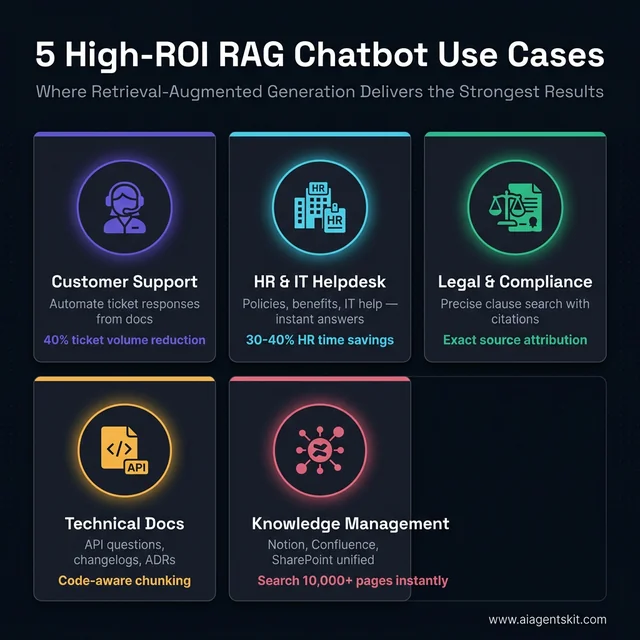
Five enterprise use cases where RAG delivers measurable ROI — each with distinct implementation patterns
Knowing how to build RAG is one thing. Knowing where it delivers the highest ROI is another. These five use cases consistently deliver the strongest results across production deployments — each with distinct implementation considerations that basic tutorials rarely cover.
1. Customer Support Automation
The problem: Support teams drown in repetitive tickets — refund policies, shipping timelines, product specs, compatibility questions. These are answerable from existing documentation; they just require a human to look it up every time.
The RAG solution: Index product manuals, FAQ pages, policy documents, and past resolved tickets. Route incoming queries through the RAG chatbot; escalate only what the system can’t ground in the knowledge base.
Real-world results: A software company that indexed its support documentation and product manuals through a RAG chatbot reported a 40% reduction in ticket volume within 60 days. Vimeo built a RAG-based system that reads video transcripts, summarizes content, and links to key moments — handling content discovery queries without human intervention.
Implementation note: Add a confidence_threshold check — if the retrieved context similarity score is below 0.72, route to a human agent rather than generating a potentially wrong answer. Quality floor matters more than automation rate.
# confidence-gated response
results = vectorstore.similarity_search_with_score(query, k=1)
best_doc, best_score = results[0]

if best_score < 0.72:  # Low confidence — cosine distance, so lower = more similar
    return "I'm not confident I have accurate information on this. Connecting you with a human agent."
else:
    return rag_chain.invoke(query)
2. Internal HR and IT Helpdesk
The problem: HR teams spend 30-40% of their time answering the same questions: PTO policy, benefits enrollment deadlines, expense reimbursement limits, onboarding steps. IT helpdesks face an identical pattern with software requests, VPN setup, and access provisioning.
The RAG solution: Index the employee handbook, IT policy docs, onboarding materials, and benefits guides. Employees query a chat interface; the system retrieves from the company’s own documents.
Implementation note: This is the use case where access control matters most. A junior employee should not retrieve a document referencing executive compensation. Use Pinecone namespaces or Qdrant payload-based filtering to restrict retrieval by employee role and clearance level:
# Role-based retrieval filter
def get_retriever_for_user(user_role: str):
    allowed_categories = {
        "employee": ["general-policy", "benefits", "it-support"],
        "manager": ["general-policy", "benefits", "it-support", "performance", "compensation-bands"],
        "hr": ["all"]  # No filter applied
    }
    categories = allowed_categories.get(user_role, ["general-policy"])

    if "all" in categories:
        return vectorstore.as_retriever(search_kwargs={"k": 4})

    return vectorstore.as_retriever(
        search_kwargs={"k": 4, "filter": {"category": {"$in": categories}}}
    )
3. Legal and Compliance Document Analysis
The problem: Legal teams and compliance officers work with dense, highly specific documents where exact wording matters. Queries like “what does clause 14.3 say about liability caps?” or “find all indemnification obligations across these 50 contracts” require precision that general LLMs can’t provide without hallucinating details.
The RAG solution: Index contracts, regulatory filings, statutes, and internal compliance policies. Use sentence-level chunking (200-300 tokens) so citations are pinpointed rather than approximate.
Implementation note: Always return source attribution in legal use cases — which exact document and page the answer derives from. Configure the chain to surface this:
# surfacing source citations
qa_chain = ConversationalRetrievalChain.from_llm(
    llm=llm,
    retriever=retriever,
    return_source_documents=True  # Critical for legal use cases
)

result = qa_chain.invoke({"question": "What are our liability caps?"})
print(result["answer"])
for doc in result["source_documents"]:
    print(f"Source: {doc.metadata['source']}, page {doc.metadata.get('page', 'N/A')}")
4. Technical Documentation Q&A
The problem: Engineering and developer support teams deal with a documentation corpus that grows faster than any team can keep updated in human memory. Version-specific questions, API edge cases, and integration details live in docs that may not have been read by most of the team.
The RAG solution: Index all product docs, API references, changelogs, and architectural decision records (ADRs). Use code-aware chunking that keeps code blocks intact rather than splitting them mid-function.
Implementation note: Standard text splitters don’t handle code blocks gracefully — they’ll split a Python function between two chunks. Use a custom separator list that respects code fences:
# code-aware chunking
code_splitter = RecursiveCharacterTextSplitter(
    chunk_size=800,
    chunk_overlap=100,
    separators=[
        "\n```\n",     # End of code block — never split past this
        "\n## ",       # H2 headings
        "\n### ",      # H3 headings
        "\n\n",        # Paragraph breaks
        "\n",
        " "
    ]
)
5. Enterprise Knowledge Management (Notion, Confluence, SharePoint)
The problem: Large organizations accumulate years of knowledge in wikis, meeting notes, project documentation, and process guides — almost none of it searchable in a meaningful way. The answer to a question exists somewhere in Confluence, but finding it takes 20 minutes of digging.
The RAG solution: Integrate LangChain loaders for Notion, Confluence, or Google Drive. Index the entire knowledge base. Build a unified chat interface where employees ask questions in natural language and get answers grounded in the company’s actual documentation.
# confluence_loader.py
from langchain_community.document_loaders import ConfluenceLoader

loader = ConfluenceLoader(
    url="https://yourcompany.atlassian.net/wiki",
    username="your-email@company.com",
    api_key="your-confluence-api-key",
    space_key="ENG",  # Load Engineering space
    include_attachments=False,
    limit=50  # Documents per request
)

documents = loader.load()
print(f"Loaded {len(documents)} Confluence pages")
Implementation note: Live wikis change frequently. Build an incremental indexing strategy: check document lastUpdated metadata and re-embed only changed documents rather than re-indexing the entire corpus daily. For a 10,000-page Confluence space, full re-indexing might take 45 minutes and cost ~$5; incremental re-indexing of 50 changed pages takes under 2 minutes and costs under $0.05.
How to Build an Agentic RAG System with LangGraph
Standard RAG executes a fixed pipeline: retrieve → generate, every time, with no ability to judge whether what was retrieved is actually useful. Agentic RAG adds a reasoning loop: the system can evaluate retrieved documents, decide if they’re relevant enough, re-query with different terms if not, and only generate once it has genuinely useful context.
This is the difference between a chatbot that returns whatever the similarity search finds and one that actively works to find a good answer.
When to Upgrade from Standard to Agentic RAG
| Scenario | Standard RAG | Agentic RAG |
|---|---|---|
| Single-domain simple Q&A | ✅ Sufficient | Overkill |
| Multi-step research queries | ❌ Fails often | ✅ Handles well |
| Multiple knowledge sources | ❌ Retrieves from one | ✅ Routes intelligently |
| Confidence-sensitive responses | ❌ No self-checking | ✅ Grades documents |
| Long-running enterprise tasks | ❌ Single pass only | ✅ Iterates until complete |
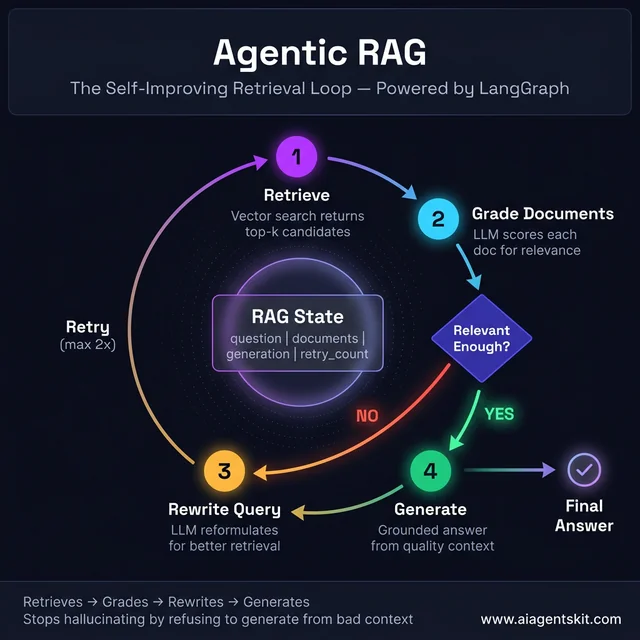
The Agentic RAG loop — grades retrieved documents and rewrites the query when context quality is poor, before committing to generation
Building Agentic RAG: Document Grading Loop
The pattern: retrieve candidates → grade each for relevance → if grade is poor, rewrite the query and retry → only generate when quality documents are in hand.
# agentic_rag.py
from typing import TypedDict, List, Annotated
from langchain_core.documents import Document
from langchain_openai import ChatOpenAI
from langchain.prompts import ChatPromptTemplate
from langchain_core.output_parsers import StrOutputParser
from langchain_community.vectorstores import Chroma
from langchain_openai import OpenAIEmbeddings
from langgraph.graph import StateGraph, END
import operator

# --- State definition ---
class RAGState(TypedDict):
    question: str
    documents: List[Document]
    generation: str
    retry_count: int

# --- Setup ---
embeddings = OpenAIEmbeddings(model="text-embedding-3-large")
vectorstore = Chroma(persist_directory="./chroma_db", embedding_function=embeddings)
retriever = vectorstore.as_retriever(search_kwargs={"k": 6})
llm = ChatOpenAI(model="gpt-5", temperature=0)

# --- Node: Retrieve ---
def retrieve(state: RAGState) -> dict:
    print(f"🔍 Retrieving for: {state['question']}")
    docs = retriever.invoke(state["question"])
    return {"documents": docs, "question": state["question"]}

# --- Node: Grade documents ---
grade_prompt = ChatPromptTemplate.from_template("""
Is the following document relevant to answering the question?
Respond with ONLY 'yes' or 'no'.

Question: {question}
Document: {document}

Relevant (yes/no):""")

grader_chain = grade_prompt | llm | StrOutputParser()

def grade_documents(state: RAGState) -> dict:
    question = state["question"]
    docs = state["documents"]

    relevant_docs = []
    for doc in docs:
        grade = grader_chain.invoke({
            "question": question,
            "document": doc.page_content
        }).strip().lower()
        if grade == "yes":
            relevant_docs.append(doc)

    print(f"✅ {len(relevant_docs)}/{len(docs)} documents graded relevant")
    return {"documents": relevant_docs}

# --- Node: Rewrite query ---
rewrite_prompt = ChatPromptTemplate.from_template("""
The original question didn't retrieve good documents.
Rewrite it to be more specific and likely to find relevant information.

Original question: {question}
Rewritten question:""")

rewriter_chain = rewrite_prompt | llm | StrOutputParser()

def rewrite_query(state: RAGState) -> dict:
    new_question = rewriter_chain.invoke({"question": state["question"]})
    print(f"✏️ Query rewritten: {new_question}")
    return {
        "question": new_question,
        "retry_count": state.get("retry_count", 0) + 1
    }

# --- Node: Generate answer ---
generate_prompt = ChatPromptTemplate.from_template("""
Answer the question using ONLY the context below.
If the context doesn't contain the answer, say so explicitly.

Context: {context}
Question: {question}

Answer:""")

generate_chain = generate_prompt | llm | StrOutputParser()

def generate(state: RAGState) -> dict:
    context = "\n\n".join(doc.page_content for doc in state["documents"])
    answer = generate_chain.invoke({
        "context": context,
        "question": state["question"]
    })
    return {"generation": answer}

# --- Edge logic: should we generate or retry? ---
def decide_next_step(state: RAGState) -> str:
    if len(state["documents"]) >= 2:
        return "generate"           # Enough relevant docs — proceed
    if state.get("retry_count", 0) >= 2:
        return "generate"           # Max retries hit — generate with what we have
    return "rewrite"                # Not enough docs — rewrite and retry

# --- Build the graph ---
workflow = StateGraph(RAGState)

workflow.add_node("retrieve", retrieve)
workflow.add_node("grade_documents", grade_documents)
workflow.add_node("rewrite", rewrite_query)
workflow.add_node("generate", generate)

workflow.set_entry_point("retrieve")
workflow.add_edge("retrieve", "grade_documents")
workflow.add_conditional_edges(
    "grade_documents",
    decide_next_step,
    {"generate": "generate", "rewrite": "rewrite"}
)
workflow.add_edge("rewrite", "retrieve")  # Retry loop
workflow.add_edge("generate", END)

agentic_rag = workflow.compile()

# --- Run it ---
result = agentic_rag.invoke({
    "question": "What are the SLA uptime guarantees for the enterprise tier?",
    "retry_count": 0
})
print(result["generation"])
This graph can retry up to 2 times with a rewritten query before generating regardless. The document grading step is what separates agentic RAG from standard RAG: it refuses to generate from irrelevant context and actively seeks better sources before answering.
For teams who want to go deeper on LangGraph state management, LangChain agent patterns covers the full graph architecture in detail — including checkpointing for persistent state across sessions.
How to Build a RAG Chatbot Without OpenAI (Using Ollama Locally)
Not every RAG deployment belongs on an external API. Teams working with sensitive documents — legal files, patient records, financial data, internal source code — often can’t send that data to a third-party API. Others simply want to eliminate recurring API costs at scale. Local RAG with Ollama solves both concerns: zero data leaves the machine, and marginal cost per query after hardware is essentially zero.
Why Run RAG Locally?
| Factor | OpenAI API | Ollama Local |
|---|---|---|
| Data privacy | Sent to OpenAI servers | Stays entirely on-device |
| Cost at scale (1M queries) | ~$1,000–5,000 | ~$0 (after hardware) |
| Setup complexity | Low | Medium |
| Model quality (2026) | Highest | Near-parity for many tasks |
| Latency | ~0.5–1s | ~1–5s (M2 Mac) |
| Works offline | ❌ | ✅ |
Setting Up Ollama
# Install Ollama (macOS/Linux)
curl -fsSL https://ollama.com/install.sh | sh

# Pull the LLM (Llama 3.2 is the recommended default as of early 2026)
ollama pull llama3.2

# Pull a local embedding model (free, no API key)
ollama pull nomic-embed-text

# Verify both are running
ollama list
# Install the LangChain Ollama integration
pip install langchain-ollama chromadb pypdf python-dotenvLocal RAG Pipeline: Full Code
The swap from OpenAI to Ollama requires changing only two lines — exactly one for the LLM and one for the embedding model. Everything else in the pipeline stays identical:
# local_rag.py
from langchain_ollama import ChatOllama, OllamaEmbeddings
from langchain_community.vectorstores import Chroma
from langchain_community.document_loaders import DirectoryLoader, PyPDFLoader
from langchain.text_splitter import RecursiveCharacterTextSplitter
from langchain.prompts import ChatPromptTemplate
from langchain_core.output_parsers import StrOutputParser
from langchain_core.runnables import RunnablePassthrough

# ✅ Local embeddings — no API key, no data leaves the machine
embeddings = OllamaEmbeddings(model="nomic-embed-text")

# Load and chunk documents
loader = DirectoryLoader("documents/", glob="**/*.pdf", loader_cls=PyPDFLoader)
documents = loader.load()

splitter = RecursiveCharacterTextSplitter(chunk_size=800, chunk_overlap=100)
chunks = splitter.split_documents(documents)

# Create local vector store
vectorstore = Chroma.from_documents(
    documents=chunks,
    embedding=embeddings,
    persist_directory="./chroma_local"
)
retriever = vectorstore.as_retriever(search_kwargs={"k": 4})

# ✅ Local LLM — Llama 3.2 running on-device
llm = ChatOllama(model="llama3.2", temperature=0.1)

prompt = ChatPromptTemplate.from_template("""Answer the question using only the context below.
If the context doesn't contain the answer, say so.

Context: {context}
Question: {question}
Answer:""")

def format_docs(docs):
    return "\n\n".join(doc.page_content for doc in docs)

# Identical chain structure to the OpenAI version
local_rag_chain = (
    {"context": retriever | format_docs, "question": RunnablePassthrough()}
    | prompt
    | llm
    | StrOutputParser()
)

# Run it — entirely local, no external API calls
response = local_rag_chain.invoke("What are the main sections of this document?")
print(response)
Performance and Model Selection
| Model | Size | RAM Required | Speed (M2 Pro) | Quality |
|---|---|---|---|---|
llama3.2 | 2B | 4GB | ~1.5s/query | Good for simple Q&A |
llama3.2:3b | 3B | 6GB | ~2.5s/query | Better reasoning |
mistral | 7B | 8GB | ~4s/query | Strong overall |
llama3.1:8b | 8B | 10GB | ~5s/query | Near-GPT-4 level |
qwen2.5:14b | 14B | 16GB | ~8s/query | Strong multi-language |
For embedding, nomic-embed-text produces 768-dimensional vectors and performs comparably to text-embedding-3-small on most retrieval benchmarks — at zero cost per query.
Switching between local and API: The LangChain abstraction makes this a two-line swap. Many teams prototype locally with Ollama and switch to GPT-5 only for production — getting the development speed of free iterations with the production quality of a commercial API.
For teams running other AI workloads locally, the guide on running AI models offline covers the broader ecosystem of local model tooling beyond RAG specifically.
RAG Chatbot Frequently Asked Questions
What is the difference between RAG and fine-tuning an LLM?
RAG retrieves external knowledge at query time and provides it as context — the model weights never change. Fine-tuning modifies the model’s parameters through continued training on domain-specific data. RAG is better for large, frequently changing knowledge bases because updates require only re-indexing documents, not retraining the model. Fine-tuning is better when the goal is changing the model’s reasoning style, persona, or specialized capability rather than expanding what it knows. For most enterprise document Q&A scenarios, RAG delivers faster time-to-value and lower ongoing maintenance cost.
What vector database is best for a production RAG chatbot?
ChromaDB is the right choice for prototyping and small projects — free, local, and zero infrastructure to manage. For production, Pinecone is the easiest managed option with minimal operational overhead, while Qdrant offers excellent query performance for teams comfortable with self-hosting. Weaviate provides the richest feature set for complex hybrid search scenarios combining semantic and keyword retrieval. The practical advantage of building on LangChain is that switching between these in production requires only swapping the vectorstore initialization call — minimal code impact.
How do I reduce hallucinations in my RAG chatbot?
Hallucination reduction in RAG systems operates at three levels. First, improve retrieval quality: better chunking, tuned k values, and hybrid search ensure the LLM receives genuinely relevant context. Second, strengthen the system prompt: make the “only answer from provided context” instruction explicit and unambiguous, with a clear fallback for out-of-scope queries. Third, reduce LLM temperature to 0.0-0.1 for factual tasks. Teams that combine all three approaches consistently see hallucination rates drop dramatically compared to vanilla LLM deployments with the same underlying model.
What chunk size should I use for RAG?
The honest answer is that optimal chunk size varies by document type and use case — even among practitioners building production systems, there’s genuine debate. A workable starting point: 500-800 tokens for prose, 300 tokens for Q&A or FAQ documents, 200-400 tokens for technical reference material. Overlap of 10-20% of chunk size prevents context loss at boundaries. The real test: retrieve chunks for representative queries and inspect whether the results contain coherent, complete information. Adjust based on empirical results rather than theoretical recommendations.
Can I build a RAG chatbot without LangChain?
Absolutely. LangChain is a convenience layer that accelerates development, not a prerequisite. The OpenAI Python SDK handles embeddings and chat completions natively; ChromaDB, Pinecone, and Qdrant all provide Python clients. Building without LangChain means more boilerplate but also more control over the pipeline — some teams strip out LangChain for production environments where tight dependency management matters. LangChain’s real value is rapid prototyping and the ecosystem of pre-built loaders, splitters, and memory components.
How much does it cost to run a RAG chatbot with GPT-5?
The two main cost drivers are embeddings (one-time per ingestion) and LLM calls (per query). OpenAI’s text-embedding-3-large costs approximately $0.00013/1K tokens — embedding a knowledge base of 10,000 document chunks at 600 tokens average costs under $1. Per-query costs with GPT-5 depend on context size: sending 4 retrieved chunks plus a question typically runs $0.003-0.010/query. A system handling 1,000 queries per day incurs approximately $3-10 in daily LLM costs — reasonable for most business applications at that scale.
What is agentic RAG and how does it differ from standard RAG?
Standard RAG executes a fixed pipeline: query → retrieve → generate. Agentic RAG gives the system the ability to reason about whether retrieved content is sufficient, issue multiple sub-queries to different data sources, discard irrelevant results and re-query, or escalate to a human when confidence is low. It’s the difference between a system that runs a single lookup and one that actively reasons about its own retrieval quality. LangGraph enables agentic RAG patterns in the LangChain ecosystem. The tradeoff is increased latency and complexity — standard RAG remains the right choice for straightforward document Q&A use cases.
How do I scale a RAG chatbot beyond a prototype?
Scaling past the prototype stage involves four key transitions: migrating from ChromaDB to a managed vector database; implementing batch embedding during ingestion rather than on-the-fly; adding metadata filters to pre-narrow retrieval by date, category, or document source before similarity search; and introducing hybrid search that combines semantic and keyword matching. Monitoring becomes critical at scale — tracking retrieval latency, answer groundedness scores, and precision metrics over time reveals where quality degrades as the knowledge base grows. Access control (who can query which documents) is another production concern that rarely appears in tutorials but becomes immediately relevant in enterprise deployments.
Conclusion
Building a RAG chatbot with Python and LangChain is genuinely accessible — the core pipeline from document loading to grounded LLM response runs in under 100 lines of code. What separates functional prototypes from production-quality systems is the work in between: thoughtful chunking strategy, retrieval quality evaluation, advanced retrieval techniques, and systematic testing before deployment.
The progression from prototype to production typically follows four stages: get the basic pipeline working (this tutorial’s first half), improve retrieval quality with hybrid search, re-ranking, and parent-child chunking (the Advanced Techniques section), add real-world robustness with metadata filtering and confidence gating, and finally choose your deployment target — OpenAI API for maximum quality or Ollama locally for maximum privacy and zero marginal cost.
The single most impactful decision teams make after getting the basic pipeline working is committing to evaluation rigor. RAG quality isn’t static — it degrades as knowledge bases grow and query patterns shift. Teams that set up RAGAS automated evaluation early, monitor precision and faithfulness scores over time, and iterate on chunking and retrieval strategies consistently outperform teams who ship once and move on.
For teams ready to give their RAG chatbot a user-facing interface, building a web interface with Streamlit is the natural next step — and for enterprise deployments requiring structured APIs, wrapping the chain in FastAPI takes roughly 20 additional lines of code and makes the system accessible to any frontend or service.