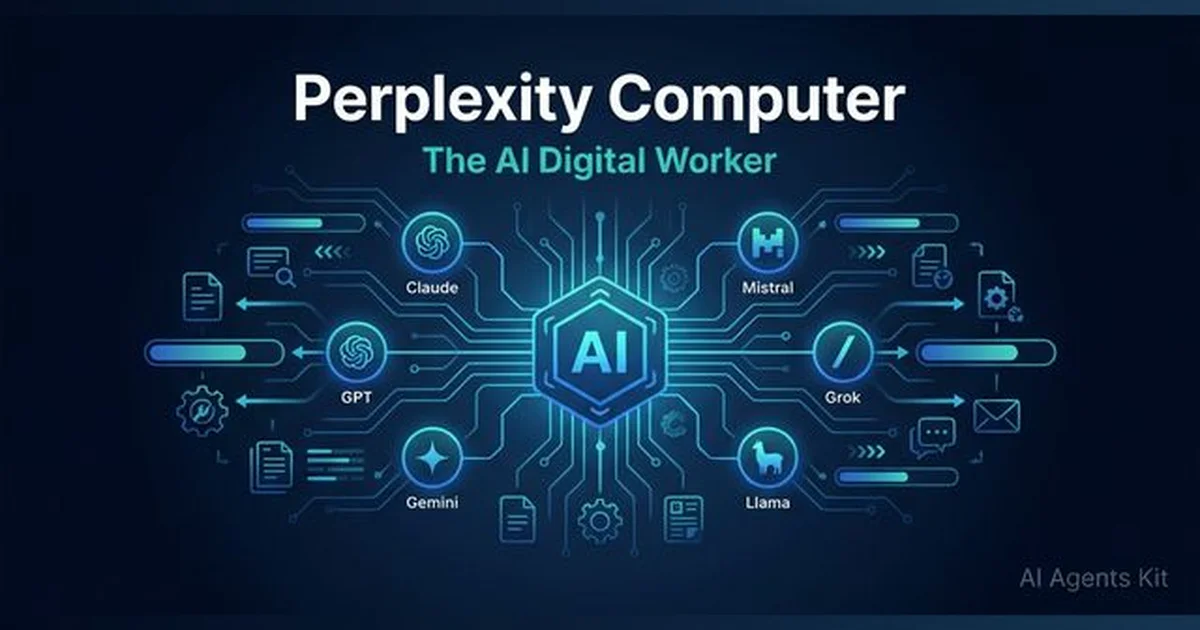
Perplexity Computer: The Complete Guide to AI's Digital Worker
Perplexity Computer is a cloud-based AI system that orchestrates 19 models to execute entire projects. Learn how it works, what it costs, and if it's worth it.
Something changed in how AI works on February 25, 2026. Perplexity AI didn’t release a new model or a faster search engine — it launched something called “Perplexity Computer,” and the name was a deliberate provocation.
The challenge most teams face isn’t finding AI tools — it’s finding AI that actually executes work rather than just responding to prompts. Most chatbots hand the work back to the user after every reply, requiring constant re-briefing and manual action across each step of a project.
Perplexity Computer is built around a different premise: give it a goal, and it coordinates 19 specialized AI models to research, design, build, test, and deliver a finished artifact — running for hours or even months without constant input. This guide breaks down how it works, which multi-agent systems architecture powers it, what it can realistically accomplish, and whether the $200/month Max plan is the right investment.
What Is Perplexity Computer and How Does It Work?
Perplexity Computer is a cloud-based, general-purpose AI system that functions as a digital worker — capable of taking a high-level goal and autonomously executing the research, planning, design, coding, and deployment steps required to deliver a finished result.
Despite its name, it’s not a physical device. The “Computer” branding signals what Perplexity is positioning it to become: a system that doesn’t just answer questions but performs work the way a skilled generalist might. Launched exclusively for Perplexity Max subscribers on February 25, 2026, it operates entirely in a sandboxed cloud environment — meaning it has access to a real filesystem, a real browser, and live API integrations, but it doesn’t directly touch the user’s personal device or local files.
Gartner’s 2026 projections estimate that 40% of enterprise applications will integrate task-specific AI agents by the end of 2026, up from under 5% just a year earlier. Perplexity Computer is already trying to meet that demand at the individual and team level, not just enterprise scale.
What sets it apart from most AI tools is model agnosticism. Rather than being limited to one LLM’s strengths, it selects whichever of its 19 integrated models is best suited for each sub-task — routing a design request to an image specialist, a long-context recall task to GPT-5.2, and a multi-step reasoning job to Claude Opus 4.6. The result is an AI system that functions more like a coordinated team than a single expert. The autonomous AI agents category has been evolving toward exactly this kind of architectural shift for several years.
Perplexity Computer vs Traditional AI Chatbots
Traditional AI chatbots handle one prompt, return one response, and wait. Perplexity Computer operates on a completely different model — it takes a goal, decomposes it into a task graph, delegates subtasks across specialized sub-agents, and returns a complete artifact.
| Feature | Traditional Chatbot | Perplexity Computer |
|---|---|---|
| Input type | Single prompt | Goal or project description |
| Output type | One response | Complete artifact (app, report, deployed site) |
| Model used | One model | 19+ models routed dynamically |
| Memory | No cross-session memory | Persistent memory across weeks/months |
| User involvement | Required per step | Checkpoints only for high-stakes actions |
| Duration | Seconds per response | Hours to months per project |
That’s a meaningful upgrade in what AI can be asked to handle — and what can realistically be delegated to it.
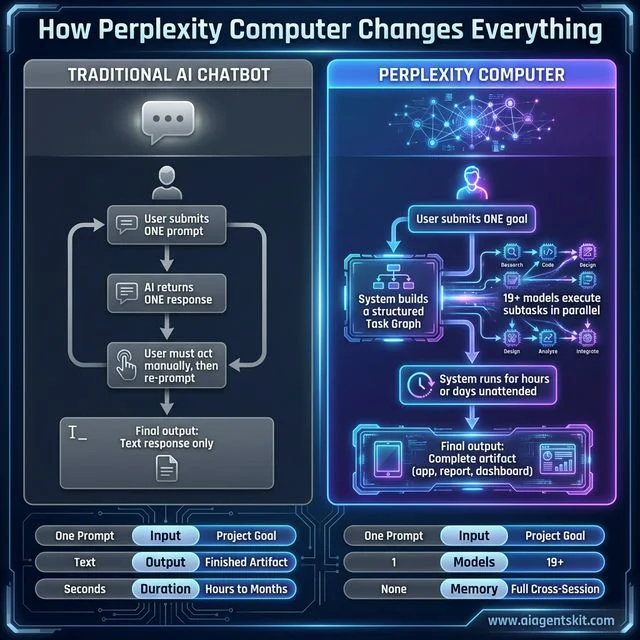 How Perplexity Computer Changes Everything: A direct architectural comparison that makes the fundamental shift visible at a glance. On the left: the loop every AI user knows — submit a prompt, receive a textual response, act on it manually, then re-prompt. Every step requires human re-engagement and the total output is never more than a single coherent text block. On the right, Perplexity Computer’s model: a single goal submission triggers the construction of a structured Task Graph, which routes 19+ specialized models to execute sub-tasks in parallel — research, coding, design, and deployment — with the system running fully unattended for hours or months. The five bottom metrics crystallize the gap: single prompt vs. project goal, seconds vs. months, one model vs. 19+, no memory vs. full cross-session persistence. This diagram shows why Perplexity Computer isn’t an upgraded chatbot — it’s an entirely different category of tool.
Which AI Models Does Perplexity Computer Orchestrate?
The multi-model AI orchestration platform behind Perplexity Computer is what makes it technically distinctive. Rather than building a new model, Perplexity built a routing and coordination layer on top of the frontier models already available — then specialized each one for its strongest use case.
McKinsey’s State of AI 2025 report found that 62% of organizations are now experimenting with AI agents, and 23% are actively scaling at least one agentic system. Perplexity’s multi-model approach reflects exactly what those practitioners are discovering — no single model is best at everything, but a well-orchestrated team of models can cover far more ground. Practitioners who want a head-to-head breakdown of the models Perplexity Computer leverages should review the detailed AI comparison to understand how each contributor performs independently.
Perplexity AI’s official launch documentation confirms 19 different AI models operating within the system. The six primary models with defined roles include:
| Model | Provider | Primary Role in Perplexity Computer |
|---|---|---|
| Claude Opus 4.6 | Anthropic | Core reasoning engine — task matching, orchestration, planning |
| GPT-5.2 | OpenAI | Long-context recall, broad web searches, large-document tasks |
| Gemini 3 Pro | Deep research tasks, sub-agent creation | |
| Grok | xAI | Lightweight, fast tasks — simple queries and QA |
| Nano Banana | Google DeepMind | Image generation and visual processing |
| Veo 3.1 | Google DeepMind | Video processing and generation |
The remaining 13 models in the pool handle specialized functions including code execution, data analysis, audio transcription, structured data extraction, and specialized API integrations. The orchestration layer — itself powered by Claude Opus 4.6 — makes the routing decision for every subtask, assigning it to the most efficient model for that specific job type.
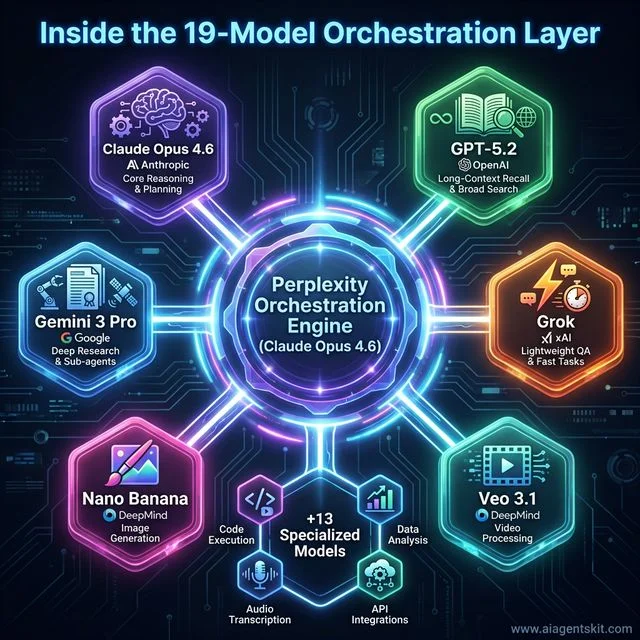 Inside the 19-Model Orchestration Layer: A visual architecture map of the multi-model coordination system that makes Perplexity Computer technically distinctive from any single-provider AI tool. Claude Opus 4.6 sits at the center — it is both the primary reasoning engine and the orchestration brain that decides which model handles which subtask. Radiating outward are the six named primary models: GPT-5.2 for long-context recall and broad web search, Gemini 3 Pro for deep source research and sub-agent creation, Grok for lightweight and fast QA tasks, Nano Banana for image generation, and Veo 3.1 for video processing. An additional cluster of 13 specialized models handles code execution, data analysis, audio transcription, and API integrations. The architectural insight here is critical: no single model is best at everything, but a well-orchestrated team of models — each assigned to its strongest domain — can outperform any individual frontier model on complex, multi-step work.
This is a meaningful architectural choice. Rather than accepting the limitations of any one provider’s strengths, Perplexity Computer can effectively use ChatGPT for recall tasks, Claude for reasoning, and Gemini for research — simultaneously, within a single user-initiated project.
The practical upside is flexibility: the system doesn’t fail when it hits the limits of one model’s training data or context window. If one sub-agent stalls, the orchestrator reassigns the task or launches a new sub-agent. The downside is opacity — users can see which models handled their project after completion, but the routing logic itself isn’t fully transparent in real time.
How Perplexity Computer Executes Multi-Step Projects
Understanding how Perplexity Computer handles multi-step tasks is key to knowing when to use it. The system isn’t designed for simple one-shot queries — it’s optimized for goals that would otherwise require hours of human coordination, and it’s built around a structured execution model that keeps complex projects from drifting or stalling.
When a user submits a goal (not just a prompt), the system converts it into a task graph — a structured sequence of interdependent steps, some executed in order and some in parallel. Each node in the graph represents a subtask, with its assigned model, expected output type, and dependency on prior subtasks clearly mapped. This graph is what Perplexity Computer actually runs — not the original natural language prompt.
How the Task Graph Converts Goals Into Subtasks
Consider a concrete goal: “Build a competitive analysis dashboard for the top 10 SaaS CRM tools, with pricing comparison, feature matrix, and customer sentiment summary.”
Perplexity Computer converts that into approximately 15–20 subtasks:
- Identify the 10 CRM tools to analyze (Grok — fast retrieval)
- Research pricing for each (Gemini 3 Pro — deep web research)
- Compile feature lists from official product pages (GPT-5.2 — broad search)
- Pull and summarize customer reviews from G2 and Capterra (Claude Opus 4.6 — structured analysis)
- Build the pricing comparison table (Claude Opus 4.6 — structured output)
- Generate the feature matrix (Claude Opus 4.6 — structured output)
- Write executive summary of sentiment findings (Claude Opus 4.6 — reasoning)
- Design the dashboard layout (Nano Banana — visual planning)
- Write the React component code (Claude Opus 4.6 — code generation)
- Test and deploy to a temporary staging URL (specialized code execution model)
That’s a project that would take a human analyst 12–15 hours. Perplexity Computer can run large portions of it overnight without any additional prompting.
Persistent Memory: How Projects Run for Weeks Without Re-Briefing
One of the most practically valuable features of Perplexity Computer is its persistent agent memory — and it’s also one of the most commonly misunderstood aspects of the platform. Unlike standard chat sessions that forget context when closed, Perplexity Computer retains the full state of a project across sessions. That includes what’s been completed, what’s in progress, which files have been produced, and what the original goal was.
This means a project started on Monday doesn’t need a briefing on Friday. The system can be asked “continue the CRM analysis and add a user adoption trends section” — and it picks up precisely where it left off, without the user re-explaining the context.
For long-running research projects, content pipelines, or iterative product builds, this persistent context is genuinely transformative. It’s the difference between an AI assistant that needs managing and one that functions more like a retained specialist.
10 Real-World Use Cases Where Perplexity Computer Delivers
The concrete Perplexity Computer real-world use cases extend well beyond the official launch examples. As the tool matures, practitioners are finding that the most powerful applications often emerge from day-to-day work problems — not theoretical demonstrations. Early adopter reports from the r/perplexity_ai community give a clearer picture of what it can actually build in practice.
A documented USADA case study found that Perplexity AI reduced legal research time by over 50%, allowing their team to focus on higher-level judgment work rather than information discovery. With Perplexity Computer’s autonomous workflow capabilities, that kind of outcome becomes possible for complex multi-step research tasks that previously required a team of analysts.
The AI productivity tools that deliver the most consistent results tend to be purpose-built for specific workflows. Here’s where Perplexity Computer shows up most clearly in practice:
1. Research and competitive intelligence: Give it a company, a market, or a trend — and have a comprehensive dossier ready by morning. The system can cross-reference dozens of sources, verify claims, and produce a structured report with citations.
2. Application development: One early user reported building two micro-applications, completing four research packets, and pushing code to GitHub — in a single overnight session. The system planned the architecture, wrote the code, tested it, and deployed it to a repo.
3. Content operations: For teams running content pipelines, Perplexity Computer can handle the research, drafting, editing, and formatting stages of article production — with consistent style and source citation throughout.
4. Data wrangling and business intelligence: It can connect to live APIs, pull structured data, clean it, build Excel or Google Sheets models, and generate visualizations — without any manual data export or formatting work.
5. Regulatory and compliance research: The USADA case shows the pattern: AI-assisted research that previously consumed dozens of analyst hours can be compressed into structured reports, allowing human experts to focus on interpretation rather than information gathering.
6. Long-horizon project management: For projects that span weeks — product strategy documents, market entry analyses, or competitive landscape reports that need periodic updates — persistent memory makes Perplexity Computer function like a retained researcher.
7. The overnight market research brief: An e-commerce brand submits a competitor analysis goal before end of day. By morning, Perplexity Computer delivers a structured 40-50 page PDF covering competitor pricing across SKUs, customer review sentiment scores, positioning gaps, and a prioritized opportunity list — sourced from live web data, not cached training data.
8. The API data wrangler: A developer needs to merge data from three APIs (Stripe, HubSpot, and Salesforce) into a unified analytics dashboard. Perplexity Computer writes the integration code, designs the schema, connects to each API, tests the data flow, and deploys the dashboard — without any manual export or formatting steps by the developer.
9. Investor due diligence at scale: A VC analyst submits a list of 20 portfolio candidates for overnight diligence. Perplexity Computer produces a structured score for each on team quality, market size, technology differentiation, and competitive risk — ready for the morning investment committee meeting.
10. Social and competitive intelligence feed: A marketing team sets up a recurring weekly task: track competitor campaigns, monitor sentiment shifts, and identify trending topics in their category. Perplexity Computer runs the cycle automatically every Monday, delivering a structured brief without any manual triggering.
3 Documented Examples from Early Max Subscribers
The 500-company overnight analysis: One Reddit user submitted a request to conduct due diligence on 500 companies, create a 15-page requirements analysis from a 2-page brief, and build a web app with a database and dashboards. The system completed the work in a fraction of the time traditional approaches would require — reported with “zero errors” by the user, who described the experience as “pretty magical.”
The parallel research model: Perplexity Computer ran multiple research passes simultaneously using different models — Gemini 3 Pro for deep source research, GPT-5.2 for broad search coverage, and Claude Opus 4.6 for synthesis and structured output — producing a final deliverable that reflected the combined output of all three rather than any single model’s limitations.
The overnight web build: A developer submitted a product landing page spec and woke up to a fully styled, deployed HTML/CSS/JS page with a functional contact form — built by Perplexity Computer without any intermediate prompting.
Perplexity Computer vs ChatGPT, Claude, and Other AI Workers
A meaningful comparison requires understanding the architecture first: Perplexity Computer isn’t strictly competing with ChatGPT or Claude — it uses both internally as components of its orchestration layer. That said, there are clear functional differences worth understanding when choosing which tool to deploy for a given task.
Gartner reports that enterprise inquiries about multi-agent systems surged 1,445% between Q1 2024 and Q2 2025, indicating that the interest in agentic orchestration has moved well past early experimentation. That context matters for understanding why Perplexity Computer’s architecture — orchestrating at scale rather than building its own proprietary model — is strategically defensible.
| Feature | Perplexity Computer | ChatGPT Agent Mode | Claude Computer Use |
|---|---|---|---|
| Model architecture | 19-model orchestration | GPT-5 only | Claude 4 only |
| Execution environment | Cloud sandboxed | Cloud APIs + connectors | Desktop native (local files) |
| Project duration | Hours to months | Session-limited | Session-limited |
| Desktop file access | ❌ No | Limited | ✅ Yes (full desktop) |
| Persistent memory | ✅ Full cross-session | ✅ Memory feature | Limited |
| Safety model | Sandboxed + checkpoints | Sandboxed | User-approved actions |
| Current pricing | Max plan ($200/month) | ChatGPT Plus ($20/month) | Claude Pro ($20/month) |
The most meaningful comparison for power users is between Perplexity Computer and Claude Computer Use. Claude’s Computer Use feature gives it direct access to the user’s desktop — it can manipulate files, open applications, and take system-level actions that Perplexity Computer is deliberately prevented from doing. For practitioners working with sensitive local data, Claude Computer Use is the stronger tool. For teams wanting a safer, cloud-coordinated system that can run unattended for hours, Perplexity Computer provides appropriate guardrails by design.
Many high-output practitioners are adopting a “Triple Stack” approach: Perplexity Computer for research-intensive and multi-step project work, ChatGPT for creative ideation and iteration, and Claude for deep coding and analytical tasks. The most effective teams tend to lean on AI research tools for their discovery workflows before delegating the execution stages to autonomous agents like Perplexity Computer.
Where Perplexity Computer Still Falls Short
Even among experts, there’s genuine debate about whether cloud-sandboxed AI agents represent the right tradeoff — especially for professionals who need tight integration with local systems, sensitive files, or proprietary internal databases. The answer depends heavily on the specific use case.
The current limitations most practitioners flag include:
No local file or desktop access: The sandboxed environment is a security feature, but it means Perplexity Computer can’t interact with files stored locally, proprietary databases not exposed via connector, or applications installed on the user’s machine. Claude Computer Use remains the dominant option for desktop-native workflows.
Credit intensity for complex projects: Long-running multi-model projects consume credits at a rate that surprises many early users. A single overnight research-to-app project can consume 2,000–4,000 credits depending on which models handle the heaviest subtasks. At 10,000 credits/month, that creates real constraints on how many large projects can run in a single billing cycle.
Max-only access currently: Pro subscribers ($20/month) cannot yet access Perplexity Computer. Rollout to Pro and Enterprise is planned, but no committed timeline has been announced. For the majority of Perplexity’s user base, the feature remains out of reach at current pricing.
Opacity in model routing: Users can see which models were used after the fact, but they don’t have real-time visibility into why specific tasks were routed to specific models. For practitioners debugging unexpected outputs or cost spikes, this creates friction.
How to Use Perplexity Computer: Step-by-Step Guide
Knowing how to use Perplexity Computer effectively requires a mental shift from prompt-writing to goal-setting. The fundamental difference: a prompt tells an AI what to say next; a goal tells Perplexity Computer what to deliver at the end. That distinction defines whether a session is efficient or frustrating.
The 6-Step Perplexity Computer Workflow
Step 1: Navigate to Perplexity Computer From the main Perplexity dashboard, Perplexity Computer appears as a distinct workspace — separate from the standard search interface. It’s only visible and accessible on Max plan accounts.
Step 2: Write a goal, not a prompt Instead of asking “Can you research CRM tools for me?”, write: “Research the top 10 SaaS CRM tools. For each: pricing, core features, customer sentiment score from major review sites, and key positioning weaknesses. Deliver as a structured Excel file with an executive summary.”
The output-first structure — describe what you want to receive, then specify the task — consistently produces more complete and accurate results than open-ended prompts.
Step 3: Review the task graph before approving After submitting the goal, Perplexity Computer generates a task graph: a visual breakdown of every subtask, which model will handle it, and the execution sequence. Review this before approving. If the graph includes high-stakes actions (API calls, code deployment, external account actions), the system will pause and require explicit approval at each checkpoint.
Step 4: Set a spending cap Before running any large project, set a credit spending cap in the project settings. Without a cap, a complex overnight project can consume 3,000–5,000 credits — a significant chunk of the 10,000/month allocation. Caps prevent unexpected depletion.
Step 5: Let it run — or monitor at checkpoints For research-only projects, most users let Perplexity Computer run to completion without monitoring. For projects involving code deployment or external integrations, checkpoint review is recommended. The system will notify users when it needs approval to proceed.
Step 6: Receive and review the artifact Completed projects are delivered as files (Excel, PDF, HTML, Python scripts, etc.) directly in the workspace. For multi-session projects, the task graph and all intermediate outputs are saved and accessible for continuation.
15 Proven Perplexity Computer Goal Templates
The quality of the goal determines the quality of the output. These templates are structured around the Output-First Rule: describe the artifact first, then the task.
Research & Intelligence Goals
-
Research [COMPANY/MARKET/TREND] across [live web sources]. Identify [specific finding: pricing, positioning, sentiment]. Deliver a [FORMAT: PDF report, Excel file, dashboard] with citations for every claim. -
Conduct competitive analysis on [COMPANY LIST]. For each: current pricing, top 3 features, G2/Capterra sentiment score, and one key positioning weakness. Output as an Excel file with a scoring matrix. -
Monitor [COMPETITOR/BRAND] across web, Reddit, and news sources for the past [TIMEFRAME]. Summarize sentiment trends, key mentions, and any product or pricing changes. Output a weekly brief in PDF format. -
Research all publicly available information on [COMPANY] as an acquisition target: financials, team, product, reviews, press coverage, legal filings. Deliver a structured 10-page due diligence brief.
Development & Technical Goals
-
Build a [TYPE: dashboard, web app, landing page] that [FUNCTION]. Stack: [PREFERRED STACK]. Deploy to a temporary staging URL. Include [SPECIFIC FEATURES: authentication, charts, data filters]. -
Write a Python script that connects to [API NAME], pulls [DATA TYPE], cleans it by [CLEANING RULES], and exports a structured CSV file. Test it against [SAMPLE INPUT] and document edge cases. -
Audit the code in [REPO URL or pasted code]. Identify security vulnerabilities, performance bottlenecks, and anti-patterns. Output a prioritized fix list with code examples for each issue.
Content & Document Goals
-
Research [TOPIC] from [MINIMUM SOURCES] current sources (after [YEAR]). Draft a [WORD COUNT]-word [FORMAT: blog post, whitepaper, report] covering [KEY POINTS]. Cite all statistics. Match this writing style: [EXAMPLE TEXT]. -
Create a [NUMBER]-slide presentation on [TOPIC] for a [AUDIENCE] audience. Include data from current sources, a competitive landscape slide, and a recommendation section. Output as structured PowerPoint-ready markdown.
Data & Analytics Goals
-
Pull data from [API/SOURCE]. Connect to [INTEGRATION: Stripe, HubSpot, Google Sheets]. Build a [TYPE] model showing [KEY METRICS]. Include [CHART TYPES] and automate the refresh logic. -
Scrape [WEBSITE LIST] for [DATA TYPE: pricing, job listings, product specs]. Clean and normalize the data. Output a structured Excel file updated [FREQUENCY].
Goal-Writing Rules That Separate Good Results From Great Ones
- The Output-First Rule: Describe the artifact you want to receive before describing the task. “Deliver a 10-page PDF” → then the research scope.
- The Format Spec Rule: Always specify the output format explicitly (Excel, PDF, Python script, HTML, JSON). Without it, Perplexity Computer defaults to markdown text.
- The Constraint Rule: Include at least one specific constraint — word count, source recency requirement, spending cap, model preference. Constraints prevent scope creep.
- The Context Rule: Give Perplexity Computer the same briefing a new employee would need. Include relevant context it can’t infer: your industry, audience, preferred data sources, what to exclude.
- The Checkpoint Rule: For any goal that includes code deployment or external API calls, explicitly write “pause for my approval before executing any deployment action” in the goal text.
What Else Max Includes: Perplexity Model Council and Comet Browser
Perplexity Computer gets most of the attention, but Max subscribers receive two additional features that are independently valuable — and largely uncovered in most reviews. Understanding both clarifies what the $200/month plan actually unlocks beyond the headline feature.
Perplexity Model Council: Multi-Model Cross-Verification
Model Council is a search feature (distinct from Perplexity Computer’s project execution) that runs a single research query simultaneously across Claude Opus 4.6, GPT-5.2, and Gemini 3 Pro — then synthesizes the outputs, resolves conflicts where possible, and presents a consolidated answer that highlights areas of agreement and divergence.
The practical effect is measurable: a single answer from one model can hallucinate citations or conflate data points. Model Council cross-verifies each claim across all three outputs before presenting a consolidated response, significantly reducing the hallucination rate for high-stakes research.
When to use Model Council instead of Perplexity Computer:
- Investment research where a single wrong figure changes a decision
- Medical or legal queries requiring multi-source verification
- Any question where you’d normally cross-reference two or three AI tools manually
- Executive briefings where source confidence needs to be exceptionally high
Model Council is not a substitute for Perplexity Computer — it’s a single-query feature, not a project execution system. Think of it as the verification layer for research questions, while Perplexity Computer is the execution layer for multi-step work.
Perplexity Comet: Browser Automation for Max Subscribers
Comet is a Chromium-based browser (launched July 2025, updated for Mac, Windows, Android, and iOS in March 2026) with a built-in AI sidebar that acts as an automation layer on top of the standard browsing experience.
What Comet automates that a standard browser can’t:
- Multi-tab research: Comet’s AI sidebar reads and synthesizes content across multiple open tabs simultaneously — no switching, no manual note-taking
- Form autofill with intelligence: Unlike standard autofill, Comet can complete multi-step forms with contextual logic (e.g., selecting the right dropdown options based on previously entered data)
- Cross-site data extraction: Extract structured data from multiple product pages, job listings, or pricing pages in a single session — automatically formatted into a table
- Automated tab organization: Groups open tabs by topic automatically, keeping research sessions organized
- Local privacy mode: Processes sensitive information locally on the device before any cloud interaction — important for work involving PII
How Comet relates to Perplexity Computer: Comet is the manual browsing layer; Perplexity Computer is the autonomous orchestration layer. For tasks that need a human deciding what to look at — Comet’s sidebar accelerates the review. For tasks that can run entirely unattended — Perplexity Computer executes them from goal to artifact without any browsing required.
| Task Type | Use Comet | Use Perplexity Computer |
|---|---|---|
| Quick research while browsing | ✅ | — |
| Filling out a complex form | ✅ | — |
| Multi-hour autonomous project | — | ✅ |
| Overnight data collection task | — | ✅ |
| Cross-tab synthesis during a meeting | ✅ | — |
Is Perplexity Max Worth $200/Month? A Realistic ROI Analysis
The pricing question is the question every prospective subscriber asks, and the honest answer is: it depends almost entirely on usage pattern. The Max plan is exceptional value for certain user types and obviously overkill for others.
Pro Plan vs Max Plan: What You Actually Get
| Feature | Pro ($20/month) | Max ($200/month) |
|---|---|---|
| Advanced AI models | ✅ | ✅ |
| Labs monthly limit | 50 queries | Unlimited |
| Perplexity Computer | ❌ | ✅ (10,000 credits) |
| Model Council | ❌ | ✅ |
| Comet browser features | Limited | ✅ Full |
| Sora 2 video generation | ❌ | ✅ (12-15 sec, with audio) |
| Early feature access | ❌ | ✅ Priority |
| Annual billing discount | $200/year | $2,000/year (save $400) |
The 10,000 Credit Reality Check: How Many Projects Per Month?
Credits are consumed per token, not per project. The real-world credit cost varies substantially by project type:
| Project Type | Estimated Credits | Max Plan Projects/Month |
|---|---|---|
| Simple research report (5 pages) | 300–600 | 16–33 projects |
| Medium research + formatted output | 800–1,500 | 6–12 projects |
| Competitive analysis with data model | 1,500–2,500 | 4–6 projects |
| Full web app + database + dashboard | 3,000–5,000 | 2–3 projects |
| 500-company due diligence analysis | 5,000–8,000 | 1–2 projects |
Practically: Max subscribers who run 2–4 medium-complexity projects per month will rarely hit the credit ceiling. Power users running daily projects or multi-day autonomous builds will need to manage credits carefully.
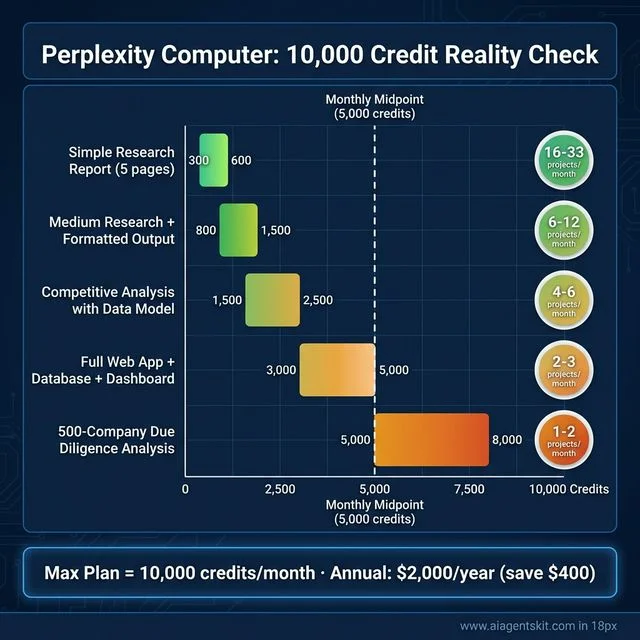 Perplexity Computer: The 10,000 Credit Reality Check — A data visualization of the real-world credit cost across five representative project types that Max subscribers run most frequently. The chart makes immediate planning possible: Simple 5-page research reports consume just 300–600 credits, enabling 16–33 such projects per month. Medium research with formatted output runs 800–1,500 credits, delivering 6–12 projects. Competitive analyses with data modeling land at 1,500–2,500 credits for 4–6 projects. Full web application builds including database and dashboard cost 3,000–5,000 credits — 2–3 per month. The most intensive project type, a 500-company due diligence analysis, can consume 5,000–8,000 credits — limited to 1–2 per billing cycle. The midpoint dashed line at 5,000 credits provides an at-a-glance reference for subscribers planning their monthly workload. Key takeaway: power users focussed on heavy builds should track credits daily, not monthly.
ROI Calculation by User Type
The power researcher (consultant, analyst, journalist): If Perplexity Computer replaces 10 hours of research per month at a $150/hour equivalent rate, that’s $1,500 in recovered time for a $200 subscription. ROI: 650%. This is the clearest value case.
The developer (indie hacker, startup founder): If Perplexity Computer drafts 2 complete web app prototypes per month that would otherwise take 15 hours each, that’s 30 hours recovered at developer rates. ROI depends on hourly rate, but for most developers: strong positive.
The content operations team: If the team uses it for research-to-draft on 8 articles per month, recovering 3 hours per article, that’s 24 hours at $75/hour = $1,800 in recovered editorial time for $200. ROI: 800%.
The occasional AI user: If the primary use is search, occasional deep research, and Q&A — the Pro plan at $20/month handles that effectively. For this user, Max is overkill. Recommendation: stay on Pro.
Honest verdict table:
| User Type | Max Worth It? | Recommended Plan |
|---|---|---|
| Researcher / analyst running 5+ complex projects/month | ✅ Yes | Max |
| Developer building 2+ prototypes/month | ✅ Yes | Max |
| Content team producing 8+ research-heavy pieces/month | ✅ Yes | Max |
| Small business needing AI search + occasional research | ⚠️ Maybe | Pro or trial Max |
| Casual AI user, light research needs | ❌ No | Pro ($20/month) |
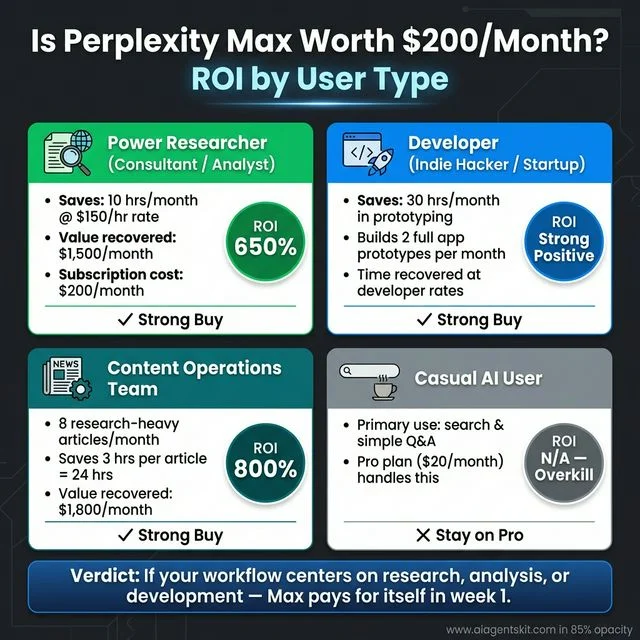 Is Perplexity Max Worth $200/Month? ROI by User Type: A decision-framework visualization that makes the subscription ROI concrete across four real user profiles. The Power Researcher, such as a consultant or analyst, recovers the subscription cost in a single project: 10 hours per month at a $150/hour equivalent rate returns $1,500 in recovered time against a $200 subscription — a 650% ROI. The Developer user building two full app prototypes per month recovers 30 hours at market developer rates, justifying the cost as a strong positive even before accounting for reduced infrastructure cost. The Content Operations Team running eight research-heavy articles recovers 24 hours at $75/hour, yielding $1,800 in recovered editorial time for an 800% ROI. Critically, the chart is equally clear on the fourth case — for Casual AI Users whose primary workflow is search and Q&A, the Pro plan at $20/month already handles those needs. The verdict is honest: Max pays for itself in week one for heavy users, and is overkill for everyone else.
When Is Perplexity Computer Coming to Pro Plan?
As of the February 2026 launch, Perplexity Computer is exclusive to Max plan subscribers. Perplexity’s official statement confirms rollout to Pro subscribers ($20/month) and Enterprise plans is planned, with the phrasing “coming to Pro and Enterprise soon” in the launch documentation — but no specific date has been committed.
Based on Perplexity’s release pattern from past feature rollouts (typically 30–90 days from Max exclusivity to Pro availability), Pro subscriber access is likely in the Q2 2026 timeframe. The credit allocation for Pro subscribers, pricing for additional credits, and feature scope for Pro access have not yet been announced.
For Pro subscribers waiting for access: Model Council and enhanced Comet features are also expected to expand to Pro tier as part of the same rollout. Monitoring Perplexity’s official blog and changelog is the most reliable way to catch the announcement.
This section will be updated when Perplexity officially announces Pro plan rollout for Perplexity Computer.
Perplexity Computer Pricing: What Max Subscribers Actually Get
The Perplexity Max subscriber features that unlock Perplexity Computer access represent the most premium AI subscription in Perplexity’s product lineup — and the pricing reflects that positioning.
Grand View Research’s AI Agents Market Report values the global AI agents market at $7.63 billion in 2025, projecting growth to $182.97 billion by 2033 at a CAGR of 49.6%. Perplexity is pricing its Max tier in line with the expectation that heavy users will derive enterprise-level ROI from autonomous workflow access. Understanding whether the cost justifies the capability requires examining the credit system in detail — the headline price doesn’t tell the full story.
The credit system explained: Max subscribers receive 10,000 credits per month for Perplexity Computer use. Credits are consumed per token — not per project — so costs scale with the complexity and length of work, not just the number of tasks submitted. Models also carry different credit rates. A task routed to Claude Opus 4.6 (the core reasoning engine, and the most expensive model in the pool) will consume significantly more credits than a lightweight Grok query.
| Plan | Price | Credits | Computer Access | Key Features |
|---|---|---|---|---|
| Free | $0/month | None | ❌ | Basic search only |
| Pro | $20/month | None | ❌ (coming) | Advanced models, 50 Labs queries/month |
| Max | $200/month | 10,000/month | ✅ Full | All models, unlimited Labs, early features |
| Enterprise Pro | $40/seat/month | None | ❌ (coming) | Team collaboration, enterprise security |
| Enterprise Max | $325/seat/month | Included | ✅ Full | Max toolset + compliance controls |
The launch bonus of 20,000 additional credits for early adopters expired after 30 days from the launch date. New Max subscribers as of March 2026 onward receive only the standard 10,000/month allocation.
How to Access Perplexity Computer as a Max Subscriber
Accessing Perplexity Computer is straightforward, but optimizing credit usage requires deliberate habits that most first-time users don’t develop until after their first billing cycle:
- Upgrade to Max plan at perplexity.ai/settings/subscription ($200/month or $2,000/year)
- Navigate to Perplexity Computer from the main dashboard — it appears as a distinct workspace, separate from standard search
- Submit a goal, not a prompt: “Build a competitive analysis of the top 10 AI writing tools with pricing, feature comparison, and market positioning” consistently outperforms vague requests like “research AI writing tools”
- Set a spending cap before submitting large projects to prevent unexpected credit consumption from model-heavy subtasks
- Choose model preferences for specific subtasks if there are provider requirements (e.g., requiring Claude Opus 4.6 for all reasoning tasks rather than allowing automatic routing)
- Review the task graph before letting it execute — Perplexity Computer surfaces the subtask sequence for approval before running high-stakes actions like code deployment or external API calls
Credit efficiency comes down to clearly defined goals and deliberate model selection. Leaving model routing entirely to the system is fast but expensive for long projects — specifying model preferences for heavyweight subtasks saves credits without sacrificing quality.
Perplexity Computer for Business: Enterprise Use Cases and ROI
While the Max plan targets individual power users, Perplexity’s Enterprise Max ($325/seat/month) extends the same Perplexity Computer capabilities to teams — with compliance controls, pooled credit management, and an admin dashboard that matters for enterprise procurement.
Enterprise AI adoption data shows companies using multi-model AI approaches — the same architecture Perplexity Computer employs — reporting up to a 35% boost in research productivity and accuracy. Organizations already using Perplexity Enterprise Pro include Zoom, HP, Stripe, and the Cleveland Cavaliers.
Business Use Cases by Department
Legal teams: Regulatory and case law research that previously took junior associate hours can be structured into Perplexity Computer goals — pulling precedents across jurisdictions, summarizing key rulings, and flagging conflicting standards. The USADA case documented a 50%+ reduction in legal research time.
Marketing teams: Set up recurring competitive intelligence runs: weekly brand sentiment monitoring, competitor campaign tracking, and trending topic analysis — delivered as a structured brief without manual triggering. Content teams use it for research-to-draft pipelines that maintain citation standards across every piece.
Product teams: Accelerate user research, market sizing, and competitive landscape analysis. A product manager can submit a market entry analysis goal and receive a structured report covering market size, competitor positioning, pricing architecture, and customer pain points — in hours rather than weeks.
Finance and investment teams: Structured due diligence at scale. Submit a list of companies for analysis; receive consistent, citation-backed assessments of financials, team quality, product differentiation, and competitive risk.
Engineering teams: Perplexity Computer can audit codebases, draft API integration code, build internal tooling prototypes, and document technical systems — freeing engineers from repetitive scaffolding and documentation tasks.
Enterprise Security and Compliance
For business teams evaluating Perplexity Enterprise, the security posture is a key consideration:
- SOC 2 Type II certified — verified security controls for data handling
- GDPR and HIPAA compliant — appropriate for healthcare and EU-regulated industries
- Zero training data policy — customer data is not used to train Perplexity’s models
- Configurable data retention — admins control how long files and project data are stored
- User and permission management — team-level access controls via admin dashboard
- Sandboxed execution environment — all Perplexity Computer tasks run in isolated compute, preventing cross-account data exposure
When to choose Perplexity Computer over a custom internal multi-agent system: Building a proprietary multi-agent system offers maximum customization but requires significant engineering investment, model API costs, and ongoing maintenance. Perplexity Computer provides a production-ready orchestration layer with 19 integrated models for a fixed per-seat cost. For most teams running research, content, and analysis workflows — Perplexity Computer’s total cost of ownership is substantially lower than building equivalent internal infrastructure.
Perplexity Computer Alternatives: Options for Every Budget
At $200/month, the Max plan price is a genuine barrier for many users. The alternatives worth knowing cover a range of capability levels and price points — some overlap with Perplexity Computer on specific use cases, none replicate the full 19-model orchestration architecture.
| Alternative | Price | What It Does Similarly | Key Difference |
|---|---|---|---|
| Claude Pro + Claude Computer Use | $20/month | Desktop-native task execution | Accesses local files; single-model only |
| ChatGPT Pro (Agent Mode) | $200/month | Multi-step agentic execution | GPT-5 only; no multi-model routing |
| OpenAI Operator | $200/month | Browser-based autonomous tasks | Browser automation focused; no research orchestration |
| Perplexity Pro | $20/month | Advanced research, 50 Labs/month | No Computer access (yet) |
| GlobalGPT | ~$30/month | Bundles Perplexity Pro + 100+ models | No autonomous project execution |
| n8n + Perplexity Pro | ~$50/month | Self-built automation with AI research | Requires setup; no built-in orchestration |
| Google Gemini Ultra + Deep Research | $20/month | Deep multi-step research tasks | Research-only; no code generation or deployment |
Honest “Which One” Guidance
“I can’t spend $200/month but need agentic AI” → Claude Pro ($20/month) + Claude Computer Use covers desktop-native task execution, coding, and document work. It’s a single-model system, but Claude 4’s capabilities cover most individual use cases.
“I need multi-model research without project execution” → Perplexity Pro ($20/month) + wait for Computer rollout to Pro tier. Model Council access in the meantime provides multi-model cross-verification for research queries.
“I need browser automation specifically” → OpenAI Operator or Perplexity Comet (included in Max). If browser task automation is the primary need, Comet may make the Max plan worth it on its own.
“I want to build my own orchestration layer” → n8n (self-hosted, free) connected to Perplexity Pro provides research capability with custom workflow automation. Requires technical setup but gives full control over the orchestration logic.
“I need Perplexity Computer for a business team” → Enterprise Max ($325/seat/month) adds compliance controls, team credit pooling, and admin management — essential for any regulated industry deployment.
Perplexity Computer: Frequently Asked Questions
Is Perplexity Computer a physical device or software?
Perplexity Computer is entirely software-based — it’s a cloud-hosted AI system with no physical hardware component. The “Computer” branding is a deliberate choice by Perplexity AI to signal that this is a system capable of performing complex, end-to-end computational work, not just answering questions. It operates in a sandboxed cloud environment with access to a real filesystem and browser, but it runs entirely on Perplexity’s infrastructure — not on the user’s local machine.
What AI models does Perplexity Computer use?
Perplexity Computer orchestrates 19 different AI models, each assigned based on the nature of the subtask. The core reasoning engine and orchestration layer is Claude Opus 4.6 (Anthropic). GPT-5.2 (OpenAI) handles long-context recall and broad search tasks. Google Gemini 3 Pro drives deep research subtasks. xAI Grok manages lightweight, fast-response tasks. Nano Banana (Google DeepMind) handles image generation, and Veo 3.1 (Google DeepMind) handles video processing. The remaining 13 models cover specialized functions including code execution and structured data extraction.
Is Perplexity Computer available to Pro subscribers?
Not yet as of the February 2026 launch. Perplexity Computer is currently exclusive to Max plan subscribers ($200/month). Perplexity has confirmed that rollout to Pro subscribers ($20/month) and Enterprise plans is planned, describing it as coming “soon” in launch documentation — but no specific date has been announced. Based on Perplexity’s historical rollout timelines, Pro access is likely in the Q2 2026 timeframe. Pro subscribers currently have access to advanced models and Labs features, but not the Perplexity Computer orchestration layer or Model Council. This FAQ will be updated when Perplexity makes the official announcement.
How does Perplexity Computer’s credit system work?
Max subscribers receive 10,000 credits per month to use Perplexity Computer. Credits are consumed on a per-token basis, meaning longer and more complex projects use more credits. The routing model also affects consumption — tasks assigned to Claude Opus 4.6, the most capable and expensive model in the pool, cost more per token than simpler Grok-handled tasks. Users can set monthly spending caps and specify model preferences for individual subtasks to control costs. The early adopter launch bonus of 20,000 additional credits has now expired.
Can Perplexity Computer access my local files?
No. Perplexity Computer operates in a sandboxed cloud environment and doesn’t have access to files stored locally on the user’s device. It can interact with external services, APIs, and connectors — including integrations with platforms like Google Drive, Notion, and GitHub — but only through the connectors and permissions that Perplexity explicitly supports. For practitioners who need AI to directly manipulate local system files or interact with installed desktop applications, Claude Computer Use remains the more appropriate option for those specific workflows.
How does Perplexity Computer compare to Claude Computer Use?
The core difference is environmental. Perplexity Computer runs in a cloud-sandboxed environment and can’t access local files or desktop applications. Claude Computer Use gives the AI direct access to the user’s desktop — it can open applications, manipulate files, scroll through browser tabs, and take system-level actions. Perplexity Computer’s approach is safer for autonomous, unattended runs; Claude Computer Use is more powerful for tasks requiring tight integration with local systems. Perplexity also orchestrates 19 models, while Claude Computer Use relies on a single model.
What can Perplexity Computer build or create?
Perplexity Computer can build web applications and full dashboards, write and deploy code to hosted environments, generate comprehensive research reports with citations, create structured data models in Excel or Google Sheets, produce PowerPoint-ready presentation documents, generate images using Nano Banana, and create video content via Veo 3.1. It can also automate multi-step data pipelines, conduct competitive intelligence research across hundreds of sources, and manage long-running projects spanning multiple weeks without user re-briefing.
Is Perplexity Computer worth the $200/month Max plan price?
For heavy users running multiple complex projects per month — researchers, developers, content operations teams, and business analysts — the ROI case is strong. A single overnight project that replaces 12–15 hours of analyst time at a $150/hour equivalent rate generates $1,500 in recovered time value for a $200 subscription. For casual users who primarily use Perplexity for search and simple AI Q&A, the Pro plan at $20/month serves those use cases well. The annual plan ($2,000/year vs. $2,400/year monthly) saves $400 for committed Max users. Full ROI breakdown by user type is covered in the “Is Perplexity Max Worth $200/Month?” section above.
What is the Perplexity Model Council and how does it work?
Model Council is a Max-exclusive feature that runs a single research query simultaneously across Claude Opus 4.6, GPT-5.2, and Gemini 3 Pro, then synthesizes the outputs into a consolidated response that highlights agreement and flags divergence. It’s designed to reduce hallucinations on high-stakes research by cross-verifying claims across all three frontier models before presenting an answer. Model Council differs from Perplexity Computer — it’s a single-query verification feature, not an autonomous project execution system. Use Model Council for investment research, medical queries, legal research, and any question where source confidence is critical.
What is Perplexity Comet and how is it different from Perplexity Computer?
Comet is a Chromium-based browser (Mac, Windows, Android, iOS) with a built-in AI sidebar that automates browsing tasks: multi-tab research synthesis, intelligent form filling, cross-site data extraction, and tab organization. It’s a manual browsing accelerator — you decide what to look at, and Comet’s AI handles the reading and synthesis. Perplexity Computer is a fully autonomous project execution system — it takes a goal and runs start-to-finish without user navigation. Both are included in the Max plan. Use Comet for active browsing sessions; use Perplexity Computer for goals that can run unattended.
How long can a Perplexity Computer project run?
Projects can run for hours, days, or even months. The persistent memory system maintains full project context across sessions, so there’s no practical upper limit on project duration imposed by the system itself. A long-running content pipeline or ongoing competitive intelligence feed could be set up once and continue producing outputs over months. The constraint isn’t time — it’s credits. Long projects that run across many sessions consume more credits, so Max subscribers working on extended projects should monitor their credit balance against the 10,000/month allocation.
What makes Perplexity Computer different from traditional AI chatbots?
The fundamental difference is execution scope. Traditional AI chatbots respond to one prompt at a time and return control to the user after each response. Perplexity Computer takes a goal, converts it into a structured task graph, assigns sub-agents to each task, executes the work — including research, design, writing, coding, and deployment — and returns a finished artifact. It doesn’t ask for permission at every step; it asks only when a specific action has high-stakes implications. The experience is closer to delegating to a digital employee than prompting a search engine.
Conclusion
Perplexity Computer represents a genuinely different category of AI tool — not an LLM upgrade, not a smarter search engine, but a structured attempt to make AI do work rather than just report on it. The 19-model orchestration layer, persistent memory, and task graph execution model mean that complex, multi-step projects can now be delegated in a way that wasn’t practical with any single-model tool.
The current limitations are real: the Max plan’s $200/month price point and 10,000-credit monthly allocation create a ceiling on intensive use, and the sandboxed environment means local file access isn’t possible. But for teams whose workflow centers on research, analysis, content production, or application development, the productivity offset is measurable. The right frame for evaluating it isn’t “is this a perfect AI worker?” — it’s “does this replace enough manual coordination to justify its cost at my usage level?”
For a broader perspective on where this category is heading, the future of AI agents in 2026 points strongly toward exactly this kind of orchestrated, multi-model execution — Perplexity Computer isn’t the destination, but it’s one of the clearest working demonstrations of what that future looks like.