AI Prompts for Image Generation: 30+ Templates for Midjourney, DALL-E & Flux
Master AI image generation with 30+ battle-tested prompts for Midjourney, DALL-E, GPT-4o, Flux, and Adobe Firefly. Includes beginner guide, negative prompts, character consistency tips, and prompts for social media and e-commerce.
I spent three hours trying to generate a product photo last week. Three hours. Forty-seven failed attempts. The lighting was wrong, the background was messy, and the product looked like it was melting.
Then I tried a structured prompt template. Eight tries later, I had a perfect image. The difference? Knowing how to describe what I actually wanted.
I’ve been testing AI image generation tools (Midjourney, DALL-E 3, Stable Diffusion) for two years. Some prompts create stunning art on the first try. Others produce garbage. The difference is specificity, structure, and understanding how these models actually work.
In this guide, I’m sharing 20 prompts I actually use for professional image generation. These aren’t generic “make it pretty” prompts—they’re sophisticated tools for achieving specific visual outcomes.
Fair warning: AI image generators have limitations. But when you know how to prompt effectively, you can create assets that would cost hundreds or thousands in traditional production. If you’re looking for free options, check out our guide to the best free AI image generators that actually deliver usable results. For video content, see the companion guide on AI prompts for video production.
What Makes an Effective AI Image Prompt? (5 Core Rules)
Think of AI image generators as incredibly talented artists who can’t read your mind but will draw exactly what you describe. Here’s the 5-component framework I use:
- Subject: What you want to depict (person, object, scene)
- Style: Art style, aesthetic, or reference (photography, painting, 3D render)
- Environment: Setting, background, atmosphere (studio, outdoor, abstract)
- Technical: Lighting, composition, quality parameters (4K, cinematic, rule of thirds)
- Negative: What to avoid (blurry, distorted, specific elements)
For a deeper dive into how these models work technically, OpenAI’s DALL-E documentation explains the underlying architecture and capabilities.
Here’s the difference:
| Vague Prompt | Structured Prompt |
|---|---|
| ”A beautiful woman" | "Portrait of a 30-year-old woman with auburn hair, natural makeup, wearing a cream linen shirt, soft natural window lighting, shallow depth of field, shot on 85mm f/1.4, Kodak Portra 400 aesthetic —ar 3:4 —no watermark” |
See the pattern? Now, here’s what you need to know about when not to rely on AI:
- Text generation: AI struggles with readable text in images
- Specific brand logos: You’ll get approximations, not exact replicas
- Real people: Ethical concerns and legal issues; photorealistic faces can be problematic
- Complex compositions: Too many elements reduce quality
Hot take: AI image generation isn’t about replacing artists—it’s about democratizing visual creation. The prompt engineer is the new art director.
For those seeking hyper-realistic, professional-quality results, our collection of 120 Nano Banana image prompts offers battle-tested templates optimized for photorealism across Midjourney, DALL-E, and Stable Diffusion.
Note for designers: Check out our AI prompts for UX/UI designers
Note for marketers: Check out our other marketing resources for AI-powered visual content creation.
Ready? Let’s build your image generation toolkit.
AI Image Prompts for Beginners: The 4-Step Quick-Start Formula
The most common frustration among new users isn’t the AI tools themselves — it’s not knowing how to talk to them. Someone types “a cool mountain photo” and gets a blurry, oddly-lit landscape with distorted trees. The fix isn’t a better tool. The fix is a better prompt.
Here’s the 4-step beginner formula that practitioners consistently find produces solid results on the first or second attempt:
Step 1 — Subject: State exactly what’s in the image. Not “a person” but “a 35-year-old South Asian woman in business casual attire, confident expression.”
Step 2 — Style/Medium: Specify how it should look. “Photorealistic,” “digital painting,” “flat vector art,” “3D render,” “watercolor,” or even “in the style of Studio Ghibli.”
Step 3 — Lighting: This single variable transforms images more than anything else. “Soft golden hour light,” “dramatic Rembrandt studio lighting,” “bright and airy natural daylight,” or “neon-lit nighttime.”
Step 4 — Quality Tags: Finish with quality boosters. These don’t describe the scene — they signal resolution and detail expectations to the model.
The Starter Quality Tag Pack (Copy and Use)
For photorealism:
8K resolution, ultra-detailed, sharp focus, cinematic, hyperrealistic, professional photographyFor digital art:
highly detailed, concept art quality, trending on ArtStation, masterpiece, vibrant colorsFor clean/minimal styles:
clean lines, high contrast, sharp edges, professional graphic design, print-readyBeginner Example: Bad vs. Good
| What Beginners Write | What Actually Works |
|---|---|
| ”A cup of coffee" | "A ceramic espresso cup on a weathered oak table, steam rising, soft morning light from a nearby window, photorealistic, 8K, shallow depth of field, cozy café atmosphere" |
| "A sci-fi city" | "Futuristic cityscape at night, neon holographic billboards, rain-slicked streets, elevated rail transport, cyberpunk aesthetic, cinematic wide shot, dramatic blue and purple lighting, 4K, ultra-detailed" |
| "A professional headshot" | "Professional headshot of a 40-year-old woman with short dark hair, neutral expression, white background, soft studio lighting, shot on 85mm f/1.8, corporate portrait style, photorealistic” |
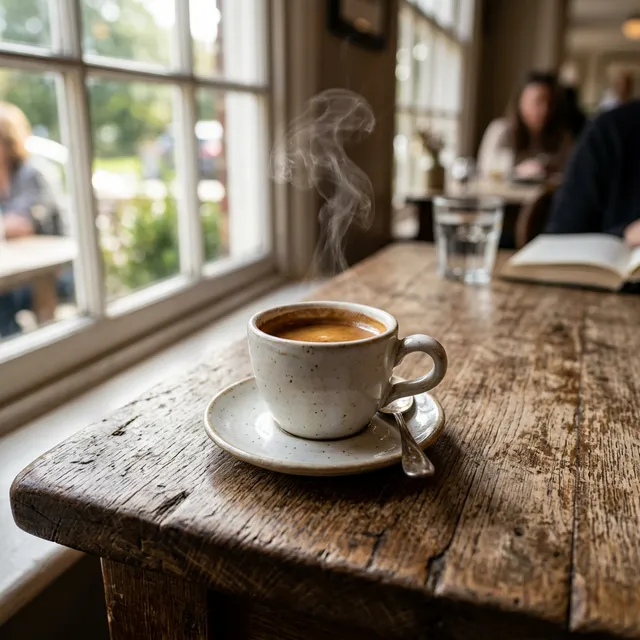
Generated using the "Good" coffee cup prompt
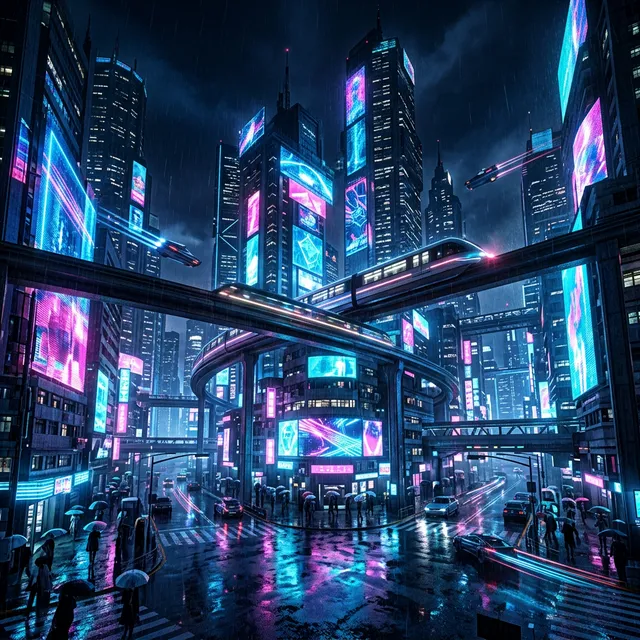
Generated using the "Good" sci-fi city prompt
Which Tool Should Beginners Start With?
The evidence strongly suggests starting with one tool and mastering it before branching out. Here’s the honest breakdown:
- Midjourney — Best overall for quality and artistic range. Subscribers access it via Discord or the web interface. The default settings produce impressive results even with simple prompts.
- ChatGPT (GPT-4o) — The easiest starting point. Simply describe what’s needed in plain language. No parameters, no Discord. The March 2025 upgrade made GPT-4o the default image generator inside ChatGPT, replacing the older DALL-E backend.
- Adobe Firefly — Best if the output will be used commercially. Built for professional workflows, training only on licensed data.
The right answer depends on the use case. Creatives and designers typically gravitate toward Midjourney. Marketers and content creators often find GPT-4o’s conversational interface faster. Businesses with legal teams often choose Firefly.
AI Photography Image Prompts for Midjourney and DALL-E
#1: Portrait Photography Prompts
Photographers and designers can enhance their workflow with AI tools. Our guide on AI for graphic designers covers how professionals integrate these tools into creative work.
The Prompt:
Act as a professional portrait photographer. Generate a prompt for [SUBJECT] in [STYLE] portrait photography.

CONTEXT:
- Subject: [PERSON DESCRIPTION - AGE, GENDER, FEATURES]
- Expression/mood: [SERIOUS, CANDID, JOYFUL, CONTEMPLATIVE]
- Lighting setup: [NATURAL, STUDIO, RIM, REMBRANDT]
- Camera/lens: [35MM, 85MM, 50MM, PORTRAIT LENS]
- Film stock or aesthetic: [KODAK PORTRA, FUJI PRO, B&W, VINTAGE]
- Aspect ratio: [1:1, 3:4, 16:9]

TASK:
Create a detailed image prompt including:

1. Subject description (appearance, pose, clothing)
2. Lighting quality and direction
3. Camera settings simulation
4. Composition guidelines
5. Mood and atmosphere
6. Technical modifiers for the AI tool

OUTPUT FORMAT:
- Full prompt string for Midjourney/DALL-E
- Parameter suggestions (--ar, --v, --s)
- Style references and artist influences
- Negative prompt suggestions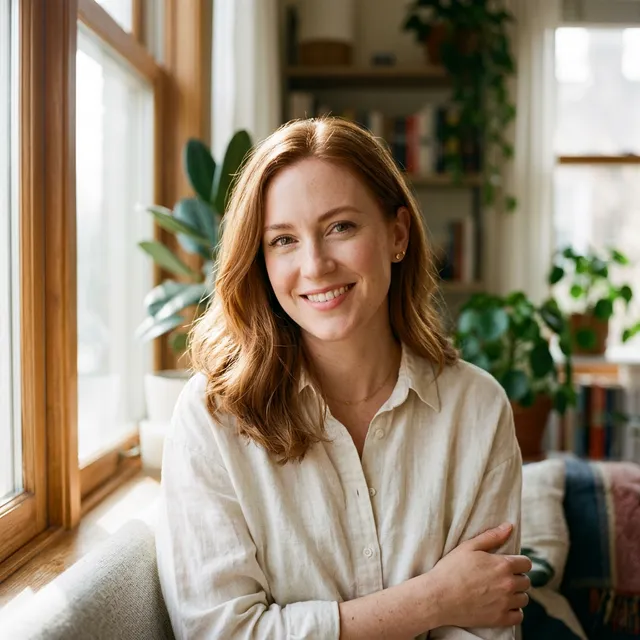
Example Result: Professional portrait photography using Template #1
Use case: When you need professional-quality portraits for marketing or personal branding Best with: Midjourney for photorealistic results Pro tip: Include ethnicity, hair color, and distinctive features for consistent results
For professional lighting setups, Digital Photography School’s lighting guides cover studio techniques that translate well to AI generation.
#2: Product Photography Prompts
The Prompt:
Act as a commercial product photographer. Generate a prompt for [PRODUCT TYPE] in [STYLE] product photography.

CONTEXT:
- Product: [DESCRIPTION OF ITEM]
- Product category: [TECH, FOOD, FASHION, LIFESTYLE]
- Desired mood: [MINIMAL, LUXURY, PLAYFUL, NATURAL]
- Background: [WHITE, NATURAL, LIFESTYLE, GRADIENT]
- Camera setup: [MACRO, ECOMMERCE, HERO SHOT]
- Brand aesthetic: [DESCRIPTION]

TASK:
Create a commercial product photography prompt including:

1. Product description and positioning
2. Lighting setup (key, fill, back, accent)
3. Shadow and reflection control
4. Background treatment
5. Scale and context hints
6. Commercial quality modifiers

OUTPUT FORMAT:
- Optimized prompt for product shots
- Lighting diagram description
- Composition notes
- Common mistakes to avoid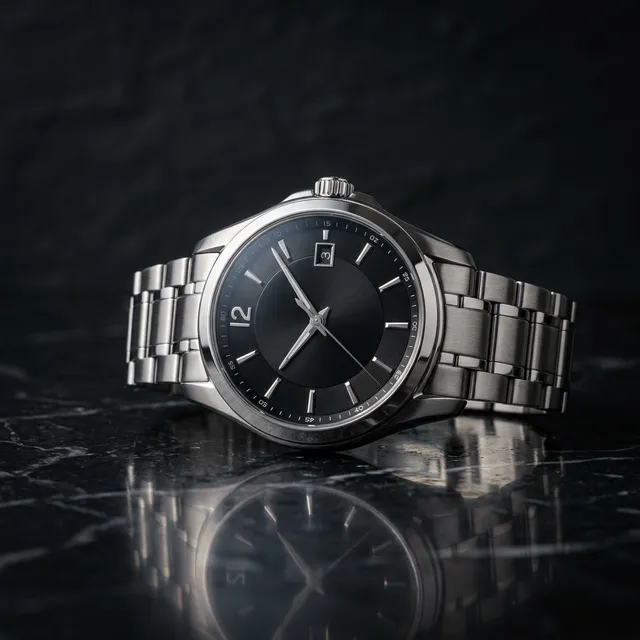
Example Result: Luxury watch product shot using Template #2
Use case: When creating product images for e-commerce or advertising Best with: DALL-E 3 for commercial consistency Pro tip: Include “product on white background” or “studio lighting” for consistent results
#3: Food Photography Prompts
The Prompt:
Act as a food photographer and stylist. Generate a prompt for [DISH/FOOD ITEM] in [STYLE] food photography.

CONTEXT:
- Food item: [DESCRIPTION OF DISH]
- Cuisine style: [ITALIAN, JAPANESE, FUSION, COMFORT]
- Styling approach: [MINIMALIST, RUSTIC, LUXURY, HOMEY]
- Plate/setting: [HANDHELD, RESTAURANT STYLE, CASUAL]
- Temperature/timeliness: [HOT, FROZEN, STEAMING]
- Lighting: [NATURAL, DRAMATIC, BRIGHT APPETITE]

TASK:
Create a food photography prompt including:

1. Food description and plating
2. Texture and steam/sizzle cues
3. Props and context suggestions
4. Color palette guidance
5. Appetite-appealing modifiers
6. Angle and composition

OUTPUT FORMAT:
- Full prompt with styling notes
- Lighting setup description
- Color harmony guidance
- Common food photography mistakes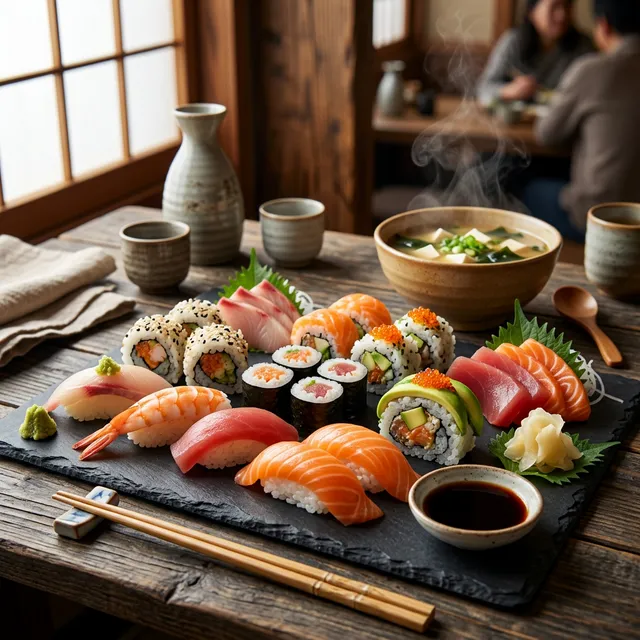
Example Result: Sushi platter food photography using Template #3
Use case: When creating food content for menus, blogs, or social media Best with: Midjourney for artistic food styling Pro tip: Include steam, droplets, or action cues (“dripping honey”) for appetite appeal
#4: Architectural Photography Image Prompts
The Prompt:
Act as an architectural photographer. Generate a prompt for [BUILDING/INTERIOR] in [STYLE] architectural photography.

CONTEXT:
- Subject: [BUILDING TYPE, ARCHITECTURAL STYLE]
- Perspective: [EXTERIOR, INTERIOR, DETAIL, WIDE]
- Time of day: [GOLDEN HOUR, BLUE HOUR, MIDDAY, NIGHT]
- Weather/atmosphere: [CLEAR, FOGGY, RAINY, MYSTERIOUS]
- Camera movement: [TILT-SHIFT, LONG EXPOSURE, HDR]
- Mood: [DRAMATIC, PEACEFUL, GRAND, INTIMATE]

TASK:
Create an architectural photography prompt including:

1. Building description and key features
2. Camera perspective and lens choice
3. Lighting direction and quality
4. Environmental elements
5. Human elements (optional)
6. Technical quality modifiers

OUTPUT FORMAT:
- Detailed prompt with composition notes
- Time of day and lighting guidance
- Camera settings simulation
- Atmospheric modifiers
Use case: When creating architectural visualizations or marketing materials Best with: Midjourney for dramatic architectural renders Pro tip: Include “tilt-shift” or specific lens references for perspective control
#5: Fashion and Lookbook Image Prompts
The Prompt:
Act as a fashion photographer and stylist. Generate a prompt for [CLOTHING/LOOK] in [STYLE] fashion photography.

CONTEXT:
- Garment/look: [DESCRIPTION OF OUTFIT]
- Fashion style: [HIGH FASHION, STREETWEAR, VINTAGE, SPORTSWEAR]
- Model type: [GENDER, AGE, BODY TYPE, DIVERSITY]
- Setting: [STUDIO, STREET, NATURAL, EDITORIAL]
- Era inspiration: [90S, Y2K, TIMELESS, FUTURISTIC]
- Brand aesthetic: [LUXURY, MINIMAL, BOLD, FEMININE]

TASK:
Create a fashion photography prompt including:

1. Garment details and styling
2. Model pose and expression guidance
3. Lighting setup
4. Background and environment
5. Editorial vs. commercial style
6. Post-processing aesthetic

OUTPUT FORMAT:
- Complete fashion prompt
- Styling breakdown
- Lighting and mood notes
- Editorial reference points
Use case: When creating lookbook images, e-commerce fashion, or brand content Best with: Midjourney for high-fashion aesthetic Pro tip: Include fabric textures and specific garment details for accuracy
Best AI Image Generator: Midjourney vs GPT-4o vs Firefly
The AI image generation landscape changed dramatically in 2025. GPT-4o’s native image capabilities launched in March 2025, Midjourney released v7, and Flux 1.1 Pro emerged as a serious contender capable of photorealistic outputs at 2K resolution six times faster than its predecessor. Choosing the right tool now depends less on “which is best overall” and more on what the job requires.
Adobe’s Firefly Image Model 5, released in October 2025, generates photorealistic images at 4MP resolution — pushing commercial-grade AI generation into territory that was impossible even 12 months prior. Meanwhile, researchers at McKinsey’s AI research division note that by mid-2026 the most effective creative teams use two or three specialized tools rather than treating one as a universal solution.
AI Image Generator Comparison: All 6 Tools Ranked
| Tool | Artistic Quality | Text in Images | Ease of Use | Commercial Rights | Starting Cost | Best For |
|---|---|---|---|---|---|---|
| Midjourney v7 | ⭐⭐⭐⭐⭐ | ⭐⭐⭐ | ⭐⭐⭐ | ✅ Pro license | $10/mo | Creative & concept art |
| GPT-4o (ChatGPT) | ⭐⭐⭐⭐ | ⭐⭐⭐⭐⭐ | ⭐⭐⭐⭐⭐ | ✅ Plus license | $20/mo | Quick generation, text-in-image |
| Adobe Firefly | ⭐⭐⭐⭐ | ⭐⭐⭐⭐ | ⭐⭐⭐⭐ | ✅✅ Enterprise-grade | CC sub | Commercial work, brand assets |
| Flux 1.1 Pro | ⭐⭐⭐⭐⭐ | ⭐⭐⭐⭐ | ⭐⭐⭐ | ✅ API license | API pricing | Hyperrealism, API workflows |
| Leonardo AI | ⭐⭐⭐⭐ | ⭐⭐⭐ | ⭐⭐⭐⭐ | ✅ Paid tiers | Free tier | Game assets, concept art |
| Stable Diffusion SDXL | ⭐⭐⭐⭐ | ⭐⭐⭐ | ⭐⭐ | ✅ Open source | Free | Advanced customization, LoRA |
AI Image Tool Profiles: Strengths and Best Use Cases
Midjourney v7 remains the benchmark for artistic quality. The v7 release brought significant improvements in photorealism, anatomy accuracy (fewer distorted hands), and coherent scene composition. Professional concept artists, game designers, and marketing teams consistently rank it first for creative output. The Discord-based interface, while unusual, gives experienced users precise parameter control.
ChatGPT (GPT-4o Image Generation) is worth highlighting because it’s the most misunderstood tool on this list. Since March 2025, GPT-4o generates images natively — not by calling DALL-E as a separate service, but as a core capability of the model itself. The result is exceptional prompt adherence, the ability to maintain context across a multi-turn conversation (“now make the background darker” actually works), and the best text-in-image accuracy of any tool. For teams already using ChatGPT, adding AI image generation requires zero new subscriptions.
Adobe Firefly stands apart on one dimension that matters enormously to businesses: commercial indemnification. Adobe trains Firefly exclusively on licensed stock imagery and has announced legal protection for enterprise customers against copyright claims. The October 2025 Firefly Image Model 5 release added 4MP output and deep integration with Photoshop’s Generative Fill — making it the strongest option for professional design workflows.
Flux 1.1 Pro from Black Forest Labs earned attention in early 2025 by outperforming Midjourney v6 on photorealism benchmarks while running six times faster. Unlike Midjourney, Flux runs via APIs (Replicate, fal.ai, and similar platforms), making it popular with developers building image generation into applications. Natural language prompts — full sentences rather than keyword strings — produce the best results.
Leonardo AI carved out a niche in the game development and concept art communities. Its Canvas editor provides robust inpainting and outpainting, custom model training, and image-to-image transformations. A generous free tier makes it accessible to creators who aren’t ready to commit to monthly subscriptions.
Stable Diffusion SDXL remains the choice for maximum customization. Running locally, it generates without content restrictions, and the LoRA (Low-Rank Adaptation) ecosystem allows fine-tuning on specific visual styles or characters. The tradeoff is technical complexity — SDXL rewards operators who understand CFG scale, sampling methods, and model selection.
Which Tool for Which Use Case?
| Use Case | Recommended Tool | Why |
|---|---|---|
| Social media graphics | Midjourney or GPT-4o | Speed + quality balance |
| E-commerce product shots | Adobe Firefly | Commercial licensing safety |
| Concept art / game assets | Leonardo AI + Midjourney | Style consistency + quality |
| Text-heavy visuals (thumbnails, banners) | GPT-4o | Best text rendering |
| API integration / automation | Flux 1.1 Pro | Speed + API availability |
| Consistent characters in series | Midjourney (—cref) | Character Reference parameter |
| Bulk generation on a budget | Stable Diffusion SDXL | Free, unlimited locally |
AI Image Prompts for Digital Art and Illustration
#6: Vector Art and Flat Design
The Prompt:
Act as a Graphic Designer and Vector Illustrator. Create a prompt for [SUBJECT] in flat vector art style.

CONTEXT:
- Subject: [WHAT TO ILLUSTRATE]
- Style: [FLAT, DUOTONE, GRADIENT, MINIMAL]
- Color palette: [MONOCHROME, VIBRANT, PASTEL, BRAND COLORS]
- Complexity: [MINIMAL, DETAILED, ICON SET]
- Purpose: [UI, WEB, PRINT, LOGO, ILLUSTRATION]
- Vibe: [PLAYFUL, CORPORATE, RETRO, MODERN]

TASK:
Create a vector art prompt including:

1. Subject description with clean shapes
2. Color approach and palette
3. Line weight and style
4. Composition guidelines
5. Scalability considerations
6. Output optimization hints

OUTPUT FORMAT:
- Optimized vector-style prompt
- Color scheme description
- Shape language notes
- Style variation options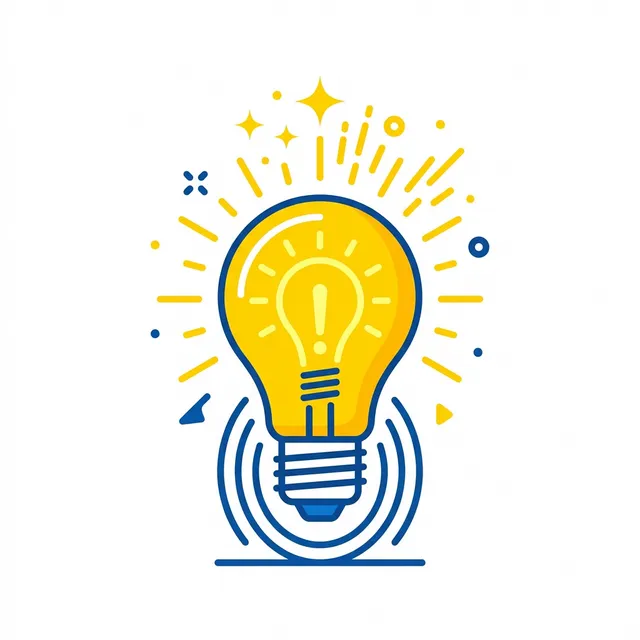
Example Result: Minimalist lightbulb icon using Template #6
Use case: When creating icons, illustrations, or UI graphics Best with: DALL-E 3 for clean vector-style outputs Pro tip: Include “no gradients, no textures, scalable” for cleaner results
#7: Digital Painting Style
The Prompt:
Act as a Concept Artist and Digital Painter. Generate a prompt for [SUBJECT] in [ARTIST/STYLE] digital painting style.

CONTEXT:
- Subject: [CHARACTER, SCENE, OBJECT]
- Art style: [CONCEPT ART, FANTASY PAINTING, SURREALISM, IMPRESSIONISM]
- Artist references: [SPECIFIC ARTISTS OR STUDIOS]
- Era: [CLASSIC, CONTEMPORARY, SPECIFIC DECADE]
- Emotional tone: [MYSTERIOUS, EPIC, INTIMATE, DARK]
- Quality level: [SKETCH, STUDY, FINISHED PAINTING]

TASK:
Create a digital painting prompt including:

1. Detailed subject description
2. Painterly style elements
3. Brushwork and texture hints
4. Color theory approach
5. Lighting and atmosphere
6. Artistic technique references

OUTPUT FORMAT:
- Art style prompt with references
- Technique breakdown
- Color and lighting notes
- Artist influence context
Use case: When creating concept art, book illustrations, or artistic assets Best with: Midjourney for painterly aesthetics Pro tip: Reference specific artists or art movements for consistent style
#8: Watercolor and Traditional Media
The Prompt:
Act as a Watercolor Artist and Traditional Media Specialist. Generate a prompt for [SUBJECT] in watercolor painting style.

CONTEXT:
- Subject: [FLORAL, LANDSCAPE, PORTRAIT, ILLUSTRATION]
- Watercolor characteristics: [BLEED, WASH, GOUACHE-LIKE]
- Paper texture: [COLD PRESS, HOT PRESS, VINTAGE]
- Color intensity: [TRANSPARENT, BOLD, MUTED]
- Style: [BOTANICAL, LOOSE, DETAILED, CHILDREN'S BOOK]
- Background: [WHITE, WASHED, TEXTURED]

TASK:
Create a watercolor art prompt including:

1. Subject rendered in watercolor style
2. Water effects and bleeding guidance
3. Paper texture cues
4. Color transparency and layering
5. Loose vs. controlled brushwork
6. Traditional media authenticity

OUTPUT FORMAT:
- Watercolor-specific prompt
- Texture and technique notes
- Color palette guidance
- Style variation options
Use case: When creating artistic illustrations, botanical art, or children’s book imagery Best with: Midjourney for authentic media effects Pro tip: Include “wet-on-wet” or specific technique references for control
#9: 3D Render Style Digital Art Prompts
The Prompt:
Act as a 3D Artist and Render Specialist. Generate a prompt for [SUBJECT] in [RENDER ENGINE] 3D style.

CONTEXT:
- Subject: [OBJECT, CHARACTER, ARCHITECTURE]
- Render engine: [CINEMA 4D, BLENDER, OCTANE, VRAY]
- Material style: [GLOSSY, MATTE, METALLIC, GLASS]
- Lighting setup: [THREE-POINT, HDRI, CINEMATIC]
- Camera: [WIDE ANGLE, MACRO, PRODUCT SHOT]
- Quality: [STUDIO QUALITY, CARTOONISH, PHOTOREALISTIC]

TASK:
Create a 3D render prompt including:

1. Subject with 3D rendering cues
2. Material and surface descriptions
3. Lighting setup and quality
4. Camera perspective and depth of field
5. Render engine references
6. Post-processing suggestions

OUTPUT FORMAT:
- 3D render prompt with technical terms
- Material breakdown
- Lighting setup description
- Camera and composition notes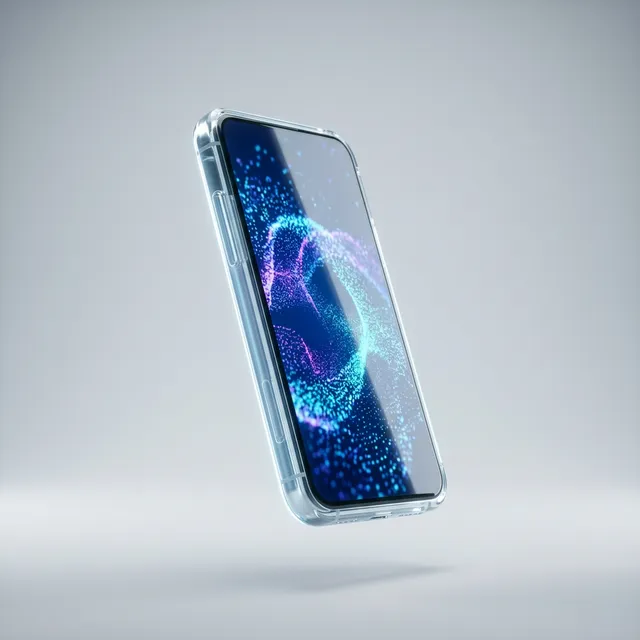
Example Result: Futuristic glass smartphone render using Template #9
Use case: When creating product visualizations, tech marketing, or stylized 3D art Best with: Midjourney’s latest version for realistic 3D renders Pro tip: Include render engine names or “octane render” for specific aesthetics
#10: Cyberpunk and Futurism
The Prompt:
Act as a Cyberpunk Concept Artist. Generate a prompt for [SUBJECT] in cyberpunk/futuristic style.

CONTEXT:
- Subject: [CITYSCAPE, CHARACTER, VEHICLE, INTERIOR]
- Time period: [NEAR FUTURE, DYSTOPIAN, SPACE AGE, RETRO-FUTURE]
- Key elements: [NEON, HOLOGRAPHIC, INDUSTRIAL, CLEAN TECH]
- Mood: [GRITTY, GLAMOROUS, DANGEROUS, UTOPIAN]
- Color scheme: [CYBER PINK/GREEN, MONOCHROME, NEON]
- Tech level: [LOW TECH, HIGH TECH, BIOMECHANICAL]

TASK:
Create a cyberpunk/futuristic prompt including:

1. Futuristic subject description
2. Technology and interface elements
3. Neon/lighting cues
4. Architectural style
5. Social/cultural hints
6. Atmosphere and mood

OUTPUT FORMAT:
- Complete cyberpunk prompt
- Style element breakdown
- Color palette notes
- Reference touchpoints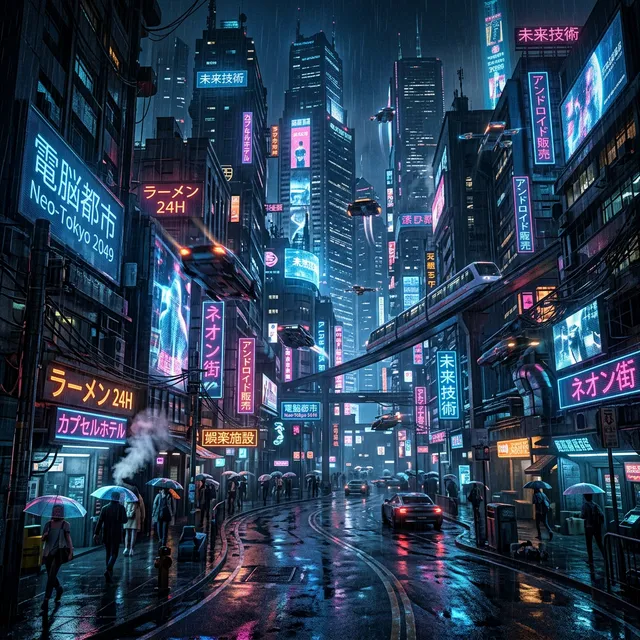
Example Result: Neon-lit cyberpunk city using Template #10
Use case: When creating concept art, game assets, or sci-fi marketing materials Best with: Midjourney for neon-soaked cyberpunk aesthetics Pro tip: Include specific neighborhood types (Chiba Town, The Sprawl) for style coherence
Advanced AI Image Prompt Techniques: Parameters and Control
#11: Multi-Prompt Weighing
The Prompt:
Act as an Image Generation Strategist. Create a multi-prompt structure for [SUBJECT] combining [ELEMENTS].

CONTEXT:
- Primary subject: [MAIN ELEMENT]
- Secondary elements: [ADDITIONAL ELEMENTS]
- Style priority: [WHICH ELEMENT SHOULD DOMINATE]
- Cohesion challenge: [DIFFICULTY IN COMBINING]
- Purpose: [HOW WILL THIS BE USED]

TASK:
Design a weighted multi-prompt strategy including:

1. Prompt weighting structure (::1, ::2, etc.)
2. Element priority hierarchy
3. Balancing conflicting styles
4. Negative prompt strategy
5. Parameter optimization

OUTPUT FORMAT:
- Weighted prompt with :: syntax
- Weight explanation
- Alternative weighting options
- Result prediction
Use case: When combining multiple concepts or styles that might conflict Best with: Midjourney’s multi-prompt syntax Pro tip: Higher weights on subjects, lower on styles for best results
#12: Aspect Ratio and Composition
The Prompt:
Act as a Visual Designer and Composition Specialist. Generate a prompt for [SUBJECT] in [ASPECT RATIO] composition.

CONTEXT:
- Subject: [WHAT TO COMPOSE]
- Aspect ratio: [1:1, 4:3, 16:9, 9:16, 2:3, CUSTOM]
- Composition style: [RULE OF THIRDS, GOLDEN RATIO, CENTERED, DIAGONAL]
- Focal point: [WHERE SHOULD EYES GO]
- Balance: [SYMMETRIC, ASYMMETRIC, DYNAMIC]
- Empty space: [MINIMAL, MODERATE, ABUNDANT]

TASK:
Create a composition-focused prompt including:

1. Subject positioning within frame
2. Leading lines and visual flow
3. Depth layering suggestions
4. Negative space treatment
5. Aspect ratio parameters
6. Framing and cropping notes

OUTPUT FORMAT:
- Complete prompt with composition focus
- Visual flow diagram description
- Aspect ratio parameter (--ar)
- Focal point guidance
Use case: When specific composition is crucial for the intended use Best with: All tools—composition is universal Pro tip: Use “rule of thirds” or “golden ratio” explicitly for guided composition
#13: Stylize and Chaos Control
The Prompt:
Act as an Image Generation Engineer. Create a prompt for [SUBJECT] with controlled stylization.

CONTEXT:
- Subject: [MAIN SUBJECT]
- Style reference: [AESTHETIC OR STRENGTH]
- Chaos level desired: [LOW (PRECISE), MEDIUM (BALANCED), HIGH (CREATIVE)]
- Quality tier: [REGULAR, DETAILED, HIGHLY DETAILED]
- Version constraints: [Midjourney current, DALL-E latest, SDXL]
- Personal style: [YOUR AESTHETIC PREFERENCES]

TASK:
Design a stylization strategy including:

1. Base prompt with subject
2. Stylize parameter (--s)
3. Chaos parameter (--c) if applicable
4. Quality parameter (--q)
5. Version-specific optimization
6. Personal style integration

OUTPUT FORMAT:
- Optimized prompt with all parameters
- Parameter explanation
- Expected output characteristics
- Iteration guidance
Use case: When you need consistent, controllable results across generations Best with: Midjourney’s parameter system Pro tip: Lower stylize values for photorealism, higher for artistic interpretation
Understanding prompt engineering principles helps with all AI generation. Learn more about chain-of-thought prompting techniques that improve results across AI tools.
#14: Object Removal and Replacement
The Prompt:
Act as a Photo Retoucher and Digital Compositor. Create a prompt for [BASE IMAGE] with [MODIFICATION].

CONTEXT:
- Base image concept: [WHAT YOU'RE STARTING WITH]
- Modification needed: [ADD, REMOVE, CHANGE]
- Context: [WHERE/WHEN THIS EXISTS]
- Style preservation: [HOW TO MATCH ORIGINAL]
- Quality requirements: [PROFESSIONAL, SOCIAL, QUICK]
- Tool being used: [DALL-E EDIT, PHOTOSHOP GENERATIVE FILL, MIDJOURNEY]

TASK:
Create a replacement/insertion prompt including:

1. Precise description of what's being added/removed
2. Context preservation cues
3. Lighting match requirements
4. Style consistency guidelines
5. Edges and blending treatment
6. Quality preservation

OUTPUT FORMAT:
- Edit/replace prompt
- Context preservation notes
- Blend mode suggestions
- Quality check points
Use case: When you need to modify existing images rather than generate from scratch Best with: DALL-E 3’s inpainting or Photoshop Generative Fill Pro tip: Be extremely specific about what to change and what to preserve
#15: Outpainting and Unzoom
The Prompt:
Act as a Digital Artist and Image Expander. Create an outpainting prompt for [BASE IMAGE].

CONTEXT:
- Base image: [WHAT YOU'RE EXPANDING]
- Direction of expansion: [LEFT, RIGHT, UP, DOWN, ALL SIDES]
- New content to add: [WHAT SHOULD APPEAR IN EXPANDED AREAS]
- Style matching: [HOW TO MATCH ORIGINAL]
- Continuity requirements: [WHAT MUST BE PRESERVED]
- Aspect ratio goal: [FINAL RATIO]

TASK:
Create an outpainting prompt including:

1. Description of original image for context
2. New scene elements in expanded areas
3. Lighting and atmosphere continuity
4. Edge blending approach
5. Narrative/continuity preservation
6. Technical parameters

OUTPUT FORMAT:
- Complete outpainting prompt
- Scene expansion description
- Continuity checklist
- Edge matching guidance
Use case: When expanding images beyond their original boundaries Best with: DALL-E 3’s outpainting or Midjourney’s pan feature Pro tip: Keep original context in mind—the new elements must feel like they were always there
How to Use Negative Prompts to Fix Bad AI Images
Negative prompts are the single most underused technique in AI image generation. Practitioners who ignore them spend an extra 10–20 generation attempts fighting random artifacts, distorted hands, and that unmistakable uncanny-valley look that marks an image as AI-generated from across the room. Understanding how to exclude unwanted elements is just as important as knowing how to describe what’s wanted.
The core idea is simple: negative prompts are a separate text field (or a --no parameter in Midjourney) that tells the model what to avoid. They act as soft constraints — the AI doesn’t guarantee their absence, but strong negative prompts reduce the frequency of common failure modes by a wide margin.
Stable Diffusion Art’s comprehensive negative prompt research found that a well-crafted negative prompt can reduce anatomical failures by up to 70%, particularly for hands and faces — the two areas where AI image generators struggle most consistently.
Universal Negative Prompt Starter Kit
This set works across Stable Diffusion, Midjourney, and Leonardo AI for general quality improvement:
low quality, worst quality, blurry, out of focus, pixelated, grainy, noisy,
jpeg artifacts, compression artifacts, watermark, signature, text overlay,
overexposed, underexposed, oversaturated, flat colors, dull,
cartoon (if realism is the goal), anime (if realism is the goal)
Anatomy-Specific Negative Prompts for Hands and Faces
Hands are notoriously difficult for all current AI models. A character reaching toward the camera without a strong negative prompt will often return six fingers, fused digits, or hands that appear to be melting. The fix:
For hands:
bad hands, extra fingers, missing fingers, fused fingers, deformed hands,
mutated hands, poorly drawn hands, too many fingers, claw hands, webbed fingers
For faces:
bad face, deformed face, asymmetrical face, distorted facial features,
double face, blurry face, cloned face, uncanny valley, creepy expression
For eyes:
extra eyes, asymmetrical eyes, deformed pupils, blank stare, missing eyes,
unrealistic iris colors, bloodshot eyes, distorted eye shape
For full body anatomy:
bad anatomy, extra limbs, missing limbs, disconnected limbs, wrong proportions,
extra arms, extra legs, long neck, mutated body, disfigured
How Negative Prompts Work in Each Tool
| Tool | Where to Put Negative Prompts | Syntax |
|---|---|---|
| Stable Diffusion | Dedicated negative prompt field | Plain comma-separated list, with optional weighting: (extra fingers:1.4) |
| Midjourney | Inline with prompt | --no keyword1, keyword2 at end of prompt |
| Leonardo AI | Dedicated negative prompt field | Plain comma-separated list |
| GPT-4o | Within the main prompt | ”Do not include…” or “Avoid showing…” in natural language |
| Adobe Firefly | Not directly supported | Describe positive opposites instead |
Before and After: The Impact of Negative Prompts
Here’s what the same prompt produces with and without negative prompts:
Base prompt: A professional portrait of a businesswoman in her 40s, confident expression, office background, photorealistic
Without negative prompts: Often produces slightly distorted skin texture, occasional extra fingers if hands are visible, and sometimes a plastic-looking sheen on skin.
With negative prompts added:
--no bad hands, extra fingers, plastic skin, airbrushed, oversmoothed,
watermark, blurry, low quality, bad lighting, unflattering angle
Result: Noticeably more natural skin texture, correct hand anatomy when visible, and professional-grade lighting quality.
Common Negative Prompt Mistakes
Mistake 1 — Negating what you want: If the prompt asks for “vibrant sunset colors” and the negative prompt includes “orange,” the model gets confused. Never put in the negative field what the positive prompt explicitly requests.
Mistake 2 — Using “no” as a keyword in Stable Diffusion: In SD’s negative prompt field, don’t write “no extra fingers” — just write “extra fingers.” The field already means “exclude this.”
Mistake 3 — Overloading the negative prompt: A 200-word negative prompt dilutes the signal. A focused 40–60 word negative prompt targeting specific, known failure modes of the current generation outperforms kitchen-sink approaches.
Specialized Image Prompts: Logo, Interior Design, and Web
#16: Logo Concept Generator
The Prompt:
Act as a Brand Identity Designer. Generate prompts for [BRAND NAME] logo concepts.

CONTEXT:
- Brand name: [NAME TO DESIGN FOR]
- Industry: [BUSINESS CATEGORY]
- Brand values: [MODERN, TRUSTWORTHY, PLAYFUL, LUXURY]
- Color preferences: [PRIMARY, SECONDARY, ACCENT]
- Style direction: [MINIMAL, ICONIC, TYPOGRAPHY, ABSTRACT]
- Usage context: [DIGITAL, PRINT, LARGE, SMALL]

TASK:
Create multiple logo concept prompts including:

1. Wordmark concept
2. Icon/symbol concept
3. Combination mark concept
4. Abstract/conceptual concept
5. Style variation for each

OUTPUT FORMAT:
- 4-6 distinct concept prompts
- Style breakdown per concept
- Color guidance
- Scalability considerations
Use case: When developing brand identity concepts or exploring logo directions Best with: DALL-E 3 for clean, concept-focused results Pro tip: Generate multiple variations and combine the best elements in design software
#17: Website Hero Background
The Prompt:
Act as a Web Designer and UI Visualizer. Generate a prompt for a website hero background featuring [THEME].

CONTEXT:
- Theme/concept: [WHAT THE SITE IS ABOUT]
- Brand colors: [PRIMARY, SECONDARY]
- Vibe: [PROFESSIONAL, CREATIVE, MINIMAL, BOLD]
- Hero element: [OVERLAY, SPLIT SCREEN, FULL BACKGROUND]
- Text legibility: [HIGH, MEDIUM, MINIMAL TEXT OVERLAY]
- Tech stack: [DARK MODE, LIGHT MODE, ADAPTIVE]

TASK:
Create a website hero background prompt including:

1. Background visual description
2. Overlay requirements for text
3. Color scheme integration
4. Mood and atmosphere
5. Resolution and quality requirements
6. Browser-safe considerations

OUTPUT FORMAT:
- Hero background prompt
- Color and mood notes
- Overlay compatibility guidance
- Technical specs
Use case: When creating website hero sections or large visual backgrounds Best with: Midjourney for high-resolution, atmospheric results Pro tip: Request “subtle texture” or “gradient” to help with text overlay
#18: Sticker Sheet Generator
The Prompt:
Act as a Sticker Designer and Illustration Specialist. Generate prompts for a [THEME] sticker sheet.

CONTEXT:
- Theme: [WHAT STICKERS ABOUT]
- Number of stickers: [X ITEMS]
- Style: [CUTE, MINIMAL, DETAILED, ILLUSTRATED]
- Shape variety: [ROUND, SQUIRCLES, DIE-CUT, IRREGULAR]
- Color palette: [BRAND OR THEME-BASED]
- Use case: [BRAND MERCH, SOCIAL, PACKAGING]

TASK:
Create sticker sheet prompts including:

1. Individual sticker descriptions
2. Consistent art style across all
3. Outline and backing requirements
4. Size and shape variety
5. Color and line weight consistency
6. White border requirements

OUTPUT FORMAT:
- Complete sticker sheet prompt
- Individual item breakdown
- Style guide for consistency
- Production notes
Use case: When creating branded stickers, social media assets, or merch designs Best with: Midjourney for illustrated, colorful results Pro tip: Request “die-cut edge” or “white border” explicitly for production readiness
#19: Isometric and 3D Illustration
The Prompt:
Act as an Isometric Illustrator and 3D Designer. Generate a prompt for [SUBJECT] in isometric view.

CONTEXT:
- Subject: [OBJECT, SCENE, BUILDING]
- Isometric angle: [30 DEGREES, TRUE ISOMETRIC]
- Style: [FLAT ISOMETRIC, 3D WITH SHADING, DETAILED]
- Color approach: [GRADIENT, SOLID, duotone]
- Complexity: [SINGLE OBJECT, SCENE, COMPLEX COMPOSITION]
- Background: [TRANSPARENT, COLOR, PATTERN]

TASK:
Create an isometric illustration prompt including:

1. Subject described in isometric terms
2. Angle and projection clarity
3. Color and shading approach
4. Detail level guidance
5. Shadow and depth treatment
6. Export considerations

OUTPUT FORMAT:
- Isometric-specific prompt
- Angle and projection notes
- Color/shading breakdown
- Technical guidance
Use case: When creating icons, explainer graphics, or game assets in isometric view Best with: Midjourney for artistic isometric, Blender for precise Pro tip: Include “orthographic projection” or “isometric projection” for accuracy
#20: Interior Design Visualization
The Prompt:
Act as an Interior Designer and Architectural Visualizer. Generate a prompt for [ROOM TYPE] interior design.

CONTEXT:
- Room type: [LIVING ROOM, BEDROOM, OFFICE, RESTAURANT]
- Design style: [SCANDINAVIAN, INDUSTRIAL, BOHO, MINIMAL]
- Key furniture: [LIST OR DESCRIBE]
- Color palette: [PRIMARY, SECONDARY, ACCENT]
- Lighting: [NATURAL, WARM, COOL, DRAMATIC]
- Mood: [COZY, AIRY, SOPHISTICATED, ECLECTIC]

TASK:
Create an interior design visualization prompt including:

1. Room layout and key elements
2. Furniture descriptions and placement
3. Color scheme application
4. Lighting setup and atmosphere
5. Textures and materials
6. Decorative accents

OUTPUT FORMAT:
- Complete interior visualization prompt
- Style element breakdown
- Color palette guidance
- Lighting notes
Use case: When visualizing design concepts for clients or mood boards Best with: Midjourney for atmospheric interior renders Pro tip: Include specific furniture styles and layout cues for accuracy
How to Use AI Image Prompts for Consistent Characters
One of the most frustrating experiences in AI image generation is generating a character for a brand, a story, or a social media series — only to find that every subsequent image produces a completely different-looking person. The AI has no memory between generations. Each new prompt starts fresh.
That said, practitioners have developed several reliable methods for maintaining visual consistency across a series. The right solution depends on which tool is being used and how much control is needed.
Method 1: Detailed Appearance Anchors (All Tools)
The simplest approach is a detailed character description used verbatim in every prompt. The more specific the anchor, the more consistent the output:
[Subject anchor]: 28-year-old South Korean woman, shoulder-length black hair with blunt cut,
brown eyes with double eyelids, light complexion, small nose, curved lips,
slender build, approximately 5'6" tall
This anchor gets copy-pasted at the start of every prompt. Combined with consistent quality tags and lighting instructions, it produces 60–70% visual similarity across generations — enough for many use cases.
Method 2: Seed Locking for Character Consistency
A seed is a numerical value that determines the starting random noise used to generate an image. When the same seed, same model, and same prompt are used together, the result is near-identical. To find the seed for a good image:
- Stable Diffusion: The seed is displayed in the image metadata or generation info panel
- Midjourney: Use
--sameseed [number]or click the seed button in the image details
With the seed locked, practitioners can change elements like pose or background while keeping the character’s appearance stable. It’s not perfect — significant prompt changes will still cause drift — but it’s the most reliable free-form consistency method available.
Method 3: Midjourney Character Reference (—cref)
This is the strongest consistency solution currently available. The --cref parameter accepts an image URL and uses that image as a reference for character appearance across new generations:
/imagine [new scene description] --cref [URL of character image] --cw 100The --cw (character weight) parameter controls how strictly the reference is followed, from 0 (loose interpretation) to 100 (strict adherence). At --cw 75–100, the generated character reliably shares the facial structure, hair, and general appearance of the reference — even when placed in completely different scenes, outfits, or lighting conditions.
Method 4: LoRA Fine-Tuning (Advanced — Stable Diffusion)
For teams building a branded mascot or a recurring character for a content series, training a LoRA (Low-Rank Adaptation) produces the most precise consistency. A LoRA is a lightweight model fine-tuned on 15–30 reference images of the character. Once trained, it’s applied to any generation with a trigger word:
[character name], portrait photography, office background [standard quality tags]The character appears with close-to-photographic consistency. This approach requires either technical setup for local Stable Diffusion or using a platform like Leonardo AI that supports custom LoRA uploads. It’s the professional-grade solution for serious character work.
Character Consistency Quick Reference
| Need | Method | Effort | Consistency Level |
|---|---|---|---|
| Quick series, any tool | Appearance anchor string | Low | 60-70% |
| Same lighting/angle series | Seed locking | Low-Medium | 75-85% |
| Midjourney series | —cref parameter | Medium | 85-95% |
| Professional branded character | LoRA training | High | 95-99% |
All 35 AI Image Generation Prompts at a Glance
| # | Prompt | Use Case | Best With |
|---|---|---|---|
| 1 | Portrait Photography | Professional portraits | Midjourney |
| 2 | Product Photography | E-commerce and commercial | Midjourney / Firefly |
| 3 | Food Photography | Menu and food content | Midjourney |
| 4 | Architectural Photography | Building visualizations | Midjourney |
| 5 | Fashion/Lookbook | Fashion marketing | Midjourney |
| 6 | Vector Art and Flat Design | UI and illustrations | GPT-4o |
| 7 | Digital Painting Style | Concept art and illustration | Midjourney |
| 8 | Watercolor and Traditional Media | Artistic illustrations | Midjourney |
| 9 | 3D Render Style | Product and tech visuals | Midjourney v7 |
| 10 | Cyberpunk and Futurism | Sci-fi concept art | Midjourney |
| 11 | Multi-Prompt Weighing | Combining concepts | Midjourney |
| 12 | Aspect Ratio and Composition | Specific layouts | All tools |
| 13 | Stylize and Chaos Control | Consistent results | Midjourney |
| 14 | Object Removal/Replacement | Editing existing images | GPT-4o / Firefly |
| 15 | Outpainting and Unzoom | Expanding images | GPT-4o |
| 16 | Logo Concept Generator | Brand identity concepts | GPT-4o |
| 17 | Website Hero Background | Web design visuals | Midjourney |
| 18 | Sticker Sheet Generator | Branded stickers | Midjourney |
| 19 | Isometric Illustration | 3D icons and assets | Midjourney |
| 20 | Interior Design Visualization | Room concepts | Midjourney |
10 AI Image Prompts for Social Media Content Creators
Social media has become the single largest driver of AI image generation demand. Content creators on Instagram, Pinterest, YouTube, and TikTok collectively generate millions of AI images per week — for backgrounds, thumbnails, pins, profile aesthetics, and viral visual trends. The challenge isn’t generating images; it’s generating images that look intentional and match platform-specific format requirements.
The following 10 prompts are built for specific platforms. Each includes the correct aspect ratio, the visual style most likely to perform well, and fill-in-the-blank placeholders.
#21: Instagram Lifestyle Square Post (1:1)
Lifestyle flat lay photograph: [PRODUCT OR SUBJECT] arranged on [SURFACE MATERIAL
 — marble, linen, wood, concrete], surrounded by [COMPLEMENTARY PROPS],
[AESTHETIC — minimalist, maximalist, cottagecore, dark academia],
soft natural side lighting, overhead shot, pastel color palette,
high-end editorial photography style, 8K, --ar 1:1
Platform: Instagram feed | Best with: Midjourney | Pro tip: Keep the color palette to 2–3 tones for a cohesive feed
#22: Pinterest Vertical Pin (2:3)
[INSPIRATIONAL SCENE — cozy reading nook, serene morning routine, beautiful workspace],
photorealistic, warm and inviting atmosphere, [SEASON OR TIME OF DAY],
text space at top 20% of image with empty light background,
crisp natural light, soft focus background, visually aspirational,
Pinterest-style lifestyle photography, --ar 2:3
Platform: Pinterest | Best with: Midjourney | Pro tip: The empty text space at top lets you overlay pin titles using Canva after generation
#23: YouTube Thumbnail (16:9 with Drama)
Ultra-dramatic close-up of [SUBJECT — person, product, concept object],
exaggerated expression or reaction, bold [PRIMARY COLOR] background,
high contrast, cinematic lighting, 3D pop-out effect,
visually striking enough to read at 120px thumbnail size,
photorealistic, shallow depth of field, --ar 16:9 --s 750
Platform: YouTube | Best with: Midjourney | Pro tip: Leave the left third of the frame empty for text overlay in post-production
#24: Viral Pixar-Style 3D Character Post
Pixar-style 3D animated character, [CHARACTER DESCRIPTION],
big expressive eyes, soft rounded features, warm studio lighting,
pastel color palette, detailed textures, cheerful expression,
animation movie poster quality, trending social media aesthetic,
rendercam, cinematic 3D render, --ar 1:1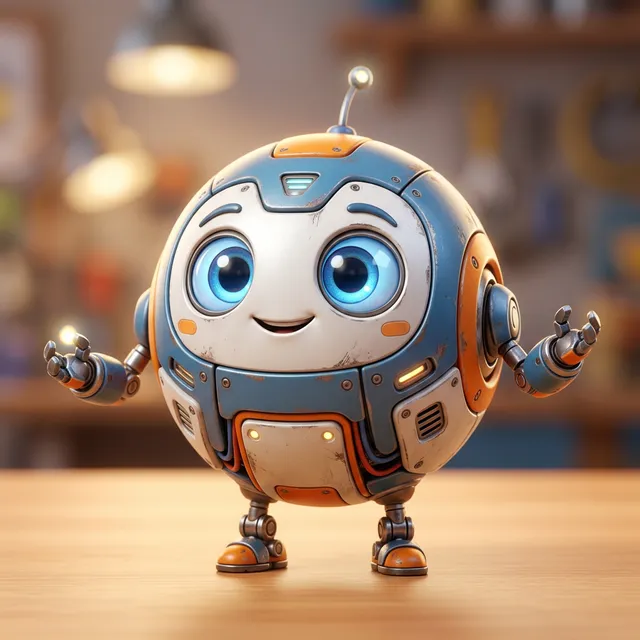
Example Result: Cute 3D robot using Template #24
Best with: Midjourney | Pro tip: Add --stylize 200 for a stronger Pixar-genre aesthetic
#25: Studio Ghibli Fantasy Landscape
Studio Ghibli-inspired fantasy landscape: [SCENE — rolling hills with wildflowers,
floating island above clouds, ancient forest with glowing spirits],
watercolor and gouache texture, hand-painted quality, warm and dreamlike,
soft light rays, rich color palette with [DOMINANT COLORS],
anime illustration style, cinematic composition, --ar 16:9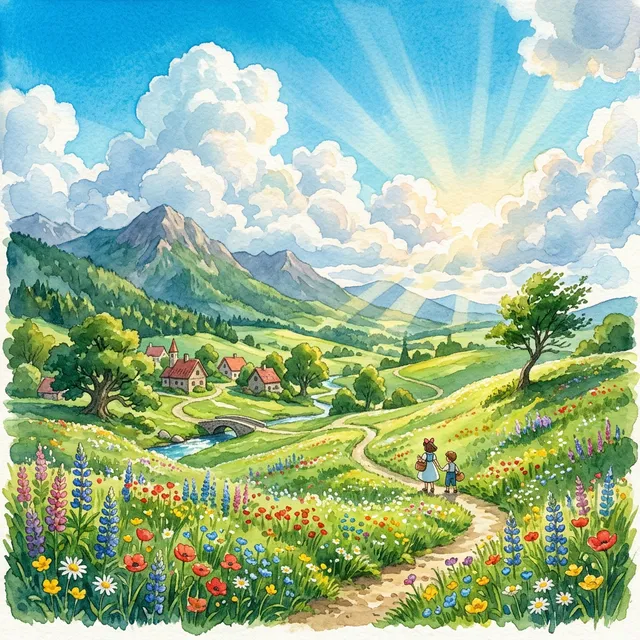
Example Result: Peaceful Ghibli-style hills using Template #25
Best with: Midjourney | Pro tip: Works exceptionally for travel content, mindfulness niches, and fantasy storytelling accounts
#26: LinkedIn Professional Background Banner (4:1)
Professional abstract background for corporate use: [INDUSTRY THEME
 — technology, finance, healthcare, creative],
geometric gradient design, [BRAND COLORS] color palette,
minimalist and clean, subtle texture, premium corporate aesthetic,
no text, scalable background design,
vector art style, professional standards --ar 4:1
Platform: LinkedIn banner | Best with: GPT-4o or Adobe Firefly | Pro tip: Firefly’s commercial licensing makes it safer for business profiles
#27: Dark Academia Aesthetic Post
Dark academia aesthetic scene: [SUBJECT — vintage books stacked with autumn leaves,
quill pen on aged parchment, candlelit library at dusk],
moody chiaroscuro lighting, rich browns and deep burgundy color palette,
film grain texture, nostalgic and intellectual atmosphere,
editorial photography style, cinematic composition, --ar 4:5
Best with: Midjourney | Pro tip: Add --c 15 (chaos parameter) for more organic, painterly variation
#28: Minimalist Brand Identity Post
Minimalist brand aesthetic: [PRODUCT OR CONCEPT] on [CLEAN SURFACE],
bold geometric composition, [SINGLE ACCENT COLOR] against white or cream background,
shadow play, contemporary graphic design aesthetic,
commercial photography quality, sharp focus, modern luxury feel,
studio lighting, --ar 1:1 --s 50
Best with: Adobe Firefly or Midjourney | Pro tip: Low stylize value (--s 50) keeps output cleaner and more commercially usable
#29: TikTok/Reels Vertical Background (9:16)
[TRENDING AESTHETIC — dreamcore, cottagecore, dark fantasy, retro Y2K],
vertical format background scene, visually engaging with strong focal point,
[COLOR PALETTE], cinematic quality, deep depth of field,
no text, no humans in background, suitable for green-screen overlay,
photorealistic, 4K, --ar 9:16
Platform: TikTok / Instagram Reels | Best with: Midjourney | Pro tip: Generates backgrounds creators can stand in front of using a green screen setup
#30: Watercolor Botanical Illustration
Detailed watercolor botanical illustration: [PLANT — fiddle leaf fig, eucalyptus,
peonies, lavender, monstera], traditional watercolor technique,
delicate brushwork, paper texture visible, soft color bleeding at edges,
muted natural tones with [ACCENT COLOR] highlight,
botanical art print quality, white background, --ar 3:4
Best with: Midjourney | Pro tip: Performs exceptionally on Pinterest and works well for Etsy digital product preview images
AI Image Generation Prompts for E-Commerce and Business
E-commerce is where AI image generation delivers the clearest financial ROI. Product images directly influence purchase decisions, and the practical gap between a professional product shot and a well-executed AI-generated image has narrowed significantly since mid-2024. Practitioners consistently report 30–50% reductions in visual asset production costs when using AI for mockups, lifestyle context images, and variation testing.
Research from McKinsey’s analysis of generative AI’s economic potential identifies e-commerce imaging as one of the highest-value applications of generative AI, particularly for reducing per-SKU photography costs at scale.
The key insight from practitioners who’ve made this work commercially: AI excels at generating context around a product, not replacing the product itself. The most effective e-commerce workflow combines a real product photo with an AI-generated background or environment — using inpainting in Adobe Firefly or Photoshop’s Generative Fill feature.
#31: E-Commerce Hero Product Shot (White Background)
Act as a commercial product photographer. Generate a prompt for [PRODUCT] on pure white.

CONTEXT:
- Product: [DETAILED DESCRIPTION — material, color, dimensions, finish]
- Brand tone: [LUXURY, MINIMAL, PLAYFUL, NATURAL]
- View: [FRONT, 3/4 ANGLE, TOP-DOWN, CLOSE-UP DETAIL]

OUTPUT:
Product centered in frame, pure white (#FFFFFF) background, soft diffused studio lighting,
no harsh shadows, slight reflection on surface below, commercial e-commerce quality,
photorealistic, 4K, sharp focus throughout, --ar 1:1
Best with: Adobe Firefly (commercial indemnification) or GPT-4o | Note: Firefly is the safest choice for images going directly into product listings
#32: Lifestyle Product Shot (In-Context)
[PRODUCT — describe precisely] placed in [LIFESTYLE SETTING — modern kitchen countertop,
cozy bedroom windowsill, outdoor café table, modern office desk],
[TARGET DEMOGRAPHIC CONTEXT — for morning routine, for home office professional],
natural lifestyle lighting, warm and aspirational atmosphere,
photorealistic, editorial quality, shallow depth of field,
product in sharp focus, background softly bokeh, 8K --ar 4:5
Best with: Midjourney | Pro tip: Lifestyle context converts better than white-background shots on Instagram and Pinterest product pins
#33: Brand Mood Board / Color Palette Visual
Brand mood board: [BRAND NAME OR NICHE] aesthetic flatlay,
color palette: [3 HEX CODES OR COLOR NAMES],
collection of brand-relevant items, textures, and materials arranged artfully,
overhead shot, consistent lighting, cohesive visual identity,
professional brand photography, editorial quality --ar 1:1
Best with: Midjourney | Use case: Proposing brand aesthetics to clients, planning a social media feed grid
#34: Professional Corporate Headshot
Corporate professional headshot, [DESCRIPTION] person in their [30s/40s],
[HAIR DESCRIPTION], business professional attire,
confident and approachable expression, neutral gradient background (light gray or cream),
soft studio portrait lighting, slightly off-center composition,
shot on 85mm f/2.0, photorealistic, professional headshot quality, --ar 3:4
Best with: Adobe Firefly or GPT-4o | Note: GPT-4o demonstrates notably strong face realism for professional headshot-style prompts
#35: Real Estate Virtual Staging
[ROOM TYPE — empty living room, unfurnished bedroom, open-plan kitchen] virtually staged
with [DESIGN STYLE — Scandinavian, Industrial, Mid-Century Modern, Luxury Contemporary] furniture,
natural light from [DIRECTION] windows, neutral color palette,
professional real estate photography angle, wide 24mm shot,
all furniture proportional and photorealistic, architectural photography quality --ar 16:9
Best with: Midjourney or Flux 1.1 Pro | Pro tip: Upload the actual empty room photo as a --sref style reference for better room geometry accuracy
Commercial Licensing Rights by AI Image Tool
| Tool | Commercial Use Allowed? | Copyright Indemnification? | Notes |
|---|---|---|---|
| Midjourney (Pro/Mega plan) | ✅ Yes | ❌ No | Check current terms; Basic plan restricts commercial use |
| Adobe Firefly (paid plan) | ✅ Yes | ✅ Yes | Enterprise-grade legal protection; trained on licensed data |
| GPT-4o (Plus+) | ✅ Yes | ❌ No | User owns outputs under OpenAI’s current Terms of Service |
| Flux 1.1 Pro (API) | ✅ Yes | ❌ No | License terms depend on the API platform used |
| Stable Diffusion (SDXL) | ✅ Yes | ❌ No | Open source; user assumes copyright responsibility |
For any business producing images for client deliverables, paid advertising, or retail product pages: review the current Terms of Service for each platform before publishing. Adobe Firefly remains the safest commercial choice as of 2026.
AI Image Prompt Syntax Guide: Parameters for Every Tool
Every AI image tool speaks a slightly different language. Understanding the syntax for the tool being used saves dozens of failed generation attempts. Practitioners who switch between tools without adapting their prompt structure consistently report worse results than those who take 10 minutes to adjust to the target platform’s conventions.
Midjourney’s official parameter documentation is the most comprehensive reference for MJ-specific syntax, updated with each version release.
Midjourney v7 Prompt Parameters and Syntax
[main prompt description], [style modifiers], [lighting], [quality terms]
--ar 16:9         (aspect ratio: width:height)
--v 7             (model version)
--s 250           (stylize: 0=raw/photographic, 1000=max stylized; default 100)
--c 10            (chaos: 0=predictable, 100=wildly variable)
--q 2             (quality: 0.25 / 0.5 / 1 / 2; higher = more detail, slower render)
--no element1, element2    (negative prompts — what to exclude)
--cref [URL] --cw 75       (character reference + weight 0-100)
--sref [URL]               (style reference from an image URL)
Full prompt example:
Portrait of a young architect, thoughtful expression, modern open-plan office background,
candid professional photography, soft natural window light, muted warm color palette
--ar 3:4 --v 7 --s 150 --q 2 --no text, watermark, blurry, cartoonish
GPT-4o Image Generation Syntax
No special parameters. GPT-4o uses natural language and multi-turn conversation:
Generate an image of [description]. Make it [style]. The lighting should be [lighting].
Aspect ratio: [16:9 / 4:5 / square]. [State exclusions naturally: "Don't include any text."]
After the first image, type “Now make the background darker” or “Change the jacket to navy blue” — it edits the existing image rather than starting fresh. No other mainstream tool handles iterative editing this naturally.
Stable Diffusion SDXL Syntax
Positive prompt: [subject], [style], [lighting], (high quality:1.2), (detailed:1.1)
Negative prompt: (bad quality:1.4), (bad anatomy:1.3), extra fingers, blurry, watermark
CFG Scale: 7–9 (lower = faithful to prompt; higher = more AI creative interpretation)
Sampling method: DPM++ 2M Karras or Euler a
Steps: 25–40
Weighted keywords use parentheses: (dramatic lighting:1.3) increases emphasis; [dramatic lighting:0.8] reduces it.
Flux 1.1 Pro Prompt Syntax and Best Practices
Flux works best with full-sentence, story-driven prompts:
A [character description] is [doing action] in [detailed setting].
The lighting is [describe]. The mood feels [describe].
Style: [photorealistic / cinematic / illustration]. Aspect ratio: [ratio].
Full example:
A young chef with flour-dusted hands carefully arranges pastries on a marble counter
in a sunlit Paris bakery. Morning light filters through tall windows, catching dust
in the air. Warm golden tones, photorealistic, cinematic, 16:9.
Parameter Guide by Creative Goal
| Goal | Midjourney | Stable Diffusion | Flux Approach |
|---|---|---|---|
| Maximum photorealism | --s 50 --q 2 | CFG 7, DPM++ | Full narrative sentences |
| Maximum artistic quality | --s 750 --c 15 | CFG 9–11, Euler | Style-first descriptions |
| Predictable, consistent results | --s 100 --c 0 | CFG 7, fixed seed | Same sentence template |
| High variation / exploration | --c 50 --s 500 | CFG 12+, more steps | Add “unexpected, surreal” |
4 Mistakes That Ruin AI Image Prompts (And How to Fix Them)
I’ve generated thousands of failed images. Here are the most common mistakes:
Mistake #1: Too Many Conflicting Elements
What it looks like:
"A beautiful woman wearing a red dress standing in a field of lavender under a starry sky with a golden retriever puppy playing in the foreground while mountains loom in the distance during sunset with a small cottage and a river"The fix:
Break into separate images. Or pick ONE focal point and make it the priority with weighted prompts.Why it fails: Too many elements dilute focus. AI does best with clear, singular subjects.
Mistake #2: Ignoring Aspect Ratio
What it looks like:
[Using square prompts for banner images]The fix:
Always specify --ar for your intended use case. 16:9 for video thumbnails, 9:16 for social, 1:1 for Instagram.Why it fails: Wrong aspect ratios require cropping, which ruins composition.
Mistake #3: Forgetting Negative Prompts
What it looks like:
[Getting extra hands, distorted faces, or unwanted text in every generation]The fix:
Use negative prompts: --no extra limbs, text, watermark, distorted, low qualityWhy it fails: AI struggles with certain elements. Negative prompts prevent common failures.
Mistake #4: Inconsistent Characters
What it looks like:
[Character looks different in each image of a series]The fix:
Use consistent seed, reference images, and detailed appearance descriptions including ethnicity, hair style, and distinctive features.Why it fails: AI doesn’t inherently maintain character consistency. You must prompt for it.
The bottom line: AI image generation is a dialogue, not a command. Iterate, refine, and treat each generation as a starting point.
For creators looking to build a comprehensive toolkit, the roundup of the best vibe coding tools covers essential creative applications for modern workflows.
Frequently Asked Questions: AI Image Prompts and Tools
Q: Which AI image tool is best in 2026?
There’s no single answer, and that’s by design. Midjourney v7 produces the best artistic quality and atmosphere. GPT-4o (ChatGPT) handles natural-language prompts and text-in-image better than any competitor. Adobe Firefly is the safest choice for commercial use, with enterprise-grade copyright indemnification. Flux 1.1 Pro delivers hyperrealistic outputs at API speeds. Most professional creators use two or three tools depending on the job — Midjourney for hero creative assets, GPT-4o for quick iterations and text-heavy designs, and Firefly for anything going into paid advertising.
Q: Can I use AI-generated images commercially?
Generally yes, but the rules differ significantly by platform. Midjourney Pro and Mega plans allow commercial use; the Basic plan does not. GPT-4o-generated images are owned by the user under OpenAI’s Terms of Service. Adobe Firefly provides the strongest commercial protection — the company has announced legal indemnification for enterprise customers against copyright claims. Stable Diffusion images are open source, but the commercial risk rests with the user. Always review current Terms of Service, as these policies update frequently.
Q: How do I get consistent character faces?
Four methods work with increasing reliability: (1) Use a detailed appearance anchor string in every prompt — hair color, eye color, face shape, age, ethnicity. (2) Lock the seed in Stable Diffusion or Midjourney to reproduce identical generation starting conditions. (3) Use Midjourney’s --cref (Character Reference) parameter with an image URL — this is the most reliable method without fine-tuning. (4) Train a LoRA model on 15–30 reference images for near-photographic character consistency across any scene.
Q: Why does text in AI images look wrong or gibberish?
All AI image generators were trained primarily on images, not on the relationship between language and visual typography. The result is that text in images often produces convincing-looking but meaningless letter shapes. GPT-4o handles text significantly better than other tools as of 2025. For Midjourney and Stable Diffusion, the practical solution is to generate the image without text and add clean typography in Canva, Photoshop, or Figma afterward. Keep AI-generated text to 1–3 words maximum for the best chance of legibility.
Q: What are negative prompts and do they actually help?
Negative prompts tell the AI what to exclude from the image. They matter significantly — especially for avoiding bad anatomy (extra fingers, distorted hands) and quality failures (blurry, plastic-looking skin, watermarks). For Stable Diffusion, they go in a dedicated negative prompt field. For Midjourney, use --no keyword1, keyword2 at the end of the prompt. A focused negative prompt of 40–60 words targeting specific known failure modes outperforms a generic 200-word kitchen-sink list.
Q: How do I get realistic skin and human anatomy?
For photorealistic humans, the best approach is: (1) Use Midjourney v7 or Flux 1.1 Pro — both show dramatically improved anatomy over older models. (2) Add a strong anatomy-focused negative prompt (bad hands, extra fingers, deformed face, bad anatomy). (3) Specify lens and camera settings: “shot on Canon EOS R5, 85mm f/1.8” signals photorealistic intent. (4) Include skin-quality modifiers: “natural skin texture, visible pores, subsurface scattering” for Stable Diffusion. GPT-4o handles realistic faces well, particularly for professional headshot-style images.
Q: What’s the best aspect ratio to use?
Aspect ratio should match the final use case. Common standards: 1:1 for Instagram feed posts; 9:16 for TikTok, Reels, and Pinterest mobile; 16:9 for YouTube thumbnails and desktop backgrounds; 4:5 for Instagram portrait posts that display largest in feed; 3:4 for print and standard vertical formats; 2:3 for Pinterest pins and cover images. In Midjourney, set this with --ar 16:9. Generating in the wrong aspect ratio and then cropping ruins the composition that was designed into the original prompt.
Q: Can I use Flux AI for free?
Flux models are available through several platforms, some with free tiers. Replicate.com provides API access to Flux 1.1 Pro with usage-based pricing. Some Stable Diffusion-based interfaces have integrated Flux as a model option. Free access typically comes with generation limits or queuing. Flux is not available as a standalone consumer app like Midjourney — it’s primarily accessed via API or integrated into third-party platforms. For unlimited free image generation, locally-run Stable Diffusion SDXL remains the best option.
Q: Best AI image generator for e-commerce photos?
Adobe Firefly for anything going into paid advertising or retail product pages — the commercial indemnification removes legal uncertainty. For lifestyle and context shots (showing the product in a room, on a table, being used), Midjourney v7 produces the most visually compelling results. The most effective e-commerce workflow practitioners have developed is combining a real product photo with AI-generated background scenes using inpainting in Firefly or via Photoshop’s Generative Fill — rather than generating the product itself from scratch.
Q: How long should an AI image prompt be?
The right length depends on the tool. For GPT-4o: 2–4 sentences in natural language works well; the model’s language understanding fills in details. For Midjourney: 30–80 words is the sweet spot — specific enough to guide the output but not so long that elements conflict. For Stable Diffusion: keyword density matters more than sentence structure; 50–100 weighted keywords across positive and negative prompts is typical. For Flux: full descriptive sentences (2–4) with a clear narrative structure produce the best results. Too short loses specificity; too long creates conflicting signals.
Start Generating: Your AI Image Prompt Action Plan
30+ prompts covered across six categories:
- Photography prompts (#1–5) for professional-quality imagery
- Digital art prompts (#6–10) for artistic and illustrative work
- Advanced techniques (#11–15) for fine-grained control
- Specialized styles (#16–20) for niche visual formats
- Social media prompts (#21–30) for platform-native content
- E-commerce prompts (#31–35) for commercial-grade product visuals
The evidence from practitioners who’ve integrated AI image generation into professional workflows consistently points to the same conclusion: the bottleneck isn’t the tool — it’s the prompt. Teams that invest time learning prompt structure, negative prompts, and tool-specific syntax outperform those chasing the newest model by a significant margin.
That said, the tools matter more than they did two years ago. GPT-4o’s native image generation, Midjourney v7’s photorealism improvements, and Adobe Firefly’s commercial indemnification have each opened categories of use cases that weren’t practically viable before 2025. The right answer depends on the use case, the budget, and the legal context of where the images will appear.
The right approach for most creators: pick one tool and spend two weeks generating 50+ images before evaluating others. The pattern recognition that comes from iteration — understanding why a prompt worked, why another failed, what the tool consistently misinterprets — compounds faster than any other form of learning. According to Harvard Business Review’s 2025 analysis of generative AI in creative workflows, the practitioners who see the best outputs are those who treat AI image generation as a craft requiring deliberate practice, not a search problem requiring a better query.
For staying updated on model releases and capability changes across Midjourney, Firefly, GPT-4o, and Flux, TechCrunch’s AI coverage provides reliable and timely reporting on new releases and major version updates.
The landscape will keep shifting — new models, new parameters, new platforms. The fundamentals won’t. Clarity of vision, specificity of description, and systematic iteration will keep producing great images regardless of which tool runs underneath.
Building a broader creative AI toolkit? Explore the essential AI skills worth learning to stay ahead as this space evolves.
Ready to go deeper? Set up your full creative workflow with our vibe coding starter kit — tools, templates, and systems for building with AI.